

Managing projects can be tough, especially when your current tools aren't cutting it. As a product manager, you face constant pressure to keep everything on track, and although it can be a great tool for specific use-cases, sometimes Asana just doesn't fit your needs.
Maybe you're dealing with complex projects, or you need better customization or collaboration features. Whatever the case, finding the right tool can make all the difference for your team.
I've tested and reviewed various options, and I'm here to share unbiased insights on the best Asana alternatives. You'll find practical solutions tailored to your unique challenges. Here are my top software recommendations.
What Is Asana?
Asana is a product management core tool designed to help teams organize, track, and manage their work. It's commonly used by project managers, team leaders, and product development professionals who need to keep projects on schedule and ensure collaboration. Task assignment, deadline tracking, and project visualization features like Calendars and Kanban boards help with managing workflows and improving team efficiency. Overall, Asana simplifies project management by providing a clear view of tasks and progress.
Why Trust Our Software Recommendations
6,700+
Reviews
20
Industry experts
16+
Evaluation factors
14
Years
Our team has been testing and reviewing software since 2012. As product managers ourselves, we know how difficult—and important—it is to choose the right software.
For this guide, we evaluated tools using hands-on testing and independent research, scoring tools using our selection criteria.
Our reviews reflect our human editorial judgment, not a sales pitch.
Expert reviewers:
- Andrew LumbySenior TPM
- Cristiano ValimSenior UI/UX Lead


Comparison Table: Asana Alternatives
This comparison table summarizes pricing details for my top Asana alternative selections.
| Tool | Best For | Trial Info | Price | ||
|---|---|---|---|---|---|
| 1 | Best for built-in time tracking | Free plan + 15-day trial + demo available | From $4/user/month (billed annually) | Website | |
| 2 | Best for customizable project workflows | Free plan + 14-day trial + demo available | From $10/user/month (billed annually) | Website | |
| 3 | Best for dev-team project tracking | Free plan + free trial available | From $7.91/user/month | Website | |
| 4 | Best for AI-assisted cross-team work tracking | Free plan + 14-day free trial + free demo available | From $9/user/month (billed annually) | Website | |
| 5 | Best for spreadsheet-style project planning | 30-day free trial + demo available | From $9/user/month (billed annually) | Website | |
| 6 | Best for deeply layered task customization | Free plan + demo available | From $7/user/month (billed annually) | Website | |
| 7 | Best for flat-rate team pricing | Free plan + 14-day free trial available | From $10/user/month (billed annually) | Website | |
| 8 | Best for productivity and goal analytics | Free plan + 14-day trial + demo available | From $5/user/month | Website | |
| 9 | Best for agency and client delivery teams | Free plan + 14-day free trial + free demo available | From $9.99/user/month (billed annually) | Website | |
| 10 | Best for agencies managing client projects | Free plan + 14-day free trial + free demo available | From $9.99/user/month (billed annually) | Website |


Best Asana Alternatives Reviews
Below are my detailed summaries of the best Asana alternatives that made it onto my shortlist. My reviews offer a detailed look at the key features, pros & cons, integrations, and ideal use cases of each tool to help you find the best one for you.
 Best for built-in time tracking
- Free plan + 15-day trial + demo available
- From $4/user/month (billed annually)
Visit WebsiteCustomer Rating:4.3/5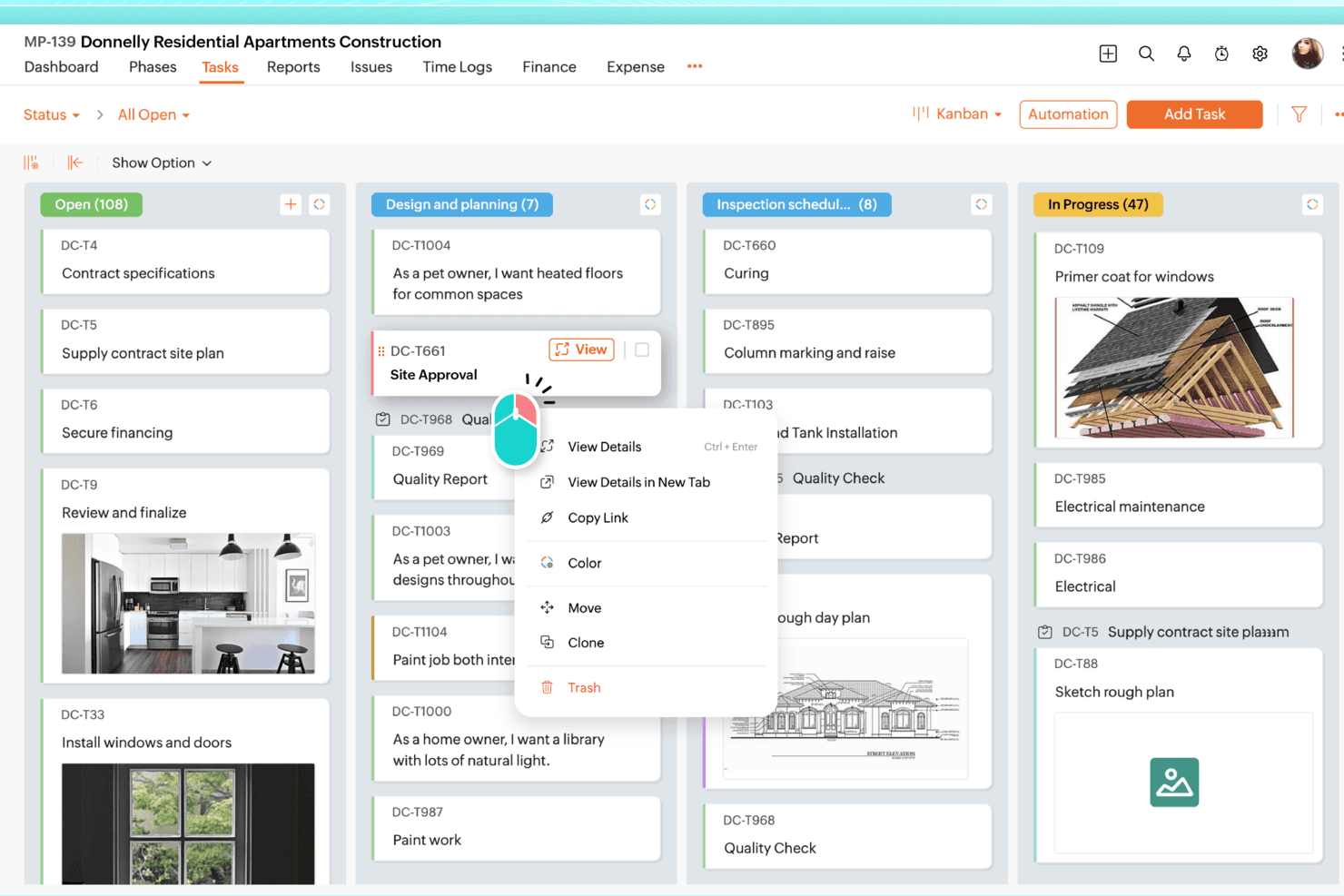
Zoho Projects organizes tasks visually across customizable Kanban board columns. Zoho Projects is a full-featured project management tool that suits project managers and operations teams who need Gantt charts, dependency tracking, budget management, and time tracking built into a single, affordable platform.
Who Is Zoho Projects Best For?
Zoho Projects is a strong fit for project managers and operations teams who need traditional PM tools—Gantt charts, budgets, and time tracking—without paying Asana-level prices.
Why I Picked Zoho Projects
I picked Zoho Projects as one of the best because its built-in time tracking goes well beyond a basic timer. Task-level timers feed directly into timesheets, where hours are flagged as billable or non-billable and routed through approval workflows before syncing to Zoho Invoice or Zoho Books for invoicing. I also appreciate the planned vs. actual hours reports and earned value management, which let you catch budget drift before it becomes a real problem.
Zoho Projects Key Features
- Blueprint workflow automation: A drag-and-drop editor that maps task status changes, assignee rules, field updates, and email alerts into structured, repeatable workflows.
- Gantt chart with dependency tracking: Visualize project timelines and set all four dependency types—finish-to-start, start-to-start, finish-to-finish, and start-to-finish—across projects at the Enterprise level.
- Portfolio dashboard: A cross-project view that surfaces status, ownership, and budget health alongside planned vs. actual hours and percent complete for each project.
- Workload management report: A built-in report that shows each team member's capacity as free, busy, or overloaded, with approved time off factored in automatically.
Zoho Projects Integrations
Zoho Projects offers native integrations with Google Calendar, Microsoft Teams, Slack, GitHub, GitLab, Dropbox, Box, Zendesk, and Zoho apps. It also supports 50+ marketplace integrations, Zapier, webhooks, custom functions, and an MCP server.
Pros and Cons
Pros:
- Budget and earned value reports expose drift
- Gantt dependencies support traditional project planning
- Built-in timers feed billable timesheets
Cons:
- Asana migration requires assisted support
- Crowded screens slow project navigation
Learn more about Zoho Projects: Best for customizable project workflows
- Free plan + 14-day trial + demo available
- From $10/user/month (billed annually)
Visit WebsiteCustomer Rating:4.3/5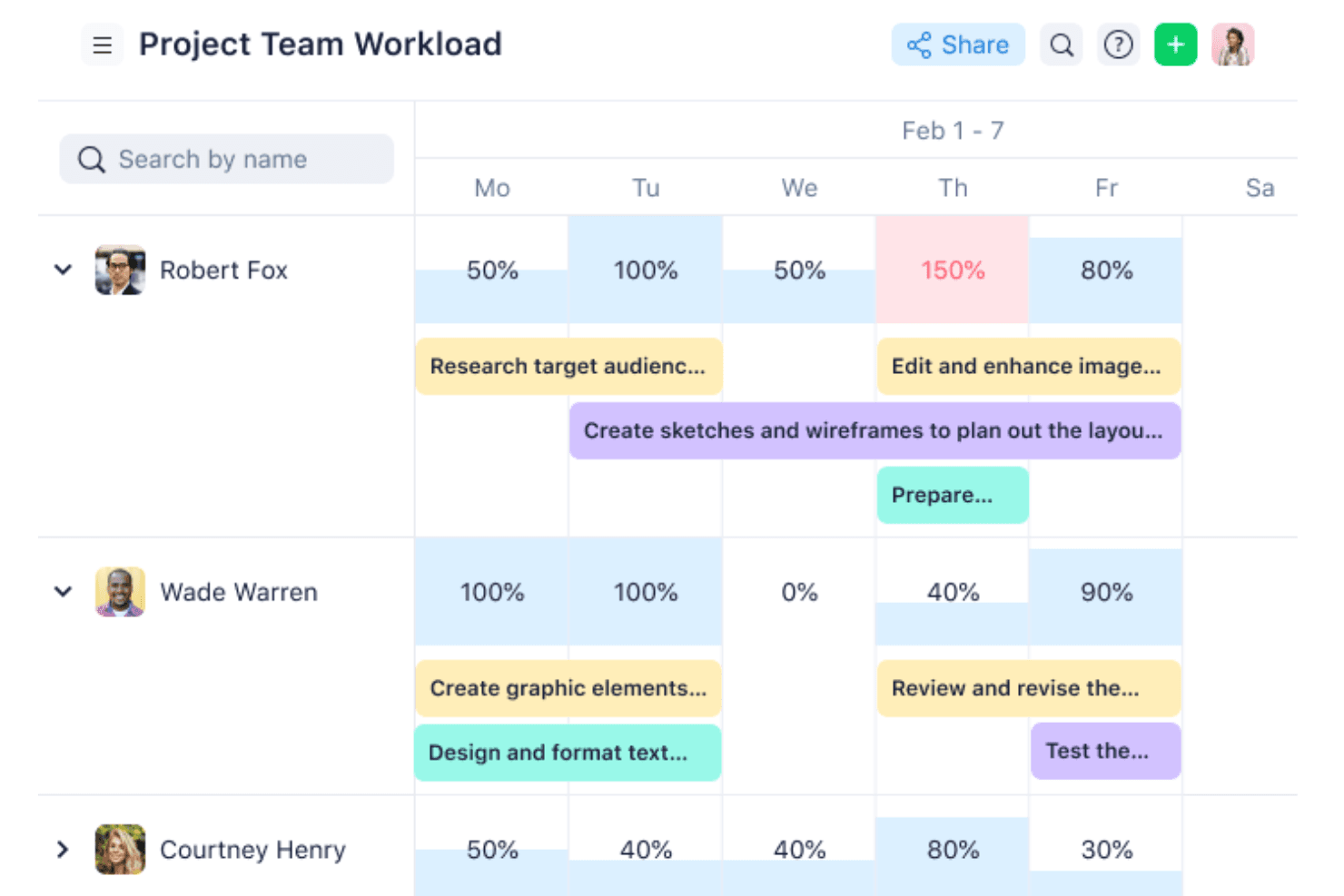
Wrike visualizes team workload and task assignments across the week. Wrike is a project and work management platform built for teams that need deep workflow customization, offering flexible hierarchy, cross-functional visibility, and planning tools that scale from small teams to enterprise portfolios.
Who Is Wrike Best For?
Wrike is a strong fit for mid-sized to enterprise teams that need to configure workflows around their own processes rather than adapt to a rigid structure.
Why I Picked Wrike
Wrike earns its spot on my shortlist because of how far it lets you push workflow customization without touching a single line of code. I particularly like custom item types, which let you model your team's exact terminology, like shaping a hierarchy of initiative > epic > story > task, rather than forcing everything into generic "tasks" and "projects." Pair that with cross-tagging, and one item can live across multiple spaces simultaneously, so nothing gets siloed.
Wrike Key Features
- Gantt chart with dependencies: An interactive timeline view that lets you map task sequences, set milestones, and drag-and-drop due dates to adjust scheduling.
- Resource bookings and workload charts: Book specific people or roles against projects and visualize individual capacity to rebalance assignments before bottlenecks form.
- Dynamic request forms: Configurable intake forms that automatically generate tasks or projects from submissions, routing work into the right workflow without manual setup.
- 400+ pre-built native integrations: Connect Wrike to tools across your stack—including Jira, Slack, Salesforce, and GitHub—via native integrations, an open REST API, or Wrike Integrate.
Wrike Integrations
Wrike offers 400+ pre-built native integrations, including Jira, GitHub, Slack, Salesforce, Google Workspace, Microsoft Teams, and HubSpot. It also provides an open REST API and Wrike Integrate for custom, cross-app automation.
Pros and Cons
Pros:
- Gantt dependencies clarify delivery sequencing
- Cross-tagging keeps initiatives visible across spaces
- Custom item types match product hierarchies
Cons:
- No native invoicing or billing capabilities
- Complex workflows can overwhelm new team members

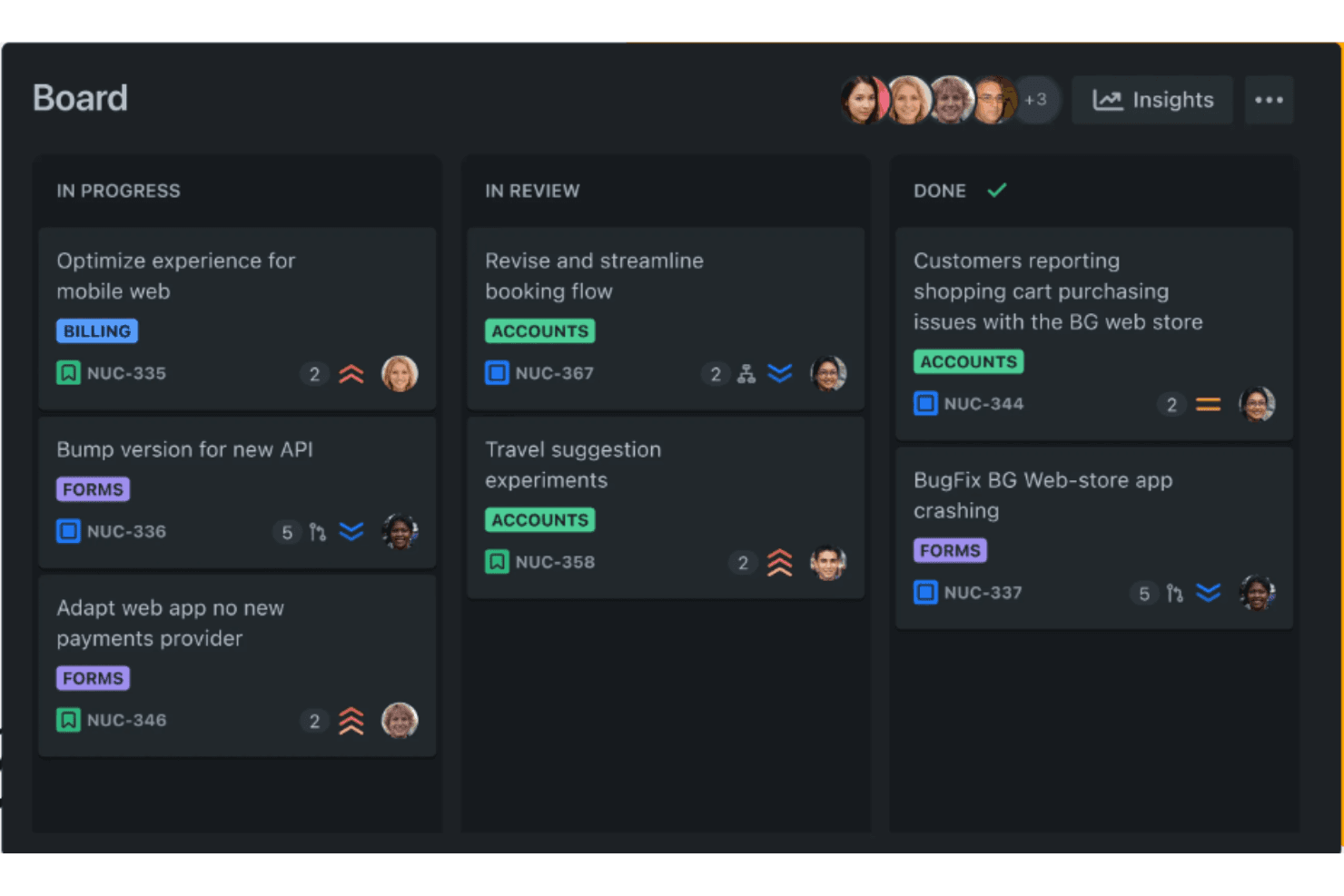
Jira's board view organizes tasks across progress stages visually. Jira is a project and issue tracking platform from Atlassian that gives dev-adjacent teams deep workflow customization, flexible hierarchy, and native integrations with tools like GitHub and Bitbucket.
Who Is Jira Best For?
Jira is a strong fit for technical teams and dev-adjacent organizations that need deep workflow customization, flexible hierarchy, and native integration with tools like GitHub and Bitbucket.
Why I Picked Jira
I picked Jira as one of the best because it's built from the ground up for dev-team project tracking, with a flexible hierarchy (Initiative > Epic > Story > Subtask) that maps directly to how engineering teams actually ship work. I love that the native GitHub integration surfaces branches, commits, and pull requests right on work items, so nothing slips between your project tracker and your codebase. Cross-team dependency mapping and capacity planning in Jira Plans round out the picture for anyone managing multiple dev squads at once.
Jira Key Features
- Flexible workflow customization: Build custom workflows with unique statuses, transitions, and fields for each project type your team runs.
- No-code automation rule builder: Set up if-this-then-that rules across tasks, projects, and connected tools like Slack and GitHub without writing any code.
- Agile reporting and dashboards: Access burndown charts, cycle time reports, and customizable dashboards to track delivery health across sprints.
- Native Asana importer: Migrate tasks, subtasks, assignees, due dates, comments, and custom fields directly from Asana via an OAuth connection.
Jira Integrations
Jira offers native integrations with GitHub, Bitbucket, Slack, Microsoft Teams, Figma, Gmail, Confluence, and Loom. It also supports 3,000+ Marketplace integrations and rich APIs for custom connections.
Pros and Cons
Pros:
- Cross-team capacity and dependency planning
- Timeline, calendar, and backlog views
- Custom hierarchies map engineering work
Cons:
- Nontechnical teams may find navigation cumbersome
- Workflow setup can overwhelm new teams
Learn more about Jira: Best for AI-assisted cross-team work tracking
- Free plan + 14-day free trial + free demo available
- From $9/user/month (billed annually)
Visit WebsiteCustomer Rating:4.6/5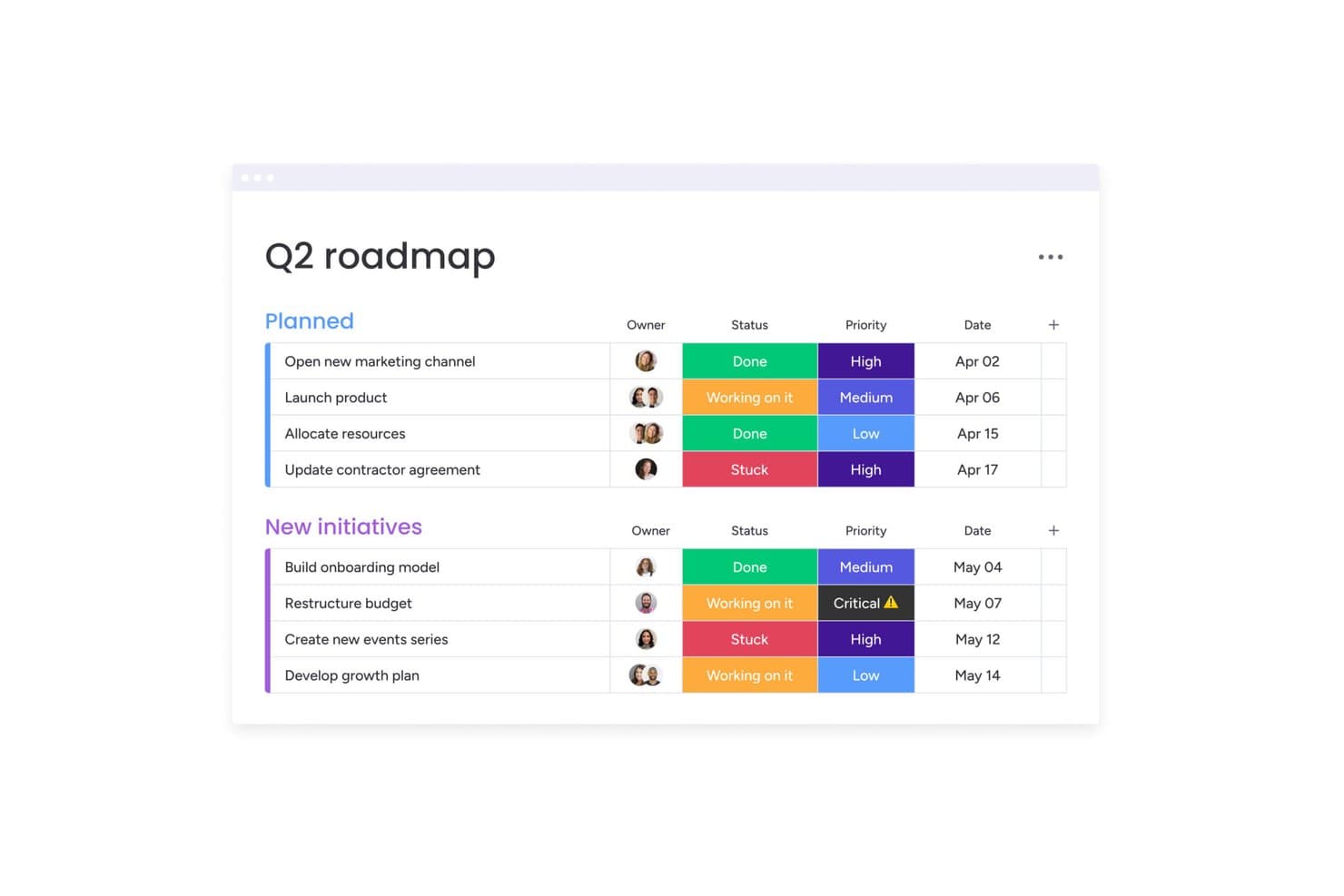
monday AI Workspace organizes milestones by status, priority, and date. monday AI Workspace is a visual work management platform that lets cross-functional teams plan, track, and automate projects across departments—making it a strong fit for operations managers and team leads who need flexibility without heavy configuration.
Who Is monday AI Workspace Best For?
monday AI Workspace is a strong fit for operations managers and cross-functional team leads who need a visual, flexible workspace that scales across departments without heavy IT setup.
Why I Picked monday AI Workspace
I picked monday AI Workspace because it's one of the few Asana alternatives that actively uses AI to manage cross-team dependencies, not just display them. I especially like the AI risk alerts that flag dependency conflicts before they derail a sprint, and the AI-assisted resource suggestions that recommend who to assign based on workload. When my team is running parallel initiatives across product, design, and engineering, the multi-board dashboards pull everything into one live view without manual updates.
monday AI Workspace Key Features
- No-code automation builder: Set up "if this, then that" rules to auto-assign tasks, trigger notifications, and move items between boards without writing any code.
- WorkForms: Build custom intake forms that feed submissions directly onto your boards, keeping requests and approvals in one place.
- Unlimited free viewers: Every paid plan lets you add unlimited read-only stakeholders at no extra cost, so anyone who needs visibility doesn't need a paid seat.
- Multiple board views: Switch between Kanban, Timeline, Gantt, Calendar, and Workload views on the same board to match how your team thinks about work.
monday AI Workspace Integrations
monday AI Workspace lists 850+ integrations, including Asana, Jira Cloud, GitHub, GitLab, Slack, Microsoft Teams, Google Calendar, and Google Drive. Its API and SDK support custom apps and integrations.
Pros and Cons
Pros:
- WorkForms route product requests into boards
- Visual dashboards unify cross-team project status
- AI flags dependency risks across projects
Cons:
- Dependencies and workload tools require higher tiers
- Asana imports omit custom fields and comments
Learn more about monday AI Workspace: Best for spreadsheet-style project planning
- 30-day free trial + demo available
- From $9/user/month (billed annually)
Visit WebsiteCustomer Rating:4.4/5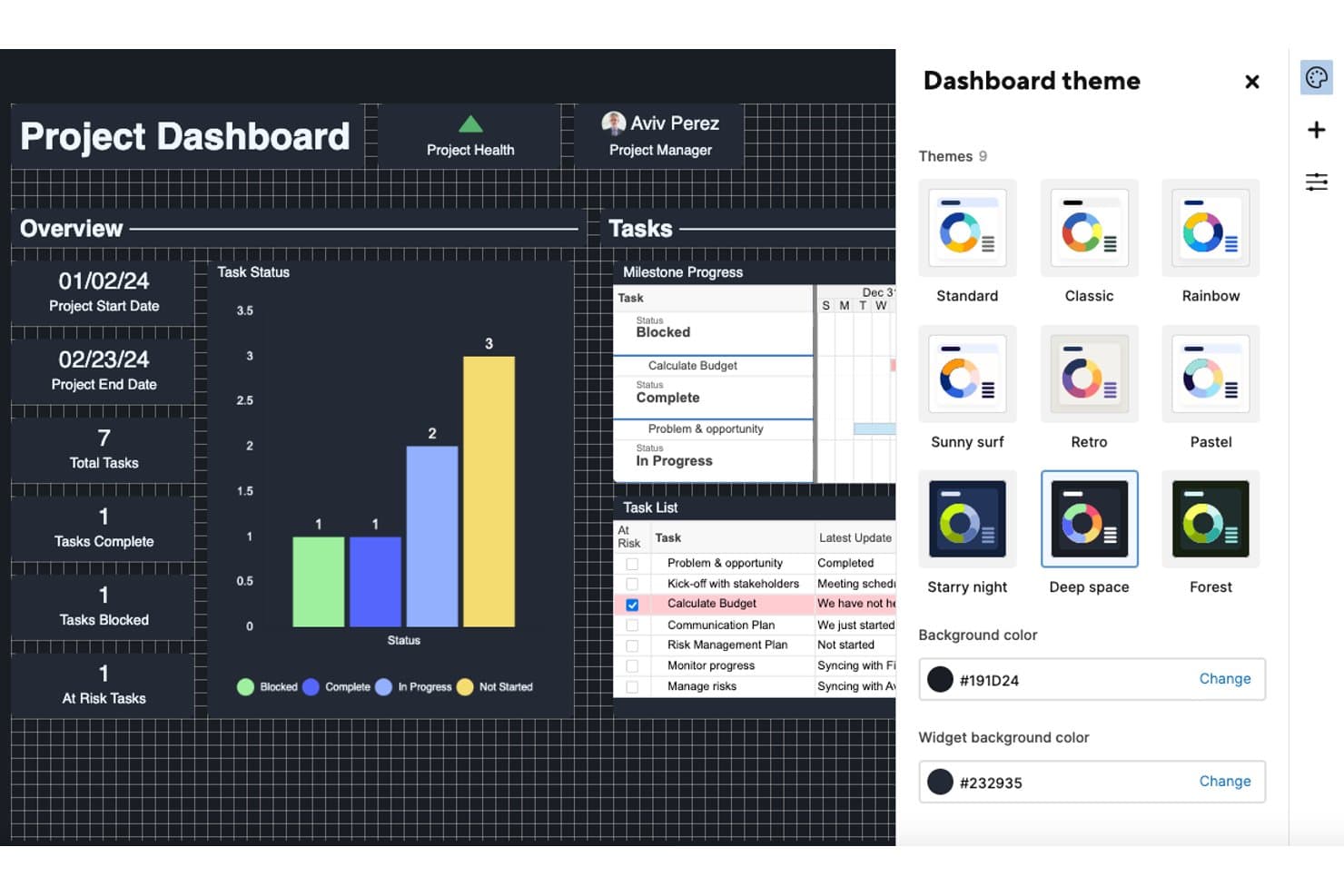
Smartsheet lets users personalize dashboards with nine color themes. Smartsheet is a spreadsheet-style work management platform that appeals to project managers and operations teams who need detailed planning tools like Gantt charts, task dependencies, and cross-project reporting.
Who Is Smartsheet Best For?
Smartsheet is a strong fit for project managers and operations teams who need detailed, data-heavy planning with Gantt charts, task dependencies, and cross-project reporting.
Why I Picked Smartsheet
I picked Smartsheet as one of the best because it brings genuine spreadsheet-style project planning into a work management tool, something Asana can't match. I rely on features like Gantt charts with critical path tracking, task dependencies, and row-level baselines to manage complex delivery timelines without leaving the grid. When I'm running a project with layered subtasks and milestone tracking, Smartsheet's parent-child row structure keeps everything organized in a way that feels natural coming from Excel.
Smartsheet Key Features
- Workflow automation: Build no-code, multi-step conditional workflows with unlimited automations on Business and higher plans.
- Free contributor and guest seats: Invite external collaborators and clients to view, comment, and manage attachments without paying for a seat.
- Two-way Jira sync: Connect Smartsheet to Jira with a bidirectional connector that keeps the Story > Task > Subtask hierarchy as parent and child rows.
- Cross-sheet reporting and dashboards: Pull data from multiple sheets into a single report and display live metrics on interactive dashboards.
Smartsheet Integrations
Smartsheet offers integrations with Google Workspace, Microsoft 365, Slack, Microsoft Teams, Salesforce, Power BI, and Jira through its premium Connector. It also provides a developer API and supports Zapier.
Pros and Cons
Pros:
- Free contributors support client collaboration
- Dashboards connect live data across sheets
- Gantt dependencies and baselines support complex plans
Cons:
- Renewal costs can rise sharply
- Asana migration requires substantial CSV cleanup
Learn more about Smartsheet: Best for deeply layered task customization
- Free plan + demo available
- From $7/user/month (billed annually)
Visit WebsiteCustomer Rating:4.6/5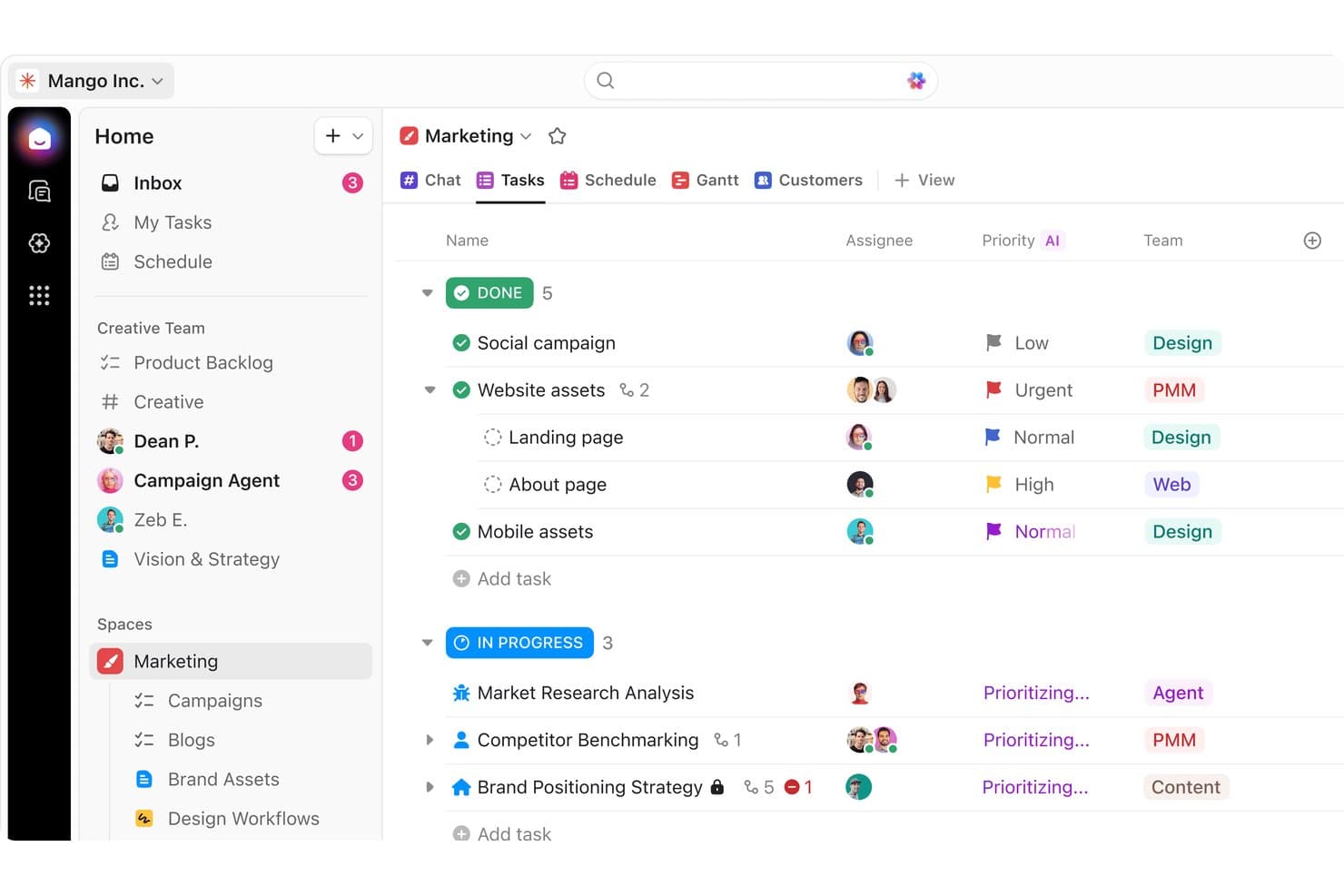
ClickUp organizes marketing tasks by status, priority, and team. ClickUp is an all-in-one work management platform that brings tasks, docs, goals, and team chat into a single workspace—making it a strong fit for cross-functional teams that need deep workflow flexibility without juggling multiple tools.
Who Is ClickUp Best For?
ClickUp is a strong fit for cross-functional teams that need to manage tasks, docs, and communication in one place without adopting multiple tools.
Why I Picked ClickUp
I picked ClickUp as one of the best because the depth of task customization genuinely sets it apart. I can build tasks with custom statuses, multiple assignees, and all four dependency types, then nest subtasks under a six-level hierarchy to mirror exactly how my team structures work. I especially like how the Gantt view ties it all together, automatically rescheduling dependent tasks when a deadline shifts and surfacing the critical path so nothing quietly falls behind.
ClickUp Key Features
- Native goal tracking: Link goals directly to tasks or sprints and let ClickUp calculate progress automatically, with targets set as numeric, task-based, or true/false values.
- Built-in chat: Create channels, send direct messages, and start video calls without leaving the platform, with AI-generated summaries to catch up on missed conversations.
- Workflow automation builder: Set trigger-based automations using plain-English prompts through the AI Builder, with actions like auto-assigning tasks, sending emails, or firing webhooks.
- Custom forms: Build forms for bug reports, customer feedback, or intake requests that automatically generate tasks when submitted.
ClickUp Integrations
ClickUp offers native integrations with Slack, Jira, GitHub, HubSpot, Google Calendar, Microsoft Teams, and Zendesk. It also supports an open API, webhooks, and Zapier for custom connections.
Pros and Cons
Pros:
- Goals connect delivery tasks to outcomes
- Gantt dependencies reschedule linked work
- Nested task hierarchies mirror product work
Cons:
- Mobile app trails desktop for project work
- Dense screens make simple workflows feel cluttered
Learn more about ClickUp: Best for flat-rate team pricing
- Free plan + 14-day free trial available
- From $10/user/month (billed annually)
Visit WebsiteCustomer Rating:4.6/5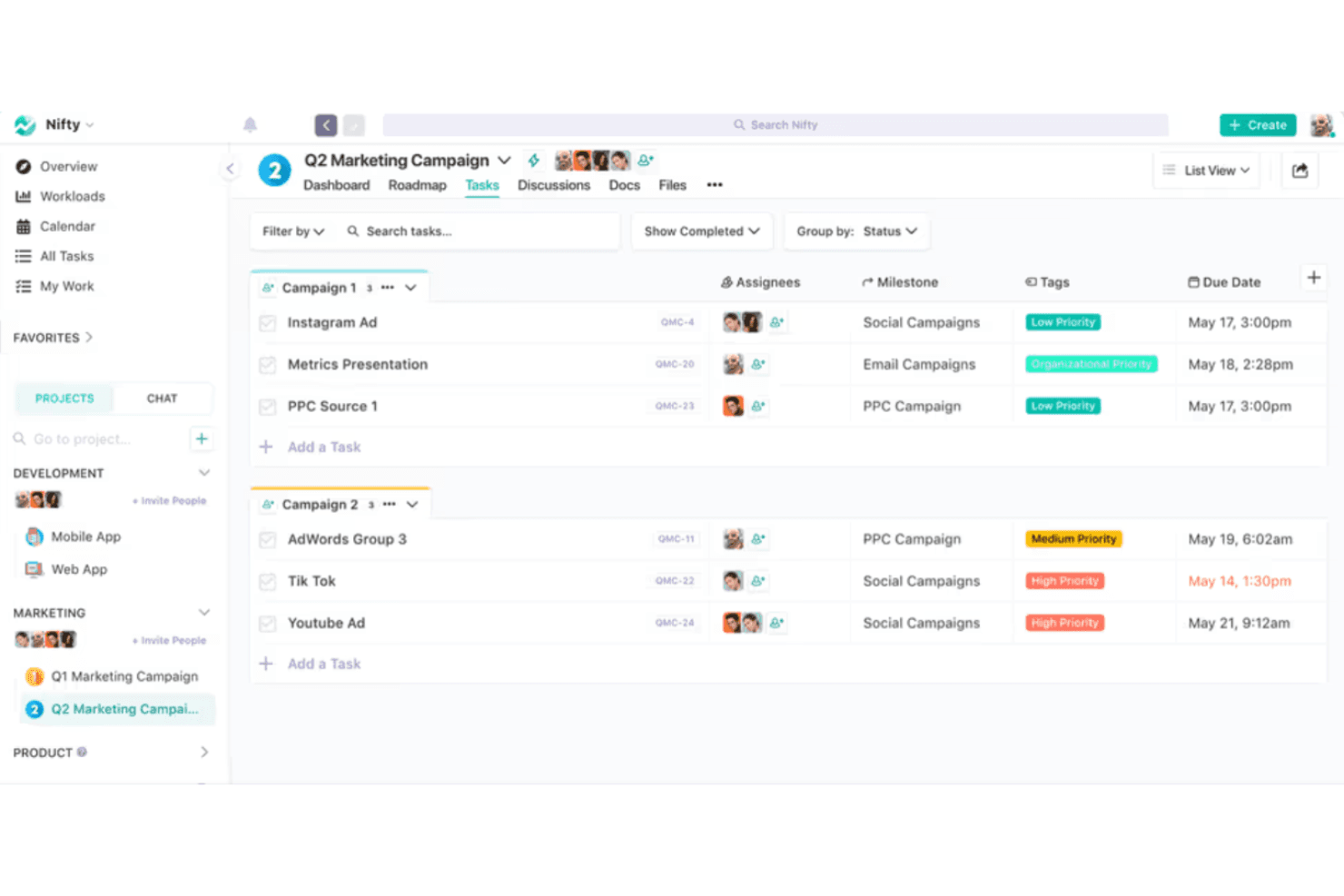
Nifty organizes marketing tasks by campaign with priority tags and due dates. Nifty is an all-in-one project management workspace that brings tasks, docs, chat, goals, and reporting together for teams that need portfolio-level visibility without juggling multiple tools.
Who Is Nifty Best For?
Nifty is a strong fit for growing teams that want one workspace for tasks, docs, and chat without paying per-seat fees as headcount scales.
Why I Picked Nifty
Nifty earns its spot on my shortlist because its flat-rate team pricing is genuinely rare in this category. Once your team hits seven or more people, you pay one fixed monthly rate instead of watching costs multiply per seat. I particularly appreciate how that model extends to unlimited guests on most paid plans, so I can loop in clients or external collaborators without triggering extra charges. The portfolio-level visibility across projects seals it for me.
Nifty Key Features
- Native goal tracking: Set goals that pull progress automatically from tasks, lists, custom fields, or tracked time across multiple projects.
- Two-way dev tool sync: Connect GitHub or Jira so commits, pull requests, and task updates reflect in both tools without manual updates.
- Workflow automation builder: Create multi-step if/then rules with custom triggers, conditions, and actions to move work forward automatically.
- Built-in time and budget tracking: Log hours directly on tasks and monitor project spend without needing a separate tracking tool.
Nifty Integrations
Nifty offers native integrations with Slack, GitHub, GitLab, Jira, Google Drive, Google Calendar, Microsoft 365, Zoom, Figma, and Miro. It also supports Zapier and an Open API for custom integrations.
Pros and Cons
Pros:
- Asana importer carries over tasks and comments
- Portfolios show progress across projects
- Tasks, docs, and chat share one workspace
Cons:
- Mobile app trails the web experience
- Reviewers report unreliable task notifications
Learn more about Nifty: 8Best for productivity and goal analytics
Hive
- Free plan + 14-day trial + demo available
- From $5/user/month
Visit WebsiteCustomer Rating:4.5/5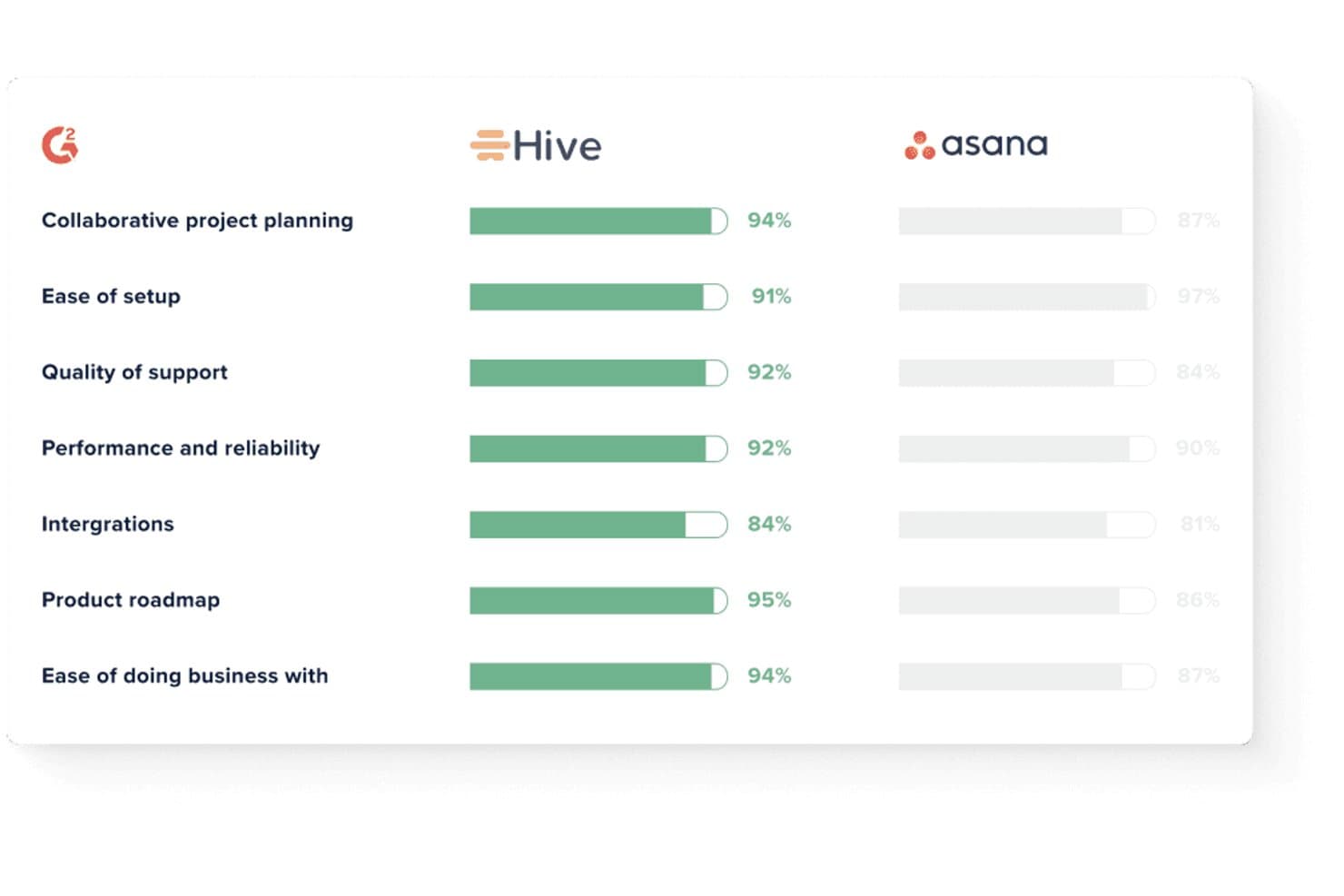
Hive outscores Asana across key G2 satisfaction metrics. Hive is a work management platform that consolidates tasks, chat, email, goal tracking, and dashboards in one place, making it a strong fit for project managers and operations teams who want fewer tools without sacrificing visibility.
Who Is Hive Best For?
Hive works well for project managers and operations teams who need built-in goal tracking and reporting without stitching together separate tools.
Why I Picked Hive
I picked Hive as one of the best because its built-in goal tracking and analytics dashboards give project managers a level of visibility that most Asana alternatives skip entirely. I especially like how goals tie directly to task completion, numerical targets, or even CRM metrics pulled from HubSpot or Salesforce, so progress is always grounded in real data. The AI-generated dashboard summaries flag projects as on track, at risk, or blocked without any manual reporting.
Hive Key Features
- Native chat: Send messages, share files, and discuss tasks directly inside Hive without switching to a separate messaging tool.
- Workflow automation builder: Create multi-step, no-code automations triggered by task status changes, due date shifts, or project creation events.
- Jira two-way sync: Keep Hive tasks and Jira issues in sync across titles, assignees, statuses, subtasks, and due dates in real time.
- Hive Mail: Connect Gmail or Outlook to turn email threads into tasks and draft replies without leaving the platform.
Hive Integrations
Hive has native integrations with Jira, GitHub, Slack, Microsoft Teams, Zoom, Google Drive, Dropbox, Microsoft OneDrive, Box, and QuickBooks. It also supports 1,000+ integrations through Zapier and offers an API for custom integrations.
Pros and Cons
Pros:
- Gantt dependencies support detailed schedule planning
- AI dashboards flag at-risk project progress
- Goals connect tasks to measurable outcomes
Cons:
- Mobile notifications can be unreliable
- Workflow setup can require staff training
Learn more about Hive: Best for agency and client delivery teams
- Free plan + 14-day free trial + free demo available
- From $9.99/user/month (billed annually)
Visit WebsiteCustomer Rating:4.4/5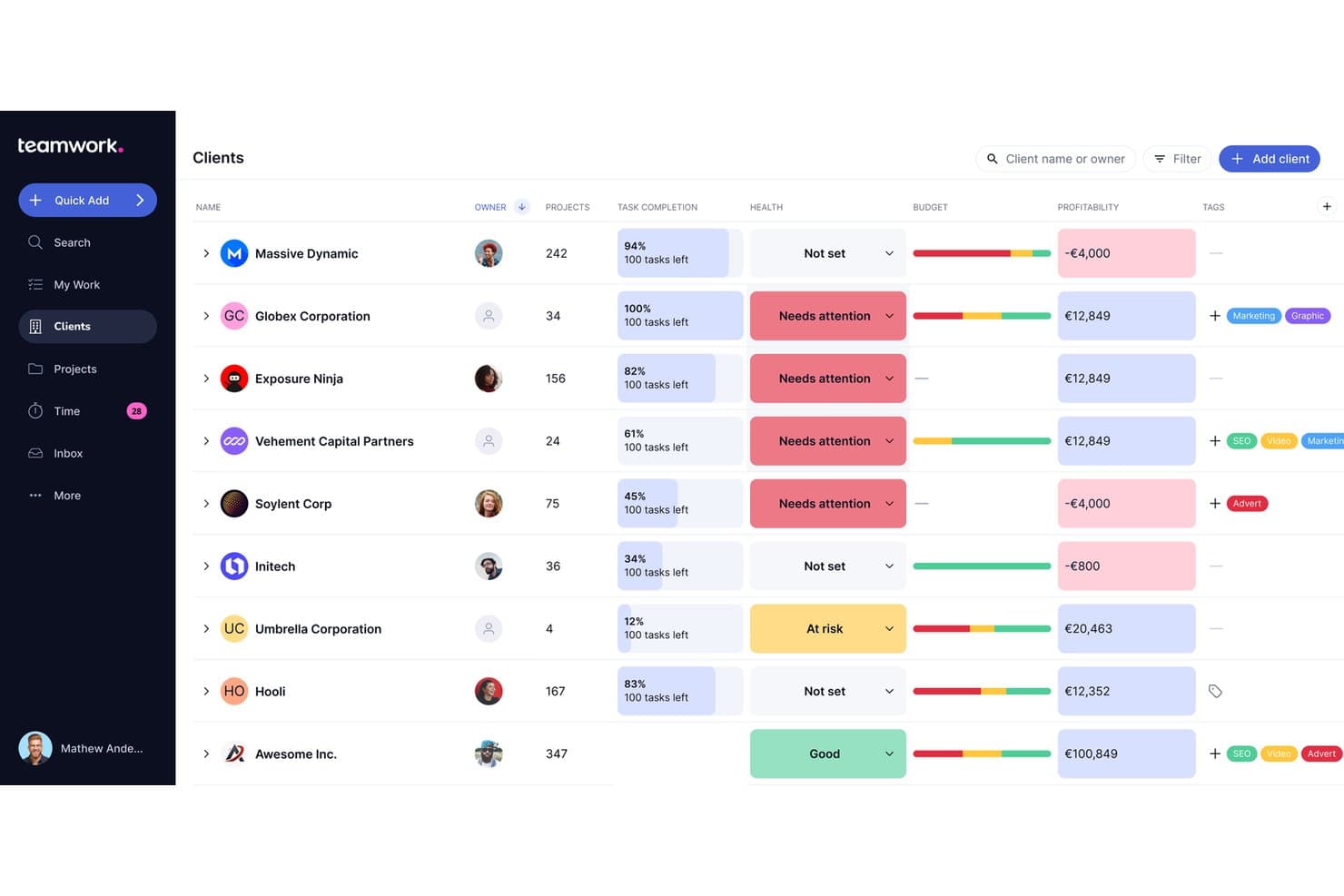
Teamwork.com lets users track client health, budget, and profitability in one view. Teamwork.com is a project management platform built for agencies and client-facing teams, bringing together task management, time tracking, budgeting, and profitability reporting in one place.
Who Is Teamwork.com Best For?
Teamwork.com is a strong fit for agencies and client services teams that need to manage delivery, track billable time, and monitor project profitability in one place.
Why I Picked Teamwork.com
Teamwork.com earns its spot on my shortlist because it's built from the ground up for agency and client delivery work in a way Asana simply isn't. I love that native budgeting, billable time tracking, and profitability reporting sit right alongside task management, so I can see whether a client project is actually making money without switching tools. The free client seat model is a real differentiator too: unlimited clients can review milestones and proofs without needing a paid license.
Teamwork.com Key Features
- Gantt chart with critical path: Visualize task dependencies and automatically flag which tasks would delay the entire project if they slip.
- Intake forms: Convert client or team requests directly into tasks, with smart routing available on higher-tier plans.
- Workload and capacity planning: View team availability, schedule resources by role or skill, and run What-If scenarios to avoid overallocation.
- Portfolio boards: Monitor multiple projects from a single high-level board, with filtering by status, health, owner, and custom fields.
Teamwork.com Integrations
Teamwork.com offers 150+ integrations, including Slack, Microsoft Teams, Google Drive, Dropbox, Xero, QuickBooks, HubSpot, Salesforce, NetSuite, and Unito for two-way sync with Jira and GitHub. API and webhooks support custom connections.
Pros and Cons
Pros:
- Gantt paths clarify delivery dependencies
- Billable time and profitability share project context
- Client portals give clients clear visibility
Cons:
- Product teams miss native OKR tracking
- Navigation can feel crowded across views
Learn more about Teamwork.com: 10Best for agencies managing client projects
Teamwork
- Free plan + 14-day free trial + free demo available
- From $9.99/user/month (billed annually)
Visit WebsiteCustomer Rating:4.5/5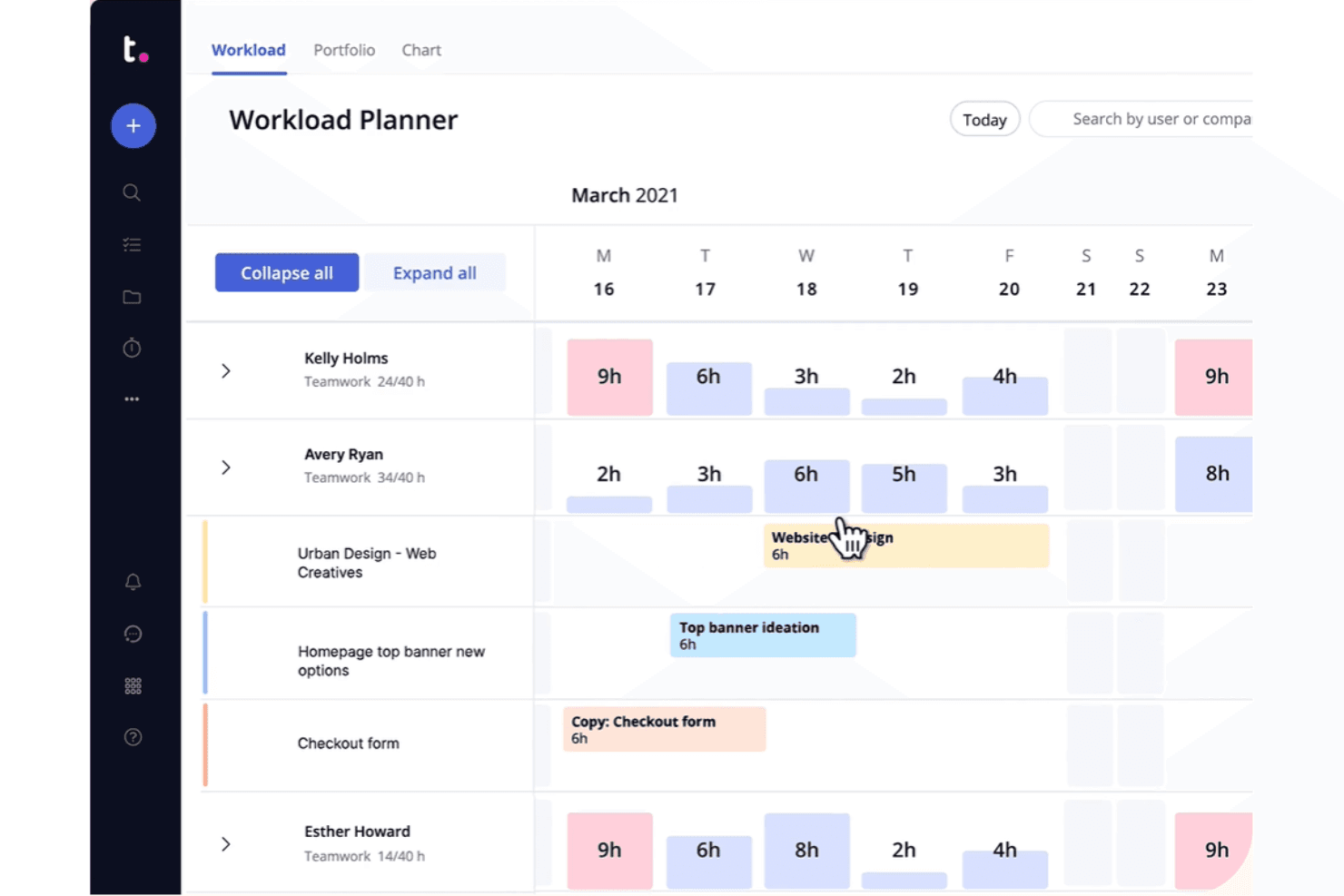
Teamwork visualizes team workloads and task assignments across a weekly calendar. Teamwork is a project management platform built for agencies and client-services teams, combining task management, time tracking, budgets, invoicing, and client-facing portals in one place.
Who Is Teamwork Best For?
Teamwork is built for agencies and client-services teams that need to manage project delivery, time tracking, and client billing in one place.
Why I Picked Teamwork
I picked Teamwork as one of the best because it's the only tool on this list built from the ground up for agency client work, not adapted for it. I love that you can give clients a branded portal to review and approve deliverables, without them ever touching your internal workspace. Built-in time budgets, retainers, and invoicing mean my team can track billable hours and generate invoices directly from logged time, which no Asana plan offers.
Teamwork Key Features
- Multiple assignees per task: Assign more than one team member to a single task, so shared ownership is tracked without workarounds.
- Portfolio boards: View status and progress across all active projects in one place, with automation triggers at the portfolio level.
- Workload planner: See each team member's capacity in real time and adjust assignments to balance workload across projects.
- Native Asana importer: Migrate people, projects, tasks, subtasks, assignees, due dates, comments, and files directly from Asana in minutes.
Teamwork Integrations
Teamwork offers 150+ integrations, including Slack, Microsoft Teams, Google Calendar, Outlook Calendar, HubSpot, QuickBooks Online, Jira via SoftSync, and GitHub via Unito. It also provides an API and supports Zapier.
Pros and Cons
Pros:
- Multiple assignees clarify shared task ownership
- Logged time feeds budgets and client invoices
- Client portals keep approvals outside internal workspaces
Cons:
- Asana imports omit dependencies and custom fields
- Navigation and views can feel confusing
Learn more about Teamwork:
Other Asana Alternatives
Here are some additional Asana alternatives that didn’t make it onto my shortlist, but are still worth checking out:
- 11CeloxisBest for enterprise-level portfolio oversight
- 12GoodDayBest for low-cost Asana migration
- 13RavetreeBest for client-facing project approvals
- 14AirtableBest for building custom workflows without code
- 15NotionBest for docs, wikis, and tasks in one workspace
- 16Aha!Best for linking tasks to product strategy
- 17LinearBest for dev-team issue and roadmap tracking
- 18TrelloBest for Kanban boards with built-in automation
How I Evaluate Asana Alternatives
I split my evaluation into three parts, with core functionality carrying the most weight: a tool needs to organize tasks across projects and show work in more than one view. I then look for native goal tracking or portfolio-level visibility as distinguishing features. Finally, I consider migration support and total cost of ownership.
Core Functionality (Table Stakes For This List)
When I'm selecting tools for my list, I score each one on a scale from 0 (does not offer the functionality) to 5 (excels in this area) for each core functionality listed below. I then convert the total into a percentage to help assess each tool's overall fit, with extra weight on any functionalities I’ve deemed essential.
- Task & Project Management (Essential): I look for clear task ownership, due dates, subtasks, and dependencies to track work across product launches or other multi-team projects.
- Work Views (Essential): I check for synced views such as lists, boards, calendars, and timelines, so teams can plan work in the format that suits them.
- Workflow Automation: I evaluate whether teams can set rules for recurring actions, such as assigning a task when its status changes.
- Team Collaboration: I look for comments, file sharing, and mentions attached to work, keeping project discussions connected to tasks.
- Reporting & Progress: I assess dashboards for project status, workload, and goal progress to help teams spot delivery risks.
- Third-Party Integrations: I check for connections to common communication, storage, and calendar tools that fit into existing team workflows.
Once I have a list of tools that meet the criteria, I consider what sets each platform apart.
Differentiating Factors (What Sets Vendors Apart)
Here's how I compare and contrast different vendors:
Standout Features
I look for native goal tracking that links daily tasks to OKRs, so a PM can trace a sprint item back to a quarterly objective without switching tools. Two-way dev tool sync matters just as much—when Jira or GitHub updates flow back into the planning tool in real time, product and engineering avoid duplicate status meetings. I also evaluate portfolio-level visibility, which lets a VP roll up several roadmaps into one executive view to spot resource conflicts across product lines.
Beyond Features
I evaluate migration support first—import fidelity for tasks, custom fields, and attachments determines whether your team actually adopts the new tool or quietly reverts to spreadsheets. Total cost of ownership matters just as much, since per-seat pricing can balloon when you add cross-functional collaborators who only need view access. I also check how each platform scales from a single product team to a multi-portfolio org without fragmenting reporting or forcing a disruptive workspace restructure.
Why Look for an Asana Alternative?
While Asana is a good choice for product management, there are a number of reasons why some users seek out alternative solutions. You might be looking for an Asana alternative due to any of the following.
- You need more customization options
- Your team requires advanced reporting tools
- You find the user interface to be convoluted
- You find it lacks integration with specific apps
- You're seeking more affordable pricing plans
- Your team is growing and requires better scalability
- You need compliance with specific data regulations
If any of these sound like you, you’ve come to the right place. My list contains several product management core options that are better suited for teams facing these challenges with Asana and looking for alternative solutions.
Asana Key Features
Here are some of the key features of Asana, to help you contrast and compare what alternative solutions offer:
- Task management: Allows you to create, assign, and track tasks to keep your projects organized.
- Project timelines: Helps visualize project schedules and deadlines, ensuring your team stays on track.
- Boards and calendars: Provides visual tools for project planning and management, aiding your team's organization.
- Real-time updates: Keeps your team informed with instant notifications, enhancing collaboration and accountability.
- Portfolios: This lets you organize projects by account or team, useful for managing numerous projects efficiently.
- Asana Intelligence: Offers AI-driven insights and suggestions to improve project outcomes and save time.
- Collaboration tools: Facilitates communication with message boards and file attachments within tasks.
- Gantt view: Assists in building projects, setting dependencies, and visualizing timelines with a drag-and-drop interface.
- Proofing feature: Converts feedback into subtasks, helping teams manage content production efficiently.
- Custom fields: This enables you to tailor project details to fit your specific workflow needs. It looks like your message is empty. How can I assist you further? If you have any instructions or questions, feel free to let me know!