

10 Best Session Replay Software for 2026

10 Session Replay Software Shortlist


With so many different session replay solutions available, figuring out which one is right for you is tough. You know you want to gain deep insights into user behavior, pinpoint usability issues, and use them to improve conversion rates but need to figure out which tool is best for the job. I've got you! In this post I'll help make your choice easy, sharing my personal experiences using dozens of different tools with large teams and diverse products, with my picks of the best session replay software.
Why Trust Our Software Reviews
We’ve been testing and reviewing product management software since 2020. As product managers ourselves, we know how critical and difficult it is to make the right decision when selecting software.
We invest in deep research to help our audience make better software purchasing decisions. We’ve tested more than 2,000 tools for different product management use cases and written over 1,000 comprehensive software reviews. Learn how we stay transparent & our software review methodology.
Best Session Replay Software Summary
This comparison chart summarizes pricing details for my top session replay software selections to help you find the best one for your budget and business needs.
| Tool | Best For | Trial Info | Price | ||
|---|---|---|---|---|---|
| 1 | Best for integrating replay and error monitoring | Free plan + free trial + free demo available | From $26/month (billed annually) | Website | |
| 2 | Prioritize session recordings based on auto friction scores | Free plan available | From $25/month (billed annually) | Website | |
| 3 | Watch dynamic heatmaps in real-time | 7-day free trial + free plan available | From $32/month (billed annually) | Website | |
| 4 | Make every visitor interaction on your site searchable | Free plan available | Pricing upon request | Website | |
| 5 | Best for event-based customer journey insights | Free plan available | Pricing upon request | Website | |
| 6 | Create effective digital journeys across web and mobile applications | Free demo available | Pricing upon request | Website | |
| 7 | Best for recording and analyzing user behavior at scale with AI | 14-day free trial + free plan available | From $175/month (billed annually) | Website | |
| 8 | Combine session replay with product analytics and performance monitoring | Free plan available | From $83/month | Website | |
| 9 | Guide users through essential processes with a multiplayer cursor | 14 days free trial | From $40/month | Website | |
| 10 | Self-hosted session replay suite | 14-day free trial | From $ 5.95/month | Website |
Best Session Replay Software Reviews
Below are my detailed summaries of the best session replay software that made it onto my shortlist. My reviews offer a detailed look at the key features, pros & cons, integrations, and ideal use cases of each tool to help you find the best one for you.

Sentry
Best for integrating replay and error monitoring

For teams seeking to enhance their application’s user experience, Sentry offers a versatile solution that combines session replay functionalities with error tracking and performance monitoring. It's an ideal choice for developers and enterprises looking to gain actionable insights into user interactions on web and mobile applications. By providing a visual reproduction of user sessions, Sentry helps identify the root cause of issues without requiring manual reproduction or customer support intervention.
Why I Picked Sentry
I picked Sentry for its unique ability to integrate session replay with error monitoring, giving you a comprehensive view of user interactions and application performance. Session Replay provides video-like reproductions of user sessions, allowing you to see when and where errors occur, which is crucial for debugging complex issues. Additionally, Sentry's privacy controls protect sensitive user data while still providing detailed insights into application performance. This combination of features makes it a compelling choice for developers who need to quickly diagnose and resolve issues.
Sentry Key Features
In addition to its robust session replay capabilities, Sentry offers:
- Breadcrumbs: Tracks events leading up to an error, providing context for debugging.
- Performance Monitoring: Measures application performance to identify bottlenecks and optimize user experience.
- Error Tracking: Automatically captures and alerts you to new errors, with detailed stack traces for quick resolution.
- Integration with Development Tools: Seamlessly connects with tools like GitHub and Slack to streamline your workflow.
Sentry Integrations
Integrations include GitHub, Slack, Jira, Bitbucket, GitLab, Trello, Azure DevOps, Vercel, Netlify, and Datadog.
Pros and Cons
Pros:
- Strong error tracking with clear stack traces
- Performance monitoring for front-end and back-end applications
- Detailed event timelines make debugging faster
Cons:
- Can generate large amounts of data at scale
- Less focused on qualitative UX research features
New Product Updates from Sentry
Sentry Ruby SDK Updates Logs, Metrics, and Data Collection Controls
Sentry Ruby SDK enables logs and metrics by default and introduces granular data collection controls. These updates give teams more control over telemetry and PII handling. For more information, visit Sentry’s official site.
 .
.
Prioritize session recordings based on auto friction scores

Mouseflow is a powerful analytics tool designed to help businesses understand user behavior on their websites through session recordings and comprehensive analytics. This versatile platform captures every mouse movement, click, scroll, and form interaction, providing invaluable insights into how visitors engage with your site.
Mouseflow's session replay feature has the unique capability to help you prioritize session recordings based on auto-generated friction scores. This allows you to focus on sessions where users encounter issues, ensuring that efforts to improve user experience are directed where they are most needed. You can also combine session replays with other analytical tools such as heatmaps and funnel analysis for a holistic view of user behavior.
Integrations include Omniconvert, Adobe Target, AB Tasty, Convert Experiences, BigCommerce, WooCommerce, Shopify, Intercom, HubSpot, Google Analytics, Google Tag Manager, Zendesk, WordPress, and others.
Mouseflow offers a free plan and a 14-day trial.

Watch dynamic heatmaps in real-time

Businesses of all types can use Lucky Orange to understand what to do to increase website conversions. The real-time dashboard analytics lets you see how many visitors are coming to your site at any moment and know how they arrived. Your teams in charge of customer experience can see where visitors abandon various processes, such as creating new accounts or trying to check out during a purchase. They can use this information to identify pain points to improve.
Lucky Orange’s dynamic heatmaps allow you to see everything your website visitors are doing and why they’re not converting. This helps you see where people are scrolling and clicking on your site and see where visitors are engaging the most. The scroll heatmap in Lucky Orange lets you see if visitors are scrolling far enough on your web page to see your calls to action (CTA) or if they’re leaving the site before you get the chance to convert them.
Lucky Orange integrates with the tools you’re already using, such as BigCommerce, HubSpot, Google Analytics, and HubSpot.
Lucky Orange costs from $18/month when billed monthly or $14/month when billed annually. They also offer a 7-day free trial and a free subscription level.

Make every visitor interaction on your site searchable

Fullstory’s behavioral data platform helps technology leaders make better, more informed, and customer-centric decisions by injecting digital behavioral data into their analytics stack. The features of this software deliver real-time insights that can help you identify opportunities on your website. You can also discover issues that are affecting your revenue and understand how many users it affects. With this information, you can make smarter digital decisions according to the user experience data FullStory provides.
The design of the platform indexes every interaction your visitors have on your site. By transforming every digital visit into actionable insights, Fullstory moves enterprise businesses closer to their customers, increases funnel conversion, and easily detects malicious behaviors or fraud. FullStory makes this information searchable. This can help you and your team identify any website bugs and also provide customer support to a single user.
FullStory integrates with various third-party software, such as Salesforce, Bugsnag, BigCommerce, and Zendesk.
FullStory offers customized pricing upon request. The platform also offers a 14-day free trial.

Best for event-based customer journey insights
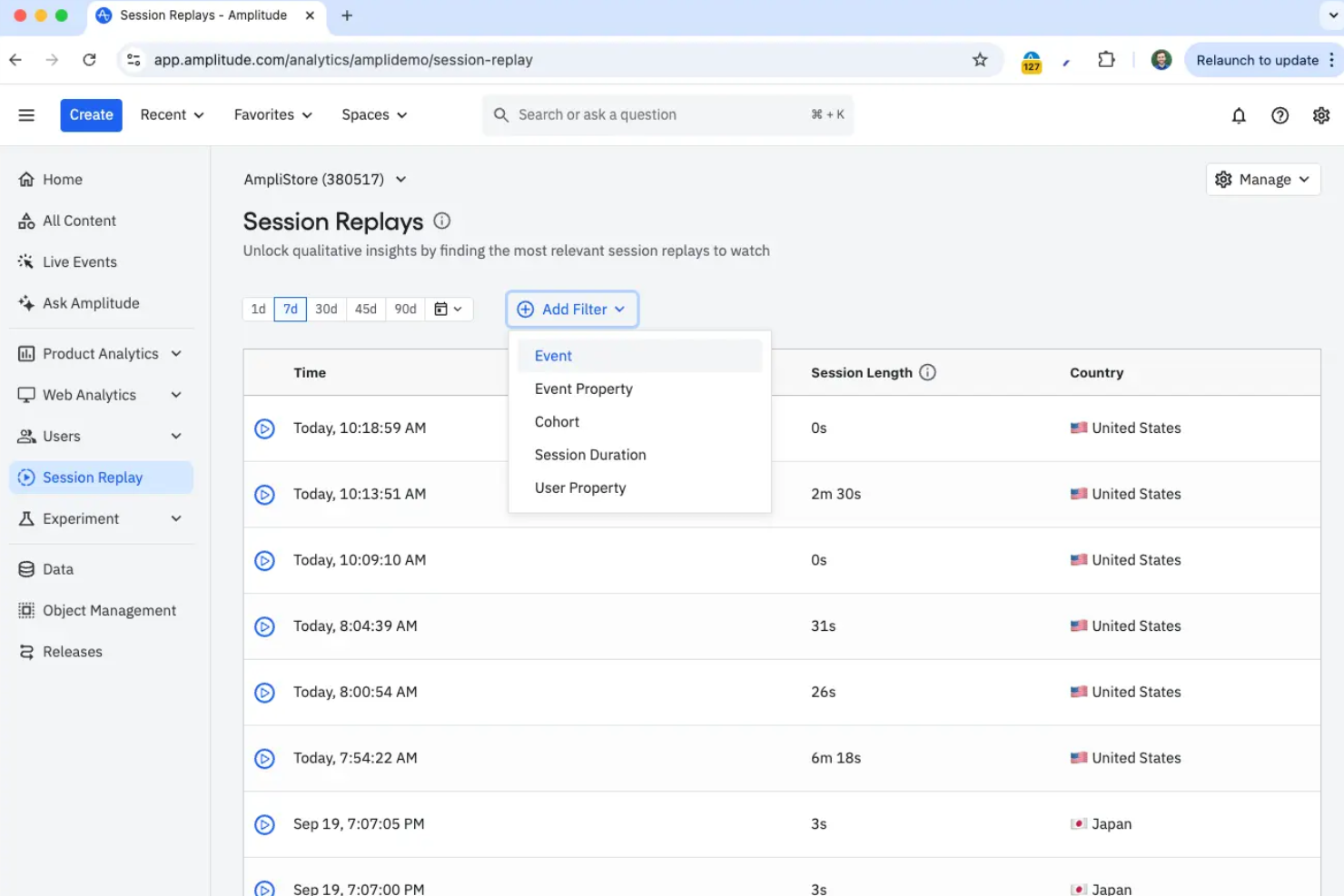
Built around event-based data, Amplitude offers session replay, funnel analysis, user segmentation, and A/B testing tools for product analytics.
Who Is Amplitude Best For?
Amplitude works well for product and growth teams at mid-size to enterprise digital companies who need to connect session replay data with deeper behavioral analytics.
Why I Picked Amplitude
I picked Amplitude for its event-based customer journey insights that tie session replay directly to user actions. When tracking a custom event like “checkout_started,” teams can open the exact replay segment where the event happened. The Journeys chart also shows the sequence of events before and after key actions, helping identify behavior patterns across thousands of sessions without watching each recording manually.
Amplitude Key Features
- Session replay filters: Filter recordings by events, users, properties, and segments to find specific user experiences faster.
- Behavioral cohorts: Group users based on shared actions or traits to analyze different audience segments.
- Privacy controls: Configure data masking, privacy settings, and retention controls to protect sensitive user information.
- Feature flag integration: Connect experiments and feature releases with analytics to measure how users respond to product changes.
Amplitude Integrations
Amplitude integrates with 60+ tools, including CDPs like Segment, data warehouses like Snowflake and BigQuery, marketing platforms like Braze, CRMs like Salesforce, attribution tools, and experimentation platforms. It also offers APIs for custom integrations, though a native Zapier integration is not currently available.
Pros and Cons
Pros:
- AI features help surface behavioral insights
- Supports session replay across web and mobile apps
- Replays link directly to analytics charts
Cons:
- Higher cost at enterprise scale
- Advanced setup requires proper event tracking configuration

Glassbox
Create effective digital journeys across web and mobile applications

Glassbox’s platform can help teams within your organization, from product management and IT to compliance and marketing. These teams can use the information from their Glassbox dashboard to understand their user’s challenges on their web and mobile apps, visualize the user’s journey and enhance each step. Glassbox can help you prioritize your customer’s experience and improve your digital products from one collaborative platform.
Glassbox provides AI-driven visualization and analytics tools. The tool ranks your session recordings with a “struggle score,” which highlights errors and bugs on your web and mobile apps. This score can help your organization’s product managers, DevOps, marketing, and support teams engage with the tool and collect insights from the data. These teams then use the data to make the necessary fixes and changes to enhance your customer’s digital journeys.
Glassbox provides native integrations to help you connect customer data systems through their platform. These integrations include Salesforce, Slack, and Google Analytics. Glassdoor also provides an open API.
Glassbox offers customized pricing upon request.

Sprig
Best for recording and analyzing user behavior at scale with AI

Sprig is a comprehensive product experience platform that assists businesses in understanding and enhancing their users’ experiences within their mobile and desktop product interfaces. It offers a suite of tools—including session replays, heatmaps, in-app surveys, feedback collection, and AI analysis—to gather and interpret user experience data at scale and surface key trends and product recommendations.
Why I picked Sprig: One particularly cool feature of Sprig is its AI analysis capability. With this, businesses can instantly uncover trends in user behavior to quickly and continuously optimize the user experience. Sprig is the only tool on the market to offer AI analysis of session replay and heatmaps studies.
The software also connects session replays with in-app surveys, providing a comprehensive view of users’ behavior and sentiment at that exact moment. Sprig's AI then organizes these session clips and responses into actionable themes, highlighting hidden patterns and user pain points.
Integrations include popular tools like Segment, Mixpanel, Amplitude, Optimizely, LaunchDarkly, Slack, User Interviews, Google Tag Manager, Census, RudderStack, and Zapier.
Pricing starts from $175/month with a free plan and free trial available.


LogRocket helps you track UX difficulties and see where to make any necessary changes to improve your site’s performance. The platform lets you see your visitors’ entire browsing journey and get the insights you need to track bugs, locate performance issues, and diagnose usability challenges. You can see all the vital details of your users’ sessions, such as keystrokes and mouse movements. The software also excludes sensitive data to protect your visitors’ privacy.
LogRocket reproduces every visitor session with perfect replay, allowing you to see JavaScript errors, network logs, and DOM state. Product analytics features use custom metrics to show interactions, features, and page changes. LogRocket’s performance monitoring monitors your page load times, memory usage, and browser crashes to measure the impact on your business. Combining these features can help you, and your teams make vital product decisions.
LogRocket integrates with multiple third-party software to provide you with a comprehensive view of your users’ experience, such as Optimizely, Intercom, Google Analytics, and Splunk.
LogRocket costs from $99/month for web applications and $199/month for mobile applications. Both versions offer a free subscription level and a 14-day trial for paid levels.


Fullview allows businesses to solve user challenges and develop better experiences faster by recording sessions. Your product and support teams can jump to errors and important events, watch only the relevant parts of a recording, and eliminate manual bug reports. You can instantly replay what the user did before submitting a support request to your teams.
Fullview allows you to see which customers are on your app and start a co-browsing session with them. During this time, you can guide them through your app in multiplayer mode. This allows you to highlight and click elements on their screen, creating an incredible experience.
Fullview integrates with Intercom but is working to implement other connections, such as Zendesk, Slack, and Jira.
Fullview costs from $40/month and offers a 14-day free trial.


Developers who need an open-source solution to monitor their application’s performance and manage data can use OpenReplay. The platform helps businesses understand every issue in their applications as if it’s happening in their browsers. You can use this software to monitor your application, see what’s working and what isn’t, and assist your visitors.
You can self-host OpenReplay’s session replay suite and keep customer data in your business’s infrastructure. This means you and your teams have full control over everything the platform captures. This also saves you time from having to go through lengthy security and compliance checks. OpenReplay offers cloud hosting solutions to help you get started fast if you aren’t a fan of self-hosting.
OpenReplay integrates with a handful of software, including CloudWatch, GitHub, Slack, Jira, and Segment.
OpenReplay offers customized pricing for their self-hosted option for enterprise-level businesses, and they also provide a free option for startups. The cloud-hosted option costs from $3.95/month and offers a 14-day free trial.
Other Session Replay Software
Here are some additional session replay software options that didn’t make it onto my shortlist, but are still worth checking out:
- SessionStack
Co-browse with users in real-time to ensure a successful experience
- Session Rewind
Analyze nuanced and detailed interactions with high-quality replays
- Dynatrace
Analyze every visitor’s interaction with an exclusive AI engine
- Datadog
Organize session replays based on detected issues
- Zoho Pagesense
For privacy-first session replays
- Crazy Egg
Use A/B testing to analyze different page variants and determine which converts more users.
- Hotjar
Provides tools to help understand how ecommerce visitors are experiencing your site.
- Quantum Metric
Automatically quantifies the impact of every visitors’ interaction.
- Smartlook
Find the answer to the “whys” behind visitors’ behaviors.
- Contentsquare
Turn digital behaviors into intelligent recommendations to improve customer experience.
- UserZoom
Empower your research, design, marketing, and product teams to create the experiences customers want.
- Auryc
Get expert customer experience analysis to gain in-depth insights about why customers are buying or aren’t.


How I Evaluate Session Replay Software
I split my evaluation into baseline must-haves—like session fidelity and frustration signal detection—and differentiators like AI summaries and analytics integration that set the top tools apart.
Core Functionality (Table Stakes For This List)
When I'm selecting tools for my list, I rank each one on a scale from 0 (does not offer the functionality) to 5 (excels in this area) for each core functionality listed below. Then, I calculate the tool's total score into a percentage. Each tool needs to achieve a minimum total score of 65% to be considered for inclusion.
- Session Recording & Playback: I evaluate replay fidelity—whether the tool reconstructs DOM elements, captures mouse movement, and lets me skip idle time to review a checkout abandon in seconds.
- Frustration Signal Detection: Rage clicks, dead clicks, and error events should surface automatically so I can spot a broken CTA or unresponsive form field without scrubbing through hours of footage.
- Session Filtering & Segmentation: I check whether I can filter sessions by custom events, user cohorts, or page URLs—like pulling up only first-time users who hit a specific onboarding step.
- Funnel & Event Integration: The tool should let me click from a funnel drop-off point directly into a relevant session replay, connecting the "what happened" with the "why."
- Privacy & Data Masking: I look for element-level PII masking, configurable redaction rules, and compliance certifications like GDPR and SOC 2 that match enterprise procurement requirements.
- Cross-Platform Capture: I evaluate whether the tool supports web, mobile web, and native iOS/Android SDKs, since most product teams ship across multiple surfaces today.
Once I have a list of tools that meet this criteria, I consider what sets each platform apart.
Differentiating Factors (What Sets Vendors Apart)
Here's how I compare and contrast different vendors:
Standout Features
AI session summaries are a big differentiator—they let PMs scan behavioral insights from dozens of recordings without watching each one, which matters when you're triaging a post-launch spike in drop-offs. I also look for native issue tracker integrations with tools like Jira or Linear, so a PM can convert a problematic session into a dev ticket with the replay link already attached. Heatmaps and scrollmaps round things out by showing aggregate engagement patterns across a page, giving broader context that individual replays alone miss.
Beyond Features
Pricing models vary widely in this space, and I pay close attention to how each vendor meters usage—whether by sessions, monthly tracked users, or events—because a surprise overage after a product launch can blow a team's budget. Implementation speed matters too. I look for tools with lightweight snippets and auto-capture so a PM can start reviewing sessions without waiting on engineering sprints. Performance impact is another key factor; I check whether the recording script adds meaningful page load time, since a tool that degrades the experience it's meant to measure defeats the purpose.
How to Choose Session Replay Software
It’s easy to get bogged down in long feature lists and complex pricing structures. To help you stay focused as you work through your unique software selection process, here’s a checklist of factors to keep in mind:
| Factor | What to Consider |
|---|---|
| Scalability | Can the software grow with your team and business needs? Consider if it can handle increased traffic and data without slowing down. |
| Integrations | Does it connect with your existing tools like CRM, analytics, or CMS? Check if it supports the systems you already use to avoid workflow disruptions. |
| Customizability | Can you tailor the software to fit your specific processes and needs? Look for options to customize dashboards, reports, and user permissions. |
| Ease of use | Is the interface intuitive and user-friendly? Ensure your team can quickly adopt the tool without extensive training or a steep learning curve. |
| Implementation and onboarding | How much time and effort will it take to get up and running? Evaluate the availability of support materials like tutorials, guides, and onboarding sessions. |
| Cost | Is the pricing transparent and within your budget? Consider total cost of ownership, including any hidden fees or additional charges for extra features. |
| Security safeguards | Does it comply with industry security standards and protect sensitive data? Verify if it offers encryption, regular security audits, and compliance with regulations. |
| Support availability | What support options are available when issues arise? Check for 24/7 support, live chat, and dedicated account managers to assist when needed. |
What Is Session Replay Software?
Session replay software is a tool that records and replays user interactions on a website or app. It's used by professionals like product managers, UX designers, and marketers to understand user behavior and improve digital experiences. Heatmaps, session recordings, and user path analysis help with identifying issues and optimizing user journeys. Overall, these tools provide valuable insights to enhance the user experience and increase engagement.
Features
When selecting session replay software, keep an eye out for the following key features:
- Session recordings: Capture and replay user interactions to understand their behavior and identify issues.
- Heatmaps: Visualize where users click and scroll on your site to see areas of interest and potential problems.
- User path analysis: Track the journey users take through your website to optimize navigation and improve user flow.
- Real-time monitoring: Observe user interactions as they happen to quickly respond to issues and improve customer support.
- Conversion funnels: Analyze the steps users take before converting to identify drop-off points and enhance conversion rates.
- Struggle detection: Automatically identify user frustrations and errors to address usability issues quickly.
- Customizable dashboards: Tailor the interface to display key metrics and insights that matter most to your team.
- Advanced filtering: Segment session data by various criteria to focus on specific user groups and behaviors.
- Compliance tracking: Ensure data privacy and adhere to regulations like GDPR by monitoring and managing data collection practices.
- Integration capabilities: Connect with existing tools like CRM and analytics platforms to streamline data flow and enhance functionality.
Benefits
Implementing session replay software provides several benefits for your team and your business. Here are a few you can look forward to:
- Improved user experience: By analyzing session recordings and heatmaps, you can identify pain points and enhance the user journey.
- Increased conversion rates: With conversion funnels, you can pinpoint where users drop off and make changes to boost conversions.
- Quick issue detection: Real-time monitoring and struggle detection help you spot and resolve problems before they affect more users.
- Data-driven decisions: Customizable dashboards and advanced filtering provide insights that inform strategic choices and optimizations.
- Enhanced compliance: Compliance tracking ensures your data collection practices meet privacy regulations, protecting your business and users.
- Better customer support: By replaying user sessions, support teams can understand issues and provide more accurate assistance.
- Streamlined workflows: Integration capabilities allow you to connect session data with other tools, improving efficiency and collaboration.
Costs & Pricing
Selecting session replay software requires an understanding of the various pricing models and plans available. Costs vary based on features, team size, add-ons, and more. The table below summarizes common plans, their average prices, and typical features included in session replay software solutions:
Plan Comparison Table for Session Replay Software
| Plan Type | Average Price | Common Features |
|---|---|---|
| Free Plan | $0 | Basic session recordings, limited heatmaps, and restricted data storage. |
| Personal Plan | $5-$25/user/month | Session recordings, heatmaps, and basic user path analysis. |
| Business Plan | $50-$150/user/month | Advanced heatmaps, conversion funnels, real-time monitoring, and compliance tracking. |
| Enterprise Plan | $200-$500/user/month | Full feature set including advanced filtering, custom dashboards, dedicated support, and extensive integrations. |
Session Replay Software FAQs
Here are some answers to common questions about session replay software:
How does session replay software impact website performance?
Session replay software can impact website performance if not properly managed. It collects a lot of data, which can slow down your site if the tool isn’t optimized for performance. Ensure the software uses efficient data collection methods and offers options to manage the data load, like sampling or limiting recording durations. Regularly monitor your website’s performance and adjust settings as needed to maintain optimal speed.
Is session replay software compliant with privacy regulations?
Yes, many session replay tools are designed to comply with privacy regulations like GDPR and CCPA. They often provide features to mask or exclude sensitive data from recordings. However, it’s your responsibility to configure these settings properly and inform users about data collection practices. Always review the software’s compliance features and consult with legal experts to ensure your implementation meets regulatory standards.
How much technical expertise is required to use session replay software?
The level of technical expertise required varies by tool. Some are user-friendly and designed for non-technical users, while others may require some technical know-how for setup and configuration. Look for software with comprehensive onboarding resources, such as tutorials and support, to help you get started. Assess your team’s technical skills and choose a tool that matches your comfort level with technology.
What’s Next:
If you're in the process of researching session replay software, connect with a SoftwareSelect advisor for free recommendations.
You fill out a form and have a quick chat where they get into the specifics of your needs. Then you'll get a shortlist of software to review. They'll even support you through the entire buying process, including price negotiations.