

Session replay software records real user sessions on your website so you can see where people click, scroll, get stuck, or drop off. It's one of the fastest ways to identify UX issues, debug problems, and improve conversions—without guessing.
Many of the best tools offer solid free tiers, but not all of them are worth your time. I've reviewed and tested the leading free and trial-based options to help you find tools that actually give useful insights without paying upfront. This list cuts through the noise and shows you what’s genuinely usable at no cost.
Let's dive into the top picks that can make a difference for your team.
Why Trust Our Software Recommendations
6,700+
Reviews
20
Industry experts
16+
Evaluation factors
14
Years
Our team has been testing and reviewing software since 2012. As product managers ourselves, we know how difficult—and important—it is to choose the right software.
For this guide, we evaluated tools using hands-on testing and independent research, scoring tools using our selection criteria.
Our reviews reflect our human editorial judgment, not a sales pitch.
Expert reviewers:
- Andrew LumbySenior TPM
- Cristiano ValimSenior UI/UX Lead


Free Session Replay Software Comparison Table
Here are the base costs for each of the paid plans for the tools that made it onto my shortlist:
| Tool | Best For | Trial Info | Price | ||
|---|---|---|---|---|---|
| 1 | Best for contextual user session replay | Free plan + free demo + 14-day free trial available | From $26/month (billed annually) | Website | |
| 2 | Best for cookieless UX friction detection | Free plan + 30-day free trial available | From $2.99/month | Website | |
| 3 | Best for replays linked to funnel drop-offs | Free plan available | From $120/month (billed annually) | Website | |
| 4 | Best for behavioral data analytics | Free plan + free demo available | Pricing upon request | Website | |
| 5 | Best for replays linked to funnels and journeys | Free plan available | Pricing upon request | Website | |
| 6 | Best for behavior-based session filtering | 14-day free trial available | Plans start at $65/month | Website | |
| 7 | Best for eye-tracking heatmaps on free plans | Free plan available | From $39/month | Website | |
| 8 | Best for self-hosted open-source replay | Free plan available | From $250/month | Website | |
| 9 | Best for debugging sessions tied to feature flags | Free plan + free trial available | From $50/month | Website | |
| 10 | Best for open-source self-hosted replay | Free plan + 7-day free trial available | From $5.95/1000 sessions/month | Website |


Best Free Session Replay Software Reviews
Below are my detailed summaries of the best free session replay software tools that made it onto my shortlist. My reviews offer a detailed look at the key features, pros & cons, integrations, and ideal use cases of each tool to help you find the best one for you. While most of these tools offer a completely free version, others offer a free trial period. I’ve added a note about what’s free in each of my reviews
 Best for contextual user session replay
- Free plan + free demo + 14-day free trial available
- From $26/month (billed annually)
Visit WebsiteCustomer Rating:4.6/5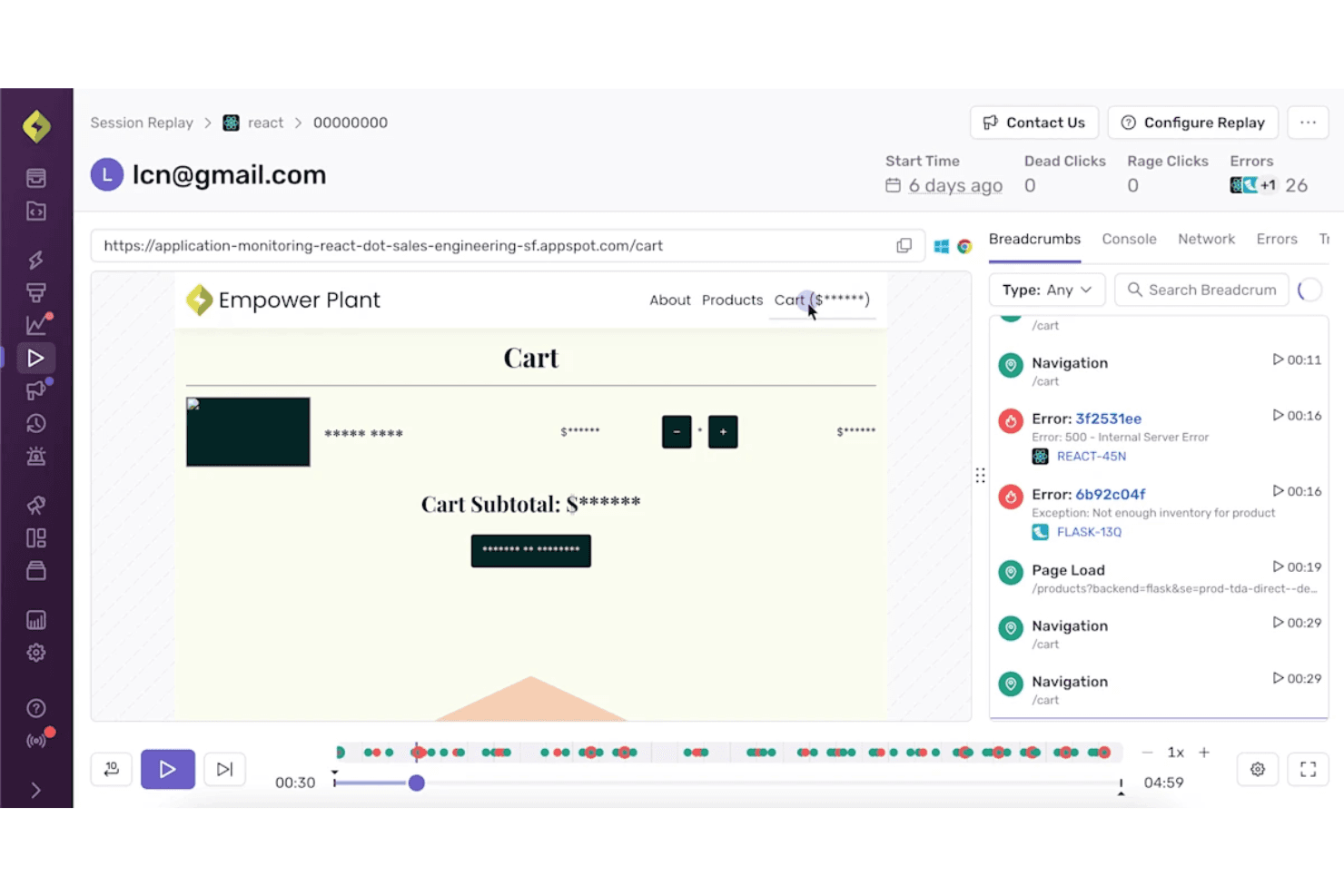
Sentry combines session replay with error details for clearer debugging context. Sentry is a free session replay platform for developer debugging that reconstructs web and mobile sessions, linking playback with errors, traces, console logs, network requests, and rage or dead-click signals.
Who Is Sentry Best For?
Sentry suits developer-led product teams that connect session replays with errors, traces, logs, and rage-click signals during bug triage.
Why I Picked Sentry
I picked Sentry for contextual user session replay because it connects DOM-based replays directly to errors, traces, console logs, and network requests. I use rage-click and dead-click signals to locate broken interactions quickly, then jump from an issue to the exact session moment. Its free plan supports focused debugging with 50 replays per month.
Sentry Key Features
- Mobile app replay: Captures sessions across iOS, Android, React Native, and Flutter apps.
- Session search: Filters replays by browser, device, URL, release, user, and custom tags.
- Privacy masking: Masks text, images, and keystrokes before replay data leaves the browser.
- Replay retention: Stores free-plan replays for 30 days.
Sentry Integrations
Sentry offers integrations with Jira, GitHub, GitLab, Linear, Slack, Microsoft Teams, Datadog, Splunk, Grafana, and Segment, plus SDKs for web, mobile, and server frameworks.
What's Free?
Sentry offers a free-forever plan rather than a limited-time trial. It includes 50 session replays per month, with free-plan replays retained for 30 days.
Pros and Cons
Pros:
- Default masking protects replayed user data
- Rage and dead clicks expose broken interactions
- Error-linked replays speed bug diagnosis
Cons:
- No funnels or heatmaps for UX analysis
- Limited replay volume weakens ongoing monitoring
Learn more about Sentry: Best for cookieless UX friction detection
- Free plan + 30-day free trial available
- From $2.99/month
Visit WebsiteCustomer Rating:4.7/5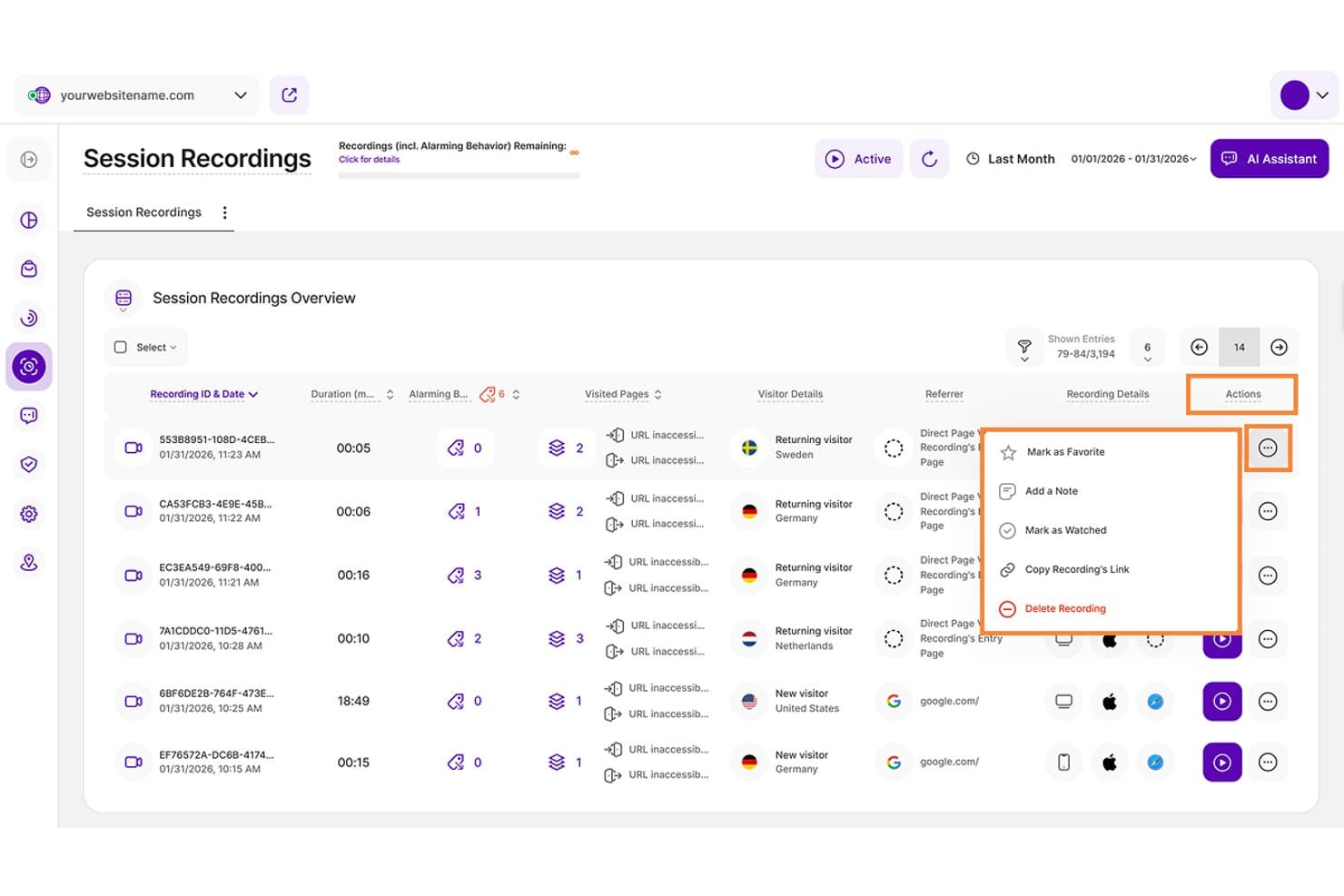
TWIPLA lets users manage session recordings with actions like notes and favorites. TWIPLA is a free session replay and web analytics platform with detailed playback, event timelines, stacked filters, friction signal detection, heatmaps, funnels, and privacy-focused tracking.
Who Is TWIPLA Best For?
Product managers, UX designers, and small teams that need privacy-focused replay analysis and cookieless UX friction detection.
Why I Picked TWIPLA
I picked TWIPLA for Best Free Session Replay Software because its cookieless tracking supports privacy-focused UX analysis. Six automatic friction signals, including rage clicks and dead clicks, appear directly on replay timelines, while stacked filters isolate funnel drop-offs and device patterns. Its Free Forever plan includes 25 recordings total, so it suits targeted investigations rather than ongoing high-volume monitoring.
TWIPLA Key Features
- Replay controls: Skip inactivity and review sessions at speeds up to 8x.
- Recording rules: Record selected URLs, active sessions, or visits above a minimum length.
- Heatmaps: Create click, movement, and scroll maps for desktop, tablet, and mobile.
- Session sharing: Copy recording links and add notes, favorites, or watched statuses.
TWIPLA Integrations
TWIPLA offers marketplace integrations through Wix App Market and Weebly App Center, plus a WordPress plugin. It also supports Google Tag Manager, TYPO3, Smartstore, Drupal, Joomla!, and October CMS, with API keys for custom integrations.
What's Free?
TWIPLA offers a Free Forever plan with 25 recordings total. It also provides a 30-day free trial, while ongoing replay analysis beyond the recording limit requires a paid plan.
Pros and Cons
Pros:
- Cookieless tracking supports privacy-focused UX analysis
- Detailed timelines jump directly to user actions
- Automatic friction signals flag rage clicks
Cons:
- Some iframe content escapes replay capture
- Free recording capacity limits ongoing monitoring
Learn more about TWIPLA: Best for replays linked to funnel drop-offs
- Free plan available
- From $120/month (billed annually)
Visit WebsiteCustomer Rating:4.5/5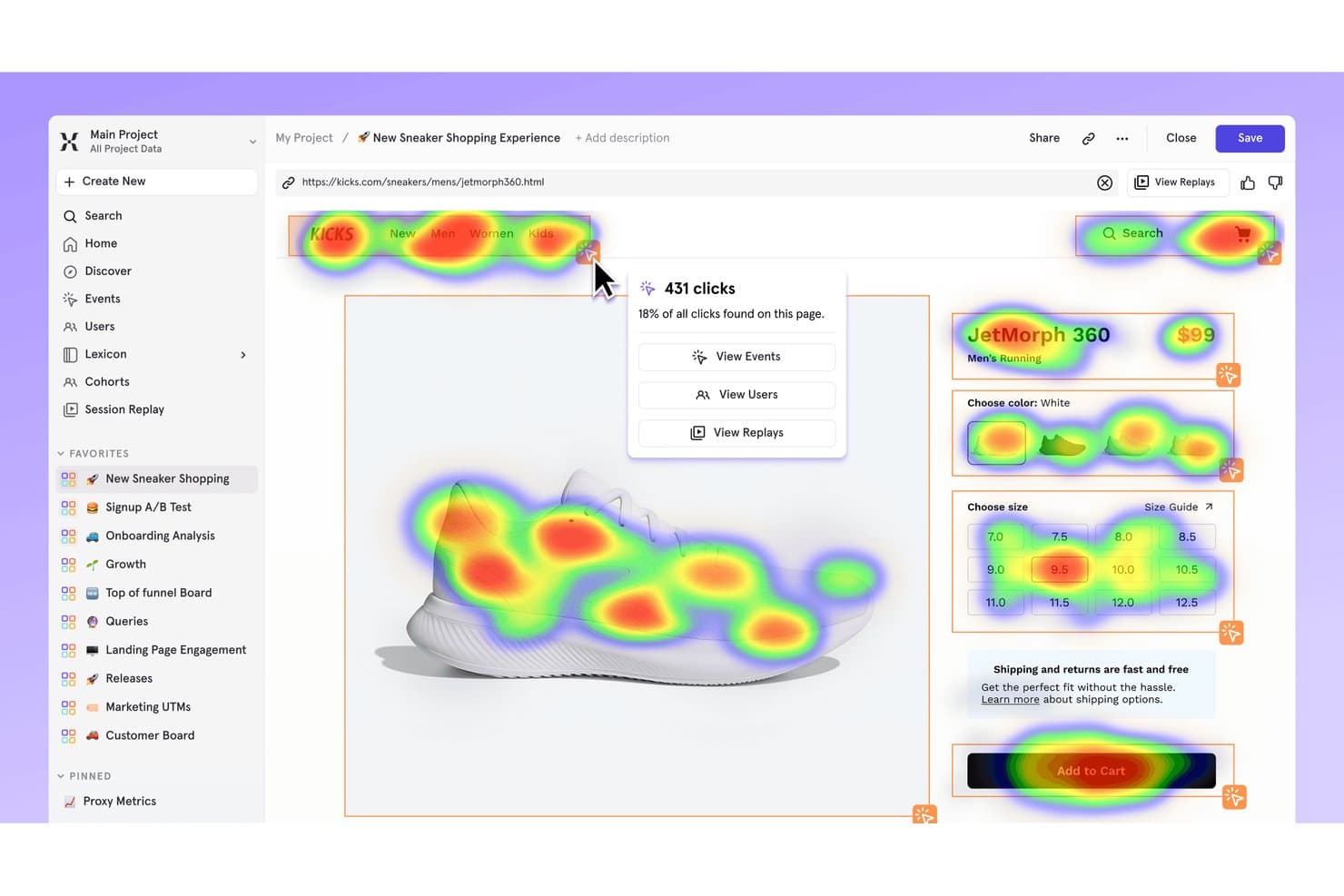
Mixpanel's heatmap shows where users click on a sneaker product page. Mixpanel is a free session replay and product analytics platform with DOM-based playback, funnel and cohort filters, heatmaps, frustration signals, console and network logs, and replay support for web and mobile apps.
Who Is Mixpanel Best For?
Product managers and lean product teams that need to connect session replays with funnel drop-offs, retention data, and user profiles.
Why I Picked Mixpanel
I picked Mixpanel because it links replays directly to funnel drop-offs. I can open sessions from funnel charts, filter them by events, cohorts, or properties, and inspect frustration signals, console logs, and network calls. That helps my team trace a checkout failure from an analytics report to the user behavior behind it.
Mixpanel Key Features
- DOM-based playback: Reconstructs sessions from page structure and changes rather than video.
- Heatmaps and scrollmaps: Visualizes clicks, page views, and scrolling on web pages.
- Mobile session replay: Captures replay data from iOS, Android, React Native, and Flutter apps.
- Privacy masking: Masks text, inputs, images, videos, and sensitive fields by default.
Mixpanel Integrations
Mixpanel offers native integrations with Segment and mParticle, plus JavaScript, iOS, Android, React Native, Flutter, and Electron SDKs. Its ingestion, query, and warehouse APIs support custom integrations.
What's Free?
Mixpanel offers a free-forever plan with unlimited seats, up to 1 million monthly events, and 10,000 session replays per month. It doesn’t charge overages, but platform access is limited after you reach the monthly event limit.
Pros and Cons
Pros:
- Masks sensitive data by default
- Supports web and mobile session replay
- Links replays directly to funnel drop-offs
Cons:
- Heatmaps and scrollmaps exclude mobile
- Retention ends after 30 days
 Best for behavioral data analytics
- Free plan + free demo available
- Pricing upon request
Visit WebsiteCustomer Rating:4.5/5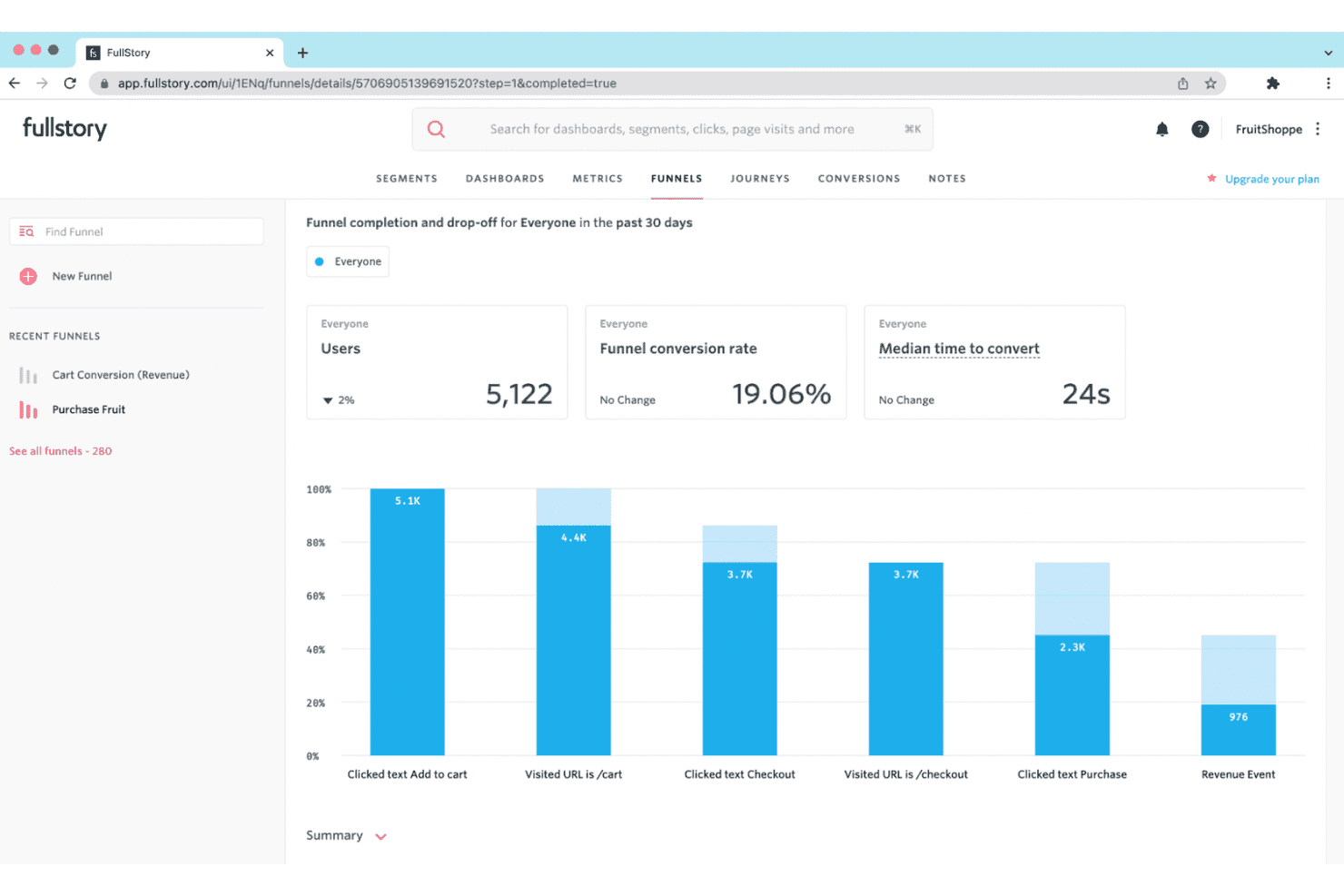
Fullstory provides session replays and behavior insights to help businesses improve digital experiences. Fullstory is a free session replay platform with tagless autocapture, searchable session filters, click and scroll maps, frustration-signal detection, and console and network debugging tools.
Who Is Fullstory Best For?
Fullstory suits product managers and UX designers who need to diagnose usability issues through session replays, heatmaps, and behavioral signals.
Why I Picked Fullstory
I picked Fullstory because its behavioral data analytics connect session evidence with user frustration. I use OmniSearch to isolate rage clicks, dead clicks, and page-speed issues, then review click and scroll maps to locate friction. Dev Tools also links error clicks to console and network activity, helping me trace usability problems to their technical cause.
Fullstory Key Features
- Tagless autocapture: Captures web interactions without manual event tagging.
- Replay controls: Adjust playback speed, skip inactivity, and filter event lists.
- Privacy masking: Masks passwords, payment details, and personal information by default.
- Guest sharing: Creates replay links for external viewers without using team seats.
Fullstory Integrations
Fullstory offers integrations with Slack, Segment, Jira, Adobe Analytics, and Google Tag Manager. It also provides an open API, webhooks, data export, and consent and identity APIs for custom connectivity.
What's Free?
FullstoryFree is a free plan rather than a limited-time trial, with no credit card required. It includes up to 30,000 sessions monthly, 12 months of retention, and 10 users, but excludes advanced features such as dashboards, webhooks, and StoryAI.
Pros and Cons
Pros:
- Heatmaps reveal click and scroll behavior
- Console and network logs aid bug diagnosis
- Detailed frustration signals surface hidden friction
Cons:
- Free data may support AI training
- Capture stops after monthly session cap
Learn more about Fullstory: Best for replays linked to funnels and journeys
- Free plan available
- Pricing upon request
Visit WebsiteCustomer Rating:4.5/5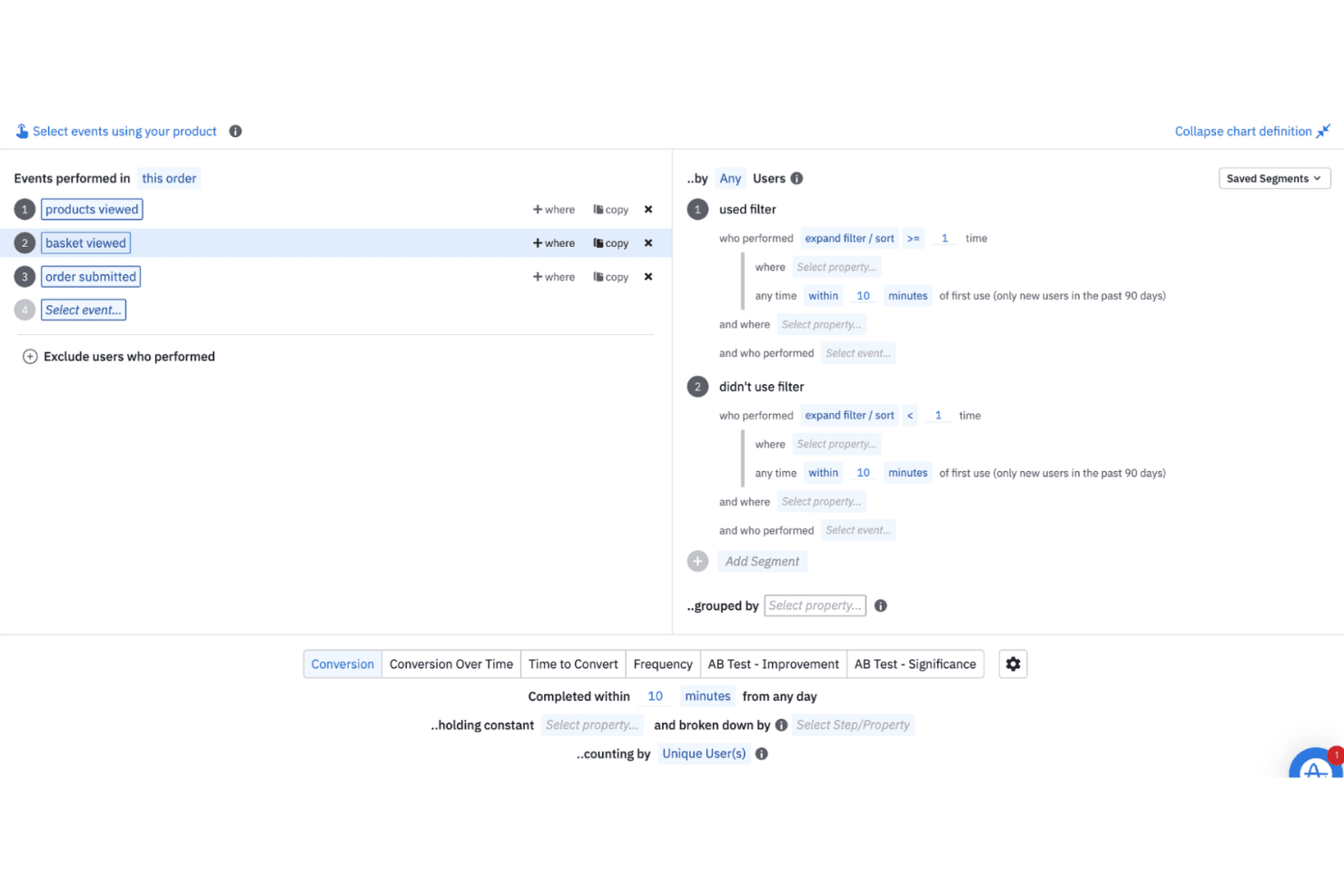
Amplitude helps teams analyze real-time and historical user behavior to guide product decisions. Amplitude is a free session replay software platform with web and mobile recording, event timelines, funnel and journey views, replay search, rage-click detection, and console and network logs.
Who Is Amplitude Best For?
Product managers and digital marketers who need to connect session replays with funnels, journeys, experiments, and user behavior data.
Why I Picked Amplitude
I picked Amplitude because it links session replays directly to funnels and journeys. I can open recordings from a conversion drop-off, then use event timelines, replay search, and rage-click detection to investigate friction. Its free plan includes 10,000 replays monthly, making continuous product diagnosis practical.
Amplitude Key Features
- Console and network logs: Review JavaScript messages, failed requests, and API activity beside replays.
- Mobile app replay: Capture sessions from iOS, Android, React Native, and Flutter applications.
- Privacy masking: Mask text fields, inputs, passwords, cards, phones, and emails by default.
- Skip inactivity: Jump past idle periods with playback controls and adjustable replay speed.
Amplitude Integrations
Amplitude lists 159+ integrations, including Segment, Snowflake, BigQuery, Slack, Optimizely, LaunchDarkly, and HubSpot. SDKs, Google Tag Manager, and the Replay Search API support custom data and replay workflows.
What's Free?
Amplitude offers a free-forever plan with no credit card required. It includes up to 10,000 session replays and 2 million events monthly, with one month of replay retention and unlimited seats.
Pros and Cons
Pros:
- Supports web, iOS, Android, and cross-platform apps
- Exposes console and network errors beside replays
- Links replays directly to funnels and journeys
Cons:
- Requires SDK instrumentation before recording sessions
- Replays expire after one month
Learn more about Amplitude: Best for behavior-based session filtering
- 14-day free trial available
- Plans start at $65/month
Visit WebsiteCustomer Rating:4.6/5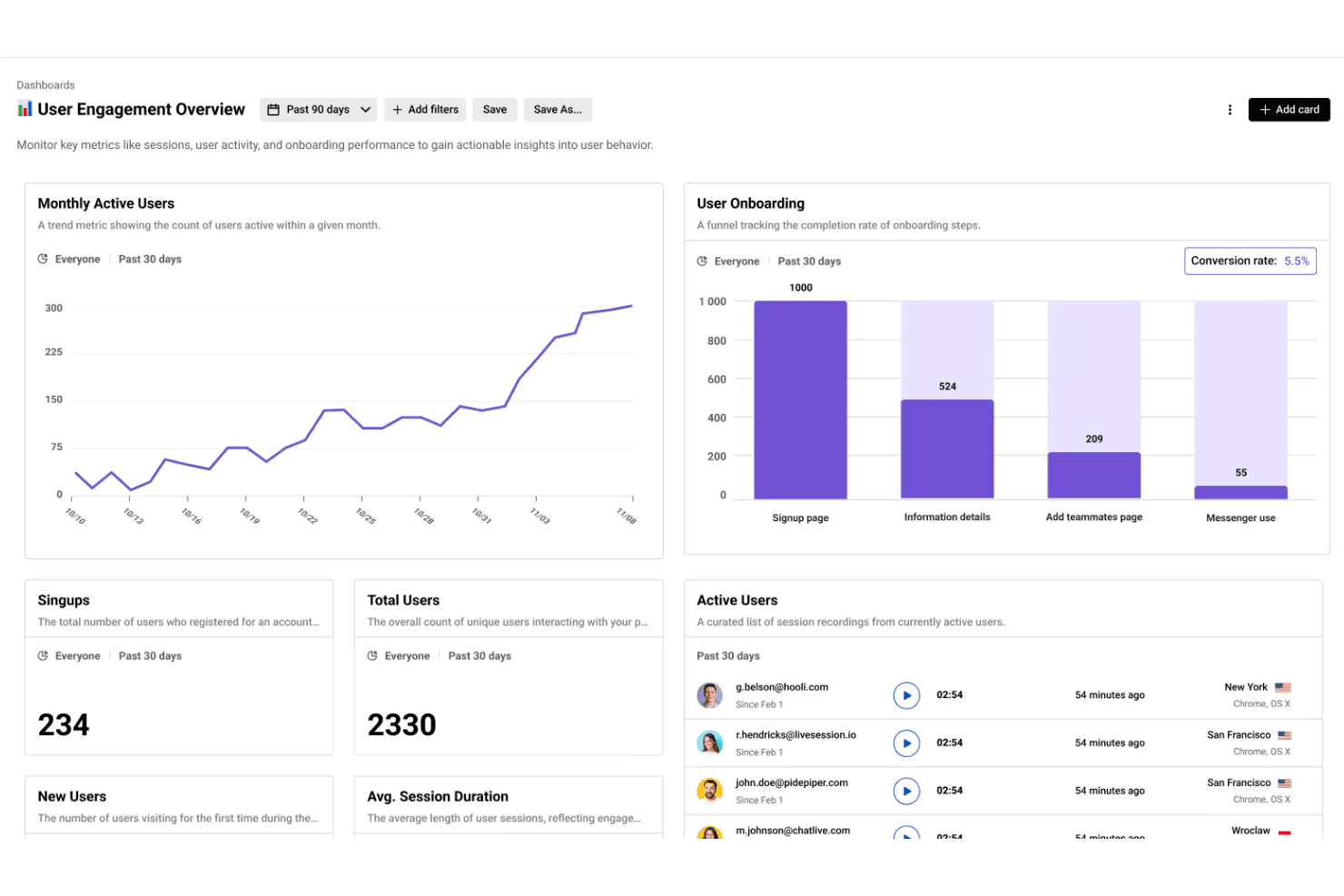
LiveSession combines session replays with analytics to help teams track KPIs and boost user engagement. LiveSession is a session replay and product analytics platform combining mouse, click, and scroll recordings with heatmaps, funnels, segments, filters, and rage and error click detection.
Who Is LiveSession Best For?
LiveSession suits product managers and UX designers at small teams who need behavior-based filtering to diagnose friction in web experiences.
Why I Picked LiveSession
I picked LiveSession because its behavior-based session filtering helps me investigate friction without watching recordings at random. I can combine search terms, save reusable segments, and use Inspect Mode to find clicks on specific CSS elements. The Events explorer also connects rage and error clicks to the replays where users struggled.
LiveSession Key Features
- Heatmaps: Visualize click activity and interaction intensity by URL.
- Funnel analysis: Track user progression through one defined conversion flow.
- Resource backup: Preserve replay styles and fonts after original files are deleted.
- Sensitive input masking: Automatically anonymize passwords and card details.
LiveSession Integrations
LiveSession documents 26 integrations, including Google Analytics, Segment, Mixpanel, Sentry, Bugsnag, Intercom, Zendesk, Slack, Google Tag Manager, and Zapier. Its REST API is available on Pro and above for custom integrations.
What's Free?
LiveSession offers a free-forever plan with session replay, heatmaps, funnels, filters, and segments. It includes 1,000 sessions monthly, one month of data retention, three team members, and two websites or projects; sessions exceeding the monthly limit aren’t recorded. A 14-day Pro trial is also available without a credit card.
Pros and Cons
Pros:
- Heatmaps complement mouse and scroll replays
- Rage and error clicks expose friction
- Behavior-based filtering narrows replay investigations quickly
Cons:
- Developer diagnostics lack console and network context
- Native mobile app replay remains unavailable
Learn more about LiveSession: Best for eye-tracking heatmaps on free plans
- Free plan available
- From $39/month
Visit WebsiteCustomer Rating:4.1/5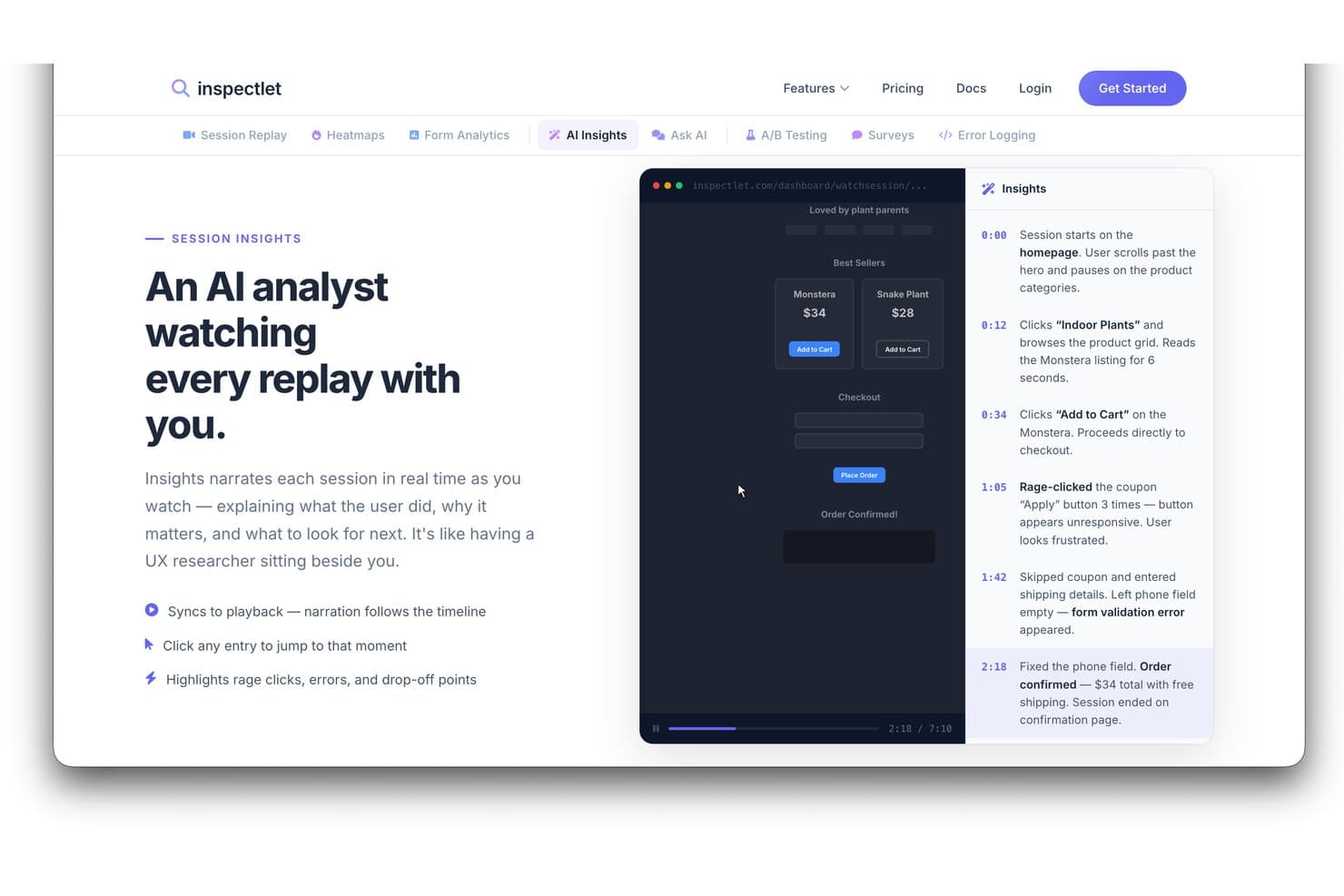
Inspectlet's AI Insights narrates session replays with timestamped events. Inspectlet is free session replay software that combines visitor recordings, heatmaps, AI session analysis, error and rage-click detection, filtering, and A/B testing for websites and single-page applications.
Who Is Inspectlet Best For?
Inspectlet suits product managers and UX designers who need free session replay with eye-tracking heatmaps to diagnose web usability issues.
Why I Picked Inspectlet
I picked Inspectlet as Best for eye-tracking heatmaps on free plans because its free tier maps mouse movement across live pages. I use click dots and scroll-depth maps to see whether visitors notice key CTAs or abandon early. Replay-linked rage-click and JavaScript error detection then connects visual friction to sessions needing investigation.
Inspectlet Key Features
- Session timeline: Review clicks, navigation, and page events in sequence.
- Session filtering: Combine visitor, source, device, page, and conversion filters.
- A/B testing: Create experiments with a visual editor and significance calculations.
- Sensitive data masking: Exclude passwords and selected fields from recordings.
Inspectlet Integrations
Inspectlet documents integrations or setup options for Google Tag Manager, WordPress, Shopify, HubSpot, Convert.com, Slack, and webhooks. API access starts on Growth for custom integrations.
What's Free?
Inspectlet offers a free-forever plan with no credit card or time limit, covering up to 2,500 recorded sessions monthly across three websites. It includes session replay, heatmaps, and A/B testing, but stores data for one month and stops recording new sessions after you reach the monthly limit.
Pros and Cons
Pros:
- Reviewers praise filtering specific sessions
- Rage clicks link directly to replays
- Eye-tracking heatmaps clarify visual attention
Cons:
- Single-user access restricts team review
- Free retention limits historical comparisons
Learn more about Inspectlet: Best for self-hosted open-source replay
- Free plan available
- From $250/month
Visit WebsiteCustomer Rating:4.5/5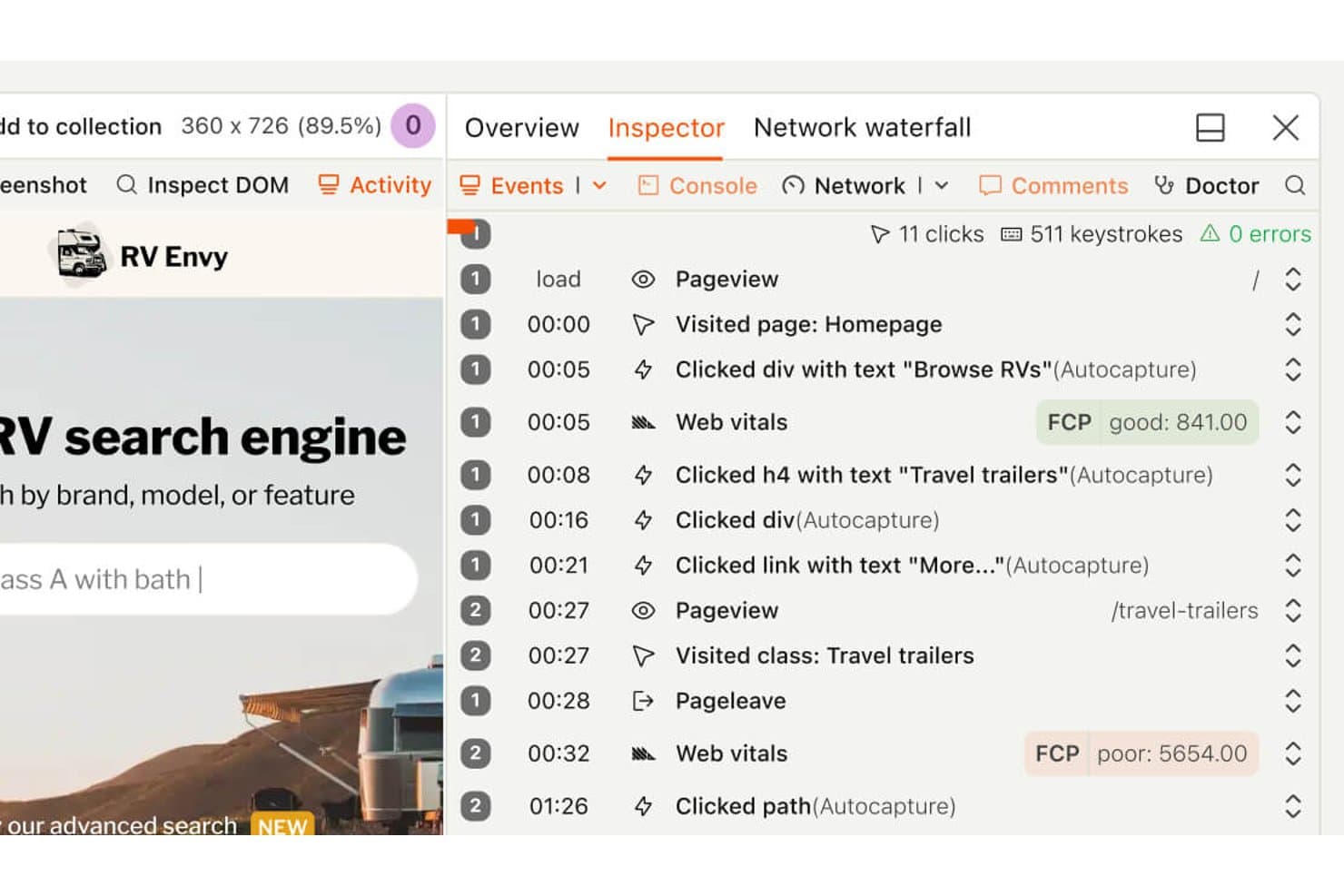
PostHog's session replay timeline shows user clicks and page visits. PostHog is free session replay software that combines DVR-style playback, heatmaps, funnel analysis, feature flags, experiments, error tracking, and synced console and network logs across web and mobile apps.
Who Is PostHog Best For?
PostHog suits product and engineering teams that need open-source, self-hosted session replay alongside funnels, experiments, and error tracking.
Why I Picked PostHog
I picked PostHog because its self-hosted open-source replay runs under the MIT license, giving teams control over their analytics stack. I can pair DVR-style playback with synced console logs, network waterfalls, and a DOM explorer to investigate bugs. Funnel-to-replay links also show where users abandon key product flows.
PostHog Key Features
- Heatmaps: Create heatmaps, scrollmaps, and clickmaps for up to three URLs.
- Frustration signals: Find sessions with rage clicks, dead clicks, or exceptions.
- Mobile replay: Capture sessions from iOS, Android, React Native, and Flutter apps.
- AI session summaries: Ask PostHog AI to find, watch, and summarize recordings.
PostHog Integrations
PostHog integrates with Intercom and Crisp for replay links, plus 50+ CDP destinations including Slack, Salesforce, HubSpot, and PagerDuty. It also provides an API and MCP server for custom workflows.
What’s Free?
PostHog’s free plan lasts indefinitely with no credit card or trial expiry, and includes 5,000 web recordings or 2,500 mobile recordings monthly. It supports unlimited team members but limits you to one project and one month of recording retention; unused recording allowances don’t roll over.
Pros and Cons
Pros:
- Funnel links connect drop-offs to recordings
- Synced console and network logs aid debugging
- Open-source self-hosting supports analytics control
Cons:
- General page text requires manual masking
- Heatmaps cover only three page URLs
Learn more about PostHog: Best for debugging sessions tied to feature flags
- Free plan + free trial available
- From $50/month
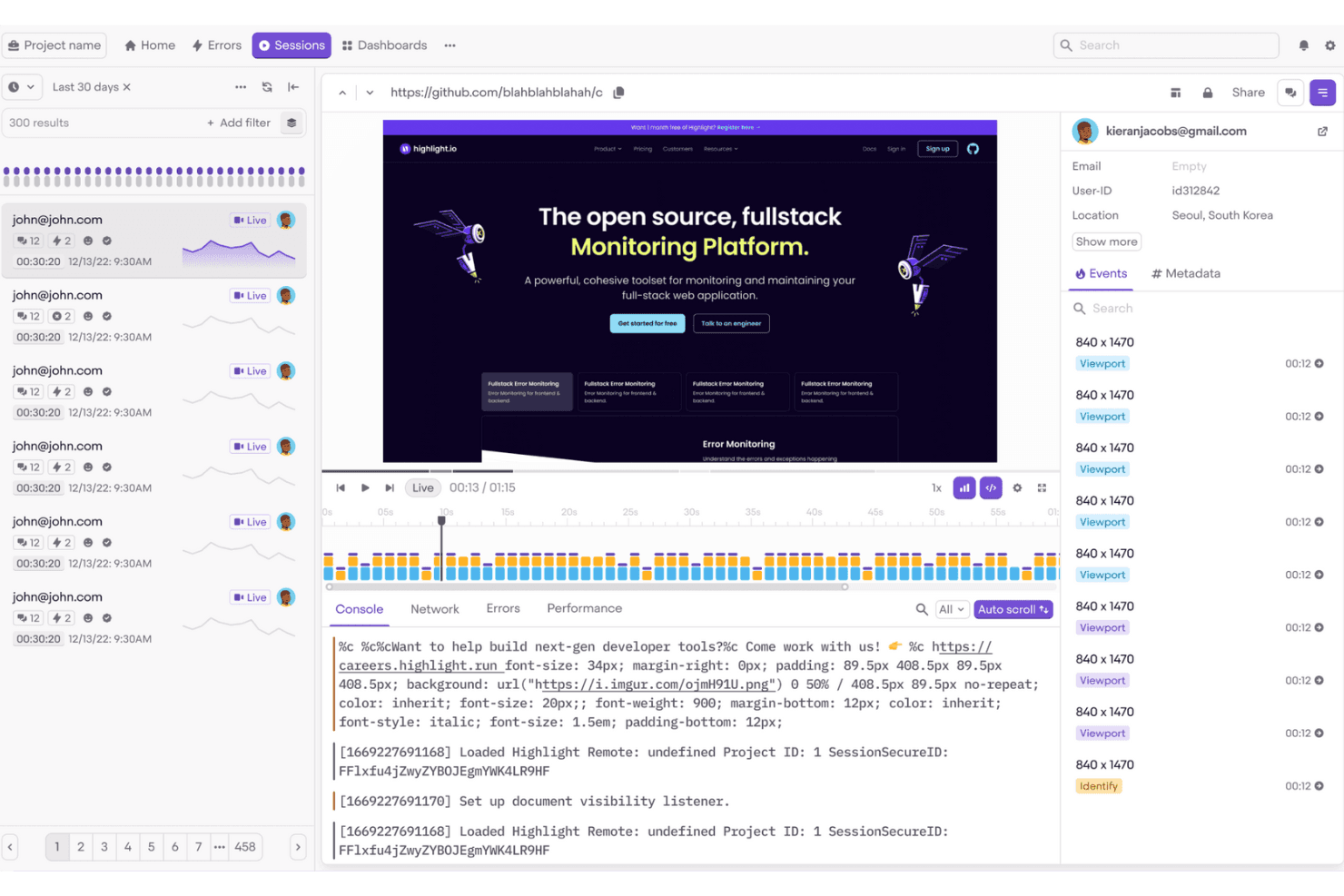
Highlight.io helps frontend teams monitor and debug user sessions easily. Highlight is session replay and observability software, now delivered through LaunchDarkly, with web and mobile playback, flexible session search, console and network logs, error and rage-click detection, and feature-flag context.
Who Is Highlight Best For?
Highlight suits developer-adjacent product teams that need to debug user sessions alongside feature flags, errors, and release context.
Why I Picked Highlight
I picked Highlight because it’s best for debugging sessions tied to feature flags. I can compare replayed sessions by the flags users saw, then inspect console and network logs alongside errors or rage clicks. That makes it easier to verify whether a flagged design change caused friction before expanding its rollout.
Highlight Key Features
- Flexible session search: Filter sessions by identity, device, location, URLs, clicks, and custom event properties.
- Privacy masking: Hide text, images, form inputs, and sensitive data before collection.
- Mobile replay support: Record sessions from Android, iOS, Flutter, and React Native apps.
- Heatmaps: Visualize clicks, taps, and scroll activity with color-coded maps.
Highlight Integrations
Highlight offers a native Jira Cloud integration and connects Vega with GitHub and Slack. It also supports OpenTelemetry and an MCP Server for custom observability workflows.
What’s Free?
Highlight offers a free plan, so you can use it without a time-limited trial. Paid pricing is available upon request, but specific free-plan limits aren’t listed here.
Pros and Cons
Pros:
- Connects replays with errors and logs
- Searches sessions by detailed user context
- Debugs sessions alongside feature flags
Cons:
- Free recording stops at monthly cap
- Requires developer-led SDK setup
Learn more about Highlight: Best for open-source self-hosted replay
- Free plan + 7-day free trial available
- From $5.95/1000 sessions/month
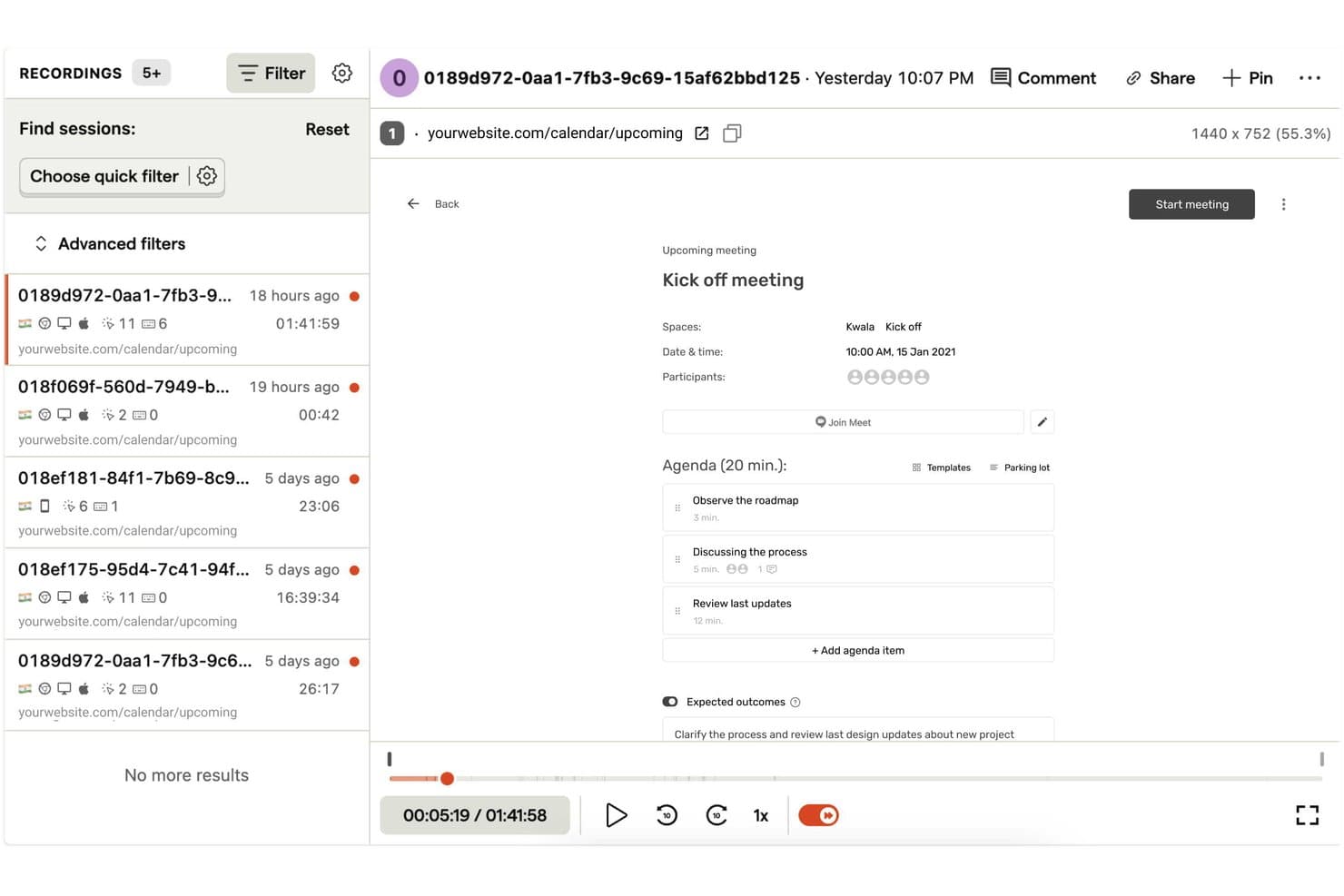
OpenReplay lets users replay and filter recorded user sessions with ease. OpenReplay is a session replay platform with pixel-perfect web and mobile recordings, synchronized console and network logs, heatmaps, error tracking, product analytics, and replay search.
Who Is OpenReplay Best For?
Product and UX teams with DevOps support who need customizable, self-hosted replay and full control over user data.
Why I Picked OpenReplay
I picked OpenReplay because its free, open-source self-hosted edition gives my team control over replay data and customization. We can inspect rage clicks, errors, and dead clicks through OmniSearch, then review synchronized console and network logs. That helps us diagnose a checkout failure without sending customer data to a third-party processor.
OpenReplay Key Features
- Multi-tab sessions: Joins activity across browser tabs into one user journey.
- Heatmaps: Visualizes clicks, mouse movement, and rage-click hotspots.
- Mobile app replay: Supports iOS, Android, React Native, and Flutter SDKs.
- Session highlights: Clips replay moments with notes, tags, and shareable links.
OpenReplay Integrations
OpenReplay offers integrations with Sentry, Datadog, Jira, GitHub, Slack, Google Tag Manager, Redux, Vuex, Pinia, and Apollo. Its REST API supports custom connections for sessions, users, events, and live data.
What's Free?
OpenReplay’s open-source edition is free forever when you host it on your own infrastructure. It’s intended for low-traffic applications, and you’ll manage hosting, storage, scaling, and support through the community.
Pros and Cons
Pros:
- Adjustable 180-day retention supports longer investigations
- Deep diagnostics connect replays with technical context
- Free self-hosting preserves complete data control
Cons:
- Free edition targets low-traffic applications
- Self-hosting demands ongoing DevOps maintenance
Learn more about OpenReplay:
Other Free Session Replay Software
Here are some additional session replay software options that also offer free plans or trials. While these tools didn’t make it onto my shortlist, they’re still worth checking out:
- 11FullSessionBest for free mobile and web session replay
- 12Microsoft ClarityBest for unlimited session replays at no cost
- 13Hotjar (by Contentsquare)Best for heatmaps, surveys, and session replays in one
- 14UXCamBest for mobile app session replay on free
- 15SmartlookBest for retroactive session replays
- 16Lucky OrangeBest for live chat triggered by rage clicks
- 17MouseflowBest for form drop-off and field-level replay
- 18LogRocketBest for dev-level debugging in session replay
- 19StatsigBest for replays filtered by experiment exposure
- 20ContentsquareBest for enterprises needing GDPR-compliant trials
How I Evaluate Free Session Replay Software
First, I define what counts as free. Session replay software needs a free-forever plan with meaningful monthly recordings and usable retention—not a trial or token quota. From there, I split my evaluation into three parts: core functionality, which carries the most weight, like replaying sessions and filtering recordings; standout features, like heatmap generation; and beyond features, like plan scaling.
Core Functionality (Table Stakes For This List)
In addition to my free plan requirements, I use a scoring system to select tools for my list. I score each one on a scale from 0 (does not offer the functionality) to 5 (excels in this area) for each core functionality listed below, based on what's available on the free plan. I then convert the total into a percentage to help assess each tool's overall fit, with extra weight on any functionalities I've deemed essential.
- Session Recording (Essential): I look for accurate playback with standard controls, clear interaction timelines, and enough detail to review checkout or onboarding sessions.
- Session Filtering: I evaluate filters for pages, devices, dates, and behaviors that help isolate sessions around a specific drop-off.
- Click And Scroll Tracking: I check whether clicks, scroll depth, and cursor movement are easy to interpret during a usability review.
- Error And Rage Detection: I look for automatic flags for rage clicks, dead clicks, and JavaScript errors that help locate reported friction.
- Data Retention Window: I assess whether recordings remain available long enough to compare findings across a product review or release cycle.
Once I have a list of tools that meet the criteria, I consider what sets each platform apart.
Differentiating Factors (What Sets Vendors Apart)
Here's how I compare and contrast different vendors:
Standout Features
I look for console and network logs inside the replay timeline. When a user hits a broken checkout flow, seeing the JS error inline saves me from filing a vague bug report and waiting on engineering to reproduce it. Shareable replay links matter just as much—I evaluate whether I can drop a timestamped clip into a Slack thread or Jira ticket so designers and engineers see exactly what I saw. I also check for heatmap generation on the free plan, since aggregate click and scroll maps help me spot patterns across hundreds of sessions that a single replay can't reveal.
Beyond Features
I evaluate how many seats the free plan includes, since session replay loses value if only one person can access it. Tools like PostHog and Microsoft Clarity don't gate seats, which lets PMs, designers, and engineers review sessions without juggling logins. I also check implementation effort—a single-snippet install gets a team watching replays the same day, while SDK-heavy setups can stall adoption for weeks. Default PII masking on the free tier matters too, because product teams working with user data need privacy controls in place before the first recording starts.
How to Choose Free Session Replay Software
Complex feature lists and pricing structures can make it hard to figure out what you’re really getting from a free session replay software. To help you stay focused as you work through your software selection process, here are some factors to keep in mind:
| Factor | What to Consider |
| Free Offer Scope | Check what's included in the free plan, such as session limits, features, and user access. Ensure it meets your basic needs without immediate upgrades. |
| Scalability | Consider if the tool can grow with your team. Look for flexible plans that accommodate increased traffic and user demands over time. |
| Integrations | Ensure compatibility with your existing tools. Look for integrations with platforms like Google Analytics, CRM systems, and marketing tools. |
| Ease of Use | Evaluate the user interface and navigation. A tool that's easy to set up and use will save your team time and reduce the learning curve. |
| Privacy Compliance | Verify the tool complies with data protection regulations like GDPR. This is crucial to protect user data and maintain trust. |
| Feature Depth | Assess the depth of features offered, such as heatmaps, session replays, and user segmentation. More features provide better insights into user behavior. |
| Customer Support | Look for responsive support options like live chat or email. Reliable support helps resolve issues quickly and keeps your team productive. |
What Is Free Session Replay Software?
Session replay software is a tool that records user interactions on websites or apps, providing insights into user behavior. These tools often offer free plans or trials with limited features or usage caps. Product managers, UX designers, and marketers typically use them to improve user experience and optimize conversion rates. Heatmaps, session recordings, and user path analysis help teams understand user behavior and identify areas for improvement.
Features of Free Session Replay Software
Let’s review the features commonly found in session replay software, and which are usually included in free vs. paid plans.
Typically Free Session Replay Software Features
- Session recordings: Capture user interactions on your site to understand behavior and identify issues.
- Heatmaps: Visualize where users click and scroll to optimize page layout and content.
- User path analysis: Track the journey users take on your site to find drop-off points.
- Basic analytics: Provide insights into user behavior with simple metrics and data.
- Feedback tools: Collect user opinions directly to improve the overall experience.
Typically Paid Session Replay Software Features
- Advanced segmentation: Filter session data by user demographics or behavior for deeper insights.
- A/B testing: Test different versions of your site to see which performs better with users.
- Real-time monitoring: Observe user interactions as they happen to quickly address issues.
- Customizable dashboards: Tailor data views to focus on metrics most relevant to your goals.
- Privacy compliance tools: Ensure data collection aligns with regulations like GDPR and CCPA.
Benefits of Free Session Replay Software
Implementing free session replay software provides several benefits for your team and your business. Here are a few you can look forward to:
- Cost-effective analysis: Gain insights into user behavior without spending money, making it ideal for startups and small businesses.
- User behavior insights: Understand how users interact with your site through session recordings and heatmaps, helping you identify problem areas.
- Improved user experience: Use feedback tools to gather user opinions and make necessary adjustments to enhance the overall experience.
- Data-driven decisions: Leverage basic analytics to inform decisions and optimize website performance based on actual user data.
- Quick setup: Many free tools offer easy installation and setup, allowing your team to start analyzing user behavior quickly.
- No long-term commitment: Try out features and benefits without being locked into a contract, providing flexibility to explore different options.
- Privacy compliance: Some free tools include basic privacy features to help ensure user data is handled responsibly.
Costs and Pricing of Free Session Replay Software
I realize you came to this article looking for the best session replay software options that are available for free. However, since free plans only offer limited features, there's a good chance you'll need to scale your plan up in the future.
The table below summarizes common plans, their average prices, and typical features included in session replay software solutions:
Plan Comparison Table for Session Replay Software
| Plan Type | Average Price | Common Features |
| Free Plan | $0 | Session recordings, basic analytics, heatmaps, user feedback tools, and limited data storage. |
| Personal Plan | $5-$25/user/ month | Advanced analytics, user segmentation, more data storage, and priority customer support. |
| Business Plan | $50-$100/user /month | Customizable dashboards, real-time monitoring, A/B testing, and enhanced privacy compliance tools. |
| Enterprise Plan | $150+/user/ month | Full feature access, dedicated account management, custom integrations, and comprehensive support. |
Free Session Replay Software FAQs
Here are some answers to common questions about free session replay software:
Why should you use session replays in user research for mobile apps?
Session replays provide invaluable insights into user interactions within your app. They help your team quickly identify issues and debug faster, enhancing the user experience with each visit. This data is crucial for refining mobile app design and functionality to meet user expectations.
What is the main purpose of session replay?
The main purpose of session replay is to understand user behavior and identify where the user journey is disrupted. This data helps you build user flows that meet customer expectations and improve overall site performance.
How does Datadog session replay work?
Datadog’s session replay logs every change to the DOM, such as user inputs, as events. It then strings these events into a visual representation of each user’s session, allowing you to see exactly what users experience on your site.
What is the sample rate for Datadog session replay?
The sample rate in Datadog’s session replay configuration ranges from 0.0 to 100.0. It determines the percentage of sessions recorded, where 0 means no replays and 100 means all sessions are included. Adjust this to control your data volume.
How do session replays help improve customer journeys?
Session replays highlight areas where users face challenges, helping you pinpoint and resolve issues. By understanding these pain points, your team can make data-driven decisions to smooth the customer journey and improve satisfaction.
Can session replay data be used for debugging?
Yes, session replay data is incredibly useful for debugging. By watching replays, developers can see exactly where errors occur in the user journey, allowing for quicker identification and resolution of issues.