

Free product roadmap tools should make your life easier—but too often, they’re limited, clunky, or just plain confusing. You need a tool that helps align your team, prioritize work, and drive the product forward—without stretching your budget. I’ve led product launches with tight timelines and tighter wallets, and tested plenty of free roadmap tools along the way. These are the ones that actually work, plus their best features, pros & cons, and more.
Why Trust Our Software Recommendations
6,700+
Reviews
20
Industry experts
16+
Evaluation factors
14
Years
Our team has been testing and reviewing software since 2012. As product managers ourselves, we know how difficult—and important—it is to choose the right software.
For this guide, we evaluated tools using hands-on testing and independent research, scoring tools using our selection criteria.
Our reviews reflect our human editorial judgment, not a sales pitch.
Expert reviewers:
- Andrew LumbySenior TPM
- Cristiano ValimSenior UI/UX Lead


Free Product Roadmap Tools Comparison Table
Here is a table you can use to compare the pricing of the tools we just covered in the overviews.
| Tool | Best For | Trial Info | Price | ||
|---|---|---|---|---|---|
| 1 | Best for publishing live Jira-based roadmaps | 30-day free trial + free plan available | From $1.10/user/month | Website | |
| 2 | Best for visual collaboration & innovation | Free plan + 14-day free trial available | From $8/user/month (billed annually) | Website | |
| 3 | Best for transparent public roadmaps | Free plan available | From $8/month (billed annually) | Website | |
| 4 | Best for engineering-led agile roadmapping | Free plan available | From $4/user/month | Website | |
| 5 | Best for free Gantt charts | Free plan available | From $7/user/month (billed annually) | Website | |
| 6 | Best for replacing documents and spreadsheets | Free plan available | From $12/user/month (billed annually) | Website | |
| 7 | Best for converting feedback into roadmap items | Free plan available | From $79/month (billed annually) | Website | |
| 8 | Best for docs, wikis, and roadmaps in one place | Free plan + free demo available | From $10/user/month (billed annually) | Website | |
| 9 | Best for agile idea-to-delivery roadmapping | Free plan available | From $8.48/user/month | Website | |
| 10 | Best for formula-driven feature prioritization | Free plan available; 14-day free trial; free demo available | From $12/user/month (billed annually) | Website |


Best Free Product Roadmap Tool Reviews
Here’s a brief description of each free product roadmap tool to showcase what each tool does best, including screenshots to highlight some of the features.
 Best for publishing live Jira-based roadmaps
- 30-day free trial + free plan available
- From $1.10/user/month
Visit WebsiteCustomer Rating:5/5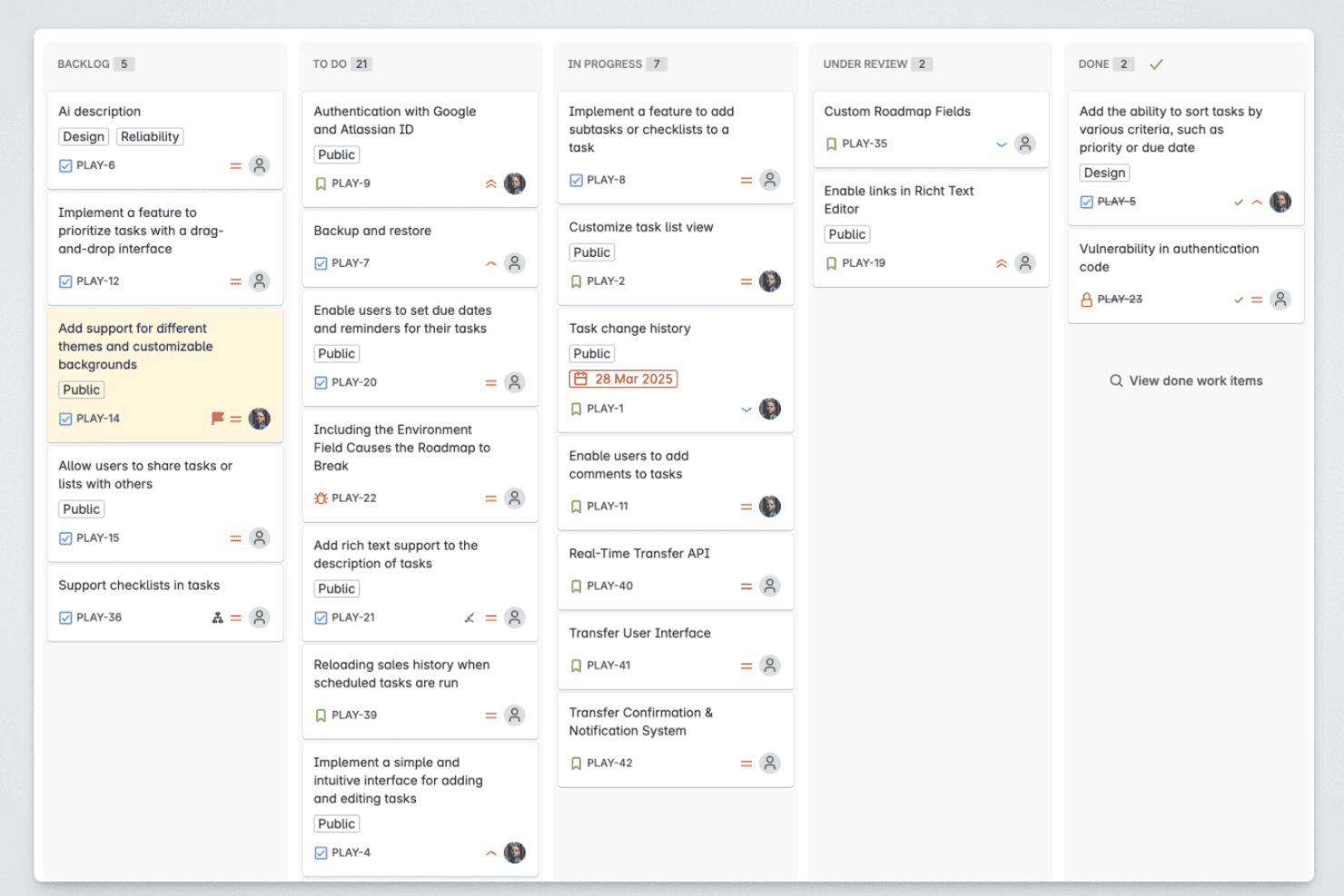
Released lets product managers organize roadmap items across backlog, in-progress, review, and completed stages. Released is a Jira-native product roadmap tool for product managers that turns Jira and Jira Product Discovery issues into customizable board and timeline roadmaps, with feedback portals, audience-specific views, and AI release notes.
Who Is Released Best For?
Released suits product managers on Jira Cloud who need branded, live roadmap views for customers, executives, and cross-functional teams.
Why I Picked Released
I picked Released because it is best for publishing live Jira-based roadmaps. I use its Board and Timeline views to turn Jira and Jira Product Discovery issues into customer-ready plans without duplicate data entry. Audience-specific views let my team show separate priorities to customers, leadership, marketing, and sales.
Released Key Features
- Feedback inbox: Triage portal, embedded, and Slack feedback in one workspace.
- AI release notes: Draft release notes from shipped Jira tickets.
- Idea portals: Collect customer ideas, comments, and wishlist requests.
- Confluence and Slack publishing: Share roadmap updates through connected channels.
Released Integrations
Released has native integrations with Jira Cloud, Jira Product Discovery, Confluence, and Slack. Its Atlassian Forge apps publish Jira data to roadmaps, Confluence, and Slack while inheriting Jira permissions.
What's Free?
Released offers a $0 Free plan for up to 10 users, with 2,000 AI tokens per user, unlimited idea portals, feedback inboxes, public roadmaps, and Jira linking. It’s available for Jira Cloud only; paid plans include a 30-day free trial and add users, AI capacity, and feedback features.
Pros and Cons
Pros:
- Feedback stays linked to Jira work
- Branded views need no viewer licenses
- Publishes live Jira-based roadmaps
Cons:
- Requires Jira Cloud for every team
- Prioritization remains outside Released
Learn more about Released: 2Best for visual collaboration & innovation
Miro
- Free plan + 14-day free trial available
- From $8/user/month (billed annually)
Visit WebsiteCustomer Rating:4.8/5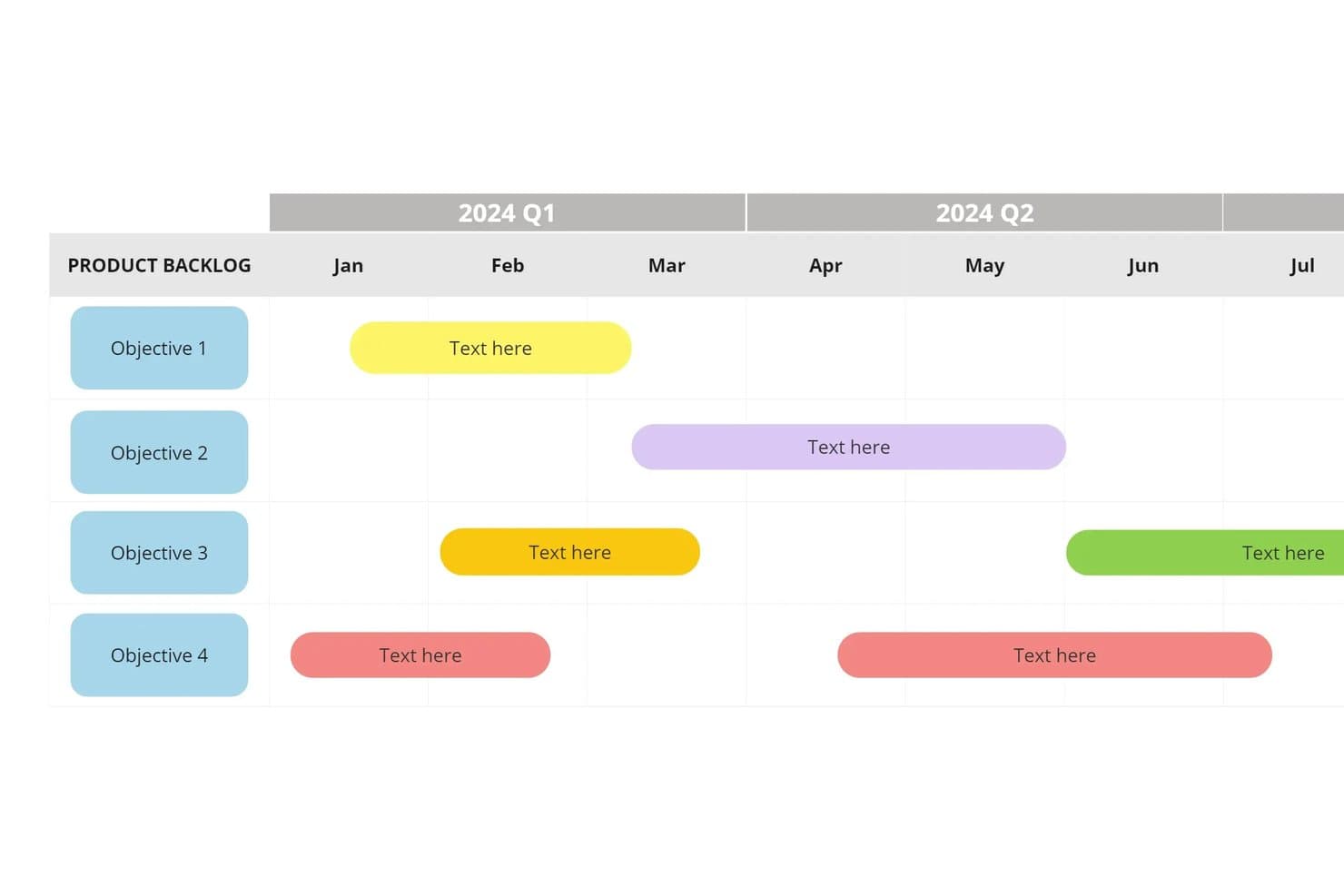
Miro lets users visualize product objectives on a timeline roadmap. Miro is a product roadmap and visual collaboration workspace with a free plan, canvas-based roadmap templates, Kanban boards, prioritization matrices, cards, comments, and integrations for product planning.
Who Is Miro Best For?
Product managers at startups and small teams who need a collaborative canvas for visual roadmaps, prioritization workshops, and cross-functional planning.
Why I Picked Miro
I picked Miro because its visual collaboration supports product planning beyond a static roadmap. I use Now-Next-Later, quarterly, and impact-versus-effort templates to connect discovery decisions with delivery priorities. Live cursors, comments, and Talktrack help product, design, and engineering teams shape release plans together.
Miro Key Features
- Kanban boards: Organize roadmap items into customizable status columns.
- 250+ integrations: Connect product planning with Jira, Slack, Microsoft 365, and Google Workspace.
- Docs, Tables, And Slides: Present product plans in multiple formats.
- AI credits: Use 10 monthly credits for supported AI features on the free plan.
Miro Integrations
Miro offers 250+ integrations, including Jira, Confluence, Slack, Microsoft 365, Google Workspace, and Azure DevOps. Its public API and SDK support custom integrations, while two-way sync with Jira and Azure DevOps requires Business+.
What's Free?
Miro offers a free-forever plan with unlimited team members, three editable boards, and 10 AI credits per month. It doesn’t include guest access, and advanced features such as two-way Jira and Azure DevOps sync require Business+.
Pros and Cons
Pros:
- Canvas connects discovery decisions with delivery
- Roadmap templates speed quarterly planning setup
- Real-time co-editing keeps planning workshops aligned
Cons:
- Manual statuses replace structured progress workflows
- Three editable boards constrain ongoing roadmaps
 Best for transparent public roadmaps
- Free plan available
- From $8/month (billed annually)
Visit WebsiteCustomer Rating:5/5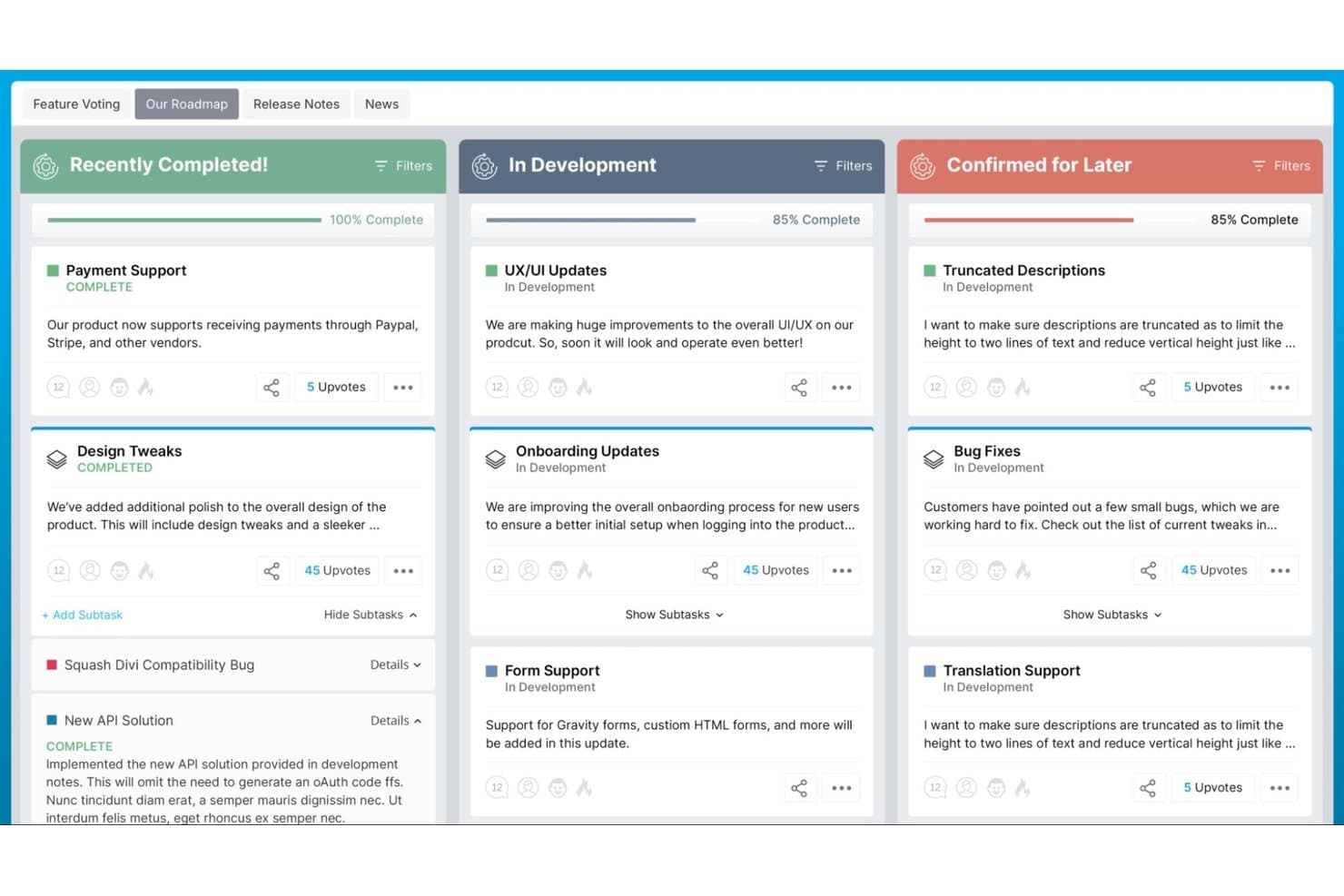
PathPro organizes roadmap items into completion stages with upvotes. PathPro is a product roadmap and feedback management platform with public status boards, feature voting, Kanban task tracking, release notes, and community-to-task workflows.
Who Is PathPro Best For?
Product managers at SaaS startups can connect customer feedback, voting, delivery tasks, and release updates in one public-facing workflow.
Why I Picked PathPro
I picked PathPro because it turns customer feedback into a transparent public roadmap. I use its Planned, In Progress, and Released columns to show progress, while customers upvote, comment, and receive release notifications. The idea-to-task workflow then moves validated requests into delivery without losing contributor context.
PathPro Key Features
- Kanban and list views: Organize tasks with drag-and-drop boards and sortable lists.
- Subtasks and checklists: Assign owners, statuses, and due dates to smaller work items.
- Support ticket management: Track customer issues through open, in-progress, and resolved statuses.
- Report exports: Download roadmap and analytics data in CSV or PDF formats.
PathPro Integrations
PathPro lists integrations with Slack and Zapier, plus webhook support and a REST API for custom connections. Its API can connect roadmap, feedback, and task data with other product workflows.
What’s Free?
PathPro’s Free plan is free forever, with no credit card or trial expiration, and includes one project, a public roadmap, feature voting, commenting, and release notes. It supports unlimited community members, but additional internal team seats, custom domains, support tickets, file attachments, and advanced features require a paid plan.
Pros and Cons
Pros:
- Reviewers praise fast setup and responsive support
- Unlimited community participation supports broad customer input
- Public roadmap connects feedback to releases
Cons:
- Vote counts replace formal prioritization frameworks
- Single internal seat limits free collaboration
Learn more about PathPro: Best for engineering-led agile roadmapping
- Free plan available
- From $4/user/month
Visit WebsiteCustomer Rating:4.8/5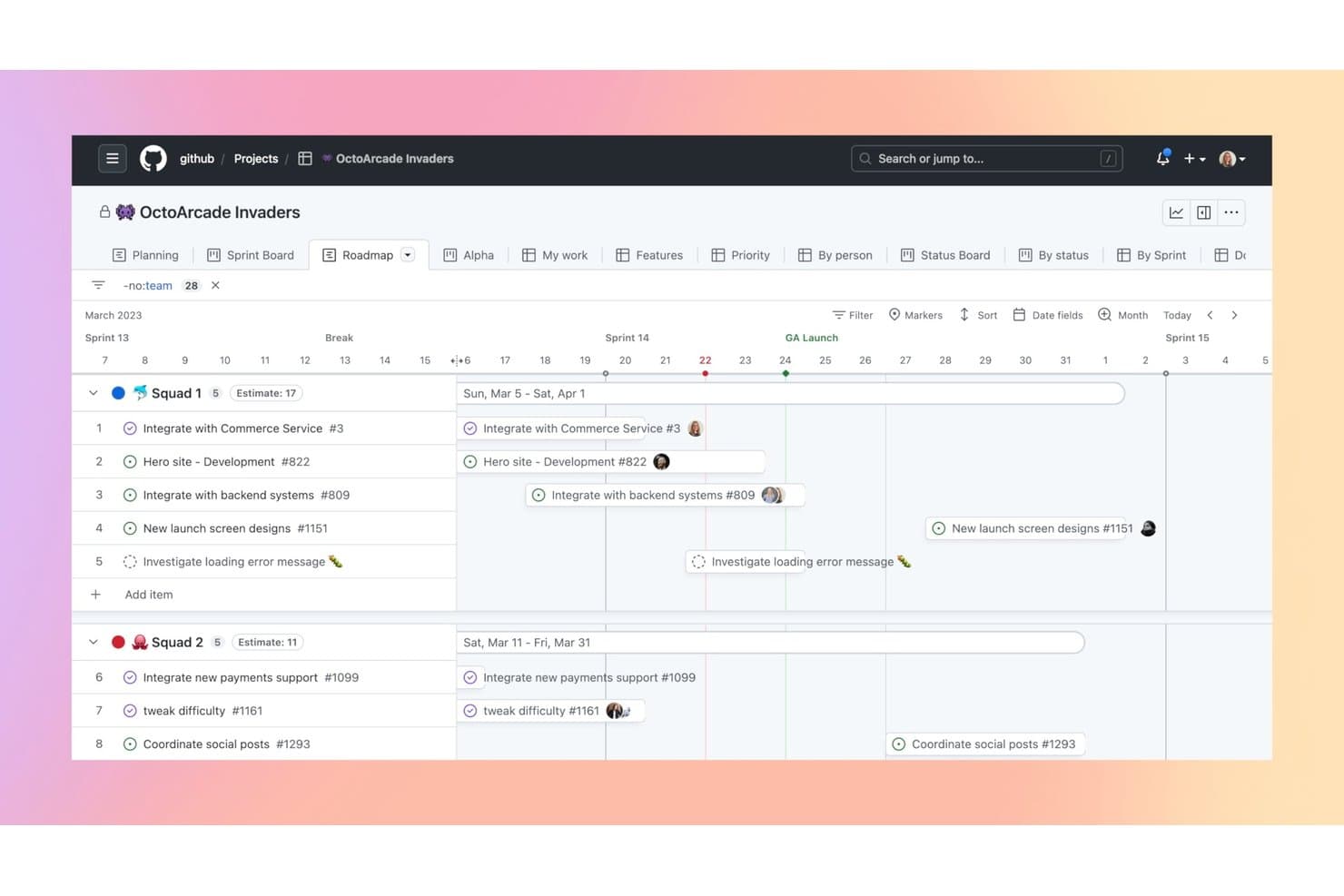
GitHub Projects lets users visualize team tasks on a timeline roadmap. GitHub Projects is a product roadmap and project planning tool built into GitHub, combining table, board, and timeline views with issues, pull requests, custom fields, dependencies, and workflow automation.
Who Is GitHub Projects Best For?
Engineering-led agile teams that need product roadmaps connected directly to GitHub issues, pull requests, and delivery workflows.
Why I Picked GitHub Projects
I picked GitHub Projects because it connects product roadmaps directly to engineering delivery. Its Roadmap layout shows dates and iterations, while synced issues and pull requests keep progress current. Custom fields, dependencies, and status automation help my team move work from draft idea to shipped change.
GitHub Projects Key Features
- Draft issues: Capture ideas before converting them into GitHub issues.
- Sub-issues: Break initiatives into nested work items with multi-level hierarchy.
- Project insights: View item charts and historical burn-up data.
- Visibility controls: Set projects as public or private and assign access roles.
GitHub Projects Integrations
GitHub Projects connects natively with GitHub Issues, Pull Requests, Milestones, Discussions, Actions, Codespaces, and the GraphQL API. Marketplace integrations include Jira Cloud, Slack, Microsoft Teams, Trello, and ZenHub.
What's Free?
GitHub Projects is free forever through GitHub Free, rather than a time-limited trial. Personal accounts get unlimited public and private repositories, although private repositories have limited features; GitHub Free organizations include 2,000 GitHub Actions minutes monthly.
Pros and Cons
Pros:
- Draft issues capture unrefined roadmap ideas
- GitHub-native teams see delivery progress
- Roadmap views track dates and iterations
Cons:
- No built-in RICE prioritization framework
- Developer terminology confuses nontechnical stakeholders
Learn more about GitHub Projects: Best for free Gantt charts
- Free plan available
- From $7/user/month (billed annually)
Visit WebsiteCustomer Rating:4.6/5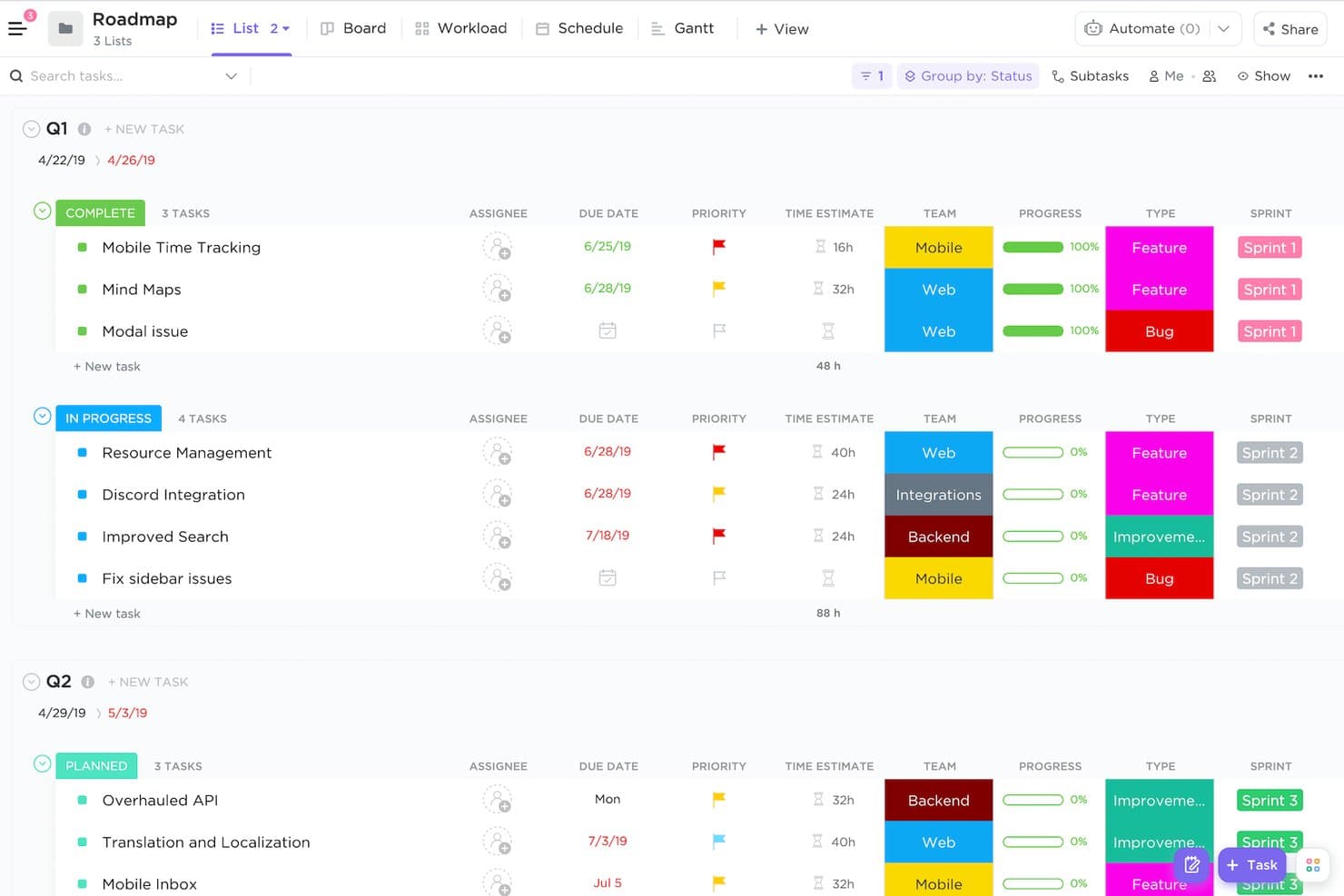
ClickUp organizes product roadmap tasks by quarter, status, and sprint. ClickUp is an all-in-one product roadmap platform with Board, List, Calendar, Gantt, and Timeline views, plus task tracking, custom workflows, sprint management, Docs, Whiteboards, and stakeholder collaboration tools.
Who Is ClickUp Best For?
ClickUp suits startup product managers and agile teams that need roadmaps, sprint planning, and cross-functional collaboration in one workspace.
Why I Picked ClickUp
I picked ClickUp because its free Gantt charts help me map dependencies, milestones, and delivery dates alongside sprint work. I use custom statuses, subtasks, and dependencies to connect roadmap initiatives with execution. Board, Calendar, and Timeline views also let me compare release plans from different angles.
ClickUp Key Features
- Priority flags: Mark and rank roadmap tasks by urgency.
- Collaborative Docs: Create product briefs and release notes.
- Sprint management: Organize backlog items into sprint workflows.
- Forms: Collect feature requests through a customizable intake form.
ClickUp Integrations
ClickUp supports 200+ integrations, including GitHub, Bitbucket, Figma, Slack, Microsoft Teams, Google Drive, HubSpot, Salesforce, Zendesk, and Intercom. A public API supports custom integrations and DevOps or CI/CD workflows.
What's Free?
ClickUp offers a free-forever plan with unlimited tasks and members. It includes 60 MB of storage, so teams with many attachments may need a paid plan.
Pros and Cons
Pros:
- Product templates accelerate roadmap setup
- Unlimited members support cross-functional roadmap reviews
- Free Gantt charts map delivery dependencies
Cons:
- Guest permissions limit polished stakeholder sharing
- Lifetime view caps restrict ongoing planning
Learn more about ClickUp: 6Best for replacing documents and spreadsheets
Coda
- Free plan available
- From $12/user/month (billed annually)
Visit WebsiteCustomer Rating:4.7/5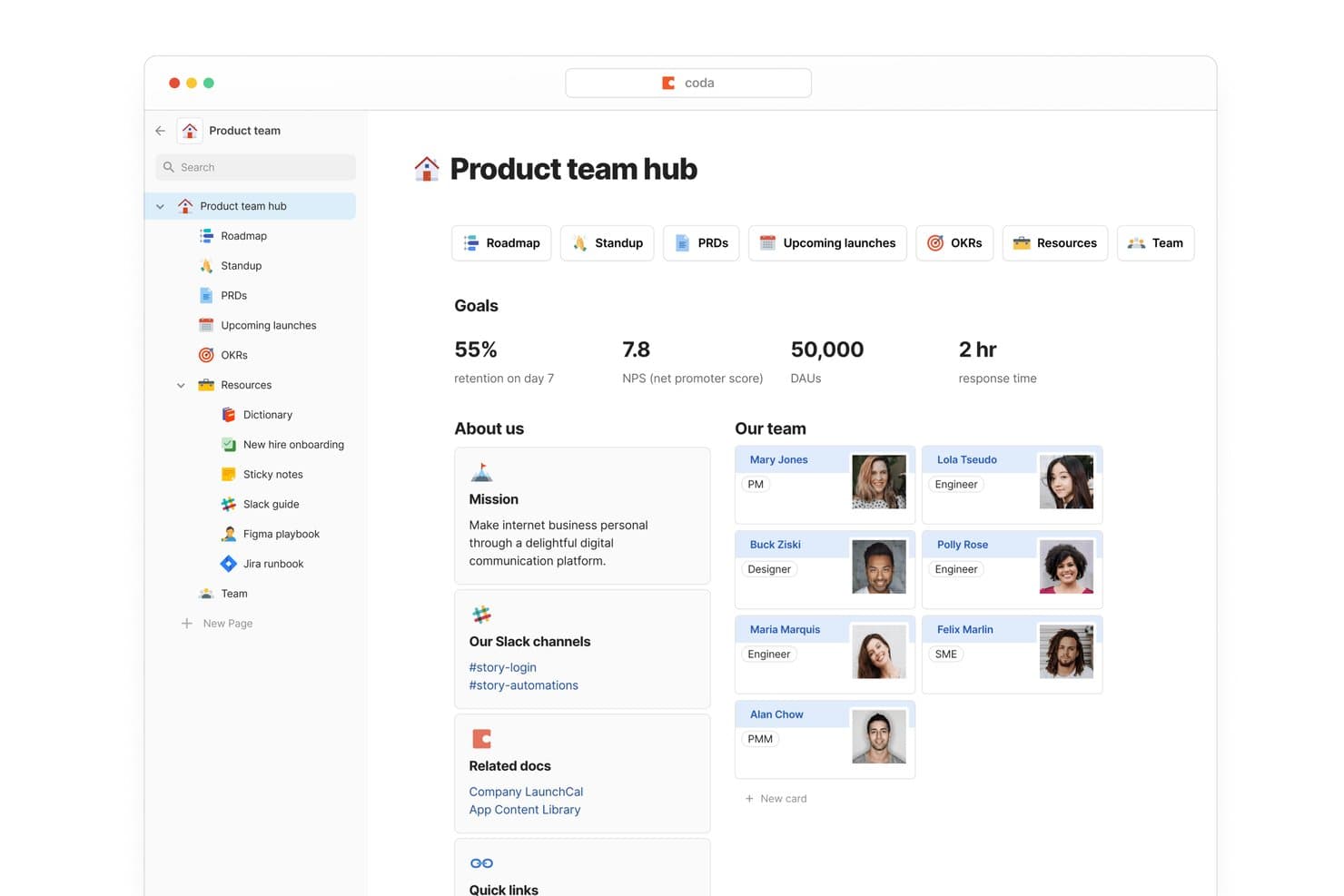
Coda centralizes product team goals, roadmap, and team info in one hub. Coda is a product roadmap tool that combines collaborative documents with connected tables, timeline, board, calendar, and chart views for tracking features, statuses, priorities, PRDs, and release plans.
Who Is Coda Best For?
Product managers who want to replace scattered documents and spreadsheets with connected roadmaps, PRDs, timelines, and stakeholder updates.
Why I Picked Coda
I picked Coda because it’s best for replacing documents and spreadsheets without separating roadmap data from product context. I use connected tables with synced timeline, board, and calendar views to track features, releases, and milestones. Linked PRDs, forms, and row-detail pages keep requests, decisions, and delivery updates together in one free collaborative doc.
Coda Key Features
- Custom formulas: Build RICE or ICE scoring columns for roadmap prioritization.
- Status columns: Assign color-coded workflow stages to roadmap items.
- Automations: Trigger updates from time-based or change-based rules.
- Packs integrations: Connect tools such as Jira, GitHub, Slack, and Figma.
Coda Integrations
Coda offers 600+ integrations through Packs, including Jira, GitHub, Slack, Google Calendar, Google Drive, Figma, Microsoft Teams, Salesforce, and OpenAI. It also provides an API and Packs SDK for custom integrations, while the Free plan lists 36+ available app integrations.
What's Free?
Coda offers a free-forever plan with unlimited Doc Makers and collaborators. It includes limited pages and objects, 1 GB of attachments per doc, manual connector refreshes, 36+ integrations, and a limited Docs AI trial.
Pros and Cons
Pros:
- Stakeholders can comment without editing
- PRDs and roadmap context stay together
- Connected views preserve one roadmap dataset
Cons:
- Shared documents have page limits
- Prioritization requires custom formulas
Learn more about Coda: Best for converting feedback into roadmap items
- Free plan available
- From $79/month (billed annually)
Visit WebsiteCustomer Rating:4.6/5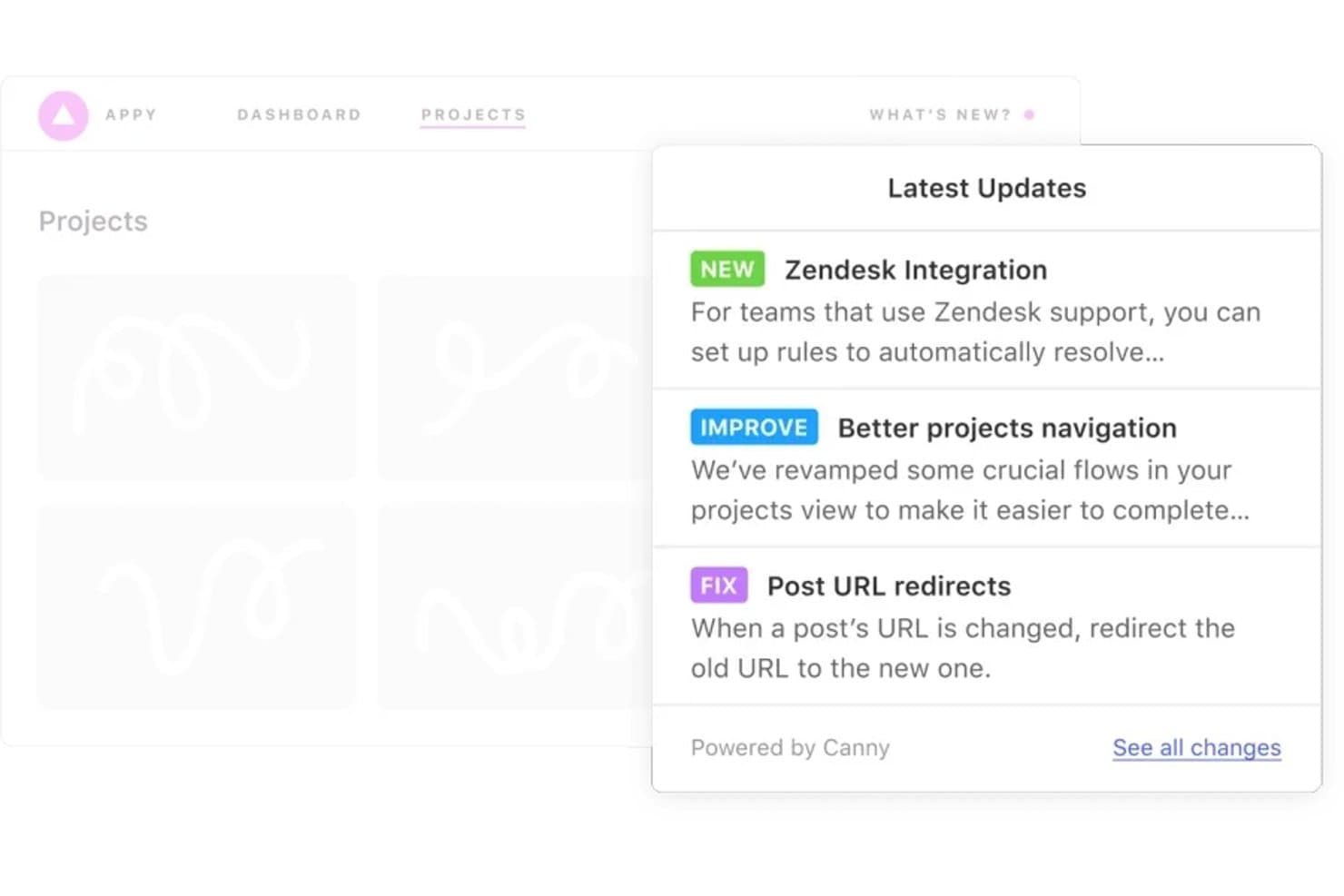
Canny keeps teams informed with a changelog of latest product updates. Canny is a free product roadmap platform for product managers that combines feedback boards, voting, AI-powered request deduplication, weighted prioritization, public roadmaps, status tracking, and changelog publishing.
Who Is Canny Best For?
Product managers who need to turn customer feedback, votes, and revenue signals into prioritized roadmap items for cross-functional teams.
Why I Picked Canny
I picked Canny because it’s best for converting feedback into roadmap items. Public feedback boards collect votes, while Autopilot AI deduplicates requests from support and sales conversations. I use weighted scoring with request volume, ARR, effort, and renewal risk to rank the roadmap.
Canny Key Features
- Status tracking: Move items from planned to in progress and shipped.
- Roadmap embeds: Add roadmap views to your website or product.
- Project management integrations: Sync items with Jira, Linear, or ClickUp.
- Internal comments: Discuss roadmap items with mentions and notifications.
Canny Integrations
Canny offers native integrations with Jira, Linear, ClickUp, Asana, GitHub, Azure DevOps, Intercom, Zendesk, Slack, and HubSpot. It also provides an open API, webhooks, and Zapier; project management integrations require Pro or higher.
What's Free?
Canny offers a free-forever plan with unlimited feedback and automatic feedback capture. It supports 25 tracked users, five managers, and unlimited contributors, while project management integrations require the Pro plan or higher.
Pros and Cons
Pros:
- Unlimited contributors support cross-functional roadmap input
- Autopilot deduplicates incoming feedback automatically
- Connects votes to revenue-weighted prioritization
Cons:
- Board views replace true timeline planning
- Tracked-user limits constrain growing feedback programs
Learn more about Canny: Best for docs, wikis, and roadmaps in one place
- Free plan + free demo available
- From $10/user/month (billed annually)
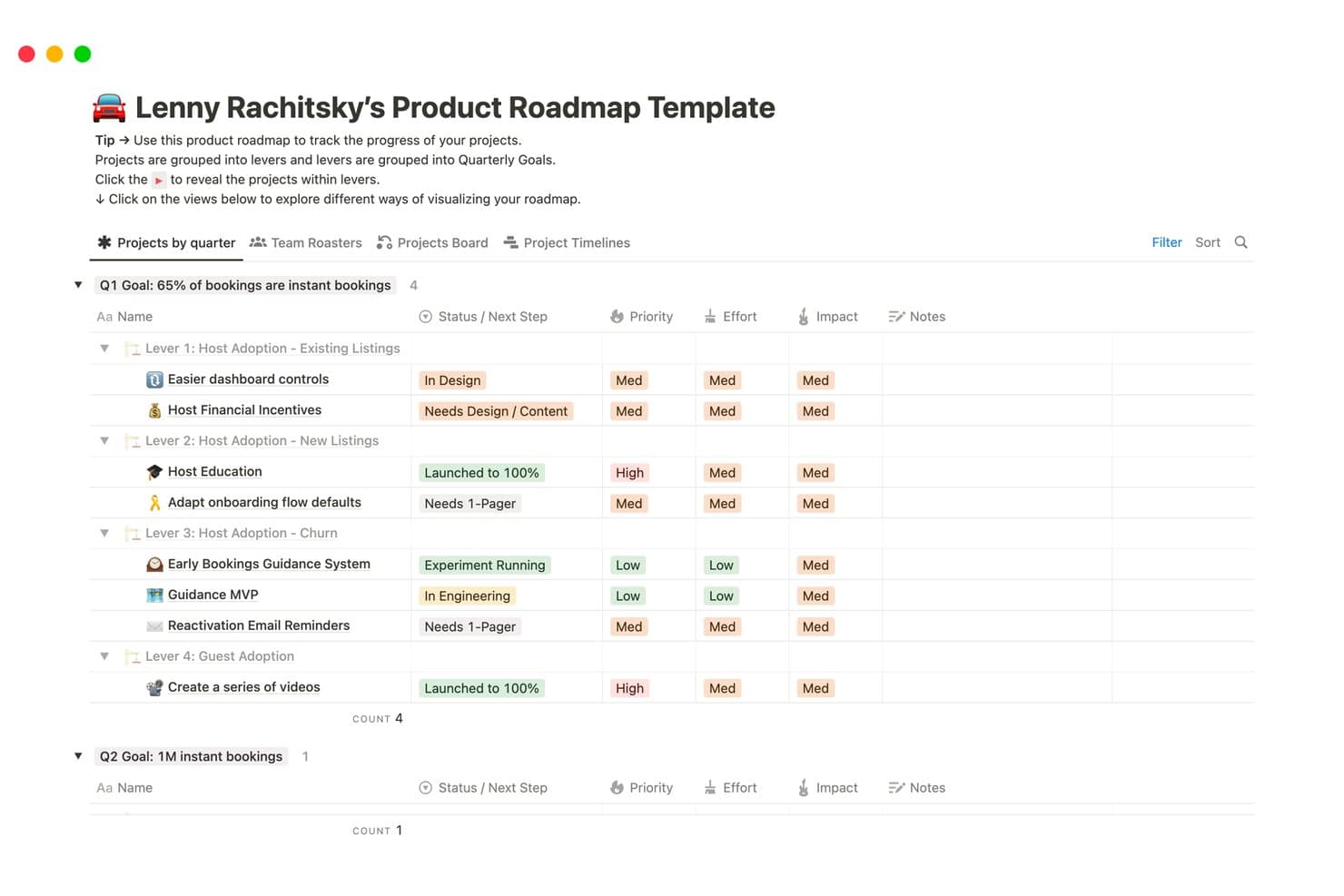
Notion organizes product roadmap projects by quarter, lever, and priority. Notion is a free product roadmap tool built around flexible databases, custom properties, dependencies, and status tracking across timeline, board, calendar, table, and other views, with linked docs and wikis.
Who Is Notion Best For?
Product managers, startup founders, and product marketing teams can keep roadmaps, product docs, and launch context together in one flexible workspace.
Why I Picked Notion
I picked Notion because it is Best for docs, wikis, and roadmaps in one place. I build one roadmap database with timeline, board, and calendar views, then link initiatives to PRDs, launch notes, and team knowledge. Dependencies, custom properties, and status rollups help my team move from discovery through delivery while keeping decision context beside each item.
Notion Key Features
- Forms: Capture feature requests directly into a roadmap database.
- Guest access: Invite up to 10 external guests with page-level permissions.
- Public publishing: Share read-only roadmaps through live web links.
- Formula properties: Build custom scoring systems for prioritizing initiatives.
Notion Integrations
Notion offers documented integrations with Figma, Slack, GitHub, Amplitude, Jira, Google Drive, Linear, Microsoft Teams, Outlook, and Google Calendar. Its public API supports custom integrations, while its Connections marketplace provides additional partner options.
What’s Free?
Notion has a free-forever plan with unlimited pages and blocks for individual users. It limits file uploads to 5 MB, keeps page history for seven days, and allows up to 10 guests.
Pros and Cons
Pros:
- Forms capture requests directly into backlogs
- Roadmap items include documents and dependencies
- Multiple roadmap views share one dataset
Cons:
- Multi-owner workspaces face restrictive block limits
- Prioritization requires manually built scoring formulas
Learn more about Notion: 9Best for agile idea-to-delivery roadmapping
Jira
- Free plan available
- From $8.48/user/month
Visit WebsiteCustomer Rating:4.4/5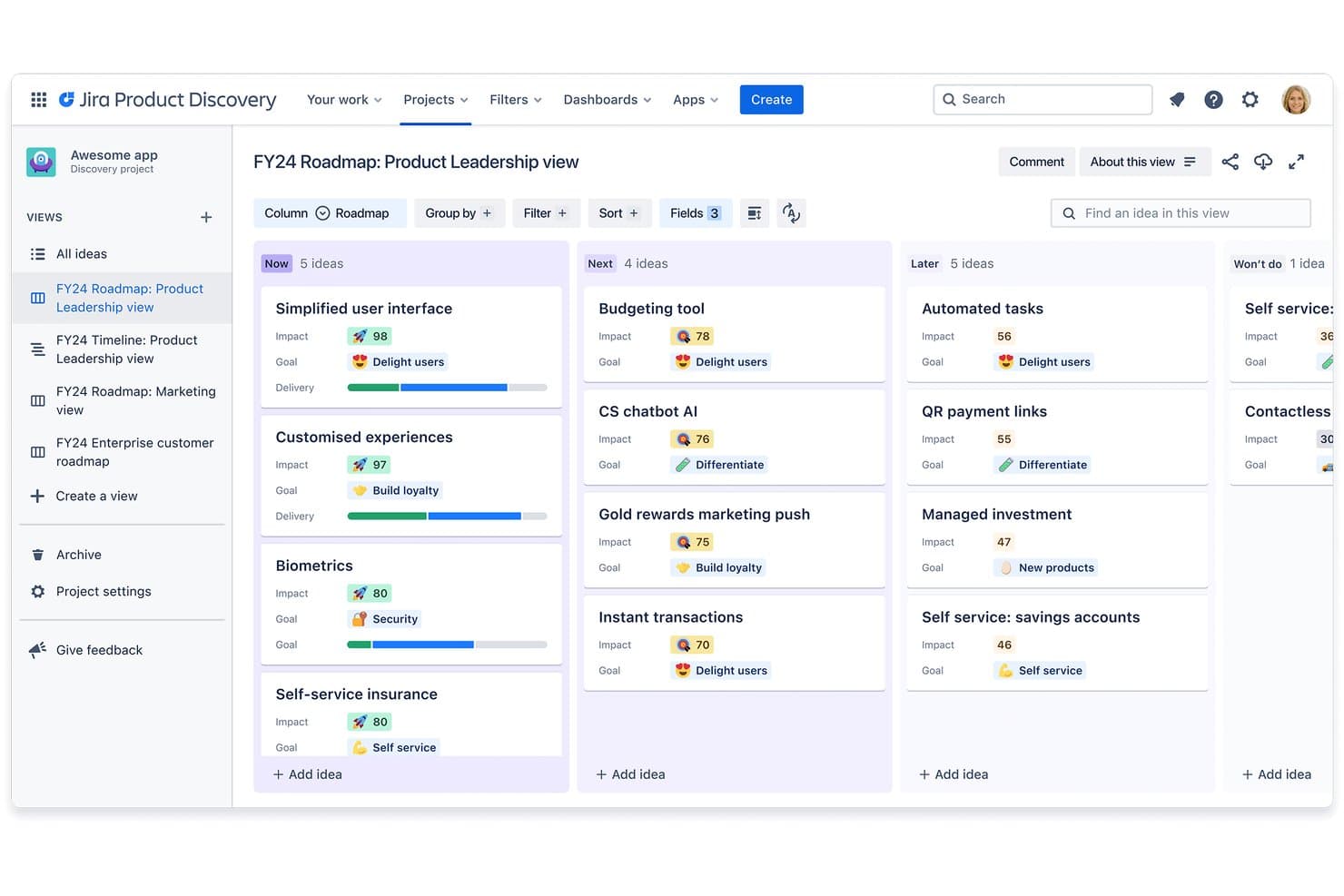
Jira organizes product ideas into Now, Next, and Later roadmap columns. Jira is a free product roadmap tool that combines Jira Product Discovery’s idea capture, scoring, and board or timeline views with Jira’s backlog, workflow, and epic tracking.
Who Is Jira Best For?
Jira suits product managers on agile teams who need to connect scored ideas, prioritized backlogs, and delivery work in one system.
Why I Picked Jira
I picked Jira because it connects product discovery with delivery work for agile idea-to-delivery roadmapping. I use Jira Product Discovery’s scoring frameworks and board or timeline views to rank opportunities, then link selected ideas to Jira epics and sprint backlogs. That traceability keeps customer problems, priorities, and engineering progress in one workflow.
Jira Key Features
- Custom workflows: Configure statuses and transitions for different work types.
- Custom fields: Add structured details such as labels, dropdowns, and user pickers.
- Calendar view: Display planned work against dates in a calendar layout.
- Comments and reactions: Collect feedback through comments, votes, and reactions.
Jira Integrations
Jira Product Discovery includes native integrations with Jira, Jira Service Management, Confluence, and Goals/Projects. The Atlassian Marketplace offers 3,000+ integrations, including Slack, Figma, Gmail, Microsoft Teams, and GitHub Copilot, while APIs support custom connections.
What's Free?
Jira offers a free-forever plan for up to 10 users, with no credit card required. It includes 2 GB of file storage, one site, community support, and 150 automation steps per subscription each month; free users also receive up to 100 email notifications per day and don’t get Rovo AI access.
Pros and Cons
Pros:
- Supports custom fields and prioritization frameworks
- Offers board and timeline roadmap views
- Connects scored ideas to delivery work
Cons:
- Separate products complicate roadmap adoption
- Free tier excludes license-free published views
 10Best for formula-driven feature prioritization
Fibery
- Free plan available; 14-day free trial; free demo available
- From $12/user/month (billed annually)
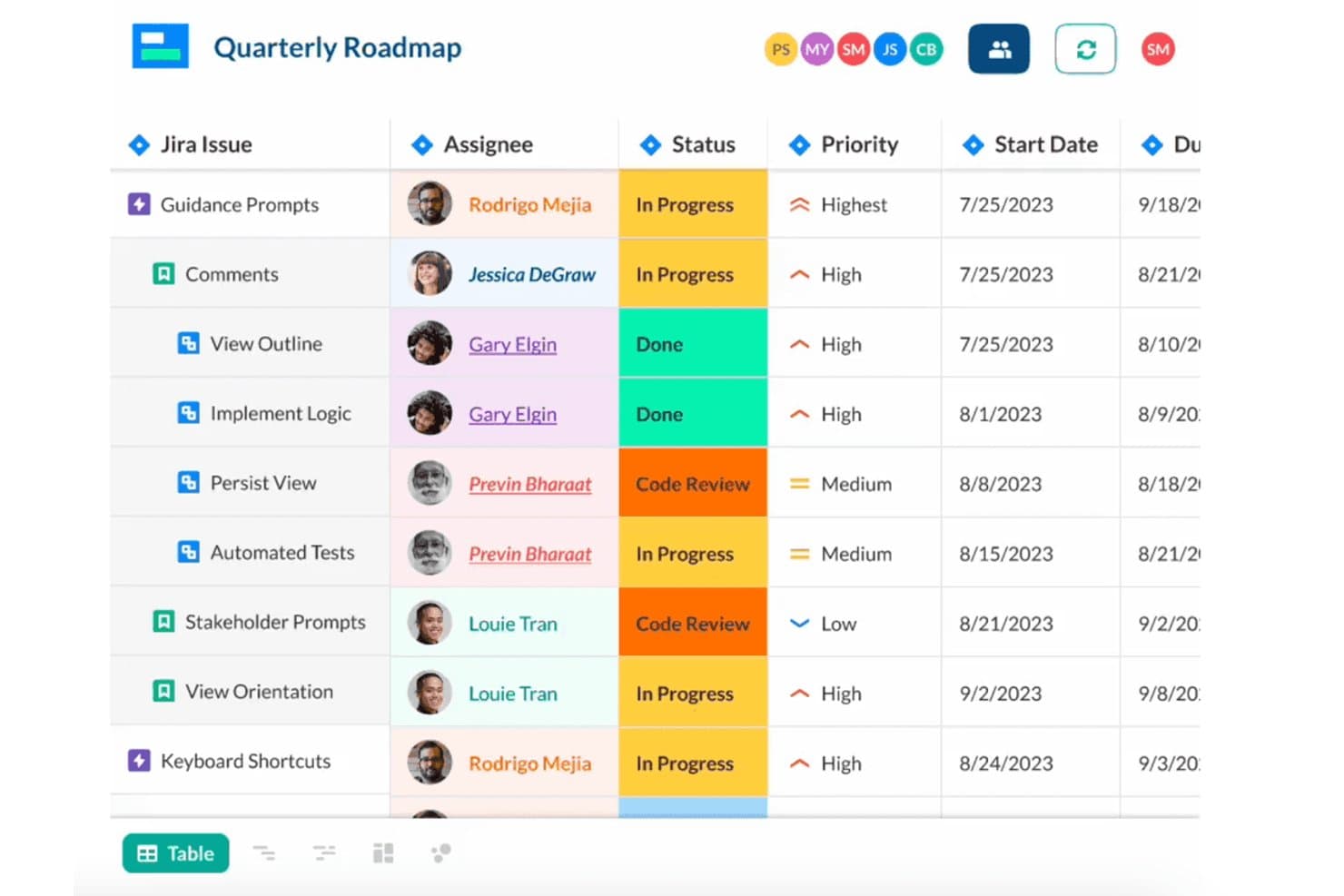
Fibery tracks Jira issues with assignees, status, priority, and dates. Fibery is a free product roadmap tool with a relational workspace for mapping initiatives, managing feedback, creating PRDs, prioritizing features, and tracking delivery through customizable views and integrations.
Who Is Fibery Best For?
Product managers who need formula-driven feature prioritization across customer feedback, product strategy, and cross-functional delivery.
Why I Picked Fibery
I picked Fibery because its formula-driven feature prioritization connects customer evidence with roadmap decisions. I use RICE, Kano, MoSCoW, or WSJF formulas to score backlog items, then apply Feedback Importance Scores by segment, severity, recency, and customer volume. That helps my team compare competing requests before moving selected features into timeline roadmaps.
Fibery Key Features
- Relational databases: Link initiatives, epics, features, tasks, and teams in customizable hierarchies.
- Product requirements documents: Create PRDs with rich text, diagrams, mockups, charts, comments, and attachments.
- Workflow automations: Update statuses, assign tasks, close subtasks, and set completion dates automatically.
- Development integrations: Sync Jira, GitHub, GitLab, Bitbucket, and Linear work with product records.
Fibery Integrations
Fibery offers native integrations with Jira, GitHub, GitLab, Linear, Bitbucket, Intercom, Zendesk, HubSpot, Slack, and Google Calendar. It also supports custom integrations through its API and connections through Zapier and Make.
What's Free?
Fibery offers a free-forever plan for teams with up to 10 users and 10 guests. It includes 10 databases, unlimited entities and collaborative documents, but limits storage to 1 GB, version history to 14 days, and automation runs to 250 per month.
Pros and Cons
Pros:
- Relational roadmaps connect strategy with delivery
- Feedback scoring ties requests to customers
- Custom formulas support RICE and WSJF prioritization
Cons:
- Free views limit external stakeholder sharing
- Blank-canvas setup demands workspace architecture
Learn more about Fibery:
Other Free Product Roadmap Tools
Here are a few more that didn’t make the top list but are worth your consideration.
- 11AirtableBest for custom-built roadmaps on a free database
- 12TaskadeBest for multi-view roadmaps with guest sharing
- 13LinearBest for planning-to-delivery roadmaps in one system
- 14ShortcutBest for dev-team roadmaps tied to live epics
- 15YouTrack by JetBrainsBest for scrum-based agile planning at no cost
- 16FeaturebaseBest for feedback-to-roadmap loop closing
Related Product Management Software Reviews
If you still haven't found what you're looking for here, check out these other related tools that we've tested and evaluated:
- Best Product Management Tools
- Best Product Planning Software
- Best Product Development Software
- Best Product Analytics Tools
- Best Idea Management Software
- Best User Research Tools
How I Evaluate Free Product Roadmap Tools
First, I define what counts as free. For product roadmap software, that means a free-forever plan—not a trial. I split my evaluation into core functionality every tool must have, like visual roadmap building and prioritization, and the differentiators that separate a genuinely useful tool from a basic one.
Core Functionality (Table Stakes For This List)
In addition to my free offer requirements, I also use a scoring system to select tools for my list. Here's how it works:
When I'm selecting tools for my list, I rank each one on a scale from 0 (does not offer the functionality) to 5 (excels in this area) for each core functionality listed below. I then calculate the tool's total score into a percentage, and use that to help me assess its overall fit for the list.
- Visual roadmap builder: I check whether the free plan includes a timeline or board view where you can map initiatives across quarters—not just a flat list of items.
- Prioritization tools: I look for built-in ways to rank or score backlog items, like drag-and-drop ordering or simple priority labels you can apply without upgrading.
- Item and feature tracking: Each tool should let you create, edit, and group individual items into themes or categories—similar to organizing features under epics in tools like Jira or Trello.
- Stakeholder sharing: I evaluate whether you can generate a shareable link or export so leadership can review the roadmap without needing their own account.
- Status and progress updates: The free plan should support at least a few status options per item—planned, in progress, done—so your roadmap reflects real progress at a glance.
- Basic collaboration: I look at how many team members can view, comment, or edit on the free plan, since a roadmap nobody else can touch defeats the purpose.
Once I have a list of tools that meet the criteria, I consider what sets each platform apart.
Differentiating Factors (What Sets Vendors Apart)
Here's how I compare and contrast different vendors:
Standout Features
I look for public feedback boards that let customers submit and upvote feature requests, since they feed real demand signals straight into your prioritization. Embeddable roadmaps matter too—teams using tools like Productboard or Airfocus can embed a live widget in an internal wiki, keeping stakeholders current without extra logins. I also evaluate guest or viewer access on each free plan, because a roadmap only works when leadership and engineering can review it without burning a paid seat.
Beyond Features
I check how quickly a new user can build their first roadmap without outside help. Tools like Airfocus and Productboard offer guided tours or sample roadmaps on signup, which matters when a founder or junior PM is setting things up solo. I also evaluate data portability—specifically whether the free plan lets you export to CSV or connect through an open API. Getting locked into a tool because your roadmap data can't move with you is a real risk, especially for growing teams weighing a future migration.
How To Choose Free Product Roadmap Tools
With so many different free product roadmap solutions available, it can be challenging to make decisions on what free product roadmap tool is going to be the best fit for your needs.
As you're shortlisting, trialing, and selecting free product roadmap tools, consider the following:
- What problem are you trying to solve - Start by identifying the product roadmap feature gap you're trying to fill to clarify the features and functionality the free product roadmap tool needs to provide. Look for software that offers a great feature set in their free version that can scale in functionality as your needs grow.
- Who will need to use it - To evaluate cost and requirements, consider who'll be using the software and how many licenses you'll need. You'll need to evaluate if it'll just be the product management professionals, or the whole organization that will require access. When that's clear, it's worth considering if you're prioritizing ease of use for all, or speed for your free product roadmap tool power users.
- What other tools it needs to work with - Clarify what tools you're replacing, what tools are staying, and the tools you'll need to integrate with, such as accounting, CRM or HR software. You'll need to decide if the tools will need to integrate together, or alternatively, if you can replace multiple tools with one consolidated free product roadmap tool.
- What outcomes are important - Consider the result that the software needs to deliver to be considered a success. Consider what capability you want to gain, or what you want to improve, and how you will be measuring success. For example, an outcome could be the ability to get greater visibility into performance. You could compare free product roadmap tool features until you’re blue in the face but if you aren’t thinking about the outcomes you want to drive, you could be wasting a lot of valuable time.
- How it would work within your organization - Consider the software selection alongside your workflows and delivery methodology. Evaluate what's working well, and the areas that are causing issues that need to be addressed. Remember every business is different — don’t assume that because a tool is popular that it'll work in your organization.
Trends In Free Product Roadmap Tools for 2026
In 2026, free product roadmap are significantly evolving, driven by technological advancements and the changing needs of product management professionals. These tools are not just about plotting milestones anymore; they're becoming integral in facilitating strategic planning, enhancing collaboration, and providing insights for product development teams. I have identified several trends that I believe reflect the most rapidly evolving features and novel functionalities emerging in the product management domain.
- Increased Focus on Security and Privacy: With growing concerns around data breaches and privacy, there's an uptick in features aimed at enhancing the security and privacy of roadmap tools. This includes advanced permission settings, end-to-end encryption for data in transit and at rest, and compliance with international data protection regulations. Such features are becoming crucial for organizations that handle sensitive information and need to safeguard their strategic plans.
- Cross-functional Accessibility: There's a notable trend towards making product roadmap tools accessible and understandable not just for product managers, but for stakeholders across various functions. This includes simplified views for executives, marketing, sales, and customer support teams, enabling them to grasp the product's direction and progress easily. This trend addresses the need for a unified understanding of product goals and timelines across an organization.
- Sustainability and Ethical Consideration Features: An emerging trend is the incorporation of features that help teams consider sustainability and ethical implications in their product development processes. This could include assessment tools or integration with databases that provide insights on materials, supply chain practices, or social impact. These features are gaining importance as companies increasingly prioritize corporate social responsibility and ethical product development.
- Adaptive Learning Algorithms: Tools are beginning to incorporate adaptive learning algorithms that can suggest adjustments to the roadmap based on past project performance, current progress, and industry trends. These algorithms can offer recommendations for reallocating resources, adjusting timelines, or prioritizing features, making roadmap planning more dynamic and responsive to change.
- Enhanced Reporting and Analytics: There's a growing emphasis on advanced reporting and analytics features within product roadmap tools. This includes the ability to generate detailed progress reports, performance analytics, and visualizations that can help teams and stakeholders understand the status of the product development process at a glance. Enhanced analytics are helpful for making informed decisions and adjusting strategies based on data-driven insights.
These trends reflect a broader movement in the product management field towards tools that not only support strategic planning and communication but also enhance collaboration, offer integrative capabilities, and provide actionable insights. As the market for free product roadmap tools continues to evolve, these features and functionalities will play a pivotal role in shaping the next generation of product development strategies.
What Are Free Product Roadmap Tools?
Free product roadmap tools are cloud-based software platforms that assist product managers and development teams in organizing and streamlining their product strategy and roadmapping efforts. These tools facilitate the creation of a project roadmap, enabling teams to visualize the product vision and strategic direction. While free versions may have limitations in features, such as restricted integrations or limited customer support, they offer a cost-effective starting point for teams to align on their objectives and secure buy-in from stakeholders.
Features of Free Product Roadmap Tools
When selecting free product roadmap tools, keep an eye out for the following key features:
- Feedback collection: Directly gather reactions, comments, or suggestions right on your roadmap. With built-in feedback mechanisms, your planning becomes more responsive and adaptable—so you’re not working in a vacuum when things change or new ideas surface.
- User-friendly interface: Look for a dashboard that's easy to navigate, even if some of your teammates aren’t tech wizards. An intuitive layout makes it easy for everyone to join the conversation, give feedback, and make use of the roadmap in a meaningful way.
- Customizable templates: It can be tough starting from a blank slate. Customizable templates let you tweak copy, layouts, colors, and structure so your roadmap is aesthetically pleasing, and reflects your product’s unique offering.
- Collaboration features: Real-time editing, commenting, and notifications get everyone get on the same page—literally. With collaboration tools baked in, your whole team can weigh in, propose changes, and get updates instantly instead of drowning in endless email chains.
- Milestone tracking: Set clear milestones and watch your progress unfold. Milestone tracking gives you and your stakeholders a crystal-clear picture of what’s coming up, what’s been accomplished, and what might be falling behind—no detective work required.
- Timeline views: Whether you’re a Gantt chart fan or prefer a classic calendar, flexible timeline views help you visualize every phase. You can see how projects and tasks line up, spot bottlenecks, and adjust deadlines before small hiccups become major headaches.
- Integration capabilities: Plug your roadmap tool straight into the apps your team already uses—like project management or communication software. Integrations let you avoid double entry and manual updates, so your information stays accurate and your team moves faster.
- Security and privacy controls: Not every detail is for everyone on your team. Permission settings let you manage who can view or edit your roadmap, keeping sensitive plans confidential while still sharing progress with those who need to know.
- Export and sharing options: Sometimes you need to share your plan outside your platform. Good export and sharing features mean you can quickly generate PDFs, spreadsheets, or public links, making it simple to keep stakeholders informed, even if they don’t use the same tool.
- Scalability: Your roadmap needs to keep pace as your product, team, or ambition grows. Scalability ensures your tool can handle extra projects, additional users, and more complex roadmaps without slowing down or breaking.
Paid versions of product roadmap tools often differentiate themselves with advanced features such as enhanced customization options, more sophisticated integration capabilities, increased security measures, and superior support services. These premium features cater to larger teams or more complex projects where the demands exceed the capabilities of free versions.
Overall, choosing the right free product roadmap tool involves balancing the need for comprehensive features with simplicity of use. While free tools offer a great starting point for small teams and projects, it's important to consider how the tool will fit into your workflow and whether it will scale with your needs. As your project grows, transitioning to a paid version might provide the additional functionality required to manage more complex product development processes.
Benefits of Free Product Roadmap Tools
Free product roadmap tools facilitate a shared understanding of a product's strategic direction, helping teams align their efforts towards common goals and significantly impacting a project's success. Here are five primary benefits of utilizing free product roadmap tools:
1. Cost Efficiency: By eliminating the need for expensive software licenses, free product roadmap tools make it easier for startups and small businesses to access sophisticated planning capabilities, allowing them to allocate their resources more effectively elsewhere.
2. Enhanced Collaboration: These tools enable team members to contribute to the roadmap from any location, ensuring that everyone is on the same page and can provide input or make adjustments as needed, thereby speeding up the decision-making process.
3. Increased Flexibility: The ability to customize and adjust roadmaps on the fly allows businesses to respond quickly to market changes or internal project updates, maintaining agility in their strategic approach.
4. Improved Visibility: With visual representations of progress and objectives, stakeholders can easily understand the project's current status and future direction, leading to more informed decision-making and better alignment across the organization.
5. Risk Mitigation: By mapping out the project timeline and key milestones, teams can foresee and address potential issues before they become significant problems, reducing the risk of project delays or failures.
While free versions of product roadmap tools offer substantial benefits, paid versions elevate these advantages to a higher level. Enhanced security features, more sophisticated integration options, advanced customization capabilities, and superior support services are among the key differentiators. Paid versions also often include more comprehensive analytics and reporting tools, enabling deeper insights into project performance and strategic outcomes. These features are particularly beneficial for larger organizations or more complex projects, where the demands on the software's scalability, reliability, and support are greater.
However, adopting free product roadmap tools can still significantly enhance strategic planning and communication within your organization, providing a solid foundation for product development success. As your project or organization grows, considering the move to a paid version can further amplify these benefits, ensuring that your roadmap tool scales effectively with your evolving needs.
Costs & Pricing For Free Product Roadmap Tools
While I have focused primarily on these tools' free plans thus far, these tools typically offer a range of plans to accommodate different needs, from basic functionalities for small teams to advanced features for large enterprises. Understanding the plan options and their pricing is essential for making an informed decision that aligns with your team's requirements and budget constraints—even if you decide to still go with the free plan.
Free plans are a great starting point, but here’s what you can expect paid versions will cost based on your needs:
Plan Comparison Table For Product Roadmap Tools
| Plan Type | Average Price | Common Features |
|---|---|---|
| Plan TypeFree | Average Price$0 | Common FeaturesBasic roadmap creation, limited collaboration features, essential integration capabilities |
| Plan TypeStandard | Average Price$10-20/user/month | Common FeaturesEnhanced collaboration tools, more integration options, advanced visualization features |
| Plan TypeProfessional | Average Price$20-40/user/month | Common FeaturesFull project tracking, advanced analytics and reporting, increased security measures |
| Plan TypeEnterprise | Average PriceCustom Pricing | Common FeaturesCustom integrations, dedicated support, unlimited users, comprehensive analytics and customization |
When considering a product roadmap tool, it's important to assess your team's specific needs and how they align with the features offered by each plan. Remember, the best choice balances functionality and cost efficiency, ensuring you have the necessary tools to support your product development journey without overspending.
Free Product Roadmap Tool Frequently Asked Questions
If your team is looking into working with a free product roadmap tool, you probably have some questions before you get started. Let’s take a look at some of the FAQs about free roadmap tools.
What is a Product Roadmap in Agile?
Within Agile product management, product roadmaps are flexible plans that help teams think strategically about the product development process. While these roadmaps do identify priorities, key themes, and milestones, they are not rigid plans that need to be followed down to the letter. Instead, they are a high-level guide meant to be iterated and changed as new information arises.
How to Build a Product Roadmap?
Curious about how to create a product roadmap? There are 5 general steps:
- Define the strategy
- Prioritize ideas
- Understand requirements and key features
- Establish milestones / delivery timeline
- Visualize your map
The free product roadmap tools on this list help teams to automate all 5 of these steps, and to communicate more effectively with team members throughout each phase.
Although if you are interested in working smart, we’ve got a list of free product roadmap templates to impress your stakeholders.
Are there any scalability limitations with the free plans?
Free product roadmap tools often come with scalability limitations in areas like:
- Users: Free plans often limit the number of users who can access the platform, restricting collaboration to smaller teams.
- Projects: There might be a cap on the number of projects or products you can manage, affecting those working on multiple initiatives.
- Views: The variety of roadmap views (e.g., timeline, kanban) might be restricted, limiting your ability to tailor presentations to different audiences.
- History: Access to the full history of changes or the ability to track revisions over time might be limited, which can be crucial for auditing purposes.
These constraints are designed to cater to individuals or small teams just starting out. As your product management needs grow, transitioning to a paid plan can offer the scalability and flexibility required for managing larger, more complex product ecosystems.
Can these tools support multi-product roadmapping?
Free roadmapping tools often provide a basic level of functionality that can help smaller teams or projects get started. However, more complex features needed to efficiently manage multiple products, such as advanced integrations, cross-project visibility, and detailed customization options, are typically reserved for premium plans. This is because handling multiple products usually requires more robust and sophisticated toolsets designed to cater to larger teams with more complex workflows, necessitating an upgrade from the free offerings.
What are the Key Features of Free Online Product Roadmap Tools?
Whether you’re a small startup or an enterprise, product roadmap tools can help you streamline workflows, monitor progress in real-time, use collaboration tools to work more closely with your team, share roadmaps, optimize sprints, and prepare for product launch in a manner that will ultimately improve user experience.
- Planning tools: a comprehensive set of features to enable complex planning
- Project overviews: easy to understand big-picture views for project managers
- Product roadmap planner templates: pre-built roadmap designs for fast implementation in accordance with business goals
- Resource allocation features: tools to make the best use of human and other resources
- Scheduling tools: timelines, calendars and milestones
- Drawing tools: for creating roadmaps from scratch
- Backlog prioritization tools: features for clearing product bottlenecks
- Collaboration/whiteboarding tools: effective team communication options
- Agile product roadmap layouts: support for standard development methodologies
How do I decide which features to work on?
Deciding which features to work on first is really important in product management. It affects how your product develops. You figure out which features or improvements are the most important and in what order to work on them. You can also use prioritization frameworks to help decide which features to focus on first and which ones to delay.
A few popular prioritization frameworks include:
- Weighted scoring
- RICE method
- Value vs Effort
- MoSCoW method
- The product tree
How do these tools handle data security and privacy?
Free product roadmap tools are cloud-based software platforms that assist product managers and development teams in organizing and streamlining their product strategy and roadmapping efforts. These tools facilitate the creation of a project roadmap, enabling teams to visualize the product vision and strategic direction. While free versions may have limitations in features, such as restricted integrations or limited customer support, they offer a cost-effective starting point for teams to align on their objectives and secure buy-in from stakeholders.Data security and privacy handling can vary between roadmapping tools, but reputable providers generally take these matters seriously even in their free plan offers. They typically employ industry-standard security measures like SSL encryption to protect data in transit and at rest. Additionally, many tools comply with global data protection regulations, such as GDPR, ensuring that user data is handled responsibly and transparently.
For detailed specifics, it’s always best to review the privacy policies and security documentation of each tool or reach out to their support teams for clarifications. This approach ensures you’re fully informed about how your and your stakeholders’ data is managed and protected.