

Gerir o ciclo de vida de um produto pode ser complicado, especialmente quando está a conciliar as necessidades dos clientes, as tendências do mercado e a dinâmica da equipa. Pode sentir-se sobrecarregado com dados e sem saber qual é a direção certa. É aí que entram as ferramentas de descoberta de produtos.
Estas ferramentas ajudam-no, a si e à sua equipa, a recolher informações, a dar prioridade às funcionalidades e a tomar decisões informadas. Na minha experiência, aliviam o stress de ter de fazer suposições.
Testei e analisei várias opções para lhe apresentar uma lista imparcial e bem fundamentada das melhores ferramentas disponíveis. Neste artigo, encontrará análises concisas, funcionalidades essenciais e os aspetos que distinguem cada ferramenta. Vamos encontrar a ferramenta certa para ajudar a sua equipa a ter sucesso.
Why Trust Our Software Recommendations
6,700+
Reviews
20
Industry experts
16+
Evaluation factors
14
Years
Our team has been testing and reviewing software since 2012. As product managers ourselves, we know how difficult—and important—it is to choose the right software.
For this guide, we evaluated tools using hands-on testing and independent research, scoring tools using our selection criteria.
Our reviews reflect our human editorial judgment, not a sales pitch.
Expert reviewers:
- Andrew LumbySenior TPM
- Cristiano ValimSenior UI/UX Lead


Tabela comparativa das ferramentas de descoberta de produtos
Esta tabela comparativa resume os detalhes de preços das minhas principais escolhas de ferramentas de descoberta de produtos:
| Tool | Best For | Trial Info | Price | ||
|---|---|---|---|---|---|
| 1 | Best for discovery-to-roadmap evidence traceability | Free demo available | Pricing upon request | Website | |
| 2 | Best for AI-driven feedback-to-roadmap workflows | 30-day free trial + free demo available | From $500/month | Website | |
| 3 | Best for end-to-end feedback-to-roadmap traceability | Free plan available; 14-day free trial; free demo available | From $12/user/month (billed annually) | Website | |
| 4 | Best for OST-based continuous discovery | 7-day free trial | From $25/user/month | Website | |
| 5 | Best for AI-moderated interviews at scale | Free plan available | Pricing upon request | Website | |
| 6 | Best for visual brainstorming in product teams | Free plan + 14-day free trial + free demo available | From $8/user/month (billed annually) | Website | |
| 7 | Best for evidence-linked feature prioritization | Free plan + free demo available | From $19/user/month (billed annually) | Website | |
| 8 | Best for prioritization-driven feature decisions | Free demo available | Pricing upon request | Website | |
| 9 | Best for feedback-to-roadmap traceability | 7-day free trial + free demo available | From $24/user/month (billed annually) | Website | |
| 10 | Best for AI-driven continuous customer insight | Free plan + free demo available | Pricing upon request | Website |


Análises das melhores ferramentas de descoberta de produtos
Abaixo encontram-se os meus resumos detalhados das melhores ferramentas de descoberta de produtos que chegaram à minha lista restrita. As minhas análises apresentam uma visão detalhada das principais funcionalidades, vantagens e desvantagens, integrações e casos de utilização ideais de cada ferramenta, para o ajudar a encontrar a melhor opção para si.
 Best for discovery-to-roadmap evidence traceability
- Free demo available
- Pricing upon request
Visit WebsiteCustomer Rating:4.4/5
ProductPlan's roadmap platform focuses on product development. ProductPlan is a dedicated roadmapping platform designed to facilitate strategic planning and visualization of product timelines. Its features enable users to establish clear product strategies and communicate them effectively, aligning with its strength in high-level strategic planning and visualization.
Why I Picked ProductPlan:
I selected ProductPlan due to its singular focus on providing a comprehensive strategic planning platform. Its ability to display complex product timelines visually makes it stand out among similar tools. Based on my comparison and judgment, ProductPlan serves as an optimal choice for teams that require efficient visualization of their product roadmaps and strategic planning.
Standout Features & Integrations:
ProductPlan's most useful features include roadmap creation, planning templates, goal setting and tracking, prioritization, and collaboration tools. Its integrations include popular platforms like Jira, Trello, Slack, and Microsoft Teams, among others, making it easy to incorporate into an existing workflow.
Pros and Cons
Pros:
- Efficient collaboration tools
- Strong integrations with popular project management tools
- Powerful visualization of product timelines
Cons:
- Higher pricing point compared to some competitors
- Lacks detailed project management features
- The user interface might take time to understand
Learn more about ProductPlan: Best for AI-driven feedback-to-roadmap workflows
- 30-day free trial + free demo available
- From $500/month
Visit WebsiteCustomer Rating:5/5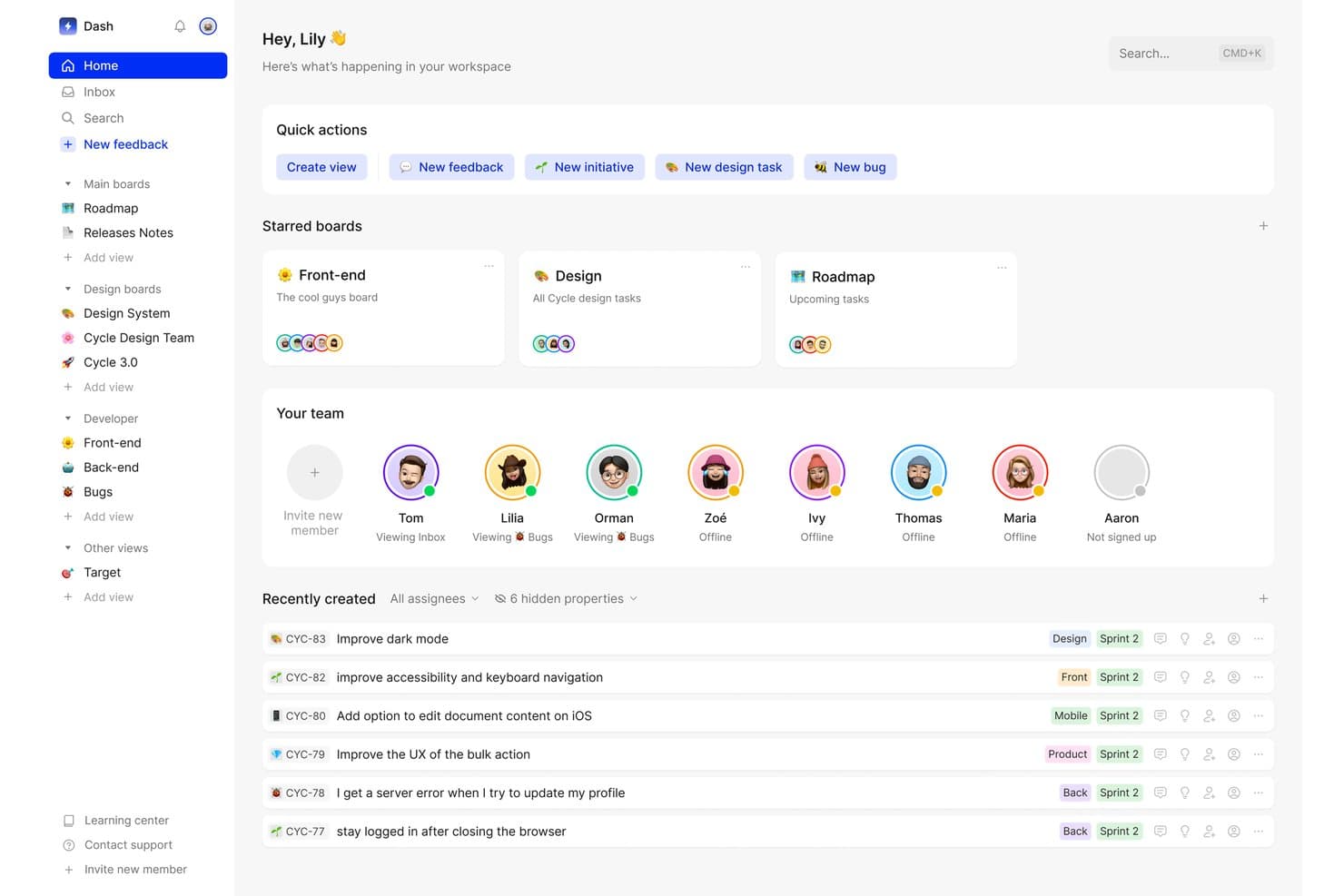
Cycle centralizes team tasks, feedback, and boards in one workspace. Cycle was a product discovery and feedback management platform that centralized multi-source customer feedback, generated AI-powered insights, and connected those insights to roadmap planning and release management.
Who Is Cycle Best For?
Cycle was a strong fit for product teams that needed to consolidate high-volume customer feedback from multiple channels and connect those insights directly to roadmap decisions.
Why I Picked Cycle
I've included Cycle in my top picks because it handles the full arc from raw customer signal to roadmap decision better than almost anything else I've seen. The @VoiceHunter agent automatically synthesizes interview notes and tags incoming feedback, while @LoopCloser notifies customers the moment their requested feature ships. What I find most compelling is how these AI agents turn what's usually a manual, scattered process into a continuous, largely automated workflow.
Cycle Key Features
- Multi-source feedback ingestion: Cycle automatically pulls customer feedback from Slack, Intercom, Zendesk, Gong, HubSpot, and meeting transcripts into a single hub.
- Cycle Ask NLP querying: An add-on that lets you search your entire feedback corpus using natural language questions to surface relevant customer signals on demand.
- Unlimited free Collaborator seats: Stakeholders like engineers, sales reps, and CS team members can join, comment, and submit feedback without taking up a paid seat.
- Release notes and changelog publishing: Teams can draft and publish AI-assisted release notes connected to a publicly hosted, custom-domain changelog.
Cycle Integrations
Cycle offered native integrations with Notion, Linear, GitHub, Figma, and Miro, plus integrations with Slack, Jira, Confluence, HubSpot, and Salesforce. It also provided a public API and Zapier connectivity.
Pros and Cons
Pros:
- Unlimited free collaborator seats support teamwork
- AI agents automate feedback synthesis workflow
- Excels at multi-source feedback aggregation
Cons:
- Lacks native hypothesis validation features
- No longer available as a standalone product
Learn more about Cycle: Best for end-to-end feedback-to-roadmap traceability
- Free plan available; 14-day free trial; free demo available
- From $12/user/month (billed annually)
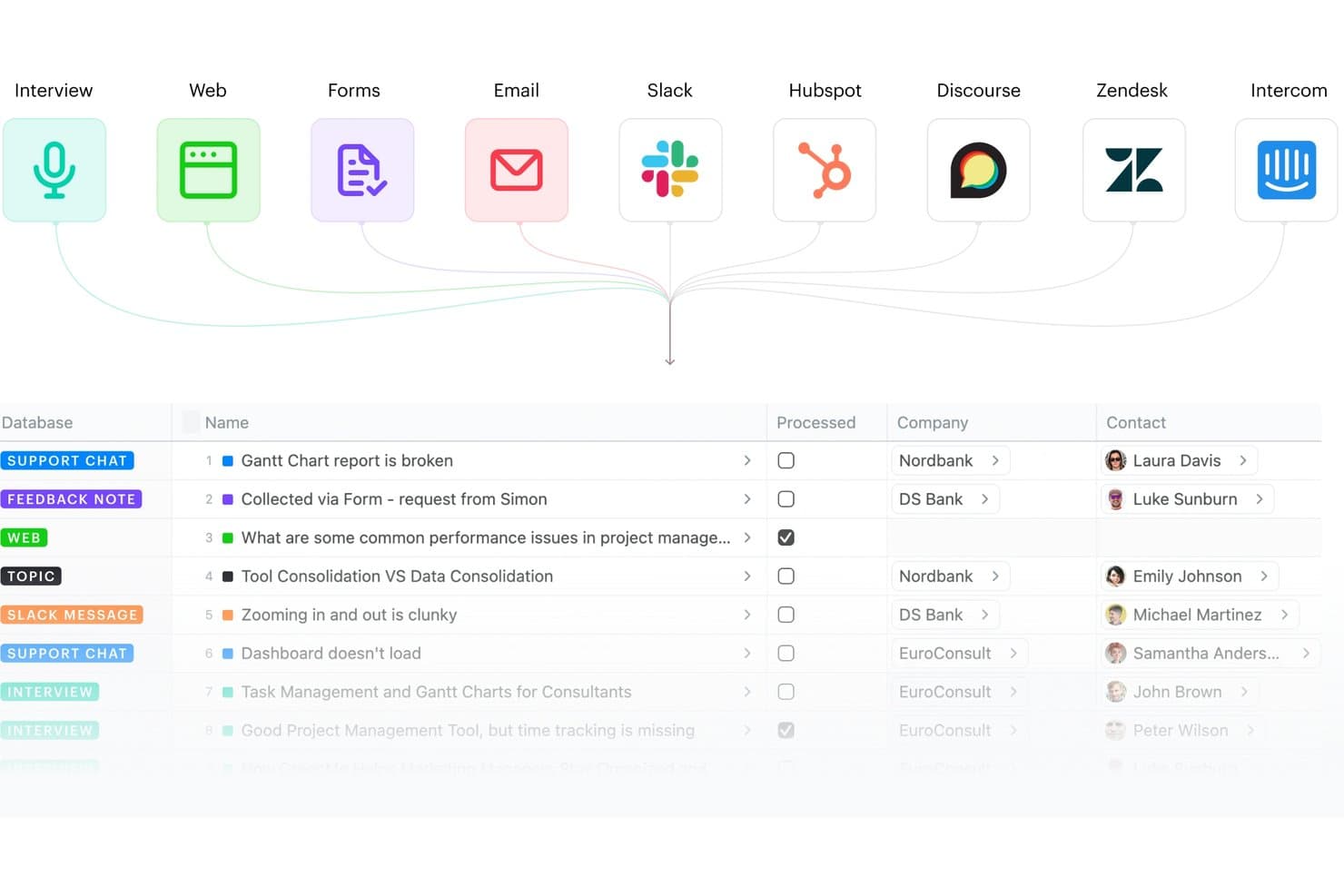
Fibery centralizes feedback from multiple sources into one database. Fibery is a modular product discovery and development platform that connects customer feedback aggregation, insight synthesis, opportunity mapping, and roadmap planning in a single relational workspace.
Who Is Fibery Best For?
Fibery fits product teams that want a single, deeply connected workspace to trace every insight from raw customer feedback all the way through to shipped features on the roadmap.
Why I Picked Fibery
Fibery earns its spot on my shortlist because of how tightly it connects raw customer feedback to shipped features, with no broken links in the chain. I love that its native Opportunity Solution Tree (built on Teresa Torres' framework) lets you map evidence directly to opportunities and solutions, so every roadmap item traces back to a real customer insight. Its AI-driven semantic clustering and Atomic Research template also mean my team can synthesize interview notes into tagged, linked facts rather than letting findings pile up in disconnected docs.
Fibery Key Features
- Feedback inbox: A centralized hub that collects and routes incoming feedback from sources like Intercom, Zendesk, Slack, HubSpot, and email into a single processing queue.
- AI-powered call transcription: Automatically transcribes recorded interviews and meetings, then generates summaries and extracts key notes without manual effort.
- Custom formula-based prioritization: Lets you build scoring models using any combination of feedback volume, customer segment, pain severity, and business impact tied to live CRM data.
- Public roadmaps and changelogs: Lets teams publish live, shareable roadmaps and product updates so stakeholders and customers can follow progress without needing a paid seat.
Fibery Integrations
Fibery offers native integrations with Intercom, Zendesk, HubSpot, Slack, Discourse, Jira, GitHub, GitLab, and Google Workspace. It also supports custom integrations through its API and Zapier.
Pros and Cons
Pros:
- AI clusters and summarizes research insights
- Highly flexible discovery and research templates
- Connects feedback directly to shipped features
Cons:
- Fewer specialized research integrations available
- No built-in user recruiting or surveys
Learn more about Fibery:
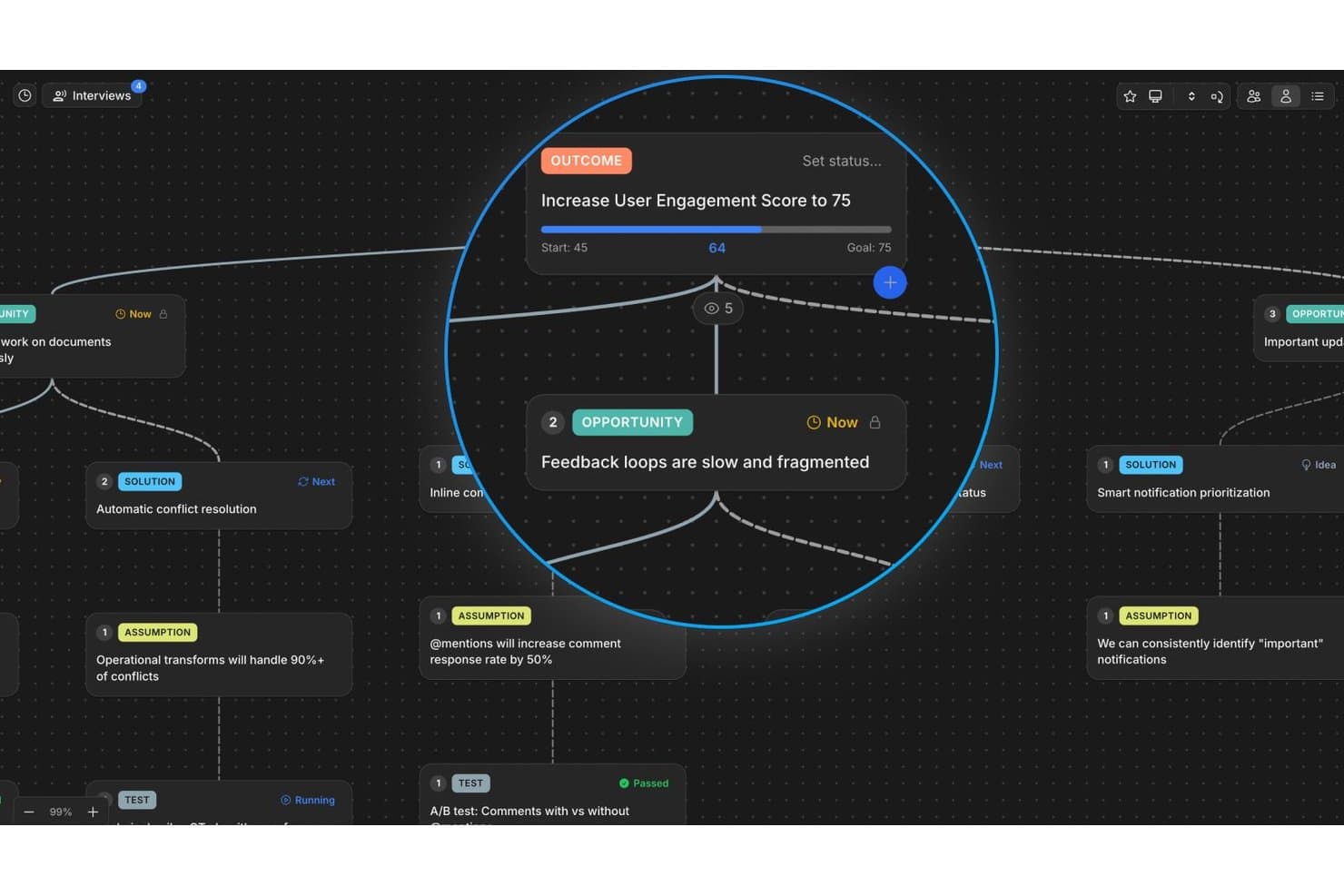
Vistaly maps opportunities and outcomes in a visual discovery tree. Vistaly is a product discovery platform built around the Opportunity Solution Tree framework, offering an interactive OST canvas, AI-powered interview synthesis, evidence traceability, and strategy mapping to connect discovery work to business outcomes.
Who Is Vistaly Best For?
Vistaly is a strong fit for product teams that have adopted—or are actively building—a continuous discovery practice around the Opportunity Solution Tree framework.
Why I Picked Vistaly
Vistaly earns its spot on my shortlist because it's the only product discovery tool built in formal partnership with Teresa Torres, the creator of the Opportunity Solution Tree framework. I picked it specifically for teams doing continuous discovery: you upload customer interviews in any of ~29 formats, and the AI synthesizes three or more into a fully structured OST with every opportunity card anchored to verbatim quotes. What I find most compelling is that the roadmap isn't a separate artifact—it's the OST itself, pivoted by card status.
Vistaly Key Features
- Strategy Space: Connect discovery opportunities directly to OKR and KPI trees, with live metric syncing from tools like PostHog, Amplitude, and Mixpanel.
- Mirror cards: Link a single opportunity or solution card to multiple outcomes, keeping evidence and status in sync across every instance.
- Assumption and Test cards: Log and structure hypotheses directly on the OST canvas using dedicated card types tied to specific solutions.
- Unlimited viewer seats: Give stakeholders, engineers, and executives read access to the full discovery tree without requiring editor licenses.
Vistaly Integrations
Vistaly offers native integrations with Jira, Linear, GitHub, Slack, Gong, and PostHog. It also provides a REST API, MCP access for Claude, ChatGPT, and Cursor, and Zapier.
Pros and Cons
Pros:
- Every card links to verbatim customer evidence
- Opportunity Solution Tree built with expert partnership
- AI turns interviews into structured OSTs
Cons:
- Lacks built-in participant recruiting features
- No native customer survey or test runner
Learn more about Vistaly: Best for AI-moderated interviews at scale
- Free plan available
- Pricing upon request
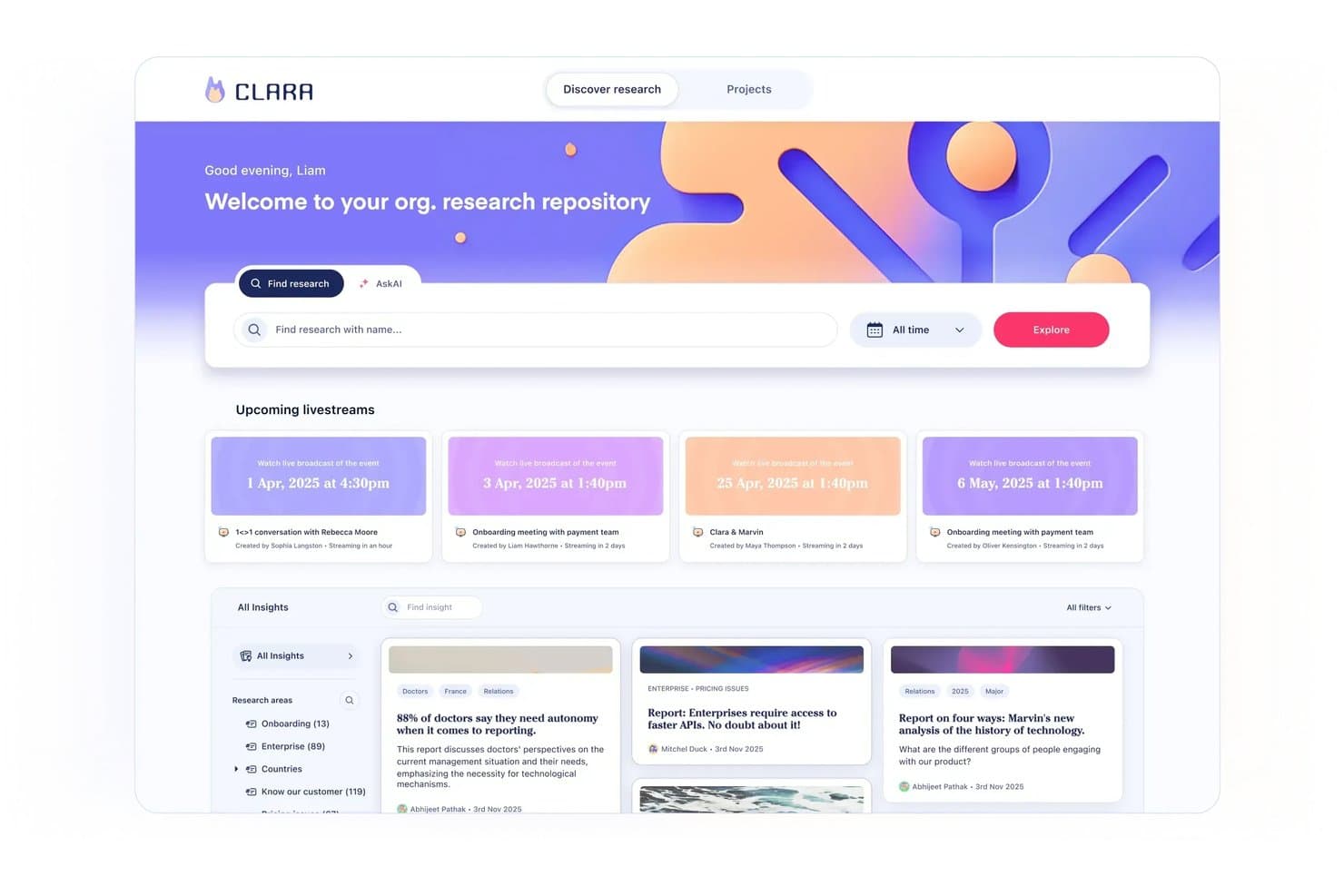
Marvin centralizes research insights and upcoming sessions in one hub. Marvin is an AI-native customer insights platform that centralizes qualitative research across interviews, support tickets, sales calls, and surveys, with built-in AI synthesis, moderated interviewing, and cross-project analysis.
Who Is Marvin Best For?
Marvin is a strong fit for UX research and product discovery teams that run high volumes of qualitative interviews and need AI to handle synthesis at scale.
Why I Picked Marvin
I picked Marvin as one of the best because it's the only tool on my list that lets you run hundreds of AI-moderated interviews simultaneously, without a researcher in the room. Its Live Intercept feature embeds a voice-to-voice AI interviewer directly inside your product, triggering real-time sessions with active users in 40+ languages. Pair that with Deep Research's hypothesis testing, and you can validate assumptions against your entire research corpus with cited, source-linked evidence.
Marvin Key Features
- Knowledge Hub: A centralized repository that ingests data from interviews, support tickets, sales calls, surveys, and reviews into one searchable system.
- Ask AI: A natural-language query tool that searches your entire research corpus and returns cited answers traceable to original source data.
- Research Digest newsletters: Auto-generated bi-weekly emails that surface curated research insights and send them directly to your team.
- Virtual Backroom: A live broadcast feature that lets stakeholders silently observe interviews in real time and collaborate via live chat.
Marvin Integrations
Marvin offers 30+ native integrations, including Notion, Jira, Confluence, Figma, Miro, Zoom, Google Meet, Gong, Zendesk, and Qualtrics. Its Import API supports custom integrations.
Pros and Cons
Pros:
- Delivers AI-cited insights traceable to sources
- Provides in-product voice-to-voice AI interviewing
- Runs hundreds of AI-moderated interviews simultaneously
Cons:
- Lacks native prioritization scoring frameworks
- No opportunity trees or solution mapping features
Learn more about Marvin: 6Best for visual brainstorming in product teams
Miro
- Free plan + 14-day free trial + free demo available
- From $8/user/month (billed annually)
Visit WebsiteCustomer Rating:4.8/5
Miro simplifies presenting plans and timeframes, ensuring adaptability to delays and client demands. Miro is an online visual collaboration platform that enables teams to work together in real-time. Its focus on interactive, visual collaboration makes it an excellent choice for product teams looking to brainstorm and ideate together, regardless of their geographical location.
Why I Picked Miro:
In my judgment, I chose Miro for its exceptional focus on real-time visual collaboration. The platform differentiates itself with an extensive set of drawing and diagramming tools, supporting a diverse array of brainstorming activities. This focus makes Miro the best choice for product teams who need to visualize ideas and engage in collaborative brainstorming.
Standout Features & Integrations:
Miro shines with features such as endless canvas, premade templates, real-time collaboration and commenting, and intuitive drawing tools. The platform integrates well with many other productivity tools, including Slack, Google Drive, Dropbox, and Microsoft Teams, making it easy to incorporate into existing workflows.
Pros and Cons
Pros:
- Real-time collaboration and commenting features enhance team cooperation
- Excellent integrations with commonly used productivity tools
- Offers a wide range of drawing and diagramming tools
Cons:
- Occasional lag issues reported during heavy usage
- More expensive than some competitors when billed annually
- Can be overwhelming for new users due to the vast number of features
 Best for evidence-linked feature prioritization
- Free plan + free demo available
- From $19/user/month (billed annually)
Visit WebsiteCustomer Rating:4.5/5
Productboard improves customer retention and innovation by identifying critical needs and delivering timely solutions. Productboard is a comprehensive product management tool designed to help product teams prioritize features, centralize product information, and craft compelling product roadmaps. Its user-centric approach makes it invaluable for teams dedicated to building products that meet real user needs.
Why I Picked Productboard:
I singled out Productboard for its strong emphasis on feature prioritization and roadmap visualization. It simplifies the usually complex process of determining what to build next and lays out a clear path to achieve it. The tool stands apart with its features like a user feedback portal and prioritization matrix.
Therefore, I find it "best for" product managers to aim to systematically prioritize features and lay out clear roadmaps.
Standout Features & Integrations:
Productboard shines with its features like a customer feedback repository, feature scoring system, and visually appealing roadmaps. Additionally, it offers persona and segmentation tools to cater to different user needs. As for integrations, Productboard smoothly collaborates with popular tools like Slack, Jira, Intercom, and Salesforce to streamline product management workflows.
Pros and Cons
Pros:
- Comprehensive integrations with other tools
- Robust feedback management system
- Excellent for feature prioritization and roadmap visualization
Cons:
- Limited options for custom fields in some plans
- Higher tiers are fairly pricey
- User interface can be a bit overwhelming initially
Learn more about Productboard: Best for prioritization-driven feature decisions
- Free demo available
- Pricing upon request
Visit WebsiteCustomer Rating:4.4/5
Maximize strategy, discovery, and execution using custom workflows with Airfocus. Airfocus is a product management tool that offers strategic planning and prioritization features. By using a unique scoring system and visualizations, it aids product teams in making informed decisions on feature prioritization, making it the ideal choice for product teams who need to strategically allocate resources and prioritize development tasks.
Why I Picked Airfocus:
In determining the best tools, I selected Airfocus due to its exceptional capacity for strategic decision-making. What makes Airfocus stand out is its proprietary prioritization system, which assists teams in understanding which features will offer the most value. This specific quality led me to view Airfocus as the best tool for prioritization in product feature development.
Standout Features & Integrations:
Airfocus provides robust features including a priority scoring system, a roadmap view for strategic planning, and a collaboration feature to include everyone in the decision-making process. It integrates with a number of other project management tools such as Jira, Trello, and Asana, making it a flexible addition to any product team's toolbox.
Pros and Cons
Pros:
- Allows for team-wide collaboration in feature prioritization
- Integrates well with other project management tools
- Unique priority scoring system supports strategic decision-making
Cons:
- Pricing may be on the higher end compared to other tools
- Has a bit of a learning curve, particularly for non-technical users
- Annual billing could be a barrier for some teams
 Best for feedback-to-roadmap traceability
- 7-day free trial + free demo available
- From $24/user/month (billed annually)
Visit WebsiteCustomer Rating:4.2/5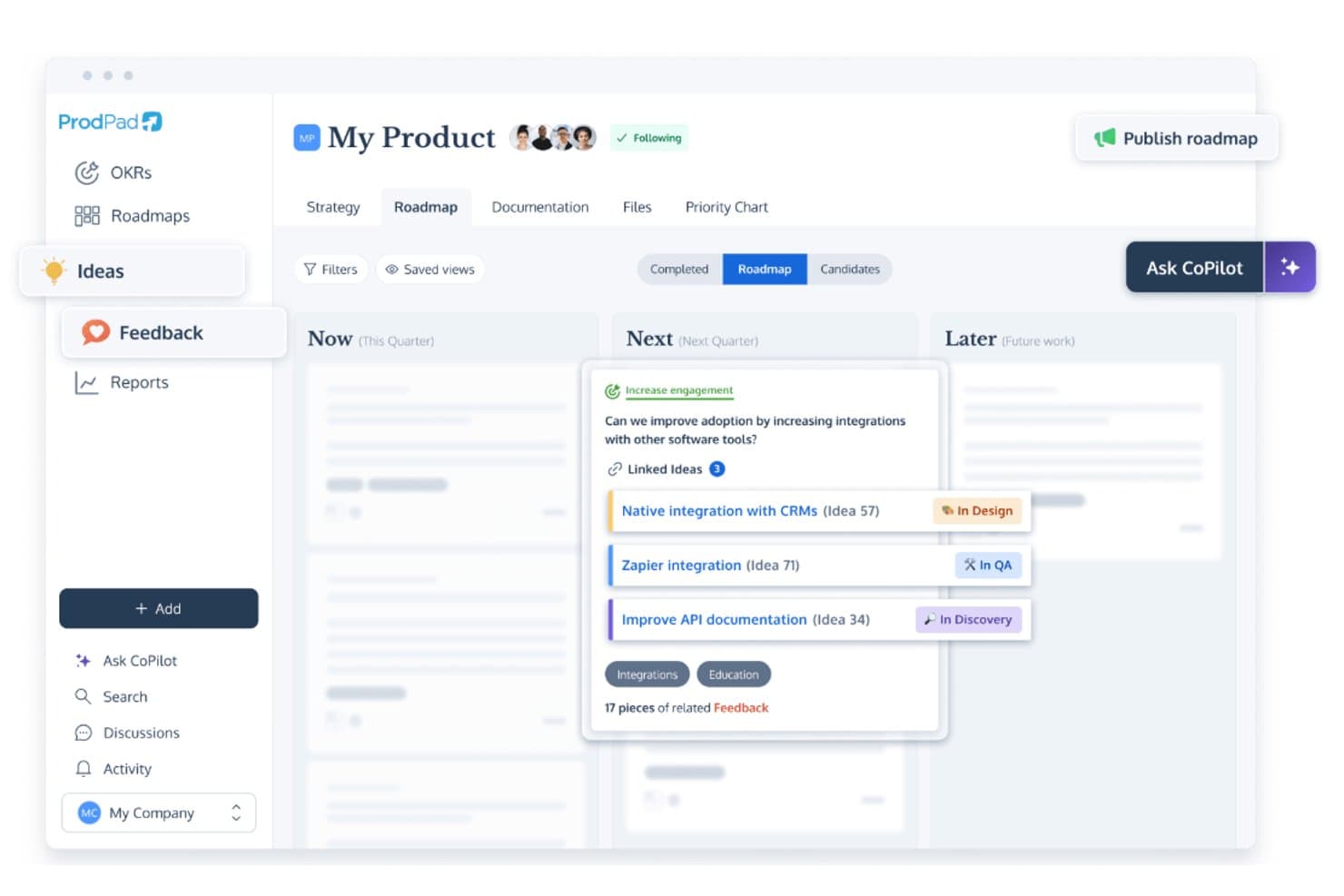
ProdPad links roadmap ideas to feedback and tracks development status. ProdPad is a product discovery and roadmapping platform built around feedback management, idea backlog organization, AI-assisted synthesis, and Now-Next-Later roadmapping.
Who Is ProdPad Best for?
ProdPad is a strong fit for product managers who need a clear, traceable link between customer feedback and roadmap decisions.
Why I Picked ProdPad
I picked ProdPad as one of the best because no other tool on this list makes the connection between raw customer feedback and roadmap decisions as traceable. Every piece of feedback links bidirectionally to the idea it influenced and the initiative it maps to, so you always know why something is on the roadmap. AI Signals surfaces recurring themes across your feedback corpus automatically, and CoPilot flags duplicate ideas in the backlog before they create noise.
ProdPad Key Features
- Now-Next-Later roadmap: A lean roadmap format organized by strategic time horizon rather than fixed dates, helping teams prioritize by outcome over output.
- Unlimited free reviewer seats: Any number of stakeholders—engineers, executives, sales, or CS—can access ProdPad as Reviewers at no added cost.
- CoPilot AI product coach: An embedded AI assistant that pressure-tests decisions, drafts specs and summaries, and generates measurable Key Results from broad strategic goals.
- Modular pricing: Teams can purchase only the modules they need—Roadmaps, Ideas, or Feedback—and add more as their discovery practice grows.
ProdPad Integrations
ProdPad offers native integrations with Jira, Azure DevOps, Linear, Salesforce, Intercom, Slack, Microsoft Teams, and Confluence. It also supports an API, webhooks, and Zapier for custom connectivity.
Pros and Cons
Pros:
- AI auto-detects feedback themes and duplicates
- Unlimited free reviewer seats for collaboration
- Feedback links directly to roadmap items
Cons:
- No native research interview repository
- No built-in surveys or testing tools
Learn more about ProdPad: 10Best for AI-driven continuous customer insight
Dovetail
- Free plan + free demo available
- Pricing upon request
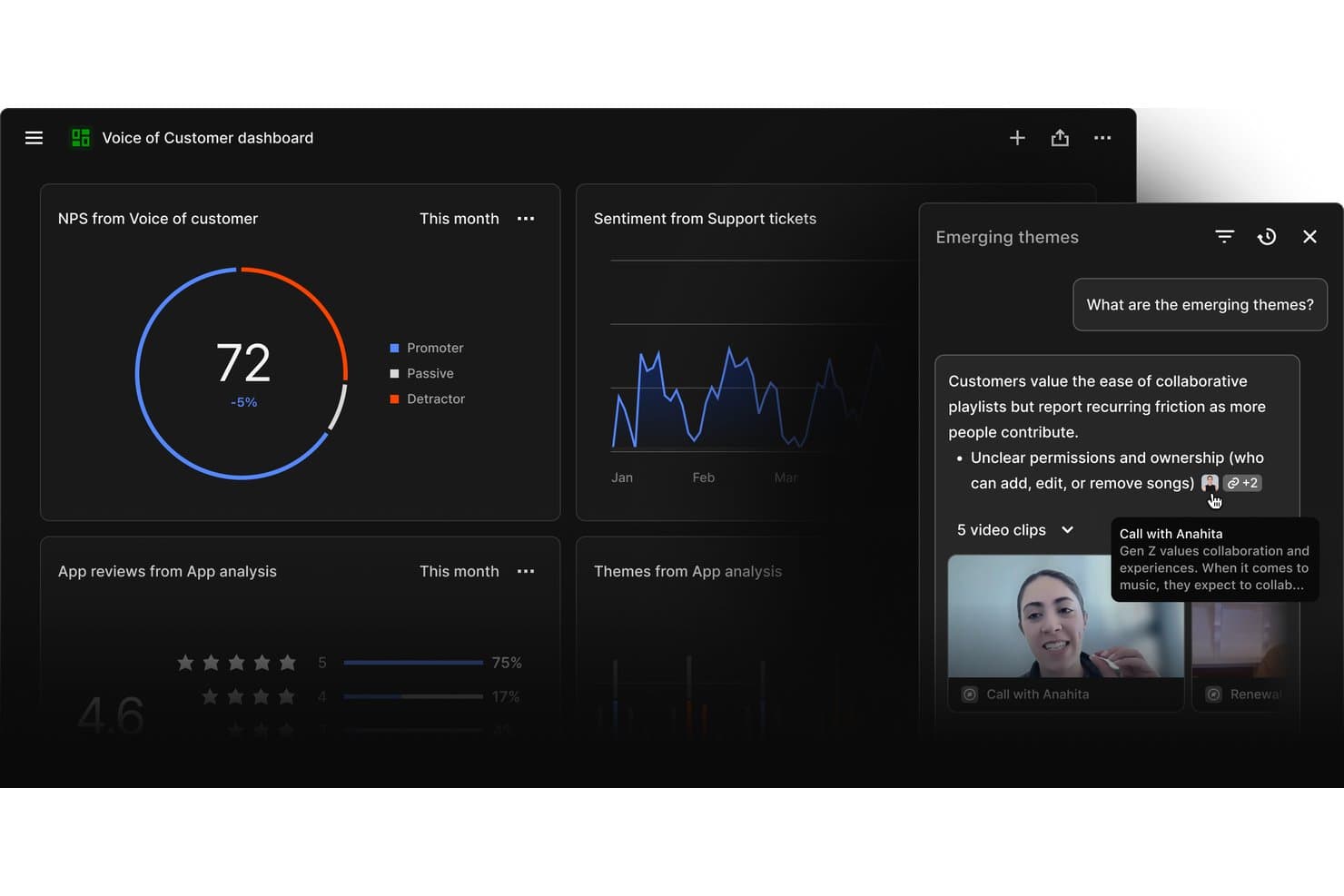
Dovetail surfaces emerging customer themes from mixed research sources. Dovetail is a customer intelligence platform that centralizes feedback from support tickets, sales calls, surveys, and app reviews, using AI to transcribe, cluster, and synthesize qualitative data into ranked, evidence-backed opportunities for product teams.
Who Is Dovetail Best For?
Dovetail is a strong fit for product and research teams at mid-to-large companies that need to turn high volumes of customer feedback into prioritized, evidence-backed opportunities across the full organization.
Why I Picked Dovetail
Dovetail earns its spot on my shortlist because its AI Channels 2.0 turns continuous feedback into ranked, revenue-weighted opportunities without any manual triage. I particularly like how it weights each opportunity by ARR impact using Salesforce enrichment, so I'm not just seeing what customers mention most often but what actually matters to the business. The Digital Twins feature lets me pressure-test assumptions against real customer conversations before a single line of code is written.
Dovetail Key Features
- AI Clustering: Automatically groups high-volume feedback into themes without requiring manual tagging, so your team can surface patterns at scale.
- Multi-language transcription: Auto-transcribes and translates customer interviews and calls across 75 languages with multi-speaker recognition built in.
- AI Agents: Configurable, no-code agents that monitor your customer data and push scheduled or triggered insight updates to Slack, Teams, or email.
- MCP Server: Connects Dovetail's insight layer directly to Claude, ChatGPT, and Microsoft Copilot, embedding customer evidence into your team's existing AI workflows.
Dovetail Integrations
Dovetail offers 38 native integrations, including Jira, Linear, Productboard, Figma Make, Slack, Microsoft Teams, Notion, Salesforce, Zendesk, and Gong. It also supports custom connections through its API, CLI, and MCP Server, plus Zapier.
Pros and Cons
Pros:
- Shares evidence-backed insights with stakeholders automatically
- Transcribes and synthesizes feedback in 75 languages
- AI ranks opportunities by revenue impact
Cons:
- No built-in RICE or MoSCoW scoring
- Cannot validate prototypes or run usability tests
Learn more about Dovetail:
Outras ferramentas de descoberta de produtos
Eis algumas opções adicionais de ferramentas de descoberta de produtos que não chegaram à minha lista restrita, mas que vale a pena conhecer:
- 11DragonboatBest for portfolio-led discovery prioritization
- 12Zeda.ioBest for revenue-linked feedback synthesis
- 13UserTestingBest for research-heavy usability validation
- 14AirtableBest for multi-framework feature prioritization
- 15HarvestrBest for revenue-linked feedback prioritization
- 16ZefiBest for AI-driven VoC to opportunity mapping
How I Evaluate Product Discovery Tools
I evaluate product discovery tools in two layers: baseline requirements like customer feedback synthesis, opportunity management, and idea validation, then the differentiators that separate strong tools from the rest.
Core Functionality (Table Stakes For This List)
When I'm selecting tools for my list, I rank each one on a scale from 0 (does not offer the functionality) to 5 (excels in this area) for each core functionality listed below. Then, I calculate the tool's total score into a percentage. Each tool needs to achieve a minimum total score of 65% to be considered for inclusion.
- Customer Feedback Aggregation: I check whether a tool can centralize qualitative and quantitative feedback from sources like customer interviews, surveys, support tickets, and sales calls so teams can work from a shared repository.
- Insight Synthesis & Tagging: I look for tools that can turn raw feedback into structured insights through tagging, clustering, thematic grouping, or other synthesis methods that help teams identify recurring patterns.
- Opportunity & Idea Management: I evaluate whether teams can capture, organize, and track product opportunities, hypotheses, and ideas discovered through research. Strong tools connect these opportunities back to the customer evidence and outcomes behind them.
- Hypothesis Validation Tools: I look at how the platform helps teams test product assumptions before committing to development, whether through surveys, prototype tests, customer interviews, experiments, or other validation methods.
- Prioritization Frameworks: I assess whether teams can rank opportunities using built-in scoring or prioritization models such as RICE, MoSCoW, or weighted scoring. I also look for flexibility in how criteria are configured and tied to user evidence and business impact.
- Discovery Collaboration & Sharing: Discovery work needs input from across product, design, and research. I look for shared workspaces, comments, stakeholder views, and other ways teams can review and act on discovery findings together.
Once I have a list of tools that meet this criteria, I consider what sets each platform apart.
Differentiating Factors (What Sets Vendors Apart)
Here's how I compare and contrast different vendors:
Standout Features
AI research synthesis is a major differentiator. Tools that can transcribe interviews, extract highlights, and surface recurring themes can reduce the manual work involved in analyzing customer research. I also look for opportunity solution trees that connect outcomes, opportunities, solutions, and experiments, as well as evidence linking that traces product decisions back to customer insights. Continuous interview recruiting can help teams maintain a regular research cadence, while roadmap and delivery integrations make it easier to move validated opportunities into tools like Jira or Linear without losing discovery context.
Beyond Features
Integration depth is one of the first things I evaluate. A discovery tool that connects to your CRM, support platform, research tools, and delivery stack means less manual work moving customer evidence between systems. I also consider how well a platform supports cross-functional teams and different levels of discovery maturity. Methodology alignment matters too, particularly for teams using approaches like Continuous Discovery Habits, Jobs-to-be-Done, Dual Track Agile, or Lean Startup. Finally, I consider security and onboarding factors like permissions, data privacy controls, templates, migration support, and training resources.
Como escolher ferramentas de descoberta de produtos
É fácil perder-se em listas extensas de funcionalidades e estruturas de preços complexas. Para o ajudar a manter-se concentrado enquanto trabalha no seu processo específico de seleção de software, eis uma lista de fatores a ter em conta:
| Fator | O que deve considerar |
|---|---|
| FatorEscalabilidade | O que deve considerarA ferramenta consegue acompanhar o crescimento da sua equipa? Considere se processa volumes de dados maiores e mais utilizadores sem problemas de desempenho. Procure indicadores como limites de utilizadores ou limites de dados. |
| FatorIntegrações | O que deve considerarÉ compatível com as ferramentas que já utiliza? Verifique se se integra com o seu CRM, aplicações de comunicação ou plataformas de análise de dados. Evite ferramentas com APIs limitadas. |
| FatorPersonalização | O que deve considerarPode adaptá-la ao seu fluxo de trabalho? Procure campos, painéis e funções de utilizador personalizáveis. Evite sistemas rígidos que não se adaptam às suas necessidades. |
| FatorFacilidade de utilização | O que deve considerarÉ intuitiva para a sua equipa? Teste a interface para garantir uma navegação simples e necessidades mínimas de formação. Evite configurações complexas que frustrem os utilizadores. |
| FatorImplementação e integração inicial | O que deve considerarQuanto tempo demora até estar tudo a funcionar? Procure uma configuração rápida, recursos de formação e apoio durante a integração inicial. Evite implementações demoradas que atrasem o progresso. |
| FatorCusto | O que deve considerarEncaixa-se no seu orçamento? Compare o custo total com o seu orçamento, incluindo taxas ocultas. Procure planos de preços flexíveis ou descontos para pagamentos anuais. |
| FatorMedidas de segurança | O que deve considerarOs seus dados e a sua privacidade estão protegidos? Certifique-se de que a ferramenta cumpre normas de segurança, como encriptação e controlos de acesso. Evite ferramentas com políticas de segurança vagas. |
O que são ferramentas de descoberta de produtos?
As ferramentas de descoberta de produtos são soluções de software que ajudam as equipas a recolher informações e a dar prioridade às funcionalidades dos produtos. Os gestores de produto, os designers de UX e as equipas de desenvolvimento utilizam normalmente estas ferramentas para alinhar as necessidades dos clientes com os objetivos empresariais. Funcionalidades como a recolha de feedback dos clientes, a definição de prioridades das funcionalidades e o planeamento do produto ajudam na tomada de decisões e na colaboração. De um modo geral, estas ferramentas proporcionam clareza e orientação para um desenvolvimento de produtos bem-sucedido.
Funcionalidades
Ao selecionar ferramentas de descoberta de produtos, esteja atento às seguintes funcionalidades essenciais:
- Recolha de feedback dos clientes: Recolhe informações dos utilizadores para orientar as decisões sobre o produto e alinhar-se com as necessidades dos clientes.
- Definição de prioridades das funcionalidades: Ajuda as equipas a classificar as funcionalidades com base no impacto, garantindo que as mais valiosas são desenvolvidas primeiro.
- Planeamento do produto: Apresenta visualmente o percurso de desenvolvimento do produto, ajudando as equipas e as partes interessadas a compreender os prazos e as prioridades.
- Capacidades de integração: Liga-se a ferramentas existentes, como CRM e aplicações de comunicação, garantindo um fluxo de dados contínuo entre plataformas.
- Painéis personalizáveis: Permitem aos utilizadores adaptar a sua visualização para se concentrarem nas métricas e informações relevantes.
- Ferramentas de colaboração: Facilitam a comunicação e o alinhamento da equipa, garantindo que todos estão a par.
- Informações baseadas em IA: Utiliza a inteligência artificial para fornecer recomendações e previsões baseadas em dados.
- Medidas de segurança: Protegem os dados através de encriptação e controlos de acesso, garantindo a privacidade dos utilizadores e a conformidade.
- Visitas interativas ao produto: Oferecem orientações passo a passo para ajudar os novos utilizadores a compreender e utilizar rapidamente a ferramenta.
- Análise e relatórios: Fornecem informações detalhadas sobre o desempenho do produto e o comportamento dos utilizadores, para uma tomada de decisões informada.
Benefícios
A implementação de ferramentas de descoberta de produtos proporciona vários benefícios à sua equipa e à sua empresa. Eis alguns dos benefícios que pode esperar:
- Melhor tomada de decisões: Com o feedback dos clientes e informações baseadas em dados, a sua equipa pode tomar decisões informadas sobre as funcionalidades e as prioridades do produto.
- Colaboração reforçada: Os planos de produto partilhados e as ferramentas de colaboração ajudam a manter a sua equipa alinhada e a trabalhar em direção a objetivos comuns.
- Maior eficiência: As funcionalidades de definição de prioridades garantem que a sua equipa se concentra primeiro nas tarefas de maior impacto, poupando tempo e recursos.
- Maior satisfação dos clientes: Ao alinhar o desenvolvimento do produto com as necessidades dos utilizadores, entrega produtos que correspondem melhor às expectativas do seu público.
- Visão clara do produto: O planeamento do produto proporciona uma representação visual do futuro do produto, ajudando as partes interessadas a compreender a orientação e o calendário.
- Redução dos riscos: As informações baseadas em IA e a análise ajudam a identificar potenciais problemas numa fase inicial, permitindo à sua equipa resolvê-los de forma proativa.
- Segurança dos dados: Com medidas de segurança robustas, os dados da sua equipa e dos seus clientes permanecem protegidos, garantindo a conformidade e a confiança.
Custos e preços
A seleção de ferramentas de descoberta de produtos requer uma compreensão dos vários modelos de preços e planos disponíveis. Os custos variam consoante as funcionalidades, o tamanho da equipa, os complementos e outros fatores. A tabela abaixo resume os planos comuns, os seus preços médios e as funcionalidades normalmente incluídas nas soluções de ferramentas de descoberta de produtos:
Tabela de comparação de planos para ferramentas de descoberta de produtos
| Tipo de plano | Preço médio | Funcionalidades comuns |
|---|---|---|
| Tipo de planoPlano gratuito | Preço médio$0 | Funcionalidades comunsRecolha básica de feedback, definição limitada de prioridades das funcionalidades e planeamento simples do produto. |
| Tipo de planoPlano pessoal | Preço médio$5-$25/utilizador/mês | Funcionalidades comunsFerramentas de feedback melhoradas, painéis personalizáveis e integrações com aplicações básicas. |
| Tipo de planoPlano empresarial | Preço médio$30-$75/utilizador/mês | Funcionalidades comunsAnálise avançada, ferramentas de colaboração em equipa e várias integrações. |
| Tipo de planoPlano empresarial avançado | Preço médio$80+/utilizador/mês | Funcionalidades comunsConjunto completo de funcionalidades, suporte dedicado e medidas de segurança avançadas. |
Perguntas frequentes sobre ferramentas de descoberta de produtos
Eis algumas respostas a perguntas comuns sobre ferramentas de descoberta de produtos:
Como é que as equipas recolhem informações utilizando ferramentas de descoberta de produtos?
Normalmente, as equipas registam as entrevistas com utilizadores, os dados de inquéritos e os padrões de utilização do produto num único local. Pode etiquetar as informações, associá-las a ideias e partilhá-las entre equipas. Isto mantém o trabalho de descoberta visível e ligado à tomada de decisões. Também evita que a investigação fique isolada.
Como é que as ferramentas de descoberta de produtos gerem o backlog de ideias?
Pode criar, etiquetar e organizar ideias à medida que surgem. Algumas ferramentas atribuem uma pontuação às ideias com base no impacto, esforço ou alinhamento com os objetivos. Isto ajuda a sua equipa a evitar o excesso de funcionalidades e a concentrar-se no que é importante. Pode rever ideias mais antigas quando o contexto muda.
As ferramentas de descoberta de produtos são compatíveis com o agile de via dupla?
Sim, muitas ferramentas permitem que a descoberta e a entrega decorram em simultâneo. Permitem explorar e validar ideias enquanto a sua equipa continua a desenvolvê-las. Pode mover facilmente as ideias entre os percursos de descoberta e de entrega, mantendo ambos os esforços alinhados.
As ferramentas de descoberta de produtos são adequadas para equipas pequenas?
Sim, as ferramentas de descoberta de produtos são adequadas para equipas pequenas. Muitas ferramentas oferecem funcionalidades escaláveis que se adaptam à dimensão e às necessidades da sua equipa. Disponibilizam funcionalidades essenciais, como a recolha de feedback e a priorização de funcionalidades, ajudando as equipas pequenas a manterem-se organizadas e concentradas nos seus objetivos, sem uma complexidade excessiva.