Com tantas soluções diferentes de feedback dos utilizadores disponíveis, é difícil perceber qual é a mais adequada para si. Sabe que quer recolher informações sobre as experiências, preferências e dificuldades dos utilizadores para tomar decisões informadas sobre a melhoria e o aperfeiçoamento do produto, mas precisa de perceber qual é a melhor ferramenta. Eu ajudo! Nesta publicação, vou ajudar a tornar a sua escolha mais fácil, recorrendo à minha experiência pessoal com dezenas de ferramentas diferentes, utilizadas por grandes equipas e em produtos diversificados, para partilhar as minhas escolhas do melhor software de feedback dos utilizadores.
Why Trust Our Software Recommendations
6,700+
Reviews
20
Industry experts
16+
Evaluation factors
14
Years
Our team has been testing and reviewing software since 2012. As product managers ourselves, we know how difficult—and important—it is to choose the right software.
For this guide, we evaluated tools using hands-on testing and independent research, scoring tools using our selection criteria.
Our reviews reflect our human editorial judgment, not a sales pitch.
Expert reviewers:
- Andrew LumbySenior TPM
- Cristiano ValimSenior UI/UX Lead


Tabela comparativa de software de feedback dos utilizadores
Esta tabela comparativa resume os detalhes de preços das minhas principais escolhas de software de feedback dos utilizadores:
| Tool | Best For | Trial Info | Price | ||
|---|---|---|---|---|---|
| 1 | Best for AI-powered contextual insights | Free demo available | Pricing upon request | Website | |
| 2 | Best for automated feedback tagging | Free demo available | Pricing upon request | Website | |
| 3 | Best for actionable feedback | Free plan available | From $9/user/month | Website | |
| 4 | Best for conversational surveys | Free plan available | From $19/user/month (billed annually) | Website | |
| 5 | User feedback software for analyzing feedback from specific customers | Free plan available | From $79/month (billed annually) | Website | |
| 6 | Best for enterprise-wide voice-of-customer programs | Free demo available | Pricing upon request | Website | |
| 7 | Best for linking feedback to revenue impact | Free plan + 30-day free trial + free demo available | Pricing upon request | Website | |
| 8 | Best for revenue-weighted feedback prioritization | 30-day free trial + free demo available | Pricing upon request | Website | |
| 9 | Best for visual and video bug feedback capture | Free 15-day trial | From $45/month | Website | |
| 10 | Best for AI-driven research repository analysis | Free plan + free demo available | Pricing upon request | Website |


Análises do melhor software de feedback dos utilizadores
Abaixo encontrará os meus resumos detalhados do melhor software de feedback dos utilizadores que integrou a minha lista restrita. As minhas análises apresentam uma visão detalhada das principais funcionalidades, vantagens e desvantagens, integrações e casos de utilização ideais de cada ferramenta, para o ajudar a encontrar a melhor opção para si.
 Best for AI-powered contextual insights
- Free demo available
- Pricing upon request
Visit WebsiteCustomer Rating:4.8/5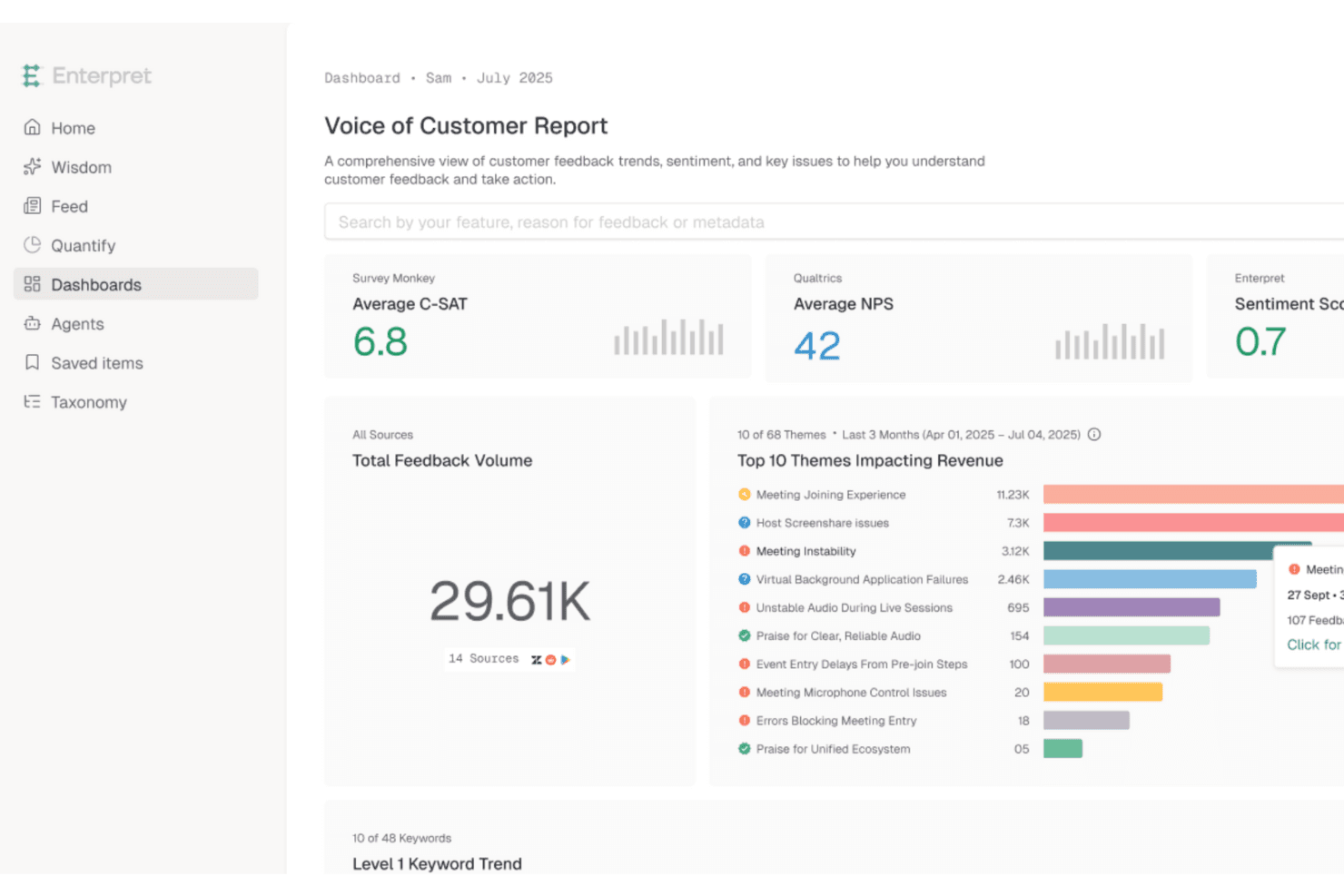
Enterpret unifies customer feedback to surface AI-driven insights fast. Enterpret is a customer intelligence platform that aggregates feedback from support tools, CRMs, sales calls, surveys, and review sites into a unified repository, then uses AI to categorize, analyze, and surface trends across all of it.
Who Is Enterpret Best For?
Enterpret is a strong fit for UX researchers and product teams at mid-market and enterprise companies that already collect feedback across multiple tools and need AI to make sense of it all.
Why I Picked Enterpret
Enterpret earns its spot on my shortlist because its AI doesn't just tag feedback—it builds a living "Customer Context Graph" that links every piece of feedback to specific product areas, customer segments, and business outcomes like churn and revenue. I love how the Adaptive Taxonomy updates itself as customer language evolves, so your categories stay accurate without manual upkeep. When a team like Canva's is processing feedback from 200M+ users, that kind of self-correcting AI analysis is what separates signal from noise.
Enterpret Key Features
- Plain-language search: Query your entire feedback repository using natural language instead of filters or boolean logic.
- Revenue-linked prioritization: Connect Salesforce and HubSpot data to feedback so you can rank issues by churn risk, NPS, and CSAT impact.
- Sales and market intelligence: Surface deal blockers and competitor trends from sales calls and market data alongside customer feedback.
- Close the Loop module: Automatically detects when a reported issue has been resolved and triggers follow-up workflows in tools like Jira, Linear, and Slack.
Enterpret Integrations
Enterpret offers documented integrations with Salesforce, HubSpot, Zendesk, Qualtrics, SurveyMonkey, Typeform, Jira, Linear, Slack, and Zapier. It also supports custom connectivity through APIs, webhooks, CSV uploads, Snowflake, and Segment.
Pros and Cons
Pros:
- Plain-language search supports cross-team analysis
- Adaptive taxonomy reveals evolving customer themes
- Connects feedback to revenue and churn
Cons:
- Users report inaccuracies and filtering issues
- Requires separate tools to collect feedback
Learn more about Enterpret: Best for automated feedback tagging
- Free demo available
- Pricing upon request
Visit WebsiteCustomer Rating:4.4/5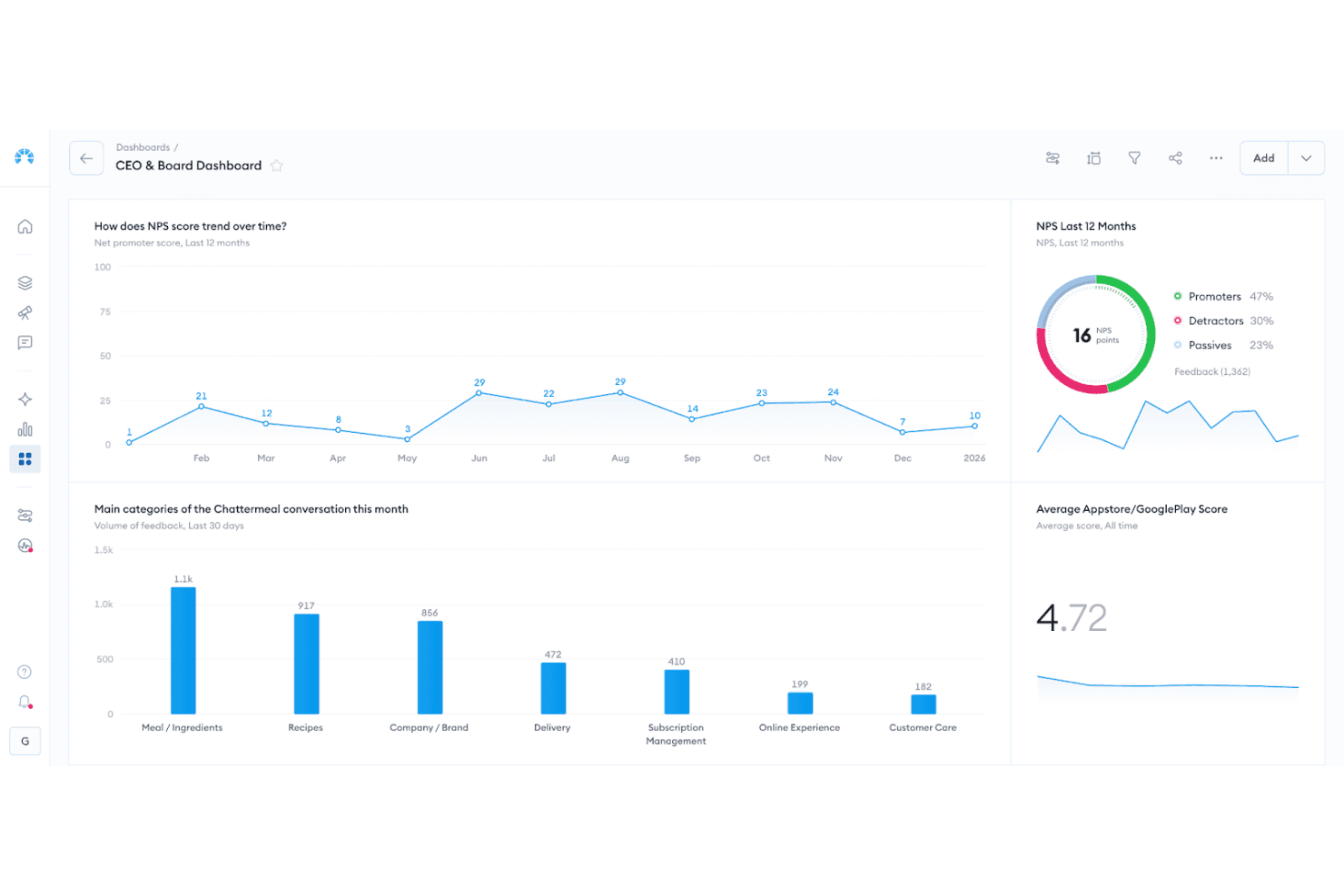
Chattermill dashboard visualizing sentiment themes, feedback volume, and trend changes over time. Chattermill is an AI-native feedback analysis platform that aggregates multichannel customer feedback from 65+ sources into a central repository, then applies automated tagging, sentiment analysis, and theme detection to surface patterns across large volumes of unstructured data.
Who Is Chattermill Best For?
Chattermill is a strong fit for enterprise CX and VoC teams that already collect feedback through other tools and need AI-powered analysis to make sense of it at scale.
Why I Picked Chattermill
I picked Chattermill as one of the best because its AI-driven tagging does something most tools can't: it automatically categorizes unstructured feedback across dozens of channels without manual effort. Precision Insights assigns themes and sentiment to every feedback item at scale, so patterns surface on their own. Lyra Agent takes it further, delivering analyst-level answers backed by verified customer quotes on demand.
Chattermill Key Features
- Anomaly detection: Automatically flags unexpected spikes or drops in feedback themes and sends real-time alerts to Slack, email, or Jira.
- Revenue-linked analysis: Connects feedback themes to CRM and transaction data to show how customer issues tie to churn or revenue impact.
- MCP and skills integrations: Lets you query your feedback data directly from AI tools like Claude, ChatGPT, and Notion AI.
- Contextual enrichment: Attaches metadata—including customer ID, channel, and location—to every feedback item for more precise filtering and reporting.
Chattermill Integrations
Chattermill offers 65+ native integrations, including Zendesk, Intercom, Qualtrics, SurveyMonkey, Trustpilot, Salesforce, Slack, Jira, and Snowflake. It also supports API connections, secure data feeds, and CSV uploads for centralizing feedback.
Pros and Cons
Pros:
- Surfaces anomalies with actionable internal alerts
- Links customer themes to revenue outcomes
- Automates tagging across unstructured feedback
Cons:
- Lacks customer-facing request voting
- Doesn't collect feedback directly
Learn more about Chattermill:
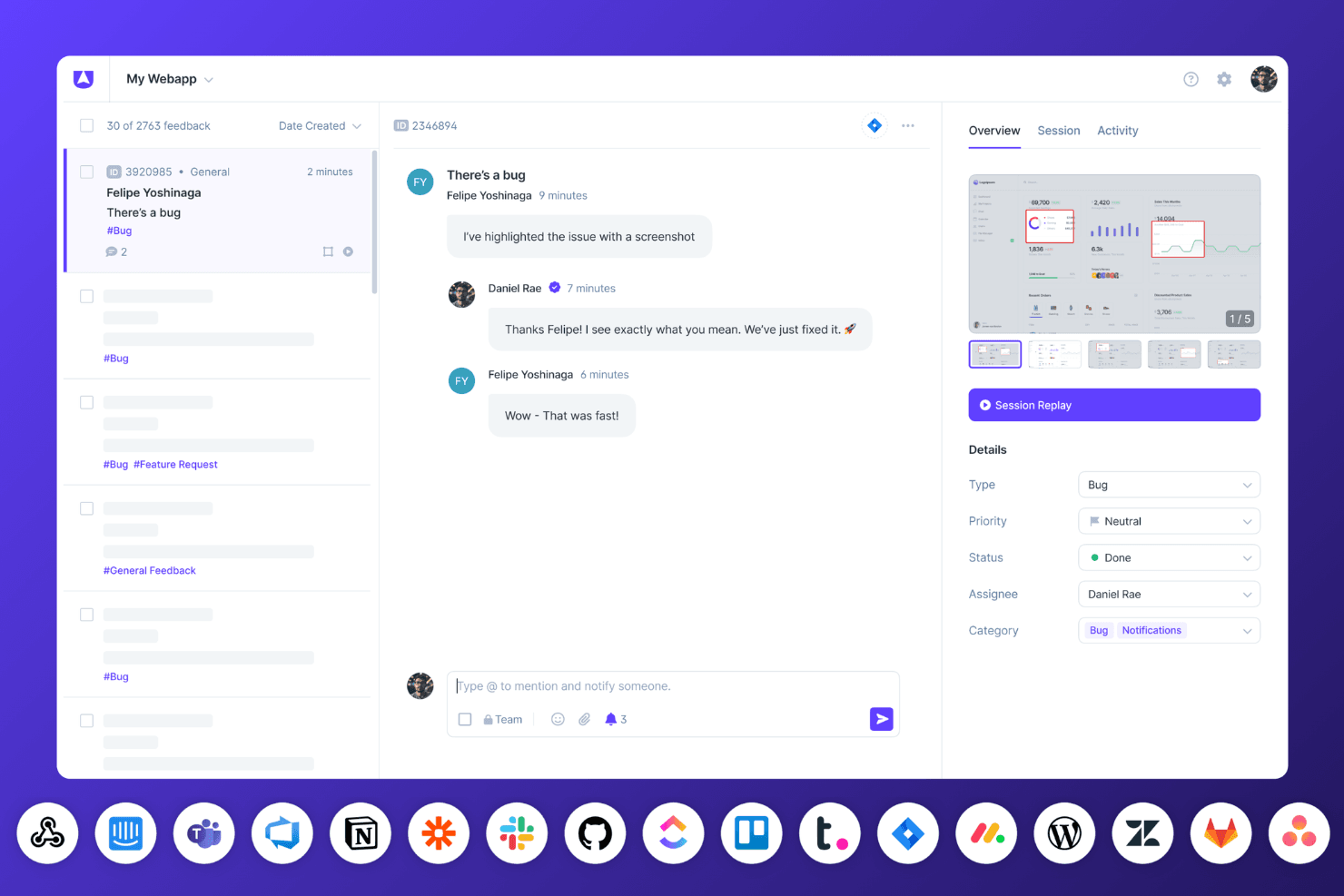
Userback’s bug tracking dashboard displays session replays, team conversations, and real-time status updates with connected integrations. Userback is a user feedback platform that combines embeddable widgets, visual annotation tools, in-app surveys, session replay, and AI-powered insights to help teams collect, organize, and act on customer feedback.
Who Is Userback Best For?
Userback is a strong fit for product managers and customer success teams who need visual, context-rich feedback they can act on immediately.
Why I Picked Userback
I picked Userback as one of the best because every piece of feedback arrives with real context you can act on: annotated screenshots, session replays, and captured console logs come bundled automatically. I love that AI Feedback & Insights then groups similar submissions and surfaces recurring themes, so patterns emerge without manual sorting. The MCP connectors, which pipe feedback directly into tools like Cursor or Claude, close the gap between what users report and what developers actually fix.
Userback Key Features
- NPS, CSAT, and CES surveys: Run in-app surveys using pre-built templates, with targeting options based on device, page, or user segment.
- Feature Portal: A branded community space where users can submit, view, and vote on feature requests, complete with a public roadmap and announcements.
- Browser extension: Lets internal teams and clients leave feedback on any webpage without any code or installation required.
- Feedback inbox and Kanban boards: A centralized workspace for managing, filtering, merging, and assigning incoming feedback across projects.
Userback Integrations
Userback offers 12+ integrations, including Jira, ClickUp, Asana, Intercom, Zendesk, Slack, Microsoft Teams, and MCP connectors for Claude, ChatGPT, and Cursor. It also supports Zapier and provides REST API access and webhooks on Business Plus.
Pros and Cons
Pros:
- Surveys measure satisfaction inside product journeys
- AI groups recurring themes and similar submissions
- Annotated feedback captures actionable technical context
Cons:
- Notification settings can feel overwhelming
- Prioritization lacks revenue-weighted scoring
Learn more about Userback: Best for conversational surveys
- Free plan available
- From $19/user/month (billed annually)
Visit WebsiteCustomer Rating:4.4/5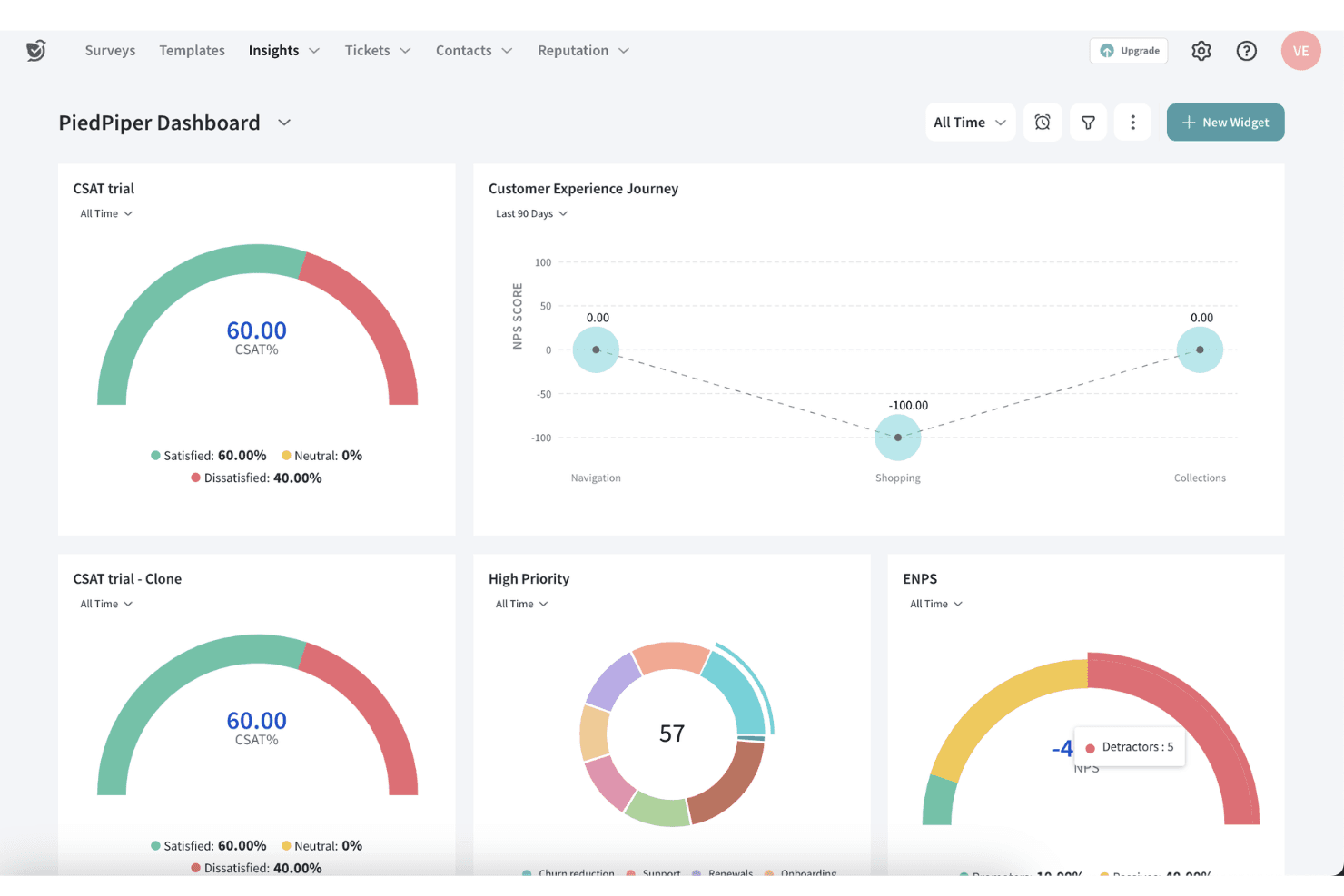
SurveySparrow provides customizable dashboards that can display various metrics and results from feedback and surveys. SurveySparrow is a feedback collection platform that spans conversational surveys, NPS, CSAT, CES, and 360 assessments, with AI-driven follow-up questions that probe deeper into each response.
Who Is SurveySparrow Best For?
SurveySparrow is a strong fit for customer experience teams that want to replace static surveys with conversational, chat-style feedback flows.
Why I Picked SurveySparrow
SurveySparrow earns its spot on my shortlist because its chat-style survey format turns what's usually a static form into a real back-and-forth exchange. I particularly like the echoAI follow-up feature, which generates dynamic questions based on each respondent's answer, so you're not left guessing what "somewhat satisfied" actually means. It also covers NPS, CSAT, and CES in one platform, which I find genuinely useful when you're tracking customer sentiment across multiple touchpoints without juggling separate tools.
SurveySparrow Key Features
- Multi-suite coverage: One platform spans NPS, CSAT, CES, 360 assessments, and brand reviews, so you're not piecing together separate tools.
- Email survey distribution: Send surveys directly through email campaigns, with embedded surveys supported on Starter plans and above.
- Workflow and webhook triggers: Business plans and above let you automate follow-up actions based on survey responses through built-in workflows and webhooks.
- Key driver analysis (CogniVue): Enterprise users get AI-powered text analysis that identifies the underlying drivers behind customer feedback trends.
SurveySparrow Integrations
SurveySparrow offers 25+ integrations on Enterprise, including Slack, HubSpot, Zendesk, and Power BI. Enterprise also supports custom plugins for additional connectivity.
Pros and Cons
Pros:
- NPS, CSAT, and CES share one platform
- AI follow-ups probe vague customer responses
- Conversational surveys uncover nuanced satisfaction drivers
Cons:
- Exported reports require extra cleanup
- No voting for feature request prioritization
Learn more about SurveySparrow: User feedback software for analyzing feedback from specific customers
- Free plan available
- From $79/month (billed annually)
Visit WebsiteCustomer Rating:4.6/5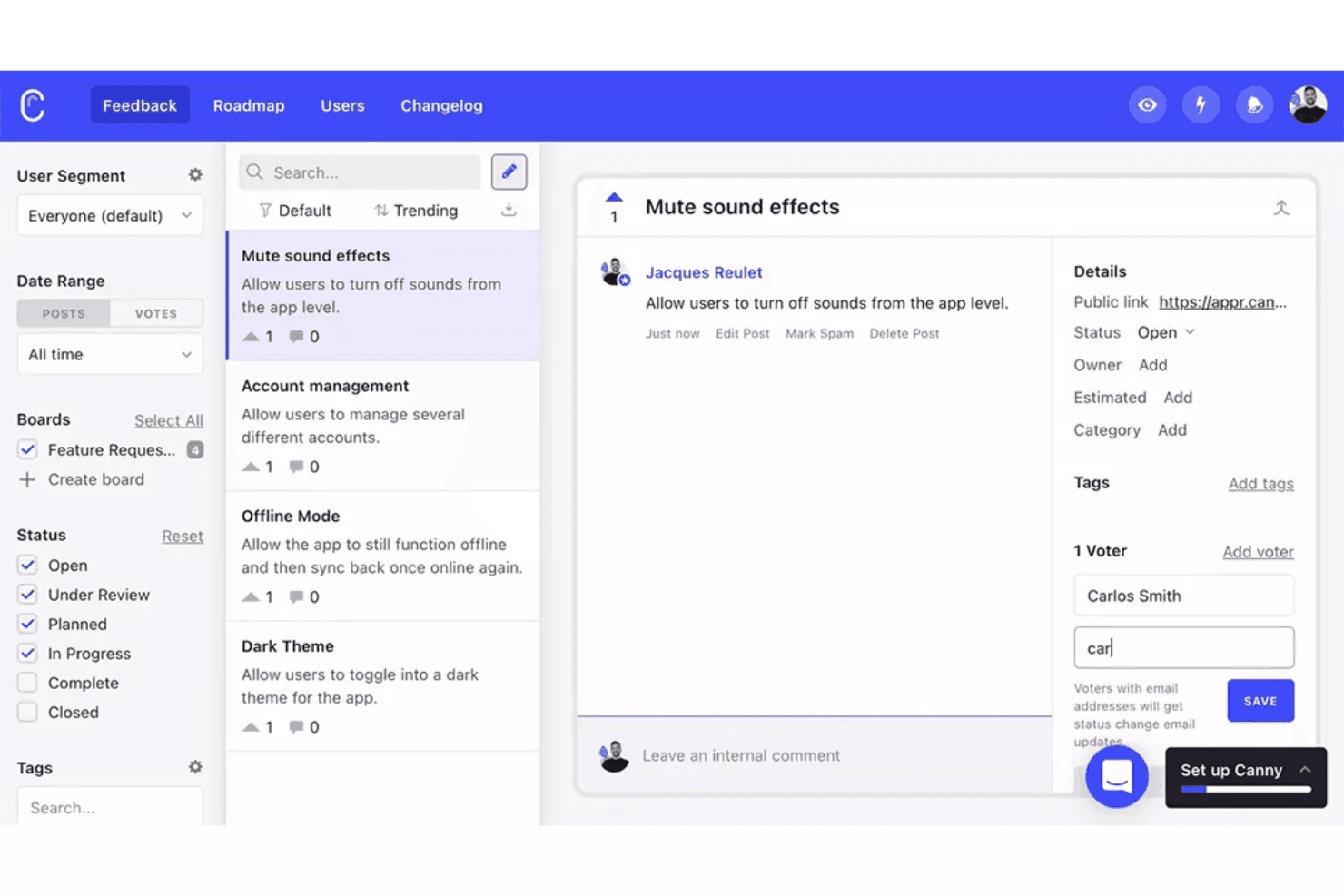
Canny allows you to collect product feedback and analyze findings from specific customer segments. Canny is a user feedback platform that centralizes feature requests, customer votes, and conversation-based feedback from support and sales tools into a single workspace, with built-in prioritization, roadmap sharing, and status notifications.
Who Is Canny Best For?
Canny is a strong fit for product managers who need to tie feature requests directly to customer accounts and revenue impact.
Why I Picked Canny
Canny earns its spot on my shortlist because of how precisely it ties feedback to the customers behind it. I love that every feature request is linked to a specific account and revenue figure, so when I'm deciding what to build next, I'm not just counting votes. Autopilot is the feature I find most compelling: it pulls requests directly from Intercom, Gong, and Zendesk conversations without anyone logging them manually, and Typeform's own tests showed it catching 30% more requests than their team did by hand.
Canny Key Features
- Public roadmap sharing: Publish your product roadmap so customers can see what's planned, in progress, and shipped.
- Status change notifications: Automatically alert customers when the status of their submitted request updates.
- Duplicate request merging: Autopilot identifies and consolidates duplicate submissions so vote counts reflect true demand.
- Custom fields and segmentation: Organize and filter feedback using custom fields, user segments, and automation rules across your workspace.
Canny Integrations
Canny supports integrations with Intercom, Zendesk, Gong, Slack, Jira, Linear, HubSpot, Salesforce, and Microsoft Teams. It also provides an API, webhooks, and Zapier connectivity for custom workflows.
Pros and Cons
Pros:
- Roadmaps close customer feedback loops
- Automatic duplicate request merging
- Revenue-weighted request prioritization
Cons:
- Advanced capabilities require higher-tier plans
- No native survey or NPS collection
Learn more about Canny: Best for enterprise-wide voice-of-customer programs
- Free demo available
- Pricing upon request
Visit WebsiteCustomer Rating:4.6/5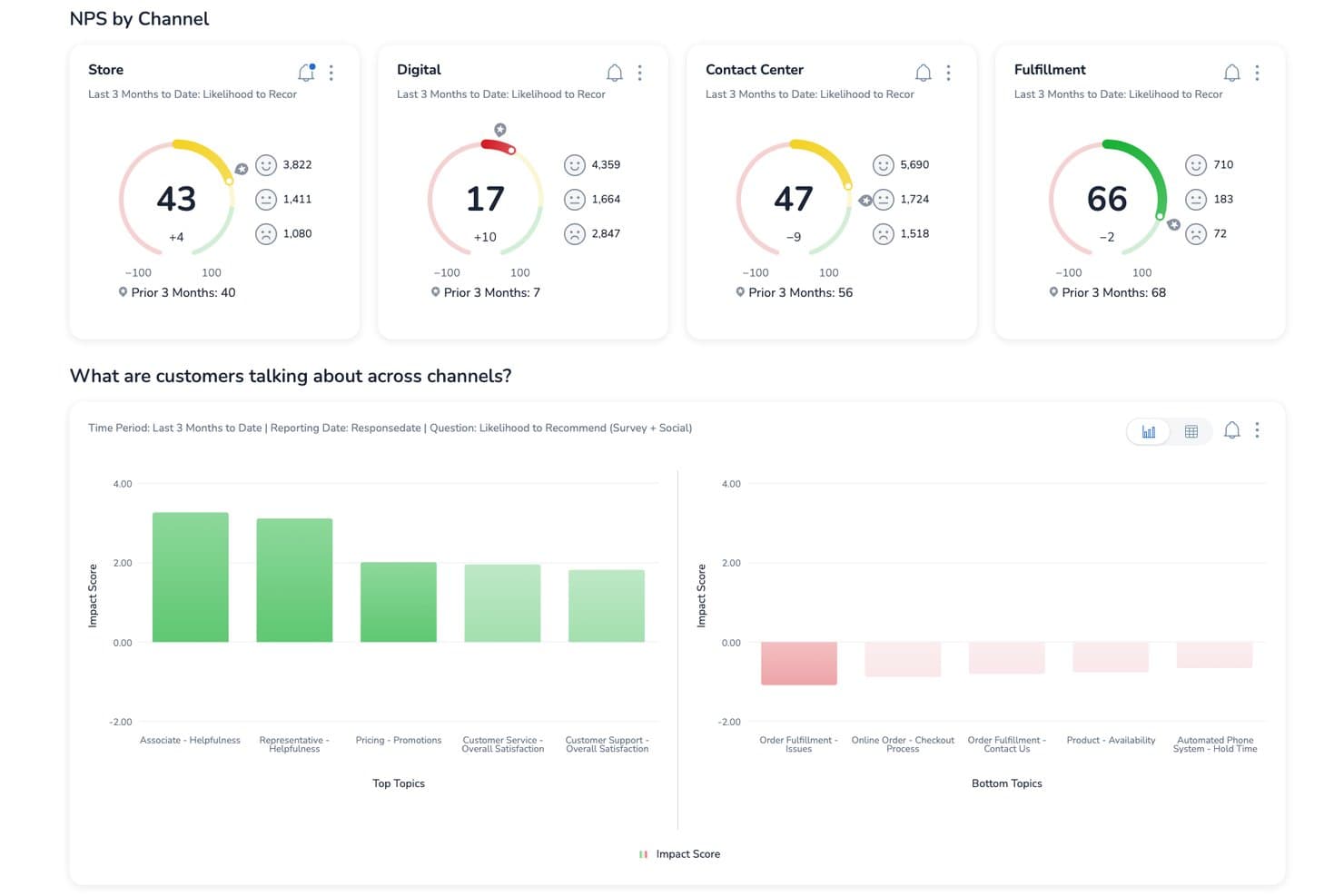
Medallia tracks NPS scores by channel to improve customer satisfaction. Medallia is an enterprise customer feedback platform that captures signals across web, mobile, in-app, speech, video, and social channels, then centralizes them into unified customer profiles with AI-powered text analytics, closed-loop case management, and role-based reporting.
Who Is Medallia Best For?
Medallia is a strong fit for enterprise CX teams running organization-wide voice-of-customer programs across multiple channels and regions.
Why I Picked Medallia
Medallia earns its spot on my shortlist because no other platform I've reviewed captures voice-of-customer signals at the same enterprise scale. I'm particularly impressed by TX Profiles, which build continuous, 360-degree timelines for each customer across web, mobile, speech, and social channels. Its AI text analytics layer then surfaces themes, sentiment, and emotion in real time, so CX teams can act on trends before they compound.
Medallia Key Features
- TX Profiles: Builds continuous, individual and account-level timelines that aggregate customer interactions across every channel in one place.
- Closed-loop case management: Automatically triggers follow-up actions and alerts frontline teams when feedback requires a direct response.
- Multi-language text and speech analytics: Detects themes, sentiment, emotion, and effort across dozens of languages using prebuilt and custom topic models.
- Role-based reporting: Delivers personalized dashboards and feedback views tailored to each team's function, with no user limits.
Medallia Integrations
Medallia offers integrations with Salesforce, Adobe, and ServiceNow, embedding customer insights into those platforms. Its Developer Portal supports custom connectivity, although specific API capabilities aren’t documented.
Pros and Cons
Pros:
- Closed-loop alerts prompt timely customer follow-up
- Connects sentiment themes to CSAT outcomes
- Captures feedback across web, mobile, and speech
Cons:
- No feature voting for product requests
- Enterprise implementation demands substantial planning
Learn more about Medallia: Best for linking feedback to revenue impact
- Free plan + 30-day free trial + free demo available
- Pricing upon request
Visit WebsiteCustomer Rating:4.4/5
You can use Pendo’s sentiment analysis to understand what delights or frustrates customers about your products and services. Pendo is a user feedback tool you can use to create in-app walkthroughs to improve new users’ onboarding and introduce existing users to new features. You can use Pendo to store user feedback giving you a better idea of the features you need to improve and new features customers want to see.
Pendo lets you generate reports and metrics using user feedback that the software collected so you can prioritize new features that can help boost your revenue. Understanding how customers feel about your products and services is an excellent way of determining areas where you are excelling and areas where you need to improve, and Pendo’s sentiment analysis feature can help you.
Pendo can help you analyze online reviews to gauge whether customers feel positively or negatively about your products and services. Instead of sending an online survey to a customer, you can use Pendo to present NPS, quizzes, and polls directly to customers through your mobile app to boost response rates.
Pendo integrates with other business tools, including Calendly, Figma, QualtricsXM, Amazon Redshift, and TrustRadius.
Pendo has a free plan, while the pricing for paid plans is available upon request.
Learn more about Pendo: Best for revenue-weighted feedback prioritization
- 30-day free trial + free demo available
- Pricing upon request
Visit WebsiteCustomer Rating:4.3/5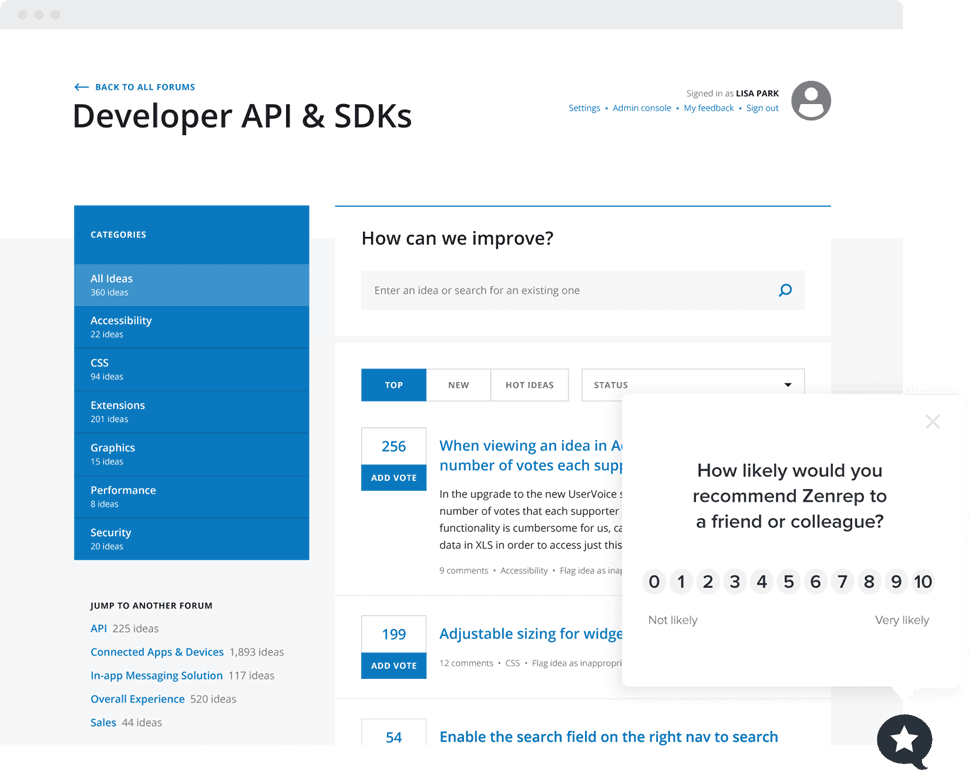
You can use Uservoice’s NPS widget to gauge customer loyalty and the likelihood of your product getting recommended to new users. UserVoice is an enterprise customer intelligence platform that collects feedback across portals, in-app widgets, and integrations, then centralizes, categorizes, and prioritizes it using AI-driven analysis and revenue-weighted scoring.
Who Is UserVoice Best For?
UserVoice is a strong fit for product managers and customer success teams at mid-market to enterprise companies that need to tie customer feedback directly to revenue impact.
Why I Picked UserVoice
UserVoice earns its spot on my list because of how it ties feedback directly to revenue. Its Indexing feature ranks ideas by ARR and account value pulled from Salesforce or HubSpot, so a request from a $200K account automatically outweighs one from a free trial user. AI Idea Insights then summarizes those ranked requests into digestible themes, so I'm not manually sifting through hundreds of submissions to find what actually moves the needle.
UserVoice Key Features
- AI Theme Detection: Automatically identifies recurring themes across submitted feedback and links each theme back to the original customer submissions.
- Feedback portal: A public-facing space where customers can post ideas, vote on existing requests, comment, and subscribe to status updates.
- Chrome extension: Lets internal teams capture feedback directly from email, support tools, and other workflows without switching to a separate app.
- Impact Reports: Displays urgency, sentiment, importance, and the revenue behind each request in a single view for quick decision-making.
UserVoice Integrations
UserVoice offers native integrations with Salesforce, HubSpot, Zendesk, Gainsight, Slack, Microsoft Teams, Jira, Azure DevOps, FullStory, and Dragonboat. Its Admin API supports custom integrations and data exports.
Pros and Cons
Pros:
- Status updates help close the feedback loop
- AI themes reveal recurring customer concerns
- Revenue-weighted prioritization focuses roadmap decisions
Cons:
- Advanced reporting feels limited for some teams
- Setup can take four to six weeks
Learn more about Uservoice: Best for visual and video bug feedback capture
- Free 15-day trial
- From $45/month
Visit WebsiteCustomer Rating:4.5/5
Customers can use Usersnap to send video feedback or screen recording about issues they encounter with your product. Usersnap is a customer feedback software for SaaS companies that collect customer feedback through video feedback and customer surveys. You can use Usersnap to label and assign issues to your product development team using Usersnap’s dashboard.
The software can help improve customer engagement by sharing ticket status and directly responding to feedback senders to close the customer feedback loop. If you want to understand better the issues customers are encountering with your products, then Usersnap is the ideal user feedback software for you because of its video feedback feature.
With Usersnap, customers can record their screens to capture issues, allowing a better context to help find solutions quickly. This visual feedback feature allows you to capture critical metadata like URL, browser information, and console log errors you can send to your engineers to help customers.
Usersnap integrates with other customer feedback and product management tools like Basecamp, Trello, WordPress, Evernote, and GitLab.
Usersnap pricing starts at $9/month/up to 2 users, and they provide a 15-day free trial.
Learn more about Usersnap: 10Best for AI-driven research repository analysis
Dovetail
- Free plan + free demo available
- Pricing upon request
 Learn more about Dovetail:
Outro software de feedback dos utilizadores
Eis algumas opções adicionais de software de feedback dos utilizadores que não entraram na minha lista restrita, mas que vale a pena consultar:
- 11SurvicateBest for customer feedback integration
- 12UnwrapBest for automatic feedback trend detection
- 13FormsuiteBest for AI-generated feedback forms
- 14Zonka FeedbackBest for real-time multi-location feedback
- 15SogolyticsBest for advanced omnichannel survey creation and distribution
- 16ProductboardBest for revenue-weighted feature prioritization
- 17ProdPadBest for linking feedback directly to roadmap outcomes
- 18Qualtrics XMBest for enterprise-scale CX feedback analysis
- 19FeaturebaseBest for closing the feedback loop with users
- 20FrillBest for idea boards with revenue-weighted voting
How I Evaluate User Feedback Software
I split my evaluation into three parts. Core functionality carries the most weight: I look for tools that capture feedback directly from users and centralize it in one searchable place. From there, I evaluate standout features like customer-weighted scoring, then consider support and onboarding quality.
Core Functionality (Table Stakes For This List)
When I'm selecting tools for my list, I score each one on a scale from 0 (does not offer the functionality) to 5 (excels in this area) for each core functionality listed below. I then convert the total into a percentage to help assess each tool's overall fit, with extra weight on any functionalities I've deemed essential.
- Feedback Collection (Essential): I check whether each tool offers surveys, in-app widgets, and embeddable forms that can be deployed across multiple touchpoints without heavy setup.
- Centralized Feedback Repository (Essential): Every tool needs a single, searchable hub where feedback from support tickets, sales calls, and direct submissions lives together.
- Categorization and Tagging: I look for flexible tagging systems that let you group feedback by theme, product area, or customer segment to spot patterns fast.
- Prioritization or Voting: Tools like Canny and Productboard handle this differently, so I evaluate whether voting, scoring, or weighted ranking helps surface high-impact requests.
- Analysis and Reporting: I evaluate whether the tool can surface sentiment shifts, trending topics, and volume changes over time in dashboards you can actually act on.
- Closing the Feedback Loop: Good tools notify users when their request ships or moves forward. I look for built-in status updates, changelogs, or automated emails tied to feedback items.
Once I have a list of tools that meet the criteria, I consider what sets each platform apart.
Differentiating Factors (What Sets Vendors Apart)
Here's how I compare and contrast different vendors:
Standout Features
Customer-weighted scoring is the feature I evaluate most closely. Tools like Productboard and Canny can tie votes to CRM data like MRR or plan tier, so a request from your largest account carries more weight than one from a free-trial user. I also check whether each tool offers AI-powered insight summarization, which clusters hundreds of raw feedback entries into themed summaries. That's the difference between reading 400 tickets and scanning five actionable trends. Finally, I look at duplicate detection and merging. Without it, the same request logged by three different reps fragments your data and skews prioritization.
Beyond Features
I evaluate how easily sales and CS teams can actually log feedback during their daily work. A browser extension or CRM plugin that lets a CSM capture a request mid-call matters more than a feature list no one uses. I also check API access and export options, since teams often need to pull feedback into internal BI tools or sync data with roadmap platforms like Jira or Shortcut. Security rounds out my review: SOC 2 compliance, role-based access controls, and GDPR readiness are non-negotiable when feedback is tied to customer accounts.
Como escolher software de feedback dos utilizadores
É fácil perder-se em listas extensas de funcionalidades e estruturas de preços complexas. Para o ajudar a manter o foco enquanto percorre o seu processo específico de seleção de software, eis uma lista de verificação dos fatores a ter em conta:
| Fator | O que considerar |
|---|---|
| FatorEscalabilidade | O que considerarO software acompanhará o crescimento da sua empresa? Verifique se suporta um volume crescente de feedback e utilizadores sem problemas significativos de desempenho. |
| FatorIntegrações | O que considerarFunciona com as ferramentas que já utiliza? Verifique se se integra perfeitamente com o seu CRM, software de gestão de projetos e plataformas de comunicação. |
| FatorPersonalização | O que considerarPode adaptá-lo às suas necessidades? Procure opções para personalizar formulários de feedback, painéis e relatórios de acordo com os requisitos específicos do seu fluxo de trabalho. |
| FatorFacilidade de utilização | O que considerarÉ fácil de utilizar pela sua equipa? Avalie a curva de aprendizagem e se a interface é suficientemente intuitiva para que todos os membros da equipa a possam utilizar de forma eficaz. |
| FatorImplementação e integração inicial | O que considerarCom que rapidez pode começar? Avalie o processo de integração inicial, o tempo de configuração e a disponibilidade de recursos de formação, como tutoriais e guias. |
| FatorCusto | O que considerarEstá dentro do seu orçamento? Compare os preços com as funcionalidades oferecidas. Tenha em conta custos ocultos ou encargos relativos a utilizadores ou funcionalidades adicionais. |
| FatorMedidas de segurança | O que considerarQuão seguros estão os seus dados? Certifique-se de que cumpre as normas do setor relativas à proteção de dados e que oferece funcionalidades como encriptação e cópias de segurança regulares. |
O que é software de feedback dos utilizadores?
O software de feedback dos utilizadores é uma ferramenta que o ajuda a recolher e compreender o feedback dos seus clientes ou utilizadores. Os gestores de produto, profissionais de marketing e equipas de apoio ao cliente utilizam-no para descobrir do que as pessoas gostam, o que não gostam ou o que querem que seja corrigido. Permite-lhe criar inquéritos, identificar tendências nos resultados e decidir o que melhorar a seguir — para saber que está a trabalhar naquilo que é mais importante.
Características
Ao selecionar software de feedback dos utilizadores, esteja atento às seguintes características principais:
- Criação de inquéritos: Permite-lhe criar e distribuir inquéritos para recolher eficazmente informações dos utilizadores.
- Análise de dados: Disponibiliza ferramentas para interpretar dados de feedback e identificar tendências e padrões.
- Capacidades de integração: Garante a compatibilidade com software existente, como CRM e ferramentas de gestão de projetos.
- Formulários personalizáveis: Permite adaptar os formulários de feedback às suas necessidades e fluxos de trabalho específicos.
- Análise em tempo real: Oferece informações imediatas sobre o feedback dos utilizadores, ajudando-o a tomar decisões atempadas.
- Recolha de feedback multicanal: Permite recolher feedback de várias plataformas, incluindo websites e aplicações móveis.
- Análise de sentimentos: Utiliza IA para identificar e interpretar as emoções e os sentimentos dos clientes expressos no feedback.
- Visualização do roteiro: Ajuda a planear e a definir prioridades no desenvolvimento do produto com base no feedback dos utilizadores.
- Medidas de segurança: Protege os dados dos utilizadores através de encriptação e do cumprimento das normas de proteção de dados.
- Lógica condicional: Permite personalizar inquéritos e formulários com base nas respostas dos utilizadores, aumentando o envolvimento.
Benefícios
A implementação de software de feedback dos utilizadores proporciona vários benefícios à sua equipa e à sua empresa. Eis alguns dos que pode esperar:
- Melhoria da tomada de decisões: O acesso a análises em tempo real e a análise de dados ajuda a sua equipa a tomar rapidamente decisões informadas.
- Desenvolvimento de produtos melhorado: As informações obtidas através do feedback e a visualização do roteiro orientam a sua equipa na definição de prioridades para as funcionalidades mais importantes para os utilizadores.
- Satisfação dos clientes: A análise de sentimentos e os formulários personalizáveis permitem responder eficazmente às necessidades dos utilizadores, aumentando a satisfação.
- Poupança de tempo: As capacidades de integração e a recolha de feedback multicanal simplificam o processo de feedback, poupando tempo valioso à sua equipa.
- Proteção de dados: As medidas de segurança garantem que os dados dos utilizadores são tratados de forma segura, mantendo a confiança dos seus clientes.
- Maior envolvimento: A lógica condicional e os inquéritos personalizados mantêm os utilizadores envolvidos e dispostos a fornecer mais feedback.
- Informações multiplataforma: A recolha de feedback multicanal proporciona uma visão abrangente da experiência dos utilizadores em diferentes plataformas.
Custos & preços
A seleção de software de feedback dos utilizadores exige uma compreensão dos vários modelos de preços e planos disponíveis. Os custos variam consoante as funcionalidades, o tamanho da equipa, os complementos, entre outros fatores. A tabela abaixo resume os planos mais comuns, os respetivos preços médios e as funcionalidades habitualmente incluídas nas soluções de software de feedback dos utilizadores:
Tabela de comparação de planos de software de feedback dos utilizadores
| Tipo de plano | Preço médio | Funcionalidades comuns |
|---|---|---|
| Tipo de planoPlano gratuito | Preço médio$0 | Funcionalidades comunsCriação básica de inquéritos, respostas limitadas e análises essenciais. |
| Tipo de planoPlano pessoal | Preço médio$5-$25/utilizador/mês | Funcionalidades comunsFormulários personalizáveis, integrações básicas e análises padrão. |
| Tipo de planoPlano empresarial | Preço médio$30-$75/utilizador/mês | Funcionalidades comunsOpções avançadas de inquéritos, feedback multicanal e ferramentas de elaboração de relatórios melhoradas. |
| Tipo de planoPlano empresarial de grande escala | Preço médio$100-$200/utilizador/mês | Funcionalidades comunsRespostas ilimitadas, funcionalidades de segurança avançadas e apoio dedicado à conta. |
Perguntas frequentes sobre software de feedback dos utilizadores
Aqui estão algumas respostas a perguntas comuns sobre software de feedback dos utilizadores:
Os dados recolhidos através de software de feedback dos utilizadores são seguros?
Sim, as soluções de software de feedback dos utilizadores de boa reputação dão prioridade à segurança dos dados. Implementam encriptação e cumprem as normas do setor relativas à proteção de dados. Antes de efetuar a compra, analise as funcionalidades e as políticas de segurança do software. Certifique-se de que cumprem os requisitos da sua organização para proteger informações sensíveis dos utilizadores.
Como pode o software de feedback dos utilizadores melhorar o seu processo de tomada de decisões?
Ajuda a sua equipa a perceber o que os utilizadores realmente pensam sobre o seu produto ou serviço, para que possa basear as atualizações em opiniões reais e não em suposições. Irá identificar padrões naquilo de que os utilizadores gostam ou não gostam, o que ajuda a sua equipa a concentrar-se nas alterações com maior impacto. Também lhe proporciona uma visão mais clara de onde os seus esforços estão a dar resultados.
Como analisa o feedback dos utilizadores para encontrar informações úteis?
Comece por agrupar os comentários ou as respostas por tema, para perceber quais são as áreas mencionadas com maior frequência. Procure palavras ou temas repetidos que revelem tendências nos sentimentos dos utilizadores. Resumir estes pontos ajuda a sua equipa a compreender a mensagem geral subjacente aos comentários individuais.
Como podem as equipas incentivar mais utilizadores a partilhar feedback?
Facilite e agilize o envio de opiniões pelos utilizadores, mantendo os formulários simples e disponíveis em locais familiares, como após a conclusão de uma tarefa ou numa página de produto. Agradeça o feedback quando o receber, para que os utilizadores sintam que são ouvidos. Quando as pessoas sabem que as suas opiniões são importantes, é mais provável que respondam novamente.
Quais são os desafios comuns enfrentados pelas equipas na gestão do feedback dos utilizadores?
Pode receber feedback em excesso para o processar de forma eficiente ou este pode estar disperso por diferentes canais. Também é fácil concentrar-se em opiniões extremas em vez de obter informações equilibradas. Definir objetivos claros para o tipo de feedback que está a recolher ajuda a sua equipa a manter o foco.
Como encerra o ciclo após recolher o feedback dos utilizadores?
Partilhe atualizações ou respostas que mostrem aos utilizadores que as suas opiniões deram origem a alterações. Até um breve reconhecimento ajuda a criar confiança e a manter o fluxo de feedback. Quando os utilizadores veem que as suas opiniões conduzem a resultados concretos, estão mais dispostos a continuar a interagir com a sua equipa.