

Parece haver inúmeras soluções de software de feedback de produtos disponíveis, por isso é difícil perceber qual é a melhor para si. Quer recolher, centralizar e analisar feedback, transformando-o em tarefas acionáveis para as equipas de desenvolvimento, mas precisa de perceber qual é a ferramenta mais adequada.
Eu ajudo! Nesta publicação, simplifico o processo, tirando partido da minha experiência na gestão de produtos grandes e complexos e da utilização de dezenas de ferramentas diferentes para lhe apresentar esta lista restrita dos melhores softwares de feedback de produtos.
Why Trust Our Software Recommendations
6,700+
Reviews
20
Industry experts
16+
Evaluation factors
14
Years
Our team has been testing and reviewing software since 2012. As product managers ourselves, we know how difficult—and important—it is to choose the right software.
For this guide, we evaluated tools using hands-on testing and independent research, scoring tools using our selection criteria.
Our reviews reflect our human editorial judgment, not a sales pitch.
Expert reviewers:
- Andrew LumbySenior TPM
- Cristiano ValimSenior UI/UX Lead


Tabela de comparação: software de feedback de produtos
Esta tabela de comparação resume os detalhes de preços das minhas principais seleções de software de feedback de produtos.
| Tool | Best For | Trial Info | Price | ||
|---|---|---|---|---|---|
| 1 | Best for customer knowledge graph insights | Free demo available | Pricing upon request | Website | |
| 2 | Best for all-in-one feedback collection | Free plan available | From $9/user/month | Website | |
| 3 | Best for multilingual feedback analysis | Free demo available | Pricing upon request | Website | |
| 4 | Best for product teams using Jira | Free plan + 30-day trial + demo available | From $1.10/user/month | Website | |
| 5 | Best for feedback for the entire user journey | 10-day free trial | From $114/month (billed annually) | Website | |
| 6 | Best for product roadmapping with feedback | Free plan + free demo available | From $19/user/month (billed annually) | Website | |
| 7 | Best for decisions backed by usage data | Free plan + 30-day free trial + free demo available | Pricing upon request | Website | |
| 8 | Best for visual bug reporting in-app | Free 15-day trial | From $45/month | Website | |
| 9 | Best for revenue-weighted feedback prioritization | 14-day free trial + free demo available | From $24/user/month | Website | |
| 10 | Best for roadmap-linked feedback prioritization | 30-day free trial + free demo available | From $39/user/month (billed annually) | Website |


Avaliações dos melhores softwares de feedback de produtos
Eis uma breve descrição de cada software de feedback de produtos, com os melhores casos de utilização, funcionalidades notáveis e capturas de ecrã para apresentar uma visão geral da interface do utilizador.
 Best for customer knowledge graph insights
- Free demo available
- Pricing upon request
Visit WebsiteCustomer Rating:4.8/5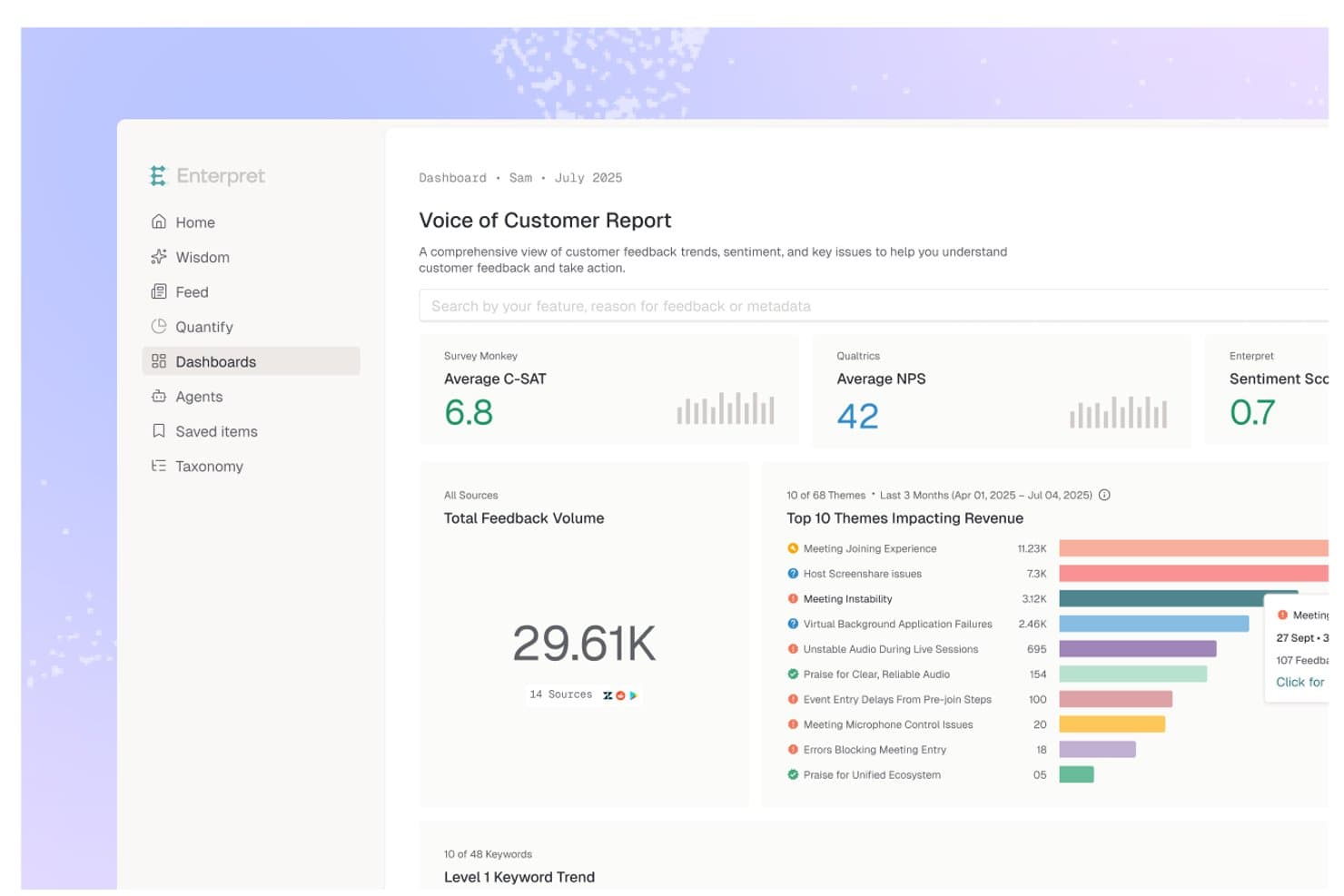
Enterpret centralizes customer feedback into a Voice of Customer dashboard. Enterpret is a customer intelligence platform that aggregates feedback from 50+ sources—support tickets, calls, surveys, reviews, and more—and uses AI-powered categorization, sentiment tracking, and a Customer Context Graph to surface and analyze product insights at scale.
Who Is Enterpret Best For?
Enterpret is a strong fit for product and customer success teams at mid-to-large companies that already collect feedback across many tools and need AI-powered analysis to surface what's actually driving retention and revenue.
Why I Picked Enterpret
I picked Enterpret as one of the best because its Customer Context Graph does something I haven't seen other feedback tools do: it links every piece of feedback to a specific feature, user segment, and business outcome in a single connected structure. That means when I'm looking at a spike in support tickets, I can trace it directly to retention risk or revenue impact rather than just tagging themes. The Adaptive Taxonomy auto-categorizes feedback across 50+ sources and updates itself as product language evolves, which removes a huge amount of manual maintenance.
Enterpret Key Features
- Revenue-weighted prioritization: Ranks feedback by its measured impact on retention, expansion, NPS, and churn using connected CRM and subscription data.
- MCP server integration: Exposes Enterpret's feedback data directly to AI tools like Claude, ChatGPT, and Cursor for use in agent-based workflows.
- Before/after impact tracking: Measures how a product change affected support ticket volume, feature adoption, retention, and revenue after release.
- Sales intelligence: Surfaces deal blockers, product objections, and feature demand signals pulled from sales calls and CRM data.
Enterpret Integrations
Enterpret offers 50+ native integrations, including Zendesk, Intercom, Salesforce, Jira, Linear, Slack, Notion, Qualtrics, Gong, and G2. It also supports custom data connections through webhooks, CSV uploads, email ingestion, Snowflake, Census, and Zapier.
Pros and Cons
Pros:
- Handles massive feedback volumes at scale
- Adaptive taxonomy tracks shifting customer language
- Connects feedback to revenue impact
Cons:
- Taxonomy changes need trial and error
- No native voting or feedback portal
Learn more about Enterpret: Best for all-in-one feedback collection
- Free plan available
- From $9/user/month
Visit WebsiteCustomer Rating:4.8/5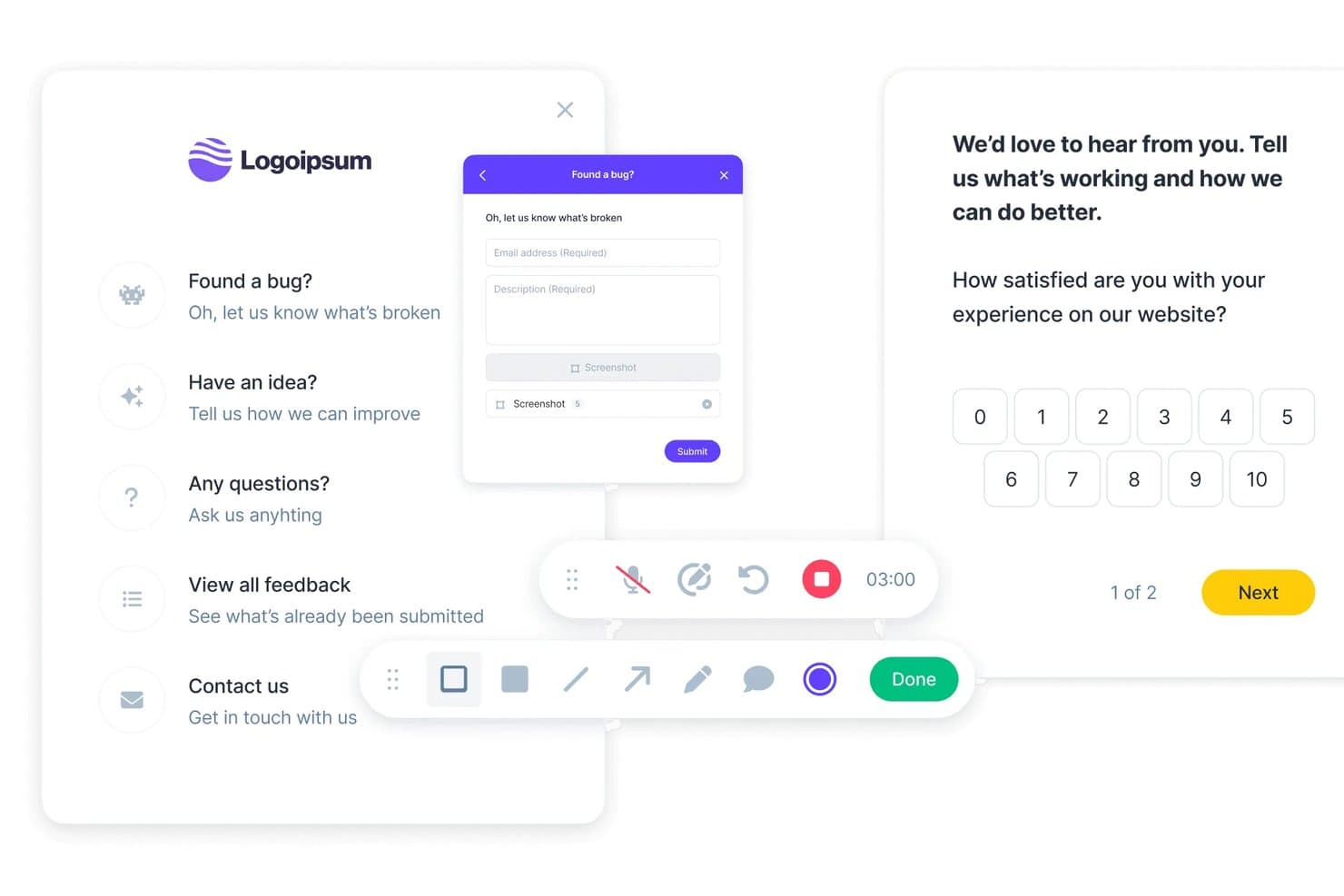
Userback lets users collect bug reports, ideas, and satisfaction scores. Userback is a product feedback platform that combines multi-channel feedback collection—including in-app widgets, visual annotation, session replay, and surveys—with a centralized Kanban repository, AI-driven categorization, and two-way integrations with development tools like Jira, Linear, and ClickUp.
Who Is Userback Best For?
Userback fits product teams that need to capture feedback from multiple channels—widget, surveys, mobile, and email—without managing separate tools for each.
Why I Picked Userback
Userback earns its spot on my shortlist because it handles the full feedback collection stack in one place, from an embeddable in-app widget with visual annotation to native iOS and Android SDKs to NPS, CSAT, and CES surveys that target specific users or behaviors. I also love that every feedback item automatically captures browser data, console logs, and session replays, so my team isn't chasing context after the fact. The AI Feedback & Insights layer then groups incoming items by theme and sentiment automatically, cutting the manual triage work that tends to pile up fast.
Userback Key Features
- Two-way dev tool sync: Resolving a ticket in Jira, Linear, or ClickUp automatically resolves the linked item in Userback, keeping dev and product workflows in lockstep.
- Browser extension: Internal teams can capture and annotate feedback from any web page without embedding any code.
- Feature Portal add-on: A public-facing space where end users can submit, vote on, and track feature requests alongside a visible product roadmap.
- Automatic technical capture: Every feedback submission automatically logs browser data, console logs, and network requests for developer context.
Userback Integrations
Userback offers native integrations with Jira, Linear, ClickUp, GitHub, GitLab, Asana, Azure DevOps, Intercom, Zendesk, Slack, and Microsoft Teams. It also supports REST API, webhooks, and Zapier.
Pros and Cons
Pros:
- Groups themes and sentiment automatically
- Centralizes feedback from diverse channels
- Captures visual and technical context
Cons:
- Advanced capabilities require higher-tier plans
- Prioritization lacks weighted scoring
Learn more about Userback: Best for multilingual feedback analysis
- Free demo available
- Pricing upon request
Visit WebsiteCustomer Rating:4.4/5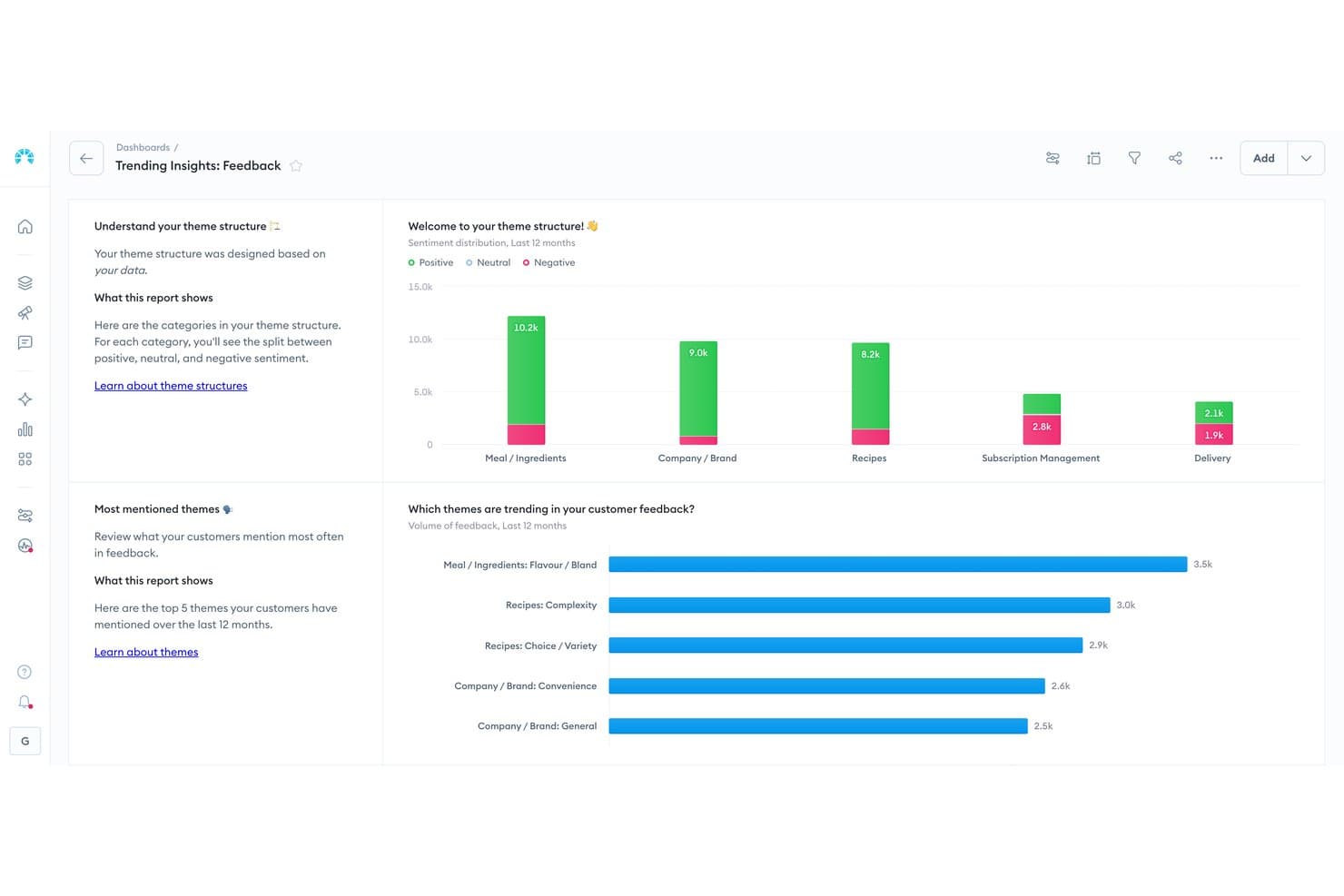
Chattermill visualizes customer feedback sentiment by theme and category. Chattermill is a Voice of Customer (VoC) analytics platform that centralizes feedback from 65+ sources—including support tools, surveys, reviews, and social media—and uses AI to categorize, cluster, and analyze it at scale.
Who Is Chattermill Best For?
Chattermill is a strong fit for enterprise UX research and customer success teams that need to analyze large volumes of feedback across multiple languages and markets.
Why I Picked Chattermill
I've included Chattermill in my top picks because its multilingual analysis capabilities are genuinely hard to match at scale, covering 50+ languages natively so teams operating across global markets can analyze feedback without manually sorting by region first. I particularly like Precision Insights, which uses AI to automatically tag and cluster feedback themes, and Lyra, Chattermill's AI that surfaces root causes and flags anomalies before they become bigger issues.
Chattermill Key Features
- Unified feedback repository: Aggregates feedback from 65+ sources—including support tools, surveys, reviews, and social media—into a single, filterable workspace enriched with CRM data.
- Impact analysis: Links categorized feedback themes directly to business metrics like NPS, CSAT, churn, and revenue to show which issues carry the most weight.
- Anomaly detection and alerts: Monitors feedback in real time and pushes alerts to Slack, email, or Jira when it detects sudden shifts or emerging issues.
- MCP-based AI querying: Lets you query your feedback data through AI assistants like Claude or ChatGPT via Model Context Protocol, with responses backed by real customer quotes.
Chattermill Integrations
Chattermill offers 65+ native integrations, including Zendesk, Intercom, Qualtrics, Jira, Linear, Notion, and Slack. It also supports custom connections through its API, CSV uploads, Snowflake, Databricks, Amazon S3, and Google Cloud Platform.
Pros and Cons
Pros:
- Links feedback themes to business outcomes
- AI clustering reveals themes and root causes
- Multilingual analysis supports global feedback programs
Cons:
- Offers no voting or submitter updates
- Requires separate tools for feedback collection
Learn more about Chattermill: Best for product teams using Jira
- Free plan + 30-day trial + demo available
- From $1.10/user/month
Visit WebsiteCustomer Rating:5/5
Released centralizes customer feedback with threaded replies and task status. Released Hub is a Jira-native product feedback tool that collects customer ideas through branded portals, embeds, and Slack, centralizes them in a single inbox, and links them directly to Jira issues for triage, roadmapping, and release note publishing.
Who Is Released Best For?
Released Hub is a strong fit for product managers whose teams are already on Jira Cloud and want feedback collection, roadmapping, and release notes without leaving the Atlassian ecosystem.
Why I Picked Released
Released earns its spot on my shortlist because it's genuinely built inside Jira, not just connected to it. I love that feedback submitted through a customer portal links directly to a Jira issue in one click, so there's no copy-pasting or syncing errors. The wishlist feature caps how many ideas a customer can prioritize, which cuts through popularity bias and surfaces what people actually care about most.
Released Key Features
- AI release note drafting: Released uses AI to generate release notes directly from your Jira tickets, pulling in issue data and applying templates you can edit before publishing.
- Multi-audience roadmap views: You can publish separate roadmap views for different audiences—internal teams, executives, or customers—with public, password-protected, or invite-only access controls.
- Changelog hosting on a custom domain: Released hosts a branded changelog on your own domain, with customer email subscriptions for new release announcements.
- Jira Product Discovery integration: Feedback submitted through Released automatically creates Insights in Jira Product Discovery, giving your prioritization work direct customer context.
Released Integrations
Released has four documented native integrations: Jira Software Cloud, Jira Product Discovery, Confluence, and Slack. It also supports feedback embeds for websites, documentation, and in-app widgets, but no public API is documented.
Pros and Cons
Pros:
- Fast support responds to product feedback
- Capped wishlists reduce popularity-driven voting
- Customer replies stay attached to requests
Cons:
- Roadmap and feedback features still maturing
- No sentiment or theme clustering analysis
Learn more about Released: Best for feedback for the entire user journey
- 10-day free trial
- From $114/month (billed annually)
Visit WebsiteCustomer Rating:4.6/5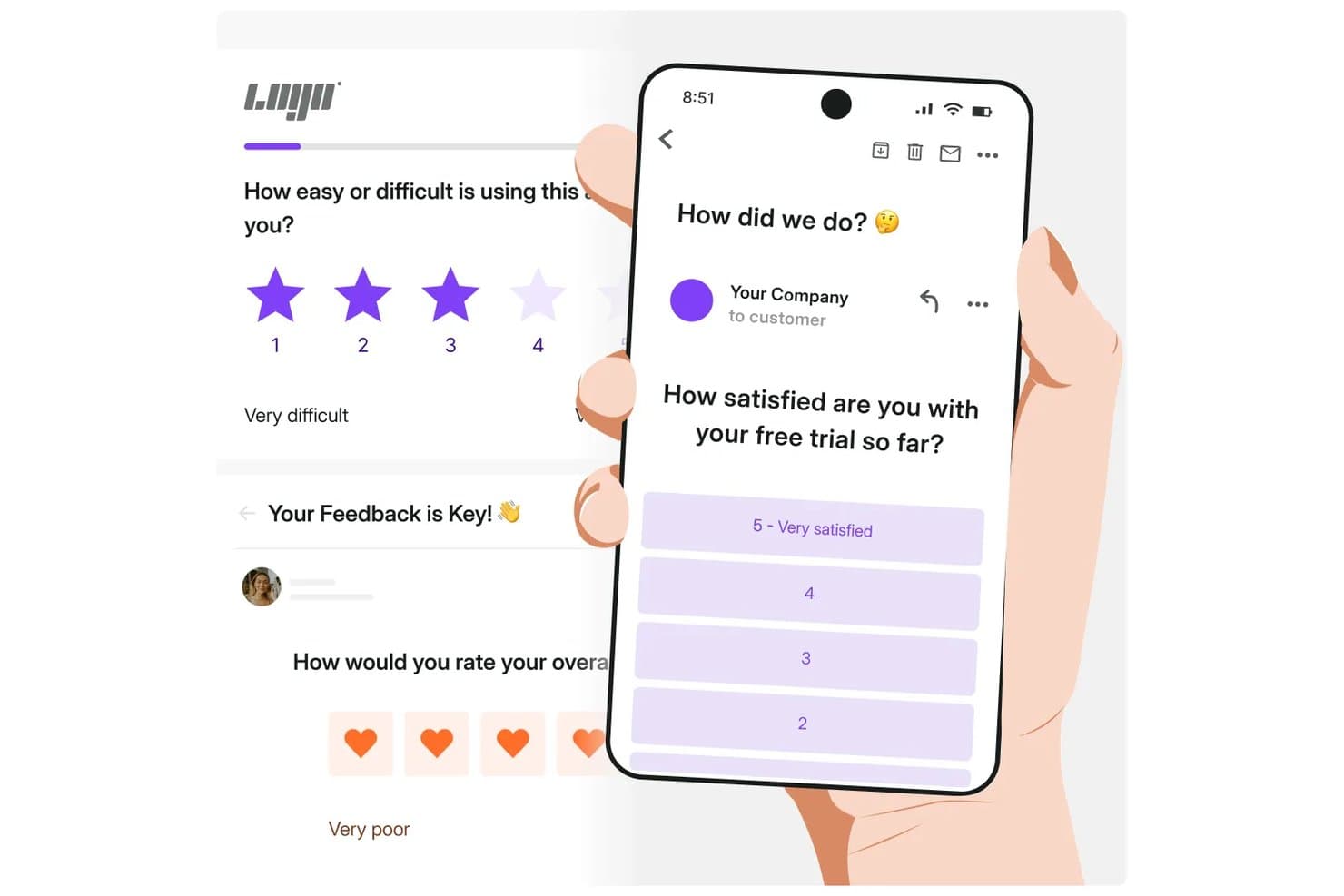
Survicate lets users collect feedback via email and in-app surveys. Survicate is a survey-based product feedback platform that collects user feedback across web, in-product, mobile, email, and chat channels, and centralizes it in an AI-powered research hub with sentiment analysis and theme clustering.
Who Is Survicate Best For?
Survicate is a strong fit for UX researchers and customer success teams that need to collect and analyze feedback across every stage of the user journey, from onboarding through retention.
Why I Picked Survicate
Survicate earns its spot on my shortlist because it's the only tool here that collects feedback at every stage of the user journey, from onboarding surveys triggered by a first login to post-support NPS requests sent through Intercom. I love how the Research Hub pulls those survey responses together with call recordings, support tickets, and reviews, then uses AI to cluster them into themes and apply sentiment scores automatically. That means I can spot a pattern like "users struggling after a plan upgrade" without manually tagging hundreds of responses.
Survicate Key Features
- Multi-channel survey distribution: Run surveys through email, website pop-ups, in-product widgets, mobile SDKs, QR codes, kiosk mode, and chat widget embeds inside tools like Intercom.
- Event-triggered survey targeting: Set surveys to fire automatically based on user actions, such as a completed purchase, support interaction, or abandoned cart.
- AI follow-up questions: On Pro and above, Survicate generates dynamic follow-up questions in real time based on a respondent's previous answers.
- Slack and Microsoft Teams alerts: Send real-time response notifications directly to your team's collaboration channels as survey results come in.
Survicate Integrations
Survicate offers 25+ native integrations on Growth and 40+ on Pro and Enterprise, including Productboard, Linear, Trello, Slack, Microsoft Teams, Zendesk, Intercom, Salesforce, and HubSpot. Growth also includes webhooks and an API, with Zapier available.
Pros and Cons
Pros:
- Event-triggered surveys support contextual product research
- AI clusters themes and scores sentiment
- Captures feedback across the entire user journey
Cons:
- Lacks public roadmaps and submitter updates
- Offers no feature voting or prioritization
Learn more about Survicate: Best for product roadmapping with feedback
- Free plan + free demo available
- From $19/user/month (billed annually)
Visit WebsiteCustomer Rating:4.5/5
Collect and consolidate feedback into a central repository to understand customer challenges and identify patterns. Productboard helps businesses prioritize customer feedback and feature requests by collecting this information and displaying it on a single board. Start-ups, small-to-medium businesses, enterprises, and agencies can use the platform to extract feature requests, prioritize what to build, and engage with customers. You can use it to manage product development, marketing, and launch activities from one place.
Productboard combines user feedback voting with feature prioritization and roadmaps. The roadmap it develops uses customer feedback data to help product managers get teams on board with the roadmap they will be used to implement new features. Your roadmap can provide in-depth strategic criteria to help you make prioritization decisions and visualize how features can support your product and objectives.
Key features include customer management, data export, data import, external integrations, Gantt charts, API, multi-user, notifications, project management, task scheduling/tracking, prioritization, and roadmapping.
Productboard integrates with other applications to consolidate your data, such as Salesforce, Slack, Microsoft Teams, Zapier, Intercom, and Zendesk.
Productboard costs from $25/user/month when paying month-to-month or $20/user/month when billed yearly. The platform also offers a 15-day free trial.
Pros and Cons
Pros:
- Roadmaps keep teams informed and engaged.
- Partial data segmentation based on customer profiles.
- Easy to set up and use.
Cons:
- Not possible to segment data according to most attributes, such as MRR.
- Limited integrations
Learn more about Productboard: Best for decisions backed by usage data
- Free plan + 30-day free trial + free demo available
- Pricing upon request
Visit WebsiteCustomer Rating:4.4/5
Pendo allows users to target specific visitors and make announcements that only they’ll see. Pendo helps businesses collect customer requests from their applications without interrupting their experience. Small and medium businesses, as well as large enterprises, can utilize this cloud-based platform. Internal teams can also implement requests on the customer’s behalf and submit their own feedback. The platform is a comprehensive solution for analytics, customer onboarding, and in-app feedback.
Pendo is an analytics tool you can use to track your customers’ activities and understand how they’re using your product. The information the platform provides can help product managers make crucial product decisions, track how customers are adopting features, and monitor behavior. You can use Pendo to request feature suggestions from your customers and allow them to browse feature ideas, vote, and add their ideas using a feedback form. Your team can analyze these results to determine which features are popular or valued by customers.
Features include sentiment analysis, in-app walkthroughs, targetted messanging, feedback surveys, customer roadmaps, and reporting.
Pendo integrates with various third-party applications, such as Calendly, Hubspot, Salesforce Sales Cloud, Slack, Zapier, and Zendesk.
Pendo offers custom pricing upon request. But they do offer a free plan for one web application, as well as one iOS and one Android mobile app, and up to 500 active users per month.
Pros and Cons
Pros:
- Establish sentiment feedback by asking hyper-specific questions.
- Trigger messages based on specific events and activities.
- Allows users to develop messages without needing any technical knowledge.
Cons:
- The onboarding process can be lengthy.
- Expensive for start-ups.
Learn more about Pendo: Best for visual bug reporting in-app
- Free 15-day trial
- From $45/month
Visit WebsiteCustomer Rating:4.5/5
Monitor feedback for various projects from multiple sources in one dashboard. Usersnap helps small to large businesses collect new ideas and hear what the customers want to develop customer-centric products. Your customers can use screen and video recordings as well as screenshots to submit feedback and suggestions to your teams. Product managers can see all feedback in one location to easily analyze it for feature prioritization.
Usersnap’s bug-tracking features help your customer experience, tech support, and product teams resolve customers’ pain points. It does this by allowing your customers to alert your teams when they find bugs and product issues. The platform helps businesses make it easier to get the insights they require to improve their product.
Key features include brand design consistency, bug history, collaboration, data retention, device responsiveness, feedback aggregation, feedback collection, photo submission, real-time action, real-time analysis, security, sorting, survey deployment, surveys, system monitoring, text/notes, trigger alerts, video interview, and video snippets.
Usersnap integrates with over 5,000 third-party applications to enhance your product feedback processes, such as Zendesk, Slack, Intercom, Zapier, Asana, and Jira.
Usersnap costs from $99/month when paying month-to-month or $69/month when billed annually.
Pros and Cons
Pros:
- Teams can collaborate to respond to customers.
- Dashboards and reports allow users to analyze trends.
- Publish feedback to track suggestions.
Cons:
- Needs more options for feedback widget customization.
- Lacks advanced analysis features
Learn more about Usersnap: Best for revenue-weighted feedback prioritization
- 14-day free trial + free demo available
- From $24/user/month
Visit WebsiteCustomer Rating:4.4/5
Create clear specs for all teams to engage with the product’s development. Craft.io helps small-to-medium-sized businesses and large enterprises discover, collect, and identify ideas and feedback from customers and their teams. Product managers and owners can use Craft’s user story mapping features to brainstorm features to implement within their products. The platform helps centralize all questions regarding your product’s features with a complete backlog.
Craft.io allows teams to document their product strategy and connect it to their tasks when executing them. You can use the platform to create a central repository of product information and connect every planning process. Users can connect everything they create in strategic inputs to stories, epics, and other items in the platform to get a complete picture when optimizing strategies, plans, and prioritizations.
Key features include batch permissions and access, customer management, dashboard, data export, data visualization, external integrations, gantt charts, multi-user, project management, task scheduling/tracking, prioritization, roadmapping, and resource management.
Craft.io integrates with the existing tools you’re already using to simplify your workflows, such as Jira, GitLab, Google Drive Confluence, and Dropbox.
Craft.io starts at $19 per editor per month when billed annually. A 14-day free trial is also available.
Pros and Cons
Pros:
- Keeps all team members on the same page without switching tools.
- Teams can connect feature sets to their strategy.
- Provides a full suite of product management features.
Cons:
- Time-consuming implementation.
- Limited native integrations.
Learn more about Craft.io: Best for roadmap-linked feedback prioritization
- 30-day free trial + free demo available
- From $39/user/month (billed annually)
 Learn more about Aha! Ideas:
Outros softwares de feedback de produtos
Eis algumas opções adicionais de software de feedback de produtos que não entraram na minha lista restrita, mas que vale a pena conhecer:
- 11CannyBest for prioritizing feature requests
- 12SurveyLegendBest for visually engaging surveys
- 13UnwrapBest for automated feedback categorization
- 14FormsuiteBest for AI-powered survey-based product feedback
- 15Zonka FeedbackBest for detailed closed loop feedback workflows
- 16LightsterBest for direct interactions with target audiences
- 17SogolyticsBest for advanced omnichannel surveys
- 18UservoiceBest for organizing feedback from multiple sources
- 19UpvotyBest for low-cost revenue-weighted feedback boards
- 20SleekplanBest for AI-driven feedback theme detection
How I Evaluate Product Feedback Software
I split my evaluation into three parts, starting with core functionality—tools must collect feedback across channels and centralize it in one searchable place, since that carries the most weight. Then I look for standout features like revenue-weighted prioritization. Finally, I consider onboarding support and pricing value.
Core Functionality (Table Stakes For This List)
When I'm selecting tools for my list, I score each one on a scale from 0 (does not offer the functionality) to 5 (excels in this area) for each core functionality listed below. I then convert the total into a percentage to help assess each tool's overall fit, with extra weight on any functionalities I've deemed essential.
- Feedback Collection (Essential): I check whether a tool captures input through in-app widgets, public portals, email, and support integrations rather than limiting you to a single form.
- Centralized Feedback Repository (Essential): Every piece of feedback should land in one searchable, filterable view so nothing gets buried across Slack threads, emails, or spreadsheets.
- Feedback Categorization: I look for tagging by theme, customer segment, or product area—and whether the tool offers AI-assisted grouping to reduce manual sorting work.
- Voting and Prioritization: Tools should let customers vote on requests and let your team layer in scoring criteria like revenue impact or strategic alignment to build a defensible backlog.
- Status Updates and Loop Closing: I evaluate how automatically a tool notifies submitters when a request moves from under review to shipped, since manual follow-up rarely scales.
- Workflow Integration: The tool needs to connect feedback to where your team already works—Jira, Linear, or your roadmapping tool—with syncing that flows in both directions.
Once I have a list of tools that meet the criteria, I consider what sets each platform apart.
Differentiating Factors (What Sets Vendors Apart)
Here's how I compare and contrast different vendors:
Standout Features
Revenue-weighted prioritization is the first thing I check. A tool that ties requests to account value lets you defend roadmap decisions with commercial data, not just upvote counts. AI theme clustering matters just as much—when hundreds of requests pile up, I look for how well a tool groups related feedback so your team spots patterns without manually tagging every entry. I also evaluate in-app contextual widgets, since feedback captured at the moment of friction is far more specific and actionable than a survey sent days later.
Beyond Features
Cross-functional adoption is the first thing I check. If your CS and sales teams won't log feedback because the interface is confusing, you'll end up with the same gaps a spreadsheet creates. I also evaluate data portability—open API access and clean export options matter when you need to pipe feedback into a BI tool or switch platforms without losing historical context. Security is equally important since feedback often contains customer PII, so I look for SOC 2 compliance, SSO support, and configurable access controls.
Como escolher um software de feedback de produtos
É fácil perder-se em listas extensas de funcionalidades e estruturas de preços complexas. Para o ajudar a manter o foco enquanto percorre o seu processo único de seleção de software, eis uma lista de verificação dos fatores a ter em conta:
| Fator | O que considerar |
|---|---|
| FatorEscalabilidade | O que considerarO software consegue acompanhar o crescimento da sua equipa? Verifique se suporta um número crescente de utilizadores e mais dados sem quebras de desempenho |
| FatorIntegrações | O que considerarFunciona com as suas ferramentas atuais? Certifique-se de que se liga a plataformas essenciais, como sistemas de CRM, ferramentas de gestão de projetos e ferramentas de comunicação, para evitar interrupções no fluxo de trabalho. |
| FatorPersonalização | O que considerarPode adaptar a ferramenta às suas necessidades? Procure opções para ajustar fluxos de trabalho, campos e painéis de controlo de modo a corresponderem aos seus processos. |
| FatorFacilidade de utilização | O que considerarÉ fácil de utilizar pela sua equipa? Uma interface simples e uma navegação intuitiva podem poupar tempo e reduzir a frustração. |
| FatorImplementação e integração inicial | O que considerarQuanto tempo demorará a começar? Tenha em conta o tempo e os recursos necessários para a configuração e a formação. Procure uma integração inicial orientada ou materiais de apoio. |
| FatorCusto | O que considerarO preço cabe no seu orçamento? Compare o custo com as funcionalidades disponibilizadas e esteja atento a taxas ocultas ou limitações dos níveis |
| FatorMedidas de segurança | O que considerarOs seus dados estão protegidos? Verifique as normas de encriptação, os locais de armazenamento dos dados e a conformidade com regulamentos de proteção de dados, como o RGPD. |
| FatorDisponibilidade do suporte | O que considerarPode obter ajuda quando precisa? Verifique se existem opções de suporte 24 horas por dia, 7 dias por semana, e a disponibilidade de recursos como perguntas frequentes, tutoriais e fóruns da comunidade. |
O que é um software de feedback de produtos?
O software de feedback de produto é um tipo especial de ferramenta que ajuda os gestores de produto a recolher, gerir e analisar feedback de utilizadores, clientes e partes interessadas relativamente a um determinado produto. A ferramenta faz isto automatizando o processo de recolha de feedback e transformando-o em dados que o utilizador e as suas equipas podem analisar para proporcionar uma melhor experiência ao cliente.
Estas ferramentas são inestimáveis para compreender as necessidades dos clientes, melhorar as funcionalidades dos produtos e tomar decisões baseadas em dados para melhorar a experiência geral do produto. As funcionalidades comuns incluem categorização e etiquetagem, análise do sentimento dos utilizadores, relatórios de tendências, questionários de feedback e colaboração.
Funcionalidades
Ao selecionar software de feedback de produto, procure as seguintes funcionalidades principais:
- Recolha de feedback: Recolhe opiniões e sugestões dos utilizadores através de questionários, formulários ou portais, proporcionando uma forma centralizada de ouvir os clientes.
- Análise de dados: Processa e interpreta dados de feedback para identificar tendências e obter informações úteis, ajudando as equipas a tomar decisões fundamentadas.
- Priorização de funcionalidades: Ajuda a classificar os pedidos e o feedback dos utilizadores com base na importância e no impacto, orientando as prioridades do desenvolvimento do produto.
- Capacidades de integração: Liga-se a outras ferramentas, como CRM e software de gestão de projetos, para garantir um fluxo contínuo de informação entre plataformas.
- Painéis personalizáveis: Permite que as equipas adaptem a sua visualização dos dados de feedback, fornecendo informações úteis alinhadas com objetivos e métricas específicos.
- Interface fácil de utilizar: Garante que a ferramenta é fácil de utilizar, reduzindo a curva de aprendizagem e aumentando a adoção nas equipas.
- Ferramentas de elaboração de relatórios: Gera relatórios visuais que resumem as informações obtidas a partir do feedback, ajudando a comunicar claramente com as partes interessadas.
- Medidas de segurança: Protege os dados dos utilizadores através de encriptação e do cumprimento de regulamentos como o GDPR, garantindo a privacidade e a confiança relativamente aos dados.
- Integração com roteiros: Alinha o feedback com os roteiros do produto, garantindo que as necessidades dos utilizadores são refletidas nos futuros planos do produto.
- Ferramentas de colaboração: Facilitam a comunicação e o trabalho em equipa entre gestores de produto, designers e programadores, melhorando o processo de feedback.
Vantagens
A implementação de software de feedback de produto proporciona várias vantagens à sua equipa e à sua empresa. Eis algumas que pode esperar:
- Melhoria da tomada de decisões: Ao analisar os dados dos utilizadores, as equipas podem tomar decisões fundamentadas que correspondem às necessidades reais dos clientes.
- Melhoria do desenvolvimento do produto: A priorização das funcionalidades com base no feedback garante que os esforços de desenvolvimento se concentram naquilo que os utilizadores mais pretendem.
- Aumento da satisfação dos clientes: Responder diretamente ao feedback dos utilizadores ajuda a criar confiança e satisfação entre os clientes.
- Colaboração eficiente: As funcionalidades que facilitam o trabalho em equipa melhoram a comunicação entre gestores de produto, designers e programadores.
- Poupança de tempo: A automatização da recolha e análise de feedback reduz o esforço manual, permitindo que as equipas se concentrem em tarefas estratégicas.
- Melhor alinhamento com os roteiros: A integração do feedback com os roteiros do produto garante que o desenvolvimento está alinhado com as expectativas dos utilizadores e os objetivos da empresa.
- Informações baseadas em dados: O acesso a relatórios e painéis detalhados fornece informações úteis e acionáveis, ajudando as equipas a compreender tendências e comportamentos dos utilizadores.
Custos e preços
A seleção de software de feedback de produto exige uma compreensão dos vários modelos de preços e planos disponíveis. Os custos variam consoante as funcionalidades, o tamanho da equipa, os complementos, entre outros fatores. A tabela abaixo resume os planos comuns, os respetivos preços médios e as funcionalidades normalmente incluídas nas soluções de software de feedback de produto:
Tabela de comparação de planos de software de feedback de produto
| Tipo de plano | Preço médio | Funcionalidades comuns |
|---|---|---|
| Tipo de planoPlano gratuito | Preço médio$0 | Funcionalidades comunsRecolha básica de feedback, armazenamento de dados limitado e relatórios básicos. |
| Tipo de planoPlano pessoal | Preço médio$10-$30/utilizador/mês | Funcionalidades comunsRecolha avançada de feedback, ferramentas de análise de dados e painéis personalizáveis. |
| Tipo de planoPlano empresarial | Preço médio$50-$100/utilizador/mês | Funcionalidades comunsFuncionalidades de colaboração em equipa, integração com outras ferramentas e medidas de segurança reforçadas. |
| Tipo de planoPlano empresarial avançado | Preço médio$150+/utilizador/mês | Funcionalidades comunsSoluções personalizáveis, suporte dedicado e funcionalidades avançadas de conformidade e proteção de dados. |
Perguntas frequentes sobre software de feedback de produto
Eis algumas respostas a perguntas frequentes sobre software de feedback de produto:
Como sei se a minha equipa precisa de software de feedback de produto?
Se a sua equipa tem dificuldades em organizar e agir com base no feedback dos clientes, é provável que precise de software de feedback de produto. Esta ferramenta ajuda a centralizar o feedback, facilitando a sua análise e definição de prioridades. Considere o seu processo atual e se este apoia os seus objetivos. Caso contrário, o software poderá simplificar o seu fluxo de trabalho e melhorar a tomada de decisões.
O software de feedback de produto pode integrar-se com as minhas ferramentas existentes?
Sim, a maioria dos softwares de feedback de produto pode integrar-se com ferramentas populares, como CRMs, software de gestão de projetos e plataformas de comunicação. Consulte as opções de integração disponibilizadas por cada fornecedor de software para garantir a compatibilidade com os seus sistemas atuais. Isto ajudará a manter um fluxo de trabalho coerente entre as suas ferramentas.
Qual é o nível de segurança do software de feedback de produto?
O software de feedback de produto inclui normalmente funcionalidades de segurança, como encriptação de dados e conformidade com regulamentos como o RGPD. Ao avaliar as opções, analise as respetivas medidas de segurança e certifique-se de que cumprem os padrões da sua organização. Isto é essencial para proteger informações sensíveis dos clientes e manter a confiança.
Precisarei de formação para utilizar software de feedback de produto?
A maioria dos softwares de feedback de produto foi concebida para ser fácil de utilizar, mas poderá ser necessária alguma formação, dependendo da complexidade da ferramenta. Procure fornecedores que disponibilizem recursos de formação, como tutoriais, webinars e documentação de apoio. Estes recursos podem ajudar a sua equipa a familiarizar-se rapidamente com o software e a maximizar os seus benefícios.