

Med så mange ulike veikartløsninger tilgjengelig er det vanskelig å finne ut hvilken som passer for deg. Du vet at du vil skissere hva som kommer for produktet ditt, men også kommunisere disse resultatene og verdien deres til både teamet og interessentene dine, samtidig som du må finne ut hvilket verktøy som er best. Jeg hjelper deg! I dette innlegget gjør jeg valget enklere ved å bruke mine personlige erfaringer med dusinvis av ulike verktøy, store team og mangfoldige produkter for å gi deg mine anbefalinger av de beste verktøyene for veikart for produktstyring.
Hva er verktøy for veikart for produktstyring?
Et verktøy for veikart for produktstyring er en programvareløsning som hjelper med å opprette og dele visuelle veikart som beskriver strategien for produktutviklingen. Disse verktøyene gjør det mulig å presentere viktige milepæler, funksjoner og lanseringer, noe som fremmer åpenhet og samordning i hele organisasjonen.
Med funksjoner som vanligvis omfatter tilpassbare veikart, samarbeidsmuligheter, integrasjon med andre verktøy og muligheten til å følge fremdriften mot planlagte milepæler, gjør verktøyet produktteam i stand til å formulere strategien sin, prioritere oppgaver og opprettholde en felles forståelse av produktutviklingsreisen.
Why Trust Our Software Recommendations
6,700+
Reviews
20
Industry experts
16+
Evaluation factors
14
Years
Our team has been testing and reviewing software since 2012. As product managers ourselves, we know how difficult—and important—it is to choose the right software.
For this guide, we evaluated tools using hands-on testing and independent research, scoring tools using our selection criteria.
Our reviews reflect our human editorial judgment, not a sales pitch.
Expert reviewers:
- Andrew LumbySenior TPM
- Cristiano ValimSenior UI/UX Lead


Oversikt over de 10 beste verktøyene for veikart for produktstyring
Her er en kort beskrivelse av hver programvare for veikart for produktstyring, som viser hva hvert verktøy gjør best, inkludert skjermbilder som fremhever noen av funksjonene.
 Best with live Jira-synced public roadmaps
- 30-day free trial + free plan available
- From $1.10/user/month
Visit WebsiteCustomer Rating:5/5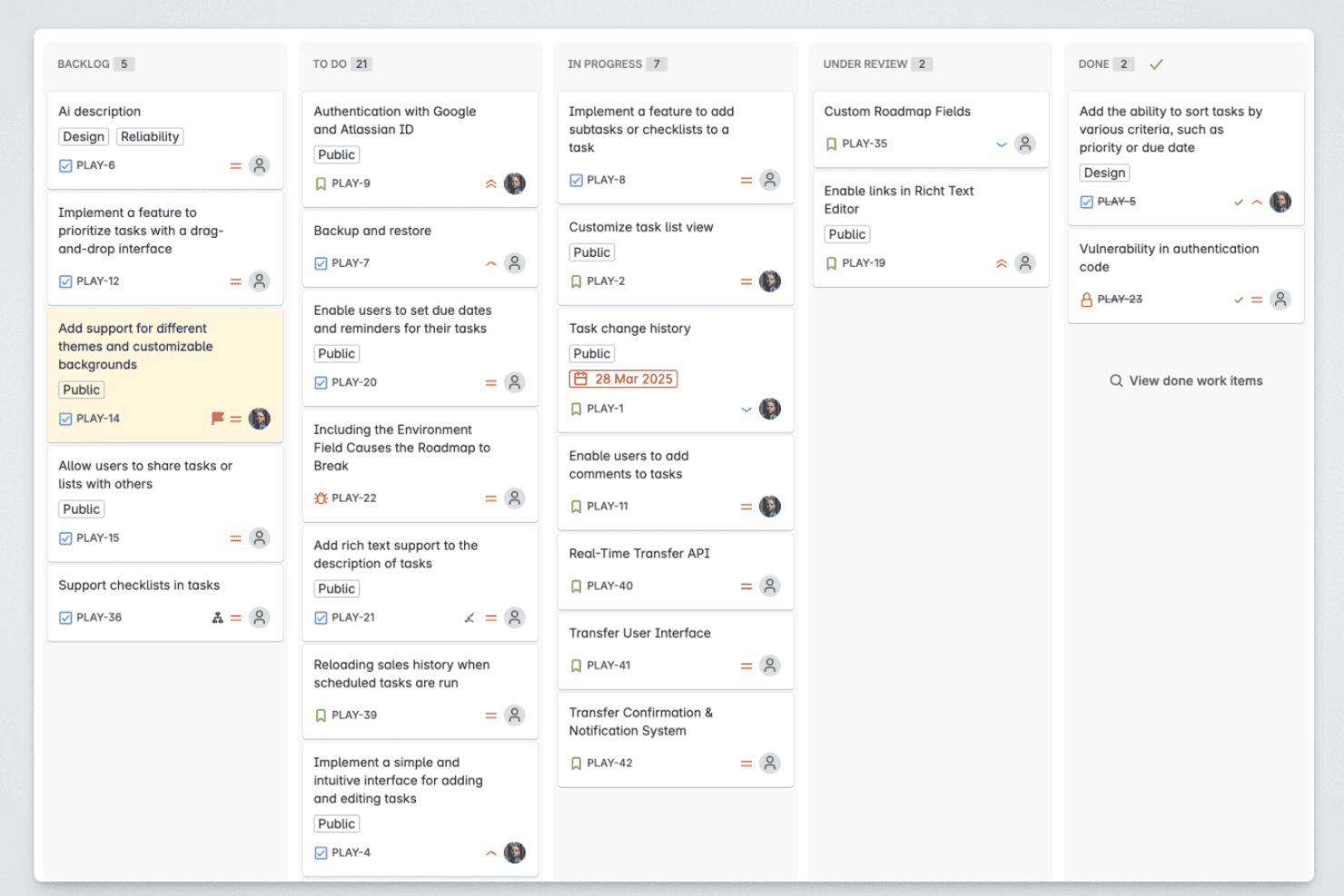
Released lets product managers organize roadmap items across backlog, in-progress, review, and completed stages. Released is an Atlassian-native roadmap and product communication tool that publishes live-synced public roadmaps, collects customer feedback, and generates AI-drafted release notes directly from your Jira and Jira Product Discovery data.
Who Is Released Best For?
Released is a natural fit for Jira-based product teams that want to share customer-facing roadmaps and changelogs without stepping outside the Atlassian ecosystem.
Why I Picked Released
Released earns its spot on my shortlist because it's the only roadmap tool that publishes directly from Jira without a separate database to maintain. I love that you can build cross-space roadmaps pulling from multiple Jira and Jira Product Discovery projects into a single unified view, then serve audience-specific versions to customers, executives, and GTM teams from that same source. When a ticket moves in Jira, the public roadmap updates automatically.
Released Key Features
- Branded changelog hub: Publish release notes to a dedicated changelog site with custom domain and styling.
- Feedback voting portal: Collect feature requests and upvotes from customers in a public or private portal.
- Slack feedback integration: Route product feedback from Slack channels directly into your roadmap and inbox.
- AI release note drafting: Automatically generate release note drafts from completed Jira tickets using built-in AI.
Released Integrations
Released offers native integrations with Jira, Jira Product Discovery, Confluence, and Slack.
Pros and Cons
Pros:
- AI drafts release notes from closed Jira tickets
- Supports audience-specific views from one source
- Roadmaps update live when Jira tickets move
Cons:
- Limited usefulness outside the Atlassian ecosystem
- Roadmap views lack deep prioritization framework support
Learn more about Released: 2Best for pre-built templates
Miro
- Free plan + 14-day free trial available
- From $8/user/month (billed annually)
Visit WebsiteCustomer Rating:4.8/5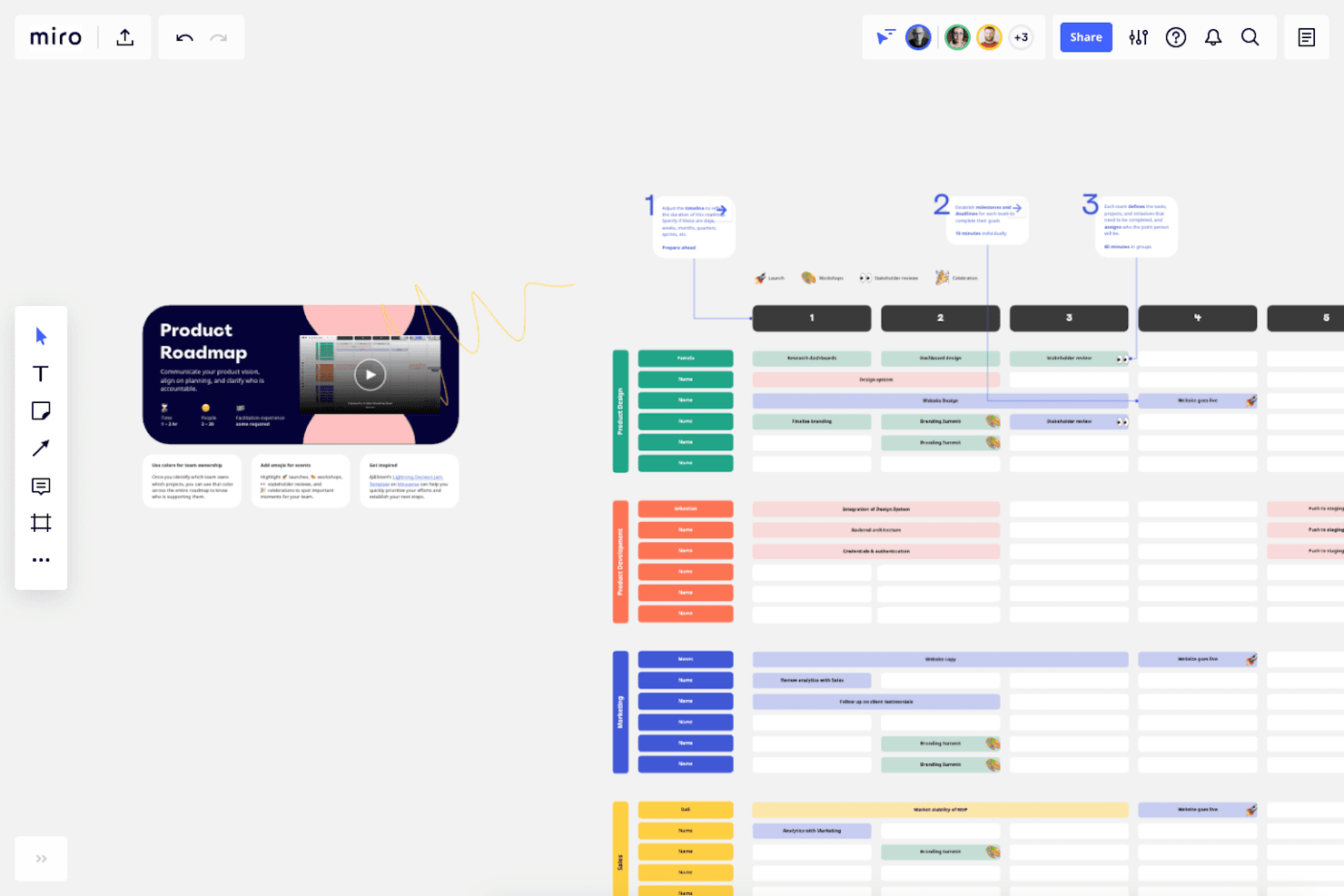
Users can access a selection of pre-designed templates that cover a variety of common roadmap styles and formats. Miro is a visual collaboration platform that lets product teams build and share roadmaps using a library of 60+ templates, timeline and table views, and two-way syncs with delivery tools like Jira, Asana, and Linear.
Who Is Miro Best For?
Miro is a strong fit for product managers and cross-functional teams who need to quickly build and share visually clear roadmaps without starting from scratch.
Why I Picked Miro
I picked Miro as one of the best because its template library is genuinely hard to beat—with 60+ product roadmap templates, I can go from blank board to a shareable Now/Next/Later or timeline roadmap in minutes. I especially like the audience-specific guidance baked in: Miro recommends timeline formats for sales and marketing stakeholders and portfolio roadmaps for executives, so you're not guessing which view fits which room. The Roadmap Tracking Blueprint even layers in AI-accelerated updates to keep the board current without manual effort.
Miro Key Features
- Two-way delivery tool sync: Connects to Jira, Asana, Linear, ClickUp, and Azure DevOps to keep roadmap items aligned with your engineering backlog in real time.
- Talktrack: Records a narrated walkthrough of your board so stakeholders can review your roadmap presentation asynchronously.
- AI Roadmap Strategist Sidekick: Suggests roadmap ideas and priorities based on your company's goals and insights, directly within the board.
- Tables and Timelines: Structures backlog items with statuses, nesting, and scheduling so you can manage and track initiatives without leaving the board.
Miro Integrations
Miro offers native two-way integrations with Jira, Asana, Linear, ClickUp, and Azure DevOps on Business and higher. It connects to more than 250 apps, including Microsoft, Slack, Google, and Adobe, plus Power BI, Looker, and Tableau data feeds.
Pros and Cons
Pros:
- Supports collaborative roadmap workshops
- Clarifies timelines for diverse stakeholders
- Offers 60-plus roadmap templates
Cons:
- Large portfolios become difficult to navigate
- Prioritization lacks built-in scoring frameworks
 Best for outcome-linked roadmap feedback loops
- 14-day free trial + free demo available
- Pricing upon request
Visit WebsiteCustomer Rating:4.2/5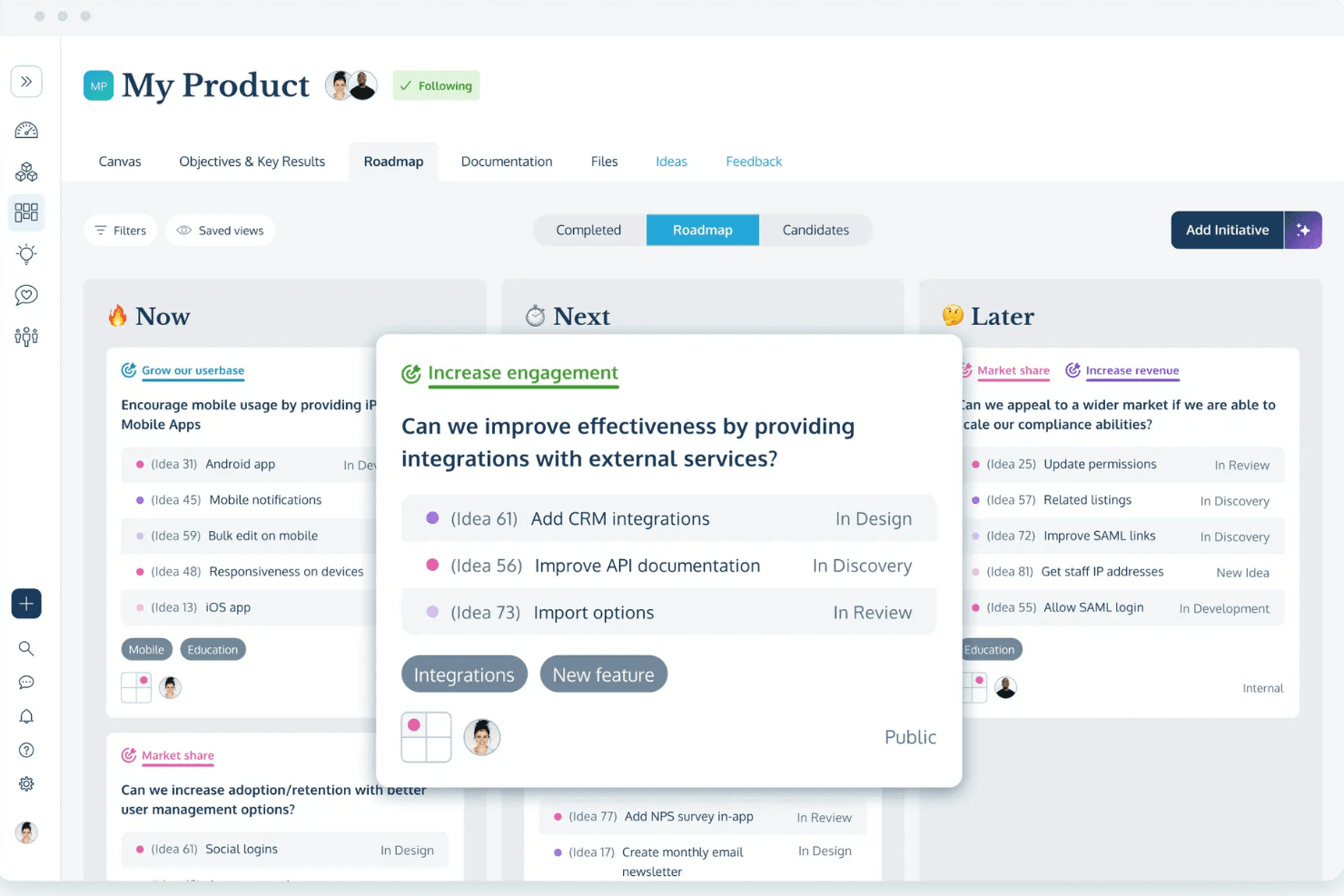
ProdPad's lean roadmaps allow you to focus more on achieving outcomes rather than specific timelines. ProdPad is a product management platform that combines Now-Next-Later roadmapping, idea and feedback intake, OKR tracking, and delivery tool integrations into a single connected workflow.
Who Is ProdPad Best For?
ProdPad suits product managers and product operations leads who want to connect customer feedback directly to their roadmap and track outcomes after release.
Why I Picked ProdPad
I've included ProdPad in my top picks because it's the only tool I've found that genuinely closes the loop between customer feedback and roadmap outcomes. When a requested feature ships, ProdPad notifies the customers who asked for it, and the OKR module lets you record actual results right next to the original decision. I also like how Signals surfaces feedback themes automatically, so you're not manually hunting for patterns before prioritizing your Now-Next-Later roadmap.
ProdPad Key Features
- Now-Next-Later roadmap publishing: Publish a single source roadmap as multiple audience-specific views for your board, internal teams, or customers.
- CoPilot PM AI assistant: Drafts specs from linked feedback, flags duplicate ideas, and summarizes customer themes using your team's own data.
- OKR module with outcome tracking: Links initiatives to objectives with a metric, baseline, and goal so you can record actual results after release.
- Two-way delivery tool sync: Keeps ideas and tickets in sync across Jira and Azure DevOps so your roadmap stays aligned with engineering execution.
ProdPad Integrations
ProdPad offers two-way integrations with Jira and Azure DevOps, plus integrations with Linear, GitHub, Trello, Slack, Microsoft Teams, Salesforce, Intercom, and Confluence. It also supports Zapier.
Pros and Cons
Pros:
- Publishes audience-specific Now-Next-Later roadmaps
- Tracks outcomes after initiatives ship
- Connects feedback directly to roadmap decisions
Cons:
- Offers limited capacity planning visibility
- Lacks dated timeline planning views
Learn more about ProdPad: Best for multi-view roadmaps from one dataset
- 14-day free trial + free demo available
- From $10/user/month
Visit WebsiteCustomer Rating:4/5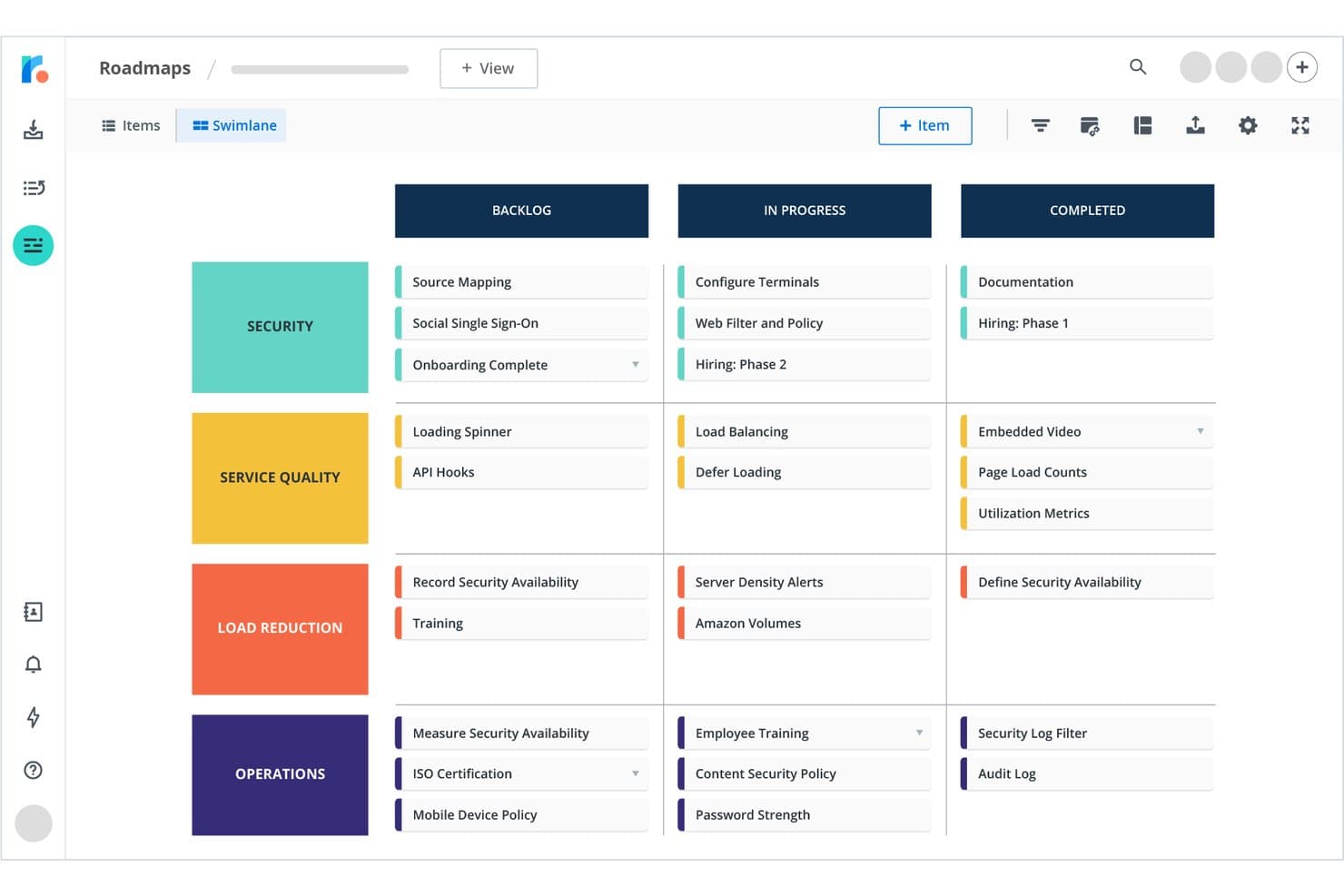
Tempo Roadmapping Software organizes tasks by swimlane across Backlog, In Progress, and Completed. Tempo Roadmapping Software (formerly Roadmunk) is a visual roadmap tool that lets product teams build timeline, swimlane, and table views from a single dataset, alongside idea management, prioritization frameworks, and stakeholder sharing features.
Who Is Tempo Roadmapping Software Best For?
Tempo Roadmapping Software suits product managers who need to present the same roadmap data in multiple formats for different audiences.
Why I Picked Tempo Roadmapping Software
Tempo Roadmapping Software earns its spot on my shortlist because it solves a problem most roadmap tools ignore: the same data needs to tell different stories to different audiences. I like that one dataset feeds into timeline, swimlane, and table views simultaneously, so I'm not maintaining separate files for engineering, executives, and customers. The swimlane view is especially useful for agile teams because it shows progress without locking items to fixed dates, and portfolio roadmaps roll multiple team roadmaps into a single high-level view for leadership.
Tempo Roadmapping Software Key Features
- Idea Manager: A prioritization workspace where you can score ideas using weighted scoring, value vs. effort, or RICE frameworks, then promote high-impact ideas directly onto the roadmap.
- Customer feedback portal: A customizable, customer-facing portal that collects feedback and links it to ideas, so your backlog reflects real user input.
- Reviewer role: A read-only seat type that lets stakeholders view roadmaps, leave comments, and submit feedback without needing a paid collaborator license.
- Jira and Azure DevOps sync: A two-way integration that connects roadmap items to delivery tickets, with custom JQL and WIQL query support on higher tiers.
Tempo Roadmapping Software Integrations
Tempo Roadmapping Software offers native integrations with Jira and Azure DevOps, including two-way sync on higher tiers. It also supports API access for custom integrations and imports from Asana, Monday.com, Shortcut, Trello, GitHub, and GitLab.
Pros and Cons
Pros:
- Portfolio rollups clarify cross-product priorities
- Polished roadmaps suit executive presentations
- Multiple views serve different stakeholder needs
Cons:
- Capacity planning requires a separate product
- Feedback intake lacks public voting boards
Learn more about Tempo Roadmapping Software: Best for product portfolio roadmapping
- Free demo available
- Pricing upon request
Visit WebsiteCustomer Rating:4.8/5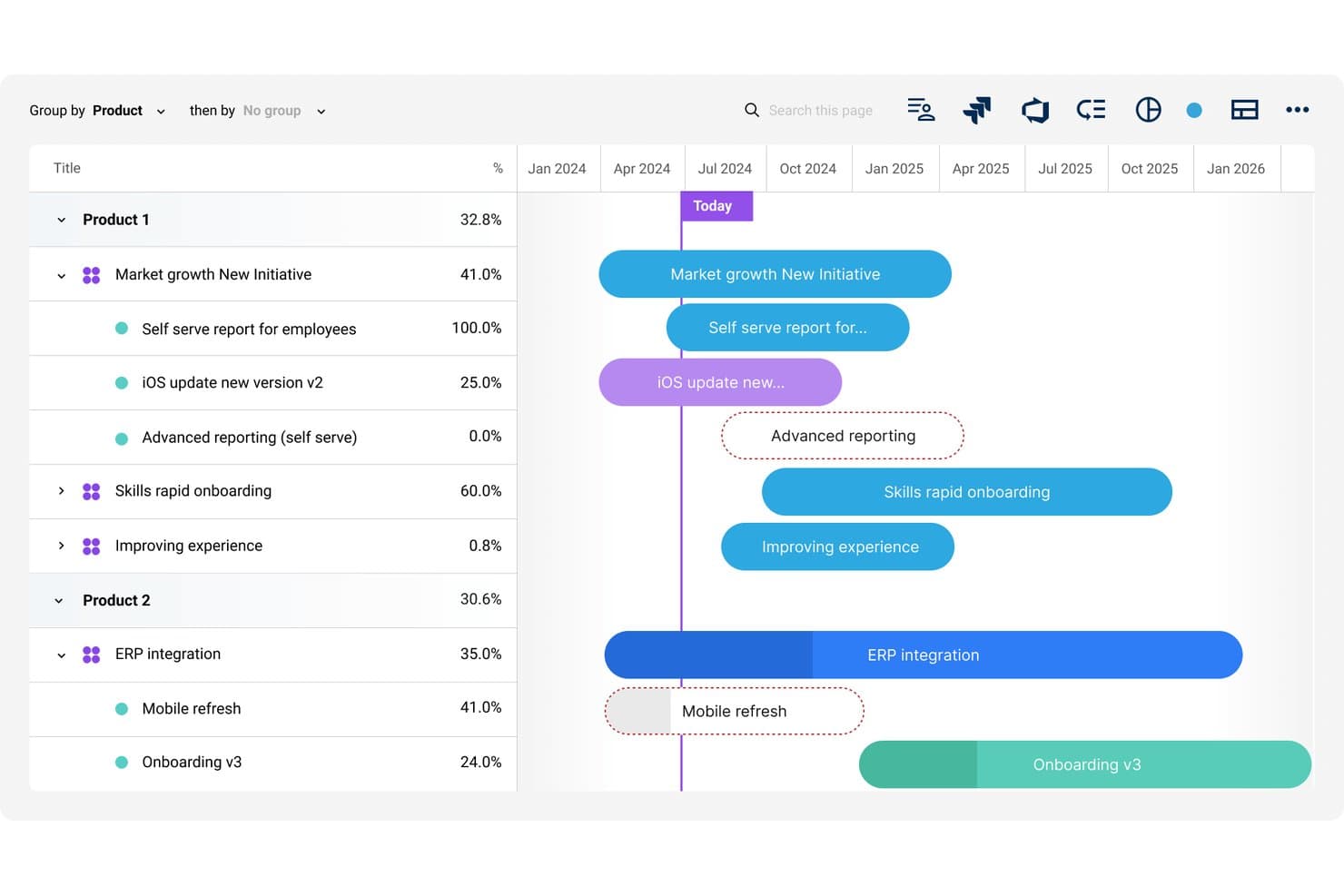
Dragonboat organizes multi-product roadmaps with timeline and progress tracking. Dragonboat is an AI-powered product portfolio management platform that combines strategy alignment, roadmapping, intake, capacity planning, and end-to-end product lifecycle tracking across a modular suite of apps.
Who Is Dragonboat Best For?
Dragonboat is a strong fit for product operations and portfolio teams managing multiple product lines who need strategy, roadmapping, and delivery tracking in one connected platform.
Why I Picked Dragonboat
Dragonboat earns its spot on my shortlist because it's built specifically for teams managing multiple product lines who need strategy, roadmaps, and delivery tracking connected in one place. I love how its hierarchy (strategic bets → initiatives → features → work items) keeps portfolio-wide roadmaps tied directly to business outcomes rather than just feature lists. The AI-powered trade-off graph is what really sets it apart: it surfaces dependencies and constraints across your portfolio so you're making prioritization calls with full visibility into consequences.
Dragonboat Key Features
- RICE scoring with custom fields: Score and rank initiatives using RICE methodology, extended with custom fields to match your team's prioritization criteria.
- Intake app with CRM integration: Collect customer feedback through customizable forms and connect to CRMs to quantify the revenue impact of each request.
- OKR and outcome-based funding: Set OKRs at multiple hierarchy levels and tie funding and investment allocation directly to strategic outcomes.
- Two-way delivery tool sync: Push strategic context down into Jira, Azure DevOps, Shortcut, and Asana, while scope, status, and risk flow back up in real time.
Dragonboat Integrations
Dragonboat supports 200+ integrations, including Jira, Azure DevOps, Rally, Shortcut, Asana, Monday.com, Slack, Microsoft Teams, Salesforce, and Zendesk. It also offers REST API and MCP connectivity for custom integrations.
Pros and Cons
Pros:
- Audit trails preserve human and AI activity
- Trade-off graphs expose downstream portfolio consequences
- Portfolio roadmaps tie strategy to execution
Cons:
- Some important features are difficult to find
- Enterprise positioning may overwhelm smaller teams
Learn more about Dragonboat: Best for customer-driven roadmap notifications
- 14-day free trial
- From $65/user/month
Visit WebsiteCustomer Rating:4.9/5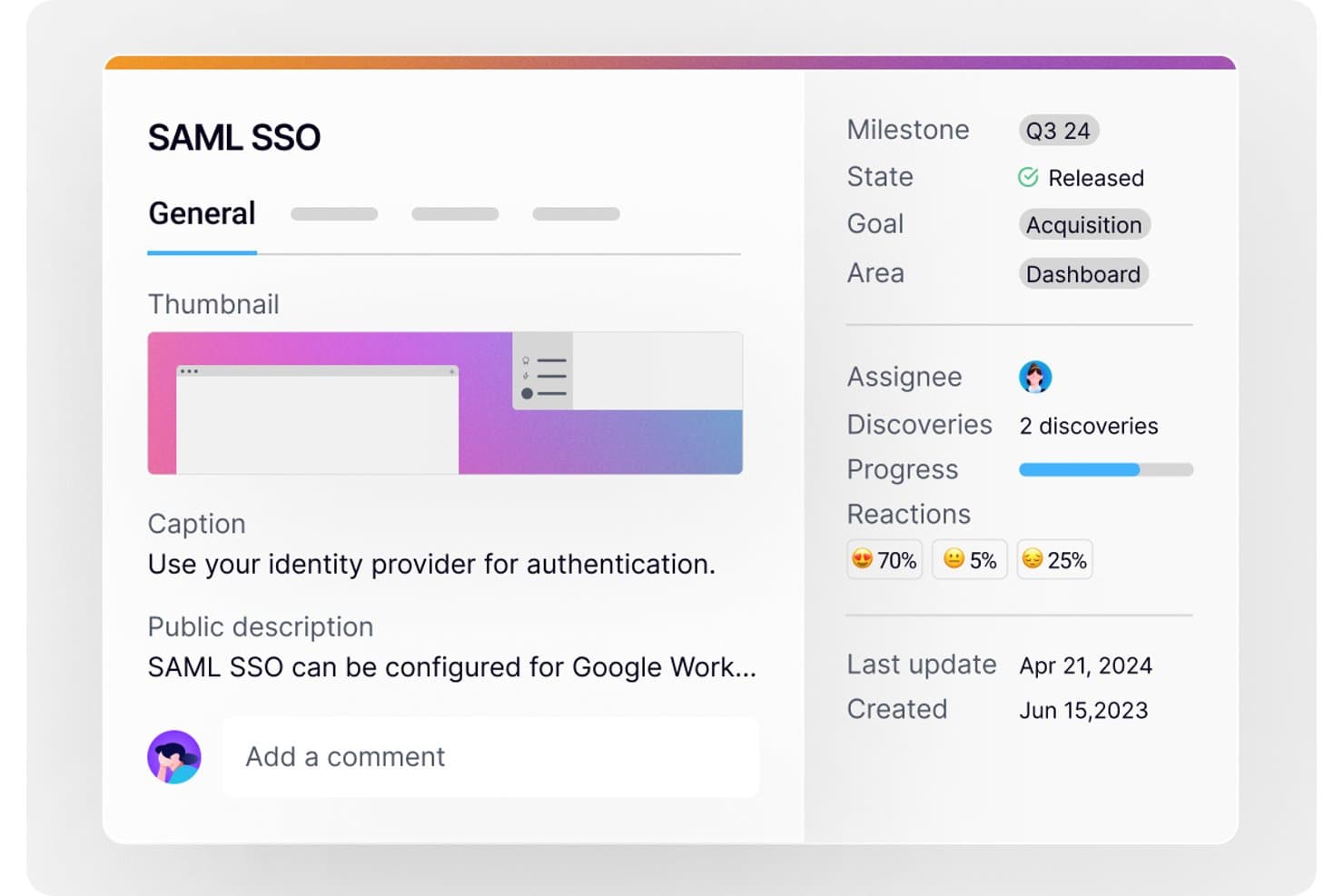
Harvestr lets users track feature details, progress, and reactions on a roadmap. Harvestr is a product feedback and roadmap platform for B2B SaaS teams that combines AI-driven feedback intake, revenue-based prioritization, and visual roadmapping across Kanban, Swimlane, and Timeline views.
Who Is Harvestr Best For?
Harvestr is a strong fit for B2B SaaS product teams that need to close the loop between customer feedback and roadmap updates automatically.
Why I Picked Harvestr
I picked Harvestr as one of the best because it's the only tool on my list that automatically notifies the people who submitted feedback the moment a roadmap item's status changes. That closed-loop notification system is a genuine differentiator: your sales and customer success teams don't have to manually chase down updates because Harvestr handles it. I also love that AI-driven feedback triage feeds directly into revenue-weighted prioritization, so you're not just closing the loop faster; you're closing it on the right things first.
Harvestr Key Features
- Multi-view roadmap builder: Create and switch between Kanban, Swimlane, and Timeline views, each with independent filtering, grouping, and card field settings.
- Revenue-weighted prioritization: Score and rank features using RICE or custom weighted criteria, with MRR data pulled from your CRM to size each opportunity.
- Branded public roadmap page: Publish a white-labeled, embeddable roadmap URL that updates live and supports smiley-face voting from external visitors.
- Delivery tool issue linking: Connect roadmap projects to tasks in Jira, Linear, GitHub, GitLab, or Trello so that progress bars update automatically as engineering work advances.
Harvestr Integrations
Harvestr lists 20+ integrations, including Jira, Linear, GitHub, GitLab, Trello, HubSpot, Salesforce, Slack, Microsoft Teams, and Zendesk. It also offers an API and Zapier.
Pros and Cons
Pros:
- Branded roadmaps support audience-specific stakeholder communication
- Revenue-weighted scoring connects priorities to business value
- Automatic notifications close the customer feedback loop
Cons:
- Public voting uses only simple smiley reactions
- No confirmed capacity planning or dependency mapping
Learn more about Harvestr: Best for customer feedback-linked roadmaps
- Free demo available
- Pricing upon request
Visit WebsiteCustomer Rating:4.5/5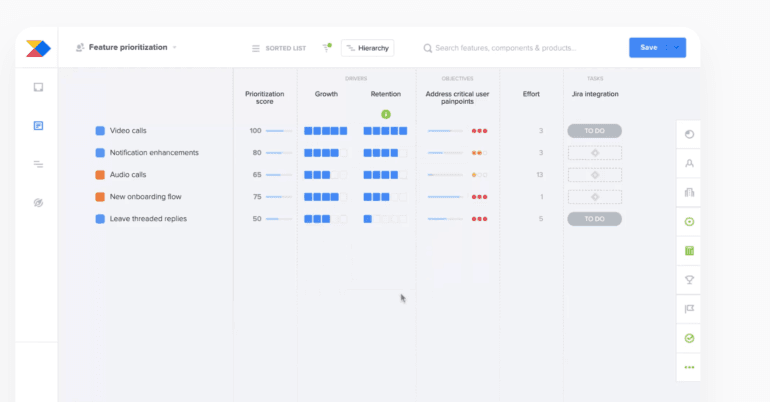
Productboard allows you to select from different roadmap layouts and visualizations. Productboard is a product management roadmap tool that combines visual roadmap building, customer feedback intake, feature prioritization, and stakeholder-facing sharing into a single connected workspace.
Who Is Productboard Best For?
Productboard is a strong fit for product managers at growth-stage and enterprise companies who need to connect customer feedback directly to roadmap decisions.
Why I Picked Productboard
Productboard earns its spot on my shortlist because of how tightly it connects customer feedback to the roadmap. I love that you can trace any feature directly back to the customer requests that drove it, and then close the loop by notifying those same customers when it ships. Custom prioritization formulas let you rank features by customer segment, so you're not guessing at what matters most.
Productboard Key Features
- Custom prioritization formulas: Build your own scoring models to rank features by business impact, customer segment, or request volume.
- OKR and objective tracking: Link objectives directly to initiatives and features, with a dedicated view for monitoring progress and risk.
- Customer portal with voting: Let customers see upcoming plans and vote on features, with options for localization and custom voting scales on higher tiers.
- Portfolio roadmap view: See all products and initiatives in a single unified view, giving leadership visibility across the entire product portfolio.
Productboard Integrations
Productboard offers 25+ native integrations, including Jira, Azure DevOps, Confluence, Google Drive, Notion, Figma, Miro, Amplitude, Mixpanel, and Salesforce. API access is available on Business and higher plans, and Productboard also integrates with Zapier.
Pros and Cons
Pros:
- Portfolio views keep executives aligned
- Customer voting closes feedback loops
- Feedback links explain roadmap decisions
Cons:
- Engineering execution visibility remains limited
- Objective hierarchies take time to master
Learn more about Productboard: Best training packages for product teams
- Free demo available
- Pricing upon request
Visit WebsiteCustomer Rating:4.4/5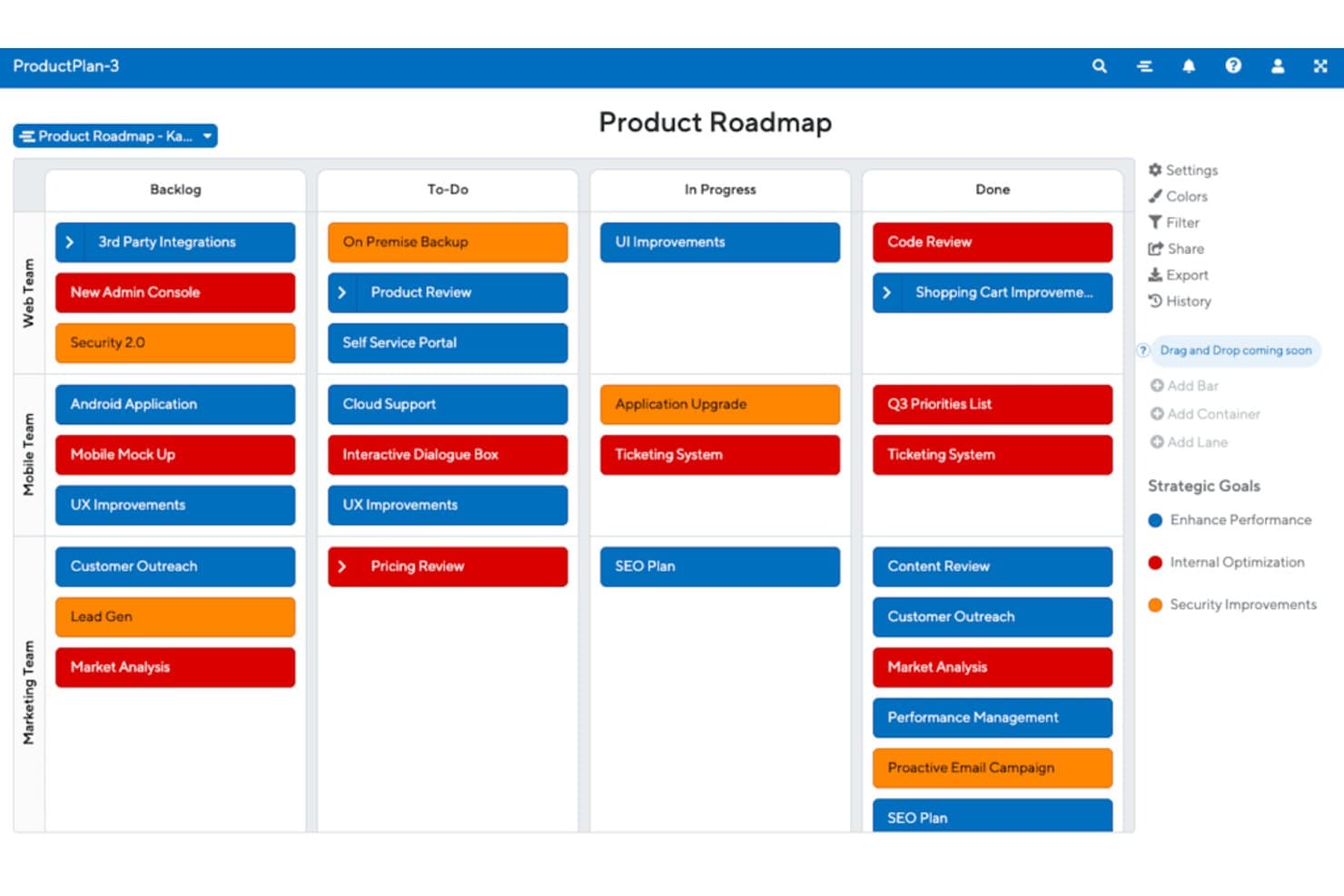
ProductPlan organizes tasks by team and status on a Kanban roadmap. ProductPlan is a product intelligence platform that combines visual roadmapping, AI-assisted idea intake, prioritization boards, and delivery tool sync for product teams.
Who Is ProductPlan Best For?
ProductPlan is a strong fit for product teams that want structured onboarding and hands-on support alongside their roadmapping tool.
Why I Picked ProductPlan
ProductPlan earns its spot on my shortlist because of the depth of support your team gets from day one. Every plan includes a dedicated Implementation Manager who handles Jira or Azure DevOps configuration and field mapping for you, plus a Customer Success Manager who runs quarterly business reviews after go-live. Free biweekly "Getting Started" webinars are open to your whole team, so new PMs can get up to speed without waiting on internal training resources.
ProductPlan Key Features
- AI Suggested Initiatives: Scans your idea backlog for patterns and surfaces up to 10 initiatives ranked by alignment with your company objectives.
- Portfolio views: Displays roadmaps across multiple products and teams in a single view for cross-team visibility.
- Secure live sharing links: Generates revocable links for internal and external stakeholders at no extra cost, with roadmaps set to private by default.
- Bi-directional Jira and Azure DevOps sync: Keeps your initiative, epic, and story hierarchy in sync across tools in real time, including text, dates, labels, and filters.
ProductPlan Integrations
ProductPlan has native integrations with Jira and Azure DevOps, plus integrations with GitHub, Trello, Confluence, Slack, and Microsoft Teams. It also supports Zapier and offers an API for custom integrations.
Pros and Cons
Pros:
- Portfolio views connect strategy across products
- Biweekly training webinars support team adoption
- Dedicated onboarding and ongoing success guidance
Cons:
- Limited capacity planning for resource-constrained teams
- Jira date synchronization can require manual adjustments
Learn more about ProductPlan: Best for end-to-end strategy-to-roadmap planning
- 30-day free trial + free demo available
- From $59/user/month (billed annually)
Visit WebsiteCustomer Rating:4.1/5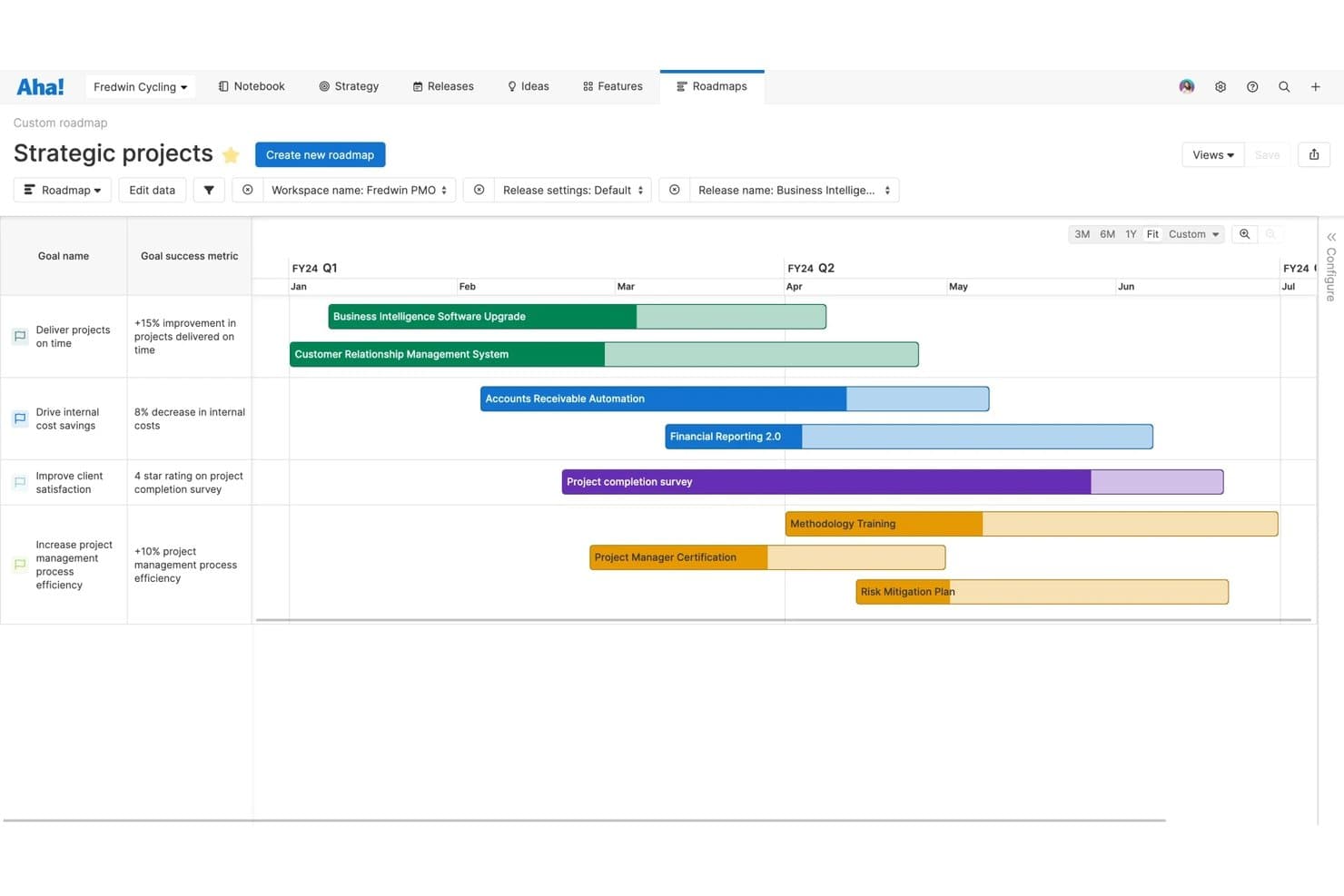
Aha Roadmaps aligns strategic goals with project timelines visually. Aha! Roadmaps is a product management platform that connects business strategy to visual roadmaps, combining goal-setting, idea intake, release planning, prioritization, and stakeholder sharing in one suite.
Who Is Aha! Roadmaps Best For?
Aha! Roadmaps is a strong fit for product teams at mid-size to enterprise companies that need to connect business strategy directly to a shareable, living roadmap.
Why I Picked Aha! Roadmaps
Aha! Roadmaps earns its spot on my shortlist because it's one of the few tools that treats strategy as the starting point, not an afterthought. I love how you can link OKRs directly to features and releases, so your roadmap always traces back to a business goal. Scorecards let you prioritize by value rather than gut instinct, and auto-updating presentations mean stakeholders always see a live view without you rebuilding slides before every review.
Aha! Roadmaps Key Features
- Ideas portal: A branded intake portal where customers or internal teams can submit, vote on, and track the status of product ideas.
- Release management: Plan and manage releases with dependency tracking, capacity calculations based on actual working days, and progress reporting.
- Auto-updating presentations: Build stakeholder presentations that pull live roadmap data, so slides stay current without manual rebuilding.
- Dev tool integrations: Connect directly to Jira, GitHub, GitLab, and Azure DevOps to track engineering execution alongside your product plan.
Aha! Roadmaps Integrations
Aha! Roadmaps offers integrations with 40+ tools, including Jira, Azure DevOps, GitHub, GitLab, Salesforce, Zendesk, Slack, Microsoft Teams, and Google Sheets. It also supports a REST API and Zapier.
Pros and Cons
Pros:
- Idea portals turn feedback into prioritized work
- Auto-updating presentations reduce stakeholder rework
- Links business goals to roadmap items
Cons:
- Setup demands substantial configuration before adoption
- Advanced planning requires higher-tier access
Learn more about Aha! Roadmaps: Best for Atlassian-native roadmap and delivery sync
- Free plan available
- From $10/user/month
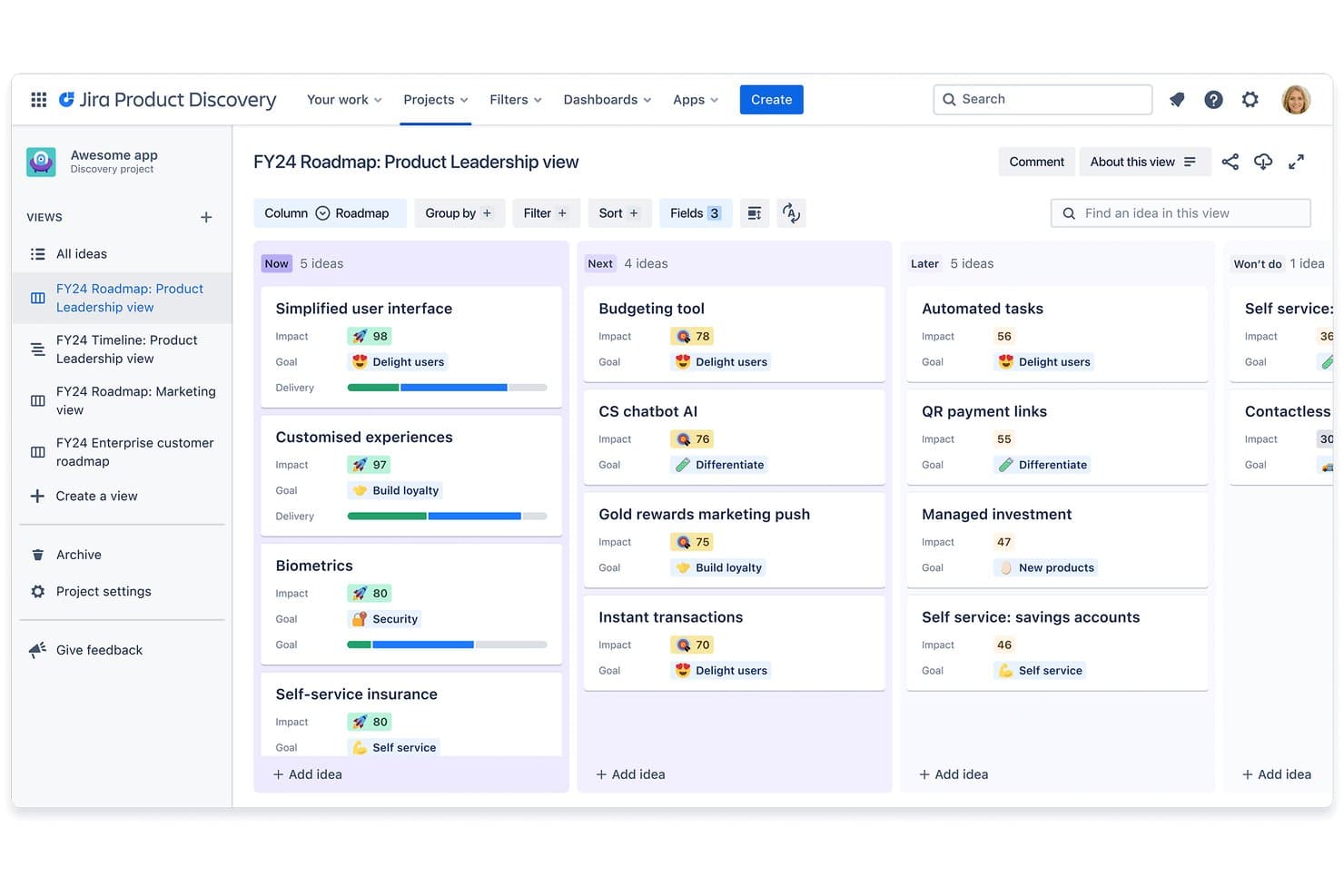
Jira Product Discovery organizes ideas into Now, Next, and Later roadmap columns. Jira Product Discovery is a product management roadmap tool from Atlassian that brings together idea capture, prioritization, and visual roadmapping across list, board, matrix, and timeline views—with native two-way sync to Jira for delivery tracking.
Who Is Jira Product Discovery Best For?
Jira Product Discovery is a natural fit for product teams already running delivery in Jira who want discovery and roadmapping to live in the same ecosystem.
Why I Picked Jira Product Discovery
Jira Product Discovery earns its spot on my shortlist because the bidirectional sync with Jira is genuinely best-in-class. When my team links a discovery idea to a Jira epic, delivery status updates flow back automatically, so the roadmap always reflects what engineering is actually shipping. I also rely on the formula fields to build RICE-style scoring directly in the tool, which keeps prioritization consistent across projects without a separate spreadsheet.
Jira Product Discovery Key Features
- Multiple roadmap views: Switch between list, board, matrix, and timeline views to plan and present work in the format that fits your audience.
- Custom field formulas: Build weighted scoring models like RICE directly in the tool using formula fields tied to any custom data you track.
- Insight connectors: Pull feedback from Zendesk, Salesforce, Pendo, Intercom, and Vivun and link it directly to ideas on your roadmap.
- Confluence embedding: Embed live roadmaps into Confluence pages so stakeholders across the org always see up-to-date priorities without leaving their workflow.
Jira Product Discovery Integrations
Jira Product Discovery offers native integrations with Jira, Confluence, Jira Service Management, Atlassian Goals, Atlassian Projects, Zendesk, Salesforce, Pendo, Intercom, and Vivun. It also provides a REST API for custom integrations.
Pros and Cons
Pros:
- Free contributors simplify stakeholder feedback
- Formula fields support RICE-style prioritization
- Four roadmap views support varied planning styles
Cons:
- Setup requires significant configuration time
- Hierarchy and aggregated views require Premium
Learn more about Jira Product Discovery:
Sammendrag av de beste verktøyene for veikart for produktstyring
Sammenlign raskt alle alternativene vi nettopp har gått gjennom.
| Tool | Best For | Trial Info | Price | ||
|---|---|---|---|---|---|
| 1 | Best with live Jira-synced public roadmaps | 30-day free trial + free plan available | From $1.10/user/month | Website | |
| 2 | Best for pre-built templates | Free plan + 14-day free trial available | From $8/user/month (billed annually) | Website | |
| 3 | Best for outcome-linked roadmap feedback loops | 14-day free trial + free demo available | Pricing upon request | Website | |
| 4 | Best for multi-view roadmaps from one dataset | 14-day free trial + free demo available | From $10/user/month | Website | |
| 5 | Best for product portfolio roadmapping | Free demo available | Pricing upon request | Website | |
| 6 | Best for customer-driven roadmap notifications | 14-day free trial | From $65/user/month | Website | |
| 7 | Best for customer feedback-linked roadmaps | Free demo available | Pricing upon request | Website | |
| 8 | Best training packages for product teams | Free demo available | Pricing upon request | Website | |
| 9 | Best for end-to-end strategy-to-roadmap planning | 30-day free trial + free demo available | From $59/user/month (billed annually) | Website | |
| 10 | Best for Atlassian-native roadmap and delivery sync | Free plan available | From $10/user/month | Website |


Andre verktøy for veikart for produktstyring
Her er noen flere som ikke kom med på topplisten.
- 11CannyBest for revenue-weighted roadmap prioritization
- 12airfocusBest for customizability
- 13Planview AdaptiveWorkBest for portfolio-scale roadmap reporting
- 14StoriesOnBoardBest for story map-driven roadmap planning
- 15Craft.ioBest for OKR-linked roadmap planning
- 16LinearBest for engineering-led roadmap execution
How I Evaluate Product Management Roadmap Tools
I split my evaluation into three parts: core functionality—whether a tool lets you build visual timelines and apply structured prioritization frameworks—carries the most weight. Then I look at standout features like customer feedback portals. Finally, I consider support quality and pricing value.
Core Functionality (Table Stakes For This List)
When I'm selecting tools for my list, I score each one on a scale from 0 (does not offer the functionality) to 5 (excels in this area) for each core functionality listed below. I then convert the total into a percentage to help assess each tool's overall fit, with extra weight on any functionalities I've deemed essential.
- Visual Roadmap Building (Essential): I check whether you can drag and drop items across timeline, board, and swimlane views rather than being locked into a single fixed layout.
- Prioritization Framework (Essential): I look for configurable scoring models like RICE or weighted criteria so you can compare features side by side instead of relying on gut feel.
- Stakeholder Sharing Views: Audience-specific share links matter here—I evaluate whether you can show executives a high-level view while giving engineering a detailed one.
- Initiative & Feature Tracking: Each item should carry status, owner, and custom fields so you can trace an initiative from idea through delivery without switching tools.
- Feedback & Idea Intake: I look for structured portals where customers or internal teams can submit and vote on ideas that link directly to roadmap items.
- Delivery Tool Integration: Two-way sync with tools like Jira or Azure DevOps is what I evaluate, so roadmap status reflects real engineering progress automatically.
Once I have a list of tools that meet the criteria, I consider what sets each platform apart.
Differentiating Factors (What Sets Vendors Apart)
Here's how I compare and contrast different vendors:
Standout Features
I look for a customer portal where users can submit and vote on feature requests, since it gives you a direct signal of demand rather than secondhand anecdotes filtered through sales. Capacity planning layered onto the roadmap is equally important—I check whether effort estimates flag over-allocation before you commit to a release. I also evaluate AI-driven prioritization, where tools like Productboard or Aha! surface recommendations based on customer impact and historical data, helping you move past gut-feel debates in planning sessions.
Beyond Features
I evaluate how easily non-technical stakeholders can adopt the tool. If a VP of sales can't parse the roadmap without a walkthrough, cross-functional alignment stalls. Ecosystem integrations also matter—I check for native connections to CRM, helpdesk, and communication tools like Slack so roadmap context travels where decisions happen. Finally, I look at data governance: SSO support, granular permissions, and compliance certifications protect sensitive strategy data, especially for teams in regulated industries.
Trender innen verktøy for veikart for produktstyring
I undersøkelsen min hentet jeg inn utallige produktoppdateringer, pressemeldinger og lanseringslogger fra ulike leverandører av programvare for veikart for produktstyring. Her er noen av de fremvoksende trendene jeg følger med på:
- AI-drevet innsikt: Verktøy bruker i økende grad AI til å tilby prediktiv analyse og innsikt. Dette hjelper team med å forutse markedsendringer og justere strategier proaktivt. Noen leverandører integrerer AI for å analysere tilbakemeldinger fra brukere og forbedre produktveikart.
- Forbedrede samarbeidsfunksjoner: Det legges stadig større vekt på funksjoner som forbedrer teamsamarbeidet på tvers av ulike steder. Redigering i sanntid og kommentarfuksjoner blir standard, slik at team kan arbeide mer effektivt sammen.
- Brukersentrert design: Leverandører prioriterer brukeropplevelsen med mer intuitive grensesnitt og brukervennlig design. Denne trenden gjør det enklere for team å ta i bruk nye verktøy uten omfattende opplæring, med fokus på enkelhet og brukervennlighet.
- Verktøy for datavisualisering: Avansert datavisualisering blir standardisert for å presentere kompleks informasjon på en tydelig måte. Verktøy for datavisualisering hjelper team med å ta datadrevne beslutninger raskt ved å omforme rådata til lettforståelige visuelle fremstillinger.
- Sporing av bærekraft: Flere veikart inkluderer funksjoner for å følge opp bærekraftsmål. Denne trenden samsvarer med virksomhetenes økende prioritering av miljøpåvirkning og gjør det mulig for team å samordne produktstrategier med bærekraftsmål.
Funksjoner i veikart for produktstyring
Når du velger programvare for veikart for produktstyring, bør du se etter følgende viktige funksjoner:
- Visualisering av veikart: Gjør det mulig for team å opprette og dele en visuell fremstilling av produktstrategien sin, noe som gjør det enklere å kommunisere planer med interessenter.
- Oppfølging av oppgaver og milepæler: Hjelper team med å holde oversikt over prosjektfremdrift og tidsfrister, slik at alle holder tidsplanen.
- KI-drevet innsikt: Tilbyr prediktiv analyse som hjelper team med å forutse endringer og ta informerte beslutninger.
- Samarbeidsverktøy: Legger til rette for kommunikasjon og samarbeid på tvers av ulike lokasjoner, noe som øker produktiviteten og samkjøringen.
- Tilpassbare arbeidsflyter: Lar team tilpasse prosesser etter sine spesifikke behov og gir fleksibilitet i prosjektstyringen.
- Datavisualisering: Gjør rådata om til tydelige visualiseringer som bidrar til rask og enkel beslutningstaking.
- Scenarioplanlegging: Gjør det mulig for team å utforske ulike strategier og resultater, slik at de kan forberede seg på forskjellige muligheter.
- Oppfølging av bærekraft: Gjør det mulig for team å overvåke og samordne produktstrategiene sine med miljømål.
- Brukersentrert design: Sikrer at verktøyet er intuitivt og enkelt å bruke, noe som reduserer læringskurven for nye brukere.
- Sikkerhetstiltak: Beskytter sensitiv informasjon med kryptering og samsvar med dataregler, slik at datasikkerheten ivaretas.
Fordeler med veikartverktøy for produktledelse
Implementering av veikartverktøy for produktledelse kan gi flere fordeler for teamet og virksomheten din. Her er noen av fordelene du kan se frem til:
Enkelt å bruke: Brukersentrert design sikrer at verktøyet er enkelt å ta i bruk, noe som minimerer opplæringstiden og oppmuntrer til utbredt bruk i hele teamet.
Bedre samkjøring: Bidrar til å sikre at alle teammedlemmer og interessenter er på samme side, med tydelig visualisering av veikartet og kommunikasjonsverktøy.
Bedre beslutningstaking: KI-drevet innsikt og datavisualisering gir informasjonen som trengs for å ta informerte strategiske valg.
Økt produktivitet: Samarbeidsverktøy og oppfølging av oppgaver holder alle samordnet og fokuserte på å overholde tidsfristene.
Større fleksibilitet: Tilpassbare arbeidsflyter og scenarioplanlegging gjør det mulig for team å raskt tilpasse seg endrede prosjektbehov eller markedsforhold.
Bedre ressursstyring: Funksjoner som oppfølging av oppgaver og milepæler bidrar til å fordele ressurser mer effektivt, redusere sløsing og optimalisere effektiviteten.
Fokus på bærekraft: Verktøy som følger opp bærekraftsmål, bidrar til å samordne produktutviklingen med miljømål og støtter arbeidet med virksomhetens samfunnsansvar.
Kostnader og priser for veikartverktøy for produktledelse
Et viktig aspekt ved valg av programvare er selvfølgelig å forstå de ulike prismodellene og abonnementene som er tilgjengelige. Kostnadene varierer naturligvis basert på funksjoner, teamstørrelse, tillegg og mer. Tabellen nedenfor gir en oversikt og oppsummerer vanlige abonnementer, gjennomsnittsprisene deres og typiske funksjoner som er inkludert i de fleste veikartløsninger for produktledelse:
Sammenligningstabell for veikart for produktledelse
| Abonnementstype | Gjennomsnittspris | Vanlige funksjoner |
|---|---|---|
| AbonnementstypeGratis abonnement | Gjennomsnittspris$0 | Vanlige funksjonerGrunnleggende oppretting av veikart, begrensede samarbeidsverktøy og grunnleggende rapportering. |
| AbonnementstypePersonlig abonnement | Gjennomsnittspris$5-$25 per bruker per måned | Vanlige funksjonerForbedret visualisering, oppfølging av oppgaver og begrensede integrasjoner. |
| AbonnementstypeBedriftsabonnement | Gjennomsnittspris$30-$60 per bruker per måned | Vanlige funksjonerAvansert samarbeid, tilpassbare arbeidsflyter og datavisualisering. |
| AbonnementstypeStorbedriftsabonnement | Gjennomsnittspris$70-$120 per bruker per måned | Vanlige funksjonerKI-drevet innsikt, fullstendige integrasjoner og avanserte sikkerhetsfunksjoner. |
Ofte stilte spørsmål
Hvis teamet ditt vurderer å bruke et verktøy for produktveikart, har du sannsynligvis noen spørsmål. Nedenfor har jeg besvart noen av de vanligste spørsmålene om produktledelse, produktveikart og verktøy for produktledelse.
Hva er håndtering av produktveikart?
Håndtering av produktveikart sikrer at utviklingen av et nytt eller eksisterende produkt fortsetter i henhold til en tydelig definert plan. Det gir smidige team og alle interesserte parter mulighet til å føre prosjektet fremover, samtidig som ledelsen får en klar oversikt over oppgaver og prioriteringer.
Bruk av programvare for produktveikart er en god måte å håndtere produktutviklingen på. Verktøy for produktveikart tilbyr dra-og-slipp-grensesnitt for å lage produktplanen, verktøy for tidslinjestyring som sikrer at viktige frister overholdes, og mer. De bidrar til å gi teammedlemmene et tydelig bilde av hva de arbeider mot, og interessentene et tydelig bilde av hva de kan forvente.
Hva bør et produktveikart inneholde?
Hvis det er første gang du lærer hvordan du lager et produktveikart, trenger du ikke å bekymre deg! Ingen produktveikart vil være helt like, men det er noen ting du bør sørge for å inkludere, for eksempel:
- En produktvisjon som definerer den overordnede utviklingsretningen,
- En strategi for å oppnå de ønskede resultatene,
- En oversikt over kravene som må oppfylles,
- En produktplan for å oppnå det ovennevnte,
- Markører eller milepæler for å holde tidsplanen, og
- Måltall som du kan bruke til å måle fremdriften.
Det finnes flere ulike typer produktveikart du kan utforske for å finne det riktige for ditt bruksområde. Men i hovedsak handler det om å kartlegge sluttmålene dine, kontrollpunktene på veien mot dem og viktige detaljer underveis.
Hva er de beste verktøyene for produktledelse og produktveikart i teknologi- og SaaS-bransjen?
Programvareutviklingsteam og produktteam som arbeider i teknologi- og SaaS-bransjen, kan være på utkikk etter bestemte funksjoner i programvare for håndtering av produktveikart. De beste verktøyene for produktveikart for disse bruksområdene er de som tilbyr funksjoner som:
- Smidige metoder og rammeverk, som sprintplanlegging og scrumtavler,
- API-er for å bygge tilpassede integrasjoner, slik at du kan koble verktøyet til produktet ditt eller den eksisterende teknologistakken,
- Verktøy som spesialiserer seg på produktveikartlegging av nye produkter, nye funksjoner eller digitale produkter spesifikt (særlig for oppstartsbedrifter),
- Integrasjoner med viktige programvareutviklingsverktøy som Jira, GitHub, Azure DevOps osv.,
- Programvare som tilbyr maler for produktveikart tilpasset utvikling av digitale produkter, som programvare og apper.
Hvordan ivaretar verktøy for produktledelse og produktveikart behovene til selskaper innen finansielle tjenester?
Leverandører av finansielle tjenester har ofte strenge krav til samsvar og sikkerhet. Derfor er det viktig å finne den beste programvaren for produktveikart når det gjelder datasikkerhetsfunksjoner. Her er noen ting du bør se etter:
- Samsvar med bestemte styringsstrukturer for datasikkerhet, som GDPR, HIPAA og SOC 2-samsvar,
- Avanserte tilgangstillatelser for brukere for å sikre at data forvaltes på riktig måte i henhold til organisasjonens sikkerhetsklareringsnivåer,
- Revisjonsspor for å holde oversikt over hvordan informasjon oppdateres, når og av hvem,
- Tilpassbare arbeidsflyter for godkjenning for å sikre at informasjon utveksles og godkjennes i henhold til selskapets standardiserte driftsprosedyrer.
I hovedsak ser du etter et produkt som går lenger enn det som er vanlig når det gjelder sikkerhet. Dette er bare noen eksempler på sikkerhetsfunksjoner du kan finne i spesifikke verktøy for produktledelse og produktveikart.
Hvem eier produktveikartet?
Vanligvis er det produktlederen som eier produktveikartet. Vedkommende samarbeider med interessenter for å sikre at veikartet er i tråd med strategiske mål. Produktlederen holder også veikartet oppdatert og kommuniserer endringer til teamet, slik at alle er samkjørte.
Hva nå?
Hvis du ser etter flere verktøy, men ikke er klar til å gjøre en stor investering, eller teamet ditt ennå ikke har omfattende behov, har vi samlet de beste gratis verktøyene for produktveikartlegging som kan bringe produktet ditt raskere til live uten å sprenge budsjettet.
Husk også å melde deg på nyhetsbrevet vårt, slik at du får de nyeste perspektivene på programvare for produktledelse fra ledende eksperter på dette nisjeområdet.