

10 Migliori Soluzioni Software di Progettazione Prodotto Recensite nel 2026

10 Migliori Software di Progettazione di Prodotti: Shortlist


La progettazione di prodotti è DIFFICILE (soprattutto se si hanno standard elevati!), quindi nulla è più essenziale di strumenti di progettazione che alleggeriscano il carico di lavoro. Nella mia carriera ho fatto di tutto—sviluppo di modelli di prodotto, collaborazione con una vasta gamma di stakeholder con opinioni forti, e molto altro—e so quanto sia importante vedere il proprio software di progettazione come un alleato, non come un nemico.
Proprio per questo motivo, ho messo in campo i miei alti standard testando una quantità notevole di strumenti di progettazione di prodotti e scegliendo solo i migliori. Qui trovi gli strumenti che ho approvato, con dettagli specifici per aiutarti a confrontarli.
Perché Fidarsi delle Nostre Recensioni Software
Testiamo e recensiamo software per il product management dal 2020. Come product manager sappiamo quanto sia fondamentale e difficile fare la scelta giusta in termini di software. Investiamo in una ricerca approfondita per aiutare il nostro pubblico a prendere decisioni migliori sugli acquisti di software. Abbiamo testato oltre 2.000 strumenti per diversi casi d’uso e scritto più di 1.000 recensioni approfondite.Scopri come assicuriamo la trasparenza & la nostra metodologia di recensione software.
Cos'è un Software di Progettazione di Prodotti?
I software di progettazione di prodotti sono programmi utilizzati per creare e sviluppare progetti digitali destinati a prodotti. Questi software sono tipicamente usati da designer di prodotto, ingegneri e produttori per realizzare progetti 2D e 3D che possono poi essere utilizzati per prototipare e produrre prodotti fisici.
Un software di progettazione di prodotti include solitamente una serie di strumenti e funzionalità come modellazione 3D, prototipazione, rendering, simulazione e strumenti di collaborazione, per supportare tutto il processo di progettazione e assicurare che il prodotto finale rispetti le specifiche e i requisiti desiderati.
Panoramica dei 10 Migliori Software di Progettazione di Prodotti
Ecco una breve descrizione di ogni soluzione di design di prodotto per mostrare i migliori casi d’uso e le caratteristiche distintive di ogni strumento.

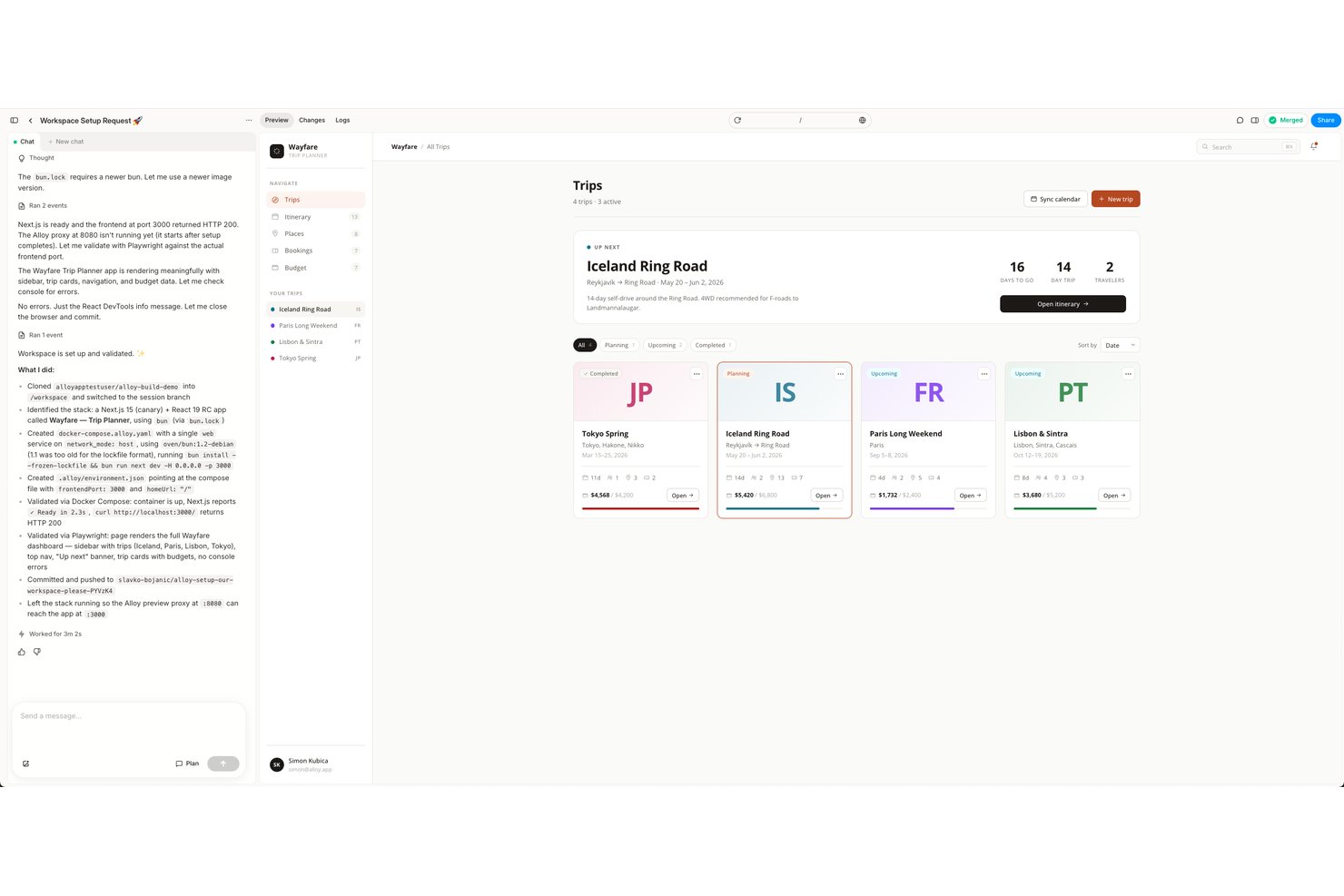
Alloy è uno strumento di prototipazione AI che cattura la tua web app live tramite un'estensione del browser e genera prototipi interattivi ad alta fedeltà che ereditano il sistema di design, i componenti e il codice reali del tuo prodotto.
Per chi è ideale Alloy?
Alloy è particolarmente adatto a product manager di aziende con web app esistenti che vogliono prototipare idee di funzionalità senza dover dipendere da designer o sviluppatori.
Perché ho scelto Alloy
Ho scelto Alloy come uno dei migliori perché è l'unico strumento che parte dal tuo prodotto reale e non da una tela bianca. La sua estensione del browser cattura qualsiasi pagina della tua web app e l'AI comprende immediatamente la tua libreria di componenti, i font e i token. Posso quindi generare nuove funzionalità tramite linguaggio naturale e inviare le modifiche direttamente in una Pull Request su GitHub.
Caratteristiche principali di Alloy
- Feedback in linea con commenti fissati: Aggiungi feedback contestuali direttamente su specifici elementi del prototipo per iterazioni rapide.
- Codice componente React esportabile: Genera codice React dai prototipi per semplificare la consegna agli sviluppatori.
- Integrazioni con workspace: Collegati con strumenti come Jira, Linear, Notion e Slack per flussi di lavoro di prodotto ottimizzati.
- Conformità SOC 2 Type II e opzioni SSO: Garantisci sicurezza di livello enterprise e accesso Single Sign-On per la gestione del team.
Integrazioni Alloy
Alloy offre integrazioni native con Jira, Linear, GitHub, Notion e Slack, e mette a disposizione un'API per integrazioni personalizzate.
Pros and Cons
Pros:
- I prototipi ereditano automaticamente gli stili reali dei componenti
- L'AI genera schermate tramite linguaggio naturale
- Esportazione PR GitHub che velocizza la consegna agli sviluppatori
Cons:
- Solo web app, nessun supporto mobile
- Comunità più piccola rispetto a Figma o Sketch

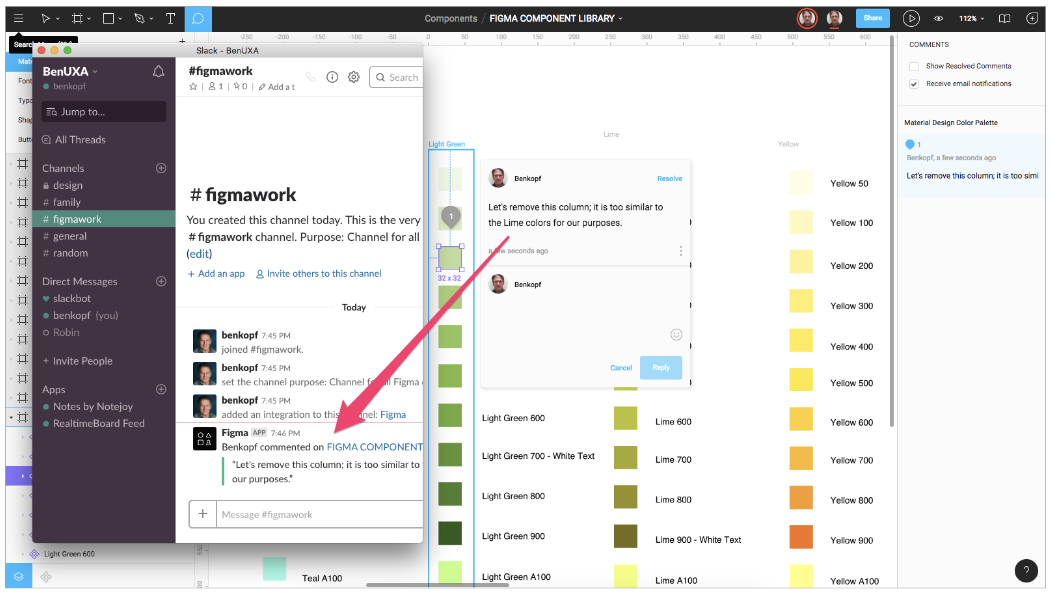
Figma è una piattaforma di progettazione UI/UX e di prodotto basata su browser che copre la creazione di wireframe, prototipazione, sistemi di design e collaborazione multiplayer in tempo reale lungo l'intero flusso di lavoro dalla progettazione allo sviluppo.
Per chi è ideale Figma?
Figma è particolarmente adatto a product designer, team UX e startup guidate dal design che necessitano di uno spazio di lavoro condiviso dove designer e sviluppatori possono collaborare sugli stessi file in tempo reale.
Perché ho scelto Figma
Figma si guadagna il suo posto tra i migliori nella mia lista perché l’editing multiplayer permette a tutto il mio team di lavorare contemporaneamente nello stesso file di progettazione del prodotto—commentando, iterando e risolvendo i feedback senza nemmeno un’esportazione. Mi piace particolarmente il modo in cui le librerie di componenti condivise mantengono i team di prodotto coerenti su ogni schermata e superficie. Inoltre, la Dev Mode consente agli sviluppatori di ispezionare dimensioni e risorse direttamente in Figma, eliminando la necessità di uno strumento separato per il passaggio di consegne.
Caratteristiche principali di Figma
- Auto layout: Ridimensiona e riorganizza automaticamente frame e componenti al variare del contenuto, mantenendo gli elementi di design allineati su diversi breakpoint.
- Prototipazione interattiva: Aggiunge interazioni cliccabili, transizioni e overlay ai frame di design per simulare i flussi di prodotto reali.
- Variabili: Memorizza valori riutilizzabili per colore, spaziatura e testo che si aggiornano in tutto il file quando vengono modificati.
- Rami (Branching): Crea una copia separata di un file di design per testare modifiche senza influenzare il file principale di lavoro.

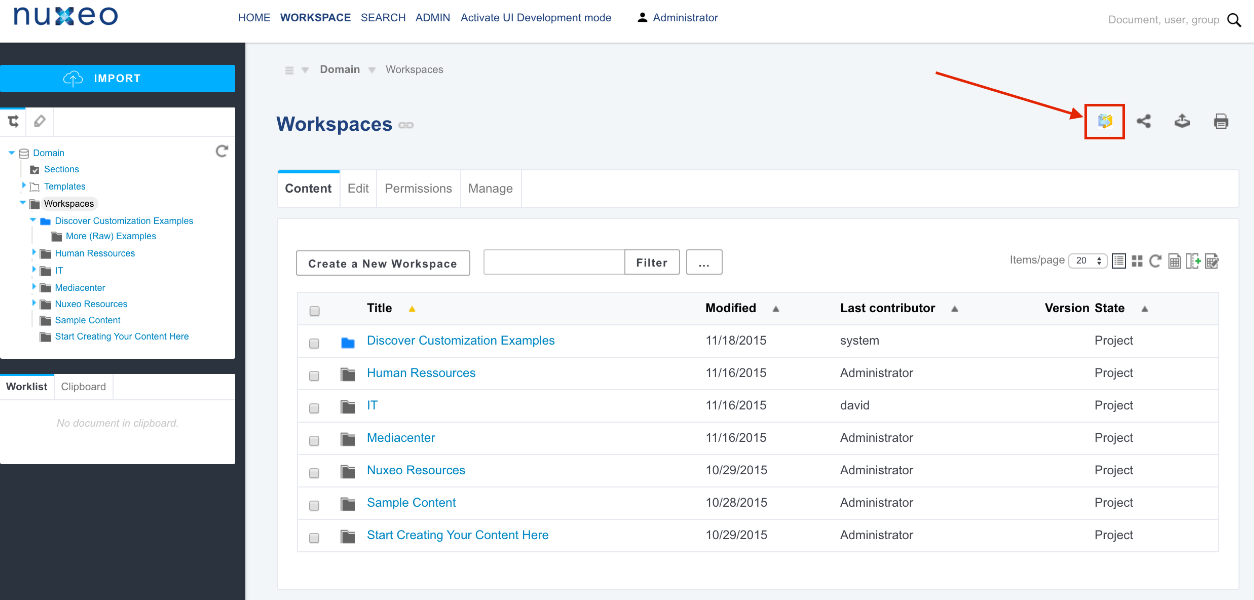
Nuxeo Platform è una piattaforma cloud-native per la gestione dei contenuti aziendali (ECM) e la gestione delle risorse digitali (DAM) che centralizza le risorse multimediali, automatizza i flussi di lavoro e collega le informazioni tra le organizzazioni di grandi dimensioni.
Per chi è più indicato Nuxeo Platform?
Nuxeo Platform è particolarmente adatto a grandi aziende e settori regolamentati che gestiscono elevati volumi di contenuti digitali complessi tra team distribuiti.
Perché ho scelto Nuxeo Platform
Nuxeo Platform gestisce la complessità dei contenuti con cui le aziende di beni di largo consumo devono confrontarsi ogni giorno. I team CPG gestiscono enormi portafogli di prodotti in continua evoluzione attraverso partner retail, e le capacità DAM di Nuxeo permettono di creare portali personalizzati per ogni rivenditore, così i partner possono accedere solo alle risorse a cui sono autorizzati. Inoltre, Nuxeo collega dati provenienti da sistemi di procurement, contabilità e gestione magazzino in un unico luogo, riducendo le comunicazioni che rallentano il lancio dei prodotti.
Funzionalità principali di Nuxeo Platform
- Tagging dei metadati basato su AI: Nuxeo Insight arricchisce automaticamente le risorse con tag di metadati per rendere ricercabili su larga scala grandi librerie di contenuti di prodotto.
- Controllo delle versioni e audit trail: Traccia ogni modifica apportata a documenti e risorse di prodotto durante il loro intero ciclo di vita, con una cronologia completa di modifiche e approvazioni.
- Workflow di approvazione configurabili: Costruisci flussi di lavoro di revisione e approvazione a più step per gestire cicli di validazione tra team trasversali.
- Ricerca e filtro facettati: Effettua ricerche tra i repository di contenuti utilizzando metadati, tipo di file o attributi personalizzati per individuare rapidamente risorse specifiche.


Adobe Creative Cloud è una suite di strumenti creativi che copre il design 2D e 3D, compresi applicativi dedicati alla modellazione 3D, texturing, creazione di materiali e rendering fotorealistico di prodotti.
Per chi è ideale Adobe Creative Cloud?
Adobe Creative Cloud è particolarmente adatto a designer di prodotto, artisti 3D e team creativi nei settori dei beni di consumo, packaging e design industriale.
Perché ho scelto Adobe Creative Cloud
Ho incluso Adobe Creative Cloud tra le mie principali scelte perché la sua offerta mobile è più integrata nel flusso di lavoro di progettazione di prodotti 3D rispetto a qualsiasi concorrente che abbia mai utilizzato. Adobe Capture, ad esempio, ti permette di puntare la fotocamera del tuo telefono su una superficie reale e generare materiali PBR istantaneamente, con queste texture che si sincronizzano direttamente con le app Substance 3D tramite le Creative Cloud Libraries. Photoshop su iPad offre gli stessi strumenti di compositing e selezione disponibili su desktop, permettendoti di rivedere e modificare i render dei prodotti in mobilità senza perdita di qualità.
Funzionalità principali di Adobe Creative Cloud
- Substance 3D Painter: Dipingi texture e materiali direttamente sulle superfici dei modelli 3D usando materiali intelligenti e pennelli parametrici.
- Adobe Dimension: Inserisci modelli 3D in scene fotorealistiche con prospettiva e illuminazione automatica abbinate alle immagini di sfondo.
- Substance 3D Sampler: Trasforma fotografie reali in materiali PBR ripetibili pronti per l’uso in scene di prodotti 3D.
- Substance 3D Stager: Assembla e renderizza scene di prodotti utilizzando template di illuminazione creati da fotografi per un risultato fotorealistico.

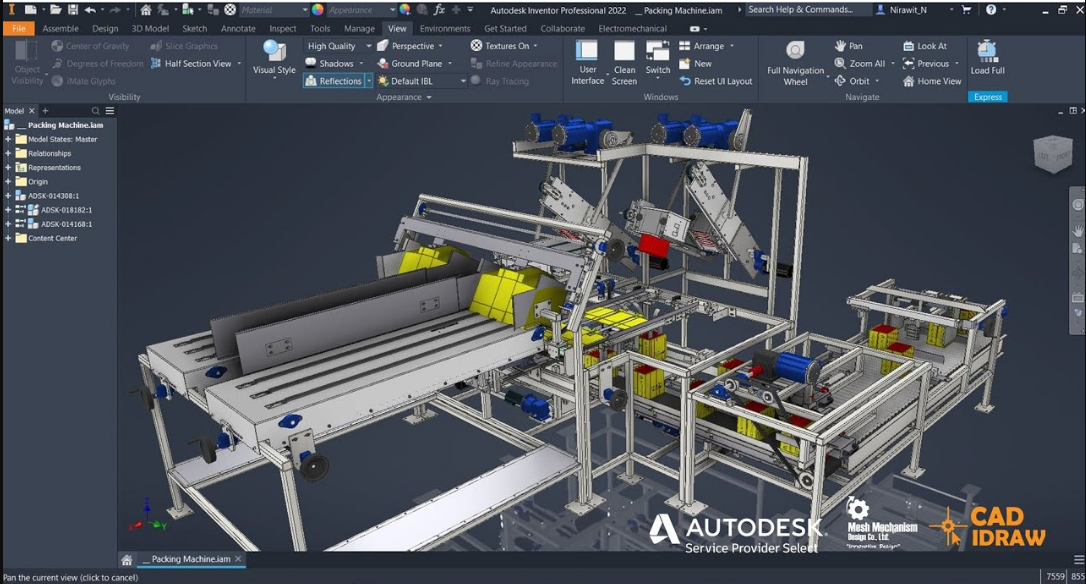
La Autodesk Product Design & Manufacturing Collection è una suite CAD/CAM che riunisce strumenti di modellazione 3D parametrica, simulazione ingegneristica, disegno 2D e rendering ad alta fedeltà per progettare prodotti fisici e apparecchiature complesse.
Per chi è ideale la suite Autodesk?
La Autodesk Product Design & Manufacturing Collection è particolarmente indicata per ingegneri meccanici, designer industriali e team di sviluppo prodotto nel settore manifatturiero.
Perché ho scelto la suite Autodesk
Ho incluso la Autodesk Product Design & Manufacturing Collection tra le mie scelte principali perché è una delle poche suite che combina modellazione di superfici di Classe A con CAD di livello ingegneristico in un unico pacchetto. Utilizzo Autodesk Alias per scolpire superfici organiche e pronte per la produzione su prodotti di consumo—il tipo di continuità superficiale precisa richiesta dal design industriale prima del passaggio alla produzione. Insieme alla modellazione parametrica di Inventor, posso passare dall'esplorazione delle forme estetiche a un modello meccanico completamente quotato e tollerato senza cambiare piattaforma.
Caratteristiche principali della suite Autodesk
- Rendering con 3ds Max: Crea visualizzazioni di prodotto fotorealistiche utilizzando materiali fisicamente basati, configurazioni di illuminazione personalizzate ed effetti fotocamera direttamente dal tuo modello 3D.
- Inventor Nastran FEA: Testa la geometria del prodotto sotto carichi reali e condizioni di stress grazie all'analisi agli elementi finiti integrata prima di passare alla produzione.
- Design generativo: Inserisci casi di carico e vincoli di produzione in Fusion per generare opzioni geometriche ottimizzate per le strutture dei prodotti.
- ReCap Pro scansione 3D: Converti oggetti fisici o prototipi in nuvole di punti 3D precise da usare come geometria di riferimento nel tuo flusso di lavoro di modellazione.

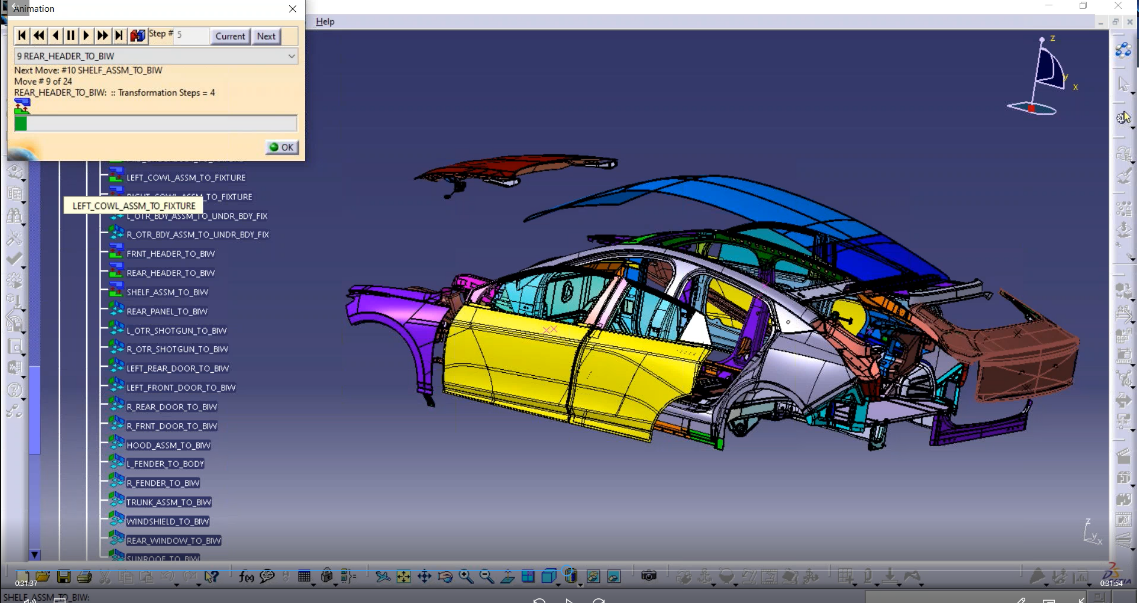
CATIA è una piattaforma di progettazione e ingegneria di prodotti 3D di Dassault Systèmes che copre modellazione di superfici, modellazione solida, superfici di Classe A, simulazione e visualizzazione fotorealistica in un ambiente unificato.
Per chi è indicato CATIA?
CATIA è particolarmente adatto per i team di ingegneria e progettazione nei settori automobilistico, aerospaziale e della produzione industriale che lavorano su modelli di prodotto complessi e ricchi di geometrie.
Perché ho scelto CATIA
Ho scelto CATIA per la progettazione automobilistica perché i suoi strumenti per superfici di Classe A sono progettati per rispettare gli standard di precisione e qualità richiesti dai produttori di automobili. Utilizzo il workflow di affinamento delle superfici per portare un concept fino alla geometria pronta per la produzione, dove ogni curvatura e linea di evidenza soddisfa le specifiche OEM. L'esperienza Virtual Twin consente inoltre al mio team di valutare il design completo del veicolo in realtà virtuale immersiva prima di costruire un prototipo fisico.
Caratteristiche principali di CATIA
- Sketch 3D naturale: Disegna e realizza schizzi direttamente nello spazio 3D utilizzando input basati su gesti per definire le forme del prodotto nelle fasi iniziali del progetto.
- Modellazione a superfici di suddivisione: Crea forme fluide e organiche tramite superfici di suddivisione, ideali per il design di prodotti di consumo ed esterni di mezzi di trasporto.
- Rendering fotorealistico: Genera visualizzazioni renderizzate ad alta fedeltà dei modelli direttamente all'interno dell'ambiente di progettazione, senza necessità di esportare in altri strumenti.
- Progettazione generativa delle forme: Realizza geometrie di superfici parametriche complesse utilizzando strumenti basati su regole per mantenere l'intento di progetto anche attraverso le iterazioni del modello.
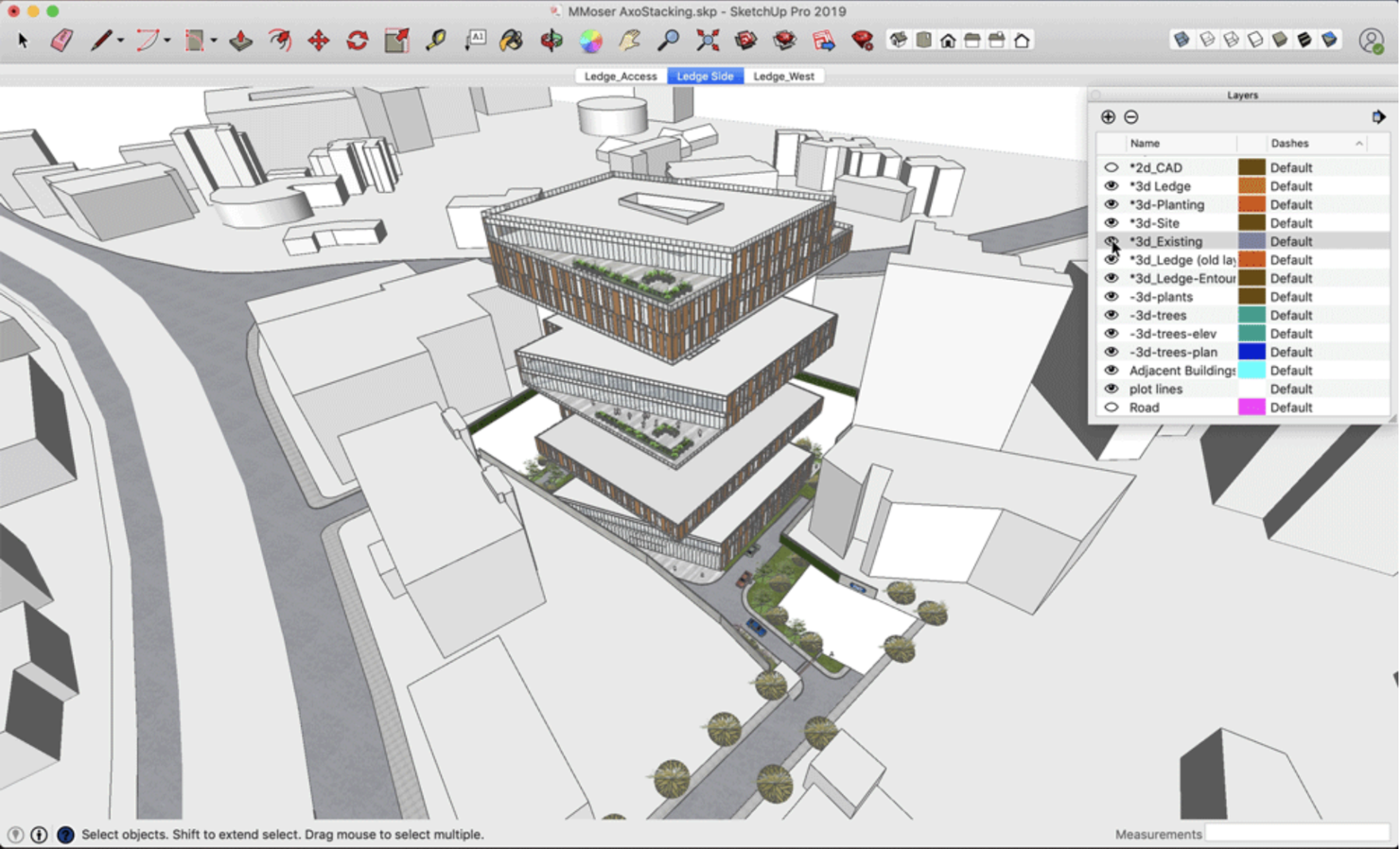
SketchUp è una piattaforma di modellazione e design 3D pensata per architetti, costruttori e designer, dotata di strumenti per creare modelli dettagliati, generare immagini fotorealistiche e collaborare tra team.
Per chi è più indicato SketchUp?
SketchUp è una scelta naturale per architetti, professionisti dell’edilizia e urbanisti che hanno bisogno di modellare e visualizzare edifici e ambienti costruiti.
Perché ho scelto SketchUp
SketchUp si guadagna il suo posto nella mia lista grazie alla sua eccellenza nella progettazione sostenibile degli edifici, in particolare grazie a Sefaira, lo strumento integrato di analisi delle prestazioni edilizie. Posso modellare la volumetria di un edificio direttamente in SketchUp e poi eseguire simulazioni energetiche annuali complete, analisi dell’illuminazione naturale e studi sul comfort termico in pochi minuti. Sefaira tiene inoltre traccia delle emissioni di CO2 e del dimensionamento degli impianti HVAC, consentendomi di prendere decisioni informate sulle prestazioni già in fase di concept, prima che le modifiche costose diventino un problema.
Caratteristiche principali di SketchUp
- Modellazione 3D push/pull: Disegna e estrudi forme piane trasformandole in oggetti 3D grazie all’inconfondibile strumento push/pull di SketchUp, senza bisogno di competenze CAD avanzate.
- LayOut: Crea documenti costruttivi 2D pronti per la presentazione, disegni annotati e planimetrie in scala direttamente dal tuo modello 3D.
- 3D Warehouse: Sfoglia e importa dalla libreria di milioni di modelli 3D e materiali predefiniti per accelerare il processo di modellazione.
- Scan Essentials: Importa dati da nuvole di punti provenienti da scansioni reali e usali come riferimento per costruire modelli 3D precisi.

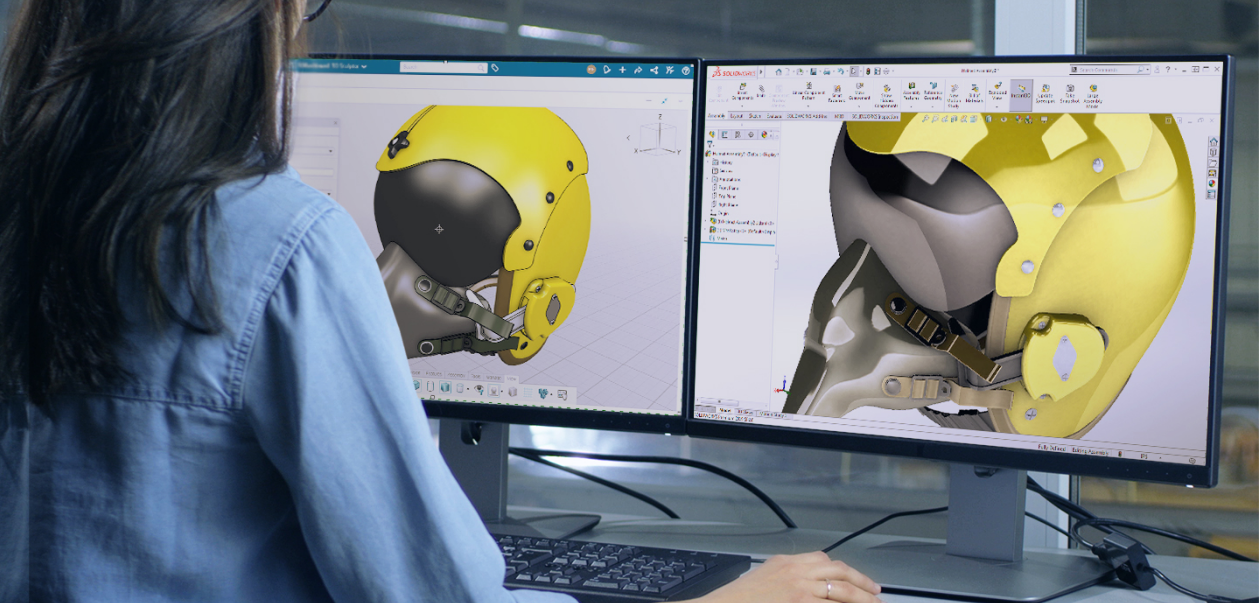
SOLIDWORKS è una piattaforma CAD 3D e di sviluppo prodotti che copre la modellazione parametrica, lo sculpting libero, il rendering fotorealistico, la simulazione e la gestione del ciclo di vita del prodotto basata su cloud.
Per chi è più indicato SOLIDWORKS?
SOLIDWORKS è particolarmente adatto per progettisti di prodotto e ingegneri meccanici che hanno bisogno di passare dallo schizzo concettuale alla modellazione e rendering 3D dettagliato in un'unica piattaforma.
Perché ho scelto SOLIDWORKS
SOLIDWORKS merita un posto nella mia shortlist perché la modellazione a superfici di suddivisione, disponibile tramite 3D Sculptor sulla piattaforma 3DEXPERIENCE, mi consente di spingere e tirare la geometria in forme organiche e libere che la sola modellazione parametrica non può raggiungere. Utilizzo l'ambiente xShape specificamente quando progetto prodotti di consumo curvi, dove la continuità precisa della superficie è fondamentale. La possibilità di integrare direttamente le sculture SubD nelle parti parametriche di SOLIDWORKS mantiene intatto il mio flusso di lavoro senza dover ricostruire la geometria da zero.
SOLIDWORKS Caratteristiche principali
- Modellazione solida parametrica: Consente modelli 3D precisi tramite funzionalità guidate da dimensioni come estrusioni, rivoluzioni e sweep che si aggiornano quando cambiano le dimensioni.
- Modellazione di superfici NURBS: Per superfici lisce e complesse, la geometria NURBS garantisce un controllo accurato di curvatura e qualità superficiale.
- Rendering SOLIDWORKS Visualize: Genera immagini di prodotto fotorealistiche con materiali fisicamente corretti, controlli di illuminazione e ambiente.
- Librerie di aspetti e materiali: Offrono proprietà, texture e finiture materiali reali applicabili direttamente alle superfici del modello per mostrare l'aspetto finale del prodotto.

Migliore suite di creazione 3D gratuita e open-source
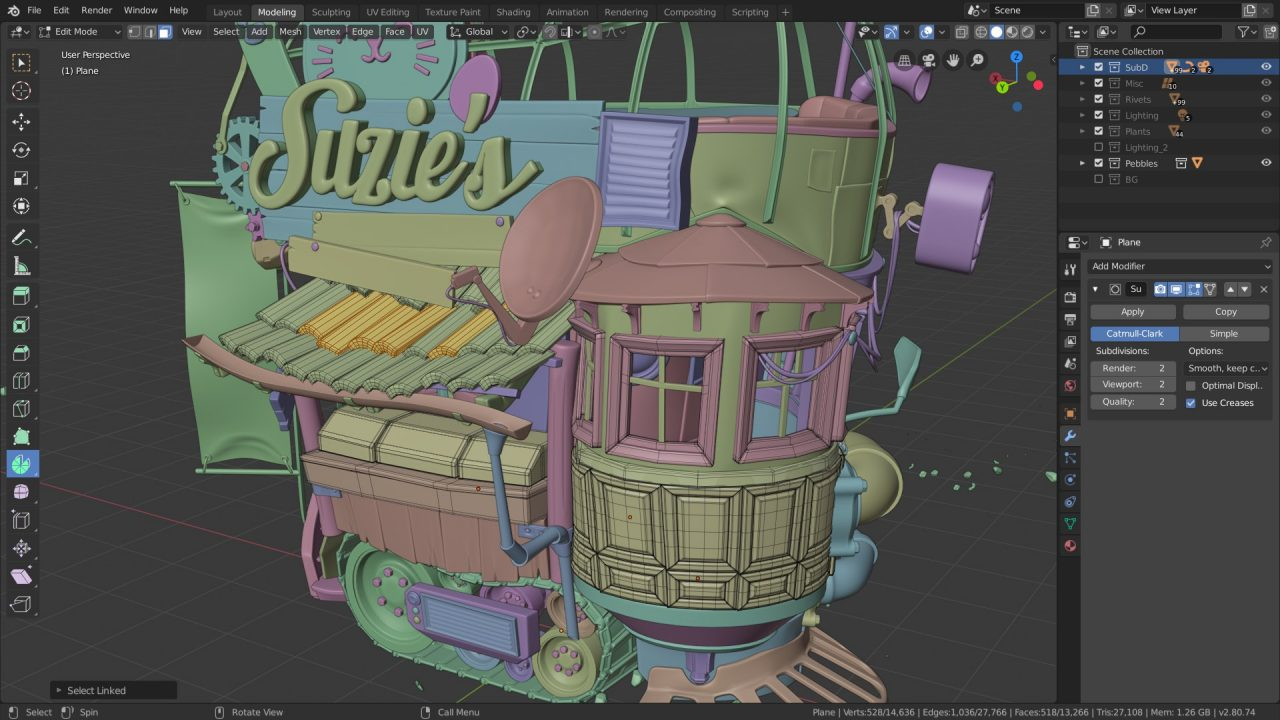
Blender è una suite di creazione 3D gratuita e open-source che copre l'intera pipeline di produzione — dalla modellazione delle mesh e srotolamento delle UV al rendering fisicamente basato, scolpitura e pittura delle texture.
Per chi è più indicato Blender, il software di grafica computerizzata 3D?
Blender è ideale per artisti 3D indipendenti, designer di prodotto e piccoli studi che necessitano di un ambiente completo per modellazione e rendering senza dover sostenere costi di licenza software.
Perché ho scelto Blender come software di grafica computerizzata 3D
Blender merita un posto nella mia shortlist perché nessun altro strumento gratuito offre questo livello di capacità di rendering fotorealistico — in particolare il motore di ray-tracing Cycles, che gestisce l’illuminazione globale, caustiche e l’ombreggiatura Principled BSDF per produrre rendering di prodotti quasi indistinguibili da fotografie di studio. Faccio inoltre affidamento sul suo sistema di materiali PBR per creare superfici fisicamente accurate come metallo spazzolato, vetro satinato o plastica opaca direttamente nell’editor a nodi. Inoltre, gli strumenti di sculpting e srotolamento UV di Blender mi permettono di portare un modello di prodotto dalla forma grezza a asset dettagliato e mappato con texture, tutto in un unico ambiente.
Caratteristiche principali di Blender 3D Computer Graphics Software
- Motore di rendering in tempo reale EEVEE: Anteprima immediata di configurazioni complesse di shader e illuminazione direttamente nel viewport, senza aspettare il rendering completo di Cycles.
- Nodi geometrici: Crea modelli procedurali e non distruttivi usando un editor basato su nodi per iterare sulle forme del prodotto durante la progettazione.
- Pittura delle texture: Dipingi direttamente sulle superfici dei modelli 3D nel viewport per aggiungere dettagli di superficie, usura o elementi grafici di branding.
- Stack di modificatori non distruttivo: Applica e regola operazioni di modellazione come booleani, smussature e suddivisioni senza alterare permanentemente la mesh di base.

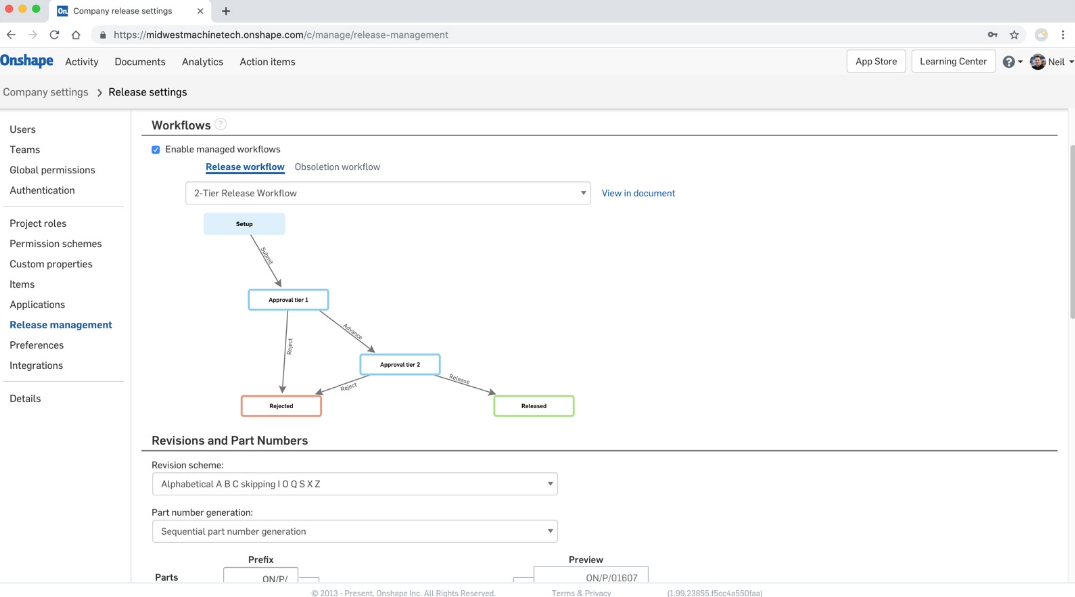
Onshape è una piattaforma CAD e PDM nativa cloud per progettisti di prodotti che offre modellazione 3D parametrica, controllo versione integrato, collaborazione in tempo reale e rendering fotorealistico tramite il suo Render Studio.
Per chi è Onshape?
Onshape è particolarmente adatto per ingegneri meccanici e team di progettazione prodotto nei settori manifatturiero, hardware e del design industriale che necessitano di una piattaforma CAD e di gestione dati completa.
Perché ho scelto Onshape
Ho incluso Onshape tra le mie migliori scelte perché la sua automazione del flusso di lavoro integrata lo distingue dagli altri CAD che trattano progettazione e approvazione come processi separati. Mi piace soprattutto la gestione automatizzata dei workflow di rilascio, che accompagna i progetti tra gli stati In attesa di approvazione, Approvato e Rilasciato senza passaggi manuali. FeatureScript permette inoltre al mio team di scrivere automazioni personalizzate direttamente nell'ambiente di modellazione—ad esempio generando automaticamente tabelle di instradamento fili da un CSV o creando funzionalità geometriche ripetute su decine di varianti di prodotto.
Funzionalità principali di Onshape
- Render Studio: Un ambiente di rendering integrato che utilizza la tecnologia NVIDIA Iray per produrre immagini di prodotto fotorealistiche e ad alta risoluzione direttamente dal tuo modello 3D.
- Materiali e texture: Una raccolta predefinita di finiture materiali reali applicabili alle superfici dei modelli per simulare l'aspetto finale del prodotto.
- Applicazione decalcomanie: Uno strumento per posizionare grafiche o etichette sulle superfici 3D senza modificare la struttura sottostante del modello.
- Modellazione parametrica dei componenti: Un ambiente di modellazione basato su vincoli che supporta progettazione solida, di superfici e di lamiera all'interno di un unico studio di componenti.
Tabella Comparativa dei Migliori Software di Progettazione di Prodotti
Ecco una tabella in cui puoi confrontare tutti gli strumenti discussi nelle panoramiche.
| Tool | Best For | Trial Info | Price | ||
|---|---|---|---|---|---|
| 1 | Ideale per prototipare dal codice reale del prodotto | Piano gratuito + demo gratuita disponibile | Da $20/utente/mese | Website | |
| 2 | Ideale per la collaborazione nel design di prodotto | Piano gratuito disponibile | Da $16/utente/mese (fatturazione annuale) | Website | |
| 3 | Ideale per aziende di beni di largo consumo | Demo gratuita disponibile | Prezzo su richiesta | Website | |
| 4 | Migliore versione mobile | Prova gratuita di 14 giorni | Da $37.99/mese (fatturazione annuale) | Website | |
| 5 | Ideale per il design industriale | Prova gratuita di 30 giorni | Da $245/utente/mese | Website | |
| 6 | Ideale per i progetti automobilistici | Demo gratuita disponibile | Prezzo su richiesta | Website | |
| 7 | Ideale per modellare edifici sostenibili | Prova gratuita di 30 giorni | Da $119 /anno | Website | |
| 8 | Ideale per lo sculpting 3D | Demo gratuita disponibile | Prezzo su richiesta | Website | |
| 9 | Migliore suite di creazione 3D gratuita e open-source | Prodotto gratuito | Prodotto gratuito | Website | |
| 10 | Ideale per l'automazione dei flussi di lavoro | Versione gratuita disponibile | Da $1,500/utente/anno | Website |
Altre Opzioni di Progettazione di Prodotti
Ecco alcune alternative che non sono entrate nella top list ma che vale la pena considerare.


Come ho Selezionato i Migliori Software di Progettazione di Prodotti
Per cominciare, mi sono focalizzato su software di progettazione di prodotto con alte valutazioni e livelli di soddisfazione degli utenti. Successivamente, grazie alla mia esperienza nella gestione di prodotti, ho identificato i criteri chiave più importanti per questo tipo di software e ho confrontato come ciascuno di essi si posizionava rispetto agli altri.
So bene quanto tempo richieda trovare il software giusto per un lavoro. Faccio questo lavoro proprio per evitarti questa fatica. Da anni utilizzo e recensisco software di progettazione di prodotti, quindi puoi fidarti che mi occupi io della parte più impegnativa e ti fornisca tutti i dati necessari per la tua decisione finale.
Come valuto i software di product design
Suddivido la mia valutazione in due livelli: le capacità fondamentali come prototipazione e passaggio sviluppatore che ogni strumento deve offrire, e i fattori differenzianti che rendono una soluzione più adatta a determinati team.
Funzionalità di base (requisiti minimi per questa lista)
Quando seleziono gli strumenti per la mia lista, assegno a ciascuno un punteggio da 0 (la funzionalità non è presente) a 5 (eccelle in quest’area) per ciascuna delle funzionalità principali elencate di seguito. Poi, converto il punteggio totale dello strumento in una percentuale. Ogni strumento deve ottenere un punteggio totale minimo del 65% per poter essere considerato.
- Prototipazione & wireframing: Valuto se uno strumento permette di passare da uno schizzo grezzo a un prototipo cliccabile con transizioni realistiche, logiche condizionali e cambiamenti di stato.
- Collaborazione in tempo reale: Più designer e PM devono poter lavorare nello stesso file contemporaneamente, con cursori live, commenti in linea e indicatori chiari di presenza.
- Sistemi di design & librerie di componenti: Cerco librerie di componenti condivise con varianti e override che mantengano l’interfaccia coerente anche quando i team lavorano su più file e progetti.
- Passaggio sviluppatore: Un buon passaggio allo sviluppatore permette agli ingegneri di ispezionare spaziature, ottenere CSS o codice specifico per la piattaforma ed esportare asset direttamente, senza dover chiedere informazioni al designer per ogni specifica.
- Strumenti di design vettoriale & UI: Verifico la presenza di editing vettoriale nativo insieme a funzioni specifiche per interfacce, come auto-layout, frame reattivi e sistemi a griglia per progetti rivolti allo schermo.
- Feedback e revisione da stakeholder: Product manager e dirigenti devono poter accedere a link condivisibili dove possono lasciare commenti contestuali su frame specifici, tracciare la cronologia delle versioni e risolvere thread.
Dopo aver selezionato gli strumenti che soddisfano questi criteri, valuto cosa distingue ciascuna piattaforma dalle altre.
Fattori differenzianti (cosa distingue i fornitori)
Ecco come paragono e confronto i diversi fornitori:
Funzionalità distintive
La progettazione assistita dall’IA è un grande elemento distintivo che valuto. Gli strumenti che generano layout o suggeriscono componenti a partire da un prompt fanno davvero risparmiare tempo nelle prime fasi di ideazione. Cerco anche test utente integrati o collegati, che permettano ai PM di svolgere test sui prototipi e di analizzare heatmap senza uscire dalla piattaforma. Un ecosistema di plugin solido è importante, poiché spesso i team necessitano di estensioni di terze parti per audit di accessibilità, librerie di icone o automazioni di flusso di lavoro che lo strumento principale non copre.
Oltre le funzionalità
Le integrazioni con lo stack di prodotto sono una delle prime cose che verifico. Uno strumento di design che si collega a Jira, Linear o Slack evita ai team di prodotto di dover cambiare contesto durante gli sprint. Anche la struttura dei prezzi è rilevante, in particolare per i team misti dove i PM hanno bisogno di accesso in modifica insieme ai designer. Valuto se il modello a posti di lavoro (seat model) del fornitore fa pagare anche i visualizzatori o li limita all’accesso gratuito, dato che questo influisce direttamente su quanto estesa può essere la collaborazione. L’accessibilità cross-platform completa il quadro: l’accesso da browser consente agli stakeholder di esaminare i lavori senza dover installare nulla.
FAQ sul software di progettazione di prodotti
Trova le risposte alle domande più comuni che altri utenti fanno su questo argomento.
Che cos'è la progettazione di prodotti?
La progettazione di prodotti è un processo in cui si progetta visivamente un’esperienza centrata sul cliente, tenendo conto della strategia e della visione del prodotto dell’azienda. Utilizzando un value proposition canvas, il team di progettazione può approfondire i bisogni, le difficoltà, le abitudini e i desideri dei clienti. Sfruttando queste informazioni, il team può progettare un prodotto che soddisfi i clienti e collocare il risultato in una user journey map. Infine, la mappa del percorso utente può essere iterata per perfezionare l’esperienza.
Ulteriori informazioni sull’argomento sono disponibili nel nostro articolo “Product design 101”.
Quali sono i vantaggi del software di progettazione di prodotti?
- Maggiore efficienza: Il software di progettazione può aiutare a semplificare il processo di design, fornendo strumenti per creare e modificare progetti in modo rapido e semplice. Questo può far risparmiare tempo e ridurre gli errori, permettendo ai designer di realizzare più prodotti in meno tempo.
- Creatività potenziata: Grazie a questi strumenti, i designer possono sperimentare diversi concetti, colori, materiali e texture e visualizzarli in 3D. Questo stimola la creatività e aiuta a generare progetti più innovativi e accattivanti.
- Collaborazione migliorata: Il software consente a designer, ingegneri e stakeholder di collaborare e condividere file di progetto e feedback in tempo reale. In questo modo si facilita la comunicazione e si garantisce che tutti siano allineati, portando a risultati di design migliori.
- Risparmio sui costi: Simulando e testando i progetti in un ambiente virtuale, il software consente di individuare e risolvere problemi prima di creare prototipi fisici. Questo fa risparmiare tempo e denaro su prototipi costosi e previene errori onerosi.
- Qualità del prodotto migliorata: Grazie agli strumenti di simulazione e analisi, il software aiuta ad assicurarsi che il prodotto finale rispetti le specifiche desiderate, portando a prodotti di maggiore qualità che soddisfano le esigenze e aspettative dei clienti.
Quali sono le caratteristiche principali del software di progettazione di prodotti?
Le caratteristiche fondamentali dei migliori software di progettazione di prodotti possono variare in base alle esigenze e ai requisiti dell’utente, ma tra le più importanti troviamo:
- Modellazione 3D per materiali di marketing: Alcuni strumenti consentono di riutilizzare i modelli 3D per creare asset marketing fotorealistici. Questa funzione consente di risparmiare tempo e costi eliminando la necessità di prototipi fisici e servizi fotografici e permettendo una realizzazione più rapida dei materiali promozionali, accelerando il go-to-market del prodotto.
- Simulazione e analisi: Il software dovrebbe includere strumenti di simulazione e analisi, come test di resistenza, dinamica dei fluidi e analisi termica, per testare e validare il design.
- Collaborazione e condivisione: Il software dovrebbe facilitare la collaborazione e condivisione di progetti con team, clienti e fornitori.
- Controllo versione: Il software dovrebbe offrire funzionalità di controllo versione per tracciare le modifiche al progetto e accedere facilmente alle versioni precedenti.
- Compatibilità e integrazione: Il software dovrebbe essere compatibile con altri strumenti comunemente usati nel settore, come software CAD e strumenti per la stampa 3D.
- Personalizzazione: Il software dovrebbe permettere personalizzazione e configurabilità specifica secondo le esigenze e i requisiti del progetto dell’utente.
- Libreria di componenti: Il software dovrebbe includere una vasta gamma di componenti essenziali preinstallati, come pulsanti e fisarmoniche, per facilitare la progettazione.
- Gestione degli asset/documenti: Il software deve poter archiviare, tracciare e condividere risorse del prodotto e documenti.
- Versatilità nella modellazione: Software che si adatta a diversi metodi di modellazione 3D come la modellazione diretta o parametrica.
- Automazione del design: Il software dovrebbe automatizzare i processi e le attività ripetitive come la generazione di varianti di progetto, l’aggiornamento degli assemblaggi, la creazione di disegni da modelli 3D e l’elaborazione batch di file per la produzione, ottimizzando i flussi di lavoro e riducendo gli errori manuali.
Quali sono i tre tipi di modellazione 3D?
Se utilizzi Computer-Aided Design (CAD) per i tuoi prodotti, puoi sfruttare tre tipi di modellazione: wireframe, superficie e solida.
- Wireframe: Questa tipologia di modellazione CAD è usata quando il prodotto ha molti bordi curvi. Qui si usano linee, cerchi, archi e altre forme per definire l’oggetto. Diversamente dalle versioni 2D di un prodotto che si possono fare con un tool di wireframing o un taccuino, il CAD permette di creare versioni 3D in cui si può osservare il prodotto da tutte le angolazioni.
- Superficie: Tra questi tre metodi, la modellazione di superfici è la più avanzata. Si basa sull’uso di linee guida per delineare i contorni e la curvatura di un componente. In seguito, il software calcola una superficie continua che collega le linee guida. Alcuni degli strumenti di questa lista offrono questa funzione con il nome Loft.
- Solida: Immagina questa modalità come un tetris avanzato dove metti assieme blocchi tridimensionali come mattoncini da costruzione. E, se hai bisogno di creare un foro nel progetto, puoi anche usare alcune forme per rimuovere (sottrarre) materiale dal modello.
Cosa c'è dopo:
Se stai cercando un software per il design di prodotti, contatta gratuitamente un consulente SoftwareSelect per ricevere consigli su misura.
Compila un modulo e fai una breve chiacchierata in cui spieghi nel dettaglio le tue esigenze. Poi riceverai una lista ristretta di software da valutare. Ti supporteranno anche in tutto il processo di acquisto, comprese le trattative sul prezzo.