

I 10 migliori concorrenti di Figma che ho testato nel 2026

10 Elenco delle migliori alternative a Figma


In qualità di product manager, affronti costantemente la sfida di bilanciare le esigenze di progettazione con la collaborazione del team. Figma potrebbe essere il tuo strumento di riferimento, ma non sempre soddisfa ogni esigenza aziendale. Potresti aver bisogno di un'alternativa che offra funzionalità specializzate, prezzi migliori o una maggiore integrazione con il software che già utilizzi.
Durante la mia esperienza di test e valutazione dei software, ho individuato diverse alternative a Figma che potrebbero soddisfare le tue esigenze specifiche. Il mio obiettivo è fornire una recensione imparziale, concentrandomi su ciò che questi strumenti offrono e su come possono aiutare il tuo team.
In questo articolo ti guiderò attraverso le migliori opzioni, evidenziandone funzionalità, facilità d'uso e prezzi. Il mio obiettivo è aiutarti a trovare uno strumento in linea con gli obiettivi del tuo team e capace di migliorare il tuo processo di progettazione.
Cos'è Figma?
Figma è uno strumento di progettazione UX utilizzato per creare interfacce utente e prototipi. È popolare tra designer, product manager e sviluppatori che ne apprezzano le funzionalità collaborative. La collaborazione in tempo reale, la modifica vettoriale e le funzionalità di prototipazione aiutano te e il tuo team a lavorare in modo efficiente e creativo. Il valore complessivo di Figma risiede nella sua capacità di facilitare il lavoro di squadra e semplificare il processo di progettazione.
Perché cercare un'alternativa a Figma?
Perché cercare un'alternativa a Figma?
Figma è una piattaforma di progettazione basata sul web molto popolare per la progettazione di interfacce utente e la progettazione collaborativa, ma non è la soluzione perfetta per tutti. Alcuni team e liberi professionisti cercano concorrenti di Figma quando:
- Hanno bisogno di accesso offline per l'utilizzo da remoto o su app mobili
- Richiedono prezzi più accessibili o una versione gratuita per piccole imprese e startup
- Desiderano strumenti di animazione avanzati per la progettazione di interfacce utente e prototipi interattivi
- Hanno bisogno di funzionalità più efficaci per il passaggio di consegne agli sviluppatori
- Preferiscono un'interfaccia con una curva di apprendimento più semplice
- Hanno esigenze specifiche in materia di conformità dei dati o devono lavorare all'interno di un determinato sistema operativo
Se queste difficoltà ti risultano familiari, esplorare altre alternative agli strumenti di progettazione potrebbe essere la scelta giusta. Le opzioni presenti nel mio elenco sono pensate per aiutare i team di progettazione e gli stakeholder a lavorare in modo più efficiente, senza i vincoli che hanno sperimentato in Figma.
Perché Fidarsi delle Nostre Recensioni Software
Testiamo e recensiamo software per il product management dal 2020. Come product manager sappiamo quanto sia fondamentale e difficile fare la scelta giusta in termini di software. Investiamo in una ricerca approfondita per aiutare il nostro pubblico a prendere decisioni migliori sugli acquisti di software. Abbiamo testato oltre 2.000 strumenti per diversi casi d’uso e scritto più di 1.000 recensioni approfondite.Scopri come assicuriamo la trasparenza & la nostra metodologia di recensione software.
Riepilogo delle migliori alternative a Figma
Questa tabella comparativa riassume i dettagli sui prezzi delle mie migliori alternative a Figma, per aiutarti a trovare quella più adatta al tuo budget e alle esigenze della tua azienda.
| Tool | Best For | Trial Info | Price | ||
|---|---|---|---|---|---|
| 1 | Ideale per wireframe rapidi con diagrammi di flusso e note adesive integrati | Piano gratuito disponibile | A partire da $10/editor/mese (con fatturazione annuale) | Website | |
| 2 | Ideale per creare e condividere rapidamente prototipi interattivi senza codice | Piano gratuito + demo gratuita disponibile | Da $12/mese (con fatturazione annuale) | Website | |
| 3 | Ideale per gli utenti dell’ecosistema Adobe | Prova gratuita di 30 giorni | Prezzi su richiesta | Website | |
| 4 | Ideale per progetti di design su macOS | Prova gratuita di 30 giorni | A partire da $12/editor/mese (con fatturazione annuale) | Website | |
| 5 | Ideale per prototipi UX complessi | Prova gratuita di 30 giorni disponibile | Da $29/utente/mese (con fatturazione annuale) | Website | |
| 6 | Ideale per le capacità di animazione | Prova gratuita di 15 giorni + demo gratuita disponibile | A partire da $29/utente/mese (fatturato annualmente) | Website | |
| 7 | Ideale per i riscontri visivi e la revisione dei progetti nelle squadre distribuite | Prova gratuita di 30 giorni + piano gratuito disponibile | A partire da €5/utente/mese | Website | |
| 8 | Ideale per la diagrammazione software | Prova gratuita di 14 giorni + piano gratuito disponibile | A partire da $4.90/utente/mese (fatturato annualmente) | Website | |
| 9 | Ideale per mockup semplici in stile schizzo | Piano gratuito disponibile | A partire da $9/utente/mese | Website | |
| 10 | Ideale per la collaborazione in tempo reale su lavagne con modelli pronti per i workshop | Piano gratuito disponibile | A partire da $8/membro/mese (fatturati annualmente) | Website |

Recensioni delle migliori alternative a Figma
Di seguito trovi i miei riepiloghi dettagliati delle migliori alternative a Figma incluse nel mio elenco. Le mie recensioni offrono un’analisi approfondita delle funzionalità principali, dei vantaggi u0026amp; degli svantaggi, delle integrazioni e dei casi d’uso ideali di ogni strumento, per aiutarti a trovare quello più adatto a te.

Ideale per wireframe rapidi con diagrammi di flusso e note adesive integrati
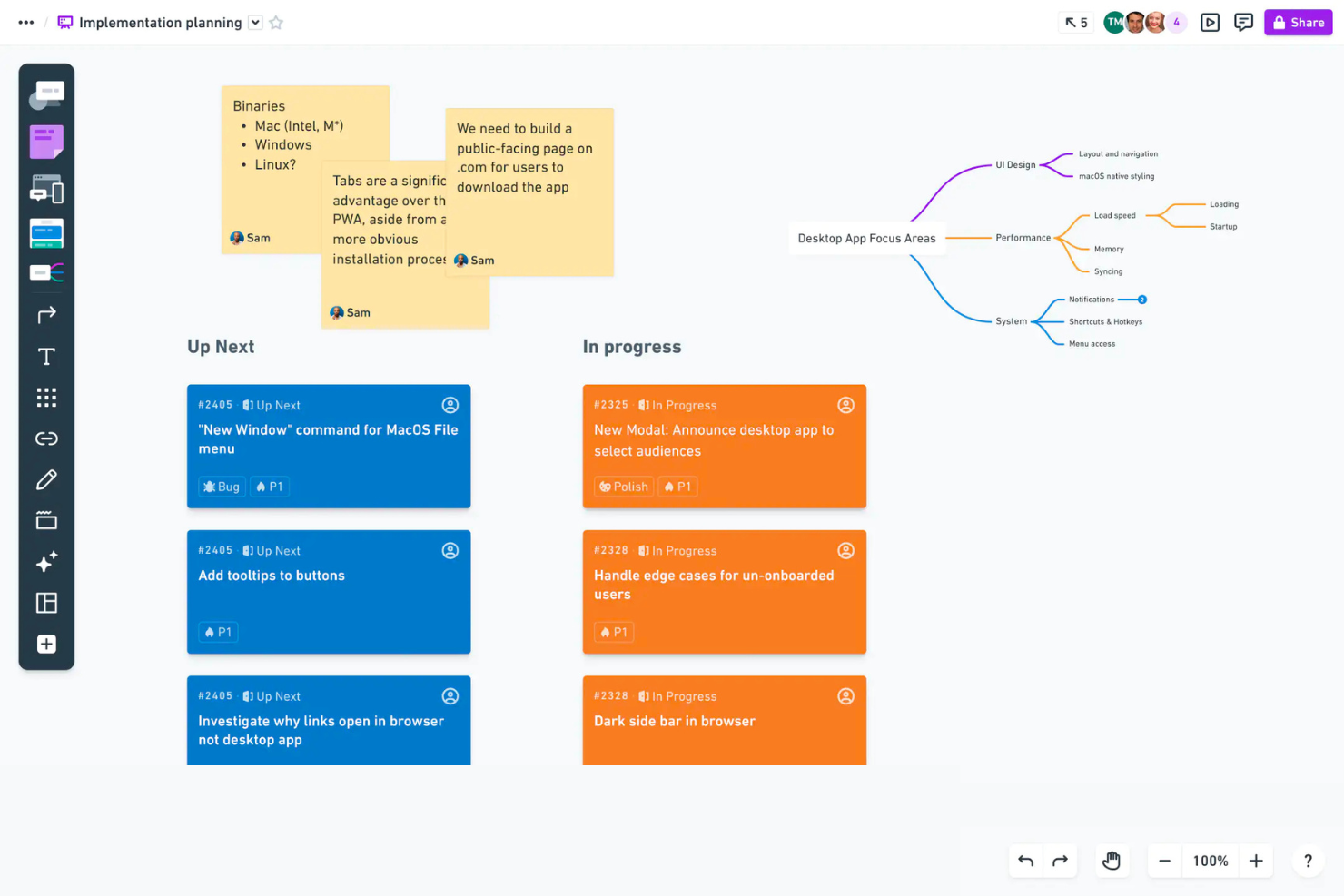
Whimsical è uno strumento di collaborazione visiva utilizzato dai team per creare diagrammi di flusso, wireframe e mappe mentali. È progettato per il brainstorming e la pianificazione e offre una piattaforma per il pensiero visivo e l'organizzazione delle idee.
Perché è una buona alternativa a Figma: la diagrammazione software di Whimsical offre funzionalità che lo rendono perfetto per rappresentare processi e sistemi. La sua interfaccia intuitiva consente al team di creare facilmente diagrammi di flusso e wireframe, favorendo la generazione rapida di idee.
Inoltre, le funzionalità di mappatura mentale dello strumento aiutano a visualizzare i collegamenti tra i concetti, migliorando le sessioni di brainstorming del team. Se la diagrammazione e la pianificazione visiva sono il tuo obiettivo, Whimsical offre gli strumenti necessari.
Funzionalità e integrazioni distintive:
Le funzionalità includono la mappatura mentale, che aiuta a visualizzare i collegamenti, la creazione di diagrammi di flusso per la rappresentazione dei processi e strumenti per la creazione di wireframe che supportano la prototipazione rapida.
Le integrazioni includono Slack, Jira, GitHub, Microsoft Teams, Google Drive, Trello, Confluence, Notion, Asana e Dropbox.
Pros and Cons
Pros:
- Ideale per la collaborazione visiva
- Supporta la generazione rapida di idee
- Creazione semplice di diagrammi di flusso
Cons:
- Limitato alla pianificazione visiva
- Potrebbe non offrire funzionalità di progettazione avanzate

Marvel
Ideale per creare e condividere rapidamente prototipi interattivi senza codice

Marvel è uno strumento di progettazione e prototipazione utilizzato da designer e team per creare e testare rapidamente prototipi interattivi. Facilita il processo di progettazione, dalla creazione di wireframe ai test con gli utenti, senza la necessità di scrivere codice.
Perché è una buona alternativa a Figma: Marvel è ideale per la prototipazione rapida e consente al tuo team di creare velocemente prototipi interattivi. La sua funzionalità di test con gli utenti aiuta a raccogliere feedback nelle prime fasi del processo di progettazione, risultando utile per la progettazione iterativa.
Grazie alla sua interfaccia intuitiva, Marvel consente al tuo team di iniziare a lavorare subito senza una formazione approfondita. Se la velocità e la facilità d’uso sono prioritarie, Marvel offre gli strumenti necessari per soddisfare queste esigenze.
Funzionalità e integrazioni principali:
Le funzionalità includono un’interfaccia intuitiva che semplifica il processo di progettazione, una funzionalità di test con gli utenti che fornisce feedback preziosi e strumenti per la creazione di wireframe che aiutano ad avviare rapidamente i progetti.
Le integrazioni includono Sketch, Dropbox, Slack, Jira, Confluence, Trello, Microsoft Teams, Google Drive e Zapier.
Pros and Cons
Pros:
- Funzionalità di prototipazione rapida
- Interfaccia intuitiva
- Supporta i test con gli utenti
Cons:
- Funzionalità avanzate limitate
- Non ideale per progetti complessi

Adobe XD
Ideale per gli utenti dell’ecosistema Adobe
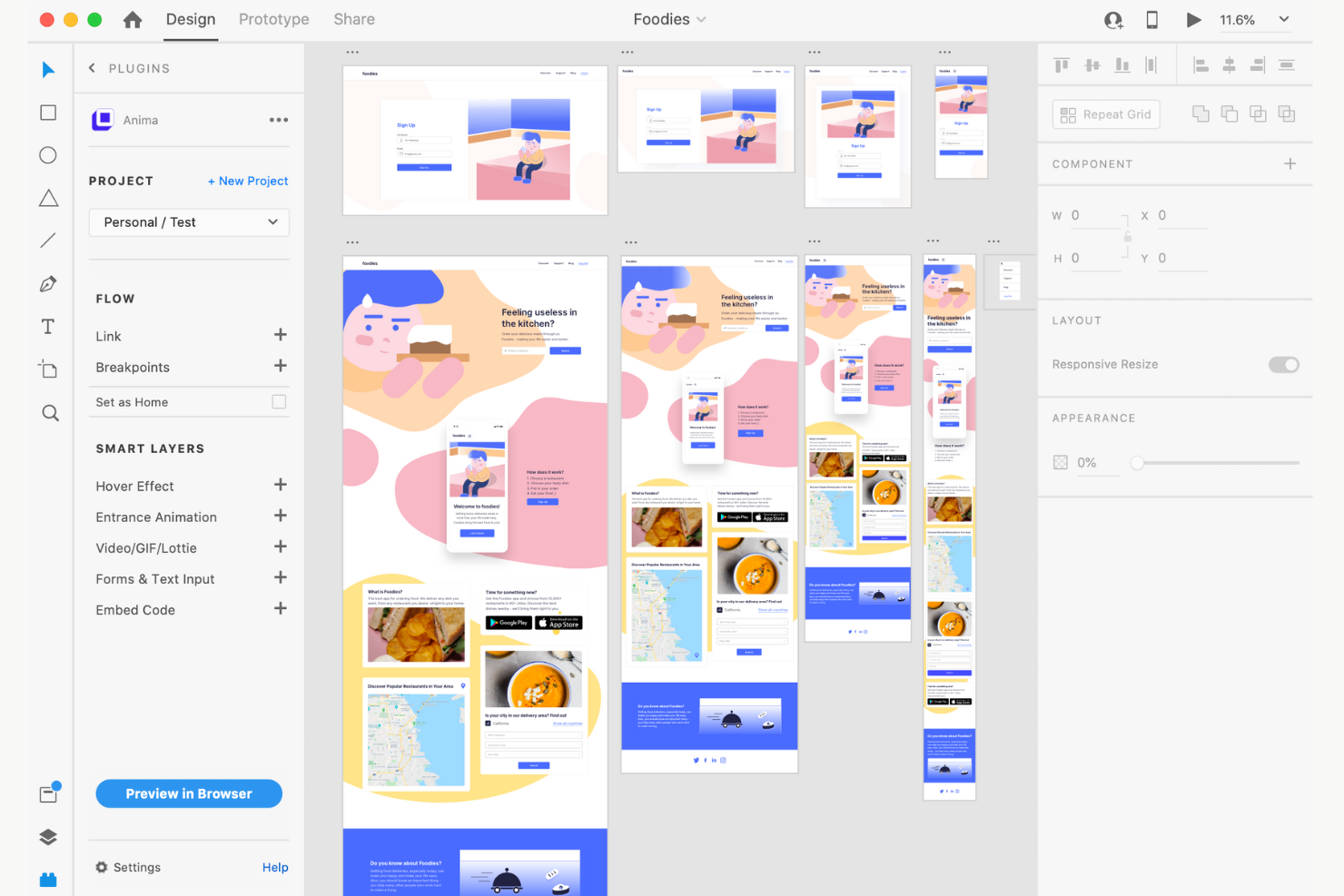
Adobe XD è uno strumento di progettazione UX e prototipazione utilizzato principalmente da designer e sviluppatori che fanno parte dell’ecosistema Adobe. Supporta la creazione di interfacce utente e prototipi interattivi per applicazioni web e mobili.
Perché è una buona alternativa a Figma: Adobe XD si integra con altri prodotti Adobe, il che lo rende ideale se il tuo team utilizza già Adobe Creative Cloud. Lo strumento offre funzionalità come la collaborazione in tempo reale e la gestione dei documenti nel cloud, che aiutano a mantenere sincronizzati i progetti su tutti i dispositivi.
La sua interfaccia intuitiva e la compatibilità con le app Adobe migliorano la produttività e il flusso di lavoro. Questo rende Adobe XD una scelta pratica per i team che investono molto nella suite di strumenti Adobe.
Funzionalità e integrazioni distintive:
Le funzionalità includono la collaborazione in tempo reale, che garantisce che tutti siano sulla stessa lunghezza d’onda, la gestione dei documenti nel cloud per un facile accesso da tutti i dispositivi e la possibilità di lavorare offline con sincronizzazione automatica quando torni online.
Le integrazioni includono Adobe Photoshop, Adobe Illustrator, Adobe After Effects, Adobe Creative Cloud Libraries e Slack.
Pros and Cons
Pros:
- Integrazione perfetta con Adobe
- Collaborazione in tempo reale
- Supporta prototipi interattivi
Cons:
- Integrazioni non Adobe limitate
- Potrebbe non soddisfare tutte le esigenze di progettazione
Sketch
Ideale per progetti di design su macOS

Sketch è uno strumento di progettazione utilizzato principalmente dai designer che lavorano su macOS per creare interfacce utente e prototipi. Offre funzionalità di modifica vettoriale, collaborazione e sistemi di progettazione per supportare i flussi di lavoro creativi.
Perché è una buona alternativa a Figma: Sketch è progettato specificamente per gli utenti macOS e offre un'esperienza nativa che si integra perfettamente con l'ecosistema Apple. Offre strumenti avanzati di modifica vettoriale, essenziali per la precisione nei progetti di design.
La funzionalità delle librerie condivise della piattaforma consente al tuo team di mantenere la coerenza tra i progetti. Se il tuo team si affida a macOS, Sketch si integra perfettamente nel tuo ambiente di progettazione.
Funzionalità e integrazioni distintive:
Le funzionalità includono la modifica vettoriale per progetti precisi, librerie condivise che garantiscono la coerenza e tavole da disegno che consentono di gestire più iterazioni del progetto in un unico spazio.
Le integrazioni includono Zeplin, Abstract, Avocode, Marvel, Flinto, Proto.io, Principle e Origami Studio.
Pros and Cons
Pros:
- Modifica vettoriale avanzata
- Librerie condivise coerenti
- Gestione di più tavole da disegno
Cons:
- Nessuna collaborazione in tempo reale
- Potrebbe avere funzionalità multipiattaforma limitate

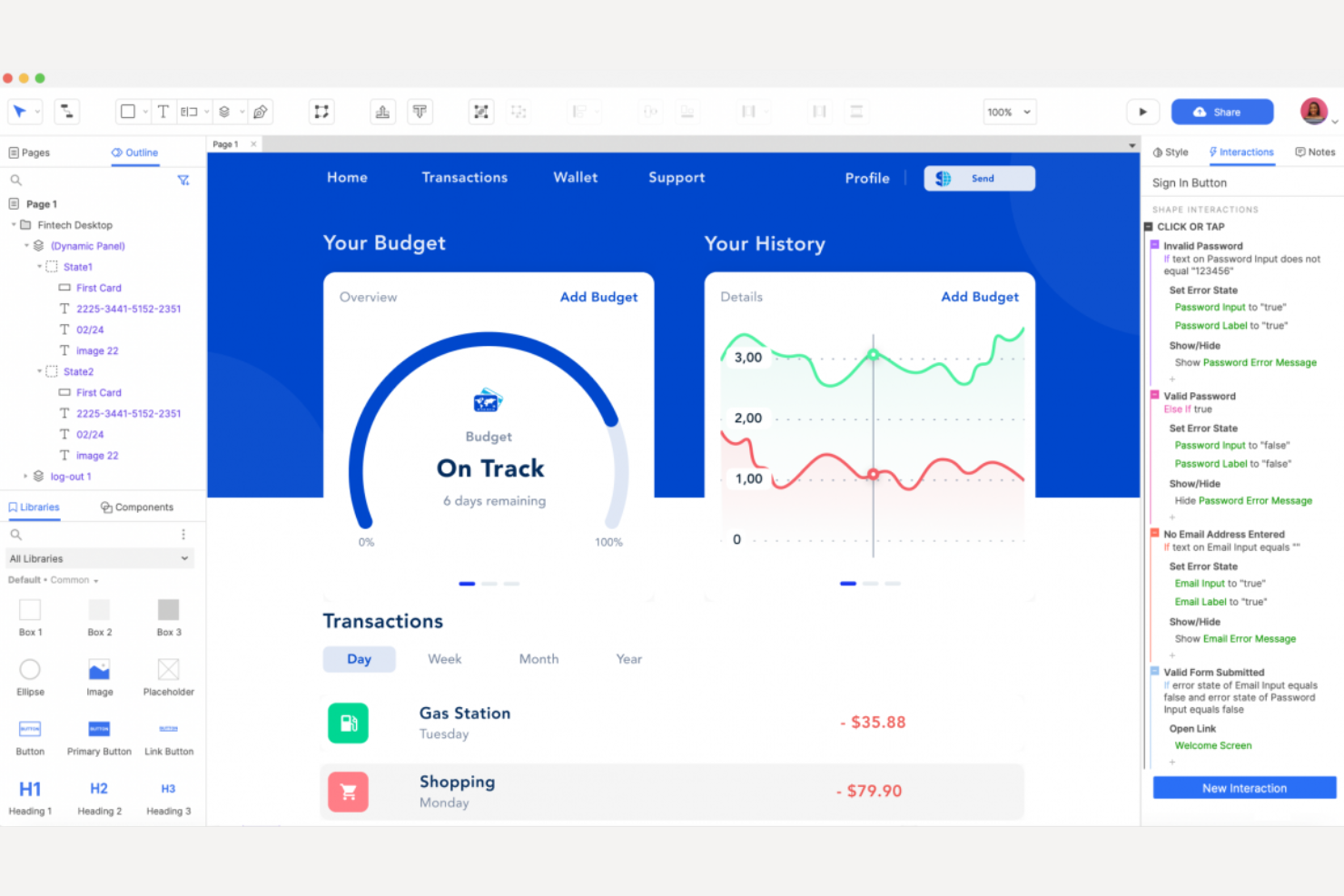
Axure RP è uno strumento di prototipazione e creazione di wireframe utilizzato principalmente dai professionisti UX per creare wireframe dettagliati e prototipi interattivi. Supporta funzionalità avanzate di prototipazione che facilitano i progetti di design complessi.
Perché è una buona alternativa a Figma: Axure RP eccelle nella creazione di wireframe e prototipi altamente dettagliati, il che lo rende ideale per i professionisti UX. Offre logica condizionale avanzata e contenuti dinamici, consentendo al tuo team di creare prototipi interattivi e realistici.
Lo strumento supporta anche una documentazione dettagliata, che aiuta a mantenere registri completi del design. Se i tuoi progetti richiedono profondità e complessità, Axure RP fornisce gli strumenti necessari per gestirli in modo efficace.
Caratteristiche distintive e integrazioni:
Le caratteristiche includono la logica condizionale avanzata, che aggiunge interattività ai prototipi, contenuti dinamici per creare esperienze utente realistiche e una documentazione completa per tenere traccia dei dettagli del design.
Le integrazioni includono Jira, Confluence, Slack, Microsoft Teams e Axure Cloud.
Pros and Cons
Pros:
- Funzionalità dettagliate per la creazione di wireframe
- Supporta interazioni complesse
- Ideale per i professionisti UX
Cons:
- Limitato a casi d'uso specifici dell'UX
- Può risultare complesso per i principianti


Proto.io è uno strumento di prototipazione utilizzato da designer e team di prodotto per creare prototipi interattivi con animazioni avanzate. Aiuta a visualizzare le esperienze degli utenti e a testare le idee senza scrivere codice.
Perché è una buona alternativa a Figma: Proto.io eccelle nella creazione di animazioni e prototipi interattivi, rappresentando un'ottima scelta se il tuo team deve visualizzare interazioni utente complesse. La sua funzionalità di animazioni sulla sequenza temporale ti aiuta a dare vita alle tue idee con animazioni dettagliate.
L'interfaccia basata sul trascinamento consente di creare rapidamente prototipi, riducendo il tempo dedicato alla creazione delle interazioni. Se l'animazione è una priorità per i tuoi progetti, Proto.io offre gli strumenti per realizzarla in modo efficace.
Caratteristiche distintive e integrazioni:
Le caratteristiche includono un'interfaccia basata sul trascinamento che semplifica il processo di prototipazione, animazioni sulla sequenza temporale per creare interazioni dettagliate e una funzionalità di test degli utenti per raccogliere feedback sui prototipi.
Le integrazioni includono Sketch, Adobe XD, Figma, Google Fonts, Dropbox, Slack e Jira.
Pros and Cons
Pros:
- Supporta i test degli utenti
- Non è necessaria alcuna programmazione
- Processo di prototipazione rapido
Cons:
- Limitato alla prototipazione
- Potrebbe non soddisfare tutte le esigenze di progettazione

Ideale per i riscontri visivi e la revisione dei progetti nelle squadre distribuite

Conceptboard è uno strumento di lavagna collaborativa virtuale progettato per consentire alle squadre di generare idee, pianificare ed eseguire insieme i progetti. Le squadre distribuite lo utilizzano ampiamente per la collaborazione visiva e la gestione dei progetti.
Perché è una buona alternativa a Figma: Conceptboard eccelle nella collaborazione tra squadre distribuite, offrendo strumenti che facilitano il lavoro di squadra da sedi diverse. La sua funzione di collaborazione in tempo reale garantisce che tutti possano contribuire e partecipare attivamente alle discussioni.
Inoltre, la tela infinita di Conceptboard consente sessioni approfondite di generazione di idee, offrendo alla squadra lo spazio necessario per esplorare le idee senza vincoli. Se il tuo obiettivo è la collaborazione e il lavoro di squadra a distanza, Conceptboard offre tutte le funzionalità necessarie.
Funzionalità e integrazioni distintive:
Le funzionalità includono la collaborazione in tempo reale che mantiene la squadra connessa, una tela infinita per sessioni approfondite di generazione di idee e strumenti visivi di gestione dei progetti che aiutano a organizzare attività e idee.
Le integrazioni includono Microsoft Teams, Slack, Trello, Google Drive, Dropbox, Jira, Confluence, Microsoft OneDrive, Asana e Zoom.
Pros and Cons
Pros:
- Ideale per la collaborazione a distanza
- Supporta il lavoro di squadra in tempo reale
- Ampie funzionalità per la generazione di idee
Cons:
- Funzionalità di progettazione avanzata limitate
- Curva di apprendimento per i nuovi utenti

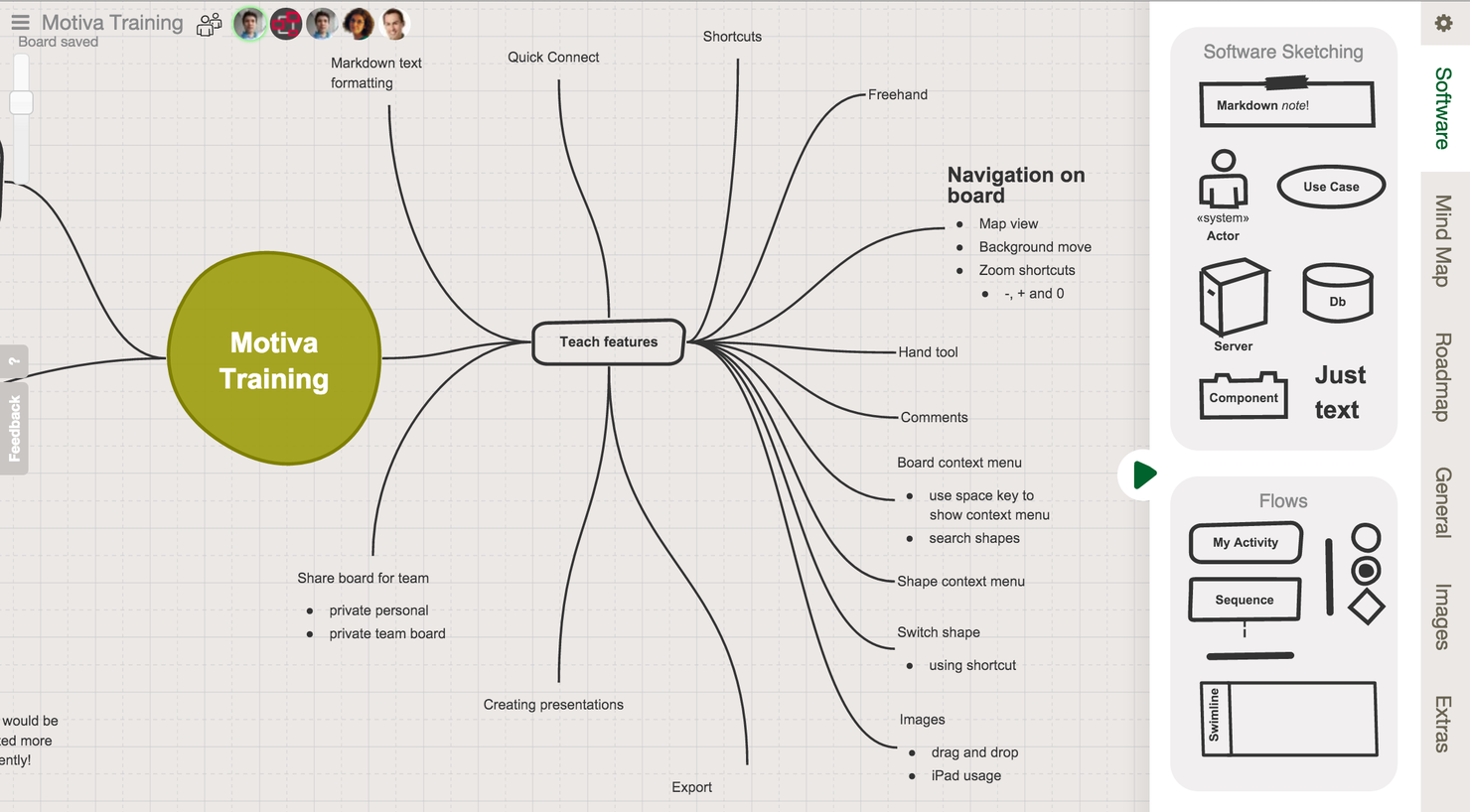
Sketchboard è uno strumento di lavagna online collaborativa utilizzato principalmente dai team per la diagrammazione software e la collaborazione visiva. È progettato per l'ideazione e la risoluzione dei problemi e offre una tela infinita per il lavoro creativo.
Perché è una buona alternativa a Figma: Sketchboard è pensato per la diagrammazione software, caratteristica che lo distingue da Figma. La funzione di collaborazione in tempo reale consente al team di lavorare insieme in modo efficiente, mentre l'ampia libreria di oltre 400 forme per schizzi aiuta a visualizzare idee complesse. L'interfaccia intuitiva garantisce una navigazione semplice per tutti i membri del team, favorendo la creatività e il lavoro di squadra in un modo unico per Sketchboard.
Funzionalità e integrazioni principali:
Le funzionalità includono la collaborazione in tempo reale che mantiene il team connesso, un'ampia libreria di forme per schizzi per visualizzare le idee e una tela infinita che consente sessioni di ideazione senza limitazioni.
Le integrazioni includono Microsoft Teams, Slack, GitHub, Webex e Google Drive.
Pros and Cons
Pros:
- Collaborazione in tempo reale
- Ampia libreria di forme per schizzi
- Tela infinita per l'ideazione
Cons:
- Personalizzazione del design limitata
- Non ideale per tutti i tipi di progettazione


Ziteboard è uno strumento per lavagne online utilizzato dai team per la collaborazione visiva e il brainstorming. È progettato per facilitare la creazione di diagrammi software e la condivisione di idee in tempo reale.
Perché è una buona alternativa a Figma: Ziteboard è particolarmente adatto alla creazione di diagrammi software e offre funzionalità che aiutano il tuo team a rappresentare processi complessi. La tela infinita consente di svolgere sessioni di brainstorming approfondite senza limitazioni.
La collaborazione in tempo reale garantisce che tutti possano contribuire e rimanere coinvolti durante le discussioni. Se la tua priorità è la creazione di diagrammi e la pianificazione collaborativa, Ziteboard offre le funzionalità necessarie.
Funzionalità e integrazioni principali:
Le funzionalità includono una tela infinita per un brainstorming senza limiti, la collaborazione in tempo reale per mantenere il team connesso e strumenti di disegno che aiutano a visualizzare le idee in modo efficace.
Le integrazioni includono Slack, Google Drive, Dropbox, Microsoft Teams, Trello, Jira, Asana, Zoom, GitHub e Confluence.
Pros and Cons
Pros:
- Ideale per la collaborazione visiva
- Supporta sessioni di brainstorming approfondite
- Funzionalità di collaborazione in tempo reale
Cons:
- Funzionalità di progettazione avanzate limitate
- Non adatto alla prototipazione dettagliata

Miro
Ideale per la collaborazione in tempo reale su lavagne con modelli pronti per i workshop
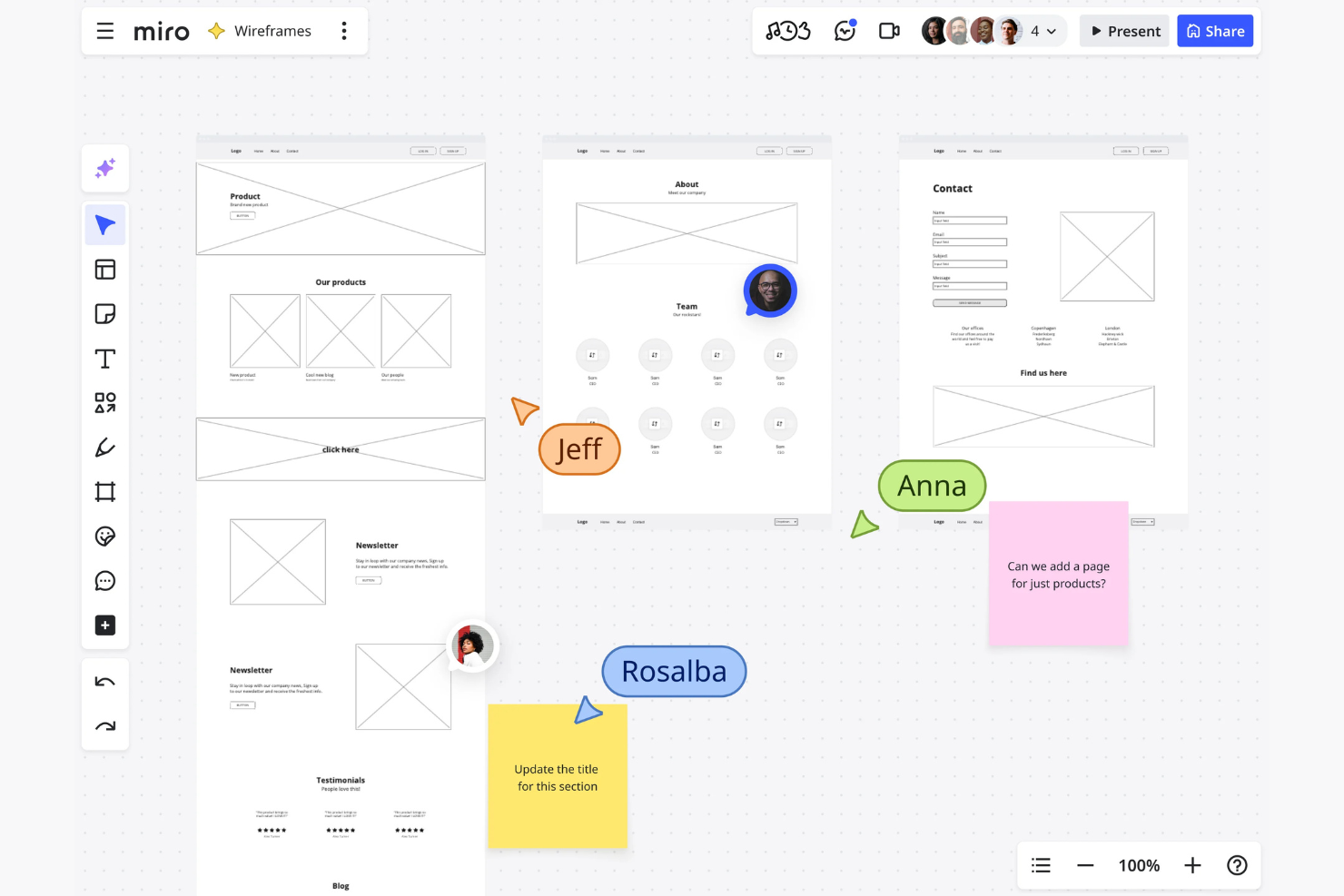
Miro è una piattaforma di lavagna online collaborativa utilizzata dai team per fare brainstorming, pianificare e collaborare ai progetti. È popolare tra product manager, designer e sviluppatori per visualizzare i flussi di lavoro e creare diagrammi.
Perché è una buona alternativa a Figma: Miro eccelle nella creazione di diagrammi software, il che lo rende ideale se il tuo team ha bisogno di mappare processi e sistemi complessi. La tela infinita consente di fare brainstorming e pianificare senza restrizioni, offrendo al team lo spazio per visualizzare le idee in dettaglio.
La funzionalità di collaborazione in tempo reale garantisce che tutti rimangano connessi e coinvolti nel processo creativo. Se la creazione di diagrammi e la collaborazione di team sono priorità, Miro offre gli strumenti per supportare queste attività in modo efficace.
Funzionalità e integrazioni principali:
Le funzionalità includono una tela infinita che consente di fare brainstorming su ampia scala, modelli predefiniti che aiutano a iniziare rapidamente e la collaborazione in tempo reale che mantiene il team coinvolto.
Le integrazioni includono Slack, Microsoft Teams, Jira, Trello, Asana, Dropbox, Google Drive, Zoom, Confluence e Microsoft OneDrive.
Pros and Cons
Pros:
- Tela infinita per il brainstorming
- Supporta la creazione di diagrammi complessi
- Modelli predefiniti disponibili
Cons:
- Può risultare complesso per i nuovi utenti
- La complessità potrebbe superare le esigenze di alcuni utenti
New Product Updates from Miro
Miro Adds Japan Data Residency for Enterprise Customers
Miro has introduced Japan data residency for enterprise customers, offering in-region storage for production data, backups, and metadata, plus in-region compute infrastructure. For more information, visit Miro's official site.
Altre alternative a Figma
Ecco alcune ulteriori alternative a Figma che non sono state incluse nel mio elenco, ma che vale comunque la pena prendere in considerazione:
- Lucidspark
Ideale per brainstorming strutturati con votazioni, timer e lavagne separate
- Framer
Ideale per prototipi interattivi di siti web
- CorelDRAW Graphics Suite
Ideale per l'illustrazione vettoriale


Come Valuto i Competitor di Figma
Scompongo la mia valutazione in due livelli: i requisiti fondamentali come la co-modifica in tempo reale e il prototipaggio, e i fattori di differenziazione che separano un'opzione dall'altra in base alle esigenze specifiche del tuo team.
Funzionalità di Base (Requisiti Indispensabili per Questa Lista)
Quando seleziono gli strumenti per la mia lista, valuto ciascuno su una scala da 0 (non offre la funzionalità) a 5 (eccelle in questo ambito) per ogni funzionalità centrale elencata di seguito. Poi calcolo il punteggio totale dello strumento in percentuale. Ogni strumento deve raggiungere un punteggio minimo totale del 65% per essere considerato per l'inclusione.
- Progettazione UI Basata su Vettori: Valuto se lo strumento supporta le principali funzioni di editing vettoriale—strumenti penna, operazioni booleane, auto-layout e vincoli responsivi—per creare schermate e mockup pronti per la produzione.
- Prototipazione Interattiva: Ogni strumento dovrebbe permettere di collegare schermate tramite transizioni, micro-interazioni e logica condizionale così che i PM possano simulare i reali flussi utente durante le review con gli stakeholder.
- Collaborazione in Tempo Reale: Cerco la modifica in tempo reale da parte di più utenti con cursori, commenti in linea e indicatori di presenza che consentono ai team distribuiti di lavorare sullo stesso file simultaneamente.
- Gestione del Design System: Librerie di componenti condivise, style token e override delle varianti sono fondamentali qui—specialmente per i team che devono mantenere coerenza su più superfici di prodotto.
- Consegna agli Sviluppatori: Controllo se lo strumento genera specifiche pronte per l'ispezione, asset esportabili e frammenti di codice che gli ingegneri possono consultare senza inseguire i designer per le redline.
- Accesso Cloud-Based: La piattaforma dovrebbe funzionare in un browser o sincronizzarsi su cloud, così che i membri del team su diversi sistemi operativi e in varie località possano accedere ai file senza trasferimenti manuali.
Una volta che ho una lista di strumenti che soddisfano i criteri, considero cosa distingue ciascuna piattaforma.
Fattori di Differenziazione (Cosa Distingue i Fornitori)
Ecco come confronto e metto a confronto i diversi fornitori:
Funzionalità Distintive
Il design assistito dall'IA è un fattore di differenziazione in crescita—strumenti come Framer e Sketch ora offrono funzionalità generative che aiutano i PM a creare layout o testi a partire da prompt durante l'ideazione iniziale. Valuto anche se una piattaforma include una lavagna integrata per attività come la journey mapping o la pianificazione di sprint, senza dover cambiare applicazione. Un ecosistema di plugin ben fornito è importante, poiché determina quanto puoi estendere lo strumento per attività come audit di accessibilità, popolamento di contenuti o controllo qualità del design.
Oltre le Funzionalità
Controllo quanto bene ogni strumento si integra nello stack di prodotto più ampio—le integrazioni native con strumenti come Jira, Linear o Slack fanno davvero la differenza quando i PM hanno bisogno di tracciabilità tra design e ticket. Anche la struttura dei prezzi è importante, in particolare come le piattaforme gestiscono le licenze tra editor e viewer, dato che i team di prodotto spesso comprendono molti stakeholder che necessitano solo di commentare o revisionare. Valuto inoltre le prestazioni dei file su larga scala, perché sistemi di design complessi con centinaia di componenti possono rallentare strumenti non progettati per gestire l'uso a livello enterprise.
Funzionalità principali di Figma
Ecco alcune delle principali funzionalità di Figma per aiutarti a confrontare le alternative e valutare ciò che offrono:
- Collaborazione in tempo reale: più utenti possono lavorare contemporaneamente sullo stesso progetto, migliorando il lavoro di squadra e la comunicazione.
- Layout automatico: facilita la progettazione responsiva ridimensionando e riposizionando automaticamente gli elementi in base allo spazio disponibile.
- Sistemi di progettazione: supportano la creazione e la gestione di componenti e stili riutilizzabili per garantire uniformità tra i progetti.
- Strumenti di prototipazione: consentono ai designer di creare prototipi interattivi per visualizzare i flussi e le interazioni degli utenti.
- Controllo delle versioni: tiene traccia delle modifiche apportate ai progetti, consentendo agli utenti di ripristinare le versioni precedenti quando necessario.
- Funzionalità di IA: Figma offre diverse funzionalità di IA, dalla scrittura di testi alla generazione di immagini e al miglioramento della risoluzione.
- Componenti aggiuntivi e integrazioni: offre una varietà di componenti aggiuntivi per estendere le funzionalità e integrarsi con altri strumenti.
- FigJam: una lavagna virtuale per workshop e sessioni di brainstorming, che favorisce la creatività collaborativa.
- Compatibilità multipiattaforma: funziona sia su Mac sia su Windows, risultando versatile per utenti diversi.
- Selezione intelligente: consente di apportare modifiche in blocco a più elementi del progetto, velocizzando le attività ripetitive.
- Kit per interfacce utente: offrono una libreria di componenti e stili predefiniti per creare rapidamente dei mockup.
E adesso:
Se stai cercando strumenti per la progettazione UX, contatta gratuitamente un consulente di SoftwareSelect per ricevere consigli personalizzati.
Compili un modulo e partecipa a una breve conversazione durante la quale verranno analizzate le specificità delle tue esigenze. Dopodiché riceverai un elenco ristretto di software da valutare. Ti offriranno supporto anche durante l'intero processo di acquisto, comprese le trattative sul prezzo.