

Bir ürün yöneticisi olarak prototipleme ve tasarım için doğru araçlara sahip olmanın önemini biliyorsunuz. Adobe XD popüler bir araç olsa da ekibinizin kendine özgü ihtiyaçlarına uymayabilir. Platformlar arası ve gerçek zamanlı iş birliği, fiyatlandırma veya belirli özelliklerle ilgili zorluklarla karşılaşıyor olabilirsiniz.
Deneyimlerime göre doğru alternatifi bulmak, iş akışınızda ve sonuçlarınızda büyük bir fark yaratabilir. Ekibiniz için en uygun seçeneği keşfetmenize yardımcı olmak amacıyla çeşitli seçenekleri değerlendirdim.
Bu makalede, en iyi Adobe XD alternatiflerini tarafsız bir şekilde inceleyeceğim. Bilinçli bir karar vermenize yardımcı olmak amacıyla özellikler, kullanıcı deneyimleri ve olası avantajlar hakkında bilgiler bulacaksınız.
Adobe XD Nedir?
Adobe XD, kullanıcı arayüzleri ve deneyimleri oluşturmak için tasarlanmış bir prototipleme aracıdır. Fikirleri gerçeğe dönüştürmek için kullanıcı arayüzü/kullanıcı deneyimi tasarımcıları, ürün yöneticileri ve geliştiriciler tarafından yaygın olarak kullanılır. Vektör tasarım araçları, etkileşimli prototipler ve iş birliği özellikleri; tasarım hassasiyetine, ekip içi iletişime ve kullanıcı testlerine yardımcı olur. Genel olarak Adobe XD, dijital ürünleri tasarlamak ve geliştirmek için çok yönlü bir platform sunar.
Why Trust Our Software Recommendations
6,700+
Reviews
20
Industry experts
16+
Evaluation factors
14
Years
Our team has been testing and reviewing software since 2012. As product managers ourselves, we know how difficult—and important—it is to choose the right software.
For this guide, we evaluated tools using hands-on testing and independent research, scoring tools using our selection criteria.
Our reviews reflect our human editorial judgment, not a sales pitch.
Expert reviewers:
- Andrew LumbySenior TPM
- Cristiano ValimSenior UI/UX Lead


Adobe XD Alternatifleri Karşılaştırma Tablosu
Bu karşılaştırma tablosu, en iyi Adobe XD alternatifleri seçimlerim için fiyatlandırma ayrıntılarını özetlemektedir:
Score legend (out of 5)
- Excellent4.5–5
- Good4–4.4
- Average3–3.9
- Below average2–2.9
- Poor1–1.9
Sorted by: Default
| Tool | Starting Price | Website | |||||||
|---|---|---|---|---|---|---|---|---|---|
Best for design work on Windows, Mac, or Linux | 3.5 out of 5 | 3 | 3 | 4 | 3 | 4 | 4 | $11.99/user/month Free plan + free demo available | Website |
Best for drag-and-drop rapid wireframing | 3.3 out of 5 | 3 | 3 | 4 | 3 | 3 | 4 | $4.95/user/month Free plan + 30-day free trial + free demo available | Website |
Best for non-designers wireframing early concepts | 3.0 out of 5 | 4 | 2 | 4 | 3 | 1 | 4 | $9/user/month Free plan available | Website |
Best for code-free prototypes with real data | 3.2 out of 5 | 4 | 4 | 3 | 2 | 3 | 3 | $19/user/month Free plan + 10-day trial available | Website |
Best for logic-driven prototypes at enterprise scale | 3.3 out of 5 | 4 | 5 | 2 | 3 | 3 | 3 | $29/user/month Free plan + 30-day free trial available | Website |
Best for multiplayer editing across design teams | 4.8 out of 5 | 5 | 5 | 5 | 5 | 5 | 4 | $3/user/month Free plan available | Website |
Best for designing interactive websites | 3.8 out of 5 | 1 | 5 | 5 | 4 | 4 | 4 | $10/month Free plan + free trial available | Website |
Best for prototypes driven by real code components | 4.5 out of 5 | 5 | 5 | 4 | 5 | 4 | 4 | $49/user/month Free plan + 14-day free trial + demo available | Website |
Best for open-source, self-hosted design work | 3.8 out of 5 | 4 | 3 | 4 | 4 | 4 | 4 | $7/user/month Free plan + 14-day free trial + free demo available | Website |
Best for offline-first Mac design work | 3.8 out of 5 | 4 | 4 | 4 | 4 | 5 | 2 | $12/user/month Free plan + 30-day free trial available | Website |


En İyi Adobe XD Alternatifleri İncelemeleri
Aşağıda, kısa listeme giren en iyi Adobe XD alternatiflerinin ayrıntılı özetlerini bulabilirsiniz. İncelemelerim, size en uygun olanı bulmanıza yardımcı olmak için her aracın temel özelliklerini, artılarını \u0026 eksilerini, entegrasyonlarını ve ideal kullanım alanlarını ayrıntılı bir şekilde ele almaktadır
 Best for design work on Windows, Mac, or Linux
- Free plan + free demo available
- From $11.99/user/month (billed annually)
Visit WebsiteCustomer Rating:4.4/5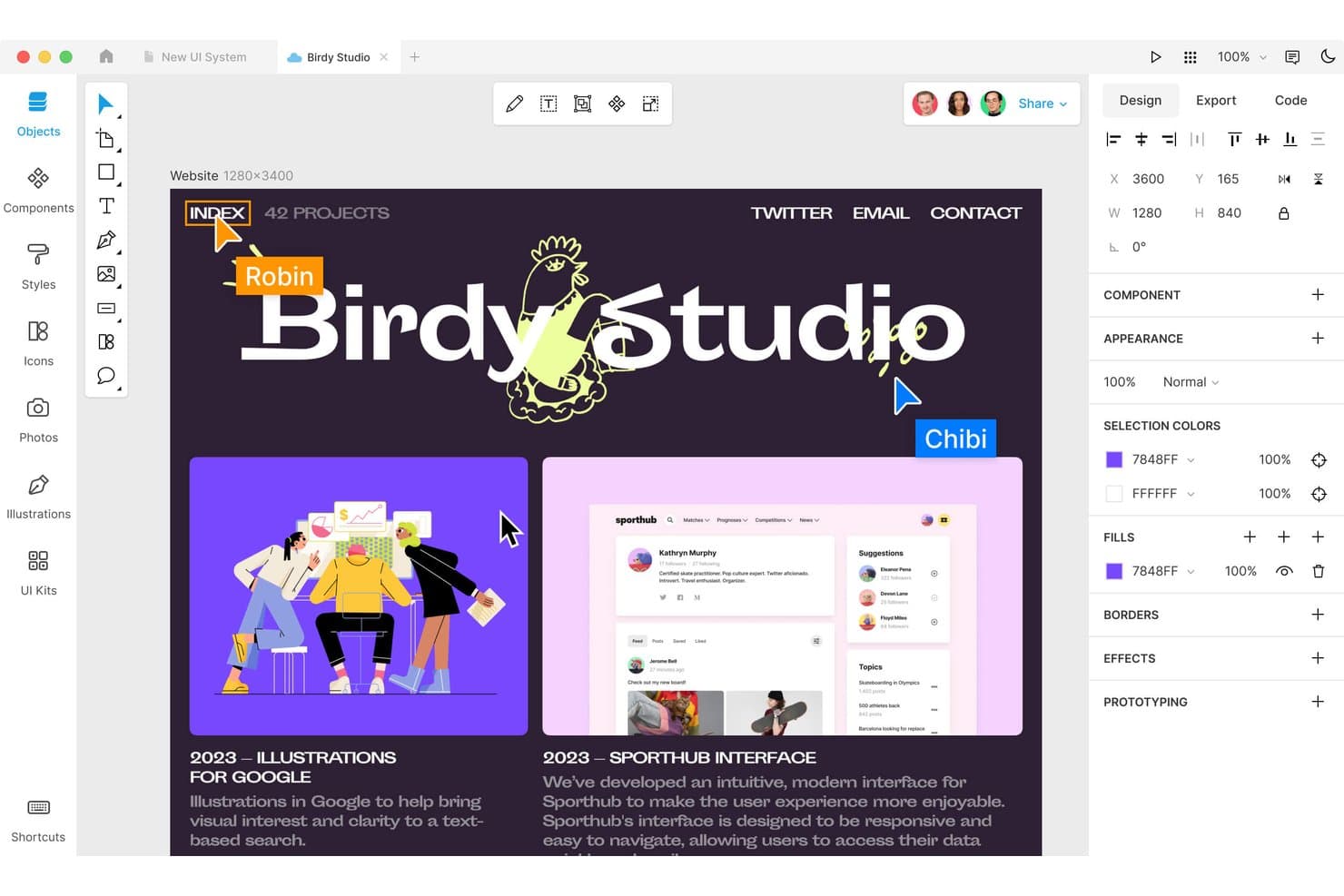
Lunacy lets users design and collaborate in a macOS interface. Lunacy is a free vector design editor built for UI/UX designers who need a fast, offline-capable tool that runs natively on Windows, macOS, and Linux, with built-in assets and AI tools to support end-to-end design workflows.
Who Is Lunacy Best For?
Lunacy is a strong fit for UI/UX designers who need a fully native design tool that works across Windows, macOS, and Linux without sacrificing speed or offline access.
Why I Picked Lunacy
Lunacy earns its spot on my shortlist because it's one of the only native design tools that runs on Windows, macOS, and Linux, making it a genuinely cross-platform Adobe XD alternative. I appreciate that it supports offline editing with full vector capabilities, including auto layout, boolean operations, and Smart Animate for prototyping. If your team has even one Linux user, Lunacy is often the only serious option that doesn't require a browser workaround.
Lunacy Key Features
- Built-in asset library: Access over 1.5 million icons, illustrations, and photos directly within the editor without leaving the app.
- Sketch file compatibility: Open, edit, and save Sketch files natively, making it a practical landing spot for teams migrating from Sketch-based workflows.
- Code tab for developer handoff: Generate CSS, XAML, JSON, or SVG code for selected layers, giving developers a direct path from design to implementation.
- AI-powered tools: Use built-in AI features including background removal, image upscaling, text generation, and an AI chat that connects to Claude, Gemini, and OpenAI.
Lunacy Integrations
Native integrations are not clearly documented. Lunacy supports Sketch, Figma .fig, PSD, AI, and PDF imports, plus compatibility with Zeplin, Avocode, Abstract, and Simpli through Sketch files.
Pros and Cons
Pros:
- Smooth performance on older machines
- Offline editing keeps local files private
- Native apps support Linux, Windows, and macOS
Cons:
- Prototype flows lack variables and conditions
- No direct Adobe XD file import
Learn more about Lunacy: Best for drag-and-drop rapid wireframing
- Free plan + 30-day free trial + free demo available
- From $4.95/user/month (billed annually)
Visit WebsiteCustomer Rating:4.5/5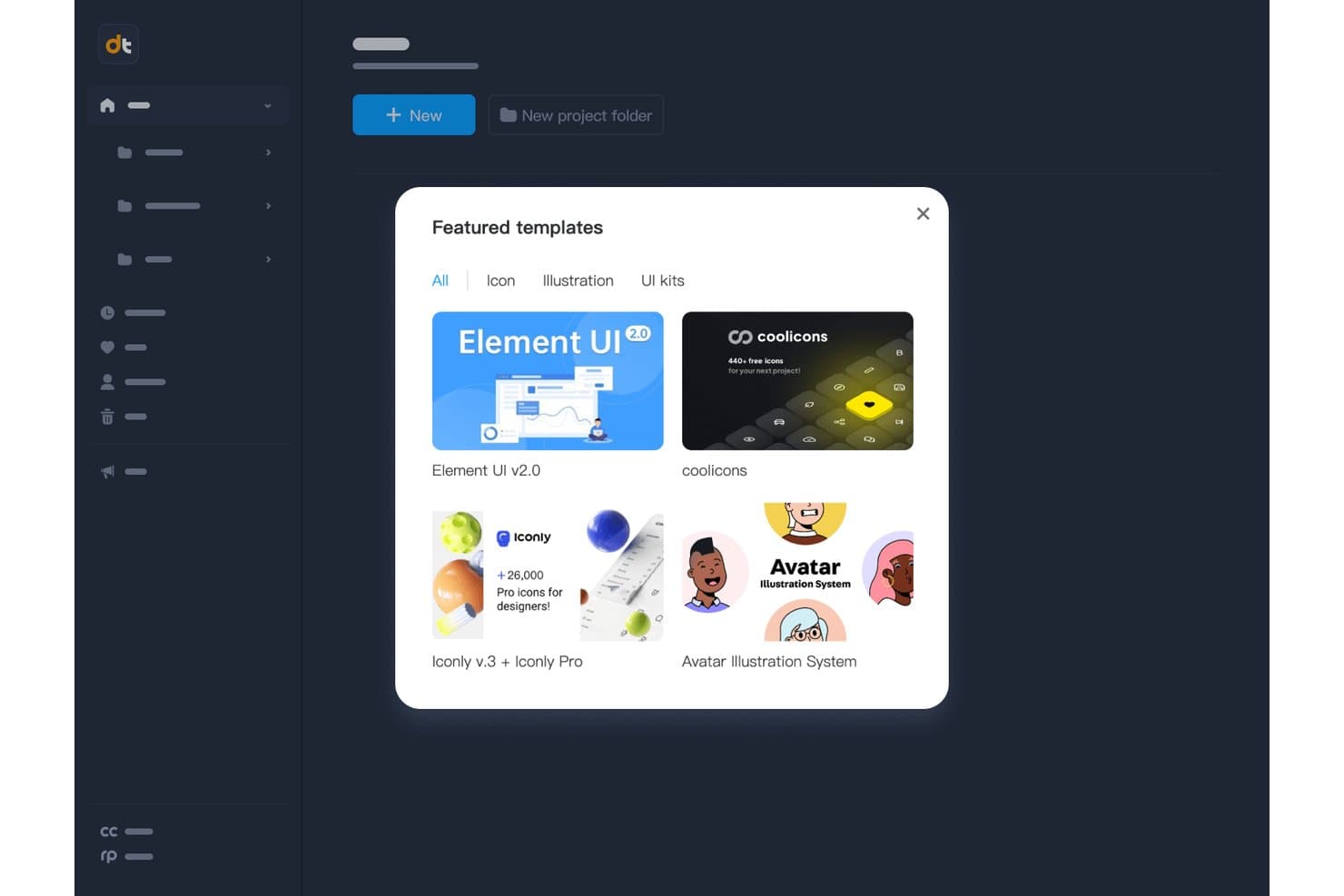
Mockplus offers ready-made UI and icon templates to jumpstart designs. Mockplus RP is a browser-based wireframing and prototyping tool built for UX/UI designers and product managers who need to move quickly from idea to interactive prototype without getting slowed down by a steep learning curve.
Who Is Mockplus Best For?
Mockplus RP is a strong fit for UX/UI designers and product managers who need to build interactive prototypes quickly without a steep learning curve.
Why I Picked Mockplus
I picked Mockplus as one of the best because its drag-and-drop wireframing workflow genuinely speeds up the early design phase. You can link screens by dragging a connector from any element to its target artboard, and with over 3,000 prebuilt UI components across web, iOS, and Android libraries, rough ideas become clickable prototypes fast. Connect Mode adds flowchart diagramming in the same canvas, so I can map user flows without switching tools.
Mockplus Key Features
- Real-time co-editing: Multiple team members can design simultaneously on the same canvas, with changes syncing instantly across all users.
- Connect Mode flowcharting: Drag-and-drop connector wires between artboards to build user flow diagrams directly within your wireframing canvas.
- Component states: Assign states like Hover, Pressed, Selected, or Disabled to any component to simulate realistic UI behavior in your prototype.
- Axure file import: Import .rp files from Axure with up to 95% of UI and interaction details preserved and fully editable inside Mockplus RP.
Mockplus Integrations
Mockplus RP connects with Mockplus Cloud for publishing, reviews, comments, handoff, and tasks, and supports plugins for Adobe XD, Photoshop, Sketch, Figma, and Axure. It also imports Axure
.rpfiles directly; native Jira or Slack integrations aren’t documented.Pros and Cons
Pros:
- Connect Mode maps flows beside prototypes
- Large component libraries speed initial wireframing
- Real-time co-editing supports fast stakeholder reviews
Cons:
- Advanced interaction logic trails leading alternatives
- Adobe XD imports require separate Mockplus products
Learn more about Mockplus: Best for non-designers wireframing early concepts
- Free plan available
- From $9/user/month (billed annually)
Visit WebsiteCustomer Rating:4.3/5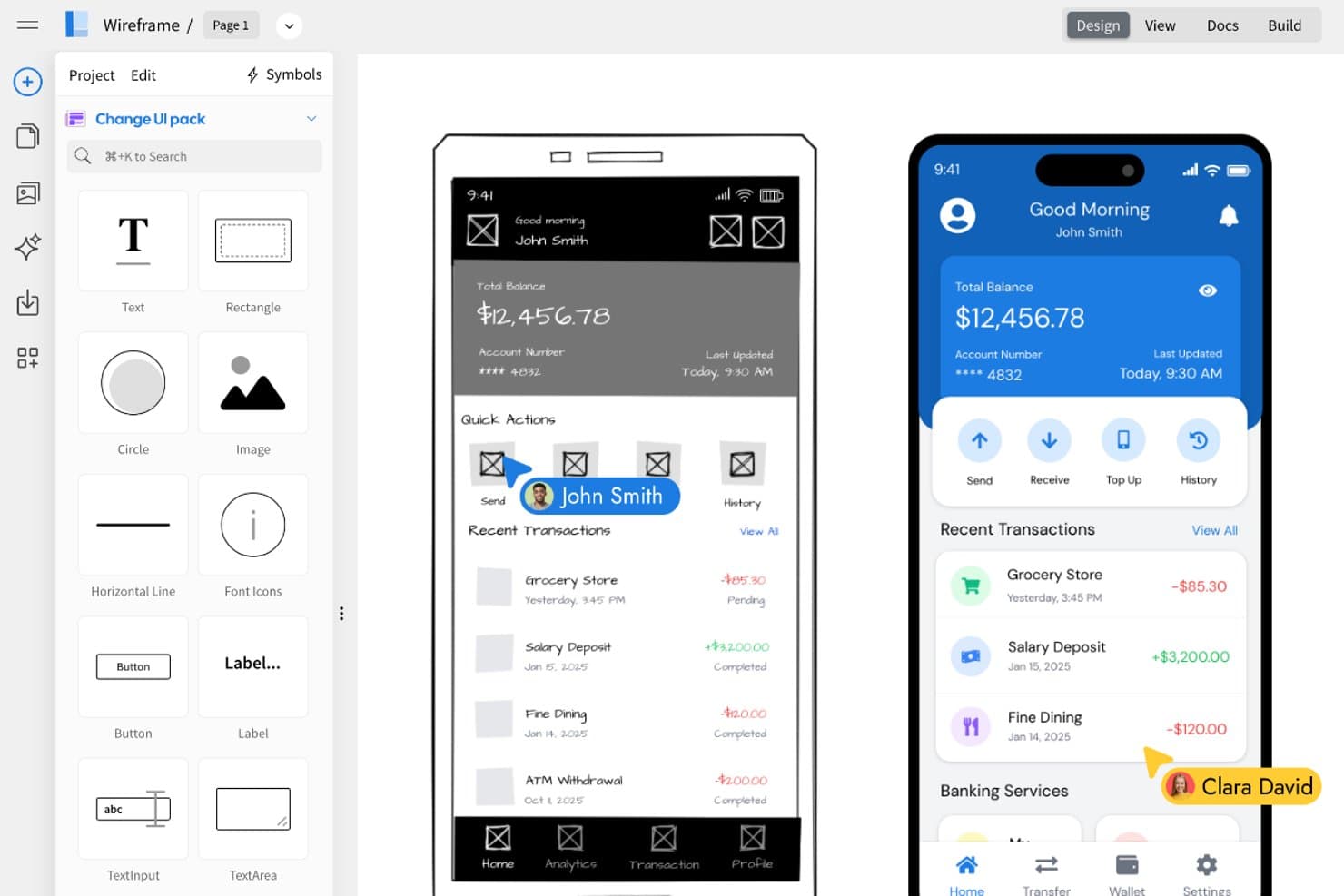
MockFlow lets users convert wireframes into polished UI designs side by side. MockFlow is a wireframing and brainstorming platform that lets non-designers—like product managers, founders, and developers—sketch out early-stage UI concepts without needing vector design skills.
Who Is MockFlow Best For?
MockFlow is a natural fit for product managers and founders who need to sketch out early UI concepts without relying on a designer.
Why I Picked MockFlow
I've included MockFlow in my top picks because it's genuinely built for non-designers who need to get ideas out of their heads and onto a screen fast. I especially like the AI-assisted wireframe generation: you can paste a screenshot or drop in a URL, and MockFlow produces a working wireframe in seconds, no design skills required. Its 1,000+ drag-and-drop UI components, including charts and data grids, mean a product manager can sketch a realistic concept without touching a single vector tool.
MockFlow Key Features
- Real-time co-editing: Multiple editors can work on the same project simultaneously, with live cursors and updates visible to reviewers without refreshing.
- Specs mode: Generates pixel-perfect specifications and CSS code for any component, letting developers inspect designs without a separate handoff tool.
- Symbols with instance overrides: Create reusable components that sync updates across all pages, with the option to override individual instances or reset them in one click.
- Integrations with Jira, Slack, and Microsoft Teams: Connect wireframes directly to your existing project management and communication tools without leaving your workflow.
MockFlow Integrations
MockFlow offers native integrations with Jira, Confluence, Slack, Microsoft Teams, Google Drive, Google Docs, Google Meet, Trello, and Visual Studio, plus Figma export. Max includes connectors to 20+ business apps.
Pros and Cons
Pros:
- Live co-editing supports stakeholder reviews
- Large library includes charts and data grids
- AI turns screenshots into editable wireframes
Cons:
- No pen tool or boolean vector editing
- Prototyping lacks conditional logic and advanced transitions
Learn more about MockFlow: Best for code-free prototypes with real data
- Free plan + 10-day trial available
- From $19/user/month
Visit WebsiteCustomer Rating:4.2/5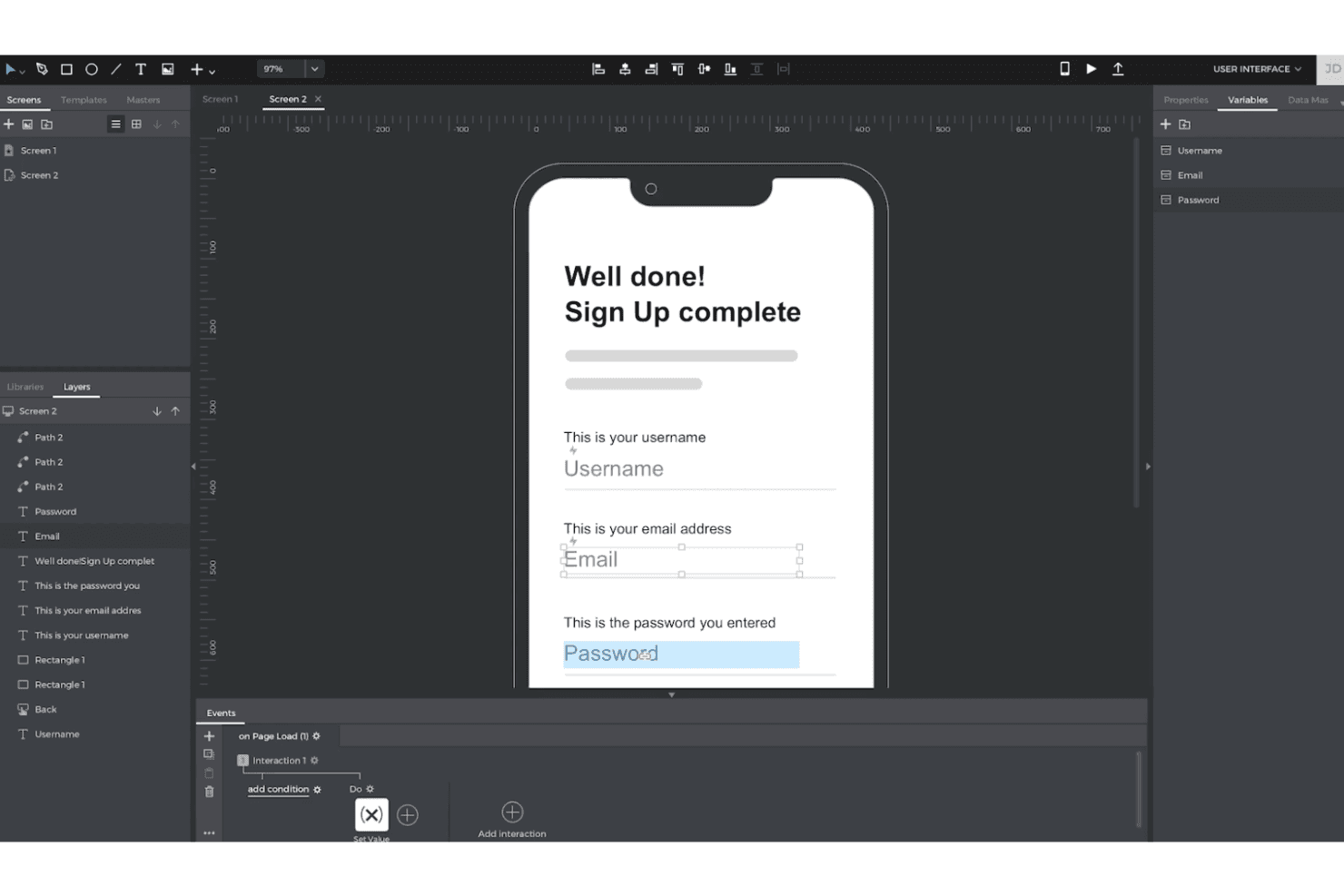
Justinmind lets you create interactive, high-fidelity prototypes with logic and data—no code required. Justinmind gives UX and product teams a visual workspace for designing interactive app and web concepts, clarifying complex user flows, and validating ideas before engineering work begins.
Who Is Justinmind Best For?
Justinmind suits product managers and UX designers who need to test realistic app or website experiences without writing code.
Why Justinmind Is a Good Best Adobe XD Alternatives
I picked Justinmind because it supports code-free prototypes with real data. I use Data Masters to populate product lists, user profiles, and checkout states with realistic records. Conditional interactions then let my team test flows that respond to different inputs before engineering begins.
Justinmind Key Features
- Responsive design: Create layouts for desktop, tablet, and mobile breakpoints.
- UI widget libraries: Add reusable controls, menus, forms, and navigation elements.
- Animations and transitions: Configure page effects, motion, and gesture-based transitions.
- Team collaboration: Share prototypes for browser-based comments and stakeholder review.
Justinmind Integrations
Justinmind has a native Atlassian Jira integration, plus documented integrations or import tools for Sketch, Adobe Creative Cloud, Figma, Confluence, and Azure DevOps. It also provides an API and SDK for custom integrations.
Pros and Cons
Pros:
- Device previews validate responsive mobile interactions
- Advanced conditions simulate complex user journeys
- Real data enables realistic product-flow testing
Cons:
- Complex interaction settings slow first prototypes
- Shared projects lack simultaneous screen co-editing
Learn more about Justinmind: Best for logic-driven prototypes at enterprise scale
- Free plan + 30-day free trial available
- From $29/user/month (billed annually)

Axure RP lets users build interactive dashboard prototypes with conditional logic. Axure RP is a UX prototyping tool built for designers and product teams who need to go beyond static mockups—supporting conditional logic, working forms, and dynamic data-driven interactions without writing a single line of code.
Who Is Axure RP Best For?
Axure RP is a strong fit for UX designers and enterprise product teams who need to prototype complex, logic-driven interactions that go well beyond what a typical mockup tool can handle.
Why I Picked Axure RP
Axure RP earns its spot on my shortlist because no other Adobe XD alternative comes close to its prototyping logic at enterprise scale. I'm talking about conditional variables, working form inputs, and repeater widgets that let you build sortable, filterable data tables—all without writing code. When I need to prototype a complex onboarding flow with branching conditions based on user input, Axure RP handles it in ways Figma simply can't. Its Axure Cloud Inspect layer also gives developers redlines, CSS declarations, and downloadable assets without requiring them to hold a paid license.
Axure RP Key Features
- Adaptive views: Design desktop, tablet, and phone layouts in a single file, and the prototype automatically displays the correct view for each screen size.
- Repeater widget: Build data-driven tables and grids that users can sort and filter directly within the prototype.
- Axure Cloud Inspect: Gives developers redlines, measurements, CSS declarations, and downloadable assets without requiring a paid license.
- Adobe XD import plugin: Copies XD layers into RP as editable widgets, preserving layer structure as groups for teams migrating away from Adobe XD.
Axure RP Integrations
Axure RP offers integrations with Jira, Confluence, Slack, Microsoft Teams, Figma, Sketch, and Adobe XD. It also supports HTML, CSS, and JavaScript plugins for Axure Cloud.
Pros and Cons
Pros:
- Developer handoff includes redlines and CSS
- Repeaters model sortable, filterable data tables
- Conditional logic supports realistic flow testing
Cons:
- Visual design systems lack variants and tokens
- Check-in/check-out slows shared page editing
Learn more about Axure RP : Best for multiplayer editing across design teams
- Free plan available
- From $3/user/month
Visit WebsiteCustomer Rating:4.7/5
Figma lets users design and prototype mobile app flows side by side. Figma is a browser-based design platform that lets UX designers, product designers, and product managers wireframe, prototype, and hand off to developers—all in one shared file.
Who Is Figma Best For?
Figma fits cross-functional product teams where designers, PMs, and developers all need to work inside the same file without stepping on each other.
Why I Picked Figma
I've included Figma in my top picks because no other tool handles multiplayer editing as well, with unlimited simultaneous editors, live cursors, and cursor chat all working inside a single shared file. I particularly like Observation mode, which lets you follow a specific teammate's screen during design critiques without interrupting their flow. Branching and merging means my team can work on separate design directions concurrently, then merge them back cleanly without overwriting each other's work.
Figma Key Features
- Smart Animate: Automatically generates transitions between component states, including parallax scrolling and touch gestures, without manual keyframing.
- Dev Mode: Gives developers code snippets, component specs, asset export, and Code Connect to map design components directly to production code.
- Variables and modes: Stores reusable values like color, spacing, and typography, then switches contexts—such as light and dark mode—across your entire design system.
- FigJam whiteboarding: A built-in whiteboard with 300+ templates covering user flows, journey maps, and retros, included with every seat on every plan.
Figma Integrations
Figma integrates with GitHub, Jira, Storybook, Slack, Notion, Microsoft Teams, Asana, and Supabase. It also offers a VS Code extension, Code Connect, MCP Server, and REST API for developer workflows and custom integrations.
Pros and Cons
Pros:
- Design specs make developer handoff clearer
- Conditional prototypes model realistic product states
- Unlimited live co-editing avoids version conflicts
Cons:
- Large files can slow during complex reviews
- Adobe XD files need third-party conversion
 Best for designing interactive websites
- Free plan + free trial available
- From $10/month (billed annually)
Visit WebsiteCustomer Rating:4.4/5
Framer lets users design and layer website sections visually. Framer is a browser-based design and publishing platform built for teams who want to design, prototype, and ship interactive websites without handing off to developers.
Who Is Framer Best For?
Framer is a strong fit for product managers and design teams building and publishing interactive websites who want realistic prototypes without relying on a development handoff.
Why I Picked Framer
I picked Framer as one of the best because it's the only tool on this list that lets you design and publish a fully interactive website without touching a single line of code. What makes it stand out for me is the AI-assisted interaction builder: you can describe a sticky navbar or animated carousel in plain language and Framer sets it all up on the canvas. Branching also gives each design iteration its own live preview URL, so stakeholders can click through a real, responsive site rather than a static mockup.
Framer Key Features
- Shared component library: Components with variants and states sync across every project in your workspace, so design updates push to all linked instances at once.
- Git-style branching: Each branch gets its own live preview URL, letting stakeholders click through real, responsive designs before changes merge to main.
- Conditional logic triggers: Show overlays or swap component variants based on conditions like cookies, URL parameters, scroll depth, or exit intent.
- Figma import plugin: Copy layers directly from Figma into Framer using the official plugin, keeping fonts, assets, and spacing intact for further editing.
Framer Integrations
Framer offers integrations with Figma, GitHub, Claude Code, Cursor, Codex/ChatGPT, Google Analytics, and Google Tag Manager. It also provides a Server API and supports Zapier.
Pros and Cons
Pros:
- Shared components keep web designs consistent
- Branch previews simplify stakeholder feedback
- Realistic prototypes behave like live websites
Cons:
- Missing inspect tools complicate developer handoff
- Website focus excludes native app interfaces
 Best for prototypes driven by real code components
- Free plan + 14-day free trial + demo available
- From $49/user/month
Visit WebsiteCustomer Rating:4.2/5
UXPin lets users inspect and export code from designed UI components. UXPin is a browser-based design and prototyping tool built for teams who need prototypes that behave like real products, using conditional logic, variables, and code-backed components to close the gap between design and development.
Who Is UXPin Best For?
UXPin is a strong fit for UX and product designers who need prototypes that go beyond static screens to test real logic, states, and interactions before a single line of production code is written.
Why I Picked UXPin
I picked UXPin as one of the best Adobe XD alternatives because it's the only tool where prototypes are rendered in actual HTML and JavaScript, not simulated interactions. That means you can build conditional logic and variables directly into a prototype, so a form that validates input or a cart that calculates a running total behaves exactly like the shipped product. With Merge, designers pull live React components from Git or Storybook, so there's no version drift between what's designed and what gets built.
UXPin Key Features
- Conditional logic and variables: Build if/then/else rules and store user input as variables that carry across screens within a single prototype.
- Stakeholder approval workflows: Send one-click approval requests to reviewers, who can approve or reject without creating an account.
- WCAG contrast checker: Evaluate color combinations against accessibility standards directly in the editor as you design.
- Mirror app for iOS and Android: Preview live prototypes on a real mobile device to test interactions and layouts before development begins.
UXPin Integrations
UXPin integrates with Figma, Sketch, Storybook, Slack, Jira, FullStory, GitHub, Bitbucket, npm, Adobe Fonts, and Google Fonts. Storybook and Git access depend on the plan, while custom Git integration is available on Enterprise.
Pros and Cons
Pros:
- Generated React projects shorten developer handoff
- Real React components reduce design drift
- Prototypes retain state across screens
Cons:
- No direct Adobe XD file import
- Logic-heavy workflows take time to master
Learn more about UXPin: Best for open-source, self-hosted design work
- Free plan + 14-day free trial + free demo available
- From $7/user/month
Visit WebsiteCustomer Rating:4.5/5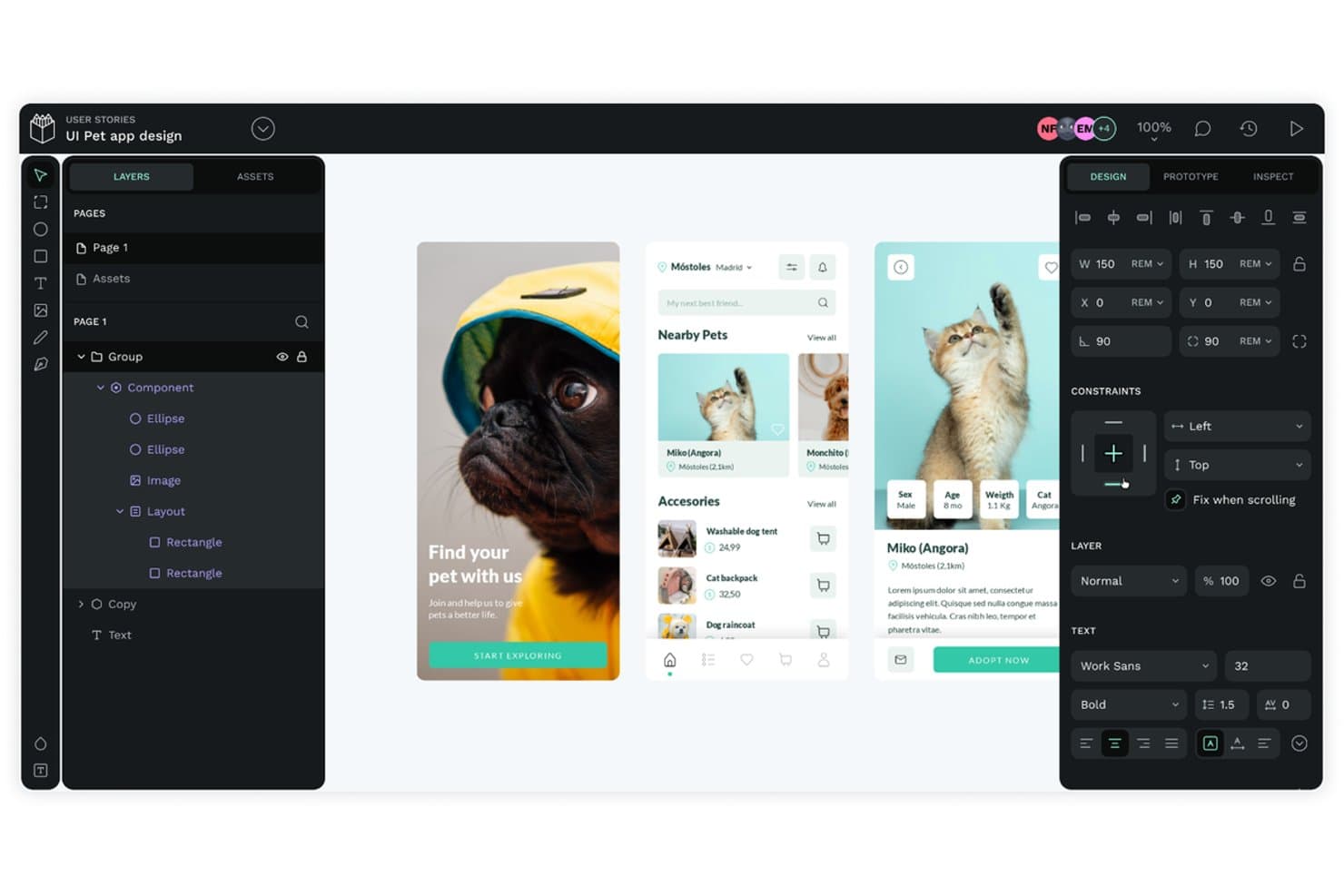
Penpot lets users design mobile app UIs with layers and components. Penpot is a browser-based, open-source design tool that gives UX/UI designers, product designers, and their dev teams a full vector editor, component system with native design tokens, and developer handoff that maps directly to real CSS and HTML.
Who Is Penpot Best For?
Penpot is a strong fit for UX/UI designers and product teams who want full design system control without vendor lock-in—especially those willing to self-host.
Why I Picked Penpot
I've included Penpot in my top picks because it's the only fully open-source design tool here, which matters deeply if your team was burned by Adobe's decision to kill XD. I love that you can self-host the entire platform via Docker, keeping your files and design tokens on your own infrastructure. Its Inspect panel outputs real CSS flex and grid rules, so developer handoff doesn't require translation.
Penpot Key Features
- Native design tokens: Penpot supports W3C DTCG-format tokens with sets, themes, and JSON export that feeds directly into CI/CD pipelines.
- Flex and CSS Grid layouts: Responsive layout tools map directly to real CSS, so designs reflect how components will actually behave in a browser.
- Component variants: Variants let you define properties and values across component states, with preserved overrides when layer structure matches.
- MCP Server for AI agents: A free, open-source MCP Server connects any external LLM to Penpot for tasks like generating variants, automating tokens, or running Figma-to-Penpot migrations.
Penpot Integrations
Penpot supports integrations through its Plugins API, REST API, and webhooks, plus the Penpot Exporter plugin for Figma and DTCG token workflows with Style Dictionary. Its MCP Server connects external AI agents and LLMs.
Pros and Cons
Pros:
- Designers and engineers collaborate on prototypes
- CSS-based handoff mirrors browser layouts
- Self-hosting protects files from vendor lock-in
Cons:
- XD files require manual SVG-based rebuilding
- Prototype flows lack conditional logic and gestures
Learn more about Penpot: 10Best for offline-first Mac design work
Sketch
- Free plan + 30-day free trial available
- From $12/user/month (billed annually)
Visit WebsiteCustomer Rating:4.5/5
Sketch lets users design layered car dashboard UIs with styled components. Sketch is a Mac-native design tool built for UX/UI and product designers who want a focused, offline-capable environment for vector design, prototyping, and developer handoff without paying for viewer or developer seats.
Who Is Sketch Best For?
Sketch is a strong fit for Mac-based UX/UI and product designers who prioritize a focused, offline-capable design environment over cross-platform flexibility.
Why I Picked Sketch
I picked Sketch as one of the best because it's the only tool on this list built specifically for Mac-native, offline-first design work. When you're on a plane or working without reliable Wi-Fi, the full editor stays completely functional with local files. Sketch's vector toolkit is especially strong here: boolean operations, Stacks auto-layout, and smooth corner controls all work offline, with no cloud dependency required.
Sketch Key Features
- Free browser-based inspect mode: Developers can view layer properties, copy CSS, and export assets directly in any browser without a paid seat.
- Smart Animate transitions: Animated transitions between frames let you control easing and duration for realistic motion between prototype screens.
- Shared libraries with update controls: Symbols, text styles, and color variables live in shared libraries, with admin controls over who can push or accept updates.
- Local MCP server for AI-assisted tasks: A privacy-first, off-by-default MCP server connects Sketch to AI clients like Claude or Cursor for tasks like design-to-code and layer cleanup.
Sketch Integrations
Sketch has an official Slack integration and plugin integrations with Zeplin, Miro, Frontify, Phrase, Smartling, and Google Sheets Content Sync. It also offers a plugin API and local MCP server for custom workflows and AI clients.
Pros and Cons
Pros:
- Free browser inspection simplifies developer handoff
- Strong vector tools support detailed interface design
- Works fully offline with local files
Cons:
- Prototypes lack variables and conditional logic
- Mac-only editing excludes Windows teams
Diğer Adobe XD Alternatifleri
Kısa listeme girmeyen ancak yine de göz atmaya değer bazı ek Adobe XD alternatifleri şunlardır:
- 11MoqupsBest for non-designers reviewing designs with teams
- 12PixsoBest for XD migration with self-hosted deployment
- 13LucidchartBest for mapping flows without design experience
- 14MiroBest for ideation boards that link to clickable flows
- 15ProtoPieBest for sensor-driven, multi-device prototypes
- 16Proto.ioBest for no-code mobile app prototyping
How I Evaluate Adobe XD Alternatives
I split my evaluation into three parts. First, core functionality: the tool must let you link screens into interactive flows and draw and edit vector-based UI elements—these carry the most weight. Second, I look for standout features like advanced prototyping logic or AI-assisted design generation. Third, I consider what's beyond features: pricing model, migration support, and vendor stability.
Core Functionality (Table Stakes For This List)
When I'm selecting tools for my list, I score each one on a scale from 0 (does not offer the functionality) to 5 (excels in this area) for each core functionality listed below. I then convert the total into a percentage to help assess each tool's overall fit, with extra weight on any functionalities I’ve deemed essential.
- Interactive Prototyping (Essential): I look for linked screens, useful triggers, and branching flows to map journeys like account setup or checkout.
- Vector Editing (Essential): I assess whether you can draw and edit UI elements with enough precision to create and revise screen layouts.
- Real-Time Collaboration: I check whether teammates can review, comment on, or co-edit a file while discussing a flow.
- Reusable Components: I look for linked components, variants, and shared libraries that help teams keep repeated interface patterns consistent.
- Developer Handoff: I assess whether developers can inspect measurements and styles, then export the assets needed to build a design.
- Cross-Platform Access: I consider whether teams can work across major desktop platforms or in a browser without losing access to key design features.
Once I have a list of tools that meet the criteria, I consider what sets each platform apart.
Differentiating Factors (What Sets Vendors Apart)
Here's how I compare and contrast different vendors:
Standout Features
I look for advanced prototyping logic—variables, conditional branching, and expressions that let a prototype respond like a real app. When a PM needs to demo a multi-step onboarding flow where field inputs change what appears next, static screen links fall short. Tools like Figma and ProtoPie handle this differently, so I evaluate how far each tool's logic can go before you need code. I also check for AI-assisted design generation, which speeds up early concepting by producing layout options or placeholder copy from a prompt.
Beyond Features
After Adobe XD's discontinuation, I evaluate vendor stability by checking release cadence and how openly a company communicates roadmap changes. A tool with frequent updates and transparent migration support signals long-term commitment. I also look at pricing structure—whether free viewer seats let PMs and stakeholders comment without adding per-seat costs, which matters as product teams scale. For regulated industries, SOC 2 compliance and role-based access controls determine whether a tool is even an option.
Neden Adobe XD Alternatifi Aramalısınız?
Adobe XD iyi bir prototipleme aracı seçeneği olsa da bazı kullanıcıların alternatif çözümler aramasının çeşitli nedenleri vardır. Aşağıdaki durumlardan biri sizin için geçerliyse Adobe XD alternatifi arıyor olabilirsiniz…
- Gerçek zamanlı iş birliği özelliklerine ihtiyacınız vardır
- Ekibiniz çevrim dışı işlevselliğe ihtiyaç duyar
- Daha gelişmiş animasyon araçları istersiniz
- Bütçeniz sınırlıdır veya kısıtlıdır
- Diğer araçlarla daha iyi entegrasyona ihtiyacınız vardır
- Ekibiniz daha basit bir arayüzü tercih eder
Bunlardan herhangi biri size uyuyorsa doğru yere geldiniz. Listemde, Adobe XD ile ilgili bu zorluklarla karşılaşan ve tıpkı ekiplerin Framer alternatiflerini araştırması gibi alternatif çözümler arayan ekipler için daha uygun olan çeşitli prototipleme aracı seçenekleri yer alıyor.
Adobe XD'nin Temel Özellikleri
Alternatif çözümlerin sunduklarını karşılaştırmanıza yardımcı olmak için Adobe XD'nin temel özelliklerinden bazıları şunlardır:
- Tasarım Araçları: Vizyonunuza uygun düzenler oluşturmak için çalışma yüzeyleri oluşturun, katmanları yönetin ve yolları düzenleyin.
- Prototipleme: Tasarımlarınızı hayata geçirmek için animasyonlar ve zaman ayarlı geçişler içeren etkileşimli prototipler geliştirin.
- İş Birliği: Prototipleri ekibinizle paylaşın, erişim izinlerini ayarlayın ve yorum yapma yoluyla geri bildirim toplayın.
- Erişilebilirlik: Tasarımlarınızın tüm kullanıcılar için erişilebilir olmasını sağlamak üzere renk yönetiminden ve klavye kısayollarından yararlanın.
- Tasarım Sistemleri: Adobe Creative Cloud Libraries ile entegrasyon sayesinde varlıkları ve bileşenleri yönetin.
- Bulut Belgeleri: Gerçek zamanlı ortak düzenleme özellikleriyle bulut tabanlı belgeler üzerinde iş birliği yapın.
- Entegrasyonlar: Photoshop ve Illustrator'daki çeşitli varlıklarla uyumludur ve Jira ile Slack gibi araçlar için eklentileri kullanabilirsiniz.
- Platform Uyumluluğu: Windows, macOS ve Linux dahil olmak üzere çeşitli platformlarda sorunsuz çalışarak ekibinizin işletim sistemi ne olursa olsun erişilebilirlik sağlar. Tarayıcı tabanlı arayüz sayesinde yazılım yüklemenize gerek kalmadan tasarım yapabilir ve iş birliği gerçekleştirebilirsiniz; bu da farklı ortamlar veya cihazlar arasında çalışan ekipler için idealdir.
- Mobil Destek: Tasarımlarınızın farklı ekranlarda nasıl göründüğünü görmek için bunları iOS ve Android cihazlarda önizleyin.
- Bileşenler ve Durumlar: Tasarımlarınızda tutarlılığı ve verimliliği korumak için yeniden kullanılabilir bileşenler ve durumlar kullanın.
- Duyarlı Yeniden Boyutlandırma: Tasarımlarınızı farklı ekran boyutlarına ve çözünürlüklere kolayca uyarlayın.