

Bir ürün yöneticisi olarak tasarım onaylarını yönetmenin ne kadar zahmetli olduğunu bilirsiniz. Geri bildirimlerin peşinden koşmak, değişiklikleri takip etmek ve herkesin aynı noktada kalmasını sağlamak gerçek bir zorluk olabilir. Tasarım onaylama yazılımları tam da bu noktada devreye girerek iş akışınızı basitleştirir ve size zaman kazandırır.
Yazılımları test etme ve inceleme deneyimim sayesinde ekibinizin bu yaygın zorlukların üstesinden gelmesine yardımcı olacak en iyi araçları belirledim. İster belirli bir şey arıyor olun ister yalnızca seçenekleri keşfediyor olun, doğru yerdesiniz. Haydi başlayalım.
Why Trust Our Software Recommendations
6,700+
Reviews
20
Industry experts
16+
Evaluation factors
14
Years
Our team has been testing and reviewing software since 2012. As product managers ourselves, we know how difficult—and important—it is to choose the right software.
For this guide, we evaluated tools using hands-on testing and independent research, scoring tools using our selection criteria.
Our reviews reflect our human editorial judgment, not a sales pitch.
Expert reviewers:
- Andrew LumbySenior TPM
- Cristiano ValimSenior UI/UX Lead


Tasarım Onaylama Yazılımları Karşılaştırma Tablosu
Bu karşılaştırma tablosu, en iyi tasarım onaylama yazılımı seçimlerim için fiyatlandırma ayrıntılarını özetlemektedir.
Score legend (out of 5)
- Excellent4.5–5
- Good4–4.4
- Average3–3.9
- Below average2–2.9
- Poor1–1.9
Sorted by: Default
| Tool | Starting Price | Website | |||||||
|---|---|---|---|---|---|---|---|---|---|
Best for customizable request forms | 4.0 out of 5 | 4 | 4 | 4 | 3 | 5 | 4 | $10/user/month Free plan + 14-day trial + demo available | Book Demo |
Best for video and image comparison review | 3.7 out of 5 | 5 | 4 | 4 | 5 | 2 | 2 | $15/user/month Free plan + free trial available | Website |
Best for enterprise-scale approval workflows | 3.8 out of 5 | 4 | 5 | 2 | 4 | 5 | 3 | Pricing upon request Not available | Website |
Best for regulated marketing team approvals | 3.8 out of 5 | 4 | 4 | 3 | 4 | 4 | 4 | Pricing upon request Free demo available | Website |
Best for frame-accurate video feedback | 3.7 out of 5 | 4 | 3 | 4 | 4 | 3 | 4 | $16/user/month 7-day free trial available | Website |
Best for ISO 27001-certified design sign-off | 4.7 out of 5 | 5 | 5 | 4 | 5 | 5 | 4 | $249/month Free demo + 10-day free trial available | Website |
Best for real-time collaboration | 4.0 out of 5 | 4 | 3 | 4 | 5 | 4 | 4 | $35/5 users/month 14-day free trial | Website |
Best for large-scale multi-format file reviews | 4.3 out of 5 | 5 | 5 | 4 | 4 | 4 | 4 | Pricing upon request Free trial + free demo available | Website |
Best for compliance-driven sign-offs | 4.2 out of 5 | 5 | 5 | 4 | 4 | 4 | 3 | $199/month 30-day free trial + free plan + free demo available | Website |
Best for video and animation reviews | 4.5 out of 5 | 5 | 5 | 5 | 5 | 4 | 3 | $66/month Free plan + free demo available | Website |


En İyi Tasarım Onaylama Yazılımları İncelemeleri
Aşağıda, kısa listemde yer alan en iyi tasarım onaylama yazılımlarına ilişkin ayrıntılı özetlerimi bulabilirsiniz. İncelemelerim, sizin için en uygun aracı bulmanıza yardımcı olmak amacıyla her bir aracın temel özelliklerine, artılarına & eksilerine, entegrasyonlarına ve ideal kullanım alanlarına ayrıntılı bir bakış sunmaktadır.
 Best for customizable request forms
- Free plan + 14-day trial + demo available
- From $10/user/month (billed annually)
Visit WebsiteCustomer Rating:4.3/5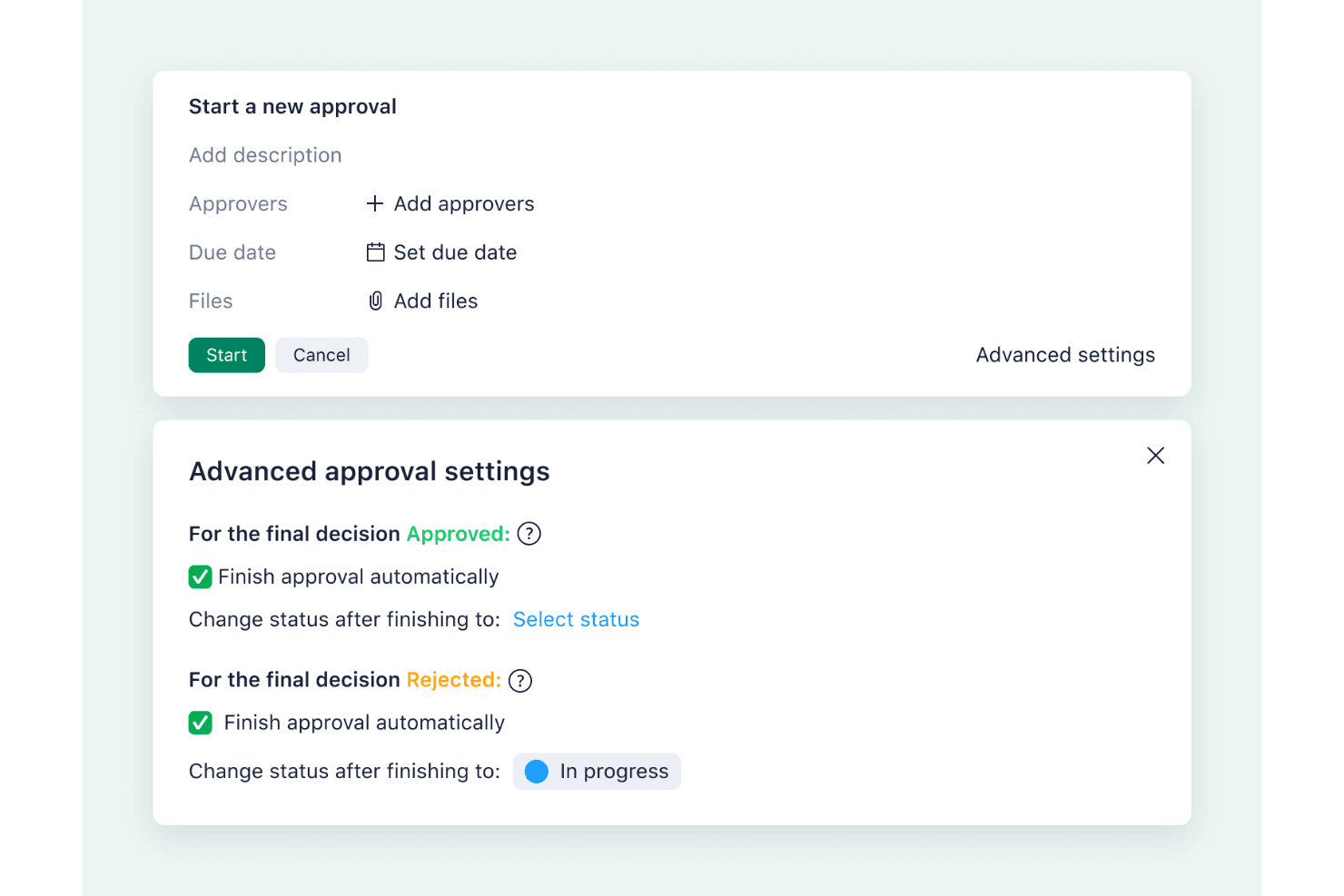
Wrike’s automated approval settings let teams manage reviews, assign approvers, and update task statuses automatically once decisions are made. Wrike is a work management platform with built-in proofing, structured approval workflows, and customizable request forms for routing creative assets through review.
Who Is Wrike Best For?
Wrike is a strong fit for marketing and creative teams that manage high volumes of incoming asset requests across multiple concurrent campaigns.
Why I Picked Wrike
I picked Wrike as one of the best because its request forms are genuinely the most configurable I've seen in this category. You can build branching logic that routes an asset to different approvers based on form answers, automatically trigger a multi-stage approval, and have the task status update on its own when a decision comes in. That end-to-end chain, from intake form to final sign-off, runs without manual handoffs.
Wrike Key Features
- Adobe Creative Cloud extension: Review and annotate files directly inside Photoshop, Illustrator, InDesign, and Premiere Pro without leaving the app.
- Version comparison mode: View two file versions side by side or in overlay with a draggable split bar, and approve or request changes from within the comparison view.
- Guest reviewer access: External stakeholders can comment and approve files via a link, with controls for password protection, expiry dates, download permissions, and version visibility.
- Video proofing: Leave frame-accurate comments at any point in a video, with frame-by-frame stepping and timestamp-sorted feedback.
Wrike Integrations
Wrike offers 400+ prebuilt connectors, including Adobe Creative Cloud, Bynder, MediaValet, Jira, GitHub, and Microsoft Teams. It also supports a REST API, two-way sync with Miro and Google Sheets via Unito, and Figma through Zapier.
Pros and Cons
Pros:
- Guest controls protect external review workflows
- Frame-accurate video feedback reduces review ambiguity
- Customizable forms route approvals automatically
Cons:
- Brand guideline enforcement remains undocumented
- Version comparison lacks automatic difference highlighting
 Best for video and image comparison review
- Free plan + free trial available
- From $15/user/month (billed annually)
Visit WebsiteCustomer Rating:4.5/5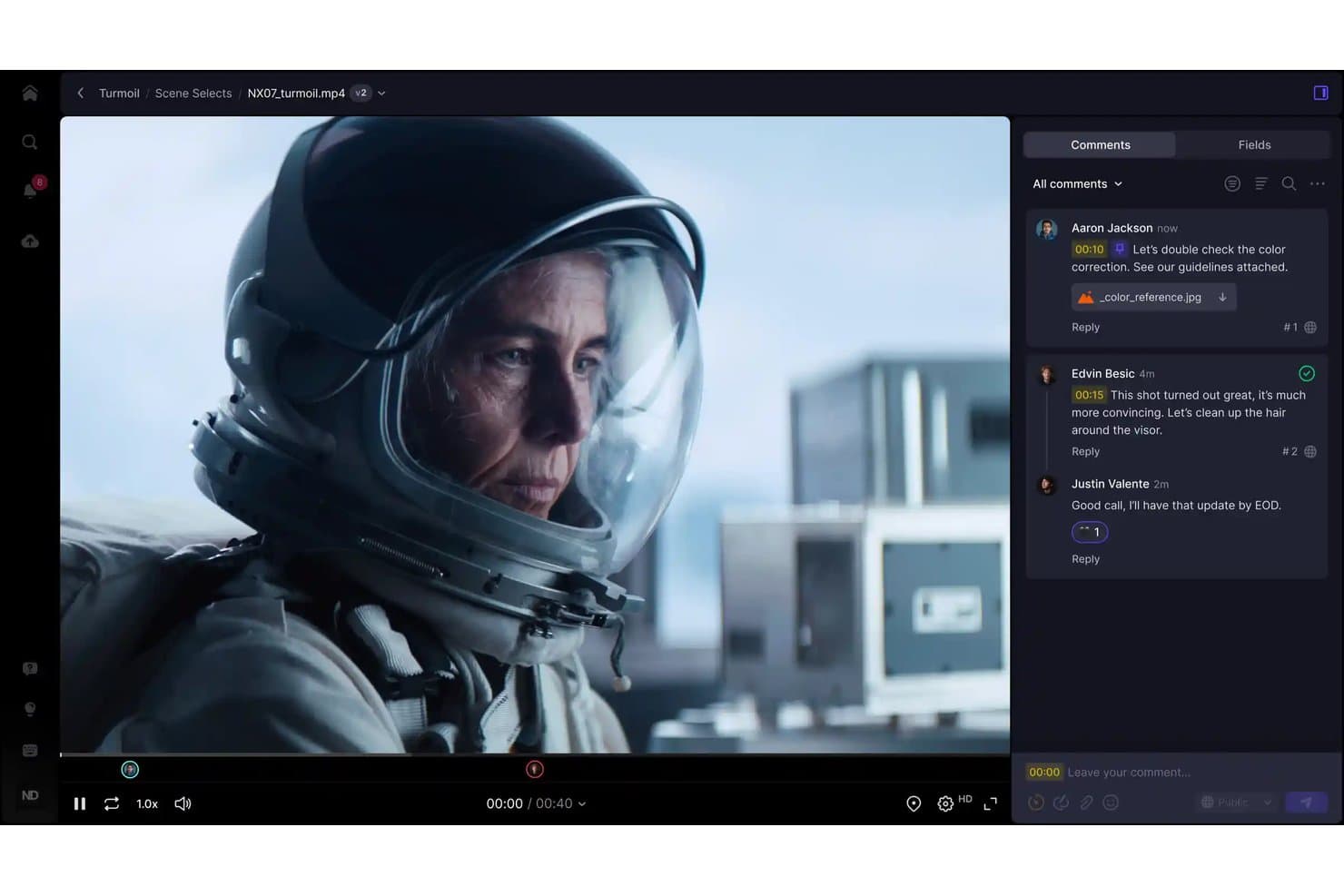
Frame.io lets users leave timestamped comments directly on video footage. Frame.io is an Adobe creative review platform that supports video, image, PDF, and design file approvals with frame-accurate annotation, version comparison, and external stakeholder sharing.
Who Is Frame.io Best For?
Frame.io is a strong fit for creative teams and agencies working heavily with video and visual media who need fast, precise client review cycles.
Why I Picked Frame.io
Frame.io earns its spot on my shortlist because of how precisely it handles video and image comparison review. I'm particularly impressed by the Comparison Viewer, which lets you overlay two assets, run a pixel-difference highlight, and scrub both videos in sync, even when comparing different file types. On top of that, frame-accurate range comments let you mark exactly which three seconds of a video clip need a change, not just a vague timestamp.
Frame.io Key Features
- Frame-accurate range comments: Mark a specific stretch of video using in/out points so reviewers know exactly which frames need changes.
- External share links: Clients review assets through branded, password-protected share links without creating a Frame.io account.
- Multi-format file support: Upload and review video, images, PDFs, audio, PSD, AI, INDD, Office documents, and HTML ZIP files in one workspace.
- Internal comments: Team and Enterprise members can leave comments visible only to workspace members, keeping internal notes separate from client-facing feedback.
Frame.io Integrations
Frame.io offers native integrations with Adobe Premiere Pro, After Effects, Lightroom, Adobe Workfront, and Final Cut Pro. It also provides a public Platform API and is available on Zapier.
Pros and Cons
Pros:
- Clients review without creating accounts
- Pixel-difference comparison exposes subtle visual changes
- Frame-accurate comments pinpoint exact revisions
Cons:
- No built-in brand guideline enforcement
- Native approval routing remains limited
Learn more about Frame.io: Best for enterprise-scale approval workflows
- Not available
- Pricing upon request
Visit WebsiteCustomer Rating:4.3/5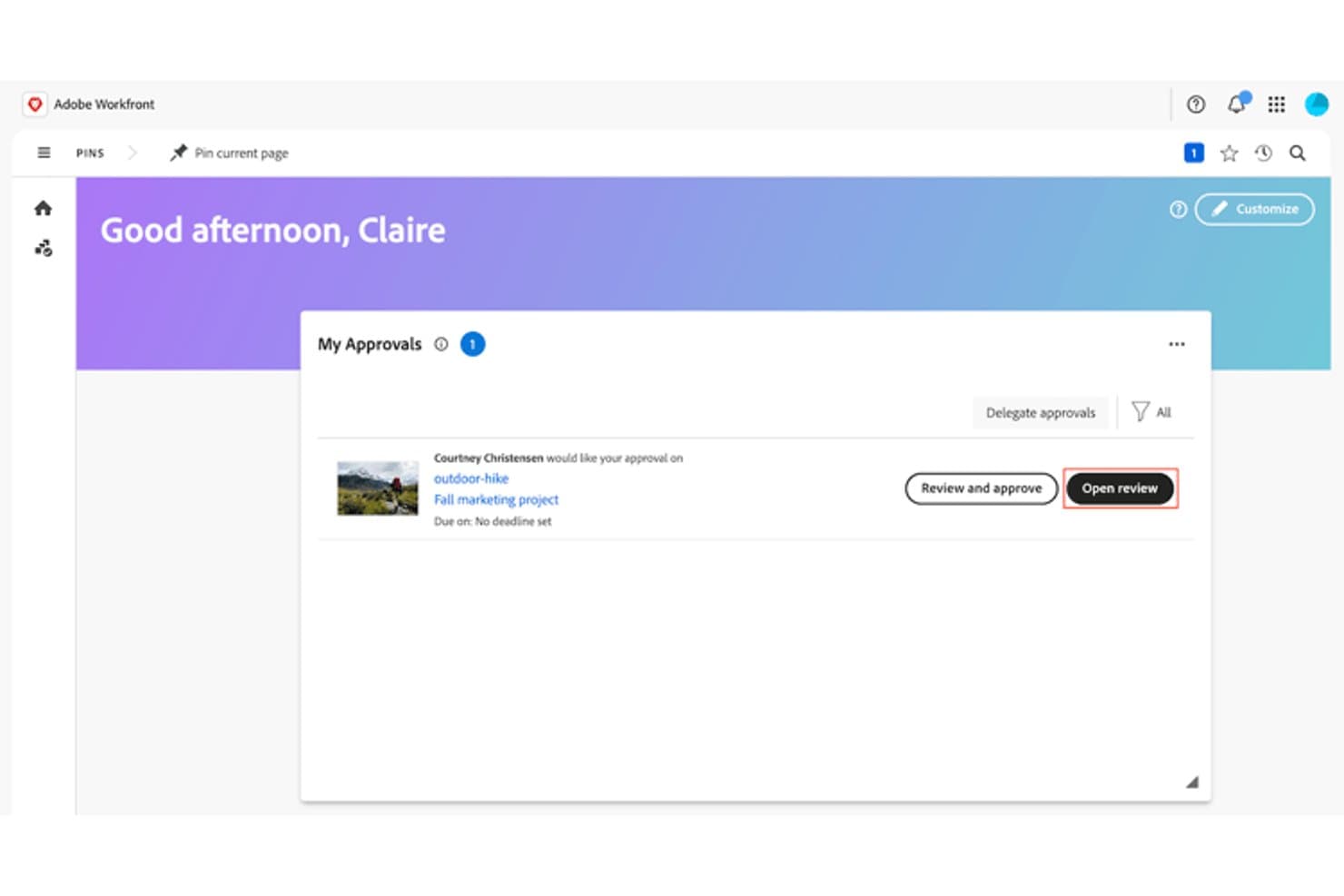
Adobe Workfront lets users review and approve design assets from a central dashboard. Adobe Workfront is an enterprise work management platform that combines structured multi-stage approval workflows, rich-media review via Frame.io, AI-powered brand compliance checks, and cross-project status tracking in one system.
Who Is Adobe Workfront Best For?
Adobe Workfront is built for enterprise creative and brand teams that need to manage high-volume, compliance-heavy approval pipelines across multiple concurrent projects.
Why I Picked Adobe Workfront
Adobe Workfront earns its spot on my shortlist because no other tool I've reviewed scales approval workflows like this: up to 100 stages and 30 parallel paths, with reusable templates that automatically calculate deadlines and send reminders at 72 and 24 hours out. I also love the AI Reviewer, which scores creative assets against your brand guidelines and flags issues before they reach a stakeholder. For enterprise teams running compliance-heavy pipelines across dozens of concurrent projects, that combination is genuinely hard to replicate.
Adobe Workfront Key Features
- Frame.io video review: Reviewers can add time-stamped comments directly to video assets inside the Frame.io viewer, supporting rich-media feedback on files up to 500 GB.
- AI Reviewer brand check: This beta tool scores images against your brand guidelines and surfaces suggested fixes before assets reach stakeholders.
- Mobile proofing app: The iOS and Android app lets reviewers comment on and approve documents, proofs, and tasks from any device.
- Audit trail logging: Every approval decision, including the date, time, user, and action, is automatically recorded in Workfront's change log.
Adobe Workfront Integrations
Adobe Workfront integrates with Adobe Creative Cloud, Frame.io, Adobe Express, Experience Manager Assets, GenStudio for Performance Marketing, and Figma through Fusion. It also connects with Slack and Microsoft Teams for approval notifications and task updates.
Pros and Cons
Pros:
- Logs approval decisions for compliance audits
- Supports timestamped video feedback up to 500GB
- Handles 100 approval stages and 30 paths
Cons:
- Frame.io comments bypass Workfront audit logs
- External reviewers need Frame.io accounts
Learn more about Adobe Workfront: Best for regulated marketing team approvals
- Free demo available
- Pricing upon request
Visit WebsiteCustomer Rating:4.8/5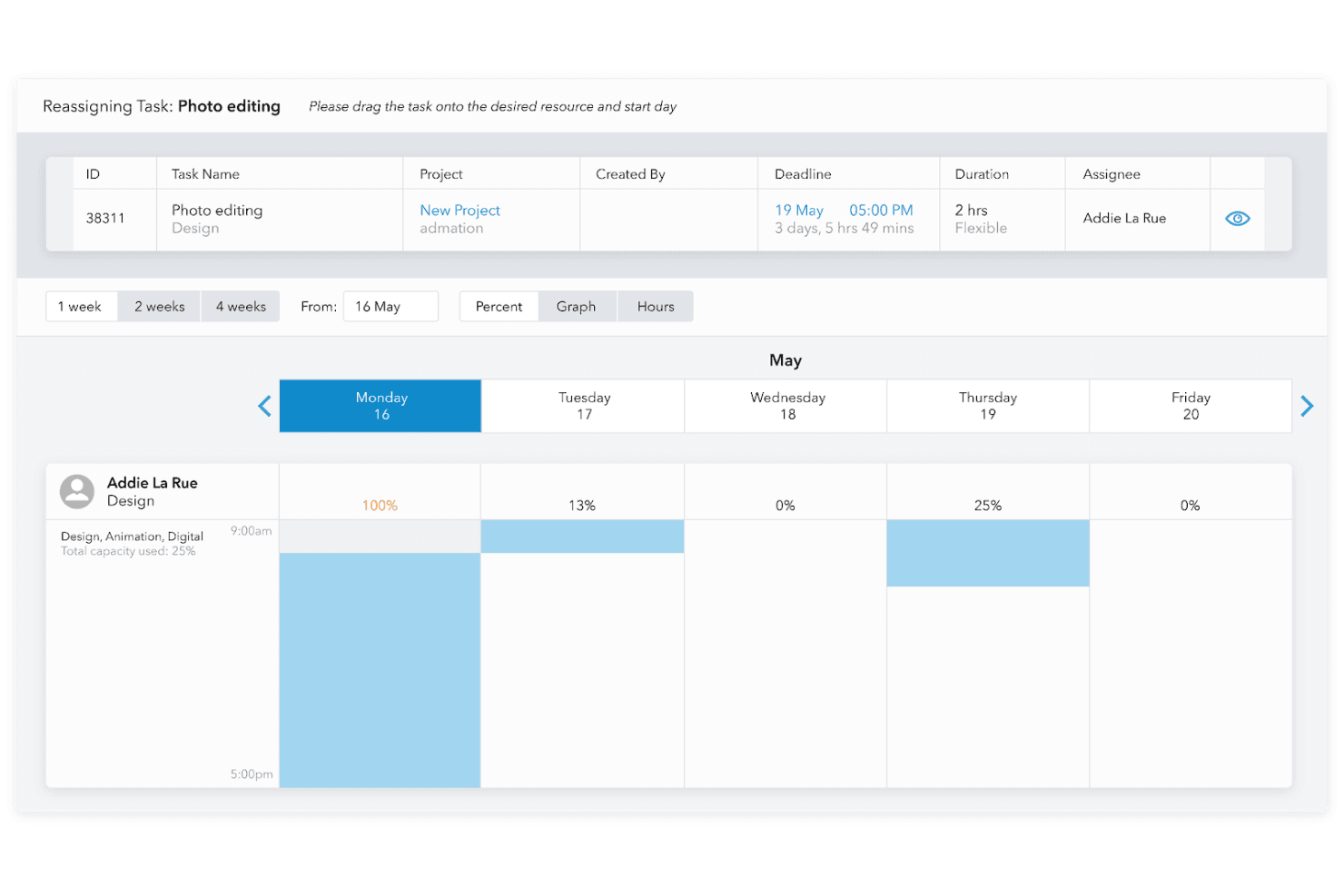
Admation simplifies task scheduling and progress tracking with intuitive design approval software. Admation is a marketing approval and project workflow platform that combines online proofing, multi-level approval workflows, AI compliance checking, and audit trail reporting in one system.
Who Is Admation Best For?
Admation fits marketing teams in regulated industries—financial services, healthcare, and insurance—where approval paths, compliance records, and brand governance aren't optional.
Why I Picked Admation
I've included Admation in my top picks because it's built specifically for marketing teams that can't afford approval shortcuts—think financial services or healthcare brands where every sign-off needs a paper trail. I love that its multi-level Approval Templates enforce mandatory, sequenced stages (creative, brand, legal, compliance, client) with no way to bypass them, and that AI compliance checking runs assets against your uploaded brand guidelines and regulatory rule sets before anyone signs off.
Admation Key Features
- Batch review and approval: Teams can review, mark up, approve, and forward groups of assets in a single action, with checklists completed once per batch.
- Four-mode version comparison: Side-by-side, swipe, overlay, and pixel contrast views let reviewers spot exact differences between asset versions.
- Frame-accurate video annotation: Reviewers can place time-stamped markup directly on video frames without leaving the proofing environment.
- Tamper-proof audit trail: Every comment, upload, approval, and forward is logged with a timestamp and username in an exportable, unalterable record.
Admation Integrations
Admation has native integrations with Simple Asset Manager, Simple Brand Manager, and Simple RetailPath, plus OpenID Connect SSO with Microsoft Entra ID and Okta. Native Figma, Adobe Creative Cloud, Jira, Asana, and Slack integrations aren’t documented.
Pros and Cons
Pros:
- Batch approvals reduce repetitive review work
- Four comparison modes clarify revisions
- Audit trails support regulated approvals
Cons:
- Updates have caused freezes and logouts
- Navigation can make projects hard to find
Learn more about Admation: Best for frame-accurate video feedback
- 7-day free trial available
- From $16/user/month (min. 3 users, billed annually)
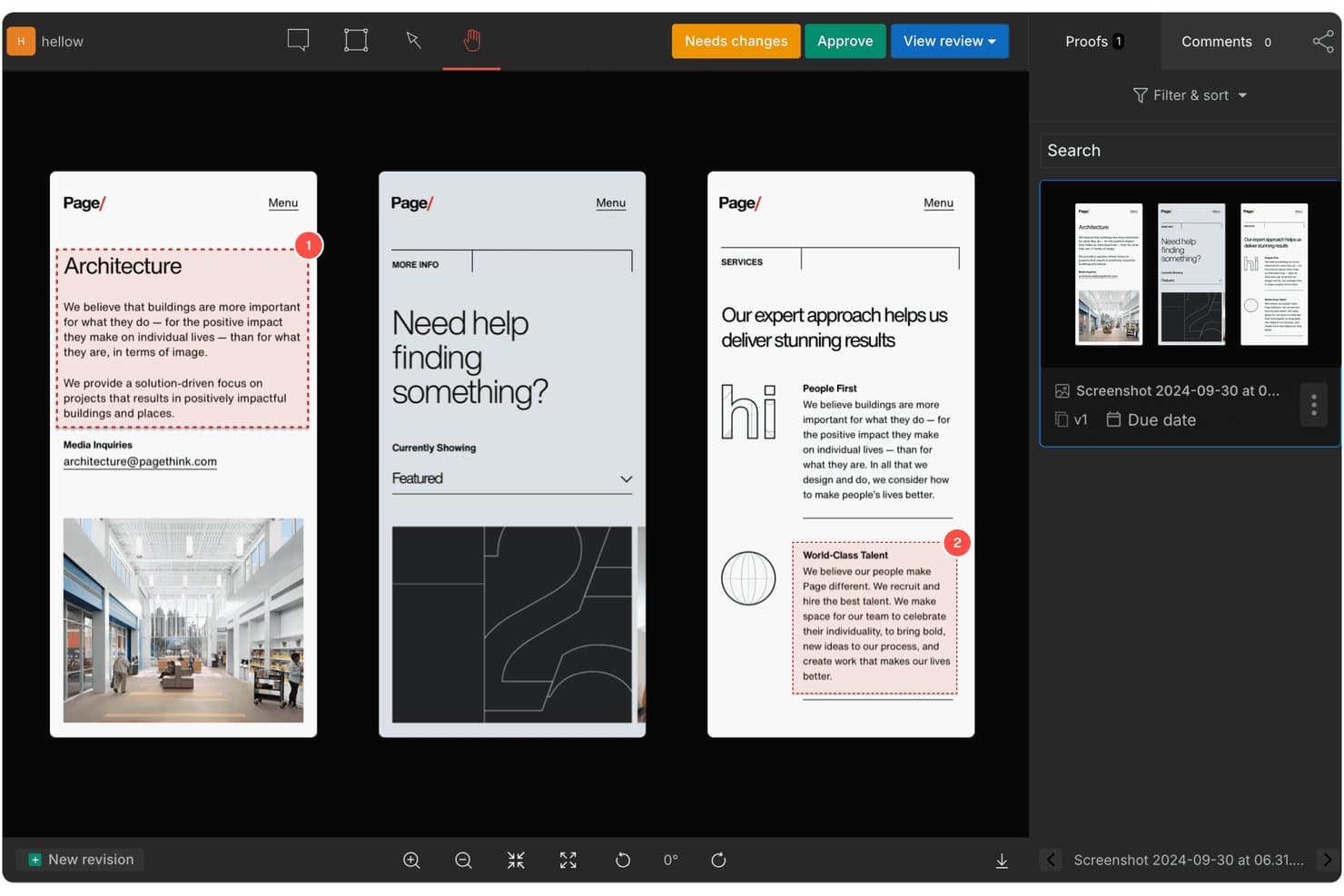
GoVisually lets users review and approve designs with numbered annotations. GoVisually is a design approval platform that centralizes feedback, version control, and stakeholder sign-offs across images, PDFs, and video files.
Who Is GoVisually Best For?
GoVisually is a strong fit for creative teams and agencies that regularly route video, image, and PDF assets through client or stakeholder review cycles.
Why I Picked GoVisually
GoVisually earns its spot on my shortlist because of how precisely it handles video feedback. Comments attach to an exact frame and timecode, so instead of a vague "fix the transition around 0:15," reviewers can pin notes directly to the moment they mean. I also like the Time Machine feature, which layers three or more revisions on a slider so you can scrub through changes rather than hunting through uploaded files.
GoVisually Key Features
- Approval checklists: Reviewers must tick off a set of required items before the Approve button activates, preventing incomplete sign-offs.
- External reviewer access: Stakeholders can open a shared link and leave feedback without creating an account, with optional password protection and link expiry.
- Bird's-eye View: A Pro-level dashboard that surfaces status across all active projects at once, helping you spot bottlenecks before they stall a deadline.
- Adobe Creative Cloud plugin: Lets designers share files, read comments, and check approval status directly inside Photoshop, Illustrator, or InDesign.
GoVisually Integrations
GoVisually offers native integrations with Adobe Creative Cloud, Slack, and Asana, plus webhooks. Its API supports custom workflows with Jira, Trello, Microsoft Teams, and CMS or asset libraries; Zapier is also available.
Pros and Cons
Pros:
- No-login reviews simplify stakeholder approvals
- Time Machine clarifies changes across revisions
- Frame-accurate video comments reduce revision ambiguity
Cons:
- Mobile markups challenge some clients
- Approval routing lacks conditional branching
Learn more about GoVisually: Best for ISO 27001-certified design sign-off
- Free demo + 10-day free trial available
- From $249/month
Visit WebsiteCustomer Rating:4.9/5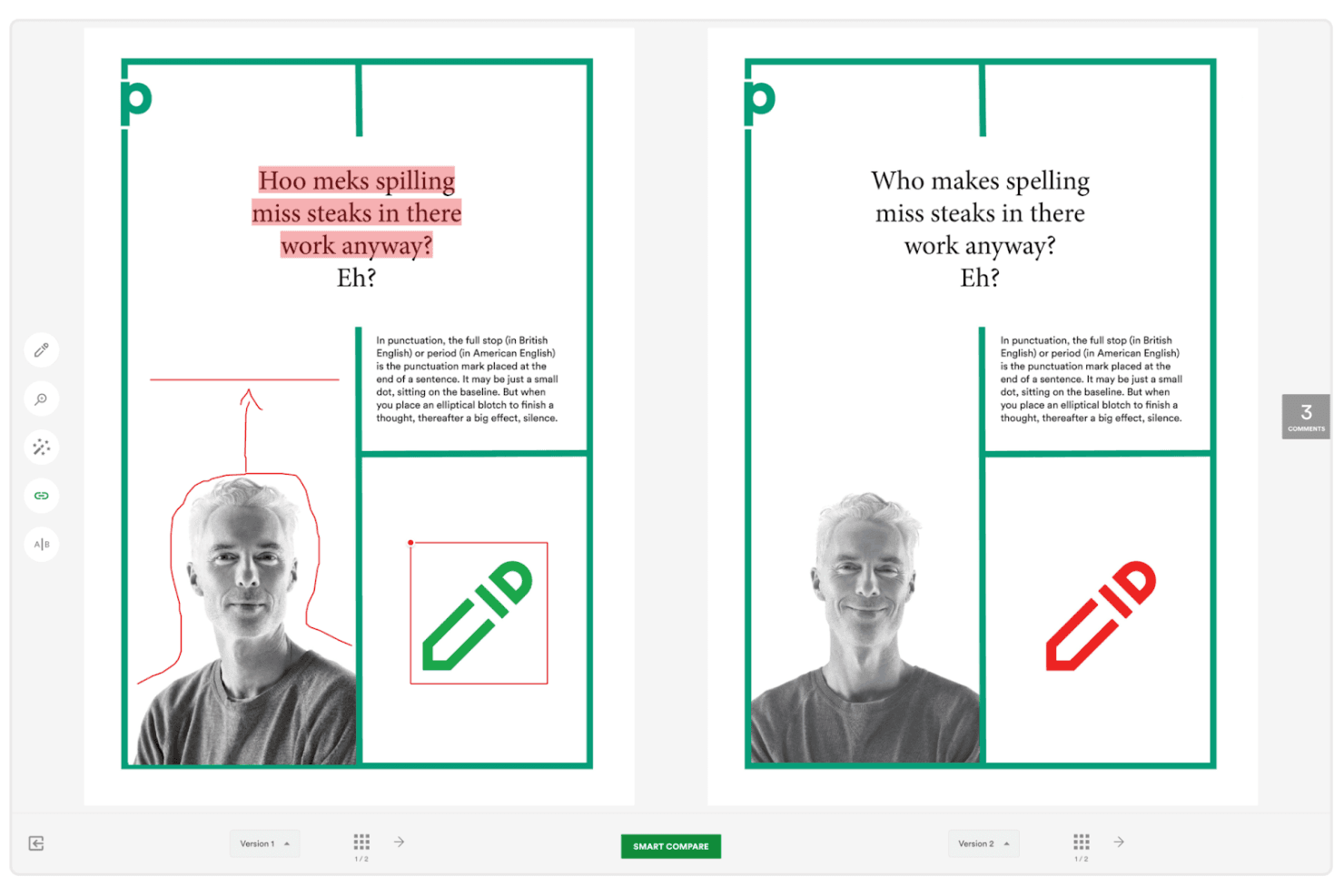
PageProof simplifies proofing with side-by-side version comparisons. PageProof is a design approval platform that covers markup and annotation, multi-stage approval workflows, version comparison, and file review across formats including video, audio, websites, and native design files.
Who Is PageProof Best For?
PageProof is a strong fit for marketing and creative teams in regulated industries where security compliance is a non-negotiable part of the approval process.
Why I Picked PageProof
I picked PageProof as one of the best because its ISO 27001:2022 certification is backed by real security infrastructure, not just a badge. I love that it uses patented triple-layer encryption and lets teams choose from 14 data storage regions to meet GDPR or CCPA requirements. Every approval also generates a tamper-proof audit log with quantum-resistant cryptography, so sign-offs hold up under scrutiny.
PageProof Key Features
- Frame-accurate video markup: Reviewers can comment on individual video frames, stretch comments across a time span, and step through footage frame by frame.
- Smart Compare: An AI-powered comparison tool that automatically detects and highlights visual and technical differences between proof versions, then adds comments on the changes.
- Reviewer roles and decision thresholds: Assign roles like Mandatory, Gatekeeper, and Approver to control how each workflow step progresses, and set how many decisions are required before a proof moves forward.
- Built-in checking tools: A suite of in-proof utilities including a ruler, color and font analyzer, barcode and QR code checker, spell check, and a WCAG color-contrast check.
PageProof Integrations
PageProof offers native integrations with Adobe Creative Cloud, Figma, Jira, Asana, monday.com, Trello, ClickUp, Slack, Microsoft Teams, and MediaValet. It supports custom connections through an API, SDK, webhooks, Make, and Zapier.
Pros and Cons
Pros:
- Feedback stays centralized across formats
- Tamper-proof approval audit trails
- Frame-accurate video markup
Cons:
- Approval loops can delay revisions
- Crashes reported during heavy use
Learn more about PageProof: Best for real-time collaboration
- 14-day free trial
- From $35/5 users/month
Visit WebsiteCustomer Rating:4.8/5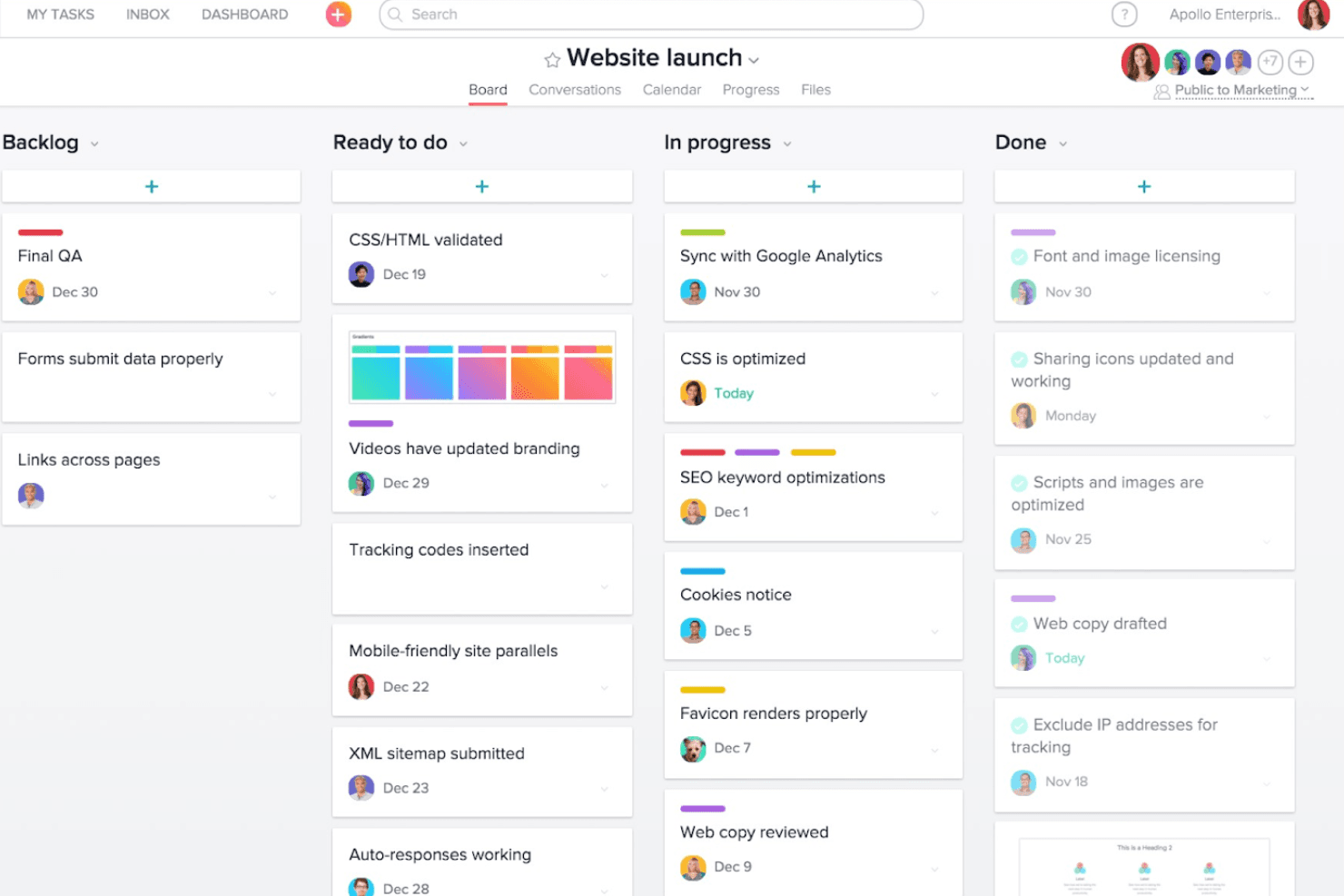
Approval Studio supports your workflow by visually tracking project progress and collaboration across tasks with ease. Approval Studio is a design approval platform with annotation tools, structured review workflows, version comparison, and multi-format file support built for creative and marketing teams.
Who Is Approval Studio Best For?
Approval Studio is a strong fit for creative and marketing teams that need designers, internal stakeholders, and external clients reviewing work together in real time.
Why I Picked Approval Studio
I've included Approval Studio in my top picks because its live chat, real-time viewer count, and Online Review Sessions let designers and stakeholders work through feedback together, not in separate slow-moving email threads. I especially like the four comparison modes: Toggle, Fader, Difference, and Side-by-Side sync let everyone confirm exactly what changed between versions without hunting through revision history. The Adobe CC extension takes this further by letting designers receive and respond to annotations without ever leaving Photoshop or Illustrator.
Approval Studio Key Features
- Adobe CC extension: lets designers upload artwork and receive annotated feedback directly inside Photoshop, Illustrator, or InDesign without switching apps.
- ABC compliance report: AI grades an asset against an uploaded brief, brand guideline, or regulatory checklist and produces a scored compliance report.
- Structured multi-stage workflows: sequential and parallel review stages route files to predefined reviewers, with automatic notifications, deadlines, reminders, and escalation rules at each step.
- Unlimited external reviewer access: external stakeholders join reviews through a link with no account required, and there's no cap on the number of reviewers per project.
Approval Studio Integrations
Approval Studio offers five documented native integrations: Adobe CC, Figma, Slack, Microsoft Teams, and Shopify. It also supports REST and GraphQL APIs, SSO through Google and Okta, and Zapier.
Pros and Cons
Pros:
- Timestamped audit trails document approval decisions
- Unlimited external reviewers simplify client sign-off
- Four comparison modes reduce version confusion
Cons:
- No native audio, HTML5, or 3D support
- MP4-only video support limits media reviews
Learn more about Approval Studio: Best for large-scale multi-format file reviews
- Free trial + free demo available
- Pricing upon request
Visit WebsiteCustomer Rating:4.6/5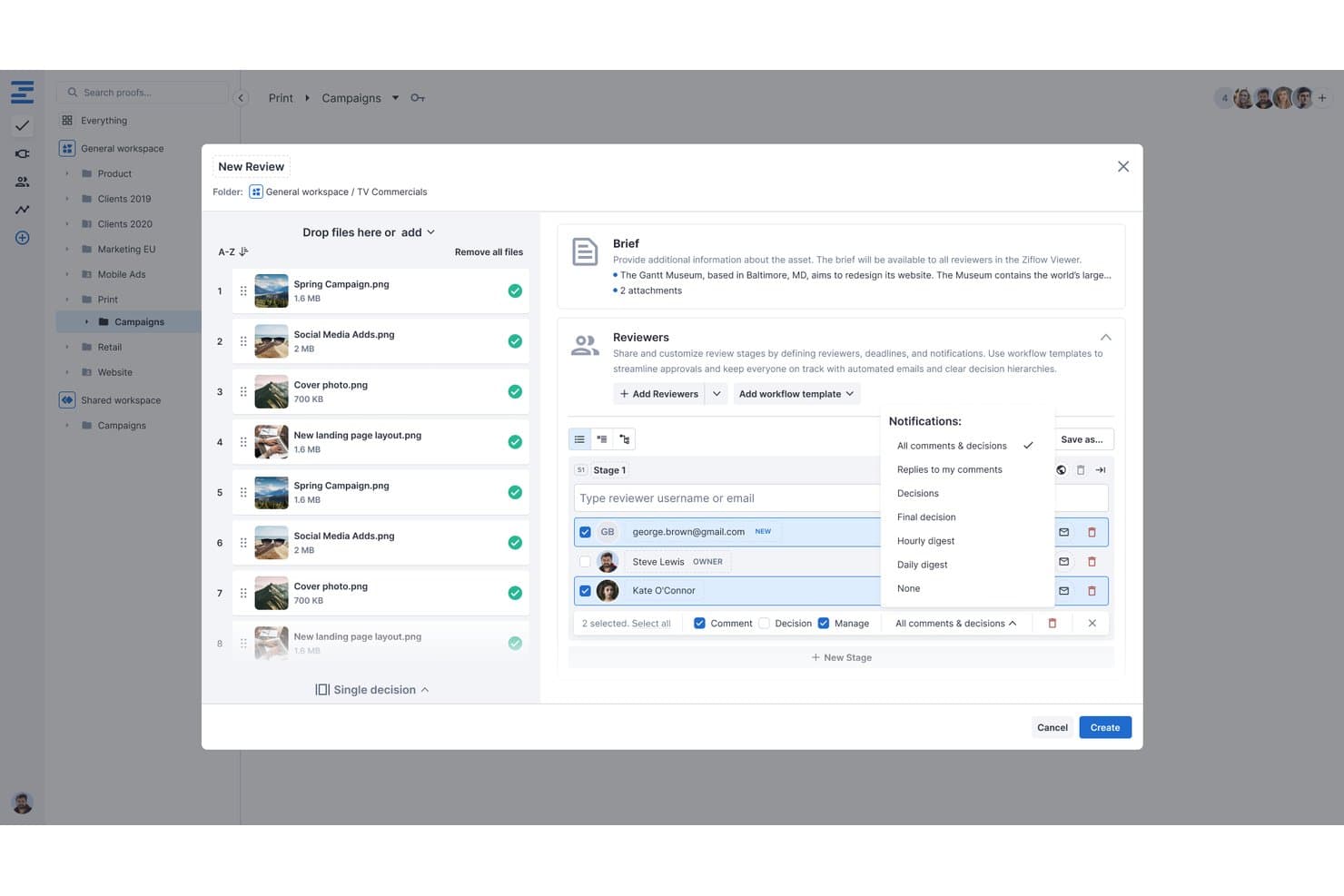
Ziflow lets users configure reviewers, notifications, and stages during proof creation. Ziflow is a design approval platform that supports markup, annotation, structured review workflows, version comparison, and multi-format file proofing across images, video, audio, PDFs, HTML5, and live websites.
Who Is Ziflow Best For?
Ziflow works well for creative and marketing teams managing high-volume review cycles across a wide range of file types, from video and audio to HTML5 and live websites.
Why I Picked Ziflow
I picked Ziflow as one of the best because no other tool on my shortlist handles sheer file variety at this scale: single proofs up to 5TB, 1,200+ supported formats, and native frame-accurate markup across video, audio, HTML5, and live websites in one viewer. I love that you can leave timeline-anchored annotations directly on a video without any conversion step, which matters when your team is reviewing a 4K campaign cut or a multi-channel audio mix.
Ziflow Key Features
- Structured approval workflows: Sequential, parallel, and conditional review stages with assignable deadlines, required decisions, and e-signatures built in.
- Pixel-level Auto Compare: Automatically highlights differences between proof versions on both static files and video, with adjustable sensitivity.
- Unlimited free guest reviewers: External stakeholders can view, comment, and approve proofs on any plan without needing a paid seat or a login.
- Adobe Creative Cloud and Figma plugins: Push proofs directly from Photoshop, Illustrator, InDesign, Premiere Pro, After Effects, and Figma into Ziflow without leaving your design tool.
Ziflow Integrations
Ziflow offers integrations with Adobe Creative Cloud, Figma, Final Cut Pro X, monday.com, Asana, Dropbox, Google Drive, SharePoint, Slack, and Microsoft Teams, plus a REST API, webhooks, Ziflow Connect, and Zapier.
Pros and Cons
Pros:
- Unlimited guests approve without paid seats
- Frame-accurate markup supports video and audio
- Handles 5TB proofs across 1,200 formats
Cons:
- Cross-version comments create confusion for reviewers
- Large uploads can take considerable time
Learn more about Ziflow: Best for compliance-driven sign-offs
- 30-day free trial + free plan + free demo available
- From $199/month
Visit WebsiteCustomer Rating:4.7/5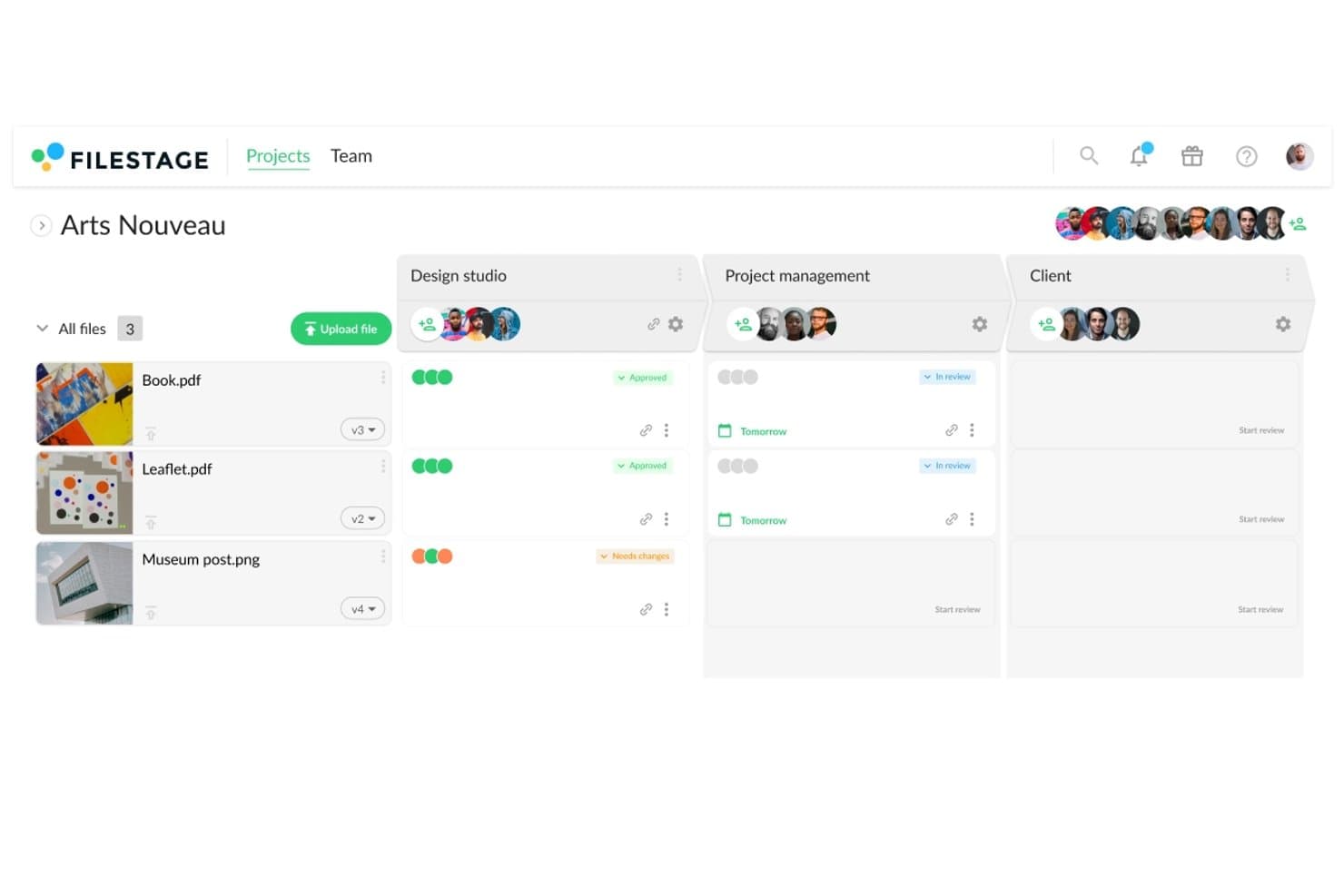
Filestage tracks design file approval status across reviewer groups. Filestage is a design approval platform that combines annotation tools, structured reviewer workflows, version comparison, and AI review agents across a wide range of file types, including video, documents, images, and live websites.
Who Is Filestage Best For?
Filestage is a strong fit for teams in regulated industries—pharma, legal, and MLR—where verified sign-offs, audit trails, and compliance with standards like FDA 21 CFR Part 11 are non-negotiable.
Why I Picked Filestage
Filestage earns its spot on my shortlist because it's built around the kind of verified sign-off that regulated teams actually need. The Enterprise "Approve and sign" feature issues a one-time password to each reviewer, creating a tamper-proof record that satisfies FDA 21 CFR Part 11 and EU Annex 11. Paired with a full audit trail that logs every human and AI action, it gives pharma, legal, and MLR teams documented proof that the right people approved the right version.
Filestage Key Features
- AI review agents: Automated agents for grammar, forbidden terms, barcode, and compliance checks comment directly on files before human reviewers step in.
- Version comparison tools: Side-by-side compare, overlay slider, and automated text-change highlighting let reviewers spot differences across any two versions of a file.
- Frame-accurate video comments: Reviewers can pin timestamped comments to specific frames in a video, so feedback stays tied to the exact moment it references.
- Multi-format file support: Filestage natively handles documents, RAW images, MXF video, audio, live websites, and HTML files up to 20 GB.
Filestage Integrations
Filestage integrates with Adobe Premiere Pro, Adobe InDesign, Adobe After Effects, Adobe Photoshop, Jira, monday.com, Google Drive, OneDrive, Dropbox, Slack, and Microsoft Teams. It also supports API access, webhooks, and Zapier.
Pros and Cons
Pros:
- Broad file support reduces format switching
- Frame-accurate comments clarify video feedback
- Verified sign-offs support regulated approvals
Cons:
- Reporting filters limit long-term oversight
- Advanced compliance controls require enterprise plan
Learn more about Filestage: Best for video and animation reviews
- Free plan + free demo available
- From $66/month (billed annually)
Visit WebsiteCustomer Rating:4.8/5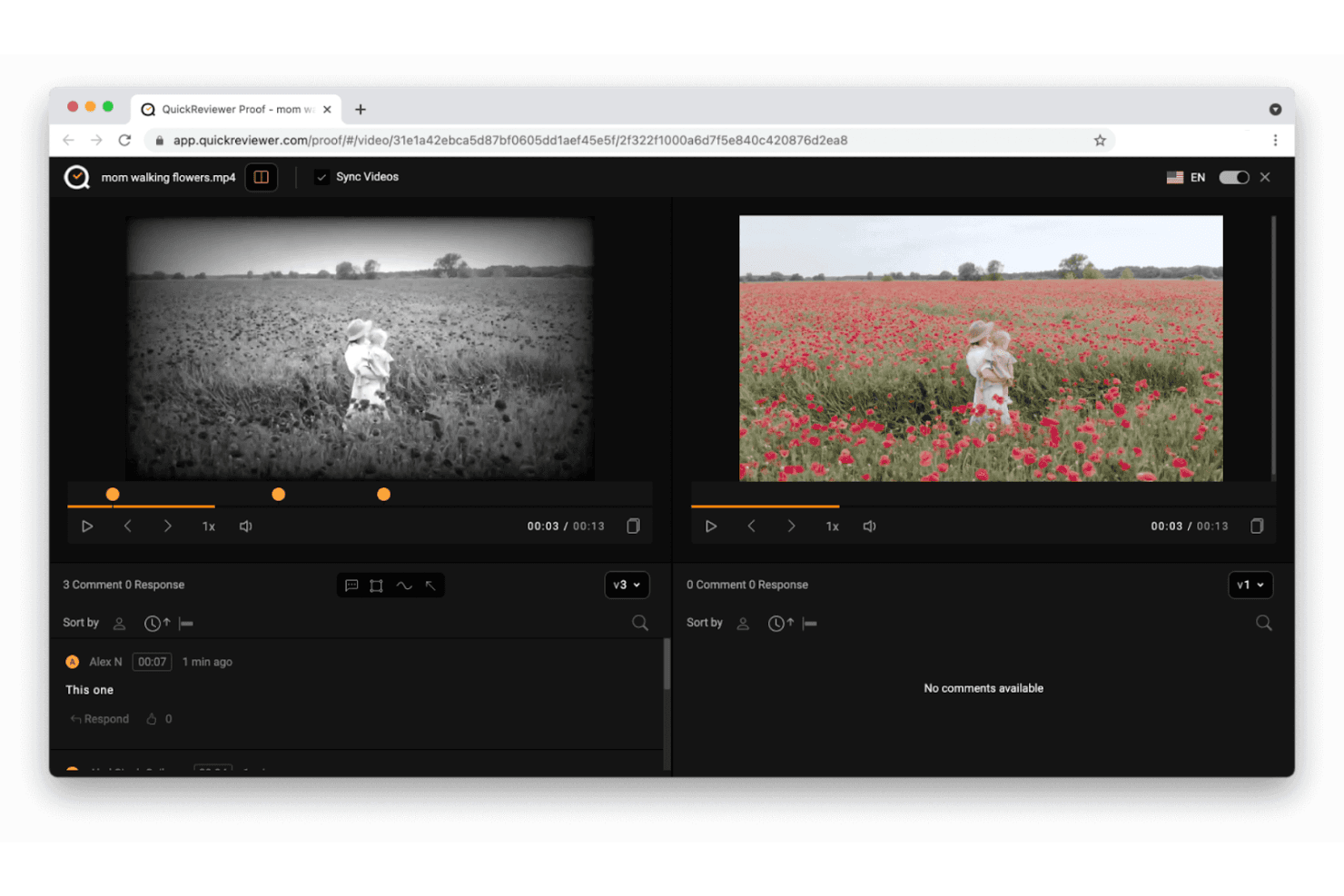
QuickReviewer accelerates feedback with side-by-side video comparison and collaborative design approval. QuickReviewer is a design approval platform that supports markup and annotation across video, audio, images, PDFs, HTML5, and 3D files, with frame-accurate commenting, version comparison, and multi-stage approval workflows.
Who Is QuickReviewer Best For?
QuickReviewer suits creative teams that need frame-accurate video and animation review with external stakeholder access before the platform shuts down on October 30, {{year}}.
Why I Picked QuickReviewer
I've included QuickReviewer in my top picks because its frame-accurate video markup is genuinely hard to beat for creative teams reviewing motion work. I love that you can drop a comment directly on a specific frame or across a range of frames, with all annotations visible in real time as the video plays. The pixel-by-pixel video comparison also means catching subtle color or motion differences between versions is fast and precise.
QuickReviewer Key Features
- Multi-format file support: Review video, audio, PDFs, images, HTML5, live websites, and 3D models in a single platform.
- Guest reviewer access: External stakeholders can comment and approve via a shared link without creating an account.
- Multi-stage approval workflows: Set up sequential review stages with custom statuses, checklists, and automatic deadline reminders.
- Project management integrations: Connect feedback directly to Jira, Asana, or Trello to turn comments into actionable tasks.
QuickReviewer Integrations
QuickReviewer offers documented integrations with Adobe Creative Cloud, Canva, Google Drive, Box, Dropbox, Jira, Asana, Trello, Slack, and Microsoft Teams. It also provides an API for custom integrations and supports Zapier.
Pros and Cons
Pros:
- Pixel comparisons expose subtle version differences
- Unlimited guest reviewers simplify stakeholder approvals
- Frame-accurate video comments reduce revision ambiguity
Cons:
- Comments and files cannot migrate to edoro
- Shutdown deadline creates immediate adoption risk
Learn more about QuickReviewer:
Diğer Tasarım Onaylama Yazılımları
Kısa listemde yer almayan ancak yine de göz atmaya değer bazı ek tasarım onaylama yazılımı seçenekleri şunlardır:
- 11GoProofBest for Adobe-native design sign-off
- 12ReviewStudioBest for agency-client review cycles
- 13IntelligenceBankBest for brand-compliant marketing approvals
- 14WipsterBest for unlimited external reviewer access
- 15StreamWorkBest for flat-rate team approval routing
- 16Artwork FlowBest for packaging and label compliance reviews
- 17MediaSiloBest for pre-release video asset sign-off
- 18HightailBest for file-sharing teams adding design review
- 19CageBest for lean creative team review workflows
- 20MarkUp.ioBest for no-login guest markup across 30+ file types
How I Evaluate Design Approval Software
I give the most weight to core functions: mark up creative files and route them through clear, multi-step approvals. Next, I look for differentiators such as Figma sync or frame-specific video comments. Finally, I consider onboarding, responsive support, and value for teams coordinating reviews across projects.
Core Functionality (Table Stakes For This List)
When I'm selecting tools for my list, I score each one on a scale from 0 (does not offer the functionality) to 5 (excels in this area) for each core functionality listed below. I then convert the total into a percentage to help assess each tool's overall fit, with extra weight on any functionalities I’ve deemed essential.
- Markup & Annotation (Essential): I look for precise pins, drawing, and comments on creative files, including timestamped feedback on video when teams review motion assets.
- Approval Workflows (Essential): I assess whether teams can route work through clear review stages, assign approvers, and track decisions when a campaign needs sign-off from several groups.
- Version Comparison: I check how clearly reviewers can compare revisions, such as spotting changes between two ad concepts without confusing feedback across versions.
- File Format Support: I look for native review of images, PDFs, and video so teams can handle varied campaign assets in one workflow.
- Status Tracking: I assess whether dashboards show each asset’s stage, owner, and deadlines across concurrent projects, making pending reviews easy to identify.
- External Reviewer Access: I check whether clients or other non-licensed reviewers can comment and formally approve through shared links, without needing a full account.
Once I have a list of tools that meet the criteria, I consider what sets each platform apart.
Differentiating Factors (What Sets Vendors Apart)
Here's how I compare and contrast different vendors:
Standout Features
I look for native integrations with tools like Figma or Adobe Creative Cloud, where two-way sync removes the need to export and re-upload files every time a revision lands. Brand guideline enforcement is another feature I evaluate closely—tools that flag off-brand colors or fonts before an asset reaches approvers catch issues that reviewers often miss under deadline pressure. I also check whether a platform offers mobile review and approval, since stakeholders traveling between meetings need to mark up and sign off on assets without waiting to reach a desktop.
Beyond Features
I check whether a tool connects to Jira or Asana so approval status flows into sprints without duplicate tracking. Cross-functional adoption matters just as much—if a legal reviewer or executive can't leave feedback without a tutorial, approvals stall. I also evaluate compliance certifications like SOC 2 and GDPR, especially when teams share unreleased product assets through external review links.
Tasarım Onaylama Yazılımı Nasıl Seçilir?
Uzun özellik listeleri ve karmaşık fiyatlandırma yapıları arasında kaybolmak kolaydır. Kendinize özgü yazılım seçim süreciniz üzerinde çalışırken odaklanmanıza yardımcı olmak için göz önünde bulundurmanız gereken faktörleri içeren bir kontrol listesi hazırladım:
| Faktör | Nelere Dikkat Edilmeli? |
| Ölçeklenebilirlik | Yazılımın ekibinizle birlikte büyüyebildiğinden emin olun. Performanstan ödün vermeden artan iş yüklerini ve daha büyük ekipleri yönetebilen çözümler arayın. |
| Entegrasyonlar | Kullandığınız araçlarla entegre olup olmadığını kontrol edin. Buna Adobe gibi tasarım yazılımları ve Trello veya Asana gibi proje yönetimi araçları dahildir. |
| Özelleştirilebilirlik | İş akışlarını ihtiyaçlarınıza göre uyarlama seçenekleri arayın. Panoları ve onay süreçlerini özelleştirebilme olanağı ekibinizin verimliliğini artırabilir. |
| Kullanım Kolaylığı | Arayüzün sezgisel ve kullanıcı dostu olup olmadığını değerlendirin. Ekibiniz, en az düzeyde eğitimle yazılımda gezinebilmelidir. |
| Bütçe | Maliyeti bütçenize göre değerlendirin. Gizli ücretler içermeyen şeffaf fiyatlandırma arayın ve yazılımı test etmek için ücretsiz deneme sürümü olup olmadığını kontrol edin. |
| Güvenlik Önlemleri | Yazılımın verilerinizi korumak için güçlü güvenlik önlemleri içerdiğini doğrulayın. Hassas bilgilerle çalışıyorsanız bu özellikle önemlidir. |
| Destek | Müşteri desteğinin erişilebilirliğini ve kalitesini değerlendirin. Gerektiğinde yardım alabilmeniz için sohbet, e-posta ve telefon gibi birden fazla kanal bulunduğundan emin olun. |
| Geri Bildirim Mekanizmaları | Yazılımın ayrıntılı geri bildirim toplamayı desteklediğinden emin olun. Açık iletişim için açıklama araçları ve yorum dizileri gibi özellikleri arayın. |
Tasarım Onaylama Yazılımlarındaki Eğilimler
Araştırmam sırasında farklı tasarım onay yazılımı sağlayıcılarından sayısız ürün güncellemesi, basın bülteni ve sürüm günlüğü derledim. Takip ettiğim yeni ortaya çıkan trendlerden bazıları şunlar:
- Gerçek zamanlı iş birliği: Özellikle yaratıcı ajanslar ve serbest çalışanlar olmak üzere daha fazla araç, yaratıcı varlıkları birlikte incelemek ve düzenlemek için bu özelliğe öncelik veriyor. Bu, daha hızlı geri bildirim, daha kısa teslim süreleri ve birden fazla formatta daha az gecikme sağlıyor.
- Yapay zekâ destekli içgörüler: Bazı sağlayıcılar, yaratıcı inceleme döngülerindeki kalıpları analiz eden yapay zekâ özelliklerini kullanıma sunuyor. Bu içgörüler darboğazları belirleyebilir, sonraki adımları önerebilir veya önceki proje verilerine dayanarak özel iş akışlarını optimize etmeye yardımcı olabilir.
- Gelişmiş güvenlik özellikleri: Hassas yaratıcı içeriklerin korunması sektörde bir standart hâline geldikçe birçok platform, izin denetimlerine, API düzeyinde kimlik doğrulamaya ve veri şifrelemeye yatırım yapıyor. Bu, ekiplerin uyumluluğu sağlamasına ve sanat eserlerinin onay süreci boyunca marka varlıklarını güvende tutmasına yardımcı oluyor.
- Entegre geri bildirim döngüleri: Artık birçok araç, tasarım dosyaları üzerinde doğrudan merkezi geri bildirim ve açıklama ekleme desteği sunuyor. Bu sayede tüm yorumlar, düzenlemeler ve kararlar tek bir yerde izlenebiliyor; sürüm denetimi iyileşiyor ve takip e-postalarına veya toplantılara duyulan ihtiyaç azalıyor.
- Kullanıcı deneyimine odaklanma: Sağlayıcılar, tasarım onay yazılımlarının benimsenmesini kolaylaştırmak için arayüzlerini geliştirmeye devam ediyor. Daha basit düzenler, daha hızlı başlangıç süreçleri ve daha az eğitim gereksinimi, bu araçları hem kurum içi ekipler hem de dış paydaşlar için daha erişilebilir hâle getiriyor.
Tasarım Onay Yazılımı Nedir?
Tasarım onay yazılımı, sosyal medya grafiklerinden markalı belgelere ve dijital kampanyalara kadar yaratıcı projeler için geri bildirim ve onay sürecini yönetmek amacıyla kullanılır. Girdi toplaması, düzenlemeleri yönetmesi ve görsel çalışmalar için nihai onay alması gereken yaratıcı ekipler, ajanslar ve serbest çalışanlar için özellikle yararlıdır.
Yazılım; gerçek zamanlı iş birliği, yaratıcı inceleme ve proje takibi gibi temel görevleri destekler. Artık birçok araç, revizyon döngülerini azaltmaya ve projeleri programa uygun şekilde ilerletmeye yardımcı olmak için yapay zekâ içgörüleri, sürüm denetimi ve entegre geri bildirim sistemleri gibi özellikler içeriyor. Bazı platformlar, marka veya mevzuat uyumluluğuna göre uyarlanmış sanat eseri onay iş akışlarını da destekliyor.
İster müşteri onaylarını yönetiyor ister kurum içi yaratıcı varlıklar üzerinde çalışıyor olun, bu araçlar tasarımları incelemenin her aşamasından geçirmek için merkezi bir alan sağlar.
Tasarım Onay Yazılımının Özellikleri
Tasarım onay araçlarını değerlendirirken şu temel özellikleri arayın:
- Gerçek zamanlı iş birliği: Birden fazla inceleyenin hızlıca geri bildirim bırakmasını ve karar vermesini sağlar.
- Sürüm denetimi: Tüm düzenlemeleri ve yinelemeleri düzenli tutarak ekiplerin her zaman doğru dosya üzerinde çalışmasını sağlar.
- Entegre geri bildirim döngüleri: Belgeler ve formatlar arasındaki yorumları bir araya getirerek ilerlemeyi takip etmeyi kolaylaştırır.
- Yapay zekâ destekli içgörüler: İş akışı sorunlarını veya tekrarlanan geri bildirimleri belirlemeye ve inceleme döngüsünü iyileştirme yolları önermeye yardımcı olur.
- Gelişmiş güvenlik özellikleri: Hassas çalışmaları korumak için izin denetimi, API entegrasyonu ve şifreleme içerir.
- Özel iş akışları: İsteğe bağlı aşamalar veya dış onaylar da dâhil olmak üzere onay sürecini özel ihtiyaçlarınıza uyarlar.
- Açıklama araçları: Kullanıcıların doğrudan belgeler, grafik tasarım dosyaları veya illüstrasyon formatları üzerinde geri bildirim bırakmasını sağlar.
- Proje yönetimi özellikleri: Son teslim tarihlerini, görevleri ve onayları tek bir sistemde takip eder.
- Sezgisel arayüz: Öğrenme eğrisini azaltarak hem ekip üyelerinin hem de müşterilerin kullanmaya başlamasını kolaylaştırır.
- Çok aşamalı onaylar: Birden fazla paydaşın dâhil olduğu karmaşık nihai onay süreçlerine olanak tanır.
Tasarım Onay Yazılımının Faydaları
Tasarım onay yazılımını uygulamak ekibiniz ve işletmeniz için çeşitli faydalar sağlar. Yararlanmayı bekleyebileceğiniz birkaç fayda şunlardır:
- Geliştirilmiş iletişim: Gerçek zamanlı iş birliği ve açıklama araçları, ekibinizin geri bildirim alışverişi yapma biçimini geliştirerek iletişim hatalarını azaltır ve karar alma sürecini hızlandırır.
- Zaman tasarrufu: Sürüm denetimi ve entegre geri bildirim döngüleri, herkesin aynı bilgiye sahip olmasını sağlayarak e-postalar ve toplantılar arasındaki gidip gelmelere harcanan zamanı en aza indirir.
- Geliştirilmiş güvenlik: Gelişmiş güvenlik özellikleri, hassas tasarım verilerinizi koruyarak sektör standartlarına uyumluluğu güvence altına alır ve işletmenizin itibarını korur.
- Artırılmış verimlilik: Özelleştirilebilir iş akışları ve yapay zekâ destekli içgörüler süreçleri optimize ederek ekibinizin yaratıcılığa ve üretkenliğe odaklanmasını sağlar.
- Daha iyi proje yönetimi: Proje yönetimi özellikleri, görevleri ve son teslim tarihlerini düzenlemeye yardımcı olarak projelerin zamanında ve belirlenen kapsam içinde teslim edilmesini sağlar.
- Kolaylaştırılmış onaylar: Çok aşamalı onaylar, gerekli tüm paydaşları sürece dahil ederek kapsamlı geri bildirim alınmasını sağlar ve gözden kaçan ayrıntıların olasılığını azaltır.
- Kullanıcı dostu deneyim: Sezgisel arayüz, ekibinizin yazılıma hızla uyum sağlamasına ve yazılımı etkili bir şekilde kullanmasına olanak tanıyarak öğrenme sürecini kısaltır ve benimsenme oranlarını artırır.
Tasarım Onaylama Yazılımının Maliyetleri ve Fiyatlandırması
Tasarım onaylama yazılımı seçmek, mevcut çeşitli fiyatlandırma modellerinin ve planların anlaşılmasını gerektirir. Maliyetler özelliklere, ekip büyüklüğüne, eklentilere ve daha birçok etkene göre değişir. Aşağıdaki tabloda yaygın planlar, ortalama fiyatları ve tasarım onaylama yazılımı çözümlerinde genellikle bulunan özellikler özetlenmektedir:
Tasarım Onaylama Yazılımı İçin Plan Karşılaştırma Tablosu
| Plan Türü | Ortalama Fiyat | Yaygın Özellikler |
| Ücretsiz Plan | $0/kullanıcı/ ay | Temel geri bildirim araçları, sınırlı depolama ve temel sürüm denetimi. |
| Kişisel Plan | $5-$25/kullanıcı/ay | Gelişmiş geri bildirim araçları, orta düzeyde depolama, sürüm denetimi ve açıklama araçları. |
| İşletme Planı | $25-$50/ kullanıcı/ay | Ekip iş birliği, artırılmış depolama, gelişmiş güvenlik ve özelleştirilebilir iş akışları. |
| Kurumsal Plan | $50+/kullanıcı/ ay | Sınırsız depolama, kapsamlı güvenlik, çok aşamalı onaylar ve özel destek. |
Tasarım Onay Yazılımı SSS
Tasarım onay yazılımı hakkında sık sorulan soruların bazı yanıtları:
Tasarım onay yazılımı iş birliğini nasıl geliştirir?
Tasarım onay yazılımı, ekip üyelerinin doğrudan tasarım dosyaları üzerinde gerçek zamanlı geri bildirim sağlamasına olanak tanıyarak iş birliğini geliştirir. Bu, uzun e-posta zincirleri ve toplantı ihtiyacını azaltarak paydaşların ve tasarımcıların aynı fikirde olmasını sağlar. Araçlar ayrıca geri bildirimleri merkezileştirerek ekiplerin bunlara kolayca erişmesini ve gereken işlemleri yapmasını sağlar.
Tasarım onay yazılımı farklı dosya türlerini destekleyebilir mi?
Evet, tasarım onay yazılımlarının çoğu resimler, videolar ve belgeler dâhil olmak üzere çeşitli dosya türlerini destekleyebilir. Bu esneklik, ekibinizin farklı araçlar arasında geçiş yapmadan çeşitli projeler üzerinde çalışmasına olanak tanır. Tüm geri bildirimlerin ve onayların tek bir yerde yönetilmesini sağlar.
Çalışma eseri onay yazılımının güvenliğinde nelere dikkat etmeliyim?
Güvenliği değerlendirirken yazılımın verilerinizi korumak için uçtan uca şifreleme sunup sunmadığını kontrol edin. GDPR veya SOC 2 gibi sektör standartlarına uygunluk arayın. Bu özellikler, hassas tasarımlarınızın ve geri bildirimlerinizin yetkisiz erişime karşı güvende olmasını sağlar.
Tasarım onay yazılımını mevcut araçlarımla nasıl entegre edebilirim?
Birçok tasarım onay yazılımı çözümü Adobe Creative Cloud, Slack ve Trello gibi popüler araçlarla entegrasyonlar sunar. Bu entegrasyonlar, tasarım yazılımınızı proje yönetimi ve iletişim araçlarına bağlamanıza olanak tanıyarak ekibiniz için sorunsuz bir iş akışı oluşturur.
Tasarım onay yazılımını öğrenmek zor mudur?
Bir öğrenme süreci gerekebilse de tasarım onay yazılımlarının çoğu kullanıcı dostu olacak şekilde tasarlanmıştır. Sezgisel arayüzlere ve eğitimler ile web seminerleri gibi erişilebilir eğitim kaynaklarına sahip araçları tercih edin. Bu, ekibinizin hızla uyum sağlamasına ve yazılımın özelliklerinden en iyi şekilde yararlanmasına yardımcı olabilir.
Tasarım onay yazılımı uzaktan çalışan ekipleri nasıl destekler?
Tasarım onay yazılımı, konumdan bağımsız olarak gerçek zamanlı iş birliğini mümkün kılarak uzaktan çalışan ekipleri destekler. Ekip üyeleri tasarımlara her yerden erişip bunları inceleyebilir, gecikme olmadan geri bildirim ve onay sağlayabilir. Bu esneklik, ekip üyeleri farklı konumlara dağılmış olsa bile projelerin sorunsuz biçimde ilerlemeye devam etmesini sağlar.