

Özellik bayrağı yazılımı, her ürün yöneticisinin gizli silahıdır. Ürün yöneticisi olarak deneyiminiz benimkine benziyorsa, özellikleri açıp kapatabilme yeteneği sizi sayamayacağınız kadar çok kez zor durumdan kurtarmıştır; bu nedenle özellik bayraklarınızı kolayca oluşturmanızı, yönetmenizi ve kullanmanızı sağlayan araçlar bir zorunluluktur.
Bu nedenle, şu anda piyasadaki en iyi özellik bayrağı yazılımlarından oluşan bu listeyi test etmek, incelemek ve sıralamak için yüzlerce karmaşık ürünü yönetme konusundaki kişisel deneyimimden yararlandım.
Why Trust Our Software Recommendations
6,700+
Reviews
20
Industry experts
16+
Evaluation factors
14
Years
Our team has been testing and reviewing software since 2012. As product managers ourselves, we know how difficult—and important—it is to choose the right software.
For this guide, we evaluated tools using hands-on testing and independent research, scoring tools using our selection criteria.
Our reviews reflect our human editorial judgment, not a sales pitch.
Expert reviewers:
- Andrew LumbySenior TPM
- Cristiano ValimSenior UI/UX Lead


Özellik Bayrağı Yazılımları Karşılaştırma Tablosu
Bu karşılaştırma tablosu, en iyi özellik bayrağı yazılımı seçimlerimin fiyatlandırma ayrıntılarını özetlemektedir:
Score legend (out of 5)
- Excellent4.5–5
- Good4–4.4
- Average3–3.9
- Below average2–2.9
- Poor1–1.9
Sorted by: Default
| Tool | Starting Price | Website | |||||||
|---|---|---|---|---|---|---|---|---|---|
Best for cross-platform feature flagging | 3.8 out of 5 | 4 | 4 | 5 | 2 | 4 | 4 | $99/month Free plan available | Website |
Best for its role-based access controls | 4.0 out of 5 | 5 | 4 | 5 | 2 | 4 | 4 | $75/seat/month 14-day free trial + free demo available | Website |
Best for analytics and triage reports | 4.2 out of 5 | 5 | 4 | 3 | 4 | 4 | 5 | Pricing upon request Free plan available | Website |
Best for scheduled flag changes and approvals | 4.0 out of 5 | 4 | 4 | 5 | 4 | 4 | 3 | Pricing upon request Free demo available | Website |
Best for flags with built-in analytics and replays | 4.5 out of 5 | 5 | 5 | 5 | 4 | 4 | 4 | Pricing upon request Free plan available | Website |
Best for KPI-triggered automated rollbacks | 4.7 out of 5 | 4 | 5 | 5 | 5 | 4 | 5 | $495/month 30-day free trial + free demo available | Website |
Best for detailed user targeting | 4.5 out of 5 | 5 | 5 | 5 | 5 | 4 | 3 | Pricing upon request Free plan + Free trial + Free demo available | Website |
Best for flag releases tied to experiment data | 4.8 out of 5 | 5 | 5 | 5 | 5 | 4 | 5 | $150/month Free plan available | Website |
Best for flag targeting tied to live metrics | 4.7 out of 5 | 5 | 5 | 5 | 4 | 4 | 5 | Pricing upon request Free plan + free demo available | Website |
Best for open-source feature flags and A/B testing | 4.5 out of 5 | 5 | 4 | 5 | 5 | 4 | 4 | $40/user/month Free plan + free demo available | Website |


En İyi Özellik Bayrağı Yazılımları İncelemeleri
Her özellik bayrağı platformunun en iyi kullanım alanını, dikkat çekici bazı özelliklerini ve kullanıcı arayüzüne genel bir bakış sunan ekran görüntülerini göstermek için her aracın kısa bir açıklamasını burada bulabilirsiniz.
 Best for cross-platform feature flagging
- Free plan available
- From $99/month (unlimited seats)
Visit WebsiteCustomer Rating:4.6/5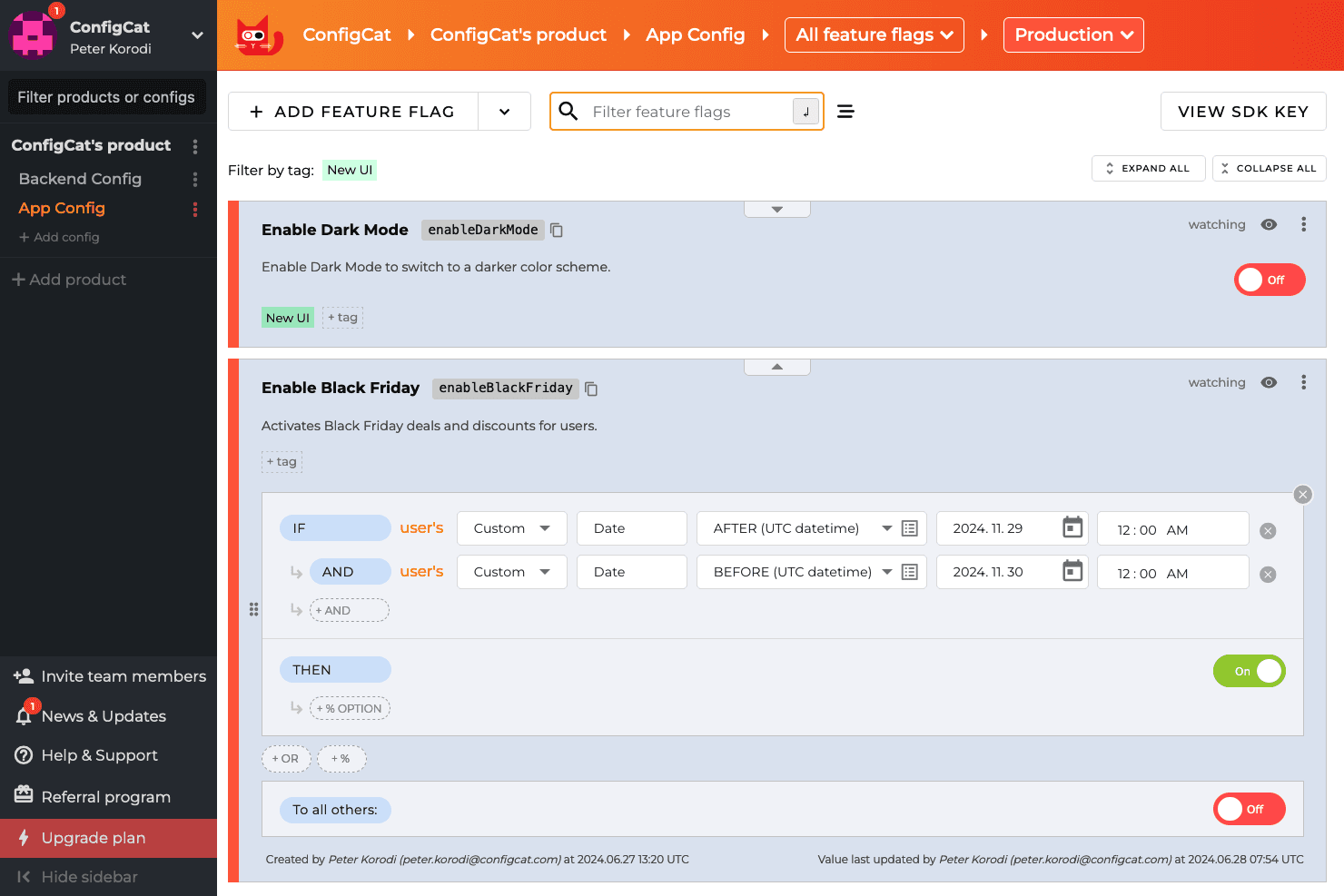
ConfigCat allows developers to turn features on and off using a dashboard, even after the code is deployed. ConfigCat is a hosted feature flag and remote configuration service that supports boolean flags, multivariate variations, targeted rollouts, percentage-based releases, and an emergency kill switch across an extensive range of SDKs spanning web, backend, mobile, game engines, and edge platforms.
Who Is ConfigCat Best For?
ConfigCat is a strong fit for engineering teams that ship across multiple platforms—web, mobile, backend, and game engines—and need one flag management system to cover all of them.
Why I Picked ConfigCat
I picked ConfigCat as one of the best because no other tool on this list matches its SDK breadth across genuinely different runtime environments. I'm talking Unity and Unreal Engine alongside Cloudflare Workers, Flutter, and Kotlin Multiplatform, all managed from a single dashboard. If your team ships a mobile app, a backend service, and a game, you can control one flag across all three without context-switching between tools. The Zombie Flags feature also helps my team stay disciplined by surfacing stale flags before they accumulate into technical debt.
ConfigCat Key Features
- Zombie Flags detection: Flags that haven't changed within a configurable number of days are automatically surfaced so your team can clean up stale toggles before they accumulate.
- SDK-side flag evaluation: Flag logic runs inside the SDK itself, so user data never leaves your infrastructure and reaches ConfigCat's servers.
- Terraform provider: You can manage flags and environments as code using ConfigCat's native Terraform provider, fitting flag management into existing IaC workflows.
- Unlimited seats on all plans: Every pricing tier includes unlimited team members, so you're not penalized for involving product managers, designers, or stakeholders in flag management.
ConfigCat Integrations
ConfigCat documents 20 integrations, including GitHub Actions, GitLab CI/CD, CircleCI, Bitrise, Terraform, Jira, Slack, Datadog, Amplitude, and Mixpanel. Its Management API supports custom integrations, while Zapier provides additional connectivity.
Pros and Cons
Pros:
- Zombie Flags expose stale toggles
- In-memory caching supports rapid emergency rollbacks
- Broad SDK coverage across diverse runtimes
Cons:
- SDKs poll instead of pushing updates
- No native statistics engine for experiments
Learn more about ConfigCat: Best for its role-based access controls
- 14-day free trial + free demo available
- From $75/seat/month
Visit WebsiteCustomer Rating:4.7/5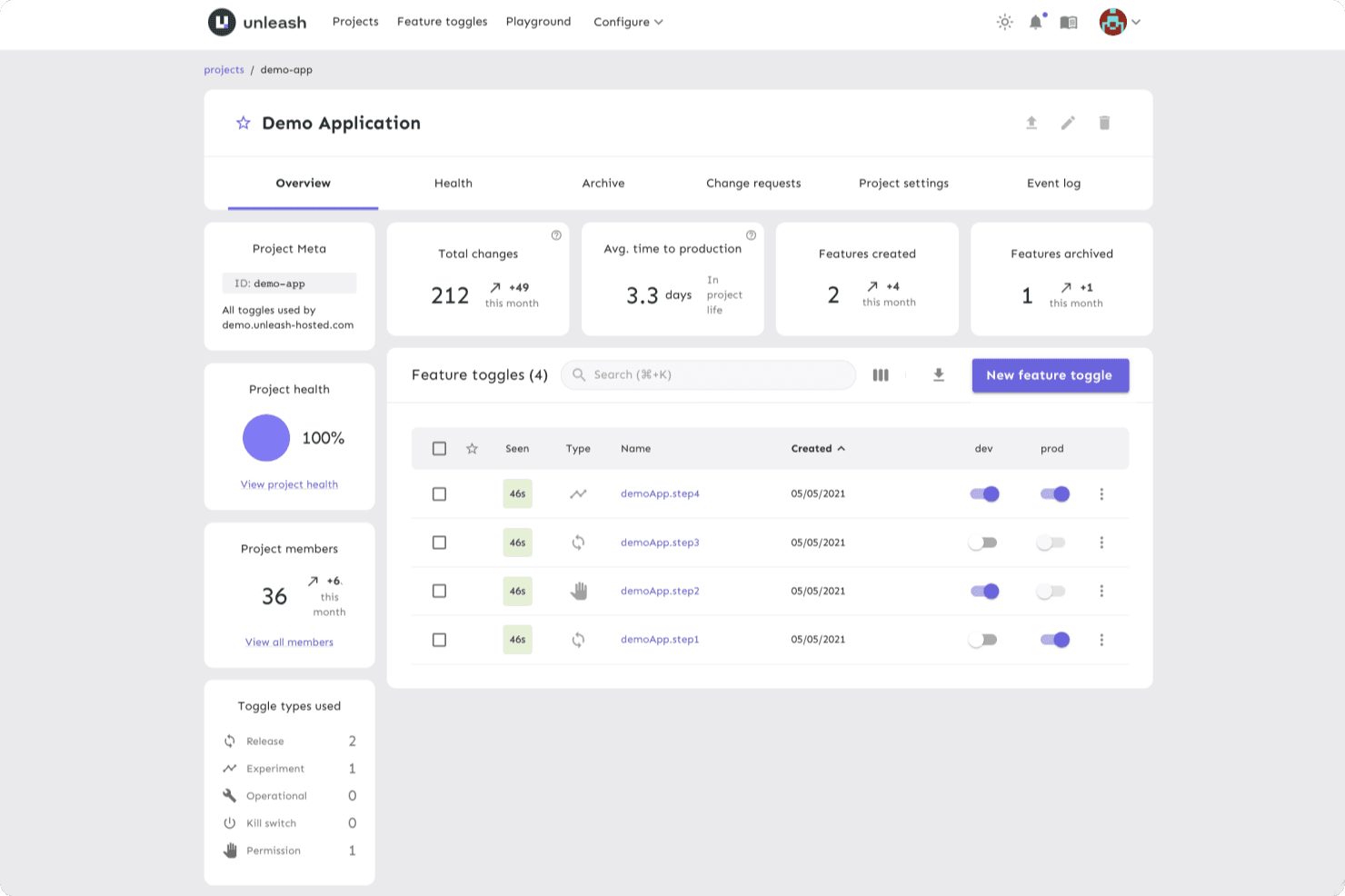
Unleash provides a unified platform for developers to manage flags, enabling them to make changes quickly in a controlled environment. Unleash is an open-source feature flag platform that supports feature toggling, targeted rollouts, kill switches, A/B testing with variants, and multi-environment flag management across 25+ SDKs.
Who Is Unleash Best For?
Unleash is a strong fit for engineering-led organizations that need granular control over who can view, edit, or toggle flags across large teams and multiple environments.
Why I Picked Unleash
I picked Unleash as one of the best because its role-based access controls go deeper than what most feature flag tools offer. You can define custom roles at the root, project, and environment level, so a developer can toggle flags in staging without touching production. I also like that change requests enforce two-person approval before any flag goes live, which matters when you're managing flags across large, distributed engineering teams.
Unleash Key Features
- Gradual rollout strategies: Roll out flags to a percentage of users using built-in activation strategies and reusable segments to control exactly who sees a change.
- Flag lifecycle management: Track stale flags, receive notifications, and monitor flag usage metrics to keep your flag inventory clean across projects.
- Kill switch: Instantly disable a feature in any environment without redeploying code, with per-environment permissions controlling who can toggle it.
- 25+ SDKs: Native SDKs for server-side, front-end, and mobile platforms—including React, Flutter, and Go—let any team integrate flag evaluation directly into their stack.
Unleash Integrations
Unleash offers four documented native integrations: Slack, Microsoft Teams, Datadog, and Jira. It also supports Admin, Frontend, and Client APIs for custom integrations, plus SAML 2.0 and OpenID Connect SSO.
Pros and Cons
Pros:
- Stale-flag tracking reduces flag sprawl
- Local evaluation supports fast flag decisions
- Granular roles protect production flag changes
Cons:
- Advanced controls can confuse navigation
- Experiment results need external analytics
Learn more about Unleash: Best for analytics and triage reports
- Free plan available
- Pricing upon request
Visit WebsiteCustomer Rating:4.6/5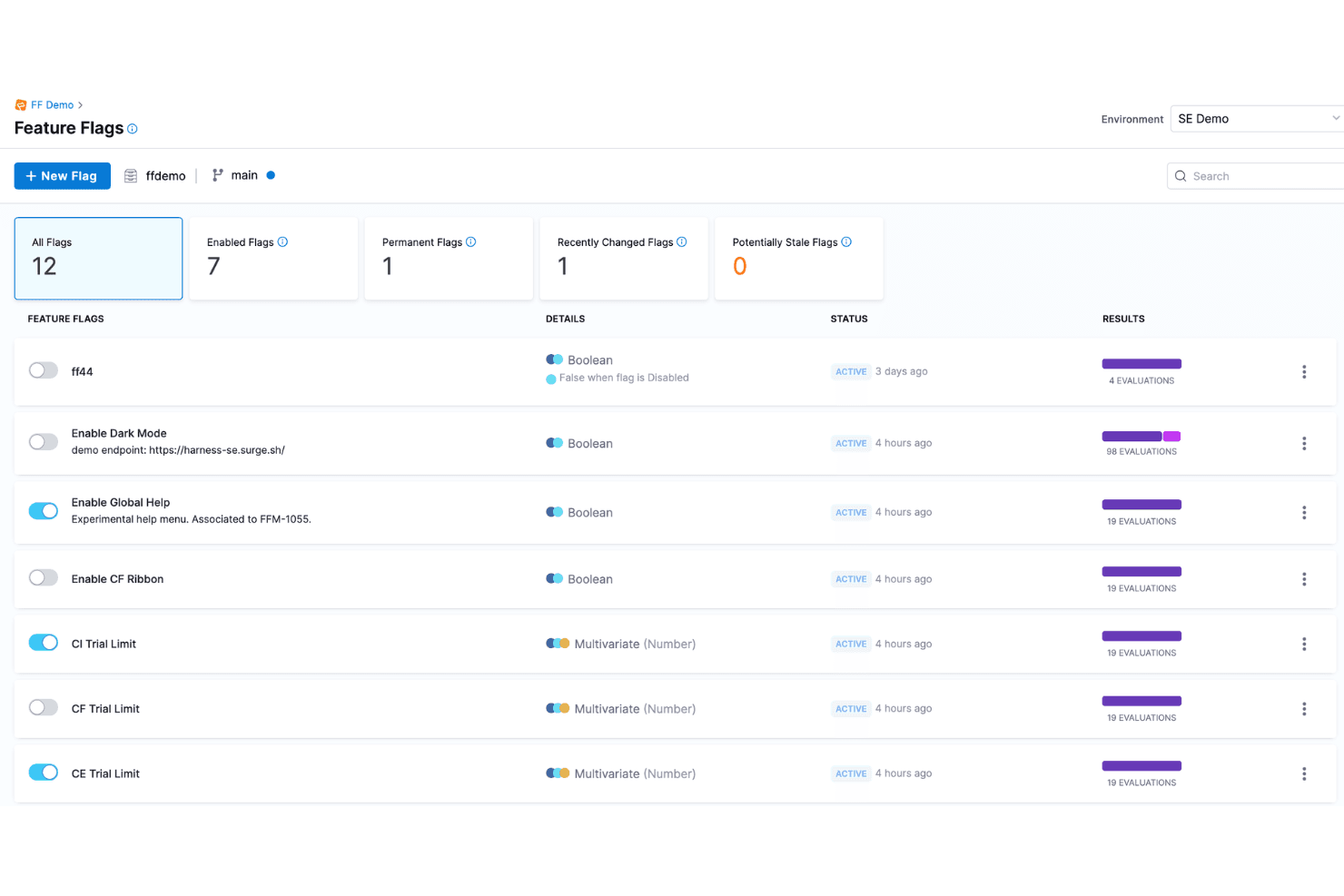
Harness is a modern, cloud-native software delivery platform that helps teams automate their deployment pipelines, including feature flags. Harness Feature Management & Experimentation (FME) is a feature flag platform that combines flag management, targeted rollouts, warehouse-native A/B testing, and automated rollback into a single module within the broader Harness DevOps platform.
Who Is Harness Best For?
Harness FME is a strong fit for enterprise engineering and product teams that need flag management, experimentation, and automated rollback in one platform.
Why I Picked Harness
I picked Harness FME as one of the best because its analytics and triage reporting capabilities are genuinely built into the rollback loop, not bolted on afterward. When a flag causes a harmful impact, Harness automatically triggers rollback in under 30 seconds based on measured metrics, not just alerts. I also love the warehouse-native experimentation layer, which pulls statistical significance directly from Snowflake, Redshift, or BigQuery, so triage reports reflect business KPIs your team already tracks.
Harness Key Features
- Stale flag detection: Harness automatically identifies unused flags and opens cleanup pull requests through Worker Agents for human review before merging.
- Warehouse-native experimentation: A/B test results pull directly from Snowflake, Redshift, or BigQuery, so metrics tie to your existing data models.
- Role-based access control: RBAC, approval workflows, OPA policy enforcement, and audit trails govern every flag change across your pipeline.
- Reusable segments: Define user segments once and apply them across flags, configs, and experiments without duplicating targeting logic.
Harness Integrations
Harness FME integrates with GitHub, GitLab, Bitbucket, Jenkins, Kubernetes, Datadog, New Relic, Snowflake, Amazon Redshift, and Google BigQuery for feature delivery, observability, and warehouse-native experimentation.
Pros and Cons
Pros:
- Automated stale-flag cleanup reduces maintenance
- Warehouse-native experiments measure business outcomes
- Analytics connect directly to rollback decisions
Cons:
- Product-specific reviews remain limited
- Mobile SDK coverage remains unclear
Learn more about Harness: Best for scheduled flag changes and approvals
- Free demo available
- Pricing upon request
Visit WebsiteCustomer Rating:4.2/5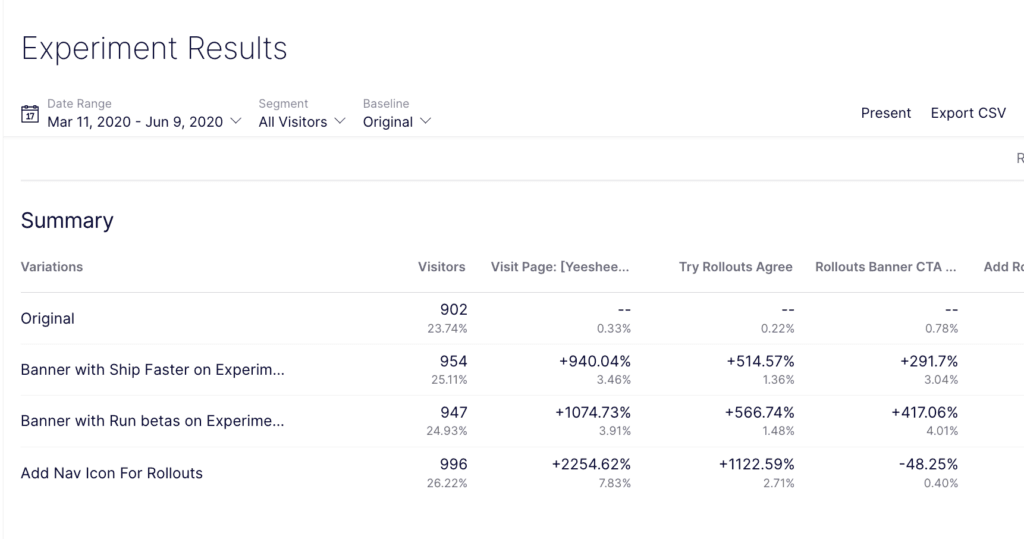
Optimizely helps you understand at a glance which of your rollouts was more successful. Optimizely is a feature flag and experimentation platform that combines targeted rollouts, A/B testing, approval workflows, and scheduled flag changes with governance tools like flag ownership tracking and audit history.
Who Is Optimizely Best For?
Optimizely is a strong fit for cross-functional product and engineering teams that need structured release governance, where both developers and non-technical stakeholders manage flags together.
Why I Picked Optimizely
Optimizely earns its spot on my shortlist because its approval workflows and scheduled flag changes set it apart from tools that treat flag management as a purely technical task. I particularly like that you can schedule a traffic percentage shift or audience swap in advance, and route it through a designated approver before it ever goes live. Flag changes are locked while a request is pending, and every decision is logged, so my team has a clear audit trail without any manual documentation.
Optimizely Key Features
- Staged rollouts: Incrementally release features to a percentage of users—1% to 10% to 50% and beyond—while targeting by user attributes, region, or audience.
- Warehouse-native analytics: Connect flag and experiment data directly to your existing data warehouse to measure impact on revenue, retention, and user behavior.
- MCP server integration: Manage flags, check statistical significance, and archive stale flags using plain-language commands through AI coding and assistant tools.
- Multiple environment support: Create and configure flags across development, staging, production, and custom environments from a single governance dashboard.
Optimizely Integrations
Optimizely supports 20+ SDKs, a REST API, webhooks for CI/CD and issue-tracking tools, and warehouse connections. Vercel offers an Optimizely edge middleware template, but specific native integrations aren’t clearly documented.
Pros and Cons
Pros:
- Local evaluation supports rapid kill switches
- Scheduled traffic and audience changes support releases
- Approval workflows lock pending flag changes
Cons:
- No documented automated rollback triggers
- Scheduled changes exclude variables and metrics
Learn more about Optimizely: Best for flags with built-in analytics and replays
- Free plan available
- Pricing upon request
Visit WebsiteCustomer Rating:4.5/5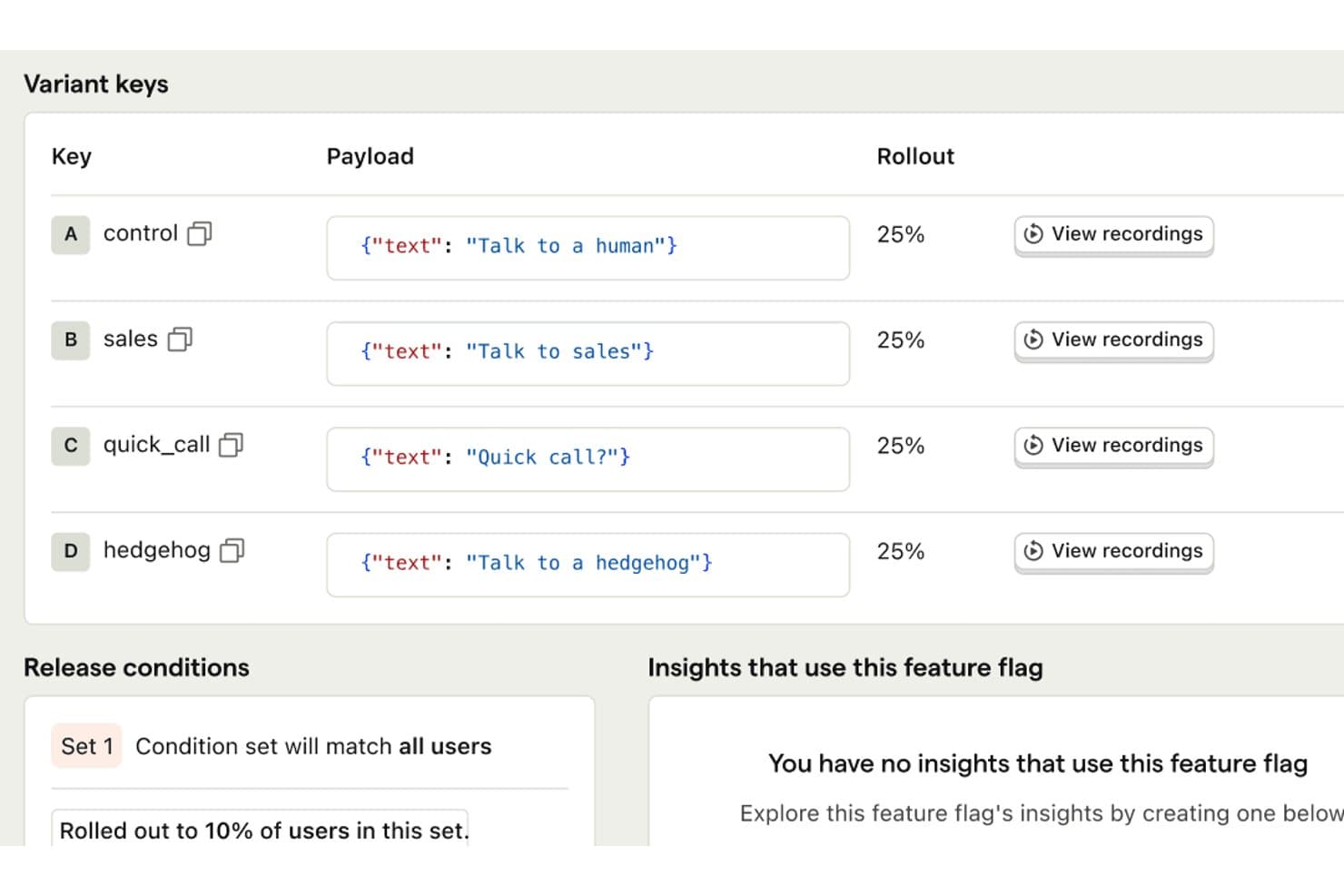
PostHog lets users run A/B tests with custom text variants and rollout controls. PostHog is a feature flag platform that combines boolean and multivariate flag toggling, targeted rollouts, A/B experimentation, session replay, and product analytics in a single tool.
Who Is PostHog Best For?
PostHog is a strong fit for product and engineering teams that want flags, experiments, analytics, and session replay in one place rather than stitching together multiple tools.
Why I Picked PostHog
PostHog earns its spot on my shortlist because it's the only feature flag tool I've used that puts flags, session replay, and product analytics in the same dashboard without any stitching. When I roll out a flag to 20% of users, I can immediately pull up replays of those sessions and see exactly how they're interacting with the new experience. I also love stale flag detection, which surfaces dead flags in your codebase so cleanup doesn't become a six-month backlog.
PostHog Key Features
- Scheduled flag releases: Set a flag to turn on, turn off, or change its rollout percentage automatically at a specific time.
- Early access opt-in widget: Let users join betas themselves through a built-in widget without any engineering work per request.
- Local flag evaluation: Cache flag values in server SDKs so flags resolve without a network call on every request.
- MCP server integration: Manage flags directly from AI coding agents like Cursor or Claude Code using natural-language prompts.
PostHog Integrations
PostHog integrates with Cursor, Claude Code, VS Code, and Slack through its MCP server and apps. It also offers 30+ SDKs and a full API for custom integrations and CI/CD workflows.
Pros and Cons
Pros:
- Scheduled releases reduce manual flag changes
- Session replays reveal rollout behavior
- Built-in analytics connect rollouts to outcomes
Cons:
- Governance controls require paid packages
- Lower tiers restrict project count
Learn more about PostHog: Best for KPI-triggered automated rollbacks
- 30-day free trial + free demo available
- From $495/month
Visit WebsiteCustomer Rating:4.7/5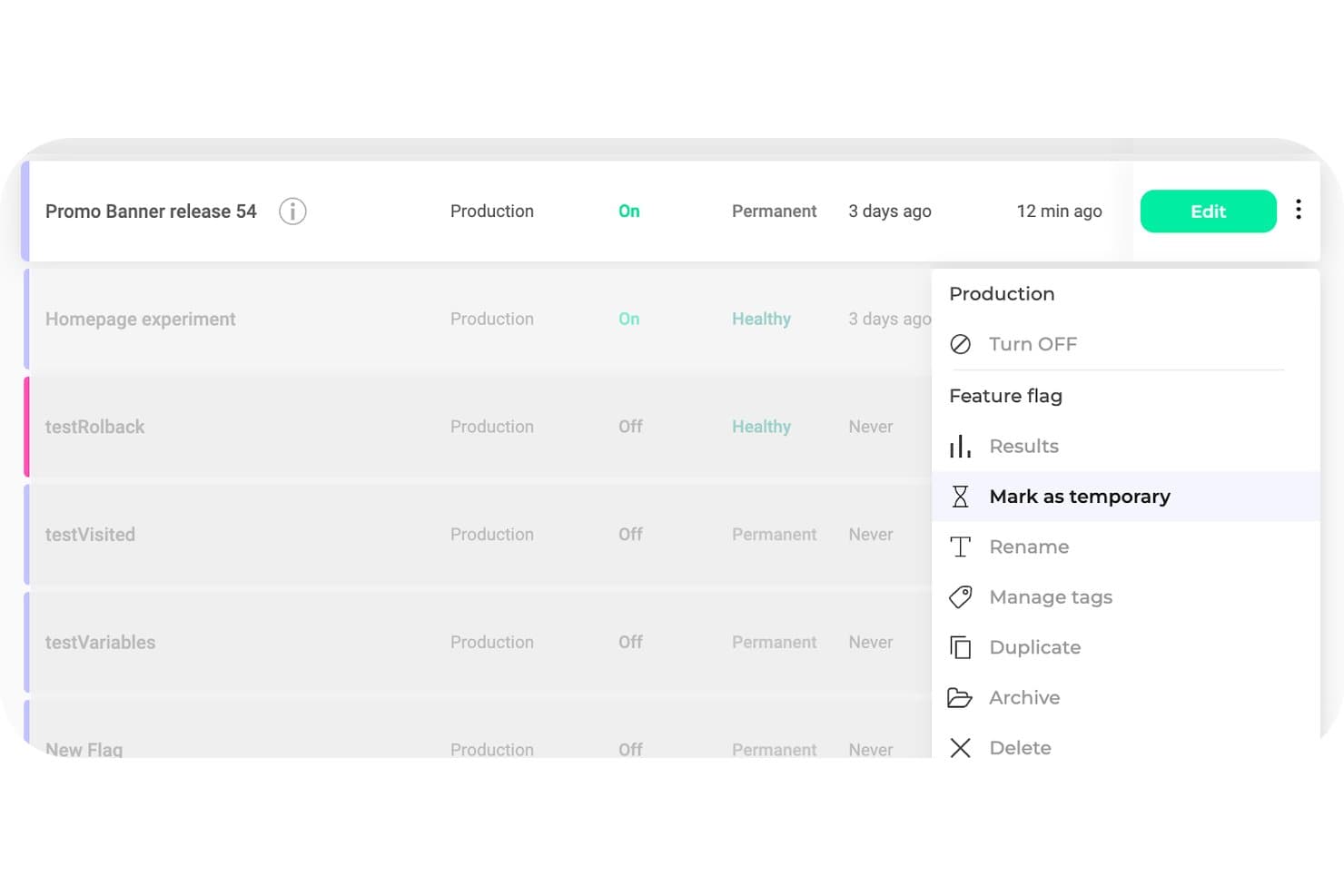
Kameleoon lets users manage feature flag lifecycle with archive, delete, and tagging options. Kameleoon is a feature flag and experimentation platform that combines flag toggling, targeted rollouts, A/B and multivariate testing, and automated rollbacks in a single dashboard with 12+ SDKs.
Who Is Kameleoon Best For?
Kameleoon is a strong fit for product and engineering teams that need experimentation and feature flag management in one platform, without juggling separate tools.
Why I Picked Kameleoon
Kameleoon earns its spot on my shortlist because of how it handles automated rollbacks tied directly to KPI thresholds. Rather than manually watching dashboards and toggling flags off when something breaks, Kameleoon monitors conditions through integrations like Datadog and Sentry and triggers a rollback the moment a metric crosses a set threshold. I also like that its stats engine, which includes CUPED and sequential testing, is wired into the same flag setup, so you're not piecing together separate tools to understand why a rollback happened.
Kameleoon Key Features
- OpenFeature SDK support: Kameleoon's SDKs are compatible with the OpenFeature standard, letting you integrate flags without vendor lock-in.
- Hybrid targeting mode: Combines client-side behavioral data, like GA4 segments or browsing activity, with server-side flag delivery for precise targeting.
- Stale flag detection: Kameleoon flags unused or outdated feature flags in your codebase, helping you manage technical debt before it accumulates.
- Approval workflows: Built-in roles, permissions, and approval steps let teams review and sign off on flag changes before they go live.
Kameleoon Integrations
Kameleoon integrates with GitHub, GitLab, Jira, Slack, Datadog, and Sentry for delivery, collaboration, and monitoring workflows. REST, JavaScript, Data, and Automation APIs support custom integrations and CI/CD workflows.
Pros and Cons
Pros:
- Approval workflows support safer releases
- Experiment results connect directly to flags
- KPI thresholds trigger automatic rollbacks
Cons:
- Starter limits multi-project flag management
- Advanced tests often require developer involvement
Learn more about Kameleoon: Best for detailed user targeting
- Free plan + Free trial + Free demo available
- Pricing upon request
Visit WebsiteCustomer Rating:4.5/5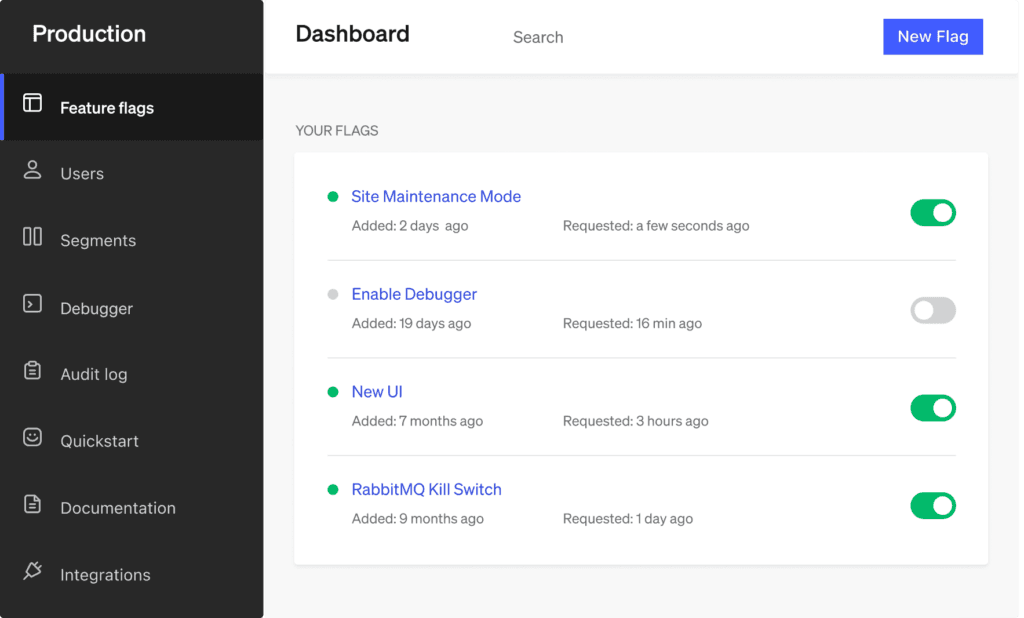
LaunchDarkly helps you use feature flags as kill switches, so you can disable the features whenever necessary. LaunchDarkly is a feature flag management platform that supports boolean and multivariate flags, targeted rollouts, built-in experimentation, and real-time flag control across unlimited projects and environments.
Who Is LaunchDarkly Best For?
LaunchDarkly is a strong fit for product and engineering teams that need granular control over who sees what—across user segments, accounts, and devices.
Why I Picked LaunchDarkly
LaunchDarkly earns its spot as one of the best on my shortlist because its targeting capabilities go well beyond a simple percentage rollout. I can define segments by user attributes, account, or device, then layer in bulk targeting and synced segments to reach exactly the right subset of users at exactly the right time. What I find especially useful is that flag changes propagate in under 150ms on Enterprise, so when I'm rolling out to a new segment, I'm not waiting on a deploy cycle to see results.
LaunchDarkly Key Features
- Multivariate flags: Define flags with multiple variations—not just on/off—so you can test several versions of a feature at once across different user groups.
- Stale flag detection: A built-in flag health list surfaces flags that are no longer in active use, with code references that show exactly where each flag appears in your codebase.
- Full-stack experimentation: Run A/B and multivariate experiments with Bayesian and frequentist statistics, CUPED variance reduction, sequential testing, and multi-armed bandits.
- 30 SDKs and REST API: Client-side, server-side, and edge SDKs cover most major languages and frameworks, with a full REST API supporting semantic, JSON, and merge patch operations.
LaunchDarkly Integrations
Native integrations are not clearly documented. LaunchDarkly supports data warehouse connections, event destinations, and custom integrations through its REST API.
Pros and Cons
Pros:
- Stale flag detection reduces technical debt
- Mature experimentation supports sophisticated product decisions
- Detailed targeting reaches precise user segments
Cons:
- Automated rollback isn’t included universally
- Advanced governance requires higher-tier plans
Learn more about LaunchDarkly: Best for flag releases tied to experiment data
- Free plan available
- From $150/month
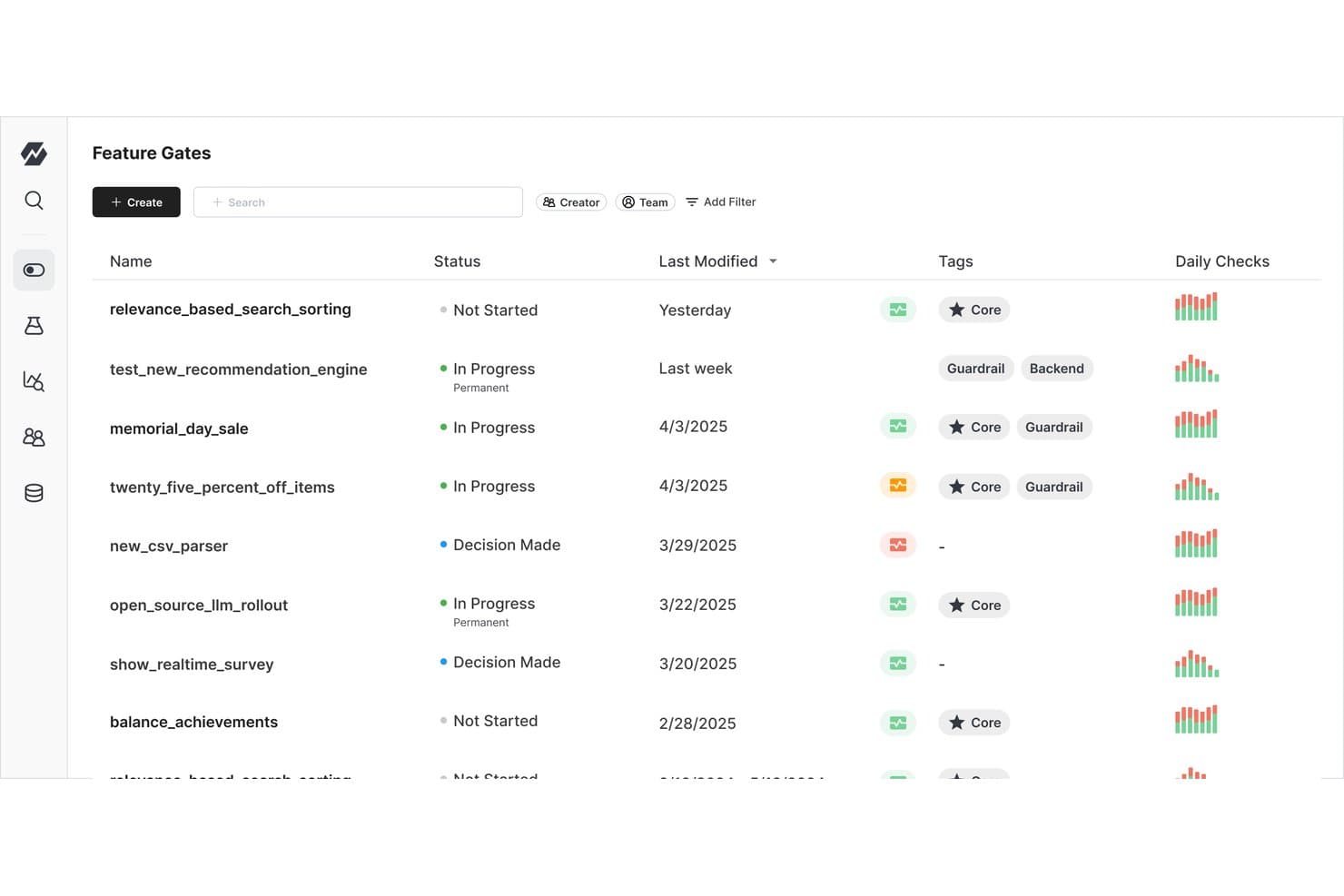
Statsig lets users manage and monitor feature gates with status and tags. Statsig is a feature flag and experimentation platform that combines flag management, A/B and multivariate testing, and product analytics in a single, tightly integrated toolset.
Who Is Statsig Best For?
Statsig is a strong fit for product and engineering teams that want every feature release backed by experiment data and measurable outcomes.
Why I Picked Statsig
Statsig earns its spot on my shortlist because every flag release is also an experiment. I love that you can attach metrics directly to a gate rollout and instantly see its measured impact, without setting up a separate test. When a rollout starts hurting a key metric, Statsig triggers an automatic rollback before you even open the console. Features like CUPED variance reduction and sequential testing make the statistical results genuinely trustworthy, not just directional.
Statsig Key Features
- Stale flag detection: Statsig sends automated alerts when a flag has been inactive or forgotten, nudging your team to clean it up before it becomes a liability.
- Warehouse-native deployment: Your flag and experiment data stays inside your own data warehouse, with support for Snowflake, BigQuery, Databricks, Redshift, and more.
- 30+ open-source SDKs: Client and server SDKs span nearly every major language, and Statsig builds them to minimize gate-check latency in production.
- Code references: The flag dashboard shows exactly where each flag appears in your codebase, making it easier to track usage and safely remove old flags.
Statsig Integrations
Statsig offers warehouse-native integrations with Snowflake, Databricks, BigQuery, Amazon Redshift, Amazon Athena, and Microsoft Fabric, plus Okta via SCIM. It supports API controls for custom integrations and is listed on AWS Marketplace.
Pros and Cons
Pros:
- Code references help remove stale flags
- Automatic rollbacks catch harmful metric changes
- Experiments measure each flag release’s impact
Cons:
- Dense experiment views challenge larger programs
- Initial setup requires coding knowledge
Learn more about Statsig: Best for flag targeting tied to live metrics
- Free plan + free demo available
- Pricing upon request
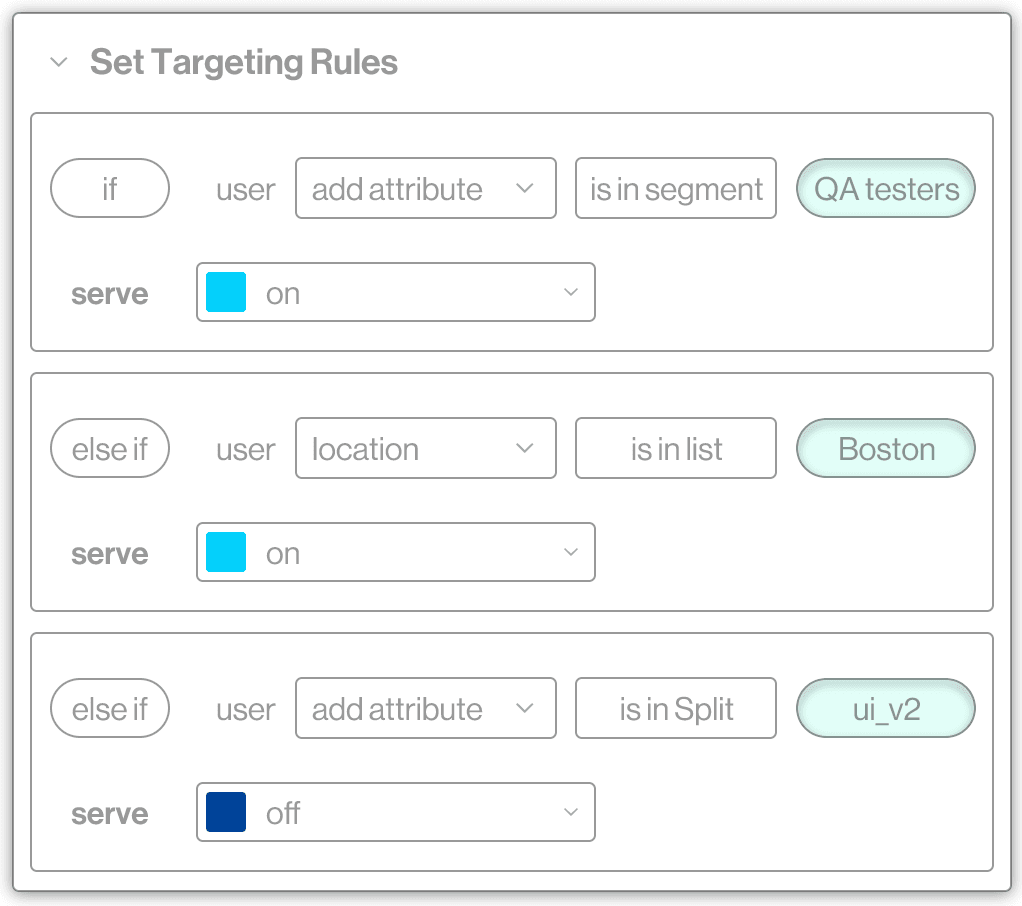
Split enables you to target feature flags to specific users or user groups. Split (now Harness Feature Management & Experimentation) is a feature flag platform that combines targeted rollouts, multivariate flag management, A/B and warehouse-native experimentation, and automated release monitoring with real-time metric tracking.
Who Is Split Best For?
Split is a strong fit for product and engineering teams at mid-to-large companies that need flag targeting tied directly to live performance metrics and experimentation data.
Why I Picked Split
Split earns its spot on my shortlist because it ties flag targeting directly to live performance metrics, which is something most feature flag tools don't do out of the box. I particularly like Release Monitoring: it tracks each flag's impact on system behavior in real time and can trigger an automated rollback when something goes wrong, pointing to the exact flag at fault. Warehouse-native experimentation is another standout, letting teams run A/B tests inside Snowflake, Redshift, or BigQuery without exporting data first.
Split Key Features
- Stale flag cleanup agent: Automatically identifies unused flags and opens draft pull requests to remove them from your codebase.
- Warehouse-native experimentation: Runs A/B tests directly inside Snowflake, Redshift, or BigQuery without exporting your data.
- Approval workflows: Requires sign-off from designated team members before any flag change goes live, locking the flag as read-only in the meantime.
- AI Configs: Lets you swap LLM prompts, models, and parameters in real time without redeploying your application.
Split Integrations
Split integrates with Datadog, New Relic, Dynatrace, Grafana, Prometheus, Jira, Slack, Microsoft Teams, PagerDuty, Snowflake, Amazon Redshift, and Google BigQuery. It also supports OpenFeature and provides a REST API for custom integrations.
Pros and Cons
Pros:
- Warehouse experiments connect flags with metrics
- Granular targeting supports measured rollouts
- Release monitoring links incidents to flags
Cons:
- Approval workflows add release overhead
- Product transition creates documentation confusion
Learn more about Split by Harness: Best for open-source feature flags and A/B testing
- Free plan + free demo available
- From $40/user/month
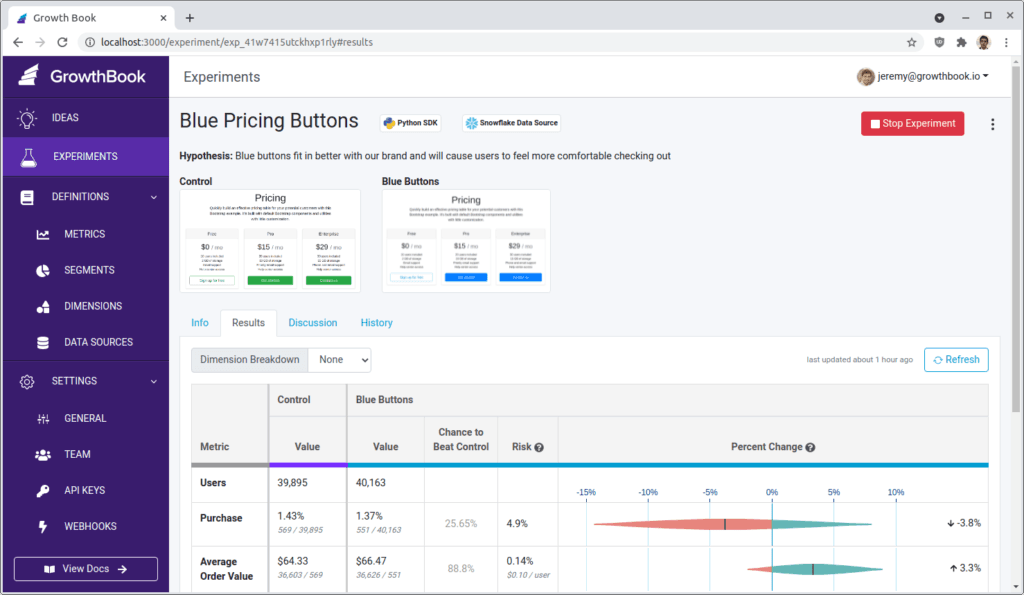
GrowthBook enables you to create gradual or canary releases with the help of user targeting. GrowthBook is an open-source feature flag and experimentation platform that supports remote toggling, targeted rollouts, A/B testing, and warehouse-native analytics across 24+ SDKs for frontend, backend, mobile, and edge environments.
Who Is GrowthBook Best For?
GrowthBook is a strong fit for engineering-led teams that want full control over their feature flag infrastructure without paying per end user or API call.
Why I Picked GrowthBook
GrowthBook earns its spot on my shortlist because it's the only tool here built open source from the ground up, meaning my team can self-host the entire platform and own our data completely. I particularly like how any feature flag converts into a full A/B test with one click, backed by a genuinely sophisticated stats engine that includes CUPED variance reduction and sequential testing pulled directly from our own data warehouse. The per-seat pricing model matters too: I'm not penalized as traffic scales, since flags are evaluated locally and handle trillions of lookups without per-MAU or per-API-call charges.
GrowthBook Key Features
- SDK-based local flag evaluation: Flags are evaluated directly inside your app using 24+ SDKs, keeping latency near zero without a round trip to a remote server.
- Warehouse-native analytics: GrowthBook connects directly to your existing data warehouse—Snowflake, BigQuery, Redshift, Databricks, or ClickHouse—to pull experiment metrics rather than relying on a proprietary data store.
- Safe rollouts: Automated rollback triggers when a guardrail metric is breached during a rollout, letting you catch regressions without manual monitoring.
- MCP server for AI coding tools: A Model Context Protocol server lets AI tools like Claude Code, Cursor, and Codex create and manage feature flags directly from your development environment.
GrowthBook Integrations
GrowthBook integrates with Snowflake, BigQuery, Redshift, Databricks, ClickHouse, Slack, OpenFeature, and the Vercel Flags SDK. It also supports REST API, webhooks, MCP, and edge connections for Cloudflare, Fastly, and AWS Lambda@Edge.
Pros and Cons
Pros:
- Self-hosting provides complete data ownership
- One-click flags enable sophisticated experimentation
- Local evaluation keeps flag latency low
Cons:
- Warehouse setup adds implementation work
- Advanced governance requires enterprise access
Learn more about GrowthBook:
Diğer Özellik Bayrağı Yazılımları
İlk sıralarda yer alamayan ancak yine de değerlendirmenize değer birkaç araç daha şunlardır.
- 11HypertuneBest for Git-style flag version control
- 12Harness Feature FlagsBest for flag governance with approval workflows
- 13AmplitudeBest for flags tied to behavioral cohort data
- 14FlagsmithBest for self-hosted and air-gapped deployments
- 15CloudBeesBest for multi-environment flag structure at scale
- 16DevCycleBest for OpenFeature-native flag management
- 17FlagshipBest for flagging tied to business KPI tracking
- 18Optimizely Web ExperimentationBest for flags bundled with a stats engine
İlgili Ürün Yönetimi Yazılımı İncelemeleri
Aradığınızı burada hâlâ bulamadıysanız, test edip değerlendirdiğimiz ve özellik bayrağı yazılımıyla yakından ilişkili olan şu araçlara göz atın.
- En İyi Ürün Yönetimi Araçları
- En İyi Ürün Planlama Yazılımları
- En İyi UX Tasarım Araçları
- En İyi Ürün Geliştirme Yazılımları
- En İyi Ürün Analitiği Araçları
- En İyi Kullanıcı Araştırması Araçları
How I Evaluate Feature Flag Software
I split my evaluation into three parts. Core functionality—toggling flags without a redeploy and targeting rollouts to specific user segments—carries the most weight. From there, I look at standout features like approval workflows, then factor in pricing model fit and onboarding quality.
Core Functionality (Table Stakes For This List)
When I'm selecting tools for my list, I score each one on a scale from 0 (does not offer the functionality) to 5 (excels in this area) for each core functionality listed below. I then convert the total into a percentage to help assess each tool's overall fit, with extra weight on any functionalities I've deemed essential.
- Feature Toggling (Essential): I check whether flags propagate instantly and support multiple types like boolean and multivariate, not just basic on/off switches.
- Targeted Rollouts (Essential): Each tool should let me combine user attributes, segments, and environments so I can roll out to, say, enterprise-tier accounts in staging first.
- Real-Time Flag Management: I look for a centralized dashboard with audit history, permissions, and lifecycle tracking so teams aren't digging through code to find stale flags.
- Experimentation Support: Tools earn higher marks when A/B or multivariate tests tie directly to flags with built-in statistical reporting rather than requiring a separate analytics platform.
- Kill Switch and Rollback: I evaluate how fast a team can disable a flag in production and whether rollback can be scoped to a specific segment or environment with one click.
- SDK and API Integration: Broad SDK coverage across server-side, mobile, and edge architectures matters. I also check API documentation quality and multi-language support.
Once I have a list of tools that meet the criteria, I consider what sets each platform apart.
Differentiating Factors (What Sets Vendors Apart)
Here's how I compare and contrast different vendors:
Standout Features
Stale flag detection is the first thing I check beyond table stakes. Teams that ship fast accumulate hundreds of flags, and without automatic cleanup alerts, technical debt quietly snowballs. I look for tools that surface unused or expired flags before they become a maintenance headache. Approval workflows matter just as much—I evaluate whether a PM can route a production flag change through a designated reviewer, which is essential when a pricing rollout needs sign-off before going live. I also look at scheduled releases, since syncing a flag flip to a product launch or partner embargo shouldn't require an engineer on standby.
Beyond Features
I evaluate how each tool's pricing model scales with real usage. Some vendors charge per seat, others by monthly active users or flag volume, and that difference matters when your product grows from a pilot to a full rollout across teams. I also check whether non-technical stakeholders can toggle flags or read experiment results without filing an engineering ticket. Shared dashboards that give product, marketing, and engineering aligned visibility into release timing save more coordination overhead than most teams expect.
Özellik Bayrağı Yazılımı Nasıl Seçilir?
Bu kadar çok farklı özellik bayrağı yazılımı çözümü mevcutken, ihtiyaçlarınıza en uygun özellik bayrağı yazılımının hangisi olduğuna karar vermek zor olabilir.
Özellik bayrağı yazılımlarını kısa listeye alırken, denerken ve seçerken aşağıdakileri göz önünde bulundurun:
- Hangi sorunu çözmeye çalışıyorsunuz? Sağlamanız gereken özellikleri ve işlevleri netleştirmek için öncelikle doldurmaya çalıştığınız özellik bayrağı boşluğunu belirleyin.
- Kimlerin kullanması gerekecek? Maliyeti ve gereksinimleri değerlendirmek için yazılımı kimlerin kullanacağını ve kaç lisansa ihtiyaç duyacağınızı göz önünde bulundurun. Yalnızca ürün yönetimi profesyonellerinin mi yoksa erişim gerektirecek tüm kuruluşun mu olacağını değerlendirmeniz gerekir. Bu netleştiğinde, herkes için kullanım kolaylığına mı yoksa özellik bayrağı yazılımınızın ileri düzey kullanıcıları için hıza mı öncelik verdiğinizi düşünmeye değer.
- Hangi diğer araçlarla birlikte çalışması gerekiyor? Hangi araçları değiştirdiğinizi, hangi araçların kullanılmaya devam edeceğini ve muhasebe, CRM veya İK yazılımı gibi hangi araçlarla entegre olmanız gerektiğini netleştirin. Araçların birbiriyle entegre olması gerekip gerekmediğine veya alternatif olarak birden çok aracı tek birleştirilmiş özellik bayrağı aracıyla değiştirip değiştiremeyeceğinize karar vermeniz gerekir.
- Hangi sonuçlar önemli? Başarılı kabul edilmesi için yazılımın sağlaması gereken sonucu göz önünde bulundurun. Hangi yetkinliği kazanmak veya neyi geliştirmek istediğinizi ve başarıyı nasıl ölçeceğinizi düşünün. Örneğin bir sonuç, performans hakkında daha fazla görünürlük elde etme becerisi olabilir. Özellik bayrağı yazılımı özelliklerini gözünüz kararana kadar karşılaştırabilirsiniz; ancak elde etmek istediğiniz sonuçları düşünmüyorsanız değerli zamanınızın çoğunu boşa harcıyor olabilirsiniz.
- Kuruluşunuz içinde nasıl çalışır? Yazılım seçimini iş akışlarınız ve teslimat metodolojinizle birlikte değerlendirin. Nelerin iyi çalıştığını ve ele alınması gereken sorunlara yol açan alanları değerlendirin. Her işletmenin farklı olduğunu unutmayın — bir aracın popüler olması, kuruluşunuzda işe yarayacağı anlamına gelmez.
Özellik Bayrağı Yazılımındaki Trendler
Özellik bayrağı yazılımı pazarı geliştikçe, sektörün yeni zorluklara ve fırsatlara verdiği tepkiyi yansıtan ek trendler ortaya çıkıyor. Bu trendler, ürün yönetimi profesyonellerinin yazılım uygulamalarındaki özellikleri etkinleştirme, test etme ve yönetme biçimlerini şekillendiriyor:
İş Birliği ve Ekipleri Güçlendirme
Fonksiyonlar arası ekiplerin sorunsuz iletişime ve bayrak yapılandırmalarına ortak erişime ihtiyaç duymasıyla, özellik bayrağı platformlarındaki gelişmiş iş birliği özellikleri kritik hâle geliyor. Platformlar, daha iyi ekip iş birliğini ve karar almayı kolaylaştırmak için yorum dizileri, bayrak değişikliği bildirimleri ve ortak panolar gibi özellikleri bünyelerine katıyor.
Ortam Tutarlılığı
Araçlar artık bayrakların tutarlı davranmasını sağlamak ve kullanıma sunma işlemleri sırasında hata riskini azaltmak için daha gelişmiş ortam yönetimi özellikleri sunuyor. Gelişmiş ortam segmentasyonu ve senkronizasyonu özellikleri, yapılandırmaların geliştirmenin ve dağıtımın tüm aşamalarında tutarlı kalmasını sağlıyor.
Kendi Kendine Hizmet Yetenekleri
Özellik bayrağı platformlarında kendi kendine hizmet yeteneklerine yönelik talep giderek artıyor. Bu sayede teknik olmayan ekip üyeleri, derin teknik bilgiye ihtiyaç duymadan bayrakları yönetebiliyor ve etkilerini anlayabiliyor. Özellik bayrağı yönetiminin demokratikleştirilmesi, daha geniş ekiplerin ürün geliştirme sürecine katkıda bulunmasını amaçlıyor. Bu yetenekler arasında kullanıcı dostu arayüzler, basitleştirilmiş bayrak yönetimi iş akışları ve erişilebilir analizler yer alıyor.
Öngörücü Analizler ve Yapay Zekâ
Özellik sürümlerinin etkisini tamamen dağıtılmadan önce öngörmek için yapay zekâ ve öngörücü analizlerin entegre edilmesi, ekiplerin özelliklerin kullanıma sunulması hakkında daha bilinçli kararlar almasını sağlıyor. Özellik performansı ve olası sistem etkileri hakkında yapay zekâ destekli öngörüler, kullanıcıların proaktif düzenlemeler yapmasına da olanak tanıyor.
Yapay zekânın yardımcı olabileceği konu, verileri ayrıştırabilmek, istediğiniz yanıtları elde etmek için onları istediğiniz şekilde dönüştürüp biçimlendirebilmek üzere gereken teknik beceridir.

Sürdürülebilirlik ve Verimlilik
Sürdürülebilirlik daha önemli bir endişe hâline geldikçe, özellik bayrağı platformları kaynak tüketimini azaltmaya ve geliştirme süreçlerinin verimliliğini artırmaya yardımcı olan özellikleri öne çıkarıyor. Buna, özellik bayrağı değerlendirmelerinin hesaplama yükünü en aza indirmek ve bayrakla ilgili işlemlerin verimliliğini optimize etmek de dâhil.
Özellik bayrağı yazılımı olgunlaşmaya devam ederken, bu trendler yazılım geliştirmenin geleceğini şekillendirmede önemli bir rol oynayacak ve ürün yönetimi profesyonellerine modern uygulama dağıtımı ve yönetiminin karmaşıklıklarını aşmaları için gelişmiş araçlar sunacaktır.
Özellik Bayrakları Nedir?
Özellik geçişleri veya özellik anahtarları olarak da bilinen özellik bayrakları, bir uygulama ya da sistem içindeki belirli özellikleri etkinleştirmek veya devre dışı bırakmak için ürün yönetimi ve yazılım geliştirmede kullanılan araçlardır. Ürün ekiplerinin, bir ampulü açıp kapatmak kadar basit ve kolay bir şekilde ürünlerindeki belirli özellikleri etkinleştirmesine veya devre dışı bırakmasına olanak tanıyarak çalışırlar.
Özellik bayrağı en iyi uygulamalarında uzmanlaşmak, geliştirme ekiplerinin ürün özelliklerinin nasıl dağıtılacağı konusunda son derece stratejik davranmasını sağlar. Ekip, özelliklerin yayınlanmasını ve görünürlüğünü genel kod dağıtımından bağımsız olarak kontrol edebilir.
Özellik bayrağı yazılımı nedir?
Özellik bayrağı yazılımı, ürün ekiplerinin ürün portföyleri genelinde özellik bayrakları oluşturmasına, düzenlemesine ve yönetmesine olanak tanır. Bu özellik, ürün yöneticilerinin kademeli kullanıma sunma, A/B testi ve hedefli özellik dağıtımları uygulamasını sağlayarak daha Çevik ve veriye dayalı karar alma olanağı sunar. Bu araçlar ayrıca özellik geçişlerini etkinleştirerek sorunlara veya değişen kullanıcı gereksinimlerine hızlıca yanıt verme esnekliği sağlar; böylece daha sorunsuz ve kontrollü bir ürün geliştirme ve yayınlama süreci sunar.
Özellik Bayrağı Yazılımının Özellikleri
Özellik bayrağı yazılımı, modern yazılım geliştirme ekipleri için vazgeçilmez bir araç hâline gelmiştir ve ekiplerin uygulamaları içindeki özellikleri sorunsuz bir şekilde etkinleştirmesine, test etmesine ve yönetmesine olanak tanır. Bu sayede geliştiriciler, yeni kod dağıtmadan yeni özellikleri seçili kullanıcı gruplarına veya ortamlara sunabilir; böylece risk en aza indirilir ve daha sorunsuz kullanıcı deneyimleri sağlanır. Burada, özellik bayrağı yazılımında aranması gereken en önemli özellikleri açıklıyorum.
- Kolay Entegrasyon: Yazılım, mevcut geliştirme iş akışlarıyla kolayca entegre olur. Bu, geliştiricilerin geliştirme süreçlerinde önemli değişiklikler yapmadan özellik bayraklarını hızlıca uygulamasını sağlar ve benimseme sürecini sorunsuz hâle getirir.
- İnce Ayrıntılı Hedefleme: Belirli kullanıcı segmentlerinin hedeflenmesine olanak tanır. Bu, A/B testleri gerçekleştirmek veya özellikleri kullanıcıların bir bölümüne sunmak için kritik öneme sahiptir; daha kişiselleştirilmiş deneyimler ve kullanıcı davranışının daha iyi anlaşılmasını sağlar.
- Gerçek Zamanlı Denetim: Özellikleri gerçek zamanlı olarak açıp kapatma olanağı sunar. Bu esneklik, yeniden dağıtım yapmaya gerek kalmadan sorunları hızlıca ele almak veya kullanıcı geri bildirimlerine göre ayarlamalar yapmak için hayati önem taşır.
- Ortama Özel Bayraklar: Farklı ortamlar için ayrı bayrakları destekler (ör. geliştirme, hazırlık, üretim). Bu, ekiplerin özellikleri kullanıcılara sunmadan önce üretim dışı ortamlarda kapsamlı şekilde test etmesine olanak tanır ve hata riskini azaltır.
- Denetim ve Analiz: Kapsamlı denetim ve analiz özellikleri sunar. Özelliklerin kullanıcı davranışını ve sistem performansını nasıl etkilediğini anlamak, veriye dayalı kararlar almaya ve özellik uygulamalarını iyileştirmeye yardımcı olur.
- Role Dayalı Erişim Denetimi (RBAC): Role dayalı erişim denetimini uygular. Özellik bayraklarını kimlerin oluşturabileceğini, değiştirebileceğini veya silebileceğini kısıtlayarak yalnızca yetkili kişilerin değişiklik yapmasını ve böylece sistem bütünlüğünün korunmasını sağlarsınız.
- Ölçeklenebilirlik: Yazılım uygulamanızla birlikte ölçeklenir. Kullanıcı tabanınız büyüdükçe ve uygulamanız daha karmaşık hâle geldikçe özellik bayrağı sistemi, performans düşüşü yaşamadan artan yükü karşılayabilmelidir.
- Birden Fazla Dil için SDK'ler: Çeşitli programlama dilleri için SDK'ler sağlar. Bu, uygulamanızın kullandığı teknoloji yığını ne olursa olsun, önemli bir zorluk yaşamadan özellik bayraklarını uygulayabilmenizi sağlar.
- Geri Dönüş Stratejileri: Özellik bayrakları için geri dönüş stratejileri içerir. Arıza durumunda (ör. ağ sorunları) uygulamanın çalışır durumda kalmasını sağlamak için sistemin önceden tanımlanmış bir duruma geçmesi gerekir.
- Özelleştirilebilir Bayrak Yaşam Döngüleri: Özelleştirilebilir bayrak yaşam döngülerine olanak tanır. Bu, ekiplerin her özellik bayrağı için oluşturulmasından kullanımdan kaldırılmasına kadar aşamalar tanımlamasını ve bayrakların yaşam döngüleri boyunca etkili bir şekilde yönetilmesini sağlar.
Ekipler bu temel özelliklere odaklanarak hem geliştirme süreçlerini iyileştiren hem de özellik yönetimi için sağlam bir çerçeve sunan bir çözüm seçtiklerinden emin olabilir; bu da nihayetinde daha kontrollü, verimli ve başarılı yazılım sürümlerine yol açar. Özellik yönetimine yönelik bu stratejik yaklaşım, ekiplerin üstün yazılım deneyimleri sunarken kullanıcı geri bildirimlerine ve pazar taleplerine hızla uyum sağlama esnekliğini korumasını mümkün kılar.
Özellik Bayrağı Yazılımının Faydaları
Özellik bayrağı araçları, geliştiricilerin yeni kod dağıtmadan özellikleri açıp kapatmasını sağlayarak yazılım geliştirme yaşam döngüsü üzerinde benzersiz bir denetim sunar. Özellik bayrağı yazılımını benimsemeyi düşünen kuruluşlar için temel faydalarını anlamak, değerini vurgulamaya yardımcı olabilir. Özellik bayrağı yazılımının başlıca beş avantajı şunlardır:
- Artırılmış Dağıtım Güvenliği: Değişiklikleri kullanıcılara kademeli olarak sunarak işletmeler kesintileri en aza indirebilir ve beklendiği gibi çalışmayan tüm özellikleri hızla geri alabilir; böylece kullanıcı deneyimini ve sistem kararlılığını koruyabilir.
- Daha Hızlı Pazara Sunma Süresi: Geliştiriciler özellikleri devre dışı bırakılmış şekilde üretim ortamına gönderebilir. Bu, her özelliğin mükemmel olmasını beklemeden diğer çalışmaların ilerlemesini sağlar; böylece genel yazılım geliştirme yaşam döngüsü hızlanır ve işletmeler daha hızlı yenilik yapabilir.
- Geliştirilmiş Kullanıcı Deneyimi Özelleştirmesi: Kuruluşlar, kullanıcı davranışı, konum veya diğer ölçütlere göre belirli özellikleri belirli gruplara sunabilir; böylece daha kişiselleştirilmiş bir deneyim aracılığıyla memnuniyeti ve etkileşimi artırabilir.
- Sadeleştirilmiş Test ve Geri Bildirim Döngüleri: Ekipler, test ortamları veya belirli kullanıcı grupları için özellik geçişlerini etkinleştirerek içgörüler toplayabilir ve özellikleri daha etkili bir şekilde yineleyebilir; bu da daha yüksek kaliteli sonuçlara ve daha bilinçli geliştirme kararlarına yol açar.
- Daha Yüksek Operasyonel Dayanıklılık: Özellik bayrakları, tüm dağıtımları geri almadan sorunlu özelliklerin hızla devre dışı bırakılmasını sağlar; böylece olaylar sırasında uygulamanın çalışır durumda kalması ve kullanıcı etkisinin en aza indirilmesi mümkün olur.
Bayer Crop Science'ın dijital tarım bölümü olan Climate LLC, yazılım geliştirmeyi kolaylaştırmak ve anında geri alma, daha güvenli dağıtımlar ve sürekli teslimat sağlamak için LaunchDarkly'de özellik bayraklarını kullanıyor. Özellik bayraklarından yararlanan mühendislik ekipleri, güncellemeleri risk almadan yayınlayabilir, değişiklikleri üretim ortamında test edebilir ve özellikleri anında açıp kapatabilir.
LaunchDarkly'de bir bayrağın durumunu değiştirebiliyor ve bunun mobil uygulamalarımıza anında yansıdığını görebiliyorum. Bunun için her gün ödeme yaparım.
Artie Lee, Mühendislik Direktörü, Climate LLC
Bu tür özellik yönetimi platformları, gövde tabanlı geliştirmeyi, kurumsal güvenliği ve geliştiriciler üzerinde daha fazla denetimi mümkün kılarak yazılım teslimatını daha hızlı ve güvenilir hale getirir.
Özellik bayrağı yazılımının potansiyel alıcıları için bu avantajlar, böyle bir aracı geliştirme ve operasyon iş akışlarına dahil etmenin stratejik faydasını ortaya koyar. Bu yaklaşımın benimsenmesi; dağıtım güvenliğinde, pazara yanıt verme hızında ve genel kullanıcı memnuniyetinde önemli iyileşmelere yol açabilir. Bu da özellik bayrağı yazılımını, yazılım geliştirme uygulamalarını iyileştirmek isteyen tüm kuruluşlar için dikkate değer bir seçenek haline getirir.
Özellik Bayrağı Yazılımı Maliyetleri ve Fiyatlandırması
Özellik bayrağı yazılımı seçeneklerini incelerken, ekibinizin büyüklüğü, ihtiyaçları ve bütçesiyle en iyi şekilde örtüşen çözümü seçtiğinizden emin olmak için mevcut çeşitli plan ve fiyatlandırma yapılarını anlamanız önemlidir. Özellik bayrağı platformları genellikle yeni kurulan şirketlerden büyük işletmelere kadar farklı kullanıcı türlerine yönelik çeşitli planlar sunar. Her plan, projelerinizin ölçeğine ve karmaşıklığına uygun belirli özellikler ve yetenekler sağlamak üzere tasarlanır. Yaygın plan seçenekleri ve fiyatlandırmalar aşağıda açıklanmıştır:
Özellik Bayrağı Yazılımı için Plan Karşılaştırma Tablosu
| Plan Türü | Ortalama Fiyat | Dahil Edilen Yaygın Özellikler |
|---|---|---|
| Plan TürüKurumsal | Ortalama Fiyat$500 - $2000/ay | Dahil Edilen Yaygın ÖzelliklerGelişmiş hedefleme ve segmentasyon, Eksiksiz analiz paketi, Sınırsız özellik bayrağı, Öncelikli müşteri desteği, SSO/SAML entegrasyonu, Özelleştirilebilir roller ve izinler |
| Plan TürüProfesyonel | Ortalama Fiyat$100 - $500/ay | Dahil Edilen Yaygın ÖzelliklerStandart hedefleme ve segmentasyon, Temel analiz, Sınırsız özellik bayrağı, E-posta desteği, Temel SSO entegrasyonu |
| Plan TürüEkip | Ortalama Fiyat$50 - $100/ay | Dahil Edilen Yaygın ÖzelliklerSınırlı hedefleme ve segmentasyon, Temel analiz, Sınırlı özellik bayrağı, Topluluk desteği |
| Plan TürüÜcretsiz | Ortalama Fiyat$0 | Dahil Edilen Yaygın ÖzelliklerTemel özellik bayraklama yetenekleri, Topluluk desteği, Sınırlı sayıda özellik bayrağı |
Her plan, büyümenin ve geliştirme ihtiyaçlarının farklı aşamalarına uyacak şekilde hazırlanmıştır. Kurumsal planlar, kapsamlı özellik yönetimi ve analiz yeteneklerine ihtiyaç duyan büyük ekipler için uygundur. Profesyonel planlar ise işlevsellik ve destek arasında denge arayan orta ölçekli ekiplere hitap eder. Ekip planları, özellik bayraklarını kullanmaya yeni başlayan küçük ekipler veya projeler için idealdir ve önemli bir yatırım gerektirmeden temel araçları sunar. Son olarak Ücretsiz seçeneği, bireylerin veya küçük ekiplerin ücretli bir plana geçmeden önce temel özellik bayraklama işlevlerini denemesine olanak tanır.
Bir plan seçerken ekibinizin büyüklüğünü, projelerinizin karmaşıklığını ve ihtiyaç duyabileceğiniz destek düzeyini göz önünde bulundurmanız önemlidir. Ayrıca platformun ölçeklenebilirliğini de değerlendirerek zaman içinde ihtiyaçlarınızla birlikte büyüyebildiğinden emin olmalısınız.