

En iyi kullanıcı araştırması araçları; araştırmaları yürütmeyi, içgörüleri toplamayı ve bilinçli ürün kararları almayı kolaylaştırır. Bu araçlar olmadan araştırmalar dağınık notlar, tutarsız yöntemler veya düşük yanıt oranları arasında sıkışıp kalır ve kullanıcı ihtiyaçlarını savunmayı zorlaştırır.
30'dan fazla araştırma platformunu değerlendirmek için yıllara dayanan ürün yönetimi deneyimimden, doğrudan gerçekleştirdiğim testlerden, kullanıcı geri bildirimlerinden ve gerçek iş akışlarına odaklanmaktan yararlandım.
Bu rehber; anketler, görüşmeler, kullanılabilirlik testleri, analizler ve geri bildirim toplama alanlarında önde gelen kullanıcı araştırması platformlarını karşılaştırarak özel ihtiyaçlarınıza, kullanım amacınıza ve bütçenize göre doğru aracı belirlemenize yardımcı olur.
Why Trust Our Software Recommendations
6,700+
Reviews
20
Industry experts
16+
Evaluation factors
14
Years
Our team has been testing and reviewing software since 2012. As product managers ourselves, we know how difficult—and important—it is to choose the right software.
For this guide, we evaluated tools using hands-on testing and independent research, scoring tools using our selection criteria.
Our reviews reflect our human editorial judgment, not a sales pitch.
Expert reviewers:
- Andrew LumbySenior TPM
- Cristiano ValimSenior UI/UX Lead


Kullanıcı Araştırması Araçları Karşılaştırma Tablosu
Genel bakışlarda az önce ele aldığımız tüm araçları karşılaştırabileceğiniz tablo aşağıdadır:
Score legend (out of 5)
- Excellent4.5–5
- Good4–4.4
- Average3–3.9
- Below average2–2.9
- Poor1–1.9
Sorted by: Default
| Tool | Starting Price | Website | |||||||
|---|---|---|---|---|---|---|---|---|---|
Best for visual in-app feedback | Not rated | 3 | 3 | 3 | 3 | 2 | Not rated | $9/user/month Free plan available | Website |
Best for omnichannel feedback | 2.8 out of 5 | 4 | 2 | 3 | 3 | 2 | 3 | Pricing upon request Free demo available | Website |
Best for mapping qualitative insights | Not rated | 3 | 3 | 4 | 4 | 1 | Not rated | $79/month 7-day free trial + free demo available | Website |
Best for sharing survey data across all tools | Not rated | 3 | 3 | 2 | 3 | 3 | Not rated | $114/month 10-day free trial | Website |
Best for effortless sharing | 1.7 out of 5 | 2 | 2 | 3 | 1 | 1 | 1 | $19/month Free plan available | Website |
Best for targeting niche and B2B research audiences | 4.5 out of 5 | 4 | 5 | 5 | 4 | 4 | 5 | Pricing upon request Free demo available | Website |
Best for AI-generated executive research reports | 4.3 out of 5 | 4 | 5 | 5 | 4 | 3 | 5 | Pricing upon request Free demo available | Website |
Best for enterprise-grade research at org scale | 4.3 out of 5 | 4 | 5 | 4 | 4 | 4 | 5 | Pricing upon request Free demo available | Website |
Best for card sorting and tree testing | 4.2 out of 5 | 3 | 5 | 5 | 4 | 3 | 5 | $208/user/month Free plan available | Website |
Best for running all research methods in one CRM | 4.5 out of 5 | 4 | 5 | 4 | 5 | 4 | 5 | $129/seat/month Free trial + free demo available | Website |


En İyi Kullanıcı Araştırması Aracı İncelemeleri
Her bir kullanıcı araştırması aracının en iyi kullanım amacını ve öne çıkan özelliklerini gösteren kısa açıklamaları burada bulabilirsiniz.
 Best for visual in-app feedback
- Free plan available
- From $9/user/month
Visit WebsiteCustomer Rating:4.8/5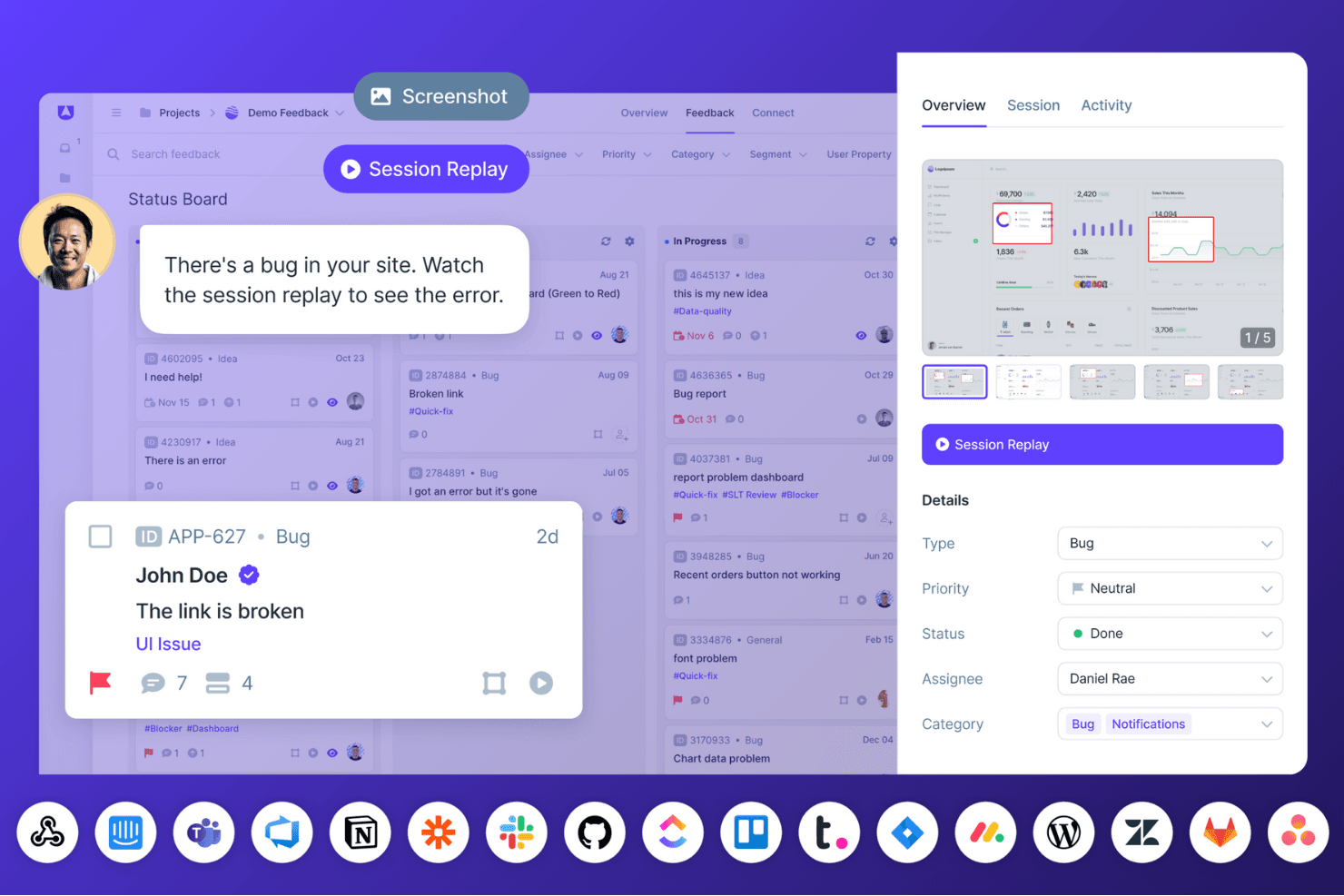
Userback enables teams to collect visual user feedback, annotated screenshots, and session replays to resolve bugs faster and improve product experiences. Userback is a visual feedback and bug-reporting platform that combines annotated screenshots, screen-recorded video, session replay, and in-app surveys to capture user input directly within web apps and websites.
Who Is Userback Best For?
Userback fits product managers who need rich visual context—annotated screenshots, video, and session replay—alongside bug reports and feature requests in one place.
Why I Picked Userback
I've included Userback in my top picks because it captures visual feedback in a way that most research tools simply don't. Every bug report or in-app survey response comes bundled with annotated screenshots, a narrated screen recording, and a session replay, so you're seeing exactly what a user saw and did. I particularly like that video submissions are auto-transcribed and tagged by AI-detected theme, which means I can spot recurring issues across hundreds of submissions without manually reviewing each clip.
Userback Key Features
- In-app survey builder: Create NPS, CSAT, CES, and custom surveys using templates or a drag-and-drop builder, with targeting by user, page, device, or segment.
- Session replay: Records clicks, scrolling, rage clicks, form inputs, and network activity to show exactly what a user did before submitting feedback.
- AI theme detection: Automatically clusters incoming feedback by recurring theme, surfacing patterns across submissions without manual tagging.
- Two-way sync with dev tools: Connects directly to Jira, Linear, and ClickUp so bug reports and feedback flow into engineering workflows with status updates synced back.
Userback Integrations
Userback offers native integrations with Jira, Linear, ClickUp, Slack, Microsoft Teams, GitHub, GitLab, and Notion, plus REST API, webhooks, and a JavaScript SDK for custom connections. Zapier is also supported.
Pros and Cons
Pros:
- Clusters recurring themes across submissions
- Connects session replays to reported issues
- Captures annotated visual context with feedback
Cons:
- Organizes findings by feedback items, not studies
- Offers no participant recruitment or scheduling
Learn more about Userback: Best for omnichannel feedback
- Free demo available
- Pricing upon request
Visit WebsiteCustomer Rating:4.5/5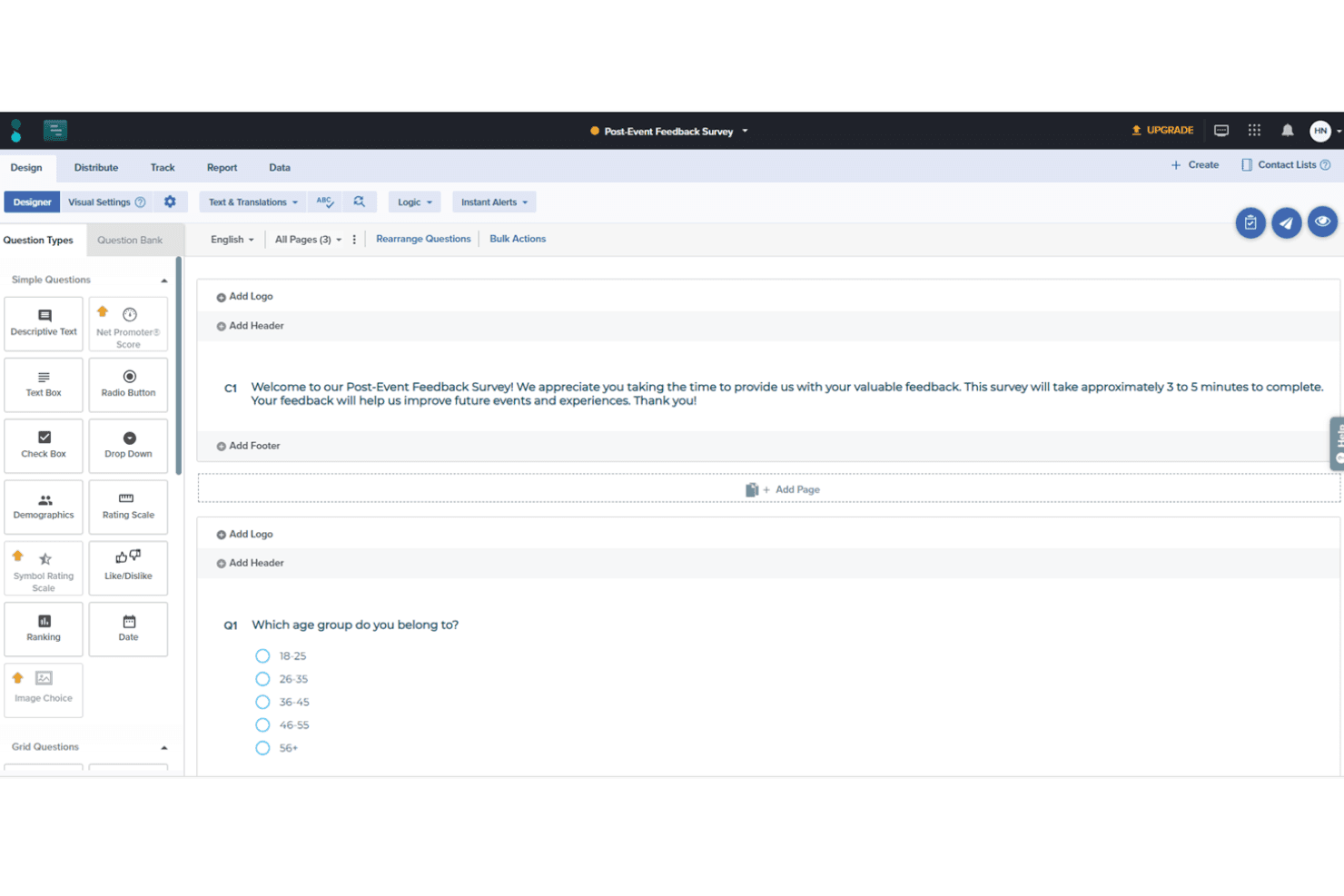
Users can create detailed surveys with custom branching and logic with Sogolytics' survey designer. Sogolytics is an experience management platform that collects customer and employee feedback across surveys, forms, polls, and omnichannel listening channels, with built-in AI text analytics, reporting dashboards, and panel services for managed research.
Who Is Sogolytics Best For?
Sogolytics is a strong fit for marketing and customer insights teams that need to collect feedback across multiple channels and turn open-ended responses into structured findings.
Why I Picked Sogolytics
I've included Sogolytics in my top picks because no other tool on this list matches its breadth of feedback channels in a single feed. Where most survey tools stop at email and web, Sogolytics pulls in SMS, QR codes, kiosk, point of sale, in-app, and social responses together, which matters when your research spans physical and digital touchpoints. I also like its AI text analytics, which groups open-ended responses into themes and assigns sentiment scores you can manually override.
Sogolytics Key Features
- AI survey generation: Build surveys from a text prompt using AI, which drafts question sets you can edit before publishing.
- Multilingual survey support: Create and distribute surveys in 50+ languages, with open-ended text analysis available across roughly 11 languages.
- Cross-tab and trend reports: Compare response segments side by side in cross-tabulation reports and track changes over time with trend analysis.
- Managed research services: Hand off end-to-end research projects to Sogolytics, including questionnaire design, panel sourcing, live monitoring, and final reporting.
Sogolytics Integrations
Documented integrations include Salesforce, HubSpot, Slack, Microsoft Teams, Miro, Tableau, Power BI, and Google Analytics. SogoCore also supports APIs and custom webhooks, while Zapier is available for additional connections.
Pros and Cons
Pros:
- Managed panel research supports broader recruitment
- AI groups open-ended themes and sentiment
- Omnichannel feedback reaches offline audiences
Cons:
- No prototype testing or insight repository
- No interviews or usability testing
Learn more about Sogolytics: Best for mapping qualitative insights
- 7-day free trial + free demo available
- From $79/month
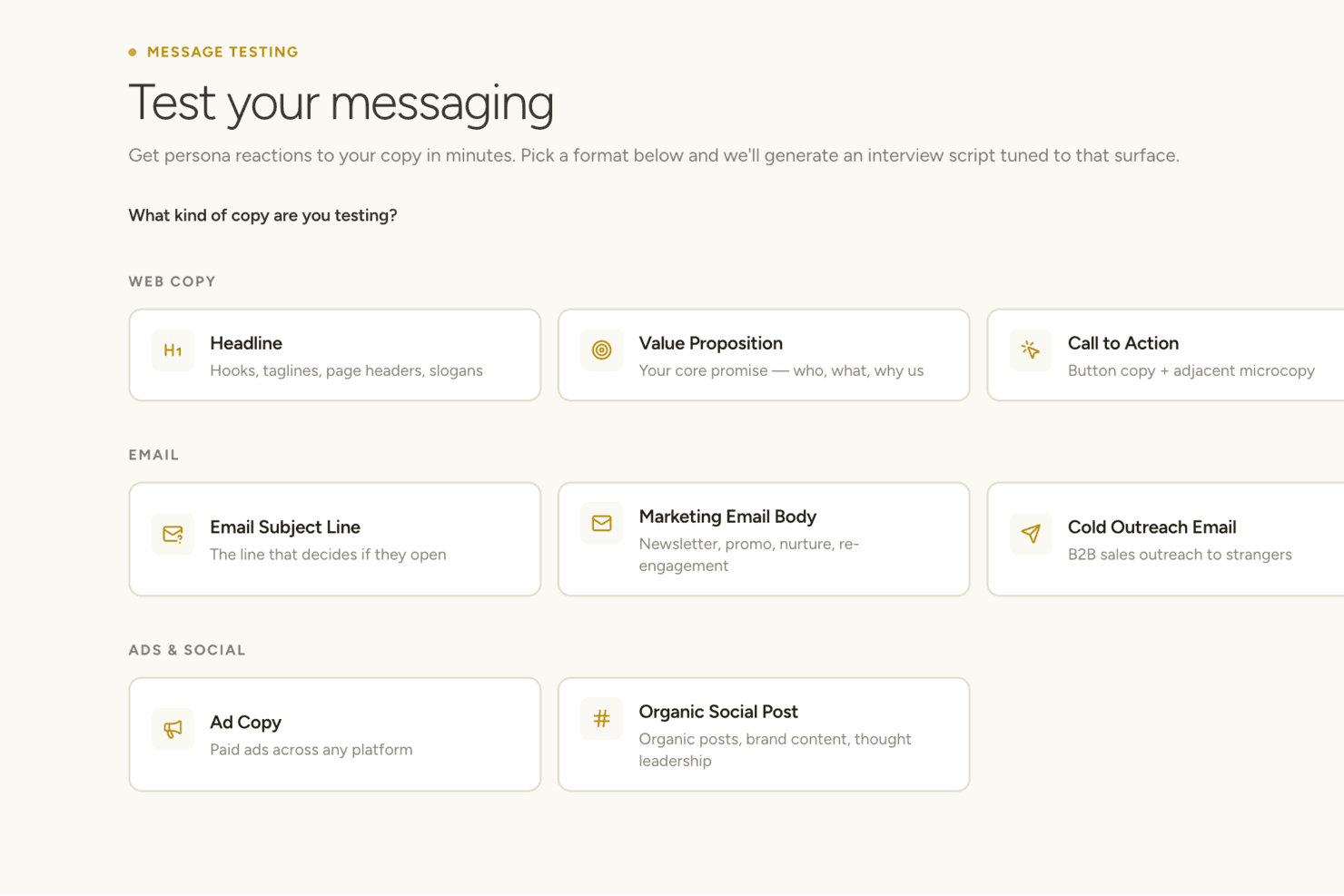
Articos lets you test persona reactions to different types of brand copy. Articos is a synthetic user research platform that runs AI-moderated interviews with AI-generated personas to produce structured reports on user motivations, objections, and points of confusion.
Who Is Articos Best For?
Articos suits product managers and agency researchers who need fast, directional qualitative feedback without the time or cost of recruiting real participants.
Why I Picked Articos
I've included Articos in my top picks because its Six-Stage Synthesis turns raw interview data from AI-generated personas into structured, traceable reports on motivations, objections, and confusion points. Every finding links back to the specific persona, question, and quote that produced it, so qualitative patterns are easy to map and communicate. Confidence scores and adversarial review flag where evidence is thin or contradictory, which I find genuinely useful for directional discovery work.
Articos Key Features
- Six-Stage Synthesis: Automatically processes interview data through theme detection, adversarial review, and bias checking to surface patterns across all personas.
- Persona stance distribution: Each study includes a forced mix of champions, skeptics, blockers, and observers to reduce confirmation bias in findings.
- Talk to Research: Lets you send written follow-up questions to any AI persona after a study is complete, without running a new research session.
- White-label reports: Pro and research pack users can export PDF reports under their own branding instead of Articos's.
Articos Integrations
Articos doesn't have any native integrations or a documented API. It operates as a standalone platform, with PDF and white-label report exports for moving findings into other tools.
Pros and Cons
Pros:
- Challenges assumptions through skeptical personas
- Generates reports faster than traditional research
- Maps motivations with traceable evidence chains
Cons:
- Reports require editing before stakeholder presentation
- Synthetic personas cannot validate real customer behavior
Learn more about Articos: Best for sharing survey data across all tools
- 10-day free trial
- From $114/month (billed annually)
Visit WebsiteCustomer Rating:4.6/5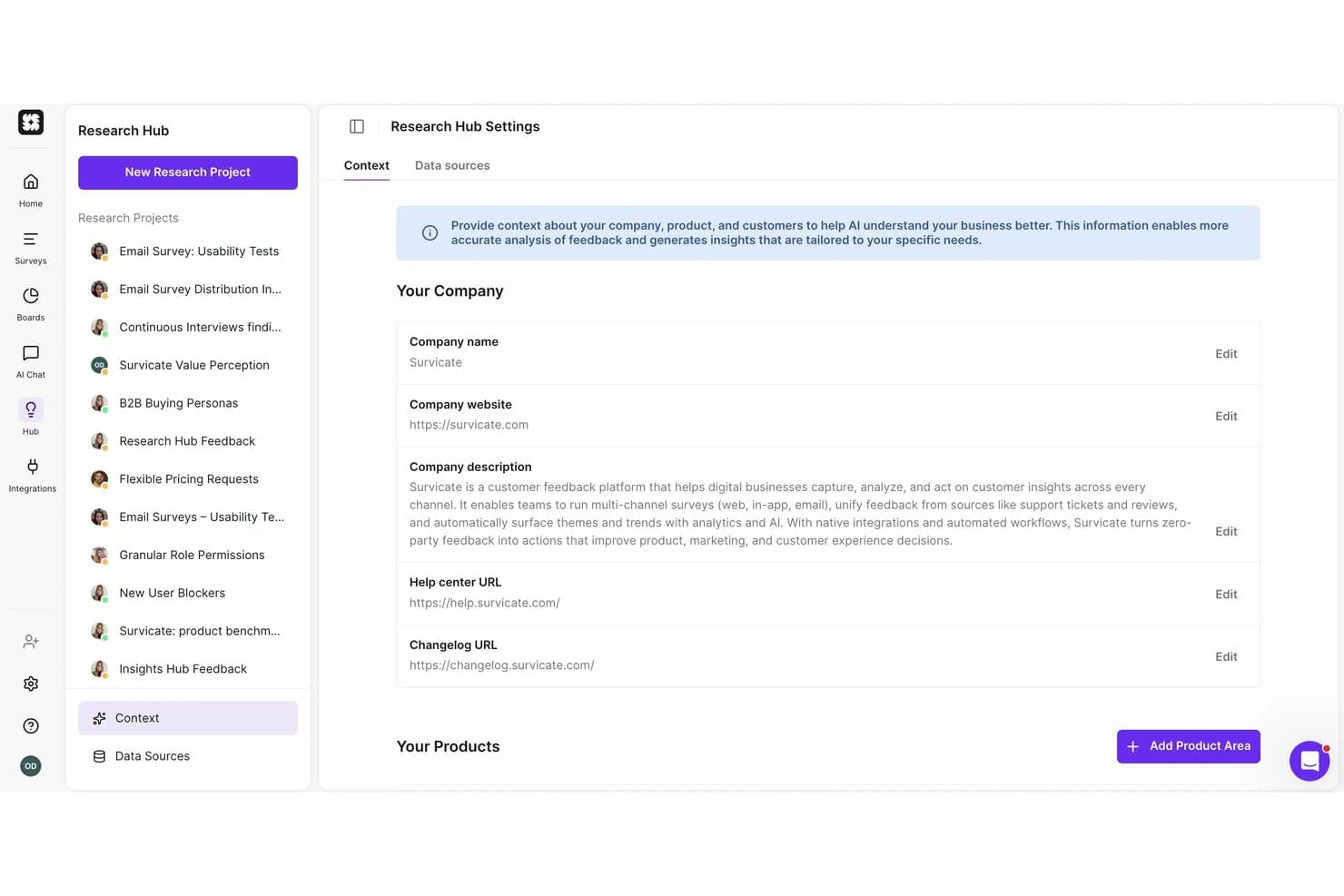
Survicate lets users add company context to guide AI research analysis. Survicate is a customer feedback and survey platform that collects responses across email, web, mobile, and in-product channels, and centralizes them alongside interview transcripts, support tickets, and reviews in an AI-powered research repository.
Who Is Survicate Best For?
Survicate is a strong fit for product managers and marketing teams that need to collect customer feedback across multiple channels and push that data directly into their existing CRM, analytics, or project management tools.
Why I Picked Survicate
I picked Survicate as one of the best because it's the only tool on this list that pushes survey data directly into your entire product stack without extra plumbing. Its native syncs with Jira, Linear, HubSpot, and Salesforce mean a churn survey response can become a backlog ticket or a CRM note automatically. I also love the MCP connector, which lets Claude or ChatGPT query your survey data and search across studies directly.
Survicate Key Features
- Multichannel survey distribution: Deploy surveys across email, web pop-ups, mobile SDKs, QR codes, kiosk mode, and in-product placements from a single platform.
- Research Hub: An AI-powered repository that pulls in survey responses, interview transcripts, support tickets, and reviews, then categorizes them by theme and sentiment.
- AI research assistant: Ask plain-language questions about your feedback data and get answers traced back to the exact source quotes.
- Feedback source integrations: Connect review platforms like G2, App Store, and Google Reviews, plus support tools like Zendesk and Intercom, to centralize all feedback automatically.
Survicate Integrations
Survicate offers 50+ documented integrations, including Jira, Linear, Slack, Salesforce, HubSpot, Google Meet, Gong, tl;dv, FullStory, and Amplitude. It also supports an Export API and Zapier.
Pros and Cons
Pros:
- AI findings cite source feedback quotes
- Research Hub unifies surveys and transcripts
- Multichannel survey collection reaches customers in context
Cons:
- No usability testing or prototype evaluation
- No participant recruitment or research panels
Learn more about Survicate:
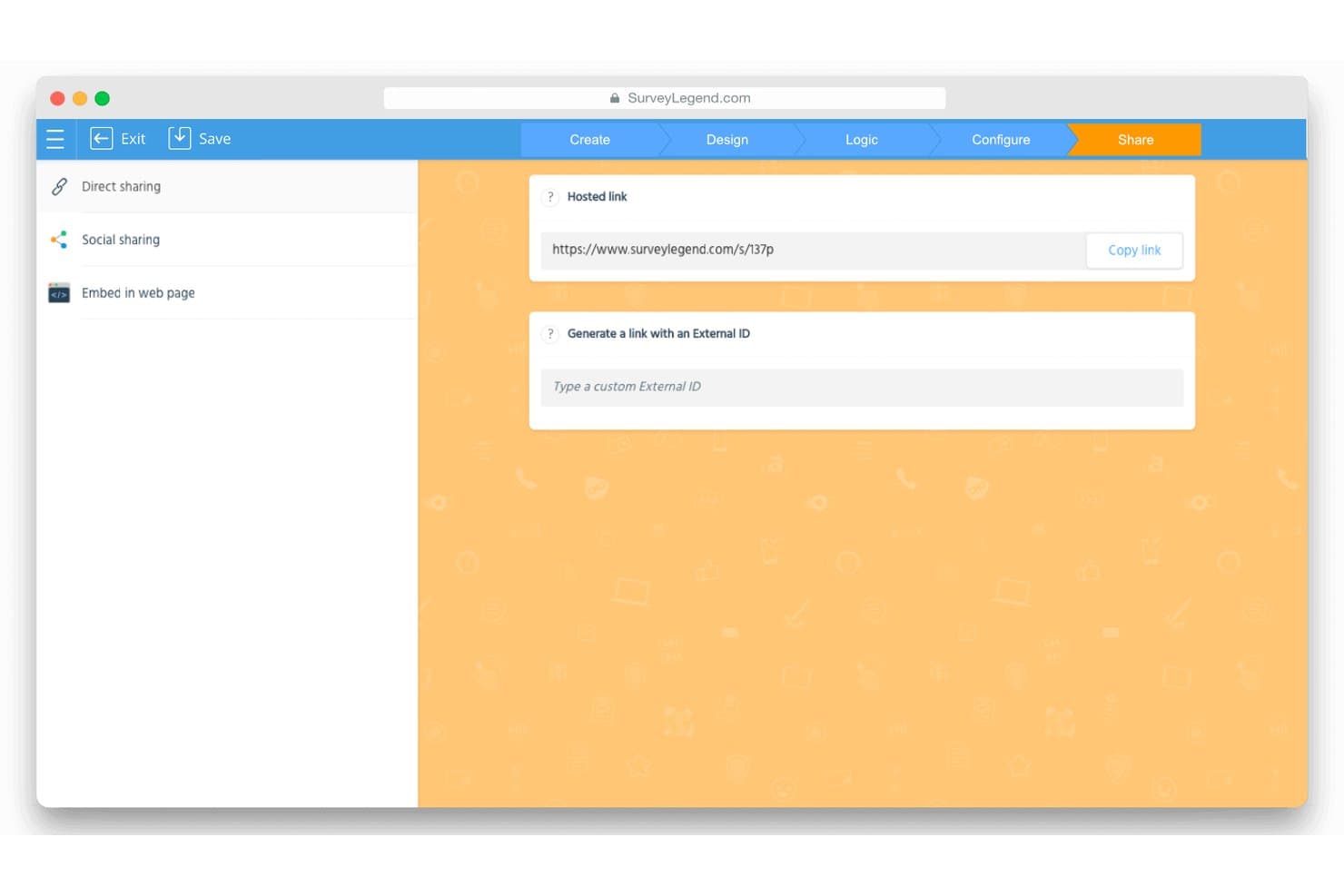
SurveyLegend lets users share surveys via a hosted link or external ID. SurveyLegend is a survey and form builder that supports NPS, CSAT, and visual feedback collection through drag-and-drop survey creation, skip logic, and real-time analytics dashboards.
Who Is SurveyLegend Best For?
SurveyLegend suits marketing and CX teams that need to distribute surveys quickly across multiple channels without a steep learning curve.
Why I Picked SurveyLegend
I've included SurveyLegend in my top picks because it makes getting surveys in front of respondents genuinely fast. Every survey generates a hosted short link you can post directly to LinkedIn, X, or Instagram in one click, and QR codes let you capture responses at in-person events without any setup friction. I also like that live analytics dashboards can be shared through a private, secure link, so stakeholders see results in real time without needing a login.
SurveyLegend Key Features
- Skip logic and branching: Set rules to show or hide questions based on previous answers, keeping surveys relevant to each respondent.
- Picture ranking questions: Let respondents rank or select between images, supporting basic visual concept and preference testing.
- NPS and CSAT question types: Built-in question formats for net promoter score and customer satisfaction tracking with a dedicated NPS gauge in the analytics dashboard.
- Google Sheets integration: Sync responses to Google Sheets in real time, giving you a live data feed outside the SurveyLegend platform.
SurveyLegend Integrations
SurveyLegend offers 3 native integrations: Google Sheets, Mailchimp, and Salesforce. Its API and webhooks support custom integrations on Business and Legendary plans.
Pros and Cons
Pros:
- Picture ranking supports visual concept testing
- Live dashboards support quick stakeholder feedback
- Hosted links and QR codes simplify distribution
Cons:
- Single-user plans limit team research
- No interviews or usability testing
Learn more about SurveyLegend: Best for targeting niche and B2B research audiences
- Free demo available
- Pricing upon request
Visit WebsiteCustomer Rating:4.5/5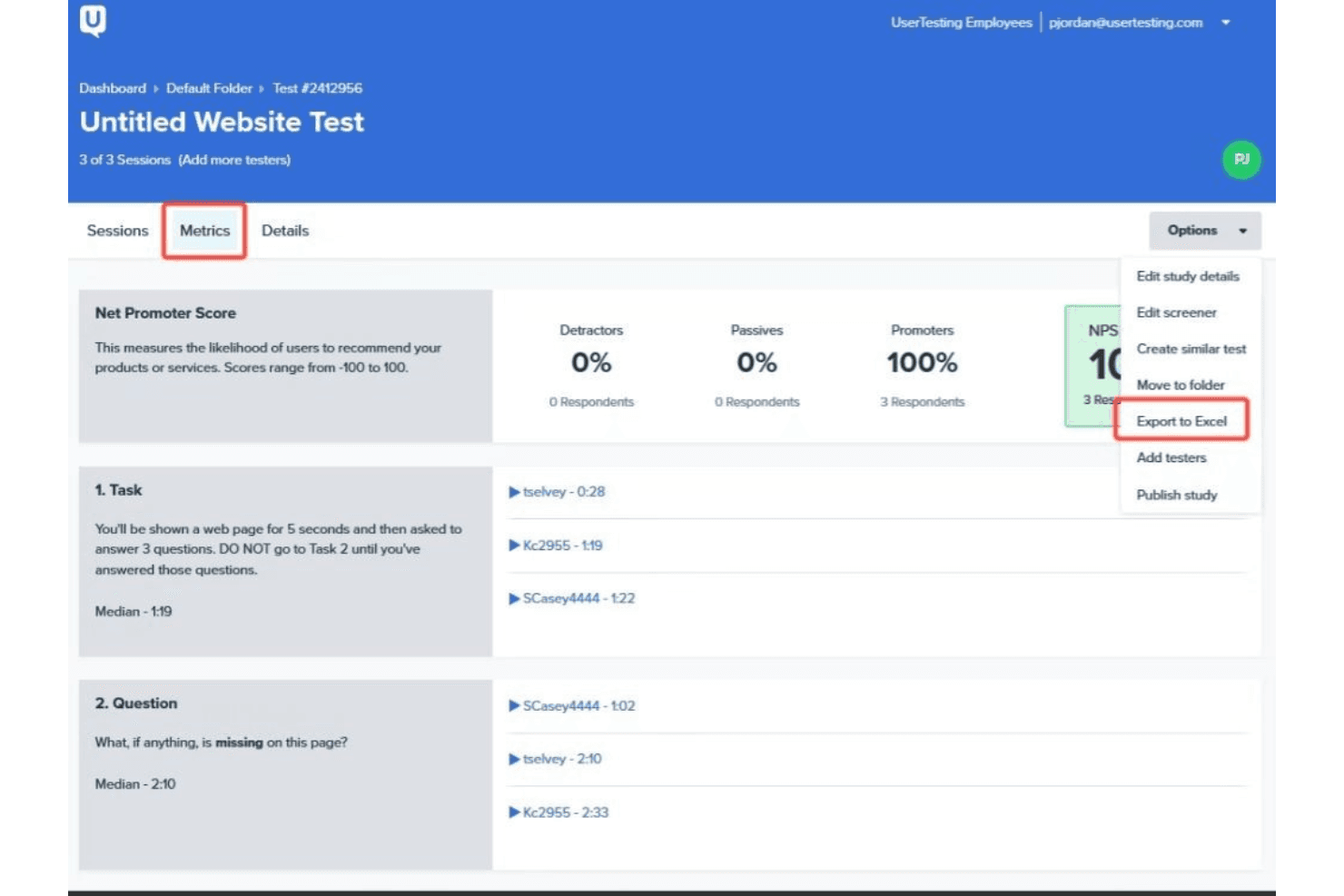
UserTesting has a comprehensive interface that tracks sessions, metrics, and details. UserTesting is a user research platform that supports unmoderated tests, moderated interviews, surveys, and participant recruitment through a verified global panel with advanced demographic targeting and screener logic.
Who Is UserTesting Best For?
UserTesting is a strong fit for enterprise product and research teams that need to recruit hard-to-reach B2B professionals or niche consumer segments at scale.
Why I Picked UserTesting
UserTesting earns its spot on my shortlist because of how far ahead it sits when it comes to reaching the audiences most research platforms can't. After the User Interviews acquisition, it now combines a 7.6M+ verified panel with B2B-specific targeting by job title, seniority, company size, and industry, so recruiting a senior procurement manager at a mid-market SaaS company is genuinely achievable. I also like the Advanced Targeting screeners, which support skip logic, double screening, and fraud prevention to keep study quality high even with niche segments.
UserTesting Key Features
- Live Conversation moderated interviews: Schedule and run real-time video interviews with participants directly through the platform, with Google Calendar integration for easy booking.
- QXscore benchmarking: Track and compare experience quality scores across studies over time to measure how product changes affect the user experience.
- Automated highlight reels: The platform automatically generates shareable video clips from sessions, so you can quickly surface key moments for stakeholders.
- Insights Hub: Search across past studies, import external research files, and aggregate app store reviews to connect findings without running duplicate research.
UserTesting Integrations
UserTesting integrates with Figma, FigJam, Jira, Jira Product Discovery, Miro, Slack, Microsoft Teams, Google Calendar, and Qualtrics. It also offers open and Results APIs for custom integrations.
Pros and Cons
Pros:
- Produces polished video-based insight reports
- Combines moderated and unmoderated research
- Reaches niche B2B professionals
Cons:
- Advanced synthesis tools require higher tiers
- Professional testers can skew participant behavior
Learn more about UserTesting: Best for AI-generated executive research reports
- Free demo available
- Pricing upon request
Visit WebsiteCustomer Rating:5/5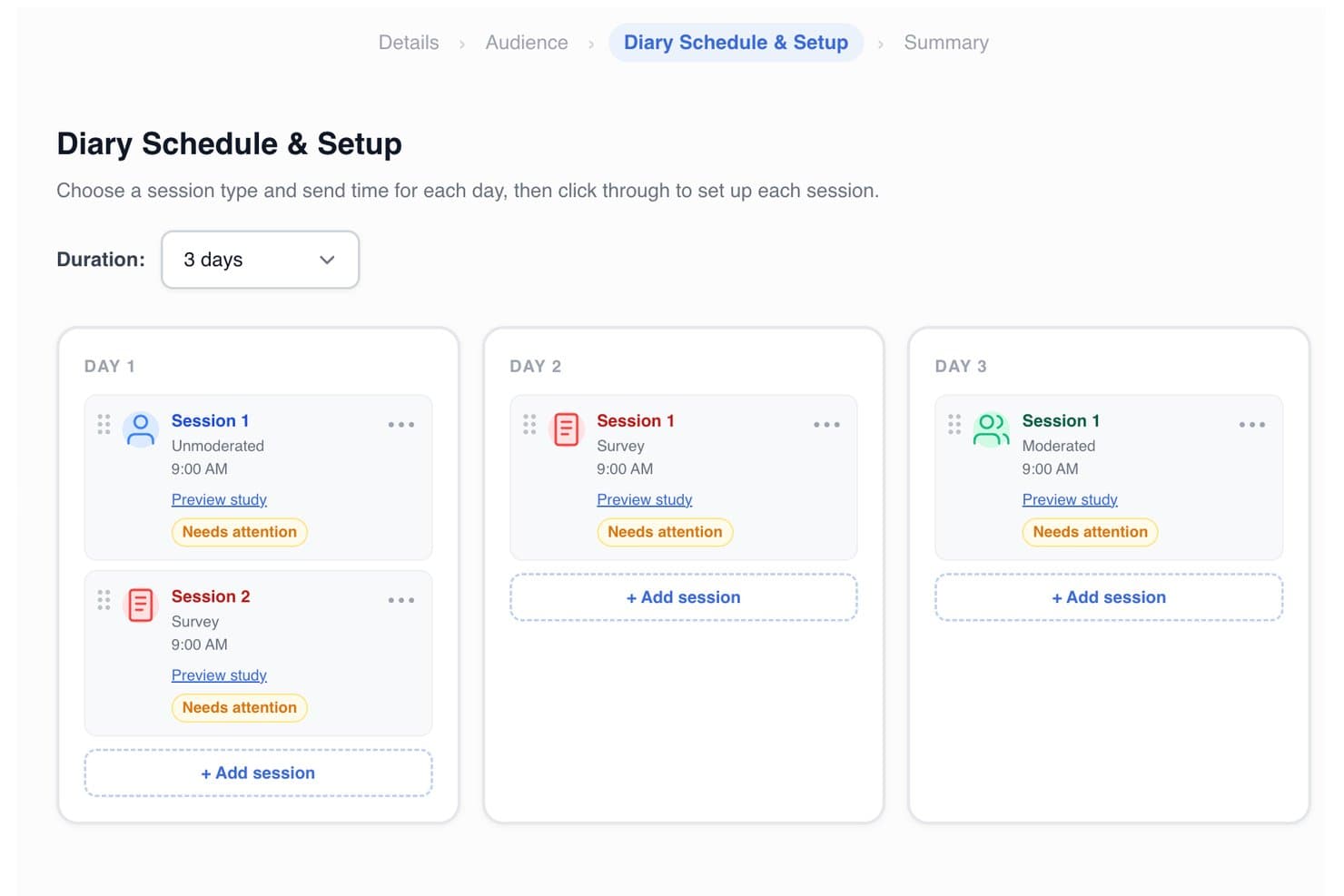
PlaybookUX lets users schedule multi-day diary study sessions by type and time. PlaybookUX is a user research platform that covers moderated and unmoderated testing, card sorting, tree testing, surveys, Figma prototype testing, and session replays, with a built-in participant panel and AI-powered analysis tools.
Who Is PlaybookUX Best For?
PlaybookUX is a strong fit for product managers and UX researchers who need to run studies across multiple methods and quickly turn findings into stakeholder-ready reports.
Why I Picked PlaybookUX
I picked PlaybookUX as one of the best because its AI Executive Reports do something I haven't seen done this cleanly elsewhere: they pull study setup, participant demographics, transcripts, themes, and supporting quotes into a single stakeholder-ready document, and they can generate that report in a different language than the study was conducted in. I also love that AI-generated synthetic personas are built from your own research videos and transcripts, not generic assumptions. These features make PlaybookUX especially useful when research velocity matters and findings need to reach executives fast.
PlaybookUX Key Features
- Built-in participant panel: Access a pool of 7M+ vetted consumers and professionals across 50+ countries, with demographic targeting, quotas, and screeners built in.
- Figma prototype testing: Import Figma prototypes directly, set goal screens, and capture task completion rates, misclicks, common paths, and heatmaps overlaid on your designs.
- Card sorting and tree testing: Run open, closed, or hybrid card sorts and tree tests natively, with results visualized as similarity matrices, dendrograms, and task-success charts.
- AI follow-up questions: During unmoderated sessions, the platform automatically asks dynamic follow-up questions based on participant responses to surface deeper context.
PlaybookUX Integrations
PlaybookUX offers a native Figma integration for prototype testing, plus Enterprise SSO/SAML with Okta, Azure, ADFS, and Google. Its open API and MCP layer support custom connections to data warehouses, CRMs, and AI tools.
Pros and Cons
Pros:
- Built-in panel supports targeted participant recruitment
- Broad research methods support mixed-method studies
- AI-generated executive reports speed stakeholder alignment
Cons:
- Reviewers report limited advanced analysis capabilities
- Repository lacks automatic cross-study insight linking
Learn more about PlaybookUX: Best for enterprise-grade research at org scale
- Free demo available
- Pricing upon request
Visit WebsiteCustomer Rating:3.9/5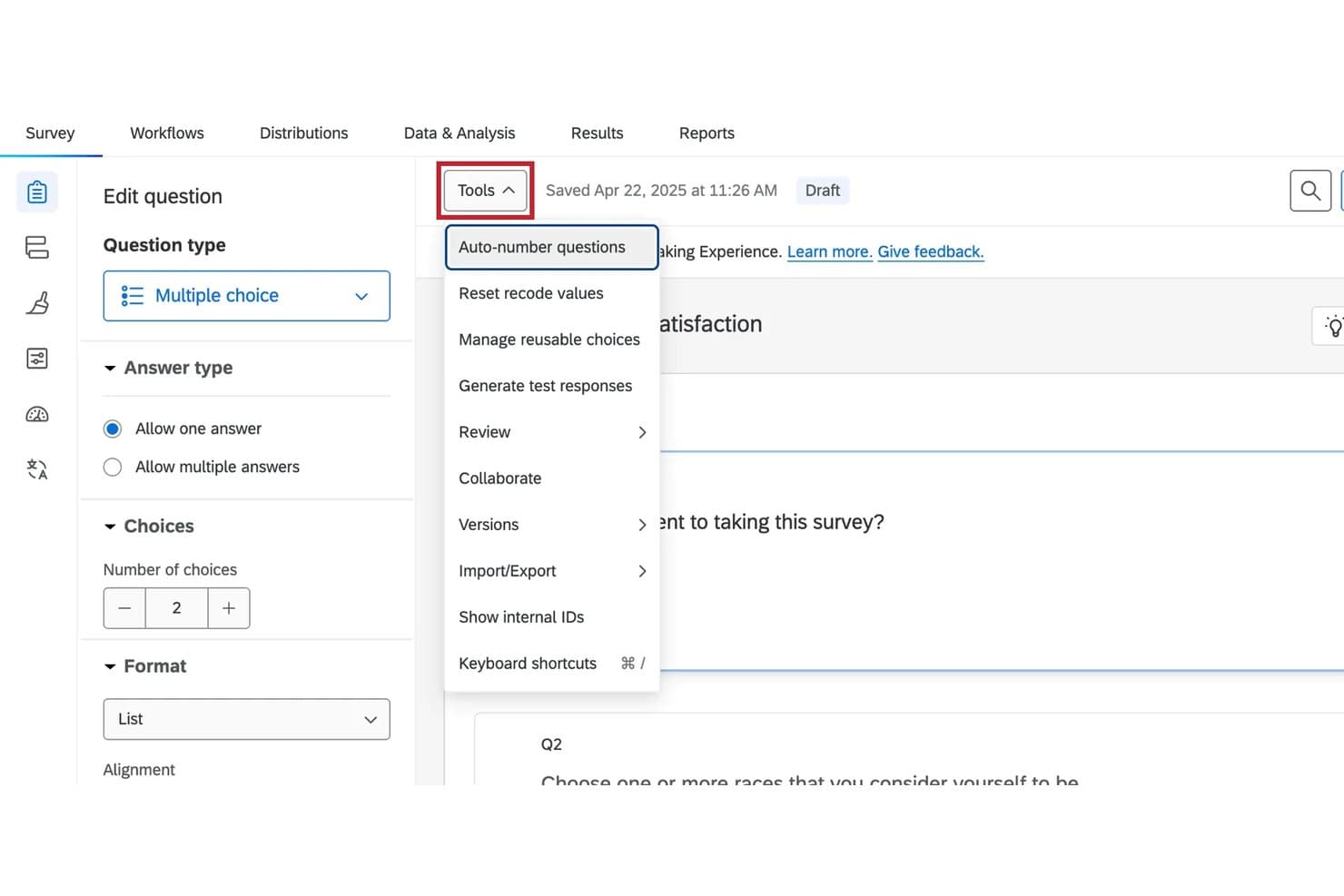
Qualtrics lets users manage survey tools like auto-numbering and imports. Qualtrics is an enterprise research platform that combines surveys, moderated and unmoderated usability testing, tree testing, card sorting, and an AI-powered insight repository into a single system.
Who Is Qualtrics Best For?
Qualtrics fits large organizations with dedicated UX research or insights teams that need to run surveys, usability tests, and org-wide research repositories under one enterprise-grade platform.
Why I Picked Qualtrics
Qualtrics earns its spot as one of the best on my shortlist because no other tool in this category covers as much research ground under one roof at enterprise scale. I've done everything from tree testing and card sorting to moderated sessions and org-wide repository searches without leaving the platform. Research Hub is what makes it genuinely enterprise-grade: it indexes every survey and dashboard across a license, supports semantic search, and lets teams upload syndicated research so you're not repeating work someone else already did.
Qualtrics Key Features
- Conversational feedback: AI generates follow-up questions based on open-text responses and prompts participants for clarification when answers are vague.
- Audio & Video Editor: Automatically transcribes, tags sentiment, detects topics, and generates AI summaries across recorded sessions.
- Tree testing: A native question type that captures success rates, path directness, and first-click data to evaluate information architecture.
- Edge Audiences panel network: Connects you to 30+ global panel partners across 84+ demographic segments for both B2B and B2C recruitment.
Qualtrics Integrations
Qualtrics integrates with Figma, Adobe XD, InVision, Zoom, Slack, Jira Cloud, Zendesk, ServiceNow, Salesforce, Tableau, and Google Sheets. Its REST API and XM Extensions framework support custom integrations.
Pros and Cons
Pros:
- Offers built-in B2B and B2C recruitment
- Searches org-wide research semantically
- Combines surveys with usability testing
Cons:
- Mobile testing lacks broad maturity
- UX testing remains survey-centric
Learn more about Qualtrics: Best for card sorting and tree testing
- Free plan available
- From $208/user/month
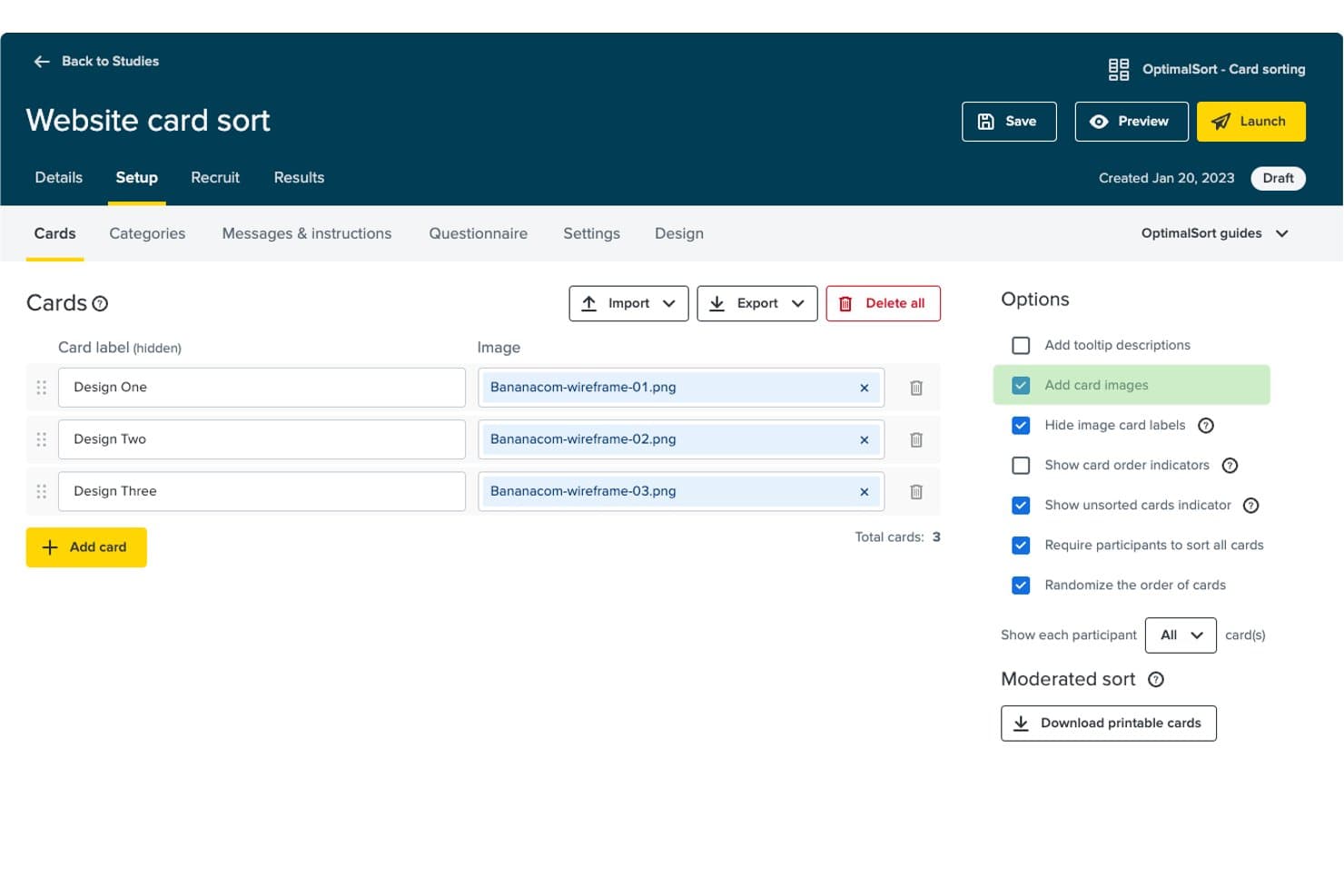
Optimal Workshop lets users attach wireframe images directly to sort cards. Optimal Workshop is a user research platform that covers card sorting, tree testing, usability testing, prototype testing, surveys, and moderated interviews—all in a single tool.
Who Is Optimal Workshop Best For?
Optimal Workshop is a strong fit for UX researchers and product teams who need card sorting and tree testing alongside a broader suite of usability, prototype, and interview research methods.
Why I Picked Optimal Workshop
Optimal Workshop earns its spot on my shortlist because it's the original card sorting and tree testing tool, and nothing else comes close to matching its depth in information architecture research. I love that tree testing results come with pietree diagrams showing exactly where participants drop off in your navigation, and card sort data surfaces dendrograms that reveal how users naturally group content. When I need to validate a site structure or rethink a navigation taxonomy, Optimal Workshop is my first call.
Optimal Workshop Key Features
- AI theme detection: Automatically surfaces themes across interviews, surveys, and usability tests, with each insight linked back to the source quote or clip.
- Moderated interview scheduling: Participants self-book, reschedule, and receive automated reminders, confirmations, and thank-you emails without manual coordination.
- Figma prototype import: Import Figma designs directly to run interactive prototype and usability tests without rebuilding assets inside the platform.
- Unlimited seats and responses: Every plan includes unlimited team members and no response caps per study, so your whole team can run and view research without extra costs.
Optimal Workshop Integrations
Integrations include Figma, Zoom, Google Meet, Microsoft Teams, Google Calendar, Microsoft Outlook, User Interviews, Respondent, Prolific, and Slack. Enterprise plans include an API for custom connections, while Optimal MCP connects research data with Claude, ChatGPT, Copilot, Gemini, and Cursor.
Pros and Cons
Pros:
- Unlimited seats support cross-functional research
- Broad research methods under one workspace
- Deep card sorting and tree testing analysis
Cons:
- Panel quality varies across recruited participants
- Survey logic trails dedicated survey platforms
Learn more about Optimal Workshop: Best for running all research methods in one CRM
- Free trial + free demo available
- From $129/seat/month
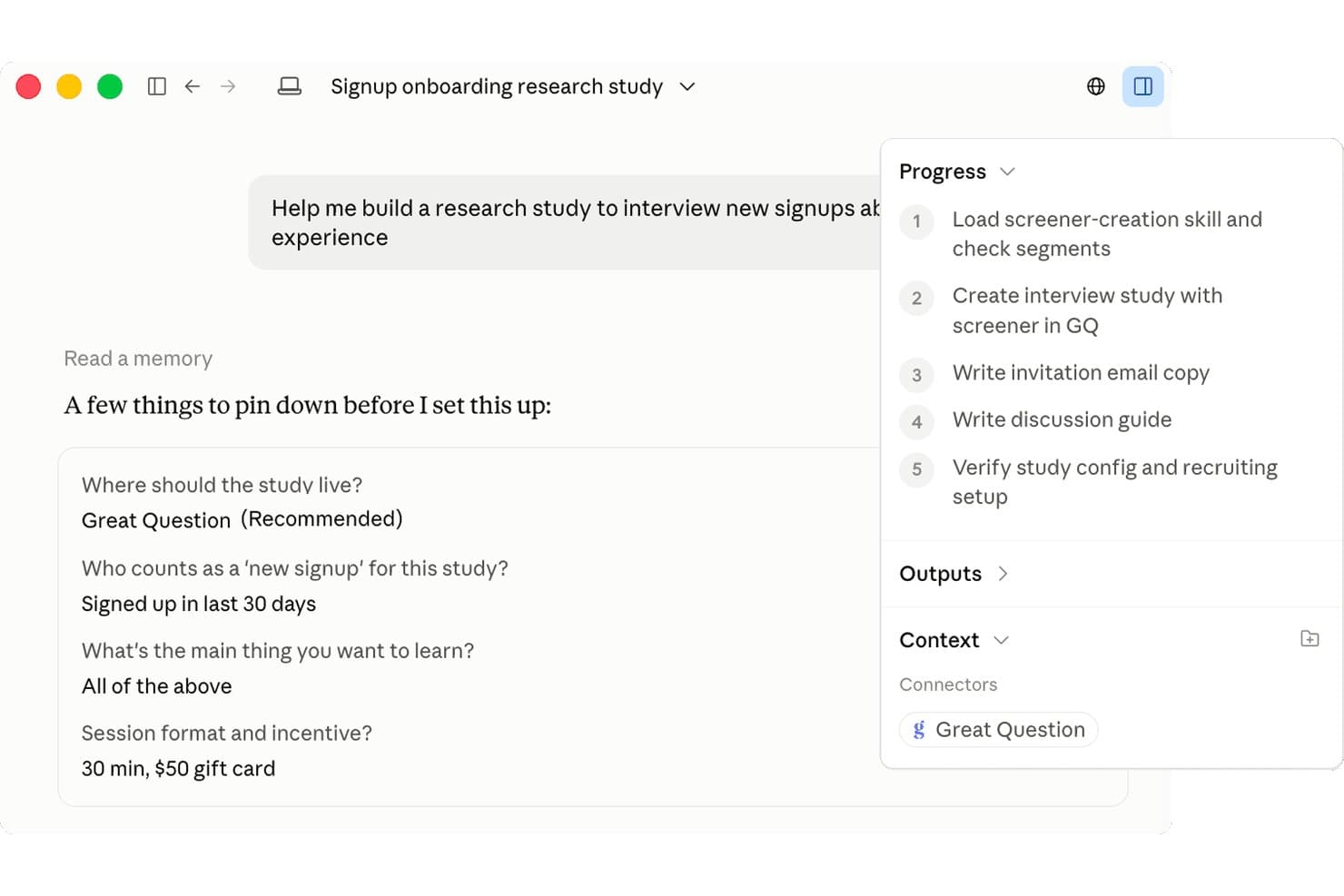
Great Question uses AI to guide study setup with structured steps. Great Question is a user research platform that combines participant recruitment, a research CRM, moderated and unmoderated studies, surveys, card sorting, tree testing, and an AI-powered insight repository in one tool.
Who Is Great Question Best For?
Great Question is a strong fit for product and UX research teams that need to run moderated interviews, unmoderated tests, surveys, and card sorting without juggling multiple tools.
Why I Picked Great Question
I picked Great Question as one of the best because it's the only tool I've seen where your research CRM, recruitment panel, moderated interviews, unmoderated tests, card sorting, and tree testing all live in one place and feed into the same AI-powered repository. I love that the AI moderator can run hundreds of sessions simultaneously, reacting in real time when a participant hesitates or takes a wrong path during a prototype test. The research CRM also lets you recruit your own customers without per-participant fees, while keeping governance guardrails like eligibility limits and consent controls in place.
Great Question Key Features
- AI-powered synthesis: After each session, AI generates summaries, key takeaways, video chapters, and tagged highlights automatically, with every finding linked back to a verbatim quote.
- Unmoderated prototype testing: Test Figma prototypes, AI-built apps, or live websites with video capture, click heatmaps, misclick rates, and user path reporting.
- Card sorting and tree testing: Native open, closed, and hybrid card sorts alongside tree tests with success rate tracking, agreement matrices, recordings, and AI summaries.
- MCP server for AI assistants: Connect Claude, ChatGPT, Gemini, Cursor, or Copilot to Great Question via an MCP server that covers 130+ actions across study design, recruitment, scheduling, and synthesis.
Great Question Integrations
Great Question offers 20+ native integrations, including Zoom, Google Meet, Microsoft Teams, Slack, Figma, Salesforce, HubSpot, Snowflake, Databricks, and Qualtrics. It also provides a public API for custom integrations and supports Zapier.
Pros and Cons
Pros:
- Manages participants with a research CRM
- Links AI themes to verbatim evidence
- Combines moderated and unmoderated research methods
Cons:
- Complex surveys can feel slow
- Enterprise gates repository and AI moderation
Learn more about Great Question:
Diğer Kullanıcı Araştırması Araçları
En iyi kullanıcı araştırması araçları listesine giremeyen, değerlendirmeye değer birkaç seçenek daha şunlardır:
- 11LightsterBest for direct user feedback
- 12SuzyBest for blending quant, qual, and panel research
- 13UserlyticsBest for enterprise UX research
- 14UXtweakBest for IA testing with card sort and tree test
- 15MazeBest for testing prototypes and getting design ideas
- 16LookbackBest for live moderated research with AI synthesis
- 17DovetailBest for AI-driven qualitative data synthesis
- 18DscoutBest for diary studies and AI-moderated research
- 19UseberryBest for testing prototypes across Figma and IA methods
- 20MarvinBest for AI-moderated interviews in your product
İlgili Ürün Yönetimi Yazılımı İncelemeleri
Burada aradığınızı hâlâ bulamadıysanız, test edip değerlendirdiğimiz diğer ilgili araçlara göz atın:
- En İyi Ürün Yönetimi Araçları
- En İyi Ürün Planlama Yazılımları
- En İyi UX Tasarım Araçları
- En İyi Ürün Analitiği Araçları
- En İyi Isı Haritası Yazılımları
- En İyi Ürün Pazarlama Araçları
How I Evaluate User Research Tools
I split my evaluation into three parts. Core functionality carries the most weight—I look for tools that can collect user data through interviews or surveys and synthesize findings into tagged, searchable insights. From there, I evaluate standout features like AI moderation and automated highlight reels, then consider pricing value and onboarding support.
Core Functionality (Table Stakes For This List)
When I'm selecting tools for my list, I score each one on a scale from 0 (does not offer the functionality) to 5 (excels in this area) for each core functionality listed below. I then convert the total into a percentage to help assess each tool's overall fit, with extra weight on any functionalities I've deemed essential.
- Data Collection Methods (Essential): I check whether a tool supports surveys, moderated interviews, unmoderated usability tests, or a mix—and how much flexibility you get in structuring each study.
- Participant Recruitment & Management: Built-in panel access, screening filters, scheduling, and incentive handling all matter here. Tools like UserTesting and Respondent approach recruitment differently, so I evaluate what fits your sourcing needs.
- Synthesis & Analysis Tools: I look for tagging, thematic coding, and cross-session pattern detection. The best tools let you move from raw transcripts to clustered themes without jumping into a spreadsheet.
- Insight Repository & Organization: Past research should be searchable and tagged so your team isn't re-running studies that already have answers sitting in a folder somewhere.
- Collaboration & Sharing: I evaluate whether stakeholders can comment, annotate clips, or co-analyze findings in real time—versus just receiving a static export after the fact.
- Reporting & Visualization: Shareable highlight reels, auto-generated summaries, and visual dashboards help research land with leadership. I look at how much manual assembly each tool requires.
Once I have a list of tools that meet the criteria, I consider what sets each platform apart.
Differentiating Factors (What Sets Vendors Apart)
Here's how I compare and contrast different vendors:
Standout Features
AI moderator capabilities matter most when you need to scale unmoderated sessions. I evaluate whether the AI can adapt follow-up questions based on participant responses, not just run a static script. Cross-study insight linking is the other feature I look for closely. Tools like Dovetail and Condens can surface connections between a new finding and past research, which keeps teams from re-running studies that already have answers buried in old reports. I also check for automated highlight reels, since assembling video clips manually for stakeholders can eat hours.
Beyond Features
I check how each tool's participant panel matches your actual audience. A platform with millions of consumer testers won't help if you're researching niche B2B buyers in healthcare IT. Integration depth also matters—I look at whether insights flow into Jira, Slack, or Figma without manual re-entry, since research that stays trapped in a silo rarely shapes roadmap decisions. Finally, I evaluate data privacy posture, including SOC 2 certification and GDPR-compliant handling of session recordings, because enterprise procurement teams will block tools that can't clear security review.
Kullanıcı Araştırması Araçları Nasıl Seçilir?
Bu kadar çok farklı kullanıcı araştırması çözümü mevcutken, hangi kullanıcı araştırması aracının ihtiyaçlarınıza en uygun olacağına karar vermek zor olabilir.
Kullanıcı araştırması araçlarını kısa listeye alırken, denerken ve seçerken aşağıdakileri göz önünde bulundurun:
- Hangi problemi çözmeye çalışıyorsunuz - Kullanıcı araştırması aracının karşılamasını istediğiniz özellik boşluğunu belirleyerek başlayın; böylece kullanıcı araştırması aracının sunması gereken özellikleri ve işlevleri netleştirebilirsiniz.
- Kimlerin kullanması gerekecek - Maliyeti ve gereksinimleri değerlendirmek için yazılımı kimlerin kullanacağını ve kaç lisansa ihtiyaç duyacağınızı göz önünde bulundurun. Erişimin yalnızca ürün yönetimi profesyonelleri için mi gerekli olacağını, yoksa tüm kuruluşun mu erişim gerektireceğini değerlendirmeniz gerekir. Bu netleştiğinde, herkes için kullanım kolaylığına mı yoksa kullanıcı araştırması aracının ileri düzey kullanıcıları için hıza mı öncelik verdiğinizi düşünmeye değer.
- Hangi diğer araçlarla birlikte çalışması gerekiyor - Hangi araçların yerine geçeceğinizi, hangi araçların kullanılmaya devam edeceğini ve muhasebe, CRM veya İK yazılımı gibi hangi araçlarla entegrasyon kurmanız gerekeceğini netleştirin. Araçların birbiriyle entegre olması gerekip gerekmediğine veya alternatif olarak birden fazla aracı tek bir bütünleşik kullanıcı araştırması aracıyla değiştirip değiştiremeyeceğinize karar vermeniz gerekir.
- Hangi sonuçlar önemli - Başarılı kabul edilmesi için yazılımın sağlaması gereken sonucu göz önünde bulundurun. Hangi yetkinliği kazanmak veya neyi geliştirmek istediğinizi ve başarıyı nasıl ölçeceğinizi değerlendirin. Örneğin sonuç, performans hakkında daha fazla görünürlük elde etme becerisi olabilir.
Kullanıcı araştırması aracı özelliklerini yüzünüz mosmor olana kadar karşılaştırabilirsiniz; ancak elde etmek istediğiniz sonuçları düşünmüyorsanız, çok değerli zamanınızı boşa harcıyor olabilirsiniz. - Kuruluşunuz içinde nasıl çalışacağı - Yazılım seçimini iş akışlarınız ve teslimat metodolojinizle birlikte değerlendirin. Nelerin iyi çalıştığını ve ele alınması gereken sorunlara yol açan alanları inceleyin. Her işletmenin farklı olduğunu unutmayın — bir aracın popüler olması, kuruluşunuzda da işe yarayacağı anlamına gelmez.
2026 İçin Kullanıcı Araştırması Araçlarındaki Eğilimler
Kullanıcı araştırması araçlarının dünyası, teknolojik gelişmeler ve değişen kullanıcı ihtiyaçlarının etkisiyle 2026 yılında hızla gelişiyor. Bu yeni eğilimler, hem kullanıcı araştırması teknolojisinin mevcut durumunu yansıtıyor hem de gelişen, yeni ortaya çıkan ve önemini yitiren özellikleri ve işlevleri öne çıkarıyor. Bu eğilimlerin her birinin gelecekte kullanıcı araştırması araçlarının gelişimini etkilemeye devam edeceğine inanıyorum.
Kullanıcı Araştırması Araçları ve Teknolojisindeki Eğilimler
- Yapay zekâ ve makine öğrenimiyle entegrasyon: Kullanıcı araştırması platformları, kullanıcı geri bildirimlerinin ve davranışlarının analizini otomatikleştiren yapay zekâ destekli araştırma araçlarına giderek daha fazla dönüşüyor. Bu eğilim, kullanıcı araştırması araçlarının kullanıcı ihtiyaçlarını ve davranışlarını öngörebildiği, içgörüleri daha uygulanabilir ve stratejik kararları daha bilinçli hâle getirdiği bir geleceğe işaret ediyor.
- Gelişmiş gerçek zamanlı iş birliği özellikleri: Uzaktan çalışma daha yaygın hâle geldikçe kullanıcı araştırması araçları, daha iyi gerçek zamanlı iş birliği özelliklerini içerecek şekilde gelişiyor. Bu sayede ekipler, fiziksel konumlarından bağımsız olarak araştırma projeleri üzerinde sorunsuzca birlikte çalışabiliyor; üretkenlik ve içgörü toplama hızı artıyor.
- Gizlilik ve güvenliğe odaklanma: Veri gizliliği ve güvenliğiyle ilgili endişelerin artmasıyla kullanıcı araştırması araçları daha sıkı veri koruma önlemlerini bünyesine katıyor. Bunlar arasında gelişmiş şifreleme ve küresel gizlilik düzenlemelerine uyum da yer alıyor; böylece kullanıcı verilerinin sorumlu bir şekilde işlenmesi sağlanıyor.
En Hızlı Gelişen Özellikler
- Otomatik içgörü oluşturma: Verilerden otomatik olarak içgörü oluşturma yeteneği hızla gelişiyor. Bu, kullanıcı geri bildirimlerini analiz etmek için gereken zamanı ve çabayı azaltarak ekiplerin iyileştirmeleri uygulamaya odaklanmasını sağlıyor.
En Yeni ve Sıra Dışı İşlevler
- Öngörücü kullanıcı davranışı modelleme: Bazı araçlar, geçmiş verilere dayanarak kullanıcı eylemlerini tahmin eden öngörücü modelleme özelliklerini kullanıma sunuyor. Bu yeni işlev, kullanıcı ihtiyaçlarını öngörmeye ve deneyimleri buna göre uyarlamaya yardımcı oluyor.
Önemini Yitiren Özellikler
- Statik raporlama araçları: Dinamik ve etkileşimli raporlama standart hâline geldikçe statik raporlama araçlarına olan talep azalıyor. Kullanıcılar artık verilerle gerçek zamanlı olarak etkileşim kurmayı ve raporları kendi özel ihtiyaçlarına uyacak şekilde özelleştirmeyi bekliyor.
Bu eğilimler, kullanıcı araştırması araçlarının ilerlediği yönü ortaya koyarak otomasyona, gelişmiş analizlere, iş birliğine ve gizliliğe doğru bir değişimi vurguluyor. Ürün yönetimi profesyonelleri için bu gelişmelerden haberdar olmak, kullanıcı araştırması araçlarından etkili şekilde yararlanmanın anahtarıdır.
Bu gelişmeleri anlayan profesyoneller, stratejik hedefleriyle uyumlu araçları daha iyi seçebilir ve kullanıcı odaklı ürünler ile deneyimler sunma konusunda önde kalabilir.
Kullanıcı araştırması araçları nedir?
Kullanıcı araştırması araçları, kullanıcı davranışları, tercihleri ve deneyimleri hakkında içgörü toplama sürecini kolaylaştıran ve daha verimli hâle getiren platformlardır. Bu araçlar, araştırmacıların, tasarımcıların ve ürün ekiplerinin hedef kitlelerini daha iyi anlamasına yardımcı olarak ürün geliştirme yaşam döngüsü boyunca bilinçli kararlar almalarını sağlar.
Kullanıcı araştırması araçları; anketler, görüşmeler, kullanılabilirlik testleri, analizler, ısı haritaları ve diğer veri toplama yöntemlerini yürütmeye yönelik özellikler içerebilir. Amaç, kullanıcıların ihtiyaçlarını, sorun yaşadıkları noktaları ve davranışlarını daha derinlemesine anlamak ve nihayetinde daha kullanıcı odaklı ve etkili ürün veya hizmetlerin oluşturulmasını sağlamaktır.
Kullanıcı Araştırması Araçlarının Özellikleri
Kullanıcı araştırması araçları, gerçek kullanıcılardan veri toplamak, bu verileri analiz etmek ve yorumlamak için harikadır; sonuçta daha akıllı UX tasarımı kararlarının şekillenmesine yardımcı olurlar. İster uzaktan kullanılabilirlik testi yürütüyor, ister Figma'da bir tel kafes tasarımını test ediyor, ister güncellenmiş bir prototip üzerinde ikinci bir test gerçekleştiriyor olun, doğru araç tasarım sürecinizle uyumlu olmalı ve anlamlı içgörüler elde etmenize yardımcı olmalıdır.
Aşağıda, UX araştırması araçlarını değerlendirirken aranması gereken temel özellikler yer almaktadır.
- Kullanım Kolaylığı: Basit bir testin nasıl yürütüleceğini anlamanız yarım gün sürüyorsa, bu araç zaten değerinden fazlasına mal oluyor demektir. En iyi araçlar kurulumu sezgisel hâle getirir ve araştırmacıların (ve araştırmacı olmayanların) hızlı ilerlemesini sağlar; sürekli yönlendirme gerektirmez.
- Çoklu Yöntem Desteği: Araştırma herkese uyan tek bir çözüm değildir. Aracınız; anketler, görüşmeler, kullanılabilirlik testleri, günlük çalışmaları ve çalışmanızın gerektirebileceği diğer formatlara uyum sağlayabilmelidir. Sürecinizle birlikte gelişen, sizi kısıtlamayan bir platform istersiniz.
- Veri Toplama ve Yönetimi: Verilerinizi düzenlemek için bir Notion belgesine, bir elektronik tabloya ve altı yapışkan nota ihtiyaç duymamalısınız. Optimal Workshop ve Lookback gibi araçlar, nitel ve nicel geri bildirimleri geniş ölçekte düzenlemeye yardımcı olur. Katılımcı yanıtlarından video kayıtlarına ve görev ölçümlerine kadar uygun veri yönetimi, gerçek kullanıcılardan güvenilir içgörüler elde etmenin temelidir.
- Analiz Araçları: Yerleşik analizler, ham kullanıcı girdilerini kullanılabilir bulgulara dönüştürür. Tel kafes tasarımı testinden duygu analizi yapmaya veya tıklama testi gerçekleştirmeye kadar bu araçlar, ek bir yazılıma ihtiyaç duymadan eğilimleri ve davranış kalıplarını ortaya çıkarmaya yardımcı olur.
- Katılımcı Bulma ve Yönetme: Doğru kullanıcıları bulmak, mücadelenin yarısıdır. Gerçek kullanıcıları demografik kriterlere göre bulup yönetebilme özelliği oldukça kullanışlı olabilir. Birçok araç, canlı oturumlar ve takip görüşmeleri için özel ön eleme anketlerini, planlamayı ve Zoom gibi video konferans platformlarıyla entegrasyonları destekler.
- İş Birliği Özellikleri: Paylaşılan panolar, gerçek zamanlı not alma veya tasarım araçlarınızla entegrasyonlar gibi iş birliğini destekleyen özellikler, ekiplerin desteğini almayı ve uyum içinde çalışmasını kolaylaştırır. Figma, Miro ve InVision entegrasyonları, araştırmacılar, tasarımcılar ve geliştiriciler arasındaki boşluğu kapatmaya yardımcı olur; böylece içgörüler UX tasarım sürecini hızla etkileyebilir.
- Entegrasyon Olanakları: Anket verileri için Qualtrics ile eşzamanlama, içgörüleri sentezleme amacıyla Miro'ya aktarma veya geri bildirimleri Figma maketlerine yerleştirme gibi işlevler, ekipler arasındaki iş akışlarının sorunsuz ilerlemesi için entegrasyon desteğini zorunlu kılar.
- Ölçeklenebilirlik: Ürününüz geliştikçe araştırma araç setiniz de gelişmelidir. Ölçeklenebilir araçlar, performansı yavaşlatmadan daha geniş katılımcı gruplarını, daha sık testleri (ikinci testler dâhil) ve daha karmaşık çalışmaları destekler.
- Güvenlik ve Gizlilik Uyumluluğu: Gerçek kullanıcılarla çalışmak, hassas verilerin işlenmesi anlamına gelir. Özellikle oturumlar kaydedildiğinde veya müşteriye yönelik ürünleri içerdiğinde araçlar GDPR ve CCPA ile uyumlu olmalıdır.
- Raporlama ve Görselleştirme: Açık ve anlaşılır görsel raporlar, araştırmayı eyleme dönüştürmeye yardımcı olur. Günlük çalışmalarından elde edilen içgörüleri, tıklama testlerinden alınan ısı haritalarını veya uzaktan kullanılabilirlik testlerinden çıkan eğilimleri paylaşıyor olun, güçlü raporlama araçları bulguları paydaşlara aktarmayı kolaylaştırır.
Doğru kullanıcı araştırması aracını seçmek; kullanım kolaylığını, esnekliği ve kapsamı dengelemek anlamına gelir. Bir tel kafes tasarımını yinelediğinizi, Zoom üzerinden moderatörlü görüşmeler yürüttüğünüzü veya sonuçları Miro'da sentezlediğinizi varsayalım; doğru platform, gözlemleri kararlara, kararları da daha iyi deneyimlere dönüştürmeye yardımcı olur.
Kullanıcı Araştırması Araçlarının Faydaları
Kullanıcı araştırması araçları yalnızca veri toplamakla kalmaz; ekiplerin daha akıllı ve daha kullanıcı odaklı ürünler geliştirmesine yardımcı olur. Geri bildirimleri toplamayı, analiz etmeyi ve bunlara göre harekete geçmeyi kolaylaştıran bu araçlar, ürün geliştirme sürecine netlik ve karar alma sürecine güven kazandırır.
Bir araştırma aracına yatırım yapmanın buna değip değmeyeceğini değerlendiriyorsanız, aşağıdaki beş fayda kararınızı vermenize yardımcı olabilir:
- Kullanıcı İhtiyaçlarının Daha Net Anlaşılması
Kullanıcı araştırması araçları, kullanıcılarınızın ne düşündüğüne, ne hissettiğine ve hangi zorlukları yaşadığına doğrudan erişmenizi sağlar. Varsayımlara dayanarak bir şeyler geliştirmek yerine gerçek insanlar için gerçek sorunları çözersiniz. Bu içgörü; daha iyi ürünlere, kullanıcı beklentileriyle daha güçlü bir uyuma ve uzun vadede daha yüksek memnuniyete ulaşmanızı sağlar. - Veri Odaklı Karar Alma
İster sırada hangi özelliği geliştireceğinize ister bir ürünü nasıl konumlandıracağınıza karar veriyor olun, hem nitel hem de nicel verilerin elinizin altında olması sürecin belirsizliğini ortadan kaldırır. Bu, ekiplerin içgüdülere veya ortamdaki en yüksek sesli görüşe güvenmek yerine kullanıcıların gerçekten neye ihtiyaç duyduğuna odaklanmasına yardımcı olur. - Daha İyi Kullanılabilirlik, Daha İyi Deneyim
Kullanılabilirlik testleri ve geri bildirim toplama, aksi takdirde fark edilmeyebilecek sorunlu noktaları ortaya çıkarır. Bu sorunları erken düzeltmek daha düzenli akışlara, daha sezgisel arayüzlere ve kullanımı daha kolay hissettiren ürünlere yol açar; bu da daha yüksek etkileşim ve daha güçlü kullanıcı bağlılığı sağlar. - Kalıcı Bir Rekabet Avantajı
Kullanıcılarla düzenli olarak konuştuğunuzda, kalıpları fark ettiğinizde ve karşılanmamış ihtiyaçları rakiplerinizden önce tespit ettiğinizde yalnızca pazara tepki vermekle kalmaz, pazarı öngörürsünüz. Bu tür proaktif araştırmalar, insanların gerçekten istediği özellikleri ve deneyimleri geliştirme konusunda size avantaj sağlar. - Zamanın ve Bütçenin Daha Akıllıca Kullanılması
Hiç kimse kullanıcıların önemsemediği bir şeyi geliştirmek için aylar harcamak istemez. Araştırma araçları, geliştirme çalışmalarınızı gerçekten önemli olan konulara odaklamanıza yardımcı olur; boşa harcanan çabayı azaltır ve her sprintin doğrulanmış kullanıcı içgörülerine dayanmasını sağlar. Bu da daha iyi ROI ve daha az “bu neden işe yaramadı?” anı anlamına gelir. - Araştırma Depolarıyla İçgörü Yönetimini Kolaylaştırma
Harika bir alıntıyı veya önemli bir bulguyu daha önce hiç kaybettiniz mi? Bu özellik tam size göre. EnjoyHQ, Looppanel ve Notably gibi araştırma deposu özellikleri; görüşmeleri, notları, dökümleri ve içgörüleri depolamak için merkezi bir alan sunar. Toplamak için büyük emek harcadığınız araştırmaları kolayca arayın, etiketleyin, bulun, ve kullanın.
Kullanıcı araştırması araçları her ürün sorununu sihirli bir şekilde çözmeyebilir; ancak kullanıcılarınızla gerçekte neler olup bittiğini anlamanızı kesinlikle kolaylaştırır. Size daha net bir bakış açısı sunar, daha iyi sorular sormanıza yardımcı olur ve harekete geçmeden önce dinlemekten doğan güveni oluşturur.
Kullanıcı Araştırması Araçları için Maliyetler & Fiyatlandırma
Kullanıcı araştırması araçları, yeni girişimlerden büyük işletmelere kadar farklı ihtiyaçlara hitap edecek şekilde tasarlanmış çeşitli planlar ve fiyatlandırma seçenekleri sunar. Genellikle bu planlar, temel işlevlere sahip ücretsiz sürümlerden kapsamlı özellikler sunan ve derinlemesine kullanıcı araştırmasına olanak tanıyan daha gelişmiş seçeneklere kadar uzanır.
Yaygın plan türlerinin, ortalama fiyatlarının ve genellikle içerdikleri özelliklerin dökümü aşağıdadır:
Kullanıcı Araştırması Araçları için Plan Karşılaştırma Tablosu
| Plan Türü | Ortalama Fiyat | Yaygın Özellikler |
|---|---|---|
| Plan TürüÜcretsiz | Ortalama Fiyat$0 | Yaygın ÖzelliklerTemel anketler, sınırlı yanıtlar, temel analizler, topluluk desteği |
| Plan TürüTemel | Ortalama Fiyat$20 - $50 aylık | Yaygın ÖzelliklerGelişmiş anketler, sınırsız yanıtlar, dışa aktarma seçenekleri, e-posta desteği |
| Plan TürüProfesyonel | Ortalama Fiyat$50 - $200 aylık | Yaygın ÖzelliklerGelişmiş analizler, özel markalama, diğer araçlarla entegrasyon, öncelikli destek |
| Plan TürüKurumsal | Ortalama Fiyat$200 - $2000+ aylık | Yaygın ÖzelliklerTüm özelliklere erişim, özel destek, özel entegrasyonlar, gelişmiş güvenlik ve uyumluluk seçenekleri |
Bir kullanıcı araştırması aracı seçerken, hem özellikler hem de bütçe açısından gerçekte neye ihtiyacınız olduğunu değerlendirmek için bir adım geri atmanız faydalı olur. Özellikle yeni başlıyorsanız en pahalı plan her zaman en uygun seçenek değildir. İşleri gereğinden fazla karmaşıklaştırmadan veya bütçenizi aşmadan olmazsa olmaz ihtiyaçlarınızı karşılayan bir plan arayın.
Birçok araç, karar vermeden önce seçenekleri denemek için harika olan ücretsiz katmanlar veya deneme sürümleri sunar. Araştırma uygulamanız büyüdükçe iş akışınızı, ekip büyüklüğünüzü ve hedeflerinizi daha iyi destekleyen bir plana her zaman geçiş yapabilirsiniz.