

AI user research tools use artificial intelligence to automate and enhance how you gather, analyze, and act on user insights. If you’re searching for ways to speed up research, reduce manual work, or get deeper feedback from real or simulated users, these tools are designed for you. With so many options, it’s tough to know which platforms actually deliver reliable results and fit your workflow. This guide will help you quickly compare the top AI user research tools, so you can find the right solution to improve your team’s research process and make smarter product decisions.
Why Trust Our Software Recommendations
6,700+
Reviews
20
Industry experts
16+
Evaluation factors
14
Years
Our team has been testing and reviewing software since 2012. As product managers ourselves, we know how difficult—and important—it is to choose the right software.
For this guide, we evaluated tools using hands-on testing and independent research, scoring tools using our selection criteria.
Our reviews reflect our human editorial judgment, not a sales pitch.
Expert reviewers:
- Andrew LumbySenior TPM
- Cristiano ValimSenior UI/UX Lead


AI User Research Tools Comparison Table
This comparison table summarizes pricing details for my top AI user research tools for accountants selections:
| Tool | Best For | Trial Info | Price | ||
|---|---|---|---|---|---|
| 1 | Best with adaptive feedback taxonomy | Free demo available | Pricing upon request | Website | |
| 2 | Best for AI-driven survey response analysis | 7-day free trial + free demo available | From $79/month | Website | |
| 3 | Best for large-scale participant panels | Free demo available | Pricing upon request | Website | |
| 4 | Best with AI-powered qualitative data analysis | Free plan + free demo available | Pricing upon request | Website | |
| 5 | Best with collaborative research repositories | 15-day free trial | From $15/user/month (billed annually) | Website | |
| 6 | Best for integrated recruitment and research | Free trial + free demo available | From $129/seat/month | Website | |
| 7 | Best for end-to-end cited AI research synthesis | Free plan available | From $49/month | Website | |
| 8 | Best with automated interview scheduling | Free demo available | Pricing upon request | Website | |
| 9 | Best for voice-based research automation | Free demo available | Pricing upon request | Website | |
| 10 | Best for cross-study emotion and theme synthesis | Free demo available | Pricing upon request | Website |


AI User Research Tools Reviews
Below are my detailed summaries of the best AI user research tools that made it onto my shortlist. My reviews offer a detailed look at the features, capabilities, and best use cases of each platform to help you find the best one for you.
 Best with adaptive feedback taxonomy
- Free demo available
- Pricing upon request
Visit WebsiteCustomer Rating:4.8/5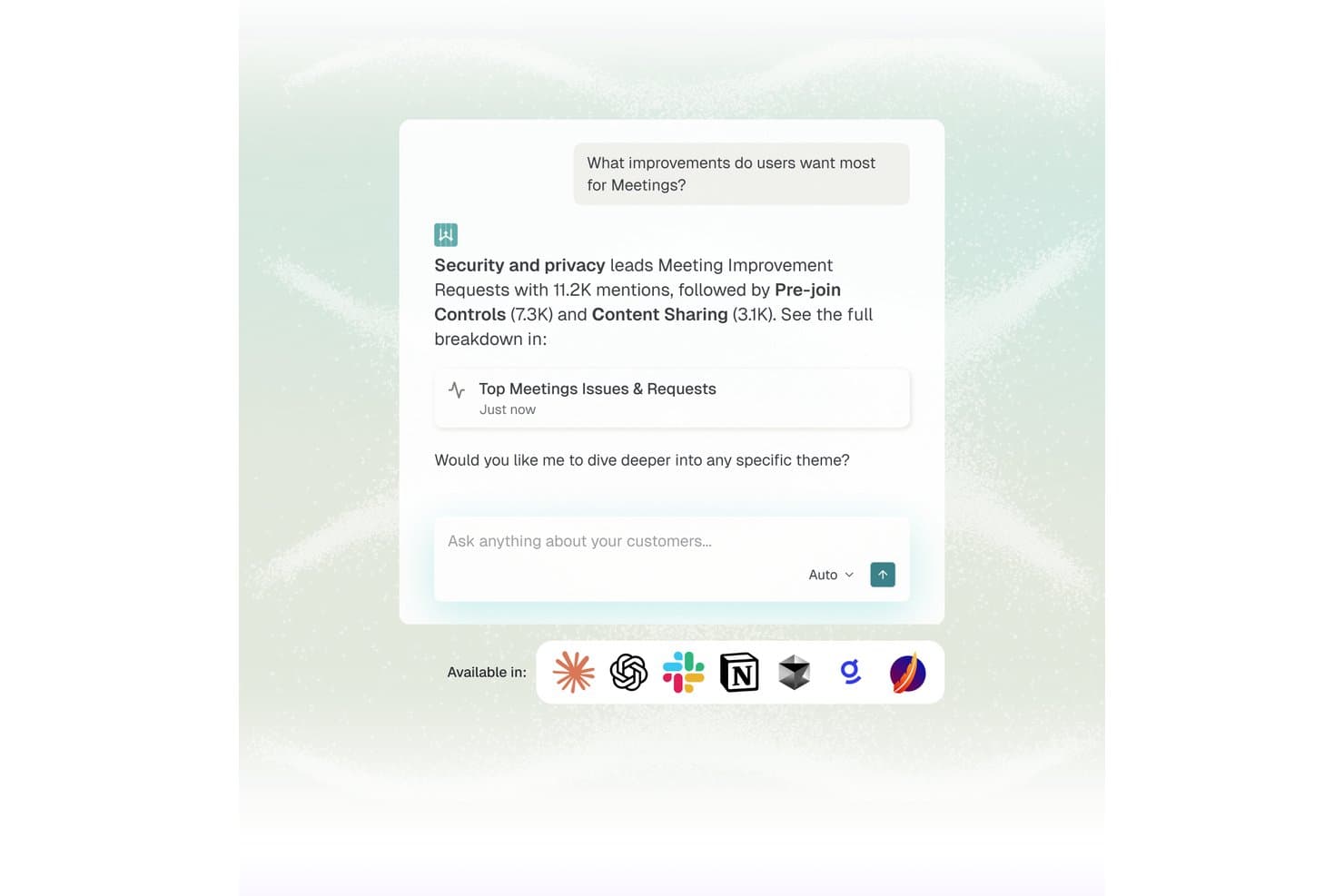
Enterpret offers an AI-powered chat interface that surfaces top user feedback themes, such as security and pre-join controls, from meeting improvement requests. Enterpret is a customer feedback intelligence platform that aggregates signals from 50+ sources and uses an adaptive AI taxonomy to automatically classify feedback, surface recurring themes, and make insights queryable in natural language.
Who Is Enterpret Best For?
Enterpret is a strong fit for mid-market and enterprise product teams managing high volumes of customer feedback across multiple channels every month.
Why I Picked Enterpret
Enterpret earns its spot on my shortlist because its adaptive taxonomy is genuinely unlike anything else I've tested. As products evolve, feedback categories shift, but Enterpret's AI automatically restructures its 5-level taxonomy to reflect new themes without manual re-tagging. I also like that Wisdom AI lets my team query the full feedback corpus in natural language and get cited, source-linked evidence back instantly.
Enterpret Key Features
- Wisdom AI natural language querying: Lets users search unified feedback data in plain language to get instant, evidence-linked insights.
- Customer context graph: Maps every piece of feedback to customer attributes, segment, and usage for deep filtering and segmentation.
- Real-time feedback ingestion: Aggregates product feedback from over 50 sources like Zendesk, Intercom, G2, Slack, and app store reviews.
- Workflow automation integrations: Triggers actions and pushes insights directly into Jira, Linear, and Slack to connect findings with product delivery.
Enterpret Integrations
Enterpret offers native integrations with Zendesk, Intercom, Salesforce, Gong, Slack, Qualtrics, Linear, Jira, Google Play Store, and the Apple App Store. An API is available for custom integrations.
Pros and Cons
Pros:
- Aggregates signals from 50+ feedback sources
- Natural language querying surfaces cited feedback evidence
- Adaptive taxonomy auto-updates as products evolve
Cons:
- Setup and taxonomy configuration takes significant time
- Primarily focused on feedback, not interview research
Learn more about Enterpret: Best for AI-driven survey response analysis
- 7-day free trial + free demo available
- From $79/month

Articos lets you test persona reactions to different types of brand copy. Articos is an AI user research platform that simulates participant interviews, generates synthetic personas, and analyzes responses to produce structured research reports with confidence scores and evidence chains.
Who Is Articos Best For?
Articos works well for UX researchers, product managers, and market research consultants who need to run studies without the time or budget for traditional participant recruitment.
Why I Picked Articos
Articos is one of my top picks because I love how it handles survey response analysis without the noise you get from raw AI output. Each study produces 17 focused themes (compared to 142 from a language model with a 22:1 noise ratio), backed by confidence scores and evidence chains. The hypothesis-blind architecture means personas can't detect what outcome I'm hoping for, so the findings hold up under scrutiny. That's a meaningful difference when I'm presenting results to a client.
Articos Key Features
- Synthetic persona generation: Build AI personas calibrated with Big Five personality science and enforced stance diversity across five archetypes (champions, pragmatists, skeptics, blockers, and observers).
- Instant survey feedback: Gather rapid qualitative and quantitative feedback from synthetic users, providing insights in minutes rather than days.
- Web corroboration: Cross-reference study findings with live external sources to validate synthetic insights.
- White-label PDF export: Export study results as branded, client-ready reports directly from the platform.
Articos Integrations
Articos doesn't have any native integrations. The platform runs in the browser, with research outputs available as white-label PDF exports you can share through your existing tools.
Pros and Cons
Pros:
- Built-in skeptic and late-adopter personas
- Reports are ready in under 30 minutes
- Hypothesis-blind architecture reduces confirmation bias
Cons:
- No native integrations with other tools
- Synthetic personas can't replace lived experiences
Learn more about Articos: Best for large-scale participant panels
- Free demo available
- Pricing upon request
Visit WebsiteCustomer Rating:4.5/5
UserTesting workspace dashboard displays tests, sessions, and project overview. UserTesting is an AI-powered user research platform that lets you source participants, launch usability tests, capture video feedback, and analyze user insights at scale.
Who Is UserTesting Best For?
UserTesting is a strong fit for UX researchers and product teams at large enterprises who need access to a broad, diverse participant panel.
Why I Picked UserTesting
I picked UserTesting as one of the best because I can instantly tap into a massive, global participant panel and launch studies with highly specific demographic filters. I like that I can run moderated and unmoderated tests, then use AI-powered video analysis to surface key insights. My team uses UserTesting to quickly validate prototypes and concepts with real users at scale.
UserTesting Key Features
- Task builder: Create custom tasks and scenarios for participants to complete during studies.
- Highlight reels: Compile and share key video moments from user sessions.
- Sentiment analysis: Automatically detect and tag positive or negative feedback in responses.
- Mobile app testing: Run usability tests on iOS and Android devices with real users.
UserTesting Integrations
Integrations include with Slack, Teams, Jira, Figma, FigJam, and Miro.
Pros and Cons
Pros:
- Advanced demographic and behavioral targeting
- Supports both moderated and unmoderated studies
- Access to a large, global participant pool
Cons:
- Occasional variability in participant quality
- Limited native integrations with other platforms
Learn more about UserTesting: Best with AI-powered qualitative data analysis
- Free plan + free demo available
- Pricing upon request

Dovetail projects dashboard with pinned studies and folders view. Dovetail is an AI user research platform that lets teams centralize research data, transcribe interviews, analyze qualitative feedback, and organize insights from multiple sources in one workspace.
Who Is Dovetail Best For?
Dovetail is a strong fit for UX researchers and product teams at mid-sized to large organizations who need to analyze and organize qualitative research data.
Why I Picked Dovetail
I picked Dovetail as one of the best because I can use its AI-powered analysis to quickly surface patterns in interview transcripts and open-ended feedback. I like that I can auto-tag qualitative data and generate instant summaries for large research projects. My team uses Dovetail to centralize notes, highlight key moments, and organize findings for easy sharing.
Dovetail Key Features
- Video and audio file support: Upload and analyze recordings directly within the platform.
- Collaborative workspace: Multiple users can work together on research projects in real time.
- Custom fields and tags: Create and manage your own metadata for organizing research data.
- Data import from external sources: Bring in research data from tools like Google Drive and Zoom.
Dovetail Integrations
Dovetail offers native integrations with Zoom, Google Drive, Slack, and Figma, and provides an API for custom integrations.
Pros and Cons
Pros:
- Enables real-time collaboration
- Supports video and audio file uploads
- AI auto-tags and summarizes qualitative data
Cons:
- Pricing is not transparently listed online
- No built-in participant recruitment tools
Learn more about Dovetail: Best with collaborative research repositories
- 15-day free trial
- From $15/user/month (billed annually)
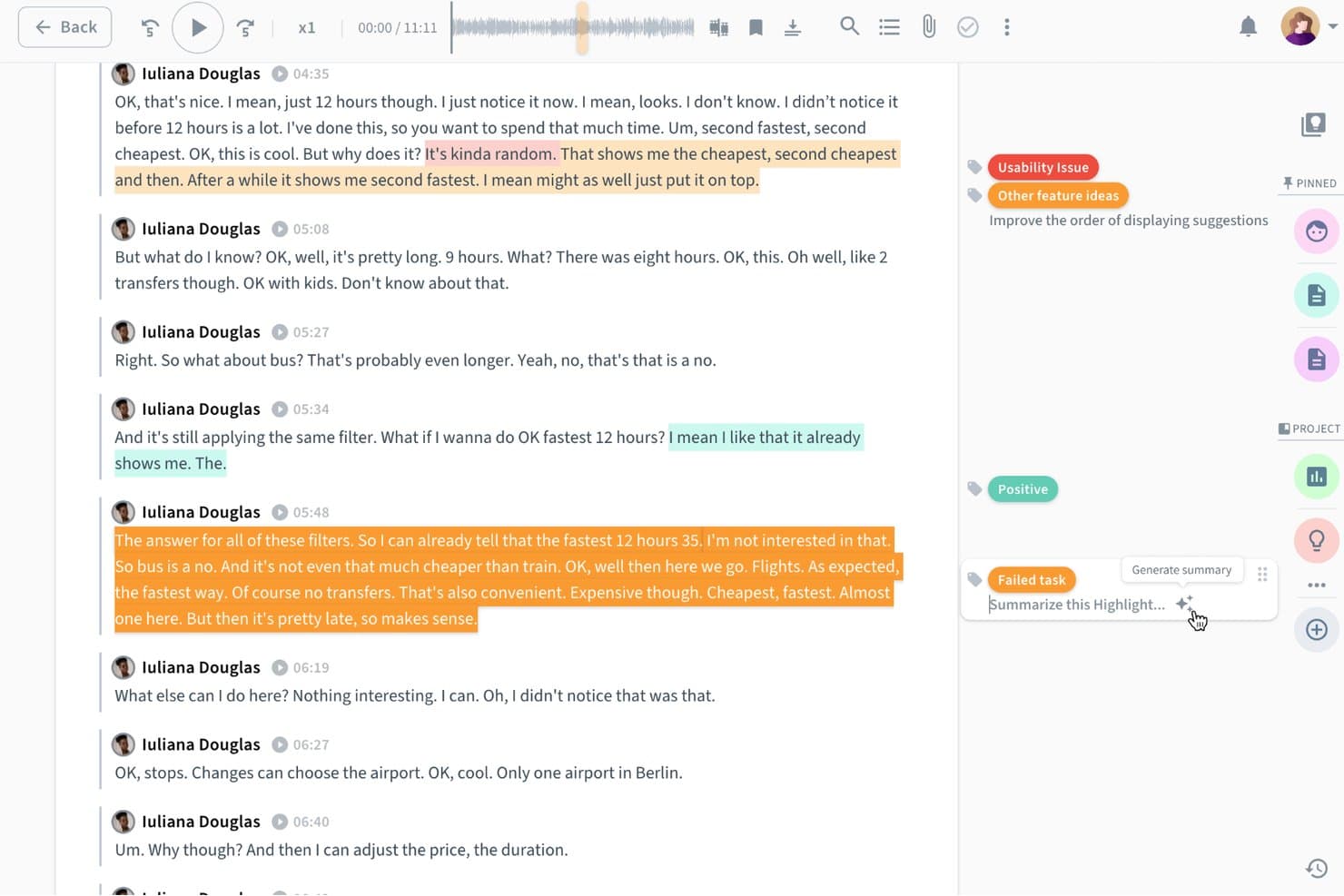
Condens lets users auto-summarize AI-tagged research highlights instantly. Condens is a user research repository platform that centralizes research data, supports tagging and analysis of qualitative findings, and lets teams collaborate on insights across studies.
Who Is Condens Best For?
Condens is a great fit for UX research teams that need a shared space to store, tag, and revisit findings across multiple studies.
Why I Picked Condens
Condens earns its spot on my shortlist because of how well it handles collaborative research repositories across a product team. I particularly like the tagging and synthesis layer, where you can link raw session data to structured insights and surface patterns across multiple studies without starting from scratch each time. The shared repository means researchers, product managers, and designers are all working from the same pool of evidence, which cuts down on duplicated research and keeps decisions grounded in real findings.
Condens Key Features
- AI-powered highlight reel creation: Condens automatically extracts and surfaces key moments from session recordings to help you build highlight clips without manual scrubbing.
- Evidence-linked insight cards: You can attach raw data clips, quotes, and notes directly to insight cards, keeping the evidence trail intact for every finding.
- Cross-study search: A global search lets you query findings, tags, and quotes across all past studies in your repository at once.
- Customizable tagging taxonomy: Teams can build and manage a shared tag structure to categorize data consistently across projects and researchers.
Condens Integrations
Native integrations are not clearly documented for Condens.
Pros and Cons
Pros:
- Searches findings across past studies
- Links evidence directly to insights
- AI surfaces highlights from recordings
Cons:
- Less suited to quantitative research analysis
- AI capabilities center on highlight extraction
Learn more about Condens: Best for integrated recruitment and research
- Free trial + free demo available
- From $129/seat/month

Great Question dashboard shows studies, interviews, and participant metrics. Great Question is an AI-powered user research platform that combines participant recruitment, scheduling, survey creation, interview management, and research repository features in one system.
Who Is Great Question Best For?
Great Question is a strong fit for UX researchers and product teams at SaaS companies who need integrated participant recruitment and research management.
Why I Picked Great Question
I picked Great Question as one of the best because I can manage participant recruitment, screeners, and scheduling all in one place. My team uses its built-in research CRM to track participant engagement and automate outreach. I like that I can launch interviews, surveys, and diary studies without switching tools.
Great Question Key Features
- Research repository: Store, organize, and search all research data in one place.
- Automated transcription: Convert interview recordings into searchable transcripts automatically.
- Survey builder: Create and distribute custom surveys to participants.
- Panel management: Maintain and segment participant panels for future studies.
Great Question Integrations
Great Question offers native integrations with Slack, HubSpot, Salesforce, Segment, and Zapier. An API is available for custom integrations.
Pros and Cons
Pros:
- Research repository with tagging and search
- Automated scheduling and calendar sync
- Built-in participant recruitment
Cons:
- No advanced AI analysis features
- Limited analytics and reporting options
Learn more about Great Question: Best for end-to-end cited AI research synthesis
- Free plan available
- From $49/month
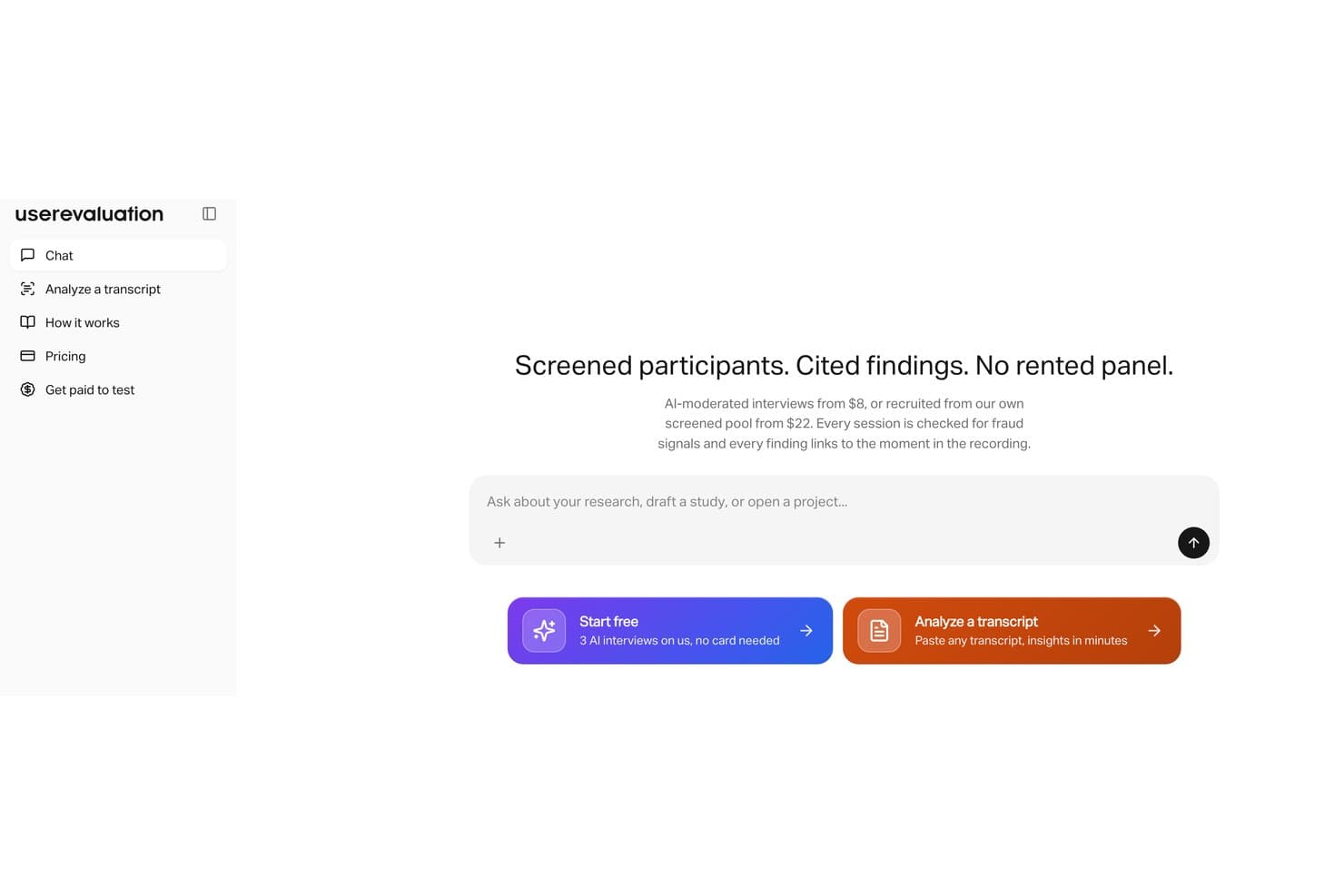
User Evaluation runs AI-moderated interviews with screened participants. User Evaluation is an AI-powered user research platform that lets you upload interviews, calls, and surveys to automatically generate transcripts, thematic analysis, insight reports, and citations from your qualitative data.
Who Is User Evaluation Best For?
User Evaluation is a strong fit for UX researchers and product teams who need to turn large volumes of qualitative data into cited, audit-ready insights without manual synthesis.
Why I Picked User Evaluation
I picked User Evaluation as one of the best because it handles the entire research synthesis pipeline in one place, from transcript generation to themed insight reports with cited sources. What I find genuinely useful is the automatic citation linking, which traces every AI-generated insight back to a specific moment in your interview or call recording. That means when a stakeholder questions a finding, you can point to the exact evidence without digging through hours of raw footage.
User Evaluation Key Features
- Multi-format data upload: Import video, audio, and text files from interviews, calls, and surveys directly into the platform for analysis.
- AI chat interface: Query your research data conversationally to surface specific answers or patterns across multiple sessions.
- Sentiment analysis: Automatically detects emotional tone across participant responses to highlight areas of friction or delight.
- Collaborative tagging: Tag and annotate transcript segments with teammates to organize findings before generating reports.
User Evaluation Integrations
Native integrations are not clearly documented.
Pros and Cons
Pros:
- Conversational queries surface cross-session patterns
- Analyzes interviews, calls, and surveys together
- Cited insights trace back to source moments
Cons:
- Sentiment results need qualitative validation
- Native integrations remain poorly documented
Learn more about User Evaluation:

Outset interview dashboard shows video, transcript, and AI insights. Outset is an AI user research platform that automates participant recruitment, interview scheduling, and session management for teams running qualitative research studies.
Who Is Outset Best For?
Outset is a strong fit for UX researchers and product teams at startups and mid-sized companies who need to automate qualitative interview logistics.
Why I Picked Outset
I picked Outset as one of the best because I can automate the entire interview scheduling process, from sending invites to managing reschedules, without manual back-and-forth. My team uses its AI-driven participant matching to quickly fill research sessions with qualified users. I also like that Outset handles reminders and calendar sync, so I can focus on running the interviews instead of logistics.
Outset Key Features
- Automated transcription: Generates transcripts of research interviews in real time.
- AI-powered interview summaries: Produces concise summaries of key findings after each session.
- Participant consent management: Tracks and stores participant consent forms securely.
- Custom screener surveys: Lets you build and distribute screeners to qualify research participants.
Outset Integrations
Native integrations are not publicly listed.
Pros and Cons
Pros:
- Built-in consent and screener management
- AI matches participants to research criteria
- Automates participant scheduling and reminders
Cons:
- Lacks advanced branching in screeners
- No native integrations with research platforms
Learn more about Outset:

Listen Research Agent chat has an interface with prompts and research suggestions. Listen is an AI-powered user research platform that automates voice-based interviews, transcribes conversations, and analyzes qualitative data for teams conducting user research at scale.
Who Is Listen Best For?
Listen is a strong fit for UX researchers and product teams at mid-sized to large organizations who need to automate and analyze voice-based user interviews.
Why I Picked Listen
I picked Listen as one of the best because I can automate voice-based user interviews and get instant transcriptions and AI-driven analysis. My team uses its research agent to schedule, conduct, and analyze interviews without manual effort. I like that Listen handles everything from recording to summarizing insights, so we can focus on interpreting results.
Listen Key Features
- Automated voice transcription: Converts recorded interviews into searchable text automatically.
- AI-powered sentiment analysis: Detects and tags emotional tone in user responses.
- Customizable interview templates: Lets you design and reuse structured interview formats.
- Insight tagging and organization: Allows you to categorize and organize findings for later review.
Listen Integrations
Native integrations are not publicly listed.
Pros and Cons
Pros:
- Multilingual support for diverse participant pools
- AI agent adapts questions in real time
- Fully automates voice interviews
Cons:
- Lacks in-depth analytics or visualization tools
- No support for video or screen sharing
Learn more about Listen: Best for cross-study emotion and theme synthesis
- Free demo available
- Pricing upon request
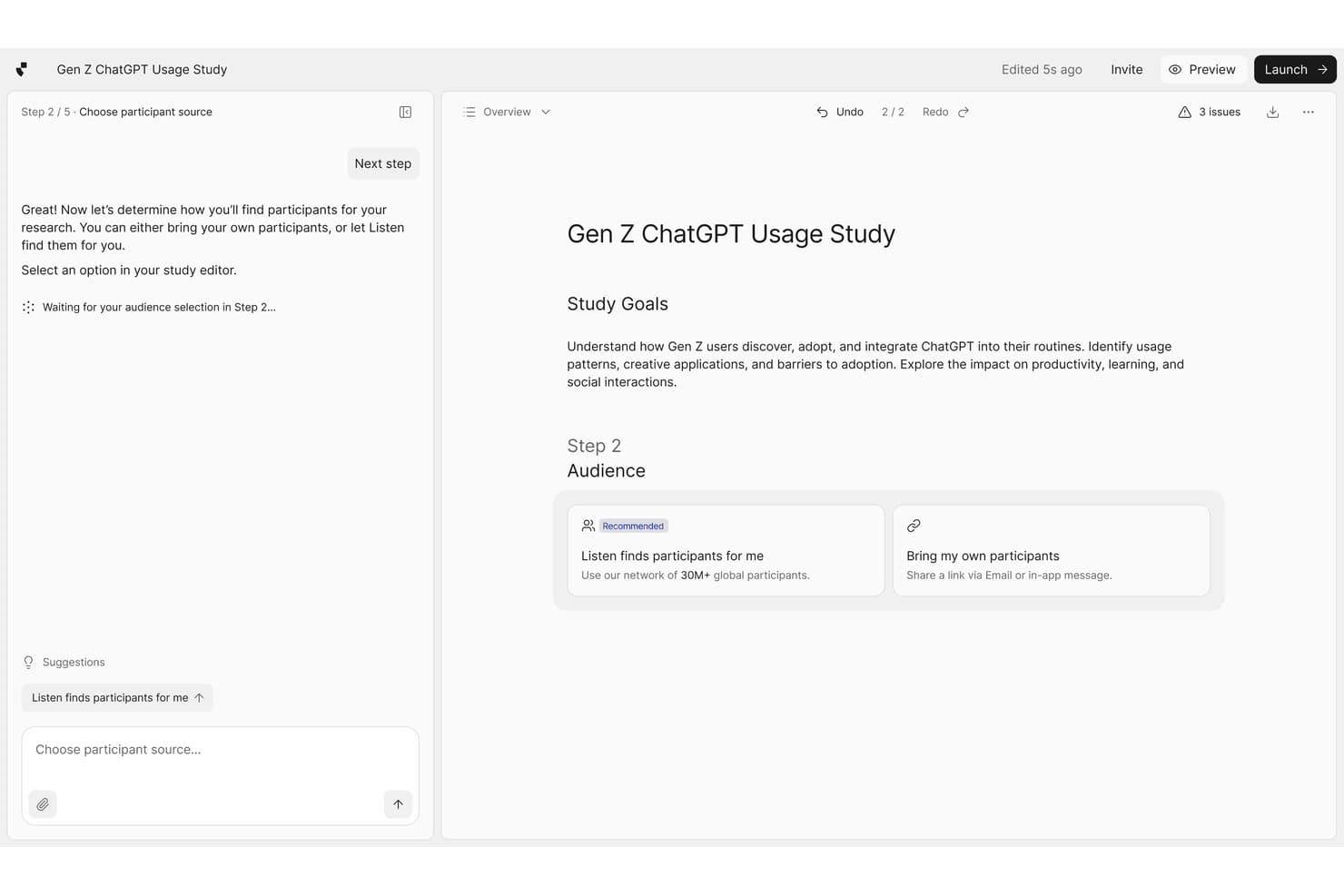
Listen Labs guides users through recruiting participants for research studies. Listen Labs is an AI user research platform that aggregates interview data across multiple studies, tagging emotional signals and surfacing recurring themes through automated analysis.
Who Is Listen Labs Best For?
Listen Labs is a strong fit for UX researchers and product teams running multiple rounds of qualitative research who need to connect emotional patterns across studies over time.
Why I Picked Listen Labs
Cross-study synthesis is where Listen Labs earns its spot on my shortlist. I love how it automatically tags emotional signals within interview responses and then surfaces recurring themes not just within a single study, but across multiple rounds of research over time. That means if anxiety around a specific onboarding step keeps surfacing across three separate studies, Listen Labs connects those dots for you. I've found that capability alone saves hours of manual tagging and cross-referencing.
Listen Labs Key Features
- Automated interview transcription: Listen Labs transcribes recorded user interviews and converts spoken responses into searchable, structured text.
- AI-generated highlight reels: The platform automatically clips the most relevant moments from interviews and compiles them into shareable video highlights.
- Participant sentiment tagging: Listen Labs labels individual responses with sentiment indicators, letting you filter and sort by emotional tone across your data.
- Research repository: All past studies, transcripts, and tags are stored in a central library you can search and reference at any time.
Listen Labs Integrations
Listen Labs offers documented integrations with Qualtrics, Rally, and Decipher (Forsta), plus an API for custom integrations and programmatic study creation.
Pros and Cons
Pros:
- Creates shareable AI-generated interview highlight reels
- Tags emotional signals in interview responses
- Connects themes across multiple research studies
Cons:
- Automated sentiment tags need researcher verification
- Focuses primarily on qualitative interview data
Learn more about Listen Labs:
Other AI User Research Tools
Here are some additional AI user research tools options that didn’t make it onto my shortlist, but are still worth checking out:
- 11GetWhyBest for enterprise consumer-insights research
- 12CoLoopBest for multilingual qualitative research synthesis
- 13UserlyticsBest for multi-device remote usability testing
- 14MazeBest for rapid prototype feedback collection
- 15LyssnaBest with unmoderated task testing
- 16LooppanelBest for video call usability insights
- 17DscoutBest for longitudinal user studies
- 18MarvinBest with AI-driven research tagging
- 19HubbleBest for in-product user feedback collection
- 20UserologyBest for voice AI moderation with screen awareness
How I Evaluate AI User Research Tools
To make this list, a tool's AI needs to handle real user research work, like transcribing interviews or synthesizing themes. From there, I evaluate three things. Core functionality carries the most weight, like storing research artifacts and managing studies. Then I look at standout features, like cross-study pattern detection, and what a tool offers beyond its feature set, like whether AI insights have source citations.
Core Functionality (Table Stakes For This List)
When I'm selecting tools for my list, I score each one on a scale from 0 (does not offer the functionality) to 5 (excels in this area) for each core functionality listed below. I then convert the total into a percentage to help assess each tool's overall fit, with extra weight on any functionalities I’ve deemed essential.
- Insight Synthesis (Essential): I assess how well AI identifies themes, sentiment, and contradictions across interviews, surveys, and usability studies.
- Transcription & Capture (Essential): I look for searchable transcripts with speaker labels, timestamps, and accurate capture from interviews, calls, and usability sessions.
- Research Repository: I check whether teams can organize, tag, search, and retrieve transcripts, notes, clips, and supporting evidence.
- AI-Assisted Reporting: I evaluate summaries, highlight reels, and reports that connect findings to quotes or other source evidence.
- Participant & Study Management: I consider participant screening, recruitment, scheduling, study tracking, and research operations in one workflow.
- Natural Language Queries: I test whether teams can ask research questions conversationally and receive relevant, source-backed answers.
Once I have a list of tools that meet the criteria, I consider what sets each platform apart.
Differentiating Factors (What Sets Vendors Apart)
Here's how I compare and contrast different vendors:
Standout Features
I look for cross-study pattern detection that surfaces recurring themes and contradictions across multiple studies, not just single sessions. When you're running continuous discovery, spotting a pain point that appears in three separate interview rounds carries more weight than an isolated mention. I also evaluate whether AI-generated answers cite specific quotes or clips. Tools like Marvin and Notably handle this differently, but traceability is what keeps synthesis from becoming guesswork. Sentiment and emotion analysis adds another layer, flagging frustration or confusion that participants don't explicitly voice.
Beyond Features
I check whether AI-generated themes link back to source quotes, because synthesis without citations can quietly mislead a roadmap. Tools like Marvin and Notably handle traceability differently, so I compare how each surfaces evidence. I also evaluate integrations with Jira, Slack, and product analytics tools—if insights don't flow into your existing workflows, they stall. Data privacy matters too: any platform recording interviews needs GDPR and SOC 2 compliance before it's worth a pilot.
How to Choose AI User Research Tools
It’s easy to get bogged down in long feature lists and complex pricing structures. To help you stay focused as you work through your unique software selection process, here’s a checklist of factors to keep in mind:
| Factor | What to Consider |
|---|---|
| FactorScalability | What to ConsiderWill the tool handle your current and future research volume? Consider user limits, storage, and project caps. |
| FactorIntegrations | What to ConsiderDoes it connect natively to your core tools (e.g., Slack, Jira, Google Workspace)? Check for API or Zapier support if needed. |
| FactorCustomizability | What to ConsiderCan you tailor workflows, tags, and templates to your research process? Avoid rigid systems that slow your team down. |
| FactorEase of use | What to ConsiderHow quickly can new team members learn the tool? Look for clear navigation, minimal training needs, and intuitive workflows. |
| FactorImplementation and onboarding | What to ConsiderWhat resources are required to get started? Assess the availability of onboarding support, migration help, and training materials. |
| FactorCost | What to ConsiderDoes the pricing fit your budget and usage patterns? Watch for hidden fees, per-user charges, or required add-ons. |
| FactorSecurity safeguards | What to ConsiderDoes the tool meet your data privacy and security standards? Confirm encryption, access controls, and compliance certifications. |
| FactorSupport availability | What to ConsiderIs responsive support available when you need it? Check for live chat, email, or phone support, and review typical response times. |
What Are AI User Research Tools?
AI user research tools are software platforms that use artificial intelligence to automate and enhance the process of gathering, analyzing, and organizing user research data. These tools help teams capture interview notes, transcribe sessions, identify patterns, and generate insights faster than manual methods. They are designed for product managers, UX researchers, and teams who need to efficiently manage and synthesize large volumes of qualitative feedback.
Features of AI User Research Tools
When selecting AI user research tools, keep an eye out for the following key features:
- Automated transcription: Converts audio or video interviews into searchable text, saving time and reducing manual effort.
- AI-powered note-taking: Captures key points and action items during live or recorded sessions, helping teams focus on the conversation.
- Sentiment analysis: Uses AI to detect and categorize user emotions or attitudes within feedback, highlighting trends and pain points.
- Tagging and categorization: Lets users organize insights by themes, topics, or custom tags for easier analysis and reporting.
- Searchable repositories: Stores all research data in a centralized, searchable location, making it easy to retrieve past findings.
- Collaboration tools: Enables multiple team members to review, annotate, and discuss research findings in real time.
- Highlight reel creation: Automatically generates clips or summaries of important moments from interviews for quick sharing.
- Export options: Allows users to download transcripts, notes, or reports in various formats for further analysis or presentation.
- Integration capabilities: Connects with other tools in your workflow, such as project management or analytics platforms, to simplify processes.
- Customizable templates: Provides pre-built or editable templates for interview guides, note-taking, and reporting to standardize research practices.
Benefits of AI User Research Tools
Implementing AI user research tools provides several benefits for your team and your business. Here are a few you can look forward to:
- Faster data analysis: AI-driven transcription and tagging speed up the process of turning raw interviews into actionable insights.
- Improved accuracy: Automated note-taking and sentiment analysis reduce the risk of human error and missed details.
- Centralized knowledge: Searchable repositories and collaboration tools keep all research data organized and accessible for your team.
- Consistent research practices: Customizable templates and standardized workflows help ensure research is conducted and documented uniformly.
- Enhanced team collaboration: Real-time annotation and sharing features make it easier for teams to work together on research projects.
- Scalable research operations: Automation allows you to handle larger volumes of interviews and feedback without increasing manual workload.
- Better decision-making: Quick access to synthesized insights supports more informed product and design choices.
Costs and Pricing of AI User Research Tools
Selecting AI user research tools requires an understanding of the various pricing models and plans available. Costs vary based on features, team size, add-ons, and more. The table below summarizes common plans, their average prices, and typical features included in AI user research tool solutions:
Plan Comparison Table for AI User Research Tools
| Plan Type | Average Price | Common Features |
|---|---|---|
| Plan TypeFree Plan | Average Price$0 | Common FeaturesLimited transcription minutes, basic note-taking, restricted storage, and single-user access. |
| Plan TypePersonal Plan | Average Price$10-$30/user/month | Common FeaturesUnlimited interviews, searchable transcripts, basic sentiment analysis, and email support. |
| Plan TypeBusiness Plan | Average Price$30-$80/user/month | Common FeaturesTeam collaboration, advanced tagging, integrations, export options, and priority support. |
| Plan TypeEnterprise Plan | Average Price$80-$150/user/month | Common FeaturesCustom onboarding, enhanced security, dedicated account manager, API access, and compliance tools. |
AI User Research Tools FAQs
Here are some answers to common questions about AI user research tools:
How do AI user research tools improve the research process?
AI-powered tools for user research automate repetitive tasks like transcription, note-taking, and tagging, which speeds up analysis and reduces manual effort. By acting as a tireless research assistant, these platforms handle time-consuming work, allowing UX teams to focus more on interpreting insights and less on administrative work. Using generative AI in this stage helps optimize the transition from ideation to the creation of final deliverables.
Can AI user research tools handle both qualitative and quantitative data?
Yes, the best AI tools for ux research are designed to manage qualitative datasets like interviews and open-ended survey responses, but some also support quantitative analysis. These AI-assisted platforms can quickly identify key themes across hundreds of outputs. Furthermore, AI-moderated sessions can now improve data collection by automatically generating relevant follow-up questions based on participant input to map out a more accurate user journey.
Are AI user research tools secure for sensitive data?
Yes, reputable AI UX research tools use encryption, access controls, and compliance certifications to protect sensitive information. When using an LLM or a specific tool like ChatGPT to process feedback, it is important to ensure that stakeholders’ privacy is protected. Always review how these AI features handle data to ensure they meet your organization’s standards for maintaining a secure user experience.
What integrations should I look for in AI user research tools?
Look for integrations with your existing research methods and the platforms your team already uses, including project management platforms, cloud storage, and communication tools. This might include tools that can convert insights into wireframes or sync digital sticky notes from a brainstorming session. This helps simplify workflows and ensures research findings are easily shared across your organization.
How long does it take to implement an AI user research tool?
Implementation time varies, but most cloud-based tools can be set up in a few hours to a few days. Factors like data migration, team training, and integration setup can affect the timeline as you transition to more modern, automated workflows.