

10 Best User Experience Testing Tools Reviewed in 2026

Best User Experience Testing Tools Shortlist


Managing a product isn’t easy, especially when it comes to improving product usability and understanding user needs. User experience testing tools can be your ally in this, helping you gather insights and make data-driven decisions.
However, it can be time-consuming and frustrating trying to research and nail down the right tools. That’s why I’ve spent the time researching and testing these tools to bring you an unbiased review of the best options out there. My goal is to cut through the hype and marketing fluff and help you find the right tool that fits your team’s needs.
In this article, you’ll discover top picks for user experience testing tools, each with unique features to meet your specific requirements, pros and cons, pricing, and more. Let’s dive in.
Why Trust Our Software Reviews
We’ve been testing and reviewing product management software since 2020. As product managers ourselves, we know how critical and difficult it is to make the right decision when selecting software.
We invest in deep research to help our audience make better software purchasing decisions. We’ve tested more than 2,000 tools for different product management use cases and written over 1,000 comprehensive software reviews. Learn how we stay transparent & our software review methodology.
Best User Experience Testing Tools Summary
This comparison chart summarizes pricing details for my top user experience testing tools selections to help you find the best one for your budget and business needs.
| Tool | Best For | Trial Info | Price | ||
|---|---|---|---|---|---|
| 1 | Best for instant, user-driven feedback loops | Free version available | From $50/month | Website | |
| 2 | Best for friction point heatmaps | Free plan available | From $25/month (billed annually) | Website | |
| 3 | Best for AI-assisted video feedback on user interactions | Free trial available for the Grow plan | From $49/user/month | Website | |
| 4 | Best for customizable remote studies | Free demo available | From $699/month (billed annually) | Website | |
| 5 | Best for A/B testing | 30-day free trial available | From $29/month | Website | |
| 6 | Best for live feedback from targeted users | Free demo available | Pricing upon request | Website | |
| 7 | Best for heatmaps | Free plan available | From $39/month (billed annually) | Website | |
| 8 | Best for unified performance monitoring | Free plan + 14-day free trial available | From $15/host/month (billed annually) | Website | |
| 9 | Best for prototype insight collection | Free plan available | Pricing upon request | Website | |
| 10 | Best for end-to-end experience tracking | Free plan available | From $99/user/month | Website |
Best User Experience Testing Tool Reviews
Below are my detailed summaries of the best user experience testing tools that made it onto my shortlist. My reviews offer a detailed look at the key features, pros & cons, integrations, and ideal use cases of each tool to help you find the best one for you.
Best for instant, user-driven feedback loops
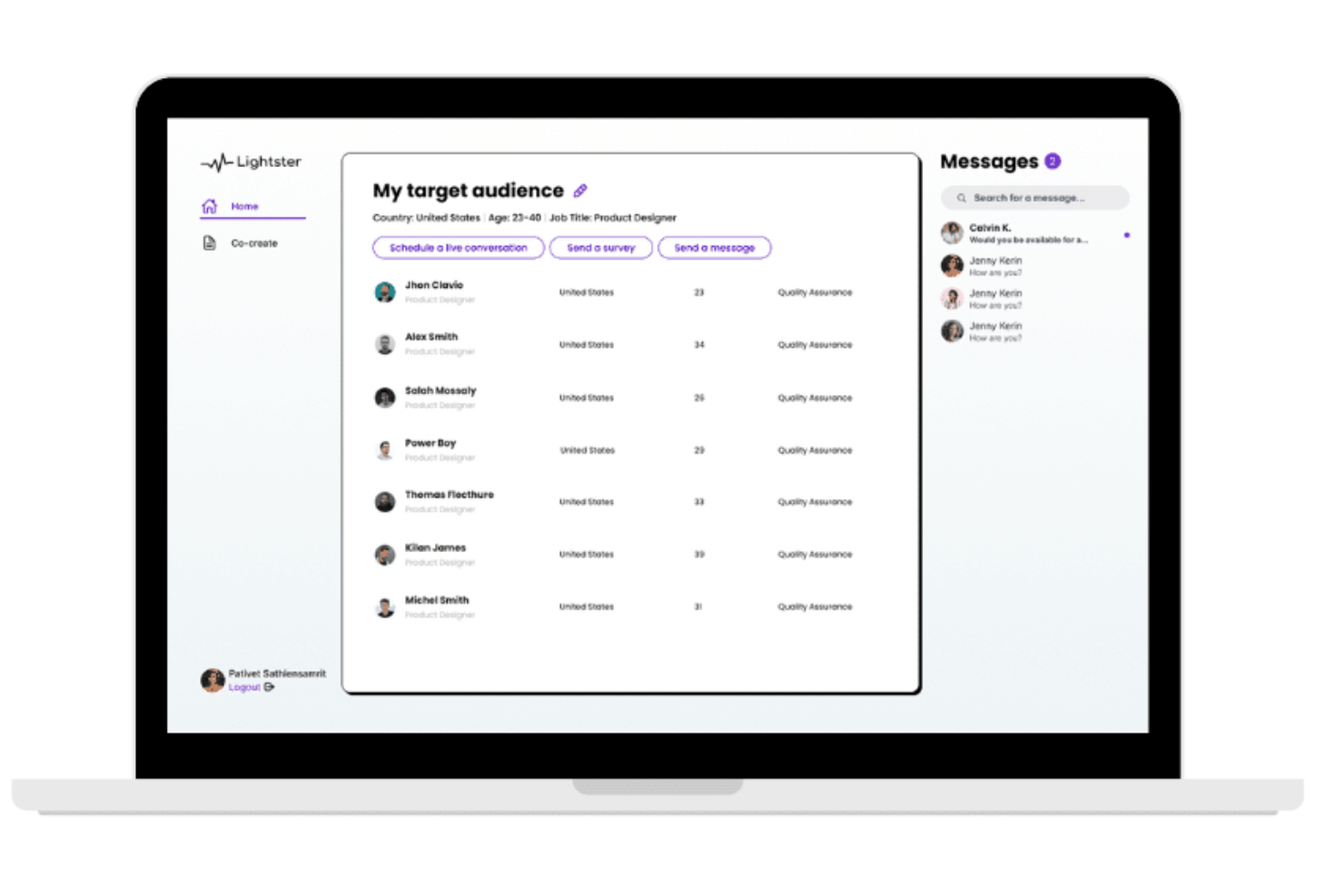
Lightster is a user testing and survey platform that specializes in rapid user feedback collection, offering the capability to gather over 100 responses in a matter of minutes and tailor the audience selection based on specific criteria.
Why I Picked Lightster:
I chose Lightster after evaluating its ability to facilitate direct connections with target audiences through surveys and conversations, which is crucial for gathering rapid user feedback. What makes Lightster different is its user-friendly interface that simplifies the process of collecting feedback and its provision for team collaboration, which is essential for making informed decisions during product development.
Standout Features & Integrations:
Features include demographic filtering, detailed profiles for double verification, session recordings, screen-sharing, direct messages, surveys, customer interviews, co-creation, web or mobile use, and more.
Integrations include Google Calendar, Outlook Calendar, and more.
Pros and Cons
Pros:
- Direct, user-focused feedback
- Easy target audience filtering
- Engagement options through various means
Cons:
- No guarantee of engagement
- Learning curve for maximizing the platform's features
Best for friction point heatmaps
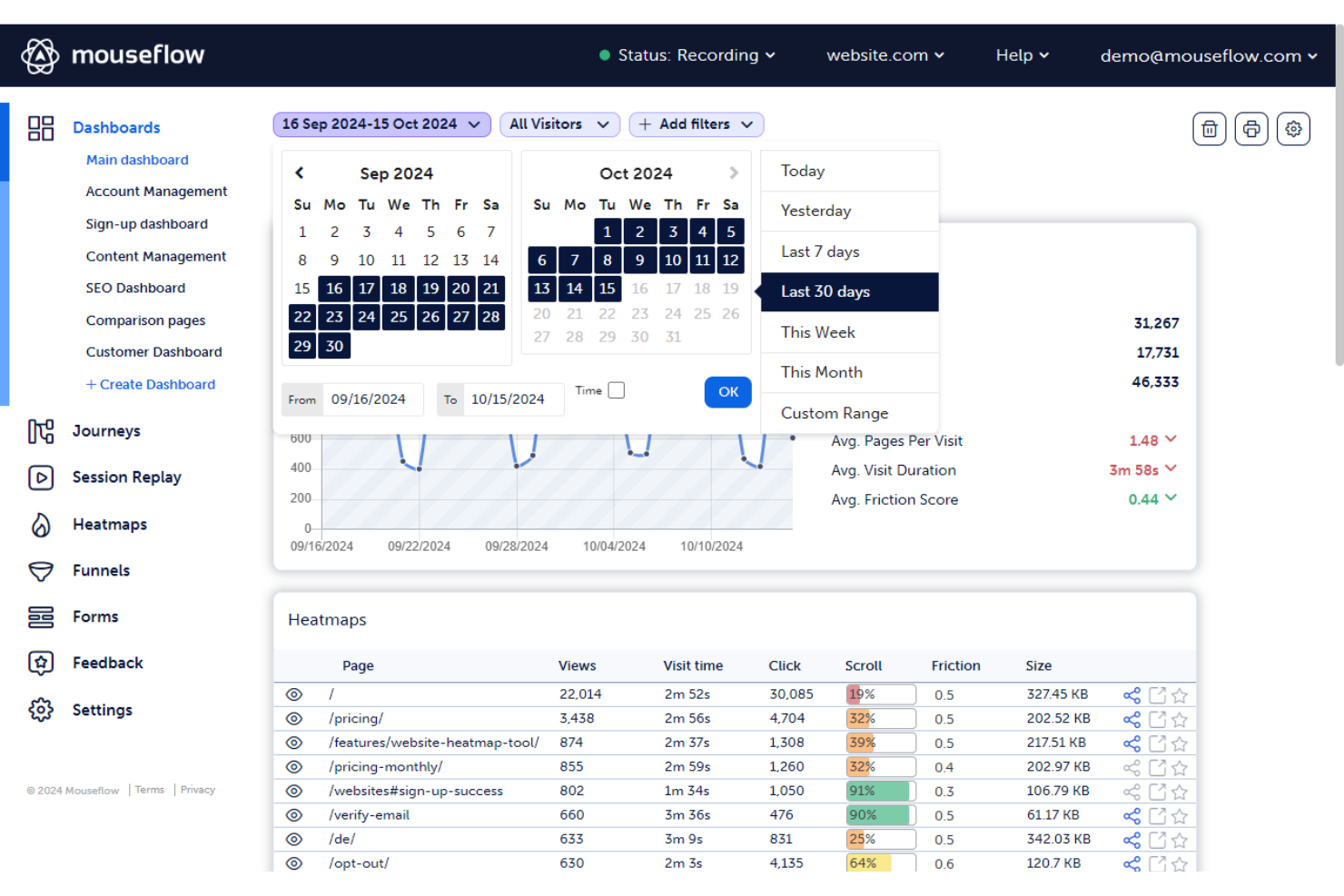
Built around website behavior tracking, Mouseflow captures session recordings, heatmaps, funnel analysis, form analytics, and user feedback to show exactly how visitors interact with your site.
Who Is Mouseflow Best For?
Mouseflow is a natural fit for product and growth teams at ecommerce and SaaS companies who need to diagnose where and why users drop off.
Why I Picked Mouseflow
I picked Mouseflow as one of the best because no other tool in this space gives you six distinct heatmap types out of the box, including click, move, scroll, attention, geo, and live heatmaps. What sets it apart is the Friction Score, which automatically flags sessions with rage clicks, error clicks, and form abandonment so I can prioritize which recordings to watch first. I also like that heatmaps generate retroactively from recorded sessions, so there's no need to configure them before data collection starts.
Mouseflow Key Features
- Funnel analysis: Build multi-step conversion funnels to see exactly which page or step loses the most users in a flow.
- Form analytics: Tracks field-by-field interaction data, including which fields users skip, refill, or abandon entirely.
- Feedback campaigns: Lets you trigger in-page surveys at specific points in a session to collect direct user input.
- Session filtering: Filter recorded sessions by attributes like device type, referral source, country, or custom tags to isolate specific user groups.
Mouseflow Integrations
Mouseflow offers 42 integrations across categories like A/B testing, analytics, customer service, and marketing, including Adobe Analytics, Google Analytics, Google Tag Manager, AB Tasty, Shopify, and Google Ads, as well as Salesforce, Microsoft Teams, and Slack. Mouseflow has not yet built an integration on Zapier, but a REST API is available for custom integrations.
Pros and Cons
Pros:
- Automatically detects JavaScript errors on pages
- Supports iframe recording unlike some competitors
- Six heatmap types generated from recorded sessions
Cons:
- Session credit limits reset monthly on paid plans
- Session recordings sometimes render incomplete or unclear

Best for AI-assisted video feedback on user interactions
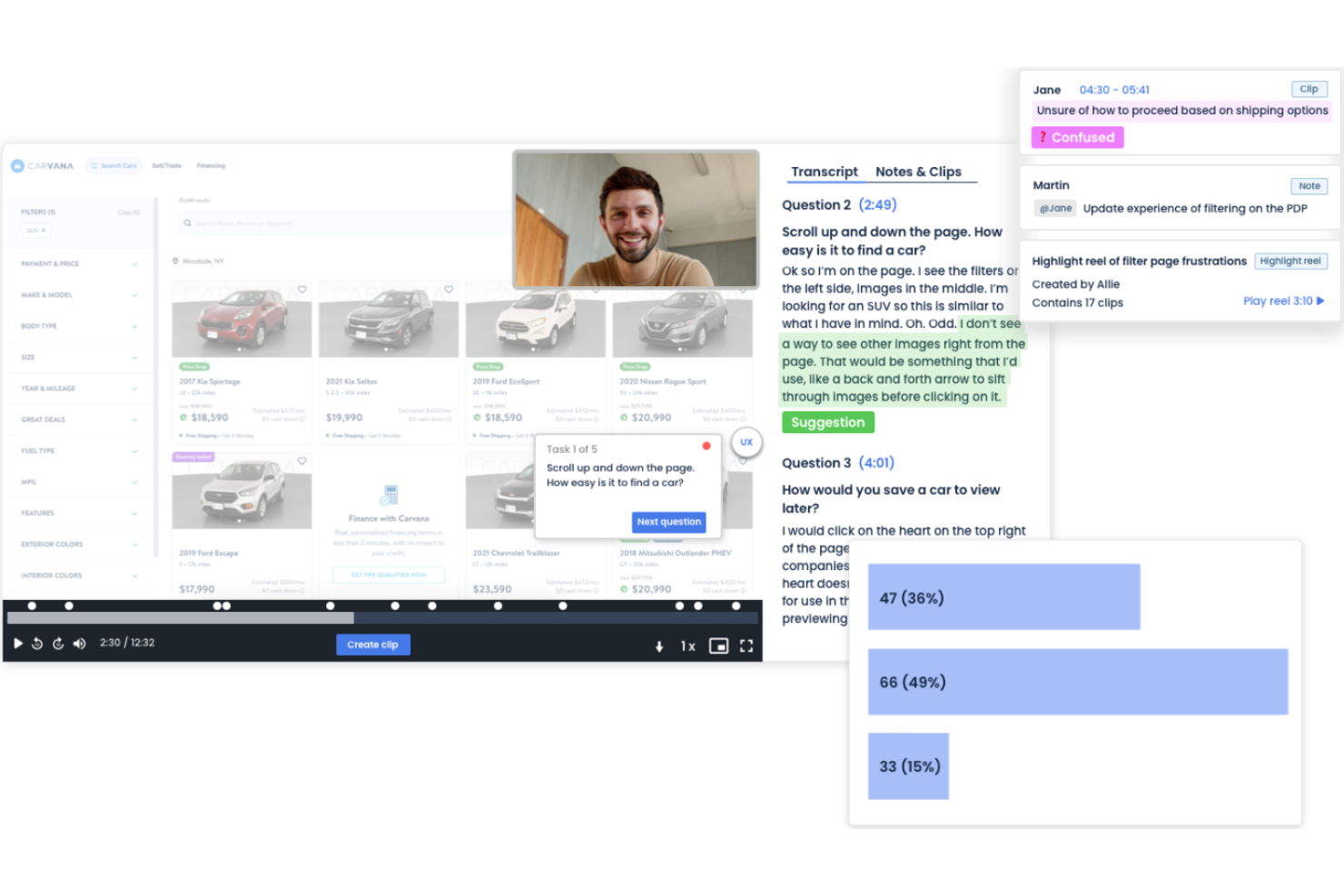
PlaybookUX is a user research platform for gathering insights through video-based feedback, usability tests, and surveys. It helps teams analyze user behavior with features like moderated interviews, card sorting, and tree testing.
Why I picked PlaybookUX: It specializes in video feedback, allowing you to see and hear users as they interact with your product. This feature provides rich insights into user experiences and pain points offering AI-assisted video feedback. PlaybookUX offers customizable testing options to suit different research needs. These capabilities help your team make informed decisions to enhance user satisfaction.
Standout features & integrations:
Features include automated transcription that converts video feedback into text, sentiment analysis that gauges user emotions, and participant recruitment to find the right test users for your studies.
Integrations include Slack, Trello, Jira, Asana, HubSpot, Microsoft Teams, Google Drive, Dropbox, Notion, and Salesforce.
Pros and Cons
Pros:
- Supports diverse research needs
- Effective sentiment analysis
- Automated transcription service
Cons:
- Can be resource-intensive
- May need technical expertise

Best for customizable remote studies
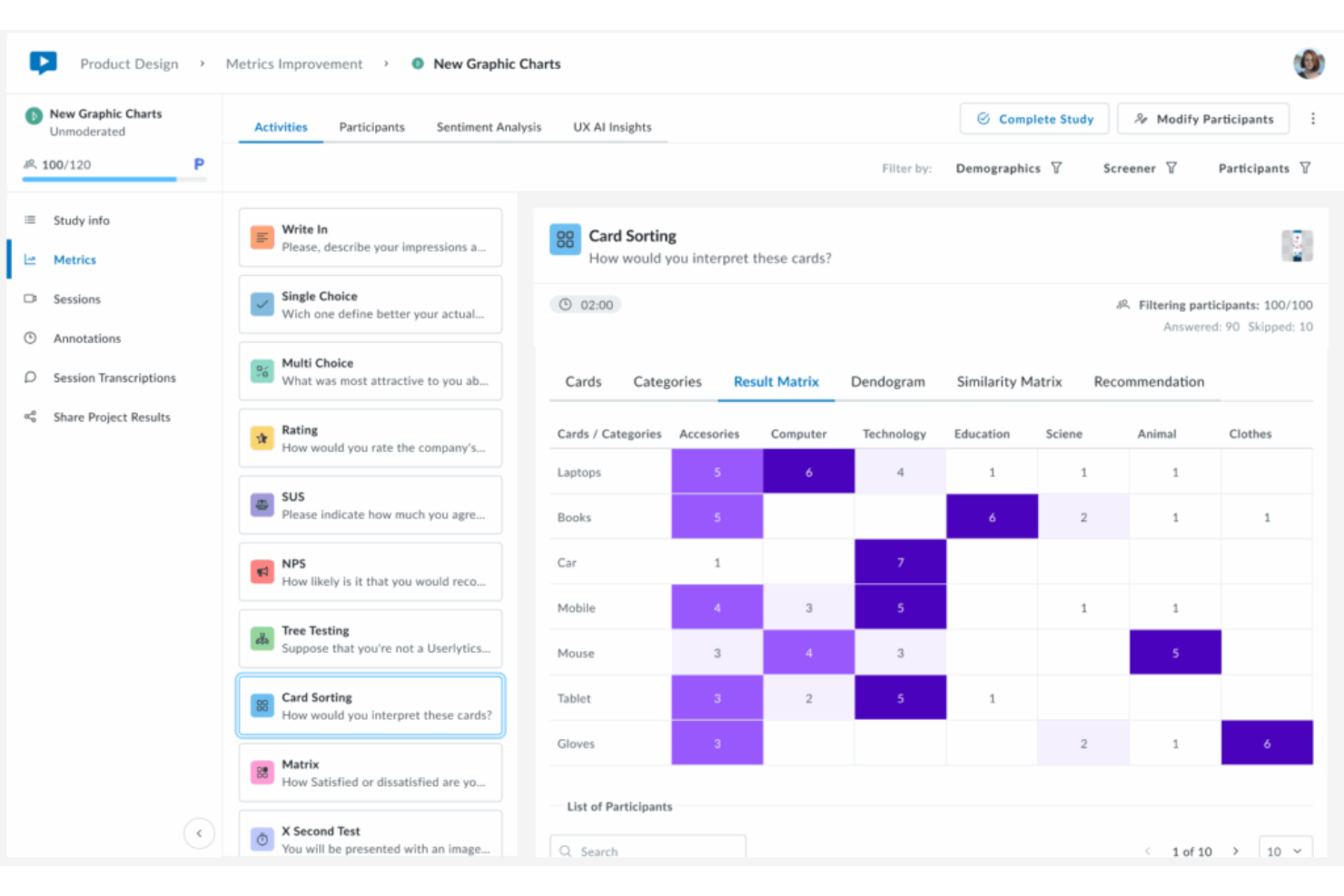
Userlytics is a remote UX research platform that combines moderated and unmoderated user testing, prototype testing, mobile testing, and AI-powered analysis in a single environment.
Who Is Userlytics Best For?
Userlytics is a strong fit for UX researchers and product teams at mid-size to enterprise companies who run frequent, study-heavy research programs.
Why I Picked Userlytics
Userlytics earns its spot on my shortlist because no other tool gives you this level of control over how a study is structured. I can mix moderated sessions, unmoderated tasks, card sorting, tree testing, and prototype testing inside a single study, with screener questions to target exactly the right participants. The ULX® Benchmarking Score is also unique: it goes beyond NPS and SUS to measure eight UX dimensions, giving me a repeatable quality benchmark across studies.
Userlytics Key Features
- AI annotations: Automatically tags moments in session recordings where participants show confusion, hesitation, or strong reactions.
- Highlight reel creation: Lets you clip, label, and compile video segments from sessions into shareable reels for stakeholder presentations.
- Global participant panel: Gives you access to 2M+ vetted participants across 150+ countries and 60+ languages for targeted recruiting.
- Sentiment analysis: Detects and surfaces emotional tone across participant responses to identify patterns without manual tagging.
Userlytics Integrations
Userlytics offers a smaller set of integrations focused on prototype testing tools, including Figma, Adobe XD, Proto.io, and InVision, along with Google Calendar and Microsoft Calendar syncing for scheduling moderated sessions. Zapier and API support are not clearly documented.
Pros and Cons
Pros:
- Test results returned within hours of launch
- Unlimited admin seats on all plans
- No repeat participants across studies
Cons:
- Audio transcription accuracy often needs manual correction
- No heatmaps or click-tracking visualizations
Best for A/B testing
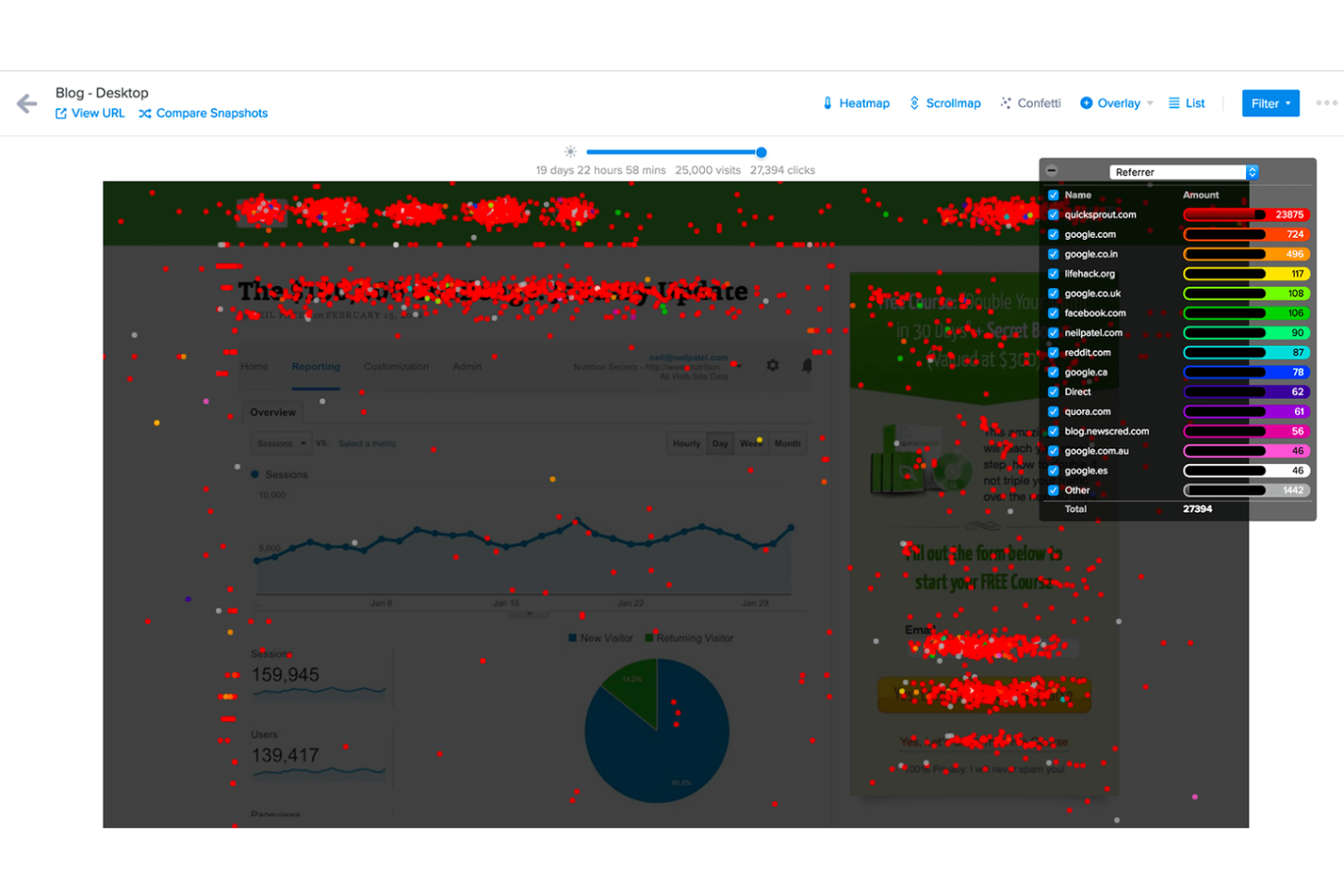
Crazy Egg is a user experience testing tool aimed at marketers and web developers. It provides insights into user behavior through A/B testing, heatmaps, and user recordings to help optimize website performance.
Why I picked Crazy Egg: Its A/B testing capabilities let you experiment with different versions throughout the usability testing process of your site to see what works best. The heatmaps show you where users click and scroll, giving clear insights into user interactions. User recordings allow you to watch how visitors navigate your site. These features help you make data-driven decisions to improve your site's effectiveness.
Standout features & integrations:
Features include traffic analysis to understand where your visitors come from and how they navigate your site. The errors tracking feature helps you identify and fix issues that may hinder user experience. Surveys allow you to gather direct feedback from your visitors, providing valuable insights for improvement.
Integrations include Shopify, Wix, WordPress, AWeber, Zapier, HubSpot, Google Tag Manager, Segment, Optimizely, and Unbounce.
Pros and Cons
Pros:
- Real-time user session recordings
- Detailed scroll map analysis
- Intuitive A/B testing setup
Cons:
- Can slow down website loading
- Limited customization in heatmaps
Best for live feedback from targeted users
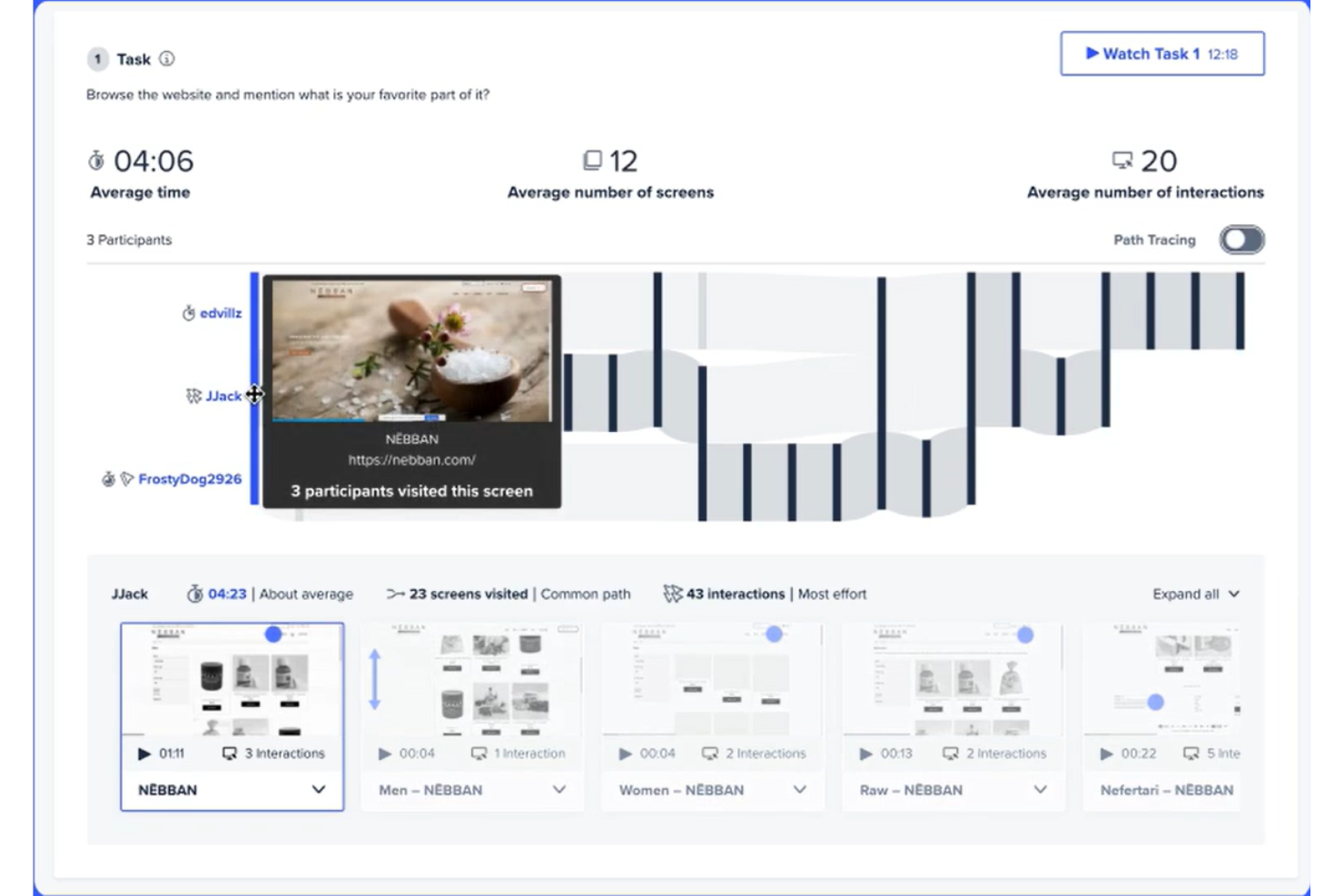
UserTesting is a platform that enables organizations to gather real-time feedback on their products, services, and experiences. It serves professionals across various industries seeking to understand customer perspectives and improve user experiences. The platform facilitates the collection of qualitative insights through video-based feedback sessions.
Why I picked UserTesting: It excels in collecting live feedback, offering video sessions where real users interact with your product. The platform allows you to see and hear users’ reactions, providing valuable insights into user experience. Even better, UserTesting's targeting capabilities let you choose the right audience for your tests. These features make it a great option for gaining actionable insights towards enhancing your product's usability.
Standout features & integrations:
Features include AI-driven analysis that quickly identifies key themes in user feedback, a detailed insights hub for organizing and sharing findings, and a vast library of test templates to streamline your research process.
Integrations include Slack, Jira, Trello, Adobe XD, Figma, Optimizely, Lookback, Productboard, Google Analytics, and Zoom.
Pros and Cons
Pros:
- Customizable test templates
- Targeted audience selection
- Real-time user feedback
Cons:
- Can be overwhelming for small teams
- Requires technical setup for some features

Hotjar
Best for heatmaps
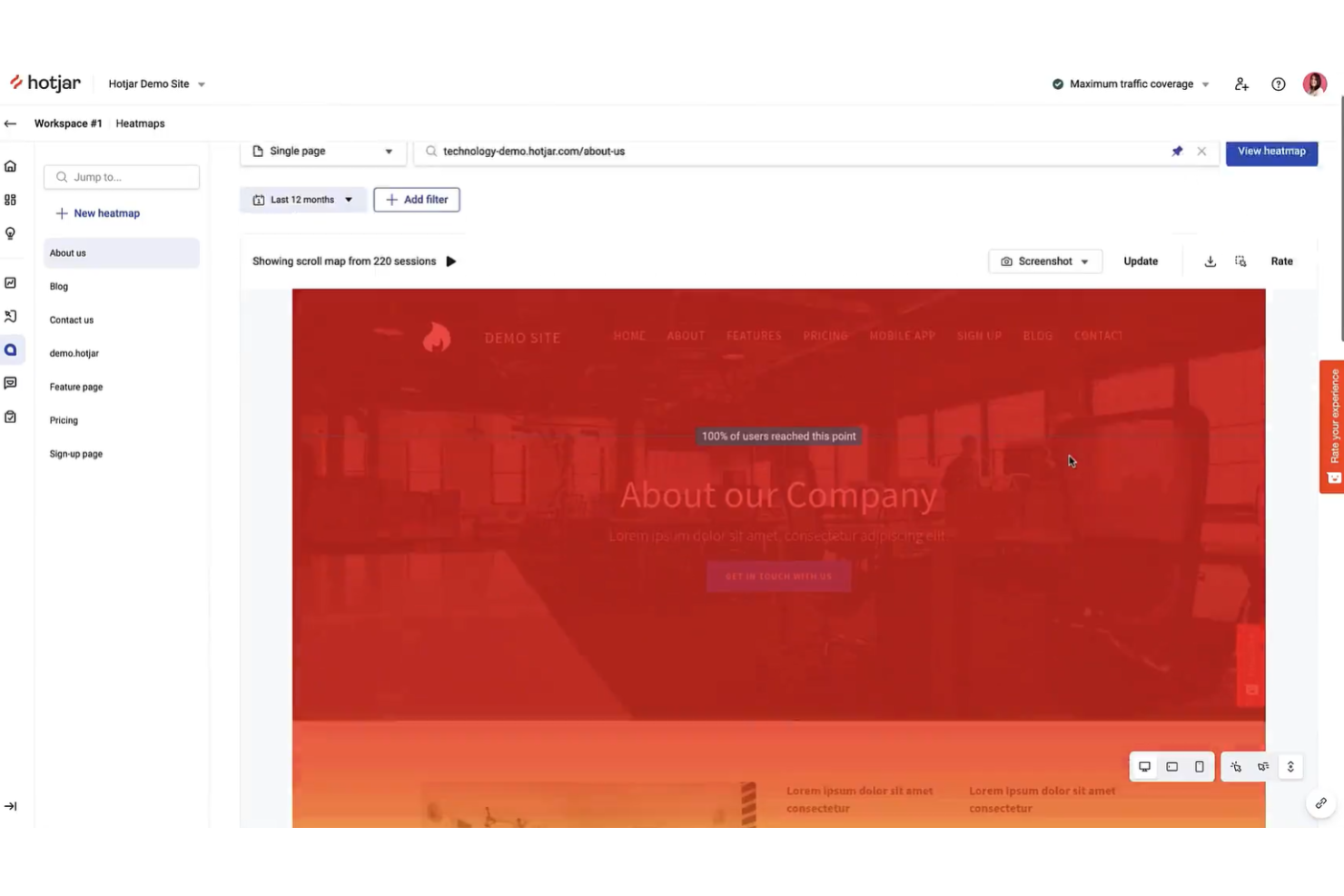
Hotjar is a digital experience insights platform that helps you understand how users interact with your website. It serves product managers, marketers, and UX designers by providing tools to visualize user behavior and gather feedback. These insights assist teams in making data-driven decisions to understand user experience, habits, and ultimately make the necessary changes to drive conversions.
Why I picked Hotjar: It excels in providing visual heatmaps that show where users click, scroll, and spend time on your site. This feature allows you to pinpoint areas of interest or confusion on your pages. Hotjar also offers session recordings so you can watch real user interactions and gain insights into user behavior. Its survey and feedback tools also let you gather user opinions directly, helping you make informed decisions.
Standout features & integrations:
Features include tools like first-click testing, heatmaps, and session recordings that help you see how users interact with your site. You can also set up surveys to gather user feedback directly, and the feedback widget lets users share their thoughts in real-time.
Integrations include Slack, Zapier, HubSpot, Google Analytics, Optimizely, Segment, Shopify, WordPress, Squarespace, and Wix.
Pros and Cons
Pros:
- Easy setup without technical skills
- Conversion funnels to track drop-offs
- Session recordings for real user insights
Cons:
- Some features need manual setup
- May slow down site loading times

Datadog
Best for unified performance monitoring
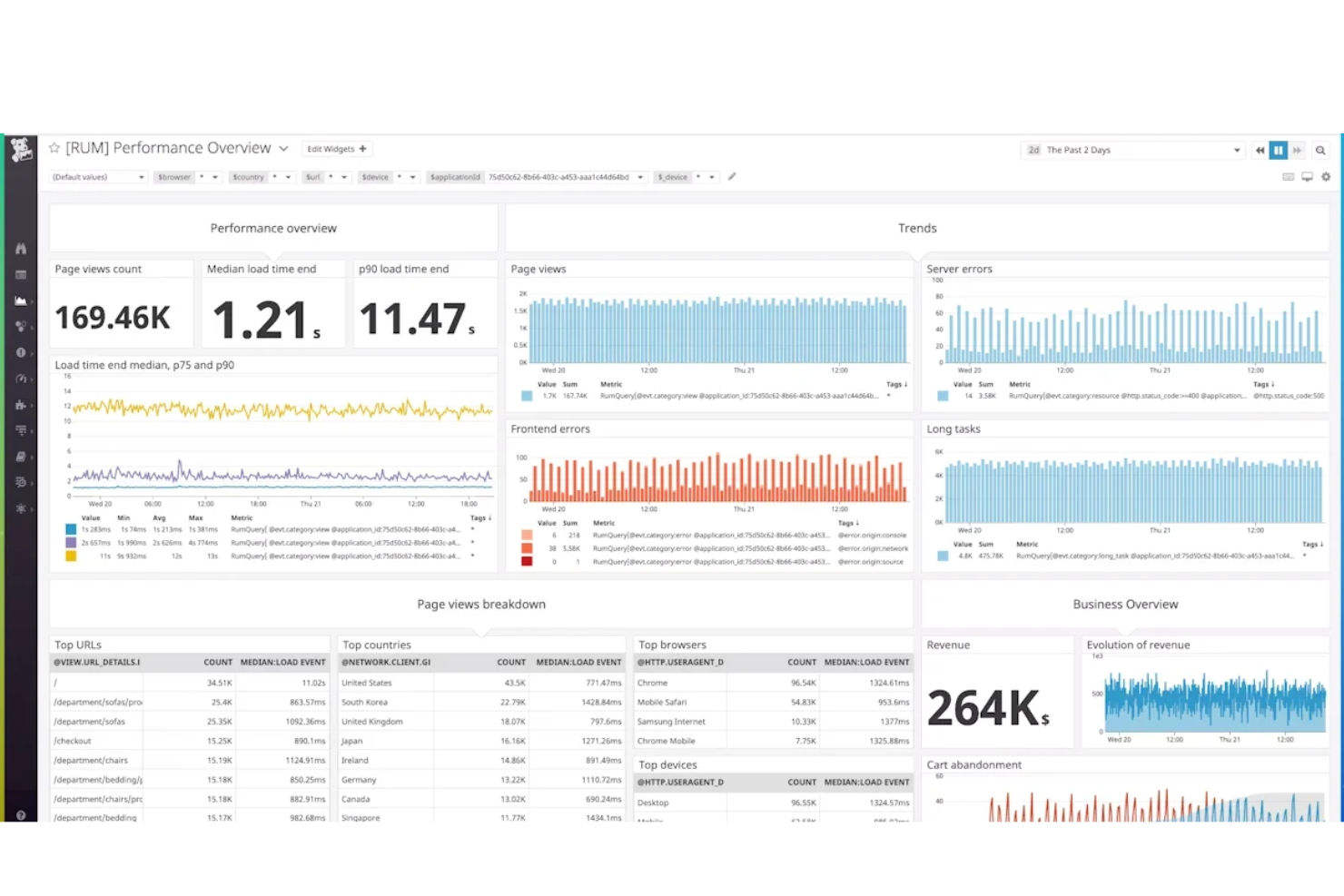
Datadog is an observability platform that combines real user monitoring, synthetic testing, and application performance monitoring to give you a full view of how your web and mobile experiences perform in production.
Who Is Datadog Best For?
Datadog is a strong fit for engineering and DevOps teams at mid-size to enterprise companies running complex, cloud-native applications across multiple services.
Why I Picked Datadog
I picked Datadog as one of the best because no other tool on this list ties frontend UX data to backend infrastructure the way it does. I use Real User Monitoring to track Core Web Vitals alongside server latency in a single dashboard, so I can tell whether a slow experience is a code issue or an infrastructure one. Synthetic testing lets me run scripted user journeys on a schedule to catch regressions before real users do.
Datadog Key Features
- Session replay: Records and plays back individual user sessions to show exactly how users navigated your site or app.
- Error tracking: Aggregates and groups frontend JavaScript errors by root cause, so you can prioritize which bugs affect the most users.
- Mobile RUM: Monitors real user interactions on iOS and Android apps, including crash rates and screen rendering times.
- Network performance monitoring: Maps traffic between services to surface latency and request failures at the infrastructure level.
Datadog Integrations
Datadog offers 1,000+ built-in integrations, including tools like Slack, Jira, PagerDuty, GitHub, Jenkins, AWS, Azure, Google Cloud Platform, Salesforce, and Cloudflare. It's also available on Zapier, and an API is available for custom integrations.
Pros and Cons
Pros:
- Synthetic tests are self-healing after updates
- Tracks Core Web Vitals with 30+ metrics
- Links frontend sessions to backend traces natively
Cons:
- Limited data export options through UI
- RUM and session replay billed separately
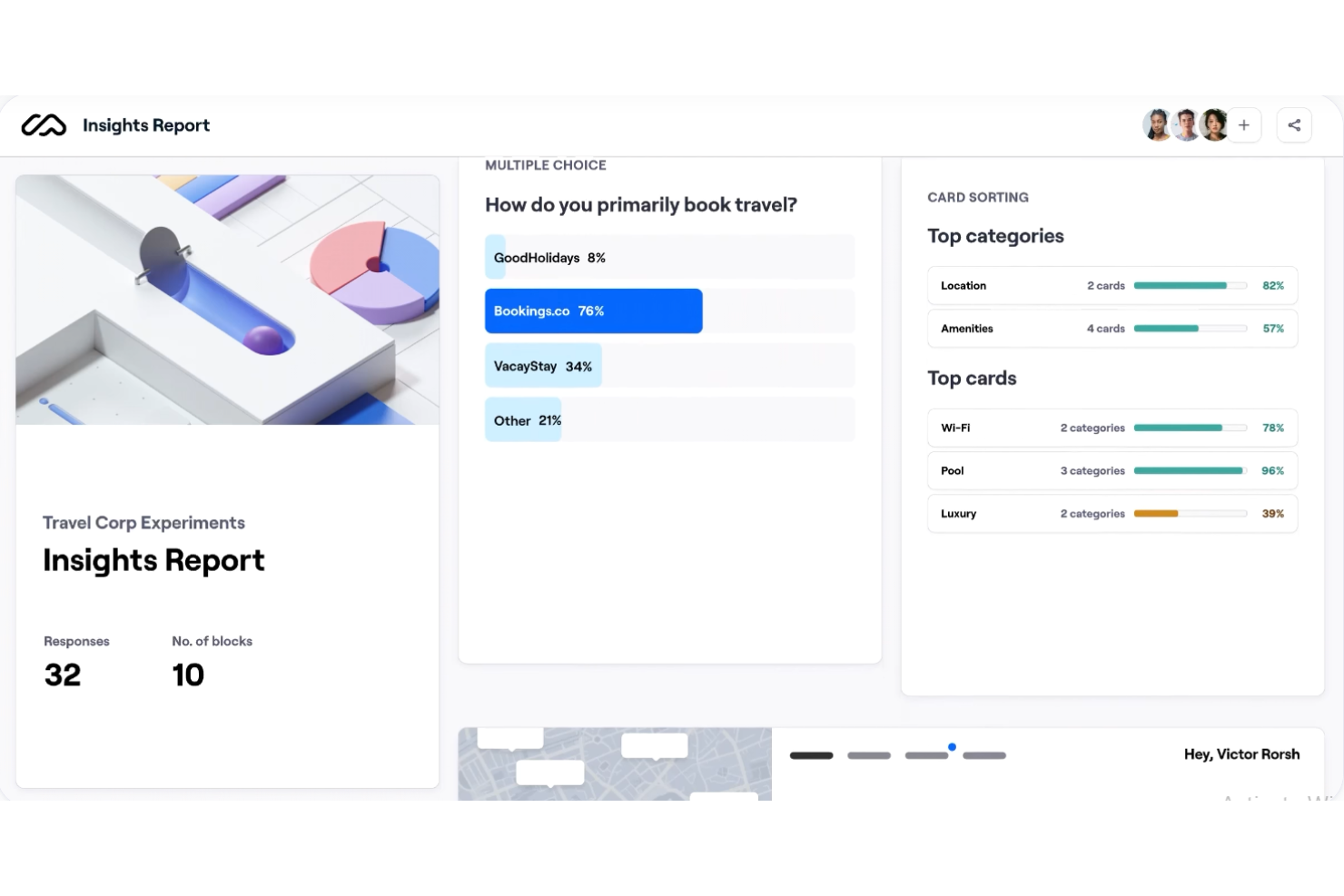
Maze is a user research platform that covers prototype testing, usability studies, moderated interviews, card sorting, tree testing, and surveys—all in one place.
Who Is Maze Best For?
Maze is a good fit for product and UX teams at mid-size to enterprise companies who run frequent research cycles alongside active design work.
Why I Picked Maze
Maze is one of my top picks because I love how tightly its prototype testing workflow connects to real usability data. I can import a Figma prototype directly, launch a test in minutes using the AI study builder, and immediately start seeing misclick rates, completion rates, and heatmaps as participants finish missions. Testing up to five design variants in a single study is also something I find genuinely useful when my team needs to compare directions before committing to a build.
Maze Key Features
- Card sorting: Run open or closed card sorting tasks to see how users naturally group content, with results visualized as agreement and similarity matrices.
- Tree testing: Validate your information architecture by assigning navigation tasks to participants and tracking the paths they take to reach a destination.
- AI-moderated surveys: Build and launch surveys with AI-generated follow-up questions that trigger automatically based on open-text responses.
- Research panel: Recruit participants directly through Maze's built-in panel using specific screening criteria, without relying on an external recruitment tool.
Maze Integrations
Maze offers 20 native integrations, including Figma, FigJam, Figma Make, Axure, Slack, Notion, Miro, Amplitude, Zoom, and Google Meet, along with calendar integrations across Google Calendar, Microsoft Office 365, Outlook.com, iCloud, and Exchange. It also integrates with Jira and Confluence through its Atlassian integration.
Pros and Cons
Pros:
- Direct Figma prototype import for testing
- Real-time quantitative usability metrics per task
- Auto-generated reports save stakeholder presentation time
Cons:
- Card sorting and tree testing need upgrades
- Mobile prototype testing can be unreliable

New Relic
Best for end-to-end experience tracking
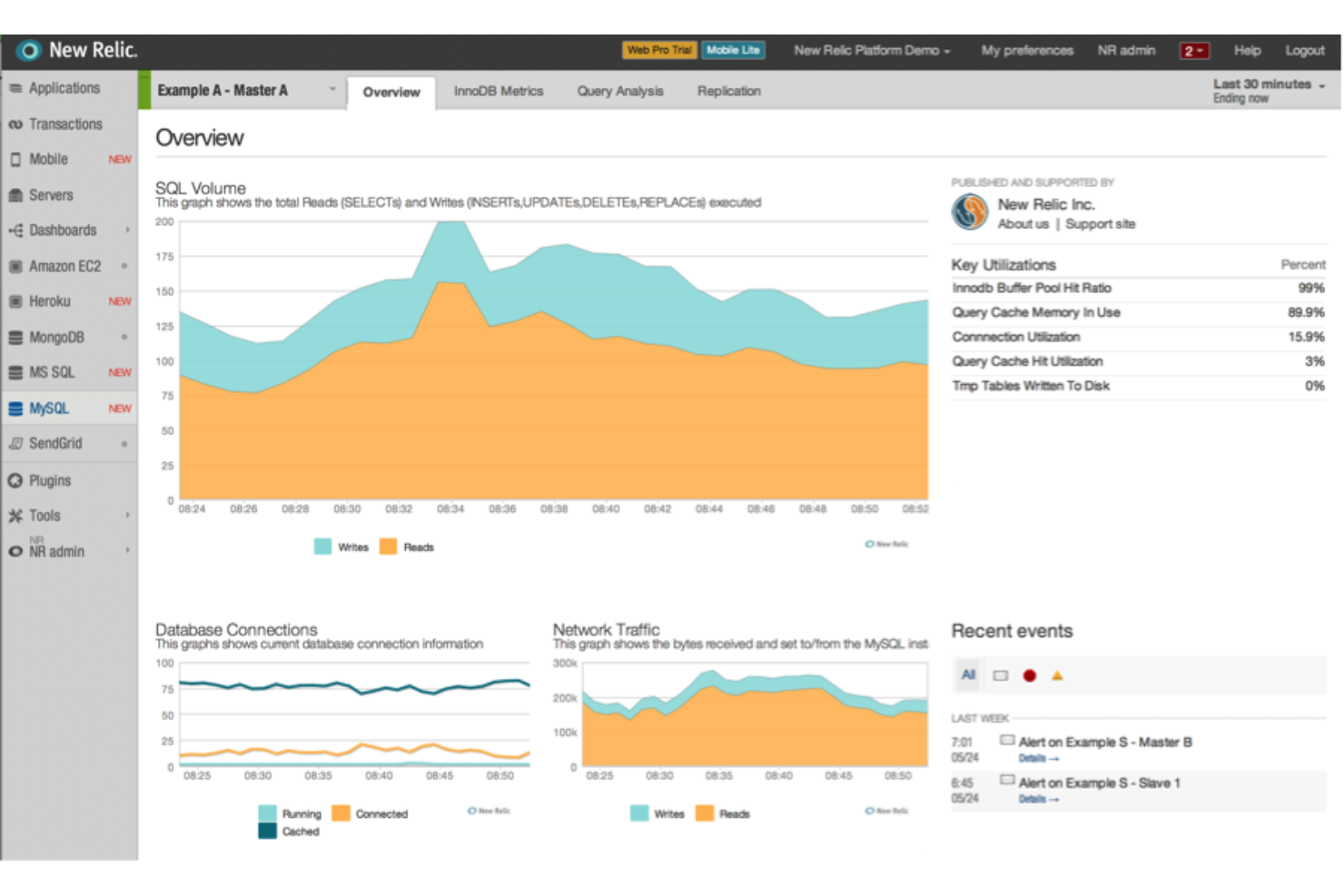
New Relic is an observability platform that combines real user monitoring, session replay, distributed tracing, and browser performance tracking to give you visibility across your entire application stack.
Who Is New Relic Best For?
New Relic is a strong fit for engineering and DevOps teams at mid-size to enterprise companies who need to connect frontend user experience data to backend system performance.
Why I Picked New Relic
I've included New Relic in my top picks because no other tool on this list connects frontend user behavior to backend code as directly as this one does. When a session replay surfaces a frustrating user interaction, distributed tracing links it to the exact backend service or database query causing the slowdown, without switching tools. I also like that browser monitoring uses Sankey diagrams to map real user navigation paths, so I can see where journeys break down across the full flow, not just on individual pages.
New Relic Key Features
- Synthetic monitoring: Simulates user interactions on a schedule to test critical flows before real users encounter issues.
- Core Web Vitals tracking: Measures LCP, INP, and CLS scores directly within the browser monitoring dashboard.
- Mobile monitoring: Captures crash reports, HTTP errors, and interaction traces for iOS and Android apps.
- JavaScript error analytics: Logs frontend errors with stack traces and links them to affected user sessions.
New Relic Integrations
New Relic offers 780+ integrations through its Instant Observability marketplace, spanning AWS, Azure, Google Cloud Platform, Kubernetes, and open source monitoring tools. For alert notifications, it connects natively with Jira, Slack, Microsoft Teams, PagerDuty, ServiceNow, and AWS EventBridge, and it's available on Zapier. A NerdGraph API and REST API are available for custom integrations.
Pros and Cons
Pros:
- AI-powered automated root cause analysis
- Filter session replays by event sequences
- Real-time monitoring with timely performance insights
Cons:
- Session replay data retained only eight days
- NRQL queries can be slow to load
Other User Experience Testing Tools
Here are some additional user experience testing tools options that didn’t make it onto my shortlist, but are still worth checking out:
- Catchpoint
For reliability performance monitoring
- Lookback
For live session feedback
- Trymata (formerly TryMyUI)
For data-driven UX insights with task success analytics
- Fullstory
For session replay analysis
- Dynatrace
For AI-powered analysis
- UXtweak
For participant recruitment options
- Lucky Orange
For interaction tracking
- LogRocket
For integrated AI session diagnostics
- Microsoft Clarity
For free visual interaction analytics
- Useberry
For prototype testing


How I Evaluate User Experience Testing Tools
I split my evaluation into baseline criteria—like session recording and participant recruitment—and differentiators that separate tools built for quick discovery from full ResearchOps programs.
Core Functionality (Table Stakes For This List)
When I'm selecting tools for my list, I rank each one on a scale from 0 (does not offer the functionality) to 5 (excels in this area) for each core functionality listed below. Then, I calculate the tool's total score into a percentage. Each tool needs to achieve a minimum total score of 65% to be considered for inclusion.
- Usability Test Creation: I look at how flexibly you can build tests—whether you can set up moderated interviews, unmoderated tasks, card sorts, or tree tests within the same platform.
- Session Recording & Playback: Playback quality matters, so I check for screen, audio, and webcam capture along with tools like timestamped notes and tagging for faster review.
- Participant Recruitment: I evaluate whether a tool offers a built-in panel with screener criteria or relies solely on self-sourced participants shared through a link.
- Behavioral Analytics: Beyond raw recordings, I look for quantitative UX metrics like click paths, heatmaps, and task completion rates that help PMs spot friction in a checkout flow or onboarding sequence.
- Prototype & Live Site Testing: Tools like Maze and UserTesting handle Figma imports differently, so I check which prototype formats and live environments each platform supports.
- Insights & Reporting: I evaluate how each tool helps you move from raw sessions to stakeholder-ready outputs—highlight reels, tagged clips, or dashboards you can drop into a sprint review.
Once I have a list of tools that meet the criteria, I consider what sets each platform apart.
Differentiating Factors (What Sets Vendors Apart)
Here's how I compare and contrast different vendors:
Standout Features
AI-powered analysis is a major differentiator—tools that auto-transcribe sessions and surface recurring themes save hours of synthesis after a round of testing. I also look for live collaboration rooms where PMs, designers, and engineers can observe sessions together and tag key moments in real time. Benchmarking capabilities matter for teams running longitudinal studies to track UX improvements across releases using standardized scores like SUS or SEQ.
Beyond Features
Speed to insight is a factor I weigh heavily—some platforms deliver completed sessions within hours, while others take days, which matters when you're validating a design direction mid-sprint. I also check how well each tool connects to the broader product stack, especially Jira and Figma, since findings locked inside a research tool rarely influence roadmap decisions. Pricing structure deserves attention too. A per-study model might suit teams running quarterly usability rounds, but continuous discovery programs need seat-based or unlimited plans that won't balloon costs.
How to Choose User Experience Testing Tools
It’s easy to get bogged down in long feature lists and complex pricing structures. To help you stay focused as you work through your unique software selection process, here’s a checklist of factors to keep in mind:
| Factor | What to Consider |
| Scalability | Ensure the tool can grow with your team. Look for options that handle increasing data loads and user numbers without compromising performance. |
| Integrations | Check if the tool integrates with your existing tech stack, like project management and design tools, to streamline your workflow and improve efficiency. |
| Customizability | Choose a tool that lets you tailor user interfaces and reports to fit your specific needs, ensuring it aligns with your team’s processes and goals. |
| Ease of Use | Look for intuitive interfaces and easy navigation. Your team should be able to adopt the tool quickly without extensive training or a steep learning curve. |
| Budget | Consider the total cost, including subscription fees and any additional charges for extra features or users. Ensure it fits your budget constraints. |
| Security Safeguards | Verify that the tool complies with data protection regulations and offers features like encryption and user access controls to protect sensitive data. |
| Support Options | Evaluate the availability of customer support, including live chat, phone support, and help center resources, to assist your team when needed. |
| Feedback Mechanisms | Look for tools that offer multiple ways to gather user feedback, such as surveys, video feedback, and live sessions, to cover all your research needs. |
Trends in User Experience Testing Tools
In my research, I sourced countless product updates, press releases, and release logs from different usability testing tools vendors. Here are some of the emerging trends I’m keeping an eye on:
- AI-Powered Insights: Vendors are using AI to analyze user data more effectively, providing deeper insights into user behavior. This trend helps teams identify patterns and issues quickly, as seen in tools like Fullstory that offer AI-driven analytics.
- Real-Time Collaboration: Tools are increasingly offering features that allow teams to work together in real-time during testing sessions. This enhances communication and speeds up decision-making processes, a feature embraced by platforms like Lookback.
- Emphasis on Accessibility Testing: There's a growing focus on ensuring digital products are accessible to all users, including those with disabilities. Vendors like UserTesting are integrating accessibility checks into their user testing processes.
- Remote Testing Capabilities: With more teams working remotely, tools that support remote testing are gaining traction. Platforms like Maze offer features that facilitate remote usability testing, making it easier for distributed teams to gather user feedback.
- Enhanced Video Feedback: Video feedback is becoming more detailed and interactive, allowing for better analysis of user reactions. PlaybookUX, for example, provides features that let teams view and analyze detailed video feedback from user sessions.
What Are User Experience Testing Tools?
User experience testing tools, or usability testing tools, are software solutions that help businesses evaluate and improve the usability of their digital products. These tools are generally used by UX designers, product managers, and researchers to gather insights into user behavior (testers) and enhance product design through A/B testing software and other methods. UX research features like usability testing, session recordings, and feedback collection help with understanding user needs, demographics, and identifying areas for improvement. Overall, these tools provide valuable insights that lead to better user experiences and increased satisfaction.
Features of User Experience Testing Tools
When selecting user testing tools, keep an eye out for the following key features:
- Usability testing: Allows you to evaluate how easily users and test participants can navigate your product, helping identify design improvements.
- Session recordings: Captures real user interactions with your product, providing insights into user behavior and pain points.
- Heatmaps: Visualizes where users click and scroll, offering a clear picture of user engagement on your site.
- A/B testing: Enables testing of different versions of your product to determine which performs better with users.
- Feedback collection: Gathers direct user opinions through user interviews, surveys, and forms, helping you understand user needs and preferences.
- Video feedback: Real-time feedback and video recordings provide detailed visual insights into user reactions and interactions, enhancing understanding of user experience.
- Remote testing capabilities: Facilitates testing with users from different locations, making it easier for distributed teams to gather feedback.
- Real-time collaboration: Allows team members to work together during testing sessions, improving communication and decision-making.
- Accessibility testing methods: Ensures your product is usable by people with disabilities, enhancing inclusivity and compliance.
- AI-powered insights: Uses artificial intelligence to analyze data and provide deeper insights into user behavior and trends.
Benefits of User Experience Testing Tools
Implementing user experience testing tools provides several benefits for your team and your business. Here are a few you can look forward to:
- Improved design decisions: UX testing can help you make informed design choices that enhance user satisfaction by analyzing session recordings and heatmaps.
- Increased user engagement: Feedback collection and A/B testing help you tailor your product to user preferences, boosting engagement.
- Faster problem identification: Usability testing and video feedback allow you to quickly spot and address issues, reducing downtime.
- Enhanced team collaboration: Real-time collaboration features enable your team to work together effectively during testing sessions.
- Greater accessibility: Accessibility testing ensures your product is usable by everyone, broadening your audience and meeting compliance standards.
- Data-driven insights: AI-powered insights provide a deeper understanding of user behavior, guiding strategic decisions.
- Cost-effective improvements: By identifying issues early through remote testing capabilities, you can implement cost-effective fixes that improve the user experience.
Costs and Pricing of User Experience Testing Tools
Selecting user experience testing tools requires an understanding of the various pricing models and plans available. Costs vary based on features, team size, add-ons, and more. The table below summarizes common plans, their average prices, and typical features included in user experience testing tools solutions:
Plan Comparison Table for User Experience Testing Tools
| Plan Type | Average Price | Common Features |
| Free Plan | $0 | Basic usability testing, limited session recordings, and basic feedback collection. |
| Personal Plan | $15-$30/ user/month | Usability testing, session recordings, heatmaps, and basic A/B testing. |
| Business Plan | $50-$100/ user/month | Advanced usability testing, detailed session recordings, comprehensive feedback collection, video feedback, and real-time collaboration. |
| Enterprise Plan | $150-$300/ user/month | Customizable dashboards, in-depth analytics, dedicated support, AI-powered insights, and extensive integration options. |
User Experience Testing Tools FAQs
Here are some answers to common questions about user experience testing tools:
What questions should I ask in user testing?
When conducting user testing, focus on questions that reveal user satisfaction and ease of use. Ask users what they liked most and least about the product, and how they would describe their experience. Such questions help you understand user preferences and identify areas needing improvement.
Which tool can be used when working with user assistance testing?
Different tools cater to various aspects of user testing. For on-demand testing, Userfeel is popular. Trymata excels in testing customer journeys, while Hotjar is known for website user behavior analytics. Choose a tool that best fits your specific testing needs.
What is the difference between user experience testing and UAT?
User experience testing focuses on user interactions, assessing how intuitive and enjoyable a product is. User Acceptance Testing (UAT) involves stakeholders validating that the product meets business requirements. Both simulate real-world scenarios but have different goals and participants.
How many users do you need for user testing?
The number of users needed varies by study type. For moderated usability tests, 5 users can uncover 80% of friction areas. Unmoderated tests may require 20 or more users. Always consider the study’s goals and complexity when deciding on the number of participants.
How do you ensure test results are unbiased?
To ensure unbiased results, select a diverse group of participants that represents your target audience. Use standardized test scripts and avoid leading questions. Analyze data with an open mind, focusing on user feedback rather than preconceived expectations.
How can user experience testing tools improve product design?
These tools provide insights into how users interact with your product, highlighting usability issues and areas for improvement. By analyzing session recordings and user feedback, teams can make informed design changes that enhance user satisfaction and product functionality.
What's Next?
If you're in the process of researching ux testing tools, connect with a SoftwareSelect advisor for free recommendations.
You fill out a form and have a quick chat where they get into the specifics of your needs. Then you'll get a shortlist of software to review. They'll even support you through the entire buying process, including price negotiations.