

10 Best Collaborative Design Software of 2026

10 Best Collaborative Design Software Shortlist


With so many different collaborative tools out there, selecting the best one for your needs can be tricky. You want to have a space where multiple users can simultaneously contribute to the design process, share feedback, and work together to create visually appealing and functional designs - and need the right tool for the job.
I've got you covered! In this post, I leverage my product management experience scheduling hundreds of projects, using many different platforms within large remote teams, and working with complex products to share my picks of the best collaborative design software.
What is collaborative design software?
Collaborative design software is a digital solution that supports the collaborative aspects of the design process. It allows multiple users to work together on design projects, providing tools and features that enable real-time collaboration, feedback exchange, and the creation of cohesive and well-coordinated designs.
These platforms often include features like version control, feedback management, proofing, and collaboration tools, making it easier for teams to iterate on designs more efficiently and collectively contribute to the creation of high-quality and visually appealing designs.
Why Trust Our Software Reviews
We’ve been testing and reviewing product management software since 2020. As product managers ourselves, we know how critical and difficult it is to make the right decision when selecting software.
We invest in deep research to help our audience make better software purchasing decisions. We’ve tested more than 2,000 tools for different product management use cases and written over 1,000 comprehensive software reviews. Learn how we stay transparent & our software review methodology.
The Best Collaborative Design Software Comparison Chart
Here is a table you can use to compare all the tools that we just covered in the overviews.
| Tool | Best For | Trial Info | Price | ||
|---|---|---|---|---|---|
| 1 | Best for AI-powered mind mapping | Free trial + free plan available | From $9/user/month (billed annually) | Website | |
| 2 | Best collaborative design software for simultaneous work on one canvas | 14-day free trial + free plan available | From $8/user/month (billed annually) | Website | |
| 3 | Best collaborative design software for real-time collaboration | Free plan available | From $16/user/month (billed annually) | Website | |
| 4 | Best collaborative design software for AI-powered design assistance | Free forever plan available | Plans start at $9.95/month | Website | |
| 5 | Best collaborative design software for non-designers | 14-day free trial + free plan available | From $12.25/user/month (billed annually) | Website | |
| 6 | Best collaborative design software for sharing design mockups | 14-day free trial | From $16/user/month | Website | |
| 7 | Best collaborative design software for cross-functional collaboration between teams | Free trial available | Plans start at $19/user/month | Website | |
| 8 | Best collaborative design software for improving the design handoff process | Free plan available | From $13.75/project/month (billed annually) | Website | |
| 9 | Best collaborative design software for whiteboarding and digital collaboration | 30-day free trial + free plan available | From €5/user/month | Website | |
| 10 | Best collaborative design software for graphic designers, marketing teams, and agencies | 7-day free trial available | From $16/user/month (min. 3 users, billed annually) | Website |

Overviews Of The 10 Best Collaborative Design Software
Here’s a brief description of each tool that showcases each tool’s best use case.

Best for AI-powered mind mapping

Lucidspark is a virtual whiteboard built for real-time team collaboration, combining an infinite canvas, dynamic mind mapping, AI-assisted ideation, visual activities, and facilitation tools for brainstorming and planning.
Who Is Lucidspark Best For?
Lucidspark is a strong fit for cross-functional teams in product, design, and strategy who need a shared space for visual brainstorming and structured ideation sessions.
Why I Picked Lucidspark
I've included Lucidspark in my top picks because its AI-powered mind mapping sets it apart from other whiteboard tools. You can prompt the AI to generate an entire mind map from a single topic, and it instantly builds out branches and sub-nodes on the canvas. I also like that the AI can sort and group a scattered board of sticky notes into labeled categories, which is a real time-saver after a messy brainstorm. These two features together make the jump from raw ideas to a structured visual plan much faster.
Lucidspark Key Features
- Voting sessions: Run timed voting directly on the canvas so teams can collectively prioritize ideas without leaving the board.
- Breakout boards: Split a main board into separate sub-boards for small group work, then reconvene results in one shared view.
- Freehand drawing: Sketch diagrams, annotations, or rough concepts directly on the canvas using a stylus or mouse.
- Templates library: Access pre-built layouts for wireframes, sitemaps, and concept maps to give sessions a head start.
Pros and Cons
Pros:
- Integrates with Google Drive and Jira
- Real-time collaboration for teams
- Kanban workflow templates available for teams
Cons:
- Annual billing required for access
- Team plans start from $10 monthly per user

Miro
Best collaborative design software for simultaneous work on one canvas
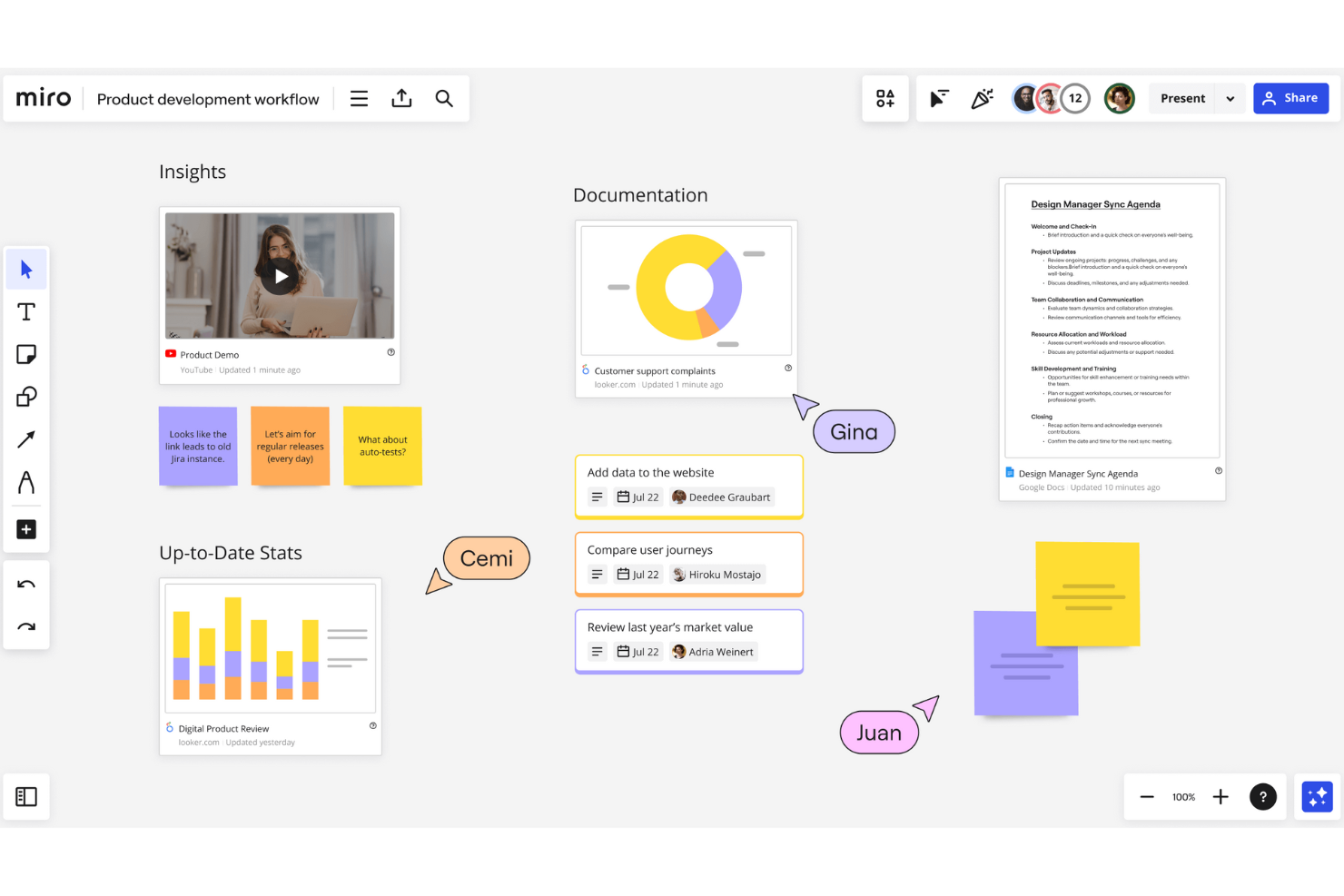
Miro is an infinite-canvas visual collaboration platform that brings wireframing, prototyping, design sprints, diagramming, and stakeholder feedback into a single shared workspace for design and product teams.
Who Is Miro Best For?
Miro serves cross-functional product and design teams at mid-size to enterprise companies that run frequent remote workshops, design sprints, and collaborative planning sessions.
Why I Picked Miro
Miro stands out because no other tool matches the experience of having an entire design team working on the same canvas at the same time. I love how cursor presence lets me see exactly where teammates are and what they're editing in real time, which makes live design critiques genuinely useful. I've run design sprints where my team used built-in voting and sticky note clustering simultaneously, and the board never missed a beat.
Miro Key Features
- Wireframing: Build low-fidelity wireframes directly on the canvas using a dedicated library of UI components and shapes.
- Talktrack: Record interactive video walkthroughs of any board so stakeholders can review designs asynchronously.
- Frames: Organize canvas sections into presentation-ready frames that double as clickable prototype flows.
- Template library: Access 7,000+ pre-built templates covering design briefs, research synthesis, and concept mapping.
Pros and Cons
Pros:
- Vast library of pre-built templates and widgets
- Easy to use and implement
- Wide range of design features
Cons:
- Free plan has limited boards
- Some integrations are only available on higher-tier plans
New Product Updates from Miro
Miro Adds Japan Data Residency for Enterprise Customers
Miro has introduced Japan data residency for enterprise customers, offering in-region storage for production data, backups, and metadata, plus in-region compute infrastructure. For more information, visit Miro's official site.

Figma
Best collaborative design software for real-time collaboration

Figma is a browser-based design platform where teams can build UI designs, interactive prototypes, and shared design systems together in a single multiplayer environment.
Who Is Figma Best For?
Figma is a strong fit for product design and UX teams at mid-size to enterprise companies who need designers, developers, and stakeholders working in one shared space.
Why I Picked Figma
Figma earns its spot as one of the best on my shortlist because its multiplayer editing is real-time; I can watch teammates' cursors move across the canvas and see every change as it happens. I also love Observation mode, which lets me follow a collaborator's exact view during design reviews without needing a separate screen share. Contextual commenting lets stakeholders pin feedback directly to specific design elements, preventing feedback from being lost in email threads.
Figma Key Features
- Shared component libraries: Publish reusable UI components, color styles, and text styles that your entire team can access and use across any project file.
- Interactive prototyping: Build clickable, animated prototypes with transitions and smart animate to simulate real product flows for testing and stakeholder review.
- Dev Mode: A dedicated workspace where developers can inspect designs, copy code snippets, and view specs without editing the original file.
- Branching and merging: Create a separate branch of any design file to explore changes independently, then merge approved updates back into the main file.
Pros and Cons
Pros:
- Easy to share designs
- Easy to collaborate on multiple files
- Good developer handoff
Cons:
- Version control needs improvement
- Learning curve for new users

Picmaker
Best collaborative design software for AI-powered design assistance
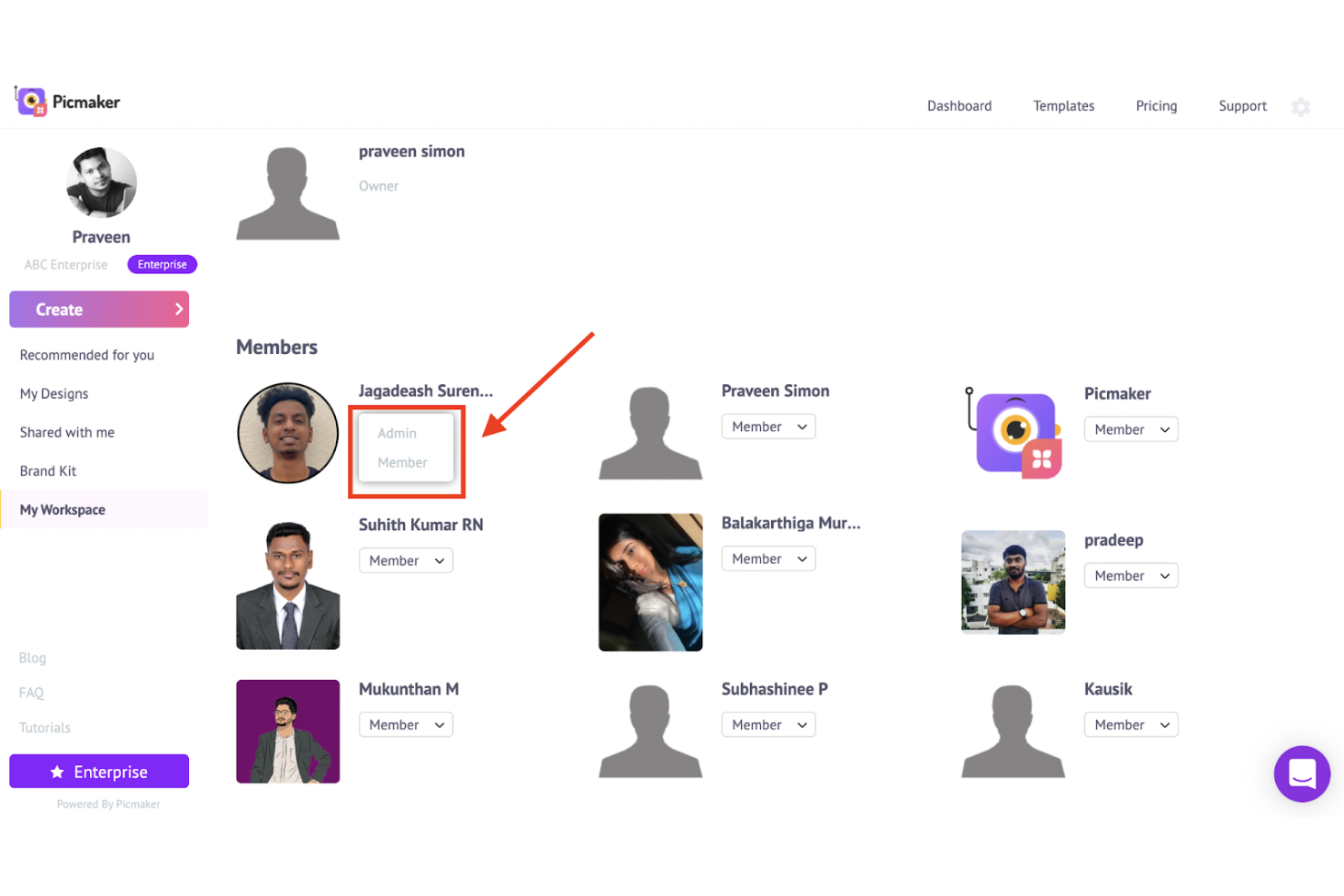
Picmaker is an AI-powered graphic design platform for creating social media visuals, marketing materials, and branded content, with tools for team collaboration, template customization, and brand kit management.
Who Is Picmaker Best For?
Picmaker is a good fit for small marketing teams and social media managers who need to produce branded visual content without relying on a dedicated designer.
Why I Picked Picmaker
I've included Picmaker in my top picks because its MAD Button is one of the more practical AI design tools I've seen in this category. When I'm working on a new post, it generates real-time suggestions for fonts, color combinations, and background elements directly inside the canvas, so I'm not starting from scratch every time. I also like the AI-powered background remover, which handles image cutouts without any manual masking. Pair those features with shareable design links that let teammates view or edit without needing an account, and it becomes a genuinely useful setup for small teams iterating on visuals together.
Picmaker Key Features
- Brand kit: Store your brand's logos, fonts, and color palettes in one place so every team member designs within brand guidelines.
- Workspace management: Invite up to 100 members to a shared workspace and assign edit or view access per design.
- Template library: Browse thousands of pre-built templates organized by platform and content type, from Instagram posts to presentation slides.
- Design resizer: Automatically resize any design for different social media platforms without rebuilding it from scratch.
Pros and Cons
Pros:
- Suitable for small teams and freelancers
- Easy design file sharing
- Simple user interface
Cons:
- No integration with communication tools
- Limited real-time collaboration features

Visme
Best collaborative design software for non-designers

Visme is a visual content design platform with collaboration tools, customizable templates, AI-powered design generation, and brand management features built for teams who create presentations, documents, infographics, and interactive content together.
Who Is Visme Best For?
Visme is a strong fit for marketing, HR, and communications teams at mid-sized companies who need to produce visual content collaboratively without relying on a dedicated design team.
Why I Picked Visme
I picked Visme as one of the best because it removes the design skill barrier without sacrificing real collaboration. The AI Designer feature lets my team generate a polished, on-brand presentation from a text prompt in seconds. From there, collaborators can leave pinned annotations directly on the canvas, so feedback like "move this chart left" lands exactly where it belongs instead of getting lost in an email thread. I also rely on the Brand Kit to keep every team member's output consistent, even when no one on the project has a design background.
Visme Key Features
- Role-based permissions: Assign view, comment, or edit access to each collaborator individually so you control who can change what.
- @mention commenting: Tag specific teammates in comments directly on the canvas to route feedback to the right person.
- Template library: Access thousands of templates across 50+ content types, including presentations, infographics, reports, and social graphics.
- Shared team workspace: Organize projects into shared folders so your entire team works from one centralized content hub.
Pros and Cons
Pros:
- Provides project management tools
- Easy sharing
- Provides several review tools
Cons:
- Limited customization
- Limited storage

Balsamiq
Best collaborative design software for sharing design mockups

Balsamiq is a wireframing and prototyping tool built for teams who need to sketch, iterate, and share low-fidelity UI mockups before committing to high-fidelity design work.
Who Is Balsamiq Best For?
Balsamiq is a strong fit for product managers, UX designers, and developers who need a fast, low-fidelity wireframing tool to communicate ideas before high-fidelity design begins.
Why I Picked Balsamiq
Balsamiq is one of my top picks because I love how it handles sharing mockups with stakeholders who aren't in the weeds of design. I can share a wireframe via a public link, a PDF, or a PNG in seconds, which means a developer, a client, or a non-technical stakeholder can review it without needing a Balsamiq account. What I find especially useful is the commenting and reactions feature built right into the shared view, so feedback stays tied to the specific screen it's about rather than scattered across a Slack thread or email chain.
Balsamiq Key Features
- Pre-built UI component library: Access a large set of pre-made UI elements, icons, and templates to sketch interface ideas without starting from scratch.
- Interactive prototype linking: Link individual wireframe screens together to show stakeholders how a user flow or interaction will work end-to-end.
- Reusable symbols: Create and reuse custom UI components—like nav menus or button groups—across multiple screens to keep mockups consistent.
- Three wireframe styles: Switch between Draft, Sketch, and Presentation modes depending on whether you're ideating, wireframing, or presenting to clients.
Pros and Cons
Pros:
- Affordable pricing plans
- Simple and easy interface
- Good real-time collaboration features
Cons:
- Limited animation features
- Limited export options

Avocode
Best collaborative design software for cross-functional collaboration between teams

Avocode is a design handoff platform that lets designers share Sketch, Figma, Adobe XD, and Photoshop files with developers for design inspection, asset extraction, and code snippet generation.
Who Is Avocode Best For?
Avocode is a good fit for product teams where designers and developers need a shared space to inspect designs and hand off assets without back-and-forth.
Why I Picked Avocode
Avocode is on my shortlist because it bridges the workflow between design and development teams. I like the design inspection feature, which lets developers click any layer to extract CSS, Swift, or Android code directly from the file, so they don't have to guess spacing or font values. The shared design repository also means my whole team, designers and developers alike, is always looking at the same source file.
Avocode Key Features
- Version history: Tracks every update to a design file so your team can review and compare previous versions side by side.
- In-file commenting: Lets designers and developers leave threaded comments directly on specific layers or areas within a design file.
- Asset export: Allows developers to export any layer as an image asset in multiple formats and resolutions without opening the original design tool.
- Design file syncing: Automatically syncs updated design files from Sketch, Figma, Adobe XD, and Photoshop to keep the team on the latest version.
Pros and Cons
Pros:
- Easy to convert designs into code snippets
- Easy to export files
- Responsive customer support
Cons:
- Performance issues with large files
- The interface is difficult to navigate


Zeplin is a design delivery and handoff platform that sits between your design tools and your development team, letting you publish finalized screens, document requirements, map user flows, track version changes, and generate code snippets for developers.
Who Is Zeplin Best For?
Zeplin is a strong fit for product teams where designers and developers work closely together and need a structured way to hand off and document designs.
Why I Picked Zeplin
I picked Zeplin as one of the best because the way it handles design handoff is genuinely different from just sharing a Figma link. When I publish screens to a Zeplin project, developers automatically get code snippets, spacing measurements, and asset exports without me documenting any of it manually. I also like the version compare feature, which lets both sides see exactly what changed between design iterations before a single line of code gets written.
Zeplin Key Features
- Flow boards: Map out complete user journeys by connecting screens with labels, shapes, and connectors directly within a project.
- Design system management: Maintain a shared styleguide with colors, text styles, and components that developers can reference alongside live code values.
- AI design review: Run automated checks on published screens to flag spacing inconsistencies, color mismatches, accessibility issues, and typos.
- Annotation and note layers: Add contextual notes directly onto screens to document requirements, interactions, or edge cases for developers.
Pros and Cons
Pros:
- The style guide feature helps ensure consistency
- Supports a wide range of file formats
- Helps designers and developers collaborate in real-time
Cons:
- Relatively expensive for small teams
- Some users report issues with speed

Best collaborative design software for whiteboarding and digital collaboration

Conceptboard is an online whiteboard platform that combines infinite canvas collaboration, visual brainstorming, wireframing, and workshop facilitation tools for distributed and co-located teams.
Who Is Conceptboard Best For?
Conceptboard is a good fit for remote and hybrid teams who run visual workshops, design sprints, or cross-functional planning sessions.
Why Choose Conceptboard
Conceptboard is one of the few whiteboard tools that keeps the full arc of a collaboration session intact. It lets you run a live workshop with a built-in timer and sticky note clustering, then convert outputs into assignable tasks on a Kanban board without leaving the board. The infinite canvas also supports real-time and async work in the same space, so distributed teams can contribute before and after a session rather than being locked into a single time zone.
Conceptboard Key Features
- Pre-built templates: 150+ templates covering design sprints, retrospectives, and workshop formats you can launch directly from the board.
- Voting: Participants cast votes on sticky notes or ideas to surface priorities during a live session.
- Commenting and annotations: Add threaded comments and visual annotations to any element on the board for structured feedback.
- Guest access: Invite external contributors to view or edit a board without requiring them to create an account.
Pros and Cons
Pros:
- Easy to create boards
- Large library of templates
- Good interface
Cons:
- Limited languages
- Limited customization

GoVisually
Best collaborative design software for graphic designers, marketing teams, and agencies

GoVisually is a visual proofing and design review platform that lets teams annotate designs, PDFs, and videos, collect centralized feedback, and manage version control and approval workflows.
Who Is GoVisually Best For?
GoVisually is a good fit for graphic designers, marketing teams, and creative agencies that regularly share design work with clients for review and approval.
Why I Picked GoVisually
I've included GoVisually in my top picks because it's purpose-built for the exact workflow that graphic designers, marketing teams, and agencies deal with daily: getting client feedback on creative assets without the chaos of email threads. I particularly like the point-and-click annotation tool, which lets reviewers drop precise comments directly onto a design, PDF, or video frame. The no-login external reviewer access is a real differentiator—clients can mark up and approve work without creating an account, which removes a lot of friction from the typical agency-client review cycle.
GoVisually Key Features
- Version comparison: Compare new design iterations directly against previous versions in a side-by-side view.
- Approval checklists: Create structured sign-off steps so stakeholders can approve designs in a defined order.
- Adobe CC plugin: Collect feedback on designs directly inside Photoshop, Illustrator, and InDesign.
- Video proofing: Add time-stamped, frame-level comments to specific moments in video files during review.
Pros and Cons
Pros:
- Offers powerful collaboration tools
- Provides a centralized platform for managing design projects
- Simple and intuitive interface
Cons:
- Limited customization and flexibility
- Some users experienced performance issues
Other Options
Here are a few more worthwhile options that didn’t make the best collaborative design software list:
- Bluescape
Collaborative design software for advanced security and privacy features
- Simplified
Collaborative design software for getting instant approvals on designs
- Cage
Collaborative design software for project feedback and approval workflows
- Invision
Collaborative design software for every stage of the design process
- Binfire
Collaborative design software for remote teams that need to manage projects, tasks, and team collaboration all in one place
- Filestage
Collaborative design software for teams that need to manage design feedback and approvals with clients and stakeholders in a single platform
- Usersnap
Collaborative design software for gathering user feedback and bug reports
- Mural
Collaborative design software for teams that need a digital whiteboard to brainstorm, plan, and collaborate visually on design projects
- Moqups
Collaborative design software for teams that need to create interactive prototypes and wireframes
- ViewFlux
Collaborative design software for teams that need to create and share design prototypes with clients and stakeholders for feedback and collaboration


How I Evaluate Collaborative Design Software
I split my evaluation into two layers: what a tool must do to qualify—real-time co-editing, prototyping, shared component libraries—and what sets the best options apart for product teams.
Core Functionality (Table Stakes For This List)
When I'm selecting tools for my list, I rank each one on a scale from 0 (does not offer the functionality) to 5 (excels in this area) for each core functionality listed below. Then, I calculate the tool's total score into a percentage. Each tool needs to achieve a minimum total score of 65% to be considered for inclusion.
- Real-Time Multiplayer Editing: I check whether multiple team members can work on the same file simultaneously with live cursors and presence indicators, like a PM and designer iterating on a flow together.
- Design & Prototyping Tools: The platform should offer vector editing and interactive prototyping, so teams can go from rough wireframes to clickable mockups without switching tools.
- Commenting & Feedback: I look for contextual, threaded comments pinned to specific frames or elements, which is how most design reviews and stakeholder approvals actually happen.
- Shared Component Libraries: Reusable components and shared design system libraries matter here. I evaluate whether teams can publish and manage assets across projects to maintain consistency.
- Version History & Management: Being able to name versions, restore past states, and organize files in team workspaces is essential when multiple contributors touch the same project.
- Developer Handoff & Integrations: I evaluate how well each tool supports inspect mode, spec export, and integrations with tools like Jira, Slack, or Linear that product teams rely on daily.
Once I have a list of tools that meet this criteria, I consider what sets each platform apart.
Differentiating Factors (What Sets Vendors Apart)
Here's how I compare and contrast different vendors:
Standout Features
Built-in whiteboarding is a big differentiator. When a PM can run a journey mapping workshop and jump straight into wireframes without leaving the tool, that's a real workflow win. I also look for AI-assisted design features—things like auto-generating layouts from prompts or converting rough sketches into polished components. Advanced prototyping logic matters too. Tools that support variables and conditional flows let product teams build clickable demos that feel close to production, which is invaluable for stakeholder buy-in and usability testing.
Beyond Features
Pricing structure matters a lot here. Most product teams include PMs, engineers, and executives who only need to view and comment, so I evaluate whether a tool separates viewer and editor seats to keep costs manageable. Integration depth with the broader product stack is another key factor. A design tool that connects to Jira, Linear, or Slack keeps handoffs tight and reduces context-switching. For larger organizations, I also check for team governance features like SSO, role-based permissions, and audit logs that support scaling across multiple squads.
How I Picked The Best Collaborative Design Software
If you’re curious about how I selected the best collaborative design software, then let me take you through the process. I compiled a list of collaborative design software with positive reviews and ratings and then refined the list against the following selection criteria.
Frequently Asked Questions
Here are some other common questions and answers about collaborative design software.
What are the benefits of collaborative design software?
Here are some benefits of collaborative design software:
- Increased productivity and efficiency: It allows team members to work together in real-time, which reduces the time spent on back-and-forth communication and iterations.
- Improved communication and collaboration: It enables team members to share ideas, feedback, and files in real time, fostering better communication and collaboration.
- Better project management: It allows project managers to monitor progress, assign tasks, and track changes in real time, making it easier to keep projects on track.
- Enhanced creativity and innovation: It enables team members to share their ideas and receive feedback from others, leading to more creative designs.
- Improved quality: It enables team members to catch errors and make revisions quickly, improving the overall design quality.
- Cost savings: It can reduce the need for travel, printing, and other expenses associated with traditional design processes.
Why is collaborative design important?
Giving your team a chance to constantly communicate improves their output, there’s no doubt about it. Both quality and speed will be affected by a team that is better connected. However, collaborative design does not only include members of the design team.
I believe that collaborative design also means creating opportunities for them to interact directly with the development team and align on priorities. Allowing these teams to talk will lead to better time estimates that will directly impact your project timeline and tentative dates for the client.
Speaking of interacting directly, collaboration-minded designers may also get a lot of value from joining one of these graphic design communities.
What other product management software should I use?
If your team is still in the early stages of visual ideation, you might want to start with a moodboard creator. These tools help teams align on look and feel before diving into detailed design. Check out our top moodboard creator tools here.
Here are some other product management software to consider:
What’s Next?
We have more articles that will help you know more about designers and their work. Check out the 5 design frameworks to run a killer ideation workshop and the basics of product design to build stickier experiences.
Related tool lists:
If you found this article helpful, you might like our compilation of the best product design software. Also, if you want to receive the latest news and tips related to product management, sign up for The CPO Club newsletter.