

Det finnes tilsynelatende utallige løsninger for prototyping av mobilapper, så det er vanskelig å finne ut hvilken som passer best for deg. Du vil at teamet ditt skal kunne visualisere appgrensesnitt, brukerinteraksjoner og brukerflyter, slik at de kan videreutvikle designkonsepter før selve utviklingsfasen. Men først må du finne ut hvilket verktøy som passer best. Jeg hjelper deg! I dette innlegget gjennomgår jeg de beste verktøyene for prototyping av mobilapper. Jeg bruker erfaringen min med å administrere dusinvis av produkter og arbeide med ulike verktøy i store team til å evaluere dem på en nøyaktig måte.
Why Trust Our Software Recommendations
6,700+
Reviews
20
Industry experts
16+
Evaluation factors
14
Years
Our team has been testing and reviewing software since 2012. As product managers ourselves, we know how difficult—and important—it is to choose the right software.
For this guide, we evaluated tools using hands-on testing and independent research, scoring tools using our selection criteria.
Our reviews reflect our human editorial judgment, not a sales pitch.
Expert reviewers:
- Andrew LumbySenior TPM
- Cristiano ValimSenior UI/UX Lead


Sammenligningstabell for verktøy for prototyping av mobilapper
Denne sammenligningstabellen oppsummerer prisopplysningene for utvalget mitt av de beste verktøyene for prototyping av mobilapper:
| Tool | Best For | Trial Info | Price | ||
|---|---|---|---|---|---|
| 1 | Best for dynamic mind mapping | Free plan available | From $9/month (billed annually) | Website | |
| 2 | Best for collaborative app wireframing | Free plan + 14-day free trial available | From $8/user/month (billed annually) | Website | |
| 3 | Best for AI-driven flows without design skills | Free plan available | From $14/user/month | Website | |
| 4 | Best for Adobe ecosystem design handoff | Free trial available | From $22.99/month (billed annually) | Website | |
| 5 | Best for Mac-native UI design with free handoff | 30-day free trial | From $12/user/month (billed annually) | Website | |
| 6 | Best for design-to-dev handoff in one workspace | Free plan available | From $3/user/month | Website | |
| 7 | Best for code-backed design system prototyping | Free plan + 14-day free trial available | From $29/user/month (billed annually) | Website | |
| 8 | Best for pre-built iOS and Android UI kits | Free plan available | From $19/user/month | Website | |
| 9 | Best for gesture-rich touch interaction prototyping | 15-day free trial + free plan available | From $29/month | Website | |
| 10 | Best for AI-generated interaction logic | Free plan available | From $25/month (billed annually) | Website |


Anmeldelser av de beste verktøyene for prototyping av mobilapper
Nedenfor finner du mine detaljerte sammendrag av de beste verktøyene for prototyping av mobilapper som kom med på kortlisten min. I anmeldelsene mine får du en detaljert gjennomgang av de viktigste funksjonene, fordelene og ulempene, integrasjonene og de ideelle bruksområdene for hvert verktøy, slik at du kan finne det beste alternativet for deg.
 Best for dynamic mind mapping
- Free plan available
- From $9/month (billed annually)
Visit WebsiteCustomer Rating:4.5/5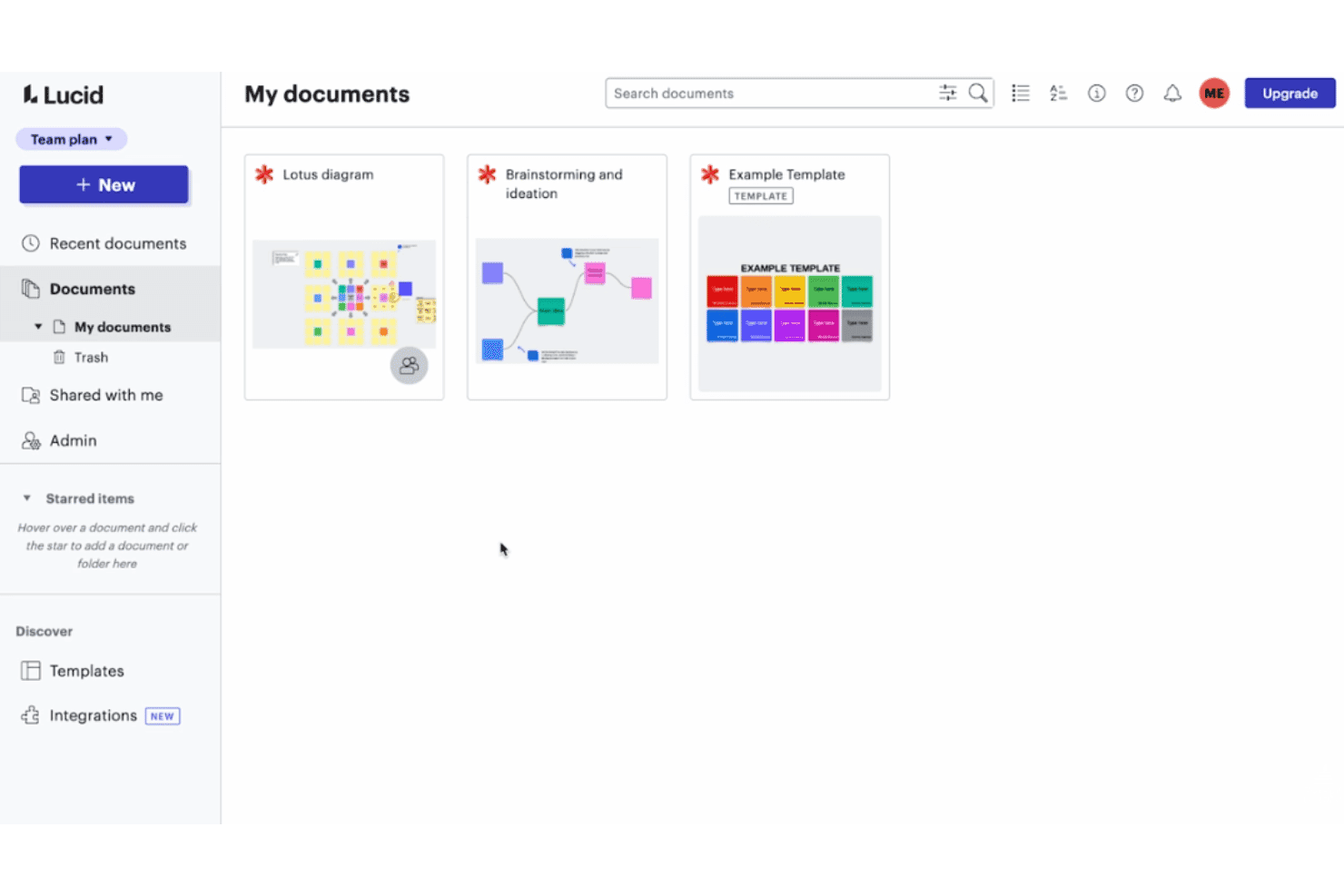
Lucidspark makes collaborative brainstorming easy with an intuitive canvas and built-in workshop tools. Lucidspark is a virtual whiteboard by Lucid Software that supports early-stage product ideation through dynamic mind mapping, user flow planning, mobile wireframe templates, and collaborative brainstorming with AI-assisted tools.
Who Is Lucidspark Best For?
Lucidspark suits product teams in early discovery who need a shared space to brainstorm, map ideas, and plan user flows before committing to a design tool.
Why I Picked Lucidspark
I picked Lucidspark as one of the best because its dynamic mind mapping gives product teams a genuinely fast way to move from raw ideas to structured user flows before any screen design begins. AI-suggested branches help expand concepts quickly, and collapsible map sections let you zoom into specific flows without losing the bigger picture. I also like how sticky notes convert directly into Jira or Azure DevOps tickets, so early ideation feeds straight into the development backlog.
Lucidspark Key Features
- Mobile wireframe templates: Pre-built templates for mobile screens, wireflows, and task flows let your team sketch app structures without starting from scratch.
- Presentation mode with Paths: Guide stakeholders through a structured board walkthrough using set views, without leaving the canvas.
- Lucid AI idea generation: AI generates sticky note ideas, groups related concepts into themes, and builds mind map branches directly on the board.
- Figma frame embedding: Drop live Figma frames onto the board as refreshable images that collaborators can view without a Figma license.
Lucidspark Integrations
Lucidspark has 116 marketplace integrations, including Figma, Jira, Azure DevOps, Slack, Microsoft Teams, Zoom, Google Workspace, Confluence, Asana, and Loom. It also offers Extension and REST APIs for custom integrations.
Pros and Cons
Pros:
- Wireflow templates clarify navigation before screens
- Guest collaboration lowers stakeholder participation friction
- Fast mind mapping for early app concepts
Cons:
- Mobile apps edit boards, not prototypes
- No clickable screen-to-screen prototype playback
Learn more about Lucidspark: 2Best for collaborative app wireframing
Miro
- Free plan + 14-day free trial available
- From $8/user/month (billed annually)
Visit WebsiteCustomer Rating:4.8/5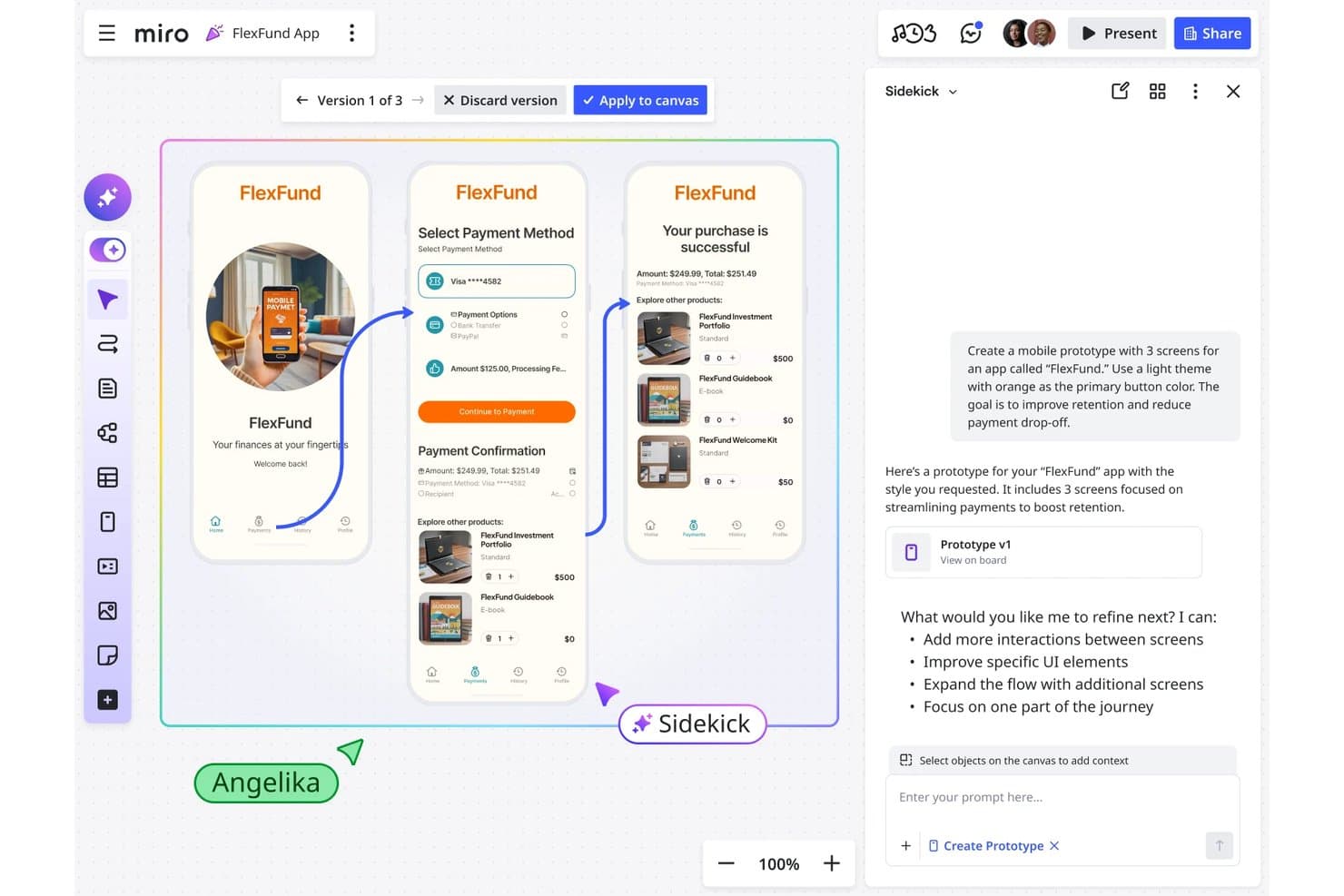
Miro lets users build interactive mobile app prototypes with AI assistance. Miro is a visual collaboration platform that includes built-in wireframing and low-to-mid-fidelity prototyping tools, letting teams generate app screens from AI prompts, build clickable flows, and hand off designs directly to coding agents.
Who Is Miro Best For?
Miro suits product managers and founders who need to turn early ideas into clickable app flows quickly, without relying on a dedicated designer.
Why I Picked Miro
Miro earns its spot on my shortlist because it's the strongest option when multiple stakeholders need to contribute to app wireframes without handing off to a designer first. I love how AI can generate clickable mobile screens directly from sticky notes or a PRD already on the board, so a PM can go from discovery artifacts to a navigable flow in a single session. The MCP server integration also lets coding agents like Claude Code or Cursor read the prototype in context and generate working code, which I think is a genuinely differentiated handoff path.
Miro Key Features
- AI screen generation: Miro generates editable mobile screens from a text prompt, sticky notes, a PRD, or a screenshot of a competitor's UI.
- Version switcher: Each iteration is saved as a named version, letting you switch between variants or compare them side by side on the canvas.
- UX heuristic audit: The AI Researcher Sidekick reviews your prototype against Nielsen's 10 usability heuristics and flags accessibility and usability issues.
- MCP server integration: Coding agents like Claude Code and Cursor can read the prototype and its surrounding board context to generate working application code.
Miro Integrations
Miro supports 250+ integrations, including Figma, Jira, Linear, Asana, Azure DevOps, Microsoft 365, Google Workspace, and Atlassian. Its developer platform provides APIs and SDKs for custom integrations, while MCP connects prototypes with Claude Code, Cursor, and GitHub Copilot.
Pros and Cons
Pros:
- Supports rapid stakeholder feedback and flow iteration
- Keeps research, wireframes, and prototypes together
- Generates clickable flows from PRDs and sticky notes
Cons:
- Offers no documented on-device mobile preview
- Omits swipe, pinch, and long-press interactions
 Best for AI-driven flows without design skills
- Free plan available
- From $14/user/month
Visit WebsiteCustomer Rating:4.8/5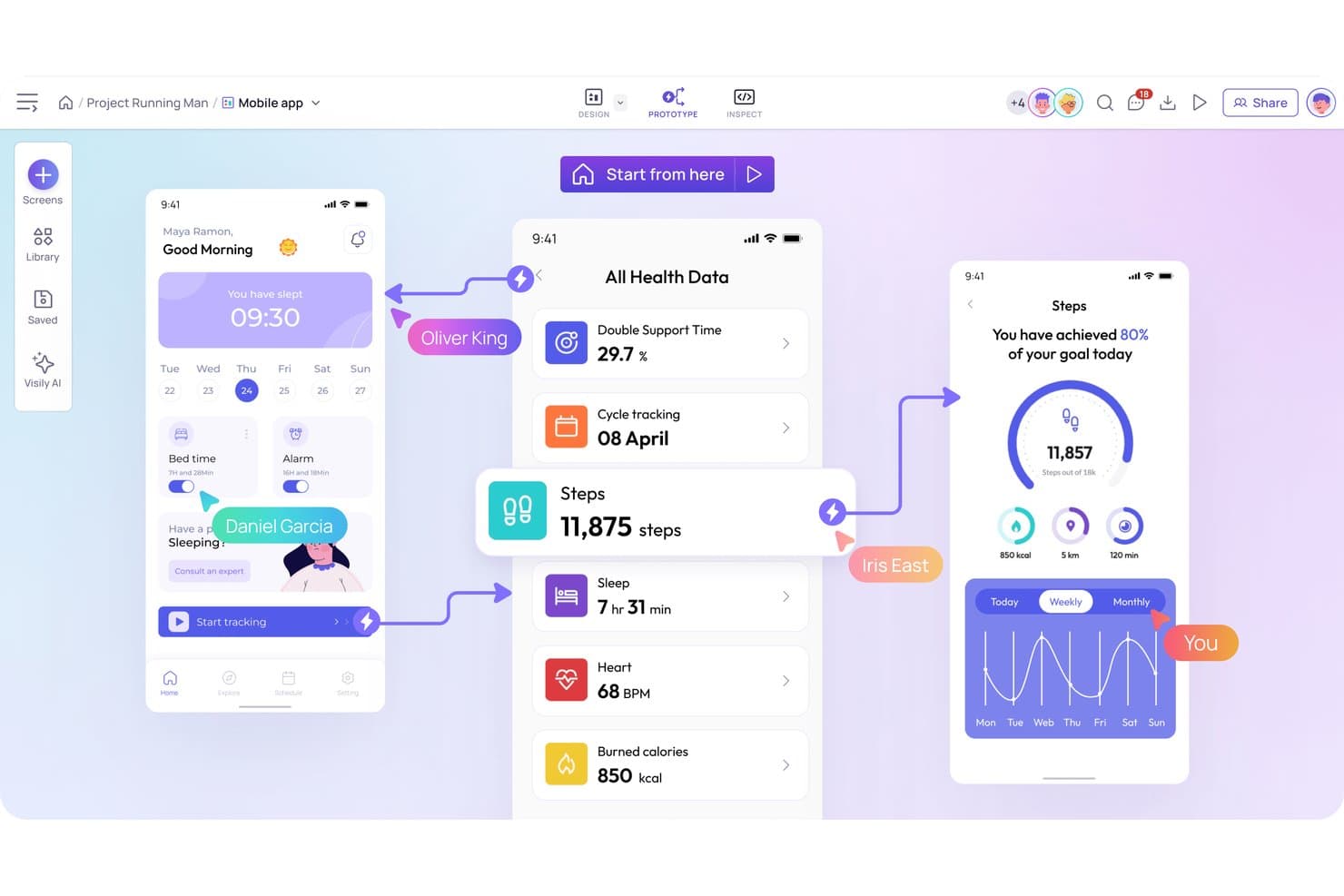
Visily lets users build interactive mobile app prototypes with linked screens. Visily is a browser-based wireframing and prototyping tool that combines AI-powered screen generation, drag-and-drop design, and clickable prototype flows with built-in sharing and developer handoff features.
Who Is Visily Best For?
Visily is a strong fit for product managers and startup founders who need to turn ideas into clickable mobile prototypes quickly, without any design background.
Why I Picked Visily
I've included Visily in my top picks because it's the only tool on this list built from the ground up for product managers who need to move from idea to clickable mobile prototype without any design background. I particularly like Auto-Prototyping, which uses AI to link screens into flows automatically, so I'm not manually drawing connections between 15 app screens. The sketch-to-design and screenshot-to-design inputs are genuinely useful too, letting me drop in a rough sketch or grab a competitor's screen and get an editable wireframe in seconds.
Visily Key Features
- Overlay prototyping: Set popups, toasts, and dropdowns as overlays with position controls, background dimming, and canvas preview.
- Gesture triggers: Supports tap, long press, swipe, and drag interactions, plus per-screen or per-container scrolling with fixed-position elements.
- Export to code: Generates React, Vue, or HTML from your screens and sends designs directly to AI coding agents via the Visily MCP server.
- Slack and Jira integration: Embeds boards in Jira tickets and pushes comment notifications to Slack, with the ability to reply directly from Slack.
Visily Integrations
Visily integrates with Slack and Notion, plus Figma through its plugin and Jira through an Atlassian Marketplace app. Its MCP server connects designs with AI coding agents, including Cursor, Claude Code, Codex, Kiro, and Lovable.
Pros and Cons
Pros:
- Pinned feedback keeps stakeholder reviews contextual
- Supports swipe, drag, and long-press interactions
- AI generates multi-screen mobile flows quickly
Cons:
- Manual positioning slows complex screen layouts
- No conditional logic for dynamic prototypes
Learn more about Visily: Best for Adobe ecosystem design handoff
- Free trial available
- From $22.99/month (billed annually)
Visit WebsiteCustomer Rating:4.3/5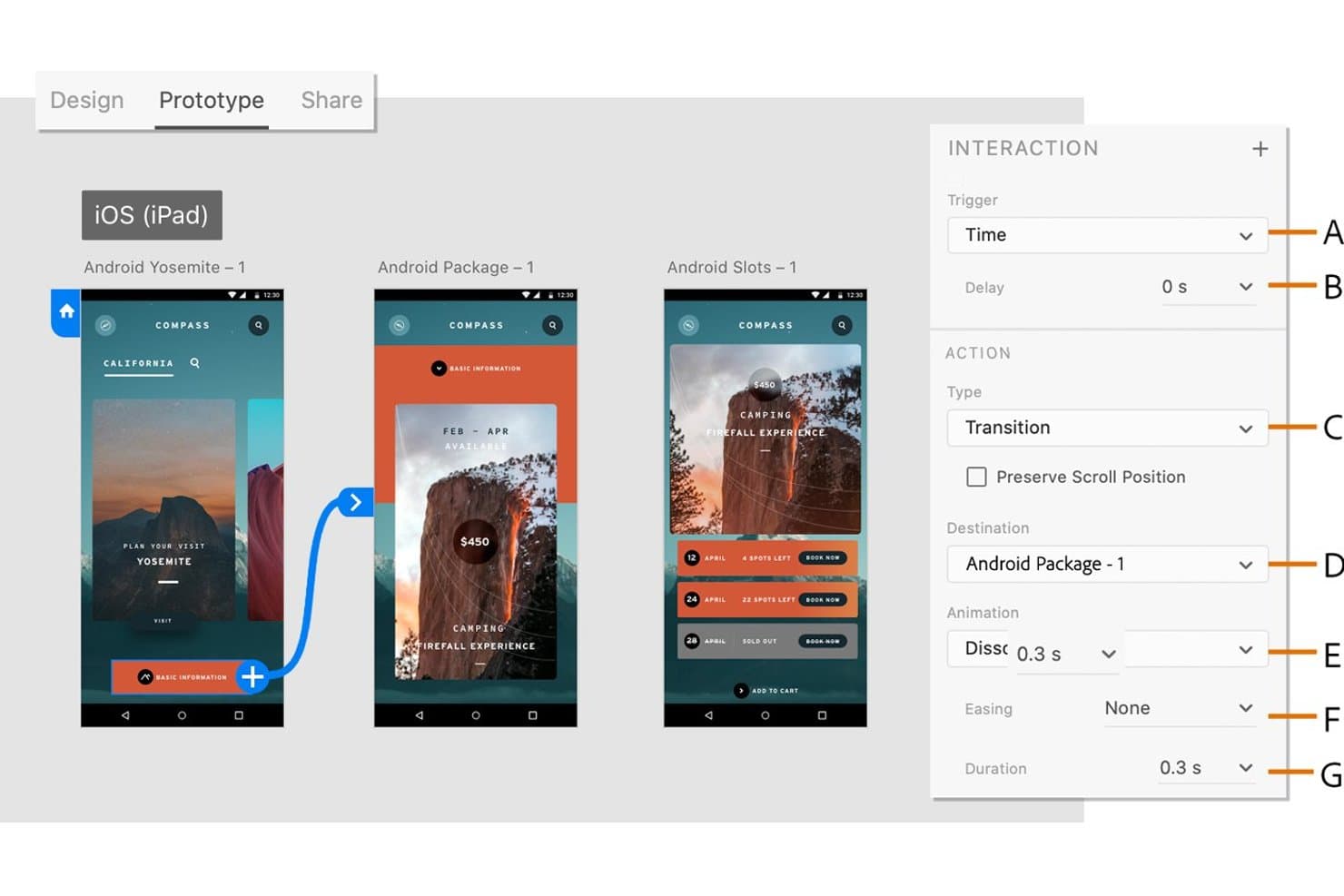
Adobe XD lets users define timed transitions between prototype screens. Adobe XD is a design and prototyping tool for desktop that lets you build interactive mobile app mockups using artboards, component states, Auto-Animate, and shareable prototype links with built-in design specs.
Who Is Adobe XD Best For?
Adobe XD fits designers and product teams already working inside the Adobe ecosystem who need a familiar, code-free tool for mobile app prototyping and design handoff.
Why I Picked Adobe XD
Adobe XD earns its spot on my shortlist because it's purpose-built for teams already living inside the Adobe ecosystem who need a clean path from design to developer handoff. I love that you can publish a Development link directly from XD, giving developers instant access to design specs, spacing, and exportable assets without any extra steps. Multiple Flows let me keep login, onboarding, and core app navigation in one file, each with its own shareable prototype link for stakeholder review.
Adobe XD Key Features
- Auto-Animate: Animates matching layers between artboards to simulate transitions like swipes, carousels, and screen changes without manual keyframing.
- Component states: Lets you define default, hover, toggle, and custom states for UI elements like buttons, switches, and checkboxes within a single component.
- Scroll groups: Creates horizontally, vertically, or free-scrolling content areas within an artboard to simulate lists, carousels, and maps.
- Voice triggers: Lets you assign spoken command phrases as prototype triggers, making it possible to prototype voice-assistant and hands-free app flows.
Adobe XD Integrations
Adobe XD offers documented integrations with Jira Cloud, Slack, Zoom, Photoshop, Illustrator, After Effects, and Creative Cloud Libraries. It also supports third-party plugins through its plugin manager and provides a plugin API for custom integrations.
Pros and Cons
Pros:
- Multiple flows organize complex app journeys
- Design specs clarify developer handoff
- Auto-Animate creates convincing screen transitions
Cons:
- Missing variables restricts realistic interaction logic
- Maintenance mode limits future product development
 Best for Mac-native UI design with free handoff
- 30-day free trial
- From $12/user/month (billed annually)
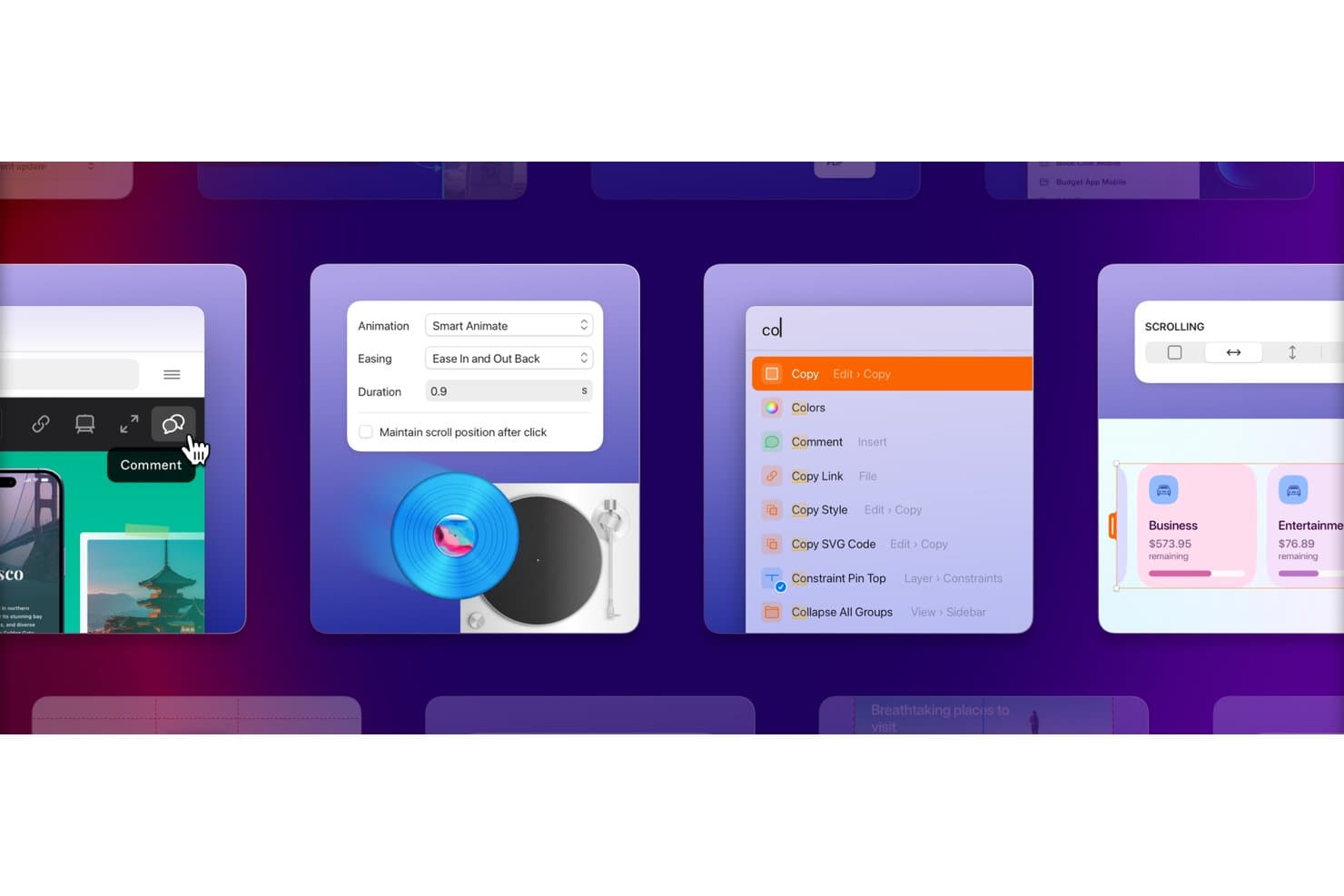
Sketch supports smart animations, comments, and quick commands for prototyping. Sketch is a Mac-native UI design and prototyping tool that lets you build linked, animated screen flows using vector editing, reusable Symbols, mobile UI kits, and shareable prototypes with free developer handoff.
Who Is Sketch Best For?
Sketch is a strong fit for UX/UI and product designers on Mac who want a fast, native design-to-prototype workflow with free developer handoff built in.
Why I Picked Sketch
Sketch earns its spot on my shortlist because it's the strongest Mac-native option for designers who want to go from screen design to a shareable prototype without switching tools. I particularly like how Symbols carry interactions across every instance, so prototyping a mobile onboarding flow means linking once and having it propagate automatically. Free developer handoff is also built in at every paid tier, letting iOS developers copy SwiftUI and UIColor values directly from the browser without a separate license.
Sketch Key Features
- Smart Animate: Automatically animates shared layers between frames, capturing position, size, and rotation changes without manual keyframing.
- Overlay controls: Add modals, menus, and alerts with configurable anchor points, backdrop blur, and tap-outside behavior on top of existing screens.
- Scrolling areas: Define vertical, horizontal, or multi-directional scroll regions with fixed elements like tab bars and headers that stay pinned during playback.
- Free developer handoff: Developers inspect designs, copy CSS values, and export assets or design tokens directly in the browser without a paid seat.
Sketch Integrations
Sketch has one documented native integration, Slack. Its extension ecosystem includes partner integrations for Jira, Notion, ProtoPie, Zeplin, Principle, Origami, Proto.io, and Stark, while its JavaScript plugin API supports custom integrations.
Pros and Cons
Pros:
- iPhone and iPad previews support validation
- Free handoff simplifies developer collaboration
- Native Mac workflow speeds design iteration
Cons:
- Limited gestures weaken realistic mobile testing
- Mac-only editing excludes Windows-based designers
Learn more about Sketch: Best for design-to-dev handoff in one workspace
- Free plan available
- From $3/user/month
Visit WebsiteCustomer Rating:4.7/5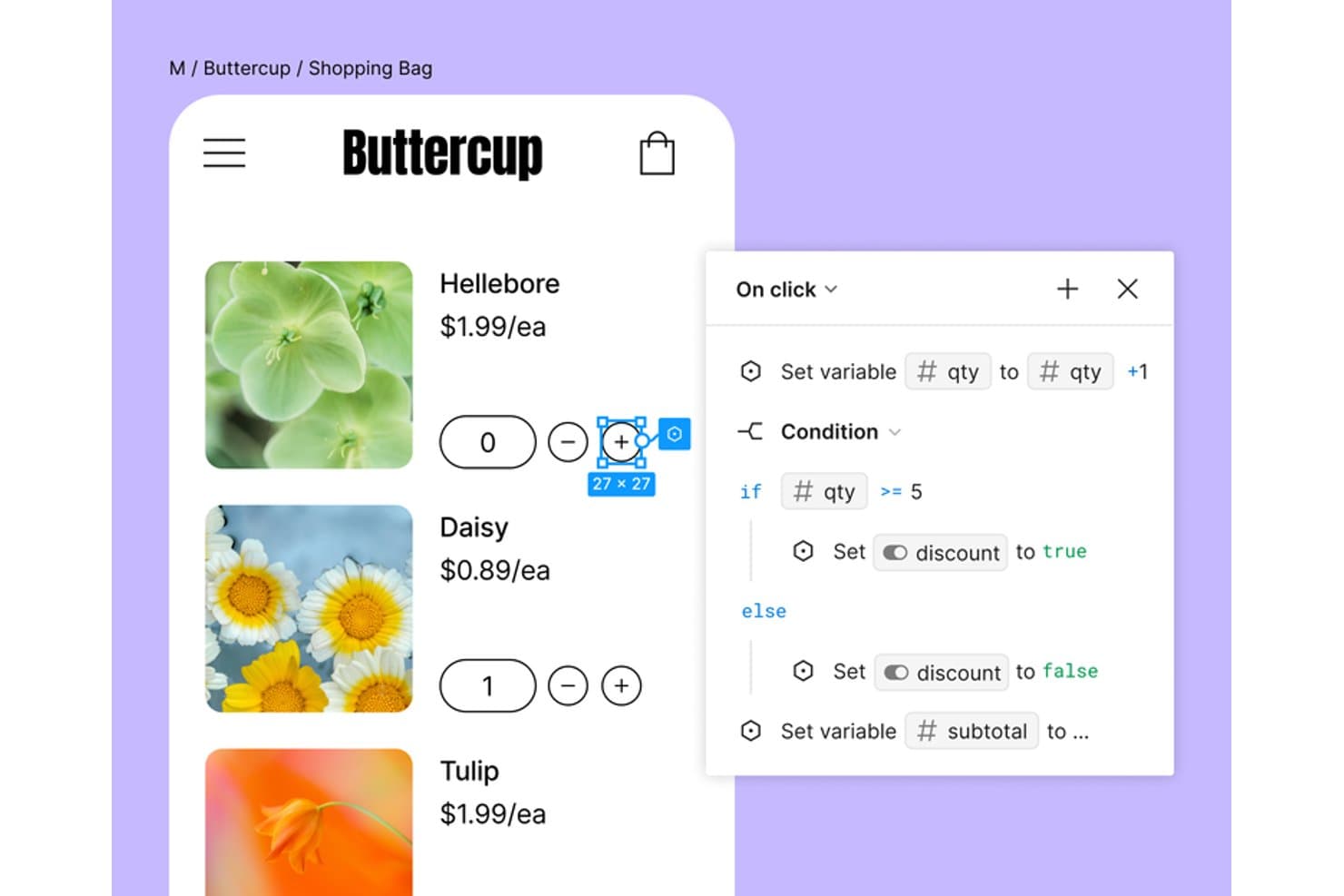
Figma lets users add conditional logic to interactive mobile prototypes. Figma is a browser-based UI design and prototyping tool that lets teams design screens, build interactive mobile app flows with variables and conditional logic, mirror prototypes on real devices, and hand off designs to developers—all without leaving a single workspace.
Who Is Figma Best For?
Figma is the go-to choice for cross-functional product teams where designers, product managers, and developers need to work in the same files without switching tools.
Why I Picked Figma
Figma earns its spot on my shortlist because design and developer handoff happen in the same file, with no exports or third-party tools required. I love how Dev Mode lets developers inspect spacing, copy code snippets, and mark screens "Ready for dev" while I'm still refining flows in the same workspace. Variables and conditional logic also let me build prototype states, like a cart total updating on item add, without duplicating dozens of frames.
Figma Key Features
- Smart Animate: Animates matching layers between frames to simulate realistic transitions like swipes, toggles, and pull-to-refresh without duplicating frames.
- Interactive components: Lets you embed hover, pressed, and toggle states directly inside component variants, reducing the total number of prototype connections needed.
- Figma Mirror: Streams your selected canvas frame live to an iOS or Android device over any network connection for real-time mobile preview.
- Maze integration: Sends your Figma prototype directly to Maze in one click for unmoderated usability testing with automated reports.
Figma Integrations
Figma offers native integrations with Jira, Slack, Microsoft Teams, Google Chat, Maze, UserTesting, dscout, UXtweak, Sprig, and Asana. Its REST API, webhooks, and Zapier support custom integrations and broader product workflows.
Pros and Cons
Pros:
- Design-to-development handoff stays in one workspace
- Dynamic variables support app-like prototype logic
- Realistic mobile previews across devices
Cons:
- Pinch zoom and live input are missing
- Large files can become slow
 Best for code-backed design system prototyping
- Free plan + 14-day free trial available
- From $29/user/month (billed annually)
Visit WebsiteCustomer Rating:4.2/5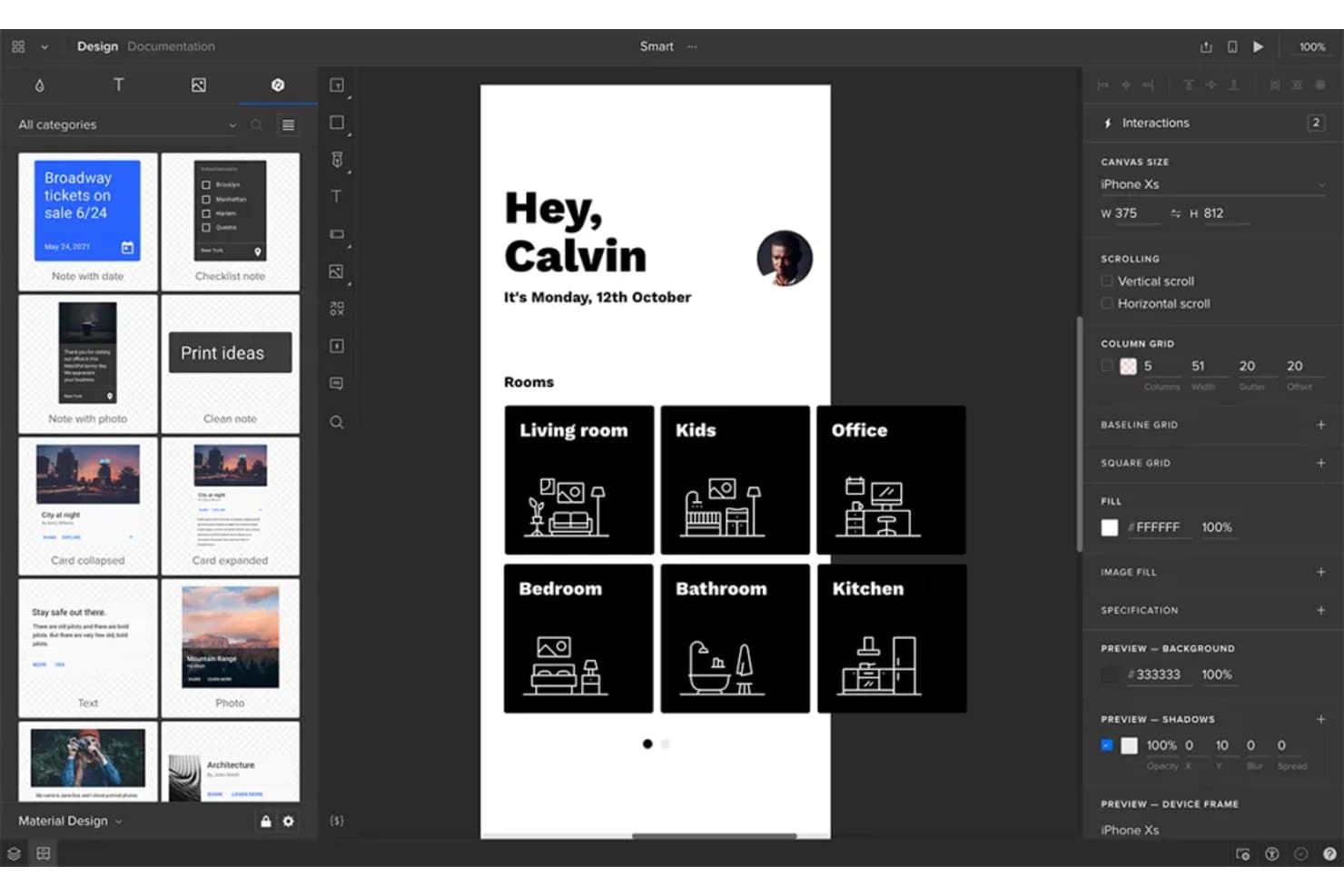
UXPin lets users prototype mobile app screens with real UI components. UXPin is a prototyping tool that lets product and design teams build interactive mobile app prototypes using a combination of no-code interactions, conditional logic, variables, and real React components through its Merge and Forge features.
Who Is UXPin Best For?
UXPin is a strong fit for UX/UI and product designers who need to bridge the gap between design and engineering using real component libraries.
Why I Picked UXPin
I picked UXPin as one of the best because it's the only tool on this list that lets you prototype directly with real React components via Merge, so what stakeholders approve in Preview is built from the same code that ships. I love that you can wire up conditional logic, variables, and API requests inside those components, which means a mobile app prototype can validate actual form inputs or pull live data. Forge extends this further by generating UI from a screenshot using your own component library.
UXPin Key Features
- Mirror app: Scan a QR code to preview your prototype live on an iOS or Android device, with real-time updates as you edit—no cable or shared Wi-Fi required.
- Stakeholder approval: Reviewers can formally approve a prototype directly from the shared preview link, giving PMs a clear sign-off record without email chains.
- Pinned comments: Collaborators can drop comments tied to a specific spot on the canvas in both the editor and preview, with , assignment, and resolve tracking.
- FullStory session recording: Enable session recording in the Share modal to capture every tester's actions on a shared preview link inside your FullStory account.
UXPin Integrations
UXPin offers five documented native integrations: Jira Cloud, Slack, FullStory, Storybook, and Git. It also supports the UXPin Figma plugin and Sketch import, but no public UXPin API is documented for custom integrations.
Pros and Cons
Pros:
- Pinned feedback keeps stakeholder decisions traceable
- Conditional logic validates realistic mobile flows
- Real React components reduce handoff rework
Cons:
- Complex prototypes can experience performance slowdowns
- Pinch and multi-touch gestures remain unsupported
Learn more about UXPin: Best for pre-built iOS and Android UI kits
- Free plan available
- From $19/user/month
Visit WebsiteCustomer Rating:4.2/5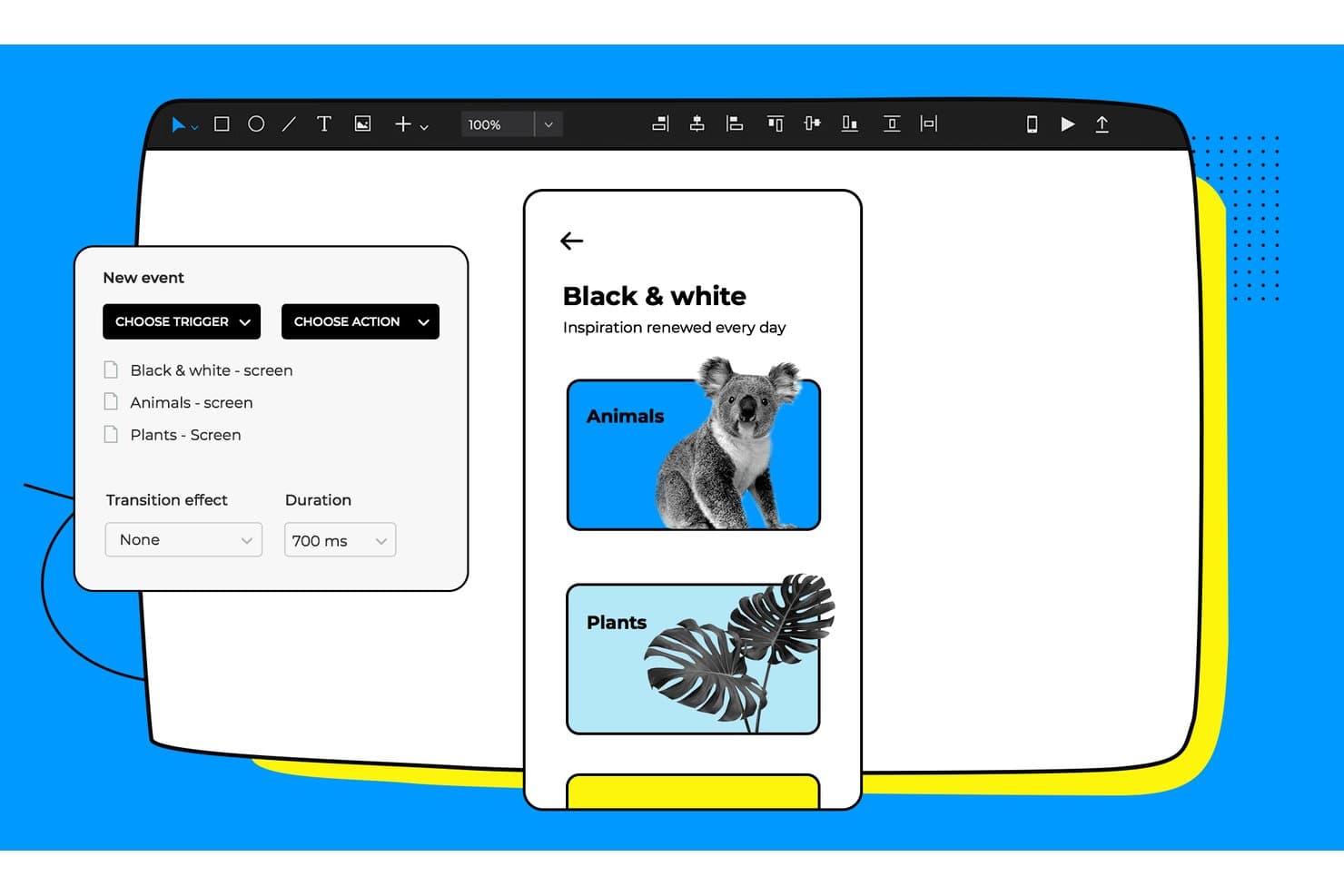
Justinmind lets users add triggers and transitions between prototype screens. Justinmind is a desktop-based mobile app prototyping tool for macOS and Windows that combines no-code interaction design, a library of 4,000+ pre-built UI components, gesture and touch simulation, and developer handoff features.
Who Is Justinmind Best For?
Justinmind is a strong fit for UX/UI and product designers who need a deep library of platform-accurate mobile components without building one from scratch.
Why I Picked Justinmind
I picked Justinmind as one of the best because its library of 4,000+ pre-built UI components covers iOS 18, Android/Material Design 3, and Apple Watch out of the box, so you're not building components from scratch before you can prototype. I love that the kits are updated for new device generations, including iPhone 16 and Galaxy S25 frames, which means your mockups reflect what users are actually holding. Pair that with a full gesture trigger set, tap, swipe in eight directions, pinch, and orientation changes, and you get mobile prototypes that feel genuinely native.
Justinmind Key Features
- No-code condition builder: A visual expression editor lets you set logic rules and conditions on any element without writing code.
- Masters: Reusable element groups that update across every screen simultaneously when you edit the source.
- Developer handoff panel: Inspectable CSS, spacing measurements, hex colors, and asset exports are available directly in the browser for developers.
- JIRA and Azure DevOps integration: Link UI elements to work items and sync requirements between your prototype and project management tools.
Justinmind Integrations
Justinmind offers documented integrations with Jira, Confluence, Azure DevOps, UserTesting, and Validately, plus imports from Figma, Sketch, Adobe XD, Photoshop, and Illustrator. Its Java-based API and SDK support custom plugins and integrations.
Pros and Cons
Pros:
- Complex flows work without writing code
- Realistic gestures model native touch interactions
- 4,000-plus platform-accurate mobile components
Cons:
- Mobile viewers report rendering and stability issues
- Desktop-only workflow limits browser-based collaboration
Learn more about Justinmind: Best for gesture-rich touch interaction prototyping
- 15-day free trial + free plan available
- From $29/month
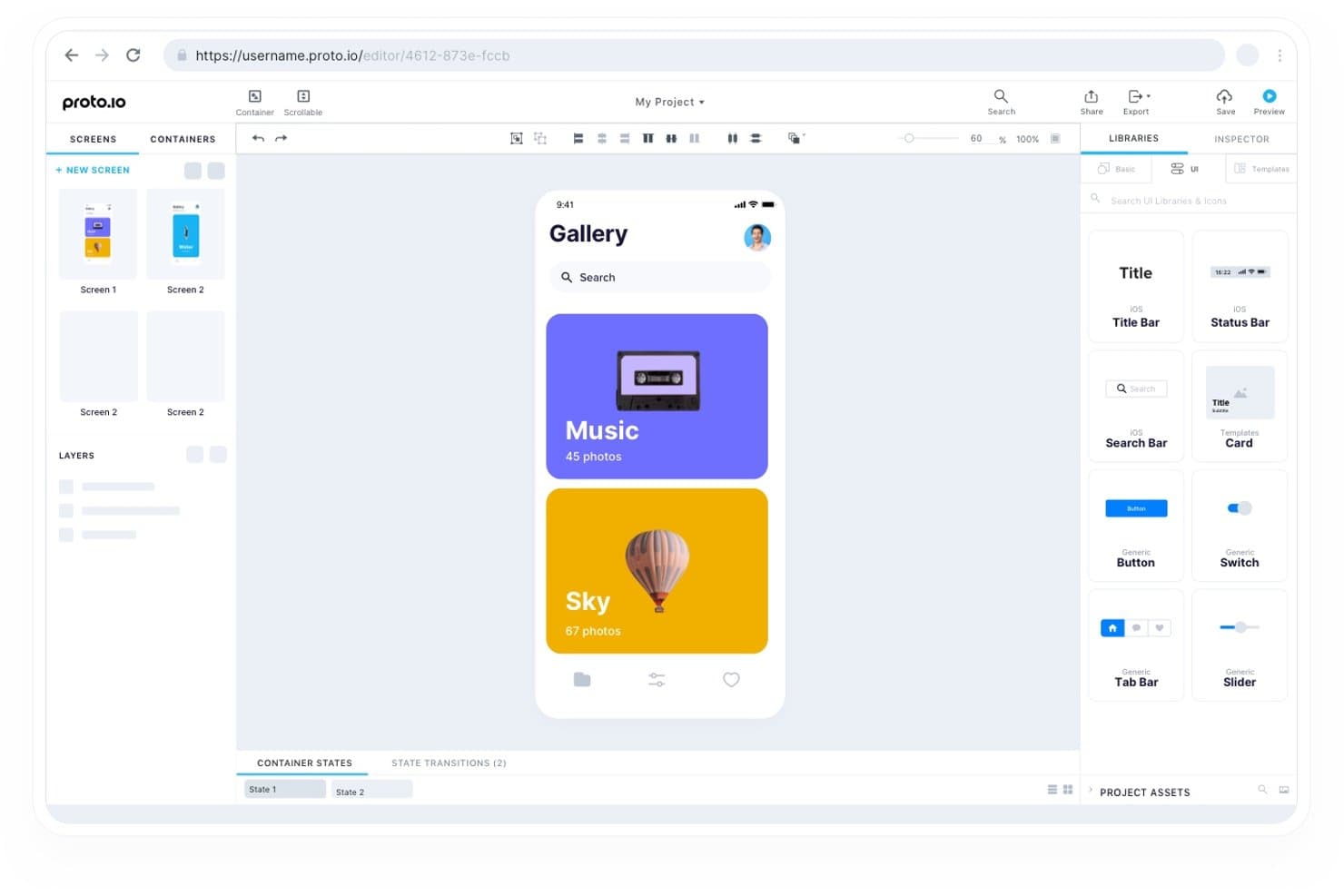
Proto.io lets users build interactive mobile prototypes with reusable UI components. Proto.io is a browser-based mobile app prototyping tool that supports no-code interactive prototype building with gesture and touch event handling, timeline-based animations, a native iOS and Android preview app, and a component library spanning iOS, Android, and web UI patterns.
Who Is Proto.io Best For?
Proto.io suits UX/UI designers and product designers who need to simulate realistic touch and gesture interactions across iOS and Android without writing a line of code.
Why I Picked Proto.io
Proto.io earns its spot on my shortlist because of how deep its gesture and touch interaction support goes. I can stack multiple events on a single element, so a swipe left triggers one action while a tap-hold triggers another on the same button, which is exactly how real mobile apps behave. The native iOS and Android player app also lets me hand a phone to a stakeholder and have them experience a fully gesture-accurate prototype offline, no browser required.
Proto.io Key Features
- Variables and logic engine: Set global variables, write JavaScript expressions, and display real user data dynamically across prototype screens.
- Reusable component containers: Sync edits across all screens instantly by building shared containers and custom components into a project design system.
- Offline HTML export: Package your entire prototype as a downloadable HTML file for sharing and previewing without an internet connection.
- Design tool import: Bring in frames and layer hierarchies directly from Figma, Sketch, Adobe XD, and Photoshop via dedicated plugins.
Proto.io Integrations
Proto.io integrates with Figma, Sketch, Adobe XD, Photoshop, Jira, Confluence, and Trello, plus UserTesting, UserZoom, Userlytics, Lookback, UXArmy, and Validately through share links.
Pros and Cons
Pros:
- Variables simulate realistic data-driven product flows
- Native previews validate touch behavior on devices
- Gesture stacking mirrors complex mobile interactions
Cons:
- Linking interactions takes time to learn
- Large projects can slow during editing
Learn more about Proto.io: 10Best for AI-generated interaction logic
ProtoPie
- Free plan available
- From $25/month (billed annually)
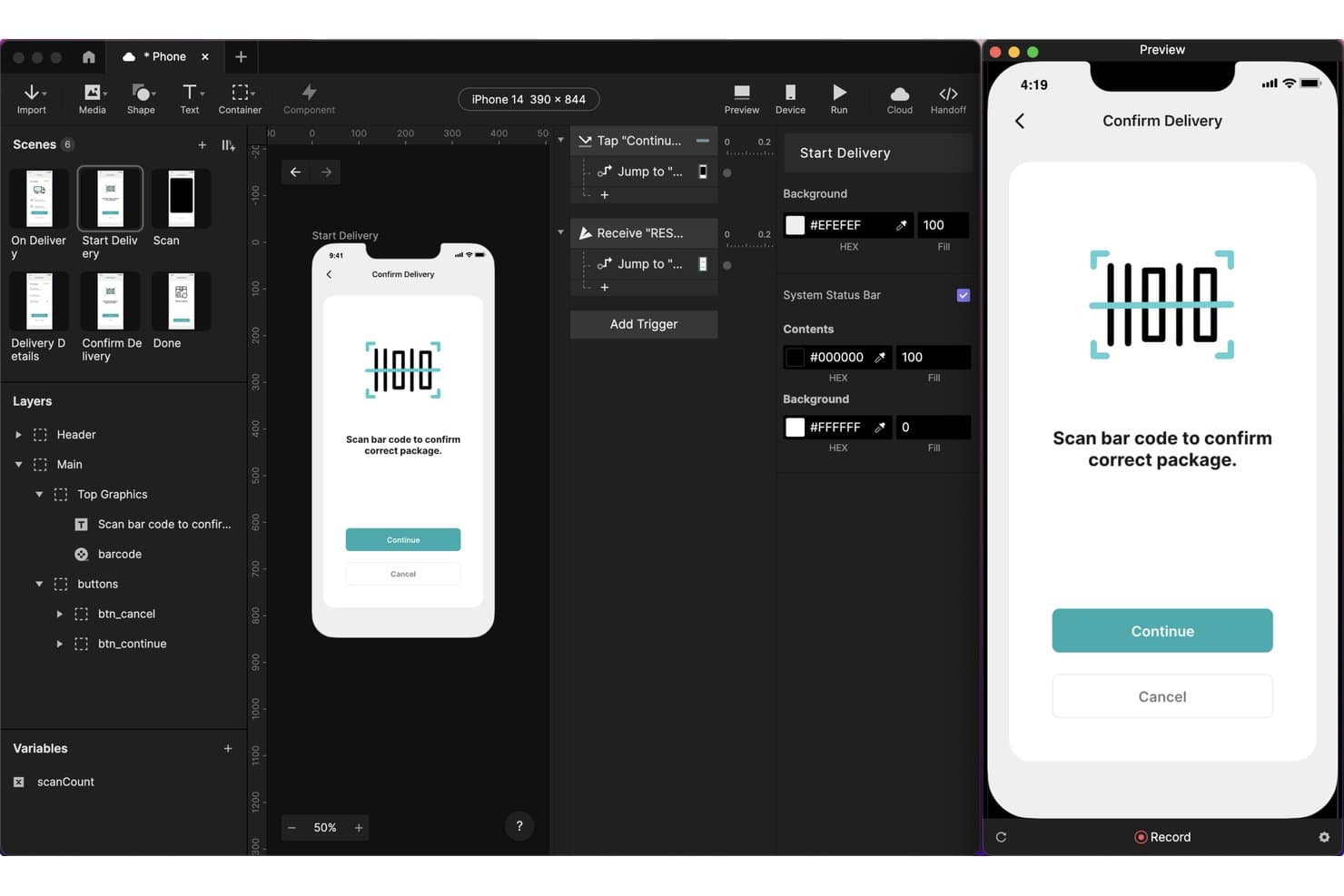
ProtoPie lets users prototype barcode scanning interactions for mobile apps. ProtoPie is a mobile app prototyping tool that lets you build high-fidelity, interactive prototypes using layer-level triggers, gesture and sensor inputs, conditional logic, variables, and AI-generated interaction logic—with built-in handoff tools and on-device preview across iOS and Android.
Who Is ProtoPie Best For?
ProtoPie is a strong fit for UX/UI and product designers who need to prototype complex mobile interactions—gestures, sensors, voice, and conditional logic—that go beyond what Figma handles natively.
Why I Picked ProtoPie
ProtoPie earns its spot on my shortlist because its AI-generated interaction logic genuinely changes how fast you can go from idea to testable prototype. I've used the AI prompt feature to describe a conditional gesture flow in plain language and watch it place editable triggers, variables, and responses directly on the canvas. Paired with Developer Handoff, which auto-documents durations, easing, and layer properties from a recorded scenario, your engineering team gets precise specs without a separate documentation pass.
ProtoPie Key Features
- Multi-device prototyping: Send and Receive triggers let two prototypes communicate across separate devices in real time, simulating cross-device app experiences.
- Built-in user testing: Run moderated and unmoderated test sessions with OTP-protected links, session replay, and task scoring directly inside ProtoPie.
- Gesture and sensor triggers: Prototype with tap, long press, fling, pinch, rotate, tilt, compass, sound, and voice triggers for precise mobile interaction simulation.
- ProtoPie Connect: A desktop app that connects your prototype to live APIs, Arduino, Unity, Unreal, and web embeds without writing code.
ProtoPie Integrations
ProtoPie integrates with Figma, Sketch, Adobe XD, Claude Code, Cursor, VS Code, Codex, Lookback, UserTesting, UserZoom GO, and Useberry. ProtoPie Connect supports APIs, Arduino, Unity, Unreal, web embeds, and custom Socket.IO plugins.
Pros and Cons
Pros:
- Documents interaction details for developers
- Simulates gestures, sensors, and voice
- AI generates editable interaction logic
Cons:
- Remote feedback needs paid sharing access
- Imported screens require one-way design updates
Learn more about ProtoPie:
Andre verktøy for prototyping av mobilapper
Her er noen flere alternativer for verktøy for prototyping av mobilapper som ikke kom med på kortlisten min, men som likevel er verdt å se nærmere på:
- 11Axure RPBest for no-code conditional logic in prototypes
- 12Origami StudioBest for sensor and hardware interaction testing
- 13Fluid UIBest for on-device mockup testing on any budget
- 14MarvelBest mobile app prototyping tool for beginners
- 15MockplusBest for prototyping with perpetual licensing
- 16BubbleBest for prototyping that ships as a real app
- 17FramerBest for motion-driven interactive prototypes
- 18PrincipleBest for timeline animation in mobile flows
- 19Mockitt PrototypeBest for AI-generated prototypes from requirements
How I Evaluate Mobile App Prototyping Tools
I split my evaluation into three parts. Core functionality carries the most weight—I look for tools that link screens into realistic flows and preview accurately on actual mobile devices. Then I check for standout features like dynamic data and variables. Finally, I consider pricing flexibility and onboarding speed.
Core Functionality (Table Stakes For This List)
When I'm selecting tools for my list, I score each one on a scale from 0 (does not offer the functionality) to 5 (excels in this area) for each core functionality listed below. I then convert the total into a percentage to help assess each tool's overall fit, with extra weight on any functionalities I've deemed essential.
- Interactive Prototyping (Essential): I evaluate how well a tool links screens into realistic flows with transitions, conditional logic, and variables that mimic real app behavior.
- Mobile Device Preview: Previewing on an actual phone matters. I check whether the tool offers a companion app or browser-based preview that renders accurately on-device.
- Screen & UI Component Design: Good mobile UI kits save hours. I look for pre-built component libraries tailored to iOS and Android patterns with easy customization.
- Gesture & Touch Support: I check for swipe, scroll, pinch, and long-press support so prototypes feel native rather than like a slideshow of static screens.
- Sharing & Feedback Collection: Teams need contextual comments pinned to specific screens. I evaluate sharing permissions, threaded feedback, and notification options for stakeholders.
Once I have a list of tools that meet the criteria, I consider what sets each platform apart.
Differentiating Factors (What Sets Vendors Apart)
Here's how I compare and contrast different vendors:
Standout Features
Dynamic data and variables separate basic prototypes from ones that actually convince stakeholders. I look for conditional logic that lets a prototype respond to user input—like showing a personalized dashboard based on a selected role during onboarding. Built-in user testing tools also matter. Tools like Marvel and Maze offer native heatmaps and session recordings, which means I can validate flows without switching to a separate research platform. I also check for design-to-code automation, since auto-generated front-end code cuts handoff friction between product and engineering.
Beyond Features
I check whether a tool connects to Jira, Slack, or Figma so prototypes stay linked to the workflows my team already uses. Pricing structure matters too—per-seat models can quietly bloat costs as a team scales, so I look for transparent tiers with free plans that let me validate fit before requesting budget. For teams in regulated industries, I also evaluate compliance certifications like SOC 2 and GDPR, since cloud-hosted prototypes often contain sensitive roadmap details that require strong access controls and audit logs.
Slik velger du et verktøy for prototyping av mobilapper
Det er lett å gå seg vill i lange funksjonslister og komplekse prisstrukturer. For å hjelpe deg med å holde fokus mens du går gjennom den unike prosessen din for valg av programvare, får du her en sjekkliste over faktorer du bør ha i bakhodet:
| Faktor | Hva du bør vurdere |
|---|---|
| FaktorSkalerbarhet | Hva du bør vurdereVil verktøyet vokse sammen med teamet ditt? Vurder om løsningen kan håndtere flere brukere, prosjekter eller mer kompleksitet etter hvert som behovene dine øker. Se etter fleksible priser og funksjoner. |
| FaktorIntegrasjoner | Hva du bør vurdereKan det kobles til de eksisterende verktøyene dine? Sjekk om det kan integreres med teamets favorittapper, som Slack, Jira eller designprogramvare, for å sikre smidige arbeidsflyter. |
| FaktorTilpasningsmuligheter | Hva du bør vurdereKan du tilpasse det etter behovene dine? Vurder om du kan justere aspekter som grensesnittoppsett eller arbeidsflyter, slik at de samsvarer med teamets prosesser og preferanser. |
| FaktorBrukervennlighet | Hva du bør vurdereEr det enkelt for teamet ditt å lære? Vurder læringskurven og om grensesnittet føles intuitivt, slik at det blir tatt raskt i bruk uten omfattende opplæring. |
| FaktorImplementering og innføring | Hva du bør vurdereHvor raskt kan du komme i gang? Se etter tilgjengelige ressurser som veiledninger, maler og kundestøtte, slik at teamet kan begynne å bruke verktøyet effektivt med en gang. |
| FaktorKostnad | Hva du bør vurderePasser det inn i budsjettet ditt? Sammenlign prisplanene og vurder om funksjonene du trenger, forsvarer kostnaden. Vær oppmerksom på skjulte gebyrer eller langsiktige bindinger. |
| FaktorSikkerhetstiltak | Hva du bør vurdereEr dataene dine beskyttet? Sørg for at verktøyet oppfyller sikkerhetsstandardene dine, inkludert kryptering og samsvar med relevante regelverk som GDPR eller CCPA. |
| FaktorTilgjengelig kundestøtte | Hva du bør vurdereHvilke støttealternativer er tilgjengelige? Sjekk om det finnes pålitelig kundeservice, inkludert støtte via chat, e-post eller telefon, som kan hjelpe deg når det oppstår problemer. |
Hva er verktøy for prototyping av mobilapper?
Verktøy for prototyping av mobilapper er programvare som lar deg raskt opprette, dele og teste hvordan en mobilapp vil se ut og føles før den bygges. Designere, utviklere og produktteam bruker disse verktøyene til å skissere skjermer, konfigurere interaksjoner og få tilbakemeldinger – alt uten å skrive kode. Du kan se hvordan ideene dine fungerer i praksis, oppdage problemer tidlig og gjøre endringer før du bruker tid og penger på utvikling.
Funksjoner
Når du velger verktøy for prototyping av mobilapper, bør du se etter følgende viktige funksjoner:
- Interaktive prototyper: Lar deg opprette klikkbare og interaktive modeller for å simulere brukeropplevelsen og samle inn tilbakemeldinger.
- Samarbeidsverktøy: Gjør det mulig for teammedlemmer å jobbe sammen i sanntid, slik at alle er samkjørte og kan komme med innspill under designprosessen.
- Dra-og-slipp-grensesnitt: Forenkler designprosessen ved å la brukere enkelt endre designelementer uten programmeringskunnskaper.
- Innsamling av tilbakemeldinger: Gjør det enkelt å samle inn tilbakemeldinger fra brukere og interessenter direkte i verktøyet, slik at design kan forbedres og videreutvikles.
- Integrasjonsmuligheter: Kobler sammen andre programvareverktøy teamet bruker, som Slack eller Jira, for å effektivisere arbeidsflyter og øke produktiviteten.
- Mallbibliotek: Tilbyr ferdig utformede maler som gjør prototypeprosessen raskere og sikrer konsistens på tvers av prosjekter.
- Versjonskontroll: Holder oversikt over designversjoner, slik at team kan gå tilbake til tidligere versjoner ved behov og opprettholde en tydelig prosjekthistorikk.
- Animasjonsverktøy: Gir mulighet til å legge til animasjoner i prototyper, noe som forbedrer brukerinteraksjonen og gjør designene mer engasjerende.
- Tilpassbare designelementer: Lar brukere tilpasse designelementer etter bestemte prosjektbehov, noe som gjør prototypene mer fleksible og tilpasningsdyktige.
- Sikkerhetstiltak: Sikrer databeskyttelse gjennom kryptering og samsvar med relevante forskrifter, slik at sensitiv prosjektinformasjon holdes trygg.
Fordeler
Implementering av verktøy for prototyping av mobilapper gir flere fordeler for teamet og virksomheten din. Her er noen av fordelene du kan se frem til:
- Raskere iterasjoner: Gjør raskt endringer i design og test nye ideer ved hjelp av funksjoner som dra-og-slipp-grensesnitt og interaktive prototyper.
- Bedre samarbeid: Samarbeidsverktøy i sanntid lar teammedlemmer bidra og gi tilbakemeldinger, slik at alle er samkjørte og involverte.
- Kostnadsbesparelser: Identifiser designfeil tidlig gjennom brukertesting og innsamling av tilbakemeldinger, slik at behovet for kostbare endringer under utviklingen reduseres.
- Bedre brukeropplevelse: Bruk animasjonsverktøy og tilpassbare komponenter til å skape engasjerende og brukervennlige design som oppfyller brukernes behov.
- Effektiviserte arbeidsflyter: Integrasjonsmuligheter med andre programvareverktøy hjelper teamet med å jobbe mer effektivt ved å koble designprosesser sammen med eksisterende arbeidsflyter.
- Effektiv kommunikasjon: Del designkonsepter og ideer tydelig med interessenter ved hjelp av interaktive prototyper, slik at alle forstår prosjektets visjon.
- Datasikkerhet: Beskytt sensitiv prosjektinformasjon med sikkerhetstiltak, inkludert kryptering og samsvar med personvernregler.
Kostnader og priser
Valg av verktøy for prototyping av mobilapper krever en forståelse av de ulike prismodellene og abonnementene som er tilgjengelige. Kostnadene varierer basert på funksjoner, teamstørrelse, tillegg og mer. Tabellen nedenfor oppsummerer vanlige abonnementer, gjennomsnittsprisene deres og typiske funksjoner som er inkludert i løsninger for prototyping av mobilapper:
Sammenligningstabell for abonnementer for verktøy for prototyping av mobilapper
| Abonnementstype | Gjennomsnittspris | Vanlige funksjoner |
|---|---|---|
| AbonnementstypeGratisabonnement | Gjennomsnittspris$0 | Vanlige funksjonerGrunnleggende prototypefunksjoner, begrensede samarbeidsfunksjoner og et lite mallbibliotek. |
| AbonnementstypePersonlig abonnement | Gjennomsnittspris$5-$25/bruker/måned | Vanlige funksjonerFlere designelementer, forbedrede samarbeidsverktøy og tilgang til et bredere utvalg av maler. |
| AbonnementstypeBedriftsabonnement | Gjennomsnittspris$25-$50/bruker/måned | Vanlige funksjonerAvanserte prototypefunksjoner, prioritert brukerstøtte og integrasjon med andre forretningsverktøy. |
| AbonnementstypeStorbedriftsabonnement | Gjennomsnittspris$50-$100/bruker/måned | Vanlige funksjonerTilpassbare løsninger, omfattende sikkerhetsfunksjoner, dedikert kontoadministrasjon og API-tilgang. |
Vanlige spørsmål om verktøy for prototyping av mobilapper
Her er noen svar på vanlige spørsmål om verktøy for prototyping av mobilapper:
Kan verktøy for prototyping av mobilapper brukes til webdesign?
Ja, mange verktøy for prototyping av mobilapper støtter også webdesign. Disse verktøyene har ofte funksjoner som er tilpasset både mobil- og webgrensesnitt, slik at du kan utforme responsive oppsett som tilpasser seg ulike skjermstørrelser. Denne allsidigheten gjør dem egnet for team som arbeider med plattformuavhengige prosjekter. Når du velger et verktøy, bør du kontrollere at det har de nødvendige funksjonene for webdesign, for eksempel rutenettsystemer og responsive bruddpunkter.
Hvordan hjelper verktøy for prototyping av mobilapper med brukertesting?
Verktøy for prototyping av mobilapper legger til rette for brukertesting ved å lage interaktive skisser som brukerne kan samhandle med. Denne samhandlingen gjør det mulig å samle inn tilbakemeldinger om brukeropplevelse, navigasjon og designelementer før utviklingen starter. Ved å teste tidlig kan du identifisere potensielle problemer og gjøre nødvendige justeringer, noe som sparer tid og ressurser. Se etter verktøy som tilbyr enkle delingsalternativer og analysefunksjoner for å spore brukerinteraksjoner.
Trenger jeg programmeringskunnskaper for å bruke verktøy for prototyping av mobilapper?
Nei, de fleste verktøy for prototyping av mobilapper er utviklet for brukere uten programmeringskunnskaper. De har vanligvis dra-og-slipp-grensesnitt og forhåndsbygde komponenter som gjør det enkelt å lage interaktive design. Enkelte avanserte funksjoner kan imidlertid kreve en grunnleggende forståelse av designprinsipper. Hvis du er ny innen prototyping, bør du begynne med verktøy som legger vekt på brukervennlighet og tilbyr veiledninger eller maler som hjelper deg i gang.