

10 migliori strumenti per testare l’esperienza utente recensiti nel 2026

Elenco dei migliori strumenti per testare l'esperienza utente


Gestire un prodotto non è facile, soprattutto quando si tratta di migliorarne l'usabilità e comprendere le esigenze degli utenti. Gli strumenti per testare l'esperienza utente possono essere tuoi alleati in questo processo, aiutandoti a raccogliere informazioni e a prendere decisioni basate sui dati.
Tuttavia, cercare e individuare gli strumenti giusti può richiedere molto tempo ed essere frustrante. Per questo ho dedicato tempo alla ricerca e alla verifica di questi strumenti, così da offrirti una recensione imparziale delle migliori opzioni disponibili. Il mio obiettivo è andare oltre l'entusiasmo eccessivo e le strategie di marketing, aiutandoti a trovare lo strumento più adatto alle esigenze del tuo team.
In questo articolo scoprirai le migliori soluzioni per testare l'esperienza utente, ciascuna con funzionalità uniche per soddisfare le tue esigenze specifiche, pro e contro, prezzi e molto altro. Iniziamo.
Perché Fidarsi delle Nostre Recensioni Software
Testiamo e recensiamo software per il product management dal 2020. Come product manager sappiamo quanto sia fondamentale e difficile fare la scelta giusta in termini di software. Investiamo in una ricerca approfondita per aiutare il nostro pubblico a prendere decisioni migliori sugli acquisti di software. Abbiamo testato oltre 2.000 strumenti per diversi casi d’uso e scritto più di 1.000 recensioni approfondite.Scopri come assicuriamo la trasparenza & la nostra metodologia di recensione software.
Riepilogo dei migliori strumenti per testare l'esperienza utente
Questa tabella comparativa riassume i dettagli sui prezzi delle mie migliori selezioni di strumenti per testare l’esperienza utente, per aiutarti a trovare quello più adatto al tuo budget e alle esigenze della tua azienda.
| Tool | Best For | Trial Info | Price | ||
|---|---|---|---|---|---|
| 1 | Ideale per feedback immediati guidati dagli utenti | Versione gratuita disponibile | Da $50/mese | Website | |
| 2 | Ideale per le heatmap dei punti di attrito | Piano gratuito disponibile | Da $25/mese (fatturato annualmente) | Website | |
| 3 | Ideale per feedback video assistiti dall’IA sulle interazioni dell’utente | Prova gratuita disponibile per il piano Grow | Da $49/utente/mese | Website | |
| 4 | Ideale per studi remoti personalizzabili | Demo gratuita disponibile | Da $699/mese (fatturazione annuale) | Website | |
| 5 | Ideale per A/B testing | Prova gratuita di 30 giorni disponibile | Da $29/mese | Website | |
| 6 | Ideale per il monitoraggio end-to-end dell'esperienza utente | Piano gratuito disponibile | Da $49/utente/mese | Website | |
| 7 | Ideale per il monitoraggio delle prestazioni e dell'affidabilità | Demo gratuita disponibile | Da $50/utente/mese (fatturato annualmente) | Website | |
| 8 | Ideale per feedback sulle sessioni dal vivo | Prova gratuita di 60 giorni | Da $299/anno (fatturato annualmente) | Website | |
| 9 | Ideale per approfondimenti UX guidati dai dati con analisi del successo delle attività | Prova gratuita disponibile | Da $399/mese (2 utenti) | Website | |
| 10 | Ideale per l'analisi della riproduzione delle sessioni | Piano gratuito + demo gratuita disponibile | Prezzi su richiesta | Website |
Recensioni dei migliori strumenti per testare l'esperienza utente
Di seguito trovi i miei riepiloghi dettagliati dei migliori strumenti per testare l’esperienza utente inclusi nel mio elenco. Le mie recensioni offrono una panoramica dettagliata delle funzionalità principali, dei pro & contro, delle integrazioni e dei casi d’uso ideali di ciascuno strumento, per aiutarti a trovare quello più adatto a te.

Ideale per feedback immediati guidati dagli utenti
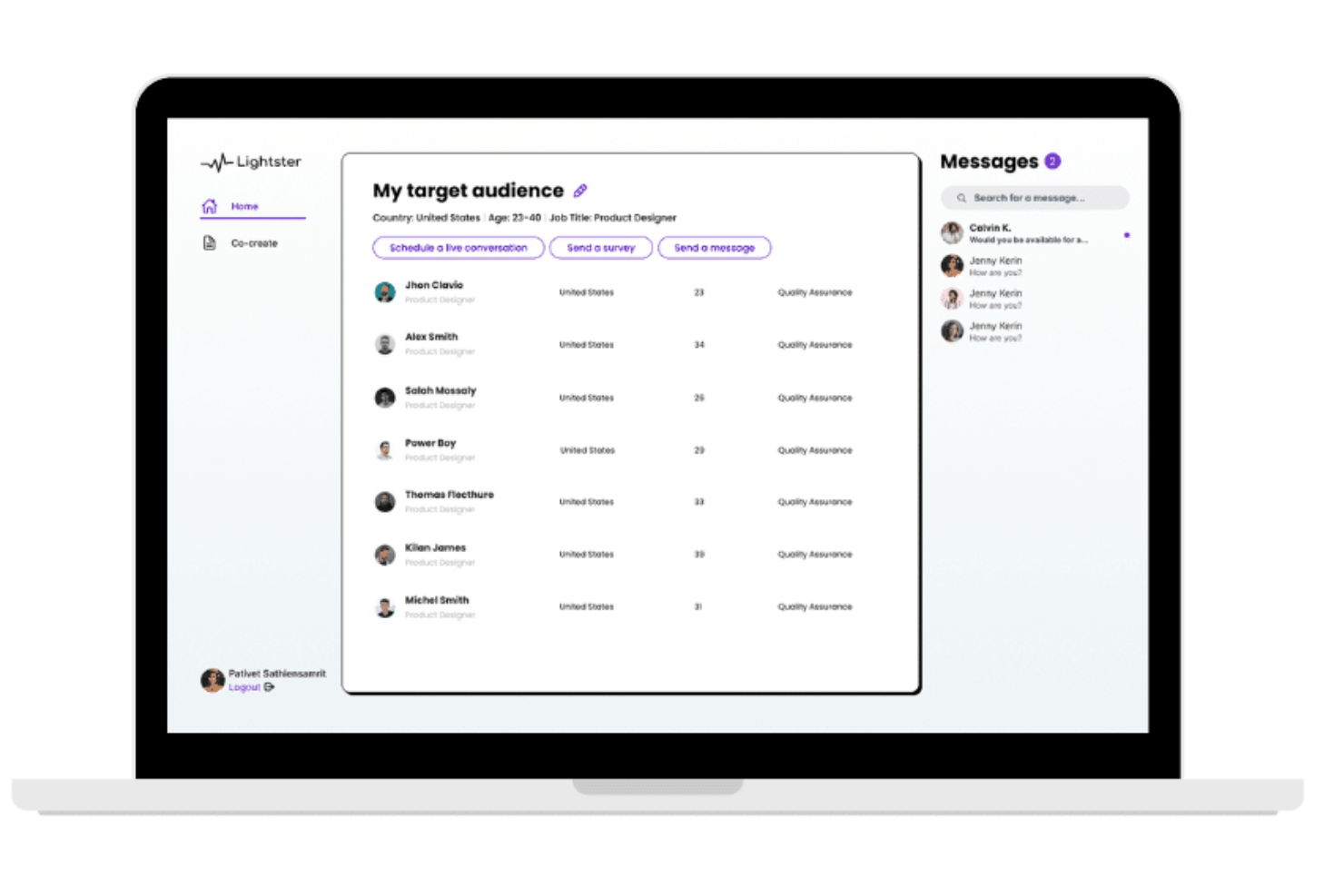
Lightster è una piattaforma di user testing e sondaggi che si specializza nella raccolta rapida di feedback degli utenti, offrendo la possibilità di ottenere oltre 100 risposte in pochi minuti e di selezionare il pubblico in base a criteri specifici.
Perché ho scelto Lightster:
Ho scelto Lightster dopo aver valutato la sua capacità di facilitare connessioni dirette con il pubblico target tramite sondaggi e conversazioni, fondamentale per raccogliere feedback rapidi dagli utenti. Ciò che distingue Lightster è la sua interfaccia intuitiva che semplifica il processo di raccolta dei feedback e la possibilità di collaborazione tra i membri del team, essenziale per prendere decisioni informate nello sviluppo del prodotto.
Caratteristiche principali e integrazioni:
Caratteristiche includono filtraggio demografico, profili dettagliati per doppia verifica, registrazioni delle sessioni, condivisione dello schermo, messaggi diretti, sondaggi, interviste ai clienti, co-creazione, uso web o mobile e altro ancora.
Integrazioni includono Google Calendar, Outlook Calendar e altri.
Pros and Cons
Pros:
- Opzioni di coinvolgimento tramite diversi canali
- Filtraggio semplice del pubblico target
- Feedback diretto e orientato all'utente
Cons:
- Curva di apprendimento per sfruttare al massimo le funzionalità della piattaforma
- Nessuna garanzia di coinvolgimento

Ideale per le heatmap dei punti di attrito

Costruito attorno al monitoraggio del comportamento degli utenti sul sito web, Mouseflow cattura registrazioni delle sessioni, mappe di calore, analisi dei funnel, analisi dei moduli e feedback degli utenti per mostrare esattamente come i visitatori interagiscono con il tuo sito.
Per chi è Mouseflow?
Mouseflow si adatta naturalmente ai team di prodotto e crescita di aziende ecommerce e SaaS che hanno bisogno di diagnosticare dove e perché gli utenti abbandonano il sito.
Perché ho scelto Mouseflow
Ho scelto Mouseflow come uno dei migliori perché nessun altro strumento in questo ambito offre sei diversi tipi di mappe di calore pronte all’uso, includendo mappe di click, movimento, scroll, attenzione, geografiche e live. La caratteristica che lo distingue è il Friction Score, che segnala automaticamente le sessioni con clic di frustrazione, errori e abbandono dei moduli così posso dare priorità alle registrazioni da visualizzare. Apprezzo anche il fatto che le mappe di calore vengono generate retroattivamente dalle sessioni registrate, quindi non è necessario configurarle prima dell’inizio della raccolta dati.
Caratteristiche principali di Mouseflow
- Analisi dei funnel: consente di costruire funnel di conversione multi-step per vedere esattamente quale pagina o passaggio perde il maggior numero di utenti durante un percorso.
- Analisi dei moduli: traccia i dati di interazione campo per campo, inclusi i campi saltati, reinseriti o abbandonati dagli utenti.
- Campagne di feedback: consente di attivare sondaggi in pagina in punti specifici della sessione per raccogliere feedback diretto dagli utenti.
- Filtraggio delle sessioni: filtra le sessioni registrate per attributi come tipo di dispositivo, fonte di riferimento, paese o tag personalizzati per isolare specifici gruppi di utenti.
Integrazioni Mouseflow
Mouseflow offre 42 integrazioni in categorie come A/B testing, analytics, assistenza clienti e marketing, tra cui Adobe Analytics, Google Analytics, Google Tag Manager, AB Tasty, Shopify e Google Ads, oltre a Salesforce, Microsoft Teams e Slack. Mouseflow non ha ancora una integrazione con Zapier, ma è disponibile una REST API per integrazioni personalizzate.
Pros and Cons
Pros:
- Sei tipi di mappe di calore generate dalle sessioni registrate
- Supporta la registrazione degli iframe a differenza di alcuni concorrenti
- Rileva automaticamente gli errori JavaScript sulle pagine
Cons:
- Le registrazioni delle sessioni a volte risultano incomplete o poco chiare
- I limiti di crediti sessione si azzerano ogni mese nei piani a pagamento

Ideale per feedback video assistiti dall’IA sulle interazioni dell’utente
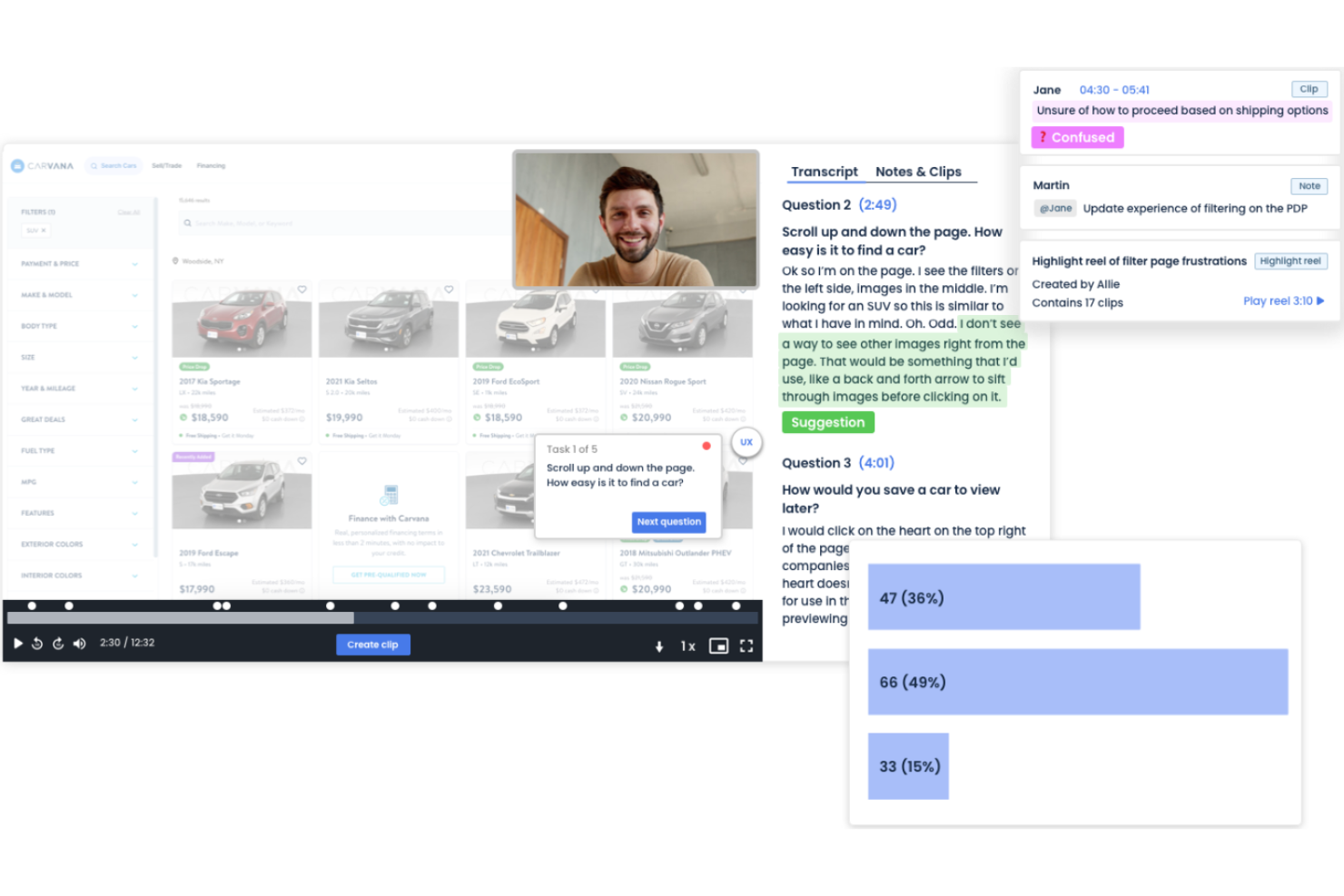
PlaybookUX è una piattaforma di ricerca sugli utenti per raccogliere insight attraverso feedback video, test di usabilità e sondaggi. Aiuta i team ad analizzare il comportamento degli utenti con funzionalità come interviste moderate, card sorting e tree testing.
Perché ho scelto PlaybookUX: Si specializza nei feedback video, permettendoti di vedere e ascoltare gli utenti mentre interagiscono con il tuo prodotto. Questa funzione fornisce ricchi insight sulle esperienze e i punti critici degli utenti, offrendo feedback video assistiti dall’IA. PlaybookUX offre opzioni di test personalizzabili per adattarsi a diverse esigenze di ricerca. Queste capacità aiutano il tuo team a prendere decisioni consapevoli per migliorare la soddisfazione degli utenti.
Funzionalità e integrazioni principali:
Funzionalità includono la trascrizione automatica che converte i feedback video in testo, l’analisi del sentiment che valuta le emozioni degli utenti e il reclutamento dei partecipanti per trovare i tester ideali per i tuoi studi.
Integrazioni includono Slack, Trello, Jira, Asana, HubSpot, Microsoft Teams, Google Drive, Dropbox, Notion e Salesforce.
Pros and Cons
Pros:
- Servizio di trascrizione automatica
- Efficace analisi del sentiment
- Supporta diverse esigenze di ricerca
Cons:
- Potrebbe essere necessaria competenza tecnica
- Può richiedere molte risorse

Ideale per studi remoti personalizzabili
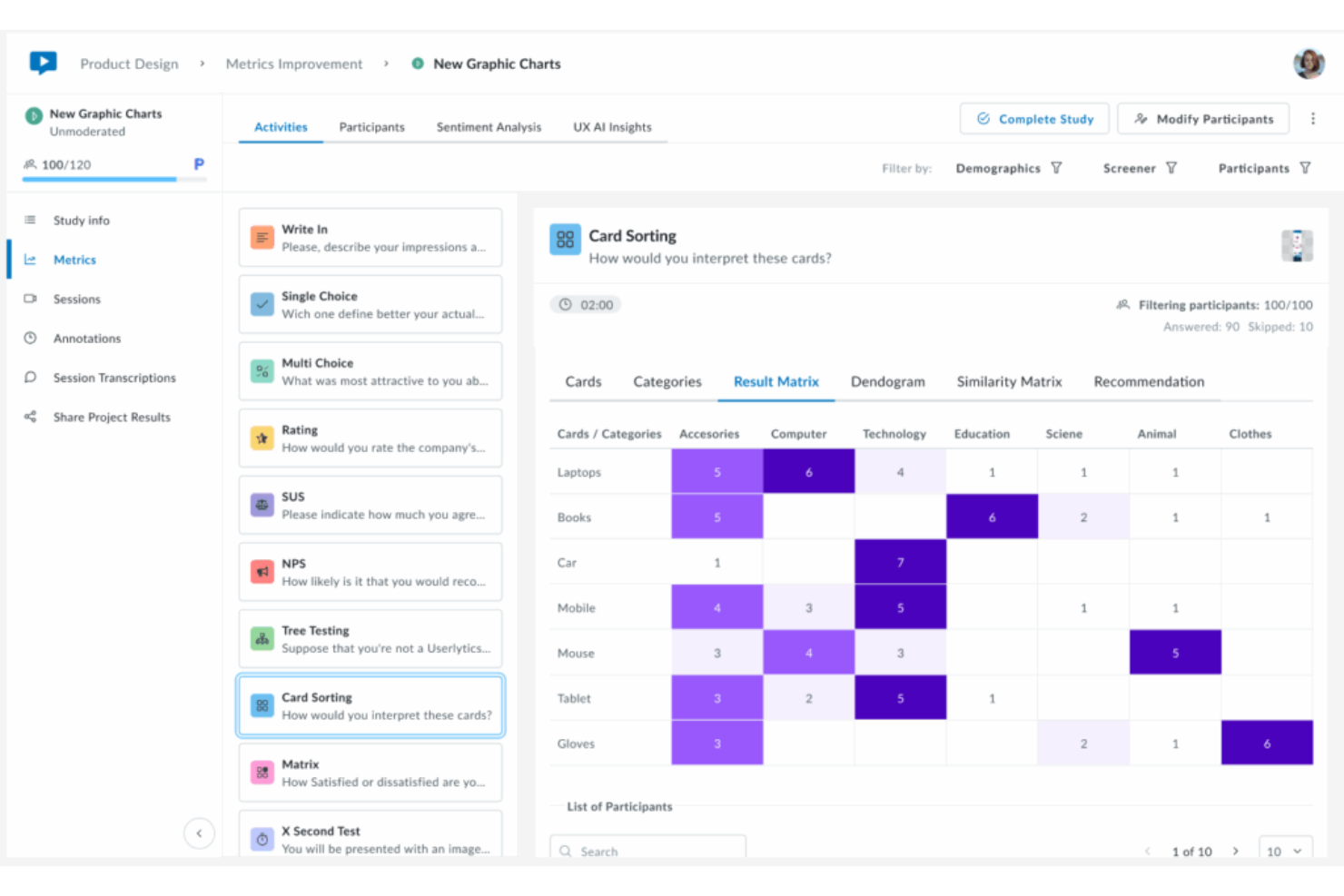
Userlytics è una piattaforma di ricerca UX remota che combina test utente moderati e non moderati, test di prototipi, test su dispositivi mobili e analisi supportata dall'IA in un unico ambiente.
Per chi è più indicato Userlytics?
Userlytics è particolarmente adatto a ricercatori UX e team di prodotto in aziende di medie e grandi dimensioni che gestiscono programmi di ricerca frequenti e intensivi di studio.
Perché ho scelto Userlytics
Userlytics merita un posto nella mia shortlist perché nessun altro strumento offre questo livello di controllo su come viene strutturato uno studio. Posso combinare sessioni moderate, task non moderati, card sorting, tree testing e test di prototipi all'interno di uno stesso studio, con domande filtro per selezionare esattamente i partecipanti giusti. Anche il punteggio di riferimento ULX® è unico: va oltre NPS e SUS, misurando otto dimensioni UX e fornendo un benchmark di qualità ripetibile tra gli studi.
Funzionalità principali di Userlytics
- Annotazioni IA: Etichetta automaticamente i momenti nelle registrazioni delle sessioni in cui i partecipanti mostrano confusione, esitazione o reazioni forti.
- Creazione di highlight reel: Permette di tagliare, etichettare e raccogliere segmenti video dalle sessioni in raccolte condivisibili per presentazioni agli stakeholder.
- Panel globale di partecipanti: Permette accesso a oltre 2 milioni di partecipanti selezionati in oltre 150 paesi e 60 lingue per un reclutamento mirato.
- Analisi del sentiment: Rileva e mette in evidenza il tono emotivo nelle risposte dei partecipanti per identificare schemi senza bisogno di etichettatura manuale.
Integrazioni di Userlytics
Userlytics offre un set più ristretto di integrazioni focalizzate sugli strumenti di test dei prototipi, tra cui Figma, Adobe XD, Proto.io e InVision, oltre alla sincronizzazione con Google Calendar e Microsoft Calendar per la pianificazione delle sessioni moderate. Supporti per Zapier e API non risultano chiaramente documentati.
Pros and Cons
Pros:
- Nessun partecipante ripetuto tra gli studi
- Amministratori illimitati in tutti i piani
- Risultati dei test disponibili entro poche ore dal lancio
Cons:
- Nessuna visualizzazione di heatmap o click-tracking
- La trascrizione audio richiede spesso correzioni manuali

Ideale per A/B testing
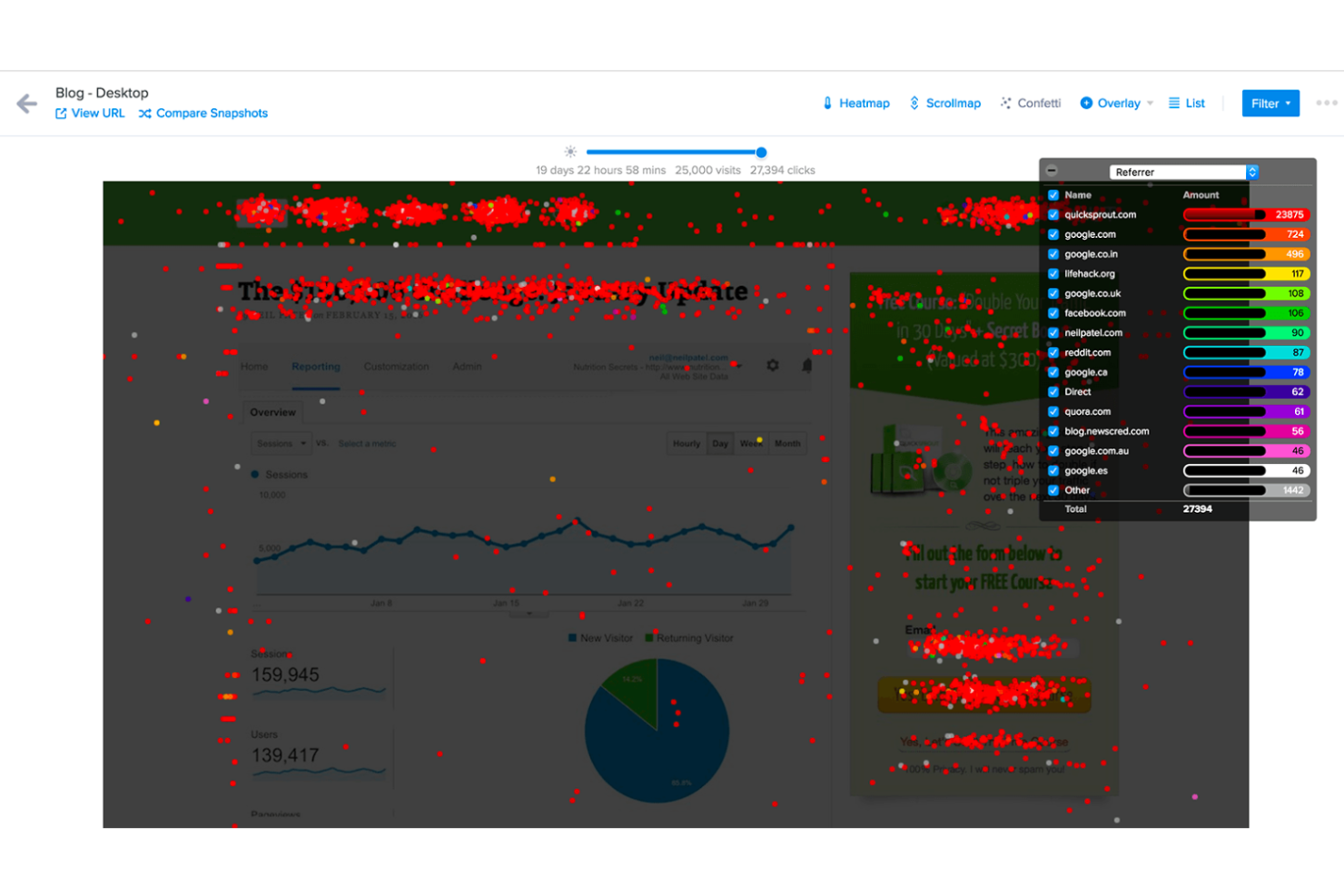
Crazy Egg è uno strumento di test dell’esperienza utente rivolto a marketer e sviluppatori web. Fornisce approfondimenti sul comportamento degli utenti tramite A/B testing, heatmap e registrazioni delle sessioni, per aiutare a ottimizzare le prestazioni del sito web.
Perché ho scelto Crazy Egg: Le sue funzionalità di A/B testing permettono di sperimentare diverse versioni durante il processo di testing dell'usabilità del sito per vedere cosa funziona meglio. Le heatmap mostrano dove gli utenti cliccano e scorrono, offrendo chiari approfondimenti sulle interazioni. Le registrazioni delle sessioni consentono di osservare come i visitatori navigano sul sito. Queste caratteristiche aiutano a prendere decisioni basate sui dati per migliorare l’efficacia del sito.
Funzionalità distintive & integrazioni:
Funzionalità comprendono l’analisi del traffico per capire da dove provengono i visitatori e come navigano il sito. La funzione di tracciamento degli errori aiuta a individuare e risolvere problemi che potrebbero ostacolare l’esperienza utente. I sondaggi permettono di raccogliere feedback diretti dai visitatori, offrendo spunti preziosi per migliorare.
Integrazioni includono Shopify, Wix, WordPress, AWeber, Zapier, HubSpot, Google Tag Manager, Segment, Optimizely e Unbounce.
Pros and Cons
Pros:
- Configurazione A/B testing intuitiva
- Analisi dettagliata delle mappe di scorrimento
- Registrazioni delle sessioni utente in tempo reale
Cons:
- Personalizzazione limitata nelle heatmap
- Può rallentare il caricamento del sito web

Ideale per il monitoraggio end-to-end dell'esperienza utente
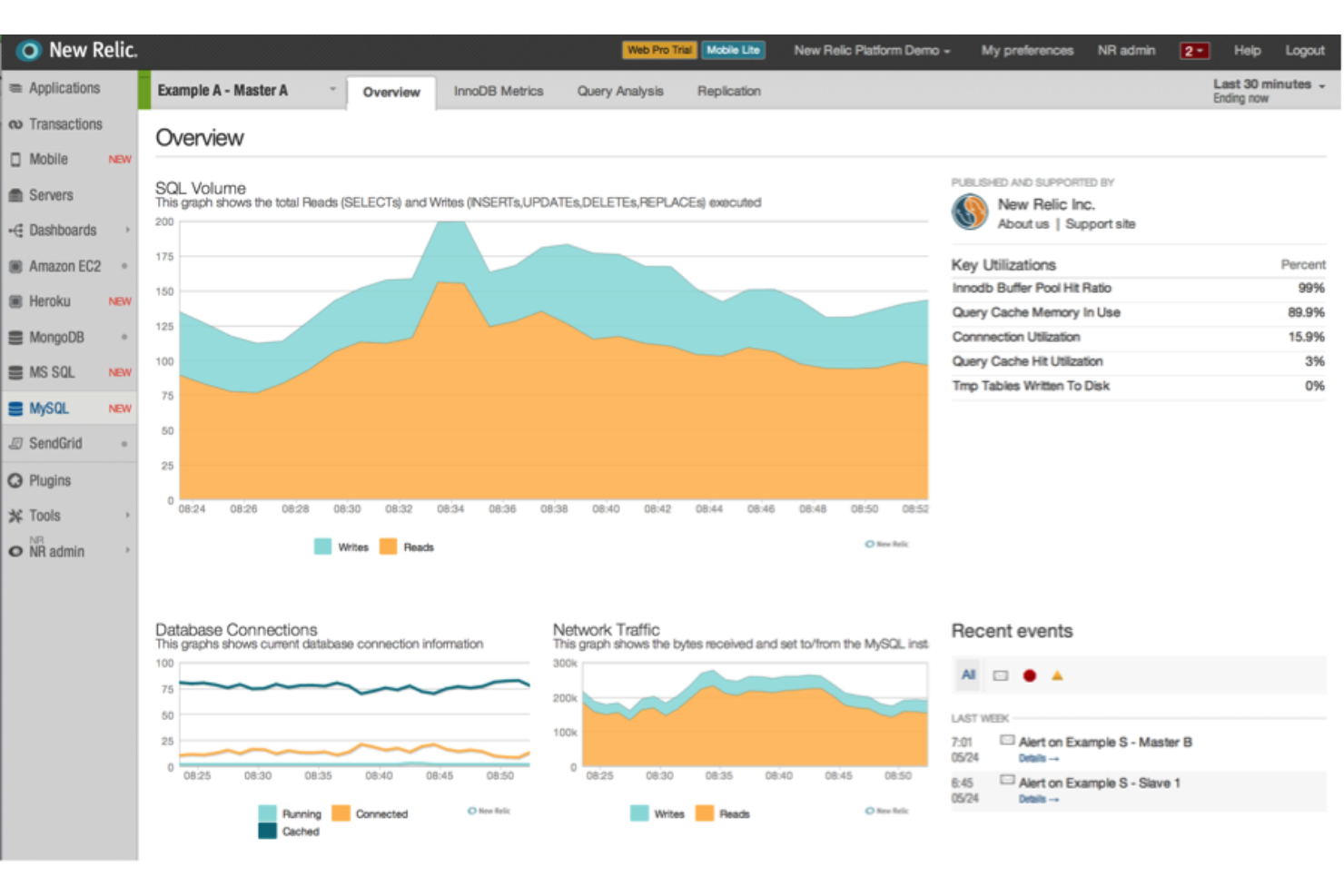
New Relic è una piattaforma di osservabilità che combina monitoraggio reale degli utenti, replay delle sessioni, tracing distribuito e monitoraggio delle prestazioni del browser per offrirti visibilità su tutto lo stack applicativo.
Per chi è ideale New Relic?
New Relic è particolarmente adatto a team di ingegneria e DevOps di aziende di medie o grandi dimensioni che hanno l'esigenza di collegare i dati sull'esperienza utente frontend alle prestazioni dei sistemi backend.
Perché ho scelto New Relic
Ho incluso New Relic tra le mie scelte principali perché nessun altro strumento in questo elenco collega il comportamento degli utenti frontend al codice backend in modo così diretto. Quando una session replay evidenzia un'interazione utente frustrante, il tracing distribuito la collega direttamente al servizio backend o alla specifica query sul database che causa il rallentamento, senza cambiare strumento. Inoltre, apprezzo che il monitoraggio del browser utilizzi i diagrammi di Sankey per mappare i percorsi di navigazione reali degli utenti, così posso vedere dove si interrompono i percorsi su tutto il flusso, e non solo sulle singole pagine.
Funzionalità chiave di New Relic
- Monitoraggio sintetico: Simula interazioni utente secondo una pianificazione per testare i flussi critici prima che gli utenti reali incontrino problemi.
- Monitoraggio dei Core Web Vitals: Misura i punteggi LCP, INP e CLS direttamente nella dashboard di monitoraggio del browser.
- Monitoraggio mobile: Cattura report di arresto anomalo, errori HTTP e trace delle interazioni per app iOS e Android.
- Analisi degli errori JavaScript: Registra gli errori frontend con stack trace e li collega alle sessioni utenti interessate.
Integrazioni di New Relic
New Relic offre oltre 780 integrazioni tramite il suo marketplace Instant Observability, tra cui AWS, Azure, Google Cloud Platform, Kubernetes e strumenti di monitoraggio open source. Per le notifiche di allerta, si integra nativamente con Jira, Slack, Microsoft Teams, PagerDuty, ServiceNow e AWS EventBridge, ed è disponibile su Zapier. Una API NerdGraph e una REST API sono disponibili per integrazioni personalizzate.
Pros and Cons
Pros:
- Monitoraggio in tempo reale con insight tempestivi sulle prestazioni
- Filtra i replay delle sessioni per sequenza di eventi
- Analisi automatizzata delle cause principali alimentata da intelligenza artificiale
Cons:
- Le query NRQL possono essere lente da caricare
- I dati dei session replay vengono conservati solo per otto giorni

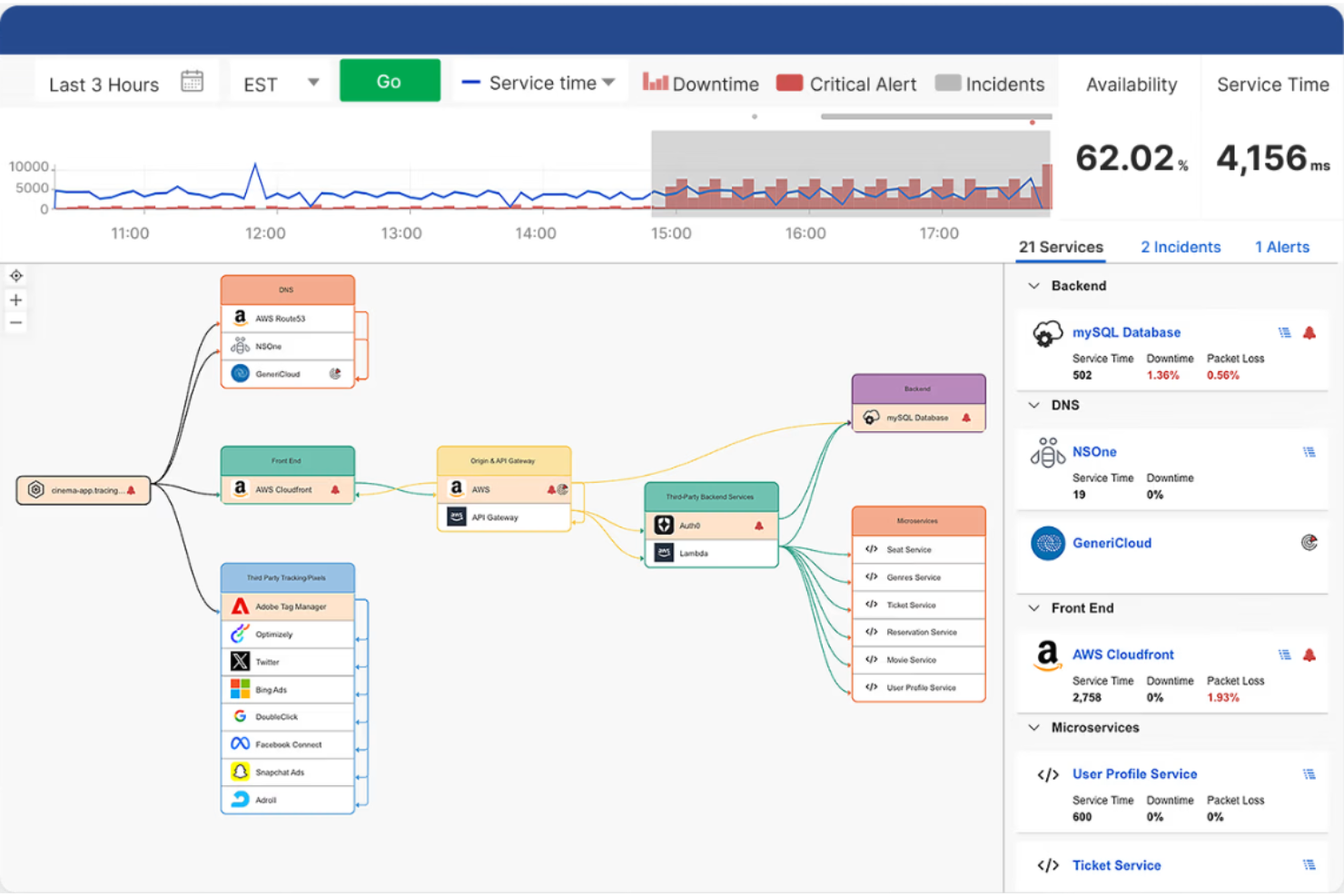
Catchpoint è uno strumento di monitoraggio delle prestazioni progettato per i team IT e operativi. Aiuta a monitorare le prestazioni di siti web e applicazioni, fornendo informazioni utili per migliorare l'esperienza utente e l'affidabilità del sistema.
Perché ho scelto Catchpoint: È specializzato nel monitoraggio delle prestazioni, offrendo avvisi in tempo reale per mantenere i sistemi sempre operativi. La funzione di monitoraggio sintetico simula le interazioni degli utenti per effettuare test di usabilità del sito e individuare potenziali problemi prima che coinvolgano gli utenti. Il monitoraggio reale degli utenti fornisce informazioni dettagliate sulle esperienze effettive degli utenti. Questi strumenti di benchmarking aiutano a garantire che il tuo sito offra sempre prestazioni ottimali, riducendo i tempi di inattività e migliorando l'affidabilità.
Caratteristiche principali & integrazioni:
Funzionalità includono il monitoraggio della rete che traccia connettività e problemi di prestazione, monitoraggio degli endpoint per garantire l'affidabilità dei dispositivi, e monitoraggio delle API che verifica le prestazioni delle interfacce applicative.
Integrazioni includono ServiceNow, Slack, Splunk, PagerDuty, DataDog, AppDynamics, New Relic, Microsoft Teams, Grafana ed Elastic.
Pros and Cons
Pros:
- Sistema di avvisi in tempo reale
- Monitoraggio sintetico dettagliato
- Supporta molteplici protocolli di monitoraggio
Cons:
- Richiede competenze tecniche
- Alto consumo di risorse

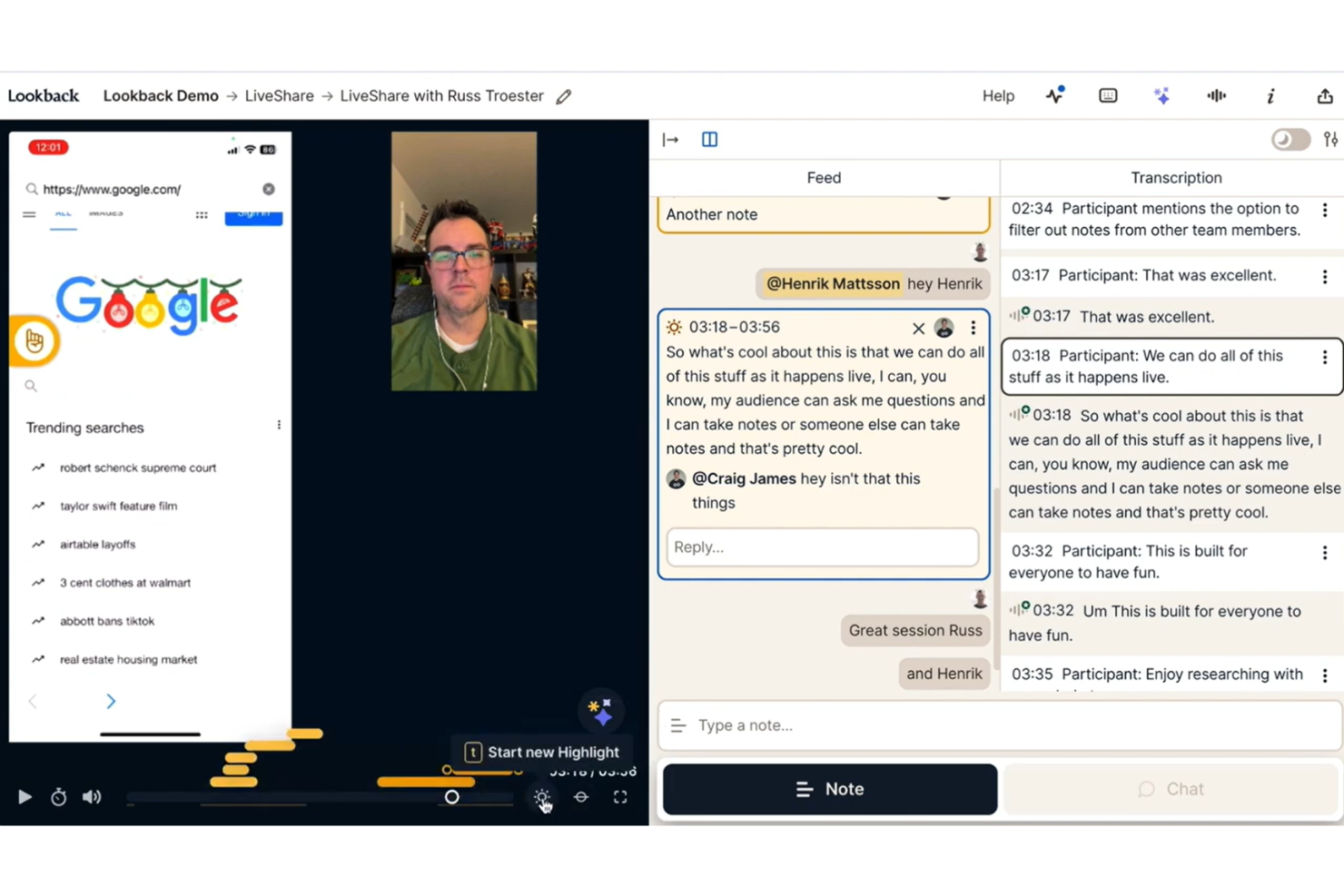
Lookback è una piattaforma di ricerca utente remota progettata per test moderati e non moderati, che combina osservazione in tempo reale delle sessioni, trascrizioni generate dall'IA e strumenti per studi asincroni in un unico luogo.
Per chi è ideale Lookback?
Lookback è particolarmente adatto a ricercatori UX e team di prodotto che conducono studi moderati regolarmente e hanno bisogno di uno spazio dedicato per osservare, registrare e analizzare sessioni utente dal vivo.
Perché ho scelto Lookback
Ho scelto Lookback tra i migliori perché gestisce molto bene l'esperienza delle sessioni dal vivo per tutti i presenti. Mi piace che i portatori di interesse possano osservare le sessioni in tempo reale tramite una vista osservatore dedicata, dove possono chattare e prendere appunti senza che il partecipante sappia della loro presenza. Trovo inoltre molto utile la funzionalità di prendere appunti durante la sessione: è possibile aggiungere note con timestamp durante la conversazione senza interrompere il flusso, e l'IA propone risultati suggeriti in base agli obiettivi prefissati subito dopo la fine della sessione.
Funzionalità principali di Lookback
- Studi asincroni guidati autonomamente: I partecipanti completano le attività e registrano le proprie sessioni secondo i propri tempi, senza la presenza di un ricercatore.
- Trascrizioni generate dall'IA: Le sessioni vengono trascritte automaticamente dopo la registrazione, facilitando la ricerca e il riferimento a momenti specifici.
- Taglio degli highlight delle sessioni: È possibile ritagliare momenti specifici da una registrazione e condividerli come clip per report o revisioni con i portatori di interesse.
- Registrazione di schermo e videocamera: Registra contemporaneamente sia lo schermo che il volto del partecipante, fornendo contesto comportamentale ed emozionale fianco a fianco.
Sulla base della mia ricerca, ecco le informazioni verificate sulle integrazioni di Lookback:
Integrazioni di Lookback
Lookback offre un piccolo set di integrazioni native, tra cui Slack, Jira, Trello, Microsoft Teams e User Interviews. Il supporto per API e Zapier non è chiaramente documentato.
Pros and Cons
Pros:
- La modalità osservatore nascosto mantiene i partecipanti spontanei
- Gli appunti con timestamp si sincronizzano direttamente alle registrazioni
- Supporta studi sia moderati che non moderati
Cons:
- Nessun pool interno di partecipanti al reclutamento
- L'audio o il video possono interrompersi a metà sessione
Ideale per approfondimenti UX guidati dai dati con analisi del successo delle attività
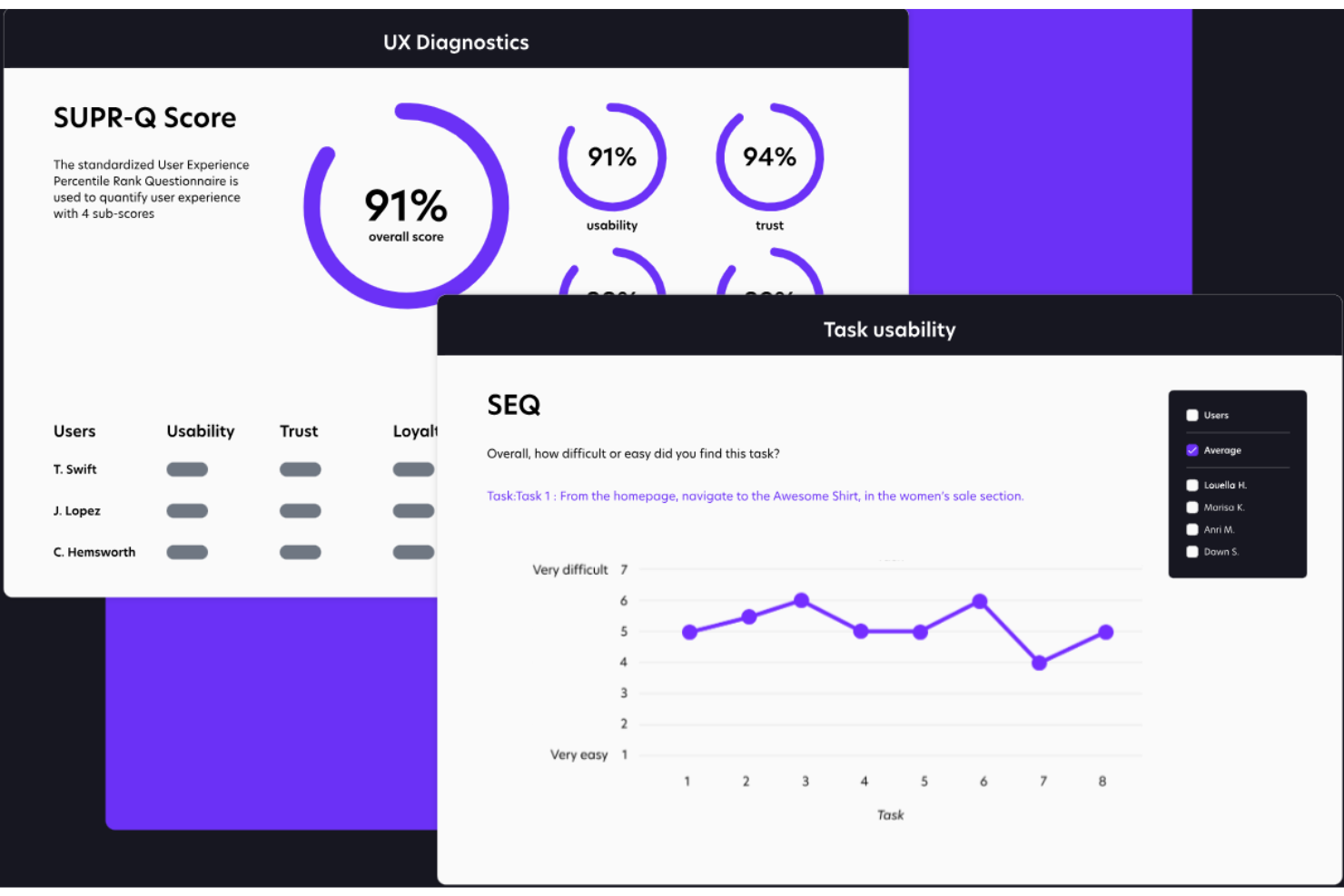
Trymata è una piattaforma di test di usabilità progettata per i team di prodotto, UX e marketing che desiderano migliorare l’esperienza utente nei prodotti digitali. Facilita i test di usabilità da remoto, permettendo ai team di raccogliere feedback reali dagli utenti su siti web e applicazioni.
Perché ho scelto Trymata: Eccelle nei test di usabilità, offrendo strumenti per osservare come gli utenti interagiscono con il tuo prodotto. Puoi raccogliere feedback e comportamenti dettagliati degli utenti attraverso sessioni video. I test basati su attività della piattaforma aiutano a individuare rapidamente i problemi di usabilità. Queste funzionalità consentono al tuo team di prendere decisioni di design informate e aumentare la soddisfazione generale degli utenti.
Caratteristiche principali e integrazioni:
Caratteristiche includono la registrazione di sessioni video che cattura le interazioni degli utenti, test basati su attività per valutare specifici percorsi utente, e analisi dettagliate che forniscono informazioni su comportamento e feedback degli utenti.
Integrazioni includono Google Analytics, Slack, Trello, Jira, Asana, Confluence, Salesforce, HubSpot, Microsoft Teams e Zapier.
Pros and Cons
Pros:
- Test di usabilità dettagliati basati su attività
- Funzionalità dettagliate di registrazione di sessioni video
- Flessibile per diversi scenari di test
Cons:
- Richiede tempo di configurazione iniziale
- Può richiedere competenze tecniche

Fullstory
Ideale per l'analisi della riproduzione delle sessioni

Altri strumenti per testare l'esperienza utente
Ecco alcune opzioni aggiuntive di strumenti per testare l’esperienza utente che non sono entrate nel mio elenco, ma che vale comunque la pena prendere in considerazione:
- LogRocket
Ideale per la diagnostica delle sessioni con IA integrata
- Microsoft Clarity
Ideale per l'analisi gratuita dell'interazione visiva
- Useberry
Ideale per il collaudo di prototipi


Come Valuto gli Strumenti di User Experience Testing
Divido la mia valutazione in criteri di base—come la registrazione delle sessioni e il reclutamento dei partecipanti—e fattori differenzianti che separano gli strumenti orientati alla scoperta rapida da quelli destinati ai programmi completi di ResearchOps.
Funzionalità Principali (Requisiti Fondamentali per Questa Lista)
Quando seleziono gli strumenti per la mia lista, valuto ciascuno su una scala da 0 (non offre la funzionalità) a 5 (eccelle in questo ambito) per ogni funzionalità principale elencata di seguito. Successivamente, calcolo il punteggio totale dello strumento in percentuale. Ogni strumento deve raggiungere un punteggio totale minimo del 65% per essere considerato per l'inclusione.
- Creazione di Test di Usabilità: Valuto la flessibilità nella costruzione dei test: se si possono organizzare interviste moderate, task non moderati, ordini di carte o tree test sulla stessa piattaforma.
- Registrazione e Riproduzione delle Sessioni: La qualità della riproduzione è importante, quindi verifico la cattura di schermo, audio e webcam insieme a strumenti come note con timestamp e tagging per una revisione più rapida.
- Reclutamento dei Partecipanti: Esamino se uno strumento offre un panel interno con criteri di screening o si affida unicamente a partecipanti auto-reclutati tramite link condiviso.
- Analisi Comportamentali: Oltre alle registrazioni grezze, cerco metriche UX quantitative come percorsi di clic, heatmap e tassi di completamento delle attività che aiutino i PM a individuare punti di attrito nel flusso di checkout o di onboarding.
- Testing di Prototipi e Siti Live: Strumenti come Maze e UserTesting gestiscono le importazioni Figma in modo diverso, quindi verifico quali formati di prototipi e ambienti live sono supportati da ogni piattaforma.
- Approfondimenti e Reportistica: Valuto come ciascuno strumento aiuta a passare dalle sessioni grezze a output pronti per gli stakeholder—video riassuntivi, clip taggati o dashboard da integrare in una sprint review.
Una volta identificati gli strumenti che soddisfano i criteri, considero ciò che distingue ciascuna piattaforma.
Fattori Differenzianti (Cosa Distingue i Fornitori)
Ecco come metto a confronto i diversi fornitori:
Funzionalità Distintive
L'analisi basata su AI è un elemento di primaria importanza—gli strumenti che trascrivono automaticamente le sessioni ed evidenziano temi ricorrenti fanno risparmiare ore di sintesi al termine di ogni round di test. Cerco anche stanze di collaborazione live dove PM, designer e ingegneri possano osservare insieme le sessioni e taggare in tempo reale i momenti chiave. Le capacità di benchmarking sono importanti per i team che svolgono studi longitudinali, per monitorare i miglioramenti UX tra diversi rilasci utilizzando punteggi standard come SUS o SEQ.
Oltre le Funzionalità
Attribuisco molto peso alla rapidità nell'ottenere insight: alcune piattaforme forniscono sessioni completate in poche ore, altre impiegano giorni, il che è rilevante quando bisogna validare una direzione di design a metà sprint. Inoltre, verifico quanto bene ogni strumento si integra con il resto dello stack di prodotto, in particolare con Jira e Figma, visto che risultati isolati in uno strumento di ricerca difficilmente influenzano le decisioni di roadmap. Anche la struttura dei prezzi è importante. Il modello a pagamento per singolo studio può andare bene per team che eseguono usability test trimestrali, ma i programmi di discovery continui hanno bisogno di piani a posti utenti o illimitati per evitare aumenti di costi.
Come scegliere gli strumenti per testare l'esperienza utente
È facile perdersi in lunghi elenchi di funzionalità e strutture tariffarie complesse. Per aiutarti a rimanere concentrato mentre affronti il tuo specifico processo di selezione del software, ecco una lista di fattori da tenere a mente:
| Fattore | Cosa considerare |
| Scalabilità | Assicurati che lo strumento possa crescere insieme al tuo team. Cerca opzioni in grado di gestire quantità crescenti di dati e di utenti senza compromettere le prestazioni. |
| Integrazioni | Verifica se lo strumento si integra con il tuo stack tecnologico esistente, come gli strumenti di gestione dei progetti e di progettazione, per semplificare il flusso di lavoro e migliorare l'efficienza. |
| Personalizzazione | Scegli uno strumento che ti permetta di adattare le interfacce utente e i report alle tue esigenze specifiche, assicurandoti che sia in linea con i processi e gli obiettivi del tuo team. |
| Facilità d'uso | Cerca interfacce intuitive e una navigazione semplice. Il tuo team dovrebbe poter adottare rapidamente lo strumento senza una formazione approfondita o una curva di apprendimento ripida. |
| Budget | Considera il costo totale, inclusi i canoni di abbonamento ed eventuali costi aggiuntivi per funzionalità o utenti extra. Assicurati che rientri nei limiti del tuo budget. |
| Misure di sicurezza | Verifica che lo strumento sia conforme alle normative sulla protezione dei dati e offra funzionalità come la crittografia e i controlli di accesso degli utenti per proteggere i dati sensibili. |
| Opzioni di supporto | Valuta la disponibilità dell'assistenza clienti, inclusi chat dal vivo, supporto telefonico e risorse del centro assistenza, per aiutare il tuo team quando necessario. |
| Meccanismi di feedback | Cerca strumenti che offrano diversi modi per raccogliere il feedback degli utenti, come sondaggi, feedback video e sessioni dal vivo, per coprire tutte le tue esigenze di ricerca. |
Tendenze negli strumenti di test dell'esperienza utente
Nella mia ricerca, ho raccolto innumerevoli aggiornamenti dei prodotti, comunicati stampa e registri delle versioni di diversi fornitori di strumenti per i test di usabilità. Ecco alcune delle tendenze emergenti che sto tenendo d'occhio:
- Approfondimenti basati sull'IA: I fornitori utilizzano l'IA per analizzare i dati degli utenti in modo più efficace, fornendo approfondimenti più dettagliati sul comportamento degli utenti. Questa tendenza aiuta i team a identificare rapidamente schemi e problemi, come avviene con strumenti come Fullstory, che offrono analisi basate sull'IA.
- Collaborazione in tempo reale: Gli strumenti offrono sempre più funzionalità che consentono ai team di lavorare insieme in tempo reale durante le sessioni di test. Ciò migliora la comunicazione e accelera i processi decisionali, una funzionalità adottata da piattaforme come Lookback.
- Maggiore attenzione ai test di accessibilità: Si pone sempre più l'accento sulla necessità di garantire che i prodotti digitali siano accessibili a tutti gli utenti, comprese le persone con disabilità. Fornitori come UserTesting stanno integrando i controlli di accessibilità nei loro processi di test degli utenti.
- Funzionalità per i test da remoto: Con un numero sempre maggiore di team che lavora da remoto, gli strumenti che supportano i test a distanza stanno guadagnando popolarità. Piattaforme come Maze offrono funzionalità che facilitano i test di usabilità da remoto, rendendo più semplice per i team distribuiti raccogliere il feedback degli utenti.
- Feedback video avanzato: Il feedback video sta diventando più dettagliato e interattivo, consentendo una migliore analisi delle reazioni degli utenti. PlaybookUX, ad esempio, offre funzionalità che permettono ai team di visualizzare e analizzare feedback video dettagliati provenienti dalle sessioni degli utenti.
Cosa sono gli strumenti di test dell'esperienza utente?
Gli strumenti di test dell'esperienza utente, o strumenti di test di usabilità, sono soluzioni software che aiutano le aziende a valutare e migliorare l'usabilità dei loro prodotti digitali. Questi strumenti vengono generalmente utilizzati da progettisti UX, product manager e ricercatori per raccogliere informazioni sul comportamento degli utenti (tester) e migliorare la progettazione dei prodotti attraverso il software per test A/B e altri metodi. Le funzionalità di ricerca UX, come i test di usabilità, le registrazioni delle sessioni e la raccolta dei feedback, aiutano a comprendere le esigenze e i dati demografici degli utenti e a identificare le aree di miglioramento. Nel complesso, questi strumenti forniscono informazioni preziose che portano a esperienze utente migliori e a una maggiore soddisfazione.
Funzionalità degli strumenti di test dell'esperienza utente
Quando selezioni gli strumenti per i test degli utenti, presta attenzione alle seguenti funzionalità chiave:
- Test di usabilità: consentono di valutare con quanta facilità gli utenti e i partecipanti ai test riescono a navigare nel prodotto, aiutando a individuare miglioramenti al design.
- Registrazioni delle sessioni: catturano le interazioni degli utenti reali con il prodotto, fornendo informazioni sul comportamento degli utenti e sui punti critici.
- Mappe di calore: mostrano visivamente dove gli utenti fanno clic e scorrono, offrendo un quadro chiaro del coinvolgimento degli utenti sul sito.
- Test A/B: consentono di testare diverse versioni del prodotto per determinare quale offre le prestazioni migliori per gli utenti.
- Raccolta dei feedback: raccoglie le opinioni dirette degli utenti attraverso interviste, sondaggi e moduli, aiutando a comprendere le esigenze e le preferenze degli utenti.
- Feedback video: i feedback in tempo reale e le registrazioni video forniscono informazioni visive dettagliate sulle reazioni e sulle interazioni degli utenti, migliorando la comprensione dell'esperienza utente.
- Funzionalità di test da remoto: facilitano i test con utenti provenienti da località diverse, rendendo più semplice per i team distribuiti raccogliere feedback.
- Collaborazione in tempo reale: consente ai membri del team di lavorare insieme durante le sessioni di test, migliorando la comunicazione e il processo decisionale.
- Metodi di test dell'accessibilità: garantiscono che il prodotto possa essere utilizzato dalle persone con disabilità, migliorando l'inclusività e la conformità.
- Informazioni basate sull'IA: utilizzano l'intelligenza artificiale per analizzare i dati e fornire informazioni più approfondite sul comportamento e sulle tendenze degli utenti.
Vantaggi degli strumenti di test dell'esperienza utente
L'implementazione di strumenti di test dell'esperienza utente offre numerosi vantaggi al team e all'azienda. Ecco alcuni dei risultati che puoi aspettarti:
- Miglioramento delle decisioni di design: i test UX possono aiutare a prendere decisioni di design consapevoli che migliorano la soddisfazione degli utenti, grazie all'analisi delle registrazioni delle sessioni e delle mappe di calore.
- Maggiore coinvolgimento degli utenti: la raccolta dei feedback e i test A/B aiutano ad adattare il prodotto alle preferenze degli utenti, aumentando il coinvolgimento.
- Identificazione più rapida dei problemi: i test di usabilità e i feedback video consentono di individuare e risolvere rapidamente i problemi, riducendo i tempi di inattività.
- Migliore collaborazione del team: le funzionalità di collaborazione in tempo reale permettono al team di lavorare insieme in modo efficace durante le sessioni di test.
- Maggiore accessibilità: i test dell'accessibilità garantiscono che il prodotto possa essere utilizzato da tutti, ampliando il pubblico e rispettando gli standard di conformità.
- Informazioni basate sui dati: le informazioni basate sull'IA offrono una comprensione più approfondita del comportamento degli utenti, guidando le decisioni strategiche.
- Miglioramenti convenienti: identificando tempestivamente i problemi attraverso le funzionalità di test da remoto, è possibile implementare correzioni convenienti che migliorano l'esperienza utente.
Costi e prezzi degli strumenti di test dell'esperienza utente
La scelta degli strumenti di test dell'esperienza utente richiede la comprensione dei diversi modelli di prezzo e dei piani disponibili. I costi variano in base alle funzionalità, alle dimensioni del team, ai componenti aggiuntivi e ad altri fattori. La tabella seguente riassume i piani più comuni, i relativi prezzi medi e le funzionalità generalmente incluse nelle soluzioni di strumenti di test dell'esperienza utente:
Tabella comparativa dei piani per gli strumenti di test dell'esperienza utente
| Tipo di piano | Prezzo medio | Funzionalità comuni |
| Piano gratuito | $0 | Test di usabilità di base, registrazioni limitate delle sessioni e raccolta di feedback di base. |
| Piano personale | $15-$30/ utente/mese | Test di usabilità, registrazioni delle sessioni, mappe di calore e test A/B di base. |
| Piano aziendale | $50-$100/ utente/mese | Test di usabilità avanzati, registrazioni dettagliate delle sessioni, raccolta completa dei feedback, feedback video e collaborazione in tempo reale. |
| Piano Enterprise | $150-$300/ utente/mese | Dashboard personalizzabili, analisi approfondite, assistenza dedicata, informazioni basate sull'IA e numerose opzioni di integrazione. |
Strumenti di test dell'esperienza utente - Domande frequenti
Ecco alcune risposte alle domande comuni sugli strumenti di test dell’esperienza utente:
Quali domande dovrei porre durante i test con gli utenti?
Quando conduci test con gli utenti, concentrati su domande che rivelino il loro livello di soddisfazione e la facilità d’uso. Chiedi agli utenti cosa hanno apprezzato di più e di meno del prodotto e come descriverebbero la loro esperienza. Domande di questo tipo aiutano a comprendere le preferenze degli utenti e a individuare le aree che necessitano di miglioramenti.
Quale strumento si può utilizzare per i test di assistenza agli utenti?
Strumenti diversi rispondono a vari aspetti dei test con gli utenti. Per i test su richiesta, Userfeel è una scelta popolare. Trymata eccelle nei test dei percorsi dei clienti, mentre Hotjar è noto per l’analisi del comportamento degli utenti sui siti web. Scegli lo strumento più adatto alle tue specifiche esigenze di test.
Qual è la differenza tra i test dell'esperienza utente e gli UAT?
I test dell’esperienza utente si concentrano sulle interazioni degli utenti, valutando quanto un prodotto sia intuitivo e piacevole. I test di accettazione da parte degli utenti (UAT) prevedono che gli stakeholder verifichino che il prodotto soddisfi i requisiti aziendali. Entrambi simulano scenari del mondo reale, ma hanno obiettivi e partecipanti diversi.
Di quanti utenti hai bisogno per i test con gli utenti?
Il numero di utenti necessari varia in base al tipo di studio. Nei test di usabilità moderati, 5 utenti possono individuare l’80% delle aree problematiche. I test non moderati possono richiedere 20 o più utenti. Nella scelta del numero di partecipanti, considera sempre gli obiettivi e la complessità dello studio.
Come si garantisce che i risultati dei test siano imparziali?
Per garantire risultati imparziali, seleziona un gruppo diversificato di partecipanti che rappresenti il tuo pubblico target. Utilizza script di test standardizzati ed evita le domande tendenziose. Analizza i dati con una mentalità aperta, concentrandoti sui feedback degli utenti anziché sulle aspettative preconcette.
In che modo gli strumenti di test dell'esperienza utente possono migliorare la progettazione dei prodotti?
Questi strumenti forniscono informazioni su come gli utenti interagiscono con il prodotto, evidenziando i problemi di usabilità e le aree di miglioramento. Analizzando le registrazioni delle sessioni e i feedback degli utenti, i team possono apportare modifiche progettuali consapevoli che migliorano la soddisfazione degli utenti e la funzionalità del prodotto.
Qual è il prossimo passo?
nnSe stai cercando strumenti per i test dell'esperienza utente, contatta gratuitamente un consulente SoftwareSelect per ricevere consigli.
nnCompili un modulo e fai una breve conversazione durante la quale il consulente approfondirà le tue esigenze specifiche. In seguito riceverai una selezione ristretta di software da esaminare. Ti assisterà persino durante l'intero processo di acquisto, comprese le negoziazioni sul prezzo.
n