

I 10 migliori software di progettazione web per creare siti nel 2026

Elenco dei migliori software per web design


Gestire progetti di web design può essere difficile, soprattutto quando è necessario rispettare scadenze ravvicinate e soddisfare esigenze diverse del team. Potresti sentirti sopraffatto dall'enorme quantità di attività e coordinamento richiesti. È qui che entra in gioco il software per il web design: ti aiuta a organizzare, collaborare e trasformare le tue idee creative in realtà in modo più efficiente.
Secondo la mia esperienza, scegliere lo strumento giusto può fare una differenza significativa nel modo in cui procedono i tuoi progetti. Ho testato e recensito in modo indipendente diversi software per offrirti un elenco imparziale delle migliori soluzioni.
In questo articolo troverai informazioni sui migliori strumenti per il web design disponibili, con particolare attenzione alle funzionalità che rispondono alle esigenze specifiche del tuo team.
Perché Fidarsi delle Nostre Recensioni Software
Testiamo e recensiamo software per il product management dal 2020. Come product manager sappiamo quanto sia fondamentale e difficile fare la scelta giusta in termini di software. Investiamo in una ricerca approfondita per aiutare il nostro pubblico a prendere decisioni migliori sugli acquisti di software. Abbiamo testato oltre 2.000 strumenti per diversi casi d’uso e scritto più di 1.000 recensioni approfondite.Scopri come assicuriamo la trasparenza & la nostra metodologia di recensione software.
Riepilogo dei migliori software per web design
Questa tabella comparativa riassume i dettagli dei prezzi delle mie migliori selezioni di software per il web design, per aiutarti a trovare la soluzione più adatta al tuo budget e alle esigenze della tua attività.
| Tool | Best For | Trial Info | Price | ||
|---|---|---|---|---|---|
| 1 | Ideale per template personalizzabili | Piano gratuito disponibile | Da $17/mese | Website | |
| 2 | Miglior website builder con canvas libero | Prova gratuita + piano gratuito disponibile | Da $10/mese (fatturazione annuale) | Website | |
| 3 | Miglior builder di siti web drag-and-drop | Piano gratuito disponibile | A partire da $12/mese (fatturato annualmente) | Website | |
| 4 | Il miglior software di web design con solide funzionalità di collaborazione cross-funzionale | Piano gratuito disponibile | Da $16/utente/mese (fatturato annualmente) | Website | |
| 5 | Ideale per la creazione di siti web white-label | Prova gratuita di 14 giorni disponibile | Da $19/mese (fatturazione annuale) | Website | |
| 6 | Ideale per sviluppare progetti mobile-first responsivi | Gratis da usare | Gratuito e open-source | Website | |
| 7 | Ideale per creare web design responsive in un builder visuale in tempo reale | Piano gratuito disponibile | Da $15/mese (fatturato annualmente) | Website | |
| 8 | Il miglior software di web design per prototipazione rapida | Piano gratuito + demo gratuita disponibile | Da $12/mese (fatturato annualmente) | Website | |
| 9 | Ideale per la prototipazione di applicazioni web e mobile | Piano gratuito disponibile | A partire da $19/utente/mese | Website | |
| 10 | La migliore piattaforma di web design con funzionalità CMS avanzate | È disponibile un piano gratuito | Da $3.25/mese (fatturato ogni due anni) | Website |
Recensione dei migliori software per web design
Di seguito trovi le mie sintesi dettagliate dei migliori software per il web design inclusi nel mio elenco. Le mie recensioni offrono un’analisi approfondita delle funzionalità principali, dei pro e contro, delle integrazioni e dei casi d’uso ideali di ogni strumento, per aiutarti a trovare quello più adatto a te.

Wix
Ideale per template personalizzabili
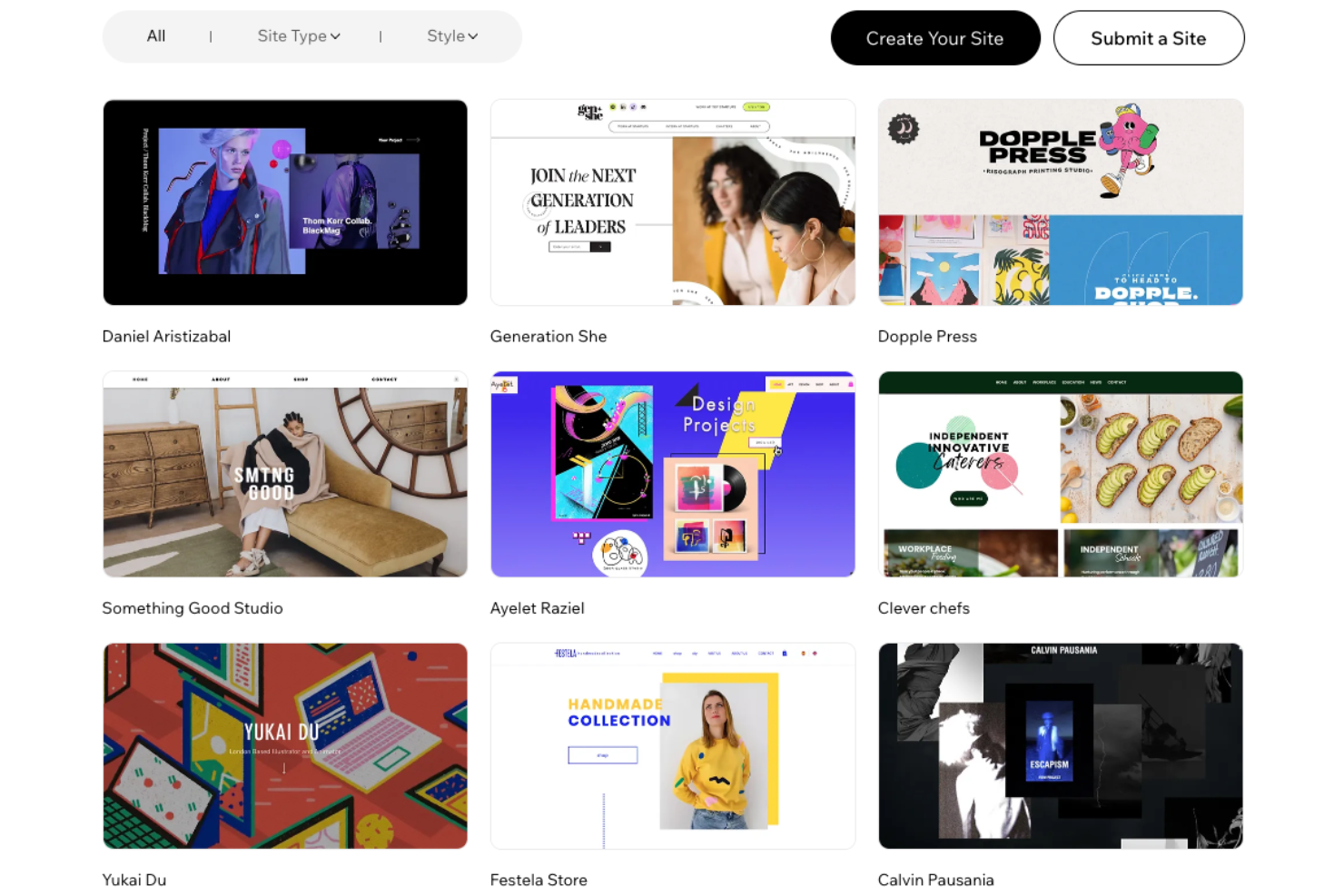
Wix è un software di web design versatile che ti consente di creare e gestire il tuo sito web senza bisogno di competenze di programmazione. Grazie al suo editor drag-and-drop e a una vasta selezione di template personalizzabili, puoi progettare un sito che rifletta il tuo brand personale o aziendale.
Perché ho scelto Wix: Wix offre una libreria di template molto ampia, con oltre 800 opzioni create da designer e adatte a diversi settori e stili. Questa varietà permette di trovare un design che risponde alle tue esigenze, offrendo una solida base per il tuo sito web. Inoltre, gli strumenti SEO integrati di Wix aiutano a migliorare la visibilità del sito sui motori di ricerca, facilitando la scoperta online da parte dei potenziali visitatori.
Un'altra funzione degna di nota è il Wix App Market, che propone una vasta gamma di applicazioni per aumentare le funzionalità del tuo sito. Dall'aggiunta di moduli di contatto o chat dal vivo all'integrazione dei feed dei social media, queste app ti permettono di personalizzare il sito in base alle tue specifiche esigenze.
Caratteristiche e integrazioni principali di Wix
Le funzionalità includono l'ottimizzazione per dispositivi mobili, che assicura al tuo sito un aspetto perfetto su qualsiasi dispositivo, e capacità di design avanzate che ti permettono di animare testi e immagini per offrire un'esperienza utente dinamica. Inoltre, Wix fornisce un hosting sicuro, dandoti la tranquillità che il tuo sito sia sempre protetto e affidabile.
Le integrazioni includono Google Analytics, Google Ads, Facebook Catalog, Mailchimp, HubSpot, Omnisend, Meta Pixel, Salesforce, Pipedrive, Stripe, PayPal e QuickBooks.
Pros and Cons
Pros:
- Strumenti SEO integrati
- Editor drag-and-drop intuitivo
- Ampia selezione di app e widget
Cons:
- Non è possibile cambiare template senza creare un nuovo sito
- Limiti di spazio di archiviazione nei piani base
Framer
Miglior website builder con canvas libero
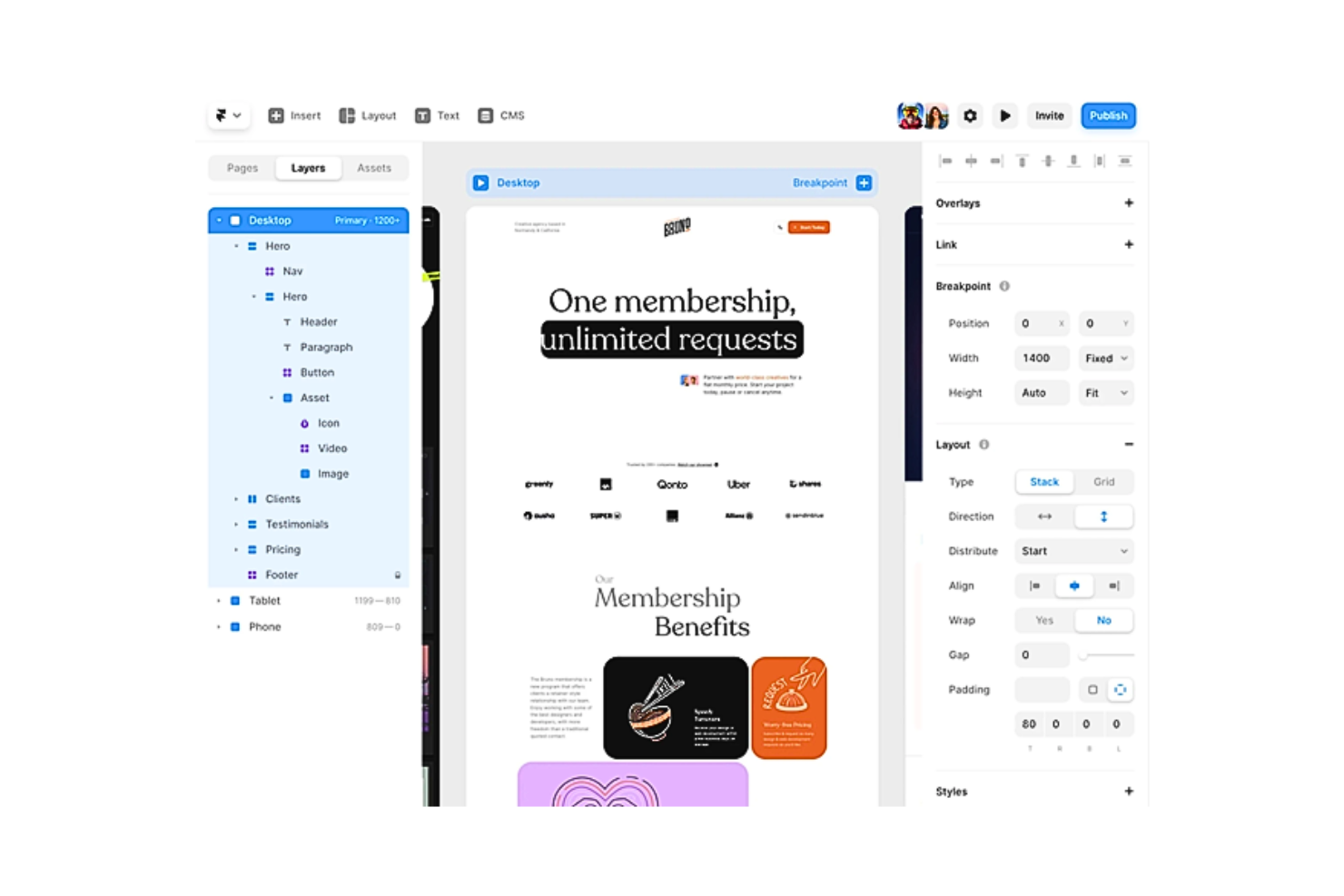
Framer era originariamente una semplice libreria JS unita a un set di strumenti per la prototipazione. Questo strumento per il web design si è poi evoluto in una piattaforma tutto-in-uno che aiuta a creare rapidamente prototipi no-code in pochi minuti. Nonostante sia uno strumento no-code, Framer permette comunque di aggiungere codice personalizzato. Il software funziona anche come una buona piattaforma di apprendimento per React e JavaScript, poiché consente di aprire facilmente l'editor di codice e vedere le controparti in codice dei componenti di design corrispondenti.
Perché ho scelto Framer: Framer è uno degli strumenti più potenti per creare design di siti web responsive, grazie alla sua vasta libreria di risorse visive personalizzabili. La sua interfaccia vettoriale è in qualche modo simile a Sketch, ma Framer offre molto supporto per animazioni avanzate. Lo strumento di web design semplifica inoltre la collaborazione con gli sviluppatori attraverso codice React e JavaScript pre-generato, garantendo che nessun criterio di design vada perso nella conversione.
Inoltre, Framer offre molte altre funzionalità, tra cui Stacks e Grids per organizzare efficientemente più elementi in livelli, Figma Copy Paste per trasferire senza problemi i design di Figma su Framer e Breakpoints che permettono agli utenti di ottimizzare i loro progetti per diversi formati di schermo.
Funzionalità e integrazioni di spicco di Framer
Funzionalità di spicco includono la sua tela libera, che conferisce a Framer la familiarità di altre piattaforme di progettazione come Adobe XD, Sketch e Figma. Potenzia la creatività dell’utente consentendo di creare design unici senza i vincoli di preset o layout predefiniti.
Framer include anche altre funzionalità, tra cui Pages e Sections che mettono a disposizione pagine predefinite, intestazioni, piè di pagina, barre di navigazione, ecc. da inserire nei progetti, e il layout pinning per consentire la progettazione di layout intelligenti su larga scala. Puoi anche utilizzare le sue opzioni di stile e posizionamento per mettere in risalto l’essenza e l’identità visiva del tuo marchio. Oltre a questo, Framer integra sistemi di gestione siti e contenuti, nonché servizi di analisi SEO e delle performance.
Integrazioni includono strumenti come Formspark, HubSpot, Intercom, Logo, Lottie, Mailchimp, Typeform, YouTube e altri.
Pros and Cons
Pros:
- Interfaccia intuitiva e adatta ai designer
- Compatibilità con componenti React
- Aggiornamenti regolari per miglioramenti e correzione bug
Cons:
- Curva di apprendimento ripida dovuta a flussi di lavoro complessi
- Manca di una soluzione integrata per le traduzioni linguistiche

Canva
Miglior builder di siti web drag-and-drop

Canva ti consente di creare siti web visivamente accattivanti in pochi minuti. È la piattaforma perfetta per i principianti con poca o nessuna esperienza. Canva offre un editor di siti web drag-and-drop facile da usare e un enorme database di modelli di design, immagini e grafiche royalty-free. Di conseguenza, il tuo processo di web design diventa veloce, semplice ed estremamente conveniente (poiché puoi pubblicare gratuitamente!).
Puoi utilizzare Canva online o scaricare l'applicazione per Mac, PC, Chromebook, dispositivi iOS o Android.
Perché ho scelto Canva: Canva offre migliaia di modelli gratuiti e oltre 250.000 foto, icone, illustrazioni, grafiche, elementi per social media, video, animazioni e molto altro gratuiti che puoi facilmente trascinare e rilasciare nel tuo sito web. La piattaforma include anche altre funzionalità, come Stili, per aiutarti a trovare la combinazione perfetta di colori e font per la modifica delle immagini. Inoltre, Canva dispone di Magic Write, uno strumento di scrittura e generazione testi basato su intelligenza artificiale alimentato da OpenAI.
Inoltre, Canva offre un generatore di palette colori per creare palette personalizzate. Canva ti permette anche di aggiungere elementi del tuo brand ai tuoi siti. Canva memorizza il tuo logo, i colori del brand e i font nel Brand Kit (disponibile solo per utenti Pro).
Funzionalità e integrazioni principali di Canva
Le funzionalità includono Website Insights, che ti permette di monitorare traffico e coinvolgimento direttamente da Canva, senza dover integrare il tuo sito con servizi di analytics di terze parti. Canva offre anche funzionalità di collaborazione avanzate, attraverso le quali puoi invitare un numero illimitato di membri del team al tuo spazio di lavoro.
Altre funzionalità includono strumenti di esportazione e importazione semplici, domini personalizzati gratuiti, salvataggio automatico, protezione tramite password e una funzione di rimozione dello sfondo con un solo clic.
Integrazioni includono oltre 150 applicazioni di terze parti, come Brandfolder, Dropbox, Edgar, Flickr, HubSpot, Later, Mojo AI, Moovely, OneDrive, Pinterest, Slack, Shopify Sync e altre. Inoltre, puoi utilizzare la sua API e i webhook per creare integrazioni personalizzate.
Pros and Cons
Pros:
- Una vasta libreria di modelli e grafiche
- Editor drag-and-drop semplice con interfaccia pulita
- Solide capacità di collaborazione in tempo reale per i team
Cons:
- Molte immagini sono con filigrana nella versione gratuita
- Mancano formati di esportazione come .psd (predefinito di Photoshop)

Figma
Il miglior software di web design con solide funzionalità di collaborazione cross-funzionale
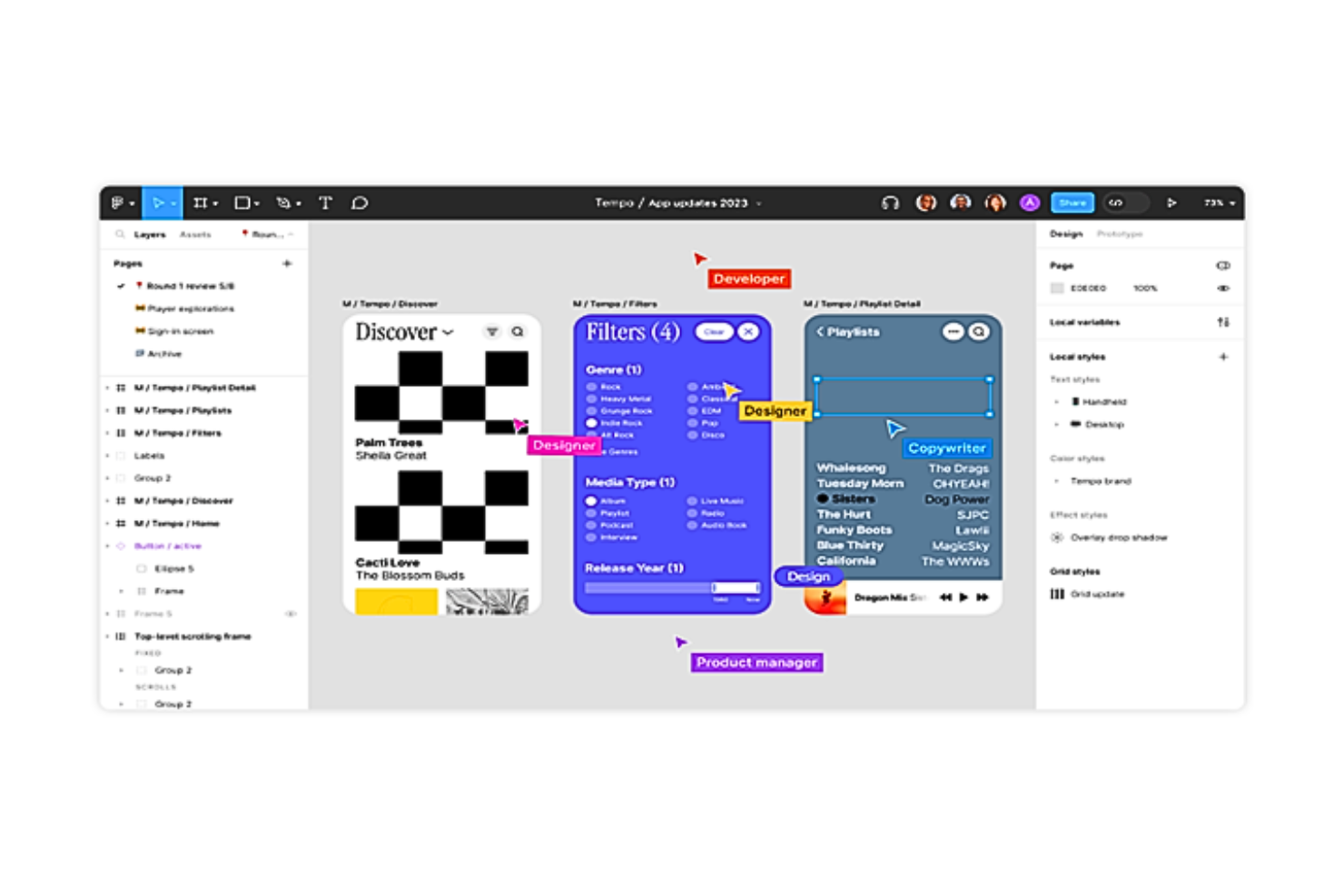
Figma è un leader nel settore dei software per il web design. La piattaforma è basata su cloud e promette una collaborazione senza interruzioni. La sua interfaccia di progettazione “multiplayer” con controllo di versione è un vero piacere per designer e sviluppatori di tutto il mondo.
Perché ho scelto Figma: Figma si conferma imbattibile quando si tratta di collaborazione efficace nel web design. Il “multiplayer” di Figma ti permette di commentare e annotare i progetti in tempo reale. Puoi anche creare ramificazioni per provare diverse opzioni di design e successivamente unire gli aggiornamenti usando sovrapposizioni dinamiche. La piattaforma offre altre funzionalità, come la caratteristica OpenType che consente di personalizzare i progetti con font variabili.
Inoltre, Figma traccia i contributori responsabili del workflow di un progetto. Nelle “pagine di progetto”, ad esempio, puoi visualizzare ogni progetto; nelle “pagine di team e organizzazione”, puoi vedere ogni contributore. Per vedere i file più recenti su cui ciascuno ha lavorato, basta cliccare sui rispettivi profili utente. Il software consente anche di condividere file tramite un link diretto oppure di incorporarlo in altri strumenti.
Caratteristiche principali e integrazioni di Figma
Caratteristiche includono la possibilità di trasformare file statici in elementi web interattivi. Puoi collegare elementi di design dell’interfaccia utente, animare oggetti, specificare interazioni e utilizzare GIF per esprimere motion design, elementi video e animazioni. La libreria di Figma contiene componenti riutilizzabili con ricerca rapida e funzioni drag-and-drop.
Integrazioni includono oltre 30 strumenti, come Asana, Bubble, Confluence, Dropbox, Flinto, GitLab, Lingo, Microsoft Teams, Mixpanel, ProtoPie, Storybook, UxTweak e altri. Inoltre, puoi utilizzare la sua API e i webhooks per creare integrazioni personalizzate.
Pros and Cons
Pros:
- Numerosi widget per facilitare la collaborazione nei workspace
- Auto-layout consente il ridimensionamento automatico e riduce le iterazioni stretch-to-fill
- Piano gratuito generoso
Cons:
- Ritardi occasionali nei tempi di caricamento
- Un po’ lento su Windows rispetto a Mac

Duda
Ideale per la creazione di siti web white-label

Duda è una piattaforma per creare e gestire siti web con velocità e flessibilità. È pensata per team e agenzie che desiderano progettare, lanciare e mantenere siti in un unico posto. Lo strumento ti aiuta a realizzare siti web che funzionano bene su tutti i dispositivi mantenendo una coerenza nel design.
Perché ho scelto Duda: Duda offre opzioni white-label affinché la tua agenzia possa proporre siti web sotto il proprio marchio. Puoi impostare modelli, gestire le autorizzazioni dei clienti e controllare i livelli di accesso. La piattaforma ti consente inoltre di gestire più progetti contemporaneamente grazie agli strumenti di collaborazione tra team. Con il suo editor di design, puoi effettuare modifiche rapidamente e vedere i risultati in tempo reale.
Caratteristiche e integrazioni principali di Duda
Caratteristiche includono un editor drag-and-drop che rende semplice la creazione di siti per te e il tuo team. Puoi costruire design reattivi che si adattano perfettamente a desktop, tablet e mobile. Sono disponibili anche strumenti per la raccolta di contenuti che aiutano a ottenere più rapidamente le informazioni dai clienti.
Integrazioni includono Google Analytics, Google Sheets, Google Drive, Dropbox, HubSpot, Mailchimp, Shopify e Zapier.
Pros and Cons
Pros:
- Funzionalità white-label per la tua agenzia
- Configurazione rapida di più siti
- Impostazioni flessibili per i permessi dei clienti
Cons:
- Controllo limitato sul design avanzato
- Più difficile personalizzare layout complessi

Ideale per sviluppare progetti mobile-first responsivi
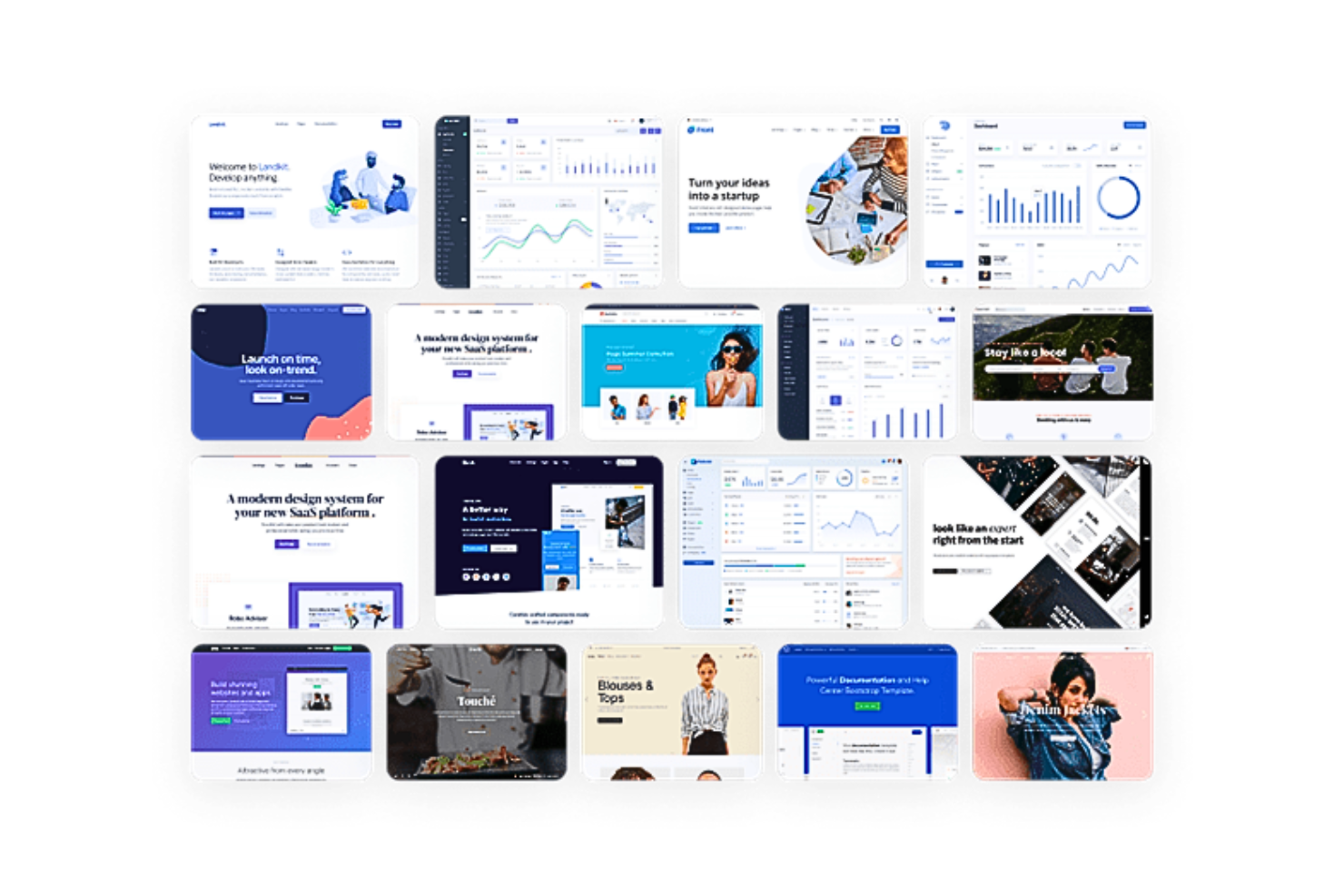
Bootstrap fornisce affidabili framework HTML, CSS e JavaScript per siti web responsivi. È un framework open-source che offre compatibilità multipiattaforma. Utilizzando sistemi di griglia e componenti predefiniti, Bootstrap aiuta a sviluppare rapidamente progetti mobile-first.
Perché ho scelto Bootstrap: Bootstrap consente un'implementazione semplice installando i suoi fogli di stile Systematically awesome (Sass) e i file JavaScript tramite package manager oppure includendoli tramite CDN. Utilizzando le personalizzazioni di Sass per un'architettura modulare, puoi abilitare opzioni globali come gradienti e ombre e scrivere CSS personalizzato con variabili, mappe e funzioni.
Inoltre, queste variabili CSS possono sostituire le variabili globali, di componenti o di classi di utilità per modificare gli stili del tema, i colori e gli stili dei caratteri. Bootstrap offre anche una Utility API, che funge da mappa Sass ricca di funzionalità e personalizzabile. Combinando queste capacità, Bootstrap è ideale per gli utenti che cercano il pieno controllo sul design e sullo sviluppo del sito.
Caratteristiche distintive e integrazioni di Bootstrap
Caratteristiche includono l'assortimento di potenti plugin JavaScript che possono essere integrati tutti senza jQuery. Queste estensioni possono aggiungere menu a scomparsa, modali, popover, tooltip ed elementi nascosti off-canvas. Il JavaScript usato in Bootstrap è HTML-first, il che significa che i plugin vengono aggiunti con gli attributi data all'interno del tuo HTML.
Inoltre, Bootstrap offre una libreria open-source di icone SVG chiamata Bootstrap Icons, con oltre 1800 glifi progettati per funzionare in qualsiasi progetto sia come SVG che come font di icone. Entrambe queste opzioni permettono la scalabilità vettoriale e la personalizzazione tramite CSS. Bootstrap dispone anche di un Marketplace ufficiale dei Temi, ricco di nuovi plugin, elementi web, documentazione e strumenti di sviluppo avanzati.
Integrazioni attualmente non disponibili.
Pros and Cons
Pros:
- Componenti pre-costruiti
- Interfaccia utente predefinita per il controllo dei form con validazioni
- Funzionalità come layout a griglia, classi di padding, ecc., per la reattività mobile
Cons:
- Scarsa compatibilità tra versioni
- Opzioni di personalizzazione e combinazioni di colori limitate

Webflow
Ideale per creare web design responsive in un builder visuale in tempo reale
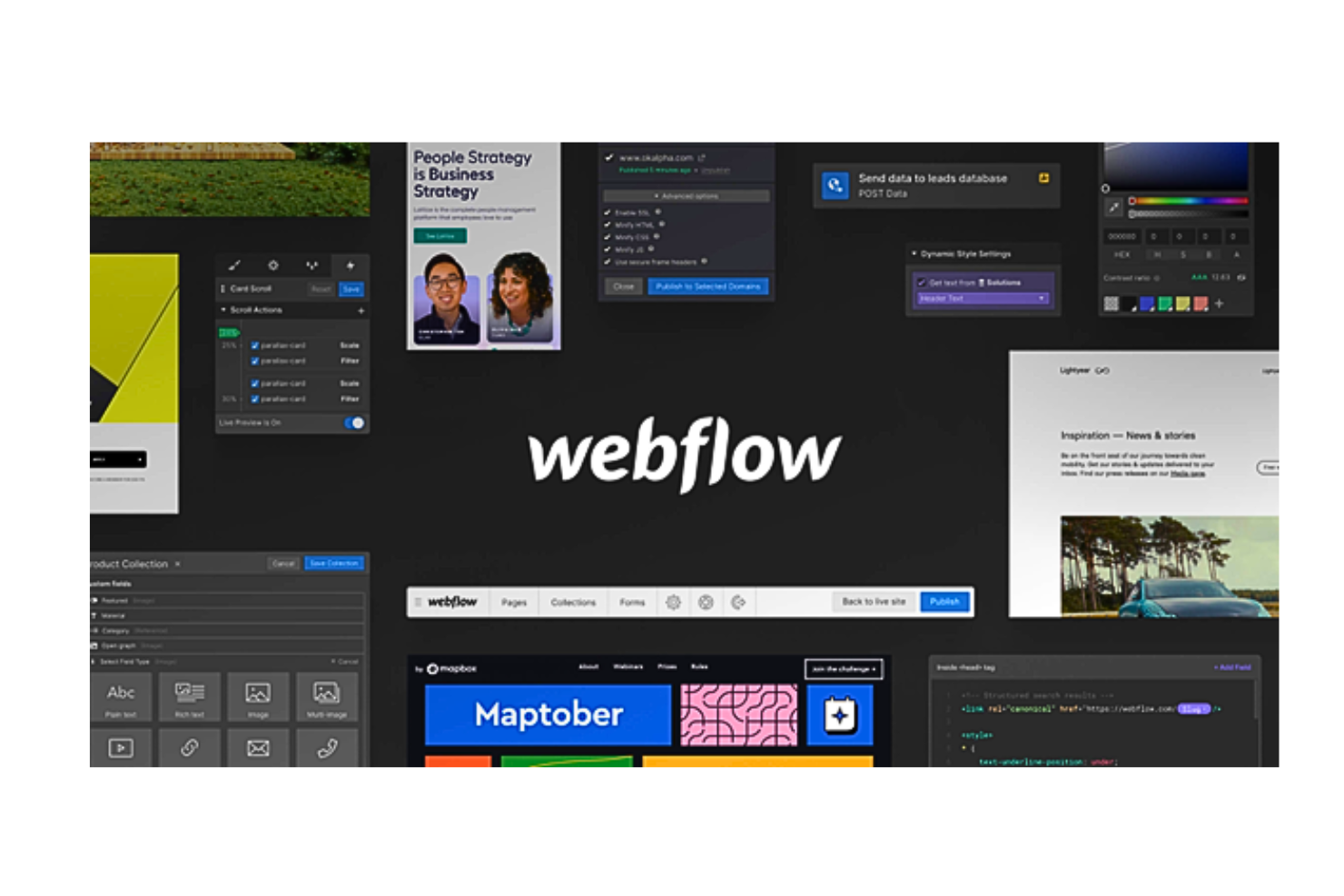
Webflow è un software di web design no-code che consente agli utenti di progettare e pubblicare siti web completamente responsive. La piattaforma offre un’interfaccia intuitiva progettata per generare codice HTML5, CSS3 o JavaScript per qualsiasi esigenza, dai layout personalizzati alle animazioni complesse. Con elementi non formattati, componenti riutilizzabili e codice pronto per la pubblicazione, Webflow è una piattaforma completa per la creazione di design web professionali.
Perché ho scelto Webflow: Con Webflow puoi avere il pieno controllo di CSS3, HTML5 e JavaScript in un canvas completamente visuale. Puoi trascinare elementi HTML non stilizzati e utilizzare la funzione Quick Stack per modificare rapidamente le strutture del sito. Inoltre, Webflow ti permette di sfruttare componenti riutilizzabili predefiniti, come barre di navigazione, footer, slider e tab, per personalizzare ulteriormente i tuoi design.
Inoltre, puoi creare classi CSS riutilizzabili per modificare lo stile su più elementi. Puoi anche cambiare layout passando da flexbox e griglie CSS a inline-block e posizionamento assoluto. La personalizzazione fine della tipografia è un’altra funzionalità interessante di Webflow. La piattaforma permette anche agli sviluppatori di aggiungere facilmente qualsiasi codice personalizzato ai progetti web.
Caratteristiche principali e integrazioni di Webflow
Le caratteristiche includono le sue solide integrazioni con CMS nativo e prodotti e-commerce. Grazie a queste estensioni puoi costruire il tuo sito web con contenuti reali, non dati fittizi.
Inoltre, Webflow dispone di uno stack di hosting di livello mondiale supportato da certificazioni SSL e ISO 27018. Il software consente anche di esportare il codice in un file ZIP ed è compatibile con più browser.
Le integrazioni includono oltre 50 strumenti, come Astroic, Census, Chaty, fluidSEO, HubSpot, Jasper, Memberstack, NoQuestionYet, PageFactory, Typeform, Unsplash, Vidzflow e altri. Inoltre puoi utilizzare le sue API e i webhooks per creare integrazioni personalizzate.
Pros and Cons
Pros:
- Prototipazione live attraverso la collaborazione in tempo reale
- Funzioni come pannelli di visualizzazione, modali, ecc. rendono i design più interattivi
- Oltre 1000 template di siti responsive predefiniti per principianti
Cons:
- Limiti occasionali alle modifiche di codice personalizzato
- Non dispone di un'app mobile

Marvel
Il miglior software di web design per prototipazione rapida
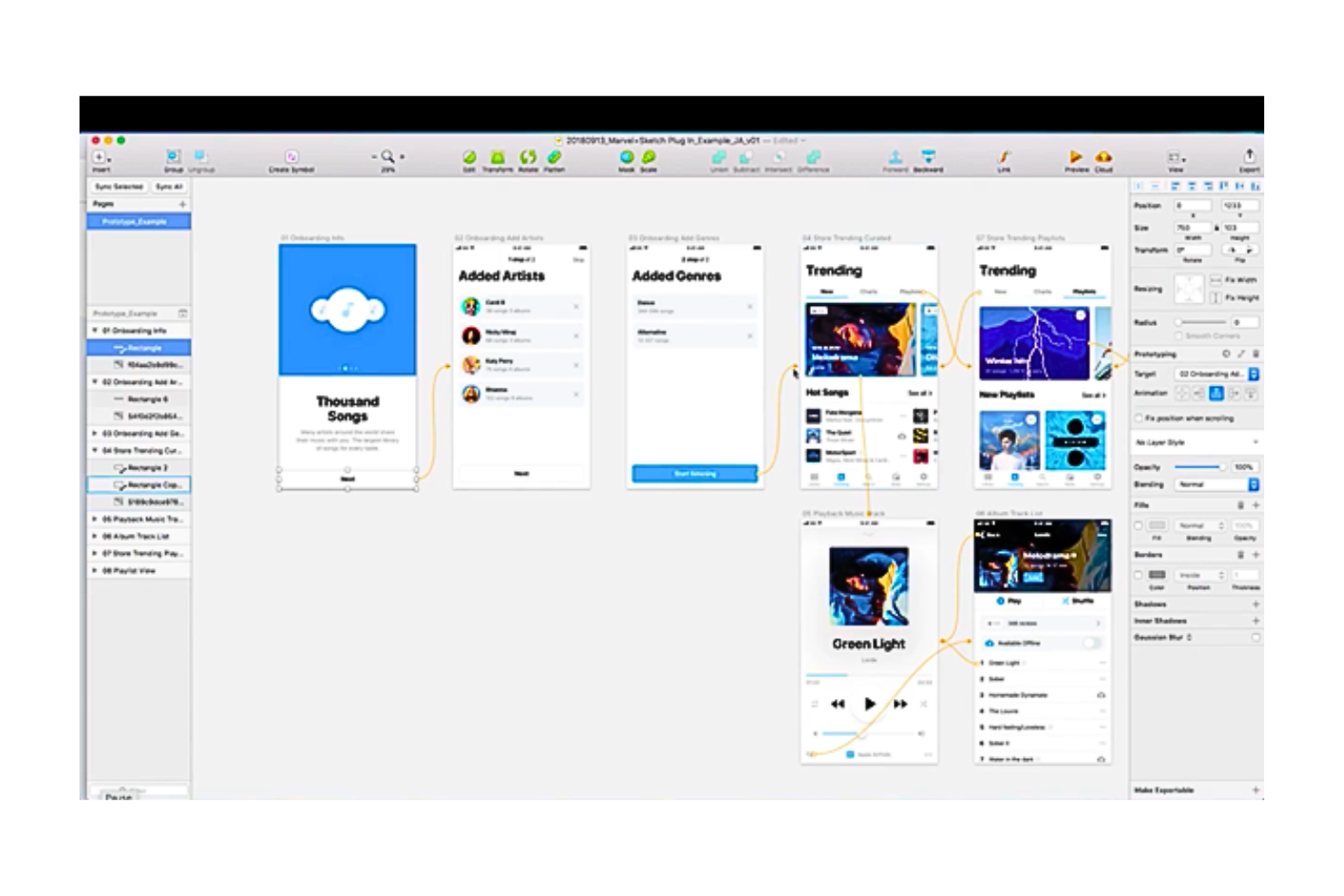
Marvel è un software di web design che permette ai team di design di generare specifiche di progettazione. È lo strumento perfetto per chi desidera creare rapidamente wireframe e prototipi senza codice e dare una struttura concreta alle proprie idee di design.
Perché ho scelto Marvel: Marvel offre una piattaforma centralizzata che unisce tutti gli aspetti del processo di web design, dal wireframing alla prototipazione, ai test utente, fino alla consegna finale agli sviluppatori. Offre solide funzionalità collaborative per lavorare in mobilità. Gli utenti possono accedere all’ampia libreria Marvel con milioni di asset digitali, foto stock e icone da cui trarre ispirazione.
Inoltre, Marvel ti aiuta a superare le complessità nello spiegare la gerarchia del sito e i percorsi utente nei tuoi mockup di design agli stakeholder; invece, puoi mostrarli attraverso prototipi online interattivi che non richiedono codice. Ciò rende molto semplice creare web design personalizzati che siano comprensibili a tutti.
Funzionalità e integrazioni principali di Marvel
Funzionalità che spiccano includono la funzione integrata di user testing e ricerca, Ballpark. Consente agli utenti Marvel di raccogliere feedback di alta qualità su domande, testi di marketing, design e prototipi (Sketch e Figma) utilizzando task e video.
Inoltre, lo strumento Handoff della piattaforma ottimizza il passaggio dal design allo sviluppo in pochi secondi. Basta un clic per generare il codice CSS, Swift e Android XML dai tuoi prototipi. Inoltre, Marvel permette di garantire al team e agli stakeholder completa visibilità e controllo su tutti i progetti, tramite cartelle, commenti e annotazioni.
Integrazioni includono più di 10 applicazioni di terze parti come Dropbox Paper, Jira, Microsoft, Niice, Sketch, Smartmockups, YouTube, Zeroheight e altre. Marvel si integra anche con quattro strumenti sviluppati dalla propria piattaforma proprietaria, Marvel LABS, tra cui BotBot, Dashboard, Keynote e Userflows.
Pros and Cons
Pros:
- Interfaccia utente pulita e semplice con elementi web a disposizione automatica
- Link dei progetti condivisibili per un facile accesso ai prototipi
- Le librerie di team per asset digitali e UI kit aiutano a mantenere la coerenza del design
Cons:
- Funzionalità di animazione limitate e nessuna versione offline
- Non supporta la creazione di gruppi all'interno dei prototipi

Ideale per la prototipazione di applicazioni web e mobile
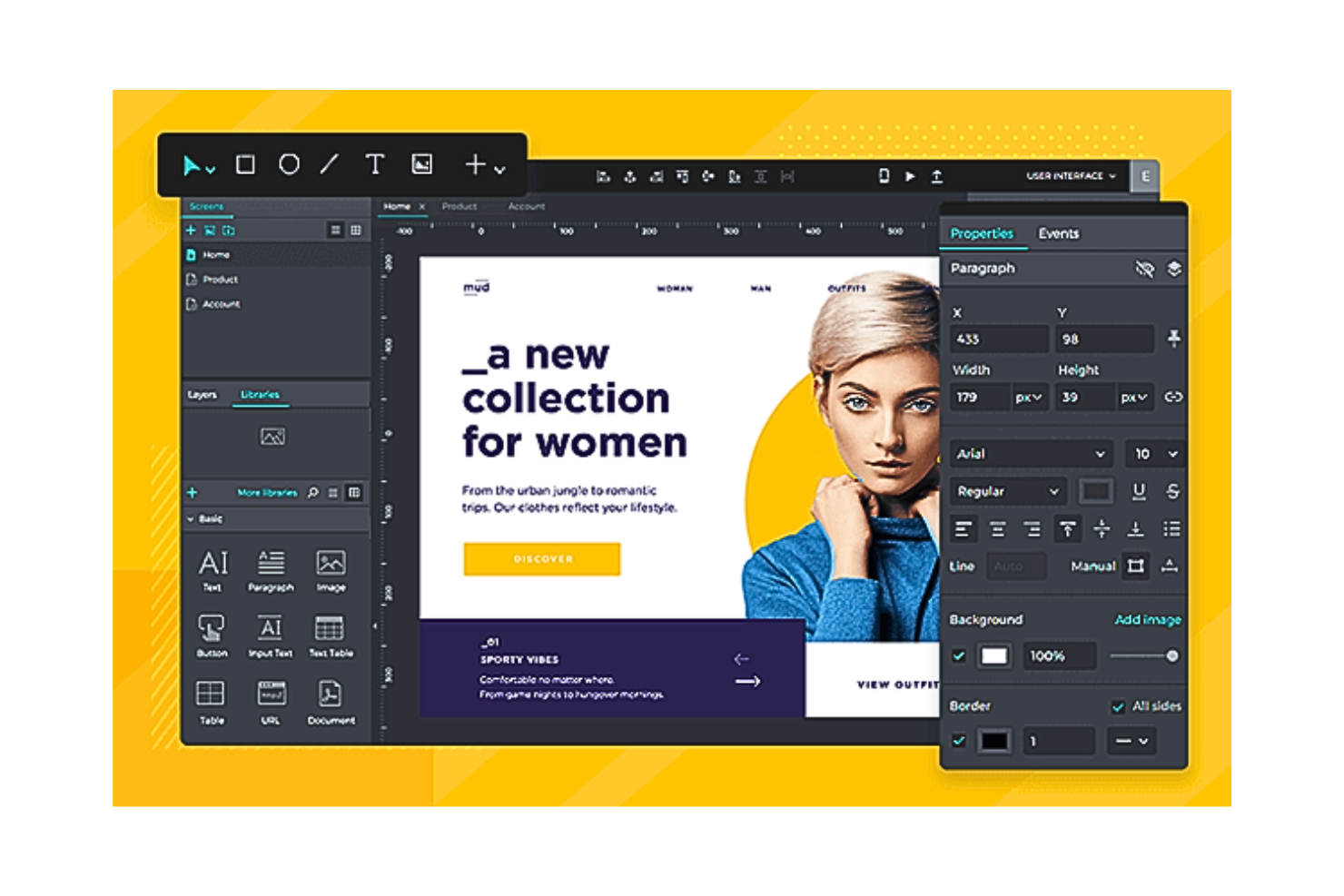
Justinmind è una piattaforma di web design tutto-in-uno che genera prototipi interattivi per applicazioni online e mobile. Consente inoltre di creare grafiche interattive, testare l'usabilità, scambiare feedback nei team e gestire i requisiti di design in modo intuitivo. Justinmind è facile da usare per i principianti e aiuta a prototipare app mobile-first per utenti iOS e Android.
Perché ho scelto Justinmind: Justinmind è ideale per creare rapidamente mockup, prototipi e wireframe di prima versione. Il software dispone di UI kit preinstallati che aiutano a creare diagrammi di flusso e interfacce utente wireframe sia per applicazioni iOS che Android. Ti permette anche di scaricare kit UI aggiuntivi che supportano la progettazione di app per altri dispositivi, inclusi Apple Watch e Google Glass.
Caratteristiche e integrazioni di spicco di Justinmind
Funzionalità includono le sue mappe di calore integrate per il test degli utenti che permettono di comprendere quali sezioni del tuo sito web ricevono più impressioni e clic. Questo è particolarmente utile per i siti e-commerce. Inoltre, Justinmind dispone di solide capacità per la creazione, gestione e supporto di un negozio digitale e-commerce.
Gli emulatori iOS e Android di Justinmind sono anche un'ottima aggiunta al tuo processo di web design poiché emulano le funzionalità esatte della tua applicazione per il testing degli utenti, anche se non utilizzi un dispositivo mobile.
Integrazioni comprendono oltre 10 applicazioni di terze parti, come Adobe XD, Adobe Illustrator, Atlassian Jira, Azure DevOps, Clicktale, Crazy Egg, Figma, Hotjar, Photoshop, Sketch, UserTesting, Validately e altre ancora. Inoltre, puoi utilizzare la sua API per creare integrazioni personalizzate.
Pros and Cons
Pros:
- Prototipazione rapida
- Ottima assistenza clienti
- Consente di realizzare contemporaneamente due o tre diverse iterazioni UI/UX
Cons:
- Mancano documentazione adeguata e tutorial
- Condividere il design e visualizzare le risposte del sistema è complicato

WordPress
La migliore piattaforma di web design con funzionalità CMS avanzate
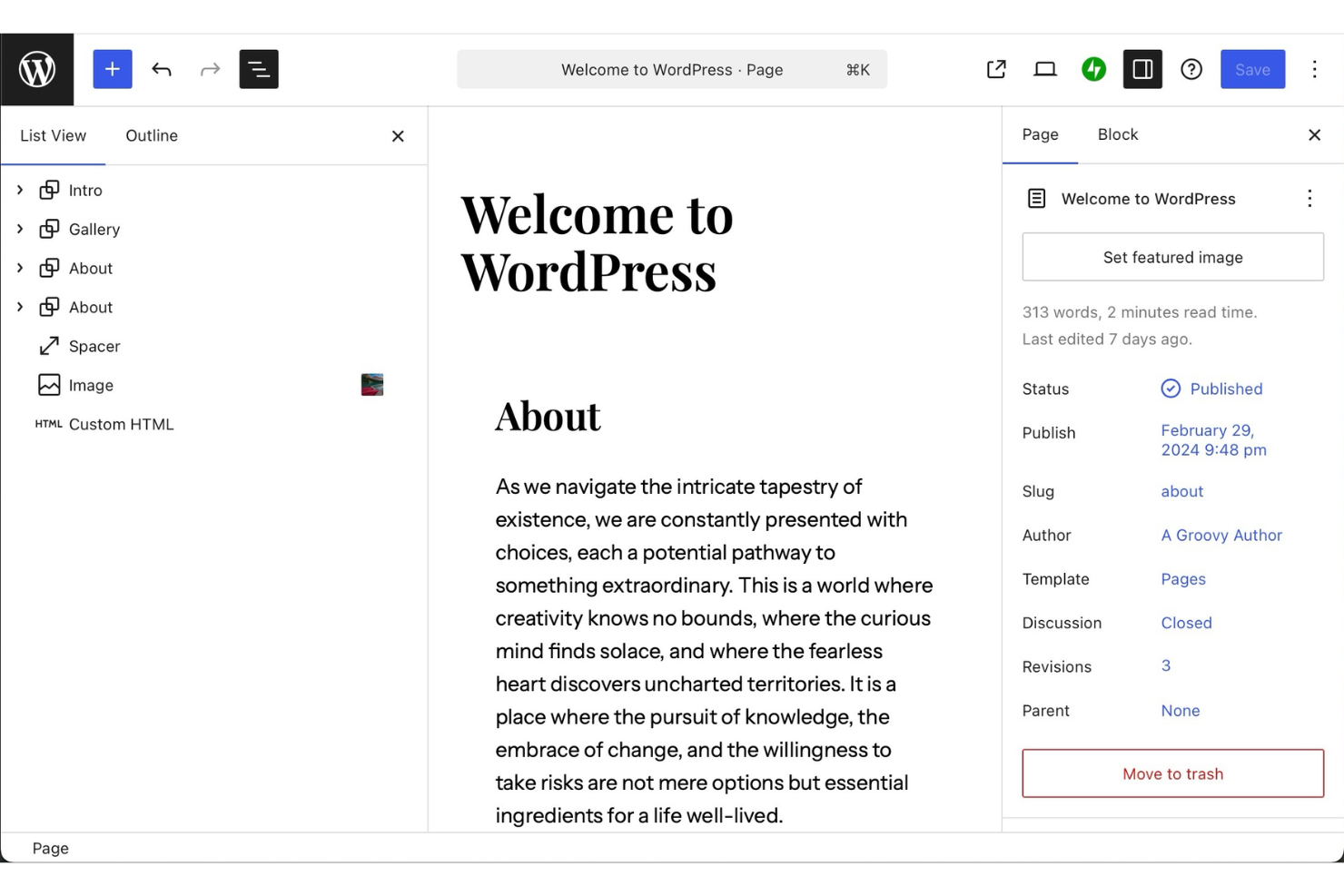
WordPress è una piattaforma di pubblicazione e design che aiuta individui e team a creare siti web e gestire i contenuti in un unico posto. È utilizzata da chi desidera realizzare siti, pubblicare articoli e organizzare contenuti digitali senza aver bisogno di competenze tecniche avanzate. Lo strumento facilita la progettazione, l’aggiornamento e la manutenzione di siti web di qualsiasi dimensione.
Perché ho scelto WordPress: WordPress ti permette di creare e personalizzare siti gestendo al contempo tutti i tuoi contenuti da un’unica piattaforma. Puoi progettare con temi e blocchi che offrono pieno controllo sui layout. Lo strumento include anche funzionalità come la pianificazione dei contenuti, la gestione dei media e l’analisi del sito. Con hosting e sicurezza integrati, non devi preoccuparti dell’impostazione tecnica.
Caratteristiche e integrazioni distintive di WordPress
Le funzionalità includono temi per il sito modificabili in layout e stile, strumenti multimediali per caricare e organizzare file, e la pianificazione dei contenuti che aiuta nella programmazione anticipata. Puoi anche utilizzare opzioni SEO integrate per ottimizzare gli articoli. La dashboard centralizza tutto, permettendoti di gestire il sito con facilità.
Le integrazioni comprendono Google Analytics, Mailchimp, WooCommerce, PayPal, Facebook, Twitter, LinkedIn, Stripe, Instagram ed Eventbrite.
Pros and Cons
Pros:
- Ampia gamma di template di design
- Pianificazione dei contenuti semplice per i team
- Personalizzazione flessibile con i blocchi
Cons:
- I plugin potrebbero richiedere aggiornamenti frequenti
- I temi hanno limiti di personalizzazione variabili
Altri software per il web design
Ecco alcune altre opzioni di software per il web design che non sono entrate nel mio elenco, ma che vale comunque la pena prendere in considerazione:
- Adobe Dreamweaver
Ideale per sviluppatori front-end tecnici
- Google Web Designer
Ideale per creare design grafici animati
- Designmodo
Il miglior software di web design con hosting gratuito
- Zeplin
La migliore piattaforma di web design per passaggi di consegna senza intoppi
- Durable
Ideale per la creazione rapidissima di siti tramite IA
- Gamma
Ideale per la creazione di contenuti guidata dall'IA


Come Valuto i Software di Web Design
Da un designer freelance che consegna un sito Webflow a uno sviluppatore, a un piccolo imprenditore che lancia un negozio online con Squarespace in un weekend, il software di web design si trova all’incrocio tra visione creativa ed esecuzione tecnica in modi che cambiano completamente a seconda di chi ha il mouse in mano. Considero ogni strumento di questa lista su due livelli: ciò che deve offrire di base per meritare un posto, e ciò che lo rende davvero la scelta migliore rispetto agli altri concorrenti.
Funzionalità Principali (Requisiti Minimi per Questa Lista)
Per il software di web design, le funzionalità chiave che testo e valuto sono:
- Interfaccia di progettazione visuale: Ogni strumento deve consentirti di comporre e stilizzare i layout delle pagine in maniera visuale, che sia una vera area di drag-and-drop o un editor WYSIWYG strutturato. Provo quanto sia intuitivo posizionare gli elementi, regolare gli spazi e perfezionare la tipografia senza scrivere codice.
- Controlli di design responsivo: Controllo se lo strumento consente di modificare i layout a breakpoint specifici e di vedere l’anteprima di come vengono visualizzate le pagine su desktop, tablet e cellulare. Una homepage perfetta a 1440px ma che si rompe su un iPhone non è un design finito.
- Librerie di template e componenti: Cerco template di partenza che vadano oltre i segnaposto generici, oltre a componenti riutilizzabili come barre di navigazione, footer e card che fanno davvero risparmiare tempo nella creazione di siti multi-pagina.
- Gestione di asset e media: Caricare immagini, cambiare font e incorporare video dovrebbe essere semplice. Valuto se lo strumento gestisce l’ottimizzazione delle immagini automaticamente e se supporta il caricamento di font personalizzati o l’integrazione con Google Fonts.
- Pubblicazione o esportazione del codice: Il lavoro di design deve trasformarsi in un sito web attivo. Verifico se lo strumento pubblica direttamente su un dominio ospitato, esporta HTML/CSS pulito o fornisce una chiara procedura di handoff per gli sviluppatori.
- Basi SEO: Verifico che sia possibile modificare i titoli delle pagine, le meta descrizioni, gli slug degli URL, i testi alternativi e la gerarchia degli heading senza escamotage. Uno strumento che nasconde queste impostazioni, o le omette del tutto, svantaggia ogni sito nei motori di ricerca.
- Form e elementi interattivi: Al minimo, mi aspetto un builder di form integrato per contatti o acquisizione lead, menu di navigazione funzionanti e stati interattivi di base come gli effetti hover su pulsanti e link.
Se uno strumento non fa queste cose in modo affidabile, è stato escluso a prescindere da tutto il resto.
Funzionalità Distintive (Cosa Fa la Differenza)
Oltre alle basi, cerco collaborazione di squadra in tempo reale, strumenti e-commerce integrati, generazione di siti o contenuti tramite IA, supporto avanzato a design system, integrazioni flessibili con terze parti e funzionalità di workflow per la consegna al cliente. Quando uno strumento mi fa risparmiare ore nella creazione di siti multi-pagina, automatizza controlli di accessibilità, o consente a più membri del team di modificare simultaneamente, questa è la vera svolta.
Cosa Considero Oltre alle Funzionalità
Valuto anche per chi è davvero pensato ogni strumento. Un proprietario di una panetteria da solo ha bisogno di una soluzione diversa rispetto a un’agenzia che gestisce 20 siti clienti. Testo la trasparenza dei prezzi, la qualità dell’onboarding, le prestazioni di hosting e le risorse di apprendimento. Anche la forza della community, la reattività del supporto clienti e il costo totale di proprietà sono fattori determinanti, perché un piano da $16/mese che richiede $50 in componenti aggiuntivi racconta una storia diversa rispetto al prezzo che si vede.
Come scegliere il software per il web design
È facile perdersi in lunghi elenchi di funzionalità e strutture tariffarie complesse. Per aiutarti a rimanere concentrato mentre affronti il tuo processo di selezione del software, unico per le tue esigenze, ecco una lista di fattori da tenere presenti:
| Fattore | Cosa considerare |
|---|---|
| Scalabilità | Il software crescerà insieme alle esigenze del tuo team? Verifica se è in grado di gestire un aumento del traffico o progetti più complessi con l'espansione della tua attività. |
| Integrazioni | Funziona con gli strumenti che utilizzi attualmente? Controlla se si integra con CMS, strumenti di analisi e altre soluzioni su cui fai affidamento. |
| Personalizzazione | Puoi adattarlo al tuo marchio? Cerca flessibilità nella progettazione e opzioni per personalizzare modelli e layout. |
| Facilità d'uso | È intuitivo per il tuo team? Valuta la curva di apprendimento e la rapidità con cui il tuo team può adattarsi alla sua interfaccia. |
| Implementazione e avvio | Quanto velocemente puoi iniziare a utilizzarlo? Valuta la disponibilità di guide, tutorial e assistenza durante la configurazione iniziale. |
| Costo | Rientra nel tuo budget? Confronta i piani tariffari e verifica l'eventuale presenza di costi nascosti o commissioni aggiuntive. |
| Misure di sicurezza | I tuoi progetti e i tuoi dati sono al sicuro? Assicurati che disponga di solide misure di sicurezza, come la crittografia e aggiornamenti regolari. |
| Disponibilità dell'assistenza | Puoi ricevere aiuto quando ne hai bisogno? Considera la disponibilità dei canali di assistenza clienti, come chat, email o telefono. |
Che cos'è il software per il web design?
Il software di progettazione web è uno strumento che aiuta a creare e gestire layout e design di siti web. A seconda della piattaforma, questo lavoro può essere svolto in un browser oppure tramite software di progettazione web offline installato localmente.
Questi strumenti vengono utilizzati da designer, sviluppatori e professionisti del marketing per creare siti web visivamente accattivanti e funzionali. Funzionalità come la progettazione mediante trascinamento, la personalizzazione dei modelli e il supporto alla progettazione reattiva aiutano a creare siti coinvolgenti e facili da usare. Nel complesso, questi strumenti semplificano la creazione di siti web che soddisfano le esigenze aziendali e migliorano l'esperienza degli utenti.
Funzionalità
Quando scegli un software di progettazione web, presta attenzione alle seguenti funzionalità fondamentali:
- Progettazione mediante trascinamento: consente agli utenti di disporre facilmente gli elementi su una pagina senza scrivere codice, rendendo la progettazione accessibile anche ai non sviluppatori.
- Personalizzazione dei modelli: offre modelli predefiniti che possono essere modificati per adattarsi all'identità visiva del marchio, riducendo il tempo necessario per creare il design.
- Supporto alla progettazione reattiva: garantisce che i siti web abbiano un buon aspetto su tutti i dispositivi, adattando automaticamente i layout alle diverse dimensioni dello schermo.
- Strumenti SEO: aiutano a ottimizzare i siti web per i motori di ricerca, migliorandone la visibilità e attirando più visitatori.
- Funzionalità di integrazione: consentono di collegarsi ad altri strumenti come CMS e sistemi di analisi, semplificando i flussi di lavoro e la gestione dei dati.
- Strumenti di collaborazione: permettono ai membri del team di lavorare insieme sui progetti in tempo reale, migliorando produttività e comunicazione.
- Opzioni di esportazione del codice: consentono di esportare codice HTML e CSS per un'ulteriore personalizzazione o integrazione con altre piattaforme.
- Integrazione dell'e-commerce: supporta funzionalità di vendita online, come carrelli degli acquisti e gateway di pagamento, per le aziende che desiderano vendere prodotti.
- Supporto multilingue: consente di creare siti web in più lingue, rivolgendosi a un pubblico più ampio.
- Funzionalità di sicurezza: include misure come la crittografia dei dati e aggiornamenti regolari per proteggere i siti web dalle minacce.
Vantaggi
L'implementazione di un software di progettazione web offre diversi vantaggi al team e all'azienda. Ecco alcuni dei risultati che puoi aspettarti:
- Processo di progettazione più rapido: le funzionalità di trascinamento e i modelli accelerano la creazione delle pagine web, facendo risparmiare tempo e fatica.
- Collaborazione migliorata: gli strumenti di collaborazione in tempo reale consentono ai membri del team di lavorare insieme in modo efficiente, migliorando la comunicazione e i risultati.
- Esperienza utente migliore: la progettazione reattiva garantisce che il sito web abbia un ottimo aspetto su qualsiasi dispositivo, migliorando la soddisfazione e il coinvolgimento dei visitatori.
- Maggiore visibilità: gli strumenti SEO integrati aiutano il sito a ottenere un posizionamento più elevato nei risultati di ricerca, attirando più visitatori.
- Risparmio sui costi: consentendo ai non sviluppatori di creare siti, le aziende risparmiano sull'assunzione di personale specializzato per le attività di progettazione web.
- Personalizzazione avanzata: la personalizzazione dei modelli e le opzioni di esportazione del codice offrono un maggiore controllo sull'aspetto e sulle funzionalità del sito web.
- Scalabilità: funzionalità come l'integrazione dell'e-commerce e il supporto multilingue consentono al sito web di crescere insieme alle esigenze aziendali.
Costi e prezzi
La scelta di un software di progettazione web richiede la comprensione dei vari modelli e piani tariffari disponibili. I costi variano in base alle funzionalità, alle dimensioni del team, ai componenti aggiuntivi e ad altri fattori; il software di progettazione web gratuito è disponibile come utile punto di partenza per i team con budget limitati. La tabella seguente riassume i piani comuni, i relativi prezzi medi e le funzionalità normalmente incluse nelle soluzioni software di progettazione web:
Tabella comparativa dei piani per il software di progettazione web
| Tipo di piano | Prezzo medio | Funzionalità comuni |
|---|---|---|
| Piano gratuito | $0 | Modelli di base, spazio di archiviazione limitato e supporto di base. |
| Piano personale | $5-$25/utente/mese | Modelli personalizzati, progettazione reattiva, strumenti SEO e supporto via e-mail. |
| Piano aziendale | $25-$75/utente/mese | Integrazioni avanzate, funzionalità di e-commerce, supporto prioritario e analisi. |
| Piano per grandi aziende | $75+/utente/mese | Soluzioni personalizzate, account manager dedicato, sicurezza avanzata e accesso API. |
Domande frequenti sui software di web design
Ecco alcune risposte alle domande comuni sui software di web design:
È necessario saper programmare per il web design?
La programmazione non è più un prerequisito per il web design. Molti strumenti contemporanei per la progettazione web offrono interfacce visive con funzionalità di trascinamento e rilascio e vaste raccolte di componenti predefiniti. Di conseguenza, puoi sfruttare la potenza dello sviluppo senza codice e pubblicare rapidamente i siti web.
Tuttavia, conoscere i linguaggi di programmazione HTML, CSS e JavaScript può offrire maggiore flessibilità e possibilità di personalizzazione per progetti web più complessi.
Come posso creare il mio sito web?
Puoi creare il tuo sito web in due modi: scegliere un costruttore di siti web oppure scrivere autonomamente il codice.
Se desideri progettare, sviluppare e lanciare rapidamente un sito, le piattaforme per la creazione di siti web come Wix, Squarespace o WordPress sono le tue alleate. Queste piattaforme semplificano l’intero processo utilizzando strumenti di trascinamento e rilascio e modelli predefiniti.
Tuttavia, puoi utilizzare programmi come Adobe Dreamweaver e imparare HTML, CSS e JavaScript se vuoi che il tuo sito offra maggiore personalizzazione e design originali.
Scegliere tra velocità e totale libertà creativa può essere difficile. In questi casi, considera gli obiettivi della tua attività, le risorse disponibili e la complessità del sito web che desideri.
Come si progetta un sito web e-commerce?
Per sviluppare un sito e-commerce, devi concentrarti su una strategia di progettazione incentrata sull’utente. Puoi farlo semplificando la navigazione, mantenendo un layout ordinato e consentendo ricerche rapide dei prodotti.
Molti utenti visitano i tuoi negozi dai loro telefoni cellulari. Di conseguenza, devi dare priorità alla responsività mobile del tuo sito e-commerce. Puoi rafforzare la fiducia nel brand attraverso immagini pertinenti e di alta qualità, descrizioni dettagliate dei prodotti e testimonianze positive dei clienti. Ridurre gli ostacoli diminuisce l’abbandono del carrello e semplifica l’esperienza utente complessiva.
Analizzare nel tempo il comportamento degli utenti utilizzando gli strumenti di analisi può aiutarti ulteriormente a migliorare le conversioni, modificare il design e ottimizzare il tuo sito web al massimo delle sue potenzialità. Un web design scadente può emarginare il tuo brand nel suo settore di nicchia. Dai un’occhiata a queste migliori pratiche per la progettazione delle pagine dei dettagli dei prodotti, così da realizzare al meglio il tuo prossimo sito web.
Cosa succede ora:
Se stai cercando un software per il web design, contatta gratuitamente un consulente SoftwareSelect per ricevere consigli.
Compili un modulo e fai una breve chiacchierata durante la quale il consulente approfondirà le tue esigenze specifiche. Poi riceverai una selezione ristretta di software da valutare. Ti supporterà anche durante l'intero processo di acquisto, comprese le negoziazioni sul prezzo.