

In qualità di responsabile di prodotto, conosci le difficoltà legate alla trasformazione di un'idea in un prototipo funzionante. Gli strumenti di prototipazione per Android possono semplificare questo processo, aiutandoti a visualizzare e perfezionare rapidamente i tuoi concetti.
Secondo la mia esperienza, questi strumenti sono preziosi per favorire la collaborazione e accelerare lo sviluppo. Consentono al tuo team di testare e perfezionare i progetti prima di impegnarsi in costose attività di sviluppo.
Ho testato e valutato in modo indipendente diversi strumenti di prototipazione per Android per offrirti un elenco imparziale delle scelte migliori. In questo articolo troverai informazioni sulle funzionalità, sull'esperienza utente e sugli elementi che distinguono ogni strumento.
Continua a leggere per scoprire le soluzioni migliori per le esigenze del tuo team.
Perché fidarsi dei nostri consigli sui software
6,700+
Reviews
20
Industry experts
16+
Evaluation factors
14
Years
Il nostro team testa e recensisce software dal 2012. In quanto product manager noi stessi, sappiamo quanto sia difficile — e importante — scegliere il software giusto.
Per questa guida, abbiamo valutato gli strumenti attraverso test pratici e ricerche indipendenti, assegnando un punteggio agli strumenti in base ai nostri criteri di selezione.
Le nostre recensioni riflettono il nostro giudizio editoriale umano, non un discorso di vendita.
Revisori esperti:
- Andrew LumbySenior TPM
- Cristiano ValimSenior UI/UX Lead


Tabella comparativa degli strumenti di prototipazione per Android
Questa tabella comparativa riassume i dettagli dei prezzi delle mie migliori selezioni di strumenti di prototipazione per Android.
| Tool | Best For | Trial Info | Price | ||
|---|---|---|---|---|---|
| 1 | Ideale per la prototipazione con un piano team gratuito permanente | Piano gratuito disponibile | A partire da 24.90 $/utente/mese (fatturato annualmente) | Website | |
| 2 | Ideale per facilitare il passaggio dalla progettazione allo sviluppo | Piano gratuito + dimostrazione gratuita disponibile | A partire da $12/utente/mese (fatturato annualmente) | Website | |
| 3 | Ideale per l'integrazione con altri prodotti della suite Adobe | Prova gratuita disponibile | Prezzi su richiesta | Website | |
| 4 | Ideale per simulazioni realistiche di app | Prova gratuita di 15 giorni | A partire da $29/mese | Website | |
| 5 | Ideale per il feedback degli stakeholder sui concept iniziali | Piano gratuito disponibile | A partire da $9/utente/mese (con fatturazione annuale) | Website | |
| 6 | Ideale per la collaborazione in tempo reale | Piano gratuito disponibile | Da $16/utente/mese (con fatturazione annuale) | Website | |
| 7 | Ideale per la gestione dei sistemi di progettazione | Piano gratuito + prova gratuita di 14 giorni disponibile | A partire da $40/utente/mese (con fatturazione annuale) | Website | |
| 8 | Ideale per l'adattabilità del design responsivo | Piano gratuito disponibile | A partire da $19/utente/mese | Website | |
| 9 | Ideale per prototipi complessi con funzionalità avanzate | Piano gratuito disponibile | A partire da $29/utente/mese (con fatturazione annuale) | Website | |
| 10 | Ideale per creare prototipi mobili altamente interattivi | Piano gratuito disponibile | A partire da $25/mese (fatturato annualmente) | Website |


Recensioni dei migliori strumenti di prototipazione per Android
Di seguito trovi i miei riepiloghi dettagliati dei migliori strumenti di prototipazione per Android inclusi nella mia selezione. Le mie recensioni offrono un’analisi approfondita delle funzionalità principali, dei pro e contro, delle integrazioni e dei casi d’uso ideali di ogni strumento, per aiutarti a trovare quello più adatto a te.
 Ideale per la prototipazione con un piano team gratuito permanente
- Piano gratuito disponibile
- A partire da 24.90 $/utente/mese (fatturato annualmente)
Visit WebsiteCustomer Rating:4.5/5This rating combines scores from multiple user review sites to reflect overall customer sentiment about the product.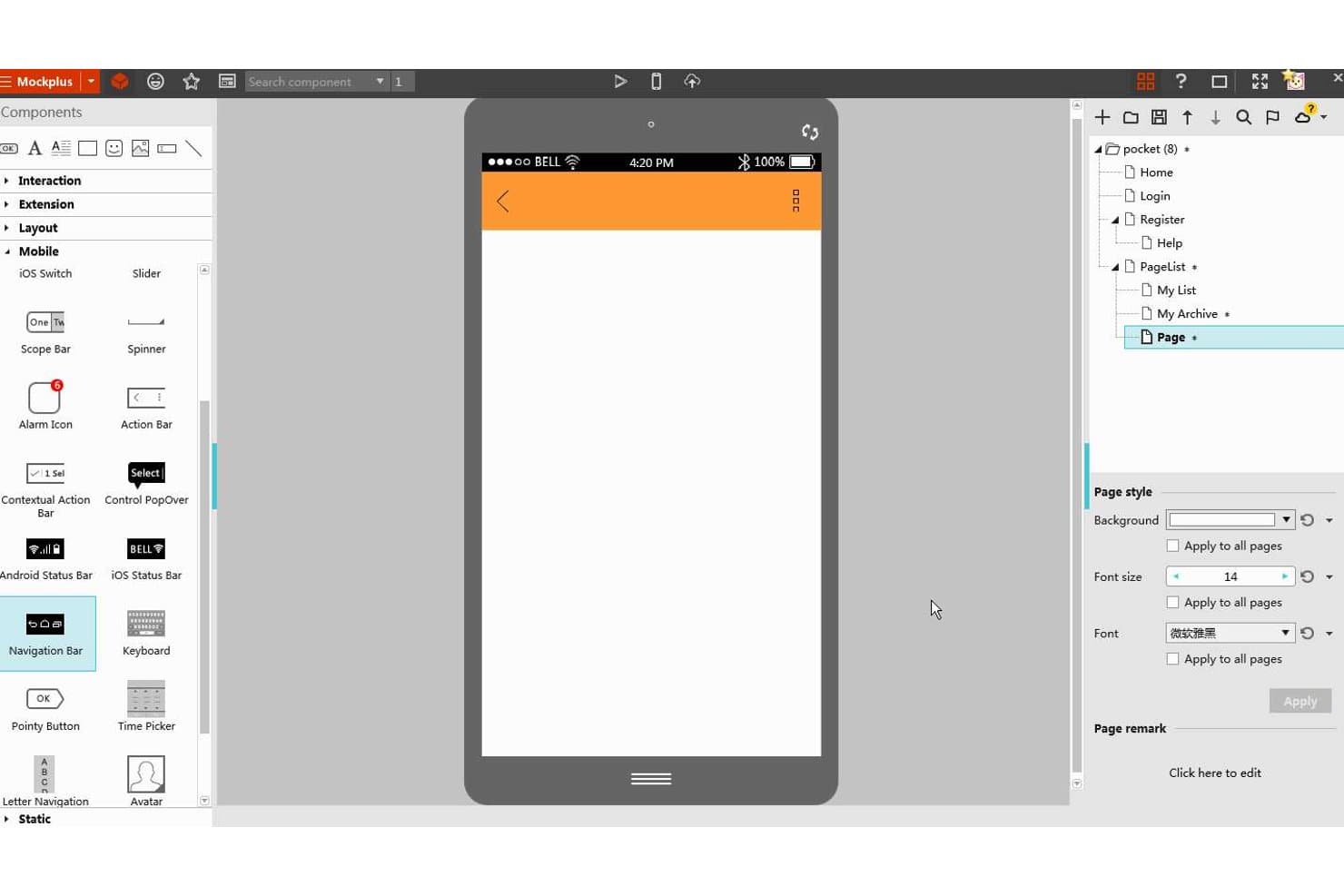
Mockplus consente agli utenti di progettare prototipi di app Android con componenti di interfaccia mobile. Mockplus RP è uno strumento di prototipazione senza codice basato su browser che combina wireframing tramite trascinamento, una libreria integrata di componenti Material Design, collegamento interattivo tra schermate e collaborazione e passaggio di consegne basati sul cloud.
Per chi è più adatto Mockplus?
Mockplus RP è particolarmente adatto a piccoli team di progettazione e startup che devono passare rapidamente dal wireframe al prototipo interattivo senza una curva di apprendimento ripida o un budget elevato per gli strumenti.
Perché ho scelto Mockplus
Ho incluso Mockplus tra le mie scelte migliori perché il suo piano team gratuito permanente offre a un massimo di 10 utenti la co-modifica in tempo reale senza data di scadenza, una caratteristica rara negli strumenti di prototipazione. Apprezzo in particolare la sua libreria dedicata a Material Design, aggiunta nel 2023, che consente ai team di trascinare componenti Material 3 predefiniti con anteprime degli stili in tempo reale direttamente sulle tavole Android. La sua Modalità di connessione e la vista Storyboard consentono inoltre di mappare visivamente flussi di navigazione completi, così gli stakeholder possono seguire la logica da una schermata all'altra prima ancora che venga scritta una sola riga di codice.
Funzionalità principali di Mockplus
- Co-modifica in tempo reale: più membri del team possono modificare contemporaneamente lo stesso prototipo, con le modifiche sincronizzate in tempo reale tra tutti i collaboratori.
- Importazione di file Axure: puoi importare direttamente in RP i file Axure, preservando circa il 95% dei dettagli originali dell'interfaccia e delle interazioni.
- Passaggio di consegne agli sviluppatori basato sul cloud: la pubblicazione su Mockplus Cloud genera automaticamente specifiche, redline, risorse scaricabili e frammenti di codice per Android, iOS e web.
- Controllo degli accessi basato sui ruoli: i team possono assegnare uno dei quattro ruoli di autorizzazione — Super amministratore, Amministratore, Membro o ospite — per gestire chi può visualizzare, modificare o commentare i progetti.
Integrazioni di Mockplus
Mockplus si integra con Figma, Sketch, Adobe XD, Photoshop e Axure tramite i plugin di Mockplus Cloud. Si collega anche a Jira, Slack, Confluence e Lark, ma non è documentata alcuna API pubblica.
Pros and Cons
Pros:
- I componenti Material 3 velocizzano il wireframing per Android
- Storyboard mappa chiaramente la navigazione tra più schermate
- La co-modifica in tempo reale supporta i team di progettazione distribuiti
Cons:
- I trigger gestuali non hanno una profondità di scorrimento documentata
- L'output di codice nativo Android resta non confermato
Learn more about Mockplus: Ideale per facilitare il passaggio dalla progettazione allo sviluppo
- Piano gratuito + dimostrazione gratuita disponibile
- A partire da $12/utente/mese (fatturato annualmente)
Visit WebsiteCustomer Rating:4.4/5This rating combines scores from multiple user review sites to reflect overall customer sentiment about the product.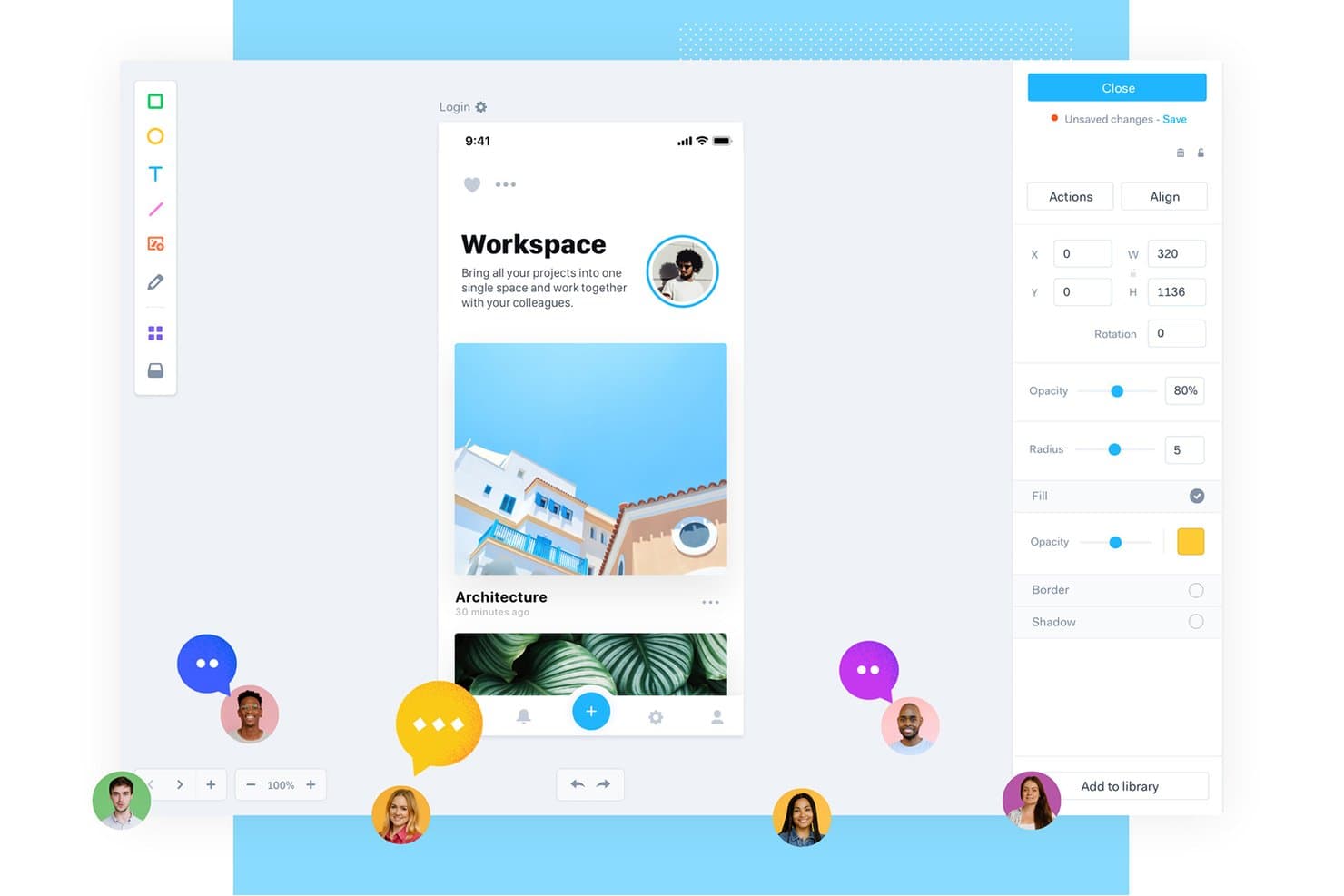
Marvel consente agli utenti di prototipare applicazioni mobili con strumenti di collaborazione in tempo reale. Marvel è uno strumento di progettazione e prototipazione basato su browser che include la creazione di strutture a bassa fedeltà, il collegamento interattivo delle schermate, i riscontri collaborativi e il passaggio agli sviluppatori, inclusa la generazione di codice XML per Android.
A chi è più adatto Marvel?
Marvel è adatto ai responsabili di prodotto e ai team interfunzionali snelli che devono passare dall'idea iniziale al passaggio agli sviluppatori senza affidarsi a un team di progettazione dedicato.
Perché ho scelto Marvel
Ho incluso Marvel tra le mie scelte principali perché il suo passaggio automatico agli sviluppatori lo distingue davvero: genera frammenti di codice XML per Android direttamente dai tuoi progetti, così gli sviluppatori ricevono misure precise, specifiche tipografiche e risorse esportabili in WEBP e SVG senza dover creare manualmente annotazioni tecniche. Mi piace anche il fatto che le annotazioni fissate consentano agli stakeholder di lasciare riscontri precisi a livello di schermata prima ancora che venga scritta una sola riga di codice. Questa combinazione di specifiche pronte per il codice e riscontri strutturati rende Marvel particolarmente adatto ai team snelli che passano rapidamente dall'idea alla realizzazione.
Funzionalità principali di Marvel
- Collegamento delle schermate basato su punti interattivi: Disegna aree cliccabili su qualsiasi schermata e collegale ad altre schermate per creare prototipi multipagina senza scrivere codice.
- Riproduzione dei prototipi sul dispositivo: L'applicazione Marvel per Android consente di aprire e riprodurre i prototipi direttamente su un dispositivo Android per visualizzarli sul dispositivo reale.
- Sincronizzazione con Sketch e Figma: Le estensioni dedicate consentono di importare direttamente nei progetti Marvel le tavole da disegno di Sketch o i riquadri di Figma, mantenendo aggiornati i progetti.
- Ruoli e autorizzazioni degli utenti: Assegna ruoli, dall'amministratore al revisore esterno, per controllare chi può modificare, commentare o visualizzare ogni progetto.
Integrazioni di Marvel
Marvel supporta integrazioni con Sketch, Figma, Jira, Confluence, Slack, Microsoft Teams e Zeroheight. Offre inoltre un'API GraphQL e la connettività con Zapier.
Pros and Cons
Pros:
- Genera frammenti XML per Android per il passaggio agli sviluppatori
- Le annotazioni fissate chiariscono i riscontri a livello di schermata
- Anteprime dei prototipi con punti interattivi nell'applicazione Android
Cons:
- Nessuna logica condizionale o gestione dello stato
- Nessuna libreria nativa di componenti Material Design
Learn more about Marvel: Ideale per l'integrazione con altri prodotti della suite Adobe
- Prova gratuita disponibile
- Prezzi su richiesta
Visit WebsiteCustomer Rating:4.2/5This rating combines scores from multiple user review sites to reflect overall customer sentiment about the product.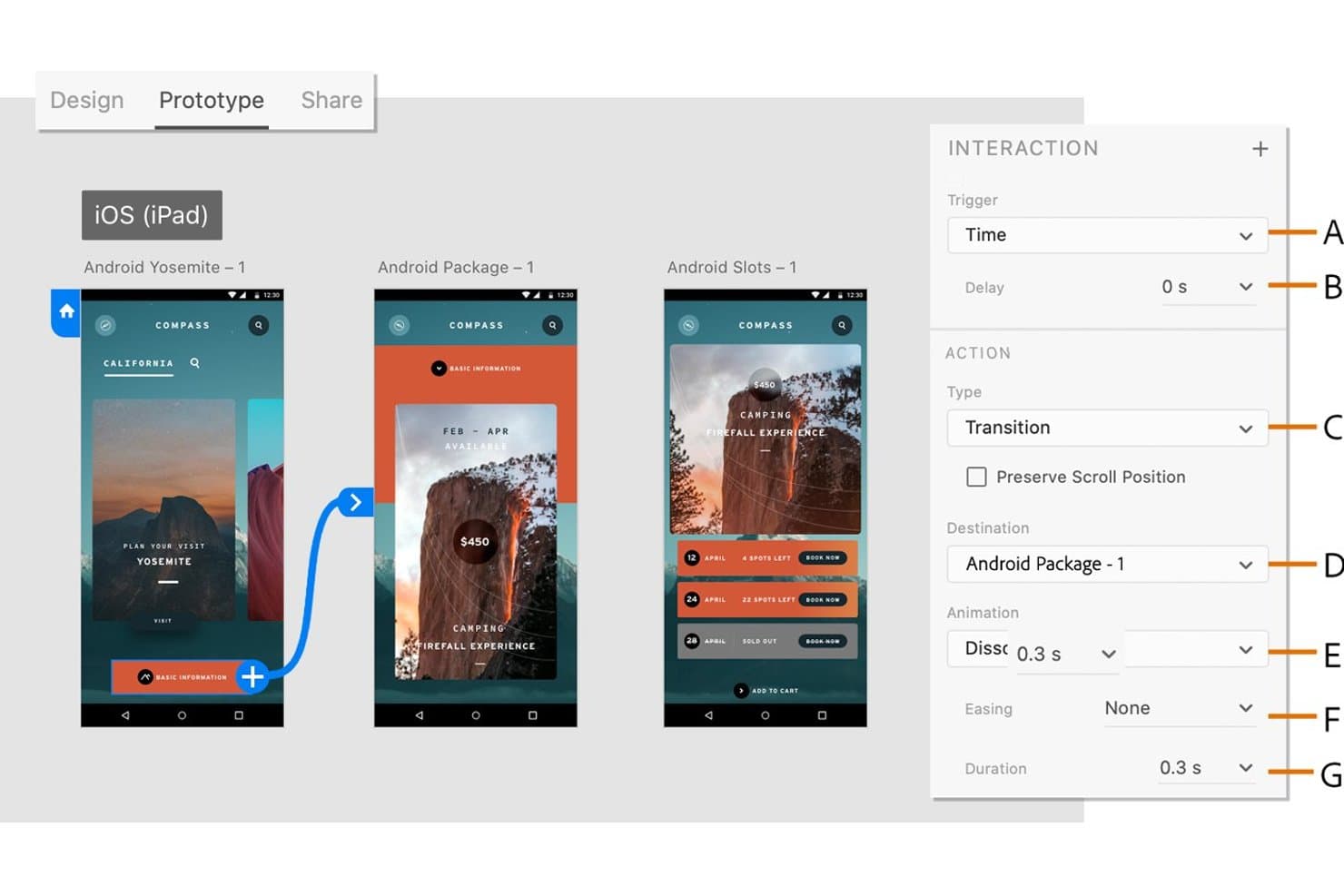
Adobe XD consente agli utenti di definire transizioni temporizzate tra le schermate dei prototipi Android. Adobe XD è uno strumento di progettazione e prototipazione UI/UX basato su vettori che supporta il collegamento interattivo delle schermate, la simulazione di gesti e animazioni, la progettazione basata su componenti e la condivisione collaborativa dei prototipi.
A chi è più adatto Adobe XD?
Adobe XD è particolarmente adatto ai team di progettazione che lavorano già nell'ecosistema Adobe, dove la condivisione rapida delle risorse tra Photoshop, Illustrator e After Effects è una necessità quotidiana del flusso di lavoro.
Perché ho scelto Adobe XD
Ho incluso Adobe XD tra le mie scelte principali perché si integra naturalmente nei team che lavorano già con la suite Adobe, dove importare vettori da Illustrator o aggiungere animazioni da After Effects a un prototipo è una pratica quotidiana. La funzionalità Auto-Animate di XD gestisce bene la simulazione di gesti e transizioni, associando i nomi dei livelli tra le tavole da disegno per produrre interazioni fluide e convincenti in stile Android senza strumenti aggiuntivi. Le librerie Creative Cloud mantengono sincronizzati contemporaneamente componenti e risorse condivisi in Photoshop, Illustrator e XD.
Funzionalità principali di Adobe XD
- Stati dei componenti: Definisci stati predefiniti, al passaggio del mouse, di attivazione/disattivazione e personalizzati per i componenti, con interazioni già configurate per alternare automaticamente gli stati.
- Esportazione per le densità Android: Esporta risorse in tutte le densità Android standard, da ldpi a xxxhdpi, oltre a SVG con attributi di presentazione per l'uso diretto in Android Studio.
- Cronologia delle versioni: Assegna un nome alle versioni dei documenti salvate, aggiungi una descrizione e cercale; le versioni salvate automaticamente vengono conservate per 60 giorni o mantenute indefinitamente quando vengono contrassegnate.
- Accesso ai kit UI: Scarica kit pronti all'uso per Google Material, iOS, modelli schematici e altre piattaforme direttamente dal menu File.
Integrazioni di Adobe XD
Adobe XD dispone di integrazioni native con Photoshop, Illustrator, After Effects e le librerie Creative Cloud. Supporta inoltre integrazioni tramite il mercato con Jira e plug-in per Slack e Zoom.
Pros and Cons
Pros:
- Esporta risorse in ogni densità Android
- Simula gesti, transizioni e comportamento dello scorrimento
- Supporta feedback fissati e co-modifica in tempo reale
Cons:
- L'anteprima Android esclude i flussi USB su Windows
- La consegna non fornisce codice Android nativo
 Ideale per simulazioni realistiche di app
- Prova gratuita di 15 giorni
- A partire da $29/mese
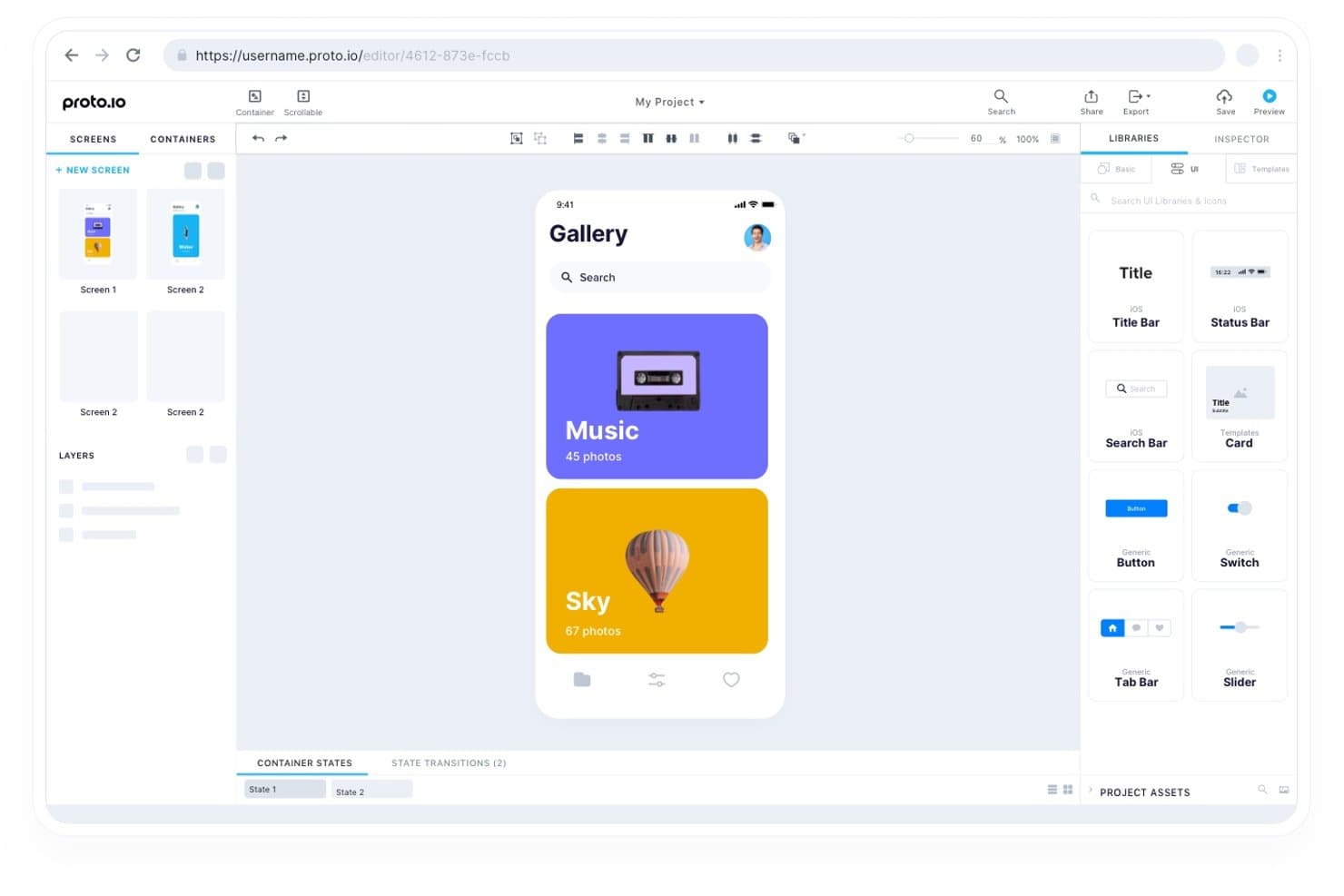
Proto.io consente agli utenti di progettare schermate di app mobili con componenti UI trascinabili. Proto.io è uno strumento di prototipazione basato sul web che consente di creare modelli interattivi di app utilizzando componenti UI trascinabili, simulazione dei gesti multitouch, animazioni sulla timeline e logica condizionale per piattaforme iOS, Android e web.
Per chi è più adatto Proto.io?
Proto.io è adatto ai designer UX/UI e ai responsabili dei team di progettazione che hanno bisogno di mostrare il comportamento di un'app in modo indistinguibile da un prodotto reale, senza scrivere una singola riga di codice.
Perché ho scelto Proto.io
Proto.io si è guadagnato un posto tra i migliori strumenti della mia selezione perché le sue variabili e la logica condizionale consentono di creare prototipi che si comportano davvero come app complete, gestendo stati come l'accesso effettuato o non effettuato senza scrivere una singola riga di codice. Sono particolarmente colpito dal sistema di animazione sulla timeline, che supporta curve di andamento a molla e file Lottie, così le transizioni risultano native anziché artificiose. Grazie anche al supporto completo dei gesti multitouch, inclusi pizzicamento, scorrimento e trascinamento con limiti di aggancio, raramente le parti interessate devono immaginare come sarà utilizzare l'app reale.
Caratteristiche principali di Proto.io
- Kit UI Material: Una libreria predefinita di componenti Material Design, inclusa la navigazione laterale, che puoi trascinare direttamente sulla tua area di lavoro.
- Contenitori riutilizzabili: Componenti personalizzati che si aggiornano automaticamente in ogni schermata quando modifichi l'origine.
- Controllo delle versioni con ripristino: L'editor salva copie di backup ogni minuto e conserva punti di salvataggio denominati che puoi ripristinare in qualsiasi momento.
- Controlli degli accessi basati sui ruoli: Assegna i ruoli di proprietario, amministratore, designer o revisore a livello di progetto per gestire chi può modificare e chi può solo commentare.
Integrazioni di Proto.io
Proto.io offre integrazioni native con Figma, Sketch, Adobe XD, Photoshop, Jira, Confluence, Trello, UserTesting, UserZoom e Lookback. Queste connessioni supportano l'importazione di design, la documentazione dei progetti, il monitoraggio dei problemi e i test di usabilità.
Pros and Cons
Pros:
- La navigazione condizionale realistica riproduce gli stati delle app Android
- I gesti multitouch e le animazioni a molla risultano nativi
- Le parti interessate possono esaminare flussi interattivi dal vivo
Cons:
- Il passaggio di consegne agli sviluppatori non include misurazioni né esportazioni di codice
- L'app complementare per Android sembra obsoleta
Learn more about Proto.io: Ideale per il feedback degli stakeholder sui concept iniziali
- Piano gratuito disponibile
- A partire da $9/utente/mese (con fatturazione annuale)
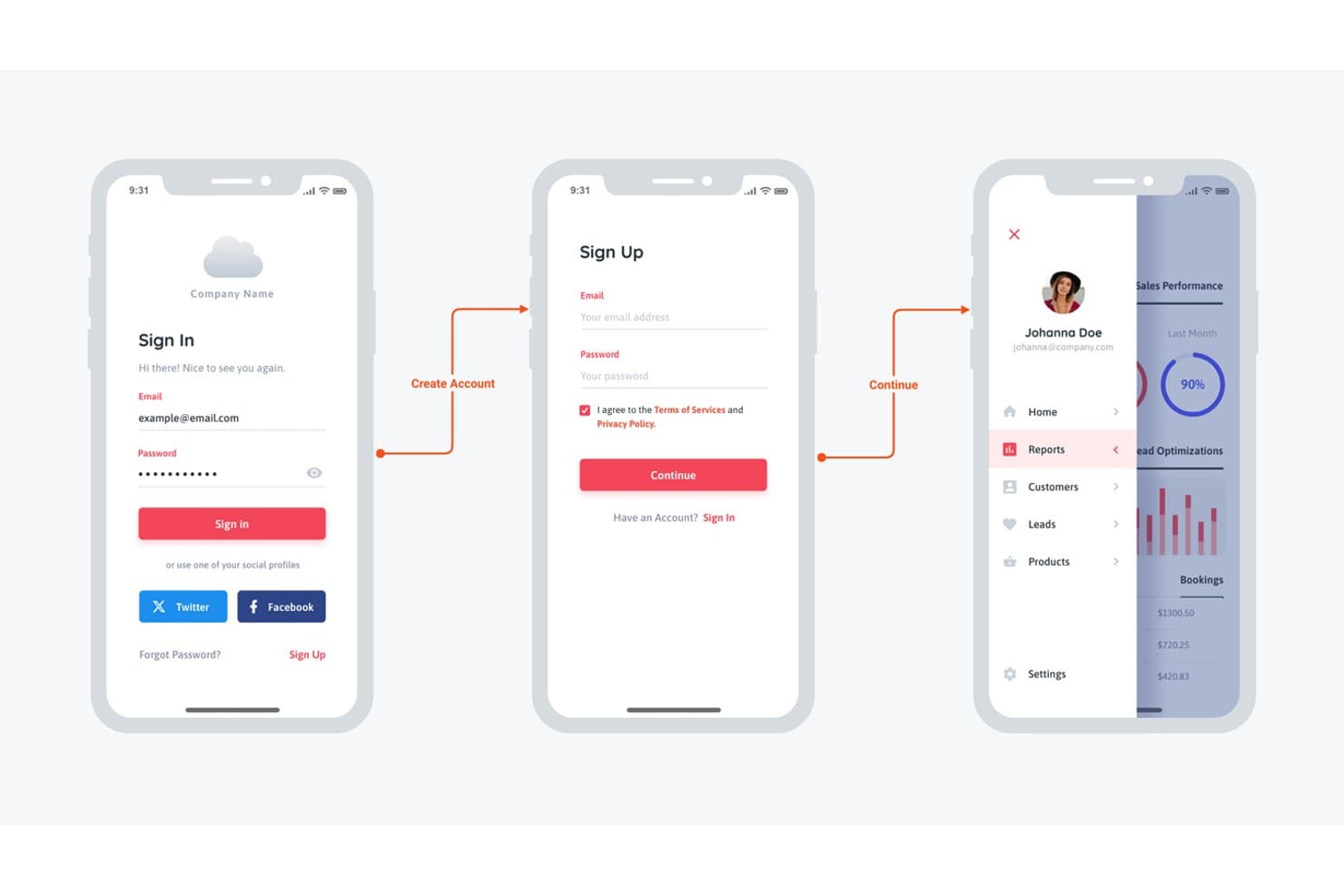
Moqups consente agli utenti di progettare wireframe per le schermate di accesso e del pannello di controllo di app mobili. Moqups è uno strumento per la creazione di wireframe e mockup basato su browser, che combina prototipazione, diagrammi e lavagne digitali in un unico spazio di lavoro, con una libreria di componenti Material Design 3 e supporto alle interazioni cliccabili per i concept di app mobili.
Per chi è più adatto Moqups?
Moqups è particolarmente adatto ai product manager che devono gestire cicli di revisione con gli stakeholder sui concept iniziali delle app senza coinvolgere i designer in ogni iterazione.
Perché ho scelto Moqups
Ho incluso Moqups tra le mie scelte principali perché gestisce il feedback degli stakeholder sui concept iniziali di app Android meglio di quasi tutti gli altri strumenti che ho testato. Il sistema di commenti consente ai revisori di aggiungere note direttamente agli oggetti del wireframe e gli ospiti illimitati possono partecipare senza occupare un posto a pagamento, quindi ottenere l'approvazione di un direttore di prodotto o di un cliente non richiede alcuna configurazione dell'account. A questo si aggiunge una libreria aggiornata di componenti Material Design 3 (comprese le aggiunte M3 Expressive, come i pulsanti divisi e le barre degli strumenti agganciate) e puoi presentare rapidamente agli stakeholder concept realistici di schermate Android.
Caratteristiche principali di Moqups
- Libreria di componenti Material Design 3: Un kit M3 completo, comprese le aggiunte M3 Expressive come pulsanti divisi, barre degli strumenti agganciate e menu FAB espansi, disponibile nei temi chiaro e scuro con vincoli di ridimensionamento integrati.
- Interazioni tra oggetti: Mostra, nascondi o attiva e disattiva la visibilità degli elementi sullo schermo per simulare menu a discesa, finestre modali e interruttori senza uscire dal browser.
- Componenti sincronizzati: Componenti riutilizzabili con sostituzioni delle istanze che propagano automaticamente le modifiche a ogni istanza collegata.
- Pannello per il passaggio allo sviluppatore: Mostra misure, colori, caratteri e codice CSS o JSX copiabile per qualsiasi oggetto selezionato sulla tela.
Integrazioni di Moqups
Moqups offre integrazioni documentate con Jira Cloud, Confluence Cloud, Trello, Slack, Google Drive, Dropbox e Box, oltre a un plugin per Figma e all'importazione da Balsamiq.
Pros and Cons
Pros:
- I componenti Material 3 aggiornati supportano i layout Android
- Gli stakeholder commentano direttamente gli oggetti del wireframe
- I componenti sincronizzati mantengono coerenti i pattern delle schermate
Cons:
- Non è documentata la simulazione di scorrimenti o animazioni
- Il passaggio allo sviluppatore non include l'output XML Android e Compose
Learn more about Moqups: Ideale per la collaborazione in tempo reale
- Piano gratuito disponibile
- Da $16/utente/mese (con fatturazione annuale)
Visit WebsiteCustomer Rating:4.7/5This rating combines scores from multiple user review sites to reflect overall customer sentiment about the product.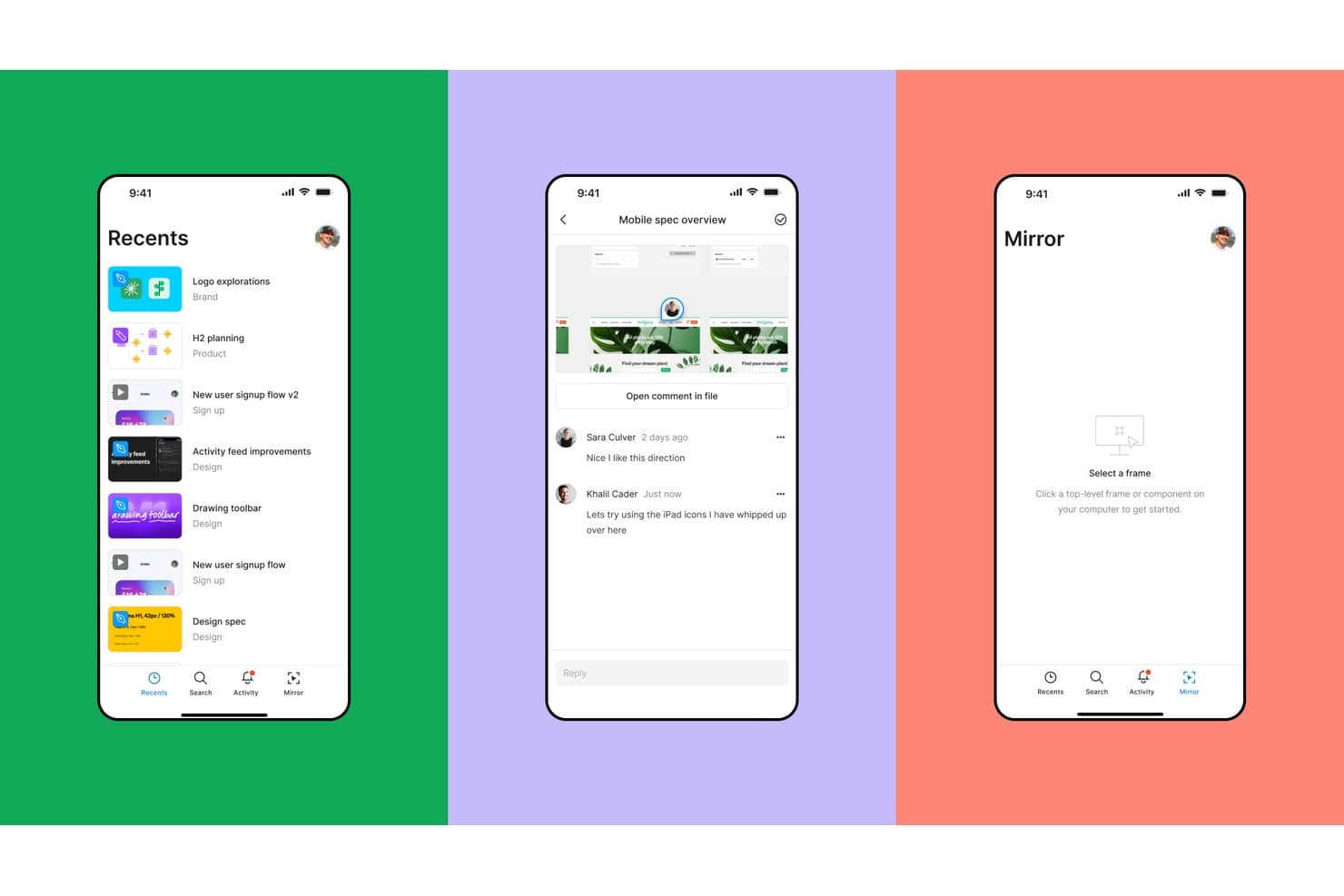
Figma permette agli utenti di esplorare, commentare e visualizzare i progetti su dispositivi mobili. Figma è uno strumento di progettazione e prototipazione basato sul browser che combina il collegamento interattivo delle schermate, la logica condizionale basata sulle variabili, un kit ufficiale di componenti Google Material 3 e la modifica collaborativa in tempo reale in un unico ambiente.
Per chi è più adatto Figma?
Figma è particolarmente adatto ai team di progettazione e ai responsabili di prodotto che hanno bisogno di più collaboratori per esaminare, modificare e commentare prototipi Android in tempo reale.
Perché ho scelto Figma
Figma si è guadagnato un posto nella mia selezione perché nessun altro strumento che ho testato eguaglia la sua modifica collaborativa in tempo reale per le revisioni dei prototipi Android. Posso avere un responsabile di prodotto, uno sviluppatore e due progettisti tutti contemporaneamente nello stesso file prototipo, mentre lasciano commenti fissati direttamente sui componenti Material 3 e io continuo a perfezionare il flusso. La logica condizionale basata sulle variabili mi permette inoltre di simulare il passaggio dalla modalità chiara a quella scura o un processo di introduzione in più fasi senza duplicare decine di tavole.
Caratteristiche principali di Figma
- Kit di componenti Material 3: il kit ufficiale Material 3 di Google, basato innanzitutto su Compose, include variabili per colori, tipografia e livelli di stato, oltre a schermate Android di esempio che puoi utilizzare direttamente nei file prototipo.
- Flussi di prototipazione: ogni percorso utente, come il processo di introduzione o il pagamento, può essere organizzato in un flusso denominato con un proprio link condivisibile e una descrizione per i test di usabilità.
- Animazione intelligente: Figma anima i livelli corrispondenti tra le tavole, gestendo posizione, scala, opacità e rotazione, con controlli regolabili per andamento e durata.
- Frammenti di codice della modalità sviluppatore: il pannello di ispezione genera frammenti Jetpack Compose e XML con unità dp e sp, fornendo agli sviluppatori Android specifiche pronte per il riferimento direttamente dal file di progettazione.
Integrazioni di Figma
Figma si integra con GitHub, Jira, Storybook, VS Code, Supabase e il plugin Material Theme Builder. Il suo server MCP si connette a Claude, Cursor, Codex e OpenAI per flussi di lavoro di progettazione e sviluppo assistiti dall'intelligenza artificiale.
Pros and Cons
Pros:
- Revisioni collaborative dei prototipi Android in tempo reale
- Componenti Material 3 ufficiali basati innanzitutto su Compose
- La logica condizionale simula stati complessi dell'app
Cons:
- Nessuna simulazione di sensori, inclinazione o voce
- Aggiornamenti manuali per i kit Material personalizzati
 Ideale per la gestione dei sistemi di progettazione
- Piano gratuito + prova gratuita di 14 giorni disponibile
- A partire da $40/utente/mese (con fatturazione annuale)
Visit WebsiteCustomer Rating:4.2/5This rating combines scores from multiple user review sites to reflect overall customer sentiment about the product.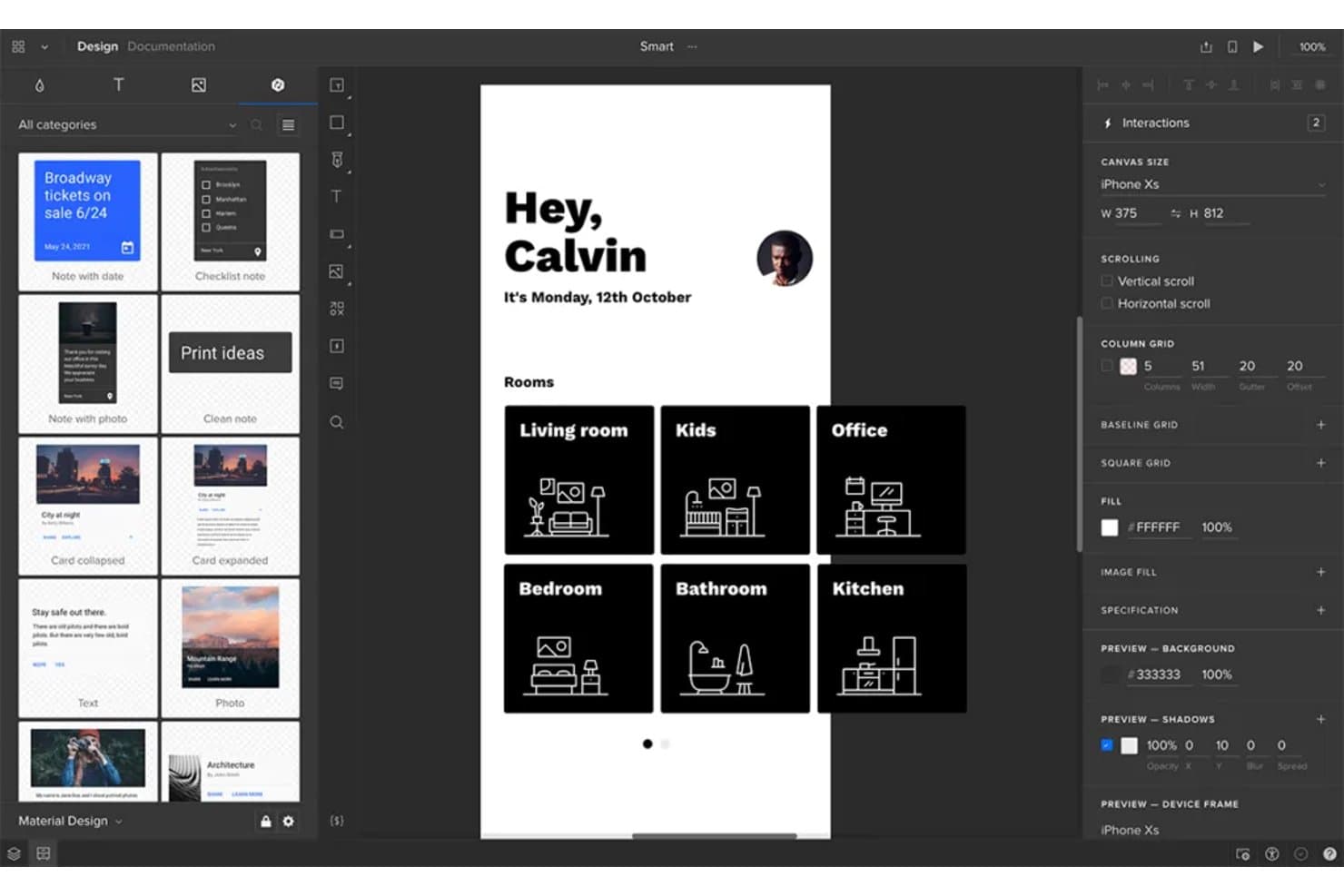
UXPin consente agli utenti di prototipare schermate di app Android con layout di navigazione basati su stanze. UXPin è uno strumento per la prototipazione ad alta fedeltà che consente di creare prototipi interattivi di app utilizzando componenti reali supportati dal codice, con supporto per la logica condizionale, le variabili, i trigger gestuali e l'anteprima sul dispositivo tramite la sua app Android Mirror.
Per chi è più adatto UXPin?
UXPin è particolarmente adatto ai team di progettazione che gestiscono una libreria di componenti condivisa tra più prodotti o flussi di lavoro.
Perché ho scelto UXPin
UXPin è entrato nella mia rosa dei candidati per la grande attenzione che dedica alla gestione dei sistemi di progettazione. Con Merge puoi sincronizzare componenti React reali direttamente da Git, Storybook o npm, così la tua libreria Material Design in UXPin rimane perfettamente allineata a ciò che gli sviluppatori stanno effettivamente creando. Trovo particolarmente utile anche Forge AI: genera schermate utilizzando la tua libreria di componenti reale, non forme generiche, il che significa che ogni schermata Android generata dall'IA rispetta già le regole del tuo sistema di progettazione.
Caratteristiche principali di UXPin
- Logica condizionale e variabili: Configura interazioni se-allora e se-altrimenti che rispondono agli input dell'utente, ai valori memorizzati e ai cambiamenti di stato nel prototipo.
- App UXPin Mirror: Visualizza in anteprima il tuo prototipo Android su un dispositivo reale in tempo reale, senza cavo USB o rete Wi-Fi condivisa.
- Commenti collaborativi: Le parti interessate e gli ospiti possono lasciare commenti organizzati in discussioni direttamente sulle schermate del prototipo, senza dover disporre di un account a pagamento.
- Kit UI Material Design: Una libreria integrata di componenti Material ridimensionabili e interattivi, inclusi pulsanti, schede e sistemi di navigazione, con interazioni preimpostate pronte all'uso.
Integrazioni di UXPin
UXPin si integra con Storybook, GitHub, Bitbucket, npm, Figma, Sketch, Slack, Jira, FullStory, StackBlitz e CodeSandbox.
Pros and Cons
Pros:
- I flussi realistici utilizzano variabili e logica condizionale
- Mirror visualizza in anteprima i prototipi Android su dispositivi fisici
- Il supporto ai commenti degli ospiti favorisce feedback mirati da parte delle parti interessate
Cons:
- I componenti basati su React non riproducono il comportamento nativo di Android
- Le variabili complesse rallentano la configurazione iniziale del prototipo
Learn more about UXPin: Ideale per l'adattabilità del design responsivo
- Piano gratuito disponibile
- A partire da $19/utente/mese
Visit WebsiteCustomer Rating:4.2/5This rating combines scores from multiple user review sites to reflect overall customer sentiment about the product.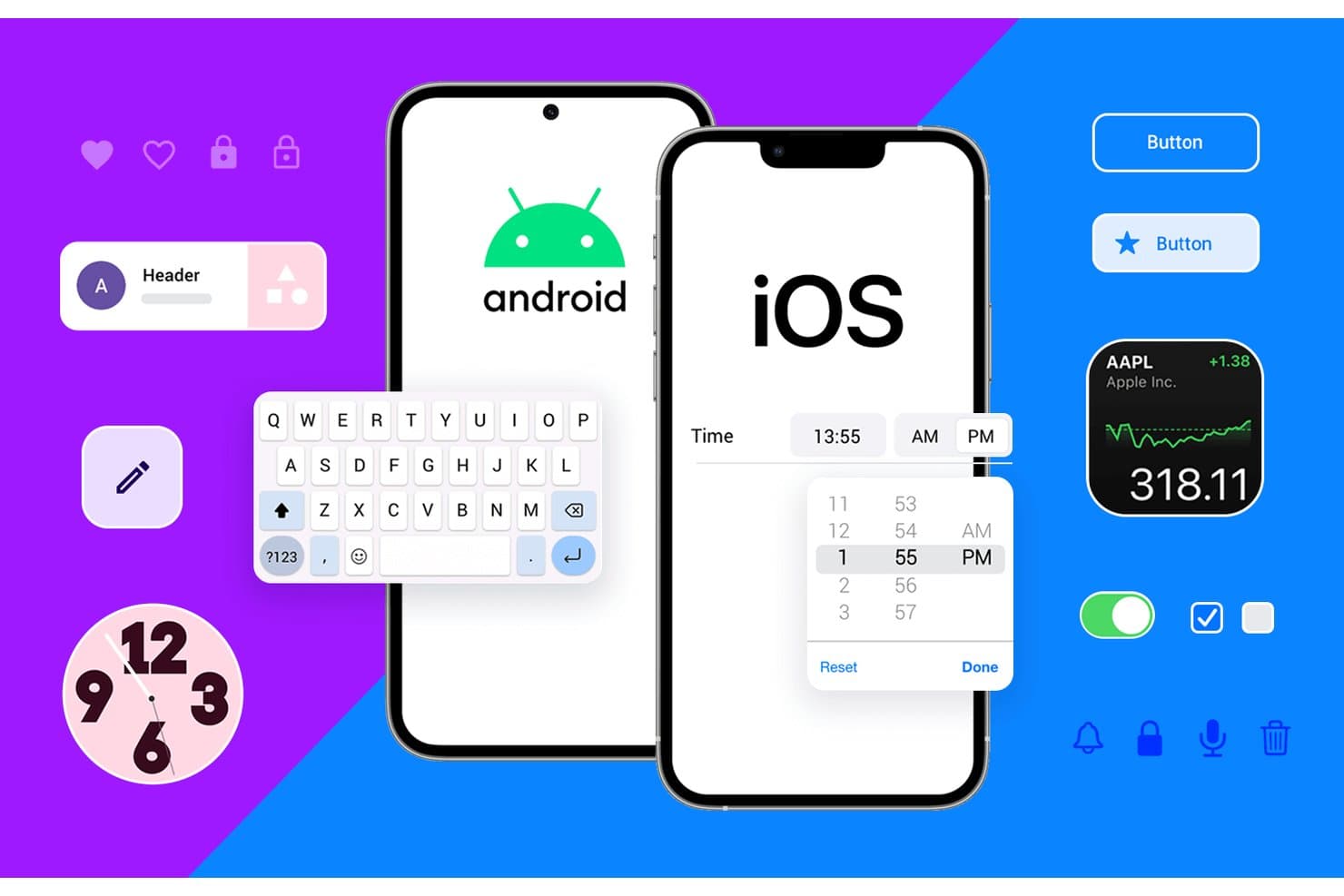
Justinmind supporta la prototipazione di componenti UI sia per Android sia per iOS. Justinmind è uno strumento per computer desktop dedicato alla prototipazione su macOS e Windows, che combina la creazione di wireframe, la simulazione interattiva e un kit UI Android Material Design 3 con logica condizionale, variabili e controlli per layout responsivi.
Per chi è più adatto Justinmind?
Justinmind è una soluzione ideale per i team di progettazione UX e di prodotto che devono creare prototipi di flussi complessi per app Android basati sulla logica e su più dimensioni dello schermo, senza scrivere codice.
Perché ho scelto Justinmind
Justinmind è entrato nella mia selezione perché i suoi strumenti per i layout responsivi sono realmente progettati per la prototipazione Android su più schermi. Posso fissare intestazioni persistenti, impostare la larghezza degli elementi in percentuale e configurare eventi relativi ai punti di interruzione, così lo stesso prototipo si adatta automaticamente a smartphone, tablet e layout pieghevoli. In combinazione con un kit Material Design 3 che include oltre 350 componenti interattivi e cornici per dispositivi attuali come Pixel 9 e Galaxy S25, posso verificare layout Android realistici a qualsiasi dimensione dello schermo prima di scrivere una sola riga di codice.
Funzionalità principali di Justinmind
- Generatore di logica condizionale: Imposta regole che controllano quando e come vengono attivate le interazioni, così puoi creare prototipi con diversi stati dell'app, come viste per utenti autenticati o errori di convalida dei moduli.
- Importazione di dati CSV: Carica dati reali nel prototipo tramite file CSV per simulare contenuti dinamici come elenchi di utenti o flussi di prodotti.
- Strumento per diagrammi dei flussi utente: Mappa visivamente i percorsi di navigazione tra le schermate per documentare e convalidare la struttura completa del flusso dell'app.
- Pannello per la consegna agli sviluppatori: Condividi una vista basata sul web che mostra agli sviluppatori misure, spaziature, codici esadecimali dei colori, CSS e risorse scaricabili, senza installazioni aggiuntive.
Integrazioni di Justinmind
Justinmind offre integrazioni con Figma, Sketch, Adobe XD, Jira, Azure DevOps e Confluence, oltre a un'API/SDK per componenti aggiuntivi personalizzati.
Pros and Cons
Pros:
- Oltre 350 componenti Material supportano schermate Android realistiche
- I punti di interruzione responsivi convalidano layout per smartphone, tablet e dispositivi pieghevoli
- Le condizioni e le variabili simulano stati complessi dell'app
Cons:
- L'editor disponibile solo su desktop limita la collaborazione basata sul web
- La consegna agli sviluppatori non include output XML nativo e Compose
Learn more about Justinmind: Ideale per prototipi complessi con funzionalità avanzate
- Piano gratuito disponibile
- A partire da $29/utente/mese (con fatturazione annuale)
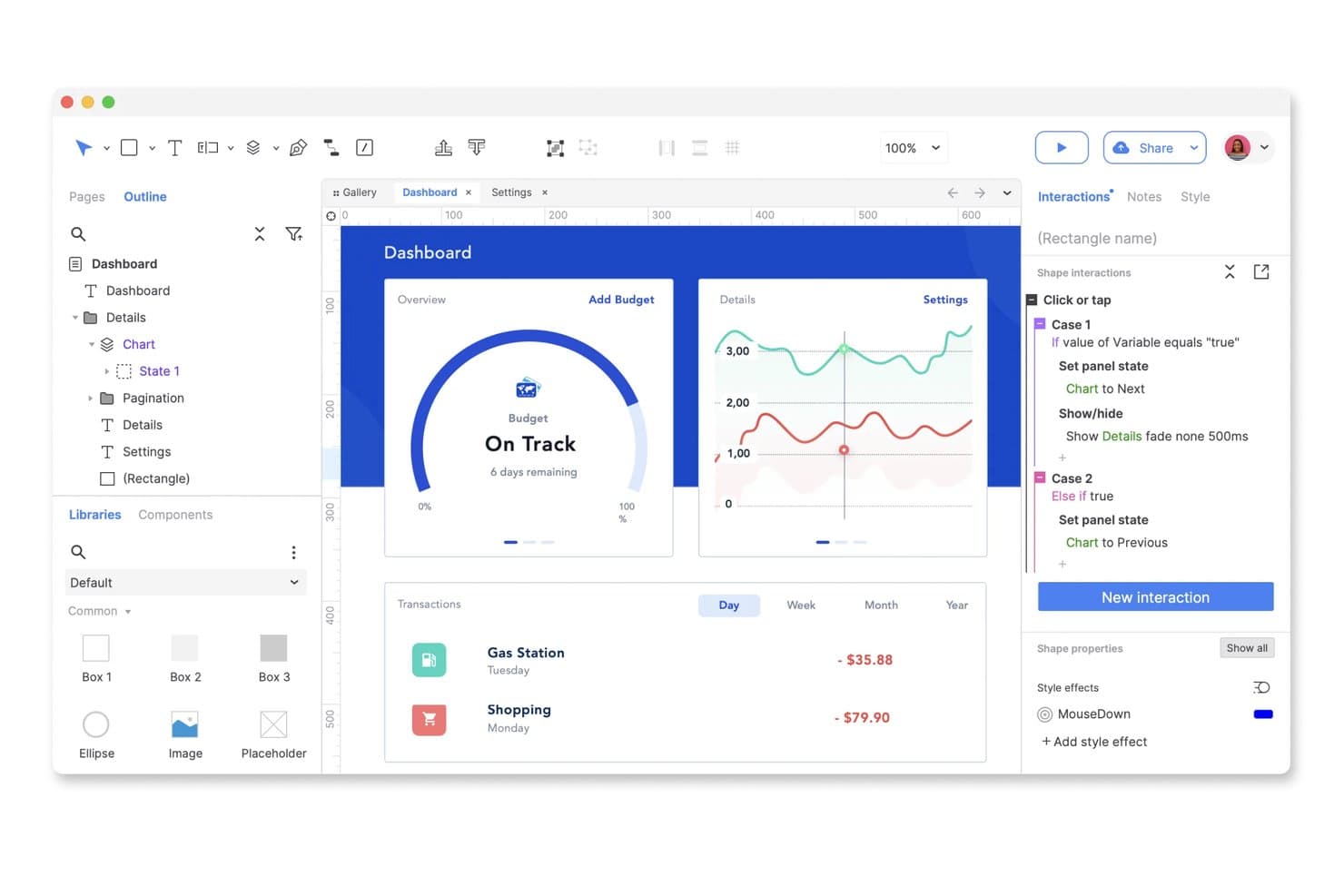
Axure RP consente agli utenti di creare prototipi interattivi di cruscotti con logica condizionale. Axure RP è uno strumento desktop per la prototipazione che consente di creare prototipi interattivi ad alta fedeltà utilizzando logica condizionale, pannelli dinamici, variabili e interazioni basate sui gesti.
Per chi è più adatto Axure RP?
Axure RP è particolarmente adatto a UX designer esperti e responsabili di team di progettazione che devono creare e testare prototipi complessi basati sulla logica prima di affidarli allo sviluppo.
Perché ho scelto Axure RP
Axure RP si è guadagnato un posto nella mia selezione perché nessun altro strumento è paragonabile al suo sistema di logica condizionale e pannelli dinamici per la creazione di prototipi complessi e basati sulla logica. L'ho utilizzato per simulare stati reali delle app, ad esempio alternando le visualizzazioni per utenti con sessione attiva e non attiva, usando variabili, ripetitori e condizioni ramificate senza scrivere una sola riga di codice. Il supporto per gli eventi di scorrimento e trascinamento sui pannelli dinamici consente inoltre di prototipare flussi di navigazione basati sui gesti che risultano davvero simili a quelli di un'app Android funzionante.
Funzionalità principali di Axure RP
- Visualizzazioni adattive: Progetta layout per telefoni, tablet e computer desktop su un'unica pagina utilizzando dimensioni preimpostate o personalizzate dei dispositivi, con catene di ereditarietà separate per piattaforme diverse.
- Commenti in Axure Cloud: Le parti interessate possono lasciare commenti organizzati in discussioni direttamente sulle schermate del prototipo, contrassegnarli come risolti e ricevere notifiche tramite Slack o Microsoft Teams.
- Modalità di ispezione: Gli sviluppatori possono accedere tramite Axure Cloud a specifiche di dettaglio, misure, dettagli tipografici, colori esadecimali e risorse grafiche scaricabili senza costi aggiuntivi.
- Estrazione e reinserimento delle pagine: Il piano Team supporta la co-realizzazione con cronologia delle versioni, punti di ripristino e note di reinserimento per mantenere organizzati i file di progettazione tra i diversi collaboratori.
Integrazioni di Axure RP
Axure RP si integra con Figma, Sketch, Adobe XD, Jira, Confluence, Slack e Microsoft Teams. Queste connessioni supportano l'importazione di progetti, l'incorporamento di prototipi, il collegamento dei ticket e l'invio di notifiche per le revisioni.
Pros and Cons
Pros:
- Simula stati complessi delle app Android senza codice
- Supporta interazioni di scorrimento, trascinamento, scorrimento della pagina e pressione prolungata
- Fornisce specifiche di dettaglio complete e risorse grafiche scaricabili
Cons:
- Richiede librerie di terze parti per i componenti di Material Design
- Non può esportare codice XML Android o Jetpack Compose
Learn more about Axure RP: 10Ideale per creare prototipi mobili altamente interattivi
ProtoPie
- Piano gratuito disponibile
- A partire da $25/mese (fatturato annualmente)
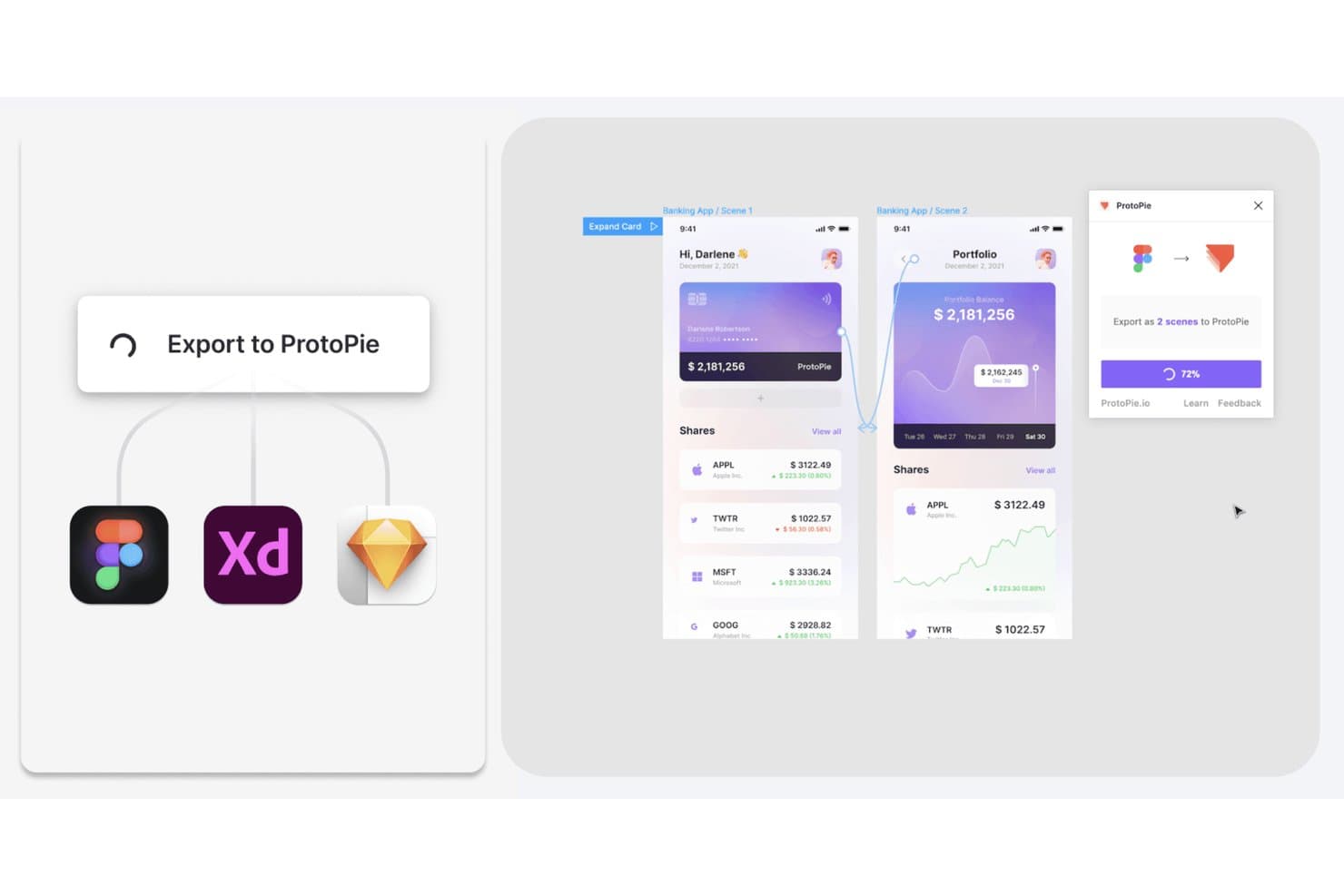
ProtoPie consente agli utenti di esportare i progetti Figma, XD e Sketch come prototipi interattivi. ProtoPie è uno strumento di prototipazione senza codice che consente di creare prototipi altamente interattivi per dispositivi mobili e multipli utilizzando logica, variabili, trigger condizionali, gesti e input dei sensori.
Per chi è più adatto ProtoPie?
ProtoPie è particolarmente indicato per i designer UX/UI e i responsabili dei team di progettazione che devono prototipare interazioni mobili complesse basate sui gesti senza scrivere codice.
Perché ho scelto ProtoPie
ProtoPie si è guadagnato un posto nella mia selezione perché nessun altro strumento che ho testato eguaglia la sua profondità nella simulazione di gesti e sensori per i prototipi mobili. Posso configurare pizzicamenti, multi-touch, inclinazione e persino trigger specifici di Android per i tasti Indietro e del volume senza scrivere una sola riga di codice. Inoltre, la logica condizionale e le variabili mi consentono di prototipare flussi decisionali reali, come la convalida di un campo per la password o la limitazione dell'accesso a una schermata in base a una regola, così gli stakeholder possono vedere qualcosa che si comporta come un'app già distribuita.
Funzionalità principali di ProtoPie
- Importazione da Figma con collegamento dei componenti: Importa i frame di Figma come scene, mantenendo collegati componenti e varianti, così la reimportazione conserva le modifiche apportate in ProtoPie.
- ProtoPie Player per Android tramite USB: Visualizza in anteprima i prototipi su un dispositivo Android fisico tramite un cavo USB con il debug USB, un metodo di connessione esclusivo di Android.
- Registrazione delle interazioni e ispezione della timeline: Le registrazioni generate automaticamente acquisiscono scenari di utilizzo reali e registrano trigger, risposte, andamento e proprietà dei livelli in una timeline con avanzamento passo passo per gli sviluppatori.
- Creazione di interazioni in ProtoPie AI tramite prompt: Crea interazioni da prompt in linguaggio naturale utilizzando livelli specifici, con controlli Interrompi e Ripristina inclusi.
Integrazioni di ProtoPie
ProtoPie si integra con Figma, Sketch e Adobe XD tramite plugin.
Pros and Cons
Pros:
- Simula gesti, sensori e tasti hardware di Android
- Consente di testare flussi complessi con variabili e condizioni
- Acquisisce la temporizzazione delle interazioni per il passaggio di consegne agli sviluppatori
Cons:
- Offre una copertura limitata dei componenti nativi Android
- Richiede di eseguire nuovamente i prototipi dopo le modifiche sul desktop
Learn more about ProtoPie:
Altri strumenti di prototipazione per Android
Ecco alcune opzioni aggiuntive di strumenti di prototipazione per Android che non sono state incluse nella mia selezione, ma che vale comunque la pena prendere in considerazione:
- 11FlutterFlow Ideale per la prototipazione con codice Flutter esportabile
- 12Mockitt PrototypeIdeale per la prototipazione tutto-in-uno con generazione basata sull'intelligenza artificiale
- 13FramerIdeale per la prototipazione con pubblicazione su un sito attivo
- 14VisilyIdeale per wireframe generati dall'IA senza competenze di progettazione
- 15DraftbitIdeale per la prototipazione con output di codice dell'app reale
Come valuto gli strumenti di prototipazione per Android
Divido la mia valutazione in tre parti, dando il maggior peso alle funzionalità fondamentali, in particolare alla possibilità per uno strumento di collegare le schermate in flussi navigabili e simulare i gesti. Successivamente, cerco funzionalità distintive come la logica condizionale e le variabili. Infine, considero la flessibilità dei prezzi e il supporto durante l'avvio.
Funzionalità fondamentali (criteri indispensabili per questo elenco)
Quando seleziono gli strumenti da includere nel mio elenco, assegno a ciascuno un punteggio su una scala da 0 (non offre la funzionalità) a 5 (eccelle in questo ambito) per ogni funzionalità fondamentale elencata di seguito. Converto quindi il totale in una percentuale per aiutare a valutare l'idoneità complessiva di ciascuno strumento, dando un peso aggiuntivo a tutte le funzionalità che ho ritenuto essenziali.
- Collegamento interattivo delle schermate (essenziale): verifico se è possibile configurare flussi con più schermate, punti attivi cliccabili, percorsi ramificati e modelli di navigazione riutilizzabili.
- Simulazione di gesti e animazioni: i prototipi realistici devono supportare lo scorrimento con il dito, lo scorrimento delle pagine e i tocchi, con curve di accelerazione e temporizzazione regolabili che riproducano il movimento nativo di Android.
- Componenti di progettazione specifici per Android: cerco librerie integrate di Material Design aggiornate e compatibili con la personalizzazione dei temi per il sistema di progettazione del team.
- Anteprima sul dispositivo: strumenti come Figma e ProtoPie offrono applicazioni complementari per l'anteprima dal vivo sui dispositivi Android e valuto la velocità di sincronizzazione e l'accesso fuori linea.
- Raccolta collaborativa dei riscontri: valuto se le parti interessate possono lasciare commenti organizzati in discussioni a livello di schermata, con menzioni e monitoraggio della risoluzione durante i cicli di revisione.
- Specifiche per il passaggio allo sviluppo: un buon passaggio allo sviluppo richiede livelli ispezionabili, risorse Android esportabili e specifiche generate automaticamente con dettagli su spaziatura, variabili dei colori e caratteri.
Una volta ottenuto un elenco di strumenti che soddisfano i criteri, considero ciò che distingue ciascuna piattaforma.
Fattori distintivi (ciò che differenzia i fornitori)
Ecco come confronto e metto in evidenza le differenze tra i vari fornitori:
Funzionalità distintive
La logica condizionale e le variabili sono i primi aspetti che valuto oltre le funzionalità di base. Strumenti come ProtoPie consentono di simulare stati reali dell'applicazione, ad esempio alternando un'esperienza con accesso effettuato e una senza accesso, fornendo dati molto più realistici nei test di usabilità. Cerco anche analisi integrate per i test di usabilità, come mappe di calore e registrazioni delle sessioni, perché consentono ai PM di quantificare i punti in cui gli utenti esitano o abbandonano senza dover ricorrere a una piattaforma di ricerca separata. Anche la simulazione della voce e dei sensori è importante, soprattutto per i team che sviluppano applicazioni Android basate sull'inclinazione del dispositivo o sull'input della fotocamera.
Oltre le funzionalità
Valuto quanto bene ogni strumento si integri nei flussi di lavoro dei PM e degli sviluppatori. Le integrazioni native con Jira o Asana consentono di collegare direttamente le schermate del prototipo agli elementi dell'elenco di lavoro, mantenendo la pianificazione delle iterazioni ancorata a progetti reali. La flessibilità dei prezzi è altrettanto importante: i modelli con costi per postazione possono far lievitare le spese nei team in crescita, quindi verifico se esistono piani gratuiti o piani per progetto per la validazione nelle fasi iniziali. Valuto anche il supporto durante l'avvio, poiché i PM senza una formazione in progettazione hanno bisogno di modelli guidati e forum della comunità attivi per iterare sui prototipi senza dover attendere un progettista.
Come scegliere uno strumento di prototipazione per Android
È facile perdersi in lunghi elenchi di funzionalità e strutture tariffarie complesse. Per aiutarti a rimanere concentrato mentre affronti il tuo processo personalizzato di selezione del software, ecco un elenco di fattori da tenere a mente:
| Fattore | Cosa considerare |
|---|---|
| FattoreScalabilità | Cosa considerareLo strumento crescerà insieme al tuo team? Verifica se è in grado di gestire più utenti e progetti con l'espansione delle tue esigenze. |
| FattoreIntegrazioni | Cosa considerareSi collega agli strumenti che già utilizzi? Cerca un'integrazione fluida con il software di progettazione, comunicazione e gestione dei progetti. |
| FattorePersonalizzazione | Cosa considerarePuoi adattarlo al tuo flusso di lavoro? Valuta la possibilità di personalizzare modelli e interfacce in base ai processi del tuo team. |
| FattoreSemplicità d'uso | Cosa considerareÈ facile da usare per tutti? Considera la curva di apprendimento e se il tuo team può adottarlo facilmente senza una formazione approfondita. |
| FattoreImplementazione e avvio | Cosa considerareQuanto velocemente puoi iniziare? Esamina il processo di avvio, la disponibilità di tutorial e il supporto durante la configurazione iniziale per evitare ritardi. |
| FattoreCosto | Cosa considerareRientra nel tuo budget? Confronta i piani tariffari, verifica la presenza di costi nascosti e assicurati che le funzionalità giustifichino il prezzo. |
| FattoreMisure di sicurezza | Cosa considerareI tuoi progetti sono protetti? Assicurati che lo strumento offra crittografia, archiviazione sicura dei dati e aggiornamenti regolari della sicurezza per mantenere il tuo lavoro al sicuro. |
| FattoreDisponibilità dell'assistenza | Cosa considerareL'aiuto è disponibile quando ne hai bisogno? Verifica gli orari del supporto, i canali disponibili (come chat o telefono) e i tempi di risposta per assicurarti che l'assistenza sia facilmente accessibile. |
Cosa sono gli strumenti di prototipazione per Android?
Gli strumenti di prototipazione per Android sono soluzioni software che aiutano designer e sviluppatori a creare mockup interattivi di applicazioni Android. Questi strumenti vengono spesso utilizzati da product manager, designer UX/UI e sviluppatori per visualizzare i design delle app e testare le interazioni degli utenti prima dello sviluppo. Funzionalità come il design interattivo, il supporto ai gesti tattili e la collaborazione in tempo reale aiutano i team a creare e perfezionare in modo efficiente i prototipi delle app. Nel complesso, questi strumenti consentono di iterare e migliorare rapidamente i design delle app, risparmiando tempo e risorse.
Funzionalità
Quando selezioni gli strumenti di prototipazione per Android, presta attenzione alle seguenti funzionalità chiave:
- Design interattivo: consente agli utenti di creare prototipi dinamici che simulano le interazioni reali degli utenti, aiutando i team a visualizzare le funzionalità dell'app.
- Supporto ai gesti tattili: consente di testare le interazioni basate sul tocco, fondamentali per sviluppare app Android intuitive.
- Collaborazione in tempo reale: facilita il lavoro di squadra consentendo a più utenti di lavorare contemporaneamente sullo stesso prototipo, migliorando la comunicazione e l'efficienza.
- Compatibilità multipiattaforma: garantisce che i prototipi possano essere testati e visualizzati su vari dispositivi, migliorando i test di usabilità.
- Funzionalità di integrazione: consente la connessione con altri strumenti di design e gestione dei progetti, semplificando il flusso di lavoro e garantendo la coerenza tra le piattaforme.
- Modelli personalizzabili: fornisce modelli di design predefiniti che possono essere adattati alle esigenze specifiche del progetto, risparmiando tempo e fatica.
- Archiviazione basata sul cloud: offre un'archiviazione online sicura per i prototipi, garantendo un facile accesso e la collaborazione da qualsiasi luogo.
- Funzionalità di test degli utenti: consente di raccogliere feedback dagli utenti, garantendo che i design soddisfino le loro esigenze e aspettative.
- Controllo delle versioni: tiene traccia delle modifiche e consente di tornare alle versioni precedenti, facilitando la gestione delle iterazioni del design.
- Misure di sicurezza: protegge i dati sensibili del design con la crittografia e aggiornamenti regolari, garantendo la sicurezza del lavoro creativo.
Vantaggi
L'implementazione di strumenti di prototipazione per Android offre diversi vantaggi al tuo team e alla tua azienda. Ecco alcuni dei vantaggi che puoi aspettarti:
- Collaborazione migliorata: le funzionalità di collaborazione in tempo reale aiutano i membri del team a lavorare insieme in modo più efficace, riducendo i problemi di comunicazione e accelerando il processo di design.
- Iterazioni più rapide: il design interattivo e il controllo delle versioni consentono ai team di testare e perfezionare rapidamente le idee, portando a prodotti finali migliori.
- Risparmio sui costi: individuando tempestivamente i difetti del design grazie alle funzionalità di test degli utenti, i team possono evitare costose revisioni durante lo sviluppo.
- Esperienza utente migliorata: il supporto ai gesti tattili garantisce che i prototipi riproducano interazioni reali, portando ad app più intuitive e facili da usare.
- Maggiore accessibilità: l'archiviazione basata sul cloud rende i prototipi accessibili da qualsiasi luogo, supportando il lavoro da remoto e ampliando le opportunità di collaborazione.
- Flusso di lavoro semplificato: le funzionalità di integrazione collegano i prototipi ad altri strumenti, creando un flusso di lavoro più efficiente e riducendo le attività ripetitive.
- Sicurezza dei dati: le misure di sicurezza proteggono i dati del design, offrendo ai team la tranquillità che la loro proprietà intellettuale sia al sicuro.
Costi e prezzi
La selezione degli strumenti di prototipazione per Android richiede la comprensione dei vari modelli e piani tariffari disponibili. I costi variano in base alle funzionalità, alle dimensioni del team, ai componenti aggiuntivi e ad altri fattori. La tabella seguente riassume i piani più comuni, i relativi prezzi medi e le funzionalità tipicamente incluse nelle soluzioni di strumenti di prototipazione per Android:
Tabella di confronto dei piani per gli strumenti di prototipazione per Android
| Tipo di piano | Prezzo medio | Funzionalità comuni |
|---|---|---|
| Tipo di pianoPiano gratuito | Prezzo medio$0 | Funzionalità comuniPrototipazione di base, modelli limitati e accesso per un singolo utente. |
| Tipo di pianoPiano personale | Prezzo medio$5-$25/utente/mese | Funzionalità comuniDesign interattivo, supporto ai gesti tattili e integrazioni di base. |
| Tipo di pianoPiano aziendale | Prezzo medio$30-$60/utente/mese | Funzionalità comuniCollaborazione in tempo reale, integrazioni avanzate e modelli personalizzati. |
| Tipo di pianoPiano per grandi aziende | Prezzo medio$100+/utente/mese | Funzionalità comuniPersonalizzazione completa, supporto dedicato, misure di sicurezza e analisi avanzate. |
Domande frequenti sugli strumenti di prototipazione per Android
Ecco alcune risposte alle domande comuni sugli strumenti di prototipazione per Android:
Gli strumenti di prototipazione per Android possono essere utilizzati offline?
Sì, alcuni strumenti di prototipazione per Android offrono funzionalità offline, ma non è una caratteristica universale. Se lavori spesso senza accesso a Internet, cerca strumenti che supportino la modifica offline e sincronizzino le modifiche una volta tornato online. Controlla le specifiche dello strumento per confermare questa funzionalità, poiché può variare da un fornitore all’altro.
Gli strumenti di prototipazione per Android supportano la collaborazione tra team?
Sì, la maggior parte degli strumenti di prototipazione per Android supporta la collaborazione tra team. Consentono a più utenti di lavorare contemporaneamente su un progetto, facilitando la condivisione dei feedback e l’apporto di modifiche in tempo reale. Questa funzionalità è particolarmente utile per i team che lavorano da remoto o collaborano con parti interessate in sedi diverse.
Gli strumenti di prototipazione per Android sono adatti ai principianti?
Sì, molti strumenti di prototipazione per Android sono adatti ai principianti. Cerca strumenti con interfacce intuitive, tutorial e modelli che ti aiutino a iniziare. Alcune piattaforme offrono tour interattivi e forum della community in cui puoi fare domande e imparare dalle esperienze degli altri, rendendo più agevole la curva di apprendimento per i nuovi utenti.
Posso importare progetti da altri software negli strumenti di prototipazione per Android?
Sì, la maggior parte degli strumenti di prototipazione per Android consente di importare progetti da software di progettazione diffusi come Sketch, Figma o Adobe XD. Questa funzionalità ti aiuta a integrare il lavoro esistente nel processo di prototipazione, risparmiando tempo e garantendo la coerenza tra i tuoi progetti. Controlla la compatibilità e le opzioni di importazione prima di scegliere uno strumento.