

Orientandoti nel mondo dello sviluppo dei prodotti, probabilmente devi affrontare scadenze ravvicinate e la pressione di innovare. Il software per la prototipazione 3D può semplificare queste sfide aiutando il tuo team a visualizzare rapidamente le idee e a prendere decisioni consapevoli.
Nella mia esperienza, scegliere gli strumenti giusti è fondamentale per i product manager che desiderano migliorare la precisione della progettazione e accelerare lo sviluppo. Ho testato e valutato diverse opzioni, concentrandomi su ciò che conta davvero per te.
In questo articolo condividerò le mie migliori scelte di software per la prototipazione 3D, evidenziandone caratteristiche e vantaggi distintivi. Che tu stia guidando una piccola startup o una grande azienda, qui troverai qualcosa adatto alle tue esigenze.
Perché fidarsi dei nostri consigli sui software
6,700+
Reviews
20
Industry experts
16+
Evaluation factors
14
Years
Il nostro team testa e recensisce software dal 2012. In quanto product manager noi stessi, sappiamo quanto sia difficile — e importante — scegliere il software giusto.
Per questa guida, abbiamo valutato gli strumenti attraverso test pratici e ricerche indipendenti, assegnando un punteggio agli strumenti in base ai nostri criteri di selezione.
Le nostre recensioni riflettono il nostro giudizio editoriale umano, non un discorso di vendita.
Revisori esperti:
- Andrew LumbySenior TPM
- Cristiano ValimSenior UI/UX Lead


Tabella di confronto: software per la prototipazione 3D
Questa tabella di confronto riassume i dettagli dei prezzi delle mie migliori selezioni di software per la prototipazione 3D.
| Tool | Best For | Trial Info | Price | ||
|---|---|---|---|---|---|
| 1 | Ideale per creare rami e unire varianti di progettazione | Piano gratuito disponibile e prova gratuita fino a 6 mesi | Da $1,500/utente/anno (fatturato annualmente) | Website | |
| 2 | Ideale per la modellazione 3D sincrona e parametrica | È disponibile una prova gratuita di 30 giorni | A partire da $110/mese | Website | |
| 3 | Ideale per il CAD parametrico con licenza perpetua | Prova gratuita di 30 giorni disponibile | Prezzi disponibili su richiesta | Website | |
| 4 | Ideale per la prototipazione CAD parametrica a costo zero | Piano gratuito disponibile | A partire da $0/mese | Website | |
| 5 | Ideale per la modellazione di superfici NURBS e SubD a forma libera | Prova gratuita di 90 giorni | A partire da $995/utente (acquisto una tantum) | Website | |
| 6 | Ideale per la continuità CAD dalla progettazione alla produzione | Versione di prova gratuita di 14 giorni | A partire da $2,310/utente/anno (con fatturazione annuale). | Website | |
| 7 | Ideale per la progettazione 3D di livello aerospaziale e automobilistico | Demo gratuita disponibile | A partire da $7,229/utente/anno (con fatturazione annuale) | Website | |
| 8 | Ideale per il CAD parametrico di livello ingegneristico su larga scala | Prova gratuita di 14 giorni | A partire da $3,350/user/year (fatturato annualmente) | Website | |
| 9 | Ideale per CAD, simulazione e CAM integrati | Demo gratuita + prova gratuita disponibili | A partire da $2,820/utente/anno (con fatturazione annuale) | Website | |
| 10 | Ideale per la progettazione di assiemi meccanici su larga scala | Prova gratuita di 30 giorni | A partire da $320/mese | Website |





Recensione dei migliori software per la prototipazione 3D
Di seguito trovi le mie sintesi dettagliate dei migliori software per la prototipazione 3D inclusi nella mia selezione. Le mie recensioni offrono uno sguardo approfondito alle caratteristiche principali, ai pro e contro, alle integrazioni e ai casi d’uso ideali di ogni strumento, per aiutarti a trovare quello più adatto a te.
 Ideale per creare rami e unire varianti di progettazione
- Piano gratuito disponibile e prova gratuita fino a 6 mesi
- Da $1,500/utente/anno (fatturato annualmente)
Visit WebsiteCustomer Rating:4.5/5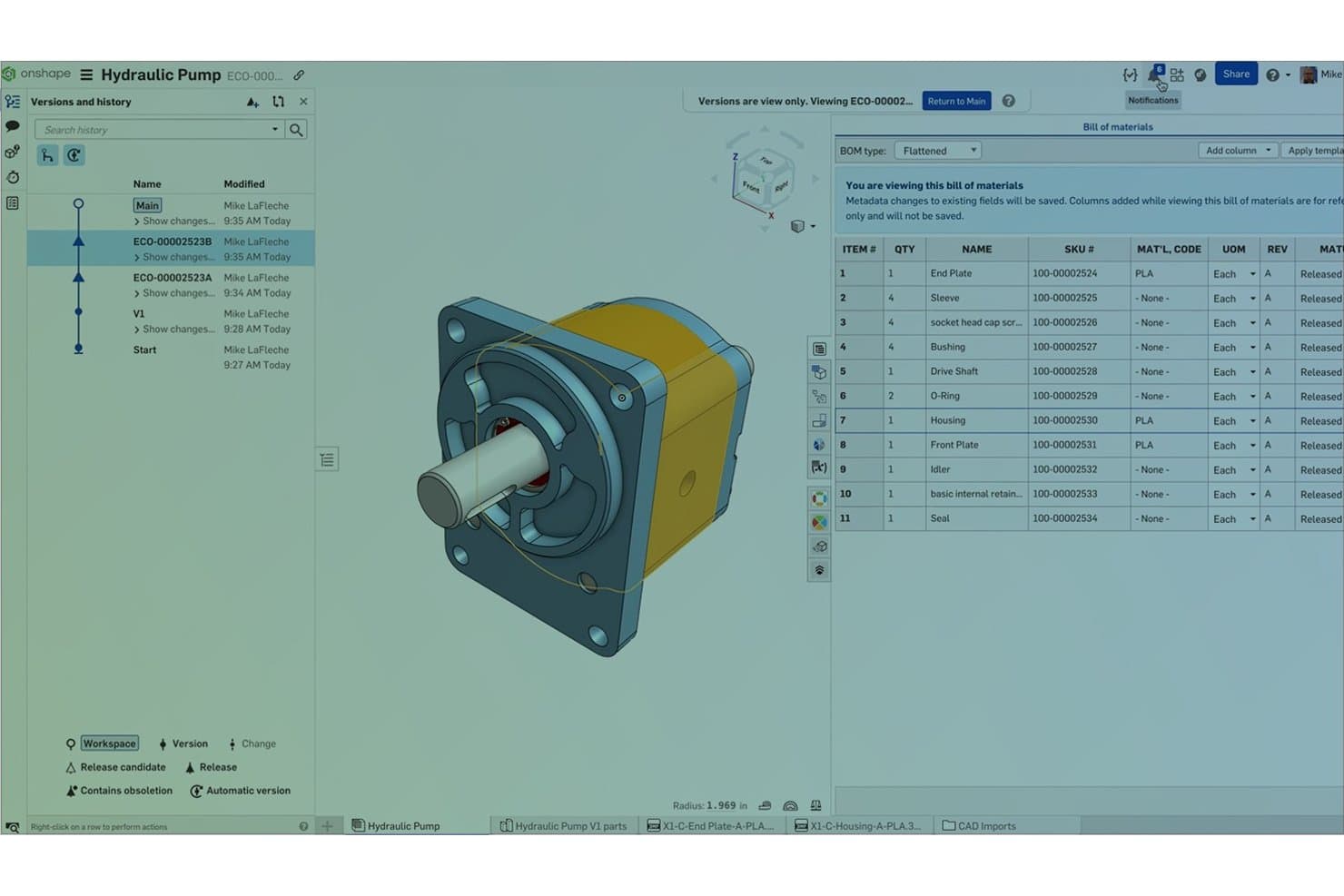
Onshape tiene traccia delle versioni delle parti e dei dati della distinta base per gli assiemi di pompe idrauliche. Onshape è una piattaforma CAD 3D e di prototipazione nativa per il cloud, che comprende modellazione parametrica e di superfici, progettazione di assiemi, simulazione, rendering e CAM, tutto in un ambiente basato su browser con controllo delle versioni integrato.
A chi è più adatto Onshape?
Onshape è adatto agli ingegneri meccanici e ai team che sviluppano prodotti hardware e che devono esplorare simultaneamente più varianti di progettazione senza il sovraccarico della gestione dei file.
Perché ho scelto Onshape
Ho incluso Onshape tra le mie scelte principali perché la sua funzionalità di ramificazione e fusione in stile git è davvero diversa da qualsiasi altra soluzione CAD cloud. Posso creare un ramo per testare una modifica allo spessore di una parete, mantenere intatto il progetto principale, quindi visualizzare in anteprima e unire selettivamente solo la geometria che desidero conservare. In combinazione con le configurazioni, un unico Part Studio può contenere più input di varianti e i risultati della simulazione si aggiornano automaticamente quando passo dall'una all'altra.
Funzionalità principali di Onshape
- Modifica collaborativa in tempo reale: Più membri del team possono modificare contemporaneamente la stessa parte o lo stesso assieme, senza blocchi dei file o conflitti tra versioni.
- Studio di rendering: Rendering fotorealistico basato sul cloud e supportato da NVIDIA Iray, che non richiede hardware grafico locale per produrre i risultati.
- Simulazione degli assiemi: L'analisi statica lineare e modale viene eseguita direttamente sugli assiemi, con i vincoli convertiti automaticamente in condizioni di simulazione.
- FeatureScript: Un linguaggio di scripting integrato che consente al team di creare funzionalità personalizzate e automatizzare le fasi ripetitive della modellazione.
Integrazioni di Onshape
Onshape offre integrazioni native con Altium Designer, Altium 365, Arena PLM, Slack, Google Drive, Dropbox e OneDrive. Il suo App Store include oltre 30 prodotti partner, mentre l'accesso all'API REST e i webhook supportano le integrazioni personalizzate.
Pros and Cons
Pros:
- La ramificazione preserva i concetti di progettazione originali
- Le configurazioni consentono confronti rapidi tra le varianti
- La collaborazione in tempo reale semplifica le revisioni della progettazione
Cons:
- Per la modellazione è necessario l'accesso a Internet
- I percorsi utensile CAM richiedono una rigenerazione manuale dopo le modifiche
Learn more about Onshape: Ideale per la modellazione 3D sincrona e parametrica
- È disponibile una prova gratuita di 30 giorni
- A partire da $110/mese
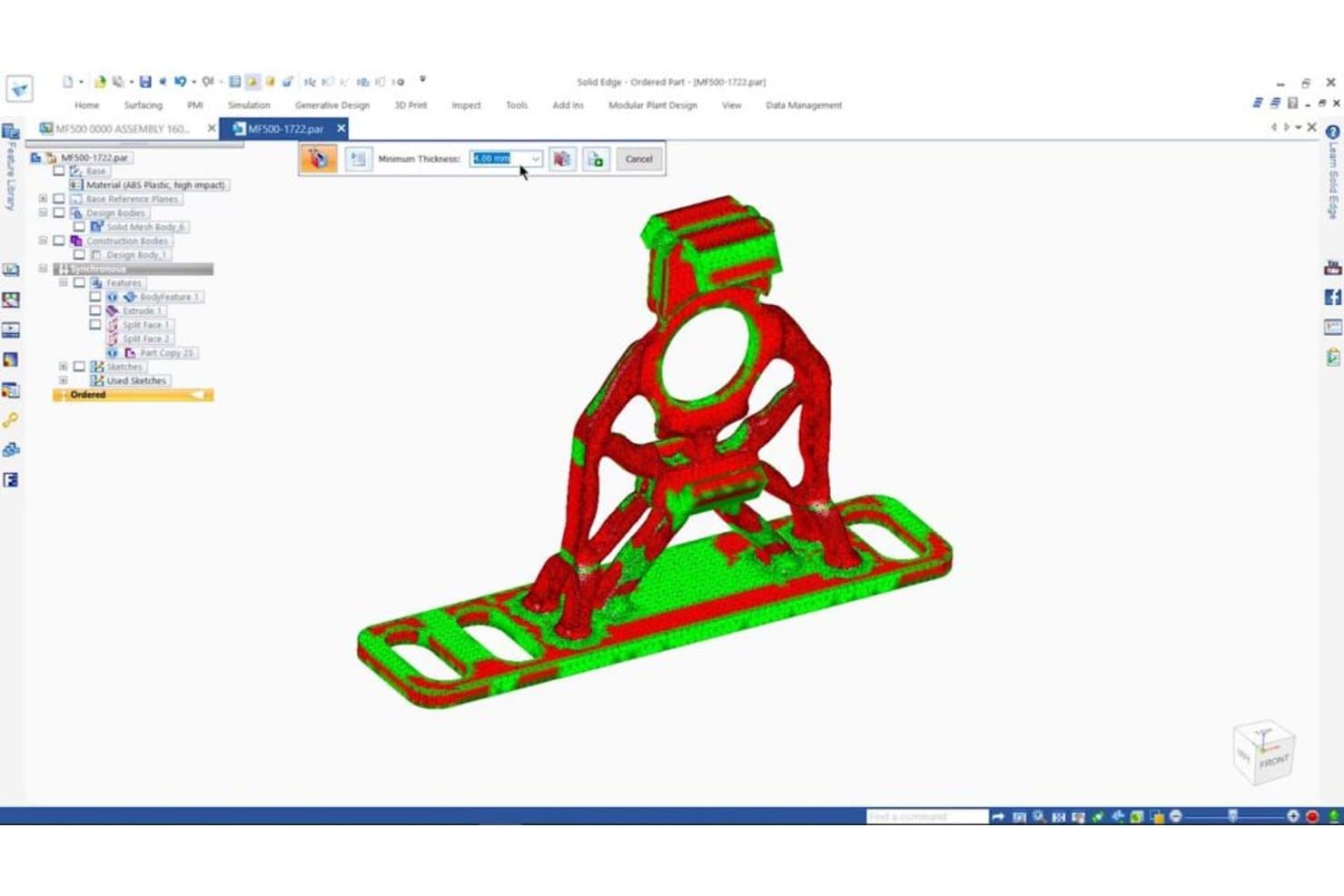
Solid Edge segnala i problemi relativi alle pareti sottili sui componenti 3D prima della stampa. Solid Edge è una piattaforma CAD 3D professionale di Siemens che combina modellazione parametrica, modifica diretta tramite tecnologia sincrona, superfici Sub-D a forma libera, simulazione, progettazione generativa e strumenti per la preparazione alla fabbricazione in un unico ambiente.
Per chi è più adatto Solid Edge?
Solid Edge è particolarmente adatto agli ingegneri meccanici e ai progettisti di prodotti che necessitano sia del controllo parametrico sia della flessibilità di modificare la geometria senza dover ricostruire l'intera cronologia del modello.
Perché ho scelto Solid Edge
Solid Edge si è guadagnato un posto nella mia rosa ristretta perché la sua tecnologia sincrona cambia davvero il modo in cui si sviluppano i modelli 3D: è possibile spingere e tirare la geometria, modificare file CAD importati e cambiare le quote senza attivare una ricostruzione completa dell'albero della cronologia. Apprezzo anche la modellazione Sub-D integrata per il lavoro sulle superfici a forma libera, che consente di scolpire forme organiche e passare direttamente al controllo parametrico nella stessa sessione. Anche la progettazione generativa è integrata, quindi è possibile definire casi di carico e vincoli sui materiali e ottenere una geometria ottimizzata senza cambiare strumento.
Caratteristiche principali di Solid Edge
- Modellazione a maglia convergente: Combina geometria solida standard e modelli a maglia triangolare nello stesso ambiente senza effettuare conversioni tra formati.
- Assemblaggio con aggancio magnetico AI: Rileva automaticamente i vincoli corretti quando si posizionano i componenti in un assieme, riducendo il tempo di configurazione manuale.
- Definizione basata sul modello (MBD): Aggiungi annotazioni per la produzione (PMI) direttamente al modello 3D ed esporta PDF 3D universali per i team a valle.
- Integrazione dei servizi di stampa 3D: Invia i progetti a 3YOURMIND direttamente da Solid Edge per confrontare in tempo reale prezzi e tempi di consegna tra materiali e servizi di stampa.
Integrazioni di Solid Edge
Solid Edge si integra con Teamcenter, Teamcenter X, Teamcenter Share, Solid Edge CAM Pro, Simcenter FloEFD, KeyShot, 3YOURMIND e Microsoft 3D Builder. Si connette inoltre a Dropbox, OneDrive, Google Drive e Box per la condivisione dei file.
Pros and Cons
Pros:
- Le modifiche sincrone accelerano le iterazioni dei prototipi
- La modellazione Sub-D supporta forme organiche per i prodotti
- I flussi di lavoro con modelli a maglia gestiscono la geometria dei prototipi scansionati
Cons:
- Gli assiemi di grandi dimensioni possono diventare lenti
- Le funzionalità avanzate richiedono competenze CAD più approfondite
Learn more about Solid Edge: Ideale per il CAD parametrico con licenza perpetua
- Prova gratuita di 30 giorni disponibile
- Prezzi disponibili su richiesta
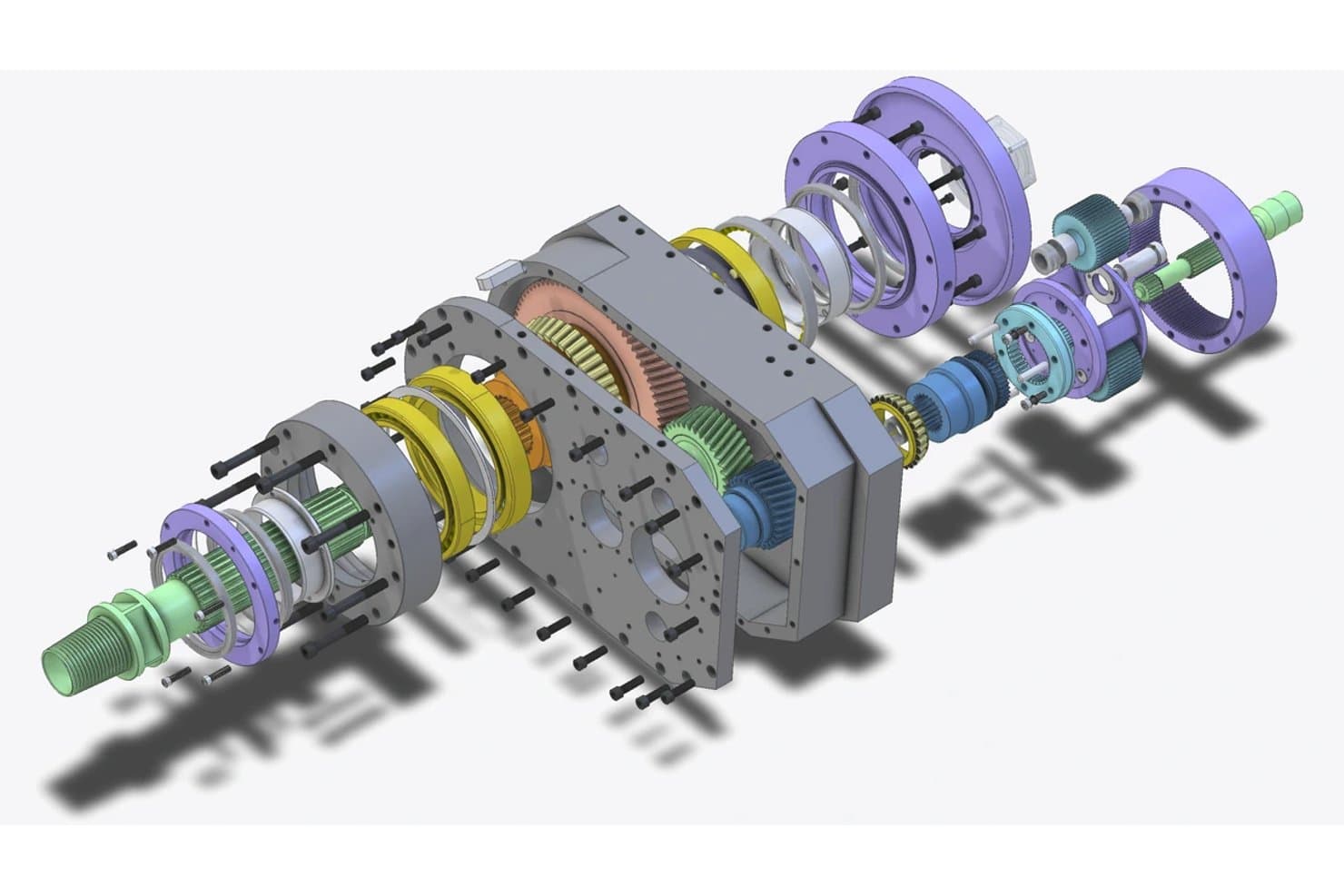
Alibre Design esegue il rendering di viste esplose dettagliate di assiemi meccanici complessi. Alibre Design è uno strumento CAD parametrico basato su Windows, incentrato sulla modellazione 3D basata su funzionalità, sulla progettazione di lamiere e strutture saldate, sui vincoli di assieme e sulla generazione di disegni tecnici 2D.
A chi è più adatto Alibre Design?
Alibre Design è una soluzione ideale per ingegneri meccanici e progettisti di prodotti che desiderano un CAD parametrico di livello professionale senza costi di abbonamento ricorrenti.
Perché ho scelto Alibre Design
Alibre Design è entrato nella mia selezione perché è uno dei pochi strumenti CAD parametrici di livello professionale che puoi acquistare definitivamente, senza alcun abbonamento. Apprezzo particolarmente il modello di licenza perpetua abbinato a un set di funzionalità davvero completo: la modifica della cronologia parametrica consente di aggiornare le quote e osservare la ricostruzione del modello in tempo reale, mentre l'ambiente dedicato alla lamiera genera istantaneamente sviluppi piani pronti per l'esportazione verso laser o macchine CNC. Per la prototipazione di componenti fisici, l'ambiente di assieme con vincoli di movimento meccanico e rilevamento delle interferenze consente di verificare accoppiamento e funzionalità prima ancora di lavorare un singolo componente.
Funzionalità principali di Alibre Design
- Ambiente per strutture saldate: Un ambiente dedicato alla progettazione di profili strutturali, che include una libreria di profili, strumenti per rifilare ed estendere, metadati per ogni struttura e distinte di taglio automatiche.
- Alibre Script: Un ambiente di scripting Python che automatizza le attività di modellazione, genera geometrie basate sulla logica e recupera dati da Excel, CSV o SQL.
- Pubblicazione interattiva in PDF 3D: Esporta i progetti come PDF 3D interattivi che consentono agli interlocutori di ruotare, spostare, ingrandire e visualizzare sezioni senza dover installare un software CAD.
- Ampia importazione di file CAD proprietari: Legge direttamente i file di SolidWorks, Inventor, Creo, CATIA, NX e Rhino utilizzando la suite di traduzione HOOPS.
Integrazioni di Alibre Design
Alibre Design si integra con KeyShot, EZ-CAM, MeshCAM Pro, FEMdesigner AD, SimWise FEA/4D, SimWise Motion e SimLab Composer. La sua API C++/.NET e Alibre Script collegano i progetti a Excel, CSV e SQL per flussi di lavoro personalizzati.
Pros and Cons
Pros:
- Le modifiche parametriche supportano iterazioni rapide dei prototipi
- I vincoli di assieme verificano l'accoppiamento prima della produzione
- I file locali sono adatti ai team di progettazione che gestiscono proprietà intellettuale sensibile
Cons:
- I flussi di lavoro nativi per le mesh limitano la prototipazione basata su scansioni
- Le funzionalità limitate di modellazione a forma libera ostacolano il lavoro di progettazione industriale
Learn more about Alibre Design: Ideale per la prototipazione CAD parametrica a costo zero
- Piano gratuito disponibile
- A partire da $0/mese
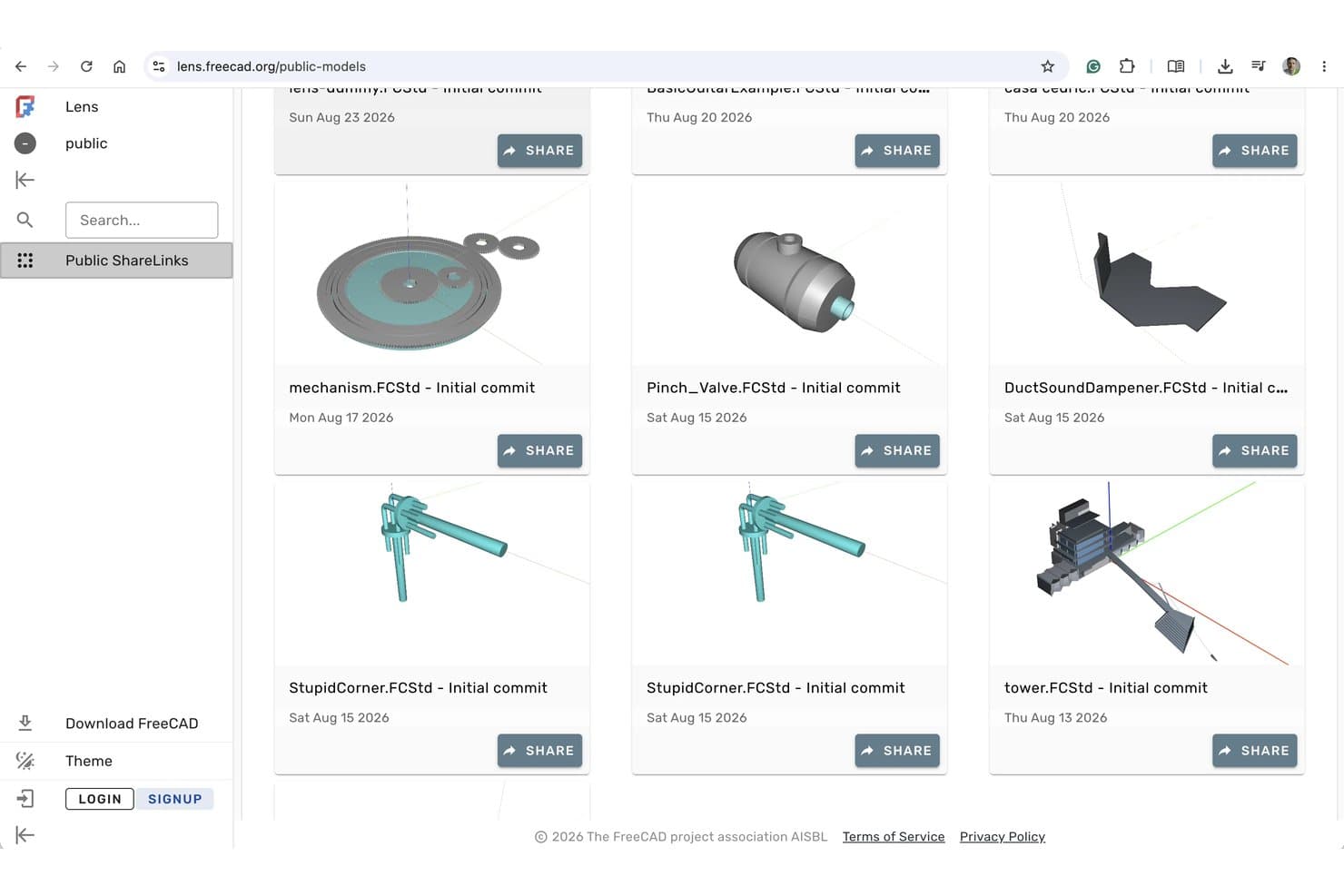
FreeCAD Lens consente agli utenti di condividere pubblicamente e sfogliare modelli 3D online. FreeCAD è uno strumento di modellazione 3D parametrica open source che comprende modellazione solida, modellazione delle superfici, assemblaggio, generazione di percorsi utensile CAM, analisi FEM e disegno tecnico 2D attraverso un sistema modulare di ambienti di lavoro.
A chi è più adatto FreeCAD?
FreeCAD è una scelta eccellente per progettisti di prodotti e ingegneri meccanici che necessitano di tutte le funzionalità CAD parametriche senza un budget per le licenze.
Perché ho scelto FreeCAD
FreeCAD merita un posto tra le migliori soluzioni della mia selezione perché offre un ambiente CAD parametrico completo a costo zero, senza limiti di postazioni e senza registrazione obbligatoria. Apprezzo il fatto che gli ambienti di lavoro per la progettazione di parti e per la creazione di schizzi consentano di creare solidi basati su vincoli e di iterare attraverso la cronologia del modello, in modo che la modifica dello spessore di una parete o del diametro di un foro a monte ricalcoli l'intero modello. L'ambiente di lavoro CAM integrato genera inoltre percorsi utensile CNC reali, mentre l'ambiente di lavoro per le mesh gestisce la riparazione dei file STL prima dell'invio a una stampante 3D.
Funzionalità principali di FreeCAD
- Ambiente di lavoro per l'analisi FEM: Esegue analisi agli elementi finiti utilizzando i solutori CalculiX ed Elmer per convalidare le prestazioni strutturali, termiche ed elettrostatiche dei progetti.
- Ambiente di lavoro per il disegno tecnico: Genera disegni di produzione 2D con convalida della forma e formattazione delle quote direttamente dai modelli 3D.
- Contenitori di proprietà per insiemi di variabili (VarSet): Memorizzano variabili personalizzate che determinano le dimensioni parametriche del modello, in modo simile agli alias gestiti tramite fogli di calcolo.
- Gestore dei componenti aggiuntivi: Installa e aggiorna ambienti di lavoro, macro e motori di rendering della comunità senza uscire da FreeCAD.
Integrazioni di FreeCAD
FreeCAD non dispone di integrazioni native. Si collega a OpenSCAD, Gmsh, Netgen, CalculiX, Elmer e a motori di rendering esterni tramite ambienti di lavoro e componenti aggiuntivi, mentre la programmazione in Python supporta strumenti personalizzati.
Pros and Cons
Pros:
- Le modifiche parametriche preservano l'intento progettuale
- Gli strumenti CAM e mesh supportano la produzione
- L'analisi FEM convalida il comportamento strutturale e termico
Cons:
- Gli assemblaggi di grandi dimensioni possono presentare problemi di prestazioni
- Le anteprime fotorealistiche richiedono una configurazione aggiuntiva
Learn more about FreeCAD:- Ideale per la modellazione di superfici NURBS e SubD a forma libera
- Prova gratuita di 90 giorni
- A partire da $995/utente (acquisto una tantum)
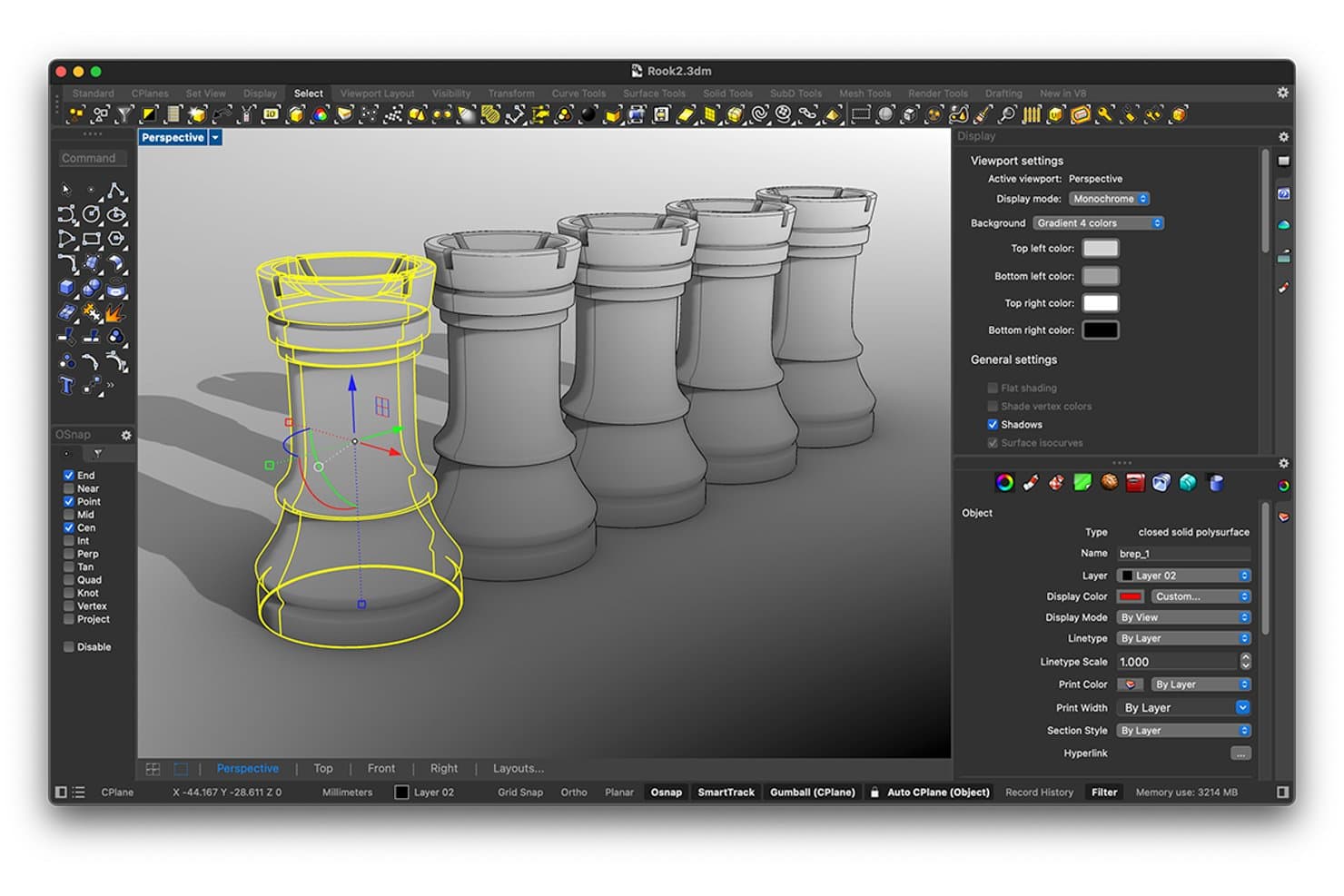
Rhinoceros consente agli utenti di modellare e ispezionare pezzi degli scacchi 3D con strumenti di precisione. Rhinoceros è uno strumento di modellazione 3D che supporta la creazione di geometrie NURBS, SubD, mesh e solide, oltre al rendering, all'esportazione per la fabbricazione e alla modellazione parametrica tramite l'ambiente di programmazione visiva Grasshopper integrato.
A chi è più adatto Rhinoceros?
Rhinoceros è particolarmente adatto ai designer di prodotti e ai progettisti industriali che necessitano di un controllo preciso su superfici organiche complesse e geometrie a forma libera.
Perché ho scelto Rhinoceros
Rhinoceros si guadagna un posto tra le migliori soluzioni della mia selezione perché le sue capacità di modellazione NURBS e SubD sono davvero senza pari per la lavorazione di superfici a forma libera. Adoro il modo in cui le pieghe SubD consentono di regolare bordi simili a raccordi sulle forme organiche senza trasformarle in geometrie rigide, mentre ShrinkWrap crea mesh a tenuta stagna attorno anche alle geometrie miste più disordinate per la stampa 3D. Grasshopper, incluso senza costi aggiuntivi, aggiunge possibilità di iterazione parametrica e generativa che ho utilizzato per esplorare decine di varianti delle superfici prima di scegliere una singola direzione.
Caratteristiche principali di Rhinoceros
- Rilevamento dei bordi liberi: Identifica i bordi aperti nel modello che impedirebbero di ottenere una mesh a tenuta stagna prima di inviarla a una stampante 3D o a un flusso di lavoro CNC.
- ShrinkWrap: Crea una mesh a tenuta stagna attorno a geometrie miste, incluse mesh aperte, NURBS e SubD, specificamente per ottenere risultati pronti per la fabbricazione.
- API Rhino.Compute: Espone Rhino e Grasshopper come API REST senza stato, consentendo di eseguire l'elaborazione delle geometrie su server cloud o locali.
- Analisi della curvatura e delle strisce zebra: Visualizza la continuità e l'uniformità delle superfici nel modello per individuare i problemi di raccordo prima della produzione.
Integrazioni di Rhinoceros
Rhinoceros si integra con Autodesk Revit tramite Rhino.Inside.Revit, Autodesk BIM 360 e AutoCAD su Windows. Supporta oltre 40 formati di file e fornisce l'API REST Rhino.Compute per flussi di lavoro personalizzati sulle geometrie.
Pros and Cons
Pros:
- NURBS gestisce le superfici organiche dei prodotti
- Grasshopper consente variazioni parametriche dei concetti
- ShrinkWrap crea mesh di stampa a tenuta stagna
Cons:
- Nessun sistema nativo di vincoli tra componenti o simulazione del movimento
- La revisione da parte degli stakeholder non supporta la co-modifica nel cloud
Learn more about Rhinoceros :  Ideale per la continuità CAD dalla progettazione alla produzione
- Versione di prova gratuita di 14 giorni
- A partire da $2,310/utente/anno (con fatturazione annuale).
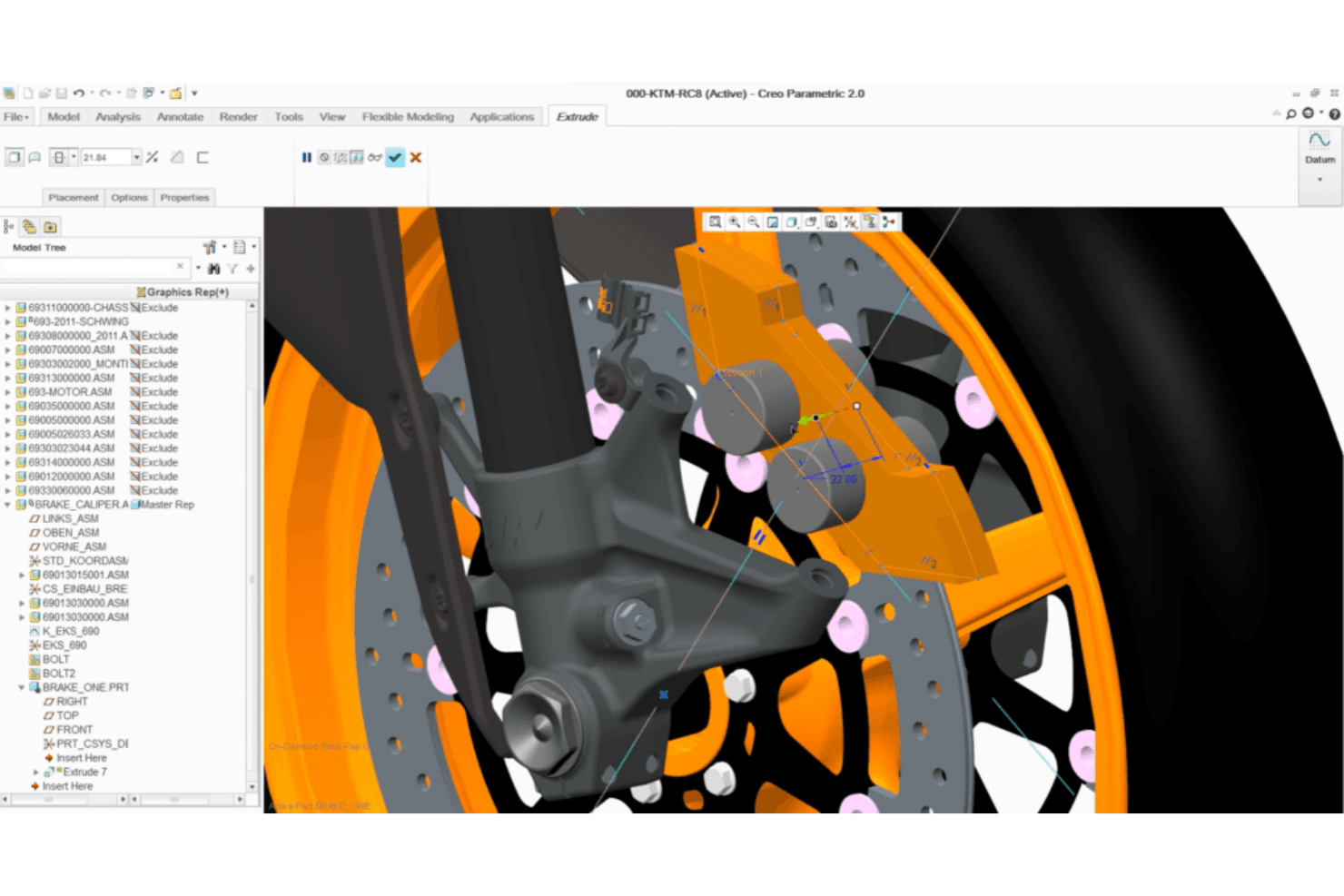
Creo Parametric consente di modellare nei dettagli assiemi 3D di pinze freno. Creo Parametric è una piattaforma CAD 3D parametrica che combina la modellazione di parti e assiemi, la modellazione di superfici, la simulazione, il GD&T e gli strumenti integrati di produzione CAM e additiva in un unico ambiente associativo.
Per chi è più adatto Creo Parametric?
Creo Parametric è la scelta giusta per gli ingegneri meccanici e i progettisti di prodotto che hanno bisogno di un unico ambiente per portare un progetto dalla modellazione iniziale fino alla simulazione, alla definizione delle tolleranze e alla produzione.
Perché ho scelto Creo Parametric
Creo Parametric si è guadagnato un posto nella mia selezione perché è uno dei pochi strumenti che accompagna un progetto dalla modellazione parametrica iniziale fino alla simulazione, alla definizione delle tolleranze GD&T e alla produzione, senza mai uscire dall'ambiente. Apprezzo particolarmente il fatto che il CAM integrato e l'estensione per la produzione additiva consentano di generare percorsi utensile CNC o esportare in un file 3MF una parte ottimizzata con reticolo a partire dallo stesso modello che è stato prototipato. L'assistente GD&T, che applica gli standard ASME e ISO direttamente nell'ambiente di modellazione, è una funzione che raramente vedo eguagliata a questo livello.
Caratteristiche principali di Creo Parametric
- Creo Simulation Live: Fornisce un riscontro quasi istantaneo sulla risposta strutturale, termica e modale utilizzando la tecnologia Ansys durante la modellazione, senza uscire dall'ambiente di progettazione.
- Progettazione generativa (GTO e GDX): Genera e confronta automaticamente opzioni di progettazione ottimizzate in base ai materiali e ai processi di produzione, inclusi lavorazione meccanica, fusione e forgiatura.
- Gestione avanzata degli assiemi: Supporta la progettazione dall'alto verso il basso, la simulazione della dinamica dei meccanismi in condizioni di carico reali e il controllo delle interferenze e dei giochi per prodotti complessi composti da più parti.
- Visualizzazione in AR: Consente di condividere e revisionare i progetti in scala reale attraverso la realtà aumentata, inclusa nel pacchetto base.
Integrazioni di Creo Parametric
Creo Parametric dispone di integrazioni native con PTC Windchill PLM, PTC Mathcad Prime, Ansys e connessioni Creo Unite per SOLIDWORKS, CATIA, Siemens NX e Inventor.
Pros and Cons
Pros:
- La definizione delle tolleranze di livello produttivo supporta prototipi accurati
- Gli aggiornamenti parametrici accelerano le iterazioni di progettazione
- I controlli degli assiemi rilevano tempestivamente i problemi di accoppiamento
Cons:
- I flussi di lavoro incentrati sull'ingegneria rallentano i revisori occasionali
- Le estensioni a pagamento aumentano la complessità della prototipazione
Learn more about Creo Parametric: Ideale per la progettazione 3D di livello aerospaziale e automobilistico
- Demo gratuita disponibile
- A partire da $7,229/utente/anno (con fatturazione annuale)
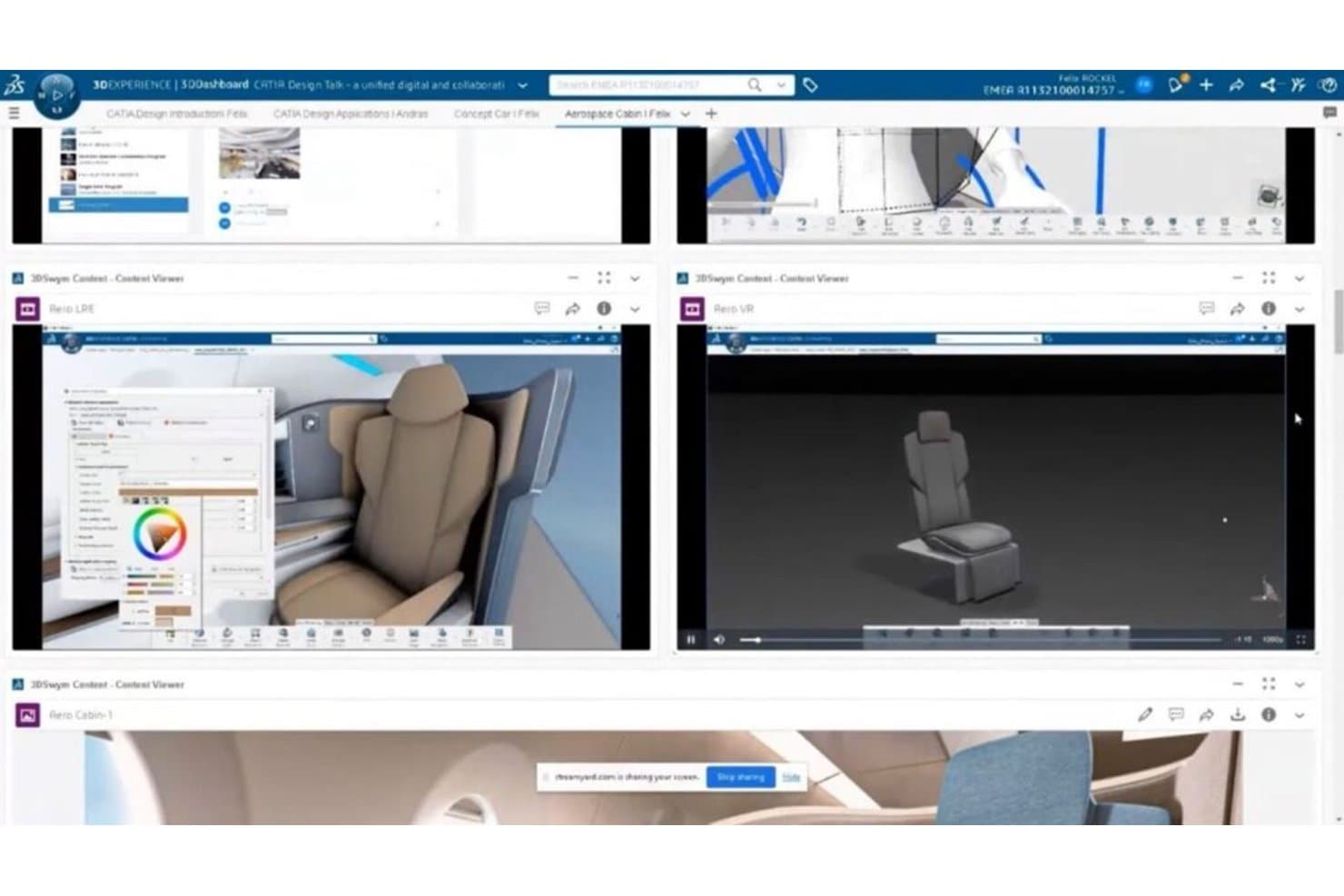
CATIA consente agli utenti di progettare e rivedere prototipi 3D di cabine da più prospettive. CATIA è una piattaforma professionale di progettazione CAD 3D e prototipazione di Dassault Systèmes, che comprende la modellazione parametrica di solidi, la progettazione di superfici di classe A, la progettazione di assiemi, la progettazione generativa e la simulazione, sia in ambienti desktop sia cloud.
Per chi è più adatta CATIA?
CATIA è la scelta ideale per ingegneri meccanici e progettisti di prodotto nei settori aerospaziale e automobilistico che necessitano di una precisione di livello produttivo lungo l'intera catena dalla progettazione alla produzione.
Perché ho scelto CATIA
CATIA si è guadagnata un posto nella mia selezione perché nessun altro strumento che ho provato si avvicina alle sue prestazioni nella progettazione 3D di livello aerospaziale e automobilistico, soprattutto quando la qualità delle superfici di classe A è imprescindibile. Apprezzo il modo in cui il nucleo della modellazione parametrica si combina con gli strumenti di CATIA per la progettazione di superfici di classe A, consentendo agli ingegneri di convalidare la geometria aerodinamica con il livello di precisione richiesto dalla progettazione di un intero aeromobile. I ruoli di progettazione generativa basati sull'intelligenza artificiale, tra cui Progettazione guidata dalla funzione e Progettazione generativa strutturale, consentono inoltre al mio team di esplorare componenti concettuali ottimizzati direttamente a partire dalle specifiche funzionali.
Funzionalità principali di CATIA
- Progettazione di assiemi: Crea e gestisci assiemi complessi composti da più parti, con monitoraggio integrato della distinta base e rilevamento delle collisioni in tempo reale.
- Quotatura e annotazione 3D: Memorizza tolleranze e annotazioni basate sul modello direttamente nel modello 3D per una documentazione pronta per la produzione.
- Ruoli di visualizzazione AR/VR: Esamina i progetti in ambienti di realtà virtuale e mista, incluse sessioni di collaborazione immersiva multiutente.
- Collaborazione cloud in tempo reale: Lavora contemporaneamente con i membri del team su modelli 3D condivisi senza ricorrere a flussi di lavoro di estrazione o archiviazione dei file.
Integrazioni di CATIA
CATIA offre integrazioni native con SIMULIA, DELMIA, ENOVIA, 3DEXCITE, CATIA Magic/Cameo, Dymola, Tuleap e DraftSight. La sua API C++ CAA, l'automazione Knowledgeware e l'ecosistema di partner supportano integrazioni personalizzate.
Pros and Cons
Pros:
- Le superfici di classe A supportano prototipi di livello aerospaziale
- La cronologia parametrica accelera le iterazioni di progettazione
- Gli assiemi di grandi dimensioni consentono di convalidare adattamento e movimento
Cons:
- Le esportazioni standard per la fabbricazione richiedono ruoli aggiuntivi
- Le interfacce complesse rallentano i collaboratori alle prime armi
Learn more about CATIA:- 8Ideale per il CAD parametrico di livello ingegneristico su larga scala
Creo
- Prova gratuita di 14 giorni
- A partire da $3,350/user/year (fatturato annualmente)
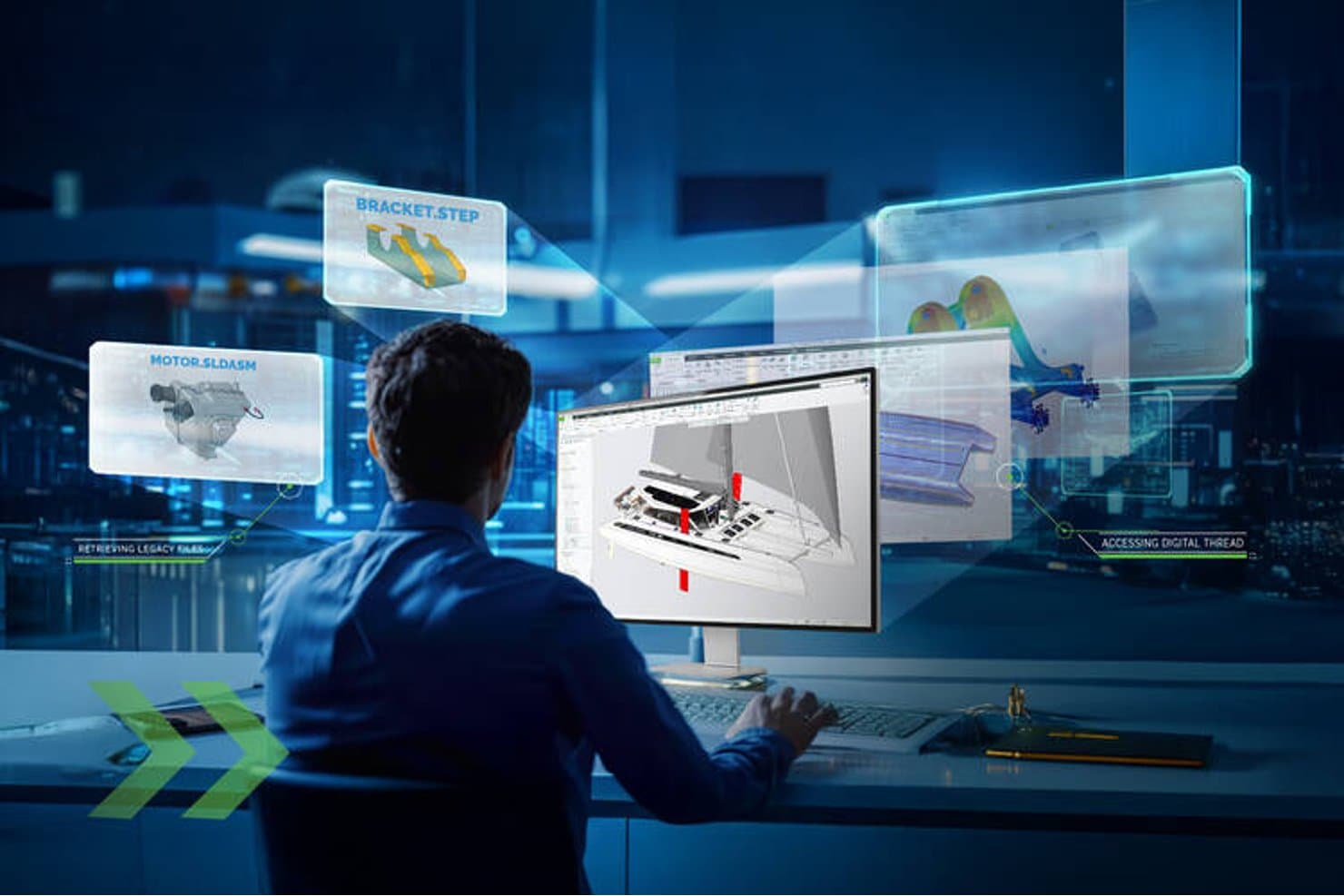
Creo consente agli utenti di accedere ai file precedenti e ai thread digitali nella progettazione 3D. Creo è una piattaforma CAD 3D parametrica di PTC che comprende modellazione di parti e assiemi, superfici, lamiera, simulazione, progettazione generativa e CAM in un unico ambiente connesso.
Per chi è più adatto Creo?
Creo è particolarmente adatto a ingegneri meccanici e progettisti di prodotti che hanno bisogno di modellazione parametrica, simulazione e CAM di livello produttivo in un unico ambiente.
Perché ho scelto Creo
Creo si guadagna un posto nella mia selezione perché nessun altro strumento gestisce la progettazione CAD parametrica di livello ingegneristico su larga scala altrettanto bene. Sono particolarmente colpito dal modo in cui la cronologia parametrica trasferisce automaticamente le modifiche progettuali alla simulazione e al CAM, così, quando una tolleranza cambia nelle fasi finali dello sviluppo, l'intero modello si aggiorna senza bisogno di rielaborazioni manuali. La suite per assiemi di grandi dimensioni e il recupero degli assiemi più veloce del 70% in Creo 13 mi permettono di lavorare con sicurezza su prodotti complessi composti da più parti, senza il rallentamento delle prestazioni che compromette il ritmo di lavoro in altri strumenti.
Funzionalità principali di Creo
- Creo Simulation Live: Esegue analisi strutturali, termiche e modali in tempo reale, basate su Ansys, direttamente nell'ambiente di modellazione.
- Definizione basata sul modello (MBD): Integra GD&T, tolleranze e informazioni per la produzione direttamente nel modello 3D, sostituendo i tradizionali disegni 2D.
- Estensione per la produzione additiva: Genera strutture reticolari, organizza il piano di stampa ed esporta file 3MF e STL pronti per la stampa direttamente da Creo.
- Creo Unite: Apre nativamente i file di SOLIDWORKS, CATIA, Siemens NX e Inventor, senza doverli prima convertire.
Integrazioni di Creo
Creo offre integrazioni native con Windchill, Ansys, Vuforia View, Vuforia Studio e PTC Control Center, oltre al supporto di Creo Unite per i file di SOLIDWORKS, CATIA, Siemens NX e Inventor. Creo Toolkit fornisce un'API per le integrazioni personalizzate.
Pros and Cons
Pros:
- Le modifiche parametriche si propagano attraverso i processi di produzione successivi
- Gli assiemi di grandi dimensioni restano gestibili su larga scala
- GD&T integrato per una precisione pronta per la produzione
Cons:
- La distribuzione per computer desktop su Windows limita l'accessibilità
- I modelli di grandi dimensioni possono causare arresti anomali improvvisi
Learn more about Creo:  Ideale per CAD, simulazione e CAM integrati
- Demo gratuita + prova gratuita disponibili
- A partire da $2,820/utente/anno (con fatturazione annuale)
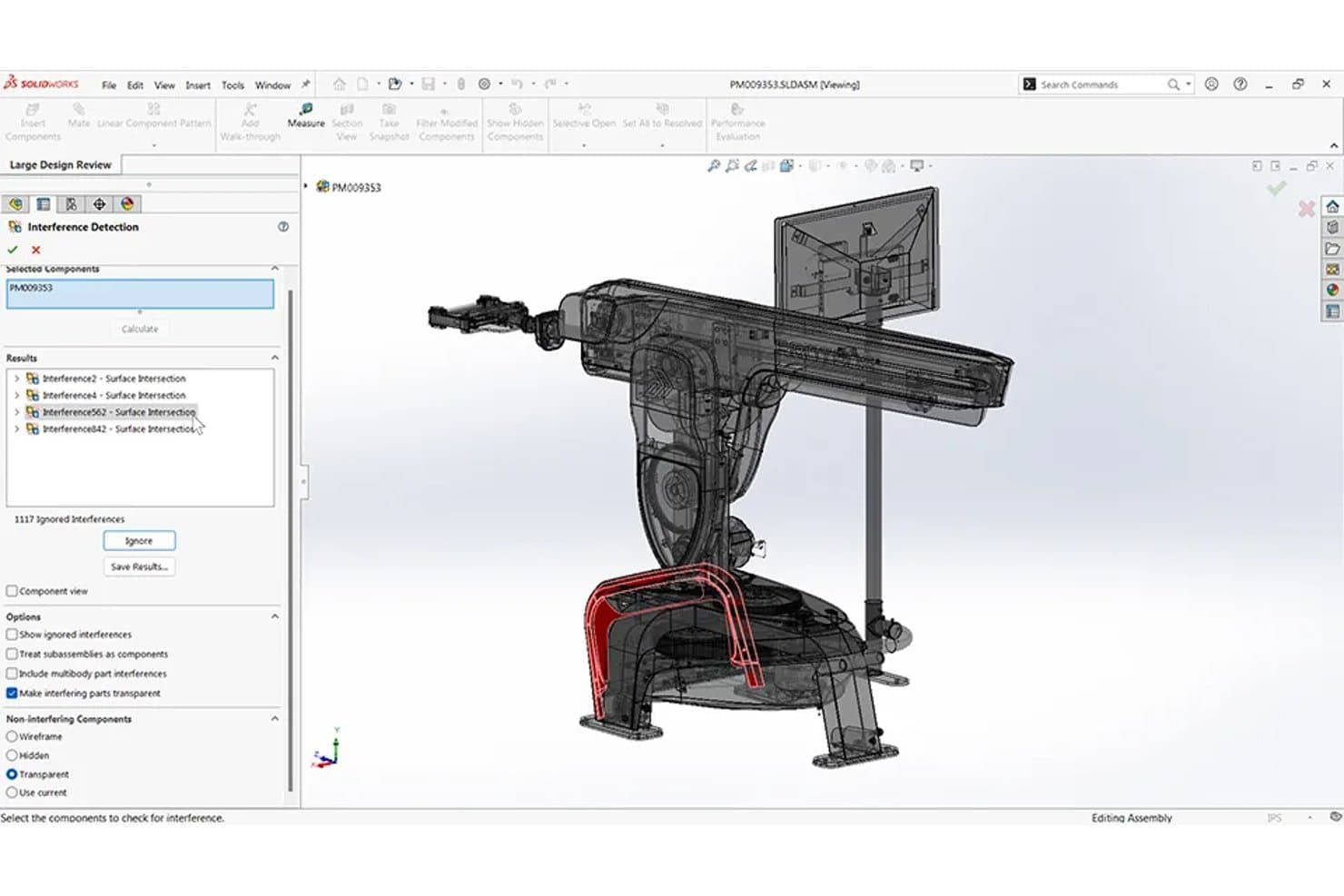
SolidWorks rileva le interferenze degli assiemi nei progetti di prototipazione 3D. SOLIDWORKS è una piattaforma CAD 3D parametrica che include la modellazione di parti e assiemi, la simulazione, il CAM e il rendering fotorealistico in un unico ambiente.
Per chi è più adatto SOLIDWORKS?
SOLIDWORKS è particolarmente adatto agli ingegneri meccanici e ai progettisti di prodotti che hanno bisogno di CAD, simulazione e CAM in un unico ambiente.
Perché ho scelto SOLIDWORKS
SOLIDWORKS si è guadagnato un posto nella mia selezione perché è uno dei pochi strumenti che mantiene CAD, simulazione e CAM realmente collegati in un unico ambiente. Mi piace molto il fatto che la simulazione sia direttamente collegata al modello parametrico, così eseguire un'analisi delle sollecitazioni o termica su una parte modificata non richiede alcuna reimportazione. Lo studio della topologia è particolarmente utile per la prototipazione, poiché genera automaticamente forme più leggere e ottimizzate per il carico. Aggiungendo SOLIDWORKS CAM con la lavorazione basata sulle tolleranze, è possibile passare direttamente da un prototipo digitale a percorsi utensile pronti per macchine CNC senza cambiare piattaforma.
Funzionalità principali di SOLIDWORKS
- Configurazioni e tabelle di progettazione: Memorizza più versioni di una parte o di un assieme in un unico file, con un foglio di calcolo incorporato che gestisce le dimensioni e le opzioni di ogni variante.
- Condivisione tramite servizi cloud: Condividi i modelli tramite un link, così le parti interessate possono esaminare e annotare i progetti in 3D direttamente in un browser, senza dover installare software.
- Rilevamento delle interferenze: Identifica automaticamente le collisioni tra i componenti negli assiemi e tra i corpi nelle parti multicorpo prima della prototipazione fisica.
- Supporto per assiemi di grandi dimensioni: Gestisce assiemi complessi composti da più parti grazie alla modalità Revisione del progetto di grandi dimensioni, agli SmartMates e agli strumenti integrati per l'analisi del movimento.
Integrazioni di SOLIDWORKS
Le integrazioni includono la piattaforma 3DEXPERIENCE, SOLIDWORKS PDM, DELMIAWorks, SOLIDWORKS Electrical, CircuitWorks e gli strumenti ECAD tramite i formati IDF, IDX e PADS. Il Programma dei partner per le soluzioni e il supporto dell'API di SOLIDWORKS consentono integrazioni personalizzate e basate sul marketplace.
Pros and Cons
Pros:
- Le modifiche parametriche si propagano negli assiemi
- Gli studi della topologia ottimizzano i prototipi per ridurne il peso
- Il CAM nativo prepara percorsi utensile pronti per CNC
Cons:
- Gli assiemi di grandi dimensioni richiedono hardware di fascia alta
- I flussi di lavoro 3DEXPERIENCE possono risultare frustranti per gli utenti
Learn more about SolidWorks: Ideale per la progettazione di assiemi meccanici su larga scala
- Prova gratuita di 30 giorni
- A partire da $320/mese
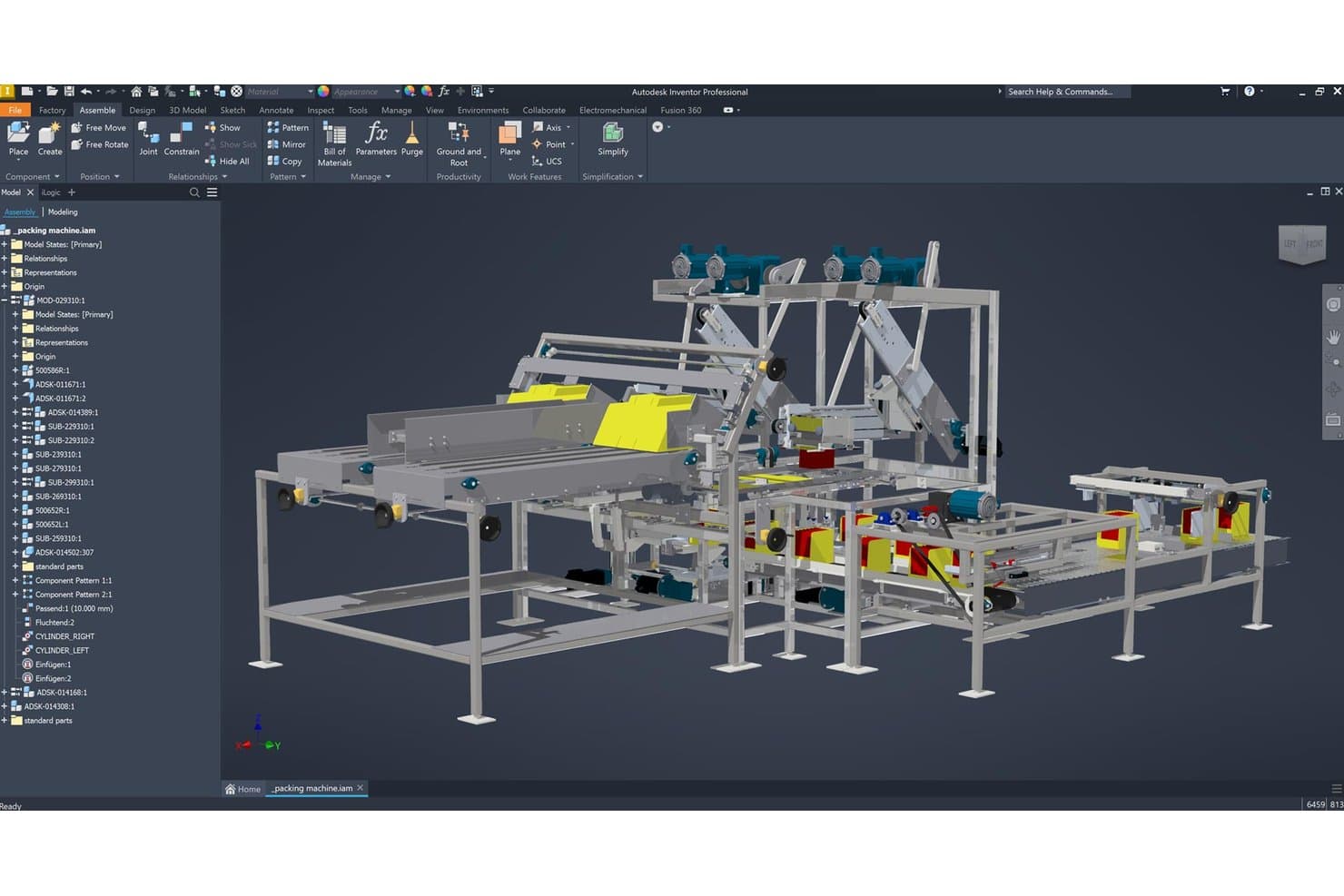
Autodesk Inventor consente agli utenti di assemblare visivamente prototipi complessi di macchine 3D. Autodesk Inventor è uno strumento CAD meccanico per Windows che combina la modellazione parametrica, diretta, a forma libera e basata su regole con la gestione di assiemi su larga scala, la simulazione e la documentazione per la produzione.
Per chi è più indicato Autodesk Inventor?
Inventor è particolarmente adatto agli ingegneri meccanici e ai progettisti di prodotti che lavorano su prodotti hardware complessi e composti da più componenti, che richiedono precisione di livello produttivo e la gestione di assiemi su larga scala.
Perché ho scelto Autodesk Inventor
Autodesk Inventor si è guadagnato un posto nella mia lista perché nessun altro strumento che ho testato gestisce gli assiemi meccanici su larga scala con la stessa profondità. Ho lavorato con assiemi composti da migliaia di parti, nei quali i vincoli relazionali, il controllo delle interferenze e la Simulazione dinamica di Inventor hanno individuato problemi di adattamento e funzionamento prima ancora della realizzazione di un singolo prototipo. Mi affido inoltre al suo set di strumenti per la Definizione basata sul modello (MBD) per incorporare direttamente nel modello 3D tolleranze di livello produttivo, mantenendo la documentazione per la produzione strettamente collegata al progetto.
Funzionalità principali di Autodesk Inventor
- Automazione basata su regole iLogic: Crea regole di progettazione basate sulla logica utilizzando un'interfaccia visiva con trascinamento per automatizzare la configurazione e le modifiche dei parametri in parti e assiemi.
- Simulazione dinamica: Valuta il movimento, la velocità e l'accelerazione dei componenti degli assiemi per convalidare il comportamento meccanico prima della prototipazione fisica.
- Definizione basata sul modello (MBD): Incorpora direttamente nel modello quote 3D, annotazioni e tolleranze per mantenere la documentazione per la produzione collegata alla geometria.
- Generatore di forme: Esegue l'ottimizzazione topologica sulle parti per individuare il materiale che può essere rimosso mantenendo le prestazioni strutturali in condizioni di carico definite.
Integrazioni di Autodesk Inventor
Autodesk Inventor dispone di integrazioni native con Autodesk Fusion, AutoCAD, Revit, Vault, Inventor Nastran e Inventor CAM, oltre a flussi di lavoro ECAD/MCAD e convertitori per STEP, JT, Parasolid, OBJ e Solid Edge. La sua API e il supporto per iLogic consentono integrazioni personalizzate.
Pros and Cons
Pros:
- Gestisce assiemi con migliaia di componenti
- Incorpora le tolleranze di produzione nei modelli 3D
- Automatizza i progetti configurabili tramite iLogic
Cons:
- Richiede Windows e una workstation con hardware elevato
- Non offre la modifica collaborativa in tempo reale
Learn more about Autodesk Inventor:
Altri software per la prototipazione 3D
Ecco alcune ulteriori opzioni di software per la prototipazione 3D che non sono entrate nella mia selezione, ma che vale comunque la pena prendere in considerazione:
Come valuto i software per la prototipazione 3D
Divido la mia valutazione in tre parti, attribuendo il peso maggiore alla creazione di parti accurate e alla revisione delle versioni, comprese dimensioni e assiemi. In seguito, cerco funzionalità distintive come la progettazione generativa o la visualizzazione in AR/VR. Infine, considero l'onboarding, l'assistenza, i prezzi e la compatibilità CAD/CAM.
Funzionalità fondamentali (criteri essenziali per questo elenco)
Quando seleziono gli strumenti per il mio elenco, assegno a ciascuno un punteggio su una scala da 0 (non offre la funzionalità) a 5 (eccelle in quest'area) per ogni funzionalità fondamentale elencata di seguito. Converto quindi il totale in una percentuale per contribuire a valutare l'idoneità complessiva di ciascuno strumento, attribuendo un peso aggiuntivo a tutte le funzionalità che ho ritenuto essenziali.
- Creazione di modelli 3D (essenziale): cerco strumenti per solidi, superfici o mesh che rappresentino concetti di prodotto, staffe, involucri e parti fabbricabili.
- Iterazione del progetto (essenziale): la cronologia parametrica, le configurazioni, la ramificazione e le modifiche reversibili sono importanti quando si confrontano le dimensioni degli involucri o si rivedono le caratteristiche di montaggio.
- Esportazione per la fabbricazione: verifico le esportazioni STEP, STL e di altro tipo, oltre ai controlli per le unità, la tassellazione e la qualità della geometria per la stampa o la lavorazione CNC.
- Accuratezza dimensionale: valuto le dimensioni numeriche, i vincoli, le tolleranze e gli strumenti di misurazione per mantenere l'accoppiamento tra le parti combacianti.
- Anteprima visiva: le viste ombreggiate, i materiali, l'illuminazione e le anteprime di rendering aiutano i team a esaminare la finitura, le proporzioni e l'intento progettuale prima della fabbricazione.
- Modellazione degli assiemi: valuto le relazioni tra i componenti, il movimento, i controlli delle interferenze e la scala dell'assieme utilizzando cerniere, alloggiamenti ed elementi di fissaggio.
Una volta ottenuto un elenco di strumenti che soddisfano i criteri, considero ciò che distingue ciascuna piattaforma.
Fattori distintivi (ciò che differenzia i fornitori)
Ecco come confronto e contrappongo i diversi fornitori:
Funzionalità distintive
Cerco una collaborazione in tempo reale basata sul cloud che consenta ai responsabili di prodotto e agli ingegneri di modificare insieme lo stesso modello senza scambiarsi file via e-mail. Anche l'automazione della progettazione generativa è un elemento distintivo: valuto quanto bene uno strumento esplori automaticamente i compromessi tra peso, materiale e resistenza, risparmiando settimane nella selezione delle opzioni per staffe o involucri. Verifico inoltre se una piattaforma supporta la visualizzazione di prototipi in AR/VR, poiché accompagnare un responsabile attraverso un modello a grandezza naturale nella realtà mista permette di individuare problemi di adattamento ed ergonomia che i rendering bidimensionali non evidenziano.
Oltre le funzionalità
Valuto come il modello di licenza di ciascuno strumento si adatti quando è necessario coinvolgere revisori al di fuori del team di progettazione principale: i prezzi basati sul numero di postazioni aumentano rapidamente se i partner di produzione o gli stakeholder del prodotto devono avere accesso. Anche la compatibilità delle integrazioni è importante: verifico se una piattaforma si connette ai sistemi PLM ed ERP esistenti, poiché le conversioni manuali dei file STEP tra strumenti non collegati introducono errori dimensionali che emergono nelle fasi avanzate della produzione. Infine, considero l'impegno richiesto per l'onboarding, soprattutto per i responsabili di prodotto senza esperienza CAD che devono comunque aggiungere annotazioni o commenti ai modelli durante le revisioni del progetto.
Come scegliere il software per la prototipazione 3D
È facile perdersi in lunghi elenchi di funzionalità e strutture di prezzo complesse. Per aiutarti a rimanere concentrato mentre affronti il tuo particolare processo di selezione del software, ecco una checklist dei fattori da tenere a mente:
| Fattore | Cosa considerare |
|---|---|
| FattoreScalabilità | Cosa considerareIl software è in grado di crescere insieme al tuo team? Verifica che supporti il numero di utenti che prevedi in futuro senza costi aggiuntivi significativi o problemi di prestazioni. |
| FattoreIntegrazioni | Cosa considerareSi collega agli strumenti che già utilizzi? Assicurati che il software possa integrarsi con CAD, PLM o altri sistemi che usi, per evitare interruzioni del flusso di lavoro. |
| FattorePersonalizzazione | Cosa considerarePuoi adattarlo alle tue esigenze? Cerca modelli e interfacce personalizzabili che si adattino ai flussi di lavoro e alle preferenze specifiche del tuo team. |
| FattoreFacilità d'uso | Cosa considerareL'interfaccia è intuitiva per tutti i membri del team? Dai priorità a un software dal design facile da usare, che riduca la curva di apprendimento e aumenti la produttività. |
| FattoreImplementazione e avviamento | Cosa considerareQuanto tempo occorrerà per renderlo operativo? Valuta la disponibilità di risorse formative e il tempo necessario per integrare efficacemente il tuo team. |
| FattoreCosto | Cosa considerareIn che modo il prezzo si adatta al tuo budget? Confronta il costo totale di proprietà, comprese eventuali tariffe nascoste, e considera il valore che il software aggiunge alle tue attività. |
| FattoreMisure di sicurezza | Cosa considerareI tuoi progetti sono protetti? Assicurati che il software offra solide funzionalità di sicurezza, come la crittografia e la conformità alle normative sulla protezione dei dati. |
Che cos'è il software per la prototipazione 3D?
Il software di prototipazione 3D è uno strumento utilizzato per creare modelli digitali tridimensionali dei prodotti. Designer, ingegneri e responsabili di prodotto utilizzano generalmente questi strumenti per visualizzare i concetti e perfezionare i progetti prima della produzione. Le funzionalità di modellazione, simulazione e collaborazione contribuiscono a migliorare la precisione del progetto, ridurre gli errori e velocizzare lo sviluppo. Nel complesso, questi strumenti migliorano l'efficienza e l'efficacia del processo di progettazione.
Funzionalità
Quando selezioni un software di prototipazione 3D, presta attenzione alle seguenti funzionalità chiave:
- Funzionalità di modellazione: consentono agli utenti di creare modelli 3D dettagliati, offrendo una visualizzazione chiara del progetto.
- Strumenti di simulazione: consentono di testare i modelli in condizioni diverse, aiutando a identificare tempestivamente i potenziali problemi.
- Funzionalità di collaborazione: facilitano il lavoro di squadra consentendo a più utenti di lavorare contemporaneamente a un progetto.
- Opzioni di integrazione: si collegano agli strumenti esistenti, come i sistemi CAD, per garantire un flusso di lavoro fluido.
- Modelli personalizzabili: offrono modelli pre-progettati che possono essere adattati alle esigenze specifiche del progetto, facendo risparmiare tempo.
- Archiviazione nel cloud: fornisce un accesso sicuro e remoto ai progetti, garantendo che i membri della squadra possano accedere ai file da qualsiasi luogo.
- Interfaccia intuitiva: garantisce che gli utenti possano navigare facilmente nel software, riducendo la curva di apprendimento.
- Misure di sicurezza: proteggono i dati sensibili dei progetti tramite la crittografia e la conformità alle normative sulla protezione dei dati.
- Tour interattivi del prodotto: aiutano i nuovi utenti a imparare rapidamente a utilizzare il software attraverso tutorial guidati.
- Funzionalità di esportazione: consentono di salvare i modelli in vari formati, facilitandone la condivisione con le parti interessate.
Vantaggi
L'implementazione di un software di prototipazione 3D offre diversi vantaggi alla tua squadra e alla tua azienda. Ecco alcuni dei vantaggi che puoi aspettarti:
- Maggiore precisione del progetto: le funzionalità di modellazione aiutano a creare progetti precisi, riducendo gli errori nel prodotto finale.
- Cicli di sviluppo più rapidi: gli strumenti di simulazione consentono test e iterazioni rapide, velocizzando il processo di progettazione.
- Collaborazione migliorata: le funzionalità di collaborazione consentono ai membri della squadra di lavorare insieme in tempo reale, migliorando la comunicazione.
- Risparmio sui costi: identificare tempestivamente i problemi di progettazione attraverso le simulazioni può prevenire errori costosi in produzione.
- Maggiore accessibilità: l'archiviazione nel cloud garantisce che i membri della squadra possano accedere e condividere i progetti da qualsiasi luogo, facilitando il lavoro da remoto.
- Curva di apprendimento semplificata: un'interfaccia intuitiva aiuta i nuovi utenti a diventare rapidamente operativi, riducendo al minimo i tempi di inattività.
- Sicurezza dei dati: le misure di sicurezza proteggono i dati sensibili dei progetti, mantenendo la riservatezza e la conformità.
Costi e prezzi
La scelta di un software di prototipazione 3D richiede la comprensione dei vari modelli e piani tariffari disponibili. I costi variano in base alle funzionalità, alle dimensioni della squadra, ai componenti aggiuntivi e ad altri fattori. La tabella seguente riassume i piani comuni, i relativi prezzi medi e le funzionalità generalmente incluse nelle soluzioni software di prototipazione 3D:
Tabella comparativa dei piani per il software di prototipazione 3D
| Tipo di piano | Prezzo medio | Funzionalità comuni |
|---|---|---|
| Tipo di pianoPiano gratuito | Prezzo medio$0 | Funzionalità comuniFunzionalità di modellazione di base, spazio di archiviazione limitato e supporto della comunità. |
| Tipo di pianoPiano personale | Prezzo medio$10-$30/utente/mese | Funzionalità comuniStrumenti di modellazione avanzati, archiviazione nel cloud e funzionalità di collaborazione limitate. |
| Tipo di pianoPiano aziendale | Prezzo medio$50-$100/utente/mese | Funzionalità comuniStrumenti completi di modellazione e simulazione, collaborazione della squadra e integrazioni. |
| Tipo di pianoPiano per grandi aziende | Prezzo medio$150+/utente/mese | Funzionalità comuniFunzionalità personalizzabili, supporto dedicato, sicurezza avanzata e analisi. |
Domande frequenti sul software di prototipazione 3D
Ecco alcune risposte alle domande frequenti sul software di prototipazione 3D:
Il software di prototipazione 3D può essere utilizzato su un Mac?
Sì, molte soluzioni software di prototipazione 3D sono compatibili con Mac. Controlla sempre i requisiti di sistema prima dell’acquisto per assicurarti della compatibilità con il tuo Mac. Alcuni software potrebbero richiedere configurazioni hardware specifiche, quindi verifica che il tuo Mac soddisfi tali requisiti per evitare problemi di prestazioni.
È necessaria una formazione per utilizzare il software di prototipazione 3D?
Sì, spesso è necessaria una certa formazione per utilizzare efficacemente il software di prototipazione 3D. Molti fornitori offrono tutorial, webinar e documentazione per aiutarti a iniziare. Se non hai mai utilizzato il modellamento 3D, valuta di dedicare del tempo all’apprendimento delle nozioni di base per sfruttare al massimo il potenziale del software e migliorare la tua produttività.
Quali settori traggono vantaggio dall'utilizzo del software di prototipazione 3D?
Sì, settori come l’architettura, l’industria automobilistica, l’aerospazio e l’elettronica di consumo traggono grandi vantaggi dal software di prototipazione 3D. Questo software aiuta questi settori a visualizzare progetti complessi, testare la funzionalità dei prodotti e apportare le modifiche necessarie prima della produzione. Ciò riduce i costi e migliora la qualità del prodotto finale. Se operi in uno di questi settori, integrare la prototipazione 3D può migliorare il tuo processo di progettazione.