

10 migliori strumenti di prototipazione rapida per i team UX nel 2026

10 Elenco dei migliori strumenti per la prototipazione rapida


In qualità di product manager, conosco in prima persona l'importanza della prototipazione rapida. È entusiasmante vedere le idee prendere forma rapidamente e raccogliere i primi feedback dagli stakeholder o dagli utenti. Tuttavia, quando gli strumenti non sono all'altezza del compito, lo sviluppo del prodotto può rallentare e la situazione può sfuggire rapidamente di mano.
Potresti sprecare ore alle prese con interfacce macchinose o non rispettare scadenze ravvicinate perché lo strumento di prototipazione non si integrava bene con il flusso di lavoro già in uso dal tuo team. Peggio ancora, i cicli di feedback possono bloccarsi quando condividere i progetti sembra più faticoso di quanto valga la pena.
Guardando indietro, mi sono reso conto che molti di questi problemi derivavano dal non avere accesso agli strumenti giusti per la prototipazione rapida, capaci di adattarsi al ritmo incalzante dello sviluppo del prodotto e alle esigenze della progettazione UX.
Per questo ho raccolto i migliori strumenti per la prototipazione rapida. Queste soluzioni ti aiuteranno a trasformare rapidamente i concetti in realtà, semplificare la raccolta dei feedback e mantenere il team concentrato sulla creazione di esperienze utente eccellenti. Continua a leggere per trovare la soluzione più adatta alle tue esigenze e ai tuoi flussi di lavoro.
Perché Fidarsi delle Nostre Recensioni Software
Testiamo e recensiamo software per il product management dal 2020. Come product manager sappiamo quanto sia fondamentale e difficile fare la scelta giusta in termini di software. Investiamo in una ricerca approfondita per aiutare il nostro pubblico a prendere decisioni migliori sugli acquisti di software. Abbiamo testato oltre 2.000 strumenti per diversi casi d’uso e scritto più di 1.000 recensioni approfondite.Scopri come assicuriamo la trasparenza & la nostra metodologia di recensione software.
Tabella comparativa dei migliori strumenti per la prototipazione rapida
Ecco una tabella che puoi utilizzare per confrontare tutti gli strumenti appena descritti nelle panoramiche.
| Tool | Best For | Trial Info | Price | ||
|---|---|---|---|---|---|
| 1 | Ideale per roadmap di prodotto visuali | Piano gratuito disponibile | Da $8/membro/mese (fatturazione annuale) | Website | |
| 2 | Miglior strumento di prototipazione rapida senza codice e per transizioni avanzate | Piano gratuito disponibile | Da $16/utente/mese (fatturazione annuale) | Website | |
| 3 | Il miglior strumento per la prototipazione rapida, ideale per integrare hotspot e transizioni | Piano gratuito + demo gratuita disponibile | A partire da $12/mese (fatturato annualmente) | Website | |
| 4 | Miglior strumento di prototipazione rapida per semplificare il processo di handoff del design | Prova gratuita di 14 giorni + demo gratuita disponibile | Da $49/mese (fatturazione annuale) | Website | |
| 5 | Miglior strumento per prototipazione rapida con breakpoint responsive e layout liquidi | Piano gratuito disponibile | Da $19/utente/mese | Website | |
| 6 | Miglior strumento per prototipizzazione rapida di siti web e-commerce | Piano gratuito + demo gratuita disponibili | A partire da $15/mese (fatturazione annuale) | Website | |
| 7 | Il miglior strumento di prototipazione rapida con applicazione nativa per macOS | Prova gratuita di 30 giorni disponibile | A partire da $12/utente/mese (fatturato annualmente) | Website | |
| 8 | Il miglior strumento di prototipazione rapida per implementare la logica condizionale | Prova gratuita disponibile | Da $25/utente/mese | Website | |
| 9 | Ideale per creare prototipi di design di videogiochi | Piano gratuito disponibile | A partire da $25/postazione/mese (con fatturazione annuale) | Website | |
| 10 | Miglior strumento di prototipazione rapida con librerie di componenti UI complete | Prova gratuita di 15 giorni + demo gratuita disponibile | A partire da $29/utente/mese (fatturazione annuale) | Website |

Panoramica dei 10 migliori strumenti per la prototipazione rapida
Entriamo nel vivo. Ecco i migliori strumenti di prototipazione, con schermate che ti permettono di visualizzare in anteprima l’interfaccia utente.

Miro
Ideale per roadmap di prodotto visuali

Miro è una piattaforma di collaborazione digitale che aiuta i team a fare brainstorming, pianificare e prototipare più rapidamente. Il suo canvas interattivo consente di visualizzare idee, creare flussi utente e mappare roadmap di prodotto in tempo reale. Come strumento di prototipazione rapida, Miro supporta sia l'esplorazione creativa che la pianificazione strutturata, permettendo di passare dal concetto alla consegna con velocità e chiarezza.
Perché ho scelto Miro: Ho scelto Miro perché aiuta i team a colmare il divario tra ideazione ed esecuzione. L'AI Innovation Workspace della piattaforma aggiunge un ulteriore livello di velocità generando idee, organizzando i pensieri e costruendo prototipi iniziali direttamente sulla board. Questo lo rende particolarmente prezioso quando è necessario validare rapidamente le idee e mantenere attive le discussioni sul design.
Apprezzo anche il modo in cui Miro supporta la creazione visiva delle roadmap, essenziale nei cicli di prototipazione rapida. Puoi collegare idee, dipendenze e obiettivi in un'unica vista, aiutando ad allineare i team di design e prodotto agli obiettivi comuni. Insieme alle funzionalità per workshop e mappatura del customer journey, Miro assicura che tutti rimangano sincronizzati durante ogni iterazione.
Funzionalità principali e integrazioni di Miro
Le funzionalità includono AI Innovation Workspace, visualizzazione delle roadmap, workshop di design, mappatura del customer journey, canvas interattivi, automazione dei processi e prototipazione AI avanzata per visuali più pulite.
Le integrazioni includono Microsoft 365, Google Workspace, Atlassian Jira, Atlassian Confluence, Microsoft Teams, Slack, AWS, GitHub, Azure DevOps, Asana, Trello e Figma.
Pros and Cons
Pros:
- Supporta oltre 250 integrazioni software
- Permette design collaborativo e brainstorming
- Offre una workspace per l'innovazione potenziata da AI
Cons:
- Funzionalità offline limitate
- Curva di apprendimento per i nuovi utenti
New Product Updates from Miro
Miro Adds Japan Data Residency for Enterprise Customers
Miro has introduced Japan data residency for enterprise customers, offering in-region storage for production data, backups, and metadata, plus in-region compute infrastructure. For more information, visit Miro's official site.

Figma
Miglior strumento di prototipazione rapida senza codice e per transizioni avanzate
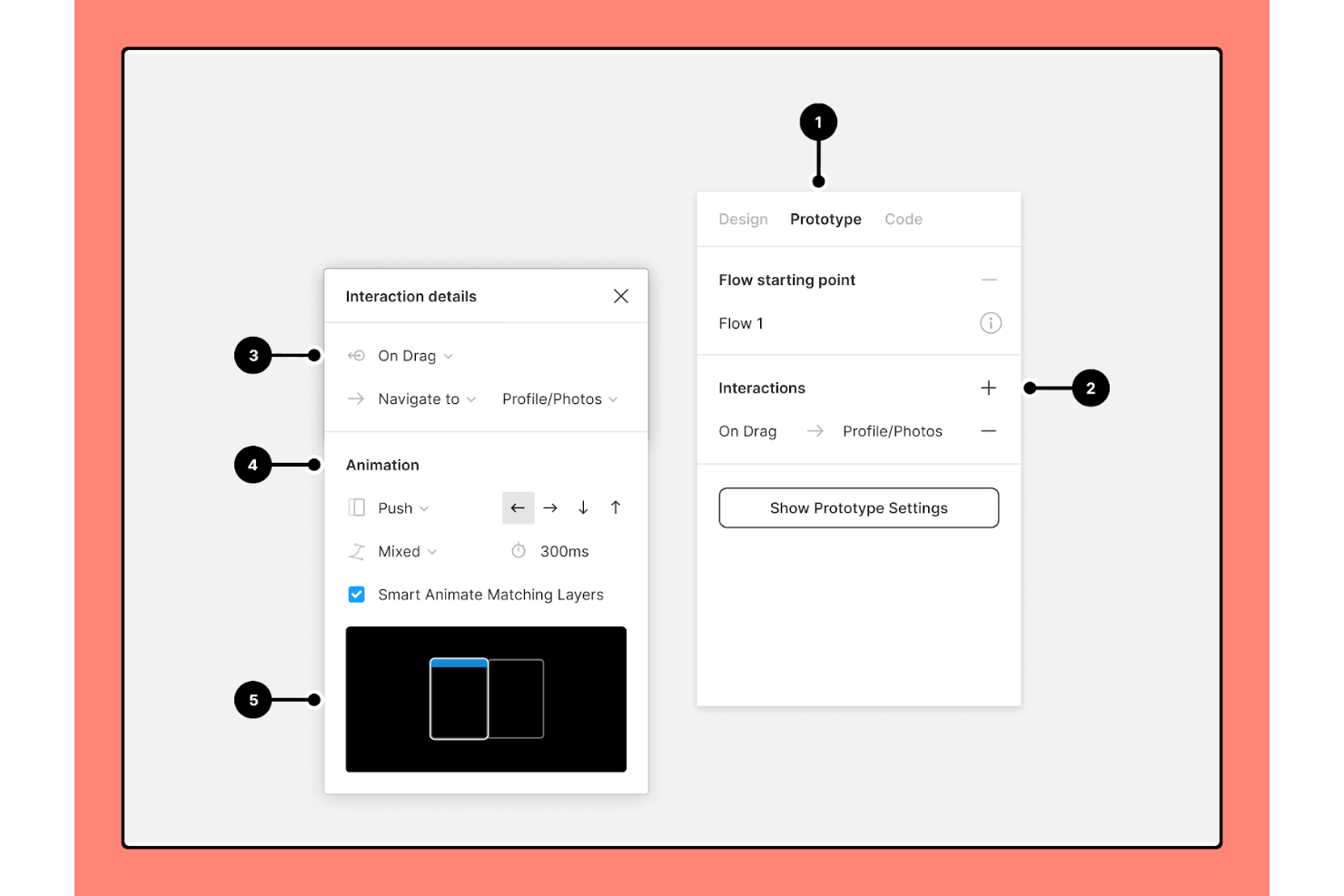
Figma ha rivoluzionato il mondo del design grazie alla sua piattaforma all-in-one che offre prototipazione rapida, uno strumento per wireframe, progettazione UI/UX, brainstorming e molto altro ancora. Figma ha creato il primissimo strumento di design che unisce la versatilità del web alla funzionalità di un'applicazione nativa. Arrivando ai giorni nostri, Figma continua a stupire con funzionalità eccellenti come animazioni intelligenti e transizioni avanzate.
Perché ho scelto Figma: Sono un grande fan degli strumenti low-code e no-code, soprattutto in questa epoca in cui l'intelligenza artificiale (AI) gioca un ruolo fondamentale. Figma aiuta i product manager a creare prototipi impressionanti senza richiedere competenze di programmazione innate. Di conseguenza, puoi trasformare rapidamente grandi idee in prototipi funzionali e interattivi incredibili. Le transizioni avanzate di Figma danno un tocco unico ai prototipi. Se aggiungi anche overlay dinamici, i tuoi prototipi saranno reattivi e pronti per la consegna.
Con Figma, la prototipazione rapida diventa ancora più veloce. Puoi facilmente trascinare e “collegare” pulsanti ed elementi per applicare overlay complessi e condizioni. Inoltre, puoi definire interazioni sottili ma essenziali come passaggi del mouse ed eventi di click, ecc.
Funzionalità e integrazioni principali di Figma
Funzionalità includono progettazione UI/UX, wireframing, creazione di diagrammi, brainstorming, flussi di lavoro Agile, pianificazione strategica, prototipazione rapida, interfaccia drag-and-drop, collaborazione in tempo reale, layout automatici, plugin e widget, hotspot, transizioni, componenti e altro ancora.
Integrazioni comprendono strumenti come Axure, Bubble, Flinto, Maze, Microsoft Teams, Mixpanel, Pendo, Principle, Sprig, Zeplin e altri.
Pros and Cons
Pros:
- Potente strumento penna per l'editing vettoriale
- Piano gratuito generoso
- Condivisione dei prototipi semplice tramite URL
Cons:
- La prototipazione responsive potrebbe essere migliorata
- Nessuna applicazione desktop dedicata (solo web)

Marvel
Il miglior strumento per la prototipazione rapida, ideale per integrare hotspot e transizioni
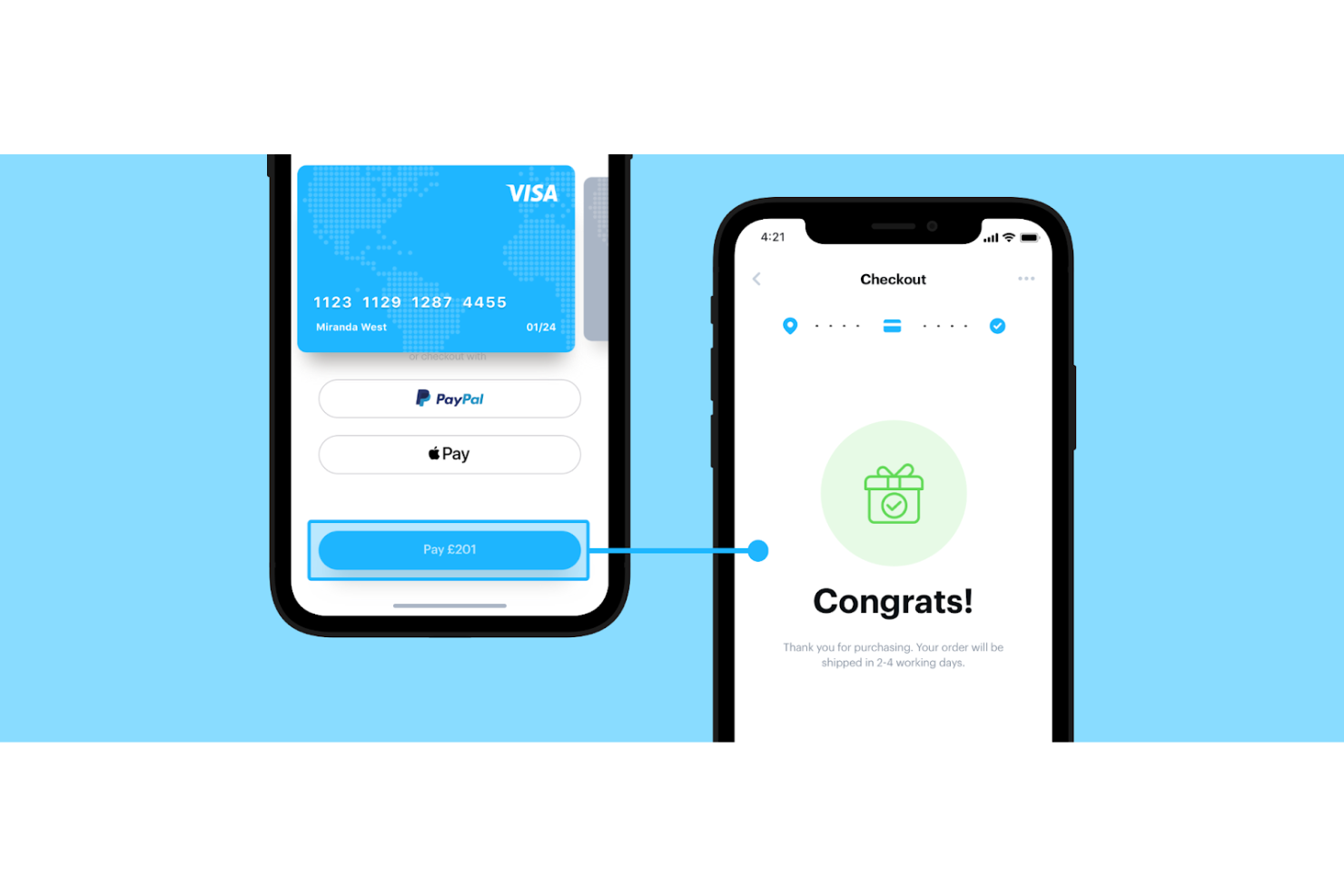
Marvel è un nome di riferimento nel settore dei mockup e del wireframing. Con una piattaforma intuitiva e collaborativa, Marvel aiuta product manager e sviluppatori a lavorare in sinergia e creare ottimi prototipi.
Perché ho scelto Marvel: Trovo la semplicità di Marvel davvero sorprendente perché permette di convertire facilmente i mockup in prototipi realistici in pochi minuti. Inoltre, Marvel dispone di funzionalità integrate per mockup e wireframing che permettono di passare da un’idea a un MVP (minimum viable product) molto rapidamente.
Marvel supporta ogni tipo di schermo, inclusi tutti i dispositivi Apple, Android e desktop. Con Marvel, puoi facilmente inserire hotspot e migliorare il coinvolgimento degli utenti. Gli hotspot sono aree sulle quali gli utenti possono toccare o cliccare. Inoltre, Marvel ti aiuta a collegare gli schermi tramite hotspot e trasmettere una sensazione di orientamento spaziale agli utenti mobile.
Caratteristiche e integrazioni principali di Marvel
Funzionalità comprendono wireframing, design di mockup, prototipazione rapida, test utente, collaborazione in tempo reale, API per sviluppatori, transizioni avanzate, gesture, download offline, test utente e altro ancora.
Integrazioni comprendono oltre 10 strumenti, come Ballpark, Dropbox Paper, Jira, Sketch, Slack, Userflows e altri.
Pros and Cons
Pros:
- Commenti sui prototipi
- Link ai prototipi facilmente condivisibili
- Interfaccia pulita e semplice
Cons:
- Funzionalità limitate nell’app mobile
- Le animazioni non sono molto fluide

UXPin
Miglior strumento di prototipazione rapida per semplificare il processo di handoff del design
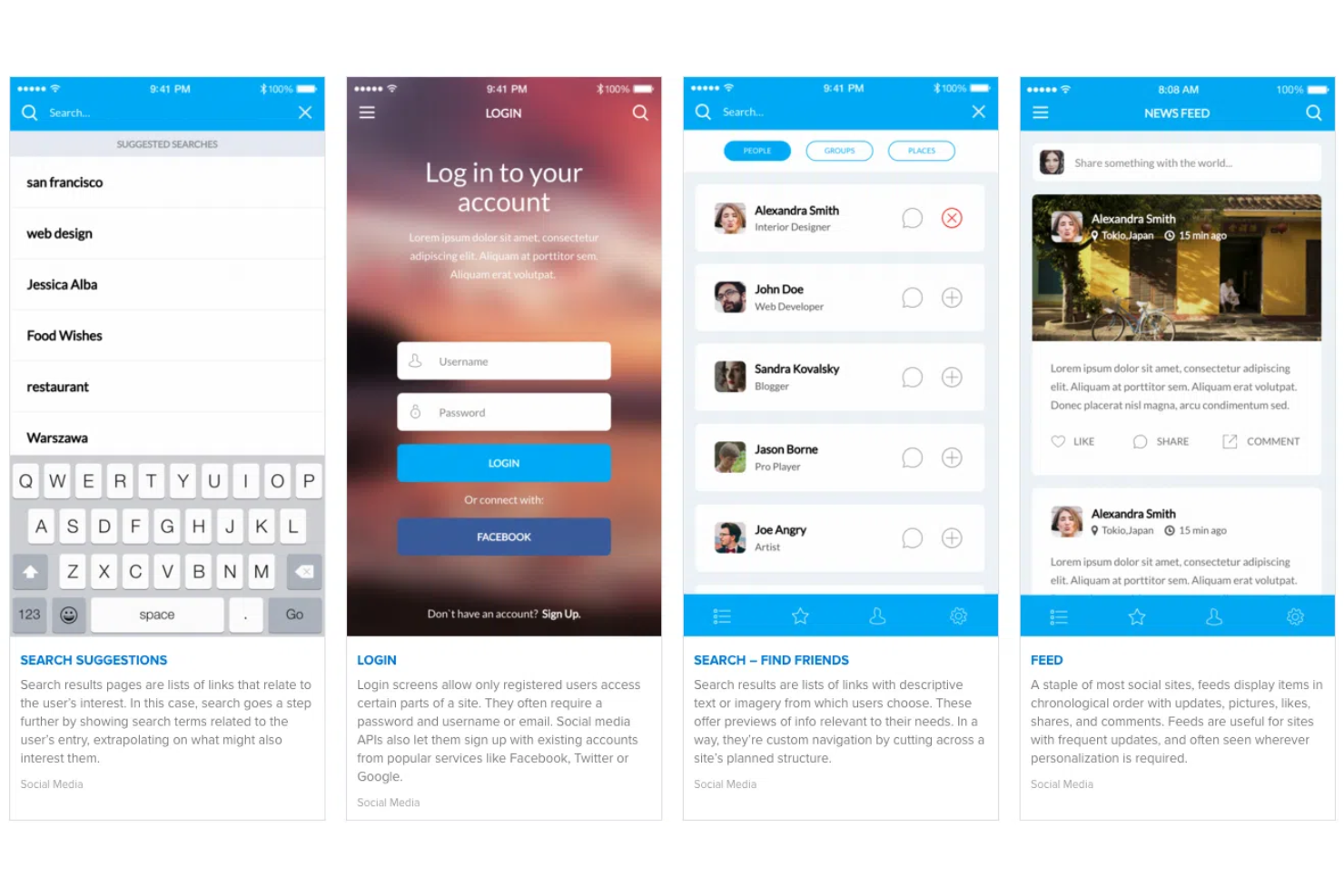
UXPin si impegna a semplificare la prototipazione e lo sviluppo di prodotti. UXPin è nato in Polonia e si è espanso a livello globale. La tecnologia proprietaria Merge di UXPin consente di creare prototipi ad alta fedeltà semplificando al contempo i passaggi nella fase di handoff del processo di design.
Perché ho scelto UXPin: Apprezzo UXPin per le sue eccellenti capacità di handoff del design. L'handoff del design è quella fase nel processo di sviluppo del prodotto in cui il team di design approva un prototipo e gli sviluppatori iniziano il vero e proprio coding o sviluppo. UXPin aiuta a rendere più fluido il ciclo di handoff automatizzando specifiche di progetto, CSS (fogli di stile a cascata) e style guide.
UXPin dà un notevole vantaggio iniziale agli sviluppatori compilando automaticamente i dettagli CSS. Inoltre, UXPin genera documentazione contestuale che aiuta gli sviluppatori a ispezionare accuratamente i design. Infine, le transizioni avanzate e i flussi di navigazione di UXPin influenzano positivamente l'aspetto e la sensazione dei prototipi interattivi.
Funzionalità e integrazioni di spicco di UXPin
Funzionalità includono layout automatico, prototipazione basata su componenti, progettazione UI/UX, wireframing, prototipazione basata su logica con definizione di variabili e interazioni condizionali, heat mapping e test di usabilità.
Integrazioni includono oltre 10 strumenti, come Asana, Google Sheets, Microsoft Dynamics 365, NPM, Salesforce, Storybook, Zendesk, e altri.
Pros and Cons
Pros:
- Caricamento font personalizzati
- Prototipi protetti da password
- Annotazione dei prototipi
Cons:
- Sporadici rallentamenti sulla piattaforma
- Curva di apprendimento leggermente ripida

Miglior strumento per prototipazione rapida con breakpoint responsive e layout liquidi
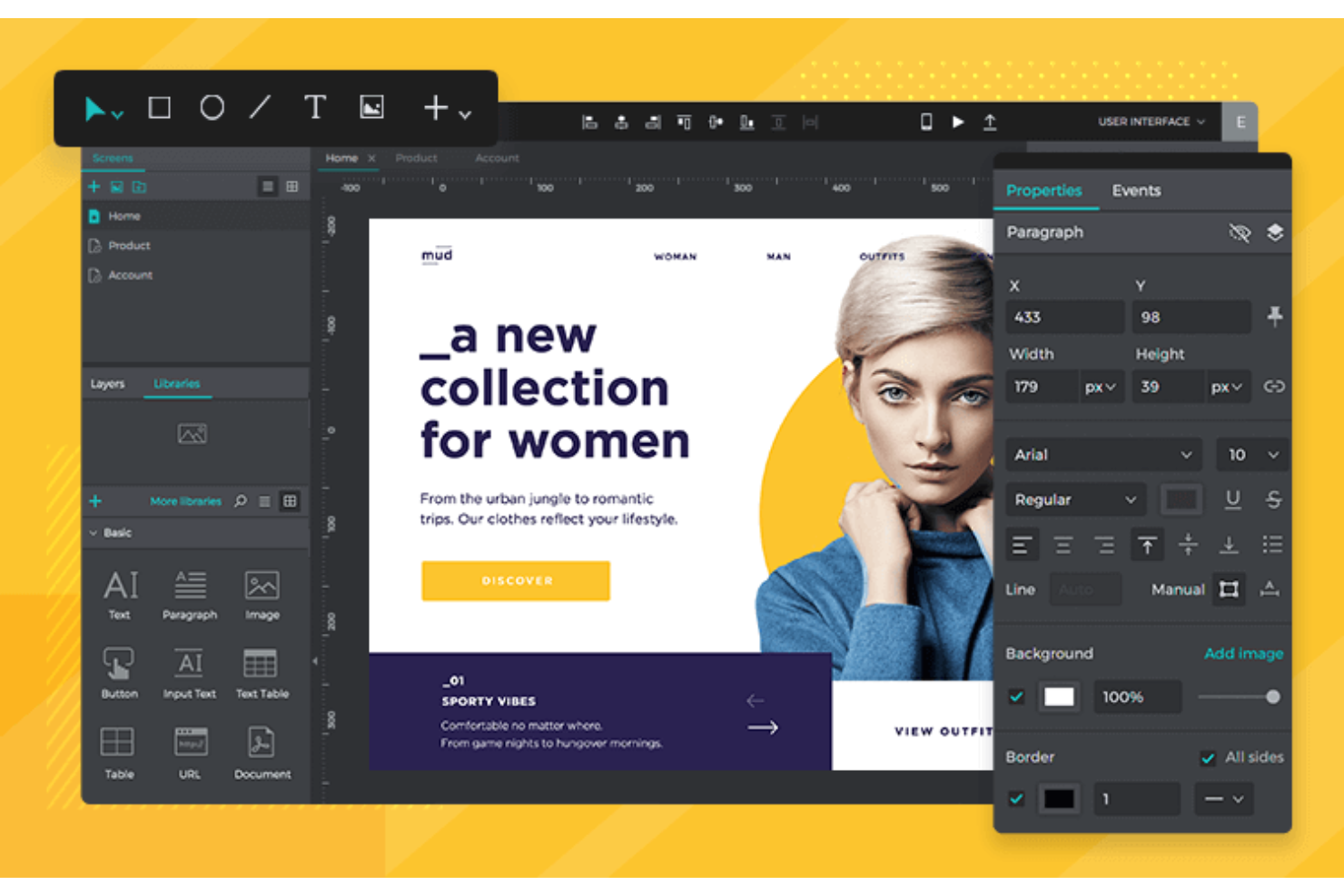
Justinmind si è rapidamente e costantemente evoluto in una piattaforma completa per la progettazione UI/UX. È interessante notare che sviluppatori e designer hanno utilizzato Justinmind per sviluppare l'intero sito web e il portafoglio prodotti di Justinmind, a dimostrazione del fatto che il team fondatore ha grande fiducia nella propria tecnologia.
Perché ho scelto Justinmind: adoro le funzionalità responsive offerte da Justinmind. I layout liquidi sono una di queste caratteristiche che consentono di definire contenitori “liquidi” per gli elementi, in modo che si adattino a diverse dimensioni dello schermo, rapporti d'aspetto o orientamenti del dispositivo. Inoltre, la funzione di ridimensionamento automatico assicura che gli elementi UI su un'app mobile o web si ridimensionino automaticamente per offrire una buona esperienza utente.
Inoltre, Justinmind offre una funzione di anteprima istantanea estremamente utile per simulare i comportamenti del prototipo durante la progettazione di un sito web o un'applicazione. Justinmind offre un controllo totale sulla progettazione responsive tramite i breakpoint - “punti” predefiniti che consentono ai contenuti del sito di adattarsi. Infine, Justinmind supporta anche l'esportazione in formati HTML, PNG, SVG, TIFF e JPG.
Funzionalità e Integrazioni Distintive di Justinmind
Funzionalità includono prototipazione responsive, wireframing, prototipazione rapida, template intelligenti, transizioni e gesti mobile, animazioni, logica condizionale, variabili, campi funzionali, griglie di dati, test con dati reali, design handoff, gestione degli utenti e altro ancora.
Integrazioni comprendono oltre 10 strumenti tra cui Adobe Photoshop, Adobe XD, Azure DevOps, Clicktale, Figma, Jira, Sketch, UserZoom e altri ancora.
Pros and Cons
Pros:
- La versione gratuita consente prototipi illimitati
- Interfaccia drag-and-drop intuitiva
- Ampie risorse gratuite per la prototipazione
Cons:
- Bug nell'esportazione
- Curva di apprendimento leggermente ripida

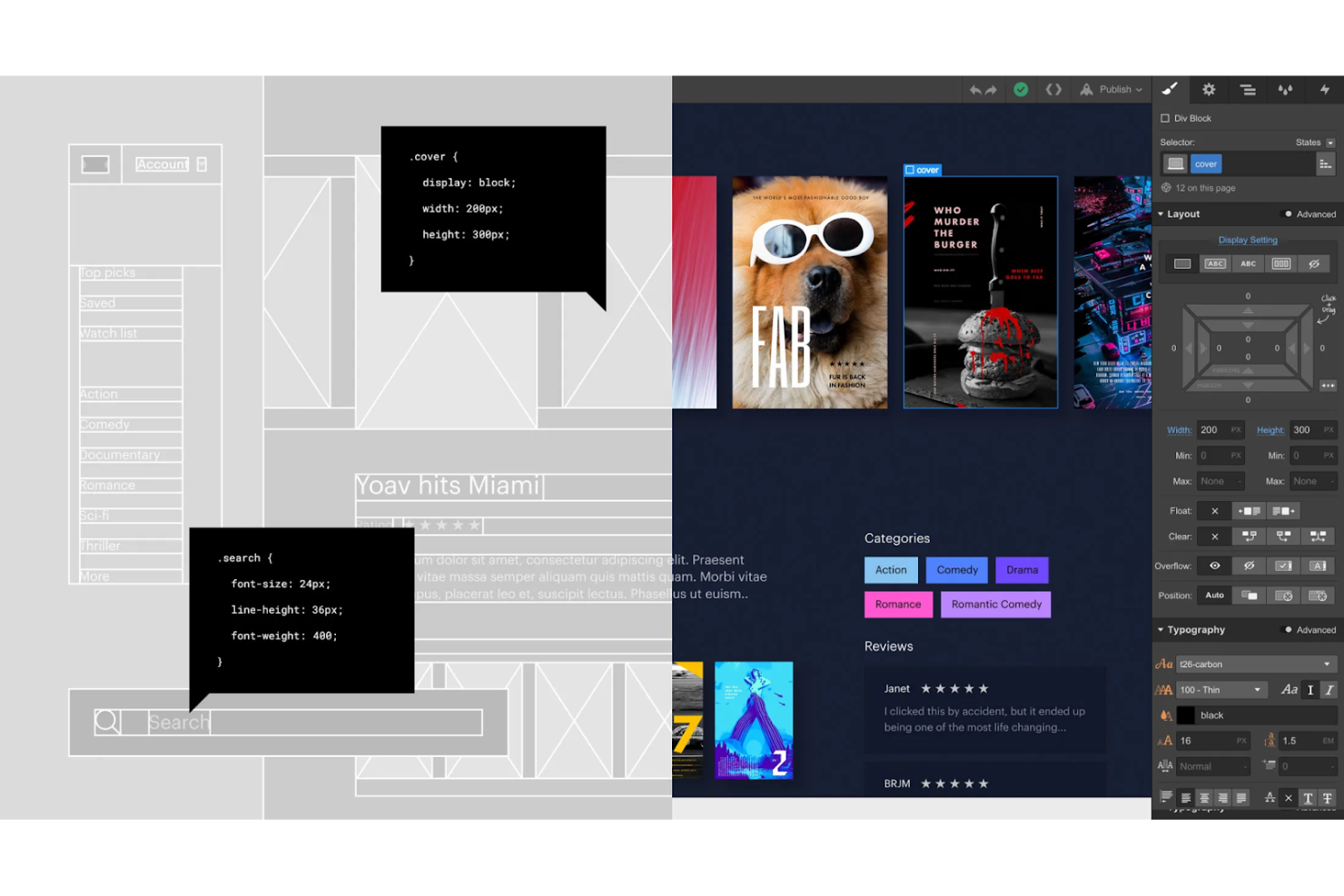
La visione di Webflow è creare lo strumento di sviluppo no-code più robusto al mondo, affinché anche chi non ha competenze tecniche possa realizzare design professionali a prescindere dal proprio livello di esperienza nel product design. Fondata nel 2013, Webflow si è evoluta in una piattaforma di design completa con funzioni di e-commerce, CMS e strumenti di modifica dei siti web.
Perché ho scelto Webflow: Da ex product manager senza un background tecnico, sono una forte sostenitrice delle piattaforme di design no-code e low-code. Webflow elimina la difficoltà di scrivere quantità enormi di codice per realizzare prototipi funzionali.
Webflow è una vera manna per il prototipaggio di siti e-commerce. Con Webflow puoi gestire aspetti critici come il carrello online, il flusso di checkout e l'intera esperienza di acquisto. Webflow ti aiuta anche a gestire altre aree di un business e-commerce, come le email transazionali e l’aggiornamento delle informazioni sui prodotti.
Caratteristiche e integrazioni di spicco di Webflow
Caratteristiche comprendono una tela visuale, content marketing, pubblicazione di siti web, ottimizzazione SEO, interazioni e animazioni coinvolgenti, CMS e un completissimo pacchetto di corsi racchiuso in Webflow University.
Integrazioni comprendono oltre 10 strumenti come Arengu, Chatwoot, Getform, Monto, Off Script, Pixie, Shopify, Zapier e altri.
Pros and Cons
Pros:
- Ottimo CMS
- Catalogazione dei template per settore
- Webflow University offre una quantità di ottime risorse
Cons:
- Manca la personalizzazione del codice
- Supporta solo il gateway di pagamento Stripe

Sketch
Il miglior strumento di prototipazione rapida con applicazione nativa per macOS

Sketch è nato nel 2010 in risposta alla frustrazione del team fondatore per l'assenza di strumenti disponibili per il design delle interfacce utente. Da allora, Sketch ha compiuto enormi progressi nel fornire strumenti di design straordinari per freelance e aziende in tutto il mondo. Tra la sua vasta gamma di strumenti, la prototipazione interattiva di siti web di Sketch è una funzione imprescindibile.
Perché ho scelto Sketch: Amo la potenza e la semplicità pura di Sketch. Con Sketch puoi costruire facilmente percorsi utente collegando schermate ed elementi di interfaccia utente. Puoi riutilizzare elementi e interazioni dell'interfaccia invece di ricostruirli da zero ogni volta. Adoro la funzione con più punti di inizio che permette di mostrare diversi flussi utente e idee ai clienti.
Sketch aiuta a creare interazioni autentiche grazie agli hotspot che permettono di rendere cliccabili intere sezioni invece che solo singoli elementi. Di conseguenza, la prototipazione rapida di app mobili guadagna un vantaggio unico. Per creare prototipi interattivi di siti web, Sketch offre interazioni uniche come la dissolvenza in entrata e lo scorrimento verso l'alto per migliorare il coinvolgimento degli utenti. Infine, Sketch dispone di un'app nativa per macOS che permette agli utenti di sfruttare l'ecosistema Apple per maggiore produttività e personalizzazione.
Funzionalità principali e integrazioni di Sketch
Funzionalità includono A/B testing, sovrapposizioni, prototipazione rapida, percorsi utente, app nativa per macOS e visualizzazione web dei componenti - una panoramica completa di tutti i colori, simboli, stili di testo e di livello, incorporamento dei font, controlli degli angoli e altri elementi.
Integrazioni includono oltre 15 strumenti, come Abstract, Flinto, Flow, InVision, Marvel, Maze, Origami, Plant, ProtoPie, Prott, Zeplin e altri.
Pros and Cons
Pros:
- Riutilizzo delle risorse nei diversi design
- Ottimo controllo delle versioni
- Ampia libreria di plugin
Cons:
- Disponibile solo per utenti macOS
- Strumenti di misurazione limitati

Axure
Il miglior strumento di prototipazione rapida per implementare la logica condizionale
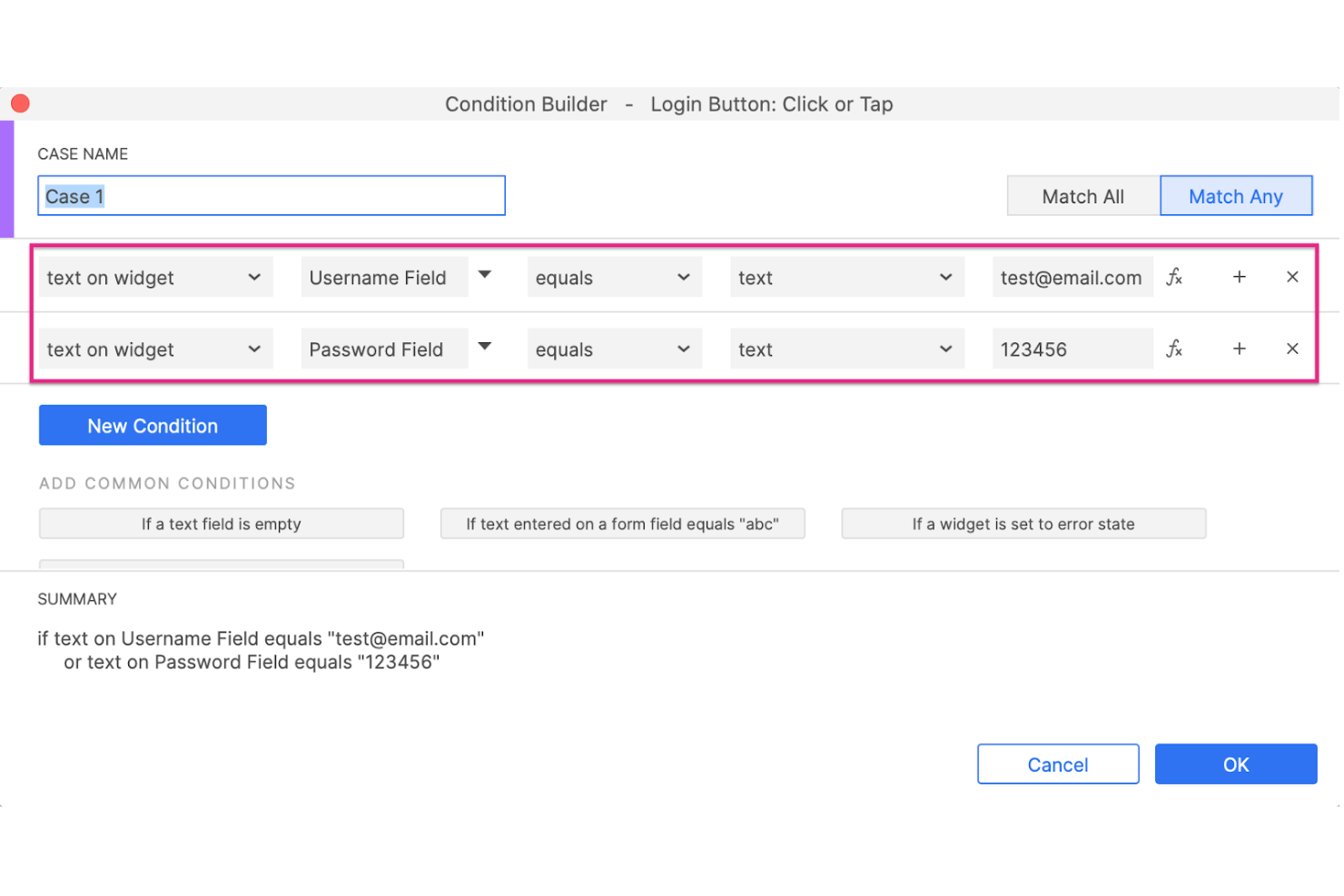
Il RP in 'Axure RP' sta per Rapid Prototyping (prototipazione rapida). Il team di Axure ha creato una potente piattaforma di progettazione che consente a più stakeholder di co-creare un unico file RP. L'ultimo aggiornamento di Axure, Axure RP 10, offre funzionalità uniche come la manipolazione dei widget e una maggiore flessibilità di progettazione.
Perché ho scelto Axure RP: Ho selezionato Axure RP principalmente per le sue infinite possibilità di interazione. Con Axure RP, puoi accedere a illimitate possibilità di interazione modificando diversi eventi interattivi come spostare, aprire link, ruotare, impostare un'immagine, mettere a fuoco, ecc.
Axure RP offre anche ottime funzionalità di logica condizionale come l'abilitazione/disabilitazione di pulsanti in base a controlli condizionali predefiniti. Ad esempio, se stai progettando un prototipo per un sito e-commerce, potresti implementare un blocco di logica condizionale che disabilita il pulsante di acquisto in caso di esaurimento scorte.
Funzionalità e integrazioni peculiari di Axure RP
Funzionalità includono prototipazione rapida, contenuti dinamici, logica condizionale, eventi interattivi, pannelli dinamici, interfacce dati, viste adattive, diagrammi di flusso, prototipazione funzionale, commenti sul prototipo a schermo, ispezione per sviluppatori e altro ancora.
Integrazioni includono oltre 10 strumenti come Adobe XD, Figma, Jira, Microsoft Teams, Sketch, Slack e altri.
Pros and Cons
Pros:
- Widget personalizzabili
- Potente prototipazione funzionale
- Vaste risorse online per l'apprendimento
Cons:
- Nessuna assistenza clienti tramite chat dal vivo
- Curva di apprendimento ripida


Lo slogan di ProtoPie è 'Realizza prototipi facili come una torta.'. Il team dietro ProtoPie si impegna a creare strumenti di progettazione che tutti possano utilizzare. Dalla sua nascita, ProtoPie si è evoluto fino a diventare un solido strumento di prototipazione rapida per diversi settori, tra cui quello automobilistico, dei videogiochi, degli smartphone, degli smartwatch e dei televisori.
Perché ho scelto ProtoPie: Un tempo giocavo molto ai videogiochi e le peculiarità del mio responsabile di prodotto mi facevano sempre riflettere su come gli sviluppatori avrebbero potuto testare qualcosa di così complesso, come un intero mondo virtuale con personaggi e conversazioni all'interno di un gioco. Ecco ProtoPie, che aiuta a realizzare prototipi rapidi di giochi per computer desktop, dispositivi mobili e persino console come PS5 e Xbox.
Con ProtoPie puoi creare prototipi immersivi per qualsiasi controller di gioco. ProtoPie consente di definire interazioni dinamiche come variabili, logica e formule. Le variabili aiutano a tenere traccia del punteggio di un gioco o della salute di un personaggio.
Funzionalità e integrazioni principali di ProtoPie
Le funzionalità includono prototipazione rapida, input di testo interattivo, assistente vocale basato sull'intelligenza artificiale, galleria fotografica, progettazione di interazioni con scorrimento e trascinamento, animazioni dell'interfaccia utente, interazioni di pressione e rotazione, cassetto trascinabile, attivatori audio e molto altro.
Le integrazioni includono strumenti di progettazione software come Adobe XD, Figma e Sketch, nonché dispositivi hardware come Arduino, il volante Logitech G29 e altri.
Pros and Cons
Pros:
- Ampie risorse per l'apprendimento
- Animazioni Lottie
- Prototipazione interattiva completa
Cons:
- Nessun supporto per webcam sui computer desktop
- La visualizzazione desktop è un po' disordinata

Proto.io
Miglior strumento di prototipazione rapida con librerie di componenti UI complete

Proto.io si impegna a migliorare lo sviluppo dei prodotti creando strumenti di design facili da usare per wireframe e prototipazione. Con Proto.io, puoi creare senza sforzo e rapidamente prototipi per Windows, iOS e watchOS arricchiti da elementi UI visivamente sorprendenti.
Perché ho scelto Proto.io: Proto.io vanta numeri impressionanti poiché lo strumento offre oltre 250 elementi UI, più di 1.000 template e oltre 6.000 risorse digitali. Di conseguenza, puoi trarre rapidamente ispirazione invece di reinventare la ruota.
Con Proto.io, puoi realizzare prototipi funzionali ricchi di vitalità grazie a oltre 80 eventi come passaggio del mouse, visualizzazione a schermo, tocco, ecc., per definire comportamenti personalizzati. Inoltre, Proto.io offre eccellenti transizioni e animazioni per creare prototipi realistici.
Caratteristiche principali e integrazioni di Proto.io
Funzionalità includono design UI/UX, wireframing, creazione di mockup, prototipazione rapida, interfaccia drag-and-drop, animazioni e interazioni avanzate, un'eccellente libreria di componenti UI, eventi personalizzati, caricamento di font personalizzati e altro ancora.
Integrazioni includono Adobe Fonts, Adobe Photoshop, Adobe XD, Figma, Google Fonts, Sketch e altri.
Pros and Cons
Pros:
- Ottimo controllo delle versioni
- Prototipi facilmente condivisibili
- Librerie UI per specifici tipi di dispositivo
Cons:
- Funzione di importazione instabile
- Occasionali rallentamenti delle prestazioni
Altre opzioni
Ecco alcune altre opzioni valide che non sono rientrate nell’elenco dei migliori strumenti per la prototipazione rapida:
- Origami Studio
Miglior strumento di prototipazione rapida per sfruttare le API hardware native
- Framer
Ideale per creare prototipi di siti web interattivi
- Ignite UI by Infragistics
Ideale per la progettazione di prototipi di applicazioni web


Come Valuto gli Strumenti di Prototipazione Rapida
Quando un PM ha bisogno di un prototipo cliccabile e condivisibile prima di un meeting con gli stakeholder, valuto due livelli: le capacità di base che qualificano uno strumento e i fattori che distinguono i migliori dal resto.
Funzionalità Core (Requisiti Fondamentali per Questa Lista)
Quando seleziono gli strumenti per la mia lista, valuto ciascuno su una scala da 0 (non offre la funzionalità) a 5 (eccelle in quest’area) per ogni funzione principale elencata qui sotto. Poi, calcolo il punteggio totale dello strumento in percentuale. Ogni strumento deve raggiungere un punteggio totale minimo del 65% per essere preso in considerazione.
- Prototipazione Interattiva: Valuto se è possibile creare flussi cliccabili con transizioni e stati realistici, come simulare un processo di checkout che l’utente naviga realmente.
- Costruzione Low-Code/No-Code: Lo strumento dovrebbe consentire al PM di unire schermate tramite drag-and-drop senza scrivere codice, così la validazione del concept non resta bloccata aspettando risorse di design.
- Componenti & Template Riutilizzabili: Cerco librerie di componenti condivisi o template iniziali che permettano di creare rapidamente schermate coerenti, simili a ciò che Figma e Axure offrono con i loro sistemi di design.
- Collaborazione & Condivisione: Commenti in tempo reale e link ai prototipi condivisibili sono fondamentali, soprattutto quando il PM necessita di un’approvazione veloce da uno stakeholder che non accede a uno strumento di design.
- User Testing & Raccolta Feedback: Verifico se lo strumento supporta la raccolta di feedback degli utenti direttamente sul prototipo, ad esempio tramite annotazioni contestuali o sessioni integrate di user testing.
- Design-to-Dev Handoff: Lo strumento dovrebbe generare specifiche, asset o snippet di codice esportabili che gli ingegneri possono consultare, riducendo il ping-pong fra approvazione del prototipo e pianificazione degli sprint.
Una volta che ho una lista di strumenti che soddisfano questi criteri, considero cosa distingue ciascuna piattaforma.
Fattori di Differenziazione (Cosa Distingue i Vendor)
Ecco come confronto e metto a confronto diversi fornitori:
Funzionalità Distintive
La generazione supportata dall’AI è un vero elemento distintivo. Alcuni strumenti trasformano un prompt di testo o uno schizzo grezzo in un layout di schermata usabile, permettendo ai PM di passare dall’idea al prototipo in pochi minuti. Anche la modalità presentazione è importante: quando occorre presentare un concetto ai dirigenti durante una review di prodotto, una walkthrough integrata è meglio che dover mettere insieme screenshot. Valuto anche la preview multipiattaforma, dato che un flusso di checkout che funziona sul desktop può apparire del tutto diverso su uno schermo mobile.
Oltre le Funzionalità
Valuto quanto velocemente un PM può passare da zero a un prototipo condivisibile. Uno strumento con tempi di onboarding lunghi vanifica lo scopo della prototipazione rapida. Anche le integrazioni sono molto importanti: verifico le connessioni con Jira, Linear, Slack e Confluence, perché un prototipo che esiste separatamente dal workflow del PM aggiunge ulteriori passaggi. Anche i modelli di prezzo sono importanti, in particolare la differenza tra costo per editor e per viewer, dato che uno strumento che addebita ogni stakeholder che apre un link di review può limitare il ciclo di feedback su team numerosi.
Che cos'è uno strumento per la prototipazione rapida?
Uno strumento per la prototipazione rapida è una soluzione software che consente di creare rapidamente prototipi funzionali per prodotti digitali o fisici. Grazie a funzionalità come il trascinamento, il supporto per diversi elementi interattivi, la collaborazione in tempo reale e la possibilità di generare prototipi per più dispositivi, questi strumenti si concentrano sull'offrire a designer e sviluppatori un modo rapido ed efficiente per trasformare le proprie idee in prototipi tangibili, favorendo iterazioni rapide e test con gli utenti.
I principali vantaggi dell'utilizzo degli strumenti per la prototipazione rapida includono iterazioni di progettazione più veloci, una riduzione del tempo necessario per arrivare sul mercato e la possibilità di raccogliere il feedback degli utenti nelle prime fasi del processo di sviluppo.
Funzionalità degli strumenti per la prototipazione rapida
Quando selezioni gli strumenti per la prototipazione rapida, presta attenzione alle seguenti funzionalità chiave:
- Design interattivo: consente agli utenti di creare prototipi con elementi cliccabili, facilitando la visualizzazione delle interazioni degli utenti.
- Collaborazione in tempo reale: permette ai membri del team di lavorare insieme simultaneamente, migliorando la comunicazione e velocizzando il processo di progettazione.
- Funzionalità di integrazione: si connette con altri strumenti software, ottimizzando i flussi di lavoro e mantenendo la coerenza tra le piattaforme.
- Supporto per AR e VR: consente la prototipazione nella realtà aumentata e virtuale, aiutando i team a valutare i progetti in ambienti immersivi.
- Progettazione di interfacce vocali: facilita la creazione di prototipi per dispositivi ad attivazione vocale, in linea con le moderne tendenze delle interfacce utente.
- Personalizzazione: offre opzioni per adattare lo strumento alle esigenze specifiche del progetto, migliorando l'esperienza utente e l'allineamento con la strategia complessiva di sviluppo del prodotto.
- Facilità d'uso: presenta un'interfaccia intuitiva, riducendo la curva di apprendimento e rendendolo accessibile a tutti i membri del team.
- Raccolta dei feedback: include strumenti per raccogliere contributi da parti interessate e utenti, favorendo il processo di progettazione iterativo.
- Misure di sicurezza: protegge i dati sensibili di progettazione tramite funzionalità di crittografia e conformità, garantendo la sicurezza delle informazioni.
- Tecnologie di stampa 3D dettagliate: la prototipazione rapida è diventata sinonimo di produzione additiva e stampa 3D, con metodi comuni tra cui:
- FDM (Modellazione a deposizione fusa): conveniente per modelli di base e prototipi nelle prime fasi. Ideale per creare progetti semplici con materiali termoplastici.
- SLA (Stereolitografia): produce componenti ad alta risoluzione e accurati, con superfici lisce, ideali per prototipi ad alta fedeltà e progetti che richiedono tolleranze ristrette.
- SLS (Sinterizzazione laser selettiva): produce prototipi resistenti e funzionali, adatti a test rigorosi, utilizzando materiali in polvere come il nylon.
Vantaggi degli strumenti di prototipazione rapida
- Iterazioni di progettazione più rapide: creazione e test rapidi dei prototipi, riducendo il tempo dedicato alle revisioni e accelerando il ciclo di sviluppo.
- Collaborazione migliorata: le funzionalità di collaborazione in tempo reale migliorano il lavoro di squadra e la comunicazione, portando a progetti più coesi e innovativi.
- Riduzione dei costi: identificazione tempestiva dei difetti di progettazione, minimizzando le modifiche costose e riducendo il rischio di ritardi nel progetto.
- Esperienza utente migliorata: raccolta dei feedback tramite prototipi interattivi per perfezionare le interfacce utente, ottenendo prodotti più intuitivi.
- Maggiore coinvolgimento delle parti interessate: condivisione semplice dei prototipi per tenere informate le parti interessate, favorendo il consenso e allineando gli obiettivi del progetto.
- Flessibilità aumentata: gli strumenti personalizzabili si adattano ai diversi requisiti del progetto, consentendo ai team di soddisfare esigenze specifiche di progettazione.
- Preparazione al futuro: mantenere la competitività sfruttando funzionalità all'avanguardia come il supporto per AR e VR, garantendo che i progetti soddisfino le aspettative moderne.
Cosa succede ora?
Se stai cercando strumenti per la prototipazione rapida, contatta gratuitamente un consulente SoftwareSelect per ricevere consigli.
Compili un modulo e fai una breve conversazione in cui vengono analizzate nel dettaglio le tue esigenze. Successivamente riceverai una selezione ristretta di software da esaminare. Ti supporteranno inoltre durante l'intero processo di acquisto, comprese le negoziazioni sul prezzo.