

I migliori strumenti online per roadmap ti aiutano a creare, condividere e aggiornare le roadmap di prodotto in tempo reale—così i team restano allineati anche quando le priorità cambiano. Senza questi strumenti, le roadmap spesso restano in slide statiche o fogli di calcolo obsoleti che causano fraintendimenti e compromettono la pianificazione.
Ho testato oltre 25 strumenti per roadmap e so quali offrono visualizzazioni flessibili, funzionalità di collaborazione e integrazioni realmente utili ai team di prodotto.
In questa guida troverai piattaforme che facilitano la visualizzazione della strategia, l'adattamento delle tempistiche e il mantenimento di tutti sulla stessa linea, dalla leadership ai team di delivery.
Perché fidarsi dei nostri consigli sui software
6,700+
Reviews
20
Industry experts
16+
Evaluation factors
14
Years
Il nostro team testa e recensisce software dal 2012. In quanto product manager noi stessi, sappiamo quanto sia difficile — e importante — scegliere il software giusto.
Per questa guida, abbiamo valutato gli strumenti attraverso test pratici e ricerche indipendenti, assegnando un punteggio agli strumenti in base ai nostri criteri di selezione.
Le nostre recensioni riflettono il nostro giudizio editoriale umano, non un discorso di vendita.
- Andrew LumbySenior TPM
- Cristiano ValimSenior UI/UX Lead
Riepilogo dei migliori strumenti online per roadmap
| Tool | Best For | Trial Info | Price | ||
|---|---|---|---|---|---|
| 1 | Ideale per mappare i flussi di lavoro del prodotto | Piano gratuito disponibile | Da $8/membro/mese (fatturato annualmente) | Website | |
| 2 | Ideale per portali di roadmap personalizzati e basati sul pubblico | Prova gratuita di 30 giorni + piano gratuito disponibile | A partire da $1.10/utente/mese | Website | |
| 3 | Ideale per spazi di lavoro personalizzabili | Piano gratuito + demo gratuita disponibile | A partire da $7/utente/mese (con fatturazione annuale) | Website | |
| 4 | Ideale per la creazione flessibile di roadmap | Demo gratuita disponibile | Prezzi su richiesta | Website | |
| 5 | Migliore con la pianificazione OKR | Prova gratuita di 14 giorni + demo gratuita disponibile | A partire da $36/mese (fatturato annualmente) | Website | |
| 6 | Ideale per centralizzare i feedback di prodotto | Prova gratuita di 14 giorni + piano gratuito + demo gratuita disponibili | Da $19/maker/mese (fatturato annualmente) | Website | |
| 7 | Ideale per scalabilità e flessibilità | Demo gratuita disponibile | Prezzo su richiesta | Website | |
| 8 | La migliore soluzione tutto-in-uno per la gestione del prodotto | Prova gratuita di 14 giorni + demo gratuita disponibile | A partire da $19/utente/mese (fatturato annualmente) | Website | |
| 9 | Ideale per creare roadmap da presentare | Prova gratuita di 14 giorni | Da $19/utente/mese (fatturato annualmente) | Website | |
| 10 | Ideale per team di sviluppo Agile | Prova gratuita di 7 giorni + piano gratuito | Da $7,75/utente/mese | Website |


Panoramica dei 10 migliori strumenti online per roadmap
Ecco le mie panoramiche dei 10 migliori strumenti online per roadmap che ho scelto di mettere in evidenza. Ho incluso il miglior caso d’uso per ogni piattaforma, le funzionalità principali, le integrazioni, nonché i pro e i contro. Ho anche inserito uno screenshot dell’interfaccia per darti un’idea visiva dei diversi strumenti.
 1Ideale per mappare i flussi di lavoro del prodotto
Miro
- Piano gratuito disponibile
- Da $8/membro/mese (fatturato annualmente)
Visit WebsiteRating:4.8/5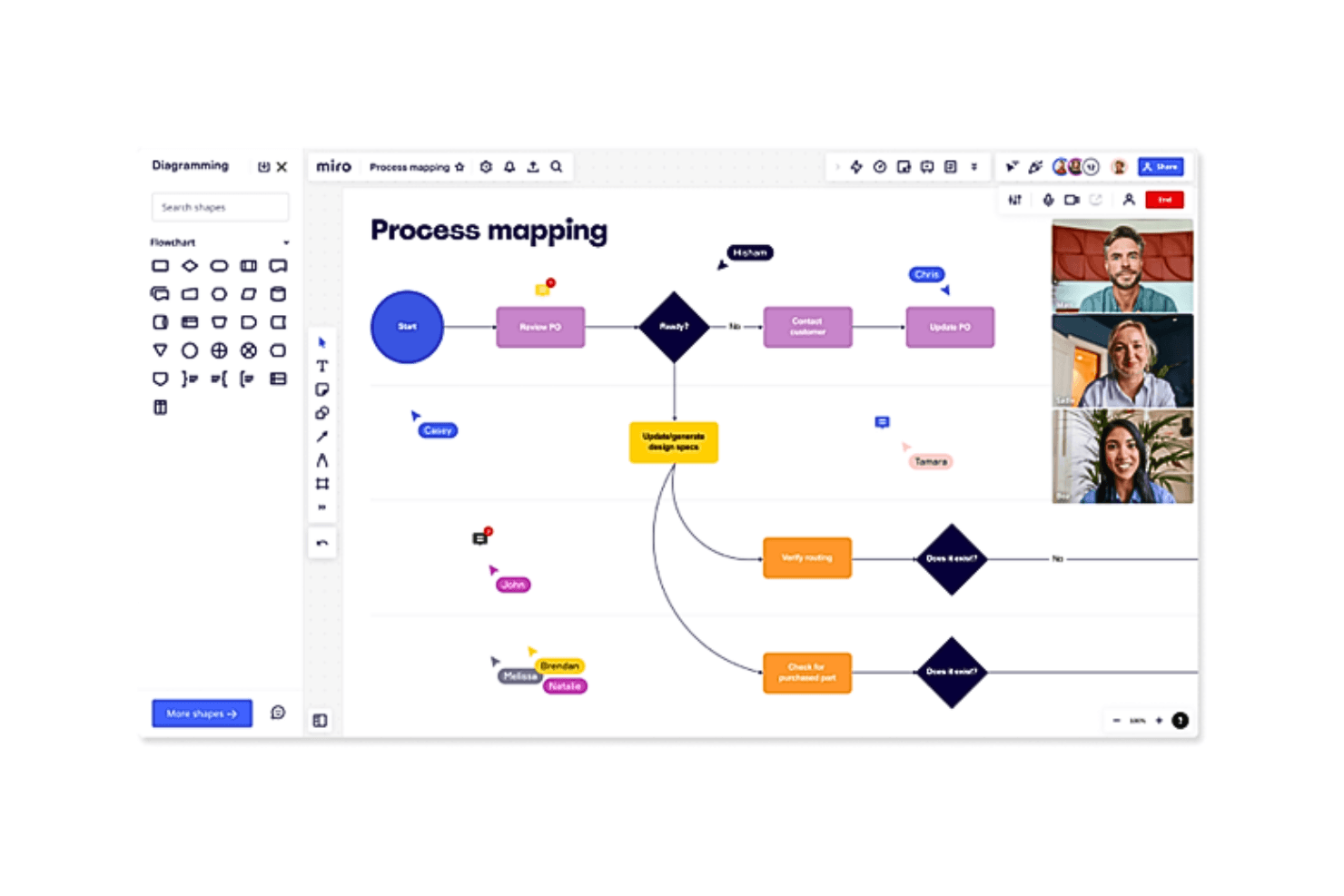
Rappresenta sia la tua roadmap di prodotto sia i principali processi e flussi di lavoro di sviluppo nello stesso sistema Miro permette al tuo team di visualizzare ed eseguire la visione del prodotto grazie al suo strumento di roadmap online, ideale per settori come product management, ingegneria e design. Offre una tela intelligente e modelli personalizzabili, consentendoti di creare roadmap strutturate che si adattano a esigenze e strategie in continua evoluzione. Integrandosi perfettamente con piattaforme come Jira e Azure DevOps, Miro garantisce collaborazione in tempo reale e tiene tutti allineati, affrontando le sfide nella gestione delle tempistiche e delle responsabilità tra i team.
Perché ho scelto Miro
Ho scelto Miro per la sua capacità unica di mappare efficacemente i flussi di lavoro dello sviluppo prodotto. La sua tela intelligente, dotata di funzionalità AI, consente al tuo team di creare roadmap dinamiche che si adattano alle modifiche nella strategia e nelle tempistiche. L'integrazione di Miro con strumenti popolari come Jira e Azure DevOps migliora il tuo flusso di lavoro offrendo aggiornamenti in tempo reale e una gestione delle attività senza interruzioni. Queste caratteristiche rendono Miro uno strumento prezioso per i responsabili di prodotto che desiderano ottimizzare i processi e migliorare la collaborazione del team.
Caratteristiche principali di Miro
Oltre alle sue solide capacità di sviluppo prodotto, ho riscontrato che Miro offre anche una vasta gamma di funzionalità in grado di soddisfare diverse esigenze di progetto.
- Modelli personalizzabili: Miro mette a disposizione oltre 7.000 modelli che ti permettono di avviare e adattare rapidamente le tue roadmap secondo i requisiti specifici del progetto.
- Collaborazione in tempo reale: Questa funzione facilita la comunicazione istantanea e il lavoro di squadra tra team distribuiti, garantendo che tutti restino informati e allineati.
- Video walkthrough: Miro supporta i walkthrough video per condividere approfondimenti e aggiornamenti, migliorando la comprensione e il coinvolgimento del team.
- Integrazione con MS Teams e Confluence: Incorporare roadmap dinamiche in queste piattaforme assicura che tutti gli stakeholder abbiano accesso alle informazioni aggiornate sul progetto.
Integrazioni di Miro
Le integrazioni includono Jira, Azure DevOps, Microsoft Teams, Confluence, Slack, Google Drive, Dropbox, Trello, Asana e Monday.com.
Pros and Cons
Pros:
- L'integrazione con le videoconferenze migliora la collaborazione a distanza.
- Le funzionalità basate su AI aumentano produttività e coinvolgimento.
- Le risorse di onboarding complete semplificano la configurazione iniziale.
Cons:
- Alcuni utenti desiderano un supporto clienti più personalizzato.
- Mancano funzionalità avanzate di roadmap.
 Ideale per portali di roadmap personalizzati e basati sul pubblico
- Prova gratuita di 30 giorni + piano gratuito disponibile
- A partire da $1.10/utente/mese
Visit WebsiteRating:0.0/5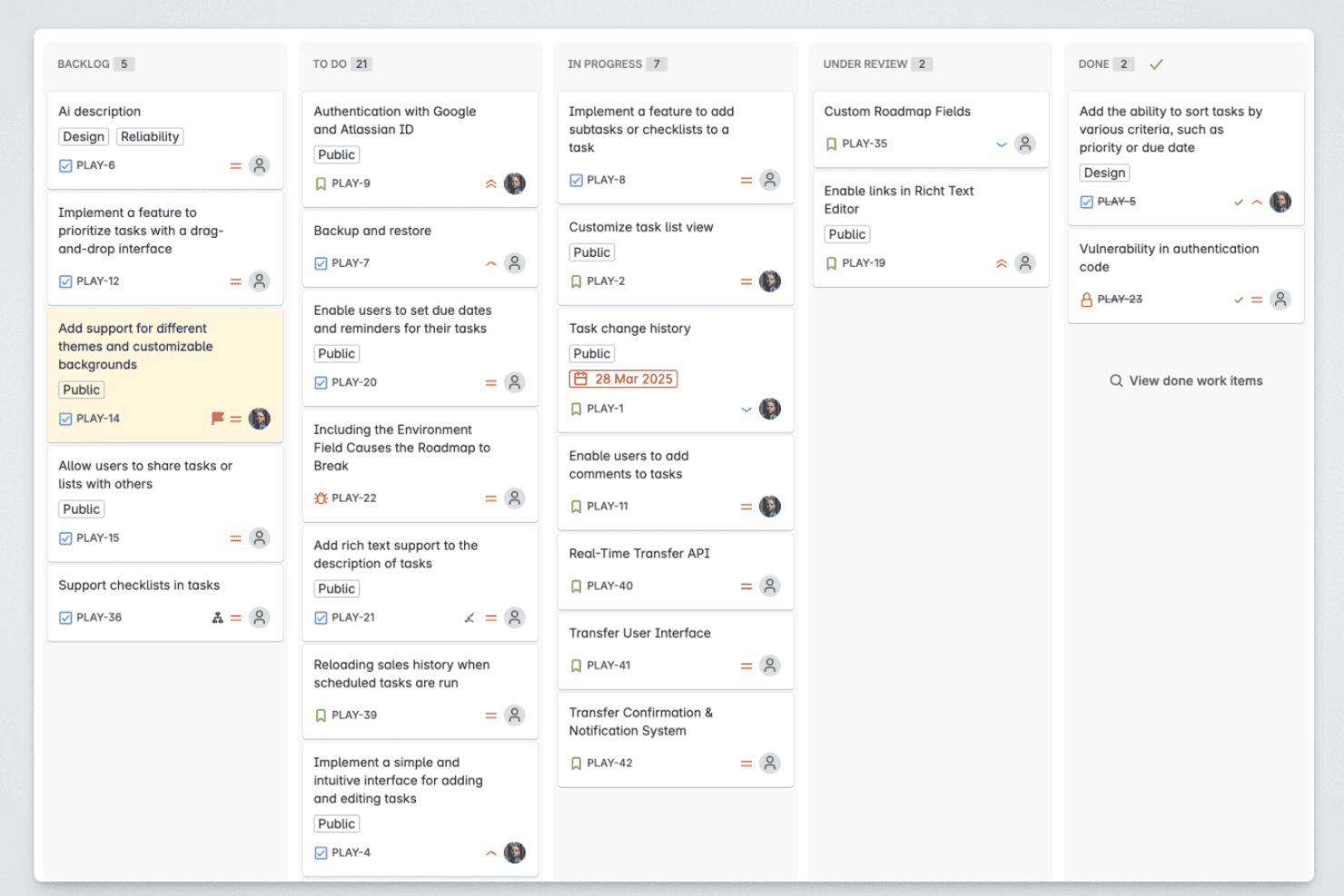
Released consente ai responsabili di prodotto di organizzare gli elementi della roadmap nelle fasi di arretrato, in corso, revisione e completato. Released è uno strumento di roadmap nativo di Jira che consente ai team di prodotto di pubblicare roadmap aggiornate in tempo reale, raccogliere feedback dai clienti e generare note di rilascio basate sull'intelligenza artificiale direttamente dai dati di Jira.
Per chi è più adatto Released?
Released è particolarmente indicato per i responsabili di prodotto dei team che utilizzano Jira Cloud e hanno bisogno di comunicare i progressi della roadmap e gli aggiornamenti del prodotto a interlocutori esterni come clienti e partner.
Perché ho scelto Released
Ho incluso Released tra le mie scelte principali perché i suoi portali di roadmap specifici per il pubblico si distinguono davvero da ciò che offre la maggior parte degli strumenti di roadmap. Posso pubblicare un portale per i clienti che mostri temi di alto livello, un altro per i dirigenti con tutti i dettagli della timeline e un terzo per il team commerciale, utilizzando sempre gli stessi dati di Jira aggiornati in tempo reale e senza aggiornamenti manuali. I controlli granulari degli accessi mi consentono di rendere ogni vista pubblica, protetta da password o accessibile solo su invito, così non condivido mai più informazioni di quelle che intendo condividere con un determinato pubblico.
Funzionalità principali di Released
- Mappatura gerarchica nativa di Jira: Mappa automaticamente iniziative, epiche e storie direttamente dai campi e dalle strutture di Jira.
- Raccolta dei feedback dei clienti: Consente agli utenti di inviare idee e votare le funzionalità attraverso un portale di feedback personalizzato collegato agli elementi di Jira.
- Note di rilascio generate dall'intelligenza artificiale: Crea bozze delle note di rilascio a partire dai ticket Jira completati, con modelli personalizzabili e impostazioni per la voce del marchio.
- Pubblicazione su Slack e Confluence: Pubblica aggiornamenti del prodotto e modifiche alla roadmap nei canali Slack e nelle pagine Confluence in tempo reale.
Integrazioni di Released
Released offre integrazioni native con Jira Cloud, Jira Product Discovery, Slack e Confluence.
Pros and Cons
Pros:
- Portali specifici per il pubblico per la condivisione con gli interlocutori esterni
- Note di rilascio generate dall'intelligenza artificiale a partire dai dati di Jira
- Votazione dei feedback dei clienti integrata nella roadmap
Cons:
- Funziona solo con Jira Cloud
- Disponibilità limitata di opzioni per la visualizzazione della roadmap
Learn more about Released: Ideale per spazi di lavoro personalizzabili
- Piano gratuito + demo gratuita disponibile
- A partire da $7/utente/mese (con fatturazione annuale)
Visit WebsiteRating:4.6/5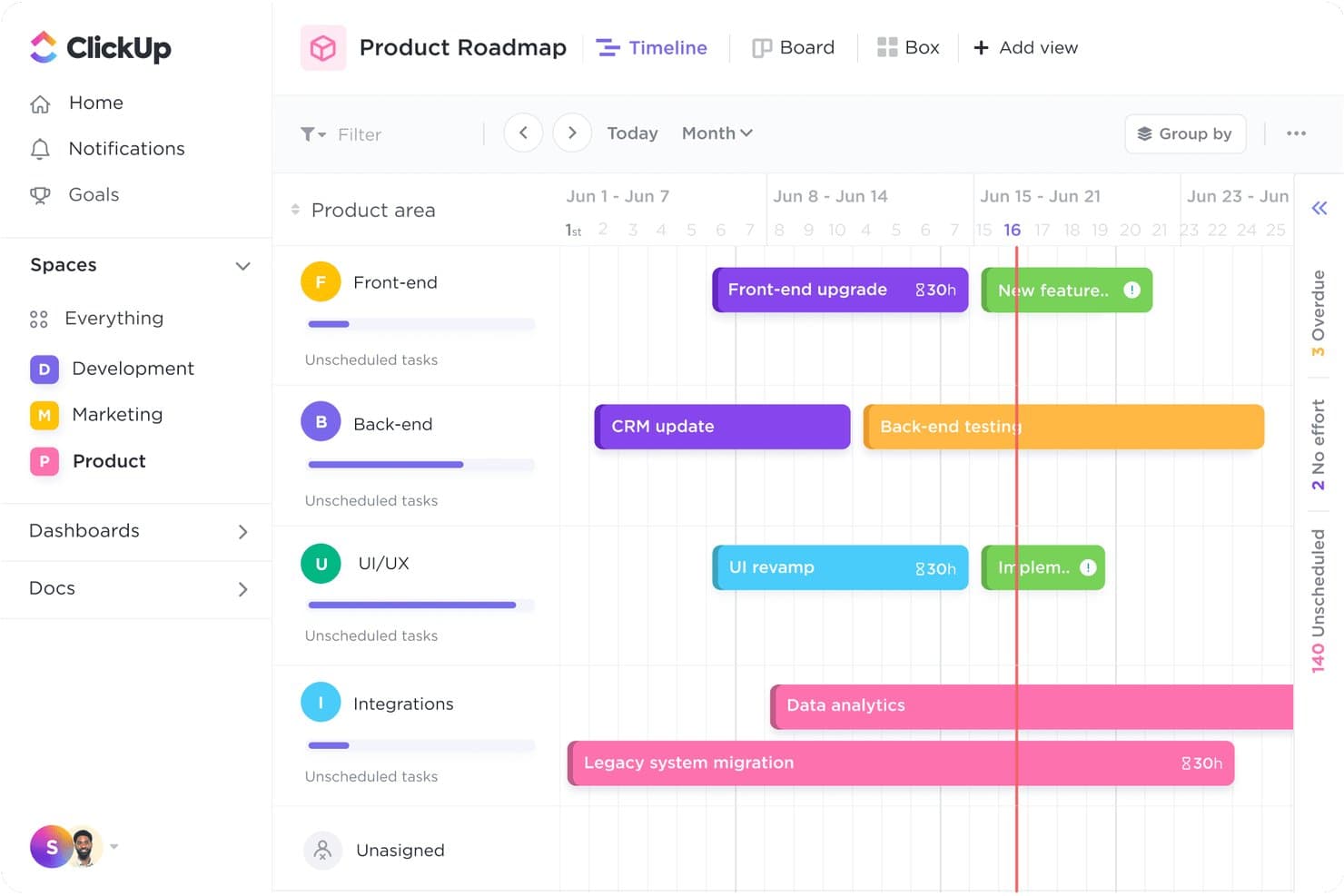
La vista Timeline di ClickUp mappa le attività tra le aree di prodotto, settimana per settimana. ClickUp è una piattaforma per la gestione del lavoro che consente ai team di creare roadmap di prodotto utilizzando le viste Gantt e Timeline, campi e stati personalizzati, framework di prioritizzazione e oltre 15 layout di visualizzazione in un unico spazio di lavoro connesso.
Per chi è più adatto ClickUp?
ClickUp è particolarmente adatto ai team di prodotto interfunzionali che devono gestire roadmap, attività, documenti e obiettivi in un unico spazio di lavoro configurabile.
Perché ho scelto ClickUp
Ho incluso ClickUp tra le mie scelte principali perché nessun altro strumento di questo elenco consente di modellare uno spazio di lavoro per le roadmap in modo così completo, adattandolo al reale modo di lavorare del team. Con oltre 15 viste, tipi di attività personalizzati e un modello di roadmap di prodotto che include campi predefiniti per Impatto, Sforzo e Affidabilità, puoi creare una roadmap trimestrale che riflette il tuo reale processo di prioritizzazione. Mi piace anche il fatto che le dipendenze Gantt riprogrammino automaticamente le attività successive quando trascini un elemento, mantenendo accurate le tempistiche interfunzionali senza dover effettuare correzioni manuali.
Funzionalità principali di ClickUp
- Monitoraggio di obiettivi e OKR: Collega direttamente attività e progetti agli obiettivi, aggiornando automaticamente i progressi man mano che il lavoro viene completato.
- Assistente IA ClickUp Brain: Interroga il tuo spazio di lavoro in linguaggio naturale per individuare dipendenze bloccate, attività a rischio e responsabili sovraccarichi.
- Vista Whiteboard: Collabora visivamente su una tela condivisa in cui forme e note adesive possono essere convertite in attività.
- Chat integrata nell'app: Comunica direttamente con i colleghi all'interno di ClickUp senza passare a uno strumento di messaggistica separato.
Integrazioni di ClickUp
ClickUp offre oltre 200 integrazioni, tra cui Jira, GitHub, GitLab, Bitbucket, Slack, Figma, Intercom, Zendesk e Google Calendar. Fornisce inoltre un'API pubblica e la connettività con Zapier per flussi di lavoro personalizzati.
Pros and Cons
Pros:
- I campi personalizzati rispecchiano il tuo framework di prioritizzazione
- Le dipendenze Gantt riprogrammano le attività successive della roadmap
- Oltre quindici viste adatte a diversi stakeholder
Cons:
- Nessun portale dedicato per le roadmap rivolte ai clienti
- L'interfaccia ricca può nascondere le priorità della roadmap
Learn more about ClickUp: Ideale per la creazione flessibile di roadmap
- Demo gratuita disponibile
- Prezzi su richiesta
Visit WebsiteRating:4.4/5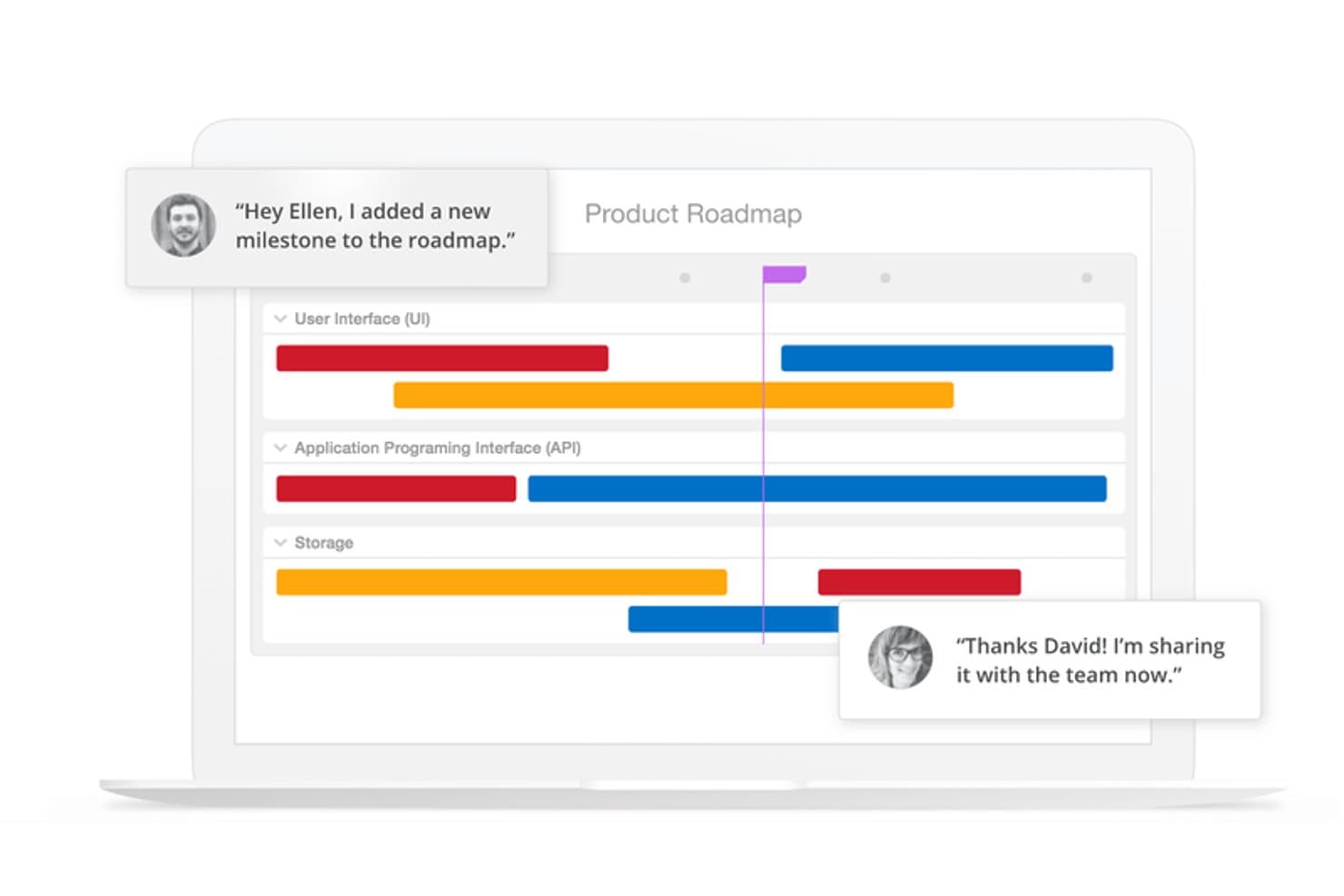
L'interfaccia drag-and-drop della piattaforma è intuitiva, mentre le sue avanzate funzionalità di sicurezza mantengono i dati ben protetti. ProductPlan è uno strumento dinamico di roadmap online progettato per i team che desiderano semplificare la gestione dei prodotti e la pianificazione strategica. È particolarmente indicato per i product manager e i team nei settori tecnologici che necessitano di una rappresentazione chiara e visiva della strategia di prodotto e della roadmap. Grazie a funzionalità come le visualizzazioni flessibili della roadmap e le integrazioni con strumenti popolari, ProductPlan aiuta a risolvere la sfida di allineare il lavoro del team con gli obiettivi aziendali.
Perché ho scelto ProductPlan
Ho scelto ProductPlan perché eccelle nel fornire una singola fonte di verità per le iniziative strategiche del tuo team. La sua funzionalità di creazione flessibile della roadmap permette di comunicare facilmente la strategia di prodotto ai diversi stakeholder. Inoltre, l'integrazione con strumenti come Slack e Jira garantisce che il team rimanga allineato e informato. La funzione drag-and-drop semplifica ulteriormente il processo, permettendoti di concentrarti più sull'esecuzione che sulla pianificazione.
Funzionalità principali di ProductPlan
Oltre alle capacità di creazione di roadmap, ProductPlan offre numerose altre funzionalità che ne aumentano l'utilità come strumento di roadmap online.
- Validazione delle opportunità: Questa funzionalità aiuta il team a valutare e prioritizzare efficacemente le opportunità potenziali.
- Visualizzazioni di portafoglio: Puoi gestire più roadmap e ottenere una panoramica di come i diversi progetti si allineano agli obiettivi aziendali.
- Raccolta e prioritizzazione delle idee: La piattaforma permette una facile raccolta e prioritizzazione delle idee, assicurando che vengano sviluppati i concetti più preziosi.
- Assistenza illimitata: Grazie all'accesso a un supporto clienti illimitato, il tuo team può risolvere rapidamente eventuali problemi e mantenere i progetti sulla giusta rotta.
Integrazioni di ProductPlan
Le integrazioni includono Slack, Microsoft Teams, Jira, Trello, GitHub, Confluence, Azure DevOps, Google Workspace e Aha! È inoltre disponibile un'API per integrazioni personalizzate.
Pros and Cons
Pros:
- Sessioni di formazione settimanali incluse in tutti i piani
- Gli highlight delle roadmap mostrano come i piani cambiano nel tempo
- Strumenti per la comunicazione e la collaborazione del team
Cons:
- Le integrazioni sono limitate in base al livello di prezzo
- La visualizzazione di portafoglio non è disponibile nel piano base
Learn more about ProductPlan: Migliore con la pianificazione OKR
- Prova gratuita di 14 giorni + demo gratuita disponibile
- A partire da $36/mese (fatturato annualmente)
Visit WebsiteRating:4.2/5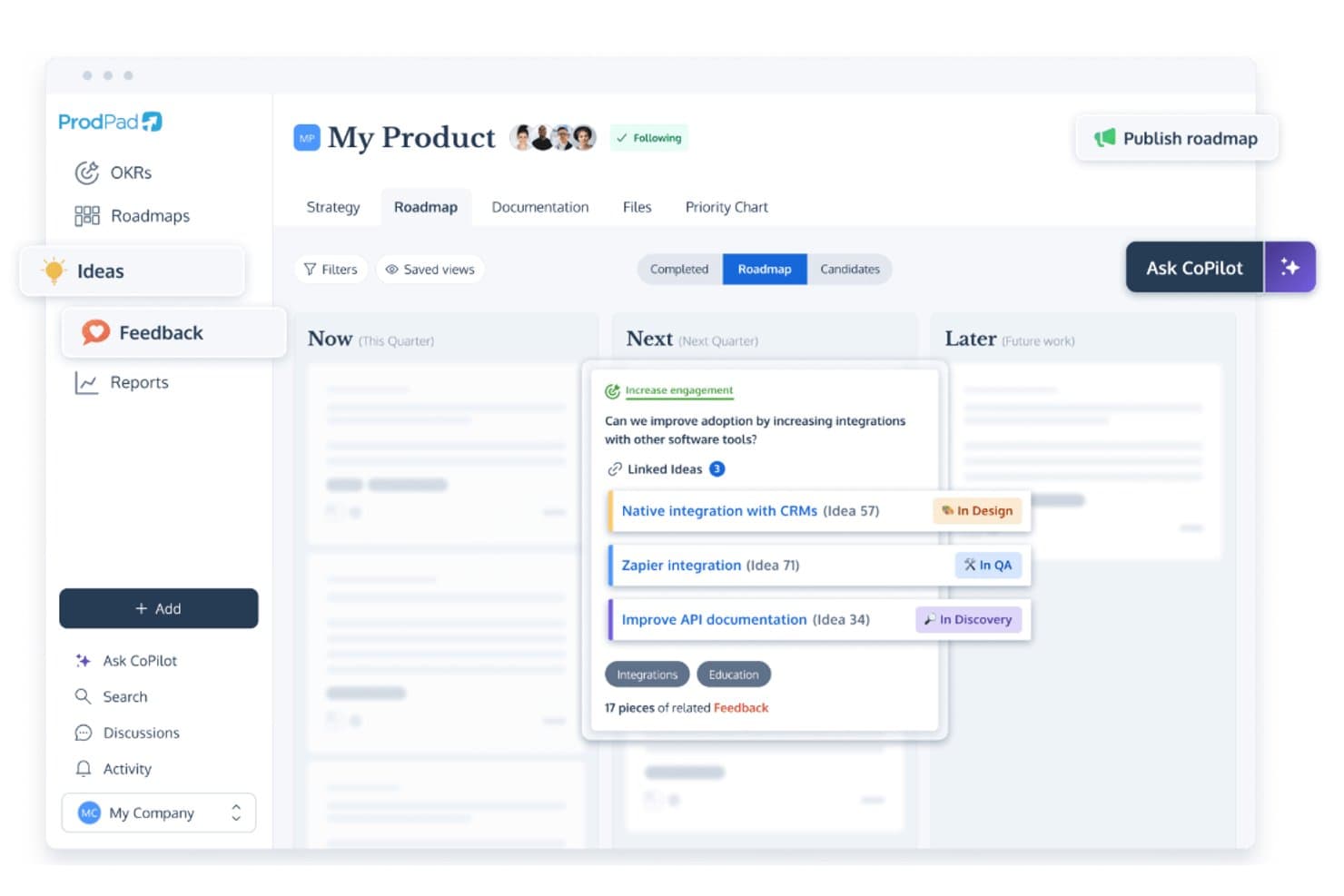
Lo strumento online di pianificazione roadmap di ProdPad consente ai team di dare priorità alle funzionalità visualizzando da una panoramica l'aggiunta delle prossime funzionalità. ProdPad consente al tuo team di creare roadmap di prodotto dinamiche e strategiche, rendendolo una scelta ideale per product manager e team che cercano di allineare obiettivi e risultati. Concentrandosi sulla roadmap snella e integrandosi perfettamente con strumenti come Jira e Slack, ProdPad migliora la collaborazione e garantisce che tutti i membri del team siano aggiornati. Che tu stia gestendo idee, raccogliendo feedback o definendo obiettivi strategici, ProdPad ti aiuta a semplificare questi processi e a mantenere il team allineato con roadmap chiare e operative.
Perché ho scelto ProdPad
Ho scelto ProdPad per la sua integrazione unica della pianificazione Objectives and Key Results (OKR) all'interno dello strumento di roadmap, particolarmente vantaggiosa per i team che desiderano allineare i propri obiettivi strategici con attività realizzabili. Il formato di roadmap snello di ProdPad ti permette di visualizzare chiaramente le priorità strategiche, mentre l'AI CoPilot aiuta a definire key results misurabili, assicurando che il tuo team rimanga concentrato e motivato. Inoltre, la possibilità della piattaforma di personalizzare la pubblicazione delle roadmap consente di condividere viste rilevanti con gli stakeholder, aumentando trasparenza e responsabilità. Queste caratteristiche rendono ProdPad una scelta d'eccellenza per i team che danno priorità all'allineamento strategico e alla gestione degli obiettivi.
Caratteristiche principali di ProdPad
Oltre alle funzionalità di pianificazione OKR, ProdPad offre diverse altre caratteristiche che ne aumentano il valore come strumento online per la creazione di roadmap.
- Gestione delle idee: Cattura e classifica le idee da team e stakeholder, assicurandoti che i migliori concetti vengano sviluppati in piani concreti.
- Gestione del feedback: Raccogli e gestisci i feedback da utenti e stakeholder per guidare le decisioni di prodotto e perfezionare le roadmap.
- AI CoPilot: Utilizza approfondimenti basati sull'intelligenza artificiale per generare e affinare iniziative all'interno della roadmap, facilitando la pianificazione e l'esecuzione strategica.
- Gestione del portafoglio prodotti: Supervisiona più prodotti e progetti da un'unica piattaforma, consentendo una gestione completa della tua suite di prodotti.
Integrazioni di ProdPad
Le integrazioni includono Jira, Slack, GitHub, Trello, Salesforce, Azure DevOps, Google Workspace, Microsoft Teams, Confluence e Pivotal Tracker.
Pros and Cons
Pros:
- Approfondimenti basati su intelligenza artificiale per generare e perfezionare iniziative.
- Gestione efficace delle idee per raccogliere e sviluppare concetti.
- Pianificazione OKR completa e pubblicazione flessibile della roadmap per l'allineamento strategico.
Cons:
- Mancanza di funzionalità dettagliate per la gestione delle risorse.
- Capacità di reportistica avanzata limitata per analisi approfondite.
Learn more about ProdPad: Ideale per centralizzare i feedback di prodotto
- Prova gratuita di 14 giorni + piano gratuito + demo gratuita disponibili
- Da $19/maker/mese (fatturato annualmente)
Visit WebsiteRating:4.5/5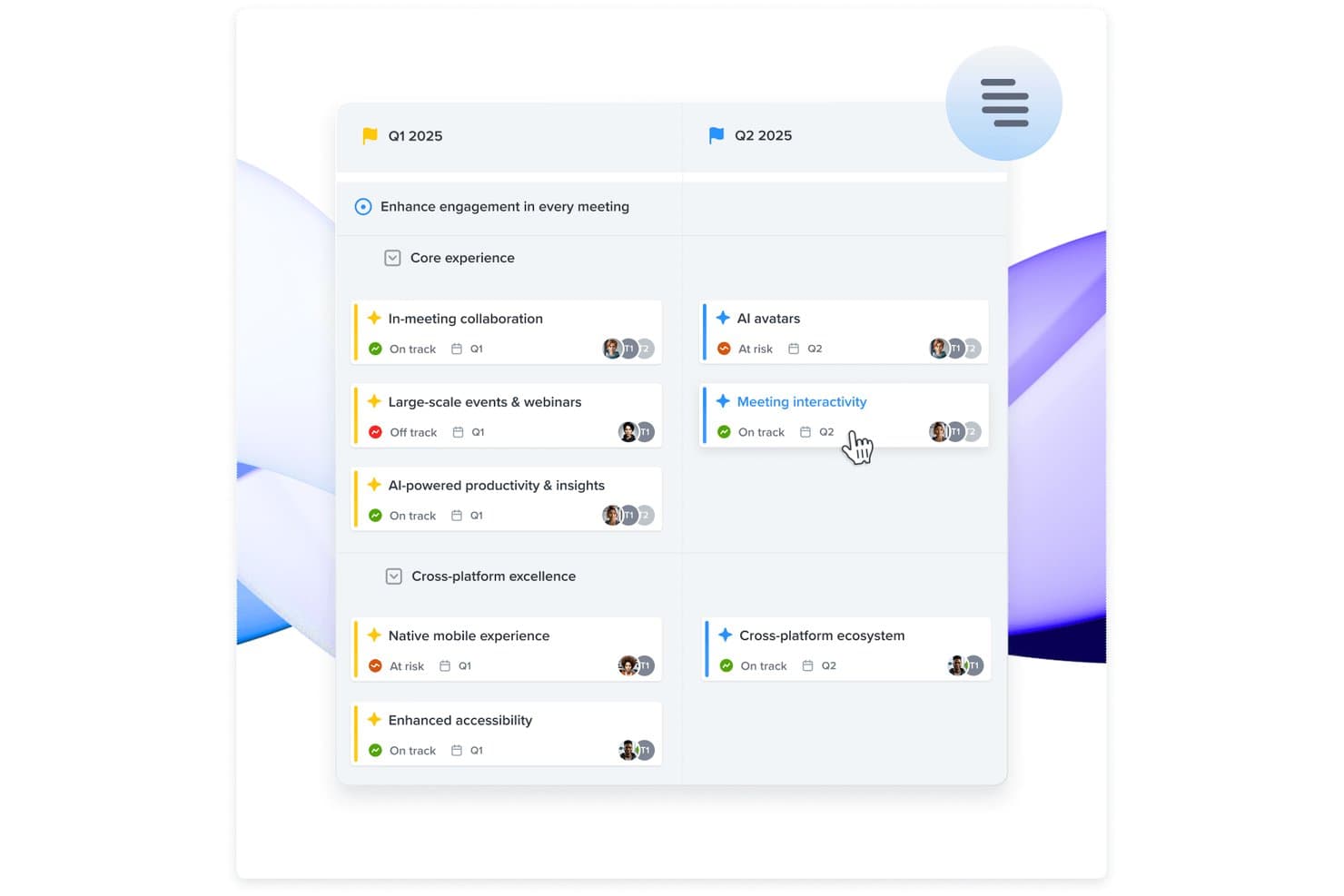
Raccogli, analizza e aggrega i feedback degli utenti per comprendere i temi ricorrenti e trasformare i suggerimenti in iniziative su cui il tuo team può dare priorità. Per i team di prodotto alla ricerca di uno strumento di roadmap online che non solo faciliti la pianificazione, ma garantisca anche l'allineamento con le esigenze dei clienti, Productboard si distingue come una scelta convincente. Consente ai team di diversi settori di dare priorità alle funzionalità sulla base degli approfondimenti degli utenti, risultando particolarmente interessante per i product manager e i decisori che valorizzano un approccio basato sui dati. Centralizzando il feedback e trasformandolo in roadmap azionabili, Productboard affronta la sfida di allineare lo sviluppo del prodotto alle aspettative degli utenti, migliorando la tua capacità di offrire prodotti che risuonano davvero con il tuo pubblico.
Perché ho scelto Productboard
Ho scelto Productboard per la sua capacità unica di centralizzare il feedback sul prodotto, fondamentale per un efficace strumento di roadmap online. Con funzionalità come l'Insights Board, puoi raccogliere e organizzare i feedback degli utenti provenienti da diverse fonti, assicurandoti di non perdere approfondimenti preziosi. Inoltre, la Prioritization Matrix ti aiuta a visualizzare quali funzionalità sono in linea con gli obiettivi strategici e le necessità degli utenti, offrendo chiarezza su cosa concentrarsi dopo. Queste funzionalità rispondono direttamente alla sfida di prendere decisioni informate, assicurando che la tua roadmap non sia solo un piano, ma una reale rappresentazione della domanda degli utenti.
Caratteristiche principali di Productboard
Oltre alle sue capacità di centralizzazione del feedback, Productboard offre anche altre funzioni preziose:
- Roadmap temporali: Questa funzione consente di pianificare con una chiara visualizzazione temporale, aiutando il team a rimanere allineato su obiettivi e scadenze.
- Prioritizzazione delle funzionalità: Utilizza questo strumento per classificare le funzionalità in base alle esigenze degli utenti e agli obiettivi strategici, assicurando che il team si concentri sugli sviluppi più impattanti.
- Portale per il feedback degli utenti: Condividi le funzionalità pianificate e appena lanciate con gli utenti e raccogli i loro feedback per guidare le iterazioni future.
- Integrazione con strumenti di sviluppo: Inoltra facilmente le funzionalità prioritarie negli strumenti di pianificazione dello sviluppo più diffusi come Jira e Trello, mantenendo i workflow esistenti.
Integrazioni di Productboard
Le integrazioni includono Jira, Trello, Azure DevOps, GitHub, Pivotal Tracker, Intercom, Zendesk, Slack, Salesforce e Google Analytics.
Pros and Cons
Pros:
- Favorisce la collaborazione tra i reparti per una pianificazione coesa.
- Assistenza clienti reattiva e competente.
- Dà priorità agli approfondimenti degli utenti insieme alle richieste di funzionalità per decisioni informate.
Cons:
- Nessuna possibilità di aggiungere note o annotazioni nelle timeline e il sistema di notifiche non aggiorna lo stato degli insights.
- Capacità di esportazione limitate che riducono le opzioni di condivisione dei dati.
Learn more about Productboard: Ideale per scalabilità e flessibilità
- Demo gratuita disponibile
- Prezzo su richiesta
Visit WebsiteRating:4.4/5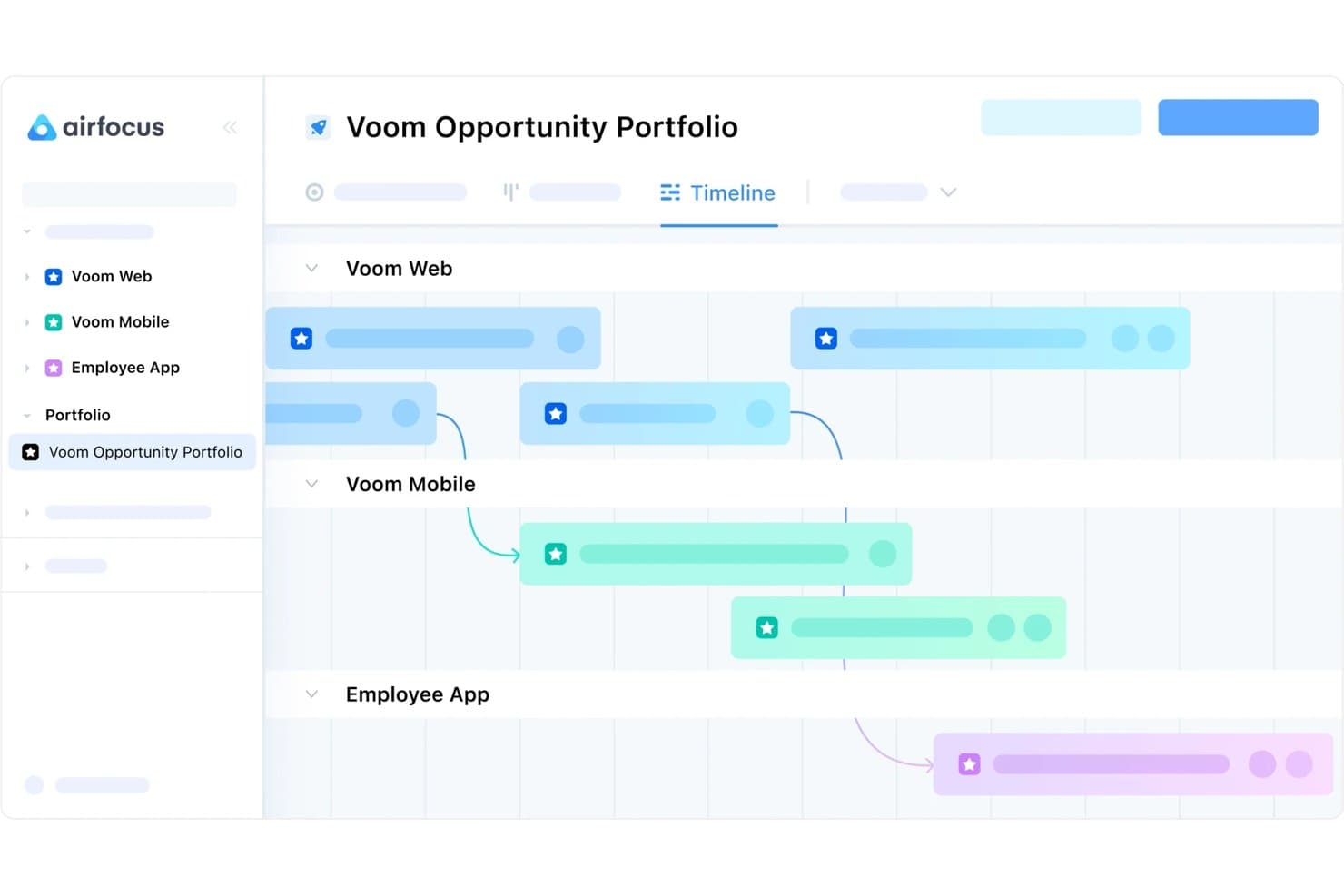
Il software offre strumenti per la gestione del backlog, la prioritizzazione, la gestione dei feedback e la creazione di roadmap. Airfocus è una piattaforma di product management con strumenti per la creazione di roadmap, la raccolta dei feedback degli utenti e la definizione di strategie, progettata per accompagnare il prodotto dall'ideazione alla consegna.
Perché ho scelto Airfocus: Questa piattaforma offre un set di funzionalità robusto per la gestione dello sviluppo prodotto dall'inizio alla fine. Ma è entrata nella mia lista per la sua scalabilità unica. Puoi iniziare a utilizzare il software con i suoi template predefiniti e poi costruire una soluzione modulare e personalizzata man mano che cresci.
Ogni funzionalità è una propria app e puoi selezionarle come componenti aggiuntivi. Questo ti permette di creare una soluzione su misura che offre esattamente il set di funzionalità di cui hai bisogno, senza extra inutili che rimarrebbero inutilizzati. I componenti aggiuntivi includono valutazioni di priorità, gestione degli insight, moduli personalizzati, portali e altro ancora.
Funzionalità principali e integrazioni di Airfocus
Una funzionalità distintiva degna di nota è la componente di gestione dei feedback. Puoi raccogliere feedback dagli utenti tramite moduli personalizzati, ma anche centralizzare quelli provenienti da altri canali come email, chat e ticket dell'assistenza clienti. I feedback possono essere collegati a idee, opportunità e funzionalità all'interno della piattaforma per orientare lo sviluppo del prodotto. Puoi anche sfruttare gli insight dei clienti durante la fase di prioritizzazione.
Integrazioni incluse: Jira, Trello, Asana, Azure DevOps, Microsoft Planner, GitHub, Webhooks, Intercom, Salesforce, Slack, Microsoft Teams e altro ancora. Puoi anche collegare un account Zapier per sbloccare ulteriori integrazioni.
Pros and Cons
Pros:
- Soluzione modulare ed eccezionalmente scalabile
- Adatto a sviluppo prodotto su piccola e grande scala
- Gestione dei feedback dei clienti inclusa
Cons:
- Richiede un periodo di apprendimento
- La configurazione e l'impostazione possono essere complesse
 La migliore soluzione tutto-in-uno per la gestione del prodotto
- Prova gratuita di 14 giorni + demo gratuita disponibile
- A partire da $19/utente/mese (fatturato annualmente)
Visit WebsiteRating:4.4/5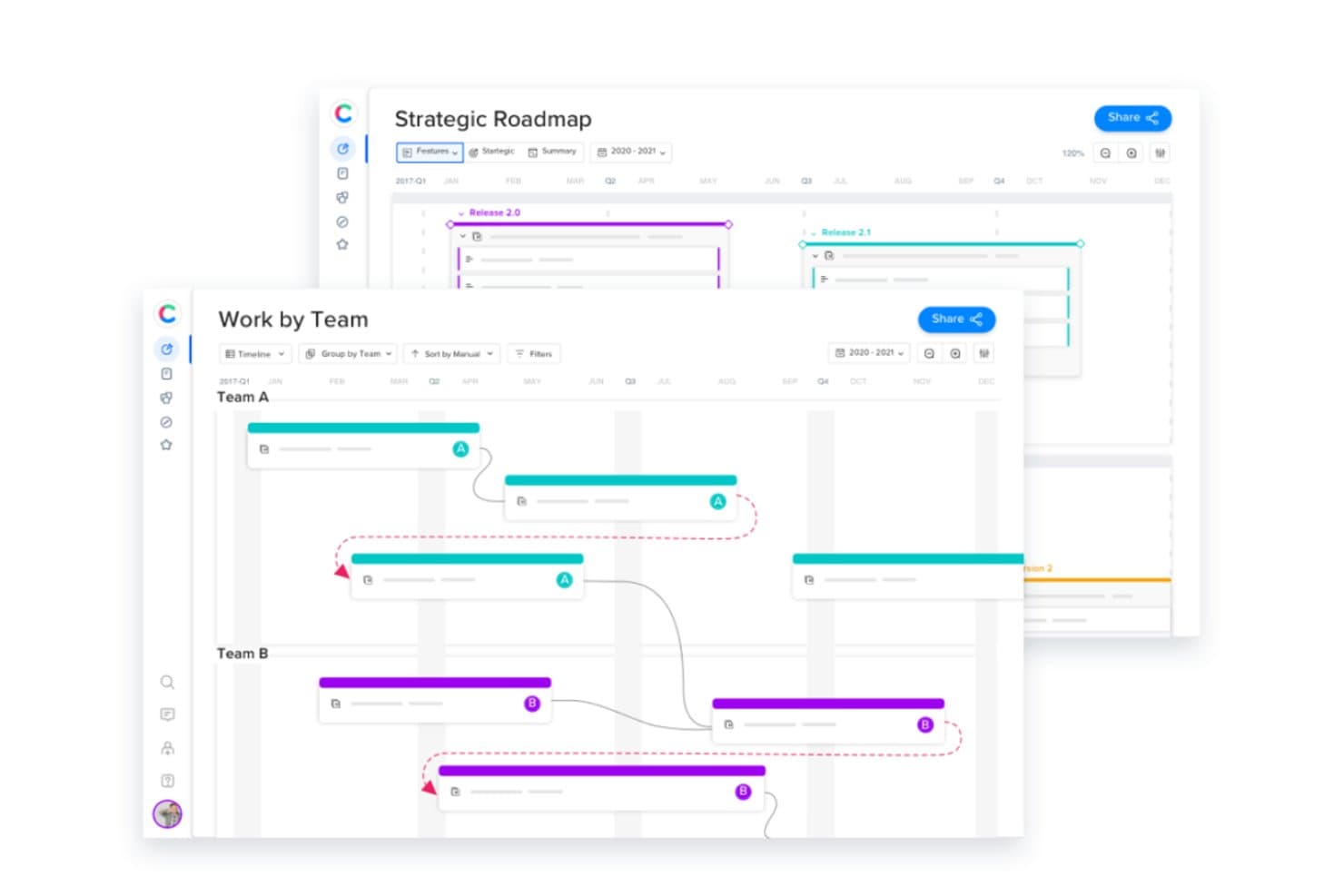
Puoi creare le roadmap dei tuoi prodotti, pianificare la tua strategia di prodotto, gestire le risorse e raccogliere feedback degli utenti tutto nella stessa piattaforma. Craft.io è una piattaforma completa per la gestione del prodotto che può gestire la creazione di roadmap, lo sviluppo della strategia, la raccolta del feedback degli utenti e altro ancora.
Perché ho scelto Craft.io: Questo software va oltre la semplice creazione di roadmap, integrando diversi strumenti di gestione del prodotto. Puoi delineare le roadmap dei tuoi prodotti così come le tue strategie. Dispone anche di strumenti come il monitoraggio del tempo e la pianificazione della capacità per gestire efficacemente le tue risorse.
Lo strumento di roadmapping offre varie opzioni di visualizzazione personalizzate e un'interfaccia intuitiva drag-and-drop per costruire la tua roadmap. Se gestisci più prodotti o servizi, puoi anche beneficiare delle capacità di gestione del portafoglio incluse nel piano enterprise.
Caratteristiche distintive e integrazioni di Craft.io
Una caratteristica distintiva di questa piattaforma è il suo sistema di gestione del feedback. Puoi raccogliere feedback sia da utenti interni che esterni, e poi tracciarli, ordinarli e gestirli all'interno della piattaforma. Il form builder consente di raccogliere facilmente il feedback in modo strutturato e coerente, e di analizzarlo con la stessa efficienza. I feedback degli utenti possono quindi essere utilizzati per pianificare e dare priorità a nuove funzionalità, prodotti e servizi.
Integrazioni includono Jira, GitHub, GitLab, Azure DevOps, Confluence, Okta, PivotalTracker, Figma, Google Workspace, InVision e Miro, tra gli altri.
Pros and Cons
Pros:
- Spazi di lavoro illimitati con i piani pro ed enterprise
- Conformità elevata agli standard di sicurezza dei dati
- Best practice incorporate in varie funzioni di prodotto
Cons:
- Strategia e feedback non inclusi nel piano starter
- Personalizzazione limitata nei piani con prezzo inferiore
Learn more about Craft.io: Ideale per creare roadmap da presentare
- Prova gratuita di 14 giorni
- Da $19/utente/mese (fatturato annualmente)
Visit WebsiteRating:4.0/5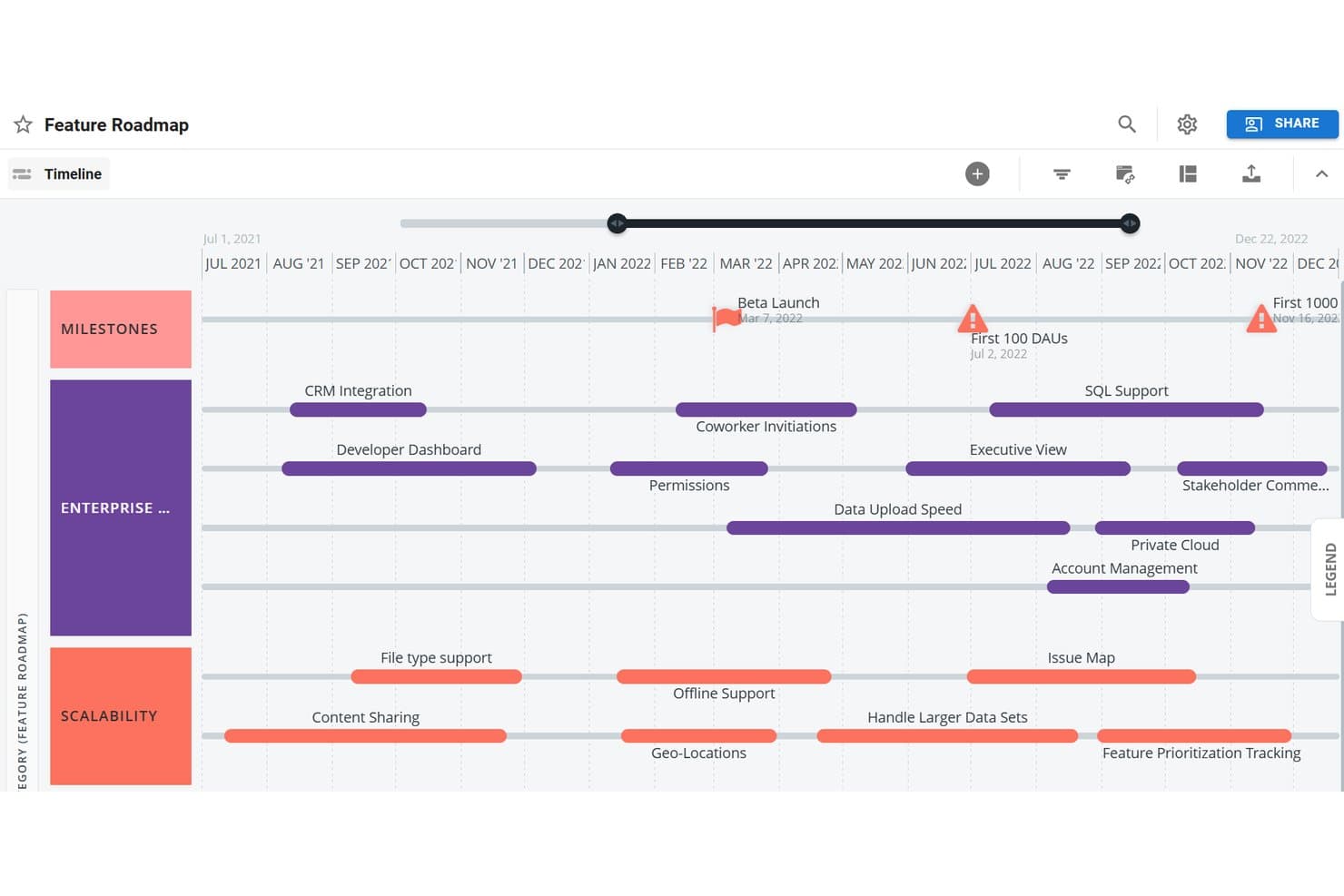
L’interfaccia intuitiva consente di creare rapidamente roadmap di prodotto chiare e complete da presentare agli stakeholder. Roadmunk è uno strumento di roadmapping progettato per aiutarti a creare rapidamente roadmap di prodotto pronte per la presentazione.
Perché ho scelto Roadmunk: Ho aggiunto questa piattaforma alla mia lista per chi di voi ha bisogno di presentare una roadmap agli stakeholder il prima possibile. Questo software è perfetto per realizzare una roadmap visivamente attraente in modo semplice e veloce. Puoi scegliere tra una visualizzazione a timeline o a corsie (swimlane) e creare più roadmap utilizzando gli stessi dati. Le roadmap che crei nella piattaforma possono essere esportate come URL, file PNG o HTML per una condivisione agevole. Sono disponibili anche numerosi modelli per velocizzare la creazione della tua roadmap.
Funzionalità e integrazioni distintive di Roadmunk
Una funzionalità distintiva è sicuramente l’hub dei modelli del software. Ci sono dozzine di modelli di roadmap tra cui scegliere, che coprono esigenze tecnologiche, aziendali e di prodotto. I modelli sono completamente accessibili durante la prova gratuita della piattaforma. Questo è un vantaggio per chi vuole provarlo o deve creare rapidamente una roadmap per una presentazione. I modelli possono essere personalizzati utilizzando il tuo set di dati e puoi allocare risorse e impostare traguardi secondo le tue necessità.
Integrazioni includono Jira, Azure DevOps e Trello. È inoltre disponibile una API per creare integrazioni personalizzate.
Pros and Cons
Pros:
- Ampia disponibilità di contenuti di supporto self-service
- Configurazione veloce e navigazione semplice
- Condivisione facile in diversi formati
Cons:
- Integrazioni limitate nei piani con prezzo inferiore
- Costi aggiuntivi per alcuni componenti extra
Learn more about Tempo Roadmapping Software: Ideale per team di sviluppo Agile
- Prova gratuita di 7 giorni + piano gratuito
- Da $7,75/utente/mese
Visit WebsiteRating:0.0/5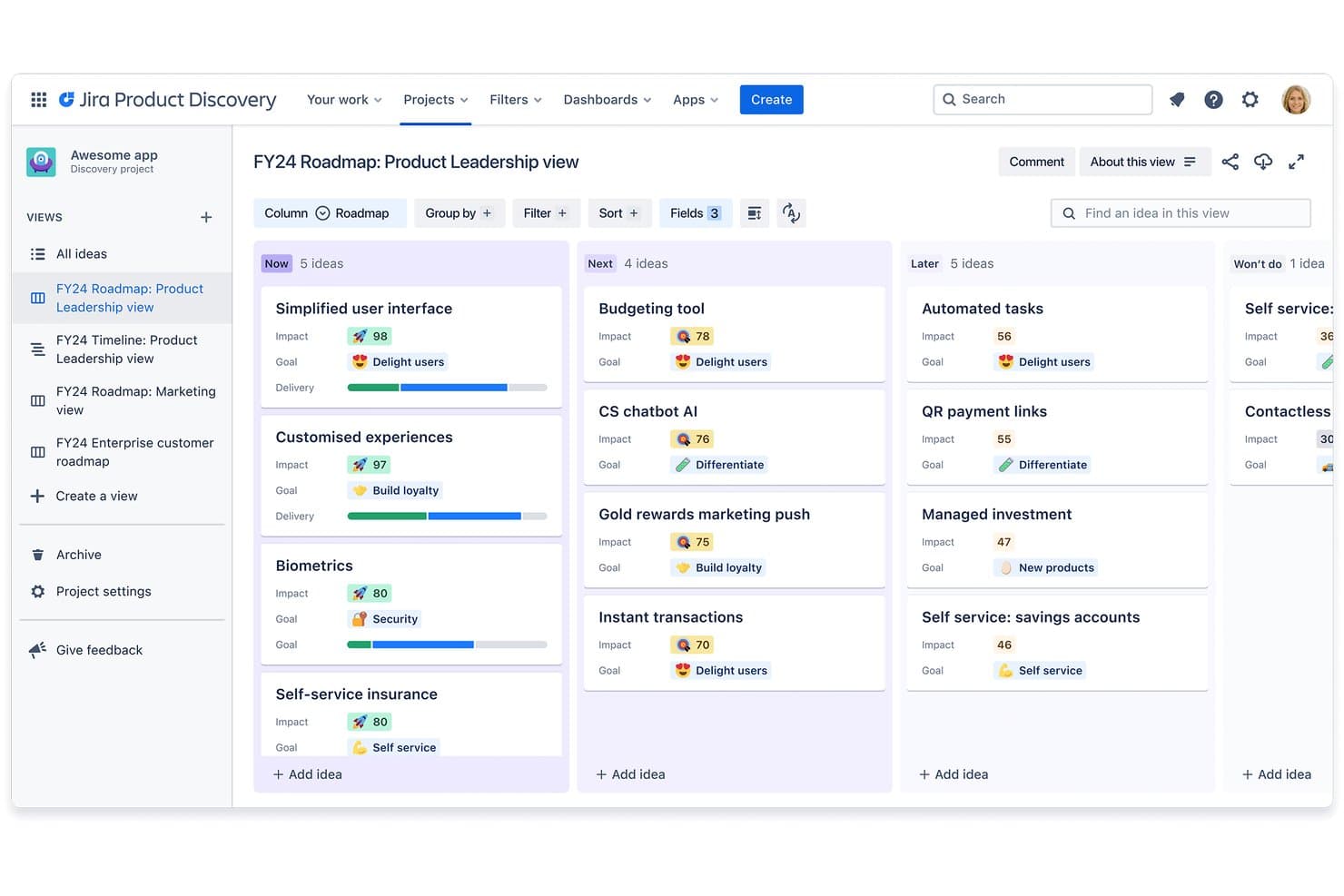
Il software offre molteplici visualizzazioni per roadmap e piani di prodotto, ed è pensato secondo metodologie Agile. Jira è un software di gestione dei prodotti affidabile che offre agli sviluppatori un sistema per monitorare, organizzare e dare priorità ai compiti.
Perché ho scelto Jira: Ho inserito questa piattaforma nella mia lista per il livello di dettaglio e la flessibilità che offre. Puoi creare roadmap di prodotto personalizzate basate su una linea temporale direttamente nel software, e sono disponibili anche template Kanban e Scrum. I prodotti possono essere suddivisi in elementi più piccoli che possono essere categorizzati come storie, issue e attività. Le attività possono essere assegnate direttamente dalla vista roadmap, aiutando tutti a restare allineati su responsabilità e proprietà. L’intera piattaforma è costruita attorno alla metodologia Agile, e ti aiuta a monitorare i progressi e a cambiare le priorità secondo necessità.
Funzionalità principali e integrazioni di Jira Software
Le funzionalità principali includono le capacità di monitoraggio e personalizzazione del software. Il monitoraggio ti consente di seguire i progressi del tuo prodotto durante tutto lo sviluppo. Tutti i compiti associati a una particolare issue sono tracciati e puoi utilizzare lo strumento di reportistica per una panoramica aggiornata sui progressi del tuo team. Gli strumenti di roadmapping e gestione delle attività sono altamente personalizzabili, così come le varie viste. Puoi scegliere tra diverse visualizzazioni disponibili per ottenere una panoramica del piano di prodotto dalla prospettiva più adatta in quel momento.
Le integrazioni includono Adobe, Dropbox, Figma, Google Workspace, InVision, Microsoft, Miro, Slack, Zendesk, Zoom e altro ancora.
Pros and Cons
Pros:
- Altamente personalizzabile e dettagliato
- Gestione delle risorse integrata
- Funziona bene con altri prodotti Atlassian (Confluence, Trello, Bitbucket, ecc.)
Cons:
- Il collegamento tra storie e attività potrebbe essere migliorato
- Nessuna modifica e scripting di massa
Learn more about JIRA by Atlassian:
Quando utilizzare uno strumento online per roadmap
Uno strumento online per roadmap offre al tuo team una visione unica e sempre aggiornata di cosa si sta costruendo, perché e quando, così non devi rincorrere aggiornamenti tra thread di Slack e slide obsolete. Se uno dei seguenti scenari ti suona familiare, probabilmente è arrivato il momento di aggiungerne uno al tuo stack:
- La tua roadmap è sparsa in cinque posti diversi: Hai una versione in Notion, un'altra in una presentazione, e una terza che qualcuno ha esportato in un foglio di calcolo. Uno strumento per roadmap centralizza tutto, così tutti gli stakeholder fanno riferimento a un'unica fonte di verità.
- Stai gestendo feedback da Sales e Support senza un modo chiaro per mostrare le valutazioni: Uno strumento per roadmap permette di collegare le richieste alla strategia, così puoi difendere le scelte di priorità senza una discussione infinita su Slack.
- Ogni sprint, l’ingegneria chiede perché qualcosa sia incluso nella roadmap: Finisci per dare spiegazioni invece di costruire. Una roadmap condivisa con obiettivi collegati elimina queste domande ancora prima che inizi il daily standup.
- Stai preparando una riunione con il board e le slide sono già superate: Uno strumento online per roadmap ti consente di mostrare una panoramica live, così ciò che la leadership vede rispecchia realmente il lavoro del team.
- Gestisci più linee di prodotto in diversi fusi orari: Uno strumento unico online, con modifica in tempo reale, mantiene allineati team distribuiti senza la necessità di una riunione settimanale solo per confrontarsi.
Altre opzioni di strumenti online per roadmap
Ecco una lista di strumenti che non sono entrati nella top 10, ma che meritano comunque attenzione:
- 11TargetprocessIdeale per la gestione strategica del portafoglio
- 12HyggerIdeale per la prioritizzazione delle attività
Come valuto gli strumenti online per le roadmap
Divido la mia valutazione in tre parti, attribuendo il peso maggiore alle funzionalità fondamentali. Verifico se uno strumento è in grado di creare sequenze temporali visive e di consentire la riprogrammazione degli elementi trascinandoli. Successivamente, controllo la presenza di funzionalità distintive, come il collegamento a obiettivi o OKR, quindi considero la qualità della fase iniziale di configurazione e il rapporto qualità-prezzo.
Funzionalità fondamentali (requisiti essenziali per questo elenco)
Quando seleziono gli strumenti da inserire nel mio elenco, assegno a ciascuno un punteggio su una scala da 0 (non offre la funzionalità) a 5 (eccelle in quest'area) per ogni funzionalità fondamentale elencata di seguito. Converto quindi il totale in una percentuale per contribuire a valutare l'idoneità complessiva di ciascuno strumento, attribuendo un peso aggiuntivo a tutte le funzionalità che ho considerato essenziali.
- Creazione visiva delle roadmap (essenziale): verifico se è possibile creare piani basati su sequenze temporali con raggruppamenti personalizzati, intervalli di date e gerarchie di elementi che corrispondano ai reali cicli di rilascio.
- Modifica tramite trascinamento (essenziale): riprogrammare una funzionalità trascinandola in un nuovo trimestre dovrebbe aggiornare immediatamente date e dipendenze, senza costringere l'utente a tornare a un modulo.
- Condivisione e pubblicazione: cerco collegamenti attivi, incorporamenti e opzioni di esportazione che consentano di personalizzare ciò che vede la dirigenza rispetto a ciò che vede un comitato consultivo dei clienti.
- Framework di prioritizzazione: strumenti come Productboard e Airfocus offrono modelli di valutazione integrati. Valuto se è possibile assegnare un peso a criteri come il valore per il cliente rispetto all'impegno richiesto.
- Viste e layout multipli: una sequenza temporale è adatta alle revisioni con i dirigenti, ma una vista kanban o a corsie funzionali è più efficace per la pianificazione degli sprint. Verifico con quale facilità è possibile passare dall'una all'altra.
- Collaborazione in tempo reale: cerco la modifica collaborativa in tempo reale, i commenti inseriti direttamente e le notifiche, così che un team distribuito possa aggiornare la stessa roadmap senza sovrascrivere il lavoro degli altri.
Una volta stilato un elenco di strumenti che soddisfano i criteri, considero ciò che distingue ciascuna piattaforma.
Fattori distintivi (ciò che differenzia i fornitori)
Ecco come confronto e metto in contrasto i diversi fornitori:
Funzionalità distintive
Cerco strumenti che colleghino gli elementi della roadmap agli OKR o agli obiettivi aziendali, così da poter mostrare esattamente in che modo una funzionalità sia collegata a un obiettivo strategico durante la pianificazione trimestrale. L'integrazione dei feedback dei clienti è altrettanto importante: valuto se uno strumento consente di contrassegnare le richieste in arrivo e ricondurle a specifici elementi della roadmap, mantenendo così la prioritizzazione basata sulle reali esigenze degli utenti. Controllo inoltre la presenza di portali dedicati che offrano a clienti o partner visibilità sull'avanzamento della roadmap senza esporre priorità o tempistiche interne.
Oltre le funzionalità
Valuto quanto bene ciascuno strumento si integri con piattaforme di sviluppo come Jira o Azure DevOps, poiché la sincronizzazione bidirezionale è ciò che mantiene aggiornata la roadmap senza reinserimenti manuali. Anche la qualità della fase iniziale di configurazione è altrettanto importante: verifico la presenza di procedure guidate e modelli che aiutino i team interfunzionali ad adottare lo strumento senza una curva di apprendimento ripida. Considero inoltre se il modello di licenza sia equo e scalabile, soprattutto confrontando i prezzi basati sugli utenti visualizzatori con i costi per postazione man mano che cresce il pubblico degli stakeholder.
Cos’è uno strumento online per roadmap?
Uno strumento online per roadmap è una piattaforma web utilizzata per creare, gestire e condividere roadmap visive, consentendo ai team di pianificare e comunicare in modo efficace obiettivi strategici e tempistiche di progetto. Alcune delle funzionalità che lo rendono possibile sono: visualizzazioni multiple sulla linea del tempo, monitoraggio delle milestone, funzionalità di collaborazione, integrazione con strumenti di project management e la possibilità di personalizzare e condividere le roadmap.
Questi strumenti offrono un ambiente dinamico e collaborativo in cui i team possono definire e comunicare i piani strategici, allineare gli stakeholder sulle tempistiche e monitorare i progressi in tempo reale.
Domande frequenti sugli strumenti di roadmap online
Hai ancora domande sulla creazione di roadmap di prodotto e sugli strumenti online che la rendono possibile? Qui trovi le risposte alle domande più comuni sull’argomento.
In che modo gli strumenti di roadmap online supportano la collaborazione tra i team di prodotto e gli stakeholder?
Gli strumenti di roadmap online facilitano la collaborazione centralizzando aggiornamenti, commenti e feedback. Puoi condividere la stessa roadmap visiva con il tuo team e gli stakeholder, assegnare attività e monitorare lo stato di avanzamento in tempo reale. Notifiche integrate e permessi garantiscono che tutti siano allineati e che solo le persone giuste possano apportare modifiche.
Quali integrazioni dovrei cercare in uno strumento di roadmap online?
Cerca strumenti di roadmap che si integrino con piattaforme di project management come Jira, Trello o Asana e strumenti di comunicazione come Slack o Microsoft Teams. Anche le integrazioni con piattaforme di analytics, archiviazione file e sistemi di controllo versione aiutano il team a mantenere tutto sincronizzato e ad evitare aggiornamenti manuali.
Quanto sono sicuri gli strumenti di roadmap online nel condividere piani di prodotto sensibili?
La maggior parte degli strumenti di roadmap online offre una solida sicurezza con crittografia, accesso basato sui ruoli e autenticazione degli utenti. Verifica sempre la presenza di conformità SOC 2, supporto SSO e impostazioni dettagliate di permessi, per garantire che le informazioni riservate siano protette. Consulta sempre la documentazione sulla sicurezza del fornitore prima di condividere piani confidenziali.
Posso personalizzare i modelli di roadmap in questi strumenti per adattarli al mio flusso di lavoro?
Sì, la maggior parte degli strumenti di roadmap online consente di personalizzare modelli, layout e campi per adattarli ai processi del tuo team. Di solito puoi aggiungere traguardi personalizzati, impostare diverse visualizzazioni (come timeline, swimlane o Kanban) e usare colori per maggiore chiarezza. In questo modo puoi adattare lo strumento al modo in cui lavora meglio il tuo team.
Qual è il modo migliore per ottenere l’approvazione degli stakeholder nell’adozione di un nuovo strumento di roadmap?
Coinvolgi gli stakeholder fin dall’inizio nel processo di selezione raccogliendo le loro esigenze e criticità. Mostra come il nuovo strumento renderà più semplici aggiornamenti, comunicazioni e report per tutti. Offri demo pratiche e una formazione semplice, così che gli stakeholder si sentano a proprio agio e possano vedere subito il valore aggiunto.
E ora?
Ora dovresti avere una panoramica più chiara sugli strumenti di roadmap online disponibili. Ricorda: non esiste un unico software di roadmap perfetto per tutti. Tuttavia, ci sono moltissime opzioni e vale la pena indagare quale risponde meglio alle tue esigenze. Grazie alle informazioni che hai trovato in questo articolo, hai tutto ciò che ti serve per scegliere lo strumento di roadmap di prodotto più adatto al tuo team!
Vuoi rimanere aggiornato sui contenuti più recenti di The CPO Club? Iscriviti alla nostra mailing list della newsletter!