

Con così tanti strumenti collaborativi diversi disponibili, selezionare quello più adatto alle proprie esigenze può essere complicato. È utile avere uno spazio in cui più utenti possano contribuire simultaneamente al processo di progettazione, condividere feedback e collaborare alla creazione di progetti visivamente accattivanti e funzionali: per questo serve lo strumento giusto.
Ho quello che fa per te! In questo articolo sfrutto la mia esperienza nella gestione dei prodotti, nella pianificazione di centinaia di progetti, nell'utilizzo di numerose piattaforme all'interno di grandi team da remoto e nella gestione di prodotti complessi per condividere la mia selezione dei migliori software di progettazione collaborativa.
Che cos'è un software di progettazione collaborativa?
Il software di progettazione collaborativa è una soluzione digitale che supporta gli aspetti collaborativi del processo di progettazione. Consente a più utenti di lavorare insieme sui progetti, offrendo strumenti e funzionalità che permettono la collaborazione in tempo reale, lo scambio di feedback e la creazione di progetti coerenti e ben coordinati.
Queste piattaforme spesso includono funzionalità come il controllo delle versioni, la gestione dei feedback, la revisione e gli strumenti di collaborazione, rendendo più semplice per i team apportare modifiche ai progetti in modo più efficiente e contribuire collettivamente alla creazione di progetti di alta qualità e visivamente accattivanti.
Perché fidarsi dei nostri consigli sui software
6,700+
Reviews
20
Industry experts
16+
Evaluation factors
14
Years
Il nostro team testa e recensisce software dal 2012. In quanto product manager noi stessi, sappiamo quanto sia difficile — e importante — scegliere il software giusto.
Per questa guida, abbiamo valutato gli strumenti attraverso test pratici e ricerche indipendenti, assegnando un punteggio agli strumenti in base ai nostri criteri di selezione.
Le nostre recensioni riflettono il nostro giudizio editoriale umano, non un discorso di vendita.
- Andrew LumbySenior TPM
- Cristiano ValimSenior UI/UX Lead
Tabella comparativa dei migliori software di progettazione collaborativa
Ecco una tabella che puoi utilizzare per confrontare tutti gli strumenti appena descritti nelle panoramiche.
| Tool | Best For | Trial Info | Price | ||
|---|---|---|---|---|---|
| 1 | Ideale per il mapping mentale con IA | Prova gratuita + piano gratuito disponibile | Da $9/utente/mese (fatturato annualmente) | Website | |
| 2 | Il miglior software di design collaborativo per lavorare simultaneamente sulla stessa tela | Piano gratuito disponibile | Da $8/membro/mese (fatturato annualmente) | Website | |
| 3 | Il miglior software di design collaborativo per la collaborazione in tempo reale | Piano gratuito disponibile | Da $16/utente/mese (fatturazione annuale) | Website | |
| 4 | Il miglior software di progettazione collaborativa per condividere mockup di design | Prova gratuita di 14 giorni disponibile | Da $16/utente/mese (fatturazione annuale) | Website | |
| 5 | La migliore soluzione di design collaborativo per chi non è designer | Prova gratuita di 14 giorni + piano gratuito disponibile | Da $12.25/utente/mese (fatturazione annuale) | Website | |
| 6 | Il miglior software collaborativo di design per migliorare il processo di handoff del design | Disponibile un piano gratuito | A partire da $13.75/progetto/mese (fatturazione annuale) | Website | |
| 7 | Miglior software collaborativo per whiteboarding e collaborazione digitale | Prova gratuita di 30 giorni + piano gratuito disponibile | Da €5/utente/mese | Website |


Panoramica dei 10 migliori software di progettazione collaborativa
Ecco una breve descrizione di ogni strumento, con l’indicazione del suo caso d’uso migliore.
 Ideale per il mapping mentale con IA
- Prova gratuita + piano gratuito disponibile
- Da $9/utente/mese (fatturato annualmente)
Visit WebsiteRating:4.5/5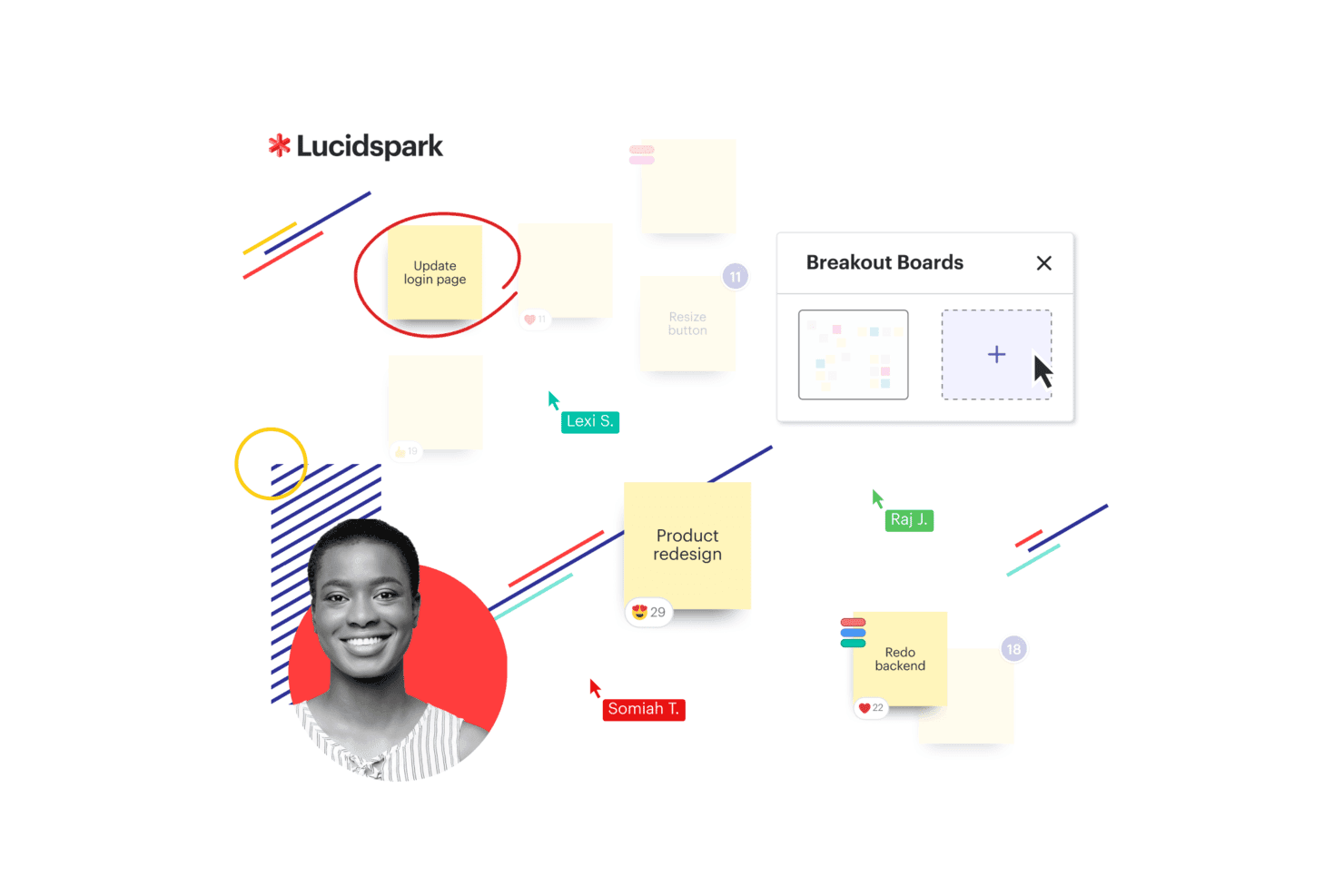
Lucidspark presenta una lavagna Kanban con colonne di flusso di lavoro e schede attività per aiutare i team a organizzare e monitorare visivamente il lavoro. Lucidspark è una lavagna virtuale pensata per la collaborazione in tempo reale dei team, che combina una tela infinita, mappe mentali dinamiche, ideazione assistita dall’IA, attività visive e strumenti di facilitazione per brainstorming e pianificazione.
Per chi è ideale Lucidspark?
Lucidspark è particolarmente adatto per team trasversali di prodotto, design e strategia che necessitano di uno spazio condiviso per brainstorming visivo e sessioni di ideazione strutturata.
Perché ho scelto Lucidspark
Ho incluso Lucidspark tra le mie scelte principali perché il suo mapping mentale potenziato dall’IA lo distingue dagli altri strumenti di lavagna digitale. Puoi chiedere all’IA di generare una mappa mentale completa a partire da un solo argomento, e questa costruisce istantaneamente rami e sotto-nodi sulla tela. Inoltre, mi piace che l’IA possa ordinare e raggruppare una lavagna piena di post-it sparsi in categorie etichettate, il che fa davvero risparmiare tempo dopo un brainstorming disordinato. Queste due funzionalità insieme rendono il passaggio da idee grezze a un piano visivo strutturato molto più rapido.
Funzionalità principali di Lucidspark
- Sessioni di voto: Avvia votazioni a tempo direttamente sulla tela così il team può prioritizzare collettivamente le idee senza uscire dalla lavagna.
- Lavagne suddivise: Dividi la lavagna principale in sotto-lavagne per lavoro in piccoli gruppi, poi riunisci i risultati in una vista condivisa.
- Disegno a mano libera: Disegna diagrammi, annotazioni o concetti direttamente sulla tela utilizzando una penna o il mouse.
- Libreria di template: Accedi a layout predefiniti per wireframe, sitemap e mappe concettuali per avviare rapidamente le sessioni.
Pros and Cons
Pros:
- Template Kanban disponibili per i team
- Collaborazione in tempo reale per i team
- Si integra con Google Drive e Jira
Cons:
- Piani team a partire da $10 al mese per utente
- La fatturazione annuale è richiesta per l’accesso
Learn more about Lucidspark: 2Il miglior software di design collaborativo per lavorare simultaneamente sulla stessa tela
Miro
- Piano gratuito disponibile
- Da $8/membro/mese (fatturato annualmente)
Visit WebsiteRating:4.8/5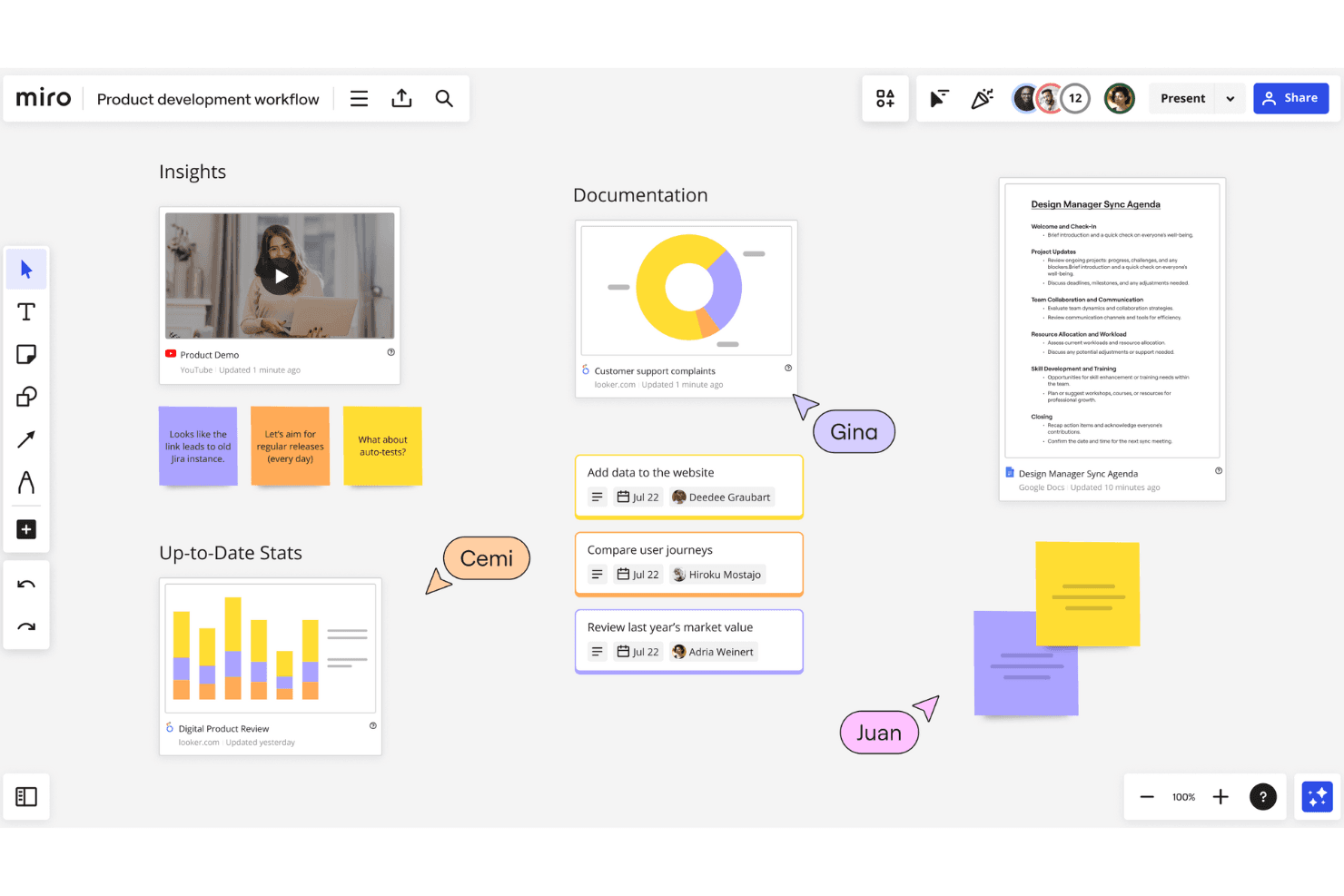
Miro offre una lavagna infinita dove i team possono collaborare su diverse iniziative in un unico posto. Miro è una piattaforma di collaborazione visiva dalla tela infinita che riunisce wireframing, prototipazione, sprint di design, diagrammi e feedback degli stakeholder in un unico spazio di lavoro condiviso per i team di design e prodotto.
Per chi è ideale Miro?
Miro è pensato per team di prodotto e design multidisciplinari, dalle aziende di medie dimensioni alle grandi imprese, che organizzano frequentemente workshop remoti, sprint di design e sessioni collaborative di pianificazione.
Perché ho scelto Miro
Miro si distingue perché nessun altro strumento eguaglia l’esperienza di avere un intero team di design che lavora sulla stessa tela in contemporanea. Adoro la funzione che mostra la presenza dei cursori: mi permette di vedere esattamente dove sono i colleghi e su cosa stanno lavorando in tempo reale, rendendo davvero efficaci le revisioni dal vivo del design. Ho gestito sprint di design in cui il mio team ha utilizzato simultaneamente il voto integrato e il raggruppamento dei post-it, e la lavagna ha sempre funzionato perfettamente.
Funzionalità principali di Miro
- Wireframing: Crea wireframe a bassa fedeltà direttamente sulla tela utilizzando una libreria dedicata di componenti UI e forme.
- Talktrack: Registra walkthrough video interattivi di qualunque lavagna così che gli stakeholder possano rivedere i design in modalità asincrona.
- Frames: Organizza sezioni della tela in frame pronti per la presentazione che fungono anche da flussi prototipo cliccabili.
- Libreria di template: Accedi a oltre 7.000 modelli preimpostati che coprono brief di design, sintesi di ricerca e mappatura dei concetti.
Pros and Cons
Pros:
- Ampia gamma di funzionalità per il design
- Facile da usare e implementare
- Vasta libreria di template e widget preimpostati
Cons:
- Alcune integrazioni sono disponibili solo nei piani di livello superiore
- Il piano gratuito prevede un numero limitato di lavagne
 Il miglior software di design collaborativo per la collaborazione in tempo reale
- Piano gratuito disponibile
- Da $16/utente/mese (fatturazione annuale)
Visit WebsiteRating:4.7/5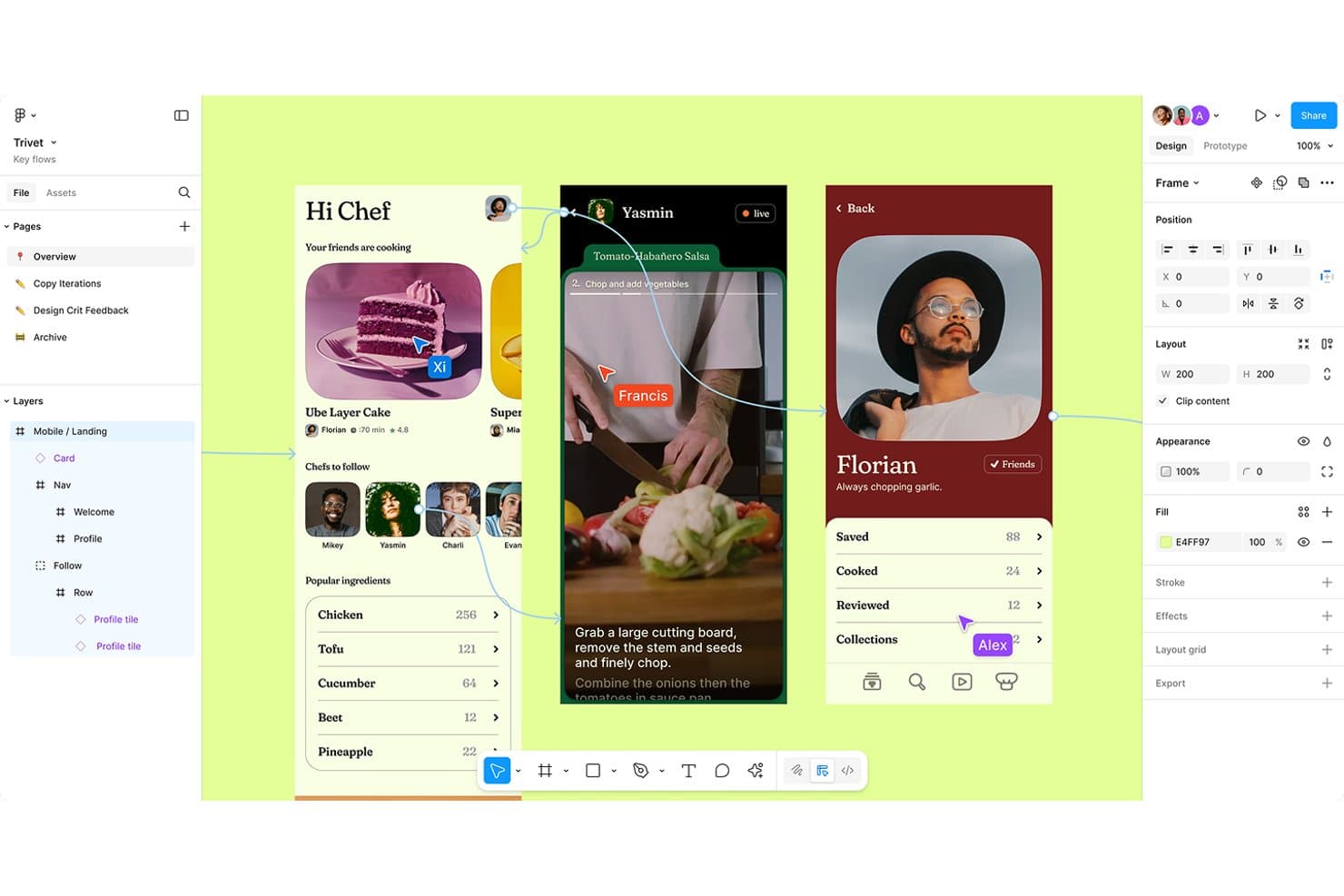
La funzione di chat tramite cursore permette agli utenti di inserire commenti direttamente in un file di design. Figma è una piattaforma di progettazione basata su browser dove i team possono creare design per interfacce utente, prototipi interattivi e sistemi di design condivisi insieme in un unico ambiente collaborativo in tempo reale.
Per chi è ideale Figma?
Figma è particolarmente adatto ai team di design di prodotto e UX in aziende di medie e grandi dimensioni che necessitano di designer, sviluppatori e stakeholder che lavorano all'interno di uno spazio condiviso.
Perché ho scelto Figma
Figma si guadagna un posto tra i migliori della mia lista perché la sua funzione di editing multiplayer è in tempo reale; posso vedere i cursori dei colleghi muoversi sulla tela e osservare ogni modifica man mano che avviene. Apprezzo anche la modalità Osservazione, che mi consente di seguire esattamente la vista di un collaboratore durante le revisioni di design senza dover condividere lo schermo. I commenti contestuali permettono agli stakeholder di fissare feedback direttamente sugli elementi specifici del design, evitando che i suggerimenti si perdano nelle email.
Funzionalità principali di Figma
- Librerie di componenti condivise: Pubblica componenti UI riutilizzabili, stili di colore e stili di testo a cui tutto il team può accedere e utilizzare in qualsiasi file di progetto.
- Prototipazione interattiva: Crea prototipi cliccabili e animati con transizioni e animazioni intelligenti per simulare i flussi reali del prodotto durante i test e le revisioni degli stakeholder.
- Dev Mode: Uno spazio di lavoro dedicato dove gli sviluppatori possono ispezionare i design, copiare frammenti di codice e visualizzare le specifiche senza modificare il file originale.
- Branching e merging: Crea un ramo separato di qualsiasi file di design per esplorare modifiche in modo indipendente, quindi unisci gli aggiornamenti approvati al file principale.
Pros and Cons
Pros:
- Facile condividere i design
- Facile collaborare su più file
- Ottimo passaggio agli sviluppatori
Cons:
- Il controllo delle versioni può essere migliorato
- Curva di apprendimento per i nuovi utenti
 Il miglior software di progettazione collaborativa per condividere mockup di design
- Prova gratuita di 14 giorni disponibile
- Da $16/utente/mese (fatturazione annuale)
Visit WebsiteRating:4.3/5
La modalità presentazione di Balsamiq aiuta gli utenti a mostrare i loro wireframe in modo raffinato e professionale. Balsamiq è uno strumento di wireframing e prototipazione progettato per i team che hanno bisogno di disegnare, iterare e condividere mockup UI a bassa fedeltà prima di passare a lavori di design ad alta fedeltà.
Per chi è più adatto Balsamiq?
Balsamiq è particolarmente indicato per product manager, UX designer e sviluppatori che necessitano di uno strumento rapido per wireframe a bassa fedeltà, utile per comunicare idee prima di iniziare il design ad alta fedeltà.
Perché ho scelto Balsamiq
Balsamiq è una delle mie scelte preferite perché apprezzo molto la facilità con cui permette di condividere i mockup con stakeholder che non sono immersi nel design. Posso condividere un wireframe tramite un link pubblico, un PDF o un PNG in pochi secondi, permettendo così a uno sviluppatore, un cliente o uno stakeholder non tecnico di visualizzarlo senza bisogno di un account Balsamiq. Trovo particolarmente utile la funzione di commenti e reazioni direttamente nella vista condivisa, così il feedback rimane collegato alla schermata specifica a cui si riferisce, invece di perdersi tra thread di Slack o catene di email.
Caratteristiche principali di Balsamiq
- Libreria di componenti UI predefiniti: Accedi a un ampio set di elementi UI, icone e template già pronti per disegnare idee di interfaccia senza dover partire da zero.
- Collegamento interattivo dei prototipi: Collega insieme schermate wireframe individuali per mostrare agli stakeholder come funzionerà un flusso utente o un'interazione dall'inizio alla fine.
- Simboli riutilizzabili: Crea e riutilizza componenti UI personalizzati—come menu di navigazione o gruppi di pulsanti—su più schermate per mantenere la coerenza dei mockup.
- Tre stili di wireframe: Passa da modalità Bozza, Schizzo e Presentazione a seconda che tu stia ideando, creando wireframe o presentando ai clienti.
Pros and Cons
Pros:
- Piani tariffari convenienti
- Interfaccia semplice e intuitiva
- Buone funzionalità di collaborazione in tempo reale
Cons:
- Funzionalità di animazione limitate
- Opzioni di esportazione limitate
Learn more about Balsamiq: La migliore soluzione di design collaborativo per chi non è designer
- Prova gratuita di 14 giorni + piano gratuito disponibile
- Da $12.25/utente/mese (fatturazione annuale)
Visit WebsiteRating:4.5/5
Visme consente agli utenti di impostare e condividere permessi sui contenuti visivi per assicurare che solo gli utenti autorizzati possano accedervi. Visme è una piattaforma di progettazione di contenuti visivi con strumenti di collaborazione, modelli personalizzabili, generazione di design alimentata dall'IA e funzionalità di gestione del brand, pensata per i team che creano insieme presentazioni, documenti, infografiche e contenuti interattivi.
A chi è più adatto Visme?
Visme è ideale per i team di marketing, risorse umane e comunicazione di aziende di medie dimensioni che devono produrre contenuti visivi in modo collaborativo senza dipendere da un team di progettazione dedicato.
Perché ho scelto Visme
Ho scelto Visme tra i migliori perché elimina la barriera delle competenze di design senza sacrificare la vera collaborazione. La funzione AI Designer permette al mio team di generare una presentazione curata e coerente con il brand a partire da un semplice testo in pochi secondi. Da lì, i collaboratori possono lasciare annotazioni fissate direttamente sulla tela, così i feedback come 'sposta questo grafico a sinistra' arrivano esattamente dove devono, invece di perdersi in una catena di email. Mi affido inoltre al Brand Kit per mantenere coerente il risultato di ogni membro del team, anche quando nessuno sul progetto ha esperienza di design.
Caratteristiche chiave di Visme
- Permessi basati sui ruoli: Assegna individualmente l'accesso in sola visualizzazione, commento o modifica a ciascun collaboratore per controllare chi può cambiare cosa.
- Commenti con @menzioni: Tagga colleghi specifici nei commenti direttamente sulla tela per indirizzare i feedback alla persona giusta.
- Libreria di modelli: Accedi a migliaia di modelli suddivisi in oltre 50 tipologie di contenuto, incluse presentazioni, infografiche, report e grafiche social.
- Workspace condiviso per il team: Organizza i progetti in cartelle condivise così tutto il team lavora da un unico hub centralizzato di contenuti.
Pros and Cons
Pros:
- Offre strumenti di project management
- Condivisione facile
- Offre diversi strumenti di revisione
Cons:
- Personalizzazione limitata
- Archiviazione limitata
Learn more about Visme: Il miglior software collaborativo di design per migliorare il processo di handoff del design
- Disponibile un piano gratuito
- A partire da $13.75/progetto/mese (fatturazione annuale)
Visit WebsiteRating:0.0/5
La funzione di controllo delle versioni di design consente agli utenti di confrontare le versioni, ripristinare precedenti iterazioni e lasciare commenti sulle modifiche. Zeplin è una piattaforma per la consegna e la gestione dei progetti di design che si posiziona tra i tuoi strumenti di progettazione e il team di sviluppo, permettendoti di pubblicare schermate definitive, documentare i requisiti, mappare i flussi utente, tenere traccia delle modifiche di versione e generare frammenti di codice per gli sviluppatori.
Per chi è Zeplin?
Zeplin è particolarmente adatto ai team di prodotto in cui designer e sviluppatori lavorano a stretto contatto e necessitano di un modo strutturato per trasferire e documentare i progetti di design.
Perché ho scelto Zeplin
Ho scelto Zeplin tra i migliori perché il modo in cui gestisce il passaggio dal design allo sviluppo è veramente diverso dal semplice condividere un link Figma. Quando pubblico schermate su un progetto Zeplin, gli sviluppatori ricevono automaticamente snippet di codice, misurazioni degli spazi e esportazioni delle risorse senza che io debba documentare nulla manualmente. Apprezzo anche la funzione di confronto delle versioni, che permette ad entrambe le parti di vedere esattamente cosa è cambiato tra una versione e l'altra prima ancora che venga scritto una riga di codice.
Funzionalità principali di Zeplin
- Bacheche di flusso: Mappa i percorsi utente completi collegando le schermate con etichette, forme e connettori direttamente all'interno di un progetto.
- Gestione del sistema di design: Mantieni una guida di stile condivisa con colori, stili di testo e componenti che gli sviluppatori possono consultare insieme ai valori del codice reale.
- Revisione del design con AI: Esegui controlli automatici sulle schermate pubblicate per identificare incoerenze di spaziatura, discrepanze di colore, problemi di accessibilità e errori di battitura.
- Livelli per annotazioni e note: Aggiungi note contestuali direttamente sulle schermate per documentare requisiti, interazioni o casi limite per gli sviluppatori.
Pros and Cons
Pros:
- La guida di stile aiuta a garantire coerenza
- Supporta un'ampia gamma di formati di file
- Aiuta designer e sviluppatori a collaborare in tempo reale
Cons:
- Relativamente costoso per piccoli team
- Alcuni utenti segnalano problemi di velocità
Learn more about Zeplin: Miglior software collaborativo per whiteboarding e collaborazione digitale
- Prova gratuita di 30 giorni + piano gratuito disponibile
- Da €5/utente/mese
Visit WebsiteRating:0.0/5
Lo strumento lavagna di Conceptboard offre una tela virtuale flessibile e personalizzabile per i team che vogliono creare, discutere e organizzare progetti. Conceptboard è una piattaforma di lavagna online che combina collaborazione su una tela infinita, brainstorming visivo, wireframing e strumenti di facilitazione di workshop per team distribuiti e co-locati.
Per chi è ideale Conceptboard?
Conceptboard è adatto a team remoti e ibridi che organizzano workshop visivi, design sprint o sessioni di pianificazione interfunzionali.
Perché scegliere Conceptboard
Conceptboard è uno dei pochi strumenti di lavagna che mantiene intatto l’intero arco di una sessione di collaborazione. Permette di condurre un workshop dal vivo con timer integrato e raggruppamento di sticky note, poi convertire i risultati in task assegnabili su una Kanban board senza lasciare la lavagna. La tela infinita supporta anche lavoro sincrono e asincrono nello stesso spazio, così i team distribuiti possono contribuire prima e dopo una sessione invece di essere vincolati a un unico fuso orario.
Funzionalità principali di Conceptboard
- Template predefiniti: Oltre 150 template che coprono design sprint, retrospettive e formati di workshop avviabili direttamente dalla lavagna.
- Votazione: I partecipanti votano su sticky note o idee per evidenziare le priorità durante una sessione dal vivo.
- Commenti e annotazioni: Aggiungi commenti in thread e annotazioni visive a qualsiasi elemento sulla lavagna per un feedback strutturato.
- Accesso ospite: Invita collaboratori esterni a visualizzare o modificare una lavagna senza che sia necessario creare un account.
Pros and Cons
Pros:
- Facile creazione di lavagne
- Ampia libreria di template
- Buona interfaccia
Cons:
- Lingue limitate
- Personalizzazione limitata
Learn more about Conceptboard:
Come valuto i software di progettazione collaborativa
Divido la mia valutazione in tre parti. La funzionalità principale, ovvero la possibilità per i team di modificare insieme i progetti in tempo reale e lasciare feedback contestuali su elementi specifici, ha il peso maggiore. Poi cerco funzionalità distintive come la gestione dei token di progettazione e considero la facilità di onboarding e la scalabilità dei prezzi.
Funzionalità principali (Requisiti fondamentali per questo elenco)
Quando seleziono gli strumenti da inserire nel mio elenco, assegno a ciascuno un punteggio su una scala da 0 (non offre la funzionalità) a 5 (eccelle in quest'area) per ogni funzionalità principale indicata di seguito. Converto quindi il totale in una percentuale per aiutare a valutare l'idoneità complessiva di ogni strumento, attribuendo un peso aggiuntivo a tutte le funzionalità che ho ritenuto essenziali.
- Modifica collaborativa in tempo reale (essenziale): verifico se più designer possono lavorare nello stesso file con cursori in tempo reale e se le prestazioni rimangono adeguate all'aumentare dei collaboratori.
- Strumenti per commenti e feedback: i commenti contestuali ancorati a livelli o riquadri specifici sono i più importanti: cerco risposte in thread, menzioni e monitoraggio della risoluzione.
- Librerie di componenti condivise: valuto come i team pubblicano, sincronizzano e gestiscono i componenti riutilizzabili tra i progetti, verificando anche se gli aggiornamenti delle librerie vengono propagati automaticamente.
- Cronologia e monitoraggio delle versioni: i punti di controllo denominati e la possibilità di confrontare o ripristinare stati precedenti mi aiutano a valutare quanto bene uno strumento supporti le revisioni iterative dei progetti.
- Passaggio di consegne agli sviluppatori ed esportazione: modalità di ispezione chiare con spaziature, token di colore e risorse esportabili mi indicano se designer e ingegneri possono rimanere allineati senza strumenti aggiuntivi.
- Prototipazione e flussi interattivi: osservo quanto sia facile collegare le schermate, aggiungere transizioni e simulare la logica condizionale per convalidare i flussi utente prima dell'inizio dello sviluppo.
Una volta ottenuto un elenco di strumenti che soddisfano i criteri, considero ciò che distingue ogni piattaforma.
Fattori distintivi (Ciò che differenzia i fornitori)
Ecco come confronto e metto in contrapposizione i diversi fornitori:
Funzionalità distintive
La gestione dei token di progettazione è la prima cosa che cerco. Quando i valori di colori, tipografia e spaziatura risiedono in un sistema centralizzato sincronizzato con le basi di codice, il flusso dalla progettazione allo sviluppo rimane coerente senza aggiornamenti manuali delle specifiche. Anche le analisi tra file sono altrettanto importanti: verifico se uno strumento mostra quali componenti i team adottano effettivamente e quali ignorano. Questi dati aiutano i responsabili di prodotto e i responsabili della progettazione a individuare le lacune nella gestione prima che si aggravino. Valuto inoltre la generazione di progetti assistita dall'IA, in particolare quanto riesca ad accelerare l'esplorazione dei layout durante le prime fasi di scoperta.
Oltre le funzionalità
Valuto quanto bene ogni strumento si integri in uno stack di prodotto esistente: le integrazioni native con Jira, Slack o Notion evitano ai team soluzioni manuali per il passaggio di consegne, che rallentano i cicli di sprint. Anche i modelli di prezzo basati sul numero di licenze sono importanti, poiché aggiungere responsabili di prodotto e ingegneri come utenti con accesso in sola visualizzazione può aumentare silenziosamente i costi con la crescita dell'organizzazione. Verifico la conformità SOC 2 e le autorizzazioni granulari per gli ospiti, soprattutto quando gli spazi di lavoro condivisi includono partner esterni che esaminano attività di prodotto non ancora rilasciate.
Come ho scelto il miglior software di progettazione collaborativa
Se ti interessa sapere come ho selezionato il miglior software di progettazione collaborativa, lascia che ti spieghi il processo. Ho compilato un elenco di software di progettazione collaborativa con recensioni e valutazioni positive, quindi ho perfezionato l'elenco sulla base dei seguenti criteri di selezione.
Domande frequenti
Ecco altre domande frequenti e risposte sul software di progettazione collaborativa.
Quali sono i vantaggi del software di progettazione collaborativa?
Ecco alcuni vantaggi del software di progettazione collaborativa:
- Maggiore produttività ed efficienza: consente ai membri del team di lavorare insieme in tempo reale, riducendo il tempo dedicato alla comunicazione avanti e indietro e alle iterazioni.
- Comunicazione e collaborazione migliorate: consente ai membri del team di condividere idee, feedback e file in tempo reale, favorendo una comunicazione e una collaborazione migliori.
- Migliore gestione dei progetti: consente ai responsabili di progetto di monitorare i progressi, assegnare attività e tenere traccia delle modifiche in tempo reale, facilitando il mantenimento dei progetti in linea con gli obiettivi.
- Maggiore creatività e innovazione: consente ai membri del team di condividere le proprie idee e ricevere feedback dagli altri, portando a progetti più creativi.
- Qualità migliorata: consente ai membri del team di individuare gli errori e apportare rapidamente revisioni, migliorando la qualità complessiva del progetto.
- Risparmio sui costi: può ridurre la necessità di viaggi, stampe e altre spese associate ai processi di progettazione tradizionali.
Perché la progettazione collaborativa è importante?
Dare al tuo team la possibilità di comunicare costantemente migliora la qualità del lavoro prodotto, non c’è dubbio. Sia la qualità sia la velocità saranno influenzate positivamente da un team più connesso. Tuttavia, la progettazione collaborativa non coinvolge solo i membri del team di progettazione.
Credo che la progettazione collaborativa significhi anche creare opportunità per interagire direttamente con il team di sviluppo e allinearsi sulle priorità. Consentire a questi team di confrontarsi porterà a stime dei tempi migliori, che influenzeranno direttamente la tempistica del progetto e le date indicative da comunicare al cliente.
A proposito di interazione diretta, i progettisti orientati alla collaborazione possono trarre grande valore anche dall’adesione a una di queste comunità di progettazione grafica.
Quali altri software per la gestione dei prodotti dovrei utilizzare?
Se il tuo team si trova ancora nelle prime fasi dell’ideazione visiva, potresti iniziare con un tavole d’ispirazione. Questi strumenti aiutano i team ad allinearsi sull’aspetto e sull’atmosfera prima di passare alla progettazione dettagliata. Scopri qui i nostri migliori strumenti per creare tavole d’ispirazione.
Ecco alcuni altri software per la gestione dei prodotti da prendere in considerazione:
Qual è il prossimo passo?
Abbiamo altri articoli che ti aiuteranno a conoscere meglio i progettisti e il loro lavoro. Scopri i 5 framework di progettazione per organizzare un workshop di ideazione straordinario e le basi della progettazione dei prodotti per creare esperienze più coinvolgenti.
Articoli correlati sugli strumenti:
- I migliori strumenti di progettazione UX
- Strumenti per la prototipazione rapida
- Software di progettazione UX/UI
Se hai trovato utile questo articolo, potrebbe interessarti la nostra raccolta dei migliori software di progettazione dei prodotti. Inoltre, se vuoi ricevere le ultime novità e i consigli sulla gestione dei prodotti, iscriviti alla newsletter di The CPO Club.