

10 mejores herramientas Kanban para la eficiencia del flujo de trabajo 2026

10 Lista de las mejores herramientas Kanban


Hay aparentemente innumerables soluciones de software Kanban disponibles, por lo que resulta difícil determinar cuál es la mejor para ti. Quieres aumentar la visibilidad de los procesos de trabajo, mejorar la colaboración, reducir los cuellos de botella y mejorar la eficiencia general del flujo de trabajo, pero necesitas averiguar qué herramienta se adapta mejor a tus necesidades. ¡Yo te ayudo! En esta publicación simplifico las cosas, aprovechando mi experiencia gestionando productos grandes y complejos, y utilizando docenas de herramientas diferentes para ofrecerte esta lista de las mejores herramientas Kanban.
Por qué confiar en nuestras recomendaciones de software
Nuestro equipo lleva probando y evaluando software desde 2012. Como gestores de producto, sabemos lo difícil —y lo importante— que es elegir el software adecuado.
Para esta guía, evaluamos las herramientas mediante pruebas prácticas e investigación independiente, puntuando las herramientas según nuestros criterios de selección.
Nuestras reseñas reflejan nuestro criterio editorial humano, no un discurso de ventas.
Resumen de las mejores herramientas Kanban
Esta tabla comparativa resume los detalles de precios de mi selección de las mejores herramientas Kanban para ayudarte a encontrar la opción más adecuada para tu presupuesto y las necesidades de tu empresa.
| Tool | Best For | Trial Info | Price | ||
|---|---|---|---|---|---|
| 1 | La mejor opción por sus funciones de informes ágiles | Prueba gratuita de 15 días | Desde $1/usuario/mes (mínimo de 12 usuarios) | Website | |
| 2 | Mejor opción para plantillas personalizables | Prueba gratuita de 7 días + plan gratuito disponible | Desde $9/usuario/mes (facturado anualmente) | Website | |
| 3 | Ideal para el desarrollo de aplicaciones sin código | Prueba gratuita de 30 días | Precios bajo solicitud | Website | |
| 4 | Software de gestión de trabajo y Kanban con muchas funciones adicionales | Prueba gratuita de 14 días + plan gratuito disponible | Desde $10/usuario/mes (facturado anualmente) | Website | |
| 5 | Ideal para hacer un seguimiento del proceso de desarrollo de nuevas funcionalidades | Plan gratuito + prueba gratuita disponible | Desde $8/usuario/mes (facturado anualmente) | Website | |
| 6 | Ideal para límites de WIP integrados y avisos de IA | Plan Gratuito disponible | Desde $7/usuario/mes (facturado anualmente) | Website | |
| 7 | Ideal para vincular los flujos de trabajo de desarrollo con la planificación del tablero | Plan gratuito + prueba gratuita de 14 días + demostración gratuita disponible | Desde $8.50/usuario/mes (facturado anualmente) | Website | |
| 8 | Ideal para obtener visibilidad de carteras con múltiples tableros | Demostración gratuita + prueba gratuita de 14 días disponible | Desde $8/usuario/mes (facturado anualmente) | Website | |
| 9 | Herramienta Kanban con funciones de automatización de flujo de trabajo fáciles de usar | Plan gratuito disponible | Desde $5/usuario/mes (facturado anualmente) | Website | |
| 10 | Ideal para kanban con informes ágiles para varios equipos | Plan gratuito + demostración gratuita + prueba de 14 días disponibles | Desde $9.05/usuario/mes | Website |


Reseña de las mejores herramientas Kanban
A continuación encontrarás mis resúmenes detallados de las mejores herramientas Kanban que llegaron a mi lista. Mis reseñas ofrecen un análisis detallado de las funciones principales, las ventajas & desventajas, las integraciones y los casos de uso ideales de cada herramienta para ayudarte a encontrar la mejor opción para ti.

La mejor opción por sus funciones de informes ágiles
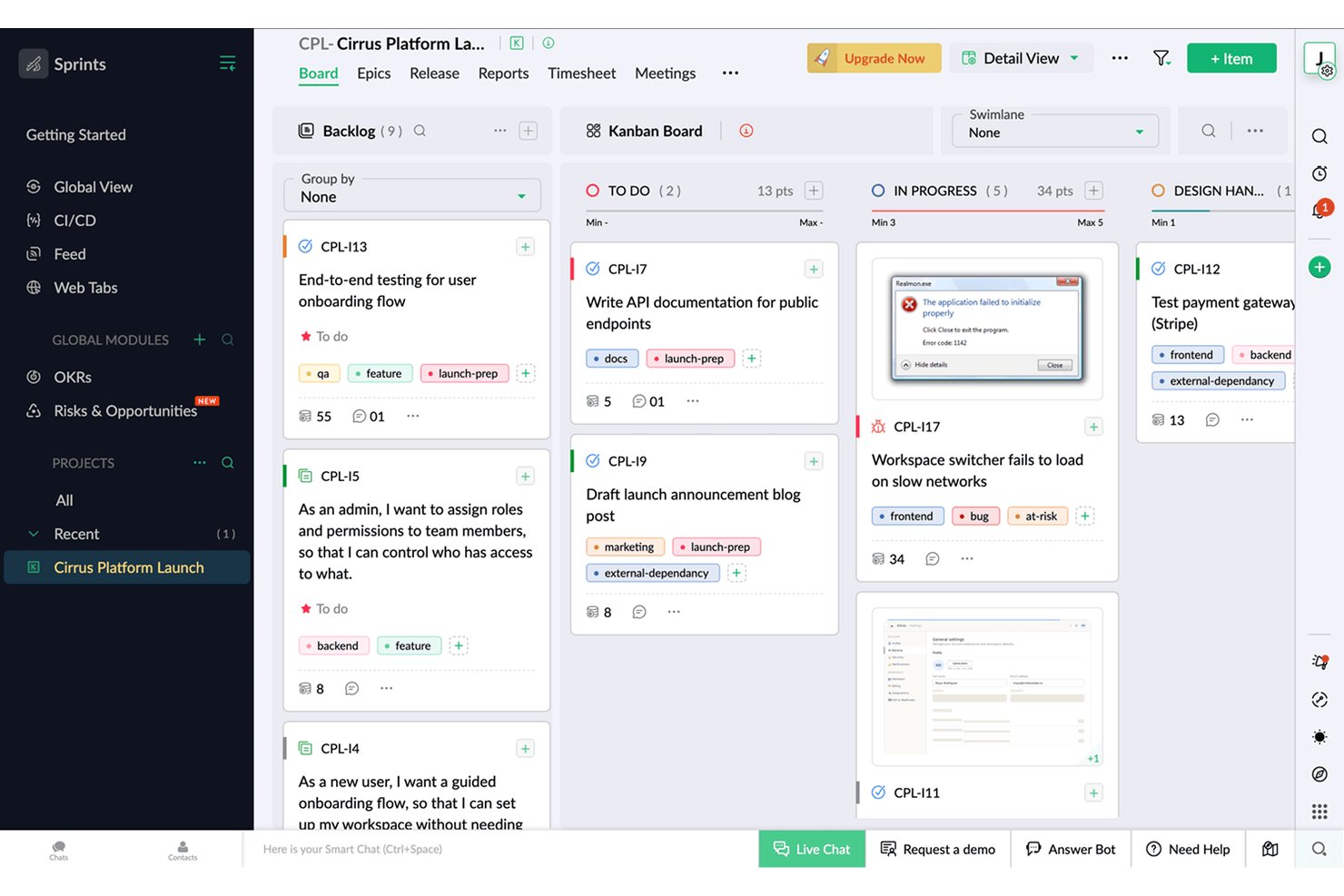
Zoho Sprints es una herramienta de gestión de proyectos ágiles que admite flujos de trabajo Kanban, Scrum y Scrumban, con gestión de listas de trabajos pendientes, planificación de sprints, seguimiento del tiempo e informes ágiles integrados que incluyen gráficos de trabajo pendiente, velocidad y flujo acumulado.
¿Para quién es más adecuado Zoho Sprints?
Zoho Sprints es una opción excelente para responsables de Scrum y gerentes de producto que necesitan informes ágiles detallados junto con su trabajo diario de sprints y listas de trabajos pendientes.
Por qué elegí Zoho Sprints
Zoho Sprints destaca por la profundidad de sus informes ágiles, incluidos gráficos de trabajo pendiente y trabajo completado, seguimiento de la velocidad, diagramas de flujo acumulado e informes de tiempo de ciclo y tiempo de entrega, disponibles en todos los planes. También aplica estrictamente los límites de WIP por columna.
Características principales de Zoho Sprints
- Gestión de listas de trabajos pendientes y épicas: Organiza los elementos de trabajo en épicas y una lista de trabajos pendientes priorizada para incorporarlos a los sprints según la capacidad del equipo.
- Carriles: Divide el tablero Kanban en carriles horizontales por equipo, tipo de trabajo o agrupación personalizada.
- Seguimiento del tiempo integrado: Registra las horas directamente en los elementos de trabajo mediante un temporizador global.
- Portales para clientes y proveedores: Proporciona a colaboradores externos acceso limitado a los proyectos.
Integraciones de Zoho Sprints
Zoho Sprints ofrece integraciones nativas con GitLab, Bitbucket, Azure DevOps, Jenkins, aplicaciones de Google, Microsoft 365, Zoho Cliq, Zoho Desk, Zoho Analytics y Zendesk. También admite REST API, webhooks y Zapier.
Pros and Cons
Pros:
- Los informes ágiles detallados respaldan las decisiones del producto
- Los límites estrictos de WIP protegen el rendimiento del equipo
- El seguimiento del tiempo integrado relaciona el esfuerzo con el trabajo
Cons:
- La terminología de Scrum puede confundir a las partes interesadas no técnicas
- La gestión de varios proyectos se vuelve confusa
New Product Updates from Zoho Sprints
Zoho Sprints Adds Dashboard View for Custom Modules
Zoho Sprints adds a Dashboard view for custom modules with charts and tables for visualizing module records. This gives teams a clearer way to review custom data. For more information, visit Zoho Sprints’ official site.
 .
.
Mejor opción para plantillas personalizables
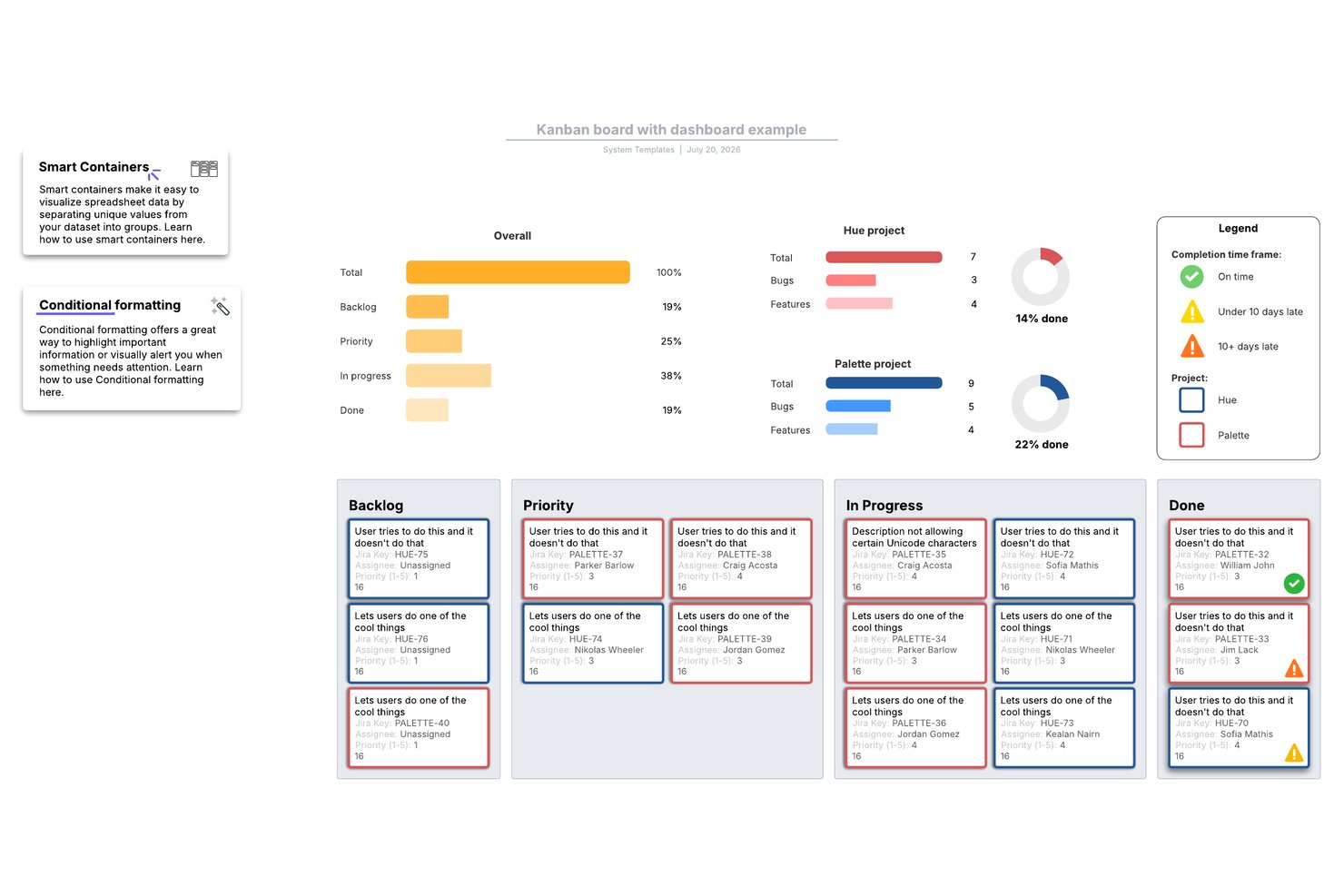
Lucidspark es una herramienta de pizarra con lienzo infinito que permite a los equipos crear tableros kanban, gestionar tareas con Lucid Cards y colaborar en tiempo real mediante una amplia biblioteca de plantillas ágiles y de planificación de proyectos.
¿Para quién es más adecuado Lucidspark?
Lucidspark es ideal para equipos multifuncionales que llevan a cabo ceremonias ágiles, como la planificación de sprints y las retrospectivas, y buscan un lienzo flexible basado en plantillas para organizar visualmente el trabajo.
Por qué elegí Lucidspark
Lucidspark ocupa un lugar en mi lista de favoritos gracias a su enorme biblioteca de plantillas personalizables, realmente incomparable para los equipos que llevan a cabo ceremonias ágiles en un lienzo visual. Me encanta que puedas abrir una plantilla de planificación de sprints, refinamiento de la lista de tareas pendientes o retrospectiva y adaptar cada columna y diseño de tarjetas al flujo de trabajo exacto de tu equipo. La plantilla de tablero ágil, en particular, permite sincronizar Lucid Cards directamente con Jira o Azure DevOps, de modo que el lienzo permanece vinculado a los datos reales de la lista de tareas pendientes.
Características principales de Lucidspark
- Edición colaborativa en tiempo real: Varios miembros del equipo pueden editar el mismo lienzo simultáneamente, con cursores en directo, chat integrado y reacciones con emojis visibles para todos los participantes.
- Sincronización bidireccional con Jira y Azure DevOps: Lucid Cards se conectan directamente con tu lista de tareas pendientes existente, manteniendo sincronizados tu tablero visual y tu herramienta de desarrollo sin actualizaciones manuales.
- Actividades de votación y facilitación: Las sesiones de votación integradas, los temporizadores y el modo privado permiten a los equipos realizar retrospectivas estructuradas y ejercicios de priorización en el lienzo.
- Tablas dinámicas: Un objeto de tabla nativo del lienzo que permite organizar y visualizar los datos de las tareas en un formato estructurado junto a tus tableros y diagramas.
Integraciones de Lucidspark
Lucidspark ofrece integraciones bidireccionales nativas con Jira, Azure DevOps y Smartsheet. También es compatible con Asana y proporciona una API para integraciones personalizadas.
Pros and Cons
Pros:
- Las plantillas ágiles personalizables se adaptan a distintos flujos de trabajo
- Potentes herramientas de facilitación para retrospectivas
- El lienzo visual permite la planificación multifuncional
Cons:
- No ofrece límites nativos de trabajo en curso (WIP) para controlar el rendimiento
- Análisis limitados del tablero y pocas vistas alternativas

Ideal para el desarrollo de aplicaciones sin código
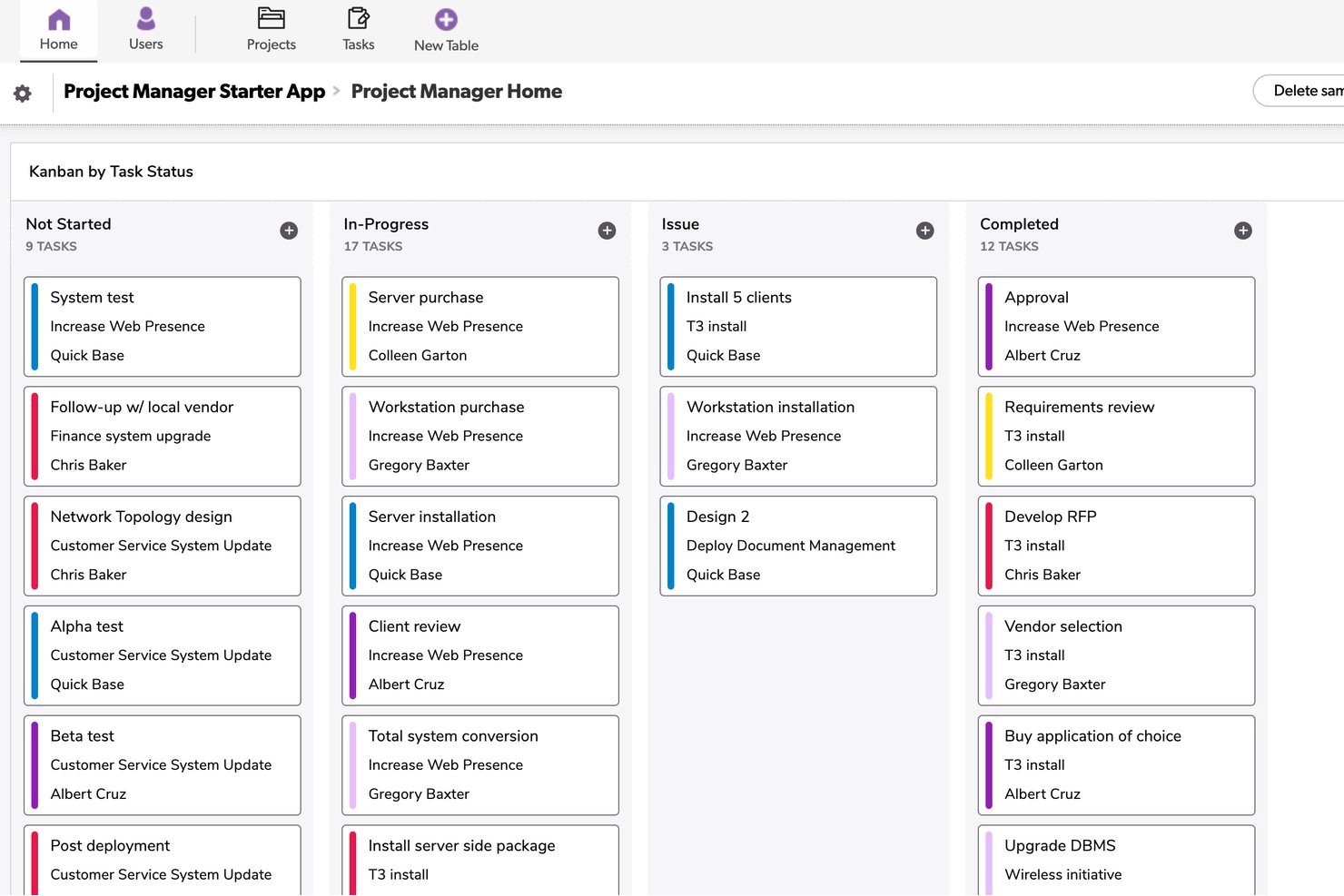
Quickbase es una plataforma para crear aplicaciones sin código que permite crear tableros kanban personalizados, paneles de control de cartera, diagramas de Gantt y flujos de trabajo automatizados sobre sus propios modelos de datos.
¿Para quién es más adecuado Quickbase?
Quickbase es ideal para equipos de operaciones empresariales y de proyectos en sectores como la construcción, la fabricación y la energía que necesitan flujos de trabajo personalizados creados sobre sus propios modelos de datos.
Por qué elegí Quickbase
He incluido Quickbase entre mis principales opciones porque es la única herramienta de esta lista que permite crear un tablero kanban directamente sobre un modelo de datos personalizado, lo que supone una verdadera ventaja diferenciadora para los equipos de producto centrados en las operaciones. Me gusta que se puedan extraer registros de tablas vinculadas y mostrarlos en las tarjetas del tablero, de modo que una tarjeta para un entregable de construcción pueda mostrar en un mismo lugar los campos del presupuesto, las especificaciones adjuntas y los registros de tareas secundarias. El panel de control de cartera entre proyectos también es algo que rara vez veo tan bien ejecutado: permite hacer un seguimiento del estado y las dependencias en varios flujos de trabajo sin tener que cambiar de aplicación.
Características principales de Quickbase
- Coloreado de tarjetas basado en fórmulas: Establece los colores de las tarjetas en tu tablero kanban mediante fórmulas personalizadas vinculadas a los valores de los campos, para señalar visualmente la prioridad, el estado o el riesgo de un vistazo.
- Visibilidad del tablero basada en roles: Controla qué tableros pueden ver determinados roles o marca un tablero como personal para que solo tú puedas acceder a él.
- Registros vinculados de tablas secundarias: Adjunta registros secundarios relacionados directamente al formulario de una tarjeta, lo que permite mostrar subtareas, dependencias o datos de apoyo sin salir de la tarjeta.
- Constructor de automatizaciones sin código (Pipelines): Crea automatizaciones de flujos de trabajo basadas en activadores sin escribir código, incluidas automatizaciones generadas a partir de descripciones en texto sin formato mediante IA.
Integraciones de Quickbase
Quickbase ofrece integraciones nativas con Salesforce, SAP, Oracle y Microsoft Teams. También proporciona API RESTful y de gobernanza para integraciones personalizadas, además de conectividad con almacenes de datos y sistemas locales en el plan Enterprise.
Pros and Cons
Pros:
- Los tableros personalizados se adaptan a datos de productos complejos
- Los paneles de control de cartera conectan varios flujos de trabajo
- Los registros vinculados mantienen accesibles los detalles de apoyo
Cons:
- No hay límites nativos de trabajo en curso
- Los límites de los tableros restringen los flujos de trabajo de gran volumen

Wrike
Software de gestión de trabajo y Kanban con muchas funciones adicionales
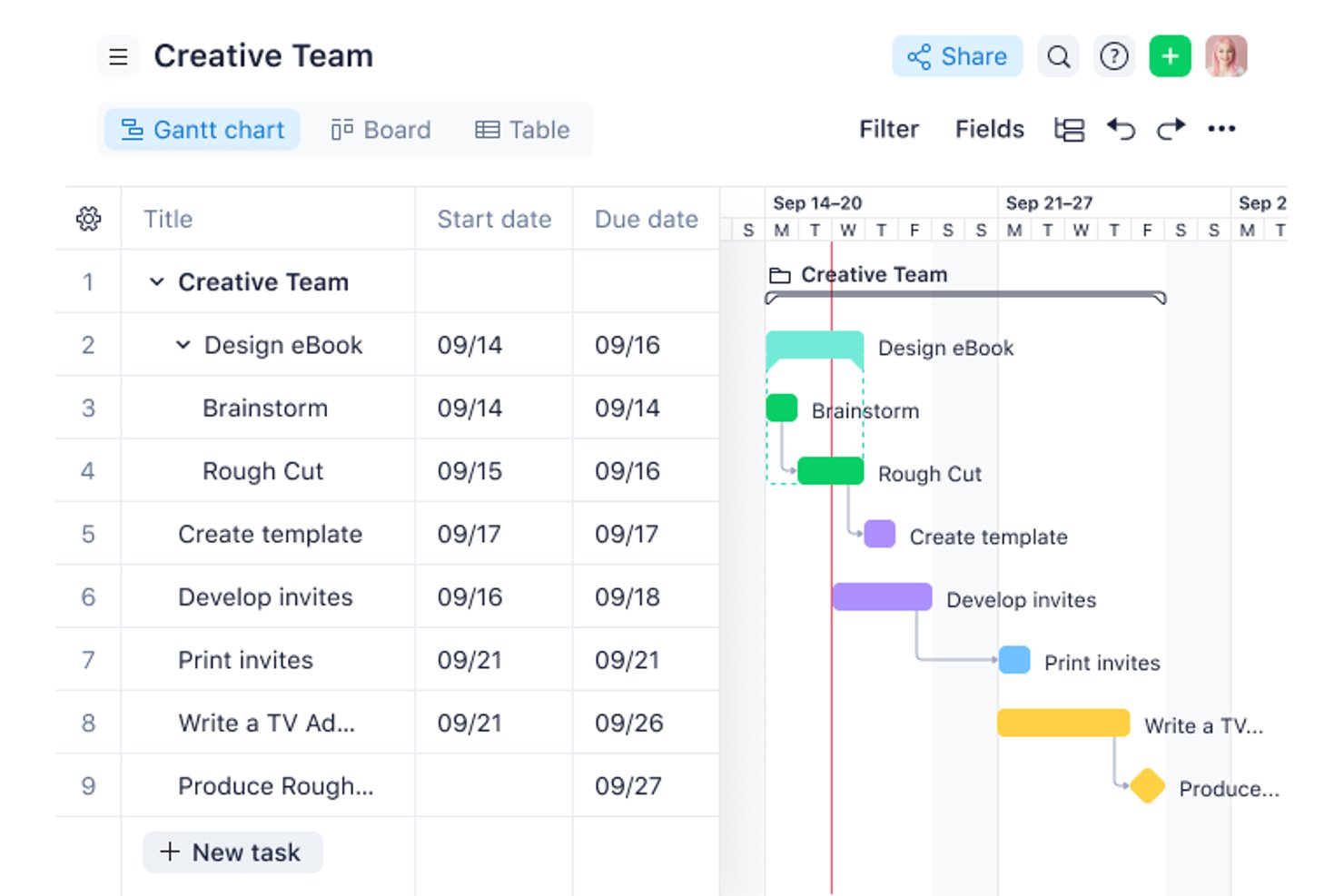
Wrike es un software de gestión de proyectos que te permite crear tableros para muchos casos de uso. Cuenta con potentes funciones de Kanban que funcionan sin problemas con sus otras características. Toda la funcionalidad básica es fácil de configurar y usar. Puedes crear tableros, gestionar el progreso de las tareas, añadir fechas límite y asignar elementos de trabajo a los miembros del equipo.
Cualquier persona de tu equipo puede adjuntar información adicional a las tareas para mantener a todos informados. Los tableros Kanban pueden interactuar con las demás funciones de Wrike. Por ejemplo, cuando agregas o cambias la fecha límite de una tarea, esta se sincronizará con el calendario de tu equipo para que todos estén actualizados. O puedes utilizar el software de seguimiento de tiempo de la herramienta para obtener visibilidad sobre cuánto tiempo dedica cada persona a una tarea.
También puedes visualizar datos en la herramienta a través de varios paneles para gestionar la carga de trabajo y seguir el progreso de tareas o proyectos. Wrike se integra con una gran cantidad de herramientas en áreas como CRM, mensajería, BI, desarrollo y almacenamiento de archivos.
Wrike ofrece un plan gratuito con funciones limitadas y una prueba gratuita para sus planes de pago.
New Product Updates from Wrike

Wrike Activity Reports Add Actor Type Details
Wrike’s Activity Report now displays actor type details, helping admins identify whether changes came from the UI, Automation, Wrike Agents, API, or AI via MCP. For more information, visit Wrike's official site.

Miro
Ideal para hacer un seguimiento del proceso de desarrollo de nuevas funcionalidades
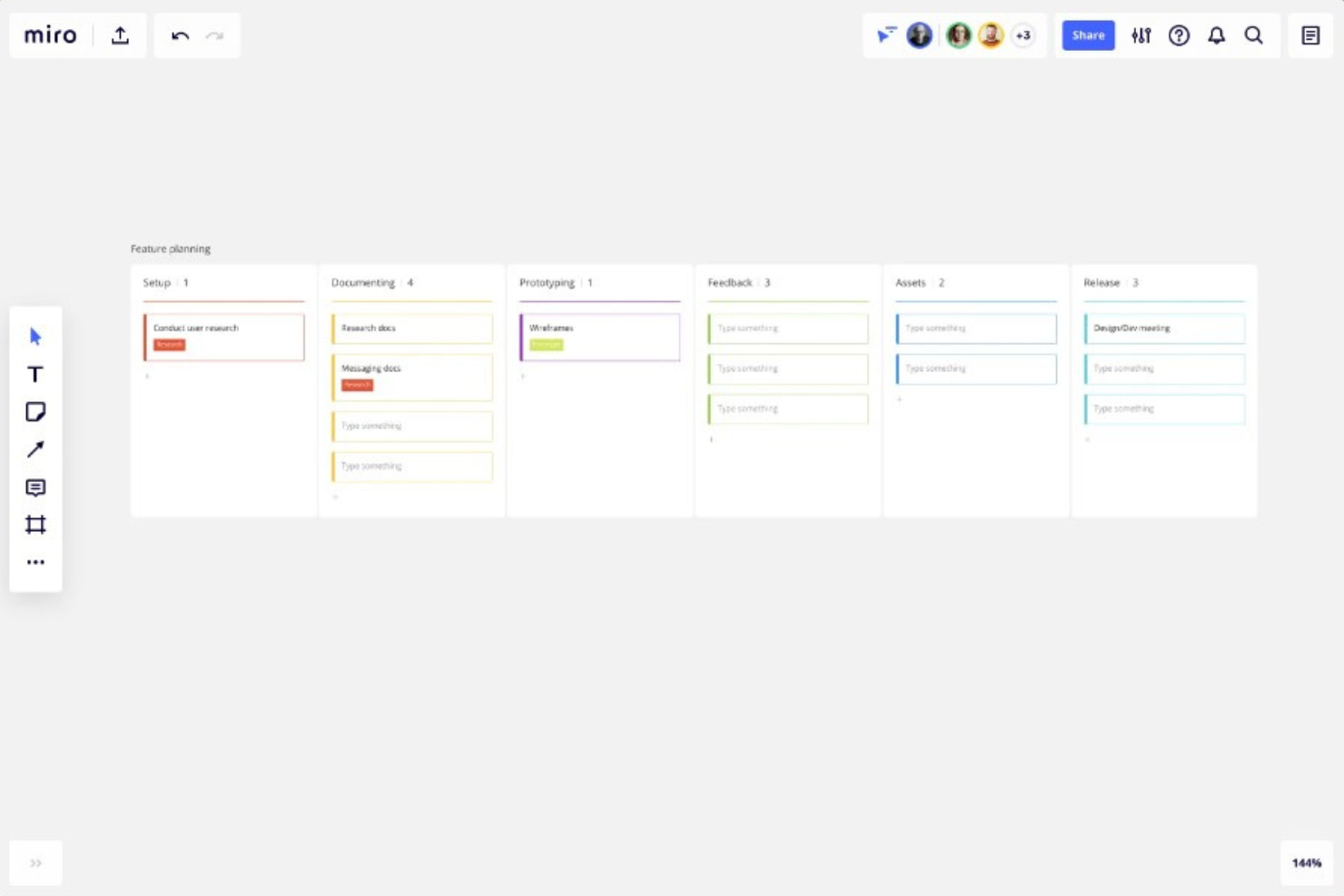
Miro es una plataforma de colaboración con lienzo infinito que reúne los tableros Kanban con hojas de ruta, diagramas y prototipos en un único espacio de trabajo visual.
¿Para quién es más adecuado Miro?
Miro es una opción ideal para los responsables de producto que necesitan conectar directamente los tableros Kanban con hojas de ruta, prototipos y trabajos de descubrimiento en un único espacio visual.
Por qué elegí Miro
Elegí Miro como una de las mejores opciones porque su lienzo infinito permite colocar un tablero Kanban justo al lado de hojas de ruta, documentos de descubrimiento y prototipos, de modo que puedes seguir una nueva funcionalidad desde la primera nota adhesiva hasta la tarjeta final en un único espacio de trabajo. Me encanta que las vistas Kanban, Cronograma y Tabla compartan los mismos datos subyacentes, lo que significa que cambiar entre el progreso del sprint y una vista de la hoja de ruta trimestral requiere un solo clic, en lugar de cambiar de contexto entre distintas herramientas.
Características principales de Miro
- Tarjetas sincronizadas: Arrastra una tarjeta Kanban al lienzo para crear una copia vinculada que se actualiza en ambas direcciones cuando se edita.
- Múltiples vistas del tablero: Cambia entre las vistas Kanban, Cronograma y Tabla sin duplicar datos, para pasar del progreso del sprint a la planificación trimestral con un solo clic.
- Integración de tarjetas de Jira: Arrastra tarjetas de Jira directamente a tu Kanban de Miro, convierte las tarjetas en incidencias de Jira y obtén sincronización bidireccional con el plan Empresarial.
- Estructura Kanban generada por IA: Usa Miro AI para generar un diseño Kanban a partir de una instrucción, utilizando el contenido existente de tu tablero como contexto.
Integraciones de Miro
Miro anuncia más de 250 integraciones, entre ellas Jira, Asana, Azure DevOps, Linear, ClickUp, Trello, Slack, Microsoft Teams, GitHub y Zapier. El plan Empresarial añade sincronización bidireccional con Jira, Asana, Linear, ClickUp y Azure DevOps.
Pros and Cons
Pros:
- Conecta Kanban con hojas de ruta y prototipos
- Sincroniza las vistas Kanban, Cronograma y Tabla
- Admite la colaboración interfuncional entre equipos de producto en tiempo real
Cons:
- No proporciona límites obligatorios de trabajo en curso
- Carece de subtareas y seguimiento del tiempo nativos
New Product Updates from Miro
Miro Adds Japan Data Residency for Enterprise Customers
Miro has introduced Japan data residency for enterprise customers, offering in-region storage for production data, backups, and metadata, plus in-region compute infrastructure. For more information, visit Miro's official site.

ClickUp
Ideal para límites de WIP integrados y avisos de IA
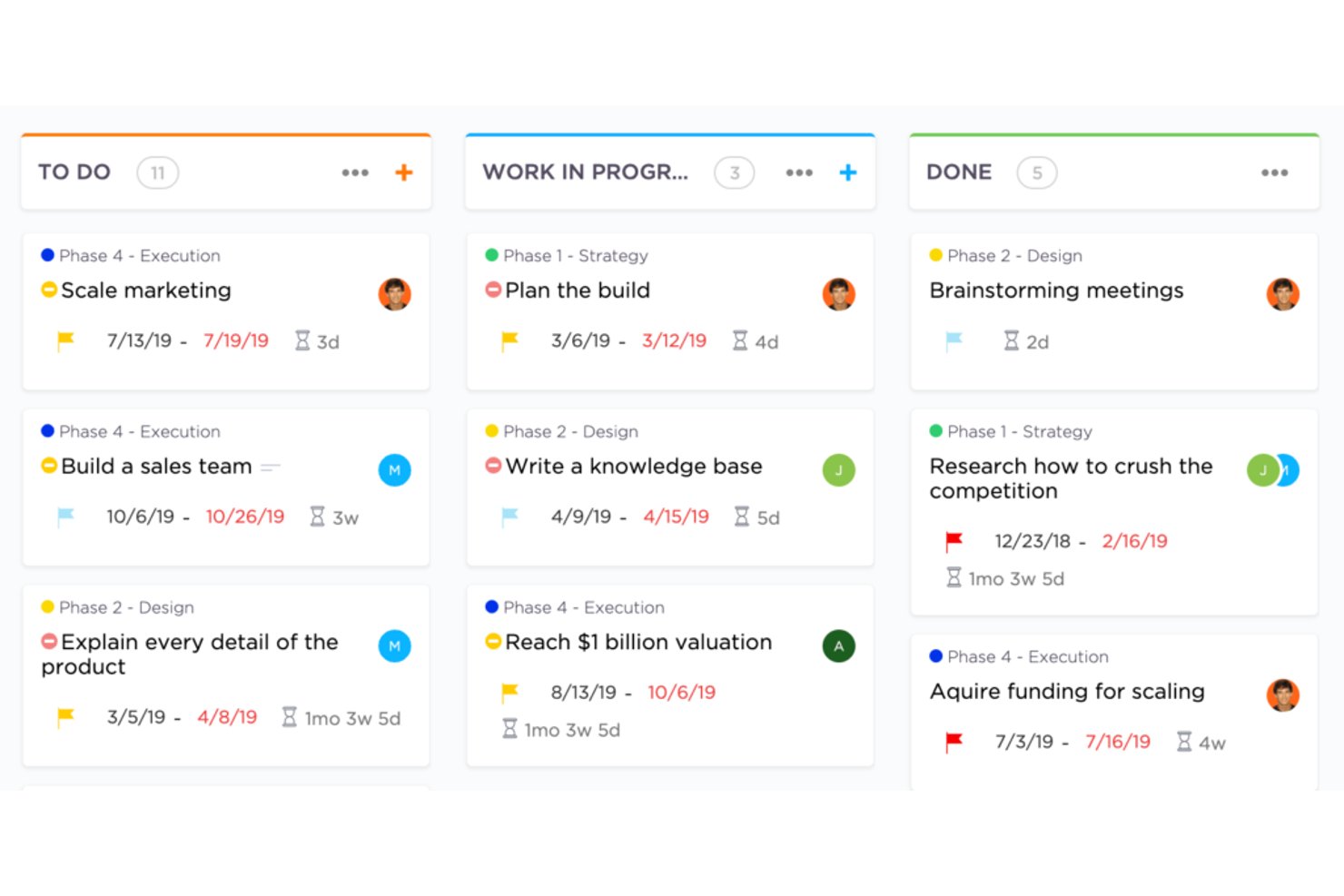
ClickUp es una plataforma de gestión del trabajo con vistas de tablero kanban, límites de trabajo en curso (WIP), gestión de sprints, seguimiento de tareas en varias vistas, seguimiento nativo del tiempo, automatizaciones y herramientas de IA integradas.
¿Para quién es más adecuado ClickUp?
ClickUp es una opción muy adecuada para equipos de producto e ingeniería que quieren kanban, sprints, límites de WIP y seguimiento de carteras en un solo espacio de trabajo.
Por qué elegí ClickUp
Elegí ClickUp como una de las mejores opciones porque sus límites nativos de WIP van más allá de un simple tope: cuando una columna alcanza su límite, el tablero lo señala visualmente y los Superagentes de IA de ClickUp envían avisos activamente a quien sea responsable de las tarjetas estancadas. Este tipo de aplicación proactiva de los límites es algo que rara vez veo integrado en otras herramientas. Los puntos de sprint y los informes de sprint completan el flujo de trabajo kanban, de modo que los equipos de producto pueden gestionar el backlog, realizar un seguimiento de la velocidad y aplicar una disciplina de rendimiento sin tener que combinar herramientas independientes.
Funciones principales de ClickUp
- Varias vistas sincronizadas: Cambia entre las vistas de Lista, Calendario, Gantt, Cronología y Mapa mental sin tener que volver a crear tus tareas; todas utilizan los mismos datos.
- Gestión de sprints: Planifica y realiza un seguimiento de los sprints con puntos de sprint directamente en el plan Gratuito, con informes completos de sprint disponibles en Business.
- Seguimiento nativo del tiempo: Registra el tiempo dedicado a las tareas desde ClickUp, a partir del plan Ilimitado, sin una integración de terceros.
- ClickUp Brain: Haz preguntas sobre tu tablero —como qué tareas están estancadas o cuáles vencen pronto— y obtén respuestas del asistente de IA integrado.
Integraciones de ClickUp
ClickUp ofrece integraciones nativas con Slack, HubSpot y Google Drive en el plan Ilimitado y superiores. Es compatible con webhooks y una API Enterprise para integraciones personalizadas.
Pros and Cons
Pros:
- Los límites nativos de WIP señalan las columnas bloqueadas
- Las vistas sincronizadas conectan el backlog y las hojas de ruta
- La IA avisa a los responsables sobre las tarjetas estancadas
Cons:
- Los controles avanzados requieren planes superiores
- La gran cantidad de funciones ralentiza la configuración inicial
New Product Updates from ClickUp
ClickUp Adds Meetings Hub, Super Agent Templates, and ZoomInfo Integration
ClickUp adds a searchable Meetings Hub, new ways to clone and template Super Agents, and a ZoomInfo integration through the App Center. These updates improve meeting retrieval, agent reuse, and access to sales intelligence. For more information, visit ClickUp’s official site.

Shortcut
Ideal para vincular los flujos de trabajo de desarrollo con la planificación del tablero
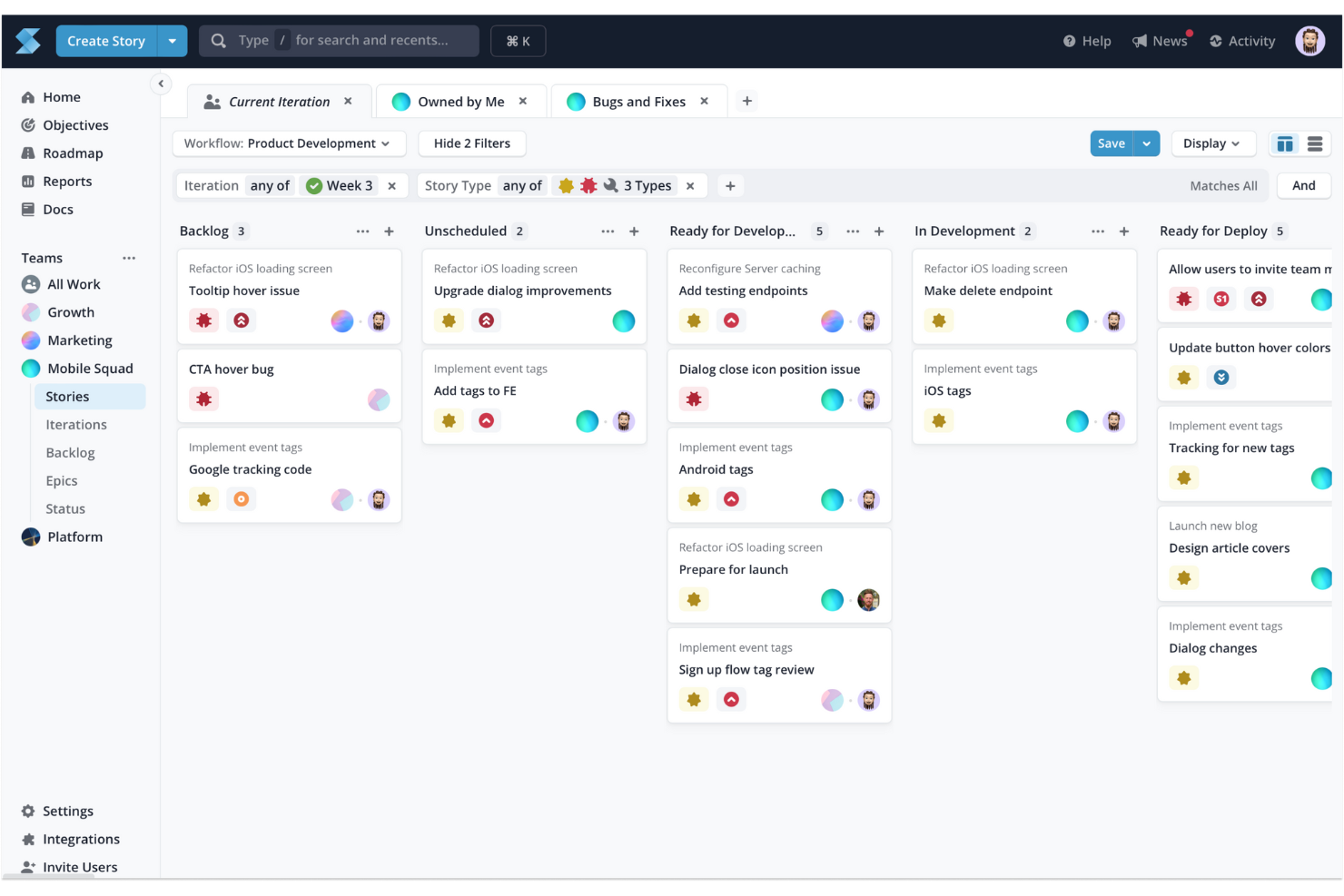
Shortcut es una herramienta de gestión de proyectos basada en kanban para equipos de software que combina Historias, Épicas, Objetivos y hojas de ruta temporales con Iteraciones integradas, límites de trabajo en curso e integraciones de código con GitHub, GitLab y Bitbucket.
¿Para quién es mejor Shortcut?
Shortcut es una opción excelente para equipos de software que quieren conectar sus tableros kanban y flujos de trabajo de desarrollo —solicitudes de incorporación de cambios, ramas y confirmaciones— en un solo lugar.
Por qué elegí Shortcut
He incluido Shortcut entre mis principales opciones porque es la única herramienta de esta lista que conecta directamente los estados del tablero kanban con la actividad del código, algo importante cuando gestionas una cartera de productos junto con un equipo de ingeniería activo. Cuando un desarrollador abre una solicitud de incorporación de cambios en GitHub, Shortcut puede mover automáticamente la Historia vinculada al estado de flujo de trabajo correspondiente, de modo que el tablero refleje la realidad sin que nadie tenga que actualizarlo manualmente. También me gusta cómo las Épicas y los Objetivos se estructuran sobre las Historias, lo que proporciona una conexión clara entre las tareas diarias de desarrollo y los objetivos estratégicos.
Características clave de Shortcut
- Jerarquía de historias: Las Historias se agrupan en Épicas, que se conectan con los Objetivos, proporcionando una conexión clara entre las tareas individuales y los objetivos estratégicos.
- Iteraciones: Los ciclos integrados con estilo de sprint permiten definir el alcance y limitar temporalmente el trabajo sin salir del tablero.
- Advertencias sobre los límites de trabajo en curso: Los encabezados de las columnas se vuelven rojos cuando un equipo alcanza su límite de trabajo en curso, señalando de un vistazo los estados sobrecargados.
- Hoja de ruta temporal: Una vista de hoja de ruta para varios equipos muestra el estado de salud de las Épicas y las Iteraciones junto con la planificación del tablero.
Integraciones de Shortcut
Shortcut ofrece más de 65 integraciones documentadas, incluidas GitHub, GitLab, Bitbucket Cloud, Slack, Figma, Productboard, Airfocus, Roadmunk y Google Sheets. También proporciona una API REST v3, webhooks salientes y compatibilidad con Zapier para conectividad personalizada.
Pros and Cons
Pros:
- Los Objetivos conectan las hojas de ruta con el trabajo de entrega
- Las Iteraciones permiten planificar productos basándose en sprints
- Los límites de trabajo en curso recomendados ponen de manifiesto las columnas sobrecargadas
Cons:
- Los permisos exclusivos del espacio de trabajo limitan el control de acceso
- No ofrece seguimiento nativo del tiempo para planificar la capacidad

Ideal para obtener visibilidad de carteras con múltiples tableros
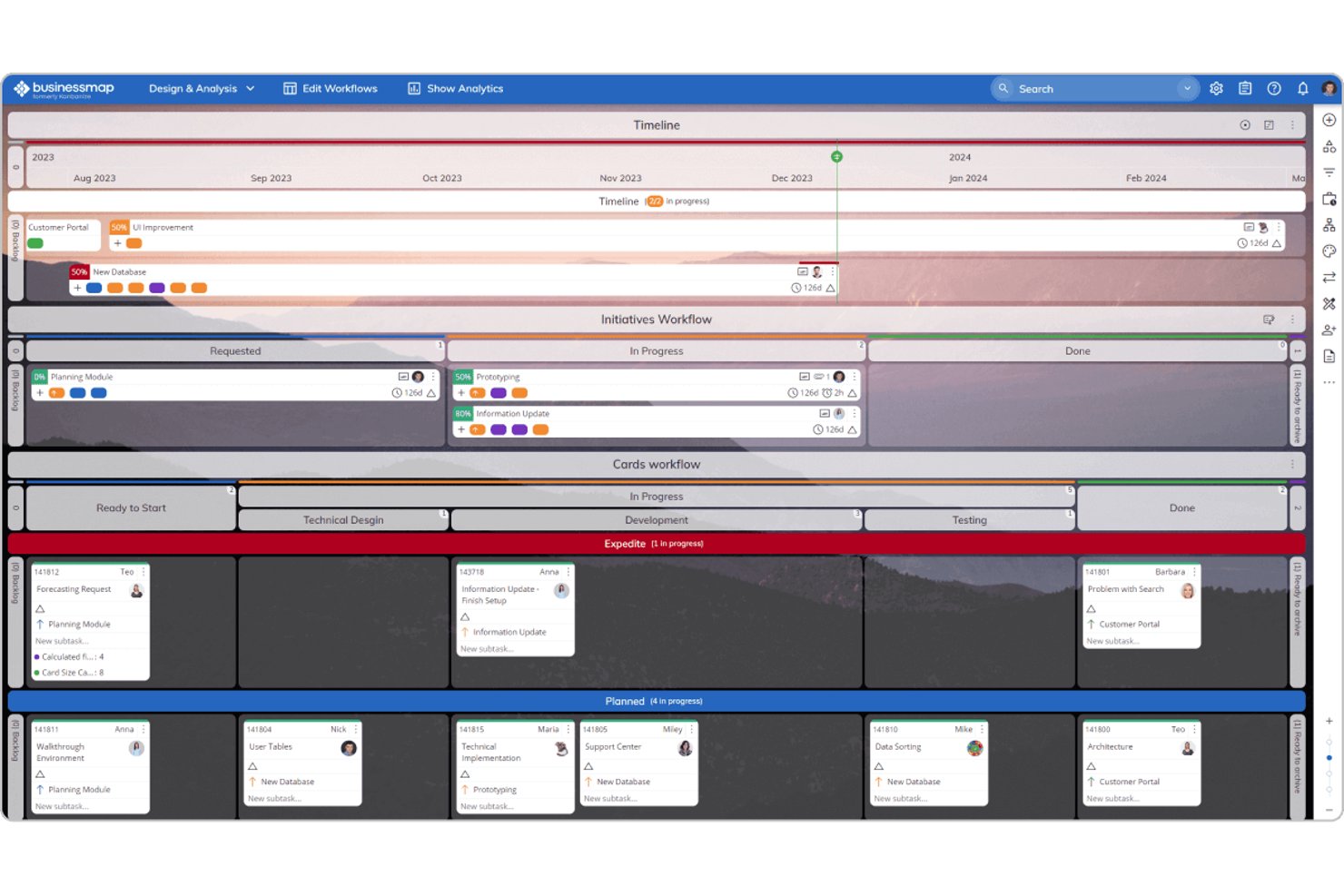
Businessmap es una plataforma de gestión de proyectos y carteras basada en tableros Kanban, que ofrece espacios de trabajo con múltiples tableros, límites de trabajo en curso, vistas de Gantt, reglas de automatización y seguimiento de carteras entre tableros.
¿Para quién es más adecuado Businessmap?
Businessmap es ideal para equipos que necesitan conectar tableros de tareas individuales con una vista de cartera más amplia, especialmente para responsables de productos y proyectos que supervisan varios flujos de trabajo a la vez.
Por qué elegí Businessmap
Businessmap ocupa un lugar en mi lista de favoritos por lo bien que conecta los tableros de tareas individuales con una vista a nivel de cartera, algo que la mayoría de las herramientas Kanban no hacen sin soluciones alternativas. Me gusta especialmente la función Espacios de trabajo de cartera, que vincula tableros de distintos equipos para que puedas hacer seguimiento de las dependencias entre equipos en un solo lugar. El Flujo de trabajo de iniciativas también destaca: actualiza automáticamente una épica principal a medida que avanzan las tarjetas de tareas vinculadas, de modo que tu hoja de ruta de alto nivel se mantiene actualizada sin sincronización manual.
Características principales de Businessmap
- Límites de trabajo en curso según el tamaño de la tarea: Establece límites de trabajo en curso en función del tamaño de la tarea en lugar del número de tarjetas, lo que ofrece a tu equipo una visión más precisa de la carga de trabajo real.
- Diagrama de flujo acumulado: Haz seguimiento de cómo avanza el trabajo por cada etapa a lo largo del tiempo mediante un gráfico integrado que revela los cuellos de botella y los patrones de rendimiento.
- Diseñador de flujos de trabajo: Crea columnas, subcolumnas y carriles personalizados mediante un diseñador sin código para adaptarlos al proceso exacto de tu equipo.
- Previsión de Monte Carlo: Utiliza predicciones estadísticas de fechas de entrega, desde optimistas hasta pesimistas, basadas en los datos históricos reales de tu equipo.
Integraciones de Businessmap
Businessmap ofrece integraciones documentadas con Jira, GitLab, Bitbucket, Power BI, Tableau, Looker Studio, Okta, Azure AD y OneLogin. También admite Make, Microsoft Power Automate y conexiones mediante la API REST, además de Zapier.
Pros and Cons
Pros:
- La visibilidad de la cartera entre tableros facilita la supervisión de la hoja de ruta
- Los límites de trabajo en curso según el tamaño aclaran la capacidad del equipo
- Las iniciativas conectan las épicas con las tareas de entrega
Cons:
- Varios tableros pueden complicar la priorización
- La configuración extensa ralentiza la adopción inicial
Trello
Herramienta Kanban con funciones de automatización de flujo de trabajo fáciles de usar
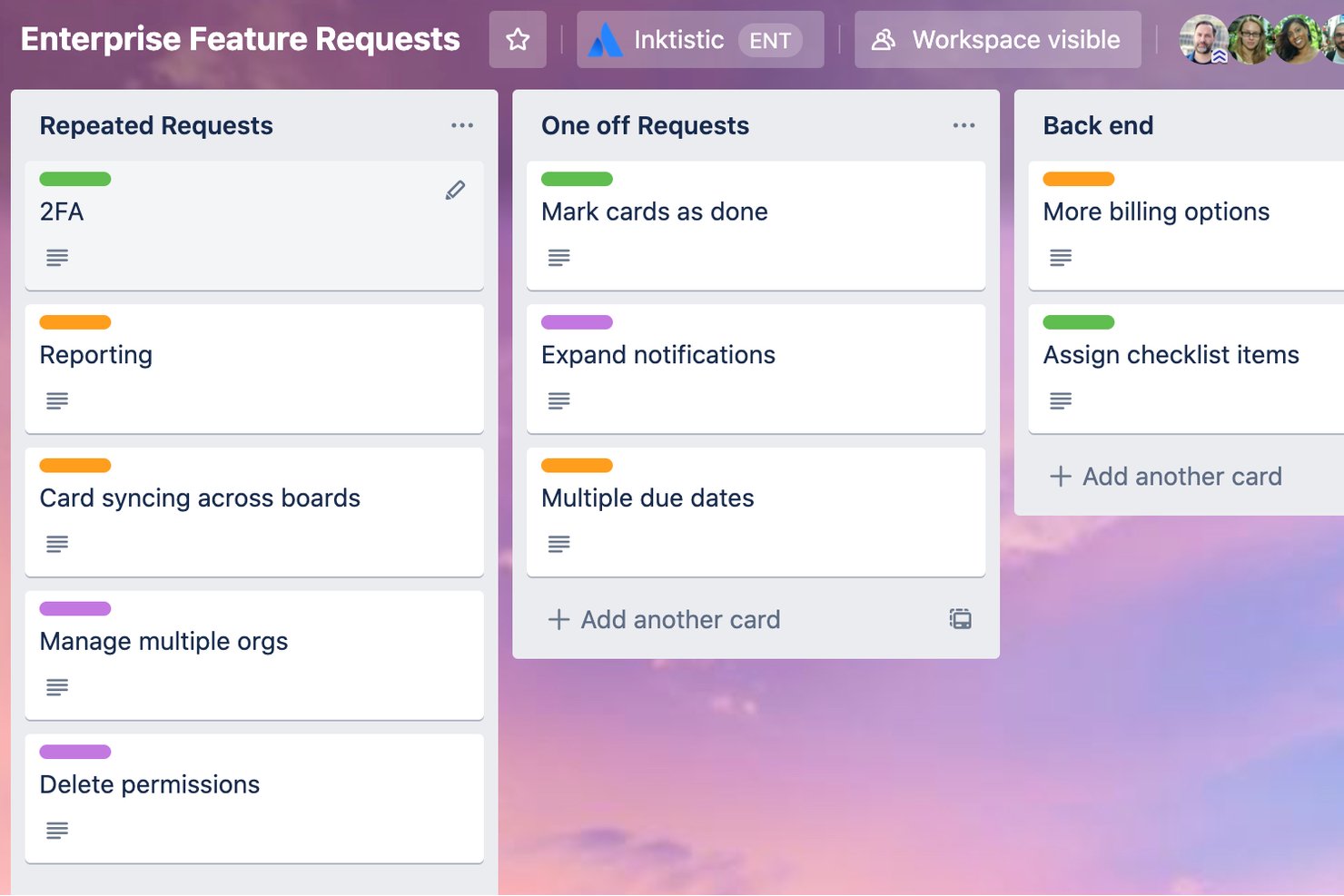
Trello es una herramienta de gestión de tareas fácil de usar que ofrece muchas funcionalidades para ayudarte a realizar tu trabajo. Configurar tu tablero es sencillo y la interfaz se ve muy bien. Es fácil personalizar las tarjetas de tareas con la información que necesites, como listas de subtareas, notas, campos, fechas límite y asignados.
También puedes usar algunas de las plantillas existentes de la herramienta para empezar más rápido. Me gusta mucho lo sencillo que es configurar automatizaciones en Trello utilizando instrucciones if/then. Solo tienes que escribir el desencadenante y la acción en la herramienta de automatización, y el flujo de trabajo ocurrirá cada vez que se realice una acción relevante.
Un ejemplo sencillo es que puedes indicar a Trello que mueva automáticamente una tarjeta al tablero finalizado cuando todos los elementos de una lista de verificación estén marcados. Trello se integra con muchas otras herramientas, como Dropbox para el almacenamiento y Slack para las notificaciones. También puedes configurar automatizaciones con estas herramientas, como alertar automáticamente a las personas relevantes en Slack cuando se les asigna una tarea. Y puedes acceder a las aplicaciones móviles en iOS y Android.
Hay un plan gratuito que te permite crear hasta diez tableros sin limitar el número de usuarios.
Los planes de pago comienzan en $6 y te permiten crear tableros ilimitados, usar funciones avanzadas y configurar más automatizaciones.

Jira
Ideal para kanban con informes ágiles para varios equipos
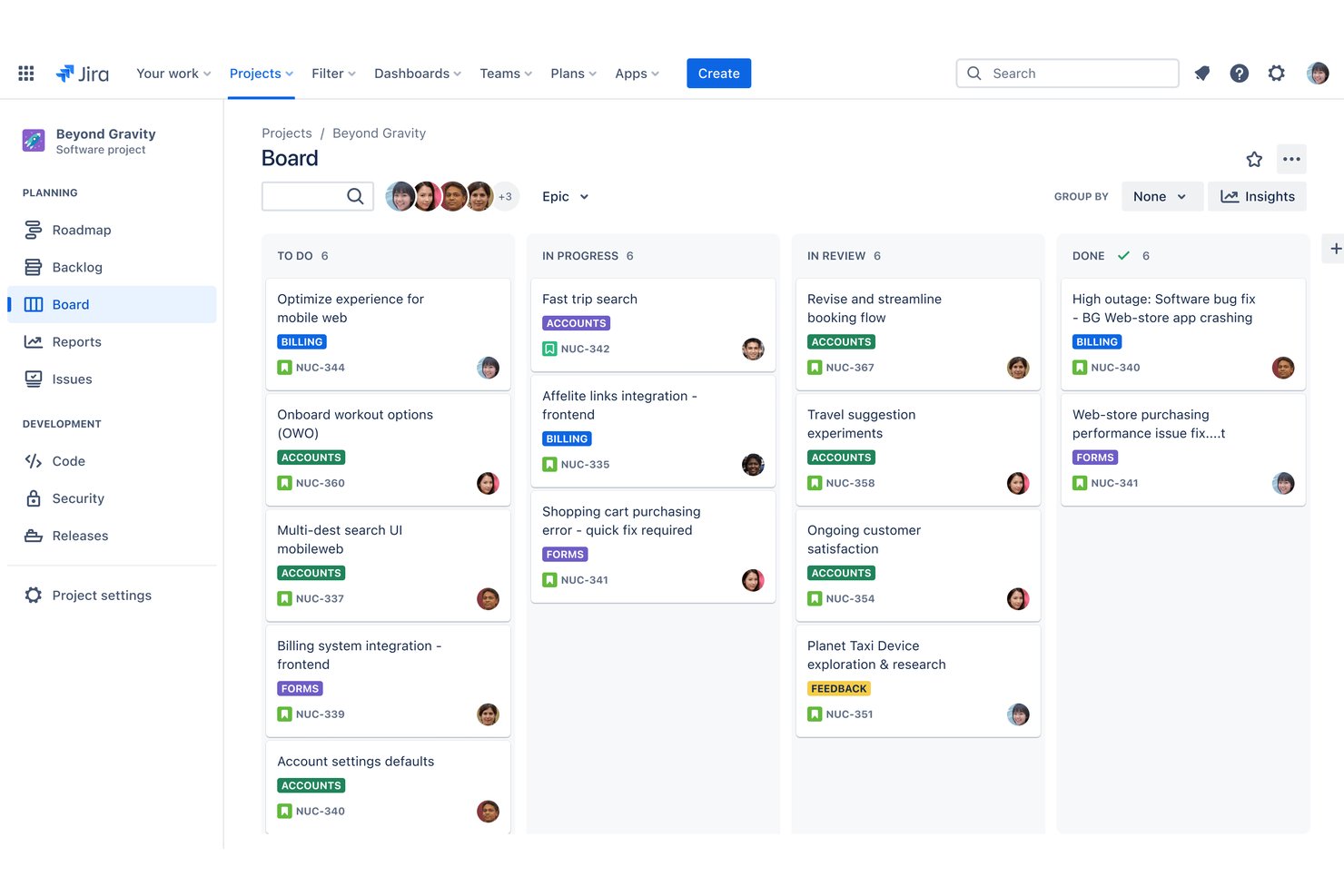
Jira es una herramienta de gestión ágil de proyectos de Atlassian que admite flujos de trabajo kanban, Scrum y ágiles escalados, con tableros visuales, columnas personalizables, límites de WIP, carriles y planificación con múltiples vistas en formatos de lista, tablero, cronograma y calendario.
¿Para quién es más adecuado Jira?
Jira es una opción excelente para equipos de productos e ingeniería que ejecutan flujos de trabajo ágiles y necesitan tableros kanban que escalen a través de varios equipos y proyectos.
Por qué elegí Jira
Jira ocupa un lugar en mi lista de opciones porque está diseñado para gestionar kanban a una escala que la mayoría de las demás herramientas simplemente no admiten de forma nativa. Me gusta especialmente que los límites de WIP, los carriles y los diagramas de flujo acumulado estén incluidos de serie, de modo que los equipos de productos puedan detectar cuellos de botella en varios flujos de trabajo sin necesidad de añadir informes externos. Cuando coordinas la entrega entre varios equipos, el seguimiento de dependencias entre proyectos de la planificación avanzada mantiene a todos alineados sin requerir una herramienta independiente.
Características principales de Jira
- Gestión del trabajo pendiente: Un trabajo pendiente específico contiene todos los elementos de trabajo antes de que lleguen al tablero, con un punto de compromiso claro que controla cuándo el trabajo entra en las columnas activas.
- Generador de reglas de automatización: Un editor sin código permite crear activadores y acciones automatizados, con límites mensuales de pasos que se ajustan según el plan.
- Múltiples vistas de proyectos: Las vistas de lista, tablero, cronograma, calendario y resumen están disponibles en todos los planes y permanecen sincronizadas en tiempo real.
- Campos y formularios personalizados: Todos los planes incluyen campos personalizados y un generador de formularios de arrastrar y soltar para recopilar exactamente los datos que tu equipo necesita en cada elemento de trabajo.
Integraciones de Jira
Jira se conecta con Confluence y Bitbucket mediante Teamwork Graph de Atlassian y admite miles de integraciones de Marketplace con herramientas de terceros.
Pros and Cons
Pros:
- Los límites de WIP nativos ponen de manifiesto los cuellos de botella de la entrega
- La planificación entre proyectos conecta el trabajo de productos dependiente
- Los carriles aclaran la responsabilidad en los distintos flujos de trabajo
Cons:
- La complejidad de la interfaz puede ralentizar la adopción por parte de los equipos nuevos
- Los niveles inferiores limitan la planificación entre varios proyectos
Otras herramientas Kanban
Estas son algunas opciones adicionales de herramientas Kanban que no llegaron a mi lista, pero que aun así vale la pena consultar:
- Favro
Ideal para métricas de flujo integradas en cada tablero
- Smartsheet
Ideal para tableros Kanban al estilo de hoja de cálculo a gran escala
- monday AI Workspace
La mejor opción para gestionar la lista de pendientes entre equipos en un solo tablero
- Kanban Tool
Ideal para puristas de Kanban que necesitan alojamiento en sus instalaciones
- Easy Projects
Ideal para equipos con gran carga operativa que realizan un seguimiento del tiempo y los presupuestos
- Teamhood
Ideal para tableros personalizables con métricas de flujo
- Notion
Ideal para mantener documentos y tableros en un mismo espacio de trabajo


Wie ich Storyboard-Software bewerte
Ich teile meine Bewertung in zwei Ebenen auf: Zunächst prüfe ich, ob ein Tool sequentielle Produktabläufe erstellen und kommentieren kann, danach, wodurch sich die leistungsstärksten Optionen abheben.
Kernfunktionen (Grundvoraussetzung für diese Liste)
Wenn ich Tools für meine Liste auswähle, bewerte ich jede Funktion auf einer Skala von 0 (bietet diese Funktion nicht) bis 5 (überzeugt in diesem Bereich). Anschließend berechne ich aus der Gesamtsumme eine prozentuale Gesamtbewertung. Jedes Tool muss mindestens 65 % der Gesamtpunktzahl erreichen, um berücksichtigt zu werden.
- Frame-für-Frame-Sequenzierung: Ich bewerte, wie das jeweilige Tool die Erstellung geordneter Panels unterstützt, etwa indem ein Onboarding-Prozess eines Nutzers schrittweise – vom Anmelden bis zur Aktivierung – abgebildet werden kann.
- Drag-and-Drop-Visual-Editor: Der Editor sollte es PMs ermöglichen, Charaktere, UI-Elemente und Szenen einfach per Drag-and-Drop auf der Leinwand zu platzieren, ohne Designkenntnisse oder externe Tools zu benötigen.
- Vorinstallierte Asset-Bibliothek: Ich prüfe die Vielfalt und Relevanz der Vorlagen und Assets und achte auf Elemente wie Platzhalter für Personas, Geräte-Mockups und Umgebungsszenen.
- Echtzeit-Zusammenarbeit: Produktteams arbeiten während Discovery Sprints gemeinsam, daher suche ich nach Funktionen wie gleichzeitiges Bearbeiten, Kommentieren und Präsenzanzeigen im Arbeitsbereich.
- Annotationen & Texteinblendungen: Jedes Bild sollte Untertitel, Sprechblasen oder Hinweistexte unterstützen, die erklären, was in jedem Schritt der Story passiert.
- Export- & Sharing-Optionen: Ich bewerte, ob Storyboards als PDFs, Bilder oder Links geteilt werden können, um sie asynchron mit Stakeholdern abzustimmen, die keinen Zugang zum Tool haben.
Sobald ich eine Liste mit Tools habe, die die Kriterien erfüllen, sehe ich mir an, wodurch sich jede Plattform unterscheidet.
Unterscheidungsmerkmale (Was Anbieter besonders macht)
So vergleiche und bewerte ich unterschiedliche Lösungen:
Herausragende Funktionen
KI-gestützte Generierung ist ein großer Unterschied. Tools, die aus einem Texteingabe-Prompt ein grobes Storyboard erstellen, bieten PMs einen schnelleren Weg von der Idee zum Visual in der frühen Discovery-Phase. Ich achte außerdem auf interaktive Prototyping-Möglichkeiten, bei denen klickbare Hotspots in den Szenen einen Nutzerablauf simulieren und vor einem Design-Handover Feedback einholen. Vorinstallierte Vorlagen für Nutzerreisen sind ebenfalls wichtig. Direkt mit einer Vorlage für Onboarding oder Feature Adoption zu starten spart viele Stunden gegenüber dem manuellen Erstellen von Frames bei jedem Sprint.
Über Funktionen hinaus
Integrationen mit dem restlichen Produkt-Stack sind sehr wichtig. Ich prüfe, ob Storyboards sich mit Jira-Epics verknüpfen oder in Confluence-Seiten einbetten lassen, da die meisten PM-Teams dort arbeiten. Auch die Lernkurve ist entscheidend. Die meisten PMs sind keine Designer, daher werte ich, wie schnell jemand beim ersten Versuch ein teilbares Storyboard erstellt. Die Preisstruktur spielt ebenfalls eine Rolle, insbesondere ob Gastzugänge es ermöglichen, dass Stakeholder Storyboards ansehen und kommentieren können, ohne dass für das gesamte Team kostenpflichtige Plätze nötig sind.
Cómo elegir una herramienta Kanban
Es fácil perderse entre largas listas de funciones y estructuras de precios complejas. Para ayudarte a mantener la atención mientras avanzas en tu proceso específico de selección de software, aquí tienes una lista de factores que debes tener en cuenta:
| Factor | Qué debes considerar |
|---|---|
| Escalabilidad | ¿Puede la herramienta crecer junto con tu equipo? Considera las necesidades futuras de más usuarios o proyectos. Busca herramientas que ofrezcan niveles de precios flexibles u opciones empresariales. |
| Integraciones | ¿Funciona la herramienta con tu software actual? Comprueba si se integra con herramientas clave como Slack, Google Workspace o Microsoft Office. Evita las herramientas que requieran transferencias manuales de datos. |
| Personalización | ¿Puedes adaptar la herramienta para que se ajuste a tus flujos de trabajo? Busca opciones para personalizar tableros, campos y notificaciones. Evita las herramientas rígidas que no se adapten a tus procesos. |
| Facilidad de uso | ¿La herramienta es fácil de usar para tu equipo? Prueba que la interfaz sea sencilla y clara. Una curva de aprendizaje pronunciada puede dificultar su adopción. |
| Implementación e incorporación | ¿Con qué rapidez puede tu equipo empezar a utilizar la herramienta? Evalúa la disponibilidad de materiales de formación, el soporte durante la configuración y la facilidad de migración de datos. |
| Coste | ¿Se ajusta la herramienta a tu presupuesto? Compara los planes de precios y considera los costes ocultos, como los complementos o los límites de usuarios. Busca una herramienta que ofrezca una buena relación calidad-precio sin exceder tu presupuesto. |
| Medidas de seguridad | ¿Protege la herramienta tus datos? Asegúrate de que cuente con funciones de seguridad sólidas, como cifrado y copias de seguridad periódicas. Verifica el cumplimiento de las normativas de protección de datos. |
| Disponibilidad de soporte | ¿Recibirás ayuda cuando la necesites? Comprueba el horario y los canales de soporte disponibles. Busca opciones de soporte rápidas, como chat o asistencia telefónica, especialmente si tu equipo trabaja en distintas zonas horarias. |
Tendencias en las herramientas Kanban
Las herramientas y la tecnología Kanban continúan evolucionando rápidamente, lo que refleja las crecientes necesidades de los profesionales de la gestión de productos de encontrar formas más eficientes de organizar, priorizar y realizar un seguimiento de las tareas, sin mencionar la continuación del cambio de las metodologías en cascada a las ágiles. Como consecuencia, han surgido varias tendencias clave que, en mi opinión, seguirán influyendo en las herramientas Kanban y en los profesionales de la gestión de productos en el futuro.
- Integración con la inteligencia artificial y el aprendizaje automático: Las herramientas Kanban incorporan cada vez más inteligencia artificial y aprendizaje automático para automatizar la priorización de tareas y pronosticar los tiempos de finalización de los proyectos. Esta funcionalidad mejora con el tiempo a medida que los algoritmos aprenden de los patrones de trabajo del equipo, lo que hace que estas herramientas sean más inteligentes y predictivas a la hora de gestionar los plazos de los proyectos.
- Sostenibilidad y funciones ecológicas: Un número cada vez mayor de herramientas Kanban incorpora funciones destinadas a promover la sostenibilidad en las prácticas de gestión de proyectos. Esto incluye el seguimiento de la huella de carbono de los proyectos y la promoción del minimalismo digital para reducir el consumo de energía. Estas funciones responden a la creciente demanda de prácticas empresariales respetuosas con el medio ambiente y reflejan una tendencia más amplia hacia la responsabilidad ambiental en la industria tecnológica.
- Espacios de trabajo de realidad virtual (VR): Algunas de las funcionalidades nuevas más innovadoras incluyen la introducción de espacios de trabajo de realidad virtual, que permiten a los usuarios interactuar con sus tableros Kanban en un entorno virtual tridimensional. Esta función inusual responde a la necesidad de experiencias de gestión de proyectos más inmersivas y atractivas, especialmente en las industrias creativas y orientadas al diseño.
- Análisis de la inteligencia emocional: Otra función innovadora es la integración del análisis de la inteligencia emocional, que evalúa la moral y el estado del equipo basándose en los patrones de interacción y las tasas de finalización de tareas. Este enfoque único pretende proporcionar a los líderes de equipo información sobre el bienestar de sus equipos, destacando la creciente importancia de la salud mental en el entorno laboral.
- Elementos de gamificación: La incorporación de elementos de gamificación en las herramientas Kanban se está volviendo cada vez más popular, con funciones como insignias por logros, clasificaciones y sistemas de recompensas. Estos elementos están diseñados para mejorar la participación y la motivación de los usuarios, haciendo que la finalización de tareas y el seguimiento del progreso de los proyectos sean más interactivos y agradables para los miembros del equipo.
Estas tendencias reflejan las necesidades y los desafíos cambiantes a los que se enfrentan los profesionales de la gestión de productos. A medida que las herramientas Kanban continúan innovando, el énfasis se centra en crear entornos más inteligentes, flexibles y colaborativos que no solo mejoren la productividad, sino que también prioricen el bienestar y la participación de los equipos.
¿Qué es una herramienta Kanban?
La herramienta Kanban es una plataforma de gestión de proyectos que te permite organizar tus tareas en tableros digitales para mejorar la visibilidad y el flujo de trabajo. Los responsables de proyectos, los líderes de producto y los miembros del equipo la utilizan para organizar el trabajo, realizar un seguimiento del progreso y detectar los cuellos de botella con antelación. Te ayuda a mantener a todos informados, priorizar lo importante y asegurarte de que nada se pase por alto.
Funciones
Al seleccionar una herramienta Kanban, presta atención a las siguientes funciones clave:
- Tableros Kanban: Visualiza los flujos de trabajo y gestiona las tareas de forma eficaz, ayudando a los equipos a ver el progreso de un vistazo.
- Asignación de tareas: Asigna tareas a los miembros del equipo, asegurándote de que todos conozcan sus responsabilidades y plazos.
- Seguimiento del progreso: Supervisa la finalización de las tareas y el estado del proyecto para mantener a los equipos encaminados y cumplir los plazos.
- Opciones de personalización: Adapta los tableros y los flujos de trabajo a las necesidades y los procesos específicos de tu equipo.
- Integraciones: Conéctate con otras herramientas como Slack o Google Workspace para agilizar el trabajo entre plataformas.
- Capacidades de automatización: Automatiza las tareas repetitivas para ahorrar tiempo y reducir los errores manuales.
- Herramientas de informes: Genera información y análisis para evaluar el rendimiento del equipo y los resultados del proyecto.
- Acceso móvil: Gestiona las tareas sobre la marcha con aplicaciones móviles, garantizando flexibilidad y accesibilidad.
- Herramientas de colaboración: Facilita la comunicación del equipo y el intercambio de ideas mediante comentarios y archivos adjuntos.
- Funciones de seguridad: Protege tus datos mediante cifrado y el cumplimiento de las normativas de protección de datos.
Beneficios
Implementar una herramienta Kanban proporciona varios beneficios para tu equipo y tu empresa. Estos son algunos de los que puedes esperar:
- Organización mejorada: Visualiza los flujos de trabajo con tableros kanban, ayudando a tu equipo a mantenerse organizado y concentrado en las tareas.
- Colaboración mejorada: Utiliza herramientas de colaboración para facilitar la comunicación y el intercambio de ideas entre los miembros del equipo.
- Mayor productividad: Automatiza las tareas repetitivas y realiza un seguimiento del progreso para garantizar que tu equipo trabaje de manera eficiente y cumpla los plazos.
- Flexibilidad: Personaliza los flujos de trabajo para adaptarlos a los procesos únicos de tu equipo, permitiendo una fácil adaptación a los cambios.
- Mejor toma de decisiones: Accede a herramientas de informes para obtener información sobre el rendimiento del equipo y los resultados de los proyectos, respaldando decisiones fundamentadas.
- Accesibilidad: Gestiona las tareas desde cualquier lugar con acceso móvil, ofreciendo flexibilidad a los miembros del equipo que trabajan de forma remota o están en movimiento.
- Seguridad de los datos: Protege la información de tu empresa con sólidas funciones de seguridad, garantizando el cumplimiento de las normativas de protección de datos.
Costes y precios
Seleccionar una herramienta kanban requiere comprender los diversos modelos de precios y planes disponibles. Los costes varían según las funciones, el tamaño del equipo, los complementos y otros factores. La tabla siguiente resume los planes habituales, sus precios medios y las funciones típicas incluidas en las soluciones de herramientas kanban:
Tabla comparativa de planes para herramientas kanban
| Tipo de plan | Precio medio | Funciones habituales |
|---|---|---|
| Plan gratuito | $0 | Tableros kanban básicos, gestión limitada de tareas y herramientas básicas de colaboración. |
| Plan personal | $5-$15/usuario/mes | Tableros personalizables, asignación de tareas, seguimiento del progreso y acceso móvil. |
| Plan empresarial | $15-$30/usuario/mes | Informes avanzados, funciones de automatización, integraciones con herramientas populares y seguridad mejorada. |
| Plan corporativo | $30-$60/usuario/mes | Usuarios ilimitados, asistencia específica, flujos de trabajo personalizables y análisis avanzados. |
Preguntas frecuentes sobre las herramientas kanban
Aquí tienes algunas respuestas a preguntas frecuentes sobre las herramientas kanban:
¿Se pueden utilizar las herramientas kanban para equipos remotos?
Sí, las herramientas kanban son excelentes para los equipos remotos. Permiten a los miembros del equipo colaborar y realizar un seguimiento del progreso desde cualquier lugar. Busca herramientas con sólidas funciones de colaboración, acceso móvil e integraciones con plataformas de comunicación como Slack o Microsoft Teams para mejorar el trabajo en equipo a distancia.
¿Es difícil cambiar de otra herramienta de gestión de proyectos a una herramienta kanban?
Cambiar a una herramienta kanban puede ser sencillo si la herramienta ofrece una buena asistencia inicial. Muchas herramientas proporcionan plantillas, vídeos de formación y recorridos interactivos para facilitar la transición. Asegúrate de que la nueva herramienta pueda importar datos de tu sistema anterior para minimizar las interrupciones y mantener tus proyectos encaminados.
¿Las herramientas kanban son compatibles con la gestión ágil de proyectos?
Sí, muchas herramientas kanban son compatibles con las metodologías ágiles. Ofrecen funciones como la gestión del trabajo pendiente, los sprints y la priorización de tareas, que son esenciales para los equipos ágiles. Si tu equipo sigue prácticas ágiles, busca herramientas que mencionen específicamente la compatibilidad con marcos ágiles para asegurarte de que satisfacen tus necesidades.
¿Qué dificultades de migración de datos debo esperar al cambiar a una nueva herramienta kanban?
Es posible que tengas que adaptar tus tarjetas, columnas, archivos adjuntos y asignaciones de usuarios existentes al formato de la nueva herramienta; espera realizar cierta limpieza manual, especialmente si la herramienta anterior utilizaba campos o estados personalizados. Revisa los formatos de importación y exportación (CSV, JSON) para poder trasladar un historial significativo en lugar de empezar desde cero. Comprueba también cómo se migrarán las tareas archivadas y las tarjetas vinculadas, ya que su ausencia puede perjudicar la trazabilidad.
¿Cómo puedo garantizar la gestión del cambio al adoptar una herramienta kanban en toda una organización?
Comunica el «porqué»: muestra a los equipos cómo hará que el trabajo sea visible y gestionable, en lugar de presentarla simplemente como otra herramienta. Crea un grupo piloto que represente a diferentes equipos y recopila comentarios desde el principio para conocer las preocupaciones reales de los usuarios. Ofrece formación no solo sobre los aspectos mecánicos, sino también sobre los comportamientos necesarios (por ejemplo, actualizar las tarjetas cuando cambia el estado), de modo que la nueva herramienta se convierta en parte de la forma de trabajar de las personas y no sea simplemente un complemento opcional.
¿Qué sigue?
Si estás investigando herramientas kanban, conecta con un asesor de SoftwareSelect para recibir recomendaciones gratuitas.
Rellenas un formulario y tienes una breve conversación en la que profundizan en los detalles de tus necesidades. Después, recibirás una lista breve de programas que podrás revisar. Incluso te acompañarán durante todo el proceso de compra, incluidas las negociaciones de precios.