

10 mejores programas de historias de usuario para equipos ágiles en 2026

Lista de las mejores herramientas de historias de usuario


Con tantas herramientas diferentes de historias de usuario disponibles, es difícil determinar cuál es la adecuada para ti. Sabes que quieres mantener el enfoque en el usuario final, describir las funcionalidades desde la perspectiva del usuario y conservar un registro de ellas en un lugar donde se puedan buscar, pero necesitas determinar qué herramienta es la mejor para ello. ¡Yo te ayudo! En esta publicación te ayudaré a elegir fácilmente, compartiendo mis experiencias personales al utilizar docenas de herramientas diferentes de historias de usuario con equipos grandes, junto con mis selecciones de las mejores herramientas de historias de usuario.
¿Qué es el software de historias de usuario?
El software de historias de usuario hace referencia a las herramientas que ayudan a los equipos de desarrollo a crear, gestionar y organizar historias de usuario como parte del proceso de desarrollo ágil. Normalmente, el software de historias de usuario proporciona una plataforma centralizada donde los equipos pueden redactar, organizar y priorizar historias de usuario. Estas herramientas suelen incluir funciones de colaboración, gestión de la lista de tareas pendientes, planificación de sprints y seguimiento del progreso de las historias de usuario durante todo el ciclo de vida del desarrollo.
El objetivo del software de historias de usuario es mejorar la comunicación, la colaboración y la transparencia dentro de los equipos de desarrollo, garantizando que todas las personas involucradas comprendan las necesidades y los requisitos de los usuarios. Se utiliza habitualmente en las metodologías ágiles y Scrum para respaldar prácticas de desarrollo iterativas e incrementales.
Por qué confiar en nuestras recomendaciones de software
Nuestro equipo lleva probando y evaluando software desde 2012. Como gestores de producto, sabemos lo difícil —y lo importante— que es elegir el software adecuado.
Para esta guía, evaluamos las herramientas mediante pruebas prácticas e investigación independiente, puntuando las herramientas según nuestros criterios de selección.
Nuestras reseñas reflejan nuestro criterio editorial humano, no un discurso de ventas.
Tabla comparativa de las mejores herramientas de historias de usuario
Aquí tienes una tabla donde puedes encontrar todas las herramientas que acabamos de analizar en las reseñas generales.
| Tool | Best For | Trial Info | Price | ||
|---|---|---|---|---|---|
| 1 | Ideal para el mapeo de historias en la gestión ágil de productos | Prueba gratuita de 14 días + demostración gratuita disponible | Desde $9/usuario/mes (facturado anualmente) | Website | |
| 2 | Ideal para una comunicación y colaboración eficaces | Demostración gratuita + prueba gratuita de 30 días disponible | Desde $6/mes | Website | |
| 3 | Ideal para planificar historias junto con el código y CI/CD | Prueba gratuita de 30 días + demostración gratuita | Desde $19/usuario/mes | Website | |
| 4 | La mejor opción para planificar historias de nuevos productos guiadas por la estrategia | Prueba gratuita de 30 días | Desde $74/usuario/mes | Website | |
| 5 | La mejor opción para el seguimiento ágil de historias nativo de Zoho | Plan gratuito y prueba gratuita de 15 días disponibles | Desde $3/usuario/mes | Website | |
| 6 | La mejor opción para gestionar la lista de pendientes y realizar el seguimiento de sprints en una sola herramienta | Hay un plan gratuito disponible | Desde $7/usuario/mes (facturado anualmente) | Website | |
| 7 | Ideal para crear y gestionar épicas | Plan gratuito + prueba gratuita de 14 días + demostración gratuita disponible | Desde $8.50/user/month (facturado anualmente) | Website | |
| 8 | Ideal para la planificación de sprints entre equipos de desarrollo y producto | Plan gratuito + demostración gratuita + prueba de 14 días disponibles | Desde $9.05/usuario/mes | Website | |
| 9 | Ideal para la planificación de historias ágiles y de incrementos de programa a escala | Prueba gratuita disponible | Precio bajo solicitud | Website | |
| 10 | Ideal para la planificación de sprints dentro del ecosistema de Microsoft | Plan gratuito disponible + prueba gratuita de 30 días + demostración gratuita disponible | Desde $6/usuario/mes | Website |

Reseñas de las 9 mejores soluciones de historias de usuario
Aquí tienes una breve descripción de cada sistema de historias de usuario para mostrar el mejor caso de uso de cada herramienta, algunas funciones destacadas y capturas de pantalla que ofrecen una visión general de la interfaz de usuario.

Ideal para el mapeo de historias en la gestión ágil de productos
StoriesOnBoard es una herramienta especializada de mapeo de historias de usuario que estructura tu lista de trabajo pendiente en tres niveles—objetivos de usuario, pasos e historias—con marcos de priorización integrados, planificación de lanzamientos y sincronización bidireccional con Jira, Azure DevOps y otros gestores de incidencias.
¿Para quién es más adecuado StoriesOnBoard?
StoriesOnBoard es una excelente opción para responsables de producto y equipos ágiles que necesitan una forma estructurada de mapear, priorizar y planificar listas de trabajo pendiente junto con sus gestores de incidencias existentes.
Por qué elegí StoriesOnBoard
StoriesOnBoard se ha ganado un lugar en mi lista de favoritos porque su estructura de mapa de historias de tres niveles (objetivos de usuario, pasos e historias) está diseñada específicamente para la planificación ágil de productos de una forma que la mayoría de las herramientas sencillamente no ofrece. Me encanta que la priorización esté integrada directamente en el flujo de trabajo de mapeo, con puntuaciones RICE, MoSCoW, Kano y Valor frente a esfuerzo disponibles de forma colaborativa, para que mi equipo pueda debatir las compensaciones sin cambiar de herramienta. Los carriles de lanzamiento nos permiten asignar historias priorizadas a iteraciones planificadas y consolidar las estimaciones al nivel del lanzamiento al instante.
Características principales de StoriesOnBoard
- Sincronización bidireccional con gestores de incidencias: Sincroniza automáticamente las tarjetas de historias en ambas direcciones con Jira, Azure DevOps, Trello y GitHub Issues, manteniendo tu mapa y la lista de trabajo pendiente de desarrollo alineados.
- Asistente de historias con IA: Genera historias de usuario, redacta perfiles de usuario, recopila criterios de aceptación y prepara resúmenes de lanzamientos mediante una asignación mensual de tokens de IA.
- Hoja de ruta de cartera: Visualiza lanzamientos y épicas de varios productos en vistas de carriles, con informes de estado y plantillas de hojas de ruta.
- Portal público de comentarios: Te permite recopilar, etiquetar y votar ideas de productos de partes interesadas externas mediante un portal personalizable y fácil de compartir.
Integraciones de StoriesOnBoard
StoriesOnBoard ofrece seis integraciones nativas, entre ellas Jira, Azure DevOps, Trello, GitHub Issues, Pivotal Tracker y Slack. También es compatible con Zapier, aunque las opciones de integración personalizada están limitadas por la falta de una API pública completa.
Pros and Cons
Pros:
- Los mapas de tres niveles aclaran el alcance de los productos nuevos
- Las puntuaciones RICE y Kano ponen de manifiesto las compensaciones
- Los carriles de lanzamiento conectan el descubrimiento con la entrega
Cons:
- Los informes no incluyen vistas de trabajo pendiente ni de velocidad
- La edición simultánea limita la participación en talleres

Ideal para una comunicación y colaboración eficaces

Visual Paradigm es una suite de modelado y planificación ágil que abarca el mapeo de historias de usuario, la gestión de la lista de pendientes, la planificación de iteraciones y el seguimiento de los criterios de aceptación, además de herramientas de UML, BPMN y modelado de procesos.
¿Para quién es más adecuado Visual Paradigm?
Visual Paradigm es una opción excelente para analistas de negocio y equipos de producto que necesitan conectar modelos de sistemas, como diagramas UML o BPMN, directamente con historias de usuario y listas de pendientes de iteraciones en un mismo lugar.
Por qué elegí Visual Paradigm
Elegí Visual Paradigm como una de las mejores opciones porque considera la comunicación una característica estructural, no algo secundario. Los elementos de confirmación permiten adjuntar listas de criterios de aceptación directamente a cada historia, mientras que PostMania permite a las partes interesadas comentar y aprobar sin necesidad de una licencia. También me gusta que las notas de conversación mantengan los debates y las decisiones vinculados a la propia historia, para que nada se pierda en un hilo separado.
Características principales de Visual Paradigm
- Editor de escenarios escritos: Permite crear flujos de interacción paso a paso entre el usuario y el sistema para cada historia, con compatibilidad con estructuras si-entonces-si no y bucles que se convierten directamente en diagramas de secuencia o de actividades.
- Estimación mediante tabla de afinidad: Permite puntuar las historias en ejes configurables de esfuerzo y riesgo para generar puntos de historia y horas destinados a la planificación de iteraciones.
- Trazabilidad del modelo a la historia: Permite obtener elementos de la lista de pendientes directamente de diagramas de casos de uso, modelos BPMN o artefactos de arquitectura empresarial, manteniendo los vínculos entre el modelo de origen y el mapa de historias.
- Comentarios de las partes interesadas mediante PostMania: Permite que las partes interesadas sin licencia revisen, comenten y aprueben diagramas desde un navegador en línea sin comprar una licencia de acceso.
Integraciones de Visual Paradigm
Visual Paradigm ofrece integraciones con Jira y Atlassian Confluence, incluida la creación de incidencias en Jira a partir de diagramas y la publicación en Confluence. También admite importaciones desde Visio, Bizagi, Rational, ErWin y PowerDesigner.
Pros and Cons
Pros:
- La trazabilidad del modelo conecta los requisitos con las historias
- Las listas de criterios de aceptación aclaran las expectativas de las partes interesadas
- Los guiones gráficos aportan contexto más allá de las tarjetas de texto
Cons:
- Los flujos de trabajo centrados en diagramas pueden resultar una carga para los equipos Scrum ligeros
- Los diagramas grandes pueden ralentizar el rendimiento

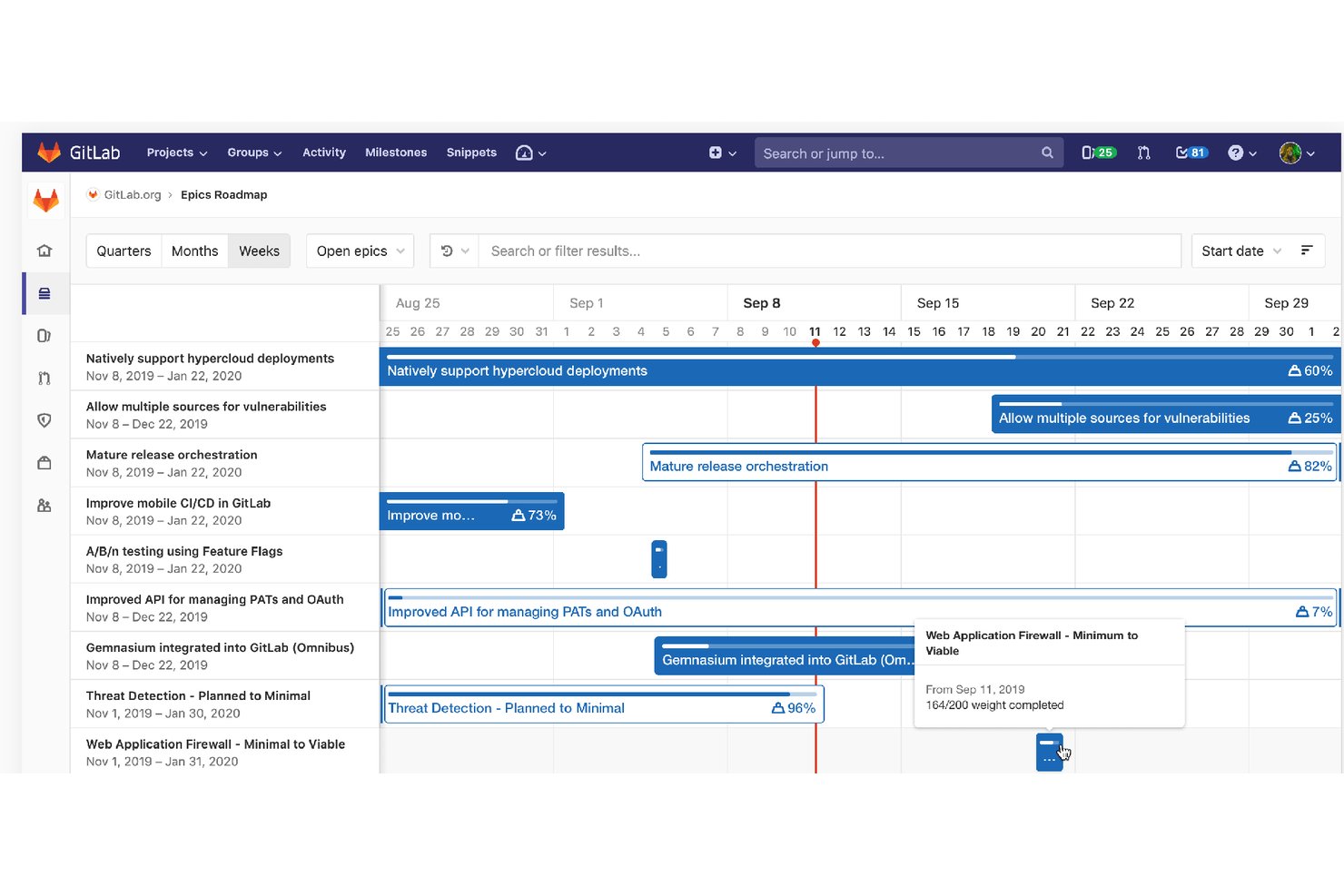
GitLab es una plataforma DevSecOps que reúne la creación de historias de usuario, la gestión de la cartera de trabajo, la planificación de sprints y la elaboración de hojas de ruta con el código fuente, las canalizaciones de CI/CD y las herramientas de seguridad en un solo entorno.
¿Para quién es más adecuado GitLab?
GitLab es una opción excelente para equipos dirigidos por ingeniería que desean planificar y realizar un seguimiento de las historias de usuario en la misma plataforma donde escriben, revisan y entregan código.
Por qué elegí GitLab
Elegí GitLab como una de las mejores opciones porque es la única herramienta de esta lista en la que tus historias de usuario y tu base de código comparten el mismo espacio. Cuando creo una incidencia mediante una plantilla de descripción con el formato 'Como… quiero… para que…', puedo vincularla directamente a una rama, una solicitud de fusión y una canalización de CI/CD; además, GitLab cierra automáticamente la historia al realizar la fusión. También utilizo cadencias de iteración con transferencia automática para mantener activa la planificación de sprints sin necesidad de realizar tareas de limpieza manual entre ciclos.
Características principales de GitLab
- Plantillas de descripción: Almacena plantillas de Markdown con el formato 'Como… quiero… para que…' en el control de versiones y aplícalas de forma coherente en cada proyecto de tu grupo.
- Tableros de épicas y hoja de ruta: Visualiza las épicas en una línea de tiempo al estilo de un diagrama de Gantt, filtrada por hito, etiqueta o fecha, para realizar un seguimiento del progreso en varios flujos de trabajo.
- Límites de trabajo en curso (WIP): Establece límites para el número de incidencias o el peso total de cada lista del tablero a fin de evitar que los equipos sobrecarguen una columna del sprint.
- Gráficos de trabajo pendiente y trabajo completado: Realiza un seguimiento del progreso de la iteración por número de incidencias o peso de las historias mediante gráficos generados automáticamente y actualizados en tiempo real.
Integraciones de GitLab
GitLab ofrece integraciones nativas con Jira, Slack, Microsoft Teams, Jenkins, Confluence Cloud y Squash TM. Las API de REST y GraphQL, los webhooks, las canalizaciones de CI/CD y las extensiones para IDE admiten flujos de trabajo de desarrollo personalizados.
Pros and Cons
Pros:
- Las historias se vinculan directamente con los cambios de código
- Las plantillas estandarizan formatos coherentes para las historias
- Las cadencias transfieren automáticamente el trabajo no terminado
Cons:
- Los criterios de aceptación siguen siendo listas de comprobación sin estructura
- La navegación orientada a desarrolladores puede ralentizar la planificación no técnica

La mejor opción para planificar historias de nuevos productos guiadas por la estrategia
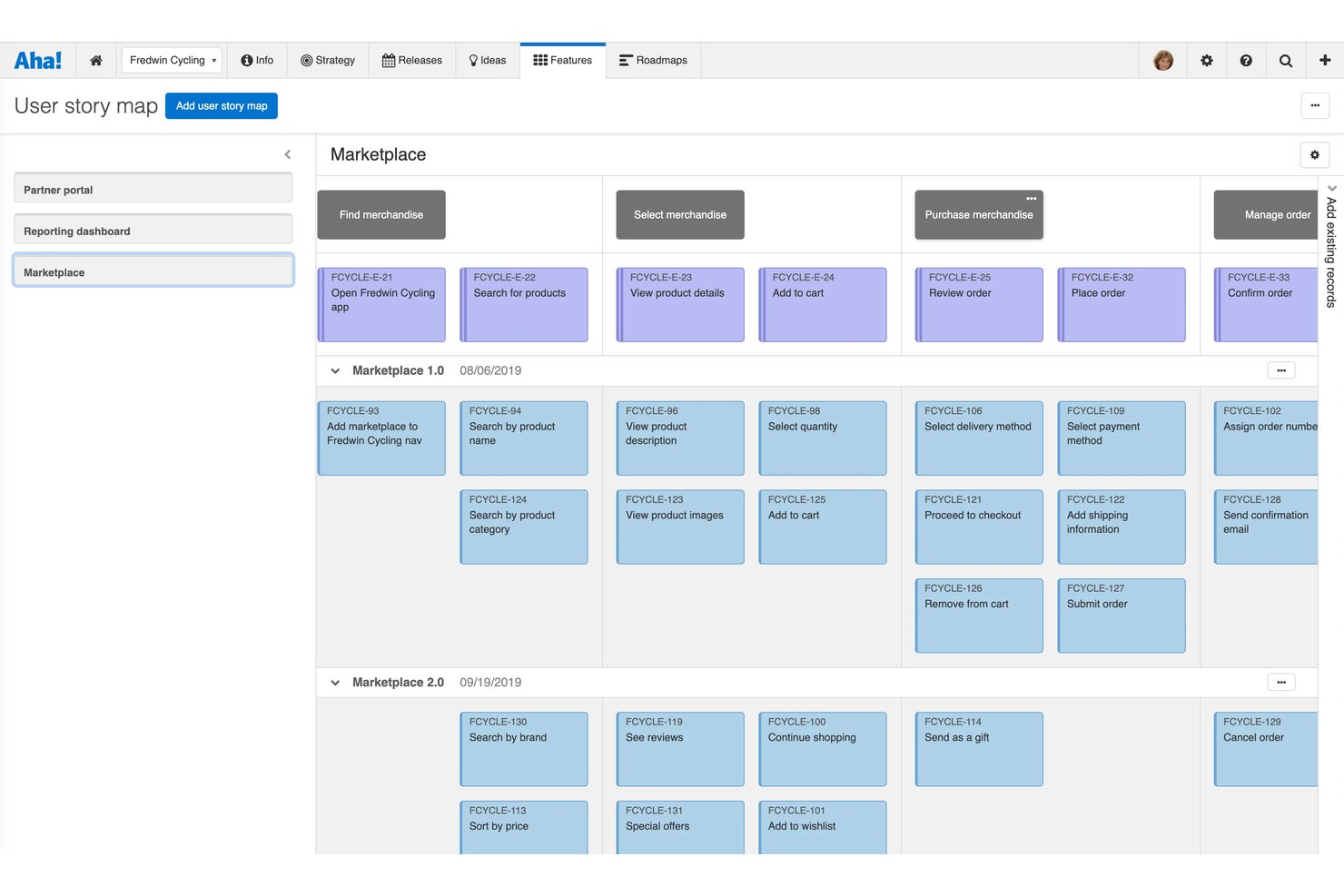
¡Aha! Roadmaps es una plataforma de gestión de productos que conecta la estrategia con la ejecución mediante una jerarquía estructurada de objetivos, épicas, funcionalidades y requisitos, con mapeo nativo de historias de usuario, priorización de la cartera de trabajo, criterios de aceptación asistidos por IA y sincronización bidireccional con herramientas de desarrollo como Jira y Azure DevOps.
¿Para quién es más adecuado Aha! Roadmaps?
Aha! Roadmaps es una opción excelente para los responsables de producto que necesitan conectar directamente la estrategia empresarial con las historias de usuario y los requisitos de las funcionalidades.
Por qué elegí Aha! Roadmaps
Aha! Roadmaps ocupa un lugar en mi lista de favoritos porque es la única herramienta que he utilizado que sigue un objetivo empresarial hasta llegar a una historia de usuario individual sin perder el hilo. Me encanta cómo la jerarquía Objetivos→Épicas→Funcionalidades→Requisitos me permite vincular cada historia a una iniciativa estratégica antes de escribir una sola línea de código. El mapa nativo de historias de usuario también me permite filtrar por persona, para que pueda ver inmediatamente qué historias sirven a cada tipo de usuario en una versión.
Funciones principales de Aha! Roadmaps
- Generación de criterios de aceptación asistida por IA: Elle AI redacta criterios de aceptación comprobables y verificables para funcionalidades individuales, incluidos los casos límite, directamente dentro del registro.
- Sincronización bidireccional con herramientas de desarrollo: Los requisitos se sincronizan bidireccionalmente con Jira, Azure DevOps, GitHub y GitLab, con asignación personalizable de campos entre tipos de registro.
- Campos de estimación de historias: Cada funcionalidad y requisito admite estimaciones iniciales, detalladas y reales del esfuerzo en puntos de historia o tiempo, con visualización en informes de capacidad.
- Promoción de ideas a historias: Las ideas de clientes capturadas en Aha! Ideas pueden promocionarse directamente a épicas, funcionalidades o requisitos, vinculando los comentarios con elementos de la cartera de trabajo.
Integraciones de Aha! Roadmaps
Aha! Roadmaps ofrece más de 40 integraciones nativas, incluidas Jira, Azure DevOps, GitHub, GitLab, Rally, Slack, Microsoft Teams, Confluence, Figma y Zendesk. También proporciona una API REST para integraciones personalizadas y es compatible con Zapier.
Pros and Cons
Pros:
- Trazabilidad de la estrategia a la historia
- Mapas de historias filtrados por persona
- Criterios de aceptación redactados por IA
Cons:
- La ejecución nativa de iteraciones requiere un producto independiente
- La amplia configuración puede abrumar a los equipos pequeños

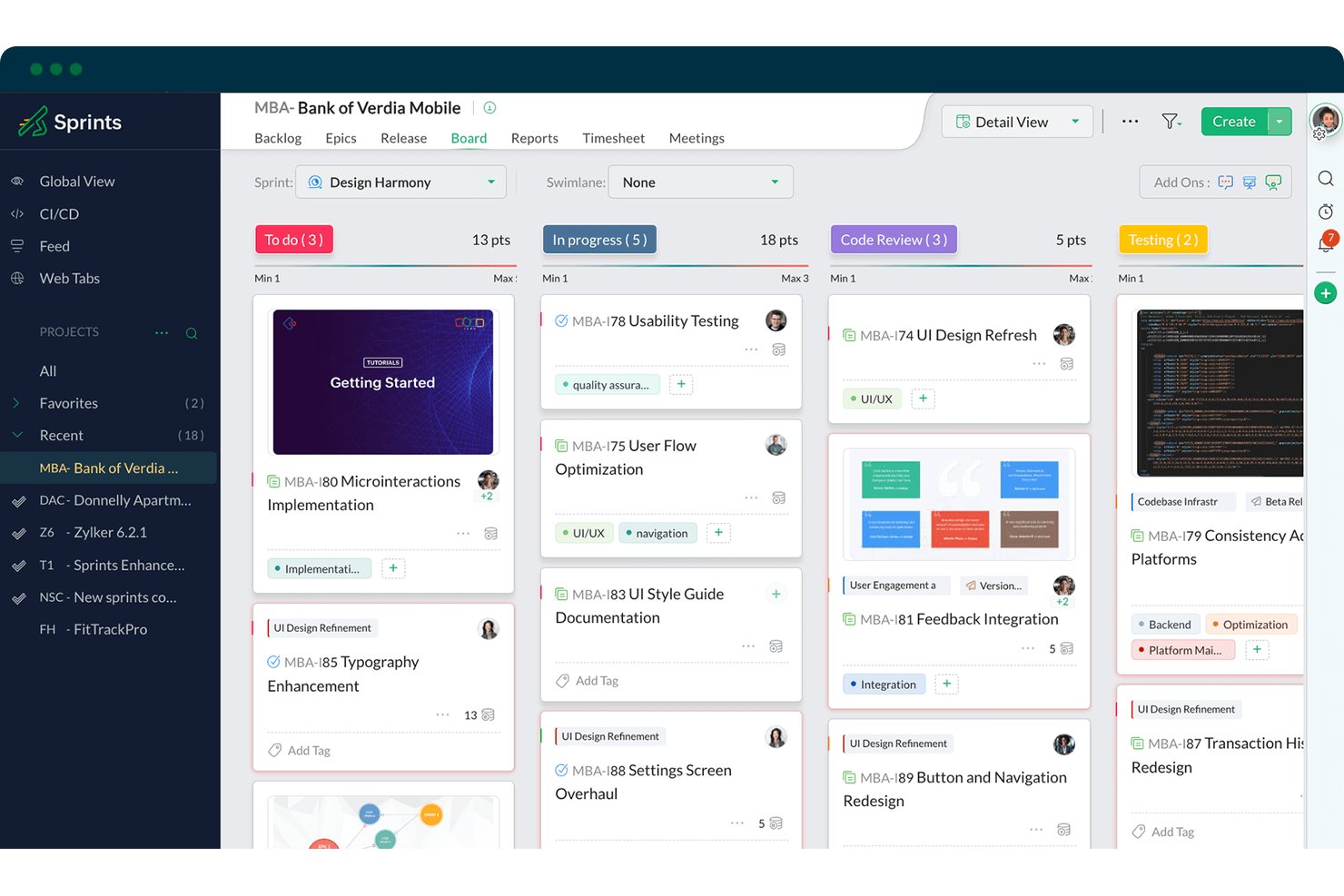
Zoho Sprints es una herramienta ágil de gestión de proyectos que abarca la creación de historias de usuario, la gestión de backlogs y épicas, la planificación de sprints y los tableros de Scrum/Kanban dentro de un conjunto más amplio para todo el ciclo de vida ágil.
¿Para quién es más adecuado Zoho Sprints?
Zoho Sprints es una opción ideal para equipos ágiles que ya forman parte del ecosistema de Zoho y desean gestionar sprints y backlogs de principio a fin sin pagar los precios de las herramientas empresariales.
Por qué elegí Zoho Sprints
Zoho Sprints ocupa un lugar en mi lista de finalistas porque está diseñado específicamente en torno a todo el ciclo de vida de las historias ágiles, desde el backlog hasta el sprint y la entrega, dentro de un único entorno nativo. Me gusta especialmente cómo el módulo de gestión de épicas vincula directamente las historias de usuario con las épicas y muestra acumulaciones de progreso en tiempo real, de modo que puedo ver de un vistazo cómo contribuyen las historias individuales a objetivos más amplios. Los equipos que ya trabajan con Zoho obtienen aún más valor, ya que Cliq, Desk y Analytics se conectan sin configuración adicional, manteniendo las conversaciones sobre las historias y los informes en un mismo lugar.
Características principales de Zoho Sprints
- Plantilla nativa de historias de usuario: Estructura las historias mediante el formato 'Como usuario/quiero/para que', con campos integrados para el título, la descripción y los criterios de aceptación.
- Informes de trabajo pendiente y velocidad: Realiza un seguimiento del progreso de los sprints y del rendimiento del equipo a lo largo del tiempo mediante gráficos visuales vinculados directamente a los puntos de estimación de las historias.
- Criterios de aceptación basados en listas de comprobación: Permite a los equipos añadir elementos comprobables de la definición de terminado a historias individuales mediante plantillas de listas de comprobación reutilizables.
- Integración con SCM: Se conecta con GitHub, GitLab, Bitbucket y Azure DevOps para que los desarrolladores puedan vincular confirmaciones y solicitudes de incorporación de cambios con historias de usuario específicas.
Integraciones de Zoho Sprints
Zoho Sprints ofrece integraciones nativas con GitHub, GitLab, Bitbucket, Azure DevOps, Jenkins, Jira, Zoho Analytics, Zoho Cliq, Microsoft Teams y Google Drive. También admite API, webhooks, Zoho Flow y Zapier para establecer conexiones personalizadas.
Pros and Cons
Pros:
- Asocia las historias con épicas y muestra acumulaciones de progreso
- Vincula los criterios de aceptación con listas de comprobación
- Admite flujos de trabajo ágiles desde el backlog hasta la entrega
Cons:
- La terminología de Scrum puede confundir a las partes interesadas no técnicas
- No cuenta con un mapa de historias ni un lienzo de recorrido específicos

ClickUp
La mejor opción para gestionar la lista de pendientes y realizar el seguimiento de sprints en una sola herramienta
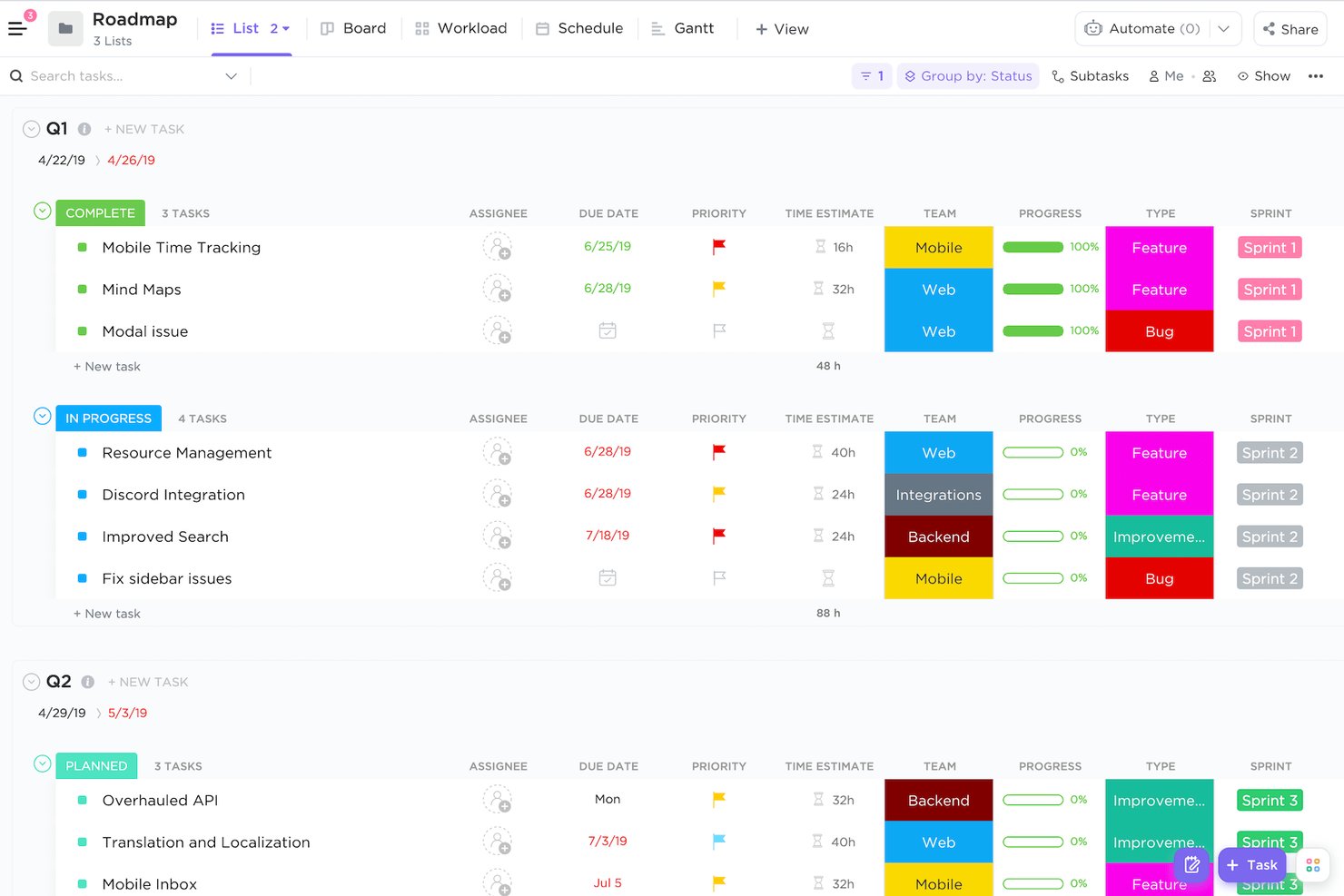
ClickUp es una plataforma de gestión de proyectos que reúne la creación de historias de usuario, la gestión de la lista de pendientes, la planificación de sprints y los informes ágiles en un único espacio de trabajo altamente personalizable.
¿Para quién es más adecuado ClickUp?
ClickUp es ideal para equipos de producto que desean gestionar la lista de pendientes, realizar el seguimiento de sprints, usar documentos y colaborar en un solo espacio de trabajo sin tener que alternar entre varias herramientas.
Por qué elegí ClickUp
ClickUp está en mi lista de opciones principales porque mantiene todo el flujo de trabajo de tus historias, desde el refinamiento de la lista de pendientes hasta el cierre del sprint, dentro de un único espacio de trabajo. Me gusta especialmente cómo los tipos de tareas personalizados permiten etiquetar el trabajo como 'Historia', 'Épica' o 'Error', y añadir directamente a cada tipo de historia campos estructurados como los puntos del sprint, la prioridad y las listas de comprobación de los criterios de aceptación. Las carpetas de sprints nativas, con transferencia automatizada y paneles de avance, hacen que no tenga que integrar una herramienta de informes independiente solo para realizar el seguimiento de la velocidad.
Funciones principales de ClickUp
- Tipos de tareas personalizados: Define tipos de tareas como 'Historia', 'Épica' o 'Error' y añade campos personalizados únicos a cada tipo para disponer de datos de historias estructurados y coherentes.
- IA ClickUp Brain: Utiliza la IA para redactar historias de usuario, generar criterios de aceptación y resumir el progreso del sprint directamente dentro de las tareas y los documentos.
- Dependencias de tareas: Vincula historias con relaciones de bloqueo o de espera para detectar problemas de secuenciación antes de que comience la planificación del sprint.
- Mapeo de historias en pizarra: Representa visualmente los recorridos de los usuarios y los flujos de historias en un lienzo, y luego convierte las formas y las notas adhesivas directamente en tareas de la lista de pendientes.
Integraciones de ClickUp
ClickUp ofrece más de 200 integraciones nativas, incluidas GitHub, GitLab, Bitbucket, Slack, Microsoft Teams, Figma, Miro, Google Drive y Google Calendar. También proporciona una API, webhooks y Zapier para establecer conexiones personalizadas.
Pros and Cons
Pros:
- La jerarquía de la lista de pendientes permite desglosar las épicas
- Los informes de sprints facilitan la previsión de lanzamientos
- Los comentarios mantienen las conversaciones sobre los criterios de aceptación vinculadas
Cons:
- La configuración ágil requiere un diseño deliberado del espacio de trabajo
- Los criterios de aceptación carecen de una etapa de flujo de trabajo específica
New Product Updates from ClickUp
ClickUp Adds Meetings Hub, Super Agent Templates, and ZoomInfo Integration
ClickUp adds a searchable Meetings Hub, new ways to clone and template Super Agents, and a ZoomInfo integration through the App Center. These updates improve meeting retrieval, agent reuse, and access to sales intelligence. For more information, visit ClickUp’s official site.

Shortcut
Ideal para crear y gestionar épicas

Shortcut es una herramienta de gestión ágil de proyectos basada en una jerarquía estructurada de historias—épicas, historias, subtareas y listas de comprobación—con gestión de la pila de trabajo, planificación de sprints, hojas de ruta y redacción de historias asistida por IA mediante su agente Korey.
¿Para quién es más adecuado Shortcut?
Shortcut es una opción ideal para equipos de productos ágiles—especialmente gerentes de producto y propietarios de producto en startups y empresas del mercado medio—que necesitan una jerarquía estructurada de épicas a historias sin la sobrecarga de herramientas como Jira.
Por qué elegí Shortcut
Shortcut merece estar en mi lista de opciones principales por lo bien que gestiona las épicas como una capa organizativa fundamental. Me encanta que cada épica incluya gráficos ARC que registran las historias añadidas, eliminadas y completadas, además de gráficos de velocidad que hacen que la previsión de sprints se base en datos reales. Korey, el agente de IA de Shortcut, también puede redactar criterios de aceptación directamente a partir de conversaciones de Slack, lo que cubre una carencia que suelo observar en la planificación a nivel de épica.
Características principales de Shortcut
- Plantillas de historias: Rellena previamente campos de las historias, como tipo, descripción, etiquetas, responsables y estado del flujo de trabajo, para estandarizar los formatos en todo el equipo.
- Agente de IA Korey: Convierte conversaciones de Slack y notas preliminares en historias estructuradas, con criterios de aceptación redactados automáticamente y preguntas abiertas identificadas.
- Flujos de trabajo personalizables con límites de WIP: Establece límites de trabajo en curso por estado del flujo de trabajo para gestionar el flujo y reducir los cuellos de botella en los sprints.
- Informes de iteración: Accede a informes de trabajo pendiente, velocidad, flujo acumulado, tiempo de ciclo y tiempo en cada estado para realizar un seguimiento detallado del progreso del sprint.
Integraciones de Shortcut
Shortcut ofrece integraciones nativas con GitHub, GitLab, Bitbucket Cloud, Slack, Figma, Miro, Notion, Sentry y Zendesk. También proporciona acceso a la API REST y a webhooks para integraciones personalizadas, además de Zapier.
Pros and Cons
Pros:
- La jerarquía de épica a historia facilita la planificación de productos
- Korey redacta historias a partir de conversaciones de Slack
- Los informes de iteración respaldan las previsiones de sprints basadas en evidencias
Cons:
- Los criterios de aceptación no pueden impedir el cierre de una historia
- Los permisos a nivel de espacio de trabajo limitan la segmentación por áreas de producto

Jira
Ideal para la planificación de sprints entre equipos de desarrollo y producto
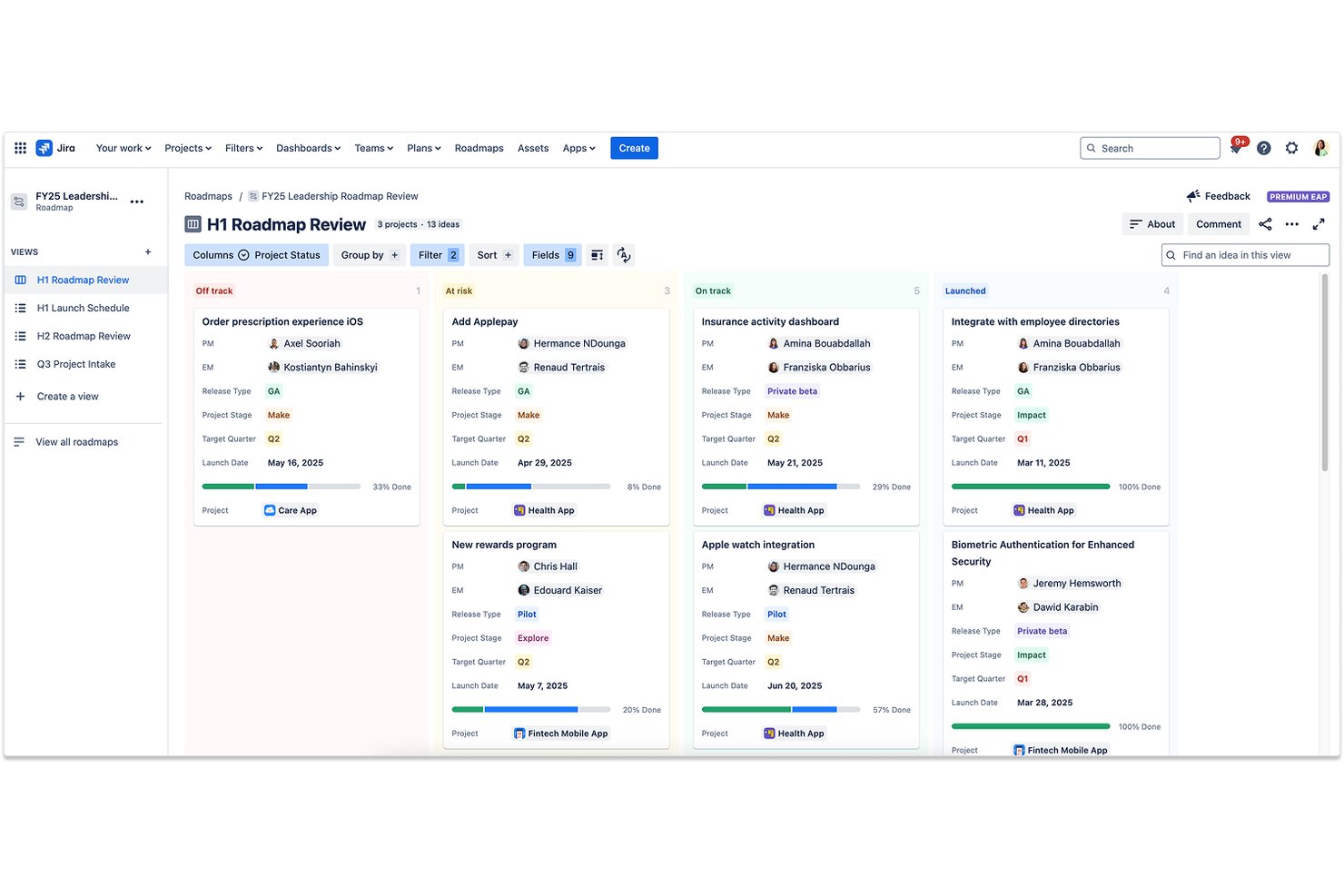
Jira es una plataforma ágil de gestión de proyectos que ofrece creación nativa de historias de usuario, gestión de listas de tareas pendientes en varios niveles, tableros de planificación de sprints y desglose del trabajo asistido por IA para equipos de desarrollo y producto.
¿Para quién es más adecuado Jira?
Jira es una excelente opción para equipos de producto e ingeniería que planifican y entregan trabajo juntos en el mismo entorno ágil.
Por qué elegí Jira
Jira ocupa un lugar en mi lista de herramientas seleccionadas porque es la única herramienta en la que los equipos de desarrollo y producto trabajan realmente en el mismo sprint, en lugar de utilizar sistemas paralelos que se sincronizan de forma imperfecta. Me encanta cómo la jerarquía nativa de iniciativa→épica→historia permite a mi equipo desglosar un nuevo concepto de producto en historias listas para el sprint sin salir del tablero, y Rovo AI puede dividir esas épicas en tareas con resúmenes automáticamente. Los informes de trabajo pendiente y velocidad del tablero de scrum también me proporcionan datos reales para perfeccionar el dimensionamiento de las historias entre versiones.
Características principales de Jira
- Jerarquía de iniciativa a subtarea: La jerarquía nativa de cuatro niveles de Jira permite asignar iniciativas a épicas, historias y subtareas dentro de una única estructura de proyecto.
- Agente de comprobación de preparación del trabajo: Este agente de IA revisa los elementos de trabajo para comprobar su claridad y exhaustividad antes de que un desarrollador los asuma.
- Hojas de ruta avanzadas: Una función Premium que ofrece visibilidad entre equipos sobre las dependencias de varios proyectos, la capacidad y los plazos.
- Integración con el panel de desarrollo: Los commits, las ramas, las solicitudes de extracción y los estados de implementación de GitHub o Bitbucket aparecen directamente en cada tarjeta de historia.
Integraciones de Jira
Jira admite más de 3.000 integraciones de Marketplace, incluidos conectores de GitHub y GitLab, además de integraciones documentadas con Confluence, Bitbucket, Trello, Slack, Microsoft Teams, Google Workspace, Zoom, Figma y Gmail. Sus completas API y la plataforma Forge/Connect permiten establecer conexiones personalizadas.
Pros and Cons
Pros:
- El desglose jerárquico conecta las iniciativas con las subtareas
- Los tableros de sprints permiten estimar y priorizar historias
- La IA divide las épicas en tareas de desarrollo prácticas
Cons:
- Los criterios de aceptación requieren campos personalizados o listas de comprobación
- La planificación avanzada requiere configuración y administración adicionales

Ideal para la planificación de historias ágiles y de incrementos de programa a escala
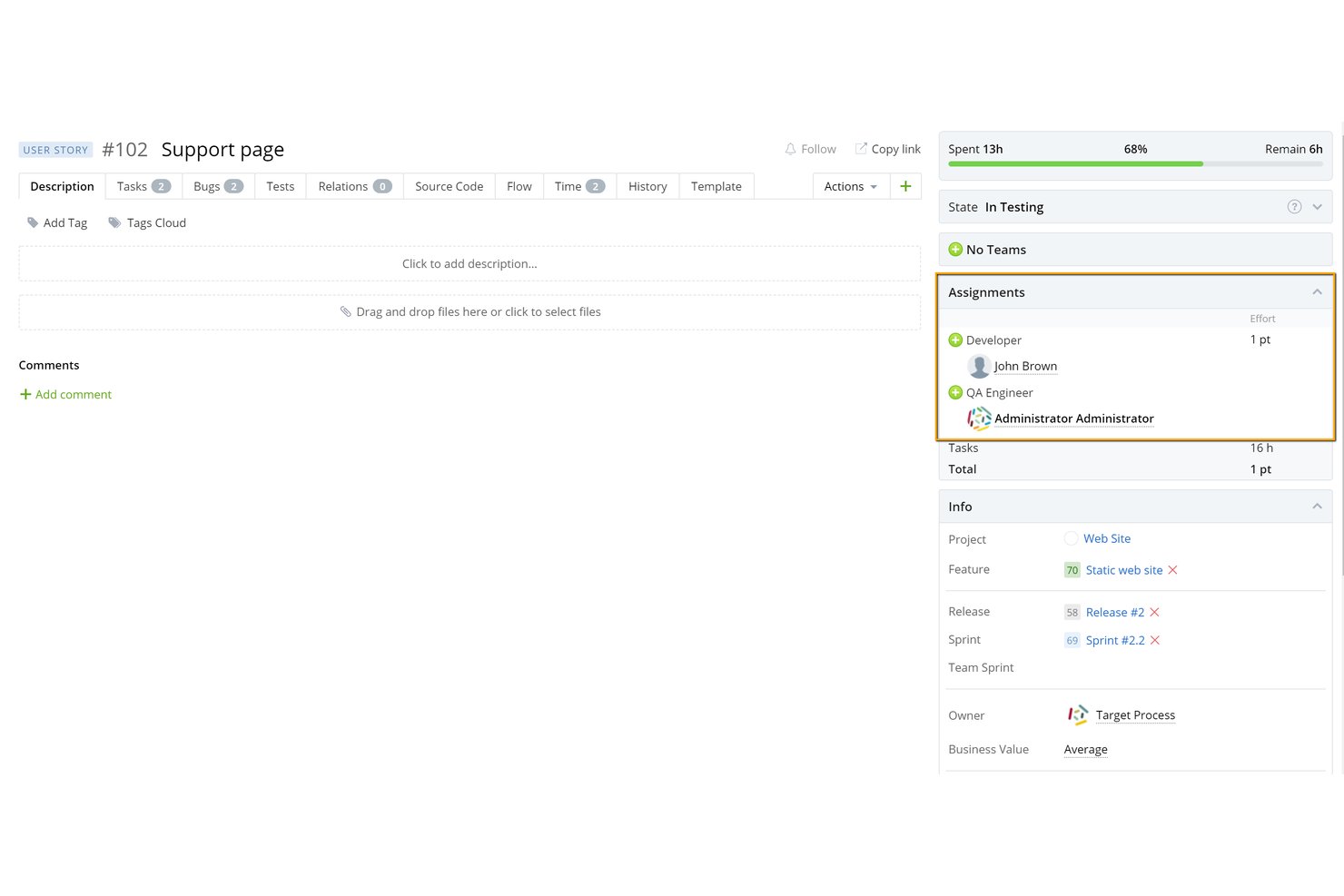
IBM Targetprocess es una plataforma de gestión ágil de proyectos que abarca la creación de historias de usuario, la gestión de listas de trabajo pendiente de varios niveles, la planificación de sprints e incrementos de programa (PI), la estimación con Póker de planificación integrado y la visualización de dependencias entre equipos y carteras.
¿Para quién es más adecuado IBM Targetprocess?
Targetprocess es adecuado para equipos ágiles empresariales y responsables de programas que ejecutan SAFe o planifican incrementos de programa (PI) entre varios equipos en carteras complejas de múltiples productos.
Por qué elegí IBM Targetprocess
IBM Targetprocess ocupa un lugar en mi lista de favoritos porque ninguna otra herramienta gestiona la planificación de historias ágiles y de incrementos de programa a escala con este nivel de estructura integrada. Me gusta cómo la jerarquía Épica → Funcionalidad → Historia de usuario se corresponde directamente con las estructuras de SAFe, de modo que los responsables de programas pueden planificar incrementos de programa mientras los equipos individuales gestionan sus propias listas de trabajo pendiente de sprint en la misma herramienta. El Póker de planificación nativo se encuentra dentro del propio elemento de trabajo, y las flechas de dependencia en las vistas de tablero y hoja de ruta señalan los conflictos de planificación antes de comprometer un incremento de programa.
Características principales de IBM Targetprocess
- Jerarquía de lista de trabajo pendiente multinivel: Organiza el trabajo en niveles de Épica, Funcionalidad, Historia de usuario, Tarea y Error dentro de una única lista de trabajo pendiente ordenada, con priorización mediante arrastrar y soltar.
- Terminología de entidades personalizable: Cambia 'Historia de usuario' por cualquier etiqueta —Historia, Requisito, Caso de uso, Incidencia— para que los equipos adapten la herramienta a su vocabulario existente.
- Seguimiento de la velocidad y previsión del esfuerzo: Calcula la velocidad del equipo en las iteraciones y la utiliza para prever automáticamente la capacidad de los próximos sprints y lanzamientos.
- Flechas de dependencia con resaltado de conflictos: Señala en rojo los conflictos de programación en las vistas de tablero y hoja de ruta cuando un elemento dependiente está planificado antes que su predecesor.
Integraciones de IBM Targetprocess
IBM Targetprocess incluye 71 integraciones documentadas, entre ellas Jira, Azure DevOps, GitHub, GitLab, Slack, Microsoft Teams, Miro, ServiceNow, Salesforce y Zendesk. Su API REST, la compatibilidad con OAuth, las reglas de automatización y la importación y exportación de CSV permiten establecer conexiones personalizadas.
Pros and Cons
Pros:
- Conecta historias entre carteras de productos con varios equipos
- El Póker de planificación nativo facilita estimaciones compartidas
- Las flechas de dependencia revelan pronto los conflictos de la hoja de ruta
Cons:
- Los criterios de aceptación carecen de controles estructurados de finalización
- La configuración puede resultar abrumadora para los equipos de un solo escuadrón

Azure Boards
Ideal para la planificación de sprints dentro del ecosistema de Microsoft
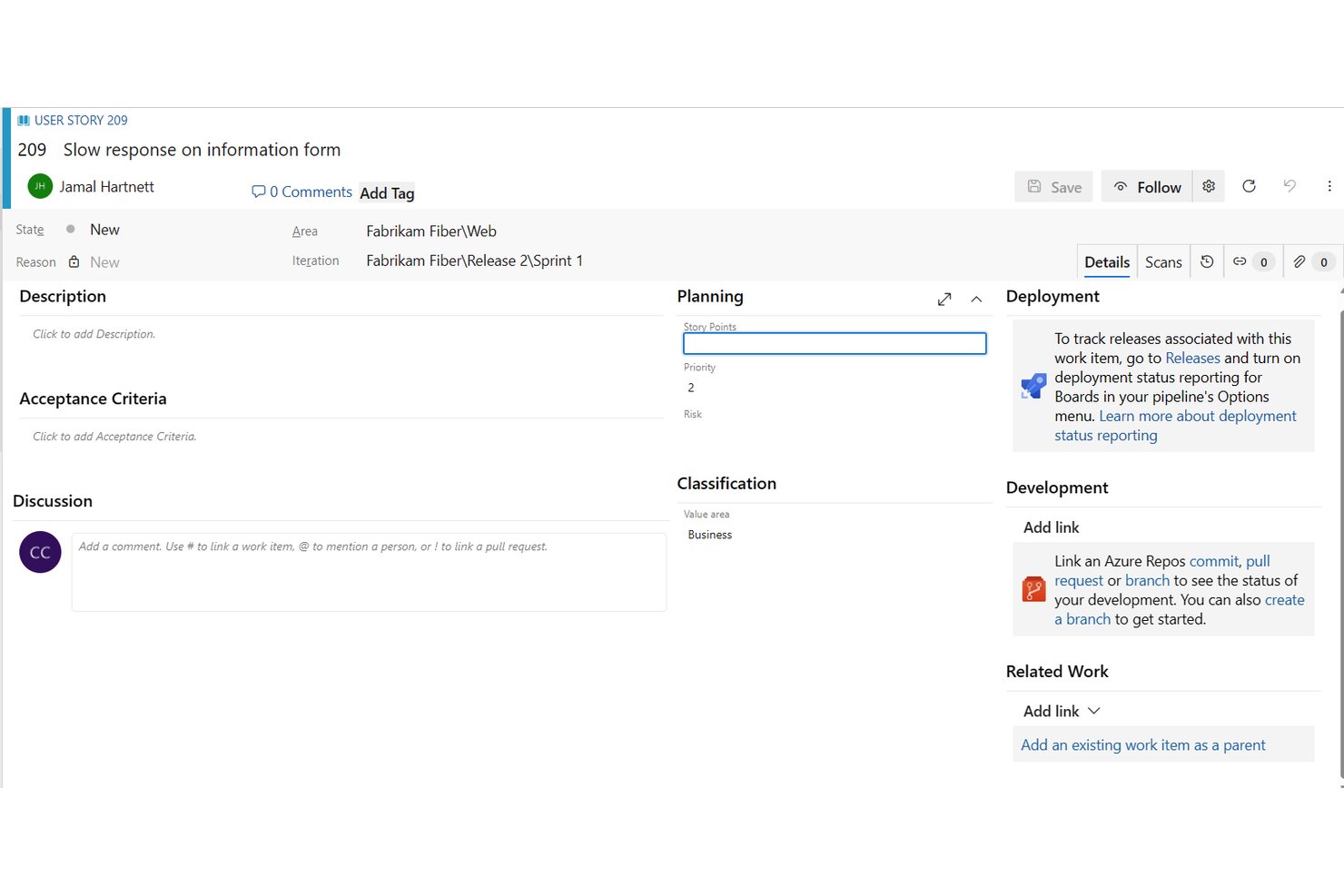
Azure Boards es una herramienta de seguimiento del trabajo dentro de Azure DevOps que permite a los equipos crear y gestionar historias de usuario, épicas y funcionalidades en backlogs multinivel, tableros de sprint y planes de entrega.
¿Para quién es más adecuado Azure Boards?
Azure Boards es una excelente opción para equipos Scrum y responsables de producto que ya trabajan en el ecosistema de Microsoft o GitHub y necesitan planificación de sprints, gestión de backlogs multinivel y trazabilidad de la canalización de desarrollo en un solo lugar.
Por qué elegí Azure Boards
Azure Boards ocupa un lugar en mi lista de opciones principales por lo bien que gestiona la planificación de sprints para equipos que ya trabajan en el ecosistema de Microsoft o GitHub. Me encanta que el centro de sprints incluya planificación de capacidad integrada, donde puedes establecer las horas por persona, tener en cuenta los días libres y ver el trabajo restante comparado con la capacidad del equipo en tiempo real. Al combinarlo con backlogs multinivel que desglosan las épicas en historias y tareas, ayuda a fundamentar las decisiones sobre el alcance del sprint en el contexto real de la cartera.
Características principales de Azure Boards
- Jerarquía del backlog de la cartera: Las épicas, funcionalidades e historias se organizan en backlogs multinivel con reordenación mediante arrastrar y soltar y seguimiento del progreso acumulado.
- Planes de entrega: Una vista con formato de calendario que asigna los entregables de varios equipos, con líneas de dependencia que señalan conflictos de programación entre elementos vinculados.
- Transferencia al agente de programación de GitHub Copilot: Asigna un elemento de trabajo a Copilot, que lee la descripción y los comentarios y, a continuación, crea una rama vinculada y una solicitud de incorporación de cambios en borrador.
- Servidor MCP de Azure DevOps: Permite a los agentes de IA crear historias, organizar backlogs, estimar elementos y mostrar conflictos de dependencias mediante comandos en lenguaje natural.
Integraciones de Azure Boards
Azure Boards ofrece integraciones nativas con Azure Repos, Pipelines, Test Plans, Artifacts, Microsoft Teams, GitHub, GitHub Enterprise y Power BI. También admite Slack, API REST, ganchos de servicio e integraciones de Marketplace para conectividad personalizada.
Pros and Cons
Pros:
- Los backlogs multinivel conectan las historias con la estrategia
- La planificación de la capacidad del sprint fundamenta las decisiones sobre el alcance
- Los planes de entrega muestran las dependencias entre equipos
Cons:
- Los criterios de aceptación siguen siendo texto de formato libre
- La jerarquía del backlog abruma a los equipos de producto nuevos
Otras opciones de software de historias de usuario
- monday AI Workspace
Ideal para flujos de trabajo de sprints e historias impulsados por IA
- Craft.io
Ideal para la planificación de historias vinculada a la estrategia y los OKR
- Asana
Ideal para la planificación de proyectos entre equipos
- Miro
Ideal para la creación colaborativa de mapas visuales de historias
- Linear
Ideal para ciclos de sprints de equipos de desarrollo sin la sobrecarga de Scrum
- Easy Agile
Ideal para la planificación del trabajo pendiente y de sprints integrada de forma nativa en Jira


Cómo Evalúo el Software de Historias de Usuario
Evalúo el software de historias de usuario en dos niveles: lo esencial que necesita un Product Owner para capturar, estimar y mapear historias, y los factores diferenciadores que hacen que una herramienta destaque frente al resto.
Funcionalidad Básica (Requisitos Indispensables para Esta Lista)
Cuando selecciono herramientas para mi lista, califico cada una en una escala de 0 (no ofrece la funcionalidad) a 5 (sobresale en este aspecto) para cada funcionalidad principal mencionada a continuación. Después, calculo la puntuación total de cada herramienta como porcentaje. Cada herramienta debe alcanzar una puntuación total mínima del 65% para ser considerada.
- Creación de Historias de Usuario: Verifico si la herramienta ofrece plantillas de historias estructuradas con campos específicos para criterios de aceptación, y no solo una caja de texto en blanco donde haya que escribir manualmente el formato "Como... quiero... para que..." cada vez.
- Gestión del Backlog: Una buena vista de backlog permite agrupar historias bajo épicas, ordenar por prioridad y filtrar por sprint o equipo. Así que evalúo cómo maneja cada herramienta la jerarquía y la organización más allá de una simple lista de tareas.
- Mapeo de Historias: Busco mapas visuales de historias que permitan organizar las historias a lo largo de un recorrido de usuario y dividirlas en entregas, similar a cómo herramientas como StoriesOnBoard o Avion manejan el flujo narrativo horizontal.
- Estimación y Dimensionamiento: Ya sea por puntos de historia, tallas de camiseta o planning poker, evalúo cómo cada herramienta apoya la estimación del esfuerzo en equipo durante las sesiones de refinamiento del backlog.
- Integración en el Flujo de Trabajo Ágil: Las historias deben integrarse en sprints y tableros, por lo que reviso cómo cada herramienta enlaza las historias con flujos de trabajo Scrum o Kanban y sigue el progreso hasta la entrega.
- Colaboración y Comentarios: Los Product Owners afinan historias junto a diseñadores, ingenieros y partes interesadas constantemente. Verifico que haya comentarios en hilos, @menciones y edición en tiempo real que mantengan esas conversaciones ligadas a cada historia.
Una vez que tengo una lista de herramientas que cumplen con los criterios, considero qué es lo que hace diferente a cada plataforma.
Factores Diferenciadores (Qué Distingue a los Proveedores)
Así es como comparo y contrasto diferentes proveedores:
Funcionalidades Destacadas
Pongo especial atención en si la herramienta puede importar comentarios de clientes desde canales de soporte o entrevistas y mostrarlo como historias candidatas. La generación de historias con IA va más allá: algunas herramientas generan criterios de aceptación y casos límite a partir de un breve mensaje o PRD, lo que realmente ahorra tiempo durante el descubrimiento. La visualización de dependencias también es importante cuando se coordina entre equipos, ya que detectar historias bloqueadas a tiempo evita sorpresas a mitad del sprint.
Más Allá de las Funcionalidades
Las integraciones con herramientas de desarrollo y diseño son fundamentales. Una sincronización bidireccional con Jira o Azure DevOps significa que las historias se mantienen actualizadas a medida que los ingenieros cambian el estado, y los enlaces a Figma mantienen el contexto de diseño vinculado a cada historia. También evalúo cómo escala la herramienta: un equipo de tres personas necesita algo distinto de una empresa que aplica SAFe en varias líneas de producto. La estructura de precios influye aquí también. Reviso si las partes interesadas que solo requieren acceso de lectura pueden unirse sin aumentar los costes por usuario.
Precios
Con cualquier buen software de historias de usuario, el precio debe corresponderse con las funciones ofrecidas. Algunos programas son gratuitos, pero tienen funciones limitadas, y las marcas de productos preocupadas por el presupuesto optarán por trabajar dentro de esas limitaciones. Sin embargo, otras empresas pueden necesitar un conjunto de funciones más amplio y estar dispuestas a pagar por él. En cualquier caso, lo ideal es contar con un software de historias de usuario que ofrezca pruebas gratuitas, precios escalables para satisfacer todas las necesidades y conjuntos de funciones justos.
Preguntas frecuentes
Estas son algunas preguntas que quizá tengas antes de empezar.
¿Qué es una historia de usuario?
Las historias de usuario son descripciones concisas y sencillas de una función, contadas desde la perspectiva del usuario final. Sirven como medio para capturar y comunicar requisitos en un formato fácil de entender. Las historias de usuario son una parte importante del desarrollo de nuevos productos porque definen a tu cliente ideal y regulan todas las tareas, funciones y diseños en torno a una única causa: ayudar a tus usuarios a superar un problema al que se enfrentan. Sin una historia de usuario, puede que descubras que tu producto es demasiado amplio, demasiado limitado o que no da en el blanco con lo que realmente importa a los consumidores modernos.
Todo equipo de producto debería tener su historia de usuario siempre a mano y relacionar con ella todo lo que hace, preguntándose constantemente: «¿X realmente ayuda a mi público objetivo o estoy perdiendo el hilo?»
“Al fin y al cabo, tu trabajo consiste en minimizar la producción y maximizar los resultados y el impacto.” — Jeff Patton, autor de Mapeo de historias de usuario: descubre toda la historia, crea el producto adecuado
¿Qué es un ejemplo de historia de usuario?
Una historia de usuario podría seguir este sencillo formato: «Como [tipo de usuario], quiero [realizar tal tarea] para [alcanzar un objetivo].» Después, es tu responsabilidad completar los espacios en blanco para tu cliente objetivo tal como lo imaginas. Algunos ejemplos podrían ser:
- Como líder de equipo ocupado, quiero una aplicación móvil que pueda programar y realizar un seguimiento automático de mis tareas diarias para poder mantenerme organizado y aumentar mi productividad.
- Como entusiasta del acondicionamiento físico, quiero una botella de agua inteligente que pueda medir mi consumo de agua y recordarme que beba agua con regularidad para poder mantenerme hidratado y alcanzar mis objetivos de acondicionamiento físico.
- Como viajero frecuente, quiero una maleta compacta que pueda transformarse fácilmente en una mochila para poder llevarla de forma cómoda y práctica durante mis viajes.
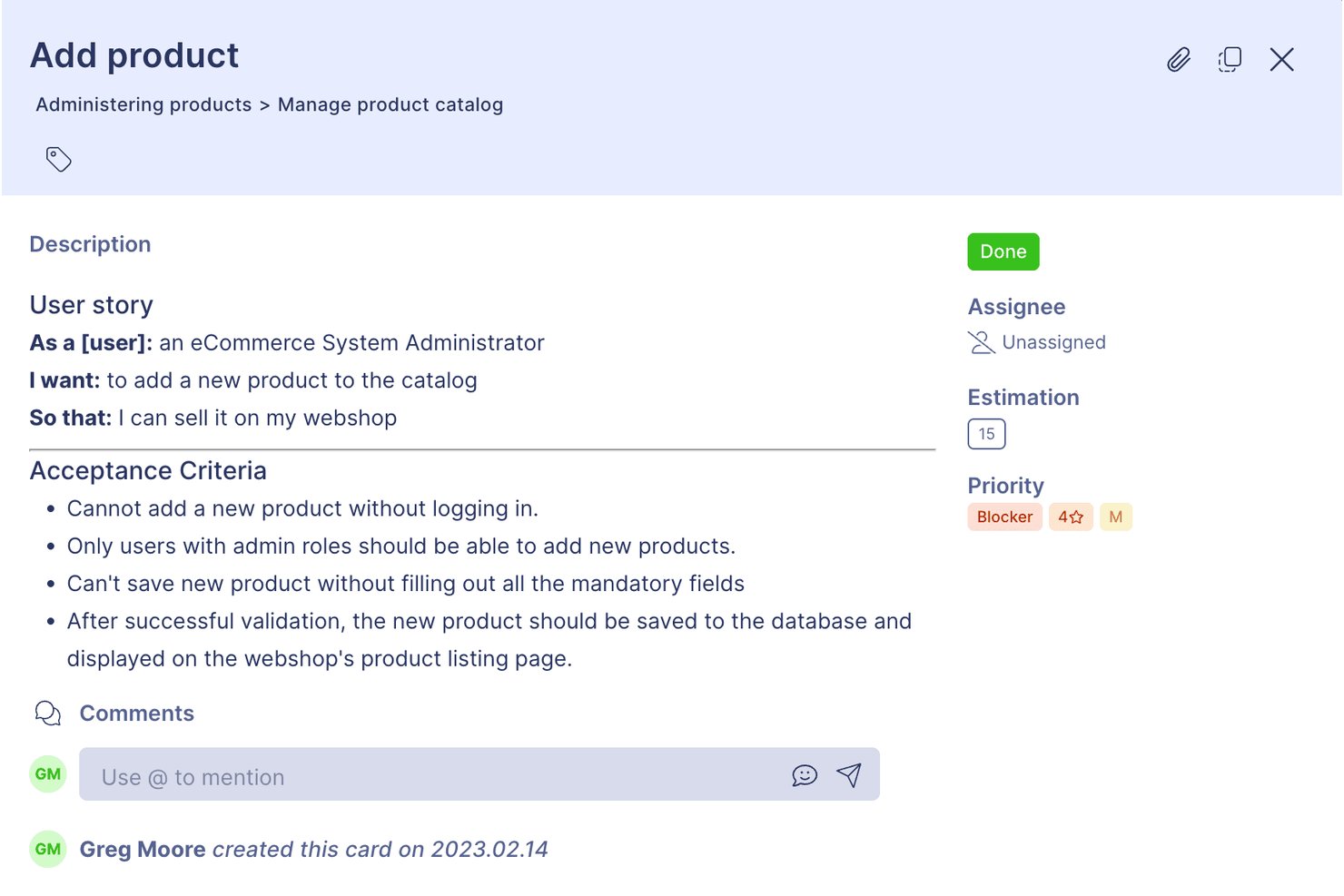
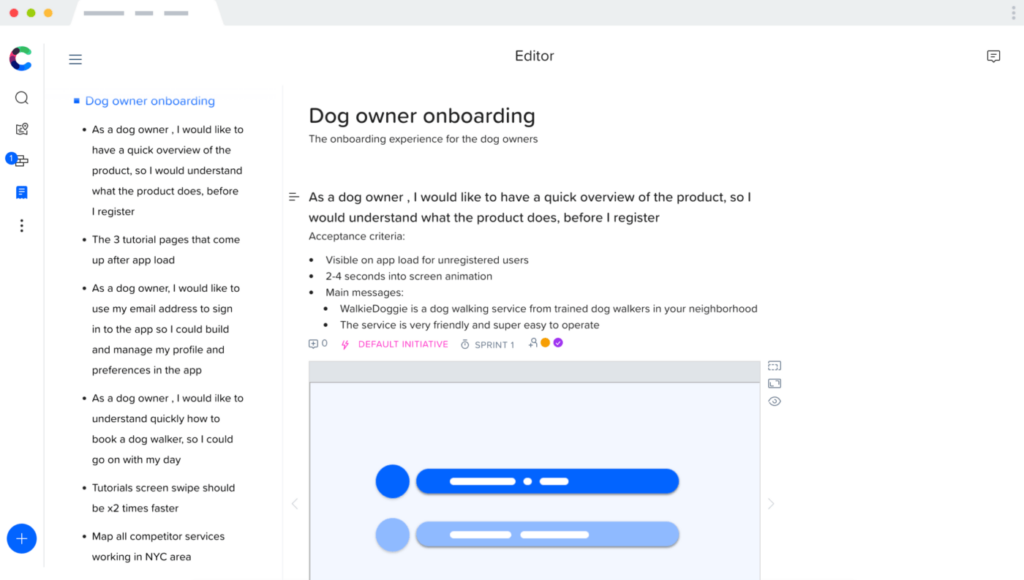
A continuación, encontrarás una historia de usuario de ejemplo generada con Craft.io para que puedas ver cómo es un enfoque más visual, detallado y colaborativo:
¿Cuáles son las ventajas del software de historias de usuario?
Las ventajas de utilizar software de historias de usuario incluyen:
- Orientación para priorizar funciones: Puedes elegir fácilmente en qué funciones centrarte en la lista de trabajo pendiente porque no es algo arbitrario; todo gira en torno a lo que más necesita tu usuario final.
- Enfoque organizativo: Lo más importante para tus usuarios también debería ser lo más importante para tu empresa. Utiliza estos elementos para definir los valores de tu marca.
- Minimización de riesgos: Ahora sabes qué quiere tu usuario ideal, así que puedes minimizar los riesgos diseñando cada hito en torno a ese conocimiento. ¡Sin desvíos!
- Los indicadores clave de rendimiento (KPIs) son claros: Tus objetivos y KPIs pueden y deben centrarse en los elementos más importantes para tu cliente. Las historias de los clientes te ayudan a concretar cuáles son.
¿Cuáles son las funciones clave del software de historias de usuario?
Entre las funciones clave que busco al seleccionar el mejor software de historias de usuario se incluyen:
- Perfiles de usuario: Una visualización concisa de quién es tu cliente ideal, qué hace y qué necesita de ti.
- Mapas de historias de usuario: Diseñar el recorrido que seguirán tus usuarios cuando comiencen a utilizar tu producto y avancen en él.
- Marco de trabajo ágil: La capacidad de los equipos ágiles para producir, adaptarse, iterar y actualizarse de forma rápida y eficiente.
- Producto mínimo viable (MVP): Comprender cuál es el producto mínimo que tus usuarios necesitarán para encontrar valor al trabajar contigo.
- Lista de trabajo pendiente: Funciones deseadas que pueden revisarse y priorizarse más adelante, cuando haya recursos disponibles.
- Épicas: Capacidad de dividir las necesidades de un proyecto grande en partes más pequeñas y manejables.
- Plantillas: Plantillas de historias de usuario para no tener que empezar desde cero.
- Iteración: Espacio para cambiar y desarrollar las historias y los perfiles de usuario a medida que crece tu producto.
- Herramientas de flujo de trabajo: Herramientas básicas para el proceso de trabajo, como gestión de tareas, comentarios, colaboración y cronogramas.
- Opciones de visualización: Pizarras digitales, tableros kanban, tarjetas de índice virtuales, puntos de historia de texto o imagen y otras formas creativas de compartir la perspectiva del usuario.
- Ejemplos de historias de usuario: Orientación para que tu equipo de producto sepa qué aspecto debe tener una historia de usuario y qué debe contener cuando esté completa.
¿Qué otros recursos sobre experiencia de usuario debería consultar?
Si ya estás pensando en un software de historias de usuario, tus próximos pasos podrían incluir:
¿Qué sigue?
nTodo buen producto comienza con una historia de usuario. Las historias de usuario proporcionan a los desarrolladores de productos una idea precisa de lo que necesitan construir, para quién lo están construyendo y por qué lo están construyendo. Con la ayuda de un excelente software para historias de usuario, los desarrolladores pueden analizar sus productos desde la perspectiva de los usuarios finales para garantizar una experiencia de usuario excelente e inspirar la lealtad a la marca.
Suscríbete al boletín de The CPO Club para recibir reseñas de software, información sobre el desarrollo de productos y liderazgo de opinión de nuestra creciente comunidad.