

10 mejores herramientas de automatización de DevOps analizadas en 2026

Mejores herramientas de automatización de DevOps: selección


Las herramientas de automatización de DevOps son plataformas de software que ayudan a tu equipo a automatizar, gestionar y coordinar tareas durante todo el ciclo de vida del desarrollo de software y las operaciones de TI. Si buscas las mejores herramientas de automatización de DevOps, probablemente quieras reducir el trabajo manual, mejorar la velocidad de implementación y mantener la coherencia de tus flujos de trabajo a medida que tus proyectos crecen.
Elegir las herramientas adecuadas puede marcar la diferencia entre apagar incendios constantemente y contar con una canalización fiable y eficiente. Esta lista incluye herramientas de integración y entrega continuas (CI/CD), infraestructura como código, gestión de configuraciones y automatización de políticas, lo que te ofrece opciones tanto si estás automatizando canalizaciones, el aprovisionamiento de infraestructura o los flujos de trabajo de gobernanza. Hemos recopilado soluciones que se adaptan a las necesidades de tu equipo y ayudan a avanzar en tu práctica de DevOps.
Por qué confiar en nuestras recomendaciones de software
Nuestro equipo lleva probando y evaluando software desde 2012. Como gestores de producto, sabemos lo difícil —y lo importante— que es elegir el software adecuado.
Para esta guía, evaluamos las herramientas mediante pruebas prácticas e investigación independiente, puntuando las herramientas según nuestros criterios de selección.
Nuestras reseñas reflejan nuestro criterio editorial humano, no un discurso de ventas.
Resumen de las mejores herramientas de automatización de DevOps
Esta tabla comparativa resume los detalles de precios de mi selección de las mejores herramientas de automatización de DevOps para ayudarte a encontrar la más adecuada para tu presupuesto y las necesidades de tu empresa.
| Tool | Best For | Trial Info | Price | ||
|---|---|---|---|---|---|
| 1 | Lo mejor para la integración con GitHub | Plan gratuito disponible | Desde $4/usuario/mes (facturado anualmente) | Website | |
| 2 | La mejor para infraestructura como código | Plan gratuito disponible | Precio bajo consulta | Website | |
| 3 | Mejor para entrega continua automatizada con IA | Plan gratuito disponible | Precio a consultar | Website | |
| 4 | Plataforma DevSecOps todo en uno | Plan gratuito disponible | Desde $29/usuario/mes | Website | |
| 5 | Ideal para pipelines personalizables | Descarga gratuita disponible | Uso gratuito | Website | |
| 6 | La mejor opción para recursos de AWS | Hasta 6 meses de prueba gratuita | Precios bajo petición | Website | |
| 7 | Ideal para la gestión de configuración | Demostración gratuita disponible | Precio bajo consulta | Website | |
| 8 | Ideal para la integración con Jira | Prueba gratuita de 30 días | Desde $1,200 | Website | |
| 9 | Mejor para ecosistemas de Microsoft potenciados por IA | Prueba gratuita disponible | Precio a consultar | Website | |
| 10 | El panel de CircleCI muestra el estado de los proyectos, los flujos de trabajo y la actividad de CI/CD. | Plan gratuito + demostración disponible | Desde $15/mes | Website |
Reseñas de las mejores herramientas de automatización de DevOps
A continuación encontrarás mis resúmenes detallados de las mejores herramientas de automatización de DevOps que llegaron a mi selección. En mis reseñas analizo en profundidad las características principales, las ventajas y desventajas, las integraciones y los casos de uso ideales de cada herramienta para ayudarte a encontrar la más adecuada para ti.

Lo mejor para la integración con GitHub
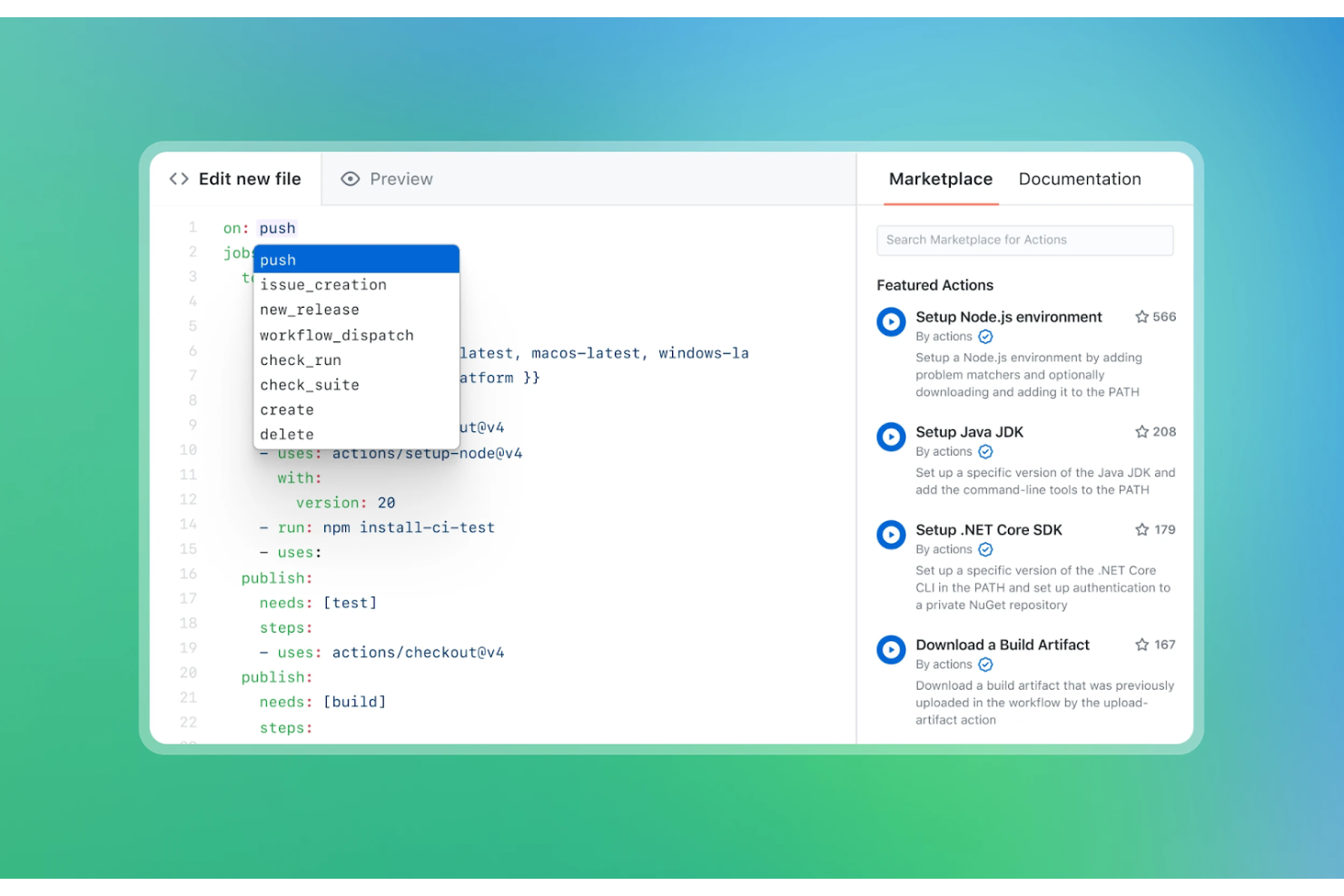
GitHub Actions es una plataforma CI/CD diseñada para desarrolladores que ya utilizan GitHub para el control de versiones. Automatiza el flujo de trabajo de desarrollo de software, desde las pruebas del código hasta el despliegue, directamente dentro del entorno de GitHub.
Por qué elegí GitHub Actions: Se integra de manera nativa con GitHub, lo que la convierte en una excelente opción para equipos que ya están comprometidos con el ecosistema de GitHub. Puedes crear flujos de trabajo que compilen, prueben y desplieguen tu código en función de eventos como las solicitudes de extracción (pull requests).
Con su amplia biblioteca de acciones preconstruidas, GitHub permite que tu equipo configure rápidamente la automatización sin necesidad de mucha programación. También tienes la flexibilidad de personalizar los flujos de trabajo usando archivos de configuración YAML. Puedes crear y desplegar aplicaciones contenerizadas usando trabajos de flujo de trabajo que construyen imágenes de Docker y las suben a un registro. GitHub Actions proporciona registros de flujo de trabajo para ayudar a solucionar problemas en los trabajos fallidos.
Características y integraciones destacadas:
Características incluyen compilaciones en matriz (matrix builds) que te permiten hacer pruebas en diferentes entornos. Ofrece flujos de trabajo reutilizables, lo que te permite compartir tareas comunes entre varios proyectos. También puedes usar la gestión de secretos para almacenar y acceder de forma segura a información sensible.
Integraciones incluyen AWS, Azure, Google Cloud Platform, Docker, Kubernetes, Slack, Jira, Microsoft Teams, Heroku, Twilio y más.
Pros and Cons
Pros:
- Integración nativa con GitHub
- Amplia biblioteca de acciones preconstruidas
- Gestión de secretos para mayor seguridad
Cons:
- Requiere conocimientos de configuración YAML
- Herramientas limitadas de análisis y generación de informes

La mejor para infraestructura como código
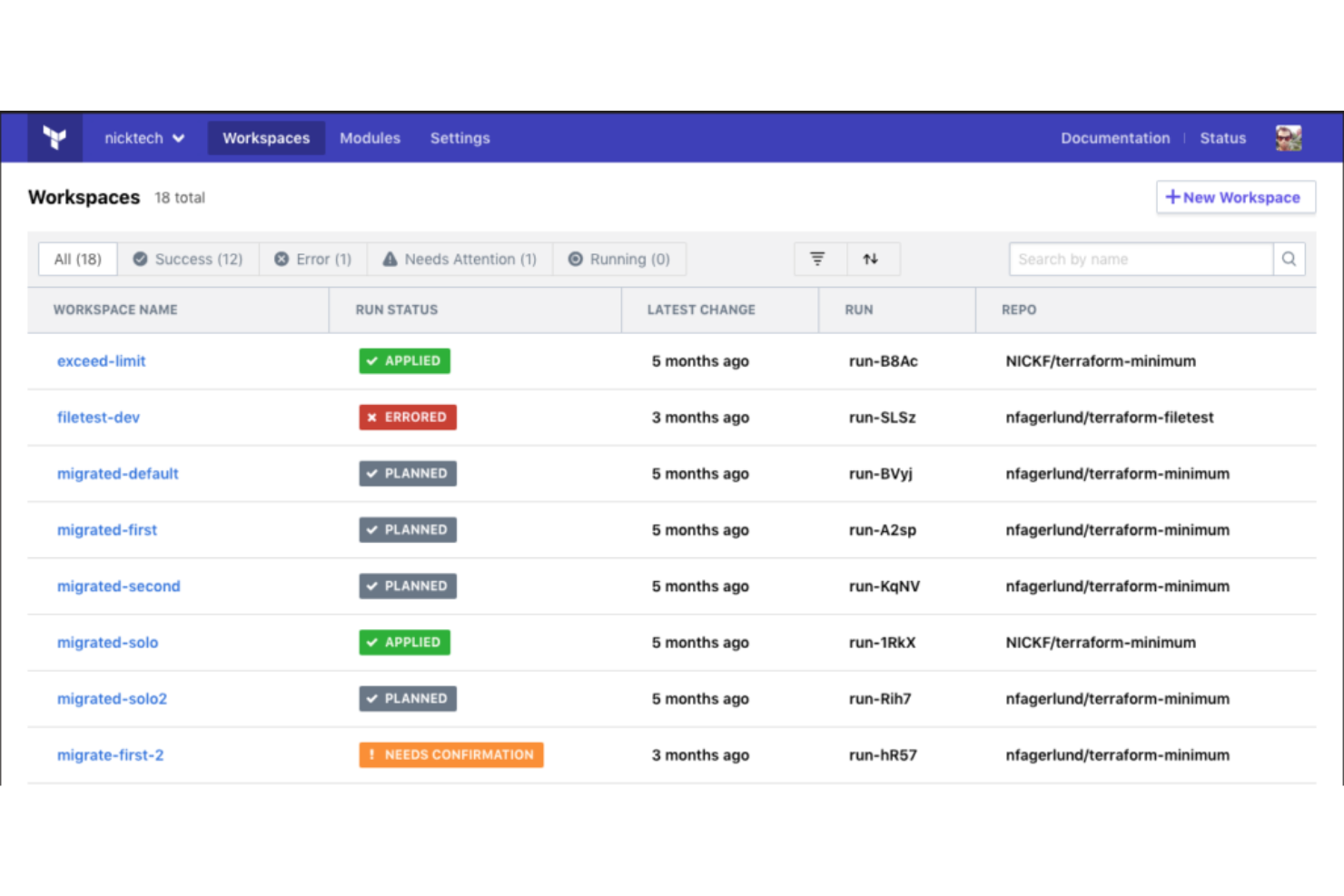
Terraform es una herramienta de infraestructura como código diseñada para profesionales de TI y equipos DevOps. Permite construir, cambiar y versionar la infraestructura de manera eficiente, dando soporte tanto a componentes de bajo nivel, como instancias de cómputo, como a componentes de alto nivel, como entradas de DNS.
Por qué elegí Terraform: Es una herramienta que se destaca en la provisión de infraestructura como código, lo que la hace ideal para equipos que necesitan gestionar infraestructuras complejas. La capacidad de Terraform para soportar y gestionar el aprovisionamiento automatizado de infraestructura en múltiples proveedores de nube la diferencia de otras.
Características como su arquitectura modular y un extenso ecosistema de proveedores refuerzan su propuesta de valor. Sus operaciones idempotentes son esenciales para pipelines de CI/CD. Terraform permite validar archivos de configuración para garantizar que la sintaxis y la semántica sean correctas. Puedes versionar tu infraestructura, asegurando consistencia y fiabilidad en todos los despliegues.
Características destacadas e integraciones:
Características incluyen su lenguaje de configuración que simplifica la descripción de la infraestructura, la CLI de Terraform para flujos de trabajo en la línea de comandos y la posibilidad de colaborar con tu equipo usando HCP Terraform.
Integraciones incluyen AWS, Azure, Google Cloud Platform, Heroku, Confluent, UpCloud, DNSimple, Cloudflare, vSphere, Oracle Cloud Infrastructure, Docker, Kubernetes, Consul y más.
Pros and Cons
Pros:
- Compatible con entornos multinube
- Capacidad de versionado de infraestructura
- Gran ecosistema de proveedores
Cons:
- Curva de aprendizaje debido a la sintaxis propietaria de HCL
- La gestión de archivos de estado es compleja a gran escala

Harness
Mejor para entrega continua automatizada con IA
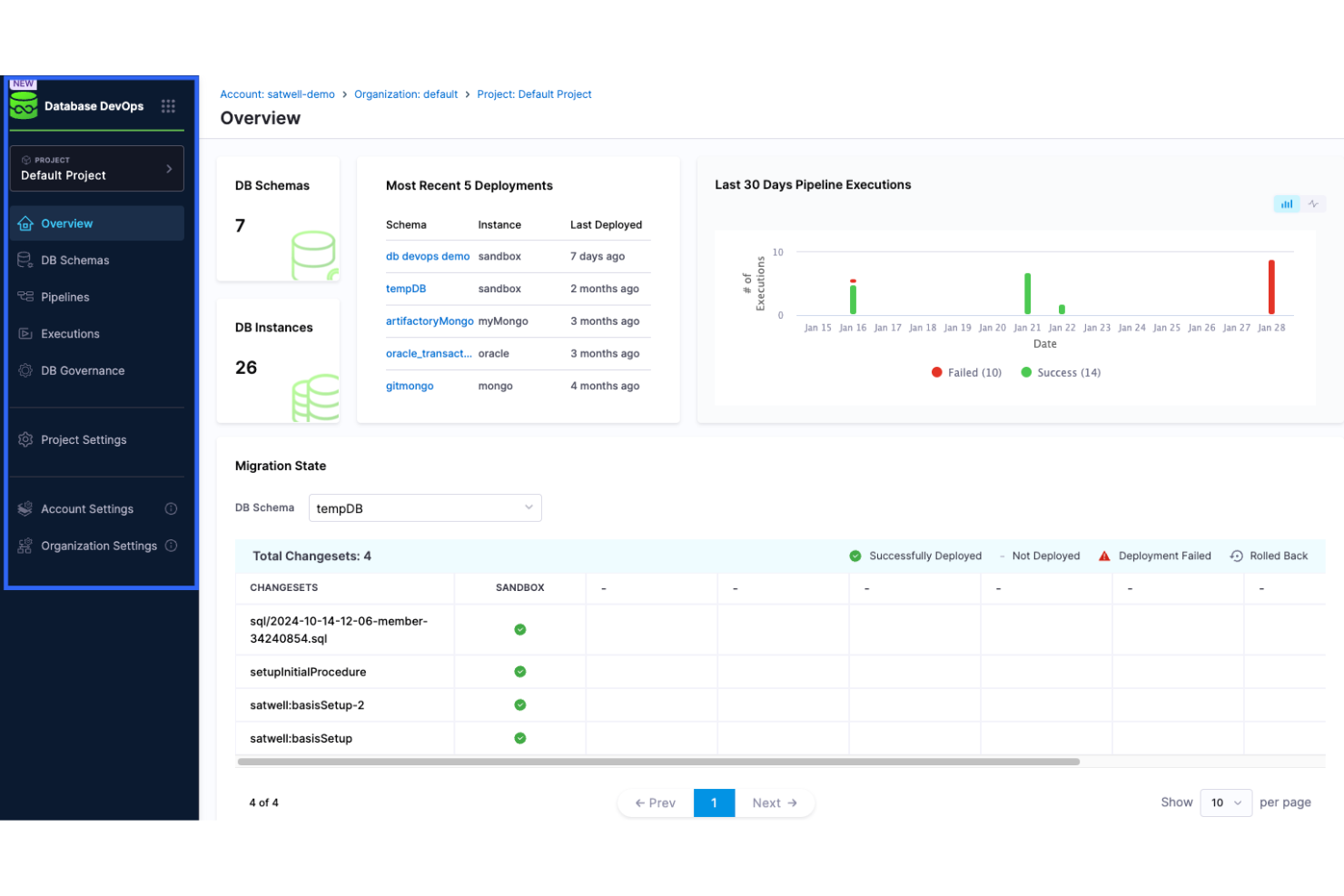
Harness es una plataforma de entrega continua dirigida a equipos de DevOps y profesionales de TI. Automatiza el proceso de despliegue, lo que permite a tu equipo liberar aplicaciones de manera rápida y fiable.
Por qué elegí Harness: Está diseñada para la entrega continua, ofreciendo características que simplifican y automatizan la canalización de despliegue. Harness incluye capacidades de reversión automática, lo que asegura la estabilidad en tus lanzamientos. Con sus algoritmos de aprendizaje automático, puedes minimizar la supervisión manual durante los despliegues. Puedes recopilar y ver métricas de sistemas y servicios usando herramientas de monitoreo como Prometheus y Grafana. Proporciona métricas de despliegue en tiempo real, permitiendo a los equipos detectar y solucionar problemas rápidamente. También puedes beneficiarte de su panel intuitivo que ofrece una visión clara de tu proceso de despliegue.
Características destacadas e integraciones:
Las características incluyen verificación continua que utiliza aprendizaje automático para detectar anomalías. Proporciona implementaciones canarias automatizadas para reducir riesgos durante las actualizaciones. También puedes utilizar sus feature flags para gestionar los despliegues sin afectar a los usuarios finales.
Las integraciones incluyen Kubernetes, Docker, AWS, Azure DevOps, Google Cloud Platform, GitHub, GitLab, Bitbucket, Jenkins, PagerDuty, Jira, Figma, Lucidchart, ServiceNow y más.
Pros and Cons
Pros:
- Capacidades de reversión automática
- Aprendizaje automático para detección de anomalías
- Soporta implementaciones canarias
Cons:
- La configuración inicial puede ser compleja
- Requiere configuración para un uso óptimo

GitLab
Plataforma DevSecOps todo en uno
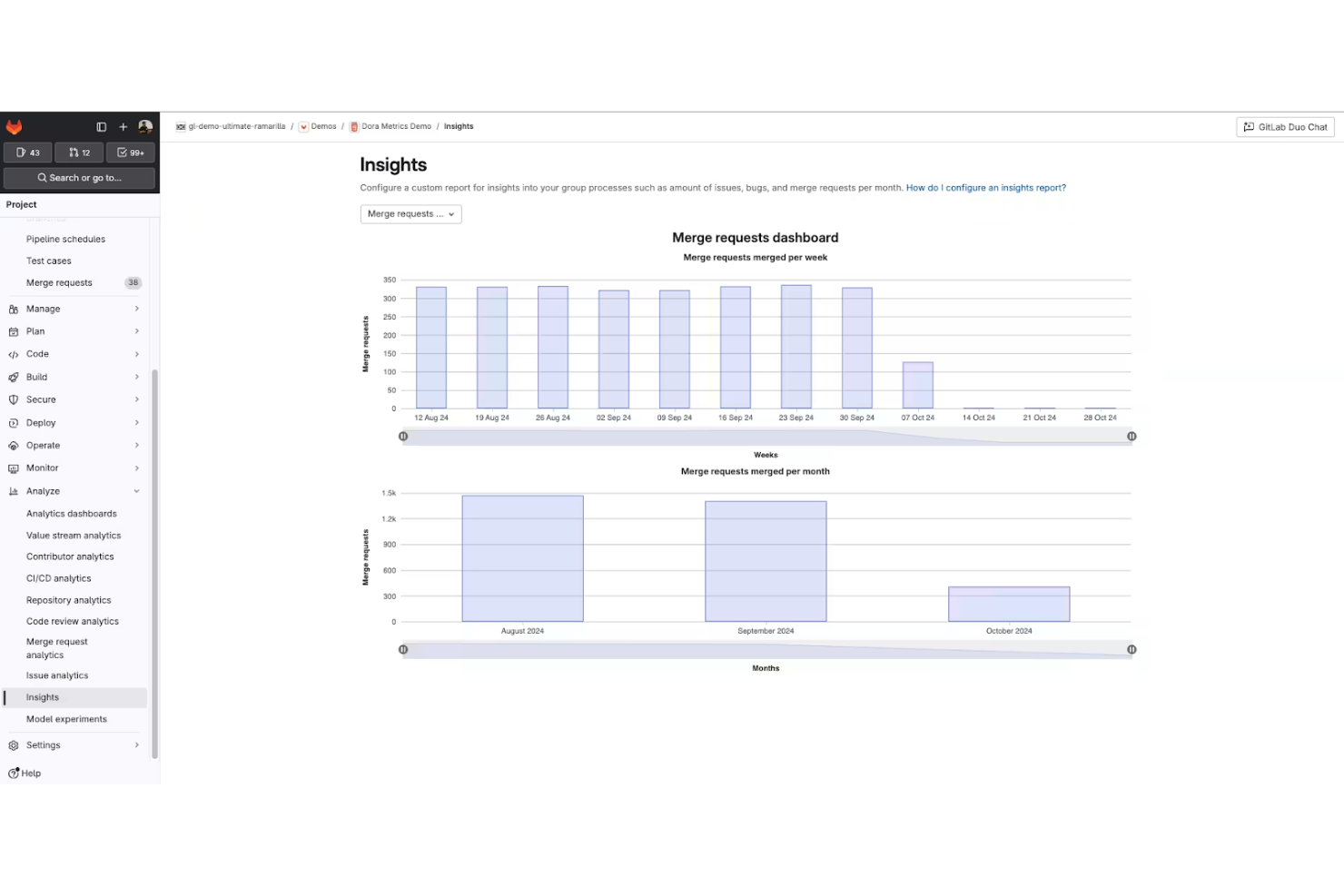
GitLab es una plataforma DevOps completa diseñada para equipos de desarrollo de software que buscan gestionar todo el ciclo de vida del desarrollo de software. Ofrece herramientas para la gestión del código fuente, CI/CD y monitoreo, permitiendo que tu equipo colabore e innove de manera eficiente.
Por qué elegí GitLab: GitLab se diferencia al combinar control de versiones, CI/CD, análisis de seguridad y gestión de proyectos en una sola plataforma. En lugar de integrar múltiples herramientas para cubrir la planificación, pruebas, seguridad y despliegue, GitLab mantiene todo dentro de un único flujo de trabajo.
Esa consolidación es importante para los equipos que buscan reducir los cambios de contexto y mantener la coherencia en todos los entornos. Las pruebas de seguridad integradas, las aprobaciones de fusión y los pipelines de despliegue permiten adelantar los controles de cumplimiento y calidad del código en el proceso. Si tu prioridad es el control del ciclo de vida en lugar de la flexibilidad modular, GitLab ofrece una experiencia DevSecOps profundamente integrada.
Funciones destacadas e integraciones:
Funciones incluyen paneles de monitoreo que proporcionan visibilidad sobre el rendimiento de las aplicaciones junto con métricas de despliegue e infraestructura. Con sus funciones de seguimiento de incidencias y gestión de proyectos, puedes mantener a tu equipo alineado y enfocado. También tienes acceso a herramientas de análisis de seguridad que se integran de forma natural en tu flujo de trabajo.
Integraciones incluyen GitHub, Jira, Slack, Microsoft Teams, Jenkins, Docker, Kubernetes, Bitbucket, AWS, Google Cloud Platform y más.
Pros and Cons
Pros:
- Cubre todo el ciclo de vida de DevOps
- Herramientas integradas de pruebas de seguridad
- Gestión eficiente del registro de contenedores
Cons:
- Puede ser complejo de configurar
- Requiere configuración para un uso óptimo

Jenkins
Ideal para pipelines personalizables
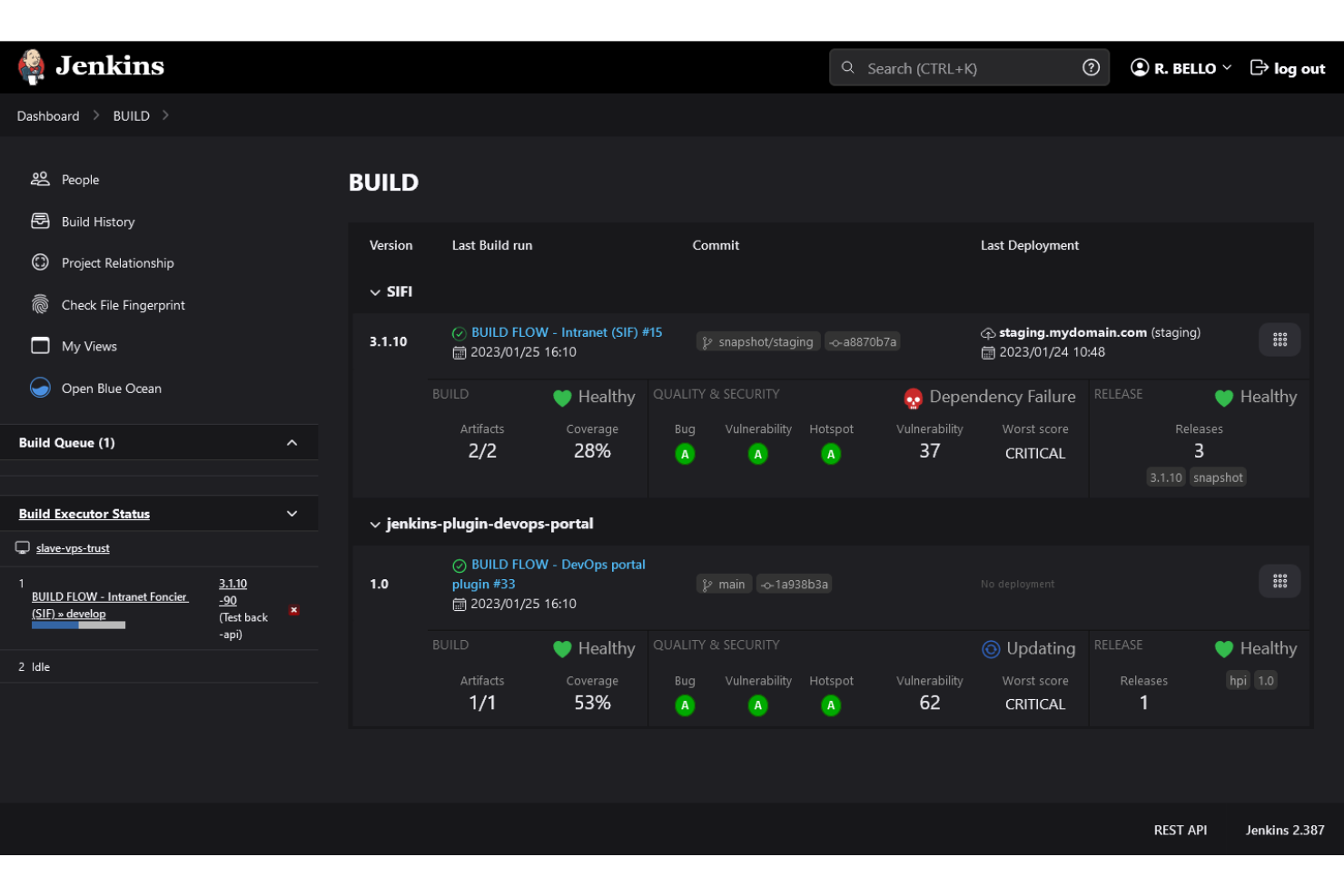
Jenkins es un servidor de automatización de código abierto ampliamente utilizado por desarrolladores de software y equipos DevOps. Ayuda a automatizar partes del proceso de desarrollo de software, incluyendo la construcción, prueba y despliegue de código.
Por qué elegí Jenkins: Está especialmente bien adaptado para crear pipelines personalizables, ofreciendo una flexibilidad que muchos equipos valoran. Su naturaleza de código abierto permite una amplia personalización, lo que lo hace adaptable a diversos flujos de trabajo.
Las canalizaciones DevOps de Jenkins admiten varios lenguajes de programación para scripts de construcción y despliegue, y los complementos pueden facilitar la resolución de problemas al agregar información de diagnóstico más detallada. Puedes crear un entorno de integración y entrega continua que se ajuste a los requisitos únicos de tu equipo.
Características destacadas e integraciones:
Las características incluyen una interfaz web para una fácil configuración, la capacidad de distribuir compilaciones en varias máquinas y un ecosistema rico de complementos que amplían su funcionalidad.
Las integraciones incluyen GitHub, GitLab, Bitbucket, Docker, Kubernetes, Maven, Gradle, JUnit, Selenium, y más.
Pros and Cons
Pros:
- Amplia biblioteca de complementos
- Pipelines altamente personalizables
- Flexibilidad de código abierto
Cons:
- Puede ser complejo de configurar
- Requiere mantenimiento y actualizaciones

La mejor opción para recursos de AWS
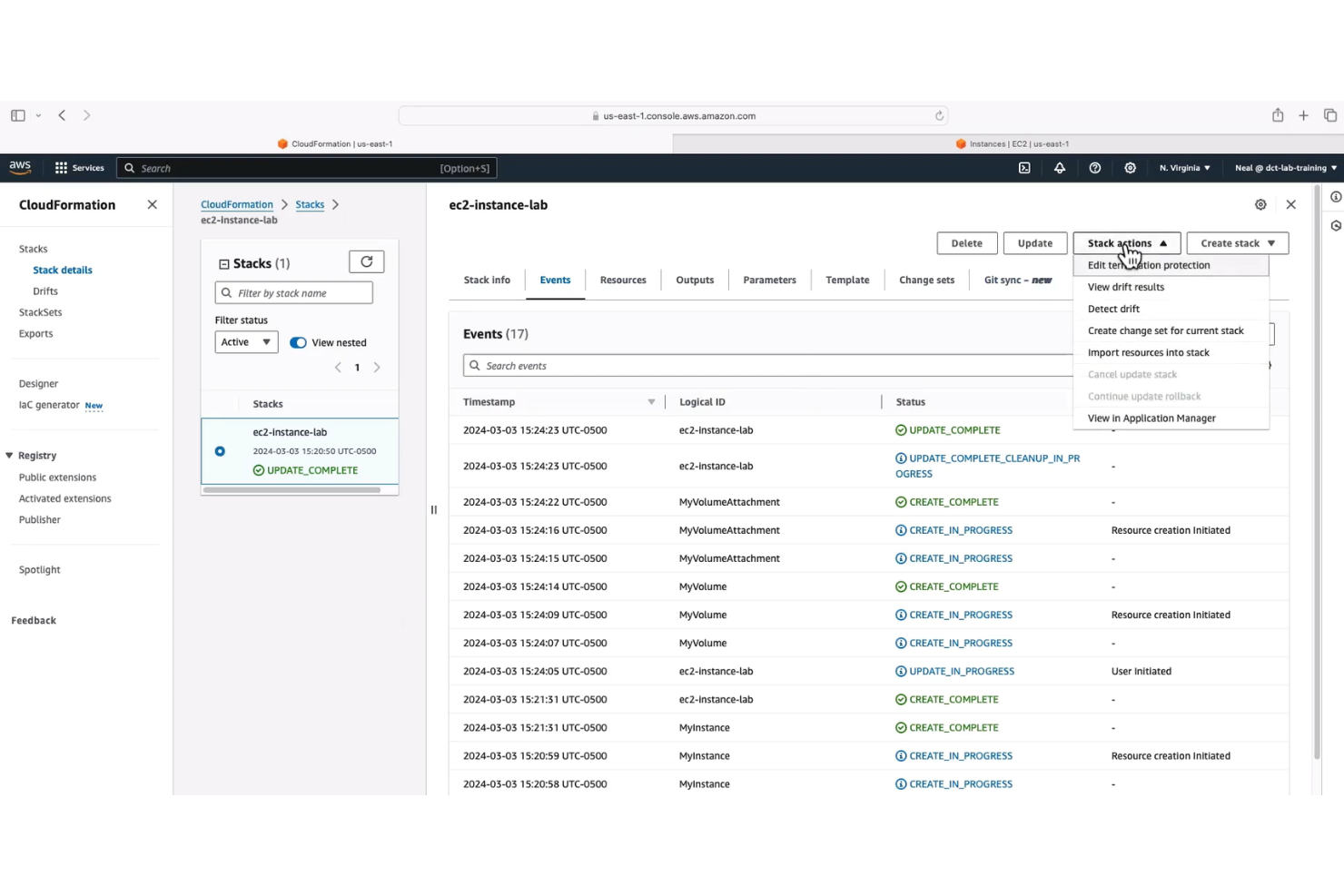
AWS CloudFormation es una herramienta de infraestructura como código diseñada para desarrolladores y profesionales de TI que trabajan dentro del ecosistema de AWS. Automatiza el aprovisionamiento y la gestión de recursos de AWS, permitiendo que tu equipo se enfoque en desarrollar aplicaciones en lugar de gestionar la infraestructura.
Por qué elegí AWS CloudFormation: Está especialmente diseñada para la gestión de recursos de AWS, proporcionando una manera estructurada de crearlos y gestionarlos. Con las plantillas de CloudFormation, puedes definir tu infraestructura como código, asegurando coherencia y capacidad de réplica. CloudFormation simplifica las actualizaciones y reversiones en entornos nativos de la nube.
Las capacidades de gestión de 'stacks' de esta herramienta te permiten actualizar y eliminar recursos fácilmente según sea necesario. Con AWS CloudFormation, puedes modelar y desplegar repetidamente los recursos de AWS necesarios para la orquestación de contenedores usando plantillas de infraestructura como código. También puedes utilizar la función de detección de divergencias para identificar cambios en los recursos de tu stack.
Características destacadas e integraciones:
Las características incluyen la capacidad de utilizar JSON o YAML para definir tu infraestructura. AWS CloudFormation ofrece 'stack sets' para desplegar recursos en múltiples cuentas y regiones. También puedes usar los 'change sets' para previsualizar cambios antes de aplicarlos a tus stacks.
Las integraciones incluyen AWS Lambda, AWS EC2, AWS S3, AWS RDS, AWS IAM, AWS CloudWatch, GitLab, Okta, PagerDuty, New Relic, Datadog y más.
Pros and Cons
Pros:
- Integración nativa con servicios de AWS
- Soporta infraestructura como código
- Gestión de recursos consistente
Cons:
- Requiere comprensión de los servicios de AWS
- Requiere conocimientos de JSON o YAML

Puppet
Ideal para la gestión de configuración
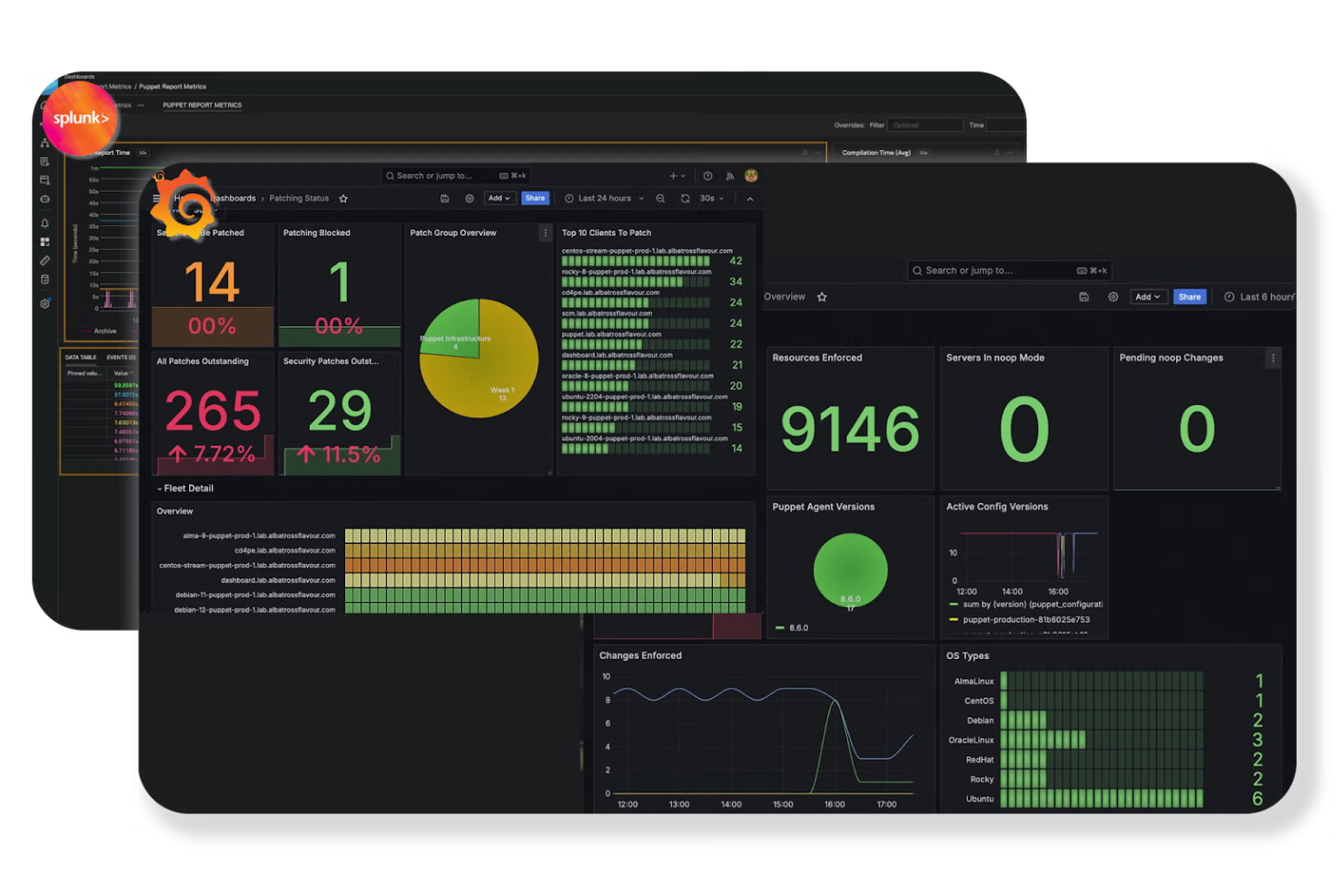
Puppet es una herramienta de gestión de configuración diseñada para administradores de TI y equipos de DevOps. Automatiza el aprovisionamiento, la configuración y la gestión de la infraestructura, ayudando a tu equipo a mantener entornos consistentes.
Por qué elegí Puppet: La herramienta utiliza playbooks para automatizar la gestión de configuración en múltiples servidores y funciona bien para empresas con entornos complejos. Es compatible con sistemas operativos como Linux, Windows, Unix y entornos en la nube, lo que permite una configuración consistente en infraestructuras heterogéneas.
El DSL de Puppet está adaptado para la gestión de configuración, pero también funciona bien junto a otros lenguajes de programación. También puedes aprovechar sus capacidades de automatización para reducir la intervención manual y el error humano.
Funciones destacadas e integraciones:
Funciones incluyen un lenguaje declarativo que simplifica las descripciones de configuración. Puppet proporciona una capa de abstracción de recursos que asegura configuraciones consistentes. También incluye herramientas de informes para ayudarte a monitorear y gestionar los cambios.
Integraciones incluyen AWS, Azure, Google Cloud Platform, VMware, Docker, GitHub, GitLab, Bitbucket, Jenkins, ServiceNow y más.
Pros and Cons
Pros:
- Potentes capacidades de gestión de configuración
- Lenguaje declarativo para configuraciones
- Sólidas características de cumplimiento y gobernanza
Cons:
- Curva de aprendizaje pronunciada para principiantes
- Requiere instalar el agente en el nodo

Bamboo
Ideal para la integración con Jira
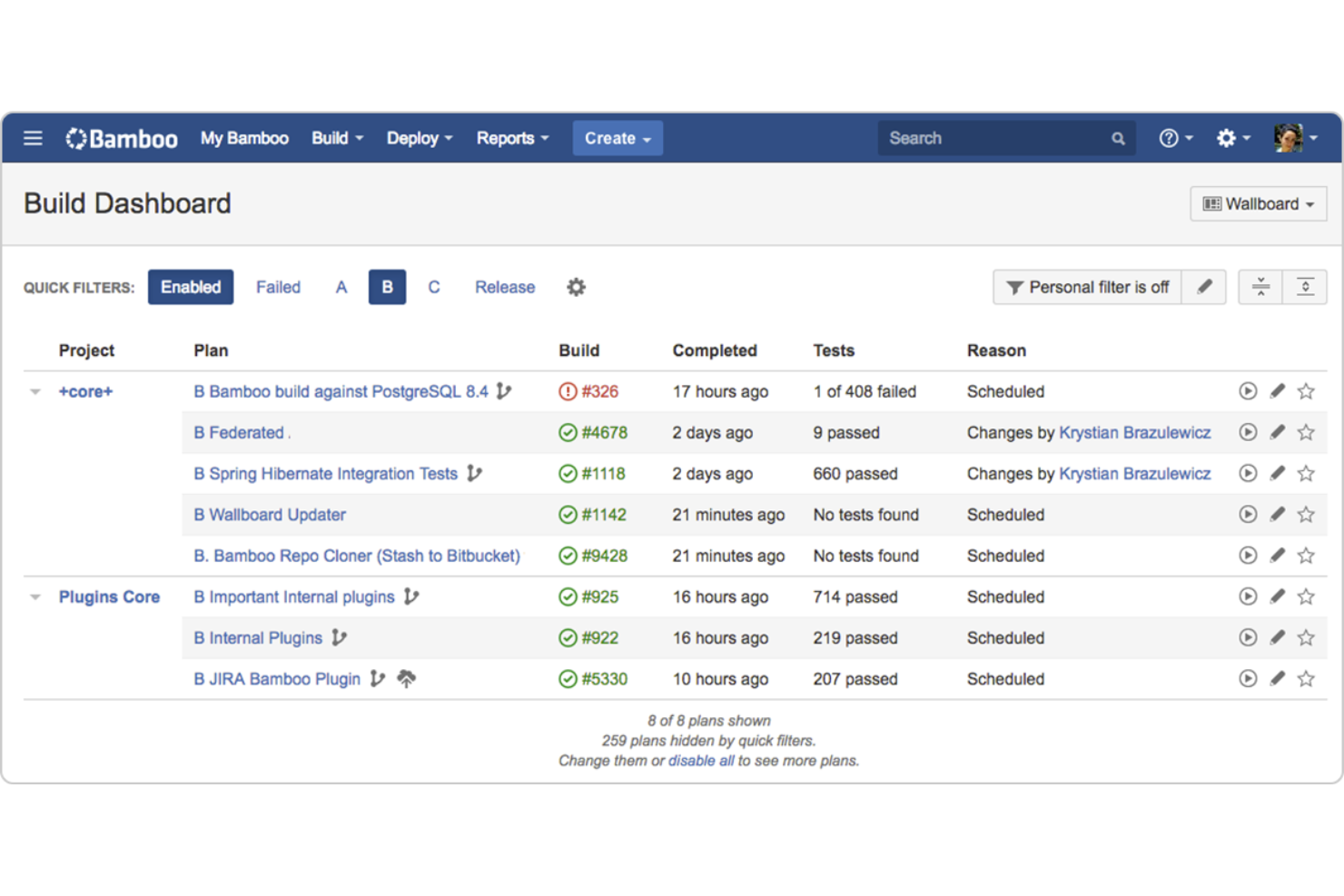
Bamboo es una herramienta de integración y entrega continua diseñada para equipos de desarrollo de software. Automatiza el proceso de compilación, pruebas y despliegue de código, lo que facilita a tu equipo la entrega de software de alta calidad.
Por qué elegí Bamboo: Es especialmente eficaz para los equipos que utilizan Jira, ya que ofrece una integración estrecha que mejora el seguimiento de proyectos. Bamboo admite fusiones y compilaciones automáticas, lo cual se alinea muy bien con sus capacidades de integración. Esta herramienta de CD permite la entrega continua mediante proyectos de despliegue automatizados vinculados a planes de compilación, y puedes gestionar y visualizar fácilmente tus lanzamientos. Puedes confiar en su soporte integrado para Git, Subversion y Mercurial, lo que simplifica el control de versiones.
Características destacadas e integraciones:
Las características incluyen la capacidad de ejecutar compilaciones en paralelo, asegurando una entrega más rápida de tu software. Ofrece proyectos de despliegue que te ayudan a gestionar lanzamientos con facilidad. Además, puedes utilizar sus agentes dedicados para optimizar los recursos de compilación.
Las integraciones incluyen Jira, Bitbucket, Confluence, Slack, Fisheye, Crucible, AWS CodeDeploy, Docker, Selenium, Opsgenie y más.
Pros and Cons
Pros:
- Fuerte integración con Jira
- Admite compilaciones en paralelo
- Soporte y automatización de proyectos de despliegue incorporados
Cons:
- Ecosistema de plugins limitado
- Configuración compleja


Azure DevOps es un completo conjunto de herramientas de desarrollo orientado a equipos de desarrollo de software, especialmente aquellos que forman parte del ecosistema de Microsoft. Proporciona funcionalidades en la nube para planificar, desarrollar, entregar y operar aplicaciones, asegurando un flujo de trabajo cohesivo para tu equipo.
Por qué elegí Azure DevOps: Soporta el ciclo completo de software de principio a fin e integra a la perfección con otros productos de Microsoft, lo que lo convierte en una excelente opción para equipos que ya utilizan tecnologías de Microsoft. Azure Pipelines permite la integración y entrega continuas. Puedes compilar, probar y desplegar apps en Python, Java, PHP, Ruby, Android e iOS, entre otros. Integra sugerencias de código asistidas por IA y herramientas de revisión para acelerar el desarrollo y reducir el error humano.
Azure Pipelines admite flujos de trabajo que construyen imágenes de contenedores y las envían a registros, ayudando a los equipos a implementar la contenerización como parte de sus pipelines CI/CD. Con Azure Boards puedes dar seguimiento al trabajo con tableros Kanban fáciles de usar, registros y reportes personalizados. También puedes gestionar el código fuente con Azure Repos, que ofrece repositorios privados ilimitados de Git.
Características y integraciones destacadas:
Características incluyen Azure Test Plans para probar y lanzar con confianza. Azure Artifacts te permite crear y compartir feeds de paquetes Maven, npm y NuGet. También puedes utilizar su wiki incorporado para documentar procesos y conocimientos.
Integraciones incluyen GitHub, Slack, Jenkins, Docker, Kubernetes, Visual Studio, Microsoft Teams y más.
Pros and Cons
Pros:
- Integración cohesiva con productos Microsoft
- Capacidades CI/CD extensas
- Soporta múltiples lenguajes de programación
Cons:
- Configuración compleja para nuevos usuarios
- Integraciones limitadas con productos que no son de Microsoft

CircleCI
El panel de CircleCI muestra el estado de los proyectos, los flujos de trabajo y la actividad de CI/CD.
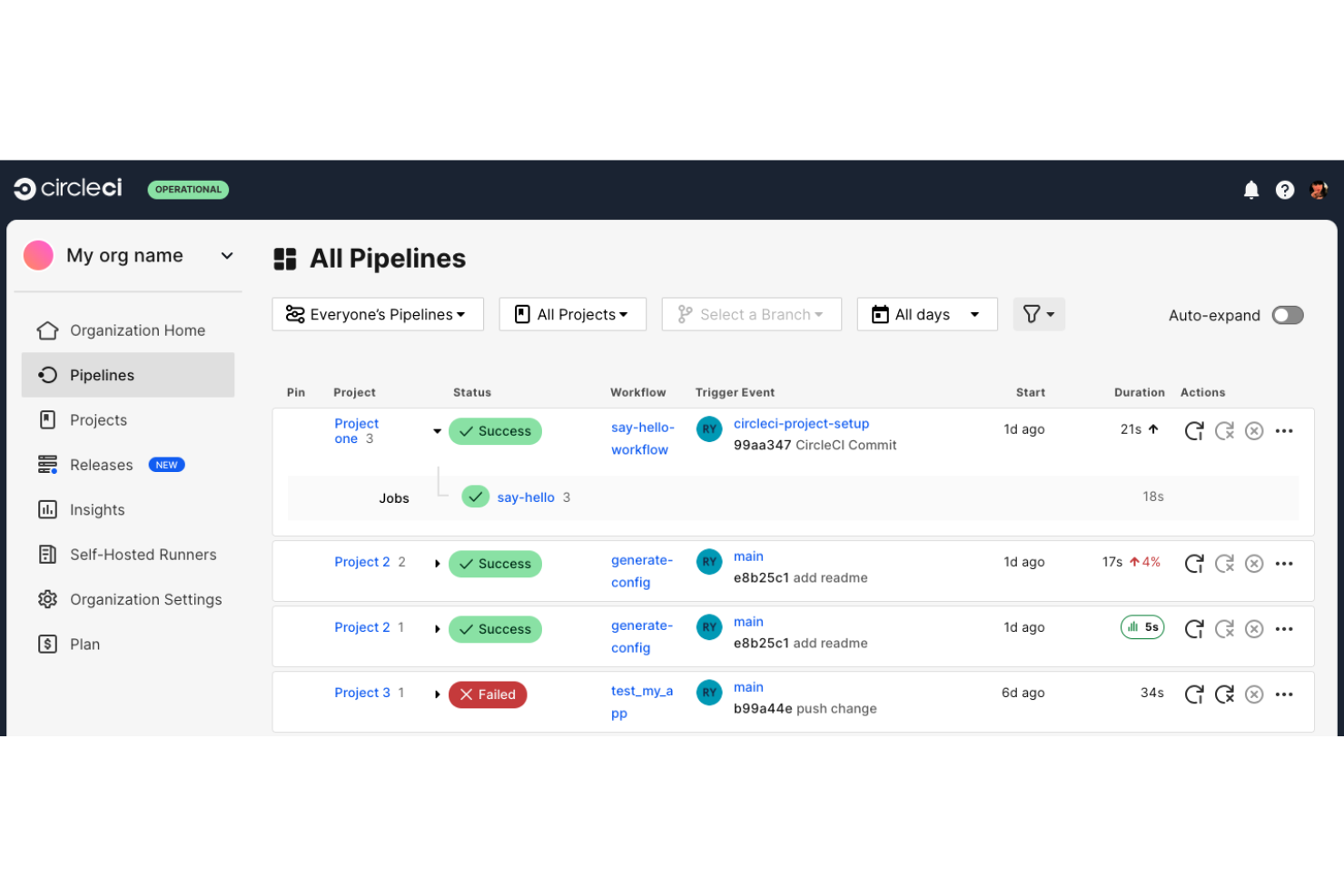
CircleCI es una plataforma de integración y entrega continua dirigida a equipos de desarrollo de software que buscan compilar, probar y desplegar código rápidamente. Automatiza el proceso de desarrollo, asegurando retroalimentación más rápida y lanzamientos más confiables.
Por qué elegí CircleCI: Se enfoca en ofrecer velocidad y confiabilidad asistidas por IA, lo que la convierte en una excelente opción para equipos que necesitan tiempos de respuesta rápidos. La función de paralelismo de CircleCI te permite ejecutar múltiples pruebas simultáneamente, reduciendo significativamente los tiempos de compilación. Con sus capacidades de almacenamiento en caché, puedes evitar trabajos redundantes y acelerar tus compilaciones.
También puedes personalizar tus flujos de trabajo con archivos YAML para lograr mayor flexibilidad. Los flujos de trabajo automatizados permiten la implementación continua, activando los despliegues después de compilaciones y pruebas exitosas. Los desarrolladores pueden compilar, probar y desplegar aplicaciones en contenedores definiendo imágenes Docker y flujos de trabajo dentro de los pipelines de CI/CD.
Características destacadas e integraciones:
Características incluyen la capacidad de ejecutar tareas en contenedores Docker, lo que mejora la reproducibilidad. CircleCI ofrece almacenamiento en caché personalizado para mejorar los tiempos de compilación reutilizando datos de ejecuciones previas. También puedes usar su panel de información para monitorear y optimizar tus flujos de trabajo.
Integraciones incluyen GitHub, Bitbucket, AWS, Google Cloud Platform, Heroku, Docker, Slack, Jira, Maven, Datadog y más.
Pros and Cons
Pros:
- Compilaciones y pruebas rápidas
- Admite ejecución de pruebas en paralelo
- Personalizable con archivos YAML
Cons:
- Soporte limitado para flujos de trabajo de despliegue multicloud
- Depurar flujos de trabajo puede ser menos intuitivo
Otras herramientas de automatización de DevOps
Estas son algunas opciones adicionales de herramientas de automatización de DevOps que no llegaron a mi selección, pero que aún merece la pena considerar:
- Terragrunt
Ideal para gestionar módulos de Terraform
- Spacelift
Ideal para políticas como código
- Northflank
Ideal para la implementación y escalado rápidos impulsados por IA


Wie ich DevOps-Automatisierungstools bewerte
Ich bewerte diese Tools auf zwei Ebenen: die grundlegenden Fähigkeiten, die ein Tool haben muss, und die Unterscheidungsmerkmale – wie GitOps-Unterstützung oder Value Stream Mapping –, die ein Tool besser geeignet machen als ein anderes.
Kernfunktionen (Mindestvoraussetzungen für diese Liste)
Wenn ich Tools für meine Liste auswähle, bewerte ich jedes einzelne auf einer Skala von 0 (Funktion fehlt) bis 5 (ausgezeichnet in diesem Bereich) in Bezug auf jede der unten aufgeführten Kernfunktionen. Danach rechne ich die Gesamtpunktzahl des Tools in einen Prozentsatz um. Jedes Tool muss eine Mindestgesamtpunktzahl von 65% erreichen, um berücksichtigt zu werden.
- CI/CD-Pipeline-Automatisierung: Ich suche nach Tools, mit denen Teams mehrstufige Build-, Test- und Deployment-Pipelines definieren können – wie etwa das automatische Auslösen eines Testpakets bei jeder Pull-Anfrage und die Promotion in die Produktion beim Merge.
- Infrastructure as Code-Unterstützung: Ob Terraform-Module oder native Vorlagen – ich bewerte, wie gut eine Plattform Cloud-Ressourcen über versionierte Konfigurationsdateien bereitstellt und verwaltet.
- Integrations-Ökosystem: Ich prüfe, ob native Verbindungen zu den Tools bestehen, die Produktteams bereits täglich nutzen – Git-Anbieter, Container-Registries, Cloud-Plattformen und PM-Tools wie Jira oder Linear.
- Release-Orchestrierung & Monitoring: Die Koordination eines Multi-Service-Releases in Staging und Produktion ist die Bewährungsprobe. Ich achte auf Rollback-Funktionen und Live-Überwachung des Deployment-Status.
- Umgebungs- & Konfigurationsmanagement: Ich bewerte, wie jedes Tool das Hochfahren von Entwicklungs-, Staging- und Produktionsumgebungen mit versionierten Konfigurationen und sicherer Geheimnisverwaltung integriert.
- DevOps-Reporting & Analytics: Dashboards zu DORA-Kennzahlen wie Deployment-Frequenz und Change Lead Time sind hier wichtig. Ich suche nach transparenter Übersicht über Pipeline-Gesundheit und Liefergeschwindigkeit.
Habe ich eine Liste von Tools, die diesen Kriterien entsprechen, sehe ich mir an, was jede Plattform besonders macht.
Unterscheidungsmerkmale (Was Anbieter voneinander abhebt)
So vergleiche ich verschiedene Anbieter:
Herausragende Funktionen
Value Stream Mapping ist für mich entscheidend – es verbindet Engineering-Aktivitäten mit Produktergebnissen, sodass man einen Feature-Prozess vom Backlog-Ticket bis zum Produktiv-Deployment nachvollziehen kann. Ich achte auch auf integriertes Feature Flag Management, das Produktteams ermöglicht, kontrollierte Rollouts und A/B-Tests durchzuführen, ohne neuen Code bereitzustellen. Developer-Self-Service-Portale sind ein weiteres Unterscheidungsmerkmal, da sie Teams das Starten von Umgebungen und das Auslösen von Deployments ermöglichen, ohne auf das Ops-Team warten zu müssen.
Über Funktionen hinaus
Security und Compliance sind wichtig – vor allem für Teams in regulierten Branchen, in denen SOC 2- oder ISO 27001-Zertifizierungen Grundvoraussetzung sind. Ich achte auch auf Preistransparenz, da sich Build-Minuten-basierte Modelle bei wachsendem Pipeline-Volumen unvorhersehbar verteuern können. Wie gut ein Tool mit Produktmanagement-Plattformen wie Jira oder Linear verbunden ist, ist für mich ebenfalls ein Kriterium, denn diese Verbindung ermöglicht es Produktmanagern, ein ausgeliefertes Feature bis zur ursprünglichen User Story zurückzuverfolgen.
Cómo elegir herramientas de automatización de DevOps
Es fácil perderse entre largas listas de características y complejas estructuras de precios. Para ayudarte a mantener el enfoque mientras avanzas en tu proceso único de selección de software, aquí tienes una lista de factores que debes tener en cuenta:
| Factor | Qué debes considerar |
|---|---|
| Escalabilidad | ¿La herramienta crecerá junto con tu equipo? Busca soluciones capaces de gestionar mayores cargas de trabajo y más usuarios sin caídas significativas del rendimiento. |
| Integraciones | ¿Funciona con tus herramientas actuales? Comprueba la compatibilidad con tus sistemas actuales, como el control de versiones, los proveedores de servicios en la nube y las plataformas de comunicación. |
| Personalización | ¿Puedes adaptarla a tus necesidades? Evalúa con qué facilidad puedes ajustar los flujos de trabajo y la configuración para adaptarlos a tus procesos y objetivos específicos. |
| Facilidad de uso | ¿La interfaz es intuitiva para tu equipo? Considera la rapidez con la que tu equipo puede aprender a utilizar la herramienta y empezar a usarla eficazmente sin una formación extensa. |
| Implementación e incorporación | ¿La transición es sencilla? Busca herramientas con recursos claros para la incorporación, como tutoriales, plantillas y asistencia, que faciliten el cambio. |
| Coste | ¿Se ajusta a tu presupuesto? Compara los precios con tu presupuesto y considera cualquier coste oculto, como complementos o actualizaciones necesarias, que pueda afectar al total. |
| Medidas de seguridad | ¿Están protegidos tus datos y operaciones? Asegúrate de que la herramienta ofrece medidas de seguridad, como cifrado y controles de acceso, para proteger la información confidencial. |
¿Qué son las herramientas de automatización de DevOps?
Las herramientas de automatización de DevOps son soluciones de software que automatizan los procesos involucrados en el desarrollo y la implementación de software. Los desarrolladores de software, los profesionales de TI y los equipos de DevOps generalmente utilizan herramientas para mejorar la colaboración y la eficiencia. Las capacidades de implementación automatizada, integración continua y gestión de la infraestructura ayudan a reducir los errores y acelerar el proceso de entrega. En general, estas herramientas ofrecen un valor significativo al permitir que los equipos entreguen software de alta calidad de forma más rápida y confiable.
Características
Al seleccionar herramientas de automatización de DevOps, presta atención a las siguientes características clave:
- Implementación automatizada: Simplifica el proceso de lanzamiento, reduce los errores manuales y acelera los tiempos de entrega.
- Integración continua: Combina los cambios de código con regularidad, lo que garantiza que las nuevas actualizaciones se prueben y se integren correctamente.
- Infraestructura como código: Gestiona la infraestructura mediante código, lo que permite realizar implementaciones uniformes y repetibles.
- Integración con el control de versiones: Funciona correctamente con los sistemas de control de versiones, facilitando la colaboración y el seguimiento de cambios.
- Políticas como código: Hace cumplir la conformidad y la gobernanza mediante la definición de políticas en código, garantizando la uniformidad entre los entornos.
- Detección de desviaciones: Identifica y corrige cambios inesperados en la infraestructura, manteniendo la integridad del sistema.
- Flujos de trabajo personalizables: Permiten que los equipos adapten los procesos a sus necesidades específicas, aumentando la flexibilidad y la eficiencia.
- Medidas de seguridad: Proporcionan cifrado y controles de acceso para proteger los datos confidenciales y garantizar operaciones seguras.
- Escalabilidad: Admite cargas de trabajo y equipos en crecimiento, adaptándose a una mayor demanda sin problemas de rendimiento.
- Herramientas de colaboración: Refuerzan la comunicación y la coordinación del equipo, mejorando la productividad y los resultados de los proyectos.
Beneficios
La implementación de herramientas de automatización de DevOps ofrece varios beneficios para tu equipo y tu empresa. Estos son algunos de los que puedes esperar:
- Implementación más rápida: Los procesos de implementación automatizados reducen las tareas manuales, lo que permite que tu equipo publique actualizaciones más rápidamente.
- Colaboración mejorada: La integración con herramientas de control de versiones y colaboración fomenta el trabajo en equipo y la comunicación.
- Uniformidad y confiabilidad: La infraestructura como código garantiza que los entornos sean uniformes, reduciendo el riesgo de errores.
- Mayor seguridad: Las medidas de seguridad, como el cifrado y los controles de acceso, protegen tus datos y operaciones.
- Escalabilidad: Admite el crecimiento de tu equipo y carga de trabajo, adaptándose a una mayor demanda sin comprometer el rendimiento.
- Menor tiempo de inactividad: La detección de desviaciones y la integración continua ayudan a identificar y resolver problemas antes de que provoquen interrupciones.
- Eficiencia de costes: La automatización de tareas repetitivas ahorra tiempo y recursos, lo que permite utilizar el presupuesto de forma más eficiente.
Costes y precios
Seleccionar herramientas de automatización de DevOps requiere comprender los diversos modelos de precios y planes disponibles. Los costes varían según las características, el tamaño del equipo, los complementos y otros factores. La siguiente tabla resume los planes habituales, sus precios promedio y las características que suelen incluir las soluciones de herramientas de automatización de DevOps:
Tabla comparativa de planes para herramientas de automatización de DevOps
| Tipo de plan | Precio promedio | Características habituales |
|---|---|---|
| Plan gratuito | $0 | Capacidades básicas de CI/CD, integraciones limitadas y asistencia de la comunidad. |
| Plan personal | $4-$29/usuario/mes | Funciones mejoradas de CI/CD, asistencia básica y acceso a plantillas y scripts de automatización limitados. |
| Plan empresarial | $25-$52/usuario/mes | Integraciones avanzadas, asistencia prioritaria, flujos de trabajo personalizables y funciones de seguridad. |
| Plan corporativo | $75-$150/usuario/mes | Medidas de seguridad exhaustivas, asistencia exclusiva, integraciones personalizadas y análisis avanzados. |
Preguntas frecuentes sobre herramientas de automatización de DevOps
Aquí tienes respuestas a algunas preguntas frecuentes sobre las herramientas de automatización de DevOps:
¿Cuál es la diferencia entre DevOps y las herramientas de automatización de DevOps?
DevOps es un conjunto de prácticas destinadas a mejorar la colaboración y la eficiencia entre los equipos de desarrollo y operaciones. Las herramientas de automatización de DevOps son soluciones de software que automatizan diversos procesos de DevOps, como la integración, las pruebas y la implementación. Si estás implementando prácticas de DevOps, utilizar herramientas de automatización puede ayudar a tu equipo a reducir el trabajo manual y aumentar la coherencia entre los proyectos.
¿Pueden las herramientas de automatización de DevOps funcionar con sistemas heredados existentes?
Sí, muchas herramientas de automatización de DevOps pueden integrarse con sistemas heredados existentes. Al seleccionar una herramienta, comprueba su compatibilidad con tu infraestructura y software actuales. Algunas herramientas ofrecen complementos o API para facilitar la integración, lo que puede ayudar a simplificar la transición y garantizar que tu equipo pueda aprovechar la automatización sin tener que renovar los sistemas existentes.
¿Cómo sé si mi equipo está preparado para utilizar herramientas de automatización de DevOps?
Para determinar si tu equipo está preparado, evalúa el flujo de trabajo actual e identifica los cuellos de botella en tus procesos de desarrollo e implementación. Si las tareas manuales están ralentizando a tu equipo, es un buen indicador de que la automatización podría aportar valor. Considera comenzar con un proyecto piloto para probar la eficacia de las herramientas y conseguir el apoyo de tu equipo.
¿Son seguras las herramientas de automatización de DevOps?
Sí, la mayoría de las herramientas de automatización de DevOps incluyen funciones de seguridad como el cifrado y los controles de acceso. Sin embargo, es fundamental revisar las medidas de seguridad específicas de cualquier herramienta que estés considerando. Busca funciones como el control de acceso basado en roles y los registros de auditoría para garantizar que tus datos y operaciones sigan siendo seguros mientras automatizas los procesos.
Qué sigue:
Si estás investigando herramientas de automatización de DevOps, ponte en contacto con un asesor de SoftwareSelect para obtener recomendaciones gratuitas.
Rellenas un formulario y tienes una breve conversación en la que se analizan los detalles específicos de tus necesidades. Después, recibirás una lista breve de software para revisar. Incluso te ayudarán durante todo el proceso de compra, incluidas las negociaciones de precios.