

10 mejores herramientas de diseño de productos analizadas para 2026

10 Lista breve de las mejores herramientas de diseño de productos


Como gerente de producto, conozco la dificultad de convertir grandes ideas en diseños pulidos y fáciles de usar.
En los mejores días, me encantaba ver cómo los bocetos cobraban vida, colaborar con diseñadores e ingenieros que simplemente lo entendían y observar cómo los usuarios interactuaban con un producto que parecía no requerir ningún esfuerzo.
Pero en los días difíciles, me enfrentaba a herramientas de diseño poco prácticas que convertían la colaboración en una pesadilla, interminables ciclos de comentarios que ralentizaban todo y traspasos frustrantes a los desarrolladores que provocaban expectativas desalineadas.
Al mirar atrás, me di cuenta de que muchas de estas dificultades se debían a no contar con la mejor herramienta de diseño de productos para optimizar el proceso.
Por eso he preparado esta lista de mis principales herramientas de diseño de productos, para que dediques menos tiempo a luchar con el software y más tiempo a crear productos que encanten a tus usuarios. Empecemos.
Por qué confiar en nuestras recomendaciones de software
Nuestro equipo lleva probando y evaluando software desde 2012. Como gestores de producto, sabemos lo difícil —y lo importante— que es elegir el software adecuado.
Para esta guía, evaluamos las herramientas mediante pruebas prácticas e investigación independiente, puntuando las herramientas según nuestros criterios de selección.
Nuestras reseñas reflejan nuestro criterio editorial humano, no un discurso de ventas.
Resumen de las mejores herramientas de diseño de productos
Esta tabla comparativa resume los detalles de precios de mi selección de las mejores herramientas de diseño de productos para ayudarte a encontrar la opción más adecuada para tu presupuesto y las necesidades de tu empresa.
| Tool | Best For | Trial Info | Price | ||
|---|---|---|---|---|---|
| 1 | Ideal para analizar comentarios de usuarios en el diseño | Plan gratuito disponible | Desde $10/mes (facturado anualmente) | Website | |
| 2 | La mejor plataforma de diseño para principiantes para crear gráficos para redes sociales | Plan gratuito disponible | Desde $12/mes (facturado anualmente) | Website | |
| 3 | La mejor herramienta de diseño colaborativo para wireframes y diseño UI/UX | Disponible plan gratuito | Desde $16/usuario/mes (facturado anualmente) | Website | |
| 4 | Ideal para diseñar rápidamente bocetos de baja fidelidad con componentes de interfaz de usuario prediseñados | Prueba gratuita de 14 días disponible | Desde $16/usuario/mes (facturado anualmente) | Website | |
| 5 | Mejor para prototipos y wireframes en la nube de aplicaciones multidispositivo | Plan gratuito + demo disponible | Desde $12/mes (facturado anualmente) | Website | |
| 6 | La mejor herramienta de diseño basada en vectores para diseños en movimiento y animaciones | Prueba gratuita de 7 días disponible | Desde $22.99/mes (facturado anualmente) | Website | |
| 7 | Ideal para crear diseños UI/UX en el entorno Mac | Prueba gratuita de 30 días | Desde $12/editor/mes (facturado anualmente) | Website | |
| 8 | Ideal para estudios 3D rápidos y producción de gráficos de presentación limpios | Prueba gratuita de 30 días | Desde $119 /año | Website | |
| 9 | Ideal para el diseño de productos mecánicos en 3D | Demostración gratuita disponible | Precio a consultar | Website | |
| 10 | Ideal para manejar imágenes vectoriales | Prueba gratuita de 15 días | Desde $89/año | Website |
Reseñas de las mejores herramientas de diseño de productos
A continuación se encuentran mis resúmenes detallados de las mejores herramientas de diseño de productos que llegaron a mi lista breve. Mis reseñas ofrecen un análisis detallado de las funciones clave, las ventajas y desventajas, las integraciones y los casos de uso ideales de cada herramienta para ayudarte a encontrar la mejor opción para ti.

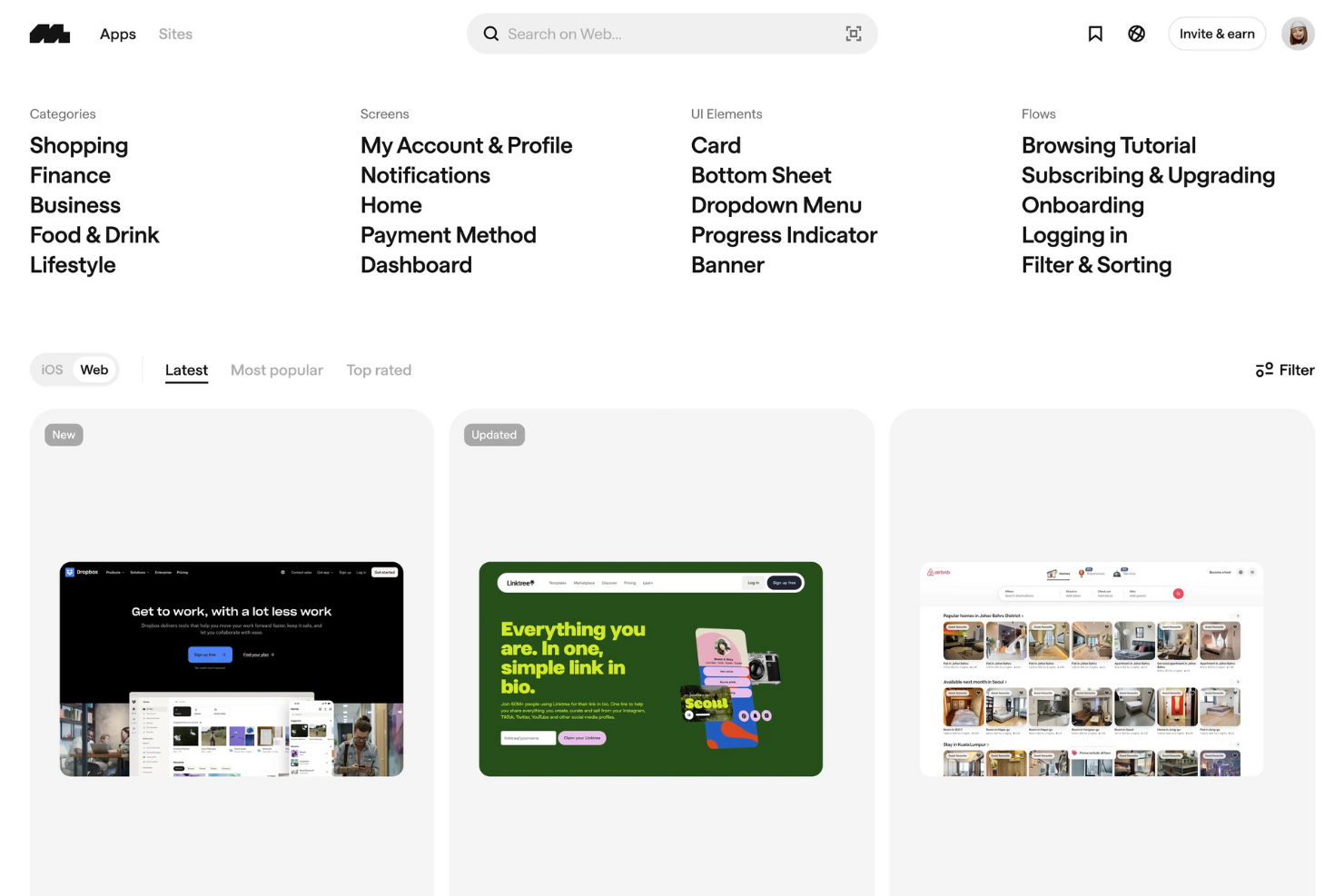
Mobbin es una mina de oro para los diseñadores de productos, ofreciendo una vasta biblioteca de inspiración de diseño de aplicaciones móviles y web reales. Es un recurso imprescindible para descubrir los últimos patrones de diseño UI y UX, ayudándote a crear diseños innovadores y fáciles de usar.
Por qué elegí Mobbin: Elegí Mobbin porque conecta la inspiración de diseño con ideas accionables sobre los usuarios. Puedes explorar flujos de usuario detallados y patrones, además de revisar comentarios analizados por IA para ver qué resuena con los usuarios. Esta combinación te ayuda a diseñar productos que no solo lucen bien, sino que también funcionan mejor en el mundo real.
También aprecio su integración con herramientas como Figma y HubSpot, lo que facilita pasar de la investigación a la iteración sin interrumpir tu flujo de trabajo.
Características destacadas e integraciones de Mobbin
Características destacadas incluyen una extensa biblioteca de interfaces con flujos de usuario a pantalla completa, analíticas de retroalimentación impulsadas por IA que resaltan tendencias clave de diseño y cursos educativos para mejorar tus habilidades de diseño. Mobbin también ofrece prototipos interactivos y vistas previas en video para ayudar a visualizar las experiencias de usuario antes de su implementación.
Integraciones incluyen Figma, Zapier, Stripe, Vercel, Notion, Supabase, Slack, Trello, GitHub, Asana, Google Workspace y Airtable.
Pros and Cons
Pros:
- Vasta biblioteca de pantallas reales de aplicaciones
- Se integra con Figma y Zapier
- La IA analiza los comentarios de usuario centralizados
Cons:
- Enfocado principalmente en diseños móviles
- Personalización limitada para colecciones guardadas
Canva
La mejor plataforma de diseño para principiantes para crear gráficos para redes sociales
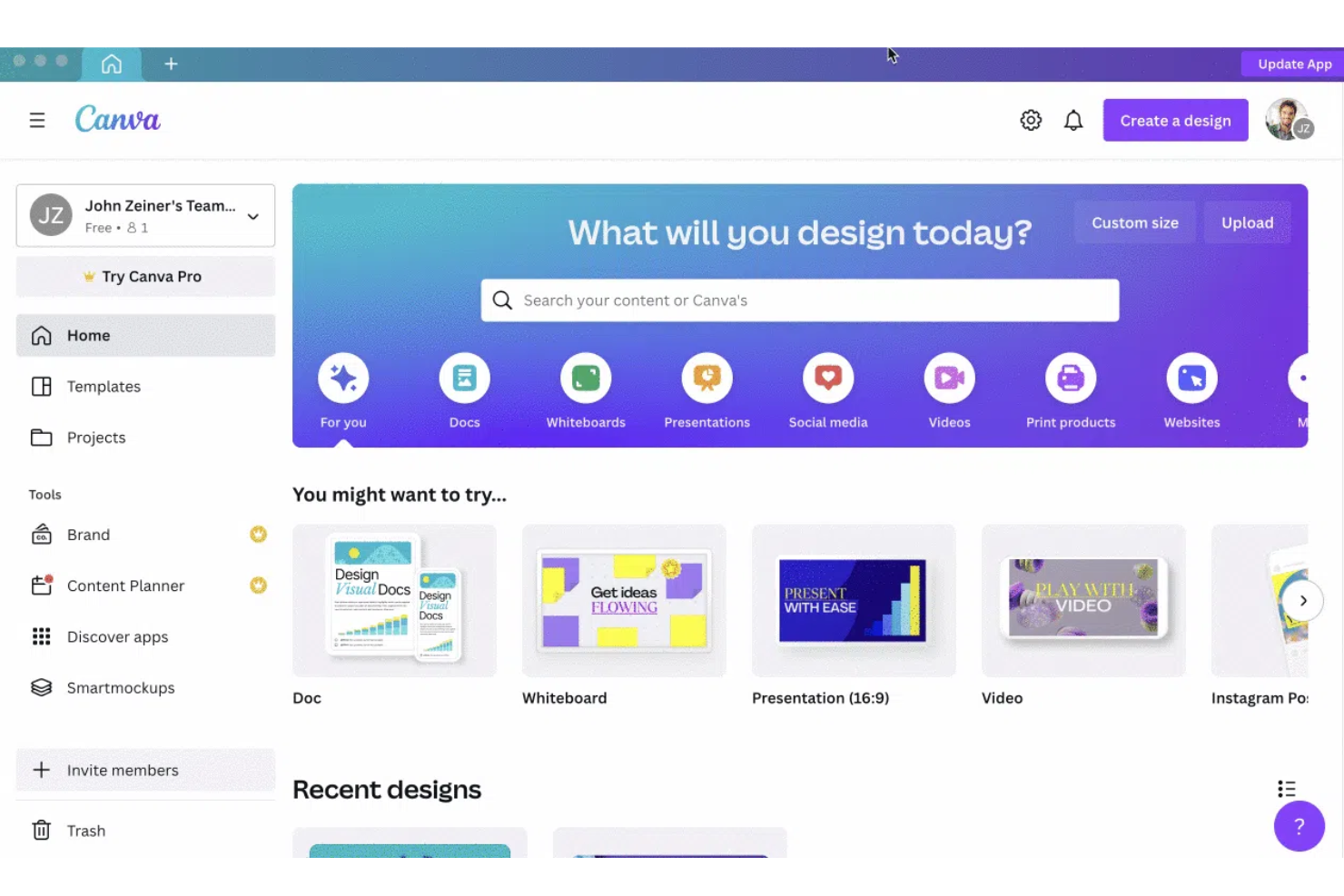
Canva es la aplicación de diseño preferida por quienes no son diseñadores y desean crear publicaciones llamativas para redes sociales, presentaciones, pósteres y otros contenidos visuales. Con una interfaz intuitiva de arrastrar y soltar, además de una amplia biblioteca de plantillas y elementos de diseño como tipografías, ilustraciones, fotos de stock, clips de audio y video, Canva es la herramienta de diseño de productos ideal para personas sin experiencia en diseño.
La aplicación está disponible en iOS, Android y la web.
Por qué elegí Canva: Es una solución integral para todo tipo de necesidades de diseño. Tanto si eres principiante como experto, la abundancia de herramientas de Canva, su enorme biblioteca de plantillas gratuitas y de pago, elementos vectoriales, funciones colaborativas y un alto nivel de personalización te ayudarán a crear diseños atractivos de forma rápida y sin esfuerzo. La aplicación ofrece más de 400.000 presets de diseño profesional, de los cuales 250.000 son gratuitos. Estos incluyen presentaciones, correos electrónicos, videos, audio, publicaciones para redes sociales, etc.
Canva también ofrece almacenamiento en la nube ilimitado para todos tus diseños, y su interfaz está disponible en más de 130 idiomas, lo que facilita aún más el uso para diseñadores y no diseñadores de todo el mundo.
Funciones y Integraciones Destacadas de Canva
Funciones destacadas incluyen accesibilidad desde cualquier dispositivo, edición de texto e imagen, personalización de colores y opciones de diseño ilimitadas. La búsqueda y organización en categorías facilitan encontrar imágenes de stock, iconos y fuentes. La colaboración en tiempo real permite invitar a otros a editar o dar retroalimentación. Canva también ofrece sugerencias de diseño con IA, gestión de kits de marca para mantener la coherencia, una vasta biblioteca de plantillas y la posibilidad de publicar directamente en redes sociales o servicios de impresión.
Integraciones incluyen herramientas como Bizplay, Bransfetch, Dropbox, Dynamic QR Codes, FlippingBook, Google Maps, HubSpot, LinkedIn, MailChimp, Mockups, Publr y VNTANA.
Pros and Cons
Pros:
- Enorme biblioteca de plantillas para formatos diversos de creación de diseños
- Directorio de marca para almacenar toda la información relacionada (incluso colores)
- Interfaz limpia
Cons:
- Sin opciones avanzadas de tipografía como kerning y desplazamiento de línea
- Las opciones de impresión directa no existen

Figma
La mejor herramienta de diseño colaborativo para wireframes y diseño UI/UX
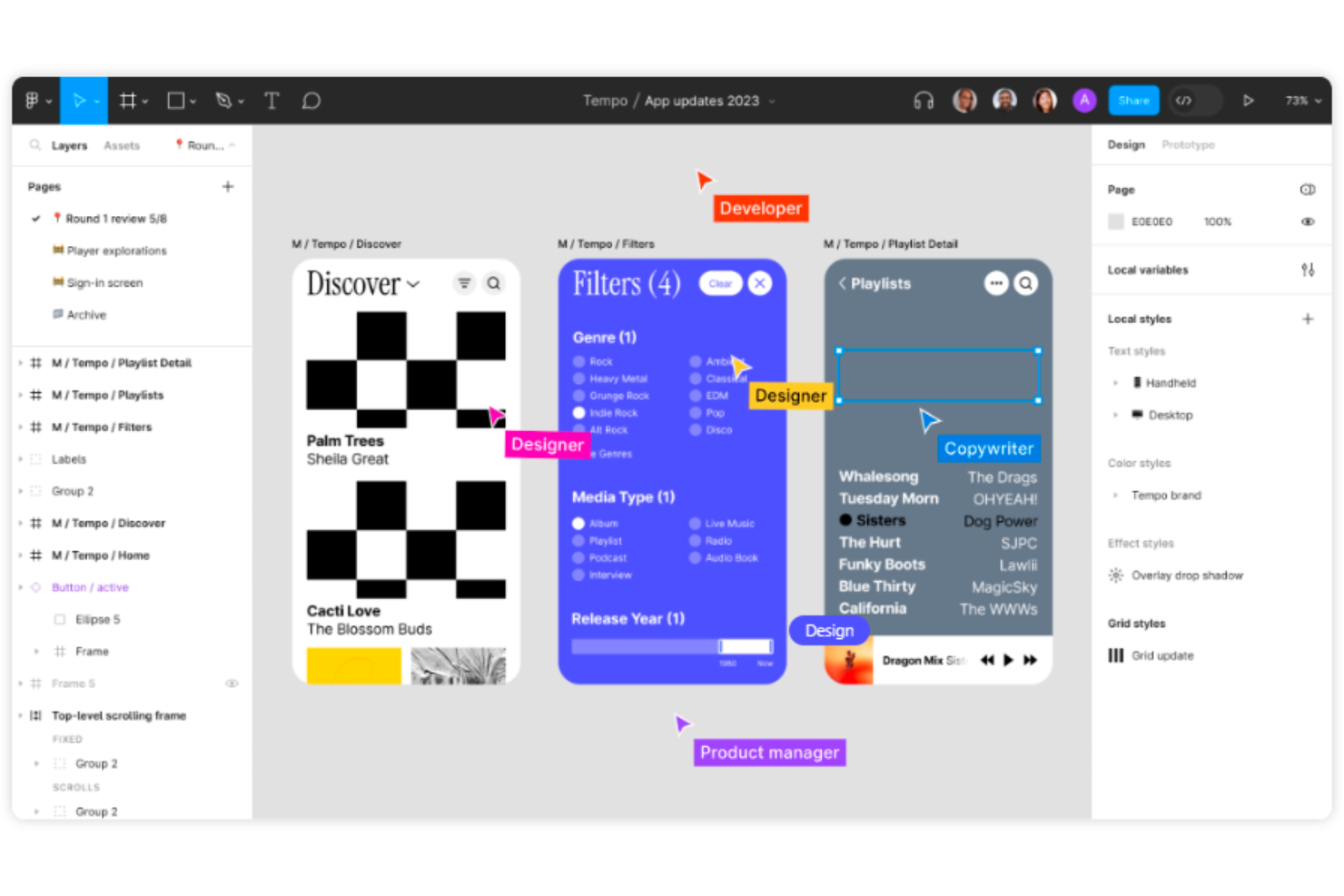
Figma es una herramienta colaborativa de diseño de interfaces que ayuda a crear wireframes de sitios web, publicaciones para redes sociales, interfaces de aplicaciones móviles y prototipos de diseño. Con elementos de UI intuitivos, superposiciones dinámicas, GIFs animados y compatibilidad multiplataforma, Figma es un referente dentro del mundo del diseño.
Por qué elegí Figma: Ninguna herramienta de diseño de productos se compara con Figma en cuanto a funcionalidades colaborativas. Con Figma, puedes diseñar, presentar y colaborar desde cualquier lugar.
Para ver cómo evoluciona un diseño en tiempo real, los miembros del equipo pueden co-crear y dar retroalimentación en tiempo real. Usando el modo de observación de Figma, puedes seguir cada movimiento del presentador y comprender cómo avanza el diseño y cómo replicar esos cambios si es necesario. Además, Figma cuenta con plugins para todo: bancos de imágenes, accesibilidad de color, diagramas de flujo, gráficos y más.
Características y integraciones destacadas de Figma
Las características destacadas incluyen colaboración basada en la nube para trabajo en equipo en tiempo real, diseño y prototipado integrados, sistema de componentes reutilizables para la consistencia, control de versiones para facilitar el seguimiento, plugins extensos para automatización y accesibilidad, y acceso multiplataforma para usar desde cualquier lugar.
Las integraciones incluyen más de 30 herramientas, como Asana, Confluence, Dropbox, GitLab, Lingo, Microsoft Teams, Mixpanel, Pendo, Sprig y UserTesting.
Pros and Cons
Pros:
- Arrastrar y soltar e importación de archivos para prototipos ágiles
- Excelentes plugins
- Colaboración en tiempo real increíble
Cons:
- Sin soporte fuera de línea ni en dispositivos móviles
- Varias páginas complican las microinteracciones en prototipos

Balsamiq
Ideal para diseñar rápidamente bocetos de baja fidelidad con componentes de interfaz de usuario prediseñados
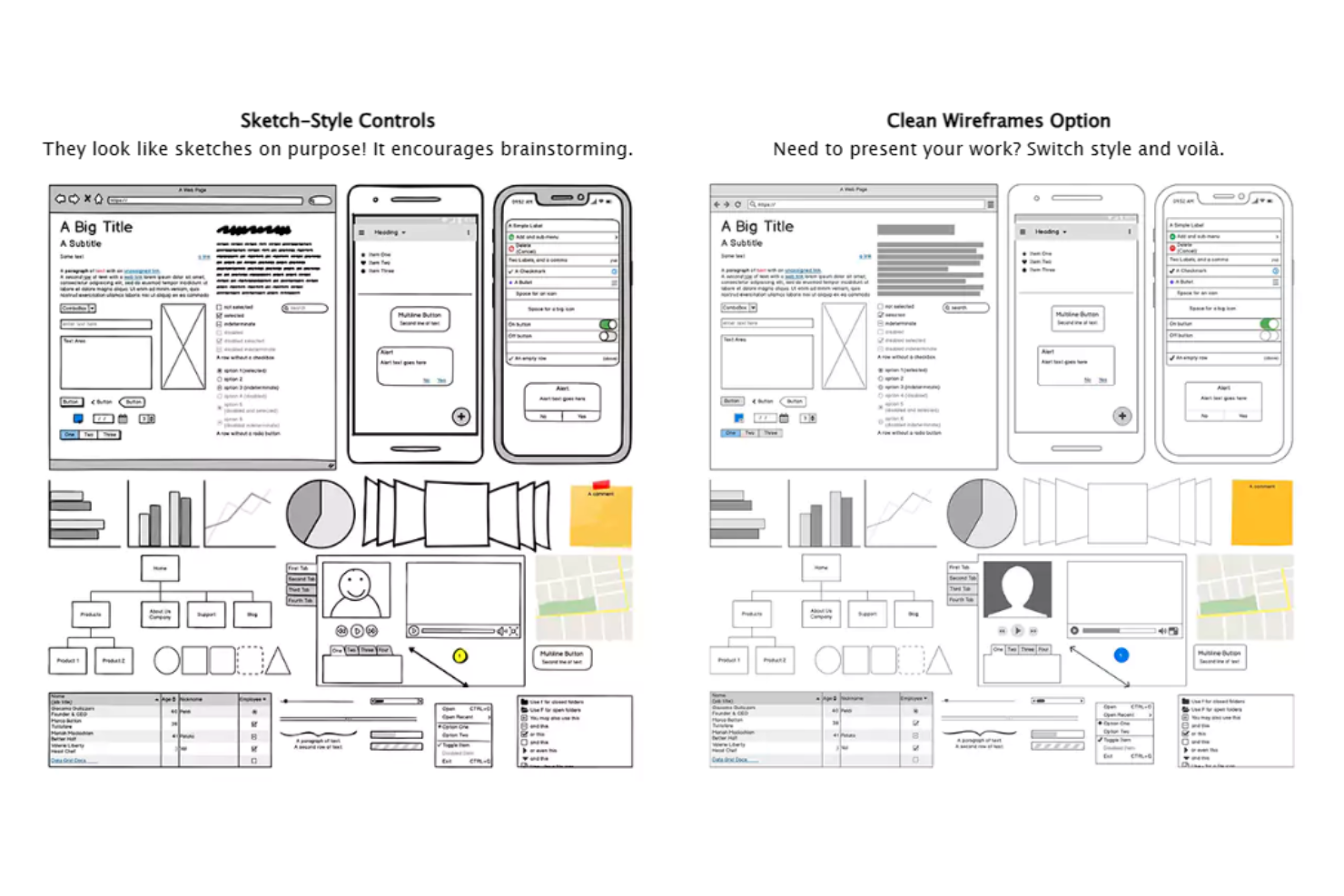
Balsamiq es una herramienta de creación de bocetos de interfaz de usuario de baja fidelidad, fácil de usar y rápida de aprender, que simula la experiencia de dibujar un diseño en un bloc de notas o una pizarra. Está disponible para Mac y PC (mediante una compra e instalación de una licencia individual de pago único). También cuenta con una versión web llamada Balsamiq Cloud (que sigue un modelo de precios de suscripción mensual).
Por qué elegí Balsamiq: Facilita la creación de bocetos y maquetas de baja fidelidad. No requiere configuración inicial ni una curva de aprendizaje. Cuenta con una enorme biblioteca de recursos integrados que contiene diversos elementos, como preajustes de plantillas y componentes de interfaz de usuario. Puedes arrastrar y soltar estos elementos para crear rápidamente proyectos y vincular marcos entre sí. Balsamiq es una herramienta excelente para crear pantallas base y prototipos para diseños de aplicaciones y sitios web.
Características destacadas e integraciones de Balsamiq
Entre sus características destacadas se incluyen una interfaz de usuario limpia, intuitiva y extremadamente fácil de usar, que ofrece de antemano todas las opciones para los elementos de diseño prediseñados. Los usuarios pueden arrastrar fácilmente iconos y componentes directamente a sus diseños de bocetos sin procesar, lo que hace que el proceso de creación sea rápido y fluido. La herramienta también proporciona enlaces entre varias maquetas para simular el flujo de trabajo del usuario.
Balsamiq también permite a los usuarios exportar imágenes independientes de documentos PDF con hipervínculos en los que se puede hacer clic y ofrece un proceso de incorporación fluido para los nuevos usuarios.
Integraciones incluyen Confluence, Trello, Google Workspace, Jira, Jira Service Management, Azure AD y Shift.
Pros and Cons
Pros:
- Componentes y plantillas prediseñados para crear bocetos rápidamente
- Funciones sencillas de vinculación y presentación interactiva a pantalla completa
- Bocetos móviles, web y de escritorio dentro de una sola aplicación
Cons:
- Opciones de personalización limitadas para crear mapas del sitio
- No hay contenido de guía ni de incorporación disponible

Marvel
Mejor para prototipos y wireframes en la nube de aplicaciones multidispositivo
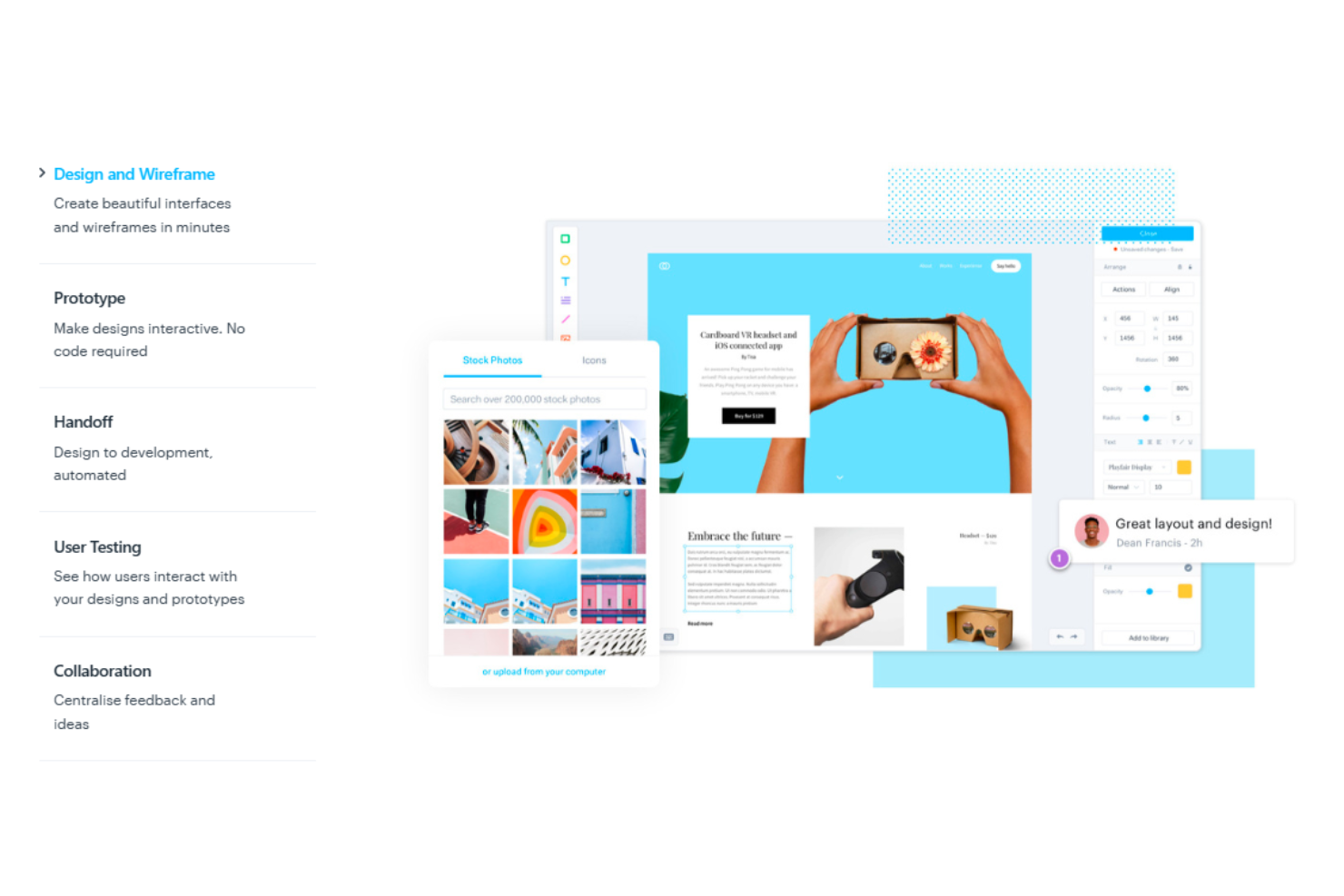
Marvel es una plataforma de diseño para productos digitales ideal para principiantes que desean visualizar sus diseños mediante wireframes y prototipos. El software ayuda a los usuarios a crear rápidamente maquetas básicas. Posteriormente, puedes mostrar a los clientes cómo se vería un sitio web o una aplicación en múltiples plataformas. Marvel es una bendición para los diseñadores que necesitan crear prototipos realistas de manera veloz.
Por qué elegí Marvel: Marvel ofrece una interfaz de usuario sumamente intuitiva y limpia, y permite colaborar y ensamblar diseños para la web de manera ágil. Sus capacidades multiplataforma permiten a los usuarios crear prototipos interactivos y maquetas que pueden visualizarse en tiempo real, lo que aporta una sensación de autenticidad a los diseños, sobre todo para aplicaciones multidispositivo.
Además, Marvel brinda herramientas valiosas para ver estilos CSS, los cuales se pueden aprovechar durante la creación del HTML. Así, puedes enviar los diseños a los clientes a través de enlaces compartibles para revisión y aprobación, seguidos de una transferencia fluida al desarrollador con parámetros específicos de diseño y código.
Funciones e integraciones destacadas de Marvel
Funciones destacadas incluyen plantillas predefinidas de maquetas y fondos precargados para un wireframing rápido. Marvel ofrece una sólida sincronización de archivos Sketch y amplias opciones de creación de prototipos como enlaces, anclajes, desplazamiento, última visita e interacciones con imágenes en capas. Otras funciones adicionales incluyen pruebas de usuarios, traspaso de diseño para desarrolladores y herramientas de gestión de proyectos para organizar flujos de trabajo y sesiones de prueba. Marvel también permite colaboración en tiempo real, para que los equipos puedan comentar directamente sobre los diseños. Su traspaso automatizado de diseño provee a los desarrolladores de código CSS, Swift y Android XML.
Integraciones incluyen Ballpark, Confluence, Dropbox Paper, Jira, Microsoft, Niice, Sketch, Smartmockups, YouTube, Zeroheight, entre otros. Marvel también se integra con cuatro herramientas desarrolladas por su propia plataforma, Marvel LABS, incluyendo BotBot, Dashboard, Keynote y Userflows.
Pros and Cons
Pros:
- Interfaz amigable para crear prototipos personalizados
- Especificaciones de diseño para desarrollar guías CSS para desarrolladores
- Compartir enlaces de manera sencilla facilita la colaboración entre los involucrados
Cons:
- Organizar pantallas y flujos repetitivos es complicado
- Carece de animaciones y otras funciones avanzadas como transiciones más rápidas

La mejor herramienta de diseño basada en vectores para diseños en movimiento y animaciones
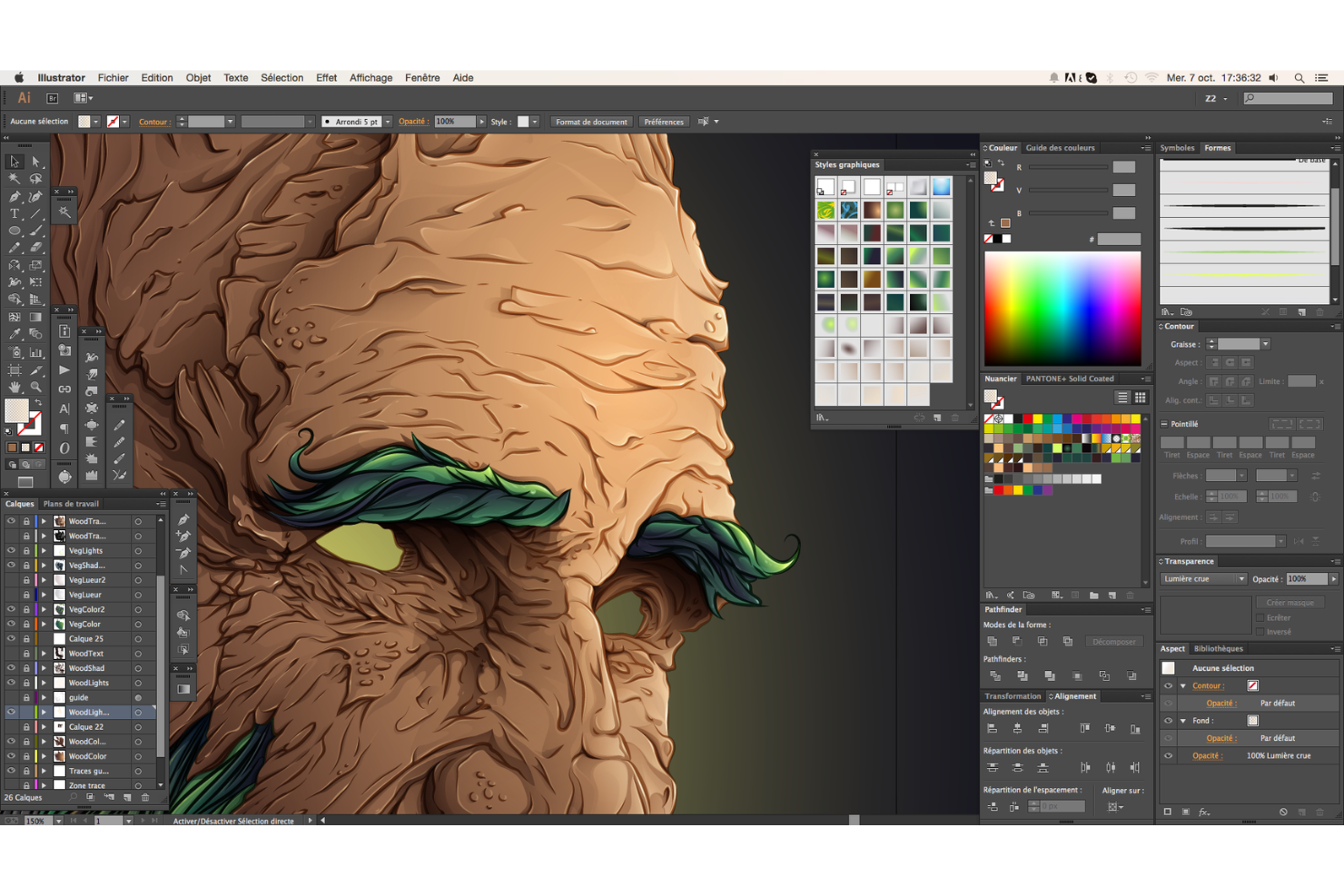
Adobe Illustrator forma parte de Adobe Cloud, ofreciendo funcionalidades de ilustración y edición vectorial de primer nivel para expertos en diseño de animación. Puedes utilizar Adobe Illustrator para diseñar prácticamente cualquier cosa, incluyendo sitios web, logotipos, juegos, películas animadas y mucho más.
Por qué elegí Adobe Illustrator: Es un software basado en vectores perfecto para producir imágenes nítidas, logotipos y materiales impresos. En combinación con Photoshop y otros productos de Adobe Creative Cloud, Illustrator es tu herramienta de diseño de referencia para crear diseños en movimiento. El software admite efectos 3D realistas, iluminación y texturas (vinculado a los activos de Adobe Substance 3D). Usando la función Intertwine, Illustrator también permite a los usuarios superponer texto y objetos. Illustrator da a los diseñadores el control total de sus creaciones con puntos de anclaje, rutas y curvas para liberar su potencial de diseño.
Además, con la introducción de la IA generativa, Adobe Illustrator puede ayudar a los diseñadores a mejorar el proceso creativo generando nuevos conceptos y oportunidades, proponiendo elementos de diseño únicos y más.
Funciones destacadas e integraciones de Adobe Illustrator
Funciones destacadas incluyen la función “compartir para revisión” que permite la colaboración en equipo y el fácil intercambio de los diseños creados con los clientes para revisión y aprobación. Los espectadores pueden anotar y comentar los cambios directamente en el propio enlace, acelerando el proceso de desarrollo. Illustrator también permite buscar y filtrar capas, lo que agiliza el flujo de trabajo de diseño. La función “retype” puede identificar cualquier tipo de fuente incrustada en los diseños y emparejarla con la fuente de Adobe más cercana disponible. El software también cuenta con una función de IA “recolorear” que aplica cualquier tema de color elegido a toda la ilustración vectorial.
Integraciones incluyen productos de Adobe como Creative Cloud, Experience Cloud, Illustrator, Photoshop, Stock y otros.
Pros and Cons
Pros:
- Publicaciones con mesas de trabajo multipágina
- Conectividad con Photoshop y otros productos de Adobe
- Gestión sencilla de vectores, trazados, exportación de archivos e imágenes
Cons:
- Las mismas herramientas para Illustrator de escritorio y tableta
- El manejo de grandes mesas de trabajo es algo lento

Sketch
Ideal para crear diseños UI/UX en el entorno Mac
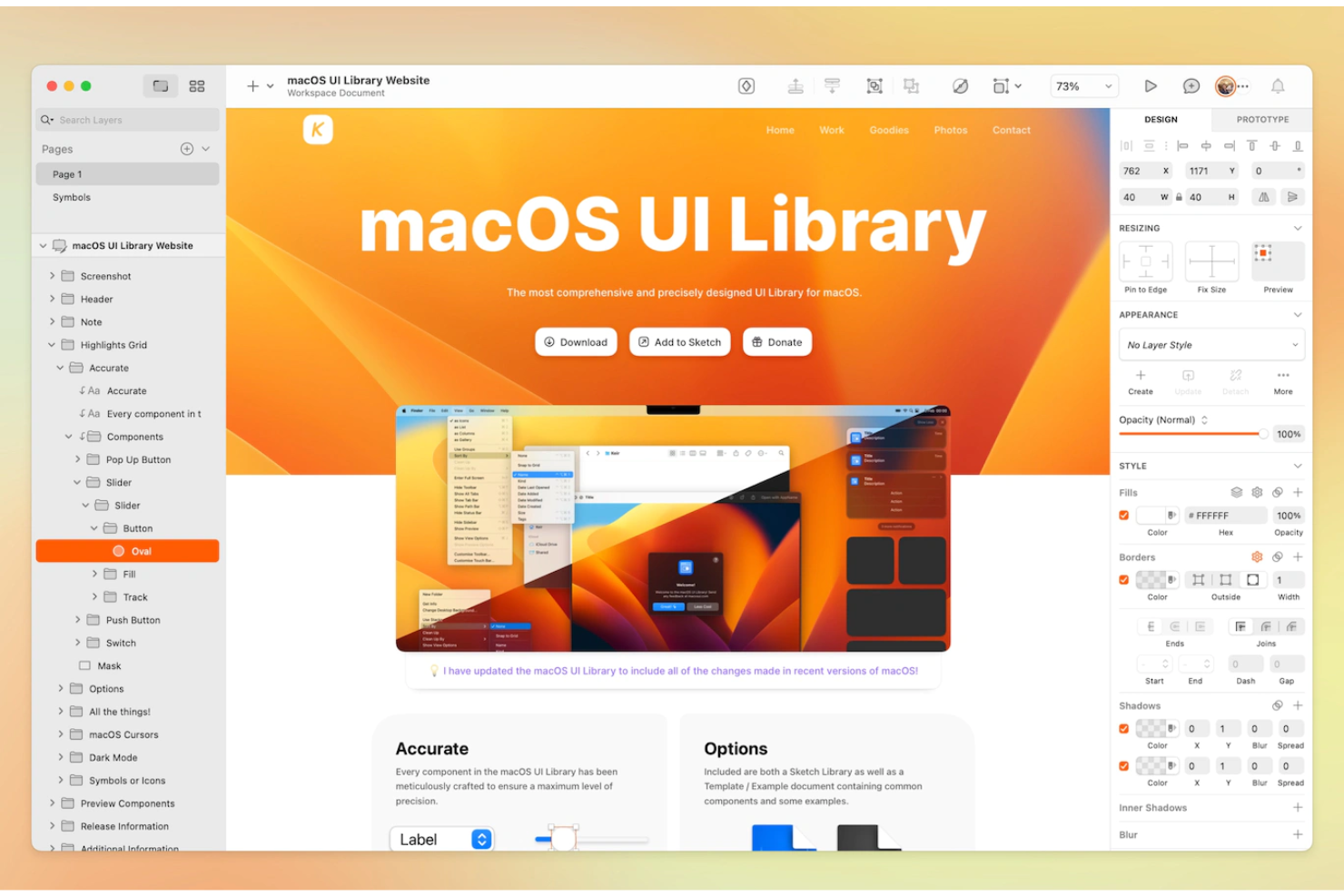
Sketch te ayuda a avanzar rápidamente desde la ideación hasta la producción. La herramienta cuenta con un potente editor de imágenes vectoriales para diseñar iconos, ilustraciones, interfaces de usuario y más. También ofrece una funcionalidad de prototipado integrada para la creación ágil de conceptos de diseño interactivos.
Sketch tiene todo lo que necesitas para organizar y producir diseños de interfaces de alta fidelidad, desde wireframes simples hasta maquetas de alta calidad. El software también cuenta con una vibrante comunidad de desarrollo de plugins que amplía las capacidades de la herramienta.
Por qué elegí Sketch: Es una potente aplicación de diseño nativa para Mac que te permite abrir archivos de Figma fácilmente y acceder a archivos locales mientras creas sin conexión. La herramienta cuenta con una interfaz limpia e intuitiva. Además, sus potentes funciones colaborativas son muy sencillas para los miembros de equipos remotos. Sketch también tiene excelentes capacidades de gráficos vectoriales con escalado sin pérdida de calidad.
Si eres usuario de MacOS, Sketch es tu herramienta de diseño de producto ideal para crear, anotar y compartir prototipos y maquetas.
Funciones y integraciones destacadas de Sketch
Funciones destacadas incluyen bibliotecas compartidas, estilos y componentes, plantillas de diseño reutilizables, control sobre perfiles de color, soporte para fuentes variables y OpenType, mesas de trabajo fáciles de exportar y almacenamiento ilimitado. Sin embargo, una de sus mejores y más infravaloradas características es la capacidad de arrastrar y soltar entre aplicaciones. Con ella, puedes importar archivos a Sketch y enviarlos por correo electrónico o incluso mensaje de texto una vez terminado. El equipo de Sketch también lanza actualizaciones y mejoras periódicas para optimizar el software.
Integraciones incluyen más de 30 herramientas como Avocode, BrandFolder, CI Hub, Doplr, Flinto, Jira, Lingo, Notion, Overflow, Phrase y otros.
Pros and Cons
Pros:
- Interfaz intuitiva
- Modo sin conexión con acceso a archivos locales
- Función de historial de versiones para ver diferentes iteraciones de diseño
Cons:
- Sin versión para Windows
- Pocas funciones de prototipado

SketchUp
Ideal para estudios 3D rápidos y producción de gráficos de presentación limpios

SketchUp es un software CAD 3D utilizado principalmente por arquitectos, ingenieros y diseñadores de interiores. Tanto los diseñadores principiantes como los experimentados lo utilizan para visualizar espacios, crear modelos con objetos y exportarlos para renderizar, con el fin de desarrollar visuales 3D pulidas. SketchUp es una excelente herramienta para renderizar, diagramar, diseñar de manera iterativa, realizar recorridos virtuales y fases de proyecto.
Por qué elegí SketchUp: Es especialmente útil para modelos iniciales de volumetría y estudios de diseño en la fase conceptual de proyectos a gran escala, como edificios comerciales. Ofrece un marco de modelado adaptable, navegación sencilla y vistas configurables.
Con la biblioteca 3D de SketchUp, los usuarios pueden tener un control increíble sobre los comandos iterativos y crear rápidamente diferentes formas y volúmenes. El software ayuda a los diseñadores de productos e ingenieros a ahorrar tiempo y visualizar sus conceptos para los clientes con precisión espacial y material.
Características destacadas e integraciones de SketchUp
Características destacadas incluyen su interfaz super intuitiva para renderizar rápidamente planos y prototipos, y su enorme almacén de componentes 3D gratuitos. SketchUp también ofrece plugins de terceros como Vray y Enscape para renderizados precisos y veloces y Revit para la documentación de diseño.
Integraciones incluye herramientas como 3D Warehouse, AUGmentecture, CabWriter, D5 Render, MeshCAM, Opencities Planner, ProjectVIEW ERP, Snaptrude, Trimble Novapoint y Yulio.
Pros and Cons
Pros:
- Herramientas intuitivas de modelado 3D para renderizados sencillos
- Interfaz limpia y amplia biblioteca web de componentes
- Visualización de etapas, cambios y posibles resultados de rehabilitación
Cons:
- Sin comando directo para copiar-pegar
- Sin modelado NURBS ni curvas reales

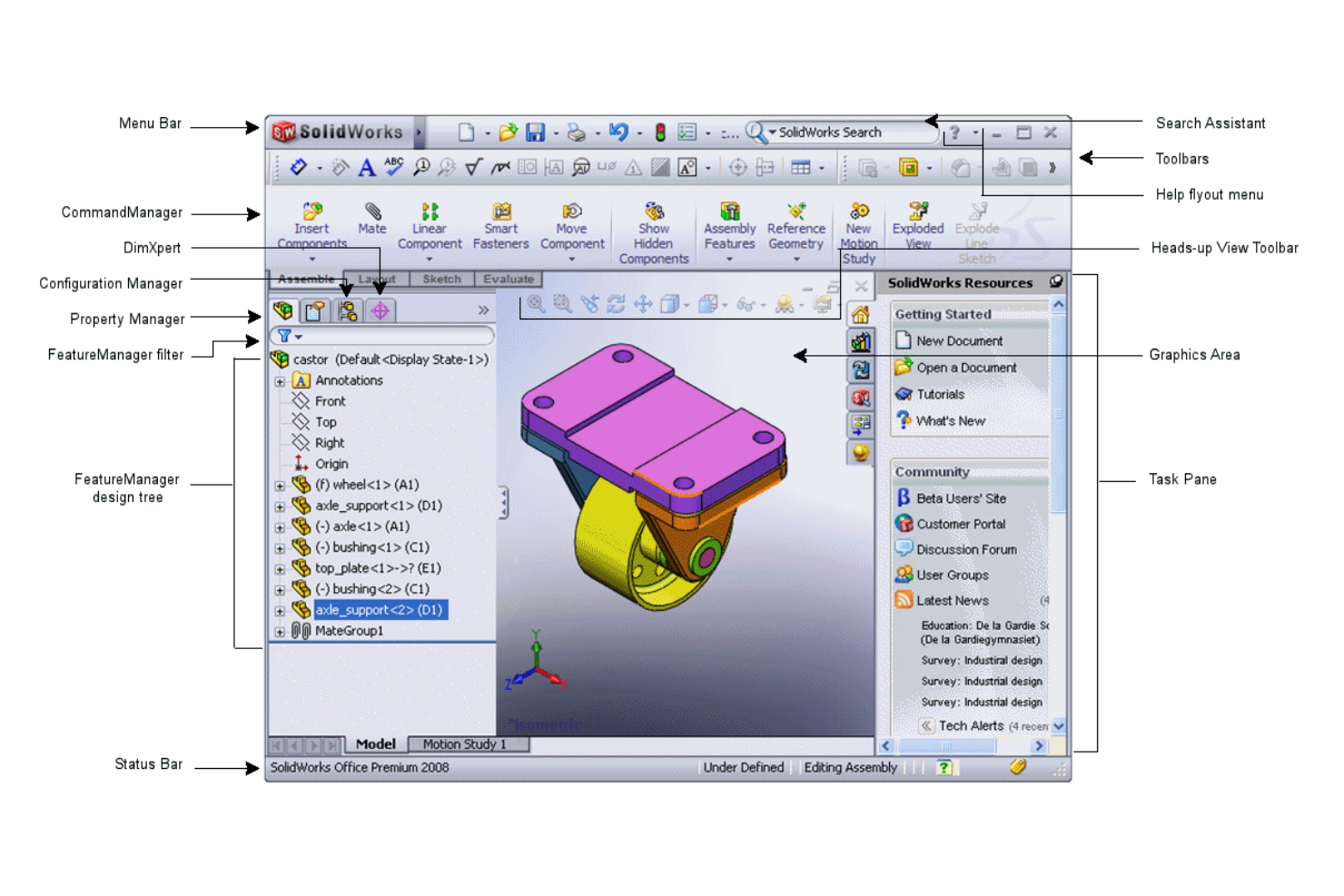
SOLIDWORKS es un programa de diseño asistido por ordenador (CAD) en 3D para desarrollar, examinar y evaluar diseños tridimensionales. Es especialmente útil para el desarrollo de productos en las industrias de diseño mecánico y eléctrico.
Por qué elegí SOLIDWORKS: SOLIDWORKS es una de las mejores herramientas CAD para diseñar componentes mecánicos en 3D y ensamblajes grandes, gracias a sus funciones interactivas de empujar y tirar fáciles e intuitivas.
SOLIDWORKS permite que varios ingenieros y desarrolladores de productos colaboren juntos, acelerando el proceso de diseño. El software también actualiza automáticamente los archivos de 3D Sculptor, registrando los cambios de diseño en tiempo real.
Funciones distintivas e integraciones de SOLIDWORKS
Funciones destacadas incluyen el Asistente de Animación, que permite a los usuarios observar los efectos en tiempo real de la deformación o distribución de tensiones en un diseño industrial. Esto ayuda a eliminar errores en aplicaciones prácticas. Además, el software admite varios tipos de análisis, incluyendo Estático, Térmico, Fatiga, Flujo, Lineal, No lineal, Prueba de caída, Pandeo e incluso Simulación de Moldes. También se pueden importar muchos componentes mecánicos estándar usando la Biblioteca de Diseño de SOLIDWORKS de acuerdo con sus especificaciones y normas como ANSI, DIN, ISO, BIS, etc.
SOLIDWORKS también puede generar dibujos de producción en 2D para comunicarte con proveedores sobre la creación de herramientas y las pruebas de calidad.
Integraciones incluyen ArtiosCAD, Canvas Envision, CoLab, Fishbowl, HSMWorks, Lattice Technology, Makersite, Valispace, Unifize y Vectary Web AR.
Pros and Cons
Pros:
- Permite realizar simulaciones que replican con precisión situaciones reales
- Función de asistente de animación para ver el efecto en tiempo real de la deformación por estrés
- Gran biblioteca repleta de piezas estándar como fijaciones, rodamientos, etc.
Cons:
- Los componentes complejos incrementan el tiempo de resolución exponencialmente
- Capacidades de colaboración limitadas y funcionamiento a veces inestable


Corel Vector es una herramienta de gráficos vectoriales basada en la web, multiplataforma y rica en funciones, que ayuda a las empresas a crear y acceder a obras de arte digitales, gráficos web e impresos. La herramienta forma parte del CorelDRAW Graphics Suite. Diseñada con una interfaz innovadora y fácil de usar, Corel Vector permite a los usuarios crear una amplia variedad de diseños.
Por qué escogí Corel Vector: Corel Vector incluye muchas funciones interesantes, especialmente para la edición de imágenes vectoriales y la gestión de texto y requisitos tipográficos. Está disponible en todas las plataformas y dispositivos, incluido MacOS, y facilita la colaboración centralizada al almacenar todos los diseños en un solo repositorio.
Los usuarios pueden crear obras desde líneas simples o formas y añadir efectos únicos como contornos, rellenos de malla y mezclas a imágenes vectoriales utilizando las herramientas de ilustración vectorial integradas de Corel Vector. También permite a las empresas gestionar tareas de retoque de imágenes y configurar diseños para documentos y folletos.
Además, la herramienta permite la importación y exportación de creaciones en múltiples formatos (incluido su formato nativo GVDESIGN). También permite seleccionar numerosos componentes vectoriales y exportarlos desde el panel de exportación.
Características destacadas e integraciones de Corel Vector
Características destacadas incluyen características de manejo de vectores como pinceles y líneas configurables, mezcla de formas, operaciones booleanas de trayectorias, opciones avanzadas de relleno (incluyendo malla (envolvente), textura, degradado y PostScript), espacios de color (CMYK, spot, Pantone, RGB, HSB y escala de grises) para impresión y pantallas, complementos y scripts de terceros, y mucho más.
Además, puedes crear, diseñar y validar códigos QR. La herramienta también cuenta con reconocimiento inteligente de formas, una herramienta de texto para creación de tablas, y LiveSketch, que permite dibujar a mano alzada con tu lápiz óptico, y la aplicación convierte posteriormente en curvas Bézier, usando corrección inteligente de trazos.
Integraciones incluyen Adobe Illustrator, Google Cloud Platform y Google Drive.
Pros and Cons
Pros:
- Función de conversión de imágenes a DXF para la industria metalmecánica
- Edición, calco y contorneado fáciles para mapas de bits
- Interfaz limpia y sólido ecosistema de soporte para el manejo de imágenes vectoriales
Cons:
- Líneas, arcos y splines se distorsionan al exportar a formato CAD
- La concesión de licencias puede ser complicada para varios usuarios
Otras herramientas de diseño de productos
Estas son algunas opciones adicionales de herramientas de diseño de productos que no llegaron a mi lista breve, pero que aun así vale la pena considerar:


Cómo Evalúo las Herramientas de Diseño de Productos
Desde la creación de wireframes de conceptos iniciales hasta la entrega de especificaciones a ingeniería, busco dos cosas: el mínimo indispensable que una herramienta debe tener para calificar y qué distingue a las mejores.
Funcionalidad Principal (Requisitos Básicos para Esta Lista)
Al seleccionar herramientas para mi lista, califico cada una en una escala de 0 (no ofrece la funcionalidad) a 5 (sobresale en esta área) para cada funcionalidad principal que se menciona a continuación. Luego, calculo la puntuación total de la herramienta en forma de porcentaje. Cada herramienta debe lograr una puntuación mínima total del 75% para ser considerada para inclusión.
- Wireframing y Prototipado: Evalúo si la herramienta admite todo el espectro de fidelidad, desde wireframes básicos en fase de descubrimiento hasta prototipos interactivos con transiciones que los PM pueden mostrar a los interesados.
- Colaboración en Tiempo Real: Los equipos necesitan coeditar pantallas, dejar comentarios en elementos específicos y etiquetar compañeros para revisión. Reviso si hay cursores en vivo, indicadores de presencia y comentarios con hilos.
- Soporte para Sistemas de Diseño: Busco bibliotecas compartidas de componentes y gestión de estilos que permitan a los equipos mantener la coherencia en las superficies del producto, como hacen Figma y Sketch con los símbolos reutilizables.
- Diseño Vectorial y Edición de UI: Herramientas como Figma, Penpot y Adobe XD gestionan de forma distinta el auto-layout y las operaciones booleanas. Evalúo la profundidad de la edición vectorial y los controles de diseño responsivo.
- Entrega a Desarrolladores: Reviso si los ingenieros pueden consultar especificaciones, copiar fragmentos de código CSS o específicos de la plataforma, y exportar recursos directamente desde los archivos de diseño sin necesidad de intercambios adicionales.
- Integraciones y Ecosistema de Plugins: Los equipos de productos dependen diariamente de Jira, Slack y herramientas similares. Busco integraciones nativas con plataformas de gestión de producto y desarrollo, además de un marketplace abierto de plugins para ampliar flujos de trabajo.
Una vez que tengo una lista de herramientas que cumplen estos criterios, considero qué distingue a cada plataforma.
Factores Diferenciadores (Qué Distingue a los Proveedores)
Así es como comparo y contrasto diferentes proveedores:
Características Destacadas
El diseño asistido por IA es un diferenciador cada vez más importante. Evalúo si una herramienta puede generar sugerencias de organización o transformar bocetos en componentes editables, lo cual ahorra horas durante la exploración inicial. La exportación de diseño a código también importa: las herramientas que generan código listo para producción en React o SwiftUI ayudan a cerrar la brecha entre diseño e ingeniería. También busco funciones de pizarra incorporadas, donde los equipos puedan mapear viajes de usuario y hacer lluvias de ideas antes de pasar a pantallas de alta fidelidad.
Más Allá de las Características
Los modelos de precios varían mucho: algunos cobran por editor mientras los visualizadores acceden a los archivos gratis, algo relevante cuando PMs, desarrolladores y partes interesadas necesitan visibilidad. También evalúo cómo escala la plataforma para el equipo que la usa, desde un PM en solitario esbozando flujos hasta una organización de producto de 50 personas con permisos jerárquicos. Para compradores empresariales, reviso si cumple con SOC 2 Tipo II, soporte para SSO y provisión SCIM, ya que estos factores suelen ser clave para la aprobación en compras.
Cómo elegir una herramienta de diseño de productos
Es fácil perderse entre largas listas de funciones y estructuras de precios complejas. Para ayudarte a mantener la concentración mientras avanzas en tu proceso único de selección de software, aquí tienes una lista de factores que debes tener en cuenta:
| Factor | Qué considerar |
|---|---|
| Escalabilidad | ¿Puede la herramienta crecer con tu equipo? Considera los límites de usuarios y cómo los costes adicionales podrían afectar a tu presupuesto a medida que tu equipo se expanda. |
| Integraciones | ¿Se conecta con tus herramientas existentes, como Slack, Jira o Trello? Comprueba la compatibilidad para evitar interrupciones en tu flujo de trabajo. |
| Personalización | ¿Puedes adaptar la herramienta para que se ajuste a tu flujo de trabajo? Busca opciones para ajustar plantillas, paneles y configuraciones según las necesidades específicas de tu equipo. |
| Facilidad de uso | ¿La herramienta es intuitiva para todos los miembros de tu equipo? Considera la curva de aprendizaje y si hay recursos de formación disponibles para que todos puedan ponerse al día rápidamente. |
| Implementación e incorporación | ¿Cuánto tiempo llevará configurar la herramienta y formar a tu equipo? Evalúa la disponibilidad de asistencia y recursos para garantizar una transición fluida. |
| Coste | ¿El precio se ajusta a tu presupuesto? Compara los modelos de suscripción, las tarifas ocultas y si hay una prueba gratuita disponible para probarla antes de comprometerte. |
| Medidas de seguridad | ¿La herramienta satisface tus necesidades de seguridad? Comprueba el cifrado de datos, los controles de acceso de los usuarios y el cumplimiento de normativas como el GDPR, si corresponde. |
| Disponibilidad de asistencia | ¿Hay asistencia al cliente disponible cuando la necesitas? Considera el horario de atención y los canales disponibles, como chat, teléfono o correo electrónico, para recibir ayuda. |
¿Qué es una herramienta de diseño de productos?
Una herramienta de diseño de productos es un software que ayuda a los equipos a crear y gestionar proyectos de diseño desde el concepto hasta su finalización. Los diseñadores, gerentes de producto y profesionales de UX suelen utilizar estas herramientas para mejorar la colaboración y la creatividad. Las capacidades de creación de prototipos, colaboración en tiempo real e integración ayudan a agilizar los procesos de diseño y la comunicación del equipo. Estas herramientas aportan valor al simplificar los flujos de trabajo de diseño y fomentar la productividad del equipo.
Características
Al seleccionar una herramienta de diseño de productos, presta atención a las siguientes características clave:
- Creación de prototipos: Permite crear maquetas interactivas para visualizar el producto final y recopilar comentarios en una fase temprana del proceso de diseño.
- Colaboración en tiempo real: Permite que los miembros del equipo trabajen juntos simultáneamente, mejorando la comunicación y acelerando las iteraciones de diseño.
- Capacidades de integración: Se conecta con otras herramientas, como Slack, Jira o Trello, para agilizar los flujos de trabajo y mejorar la productividad.
- Gestión del sistema de diseño: Ayuda a mantener la coherencia entre proyectos mediante la organización y actualización de componentes y estilos de diseño.
- Pruebas con usuarios: Facilita la recopilación de comentarios de los usuarios sobre los prototipos para garantizar que el diseño satisfaga sus necesidades y expectativas.
- Recopilación de comentarios: Simplifica el proceso de recopilar y gestionar comentarios de las partes interesadas y los miembros del equipo.
- Control de versiones: Registra los cambios y mantiene un historial de las iteraciones de diseño, lo que permite consultar fácilmente las versiones anteriores.
- Plantillas personalizables: Ofrece plantillas de diseño prediseñadas que pueden adaptarse a los requisitos específicos de cada proyecto.
- Tours interactivos del producto: Guía a los nuevos usuarios por las funciones de la herramienta, reduciendo la curva de aprendizaje y mejorando la incorporación.
- Medidas de seguridad: Garantiza la protección de los datos mediante el cifrado y el cumplimiento de normativas como el GDPR, manteniendo segura la información de los usuarios.
Beneficios
La implementación de una herramienta de diseño de productos ofrece varios beneficios para tu equipo y tu empresa. Estos son algunos de los que puedes esperar:
- Colaboración mejorada: Las herramientas de colaboración en tiempo real permiten que los miembros del equipo trabajen juntos de forma eficiente, reduciendo los malentendidos y acelerando los plazos de los proyectos.
- Creatividad potenciada: La creación de prototipos y las plantillas personalizables favorecen la exploración creativa, permitiendo que los equipos experimenten e innoven sin tener que empezar desde cero.
- Diseño coherente: La gestión del sistema de diseño garantiza que todos los proyectos mantengan una apariencia unificada, reforzando la identidad de marca y reduciendo los errores.
- Toma de decisiones fundamentada: Las pruebas con usuarios y la recopilación de comentarios proporcionan información valiosa, ayudando a los equipos a tomar decisiones de diseño basadas en datos.
- Flujos de trabajo eficientes: Las capacidades de integración conectan las herramientas existentes, agilizando los procesos y ahorrando tiempo al minimizar las tareas manuales.
- Gestión segura de datos: Las medidas de seguridad protegen la información confidencial, garantizando el cumplimiento de las normativas y manteniendo la confianza de los usuarios.
- Incorporación sencilla: Los tours interactivos del producto y los recursos de formación ayudan a los nuevos usuarios a ponerse al día rápidamente, minimizando el tiempo de inactividad y mejorando la productividad.
Costes y precios
Seleccionar una herramienta de diseño de productos requiere comprender los diversos modelos de precios y planes disponibles. Los costos varían según las funciones, el tamaño del equipo, los complementos y otros factores. La tabla siguiente resume los planes comunes, sus precios promedio y las funciones habituales incluidas en las soluciones de herramientas de diseño de productos:
Tabla comparativa de planes para herramientas de diseño de productos
| Tipo de plan | Precio promedio | Funciones comunes |
|---|---|---|
| Plan gratuito | $0 | Prototipado básico, colaboración limitada y acceso a algunas plantillas. |
| Plan personal | $10-$30/usuario/mes | Prototipado avanzado, colaboración en tiempo real y gestión del sistema de diseño. |
| Plan empresarial | $30-$60/usuario/mes | Capacidades completas de integración, herramientas de pruebas con usuarios y seguridad mejorada. |
| Plan corporativo | $60+/usuario/mes | Funciones personalizables, asistencia exclusiva y medidas integrales de protección. |
Preguntas frecuentes sobre herramientas de diseño de productos
Si eres nuevo en el diseño de productos y de UI/UX, es posible que tengas algunas preguntas después de leer mi guía. Estas son algunas preguntas frecuentes que otras personas hacen sobre este tema.
¿Por qué es importante el diseño de productos?
El diseño de productos es fundamental porque determina el aspecto, la sensación y el funcionamiento de los productos. Esto influye directamente en las experiencias de los usuarios y en el éxito comercial.
Un diseño de productos bien ejecutado mejora la usabilidad, la estética y la funcionalidad, lo que da como resultado experiencias de usuario más atractivas, una mayor fidelidad a la marca y una mejor retención de clientes a lo largo de los años.
Una estrategia de diseño y desarrollo de productos cuidadosamente elaborada garantiza que los productos satisfagan las necesidades de los usuarios y contribuyan a su satisfacción general.
¿Cuál es la diferencia entre un diseñador de productos y un diseñador de UX?
Los diseñadores de productos están a cargo del diseño completo del producto, lo que incluye los aspectos visuales, la funcionalidad y las consideraciones comerciales. Trabajan con equipos multifuncionales. Deben contar con conocimientos adecuados de diseño industrial, diseño de interfaces de usuario e investigación de usuarios.
Por otro lado, los diseñadores de UX se centran en la creatividad y la usabilidad al optimizar las interacciones de los usuarios. Tienen especial experiencia en investigación de usuarios, psicología y diseño de interacción.
Las organizaciones suelen utilizar ambos títulos indistintamente, pero la principal diferencia entre un “diseñador de productos” y un “diseñador de UX» son sus entornos de trabajo. Los diseñadores de UX se adaptan mejor a los requisitos basados en proyectos, mientras que los diseñadores de productos están destinados a entornos ágiles basados en productos que innovan continuamente. Aunque ambos contribuyen a crear productos centrados en el usuario, los diseñadores de productos tienen un ámbito de trabajo más amplio, mientras que los diseñadores de UX se enfocan en crear experiencias de usuario fluidas.
¿Los diseñadores de productos utilizan CAD?
Sí, los diseñadores de productos utilizan CAD para crear modelos detallados en 2D y 3D que facilitan la visualización, el prototipado y el análisis. El software CAD se utiliza en múltiples sectores, como la ingeniería aeroespacial, la automoción, la ingeniería mecánica, el diseño arquitectónico, la electrónica de consumo y el diseño de joyería.
¿Dónde puedo aprender más sobre diseño de productos?
Como gerente de producto, conozco la dificultad de convertir grandes ideas en diseños pulidos y fáciles de usar.
En los mejores días, me encantaba ver cómo las estructuras alámbricas cobraban vida, colaborar con diseñadores e ingenieros que realmente lo entendían y observar cómo los usuarios interactuaban con un producto que parecía no requerir ningún esfuerzo.
Pero en los días difíciles, me enfrentaba a herramientas de diseño poco intuitivas que convertían la colaboración en una pesadilla, interminables ciclos de comentarios que ralentizaban todo y entregas frustrantes a los desarrolladores que generaban expectativas desalineadas.
Al mirar atrás, me di cuenta de que muchas de estas dificultades se debían a no contar con la mejor herramienta de diseño de productos para optimizar el proceso.
Por eso he elaborado esta lista de las mejores herramientas de diseño de productos, para que dediques menos tiempo a luchar con el software y más a crear productos que les encanten a tus usuarios. Empecemos.
Si estás empezando, considera realizar un curso de diseño de productos en una universidad local o en línea. Para continuar aprendiendo, recomiendo unirte a una comunidad de diseño gráfico, especialmente a aquellas centradas en productos digitales.
Qué sigue:
Si estás investigando una herramienta de diseño de productos, ponte en contacto con un asesor de SoftwareSelect para obtener recomendaciones gratuitas.
Rellenas un formulario y tienes una breve conversación en la que analizan los detalles de tus necesidades. Después recibirás una lista reducida de opciones de software para revisar. Incluso te ayudarán durante todo el proceso de compra, incluidas las negociaciones de precios.