

Piyasada görünüşte sayısız Kanban yazılımı çözümü mevcut olduğundan, hangisinin sizin için en iyi olduğunu belirlemek zor olabilir. İş süreçlerinin görünürlüğünü artırmak, iş birliğini geliştirmek, darboğazları azaltmak ve genel iş akışı verimliliğini iyileştirmek istiyorsunuz; ancak hangi aracın ihtiyaçlarınıza en uygun olduğunu belirlemeniz gerekiyor. Size yardımcı olabilirim! Bu yazıda, büyük ve karmaşık ürünleri yönetme deneyimimden ve onlarca farklı aracı kullanmış olmamdan yararlanarak işleri sizin için kolaylaştırıyor ve en iyi Kanban araçlarından oluşan bu kısa listeyi sunuyorum.
Why Trust Our Software Recommendations
6,700+
Reviews
20
Industry experts
16+
Evaluation factors
14
Years
Our team has been testing and reviewing software since 2012. As product managers ourselves, we know how difficult—and important—it is to choose the right software.
For this guide, we evaluated tools using hands-on testing and independent research, scoring tools using our selection criteria.
Our reviews reflect our human editorial judgment, not a sales pitch.
Expert reviewers:
- Andrew LumbySenior TPM
- Cristiano ValimSenior UI/UX Lead


Kanban Araçları Karşılaştırma Tablosu
Bu karşılaştırma tablosu, en iyi Kanban aracı seçimlerim için fiyatlandırma ayrıntılarını özetlemektedir.
Score legend (out of 5)
- Excellent4.5–5
- Good4–4.4
- Average3–3.9
- Below average2–2.9
- Poor1–1.9
Sorted by: Default
| Tool | Starting Price | Website | |||||||
|---|---|---|---|---|---|---|---|---|---|
Best for its Agile reporting features | 3.7 out of 5 | 4 | 4 | 3 | 4 | 4 | 3 | $1/user/month Free plan available | Website |
Best for customizable templates | Not rated | 3 | 3 | 1 | Not rated | 2 | 4 | $9/user/month Free plan + 7-day trial + demo available | Website |
Best for no-code app development | Not rated | 3 | 3 | 4 | Not rated | 3 | 3 | $35/user/month 30-day free trial | Website |
Best for cross-functional workflows | 3.5 out of 5 | 3 | 4 | 5 | 1 | 4 | 4 | $10/user/month Free plan + 14-day trial + demo available | Book Demo |
Best for tracking new feature development process | 3.2 out of 5 | 4 | 4 | 4 | 1 | 3 | 3 | $8/user/month Free plan + 14-day trial available | Book Demo |
Best for built-in WIP limits and AI nudges | 4.5 out of 5 | 4 | 4 | 5 | 5 | 5 | 4 | $12/user/month Free plan + free demo available | Book Demo |
Best for linking dev workflows to board planning | 3.7 out of 5 | 3 | 4 | 4 | 3 | 4 | 4 | $8.50/user/month Free plan available | Website |
Best for multi-board portfolio visibility | 4.2 out of 5 | 2 | 5 | 5 | 4 | 4 | 5 | Pricing upon request 30-day free trial available | Website |
Best for enterprise-scale kanban portfolio planning | 4.5 out of 5 | 4 | 5 | 3 | 5 | 5 | 5 | Pricing upon request 30-day free trial + free demo available | Website |
Best for no-code automation on any board size | 3.5 out of 5 | 4 | 4 | 3 | 2 | 4 | 4 | $5/user/month Free plan + free trial available | Website |


En İyi Kanban Araçları İncelemesi
Aşağıda, kısa listeme giren en iyi Kanban araçlarının ayrıntılı özetlerini bulabilirsiniz. İncelemelerim, sizin için en iyi aracı bulmanıza yardımcı olmak amacıyla her aracın temel özelliklerine, avantajlarına ve dezavantajlarına, entegrasyonlarına ve ideal kullanım alanlarına ayrıntılı bir bakış sunuyor.
 Best for its Agile reporting features
- Free plan available
- From $1/user/month (billed annually)
Visit WebsiteCustomer Rating:4.4/5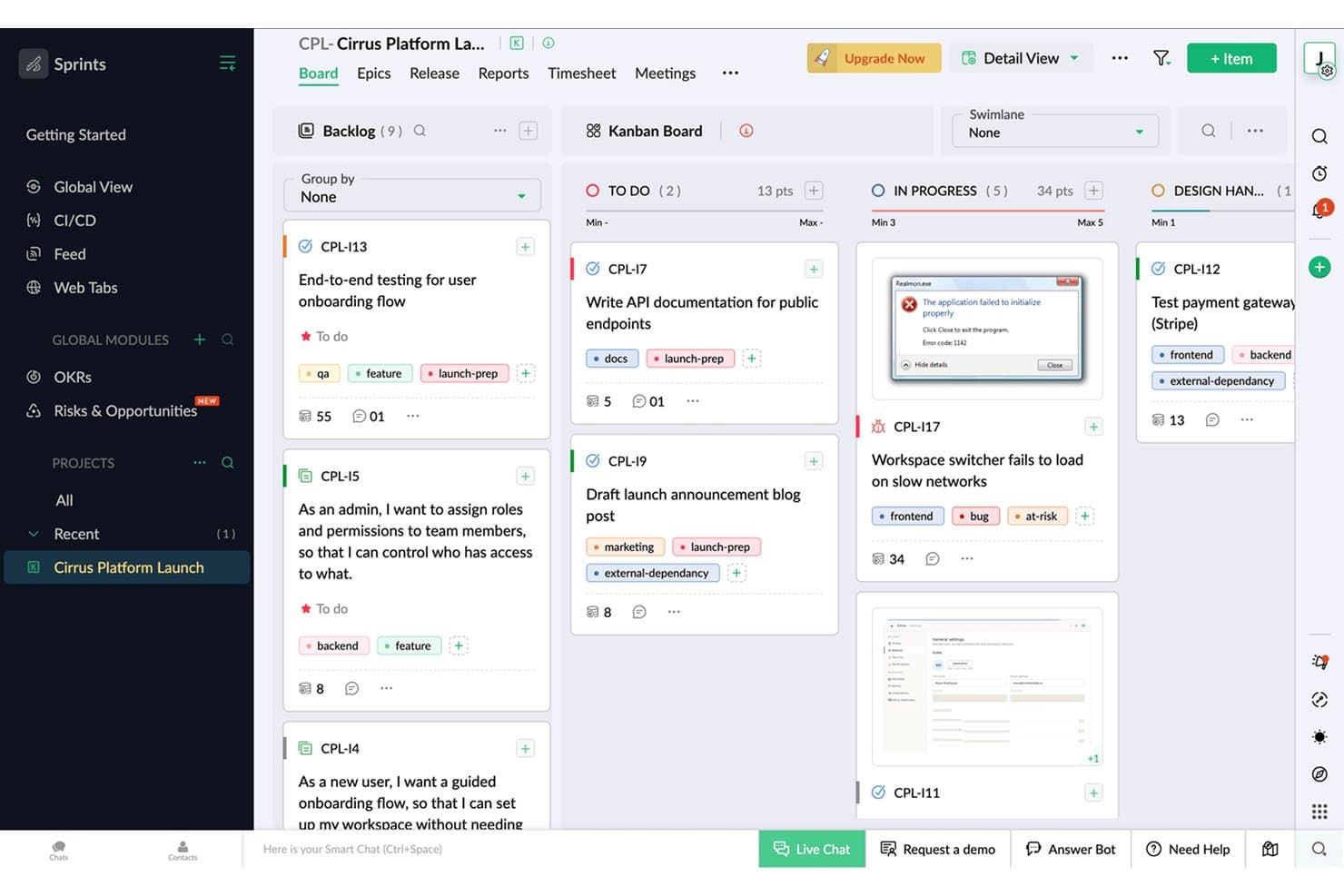
Zoho Sprints organizes tasks across Kanban columns with tags and points. Zoho Sprints is an Agile project management tool that supports Kanban, Scrum, and Scrumban workflows, with built-in backlog management, sprint planning, time tracking, and Agile reporting across burndown charts, velocity, and cumulative flow diagrams.
Who Is Zoho Sprints Best For?
Zoho Sprints is a strong fit for Scrum masters and product managers who need detailed Agile reporting alongside their day-to-day sprint and backlog work.
Why I Picked Zoho Sprints
Zoho Sprints earns its spot on my shortlist because of its Agile reporting depth, which goes well beyond what most Kanban tools offer. I'm talking burndown and burnup charts, velocity tracking, cumulative flow diagrams, and cycle time and lead time reports, all available on every plan. I also like that WIP limits are strictly enforced per column, not just suggested, so when a sprint column hits capacity, the board actually blocks new additions rather than quietly ignoring the limit.
Zoho Sprints Key Features
- Backlog and epic management: Organize work items into epics and a prioritized backlog, then pull them into sprints as your team's capacity allows.
- Swimlanes: Divide your Kanban board into horizontal lanes by team, work type, or any custom grouping to separate parallel workstreams visually.
- Built-in time tracking: Log hours directly on work items using a global timer, with timesheet approval workflows available for team leads.
- Client and vendor portals: Give external collaborators scoped access to projects without requiring a full user license.
Zoho Sprints Integrations
Zoho Sprints offers native integrations with GitLab, Bitbucket, Azure DevOps, Jenkins, Google apps, Microsoft 365, Zoho Cliq, Zoho Desk, Zoho Analytics, and Zendesk. It also supports REST API connections, webhooks, and Zapier.
Pros and Cons
Pros:
- Built-in time tracking connects effort to work
- Strict WIP limits protect team throughput
- Detailed Agile reporting supports product decisions
Cons:
- Multiple projects become confusing to manage
- Scrum terminology can confuse nontechnical stakeholders
Learn more about Zoho Sprints: Best for customizable templates
- Free plan + 7-day trial + demo available
- From $9/user/month (billed annually)
Visit WebsiteCustomer Rating:4.5/5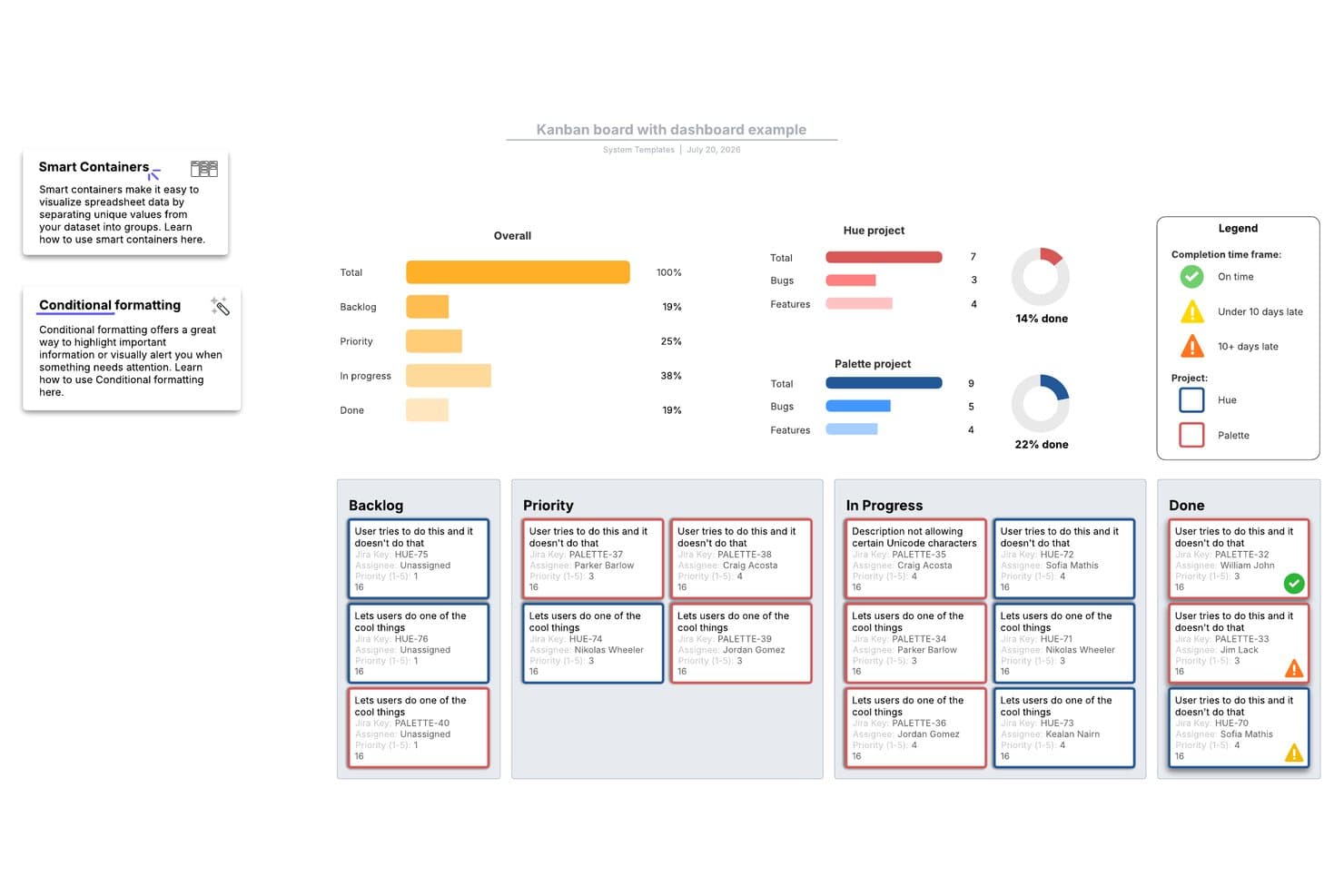
Lucidspark's Kanban board template tracks project progress across stages. Lucidspark is an infinite-canvas whiteboard tool that lets teams build kanban boards, manage tasks with Lucid Cards, and collaborate in real time using a large library of agile and project planning templates.
Who Is Lucidspark Best For?
Lucidspark suits cross-functional teams that run agile ceremonies—like sprint planning and retrospectives—and want a flexible, template-driven canvas to organize work visually.
Why I Picked Lucidspark
Lucidspark earns its spot on my shortlist because of its massive, customizable template library, which is genuinely unmatched for teams that run agile ceremonies on a visual canvas. I love that you can pull up a sprint planning, backlog refinement, or retrospective template and tailor every column and card layout to your team's exact workflow. The Agile board template, in particular, lets you sync Lucid Cards directly with Jira or Azure DevOps, so your canvas stays tied to real backlog data.
Lucidspark Key Features
- Real-time co-editing: Multiple team members can edit the same canvas simultaneously, with live cursors, in-app chat, and emoji reactions visible to all participants.
- Jira and Azure DevOps two-way sync: Lucid Cards connect directly to your existing backlog, keeping your visual board and dev tool in sync without manual updates.
- Voting and facilitation activities: Built-in voting sessions, timers, and private mode let teams run structured retrospectives and prioritization exercises on the canvas.
- Dynamic Tables: A canvas-native table object that lets you organize and view task data in a structured format alongside your boards and diagrams.
Lucidspark Integrations
Lucidspark offers native two-way integrations with Jira, Azure DevOps, and Smartsheet. It also supports Asana and provides an API for custom integrations.
Pros and Cons
Pros:
- Visual canvas supports cross-functional planning
- Strong facilitation tools support retrospectives
- Customizable agile templates fit varied workflows
Cons:
- Limited board analytics and alternate views
- No native WIP limits for throughput control
Learn more about Lucidspark: Best for no-code app development
- 30-day free trial
- From $35/user/month (billed annually)
Visit WebsiteCustomer Rating:4.4/5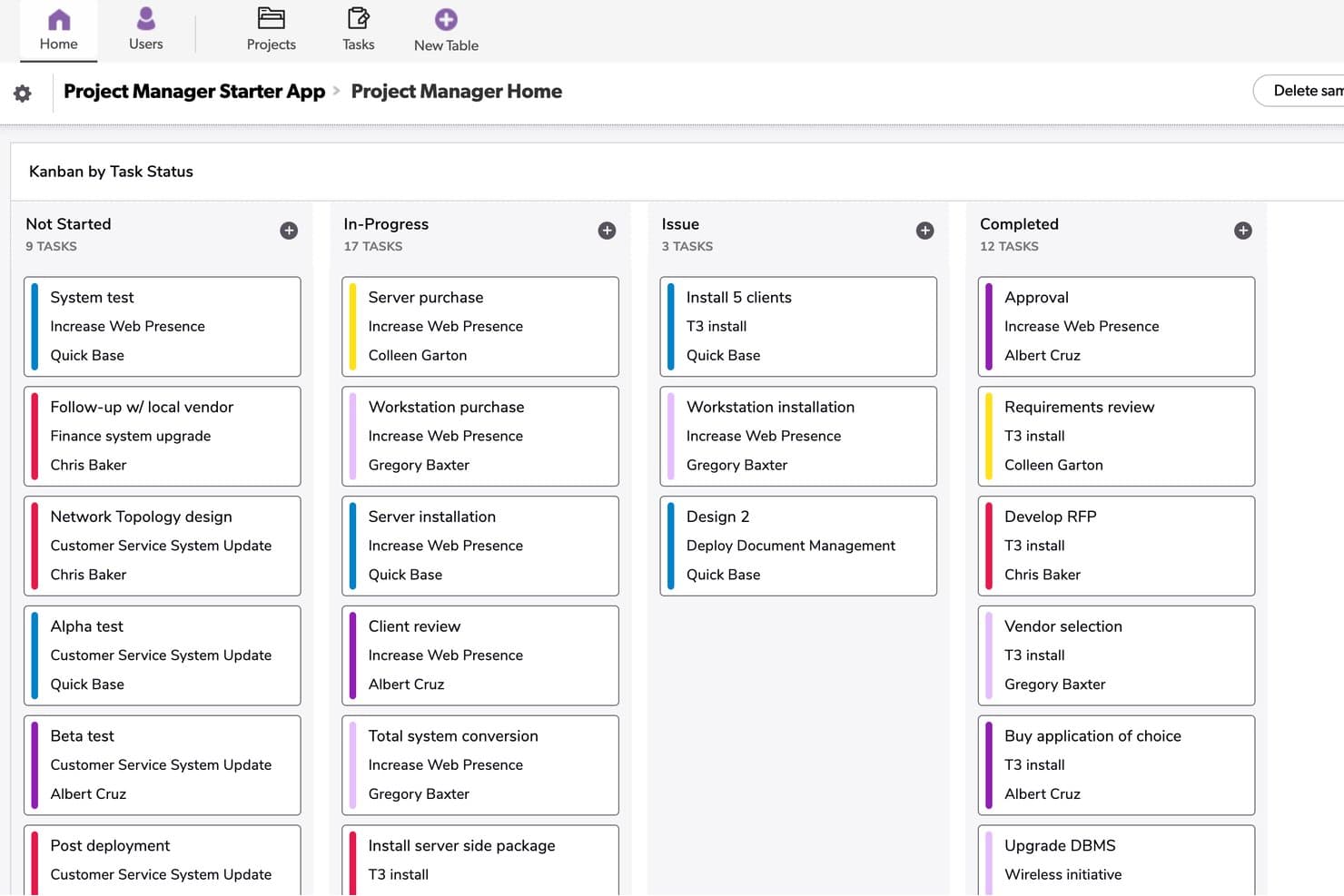
Quickbase organizes tasks by status across four Kanban columns. Quickbase is a no-code app-building platform that lets you create custom kanban boards, portfolio dashboards, Gantt charts, and automated workflows on top of your own data models.
Who Is Quickbase Best For?
Quickbase suits enterprise operations and project teams in industries like construction, manufacturing, and energy that need custom workflows built on their own data models.
Why I Picked Quickbase
I've included Quickbase in my top picks because it's the only tool on this list that lets you build a kanban board directly on top of a custom data model, which is a genuine differentiator for operations-heavy product teams. I like that you can pull records from linked tables into your board cards, so a card for a construction deliverable can surface budget fields, attached specs, and child task records all in one place. The cross-project portfolio dashboard is also something I rarely see this well-executed, letting you track status and dependencies across multiple workstreams without switching apps.
Quickbase Key Features
- Formula-based card coloring: Set card colors on your kanban board using custom formulas tied to field values, so you can visually flag priority, status, or risk at a glance.
- Role-based board visibility: Control which boards specific roles can see, or mark a board as personal so only you can access it.
- Linked child table records: Attach related child records directly to a card's form, letting you surface subtasks, dependencies, or supporting data without leaving the card.
- No-code automation builder (Pipelines): Build trigger-based workflow automations without writing code, including automations generated from plain-text descriptions using AI.
Quickbase Integrations
Quickbase offers native integrations with Salesforce, SAP, Oracle, and Microsoft Teams. It also provides RESTful and governance APIs for custom integrations, plus data-warehouse and on-premise connectivity on Enterprise.
Pros and Cons
Pros:
- Linked records keep supporting details accessible
- Portfolio dashboards connect multiple workstreams
- Custom boards fit complex product data
Cons:
- Board caps restrict high-volume workflows
- No native work-in-progress limits
Learn more about Quickbase: Best for cross-functional workflows
- Free plan + 14-day trial + demo available
- From $10/user/month (billed annually)
Visit WebsiteCustomer Rating:4.3/5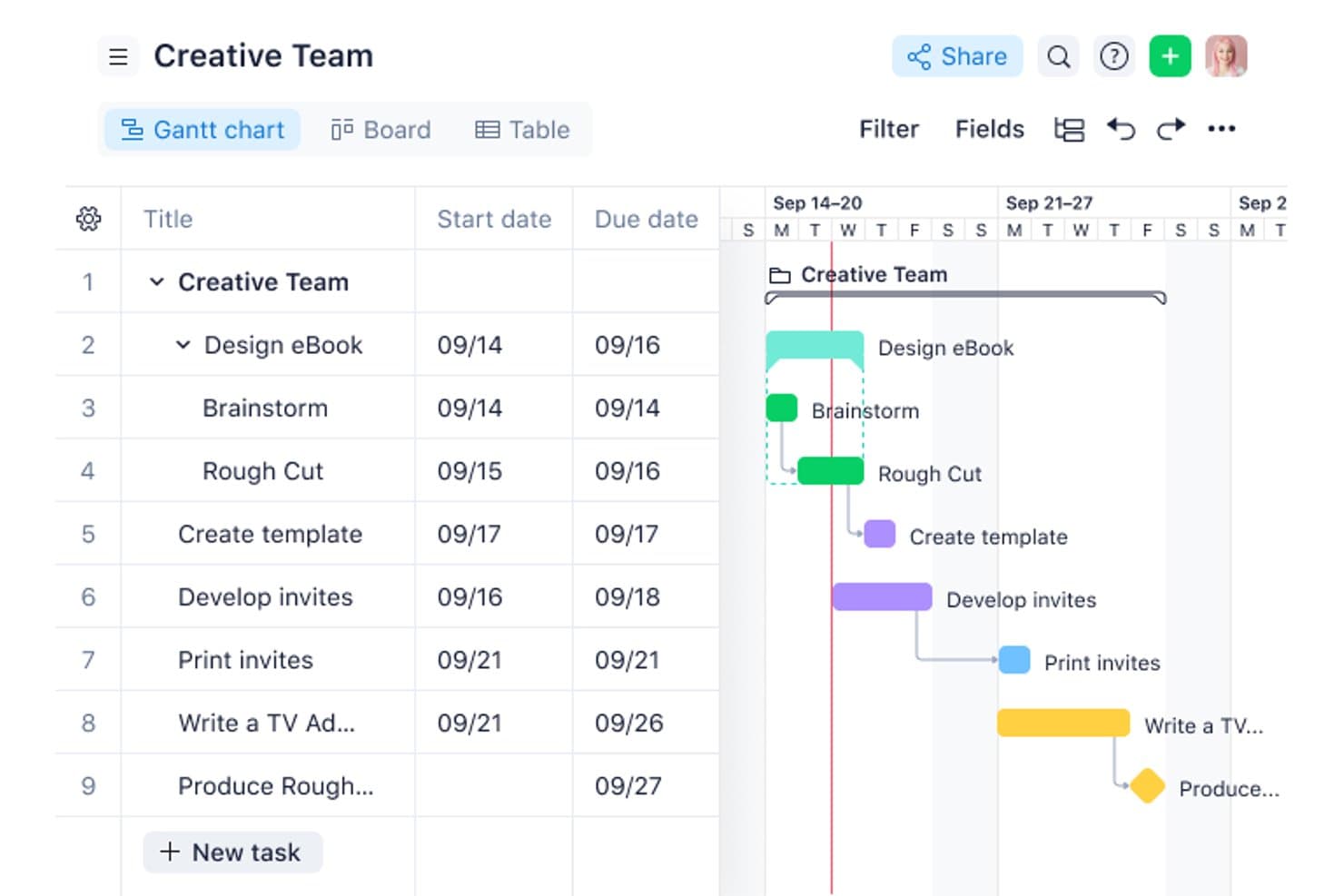
See the status of all your tasks with Wrike’s Kanban view. Wrike is a project management platform with a configurable Kanban board, 15+ synced views, no-code automation, AI-assisted collaboration, and cross-functional dashboards built to support multi-project and portfolio-level work.
Who Is Wrike Best For?
Wrike fits product managers and operations teams coordinating work across multiple departments, tools, and stakeholders at once.
Why I Picked Wrike
Wrike earns its spot on my shortlist because its board is built to handle the complexity of cross-functional work, not just single-team sprints. I love that you can toggle a board between individual tasks and portfolio-level views, so I can track a product launch across marketing, engineering, and ops without switching tools. Custom-field columns and swimlanes let me organize work by team, priority, or any other category that matters in the moment.
Wrike Key Features
- No-code automation builder: Create automation rules in plain language to auto-escalate at-risk tasks and route incoming work to the right queues.
- Request forms: Build intake forms that automatically assign submitted work to specific projects or team queues without manual triage.
- AI summaries on comments: Wrike Copilot condenses long comment threads on tasks into summaries, keeping you current without reading every reply.
- Portfolio-level board toggle: Switch the board view from individual tasks to program or portfolio level to track work across multiple projects at once.
Wrike Integrations
Wrike offers more than 400 integrations, including Jira, GitHub, GitLab, Bitbucket, Slack, Microsoft Teams, Google Workspace, Salesforce, Tableau, and Power BI. Wrike Sync provides two-way sync with 22+ apps, including Jira and GitHub.
Pros and Cons
Pros:
- Synced views connect planning with delivery
- Custom fields organize cross-functional workflow stages
- Portfolio-level boards support product roadmaps
Cons:
- Initial setup can burden smaller teams
- WIP limits lack confirmed enforcement
 5Best for tracking new feature development process
Miro
- Free plan + 14-day trial available
- From $8/user/month (billed annually)
Visit WebsiteCustomer Rating:4.8/5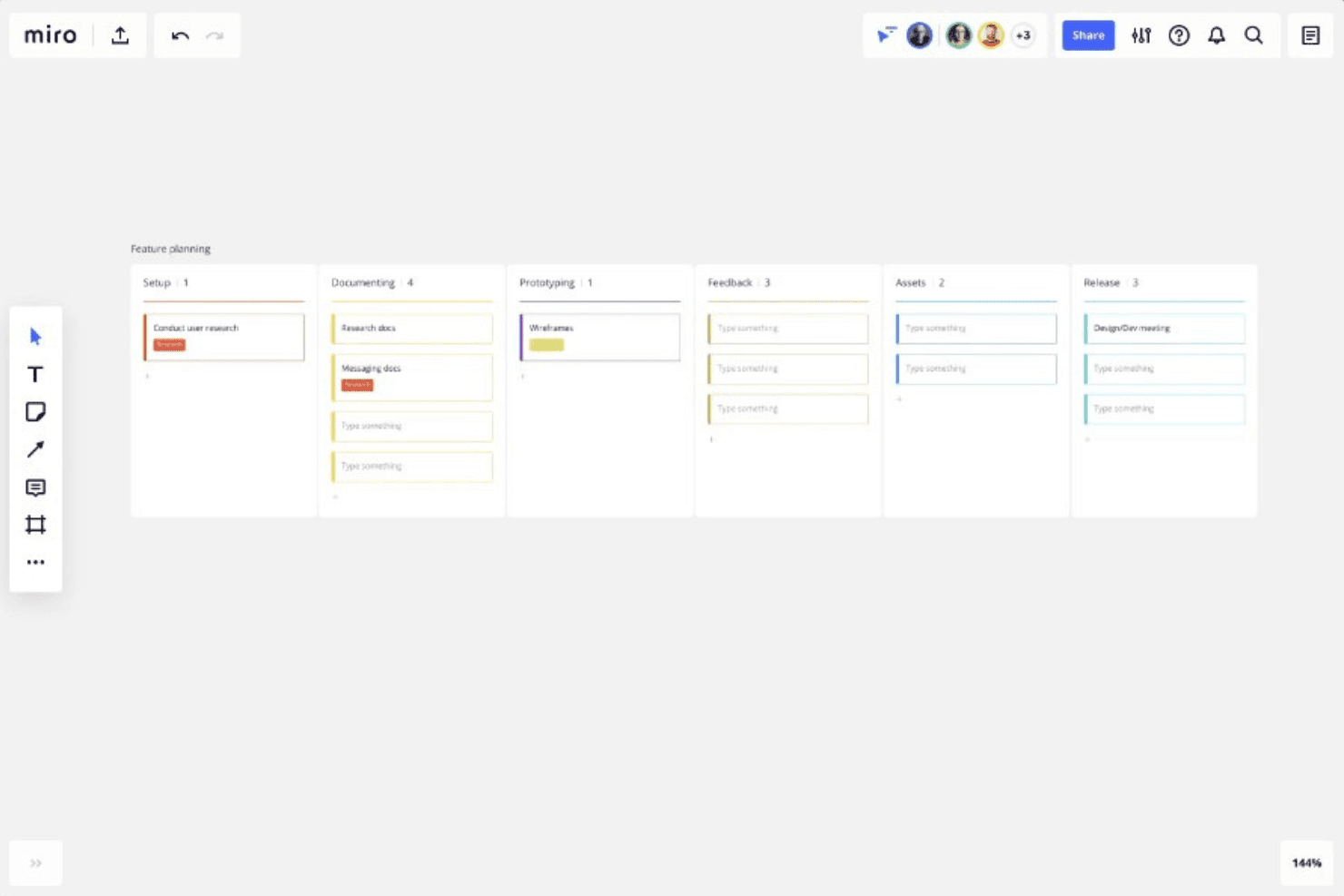
You can use Miro to track each phase of your product development, from setup through to prototyping, feedback, and eventually release. Miro is an infinite-canvas collaboration platform that brings Kanban boards together with roadmaps, diagrams, and prototypes in a single visual workspace.
Who Is Miro Best For?
Miro is a strong fit for product managers who need to connect Kanban boards directly to roadmaps, prototypes, and discovery work in a single visual space.
Why I Picked Miro
I picked Miro as one of the best because its infinite canvas lets a Kanban board sit directly alongside roadmaps, discovery docs, and prototypes, so you can track a new feature from the first sticky note to the final card in a single workspace. I love that Kanban, Timeline, and Table views all share the same underlying data, which means switching between sprint progress and a quarterly roadmap view takes one click rather than a context switch across tools.
Miro Key Features
- Synced cards: Drag a Kanban card onto the canvas to create a linked copy that updates in both directions when edited.
- Multiple board views: Switch between Kanban, Timeline, and Table views without duplicating data, so you can move from sprint progress to quarterly planning in one click.
- Jira card integration: Drag Jira cards directly into your Miro Kanban, convert cards to Jira issues, and get two-way sync on the Business plan.
- AI-generated Kanban structure: Use Miro AI to generate a Kanban layout from a prompt, with your existing board content used as context.
Miro Integrations
Miro advertises 250+ integrations, including Jira, Asana, Azure DevOps, Linear, ClickUp, Trello, Slack, Microsoft Teams, GitHub, and Zapier. Business adds two-way sync with Jira, Asana, Linear, ClickUp, and Azure DevOps.
Pros and Cons
Pros:
- Supports real-time cross-functional product collaboration
- Syncs Kanban, Timeline, and Table views
- Connects Kanban with roadmaps and prototypes
Cons:
- Lacks native subtasks and time tracking
- Provides no enforced work-in-progress limits
 Best for built-in WIP limits and AI nudges
- Free plan + free demo available
- From $12/user/month (billed annually)
Visit WebsiteCustomer Rating:4.6/5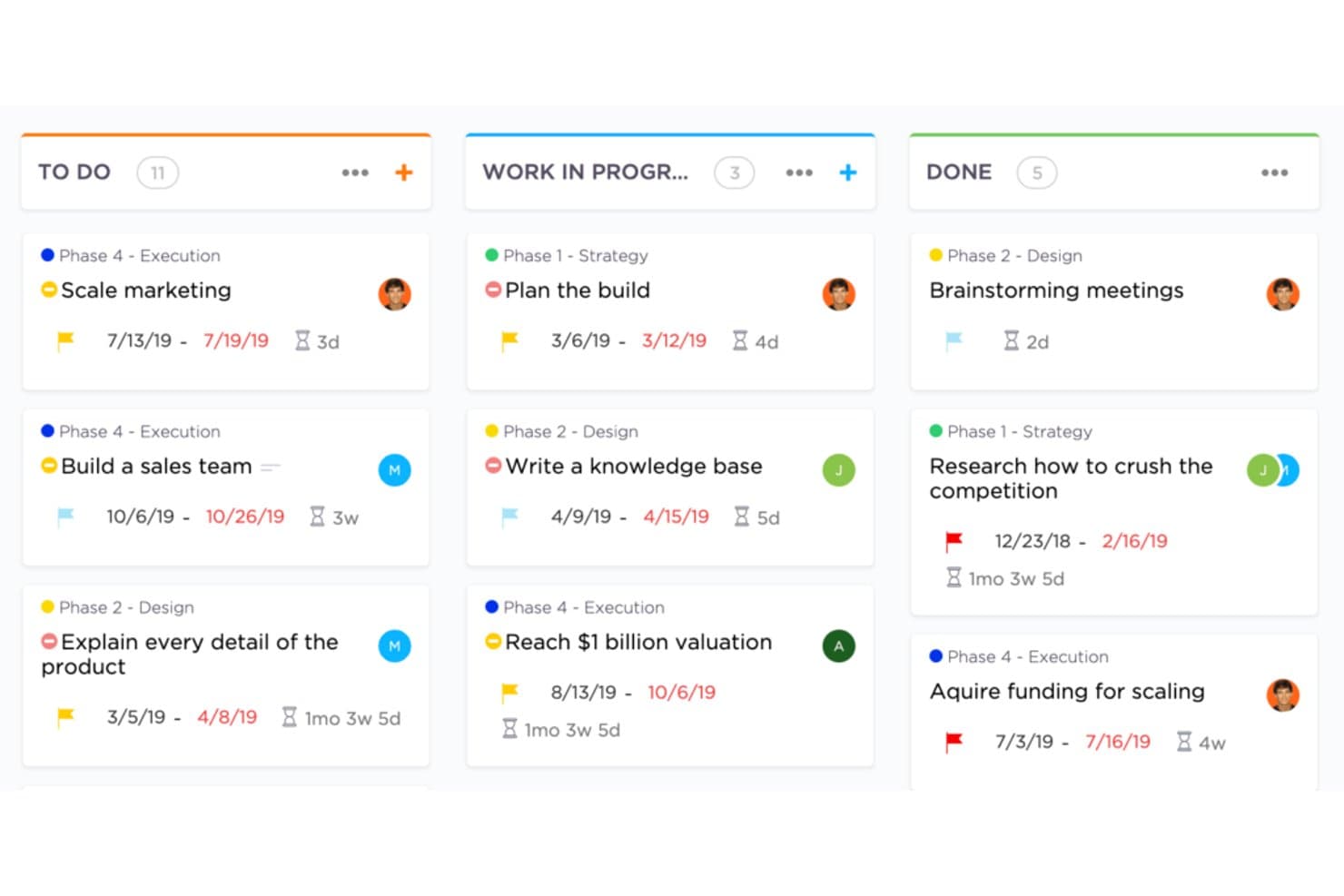
Create flexible Kanban boards in ClickUp. ClickUp is a work management platform with kanban board views, WIP limits, sprint management, multi-view task tracking, native time tracking, automations, and built-in AI tools.
Who Is ClickUp Best For?
ClickUp is a strong fit for product and engineering teams that want kanban, sprints, WIP limits, and portfolio tracking in a single workspace.
Why I Picked ClickUp
I picked ClickUp as one of the best because its native WIP limits go beyond a simple cap: when a column hits its limit, the board flags it visually, and ClickUp's AI Super Agents actively ping whoever owns the stalled cards. That kind of proactive enforcement is something I rarely see built in elsewhere. Sprint Points and sprint reporting round out the kanban workflow, so product teams can manage backlog, track velocity, and enforce throughput discipline without stitching together separate tools.
ClickUp Key Features
- Multiple synced views: Switch between List, Calendar, Gantt, Timeline, and Mind Map views without rebuilding your tasks—they all pull from the same data.
- Sprint management: Plan and track sprints with Sprint Points directly on the Free plan, with full sprint reporting available on Business.
- Native time tracking: Log time against tasks from within ClickUp, starting on the Unlimited plan, without a third-party integration.
- ClickUp Brain: Ask questions about your board—like which tasks are stalled or what's due soon—and get answers from the built-in AI assistant.
ClickUp Integrations
ClickUp offers native integrations with Slack, HubSpot, and Google Drive on Unlimited and higher. It supports webhooks and an Enterprise API for custom integrations.
Pros and Cons
Pros:
- AI nudges owners about stalled cards
- Synced views connect backlog and roadmaps
- Native WIP caps flag blocked columns
Cons:
- Large feature set slows initial setup
- Advanced controls sit behind higher plans
Learn more about ClickUp: Best for linking dev workflows to board planning
- Free plan available
- From $8.50/user/month (billed annually)
Visit WebsiteCustomer Rating:4.5/5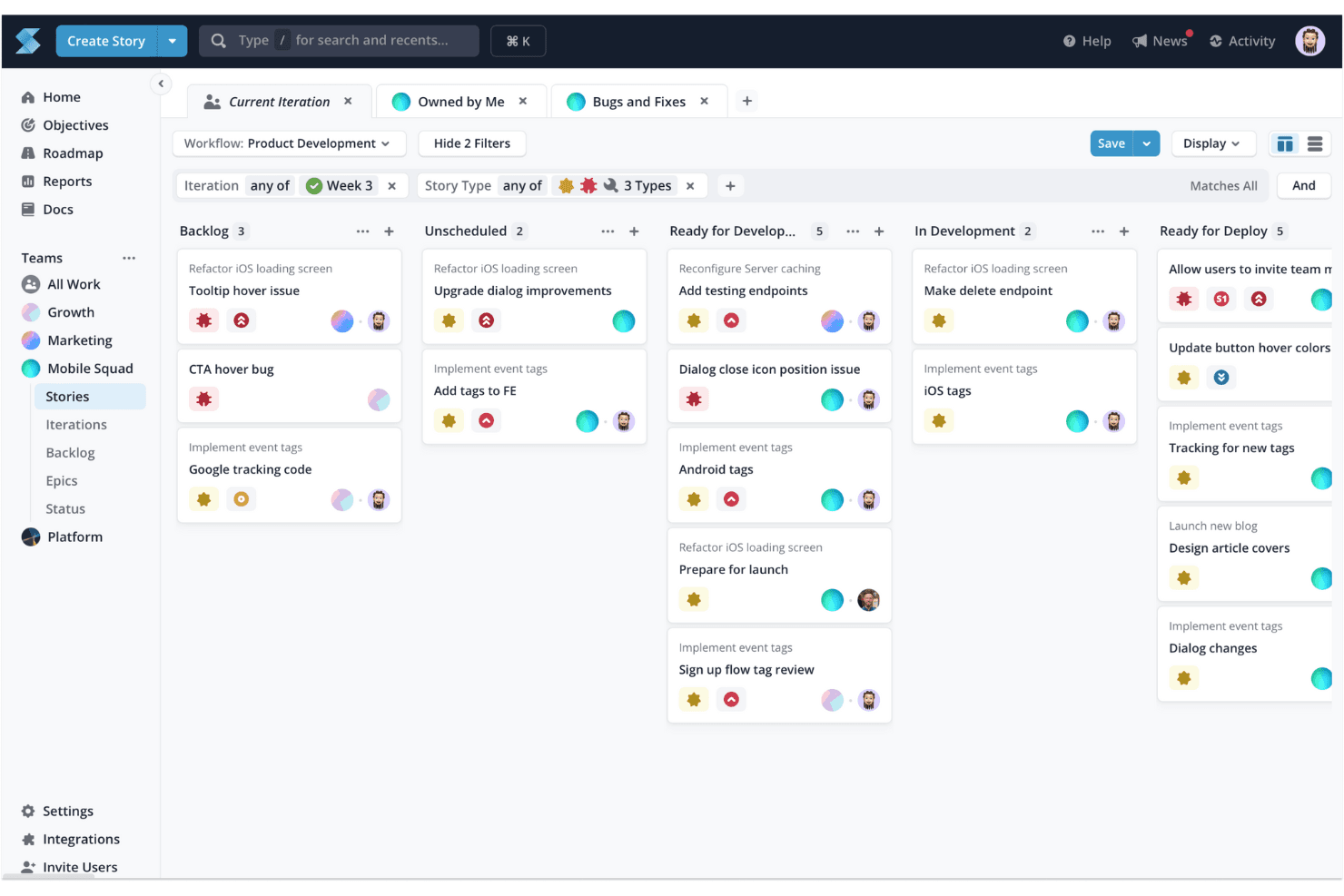
Shortcut's Kanban board helps you visualize and manage tasks, making it ideal for task tracking and optimizing workflow processes. Shortcut is a kanban-based project management tool for software teams that combines Stories, Epics, Objectives, and Timeline roadmaps with built-in Iterations, WIP limits, and code integrations across GitHub, GitLab, and Bitbucket.
Who Is Shortcut Best For?
Shortcut is a strong fit for software teams that want their kanban boards and dev workflows—pull requests, branches, commits—connected in one place.
Why I Picked Shortcut
I've included Shortcut in my top picks because it's the only tool on this list that directly connects kanban board states to code activity, which matters when you're managing a product backlog alongside an active engineering team. When a developer opens a pull request on GitHub, Shortcut can automatically move the linked Story to the right workflow state, so your board reflects reality without anyone updating it manually. I also like how Epics and Objectives layer on top of Stories, giving you a clear line from daily dev tasks up to strategic goals.
Shortcut Key Features
- Story hierarchy: Stories roll up into Epics, which connect to Objectives, giving you a clear line from individual tasks to strategic goals.
- Iterations: Built-in sprint-style cycles let you scope and time-box work without leaving the board.
- WIP limit warnings: Column headers turn red when a team hits its work-in-progress limit, flagging overloaded states at a glance.
- Timeline roadmap: A cross-team roadmap view shows Epic and Iteration health status alongside your board planning.
Shortcut Integrations
Shortcut offers 65+ documented integrations, including GitHub, GitLab, Bitbucket Cloud, Slack, Figma, Productboard, Airfocus, Roadmunk, and Google Sheets. It also provides a REST API v3, outgoing webhooks, and Zapier support for custom connectivity.
Pros and Cons
Pros:
- Advisory WIP limits expose overloaded columns
- Iterations support sprint-based product planning
- Objectives connect roadmaps with delivery work
Cons:
- No native time tracking for capacity planning
- Workspace-only permissions limit access control
Learn more about Shortcut: Best for multi-board portfolio visibility
- 30-day free trial available
- Pricing upon request
Visit WebsiteCustomer Rating:3.9/5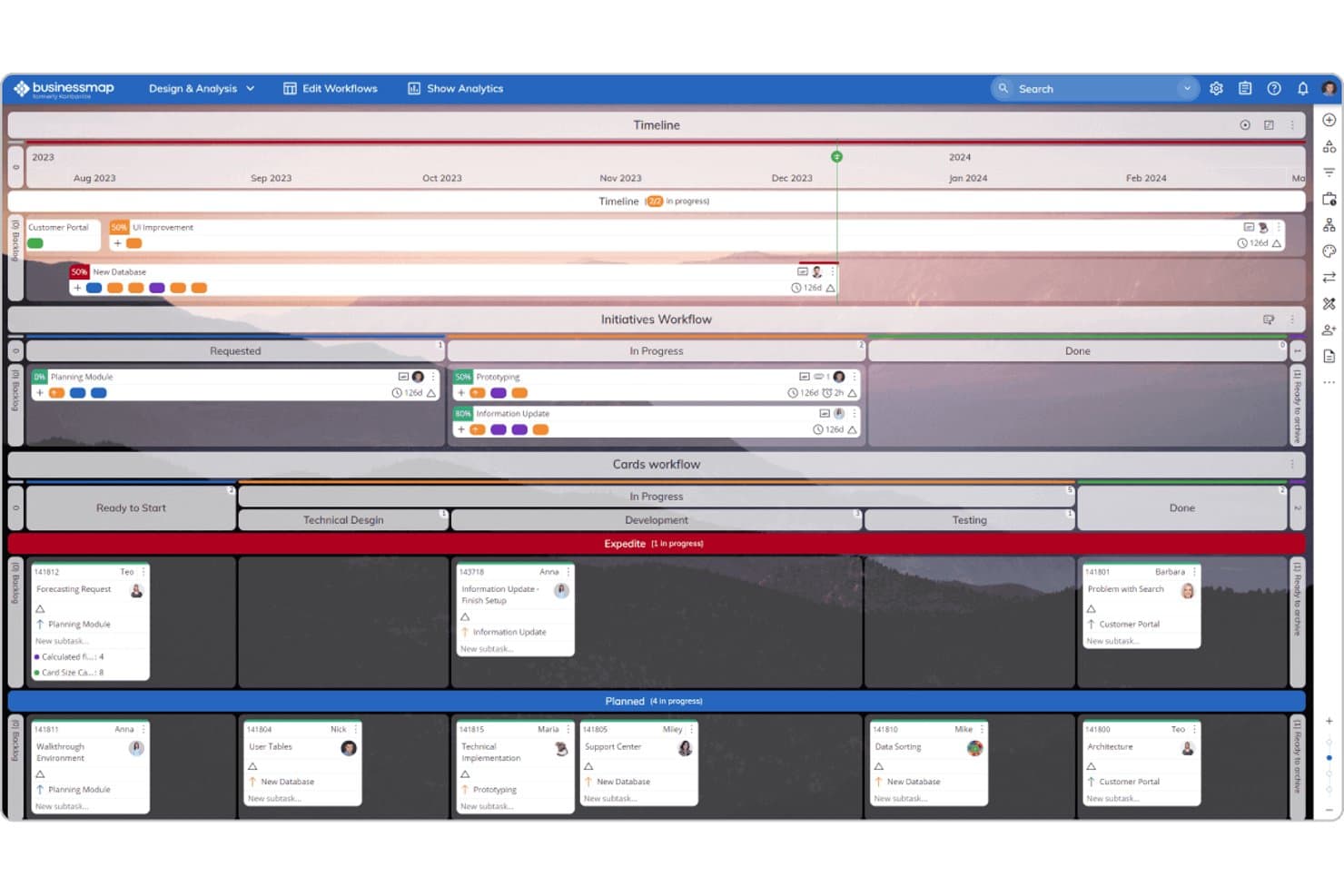
Businessmap combines Timeline, Kanban, and workflow views for product management. Businessmap is a project and portfolio management platform built around Kanban boards, offering multi-board workspaces, WIP limits, Gantt views, automation rules, and cross-board portfolio tracking.
Who Is Businessmap Best For?
Businessmap fits teams that need to connect individual task boards to a broader portfolio view—especially product and project managers overseeing multiple workstreams at once.
Why I Picked Businessmap
Businessmap earns its spot on my shortlist because of how well it connects individual task boards to a portfolio-level view—something most Kanban tools don't do without a workaround. I particularly like the Portfolio Workspaces feature, which links boards across teams so you can track cross-team dependencies in one place. The Initiatives Workflow also stands out: it auto-updates a parent epic as linked task cards move, so your high-level roadmap stays current without manual syncing.
Businessmap Key Features
- WIP limits by task size: Set work-in-progress limits based on task size rather than card count, giving your team a more accurate picture of actual workload.
- Cumulative flow diagram: Track how work moves through each stage over time with a built-in chart that surfaces bottlenecks and throughput patterns.
- Workflow designer: Build custom columns, sub-columns, and swimlanes using a no-code designer to match your team's exact process.
- Monte Carlo forecasting: Use statistical delivery date predictions—ranging from optimistic to pessimistic—based on your team's real historical data.
Businessmap Integrations
Businessmap offers documented integrations with Jira, GitLab, Bitbucket, Power BI, Tableau, Looker Studio, Okta, Azure AD, and OneLogin. It also supports Make, Microsoft Power Automate, and REST API connections, plus Zapier.
Pros and Cons
Pros:
- Initiatives connect epics with delivery tasks
- Size-based WIP limits clarify team capacity
- Cross-board portfolio visibility supports roadmap oversight
Cons:
- Extensive configuration slows initial adoption
- Multiple boards can complicate prioritization
Learn more about Businessmap: Best for enterprise-scale kanban portfolio planning
- 30-day free trial + free demo available
- Pricing upon request
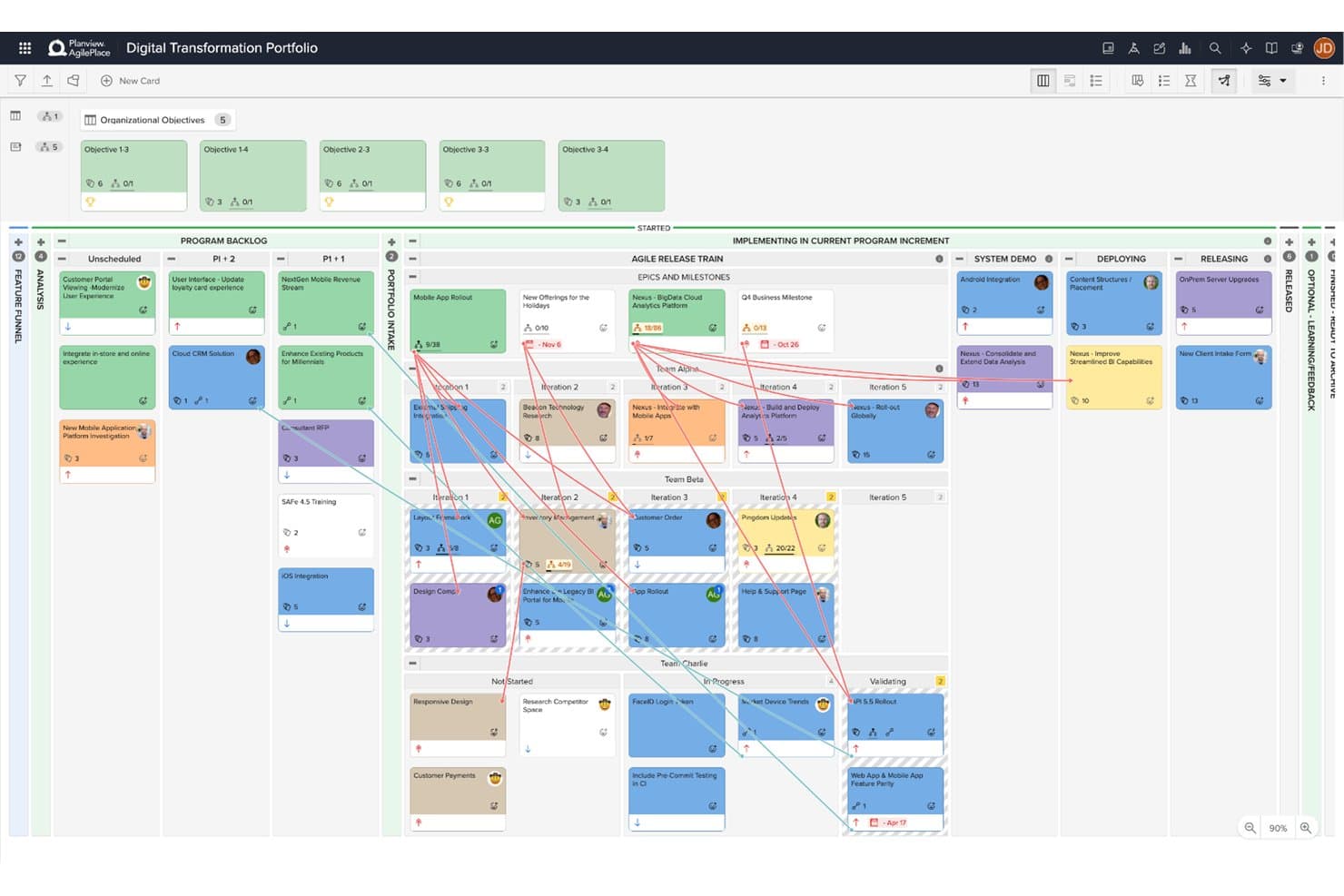
Planview AgilePlace visualizes portfolio work across teams and program increments. Planview AgilePlace is an enterprise kanban platform that combines visual board management, cross-board portfolio planning, WIP limit enforcement, flow analytics, and PI planning across teams of teams.
Who Is Planview AgilePlace Best For?
Planview AgilePlace is a strong fit for enterprise product and engineering teams coordinating work across multiple teams, boards, and program increments.
Why I Picked Planview AgilePlace
Planview AgilePlace earns its spot on my shortlist because it's built from the ground up for teams managing work across dozens of boards simultaneously. I particularly like the cross-board portfolio view, which rolls up parent-child card relationships so you can track epics and milestones across teams without losing sight of lane-level detail. The PI and quarter planning features are equally impressive, letting teams-of-teams coordinate dependencies and visualize blockers across program increments in one place.
Planview AgilePlace Key Features
- WIP limits: Set work-in-progress limits on lanes and individual users, with alerts on every limit breach and recorded override reasons.
- Flow analytics: Track cycle time, lead time, and cumulative flow diagrams to identify bottlenecks across your boards.
- Card scoring: Rank backlog items using custom scoring criteria to support prioritization decisions.
- AI assistant (Planview Anvi): Ask questions in natural language, surface risks, and get backlog curation suggestions directly within the tool.
Planview AgilePlace Integrations
Planview AgilePlace offers native integrations with Jira, Broadcom Rally, Microsoft Azure DevOps, digital.ai, and ServiceNow. It also provides an open API for connections to Power BI, Tableau, and other Planview products.
Pros and Cons
Pros:
- Flow metrics expose product delivery bottlenecks
- WIP enforcement records override reasons
- Cross-board portfolio planning connects team dependencies
Cons:
- Reporting needs more depth for some teams
- Interface feels dated to some reviewers
Learn more about Planview AgilePlace: 10Best for no-code automation on any board size
Trello
- Free plan + free trial available
- From $5/user/month (billed annually)
Visit WebsiteCustomer Rating:4.5/5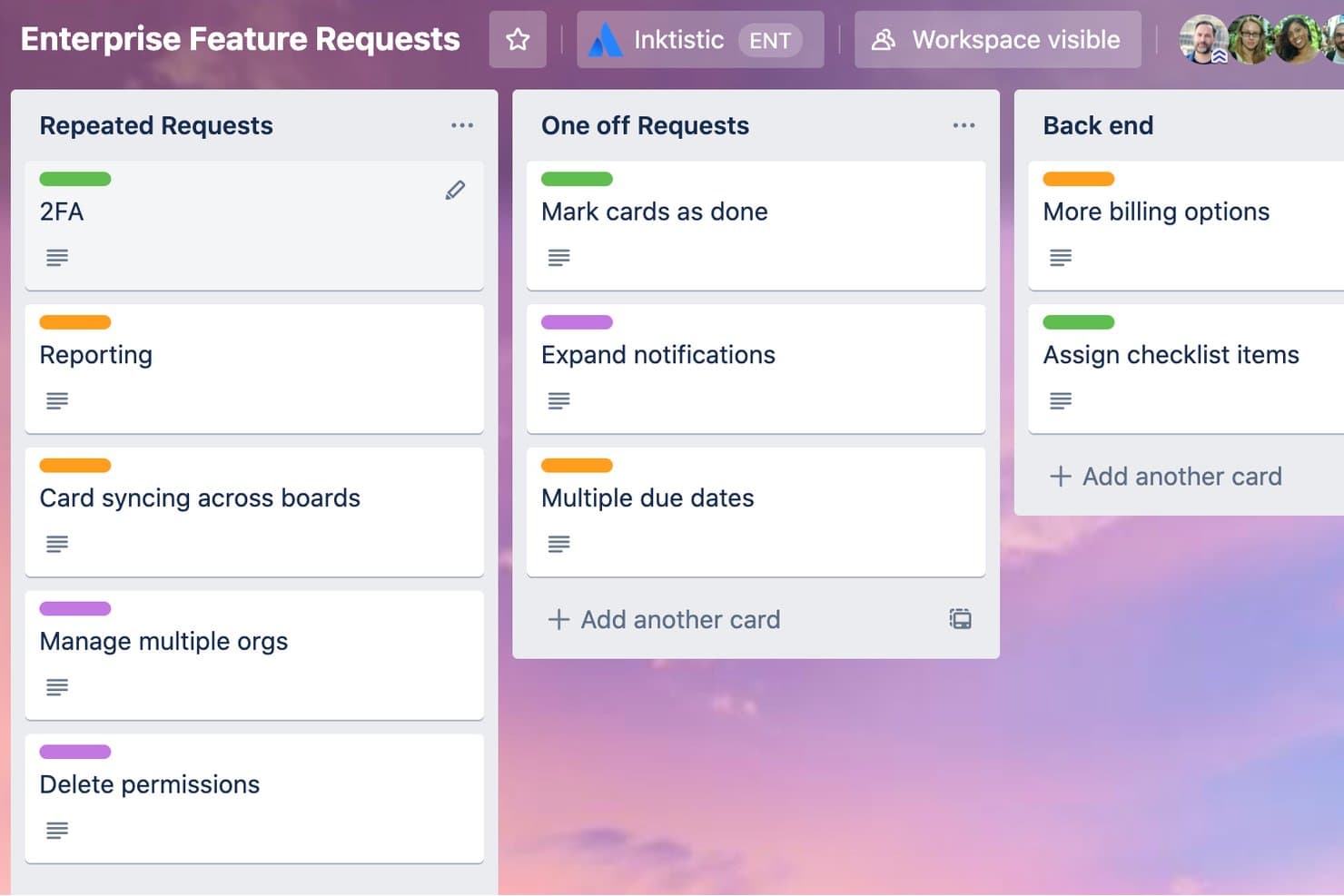
Trello organizes enterprise feature requests across labeled Kanban columns. Trello is a kanban-based project management tool built around boards, lists, and cards, with built-in no-code automation, 200+ Power-Up integrations, and cross-functional collaboration features like comments, assignees, and checklists.
Who Is Trello Best For?
Trello works well for small to mid-sized teams that want a simple, visual way to manage tasks without a steep learning curve or heavy setup.
Why I Picked Trello
I've included Trello in my top picks because its built-in Butler automation works across boards of any size without writing a single line of code. I particularly like how you can set rules to automatically move cards between lists, assign members, or apply due dates the moment a trigger fires. For product teams juggling backlog grooming and sprint handoffs, that automation removes a lot of repetitive manual work from the board.
Trello Key Features
- Custom fields: Add structured data to cards—like priority, status, or product area—to keep your backlog organized and consistent across the board.
- Card mirroring: Display a single card across multiple boards so cross-functional teams always see the same up-to-date task without duplication.
- AI-generated checklists and due dates: Let Trello draft task breakdowns and timelines from a card description, giving you a starting point for sprint planning.
- 200+ Power-Up integrations: Connect tools like Slack, Google Drive, and Salesforce directly to your boards to keep work centralized without switching tabs.
Trello Integrations
Trello supports 200+ integrations through Power-Ups, including Slack, Google Drive, and Salesforce. Power-Ups are unlimited per board, though some carry separate subscription fees.
Pros and Cons
Pros:
- Card mirroring aligns shared work
- Visual backlog-to-completion tracking
- No-code automation across boards
Cons:
- Complex portfolios become difficult to organize
- Native WIP limit controls absent
Diğer Kanban Araçları
Kısa listeme giremeyen ancak yine de göz atmaya değer bazı ek Kanban aracı seçenekleri şunlardır:
- 11JiraBest for kanban with multi-team agile reporting
- 12FavroBest for built-in flow metrics across every board
- 13SmartsheetBest for spreadsheet-style kanban at scale
- 14AsanaBest for managing multiple workstreams across boards
- 15monday AI WorkspaceBest for cross-team backlog on one board
- 16Kanban ToolBest for Kanban purists needing on-site hosting
- 17Easy ProjectsBest for ops-heavy teams tracking time and budgets
- 18TeamhoodBest for customizable boards with flow metrics
- 19NotionBest for keeping docs and boards in one workspace
- 20Azure BoardsBest for dev-team kanban in Microsoft ecosystems
How I Evaluate Kanban Tools
I split my evaluation into three parts, with core functionality carrying the most weight: can the tool build boards that actually mirror how your team works, and does it enforce WIP limits with real visibility? Then I look at standout features like cross-board dependency tracking, and finally consider onboarding ease and pricing transparency.
Core Functionality (Table Stakes for This List)
When I'm selecting tools for my list, I score each one on a scale from 0 (does not offer the functionality) to 5 (excels in this area) for each core functionality listed below. I then convert the total into a percentage to help assess each tool's overall fit, with extra weight on any functionalities I've deemed essential.
- Visual Kanban Boards (Essential): I check whether boards scale beyond a single team—can you run separate boards for discovery, delivery, and ops without the layout falling apart?
- Drag-and-Drop Cards (Essential): Cards should update status the moment you move them, and I look for bulk drag support so reprioritizing a dozen items isn't a one-by-one chore.
- Work-in-Progress Limits: I evaluate whether WIP limits actually warn or block your team when a column is overloaded, not just display a number no one notices.
- Multiple Board Views: Teams need list, calendar, and timeline views that stay in sync with the board. I look for full data parity so switching views never means losing context.
- Workflow Customization: I check for configurable columns, swimlanes, and sub-stages—plus whether you can save custom workflows as templates to reuse across new product squads.
- Flow and Performance Reporting: Cycle time, lead time, and cumulative flow charts tell you where work stalls. I look for filtering by team or time period so you can spot bottlenecks early.
Once I have a list of tools that meet the criteria, I consider what sets each platform apart.
Differentiating Factors (What Sets Vendors Apart)
Here's how I compare and contrast different vendors:
Standout Features
I evaluate each tool's automation and rules engine first. A board that can auto-assign cards, trigger notifications, and move items between columns based on status changes saves hours of manual upkeep each sprint. I also check for cross-board dependency tracking, since product teams running parallel workstreams need to see how a blocked card on one board affects delivery on another. Finally, I look at native integrations with tools like Slack, GitHub, and Google Workspace to confirm data flows both ways without manual re-entry.
Beyond Features
I evaluate how well a tool scales from a single squad to an org-wide rollout, checking whether permission tiers and guest access keep up as teams multiply. Onboarding ease matters just as much—kanban adoption usually starts with one team and spreads organically, so guided templates and in-app walkthroughs shorten time-to-value. I also look at integration depth with dev and PM ecosystems, since two-way sync with tools like Jira or Slack determines whether your board stays the source of truth or drifts into a silo.
Kanban Aracı Nasıl Seçilir
Uzun özellik listeleri ve karmaşık fiyatlandırma yapıları içinde kaybolmak kolaydır. Kendinize özgü yazılım seçim sürecinizi yürütürken odağınızı korumanıza yardımcı olmak için göz önünde bulundurmanız gereken faktörleri içeren bir kontrol listesi hazırladım:
| Faktör | Göz Önünde Bulundurulması Gerekenler |
|---|---|
| FaktörÖlçeklenebilirlik | Göz Önünde Bulundurulması GerekenlerAraç ekibinizle birlikte büyüyebilir mi? Daha fazla kullanıcı veya proje için gelecekteki ihtiyaçlarınızı göz önünde bulundurun. Esnek fiyatlandırma katmanları veya kurumsal seçenekler sunan araçları tercih edin. |
| FaktörEntegrasyonlar | Göz Önünde Bulundurulması GerekenlerAraç mevcut yazılımlarınızla çalışıyor mu? Slack, Google Workspace veya Microsoft Office gibi temel araçlarla entegrasyonları kontrol edin. Verilerin manuel olarak aktarılmasını gerektiren araçlardan kaçının. |
| FaktörÖzelleştirilebilirlik | Göz Önünde Bulundurulması GerekenlerAracı iş akışlarınıza uyacak şekilde uyarlayabilir misiniz? Panoları, alanları ve bildirimleri özelleştirme seçeneklerini arayın. Süreçlerinize uyum sağlamayan katı araçlardan kaçının. |
| FaktörKullanım kolaylığı | Göz Önünde Bulundurulması GerekenlerAraç ekibiniz için kullanıcı dostu mu? Arayüzü basitlik ve anlaşılabilirlik açısından test edin. Dik bir öğrenme eğrisi, benimsenmeyi engelleyebilir. |
| FaktörUygulama ve kullanıma geçiş | Göz Önünde Bulundurulması GerekenlerEkibiniz aracı ne kadar hızlı kullanmaya başlayabilir? Eğitim materyallerinin bulunabilirliğini, kurulum sırasında sunulan desteği ve veri taşıma kolaylığını değerlendirin. |
| FaktörMaliyet | Göz Önünde Bulundurulması GerekenlerAraç bütçenize uygun mu? Fiyatlandırma planlarını karşılaştırın ve eklentiler veya kullanıcı sınırları gibi gizli maliyetleri göz önünde bulundurun. Bütçenizi aşmadan değer sunan bir araç arayın. |
| FaktörGüvenlik önlemleri | Göz Önünde Bulundurulması GerekenlerAraç verilerinizi koruyor mu? Şifreleme ve düzenli yedeklemeler gibi güçlü güvenlik özelliklerine sahip olduğundan emin olun. Veri koruma düzenlemelerine uyumluluğunu doğrulayın. |
| FaktörDestek bulunabilirliği | Göz Önünde Bulundurulması GerekenlerGerektiğinde yardım alabilecek misiniz? Kullanılabilir destek saatlerini ve kanallarını kontrol edin. Özellikle ekibiniz farklı saat dilimlerinde çalışıyorsa sohbet veya telefon desteği gibi hızlı yanıt veren destek seçeneklerini tercih edin. |
Kanban Araçlarındaki Trendler
Kanban araçları ve teknolojisi, görevleri organize etmek, önceliklendirmek ve takip etmek için daha verimli yöntemlere duyulan ihtiyacın yanı sıra şelale metodolojilerinden Çevik metodolojilere geçişin devamını da yansıtarak hızla gelişmeye devam ediyor. Bu doğrultuda, gelecekte Kanban araçlarını ve ürün yönetimi profesyonellerini etkilemeye devam edeceğini düşündüğüm birkaç önemli trend ortaya çıktı.
- Yapay zekâ ve makine öğrenimiyle entegrasyon: Kanban araçları, görev önceliklendirmesini otomatikleştirmek ve projelerin tamamlanma sürelerini tahmin etmek için yapay zekâ ve makine öğrenimini giderek daha fazla kullanıyor. Algoritmalar ekiplerin iş akışı modellerinden öğrendikçe bu işlevsellik zaman içinde gelişiyor; böylece bu araçlar proje takvimlerini yönetme konusunda daha akıllı ve öngörücü hâle geliyor.
- Sürdürülebilirlik ve çevre dostu özellikler: Giderek daha fazla Kanban aracı, proje yönetimi uygulamalarında sürdürülebilirliği teşvik etmeyi amaçlayan özellikler sunuyor. Bunlar arasında projelerin karbon ayak izini takip etmek ve enerji tüketimini azaltmak için dijital minimalizmi teşvik etmek yer alıyor. Bu tür özellikler, çevreye duyarlı iş uygulamalarına yönelik artan talebi karşılıyor ve teknoloji sektöründe çevresel sorumluluğa doğru daha geniş bir eğilimi yansıtıyor.
- Sanal gerçeklik (VR) çalışma alanları: En yeni ve özgün işlevlerden bazıları, kullanıcıların Kanban panolarıyla üç boyutlu bir sanal ortamda etkileşim kurmasına olanak tanıyan VR çalışma alanlarının kullanıma sunulmasını içeriyor. Bu sıra dışı özellik, özellikle yaratıcı ve tasarım odaklı sektörlerde daha sürükleyici ve ilgi çekici proje yönetimi deneyimlerine duyulan ihtiyacı karşılıyor.
- Duygusal zekâ analitiği: Bir diğer yenilikçi özellik, etkileşim modellerine ve görev tamamlama oranlarına dayanarak ekip moralini ve sağlığını değerlendiren duygusal zekâ analitiğinin entegrasyonudur. Bu özgün yaklaşım, ekip liderlerine ekiplerinin iyi oluş durumları hakkında içgörüler sunmayı amaçlıyor ve iş yerinde ruh sağlığına verilen önemin giderek arttığını gösteriyor.
- Oyunlaştırma ögeleri: Başarı rozetleri, liderlik tabloları ve ödül sistemleri gibi özelliklerle oyunlaştırma ögelerinin Kanban araçlarına dâhil edilmesi giderek daha yaygın hâle geliyor. Bu ögeler, kullanıcı katılımını ve motivasyonunu artırmak, görev tamamlamayı ve proje ilerlemesini takip etmeyi ekip üyeleri için daha etkileşimli ve keyifli hâle getirmek üzere tasarlanmıştır.
Bu trendler, ürün yönetimi profesyonellerinin karşılaştığı değişen ihtiyaçları ve zorlukları yansıtıyor. Kanban araçları yenilik yapmaya devam ederken odak noktası, yalnızca üretkenliği artırmakla kalmayan, aynı zamanda ekiplerin iyi oluşuna ve katılımına da öncelik veren daha akıllı, esnek ve iş birliğine dayalı ortamlar oluşturmak.
Kanban Aracı Nedir?
Kanban Aracı, daha iyi görünürlük ve akış için görevlerinizi dijital panolarda planlamanızı sağlayan bir proje yönetimi platformudur. Proje yöneticileri, ürün liderleri ve ekip üyeleri bu aracı işleri organize etmek, ilerlemeyi takip etmek ve darboğazları erkenden tespit etmek için kullanır. Herkesin aynı anlayışta olmasına, önemli işlere öncelik vermenize ve hiçbir işin gözden kaçmamasını sağlamanıza yardımcı olur.
Özellikler
Bir Kanban aracı seçerken aşağıdaki temel özelliklere dikkat edin:
- Kanban panoları: İş akışlarını görselleştirir ve görevleri etkili bir şekilde yöneterek ekiplerin ilerlemeyi bir bakışta görmesine yardımcı olur.
- Görev atamaları: Görevleri ekip üyelerine dağıtarak herkesin sorumluluklarını ve son teslim tarihlerini bilmesini sağlar.
- İlerleme takibi: Ekipleri programa uygun tutmak ve son teslim tarihlerine yetişmek için görevlerin tamamlanma durumunu ve proje durumunu izler.
- Özelleştirme seçenekleri: Panoları ve iş akışlarını ekibinizin özel ihtiyaçlarına ve süreçlerine uyarlamanızı sağlar.
- Entegrasyonlar: Platformlar arasındaki çalışmayı kolaylaştırmak için Slack veya Google Workspace gibi diğer araçlara bağlanır.
- Otomasyon yetenekleri: Zamandan kazanmak ve manuel hataları azaltmak için tekrarlanan görevleri otomatikleştirir.
- Raporlama araçları: Ekip performansını ve proje sonuçlarını değerlendirmek için içgörüler ve analizler oluşturur.
- Mobil erişim: Esneklik ve erişilebilirlik sağlamak için mobil uygulamalarla hareket hâlindeyken görevleri yönetmenizi sağlar.
- İş birliği araçları: Yorumlar ve dosya ekleri aracılığıyla ekip iletişimini ve fikir paylaşımını kolaylaştırır.
- Güvenlik özellikleri: Verilerinizi şifreleme ve veri koruma düzenlemelerine uyumlulukla korur.
Faydalar
Kanban aracını uygulamak ekibiniz ve işletmeniz için çeşitli faydalar sağlar. Yararlanabileceğiniz birkaç fayda şunlardır:
- Geliştirilmiş organizasyon: İş akışlarını kanban panolarıyla görselleştirerek ekibinizin düzenli kalmasına ve görevlere odaklanmasına yardımcı olun.
- Geliştirilmiş iş birliği: Ekip üyeleri arasındaki iletişimi ve fikir paylaşımını kolaylaştırmak için iş birliği araçlarını kullanın.
- Artan üretkenlik: Ekibinizin verimli çalışmasını ve teslim tarihlerine uymasını sağlamak için tekrarlayan görevleri otomatikleştirin ve ilerlemeyi takip edin.
- Esneklik: İş akışlarını ekibinizin kendine özgü süreçlerine uyacak şekilde özelleştirerek değişikliklere kolayca uyum sağlamasına olanak tanıyın.
- Daha iyi karar alma: Bilinçli kararları desteklemek için ekip performansı ve proje sonuçları hakkında içgörüler sunan raporlama araçlarına erişin.
- Erişilebilirlik: Mobil erişim sayesinde görevleri her yerden yönetin ve uzaktan veya hareket hâlinde çalışan ekip üyelerine esneklik sağlayın.
- Veri güvenliği: Veri koruma yönetmeliklerine uyumu güvence altına alan güçlü güvenlik özellikleriyle işletme bilgilerinizi koruyun.
Maliyetler ve Fiyatlandırma
Bir kanban aracı seçmek, mevcut çeşitli fiyatlandırma modellerinin ve planların anlaşılmasını gerektirir. Maliyetler özelliklere, ekip büyüklüğüne, eklentilere ve daha fazlasına bağlı olarak değişir. Aşağıdaki tablo, kanban aracı çözümlerinde yaygın planları, ortalama fiyatlarını ve genellikle sunulan özellikleri özetlemektedir:
Kanban Aracı İçin Plan Karşılaştırma Tablosu
| Plan Türü | Ortalama Fiyat | Yaygın Özellikler |
|---|---|---|
| Plan TürüÜcretsiz Plan | Ortalama Fiyat$0 | Yaygın ÖzelliklerTemel kanban panoları, sınırlı görev yönetimi ve temel iş birliği araçları. |
| Plan TürüKişisel Plan | Ortalama Fiyat$5-$15/kullanıcı/ay | Yaygın ÖzelliklerÖzelleştirilebilir panolar, görev atamaları, ilerleme takibi ve mobil erişim. |
| Plan Türüİşletme Planı | Ortalama Fiyat$15-$30/kullanıcı/ay | Yaygın ÖzelliklerGelişmiş raporlama, otomasyon özellikleri, popüler araçlarla entegrasyonlar ve geliştirilmiş güvenlik. |
| Plan TürüKurumsal Plan | Ortalama Fiyat$30-$60/kullanıcı/ay | Yaygın ÖzelliklerSınırsız kullanıcı, özel destek, özelleştirilebilir iş akışları ve gelişmiş analizler. |
Kanban Aracı SSS
Kanban aracı hakkında sık sorulan bazı soruların yanıtlarını burada bulabilirsiniz:
Kanban araçları uzaktan çalışan ekipler için kullanılabilir mi?
Evet, kanban araçları uzaktan çalışan ekipler için oldukça uygundur. Ekip üyelerinin her yerden iş birliği yapmasına ve ilerlemeyi takip etmesine olanak tanır. Uzaktan ekip çalışmasını geliştirmek için güçlü iş birliği özelliklerine, mobil erişime ve Slack veya Microsoft Teams gibi iletişim platformlarıyla entegrasyonlara sahip araçları tercih edin.
Başka bir proje yönetimi aracından kanban aracına geçmek zor mudur?
Araç iyi bir başlangıç desteği sunuyorsa kanban aracına geçiş kolay olabilir. Birçok araç geçişi kolaylaştırmak için şablonlar, eğitim videoları ve etkileşimli tanıtımlar sağlar. Kesintiyi en aza indirmek ve projelerinizi planlandığı şekilde sürdürmek için yeni aracınızın önceki sisteminizdeki verileri içe aktarabildiğinden emin olun.
Kanban araçları çevik proje yönetimini destekler mi?
Evet, birçok kanban aracı çevik metodolojileri destekler. Çevik ekipler için gerekli olan iş listesi yönetimi, sprintler ve görev önceliklendirme gibi özellikler sunarlar. Ekibiniz çevik uygulamaları izliyorsa ihtiyaçlarınızı karşıladıklarından emin olmak için özellikle çevik çerçeveleri desteklediğini belirten araçları tercih edin.
Yeni bir kanban aracına geçerken hangi veri taşıma zorluklarıyla karşılaşmayı beklemeliyim?
Mevcut kartlarınızı, sütunlarınızı, eklerinizi ve kullanıcı atamalarınızı yeni aracın biçimine uyarlamanız gerekebilir; özellikle eski aracınız özel alanlar veya durumlar kullanıyorsa bazı manuel temizlik işlemleri yapmayı bekleyin. Anlamlı geçmişi aktarabilmek ve her şeye sıfırdan başlamamak için içe/dışa aktarma biçimlerini (CSV, JSON) inceleyin. Ayrıca arşivlenmiş görevlerin ve bağlantılı kartların nasıl taşınacağını da kontrol edin; bunların eksik olması izlenebilirliği olumsuz etkileyebilir.
Bir kuruluş genelinde kanban aracı kullanırken değişim yönetimini nasıl sağlayabilirim?
“Neden” sorusunu açıkça anlatın; ekiplere bunun yalnızca başka bir araç olmadığını, işi görünür ve yönetilebilir hâle getireceğini gösterin. Farklı ekipleri temsil eden bir pilot grup oluşturun ve gerçek kullanıcıların endişelerini yakalayabilmek için erken aşamada geri bildirim toplayın. Sadece kullanım konusunda değil, davranışlar konusunda da (ör. durum değiştiğinde kartları güncellemek) eğitim verin; böylece yeni aracınız yalnızca isteğe bağlı bir eklenti olarak kalmaz, insanların çalışma biçiminin bir parçası hâline gelir.