

En iyi A/B testi yazılımları, ürün özellikleri, kullanıcı arayüzü değişiklikleri ve mesajlaşma üzerinde denemeler yapmanıza olanak tanır; böylece performansı artıran, verilere dayalı kararlar alabilirsiniz.
Bu yazılımlar olmadan ekipler çoğu zaman sezgilere veya eksik analizlere güvenir; bu da sonuçları iyileştirmeyen ya da risk oluşturan değişikliklere yol açar.
20'den fazla A/B testi aracını değerlendirdim ve hangilerinin güvenilir hedefleme, istatistiksel titizlik ve kolay okunabilir sonuçlar sunduğunu biliyorum.
Bu rehberde, ürün ekiplerinin testleri verimli bir şekilde yürütmesine, daha hızlı öğrenmesine ve güvenle optimizasyon yapmasına yardımcı olan platformları bulacaksınız.
Why Trust Our Software Recommendations
6,700+
Reviews
20
Industry experts
16+
Evaluation factors
14
Years
Our team has been testing and reviewing software since 2012. As product managers ourselves, we know how difficult—and important—it is to choose the right software.
For this guide, we evaluated tools using hands-on testing and independent research, scoring tools using our selection criteria.
Our reviews reflect our human editorial judgment, not a sales pitch.
Expert reviewers:
- Andrew LumbySenior TPM
- Cristiano ValimSenior UI/UX Lead


Karşılaştırma Tablosu: A/B Testi Yazılımları
Genel bakışlarda az önce ele aldığımız araçları karşılaştırmak için kullanabileceğiniz tabloyu burada bulabilirsiniz.
Score legend (out of 5)
- Excellent4.5–5
- Good4–4.4
- Average3–3.9
- Below average2–2.9
- Poor1–1.9
Sorted by: Default
| Tool | Starting Price | Website | |||||||
|---|---|---|---|---|---|---|---|---|---|
Best for real-time optimization recommendations | Not rated | 1 | 1 | 2 | Not rated | Not rated | 3 | $79/month 7-day free trial + free demo available | Website |
Best for self-serve experiment analytics | 4.5 out of 5 | 4 | 5 | 4 | 5 | 5 | 4 | Pricing upon request Free plan + free demo available | Website |
Best for adaptive traffic allocation across channels | 4.3 out of 5 | 4 | 4 | 4 | 5 | 5 | 4 | Pricing upon request Not available | Website |
Best for advanced statistical analysis | 4.7 out of 5 | 5 | 5 | 4 | 5 | 5 | 4 | $150/month Free plan available | Website |
Best for warehouse-native open-source testing | 4.7 out of 5 | 5 | 5 | 4 | 5 | 5 | 4 | $40/user/month Free plan + free demo available | Website |
Best for multi-method stats with gradual rollouts | 5.0 out of 5 | 5 | 5 | 5 | 5 | 5 | 5 | $495/month 30-day free trial + free demo available | Website |
Best for customizable feature flagging options | 4.7 out of 5 | 5 | 5 | 4 | 5 | 5 | 4 | Pricing upon request Free plan + Free trial + Free demo available | Website |
Best for targeted product rollouts | 4.7 out of 5 | 4 | 5 | 5 | 5 | 5 | 4 | Pricing upon request Free demo available | Website |
Best for personalized audience experiences | 4.7 out of 5 | 4 | 4 | 5 | 5 | 5 | 5 | Pricing upon request Free demo available | Website |
Best for experiment governance and approval workflows | 4.7 out of 5 | 4 | 5 | 5 | 4 | 5 | 5 | $299/month 15-day free trial + free demo available | Website |


En İyi 10 A/B Testi Yazılımına Genel Bakış
Her aracın ayrıntılı incelemesini burada bulabilirsiniz. Her aracı öne çıkaran özellikleri ve işlevleri vurgulamak için artılarını ve eksilerini ele alacağım.
 Best for real-time optimization recommendations
- 7-day free trial + free demo available
- From $79/month

Articos provides user research and interview analysis tools that help teams validate hypotheses and inform A/B testing decisions. Articos is an AI-powered synthetic user research platform that generates personas based on behavioral science to simulate audience reactions, test messaging and concept variants, and produce structured research reports with prioritized insights.
Who Is Articos Best For?
Articos is a good choice for marketers, product teams, and UX researchers who need fast audience insights without recruiting live participants or running large-scale live traffic experiments.
Why I Picked Articos
I picked Articos as one of the best because its AI engine goes beyond surfacing what resonates with simulated personas. It delivers ranked optimization recommendations you can act on right away. When I run a concept test, Articos flags which messaging angles perform strongest and suggests specific copy or positioning adjustments, removing the guesswork from interpreting results and cutting the time between testing and iteration.
Articos Key Features
- Synthetic persona generation: Uses AI and behavioral science to simulate how different user segments would react to your content.
- Concept variant testing: Compares two content or messaging variants with the same simulated audience panel.
- Audience segmentation targeting: Allows you to define demographic and psychographic audience profiles for pre-launch tests.
- Structured insight reports: Present test results in themed findings and include persona quotes for stakeholder review.
Articos Integrations
Native integrations are not currently listed.
Pros and Cons
Pros:
- Compares message variants without live traffic
- Completes full studies in under 30 minutes
- AI personas include built-in skeptics
Cons:
- Vague inputs produce less reliable outputs
- Synthetic personas miss truly unexpected responses
Learn more about Articos: Best for self-serve experiment analytics
- Free plan + free demo available
- Pricing upon request
Visit WebsiteCustomer Rating:4.5/5
Amplitude helps teams create experiments, compare variants, and analyze results using built-in product analytics. Amplitude is a feature experimentation and A/B testing platform that combines feature flags, a visual experiment editor, and built-in statistical analysis with its product analytics suite.
Who Is Amplitude Best For?
Amplitude suits product and growth teams at mid-size to enterprise digital companies that conduct experiments along with product analytics.
Why I Picked Amplitude
I picked Amplitude for its self-serve experiment analytics that help teams run and understand tests without heavy technical support. The guided experiment UX walks teams through setup using built-in best practices, so product managers can design, launch, and read results without leaning on data science. I also like that Amplitude shows which user segments are driving impact and flags data quality issues, so I'm not second-guessing whether a result is valid.
Amplitude Key Features
- Feature flags: Manage feature releases, target audiences, and connect experiments with product behavior data.
- Mutual exclusion groups: Prevent users from being included in competing experiments by separating test audiences.
- Sequential testing: Analyze experiments continuously and identify significant results without relying on fixed test windows.
- Experiment metrics: Define primary and secondary metrics to measure how variants impact user behavior and outcomes.
Amplitude Integrations
Amplitude integrates with 60+ tools, including Segment, Snowflake, BigQuery, Braze, Salesforce, attribution tools, and experimentation platforms. It also offers APIs for custom integrations, but does not currently support native Zapier integration.
Pros and Cons
Pros:
- CUPED variance reduction improves test accuracy
- Explore additional metrics after experiments run
- Experiments tie directly to behavioral analytics
Cons:
- Custom metric definitions can be tricky
- Advanced experimentation features may require higher-tier plans
Learn more about Amplitude: Best for adaptive traffic allocation across channels
- Not available
- Pricing upon request
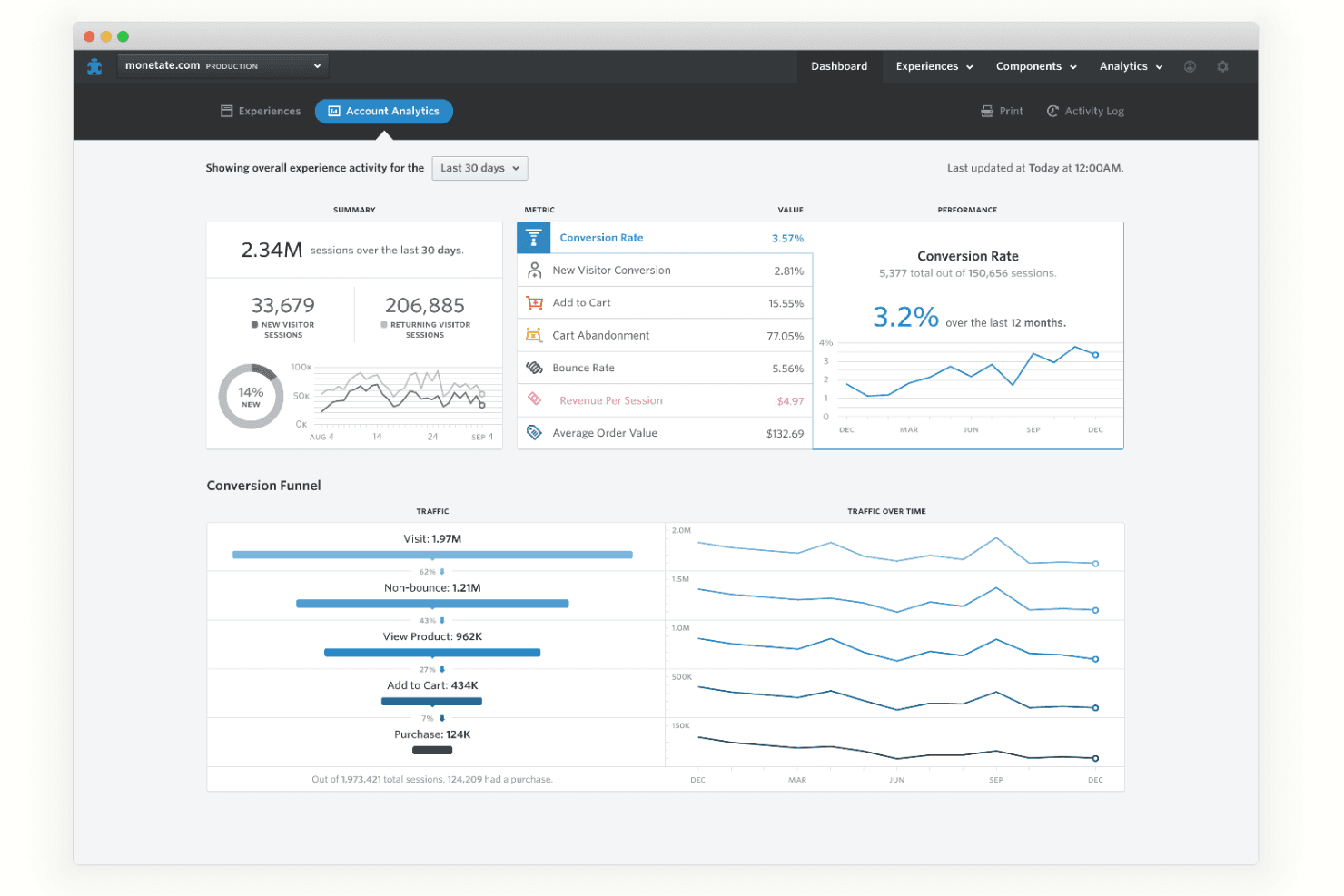
Get real-time analytics of your web page visitors on Monetate. Monetate is an experimentation platform that supports A/B, A/B/n, and multivariate testing alongside feature flags, dynamic traffic allocation, and multi-channel deployment across web, mobile, server-side, and network-layer environments.
Who Is Monetate Best For?
Monetate is a strong fit for growth and CRO teams at mid-to-large ecommerce brands that need to run experiments across web, mobile, and server-side channels without relying heavily on engineering.
Why I Picked Monetate
I picked Monetate as one of the best because its Dynamic Testing engine does something most A/B tools don't: it shifts traffic toward winning variants in real time using a Bayesian multi-armed bandit model that updates every five minutes. That means you're not leaving revenue on the table while waiting for statistical significance. I also like that this adaptive allocation works across web, mobile, server-side, and network-layer environments through the Forte integration, so a single experiment can run consistently across every channel your product touches.
Monetate Key Features
- Action Builder: A no-code, WYSIWYG editor that lets you insert, edit, move, or hide images, HTML, CSS, and JavaScript to build web variants without developer support.
- Feature flags: Enable incremental rollouts of code-level changes—like checkout flows or UI updates—to targeted audience segments, with instant rollback capability.
- Event Builder: A WYSIWYG tracking tool that captures clicks, form submits, page URL events, and JavaScript variable impressions without requiring code changes.
- Analytics Cloud: Sends experiment data to Snowflake, Tableau, Power BI, and Looker so you can tie test results to revenue, customer lifetime value, and churn metrics.
Monetate Integrations
Monetate documents integrations with Google Analytics, Adobe Analytics, Contentsquare, Snowflake, Tableau, and more. Its Engine API supports custom connections across web, mobile, server-side, and in-store experiences.
Pros and Cons
Pros:
- Marketers build variants without developers
- Tests run across network and app layers
- Adaptive traffic shifts toward winners
Cons:
- API responses can be inconsistent
- Action Builder can misbehave after Safari updates
Learn more about Monetate:
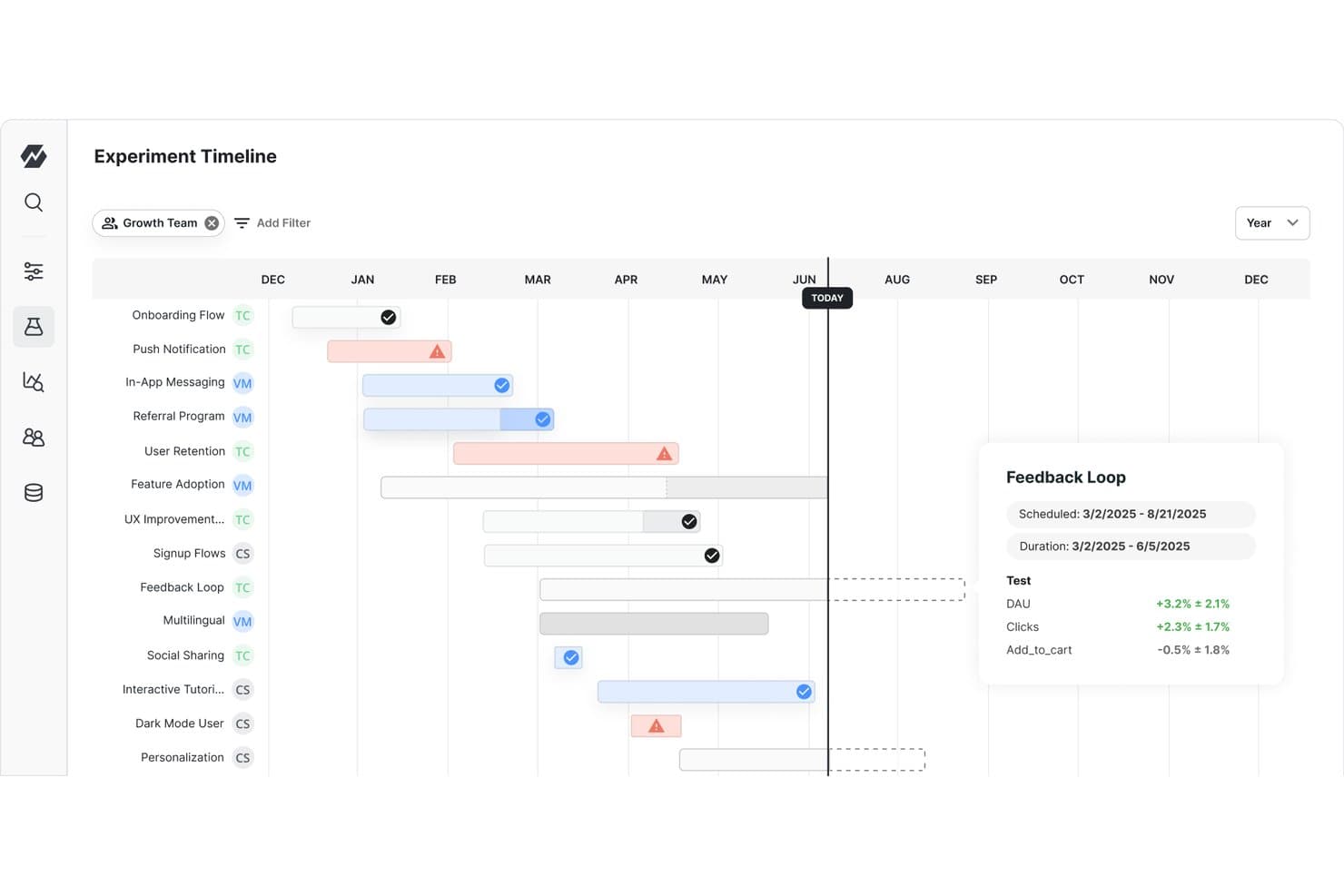
Statsig tracks A/B experiment timelines and results across teams. Statsig is an experimentation and feature management platform that combines A/B and multivariate testing, feature flags, product analytics, and session replay with a statistical engine that supports Bayesian, frequentist, and sequential testing methods.
Who Is Statsig Best For?
Statsig is a strong fit for engineering-led product teams that need a statistically rigorous experimentation platform and have the technical resources to implement it.
Why I Picked Statsig
Statsig earns its spot on my shortlist because its statistical engine goes deeper than almost anything else in this category. I'm talking about support for frequentist, Bayesian, and sequential testing (mSPRT) in a single platform, plus CUPED variance reduction, winsorization, and cross-experiment interaction detection. In practice, that means I can run Bayesian analysis with informative priors from past experiments while simultaneously checking for interaction effects between overlapping tests.
Statsig Key Features
- Autotune multi-armed bandit: Automatically shifts traffic toward winning variants in real time, using Bayesian optimization to maximize a single target metric.
- Release pipelines: Move feature flag and config changes through staged environments (e.g., dev → staging → production) with time-based or manual approvals and instant rollback.
- Warehouse-native experimentation: Runs experiment analysis directly inside Snowflake, Databricks, BigQuery, Redshift, Athena, or Microsoft Fabric without moving data out of your warehouse.
- Reusable segments: Define user segments once by location, device, browser, or app version and apply them across experiments, feature flags, and analytics.
Statsig Integrations
Statsig offers native integrations with Snowflake, Databricks, BigQuery, Redshift, Amazon Athena, Segment, RudderStack, mParticle, Amplitude, and Mixpanel. It also provides a data export API for custom integrations.
Pros and Cons
Pros:
- Deterministic allocation supports reliable variant exposure
- CUPED reduces variance in experiment results
- Bayesian, frequentist, and sequential testing
Cons:
- Complex setup often requires engineering support
- Visual Editor remains in early access
Learn more about Statsig: Best for warehouse-native open-source testing
- Free plan + free demo available
- From $40/user/month
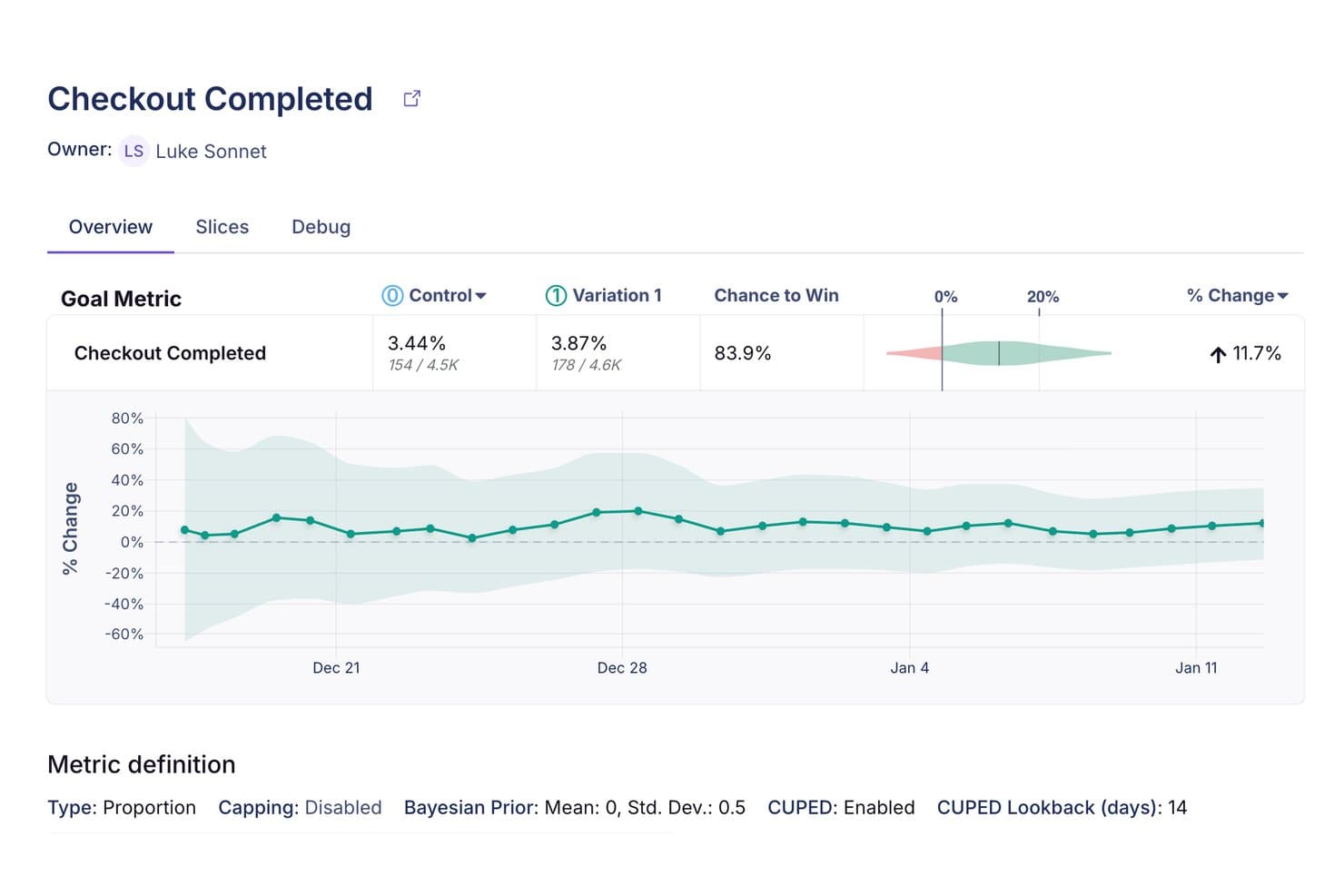
GrowthBook tracks A/B test results with Bayesian stats and trend charts. GrowthBook is an open-source A/B testing and feature flagging platform that supports experimentation across web, mobile, server-side, and edge environments using a warehouse-native analysis architecture.
Who Is GrowthBook Best For?
GrowthBook is a strong fit for engineering-led teams that want to own their experimentation data and run tests directly against their existing data warehouse.
Why I Picked GrowthBook
GrowthBook earns its spot on my shortlist because it's the only open-source A/B testing platform built around your existing data warehouse from the ground up. I love that analysis runs directly in Snowflake, BigQuery, or Redshift via read-only SQL queries, so your experiment data never leaves your infrastructure. The dual Bayesian and frequentist engines, with CUPED variance reduction and sequential testing, let my team run statistically rigorous tests without compromising on methodology.
GrowthBook Key Features
- Visual Editor with AI mode: Describe a change in plain language and GrowthBook generates testable front-end variations without writing code.
- Multi-armed bandits: Uses Thompson sampling to automatically shift traffic toward the best-performing variation based on a single decision metric.
- Safe Rollouts: Monitors guardrail metrics like error rate and latency during a ramp, flagging or rolling back regressions automatically.
- Audience targeting with saved groups: Build reusable audience segments using attribute-based rules, including advanced JSON logic, and apply them across experiments.
GrowthBook Integrations
GrowthBook connects to Snowflake, BigQuery, Redshift, Databricks, ClickHouse, Segment, Google Analytics 4, Amplitude, and Mixpanel. It also offers 24+ SDKs, Slack and Discord notifications, Vercel integration, webhooks, and a REST API for custom connectivity.
Pros and Cons
Pros:
- Safe Rollouts reduce feature-release risk
- Bayesian, frequentist, and CUPED methods
- Warehouse-native analysis preserves data ownership
Cons:
- SQL-heavy workflows challenge nontechnical product teams
- SDK setup still requires developer involvement
Learn more about GrowthBook: Best for multi-method stats with gradual rollouts
- 30-day free trial + free demo available
- From $495/month
Visit WebsiteCustomer Rating:4.7/5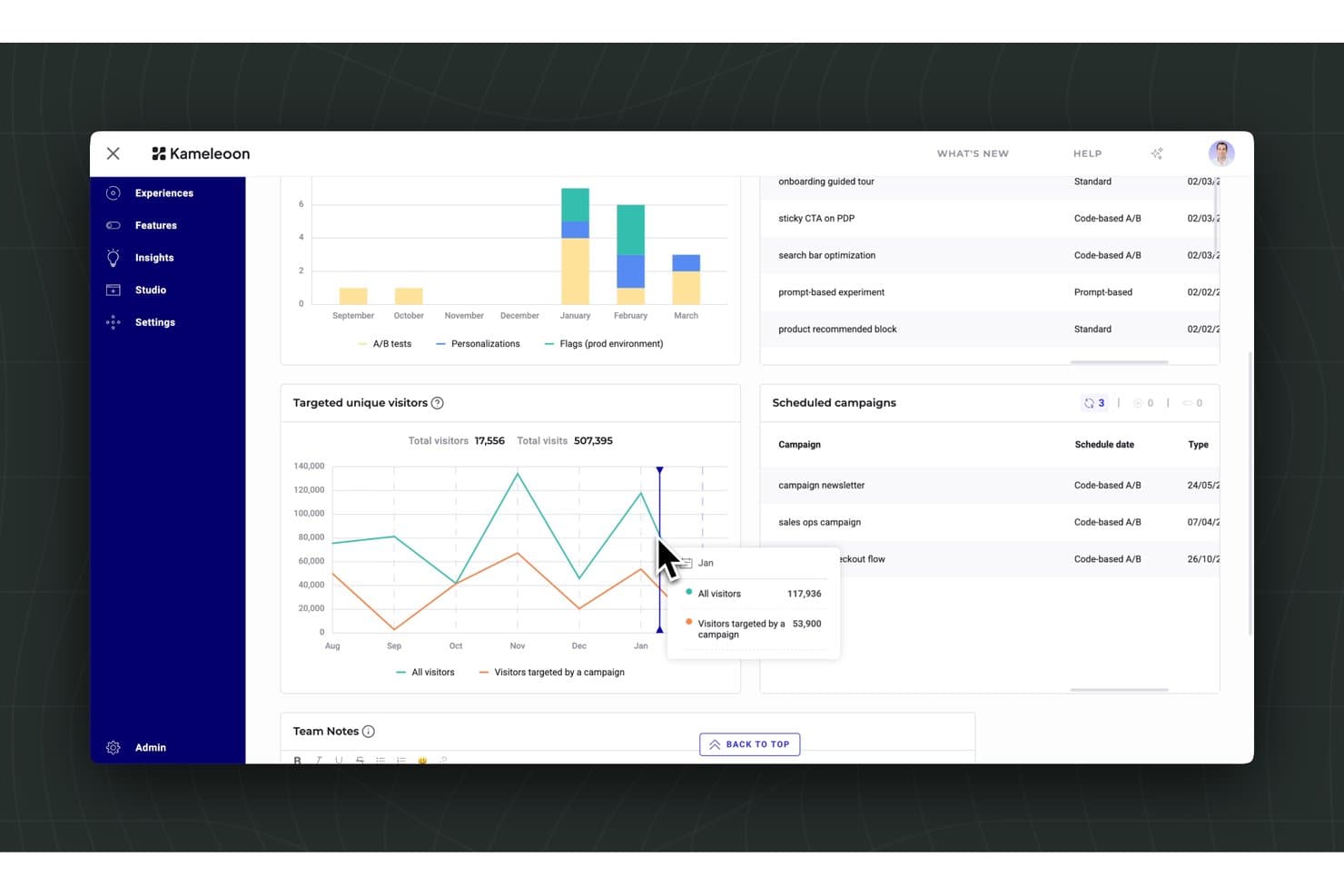
Kameleoon tracks visitor targeting and scheduled A/B campaigns in one dashboard. Kameleoon is an A/B testing and experimentation platform that supports web, mobile, and server-side testing through AI-driven variation creation, multiple statistical methods, feature flags, and progressive rollouts.
Who Is Kameleoon Best For?
Kameleoon is a strong fit for cross-functional teams—product managers, growth marketers, and developers—who need rigorous statistical controls alongside the flexibility to run gradual, risk-managed feature rollouts.
Why I Picked Kameleoon
Kameleoon earns its spot on my shortlist because it's the only platform I've used that lets you choose between Frequentist, Bayesian, and Sequential statistical methods within the same experiment setup, which matters when your testing program spans both speed-sensitive launches and high-stakes revenue tests. I particularly like how progressive rollout rules tie directly into that statistical rigor: you can ramp a feature to 5%, then 25%, with automatic rollback triggered by KPI thresholds you define. That combination makes controlled, evidence-backed releases genuinely practical rather than theoretical.
Kameleoon Key Features
- Prompt-based experimentation: Describe a change in plain language and Kameleoon's AI builds the variation, covering copy edits through advanced layout changes without coding.
- Cross-campaign interaction analysis: Filter and break down results by exposure to other experiments, features, or personalizations to spot interference or synergy across tests.
- Sample ratio mismatch detection: Automatic SRM alerts flag bucketing errors in real time so you're not drawing conclusions from flawed experiment data.
- Mutually exclusive experiment groups: Assign users to isolated groups across client-side and server-side tests to prevent overlapping experiments from contaminating results.
Kameleoon Integrations
Kameleoon offers 100+ native integrations, including Google Analytics, Adobe Analytics, Amplitude, Mixpanel, Snowflake, BigQuery, Segment, Git, and Jira. JavaScript, Activation, Automation, and Data APIs support custom integrations and CI/CD workflows.
Pros and Cons
Pros:
- Reviewers praise responsive support
- Progressive rollouts reduce feature launch risk
- Multiple statistical methods support varied testing needs
Cons:
- Experiment visibility can feel fragmented
- Complex tests often require developer assistance
Learn more about Kameleoon: Best for customizable feature flagging options
- Free plan + Free trial + Free demo available
- Pricing upon request
Visit WebsiteCustomer Rating:4.5/5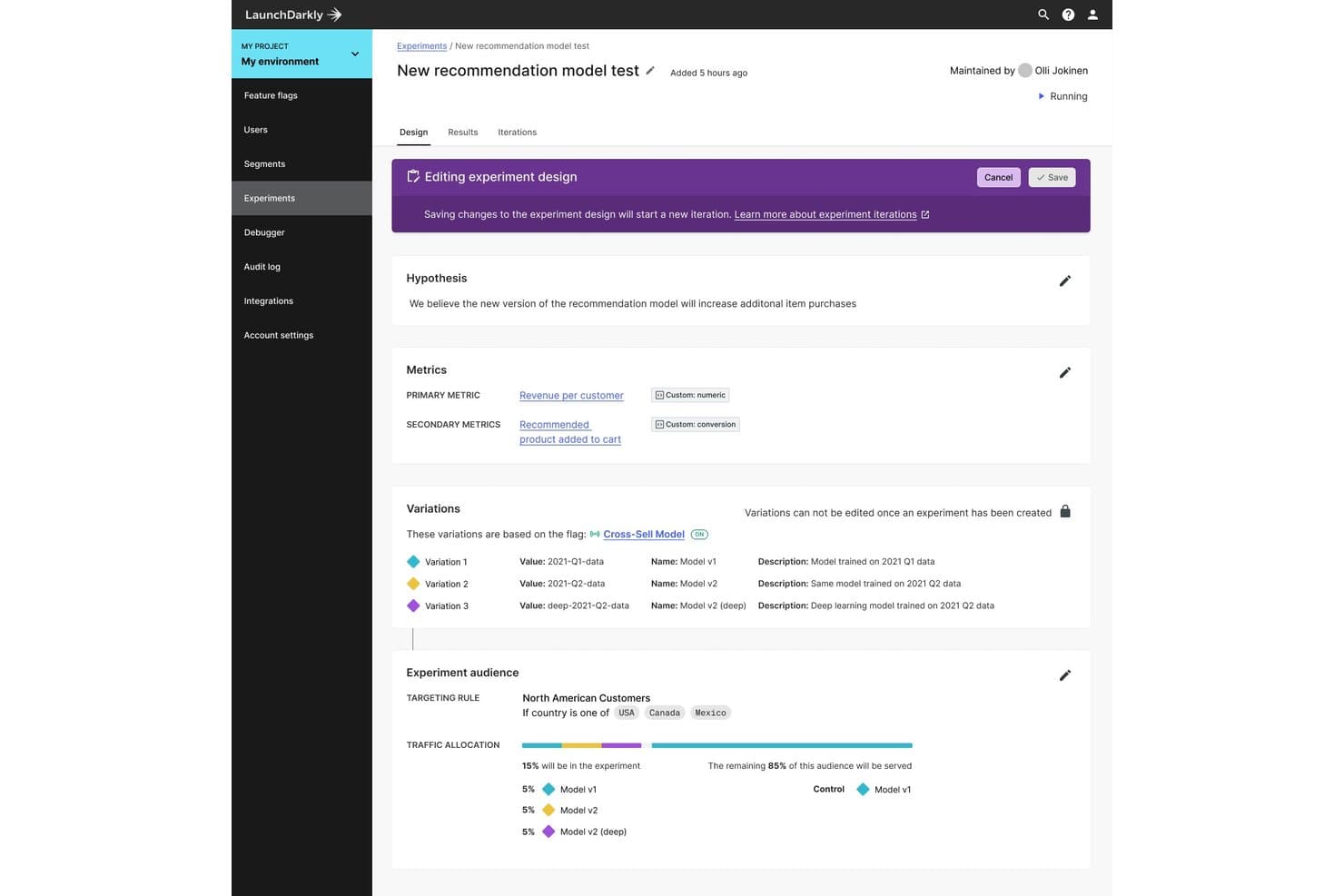
LaunchDarkly lets users design A/B experiments with metrics, variations, and audience targeting. LaunchDarkly is a feature flagging and experimentation platform that lets developers run A/B/n tests, multi-armed bandits, and full-stack experiments across web, mobile, server, and edge environments through a suite of 30+ SDKs.
Who Is LaunchDarkly Best For?
LaunchDarkly is a strong fit for engineering-led teams that want to run experiments directly within their feature delivery workflow.
Why I Picked LaunchDarkly
LaunchDarkly earns its spot as one of the best on my shortlist because it gives engineering teams more control over how experiments are structured than any other tool I've seen. Every test runs on a coded feature flag, which means you can experiment on anything from a search ranking algorithm to a recommendation engine, not just UI copy. I especially like the layering system, which keeps users out of overlapping experiments and prevents interference across concurrent tests.
LaunchDarkly Key Features
- Multi-armed bandit testing: Automatically shifts traffic toward the best-performing variation using Thompson Sampling, so you don't have to wait for a fixed-horizon test to conclude.
- Warehouse-native metrics: Pulls experiment metrics directly from Snowflake, BigQuery, Redshift, or Databricks, keeping your data in your own warehouse.
- Mutually exclusive experiment layers: Assigns users to only one experiment per layer, preventing cross-experiment interference when running multiple tests at once.
- Holdout groups: Keeps a defined percentage of users out of all experiments so you can measure the cumulative impact of your full experimentation program.
LaunchDarkly Integrations
LaunchDarkly offers native integrations with Snowflake, BigQuery, Databricks, Amplitude, Segment, Datadog, GitHub, Jira, Slack, and Microsoft Teams. It also supports REST API, webhooks, OpenFeature providers, and Zapier for custom connectivity.
Pros and Cons
Pros:
- Layers prevent overlapping experiment interference
- Bayesian and frequentist analysis support rigorous decisions
- Tests span web, mobile, server, and edge
Cons:
- No visual editor for independent CRO testing
- Variations require developer-written feature flags
Learn more about LaunchDarkly: Best for targeted product rollouts
- Free demo available
- Pricing upon request
Visit WebsiteCustomer Rating:4.2/5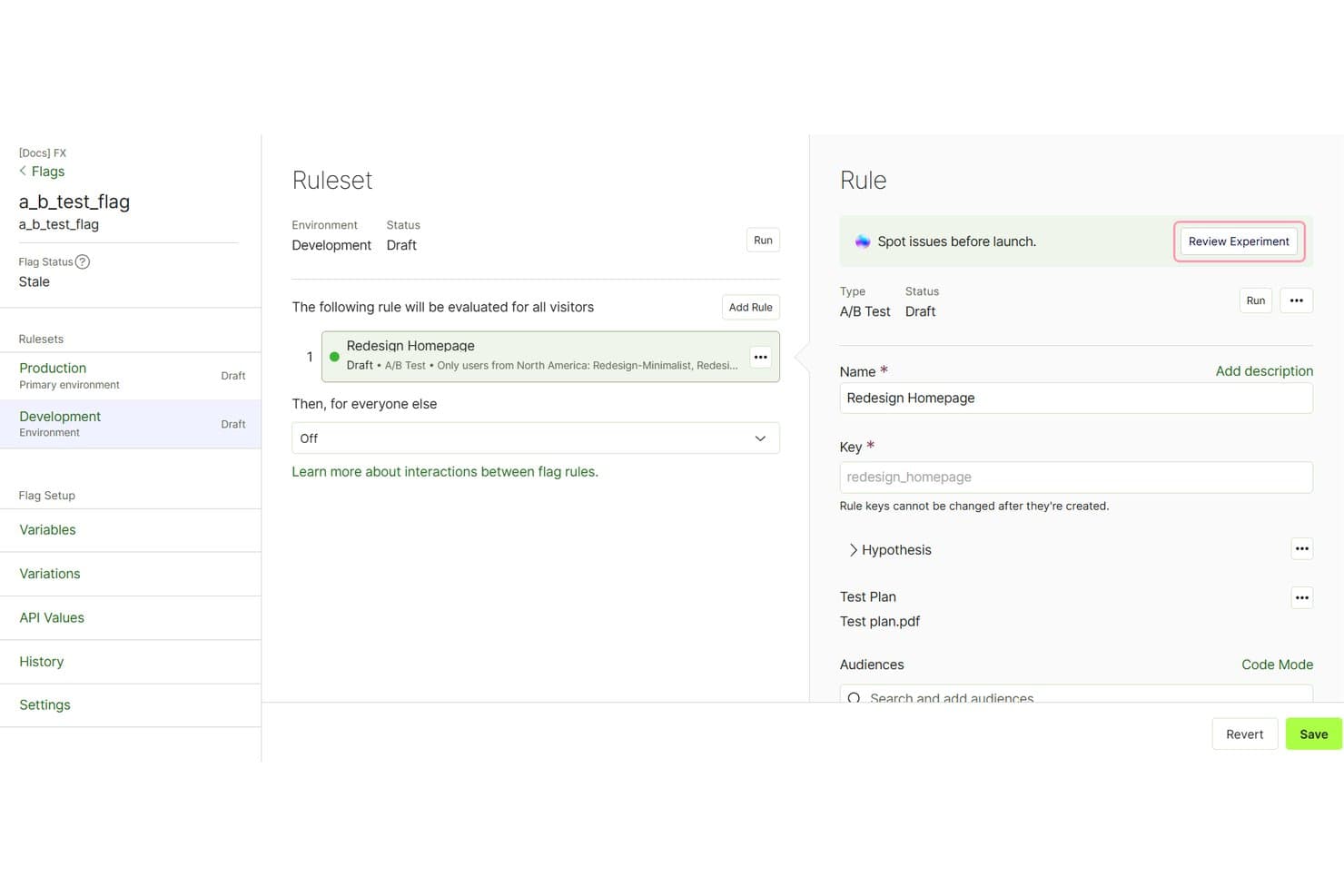
Optimizely lets users configure A/B test rules and audiences per environment. Optimizely is an experimentation platform that combines A/B, multivariate, and feature flag testing across web, mobile, server-side, and edge environments, with a no-code visual editor, SDK-based feature experimentation, and warehouse-native analytics.
Who Is Optimizely Best For?
Optimizely is a strong fit for product and engineering teams at mid-size to enterprise companies that need granular control over how and when features reach users.
Why I Picked Optimizely
Optimizely earns its spot on my shortlist because of how precisely it handles staged feature releases. Progressive rollouts let you ramp exposure from 1% to 100% with targeted attribute-based rules, and a kill switch lets you pull back instantly if something breaks. I also like that Local Holdbacks let you exclude specific flag rules rather than a whole project, which gives you surgical control when multiple features are live at once.
Optimizely Key Features
- Sequential Stats Engine: Lets you check results at any time during a test without inflating false positive rates, using a sequential mSPRT method with false discovery rate control built in.
- Multi-armed bandit optimization: Automatically re-allocates traffic hourly toward top-performing variations using Thompson Sampling, with contextual bandits that adapt per user segment.
- Warehouse-native analytics: Connects directly to Snowflake, BigQuery, Databricks, and Redshift to run experiment analysis on your own data warehouse with CUPED variance reduction.
- AI-assisted test building (Opal): Generates test ideas from a page URL or screenshot, then builds complete A/B test variations and suggests a primary metric and target audience.
Optimizely Integrations
Optimizely integrates with Google Analytics, Segment, Mixpanel, Snowflake, BigQuery, Databricks, Redshift, Amazon S3, and Google Cloud Storage. A REST API and connectors marketplace support additional custom integrations.
Pros and Cons
Pros:
- Supports web, mobile, server, and edge testing
- Targeted rollouts reduce feature-release risk
- Sequential testing controls false-positive risk
Cons:
- Bayesian analysis remains limited to beta access
- Implementation often requires developer support
Learn more about Optimizely: Best for personalized audience experiences
- Free demo available
- Pricing upon request
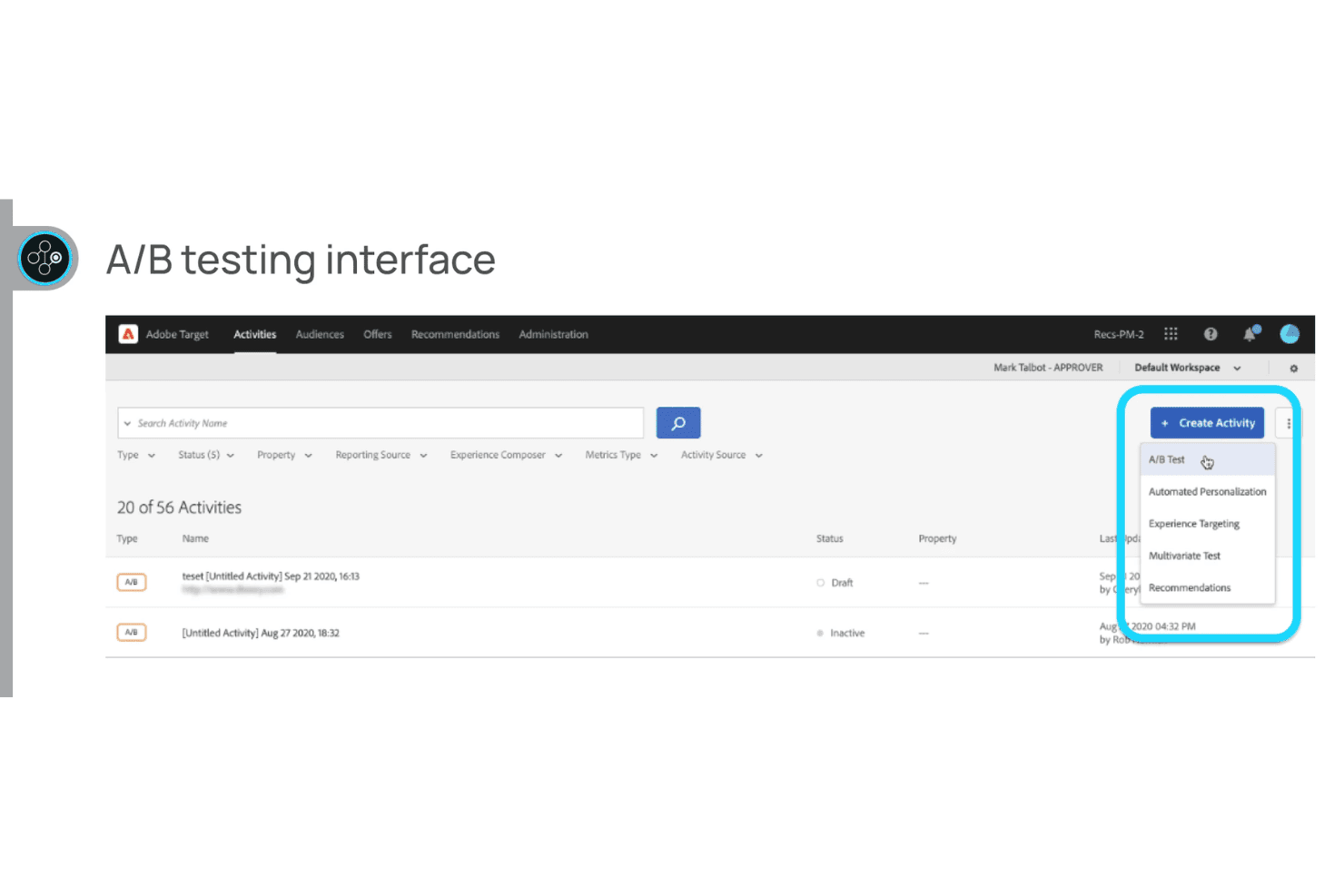
Adobe Target lets teams create and manage A/B tests alongside personalization, experience targeting, and multivariate testing activities. Adobe Target is an enterprise A/B testing and personalization platform that supports A/B/n tests, multivariate tests, automated traffic allocation, and multi-channel test delivery across web, mobile, server-side, and IoT environments.
Who Is Adobe Target Best For?
Adobe Target is a strong fit for enterprise teams already using Adobe Experience Cloud who want to run personalization-heavy experiments across web, mobile, and server-side channels.
Why I Picked Adobe Target
Adobe Target earns its spot on my shortlist because of how deeply it handles audience-driven personalization alongside traditional A/B testing. I particularly like that its Audience Builder pairs with Real-Time CDP to evaluate segments in milliseconds on the first page of a visit, including for first-time visitors. Combined with Auto-Allocate, which dynamically shifts traffic toward the best-performing experience, you're not just testing variations but actively serving the right one faster.
Adobe Target Key Features
- Visual Experience Composer (VEC): A no-code, WYSIWYG editor that lets you drag, swap, and modify page content without writing code.
- Full-factorial multivariate testing: Tests every combination of content across multiple page locations to identify which elements and interactions drive performance.
- Analytics for Target (A4T): A server-to-server integration with Adobe Analytics that lets you use Analytics metrics, segments, and calculated metrics directly in your test reports.
- On-device decisioning: Caches test rules on your server so decisions run in memory at near-zero latency, without a network call to Adobe's servers.
Adobe Target Integrations
Adobe Target offers integrations with Adobe Analytics, Adobe Real-Time CDP, Adobe Audience Manager, and Experience Cloud ID Service. Its Delivery API and server-side SDKs support custom integrations across web, mobile, server-side, and IoT environments.
Pros and Cons
Pros:
- Audience-specific experiences personalize first visits
- Bayesian and frequentist reporting support decisions
- Full-factorial MVT reveals interaction effects
Cons:
- Manual rollouts lack automatic regression rollback
- Bayesian reporting covers conversion goals only
Learn more about Adobe Target : 10Best for experiment governance and approval workflows
Convert
- 15-day free trial + free demo available
- From $299/month (billed annually)
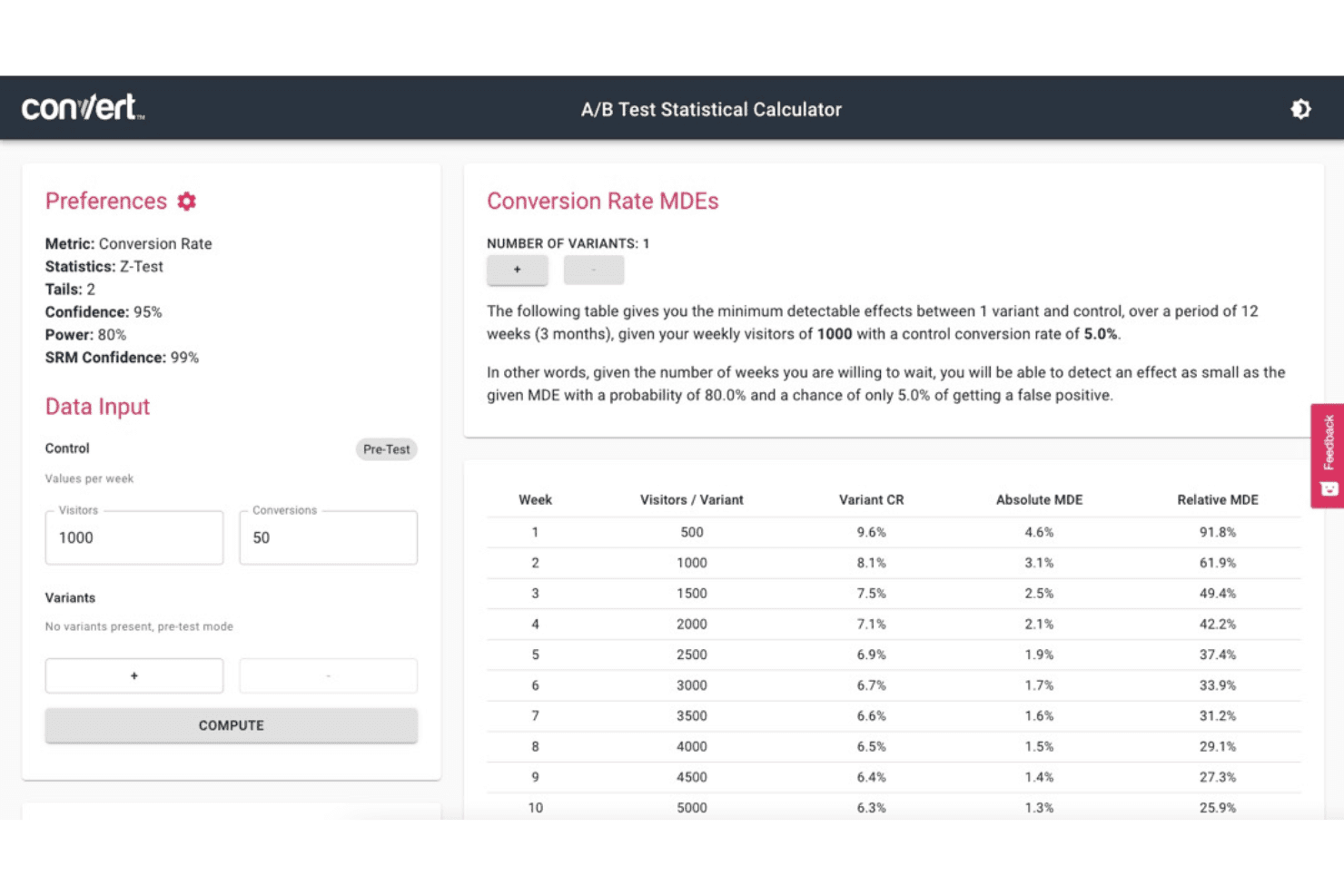
Convert helps teams plan A/B tests by calculating detectable conversion rate changes based on traffic, confidence, and test duration. Convert is an A/B testing platform that supports web, full-stack, and multivariate experimentation, with built-in statistical engines, a visual editor, feature flags, and an experiment approval workflow.
Who Is Convert Best For?
Convert is a strong fit for CRO teams and growth-focused product managers who need enterprise-grade statistical rigor without enterprise pricing.
Why I Picked Convert
Convert earns its spot on my shortlist because of how seriously it treats experiment governance. The Request Approval System (available on Pro and above) lets teams require sign-off before any test goes live, and the Change History log creates a clear audit trail of every modification. I also love that Convert pairs this with SRM checks and primary-goal locking, so experiments aren't just approved correctly but run correctly too.
Convert Key Features
- Bayesian and sequential statistical engines: Convert lets you run experiments under Frequentist, Bayesian, or Sequential testing modes, with multiple-comparison corrections and SRM checks built in.
- Multi-Armed Bandit auto-allocation: Convert dynamically shifts traffic between variations using Thompson Sampling, Epsilon-Greedy, or UCB algorithms to optimize on a single locked primary metric.
- Visual editor with AI Wizard: A WYSIWYG editor lets you make DOM-level changes and generate alternative headline and copy suggestions without writing code.
- 90+ one-tag integrations: Convert connects natively with analytics, CDP, heatmap, CRM, and ecommerce tools—including GA4, Segment, HubSpot, and Shopify—on every plan.
Convert Integrations
Convert offers 90+ one-tag integrations, including Google Analytics 4, Segment, HubSpot, Shopify, Adobe Analytics, and Mixpanel.
Pros and Cons
Pros:
- Multi-armed bandits optimize traffic allocation
- Multiple statistical engines include SRM checks
- Approval workflows support governed experiment launches
Cons:
- Visual editor can feel less polished
- Native mobile testing requires SDK development
Learn more about Convert:
A/B Testi Yazılımı Ne Zaman Kullanılmalı?
A/B testi yazılımı, dönüşümleri, elde tutmayı veya geliri gerçekten neyin artırdığını görmek için ürününüz üzerinde kontrollü deneyler yürütmenizi sağlar. Ürün kararlarındaki tahminleri ortadan kaldırır ve sezgisel kararların yerine savunabileceğiniz verileri koyar. Aşağıdaki senaryolardan herhangi biri size tanıdık geliyorsa bu yazılımı teknoloji yığınına eklemenin zamanı gelmiş olabilir:
- Ekibiniz özellikleri kullanıma sunuyor ve en iyisini umuyor: Geçen çeyrekte yenilenmiş bir ilk katılım akışı kullanıma sundunuz ancak bunun sonuçları etkileyip etkilemediğini anlayamıyorsunuz. A/B testi, her değişikliği ölçülebilir bir sonuca bağlar; böylece daha fazla yatırım yapmadan önce neyin işe yaradığını bilirsiniz.
- Onay süreçleri, hiç kimse anlaşamadığı için uzuyor: Tasarımcınız CTA'nın ekranın üst kısmında, ürün direktörünüz ise alt kısmında olmasını istiyor ve bu tartışma iki haftanızı alıyor. Test yapmak, konuyu toplantılar yerine günler içinde kullanıcı verileriyle çözüme kavuşturur.
- Dönüşümü optimize ediyor ancak değişkeni izole edemiyorsunuz: Ana sayfa yenilemesinden sonra denemeden ücretliye geçiş oranınızın %8 düştüğünü varsayalım. A/B testi, düşüşe tam olarak hangi değişikliğin neden olduğunu belirlemenize ve size daha fazla maliyet çıkarmadan önce bu değişikliği geri almanıza olanak tanır.
- Ekipler arasındaki büyüme deneylerini yönetmek karmaşıklaşıyor: Ortak görünürlük olmadan, elektronik tablolarda ayrı testler yürüten üç ekibiniz var. Uygun bir test platformu sonuçları merkezileştirir, çakışmaları önler ve deneylerin istatistiksel olarak geçerli kalmasını sağlar.
- Yeni fiyatlandırmayı veya paketlemeyi doğrulamak çok uzun sürüyor: Yeni bir plan kademesini veya yıllık indirimi manuel olarak test etmek, davranışsal sinyalleri görmek için aylarca beklemek anlamına gelir. A/B testi bu geri bildirim döngüsünü hızlandırır; böylece bir sonraki yönetim kurulu toplantınızdan önce yineleme yapabilirsiniz.
Diğer A/B Testi Yazılımı Seçenekleri
En iyi listeme giremeyen ancak yine de değerlendirmeye değer diğer araçlar şunlardır:
- 11Dynamic YieldBest for experimentation within personalization
- 12Webtrends OptimizeBest for CRO-focused web experimentation
- 13Zoho PagesenseBest for conversion optimization
- 14Split by HarnessBest for full-stack application testing
- 15PostHogBest for all-in-one product experiment analytics
- 16EppoBest for warehouse-native experiment analysis
- 17MidaBest for no-code tests with AI variant creation
- 18Wingify (formerly VWO and AB Tasty)Best for Bayesian stats with built-in safeguards
How I Evaluate A/B Testing Software
I split my evaluation into three parts, weighting core functionality most: create variants and randomly split traffic so a PM can compare checkout changes before rollout. Next, I look for standout features such as gradual rollouts or Bayesian reporting. Finally, I consider beyond-feature factors, including onboarding, support, and predictable pricing.
Core Functionality (Table Stakes For This List)
When I'm selecting tools for my list, I score each one on a scale from 0 (does not offer the functionality) to 5 (excels in this area) for each core functionality listed below. I then convert the total into a percentage to help assess each tool's overall fit, with extra weight on any functionalities I’ve deemed essential.
- Experiment Variations (Essential): I look for options to test meaningful alternatives, from checkout copy and layouts to changes across an app journey.
- Traffic Allocation (Essential): For a signup test, I check for randomized exposure and adjustable splits so teams can control how users enter each variation.
- Statistical Analysis: I assess whether reports explain uncertainty and sample needs, helping PMs distinguish a real lift from noise before rollout.
- Goal Tracking: I look for custom goals tied to the hypothesis, such as completed checkout alongside add-to-cart, rather than a generic conversion count.
- Audience Targeting: I consider whether teams can compare experiences for relevant cohorts, such as new versus returning users or different device groups.
- Platform Coverage: I check whether experiments can reach web, mobile, and server-side features, especially when a change spans an app and its APIs.
Once I have a list of tools that meet the criteria, I consider what sets each platform apart.
Differentiating Factors (What Sets Vendors Apart)
Here's how I compare and contrast different vendors:
Standout Features
I look for a Bayesian stats engine that reports probability of a variant winning rather than just p-values, since PMs can act on those results faster mid-experiment. Warehouse-native experimentation matters too—tools like Eppo run analysis directly in your data warehouse, so metrics stay consistent with what your data team already trusts. I also evaluate cross-experiment interaction detection, which flags when two concurrent tests share audience overlap and risk skewing each other's results.
Beyond Features
I check how much engineering time each tool demands day-to-day. A platform like LaunchDarkly assumes dedicated developer support, while VWO lets a PM launch tests from a visual editor—big difference when your engineering team is already stretched. Pricing predictability matters just as much; MTU-based billing can spike fast once multiple squads run concurrent experiments. I also evaluate onboarding quality and statistical guidance, since teams new to experimentation often misread confidence intervals without vendor-provided templates and support.
A/B Testi Yazılımı Nedir?
A/B testi yazılımı; ürün yöneticilerinin, pazarlamacıların ve UX ekiplerinin bir web sayfası, uygulama özelliği veya CTA gibi bir dijital deneyimin iki ya da daha fazla sürümünü karşılaştırarak hangisinin kullanıcılar nezdinde daha iyi performans gösterdiğini görmesini sağlayan bir araçtır. Ekiplerin kontrollü deneyler yürütmesine, sonuçları analiz etmesine ve dönüşümleri, kullanıcı etkileşimini ve genel ürün performansını iyileştirmek için verilere dayalı kararlar almasına yardımcı olur. Bu yazılım; tahminlere güvenme, yavaş yineleme ve tasarım ya da içerik değişikliklerinin etkisinin net olmaması gibi zorlukları ele alır.
A/B Test Yazılımı SSS
A/B test yazılımı hakkında insanların sorduğu yaygın soruların yanıtlarını bulun:
A/B testini nasıl gerçekleştirirsiniz?
Etkili A/B testleri gerçekleştirmek için izleyebileceğiniz altı adımlı süreç şöyledir:
\u003col\u003e
\u003cli\u003e\u003cstrong\u003eHedefinizi belirleyin\u003c/strong\u003e: A/B testi için hedeflerinizi belirleyin.\u003c/li\u003e
\u003cli\u003e\u003cstrong\u003eTest kapsamını belirleyin\u003c/strong\u003e: Dijital ürününüzün hangi unsurlarını test etmek istediğinize karar verin.\u003c/li\u003e
\u003cli\u003e\u003cstrong\u003eVaryasyonlar oluşturun\u003c/strong\u003e: Test öğelerinizin birden fazla varyantını geliştirin. Örneğin bir CTA düğmesini test ediyorsanız farklı renk, boyut vb. kombinasyonlarına sahip varyantlar oluşturun.\u003c/li\u003e
\u003cli\u003e\u003cstrong\u003eTrafiği bölüştürün\u003c/strong\u003e: A/B test yazılımını kullanarak gelen trafiği varyantlarınız arasında bölüştürün.\u003c/li\u003e
\u003cli\u003e\u003cstrong\u003eTestleri çalıştırın\u003c/strong\u003e: Test yazılımının testleri çalıştırmasına ve veri toplamasına izin verin.\u003c/li\u003e
\u003cli\u003e\u003cstrong\u003eSonuçları analiz edin\u003c/strong\u003e: Hangi varyantın daha iyi performans gösterdiğini belirlemek için sonuçlarınızı analiz edin.\u003c/li\u003e
\u003c/ol\u003e
\u0026nbsp;
A/B testinin türleri nelerdir?
İşte bazı popüler A/B testi türleri:
\u003cul\u003e
\u003cli\u003e\u003cstrong\u003eA/B/n testi:\u003c/strong\u003e Bu, geleneksel A/B testlerinin bir uzantısıdır. A/B/n testi birden fazla varyant içerir.\u003c/li\u003e
\u003cli\u003e\u003cstrong\u003eÇok değişkenli test:\u003c/strong\u003e MVT, birden fazla öğenin kombinasyonlarını aynı anda test etmeyi içerir. Böylece en iyi kombinasyonu bulmak için çeşitli öğeler içeren karmaşık sayfaları optimize edebilirsiniz.\u003c/li\u003e
\u003cli\u003e\u003cstrong\u003eBölünmüş URL testi:\u003c/strong\u003e Burada kullanıcılar varyasyonlar yerine tamamen farklı URL’lere yönlendirilir.\u003c/li\u003e
\u003cli\u003e\u003cstrong\u003eHaydut testi:\u003c/strong\u003e Bu yöntemde gelen trafik, daha iyi performans gösteren varyanta dinamik olarak tahsis edilir.\u003c/li\u003e
\u003c/ul\u003e
Çoğu A/B test aracı temel A/B/n testini, çok değişkenli testi ve bölünmüş URL testlerini destekler. A/B/n, tek bir öğenin çeşitli sürümlerini karşılaştırmanıza olanak tanır. Çok değişkenli test, değişiklik kombinasyonlarını test etmenize yardımcı olurken bölünmüş URL testi tamamen farklı sayfaları karşılaştırır. Başlamadan önce seçtiğiniz araçta bu seçeneklerin bulunduğunu kontrol edin.
A/B test araçları çok değişkenli veya bölünmüş URL testleri çalıştırabilir mi?
Evet, birçok önde gelen A/B test platformu standart A/B testlerinin yanı sıra çok değişkenli ve bölünmüş URL testleri de sunar. Çok değişkenli test, aynı anda birden fazla değişikliği denemenize olanak tanırken bölünmüş URL testi kullanıcıları tamamen farklı sayfalara yönlendirir. Tüm araçlar her iki özelliği de sunmaz; bu nedenle bu test yöntemleri ekibiniz için önemliyse uyumluluğu kontrol edin.
Güvenilir sonuçlar elde etmek için A/B testini ne kadar süre çalıştırmalıyım?
İstatistiksel anlamlılığa ulaşmak için yeterli veri toplayana kadar A/B testini çalıştırmalısınız. Çoğu ürün yöneticisi ve pazarlamacı en az bir ila iki haftalık trafiği göz önünde bulundurur; ancak kesin süre kullanıcı hacminize ve dönüşüm oranlarınıza bağlıdır. Bazı yazılımlar anlamlılığa ulaştığınızda sizi uyararak testleri çok erken sonlandırmaktan kaçınmanıza yardımcı olur.
A/B testlerini kurmak için geliştirici desteğine ihtiyacım var mı?
Hayır, birçok modern A/B test aracı teknik bilgisi olmayan kullanıcılar için tasarlanmıştır ve görsel düzenleyiciler veya eklentiler sunar. Pazarlamacılar ve ürün yöneticileri genellikle herhangi bir kodlama yapmadan temel testleri kurabilir. Özel etkinlik izleme veya uygulama içindeki derin akışları test etme gibi daha karmaşık deneyler için geliştirici katkısı yine de yararlı olabilir.\u003c!– wp:heading {\u0022level\u0022:3} –\u003e
\u003ch3 class=\u0022wp-block-heading\u0022\u003eKullanılabilirlik\u003c/h3\u003e
\u003c!– /wp:heading –\u003e \u003c!– wp:paragraph –\u003e
Kullanımı kolay ve anlaşılır bir arayüz sunan A/B test araçlarını oldukça başarılı buluyorum. Ayrıca kullanımı kolay A/B test araçları sorunsuz bir başlangıcın önünü açar. Yeni başlayanların testleri anında oluşturup yürütmek için bir A/B test aracına hızla alışması gerekir.
\u003c!– /wp:paragraph –\u003e \u003c!– wp:heading {\u0022level\u0022:3} –\u003e
\u003ch3 class=\u0022wp-block-heading\u0022\u003eYazılım Entegrasyonları\u003c/h3\u003e
\u003c!– /wp:heading –\u003e \u003c!– wp:paragraph –\u003e
Her aracın sunduğu çeşitli entegrasyon olanaklarından bahsettim. A/B test yazılımını iş birliği araçları, üçüncü taraf analiz araçları, CMS araçları ve CRM araçları gibi uygulamalarla entegre edebilirsiniz.
\u003c!– /wp:paragraph –\u003e \u003c!– wp:heading {\u0022level\u0022:3} –\u003e
\u003ch3 class=\u0022wp-block-heading\u0022\u003eFiyatlandırma\u003c/h3\u003e
\u003c!– /wp:heading –\u003e \u003c!– wp:paragraph –\u003e
Son olarak A/B test yazılımı bütçenizi zorlamamalıdır. Her aracın fiyatlandırmasından ve ücretsiz deneme olanağından bahsettim. Tüm araçlar aylık SaaS abonelik ücreti sunar.
\u003c!– /wp:paragraph –\u003e \u003c!– wp:paragraph –\u003e
Tipik aylık abonelik ücreti aylık $10 ile $2000 arasında değişir. Bazı araçlar fiyatlandırma bilgilerini belirtmemiştir; bu nedenle özel bir teklif almak için satış ekipleriyle iletişime geçmeniz gerekir.