

DevOps otomasyon araçları, ekibinizin yazılım geliştirme ve BT operasyonları yaşam döngüsü boyunca görevleri otomatikleştirmesine, yönetmesine ve koordine etmesine yardımcı olan yazılım platformlarıdır. En iyi DevOps otomasyon araçlarını arıyorsanız muhtemelen manuel çalışmayı azaltmayı, dağıtım hızını artırmayı ve projeleriniz ölçeklendikçe iş akışlarınızı tutarlı tutmayı amaçlıyorsunuz.
Doğru araçları seçmek, sürekli sorun gidermek ile güvenilir ve verimli bir işlem hattına sahip olmak arasındaki farkı yaratabilir. Bu liste; CI/CD, kod olarak altyapı, yapılandırma yönetimi ve politika otomasyonu genelindeki araçları kapsar. Böylece işlem hatlarını, altyapı tedarikini veya yönetişim iş akışlarını otomatikleştirirken ihtiyaçlarınıza uygun seçeneklere sahip olursunuz. Ekibinizin ihtiyaçlarına uyacak ve DevOps uygulamalarınızı ilerletecek çözümleri bir araya getirdik.
Why Trust Our Software Recommendations
6,700+
Reviews
20
Industry experts
16+
Evaluation factors
14
Years
Our team has been testing and reviewing software since 2012. As product managers ourselves, we know how difficult—and important—it is to choose the right software.
For this guide, we evaluated tools using hands-on testing and independent research, scoring tools using our selection criteria.
Our reviews reflect our human editorial judgment, not a sales pitch.
Expert reviewers:
- Andrew LumbySenior TPM
- Cristiano ValimSenior UI/UX Lead


DevOps Otomasyon Araçları Karşılaştırma Tablosu
Bu karşılaştırma tablosu, en iyi DevOps otomasyon araçları seçimlerim için fiyatlandırma ayrıntılarını özetlemektedir:
Score legend (out of 5)
- Excellent4.5–5
- Good4–4.4
- Average3–3.9
- Below average2–2.9
- Poor1–1.9
Sorted by: Default
| Tool | Starting Price | Website | |||||||
|---|---|---|---|---|---|---|---|---|---|
Best for governed multi-agent cloud operations | 3.5 out of 5 | 3 | 4 | 4 | 4 | 4 | 2 | $3,500/month Free demo available | Website |
Best for infrastructure as code | 3.7 out of 5 | 4 | 4 | 1 | 5 | 4 | 4 | Pricing upon request Free plan available | Website |
Best for AI-automated continuous delivery | 4.7 out of 5 | 5 | 4 | 5 | 5 | 4 | 5 | Pricing upon request Free plan available | Website |
Best for event-driven remediation at scale | 3.7 out of 5 | 4 | 5 | 2 | 4 | 4 | 3 | Pricing upon request 60-day free trial | Website |
Best for AI-powered developer-first IaC | 3.7 out of 5 | 4 | 4 | 2 | 5 | 3 | 4 | $40/month Free plan available | Website |
All-in-One DevSecOps Platform | 3.8 out of 5 | 4 | 4 | 5 | 3 | 3 | 4 | $29/user/month Free plan + free trial available | Website |
Best for customizable pipelines | 3.7 out of 5 | 5 | 4 | 5 | 2 | 3 | 3 | Pricing upon request Not available | Website |
Best for enterprise Jenkins governance at scale | 3.7 out of 5 | 4 | 4 | 5 | 2 | 3 | 4 | Pricing upon request Free demo available | Website |
Best for AI-driven microservices lifecycles | 3.8 out of 5 | 4 | 4 | 4 | 3 | 4 | 4 | Pricing upon request Free demo available | Website |
Best for AI-powered Microsoft ecosystem | 3.8 out of 5 | 4 | 4 | 5 | 3 | 3 | 4 | $6/user/month Free plan available | Website |


En İyi DevOps Otomasyon Araçları İncelemeleri
Aşağıda, kısa listeme giren en iyi DevOps otomasyon araçlarına ilişkin ayrıntılı özetlerimi bulabilirsiniz. İncelemelerim, sizin için en iyi aracı bulmanıza yardımcı olmak amacıyla her aracın temel özelliklerine, artılarına ve eksilerine, entegrasyonlarına ve ideal kullanım alanlarına derinlemesine bir bakış sunar.
 Best for governed multi-agent cloud operations
- Free demo available
- From $3,500/month

DuploCloud tracks ALB metrics like host health and request counts in real time. DuploCloud is an AI-powered DevOps automation platform that combines multi-agent cloud infrastructure provisioning, CI/CD orchestration, Kubernetes management, compliance controls, and observability across AWS, Azure, and GCP.
Who Is DuploCloud Best For?
DuploCloud suits platform and DevOps engineering teams that need governed, multi-cloud automation without building and maintaining their own internal developer platform from scratch.
Why I Picked DuploCloud
DuploCloud earns its spot on my shortlist because of how it handles governed multi-agent cloud operations at a level I haven't seen other platforms match. I'm particularly impressed by how its specialized agents (Infrastructure, Kubernetes, Compliance, Security) share context and coordinate work through an Orchestration Agent, while still requiring human approval before any consequential change executes. In practice, that means my team can let agents detect Terraform drift, propose a fix, open a GitHub PR, and apply it after merge—without ever losing the audit trail or control gate.
DuploCloud Key Features
- Katkit built-in CI/CD framework: Links a repository to a Tenant, runs your
ci.shscript in a short-lived build service, and supports configurable phases that update service image tags on deployment. - Terraform drift detection and export: Reads live Terraform state, flags configuration drift, and can export Tenant infrastructure as code for version control or Tenant cloning.
- Advanced Observability Suite: Delivers OpenTelemetry-based metrics, traces, logs, and profiles with real-time anomaly detection, customizable alerts, and root-cause-analysis workflows.
- Tenant-based environment isolation: Creates isolated workspaces for production, staging, and developer sandboxes, with cross-Tenant resource access disabled unless explicitly enabled.
DuploCloud Integrations
DuploCloud integrates with GitHub Actions, GitLab, Azure DevOps, Bitbucket, ArgoCD, Jenkins, Terraform, Kubernetes, Jira, and Slack. REST and MCP APIs support custom integrations and CI/CD workflows.
Pros and Cons
Pros:
- Human approval gates pair with compliance controls
- Terraform drift workflows preserve reviewable change control
- Automates tenant-scoped deployments with fewer manual errors
Cons:
- Console loading issues can hinder slower connections
- Cross-environment release promotion lacks documented automation
Learn more about DuploCloud: Best for infrastructure as code
- Free plan available
- Pricing upon request
Visit WebsiteCustomer Rating:4.7/5
Terraform workspaces dashboard showing run status, recent changes, and linked repos. Terraform is an infrastructure-as-code tool designed for IT professionals and DevOps teams. It allows you to build, change, and version infrastructure efficiently, supporting both low-level components, such as compute instances, and high-level components, such as DNS entries.
Why I picked Terraform: It’s a tool that distinguishes itself in providing infrastructure as code, making it ideal for teams needing to manage complex infrastructure. Terraform’s ability to support and manage automated infrastructure provisioning across multiple cloud providers differentiates it from others.
Features such as its modular architecture and extensive provider ecosystem support its USP. Its idempotent operations are essential for CI/CD pipelines. Terraform allows you to validate configuration files to ensure that the syntax and semantics are correct. You can version your infrastructure, ensuring consistency and reliability across deployments.
Standout Features and Integrations:
Features include its configuration language that simplifies infrastructure description, the Terraform CLI for command-line workflows, and the ability to collaborate with your team using HCP Terraform.
Integrations include AWS, Azure, Google Cloud Platform, Heroku, Confluent, UpCloud, DNSimple, Cloudflare, vSphere, Oracle Cloud Infrastructure, Docker, Kubernetes, Consul, and more.
Pros and Cons
Pros:
- Large provider ecosystem
- Infrastructure versioning capability
- Supports multi-cloud environments
Cons:
- State file management is complex at scale
- Learning curve due to proprietary HCL syntax
Learn more about Terraform: Best for AI-automated continuous delivery
- Free plan available
- Pricing upon request
Visit WebsiteCustomer Rating:4.6/5
Harness executes automated continuous delivery releases with deployment control. Harness is a continuous delivery platform aimed at DevOps teams and IT professionals. It automates the deployment process, enabling your team to release applications quickly and reliably.
Why I picked Harness: It’s tailored for continuous delivery, offering features that simplify and automate the deployment pipeline. Harness includes automated rollback capabilities, which ensure stability in your releases. With its machine learning algorithms, you can minimize manual oversight during deployments. You can collect and view system and service metrics using monitoring tools such as Prometheus and Grafana. It provides real-time deployment metrics, allowing teams to quickly detect and fix issues. You can also benefit from its intuitive dashboard that provides clear visibility into your deployment process.
Standout Features and Integrations:
Features include continuous verification that uses machine learning to detect anomalies. It provides automated canary deployments to reduce risk during updates. You can also use its feature flags to manage deployments without affecting end-users.
Integrations include Kubernetes, Docker, AWS, Azure DevOps, Google Cloud Platform, GitHub, GitLab, Bitbucket, Jenkins, PagerDuty, Jira, Figma, Lucidchart, ServiceNow, and more.
Pros and Cons
Pros:
- Supports canary deployments
- Machine learning for anomaly detection
- Automated rollback capabilities
Cons:
- Requires configuration for optimal use
- Initial setup may be complex
Learn more about Harness: Best for event-driven remediation at scale
- 60-day free trial
- Pricing upon request
Visit WebsiteCustomer Rating:4.6/5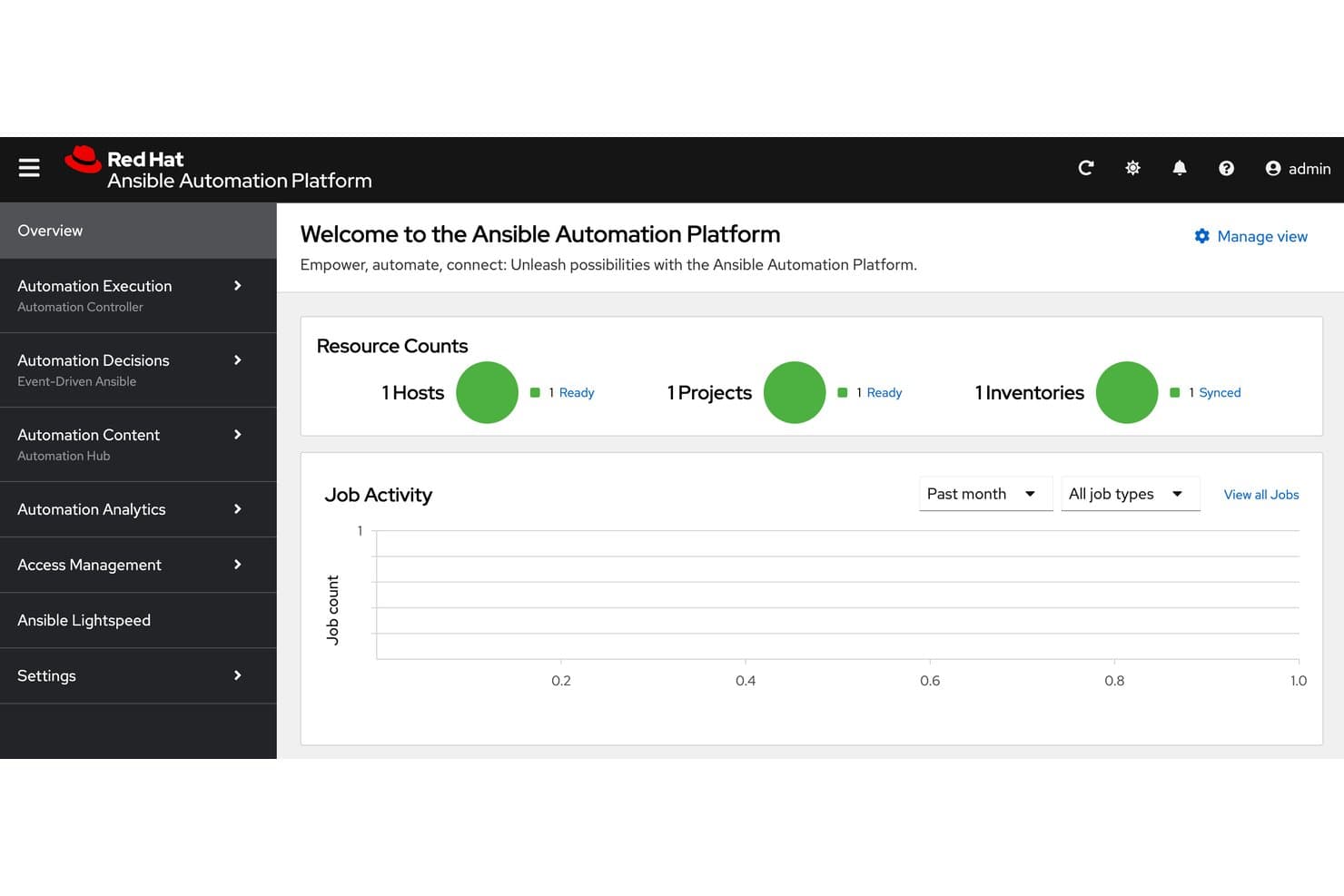
Ansible centralizes host, project, and inventory status at a glance. Ansible is an agentless DevOps automation platform that covers infrastructure provisioning, configuration management, deployment automation, workflow orchestration, and event-driven remediation through YAML-based playbooks and a centralized automation controller.
Who Is Ansible Best For?
Ansible is a strong fit for DevOps and platform engineering teams that need to manage infrastructure and automate remediation across large, complex environments.
Why I Picked Ansible
I picked Ansible as one of the best because Event-Driven Ansible is genuinely impressive for automated remediation at scale. When a Splunk alert fires, a rulebook can trigger a remediation playbook instantly, no human in the loop. I also like that the Automation Orchestrator lets my team chain Ansible playbooks, Terraform modules, and REST calls in a single visual workflow with conditional logic and approval gates baked in.
Ansible Key Features
- Agentless execution: Connects to managed nodes over SSH or WinRM, so you don't need to install anything on the machines you're automating.
- Execution environments: Container images that pin exact runtime dependencies, ensuring playbook runs are consistent and repeatable across teams.
- Policy-as-code enforcement: Integrates with Open Policy Agent to check and block jobs before they run if they violate defined policies.
- Self-service automation portal: Point-and-click forms let non-specialist users launch pre-approved automation without writing any code.
Ansible Integrations
Ansible offers 140+ Certified Content Collections from 60+ partners, with integrations including AWS, Azure, Google Cloud, Kubernetes, Terraform, ServiceNow, Splunk, HashiCorp Vault, GitHub, and GitLab. Its REST API supports custom integrations.
Pros and Cons
Pros:
- Approval gates support governed releases
- Event-driven remediation handles alerts automatically
- Agentless playbooks reduce deployment overhead
Cons:
- No persistent state for infrastructure drift
- No native build or test runners
Learn more about Ansible: Best for AI-powered developer-first IaC
- Free plan available
- From $40/month
Visit WebsiteCustomer Rating:4.8/5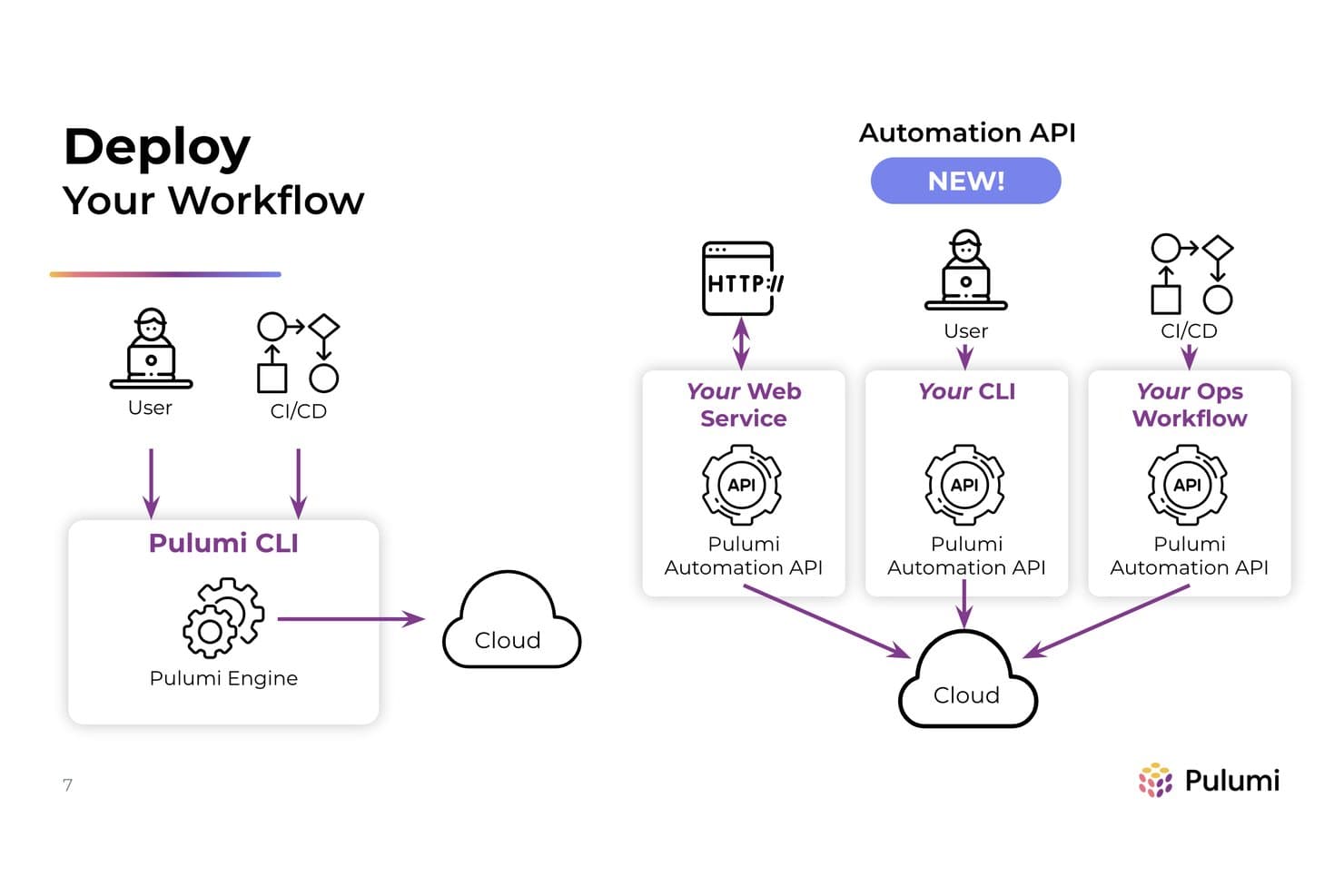
Pulumi's Automation API embeds cloud deployments into custom workflows. Pulumi is an infrastructure-as-code platform that lets you define, deploy, and manage cloud infrastructure using general-purpose programming languages, with added layers for secrets management, policy as code, and AI-assisted infrastructure automation.
Who Is Pulumi Best For?
Pulumi is a strong fit for DevOps and platform engineering teams that want to manage cloud infrastructure in the same programming languages they use to build applications.
Why I Picked Pulumi
I picked Pulumi as one of the best because it's the only IaC platform where your infrastructure is genuinely written in TypeScript, Python, Go, or Java—not a templating language bolted on top. What really sets it apart is Neo, an AI agent that handles multi-step infrastructure tasks end to end, generates code, diagnoses deployment failures in plain English, and even posts AI-driven code reviews directly on your PRs. Pair that with review stacks that spin up a real cloud environment for every pull request and tear it down on merge, and you get a tight, code-native DevOps workflow that Terraform simply can't match.
Pulumi Key Features
- Policy as code enforcement: Write compliance policies in TypeScript or Python and enforce them as advisory or mandatory gates that block non-compliant deployments.
- Drift detection and remediation: Continuously compares live cloud resources against your code and can automatically fix any configuration drift on a schedule.
- Pulumi ESC secrets management: Centrally manage, version, and rotate secrets and environment configs across stacks, with dynamic credentials and approval workflows.
- Automation API: Embed Pulumi directly in your own code to build custom multi-stack orchestration workflows without relying on the CLI.
Pulumi Integrations
Pulumi documents integrations with GitHub, GitLab, Azure DevOps, Bitbucket, Jenkins, CircleCI, AWS CodeBuild, Slack, and Microsoft Teams. Its 315+ registry packages support cloud, Kubernetes, SaaS, and secrets providers, while the Automation API and webhooks enable custom orchestration.
Pros and Cons
Pros:
- Review stacks create ephemeral testing environments
- General-purpose languages support reusable infrastructure
- AI agent diagnoses infrastructure failures
Cons:
- Large stacks can slow deployment runs
- Application builds and tests remain external
Learn more about Pulumi: All-in-One DevSecOps Platform
- Free plan + free trial available
- From $29/user/month (billed annually)
Visit WebsiteCustomer Rating:4.5/5
GitLab unifies code management, CI/CD, and monitoring workflows. GitLab is a complete DevOps platform designed for software development teams looking to manage the entire software development lifecycle. It offers tools for source code management, CI/CD, and monitoring, allowing your team to collaborate and innovate efficiently.
Why I picked GitLab: GitLab differentiates itself by combining source control, CI/CD, security scanning, and project management into one platform. Instead of integrating multiple tools to cover planning, testing, security, and deployment, GitLab keeps everything under a single workflow.
That consolidation matters for teams trying to reduce context switching and enforce consistency across environments. Built-in security testing, merge approvals, and deployment pipelines allow you to shift compliance and code quality checks earlier in the process. If your priority is lifecycle control rather than modular flexibility, GitLab delivers a tightly integrated DevSecOps experience.
Standout Features and Integrations:
Features include monitoring dashboards that provide visibility into application performance alongside deployment and infrastructure metrics. With its issue tracking and project management features, you can keep your team aligned and focused. You also have access to security testing tools that integrate naturally into your workflow.
Integrations include GitHub, Jira, Slack, Microsoft Teams, Jenkins, Docker, Kubernetes, Bitbucket, AWS, Google Cloud Platform, and more.
Pros and Cons
Pros:
- Efficient container registry management
- Integrated security testing tools
- Covers the entire DevOps lifecycle
Cons:
- Requires configuration for optimal use
- Can be complex to configure
Learn more about GitLab:

Jenkins automates builds, tests, and deployments for development teams. Jenkins is an open-source automation server widely used by software developers and DevOps teams. It helps automate parts of the software development process, including building, testing, and deploying code.
Why I picked Jenkins: It’s particularly well-suited for building customizable pipelines, offering flexibility that many teams find valuable. Its open-source nature allows for extensive customization, making it adaptable to various workflows.
Jenkins DevOps pipelines support multiple programming languages for build and deployment scripts, and plugins can facilitate troubleshooting by adding more detailed diagnostic information. You can create a continuous integration and delivery environment that aligns with your team’s unique requirements.
Standout Features and Integrations:
Features include a web-based interface for easy setup, the ability to distribute builds across multiple machines, and a rich plugin ecosystem that extends its functionality.
Integrations include GitHub, GitLab, Bitbucket, Docker, Kubernetes, Maven, Gradle, JUnit, Selenium, and more.
Pros and Cons
Pros:
- Open-source flexibility
- Highly customizable pipelines
- Extensive plugin library
Cons:
- Requires maintenance and updates
- Can be complex to configure
Learn more about Jenkins: Best for enterprise Jenkins governance at scale
- Free demo available
- Pricing upon request
Visit WebsiteCustomer Rating:4.4/5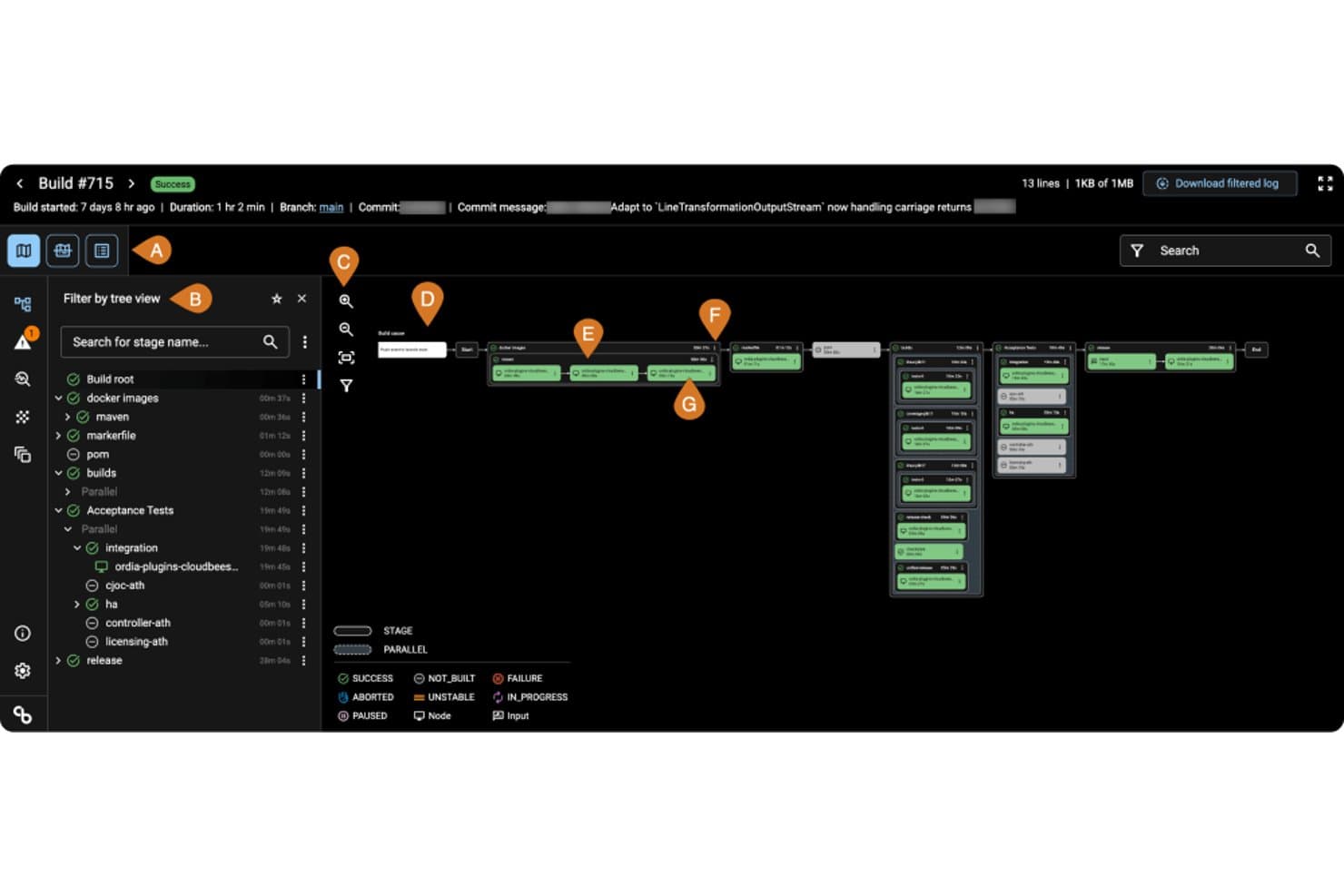
CloudBees visualizes CI/CD pipeline stages and parallel build flows. CloudBees is an enterprise DevOps automation platform that combines CI/CD pipeline management, release orchestration, feature management, and policy-as-code governance across Jenkins, GitHub Actions, and Tekton environments.
Who Is CloudBees Best For?
CloudBees is built for large enterprise engineering teams that need centralized governance and compliance controls across distributed Jenkins environments.
Why I Picked CloudBees
I picked CloudBees as one of the best because it's the clearest answer I've found for enterprise teams running Jenkins at scale who need real governance controls, not just pipeline automation. Policy-as-code via Open Policy Agent lets teams encode SOC 2, PCI, and FedRAMP rules directly into delivery workflows, with named approvers, expiry dates, and automatic audit evidence capture. I also like that CloudBees CI sits on top of existing Jenkins infrastructure, so teams at Autodesk-scale (4,000 engineers, 200+ apps) can centralize control without rewriting a single pipeline.
CloudBees Key Features
- Smart Tests: AI-driven test selection that runs only the tests most relevant to each code change, cutting test execution time by up to 80%.
- Release orchestration: Staged release workflows with milestones, approvals, and a one-click audit report covering environments, artifacts, and owners.
- Feature management: Git-native feature flags with gradual rollout controls and instant rollback without redeploying.
- DORA metrics and analytics: Built-in tracking of deployment frequency, lead time, change failure rate, and MTTR to surface pipeline bottlenecks and SLA risks.
CloudBees Integrations
CloudBees offers documented integrations with GitHub, GitLab, Bitbucket, Gerrit, Jenkins, GitHub Actions, Tekton, Jira, Snyk, and SonarQube. It also connects with Slack, AWS ECR, JFrog Artifactory, and AI tools through its MCP server.
Pros and Cons
Pros:
- Captures approvals and audit evidence automatically
- Preserves existing pipelines during modernization
- Centralizes Jenkins governance across enterprise teams
Cons:
- IaC support focuses on scanning, not provisioning
- Requires skilled staff for ongoing administration
Learn more about CloudBees: Best for AI-driven microservices lifecycles
- Free demo available
- Pricing upon request
Visit WebsiteCustomer Rating:4.3/5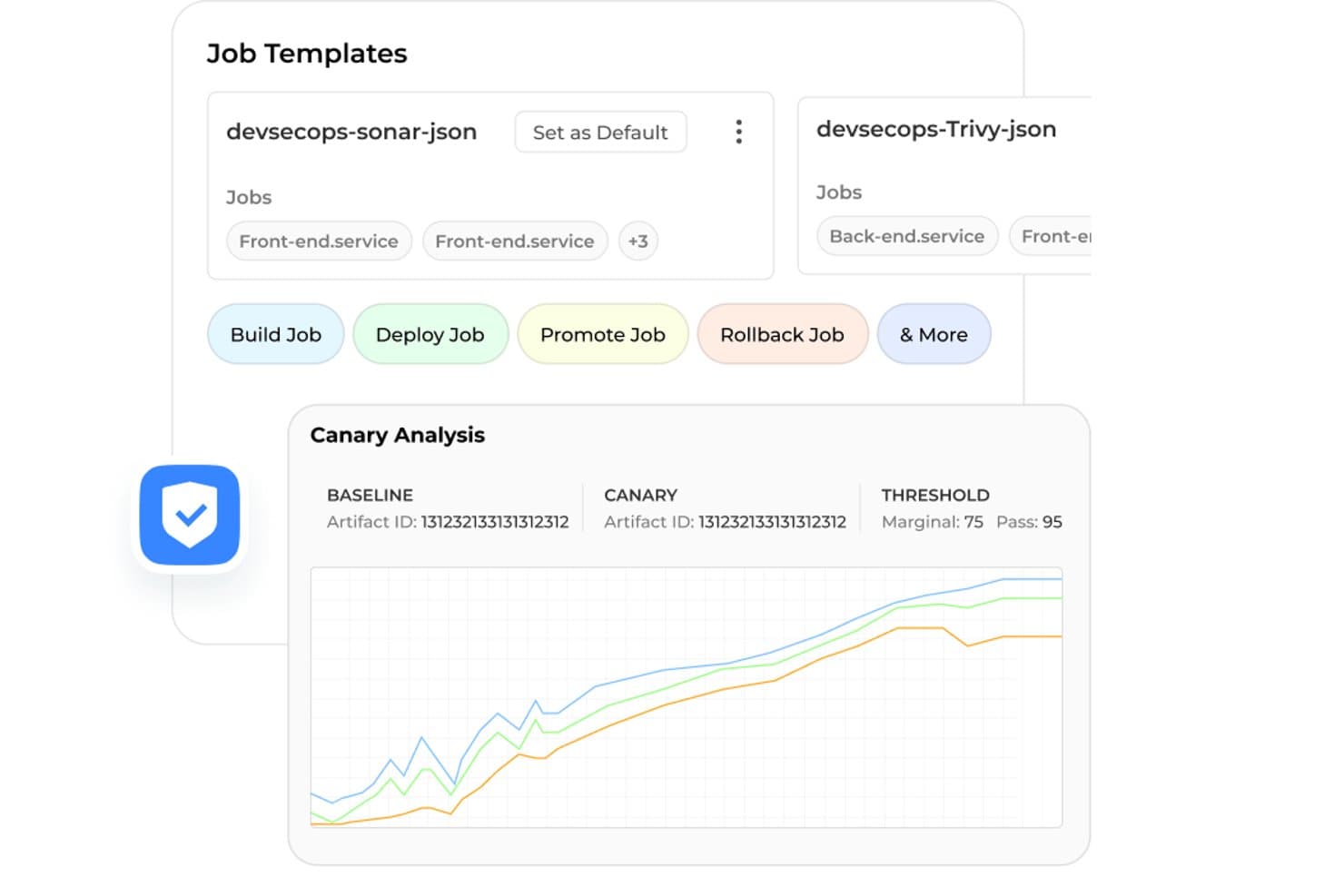
BuildPiper supports canary analysis and job templates for safe deployments. BuildPiper is a DevSecOps automation platform that covers CI/CD pipelines, Kubernetes management, GitOps, cloud orchestration, and AI-driven observability across microservices, monolith, and serverless workloads.
Who Is BuildPiper Best For?
BuildPiper is a strong fit for DevOps and platform engineering teams managing complex microservices environments who want CI/CD, Kubernetes, and AI-driven observability in one platform.
Why I Picked BuildPiper
I picked BuildPiper as one of the best because it's purpose-built for teams running complex microservices at scale, and the Ask Olly AI module is what sets it apart. When a deployment fails, Ask Olly analyzes logs in real time, identifies the root cause, and walks you through remediation steps instead of leaving you to dig through Grafana manually. I also like that native DORA metrics and policy-based deployment gates are baked in, so engineering leads get visibility into release velocity without bolting on a separate analytics tool.
BuildPiper Key Features
- Zero-touch CI/CD pipelines: Automated pipelines support multi-language builds, parallel execution, and conditional stage logic with blue-green, canary, and rolling deployment strategies.
- Policy-based deployment gates: Preset or configurable quality and security gates enforce standards before any deployment moves forward, with full audit trails for each release.
- GitOps event listeners: Watches Git repository events and automatically triggers defined pipeline actions, reducing manual handoffs between development and operations.
- Secrets management integration: Connects natively with HashiCorp Vault, AWS Secrets Manager, and Azure Secrets Manager to centralize credential handling across environments.
BuildPiper Integrations
BuildPiper integrates with GitHub, GitLab, Jenkins, ArgoCD, Kubernetes, AWS, Azure, Jira, ServiceNow, and Prometheus. It also supports GitOps workflows and Terraform modules for infrastructure delivery.
Pros and Cons
Pros:
- Reviewers praise responsive, hands-on customer support
- Native DORA metrics clarify release performance
- AI diagnoses deployment failures with remediation steps
Cons:
- New users need portal guidance and training
- Multi-account and cluster setups confuse reviewers
Learn more about BuildPiper: Best for AI-powered Microsoft ecosystem
- Free plan available
- From $6/user/month

Azure DevOps connects planning, development, delivery, and operations workflows. Azure DevOps is an extensive suite of development tools aimed at software development teams, particularly those within the Microsoft ecosystem. It provides cloud-based functionalities for planning, developing, delivering, and operating applications, ensuring a cohesive workflow for your team.
Why I picked Azure DevOps: It supports the complete software cycle end-to-end and integrates cohesively with other Microsoft products, making it an excellent choice for teams already using Microsoft technologies. Azure Pipelines allows for continuous integration and delivery. You can build, test, and deploy Python, Java, PHP, Ruby, Android, and iOS apps, among others. It integrates AI-assisted code suggestions and review tools to accelerate development and reduce human error.
Azure Pipelines supports workflows that build container images and push them to registries, helping teams implement containerization as part of their CI/CD pipelines. With Azure Boards, you can track work with user-friendly Kanban boards, backlogs, and custom reporting. You can also manage your source code with Azure Repos, providing unlimited private Git repositories.
Standout Features and Integrations:
Features include Azure Test Plans for testing and shipping with confidence. Azure Artifacts enables you to create and share Maven, npm, and NuGet package feeds. You can also use its built-in wiki to document your processes and knowledge.
Integrations include GitHub, Slack, Jenkins, Docker, Kubernetes, Visual Studio, Microsoft Teams, and more.
Pros and Cons
Pros:
- Supports multiple programming languages
- Extensive CI/CD capabilities
- Cohesive integration with Microsoft products
Cons:
- Limited non-Microsoft integrations
- Complex setup for new users
Learn more about Azure DevOps:
Diğer DevOps Otomasyon Araçları
İşte kısa listeme girmeyen ancak yine de göz atmaya değer bazı ek DevOps otomasyon aracı seçenekleri:
- 11SpinnakerBest for multi-cloud canary deployments at scale
- 12Argo CDBest for GitOps-driven Kubernetes promotion
- 13DatadogBest for observability-driven pipeline governance
- 14ChefBest for compliance-driven config management at scale
- 15Octopus DeployBest for multi-environment release orchestration
- 16SpaceliftBest for policy as code
- 17NorthflankBest for AI-powered rapid deployment and scaling
How I Evaluate DevOps Automation Tools
I split my evaluation into three parts, giving core functionality the most weight: build, test, and deploy across environments; provision versioned infrastructure. Next, I look for policy-as-code guardrails or pull-request preview environments. Finally, I consider onboarding, adoption, security, and pricing as teams scale.
Core Functionality (Table Stakes For This List)
When I'm selecting tools for my list, I score each one on a scale from 0 (does not offer the functionality) to 5 (excels in this area) for each core functionality listed below. I then convert the total into a percentage to help assess each tool's overall fit, with extra weight on any functionalities I’ve deemed essential.
- CI/CD Pipelines (Essential): I look for automated build, test, and deploy stages, including branch conditions and parallel jobs for releases across development, staging, and production.
- Infrastructure as Code (Essential): I assess how teams version and reuse infrastructure definitions, apply them across environments, and detect drift as cloud resources change.
- Workflow Orchestration: I consider whether event-driven workflows coordinate approvals, deployment tasks, and handoffs across tools and teams.
- Integrations: I check for connections to version control, cloud platforms, containers, and monitoring tools used across the delivery lifecycle.
- Environment and Releases: I look for controls that manage multiple environments and structure release promotion, such as moving a tested build from staging to production.
- Monitoring and Alerts: I evaluate how tools detect pipeline or deployment issues and route configurable alerts to the teams responsible for responding.
Once I have a list of tools that meet the criteria, I consider what sets each platform apart.
Differentiating Factors (What Sets Vendors Apart)
Here's how I compare and contrast different vendors:
Standout Features
I evaluate whether a platform offers DORA metrics benchmarking, since tracking deployment frequency and change failure rate against industry peers gives PMs real data for capacity planning. Policy-as-code governance matters just as much—I check if pipelines can block a release that skips a required security scan. Ephemeral preview environments round out the picture; when a stakeholder can click a link on a pull request and see the change live, feedback cycles shrink dramatically.
Beyond Features
I evaluate how quickly non-engineering teammates can read dashboards and join release decisions without scripting knowledge. A tool that requires a platform engineer to pull deployment stats for every sprint review slows the whole team down. I also check whether pricing scales predictably—some vendors charge per build minute, which can spike during hardening sprints. Security posture matters too; I look for SOC 2 compliance, SSO support, and granular role-based access so regulated teams don't need a separate toolchain.
DevOps Otomasyon Araçları Nasıl Seçilir?
Uzun özellik listeleri ve karmaşık fiyatlandırma yapıları içinde kaybolmak kolaydır. Kendinize özgü yazılım seçim sürecinizi yürütürken odaklanmanıza yardımcı olmak için göz önünde bulundurmanız gereken faktörlerin bir kontrol listesini burada bulabilirsiniz:
| Faktör | Dikkate Alınması Gerekenler |
|---|---|
| FaktörÖlçeklenebilirlik | Dikkate Alınması GerekenlerAraç ekibinizle birlikte büyüyebilir mi? İş yüklerini ve kullanıcı sayısını performansta önemli düşüşler olmadan artırabilecek çözümler arayın. |
| FaktörEntegrasyonlar | Dikkate Alınması GerekenlerMevcut araçlarınızla çalışıyor mu? Sürüm denetimi, bulut sağlayıcıları ve iletişim platformları gibi mevcut sistemlerinizle uyumluluğunu kontrol edin. |
| FaktörÖzelleştirilebilirlik | Dikkate Alınması GerekenlerAracı ihtiyaçlarınıza göre uyarlayabilir misiniz? İş akışlarını ve ayarları belirli süreçlerinize ve hedeflerinize uyacak şekilde ne kadar kolay düzenleyebileceğinizi değerlendirin. |
| FaktörKullanım kolaylığı | Dikkate Alınması GerekenlerArayüz ekibiniz için sezgisel mi? Kapsamlı bir eğitim almadan ekibinizin aracı ne kadar hızlı öğrenip etkili şekilde kullanmaya başlayabileceğini göz önünde bulundurun. |
| FaktörUygulama ve işe alıştırma | Dikkate Alınması GerekenlerGeçiş ne kadar sorunsuz? Geçişi kolaylaştırmak için eğitimler, şablonlar ve destek gibi açık işe alıştırma kaynaklarına sahip araçları arayın. |
| FaktörMaliyet | Dikkate Alınması GerekenlerBütçenize uyuyor mu? Fiyatlandırmayı bütçenizle karşılaştırın ve toplam maliyeti etkileyebilecek eklentiler veya gerekli yükseltmeler gibi gizli maliyetleri göz önünde bulundurun. |
| FaktörGüvenlik önlemleri | Dikkate Alınması GerekenlerVerileriniz ve operasyonlarınız korunuyor mu? Aracın hassas bilgileri korumak için şifreleme ve erişim denetimleri gibi güvenlik önlemleri sunduğundan emin olun. |
DevOps Otomasyon Araçları Nedir?
DevOps otomasyon araçları, yazılım geliştirme ve dağıtım süreçlerini otomatikleştiren yazılım çözümleridir. Yazılım geliştiricileri, BT profesyonelleri ve DevOps ekipleri, iş birliğini ve verimliliği artırmak için genellikle bu araçları kullanır. Otomatik dağıtım, sürekli entegrasyon ve altyapı yönetimi özellikleri hataları azaltmaya ve teslimat sürecini hızlandırmaya yardımcı olur. Genel olarak bu araçlar, ekiplerin yüksek kaliteli yazılımları daha hızlı ve daha güvenilir bir şekilde sunmasını sağlayarak önemli bir değer sunar.
Özellikler
DevOps otomasyon araçlarını seçerken aşağıdaki temel özelliklere dikkat edin:
- Otomatik dağıtım: Yayınlama sürecini basitleştirir, manuel hataları azaltır ve teslimat sürelerini hızlandırır.
- Sürekli entegrasyon: Kod değişikliklerini düzenli olarak birleştirir, yeni güncellemelerin test edilmesini ve sorunsuz bir şekilde entegre edilmesini sağlar.
- Kod olarak altyapı: Altyapıyı kod aracılığıyla yöneterek tutarlı ve tekrarlanabilir dağıtımlara olanak tanır.
- Sürüm denetimi entegrasyonu: Sürüm denetimi sistemleriyle sorunsuz bir şekilde çalışarak iş birliğini ve değişiklik takibini kolaylaştırır.
- Kod olarak politika: Politikaları kod içinde tanımlayarak uyumluluğu ve yönetişimi uygular, ortamlar arasında tutarlılık sağlar.
- Değişim algılama: Altyapıdaki beklenmeyen değişiklikleri belirler ve düzeltir, sistem bütünlüğünü korur.
- Özelleştirilebilir iş akışları: Ekiplerin süreçleri kendi özel ihtiyaçlarına göre uyarlamasını sağlayarak esnekliği ve verimliliği artırır.
- Güvenlik önlemleri: Hassas verileri korumak ve güvenli işlemler sağlamak için şifreleme ve erişim denetimleri sunar.
- Ölçeklenebilirlik: Artan talebi performans sorunları olmadan karşılayarak büyüyen iş yüklerini ve ekipleri destekler.
- İş birliği araçları: Ekip iletişimini ve koordinasyonunu güçlendirerek üretkenliği ve proje sonuçlarını iyileştirir.
Faydalar
DevOps otomasyon araçlarını uygulamak, ekibiniz ve işletmeniz için çeşitli faydalar sağlar. Yararlanabileceğiniz birkaç fayda şunlardır:
- Daha hızlı dağıtım: Otomatik dağıtım süreçleri manuel görevleri azaltarak ekibinizin güncellemeleri daha hızlı yayınlamasına olanak tanır.
- Geliştirilmiş iş birliği: Sürüm denetimi ve iş birliği araçlarıyla entegrasyon, ekip çalışmasını ve iletişimi güçlendirir.
- Tutarlılık ve güvenilirlik: Kod olarak altyapı, ortamların tutarlı olmasını sağlayarak hata riskini azaltır.
- Artırılmış güvenlik: Şifreleme ve erişim denetimleri gibi güvenlik önlemleri verilerinizi ve işlemlerinizi korur.
- Ölçeklenebilirlik: Performanstan ödün vermeden artan taleplere uyum sağlayarak büyüyen ekibinizi ve iş yükünüzü destekler.
- Azaltılmış kesinti süresi: Değişim algılama ve sürekli entegrasyon, sorunları kesintilere neden olmadan önce belirlemeye ve düzeltmeye yardımcı olur.
- Maliyet verimliliği: Tekrarlanan görevleri otomatikleştirmek zaman ve kaynak tasarrufu sağlayarak bütçenizin daha verimli kullanılmasına katkıda bulunur.
Maliyetler ve Fiyatlandırma
DevOps otomasyon araçlarını seçmek, mevcut çeşitli fiyatlandırma modellerinin ve planların anlaşılmasını gerektirir. Maliyetler özelliklere, ekip büyüklüğüne, eklentilere ve diğer unsurlara göre değişir. Aşağıdaki tablo, DevOps otomasyon araçları çözümlerinde yaygın planları, ortalama fiyatlarını ve genellikle sunulan özellikleri özetlemektedir:
DevOps Otomasyon Araçları için Plan Karşılaştırma Tablosu
| Plan Türü | Ortalama Fiyat | Yaygın Özellikler |
|---|---|---|
| Plan TürüÜcretsiz Plan | Ortalama Fiyat$0 | Yaygın ÖzelliklerTemel CI/CD özellikleri, sınırlı entegrasyonlar ve topluluk desteği. |
| Plan TürüKişisel Plan | Ortalama Fiyat$4-$29/kullanıcı/ay | Yaygın ÖzelliklerGeliştirilmiş CI/CD özellikleri, temel destek ve sınırlı şablonlara ve otomasyon komut dosyalarına erişim. |
| Plan Türüİşletme Planı | Ortalama Fiyat$25-$52/kullanıcı/ay | Yaygın ÖzelliklerGelişmiş entegrasyonlar, öncelikli destek, özelleştirilebilir iş akışları ve güvenlik özellikleri. |
| Plan TürüKurumsal Plan | Ortalama Fiyat$75-$150/kullanıcı/ay | Yaygın ÖzelliklerKapsamlı güvenlik önlemleri, özel destek, özel entegrasyonlar ve gelişmiş analizler. |
DevOps Otomasyon Araçları SSS
DevOps otomasyon araçları hakkında sık sorulan soruların bazı yanıtları:
DevOps ile DevOps otomasyon araçları arasındaki fark nedir?
DevOps, geliştirme ve operasyon ekipleri arasındaki iş birliğini ve verimliliği geliştirmeyi amaçlayan bir uygulamalar bütünüdür. DevOps otomasyon araçları; entegrasyon, test ve dağıtım gibi çeşitli DevOps süreçlerini otomatikleştiren yazılım çözümleridir. DevOps uygulamalarını hayata geçiriyorsanız otomasyon araçlarını kullanmak, ekibinizin manuel çabayı azaltmasına ve projeler arasındaki tutarlılığı artırmasına yardımcı olabilir.
DevOps otomasyon araçları mevcut eski sistemlerle çalışabilir mi?
Evet, birçok DevOps otomasyon aracı mevcut eski sistemlerle entegre olabilir. Bir araç seçerken mevcut altyapınız ve yazılımlarınızla uyumluluğunu kontrol edin. Bazı araçlar entegrasyonu kolaylaştırmak için eklentiler veya API’ler sunar. Bu, geçişi kolaylaştırmaya ve ekibinizin mevcut sistemleri tamamen elden geçirmeden otomasyondan yararlanabilmesini sağlamaya yardımcı olabilir.
Ekibimin DevOps otomasyon araçlarını kullanmaya hazır olup olmadığını nasıl anlarım?
Ekibinizin hazır olup olmadığını belirlemek için mevcut iş akışınızı değerlendirin ve geliştirme ile dağıtım süreçlerinizdeki darboğazları belirleyin. Manuel görevler ekibinizi yavaşlatıyorsa bu, otomasyonun değer sağlayabileceğinin iyi bir göstergesidir. Araçların etkinliğini test etmek ve ekibinizin desteğini almak için bir pilot projeyle başlamayı değerlendirin.
DevOps otomasyon araçları güvenli midir?
Evet, çoğu DevOps otomasyon aracı şifreleme ve erişim kontrolleri gibi güvenlik özellikleri içerir. Ancak değerlendirdiğiniz herhangi bir aracın özel güvenlik önlemlerini incelemeniz önemlidir. Süreçleri otomatikleştirirken verilerinizin ve operasyonlarınızın güvenli kalmasını sağlamak için rol tabanlı erişim denetimi ve denetim günlükleri gibi özellikleri arayın.