

Popüler bir tasarım iş birliği platformu olan InVision, yazılım hizmetlerini 31 Aralık 2024 itibarıyla sonlandıracağını duyurdu. Kullanıcı deneyimi/kullanıcı arayüzü iş akışları için prototip oluşturma, tasarım iş birliği ve geri bildirim süreçlerine odaklanan ürün tasarımı platformuyla tanınan InVision'ın bu vedası, kullanıcılarını yeni bir araç arayışına yöneltebilir; bu yazılımı değerlendiren diğer kişileri ise alternatifler konusunda kararsız bırakabilir. Bu nedenle, aralarından seçim yapabilmeniz için en iyi tasarım iş birliği araçlarını test ettim, inceledim ve derledim.
Bu makalede, InVision rakipleri arasındaki en iyi seçimlerimi paylaşacağım. Bu araçların özellikleri, artıları, eksileri ve fiyatlandırmaları hakkında bilgiler bulacaksınız. Bu rehber, ekibinizin tasarım ihtiyaçları için bilinçli bir seçim yapmanıza yardımcı olmayı amaçlıyor.
Why Trust Our Software Recommendations
6,700+
Reviews
20
Industry experts
16+
Evaluation factors
14
Years
Our team has been testing and reviewing software since 2012. As product managers ourselves, we know how difficult—and important—it is to choose the right software.
For this guide, we evaluated tools using hands-on testing and independent research, scoring tools using our selection criteria.
Our reviews reflect our human editorial judgment, not a sales pitch.
Expert reviewers:
- Andrew LumbySenior TPM
- Cristiano ValimSenior UI/UX Lead


InVision Rakipleri Karşılaştırma Tablosu
En iyi InVision rakiplerim için fiyatlandırma ayrıntılarını karşılaştırmak üzere bu karşılaştırma tablosunu kullanın.
Score legend (out of 5)
- Excellent4.5–5
- Good4–4.4
- Average3–3.9
- Below average2–2.9
- Poor1–1.9
Sorted by: Default
| Tool | Starting Price | Website | |||||||
|---|---|---|---|---|---|---|---|---|---|
Best for designers in the Adobe ecosystem | 3.3 out of 5 | 4 | 3 | 4 | 4 | 2 | 3 | $91.99/month Free trial available | Website |
Best for self-hosted design with no lock-in | 3.3 out of 5 | 3 | 4 | 4 | 3 | 3 | 3 | $7/user/month Free plan + 14-day free trial + free demo available | Website |
Best for data-driven prototype simulations | 3.3 out of 5 | 4 | 3 | 3 | 4 | 3 | 3 | $19/user/month Free plan + 10-day trial available | Website |
Best for high-fidelity conditional prototypes | 3.5 out of 5 | 5 | 2 | 4 | 3 | 3 | 4 | $29/user/month Free plan + 30-day free trial available | Website |
Best for hardware and sensor-based prototyping | 3.2 out of 5 | 5 | 2 | 4 | 3 | 2 | 3 | $25/user/month Free plan + free demo available | Website |
Best for cross-functional team collaboration | 4.5 out of 5 | 5 | 5 | 4 | 4 | 5 | 4 | $3/user/month Free plan available | Website |
Best for all-in-one design-to-handoff workflows | 3.8 out of 5 | 4 | 4 | 4 | 4 | 4 | 3 | $4.95/user/month Free plan + 30-day free trial + free demo available | Website |
Best for code-backed design systems | 4.0 out of 5 | 5 | 5 | 4 | 2 | 5 | 3 | $49/user/month Free plan + 14-day free trial + demo available | Website |
Best for macOS-native design workflows | 3.8 out of 5 | 4 | 4 | 4 | 4 | 4 | 3 | $12/user/month 30-day free trial available | Website |
Best for design-to-developer handoff | 3.7 out of 5 | 2 | 4 | 5 | 3 | 4 | 4 | $12/user/month Free plan + free demo available | Website |


En İyi InVision Rakipleri İncelemeleri
Aşağıda, kısa listeme giren en iyi InVision rakipleri hakkındaki ayrıntılı özetlerimi bulabilirsiniz. İncelemelerim, size en uygun aracı bulmanıza yardımcı olmak için her aracın temel özelliklerine, artılarına ve & eksilerine, entegrasyonlarına ve ideal kullanım alanlarına ayrıntılı bir bakış sunuyor.
 Best for designers in the Adobe ecosystem
- Free trial available
- From CAD $91.99/month
Visit WebsiteCustomer Rating:4.3/5
Adobe XD lets users start new designs from preset device canvas sizes. Adobe XD is a UI/UX design tool from Adobe that covers wireframing, prototyping, and developer handoff in one app—making it a natural fit for designers already working inside the Adobe ecosystem with Photoshop, Illustrator, or Creative Cloud Libraries.
Who Is Adobe XD Best For?
Adobe XD is a strong fit for product designers who are already deep in the Adobe ecosystem and rely on Photoshop, Illustrator, or Creative Cloud Libraries in their daily workflow.
Why I Picked Adobe XD
I've included Adobe XD in my top picks because it's the natural choice for designers who live inside the Adobe ecosystem. If your workflow already moves between Photoshop, Illustrator, and Creative Cloud Libraries, XD keeps everything connected without extra friction. I particularly like how components published to Creative Cloud Libraries stay linked across documents, so updating a design system element in one place pushes changes everywhere. Auto-Animate is also genuinely impressive for prototyping micro-interactions without duplicating artboards.
Adobe XD Key Features
- Voice prototyping: Add voice triggers and speech playback actions to prototype flows directly in Prototype mode.
- Scroll groups: Define scrollable regions within an artboard to simulate horizontal or vertical scrolling in a prototype.
- Design-spec links: Generate shareable links that expose measurements, colors, typography, and downloadable assets for developer handoff.
- Document history: View and revert cloud documents to earlier saved states using the built-in version history panel.
Adobe XD Integrations
Adobe XD integrates with Photoshop, Illustrator, After Effects, Creative Cloud Libraries, Adobe Fonts, Creative Cloud cloud storage, and Jira through the Adobe XD for Jira app. Slack and Zoom are available through marketplace plugins.
Pros and Cons
Pros:
- Design-spec links give developers detailed measurements
- Component states reduce duplicated prototype artboards
- Auto-Animate creates polished interaction prototypes
Cons:
- Comment replies require refreshing the browser
- Maintenance mode leaves no feature roadmap
 Best for self-hosted design with no lock-in
- Free plan + 14-day free trial + free demo available
- From $7/user/month
Visit WebsiteCustomer Rating:4.5/5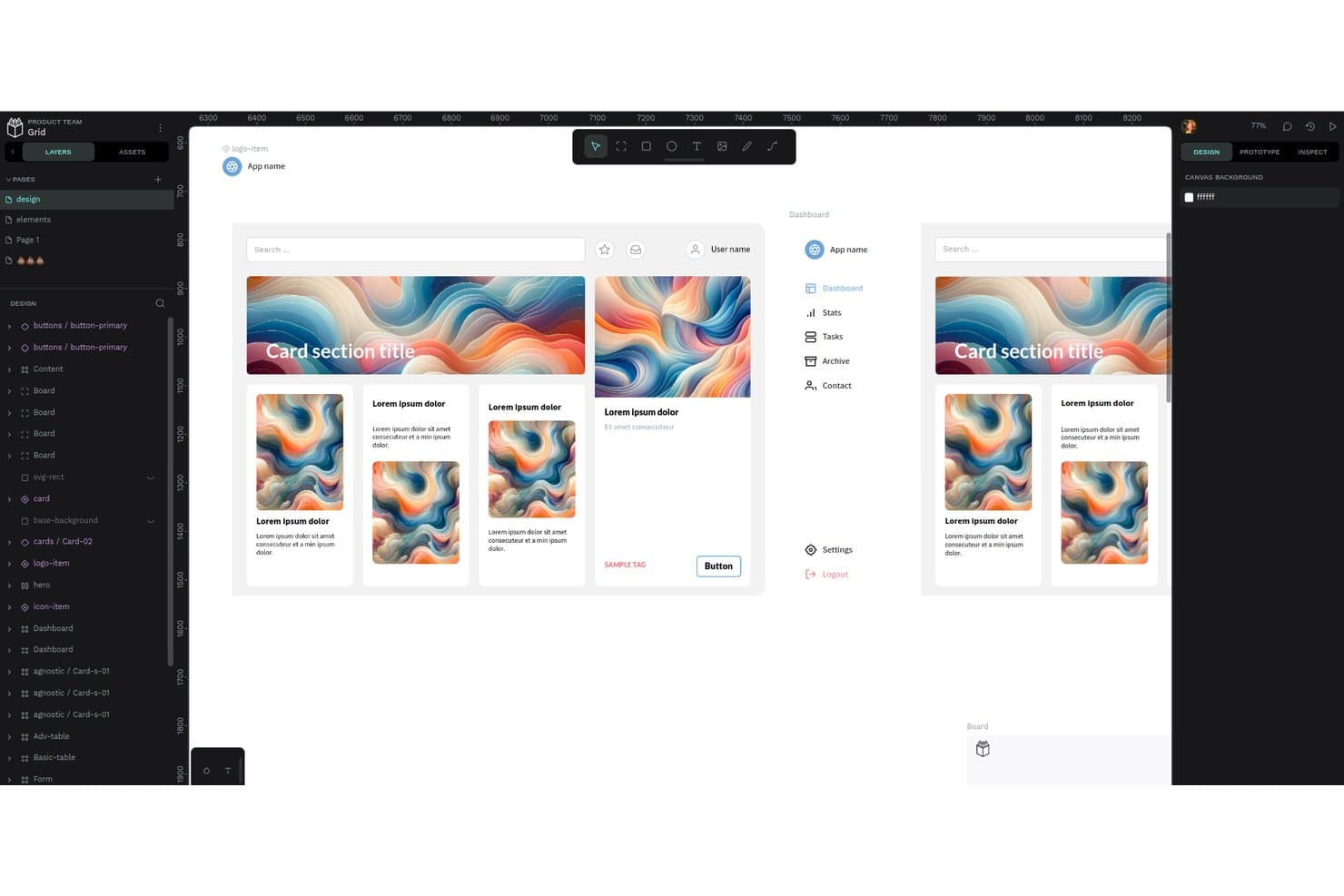
Penpot's workspace lets users design and prototype UI components collaboratively. Penpot is an open-source design and prototyping tool that appeals to design teams who want real-time collaboration, developer handoff, and design system management without depending on a proprietary vendor.
Who Is Penpot Best For?
Penpot is a strong fit for design teams that want full control over their infrastructure and can't afford to be caught off guard by another vendor shutdown.
Why I Picked Penpot
I picked Penpot as one of the best because it's the only tool on this list you can actually self-host, which means no vendor can pull the rug out from under your team the way InVision did. Your files stay in the open
.penpotformat built on SVG standards, so you're never stuck. I also appreciate that design tokens are natively DTCG-compliant, supporting themes, sets, math operations, and composite tokens without any third-party plugin.Penpot Key Features
- Real-time multiplayer editing: Multiple team members can work on the same design file simultaneously in the browser.
- Inspect mode with CSS export: Developers can view measurements, copy CSS/HTML/SVG code, and export assets from a dedicated read-only tab.
- Multi-flow prototyping: Each prototype flow has its own starting board and shareable link, supporting multiple user journeys within one project.
- Shared component libraries: Any file can be published as a team library, with library updates propagated to all connected files.
Penpot Integrations
Penpot has about 125 marketplace plugins, including Locofy, Miro via Sync Board Companion, Iconify, Lucide, and penpot2flutter. Its REST API, webhooks, and open plugin API support custom integrations.
Pros and Cons
Pros:
- Developers praise inspect mode and code output
- Open SVG-based files reduce lock-in
- Self-hosting protects teams from vendor shutdowns
Cons:
- InVision migration requires manual rebuilding
- Prototype flows lack conditional logic
Learn more about Penpot: Best for data-driven prototype simulations
- Free plan + 10-day trial available
- From $19/user/month
Visit WebsiteCustomer Rating:4.2/5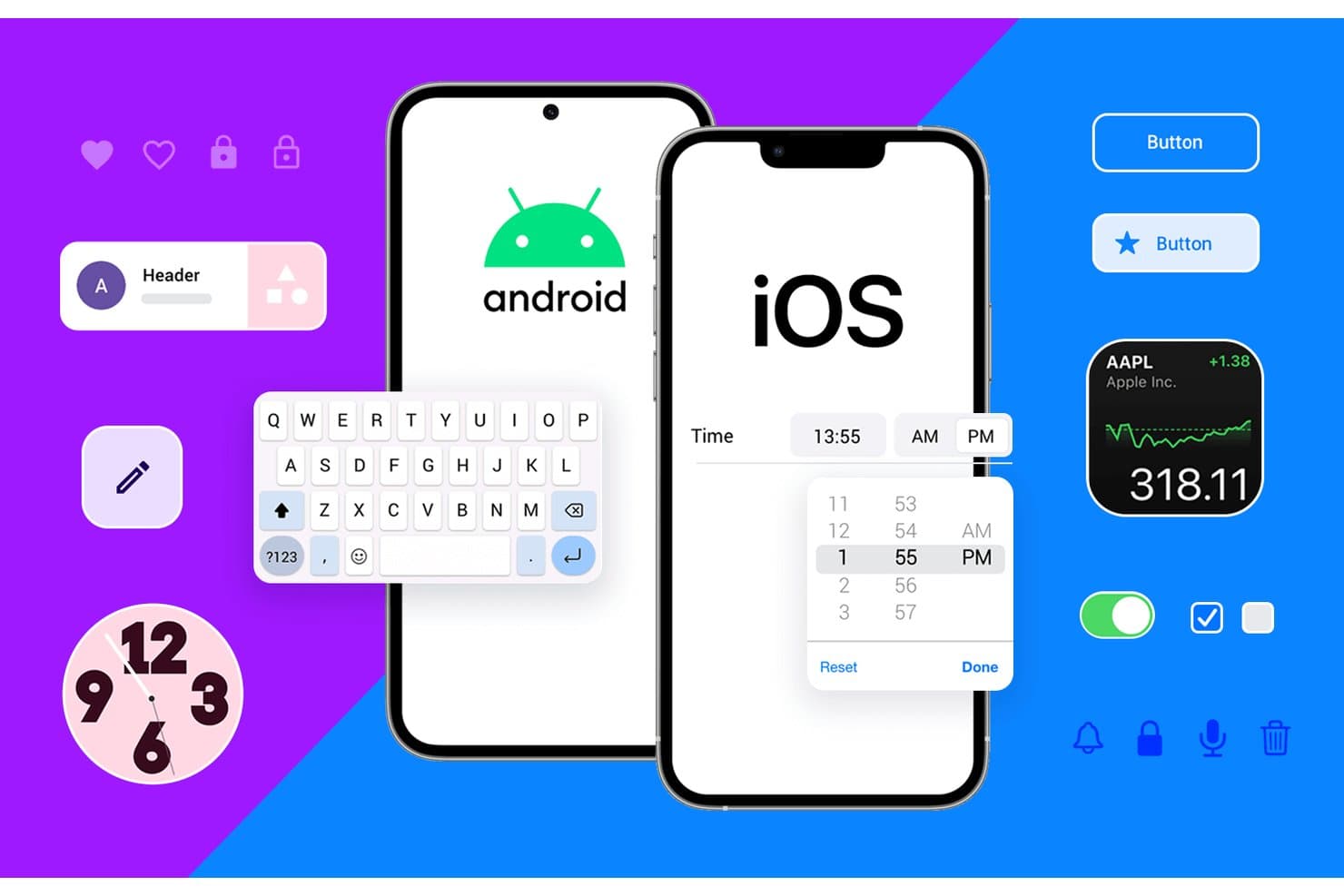
Justinmind supports both Android and iOS UI component prototyping. Justinmind is a desktop prototyping tool that lets product designers and PMs build data-driven, functional simulations with conditions, variables, and form logic—without writing any code.
Who Is Justinmind Best For?
Justinmind suits product designers and PMs on enterprise or regulated teams who need functional, data-driven prototypes with requirements traceability.
Why I Picked Justinmind
I picked Justinmind as one of the best because it's the only tool on this list that lets you build genuinely data-driven prototype simulations without touching code. I'm talking about Data Masters populated from CSV files, smart data grids, and form validation with real error logic, so a prototype can behave like a live product during stakeholder reviews. Conditions and variables let me wire up business rules across screens, which is something InVision never came close to supporting.
Justinmind Key Features
- Unlimited viewer access: Every plan lets you share prototypes with an unlimited number of stakeholders and reviewers at no extra cost.
- Device preview and testing: A mobile viewer app for iOS and Android, plus QR-code device preview, lets you test prototypes on real devices.
- Design file import: Native import from Figma, Sketch, and Adobe XD is available on every plan, including the free tier.
- Requirements management: Enterprise users can capture, version, and link requirements directly to UI components for full traceability.
Justinmind Integrations
Justinmind offers integrations with Jira, Confluence, Azure DevOps, IBM DOORS, Figma, Sketch, Adobe XD, Photoshop, and Illustrator. It also provides an API and SDK for custom integrations.
Pros and Cons
Pros:
- Reviewers praise its intuitive, clean interface
- Unlimited viewers simplify stakeholder review
- Builds data-driven flows with realistic logic
Cons:
- Large prototypes can suffer stability issues
- Co-editing depends on lock-and-commit workflows
Learn more about Justinmind: Best for high-fidelity conditional prototypes
- Free plan + 30-day free trial available
- From $29/user/month (billed annually)

Axure RP lets users build interactive dashboard prototypes with conditional logic. Axure RP is a desktop-based prototyping tool built for UX and product designers who need to simulate complex, realistic product interactions without writing code.
Who Is Axure RP Best For?
Axure RP is a strong fit for UX designers and product teams who need to prototype complex, conditional interactions without touching code.
Why I Picked Axure RP
I've included Axure RP in my top picks because no other tool on this list gets closer to simulating a real product without writing code. Where InVision kept interactions basic, Axure lets you build conditional logic with variables, so a prototype can respond differently based on what a user actually types into a form field. I also love the repeater widget, which lets you prototype sortable, filterable data tables that stakeholders can interact with as if they're using the live product.
Axure RP Key Features
- Dynamic panels: Multi-state panels let you prototype popups, overlays, and swipeable mobile screens without any code.
- Threaded comments with resolution tracking: Stakeholders can leave comments directly on published prototypes, and teams can mark each one resolved with email, Slack, or Teams notifications.
- Automated developer redlines: Axure Cloud generates CSS specs and image asset exports automatically when you publish a prototype.
- Adaptive views: A single page can display different layouts for desktop, tablet, and mobile within the same file.
Axure RP Integrations
Axure RP offers documented integrations with Jira, Confluence, Slack, Microsoft Teams, Figma, Sketch, and Adobe XD, plus third-party user-testing services. It also supports experimental MCP connections for Claude Code, VS Code, and Cursor.
Pros and Cons
Pros:
- Reviewers praise realistic prototype animations
- Repeaters make sortable data tables testable
- Conditional logic models realistic product behavior
Cons:
- RP co-authoring depends on check-in and checkout
- Complex interactions take time to configure
Learn more about Axure RP : Best for hardware and sensor-based prototyping
- Free plan + free demo available
- From $25/user/month
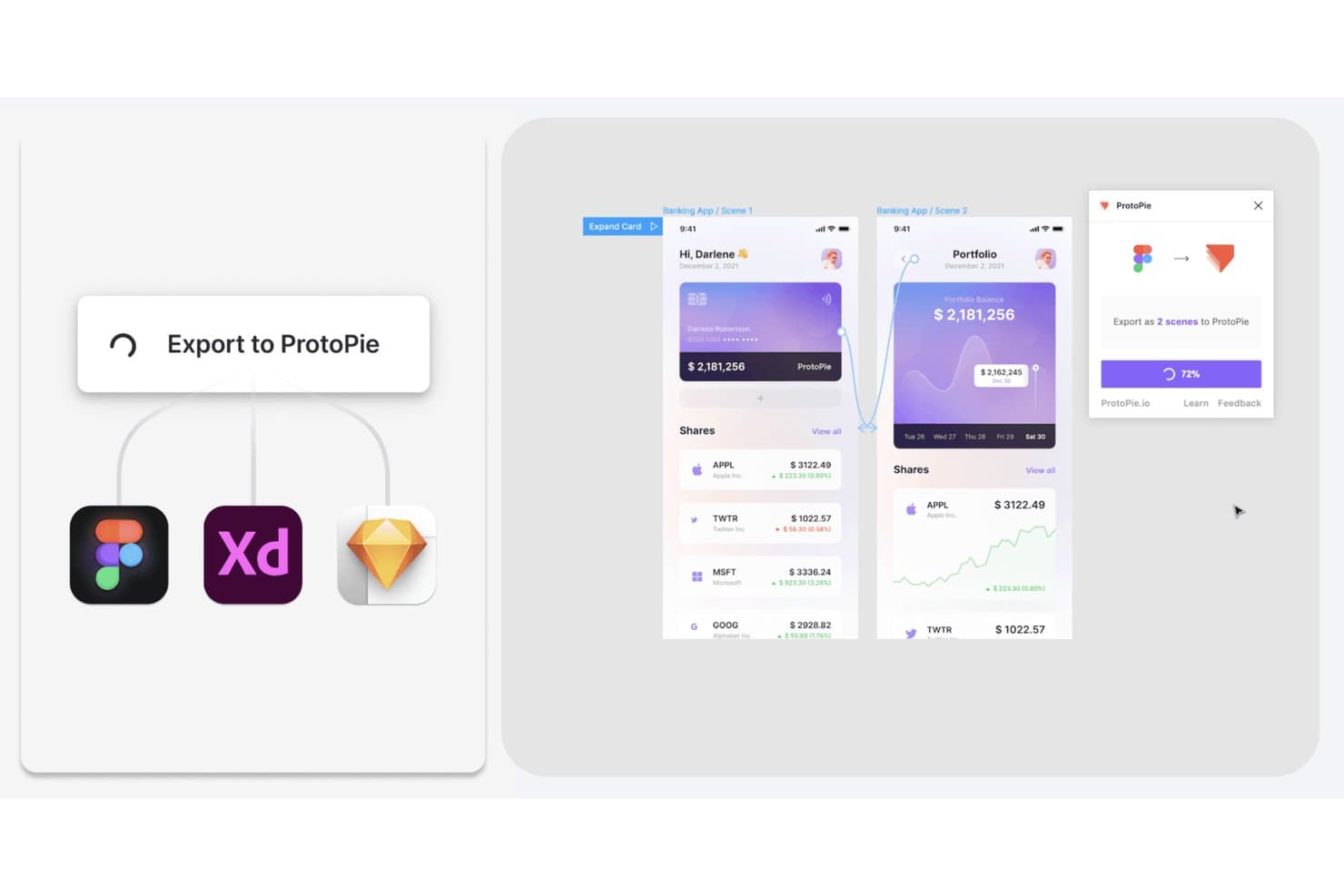
ProtoPie lets users export Figma, XD, and Sketch designs as interactive prototypes. ProtoPie is a high-fidelity prototyping tool built for UX and UI designers who need to simulate realistic interactions, complex micro-animations, and multi-device behaviors that go well beyond what most design tools can produce natively.
Who Is ProtoPie Best For?
ProtoPie is a strong fit for UX and UI designers working in hardware-adjacent industries like automotive, IoT, and MedTech who need to prototype sensor-driven or multi-device interactions.
Why I Picked ProtoPie
I picked ProtoPie as one of the best because no other tool on this list handles hardware and sensor-based prototyping the way it does. With ProtoPie Connect, you can wire a prototype directly to an Arduino, a gamepad, or a driving simulator, which makes it the go-to for automotive HMI and IoT teams who need to test real-device interactions before writing a line of code. Its object-trigger-response model also supports gyroscope, compass, voice, and camera inputs natively.
ProtoPie Key Features
- Conditional logic and variables: Build prototypes that respond dynamically to user input using formulas, conditions, and stored variables—no code required.
- Built-in user testing: Run moderated or unmoderated test sessions directly in ProtoPie Cloud via OTP-protected links, with session replays and interaction logs available within about 60 seconds of completion.
- Automatic interaction recording: One click captures a full interaction scenario—including timing, delays, easing, and layer properties—and generates developer-ready specs that update when the prototype changes.
- Design file import: Bring screens directly from Figma, Sketch, or Adobe XD using dedicated plugins, then layer interaction logic on top without rebuilding layouts from scratch.
ProtoPie Integrations
ProtoPie offers integrations with Figma, Sketch, Adobe XD, Unity, Unreal, Arduino, and Socket.IO through plugins and ProtoPie Connect. It also supports APIs, web embeds, live camera feeds, gamepads, and driving simulators for hardware-focused prototypes.
Pros and Cons
Pros:
- Sensor-driven prototypes surpass static review tools
- Recorded motion specs clarify developer handoff
- Reviewers praise advanced interaction control
Cons:
- No real-time co-editing for distributed teams
- Reviewers flag bugs and dated interface
Learn more about ProtoPie: Best for cross-functional team collaboration
- Free plan available
- From $3/user/month
Visit WebsiteCustomer Rating:4.7/5
Figma lets users collaborate in real time on mobile UI designs. Figma is a browser-based design platform where product designers, UX teams, and product managers can prototype, iterate, and hand off work without switching between tools.
Who Is Figma Best For?
Figma is a natural fit for cross-functional product teams where designers, PMs, and developers all need to work inside the same files without buying a seat for everyone.
Why I Picked Figma
I've included Figma in my top picks because no other tool makes cross-functional collaboration feel this native. Designers, PMs, and developers all work inside the same file at once, with live cursors and threaded comments that resolve without anyone leaving the browser. I especially appreciate that PMs and stakeholders can view, comment, and annotate prototypes for free, while Dev Mode gives engineers inspect panels and code snippets the moment designs are marked ready.
Figma Key Features
- Smart Animate: Automatically animates matching objects between frames to create smooth transitions like parallax scrolling and touch gestures in your prototypes.
- FigJam whiteboard: A built-in digital whiteboard with voting, timers, Spotlight mode, and 300+ templates for running workshops and collaborative sessions.
- Design system libraries: Team-wide component libraries that push updates automatically to every file using them, keeping designs consistent across your product.
- Figma Make: Turns a text prompt into an interactive, code-backed prototype or web app using your existing Figma designs as a starting point.
Figma Integrations
Figma offers native integrations with Jira and Asana, plus connections to GitHub, Storybook, and VS Code through Dev Mode. Its REST, Plugin, Widget, Embed Kit, and SCIM APIs support custom integrations.
Pros and Cons
Pros:
- Shared libraries keep components consistent
- Prototype logic supports realistic product flows
- Live co-editing keeps feedback in-file
Cons:
- Offline work is limited
- Large files can load slowly
 Best for all-in-one design-to-handoff workflows
- Free plan + 30-day free trial + free demo available
- From $4.95/user/month (billed annually)
Visit WebsiteCustomer Rating:4.5/5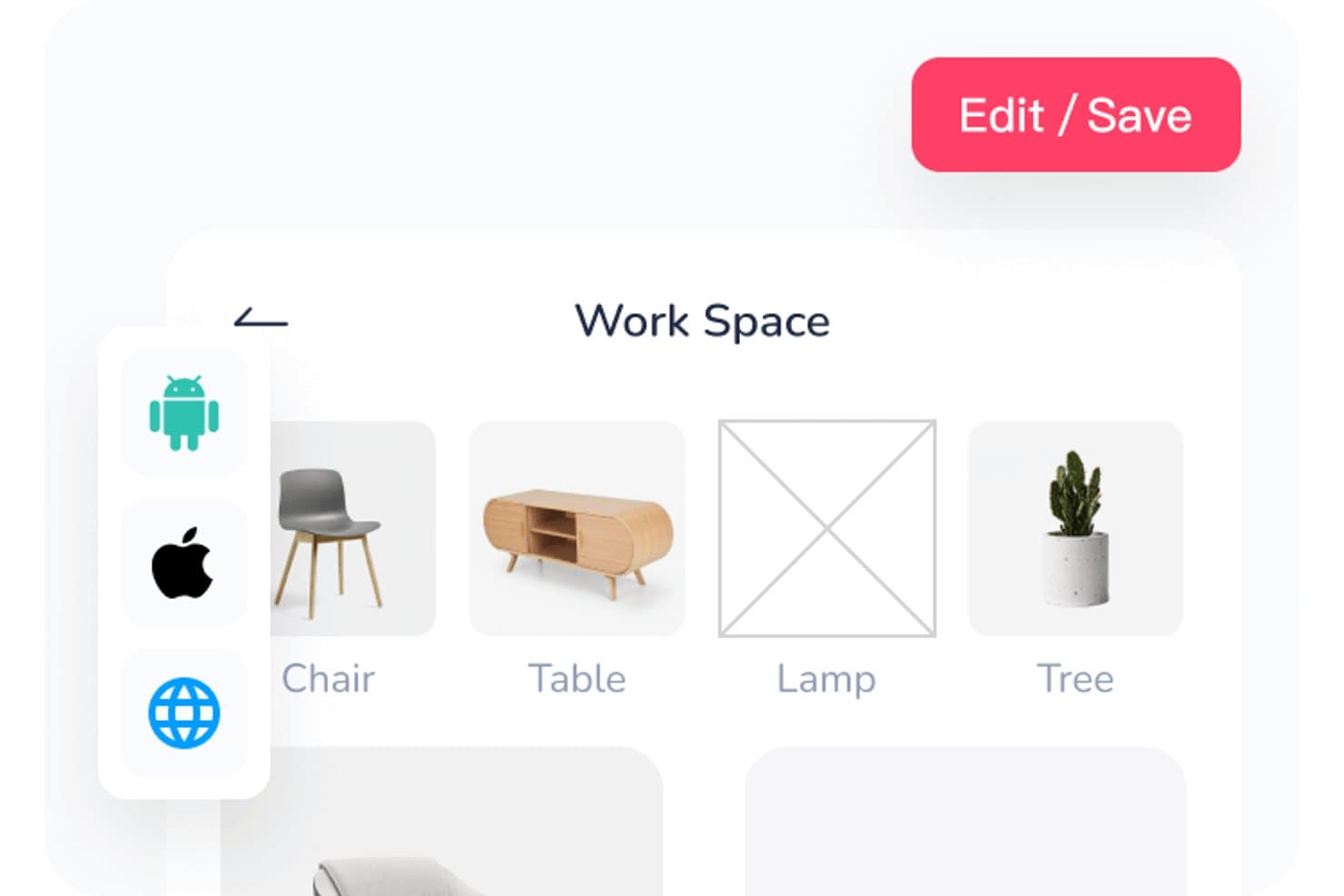
Mockplus lets users organize workspace assets in a visual grid layout. Mockplus is a design suite spanning prototyping, review, developer handoff, and design systems that appeals to product designers and UX/UI teams who need one connected workspace from early wireframes through to developer specs.
Who Is Mockplus Best For?
Mockplus suits product designers and UX/UI teams who want prototyping, review, developer handoff, and design systems in one place rather than stitching together separate tools.
Why I Picked Mockplus
I picked Mockplus as one of the best because it genuinely covers the full design-to-handoff loop without forcing you to bolt on separate tools. I appreciate how Dev Mode auto-syncs specs, multi-platform code snippets, and exported assets the moment a design is published, so developers aren't chasing updated files. Pair that with built-in PRD authoring and task tracking inside the same workspace, and your whole review-to-delivery workflow lives in one place.
Mockplus Key Features
- Connect Mode flowcharting: Build user flows, sitemaps, and flowcharts directly inside the prototyping workspace without switching tools.
- Multi-platform code snippets: Dev Mode generates code in CSS, Swift, Objective-C, and other languages for web, iOS, and Android simultaneously.
- Offline prototype download: Export interactive prototypes as offline HTML files for sharing with stakeholders who don't have a Mockplus account.
- Mockplus 3 Offline desktop app: A fully offline, locally stored version of the tool built for high-security environments like government or regulated industries.
Mockplus Integrations
Mockplus offers integrations with Figma, Sketch, Adobe XD, Photoshop, Axure, Slack, Jira, Confluence, and Lark. No public API or VS Code and Storybook integrations are documented.
Pros and Cons
Pros:
- Auto-synced specs support developer handoff
- Imports support mixed-tool design workflows
- Reviewers praise its broad component library
Cons:
- Reviewers report slow license support
- Page-by-page restores limit version recovery
Learn more about Mockplus: Best for code-backed design systems
- Free plan + 14-day free trial + demo available
- From $49/user/month
Visit WebsiteCustomer Rating:4.2/5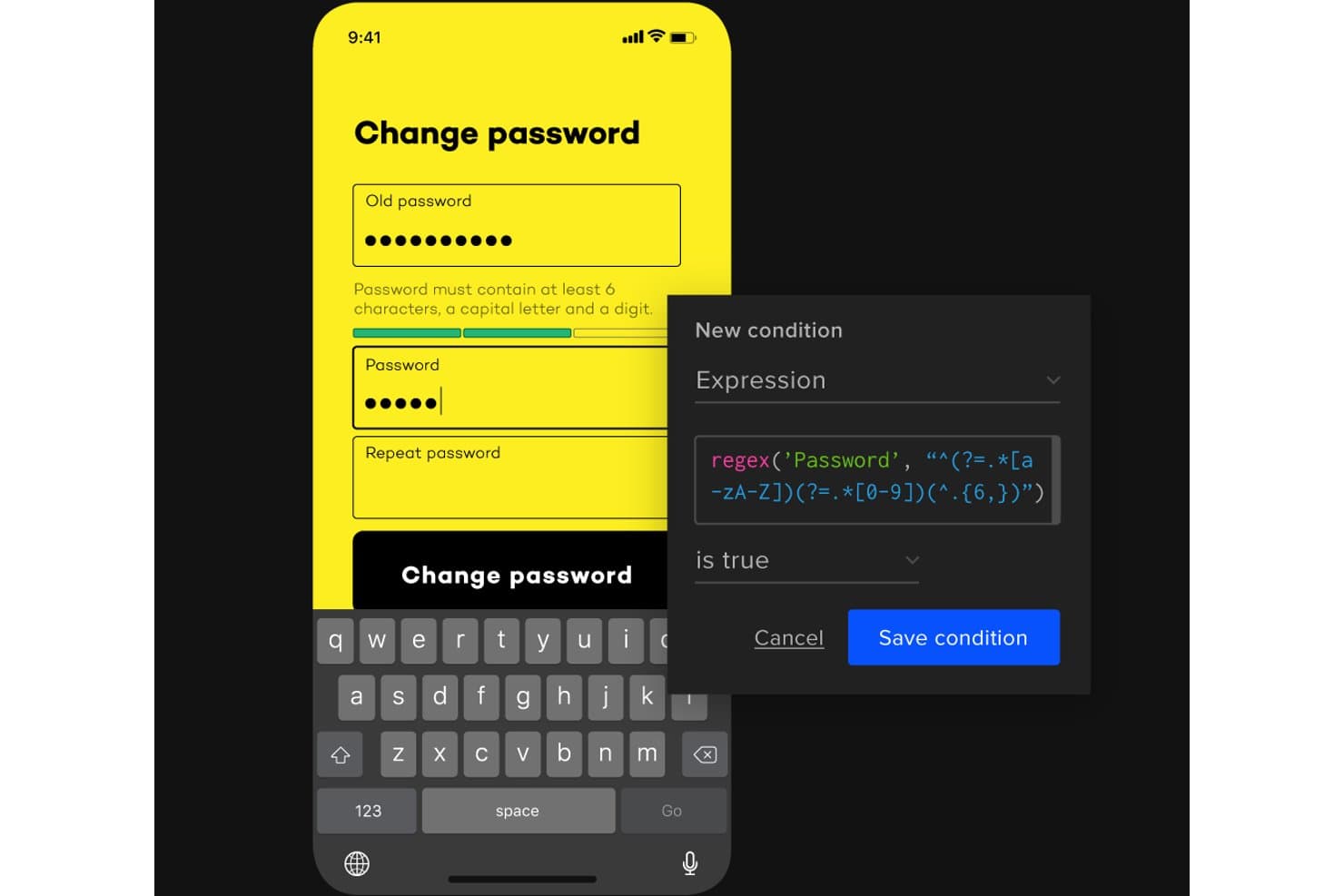
UXPin lets users add conditional logic with regex to password fields. UXPin is a browser-based design and prototyping tool built for teams who want their prototypes to behave like real products—using conditional logic, real form inputs, and production React components synced directly from code.
Who Is UXPin Best For?
UXPin is a strong fit for design and product teams that build on top of a coded component library and need prototypes that behave like the real thing.
Why I Picked UXPin
I picked UXPin as one of the best because it's the only tool where your prototypes are literally built from the same React components shipping to production. With Merge, you sync your team's actual component library from Git or Storybook, so a prototype of a dashboard or SaaS onboarding flow uses real code, not a static imitation. I also love that conditional logic and real HTML form inputs come standard on paid plans, making flows behave exactly as the finished product would.
UXPin Key Features
- Merge component sync: Pull live React or Web components directly from Git, Storybook, or npm into your design environment so prototypes use production code.
- Real HTML form inputs: Text fields, checkboxes, and radio buttons behave as actual form elements rather than static design layers.
- Get Code mode: Developers can inspect spacing, typography, and colors, copy CSS, and download assets directly from a live-updating spec view.
- WCAG accessibility tools: Built-in color blindness simulation across eight vision types lets you check designs against accessibility standards without leaving the editor.
UXPin Integrations
UXPin integrates with Figma, Sketch, Git, Storybook, npm, Jira, Slack, FullStory, StackBlitz, and CodeSandbox. Git requires Enterprise, while Storybook requires Growth or higher.
Pros and Cons
Pros:
- Production components keep prototypes aligned
- Stakeholders can comment without accounts
- Real form inputs make flows credible
Cons:
- Code export remains restricted and beta
- Native vector editing remains limited
Learn more about UXPin: Best for macOS-native design workflows
- 30-day free trial available
- From $12/user/month (billed annually)

Sketch lets users design layered car dashboard UIs with reusable components. Sketch is a Mac-native design tool that lets product designers and UX teams build interactive prototypes, manage shared component libraries, and hand off specs to developers—all within a single subscription.
Who Is Sketch Best For?
Sketch is a natural fit for product designers and UX teams who work primarily on macOS and want prototyping, handoff, and design system management in one place.
Why I Picked Sketch
I've included Sketch in my top picks because it's the go-to option for designers who live and breathe macOS. The native Mac editor is genuinely fast on Apple Silicon, and built-in prototyping with Smart Animate lets me link Frames and animate transitions without touching a plugin. I also rely on its centralized Libraries to sync Symbols, Color Variables, and Text Styles across documents, which covers the design system management InVision never handled natively.
Sketch Key Features
- Free unlimited viewer access: Anyone can browse, comment, inspect layers, and download assets in a browser without a paid seat.
- Design token export: Color Variables, Layer Styles, and Text Styles export as tokens, with a shareable public link that stays current automatically.
- Local AI MCP server: Connects AI clients like Claude and Cursor to your designs on your Mac, with no extra tokens or add-on costs.
- Password-protected previews: Share selected pages or prototypes with optional password protection and expiration dates for stakeholder review.
Sketch Integrations
Sketch offers native Slack integration and an official MCP Server, plus integrations with Jira, Notion, GitHub, ProtoPie, Principle, and Zeplin. Its JavaScript API supports custom integrations.
Pros and Cons
Pros:
- Browser handoff includes inspection and token export
- Shared Libraries sync components across documents
- Built-in prototypes cover core InVision workflows
Cons:
- Prototypes lack conditional logic and variables
- Editing requires macOS 15 or newer
Learn more about Sketch: 10Best for design-to-developer handoff
Zeplin
- Free plan + free demo available
- From $12/user/month (billed annually)
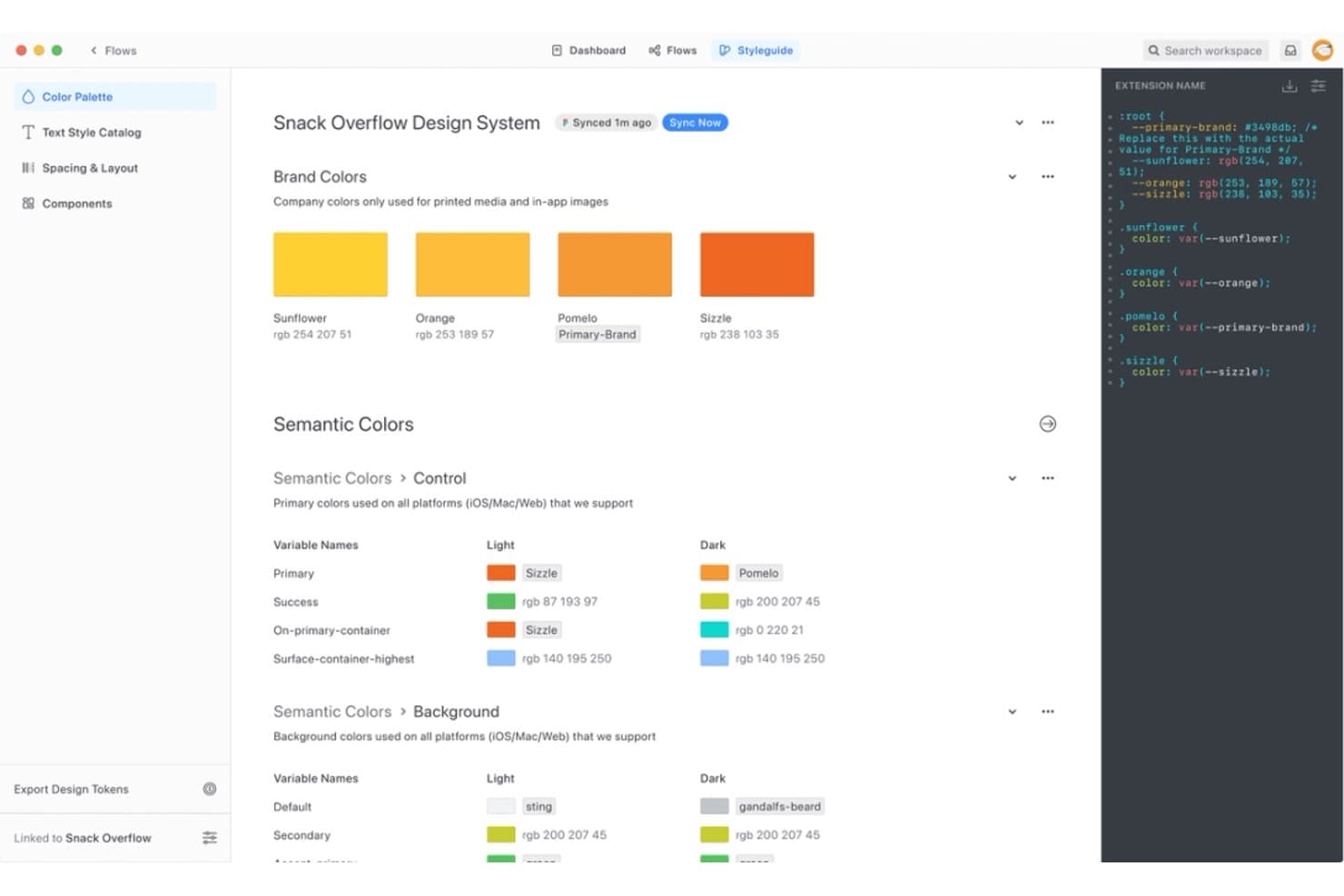
Zeplin centralizes design tokens and color systems for dev handoff. Zeplin is a design delivery platform built for teams that need a dedicated layer between their design tools and developers, handling inspection, annotation, and approval of finalized screens from Figma, Sketch, Adobe XD, and Photoshop.
Who Is Zeplin Best For?
Zeplin is a strong fit for cross-functional product teams where developers and PMs need a dedicated, structured space to inspect, annotate, and approve finalized designs.
Why I Picked Zeplin
I picked Zeplin as one of the best InVision competitors because it treats design-to-developer handoff as its entire job, not a secondary feature. Where InVision blurred the line between prototyping and delivery, Zeplin keeps things focused: developers get pixel-precise specs, seven code-snippet formats (CSS, Tailwind, Flutter, Swift, and more), and a Flows view that maps published screens into user journeys. I also appreciate the MCP server, which lets AI coding agents like Cursor and Claude Code read specs and tokens directly to generate UI code.
Zeplin Key Features
- Approvals 2.0: Request approval on multiple designs at once and track all outstanding approvals from a single panel, with the option to re-request after changes.
- Custom annotation types: Pin annotations to screens or components and define your own types—such as API notes, accessibility flags, or QA checklists—using built-in or custom templates.
- Version Diff: Compare two versions of a screen side by side with pixel-level highlighting that shows exactly what changed between publishes.
- Project Activity panel: View a chronological timeline of all project updates, including comments, status changes, and approvals, in one filterable feed.
Zeplin Integrations
Zeplin offers native integrations with Figma, Sketch, Adobe XD, Photoshop, Jira, Azure DevOps, VS Code, Storybook, Slack, and Microsoft Teams. It also provides an API, webhooks, and an MCP server for custom developer workflows.
Pros and Cons
Pros:
- Stakeholders can comment and approve asynchronously
- Version diffs make screen changes visible
- Precise specs reduce developer handoff guesswork
Cons:
- No real-time collaboration or live cursors
- No native interactive prototype builder
Learn more about Zeplin:
Diğer InVision Rakipleri
İşte kısa listeme giremeyen ancak yine de göz atmaya değer bazı ek InVision rakibi seçenekleri:
How I Evaluate InVision Competitors
My evaluation splits into three parts, with core functionality weighted most. Every alternative must link screens into clickable, navigable flows and let teams comment and resolve feedback directly on designs. Beyond that, I look for design token pipelines and check how pricing holds up for mixed teams of designers, PMs, and engineers.
Core Functionality (Table Stakes For This List)
When I'm selecting tools for my list, I score each one on a scale from 0 (does not offer the functionality) to 5 (excels in this area) for each core functionality listed below. I then convert the total into a percentage to help assess each tool's overall fit, with extra weight on any functionalities I’ve deemed essential.
- Interactive Prototyping (Essential): I look for clickable, multi-screen flows with interactions such as overlays or conditional steps to help teams explore and validate product journeys.
- Design Collaboration (Essential): I assess whether teams can comment on designs and prototypes, discuss feedback in context, and track which review items have been resolved.
- Design Creation & Import: I check for native editing or reliable imports that preserve layouts and components when teams bring in work from other design tools.
- Developer Handoff: I look for inspectable measurements and exportable assets or code that give developers practical implementation details.
- Design Systems: I assess how teams create and reuse shared components and styles, and whether updates carry across project files.
- Version & Asset Management: I check whether teams can review earlier versions, restore prior work, and keep design assets organized as flows evolve.
Once I have a list of tools that meet the criteria, I consider what sets each platform apart.
Differentiating Factors (What Sets Vendors Apart)
Here's how I compare and contrast different vendors:
Standout Features
I evaluate each tool's plugin and API ecosystem because teams often need to connect design work to internal pipelines or tools like Storybook. A rich extension marketplace signals long-term flexibility. I also check for design token pipelines that sync variables directly into code, cutting manual translation between design and engineering. AI-assisted design generation matters too; I look at whether a tool can produce layout drafts from prompts, which speeds up early concepting before a team commits to detailed work.
Beyond Features
I check how easily non-designers can access files. PMs and engineers who only join during review cycles shouldn't need a paid design seat just to leave comments. Free viewer tiers in tools like Figma or Penpot keep total licensing costs reasonable as cross-functional teams grow. I also evaluate integration depth with tools like Jira and Slack, since connecting design decisions to sprint workflows cuts context-switching. Vendor stability matters too—I look at release cadence and community size to gauge whether a tool will still be supported two years into a migration.
InVision Rakibi Nasıl Seçilir?
Uzun özellik listeleri ve karmaşık fiyatlandırma yapıları arasında kaybolmak kolaydır. Kendinize özgü yazılım seçimi sürecinizde ilerlerken odağınızı korumanıza yardımcı olmak için göz önünde bulundurmanız gereken faktörleri içeren bir kontrol listesi hazırladım:
| Faktör | Dikkate Alınması Gerekenler |
| Ölçeklenebilirlik | Kullanıcı sayısını artırmanız veya özellikler eklemeniz fark etmeksizin aracın ekibinizle birlikte büyüyebildiğinden emin olun. |
| Entegrasyonlar | Sorunsuz iş akışları için mevcut yazılım yığınınızla uyumluluğunu kontrol edin. |
| Özelleştirilebilirlik | Arayüzü ve özellikleri ekibinizin ihtiyaçlarına uyarlamanıza olanak tanıyan seçenekleri arayın. |
| Kullanım Kolaylığı | Ekibinizin kapsamlı bir eğitim almadan hızlıca öğrenebileceği ve uyum sağlayabileceği bir araç seçin. |
| Bütçe | Uzun vadeli değeri göz önünde bulundurarak aracın maliyetini bütçenizle uyumlu hâle getirin. |
| Güvenlik Önlemleri | Aracın veri koruma önlemlerinin uyumluluk gereksinimlerinizi karşıladığını doğrulayın. |
InVision Rakiplerindeki Trendler
Araştırmam sırasında çeşitli InVision rakibi sağlayıcılardan sayısız ürün güncellemesi, basın açıklaması ve sürüm günlüğü derledim. Takip ettiğim yeni trendlerden bazıları şunlar:
- Gerçek zamanlı iş birliği: Daha fazla araç, gerçek zamanlı iş birliği özellikleri sunarak ekiplerin farklı konumlardan birlikte çalışmasını kolaylaştırıyor.
- Tasarım sistemi entegrasyonu: Araçlar, projeler genelinde tutarlılığı korumak için tasarım sistemlerini entegre etmeye giderek daha fazla odaklanıyor. Bu, birden fazla katkıda bulunan kişinin yer aldığı büyük projeleri yöneten ekipler için önemlidir.
- Genişletilmiş prototipleme: Bazı platformlar artık tasarımcıların daha etkileşimli ve sürükleyici deneyimler oluşturmasına olanak tanıyan genişletilmiş prototipleme özellikleri sunuyor. Kullanıcılar gerçeğe yakın prototipler oluşturmaya çalıştıkça bu eğilim yaygınlaşıyor.
- Erişilebilirlik özellikleri: Kapsayıcılığı sağlamak amacıyla erişilebilirlik özelliklerinin tasarım araçlarına entegre edilmesine giderek daha fazla önem veriliyor. Bu eğilim, ekiplerin farklı kitlelerin ihtiyaçlarına uygun tasarımlar oluşturmasına yardımcı oluyor.
- Sürdürülebilirliğe odaklanma: Bazı araçlar, kullanıcıların sürdürülebilirliği göz önünde bulundurarak tasarım yapmasına yardımcı olan özellikleri entegre etmeye başlıyor. İşletmeler çevre konusunda daha bilinçli hâle geldikçe bu eğilim ivme kazanıyor.
InVision Nedir?
InVision, tasarımcılar, ürün yöneticileri ve geliştiriciler tarafından dijital ürünler oluşturmak, test etmek ve geliştirmek için kullanılan bir tasarım ve prototipleme aracıydı. Bu tür yazılımlar genellikle ekip çalışmasına, tutarlılığa ve gerçeğe yakın deneyimler oluşturmaya yardımcı olmak için gerçek zamanlı iş birliği, tasarım sistemi entegrasyonu ve genişletilmiş prototipleme özellikleri gibi işlevlere sahiptir. Genel olarak bu araçlar, tasarım sürecini geliştirerek ve ekip verimliliğini artırarak değer sağlar.
InVision Rakiplerinin Özellikleri
InVision rakiplerini seçerken aşağıdaki temel özelliklere dikkat edin:
- Gerçek zamanlı iş birliği: Birden fazla kullanıcının aynı proje üzerinde eş zamanlı olarak çalışmasına olanak tanıyarak ekip çalışmasını ve verimliliği artırır.
- Tasarım sistemi entegrasyonu: Kapsamlı tasarım sistemlerini entegre ederek projeler genelinde tutarlılık sağlar.
- Genişletilmiş prototipleme: Daha iyi kullanıcı deneyimi testleri ve doğrulaması için etkileşimli ve gerçeğe yakın prototipler oluşturur.
- Erişilebilirlik araçları: Erişilebilirlik özelliklerini kontrol edip geliştirerek kapsayıcı ürünler tasarlamaya yardımcı olur.
- Sonsuz tuval: Beyin fırtınası yapmak ve fikirleri düzenlemek için sınırsız alan sunar; kapsamlı projeler için idealdir.
- Etkileşimli bileşenler: Tasarımlar içinde dinamik ve ilgi çekici ögeler oluşturulmasını sağlar.
- Duyarlı tasarım özellikleri: Tasarımları farklı ekran boyutlarına ve yönlerine otomatik olarak uyarlar; zamandan ve emekten tasarruf sağlar.
- Görev yönetimi entegrasyonu: Görev yönetimi özelliklerini doğrudan tasarım aracına ekleyerek proje iş akışlarını kolaylaştırır.
- Dışa aktarma seçenekleri: Tasarımları paylaşım ve geliştirme amaçlarıyla dışa aktarmak için çeşitli yollar sunar.
- Sunum modu: Yerleşik sunum araçları aracılığıyla tasarımların paydaşlarla kolayca paylaşılmasını sağlar.
InVision Rakiplerinin Faydaları
InVision rakiplerini kullanıma almak ekibiniz ve işletmeniz için çeşitli faydalar sağlar. Yararlanabileceğiniz birkaç fayda şunlardır:
- Geliştirilmiş iş birliği: Gerçek zamanlı iş birliği özellikleri, ekibinizin konumdan bağımsız olarak etkili şekilde birlikte çalışmasını sağlar.
- Tutarlı tasarımlar: Tasarım sistemi entegrasyonu, projelerinizin bütünlüklü bir görünüme ve hisse sahip olmasını sağlar.
- Gelişmiş kullanıcı testleri: Genişletilmiş prototipleme, gerçekçi ve etkileşimli kullanıcı deneyimi testlerine olanak tanır.
- Kapsayıcı ürünler: Erişilebilirlik araçları, tüm kullanıcılara uygun tasarımlar oluşturmaya yardımcı olarak kapsayıcılığı geliştirir.
- Verimli proje yönetimi: Görev yönetimi entegrasyonu, her şeyi tek bir yerde tutarak iş akışlarını kolaylaştırır.
- Uyarlanabilir tasarımlar: Duyarlı tasarım özellikleri, düzenleri farklı cihazlara otomatik olarak uyarlayarak zamandan tasarruf sağlar.
- İlgi çekici sunumlar: Sunum modu, tasarımlarınızı paydaşlarla paylaşmayı kolaylaştırarak karar alma sürecine yardımcı olur.
InVision Rakiplerinin Maliyetleri ve Fiyatlandırması
InVision rakiplerini seçmek, mevcut çeşitli fiyatlandırma modellerini ve planları anlamayı gerektirir. Maliyetler özelliklere, ekip büyüklüğüne, eklentilere ve daha fazlasına göre değişir. Aşağıdaki tabloda yaygın planlar, ortalama fiyatları ve InVision rakibi çözümlerde genellikle bulunan özellikler özetlenmektedir:
InVision Rakipleri için Plan Karşılaştırma Tablosu
| Plan Türü | Ortalama Fiyat | Yaygın Özellikler |
| Ücretsiz Plan | $0 | Temel prototip oluşturma, sınırlı depolama ve ücretsiz şablonlar. |
| Kişisel Plan | $5-$25/kullanıcı/ay | Sınırsız proje, temel iş birliği araçları ve özel şablonlar. |
| İşletme Planı | $25-$50/kullanıcı/ay | Gelişmiş iş birliği, tasarım sistemi entegrasyonu ve artırılmış güvenlik. |
| Kurumsal Plan | $50-$100/kullanıcı/ay | Özel iş akışları, özel destek ve kapsamlı analizler. |
InVision Rakipleri Hakkında SSS
InVision rakipleri hakkında sık sorulan bazı soruların yanıtları:
InVision'ın yerini ne alıyor?
Farklı güçlü yönlere ve odak noktalarına sahip çeşitli yazılım alternatifleri bulunsa da en yakın doğrudan alternatifler muhtemelen Figma, Adobe XD ve Miro’dur – bunların tümü InVision’a benzer işlevlere sahip popüler alternatiflerdir. Prototip oluşturma ve tasarım iş birliği gibi temel özellikleri sunar; hatta bazıları gerçek zamanlı düzenleme ve bulut depolama gibi ek özellikler de sağlar. Bu alternatifler, InVision hizmetlerini aşamalı olarak sonlandırırken tasarım süreçlerinizin sürekliliğini korumanıza yardımcı olur.
InVision neden kullanımdan kaldırılıyor?
InVision platformu, yüksek bakım maliyetleri ve değişen pazar talepleri nedeniyle zorluklarla karşılaştı. Bu faktörler, hizmetin sonlandırılması kararına katkıda bulundu. Birçok kullanıcı, modern yetenekler sunan ve güncel tasarım ihtiyaçlarını daha iyi karşılayan diğer platformlara geçiş yapıyor.
InVision alternatifleri büyük projeleri yönetebilir mi?
Evet, Sketch ve UXPin gibi birçok InVision alternatifi büyük ölçekli projeleri yönetebilecek donanıma sahiptir. Projelerin düzenli ve verimli kalmasına yardımcı olmak için tasarım sistemleri ve sürüm kontrolü gibi özellikler sunarlar. Bu araçlar, karmaşık iş akışlarını ve büyük ekipleri desteklemek üzere tasarlanmıştır.
InVision alternatifleri için maliyet açısından neler dikkate alınmalıdır?
InVision alternatifleri, ücretsiz planlardan kurumsal düzeyde aboneliklere kadar çeşitli fiyatlandırma seçenekleri sunar. Maliyetler genellikle kullanıcı sayısına ve dahil edilen özelliklere göre değişir. Her aracın fiyatlandırma yapısını değerlendirerek ekibinizin bütçesi ve ihtiyaçlarıyla uyumlu olduğundan emin olmanız önemlidir.