

Yapay zekâ ürün yol haritası yazılımları görevleri önceliklendirmenize, veriye dayalı kararlar almanıza ve gecikmelere ve kaçırılan fırsatlara yol açan gürültüyü azaltmanıza yardımcı olur. Ürün planlamanız statik araçlara veya dağınık girdilere dayandığında kritik bağımlılıkları gözden kaçırmak, aynı işi tekrarlamak ya da müşteri geri bildirimlerinin takibini kaybetmek kolaydır.
Size mevcut en iyi seçenekler hakkında dürüst ve tarafsız bir değerlendirme sunmak için bu araçları gerçek ortamlarda inceleyip test etmeye zaman ayırdım. Odağım, yapay zekâ özelliklerinin etkili planlama, iş birliği ve uygulamayı ne ölçüde desteklediği oldu; abartılı vaatler değil.
Bu makalede her aracın yapay zekâ özellikleri, bunların planlama sürecinizi nasıl etkilediği ve hangi senaryolarda en iyi şekilde çalıştıkları hakkında net bilgiler edineceksiniz. Ürün yönetimiyle ilgili zorluklarınıza en iyi çözümü bulalım.
Why Trust Our Software Recommendations
6,700+
Reviews
20
Industry experts
16+
Evaluation factors
14
Years
Our team has been testing and reviewing software since 2012. As product managers ourselves, we know how difficult—and important—it is to choose the right software.
For this guide, we evaluated tools using hands-on testing and independent research, scoring tools using our selection criteria.
Our reviews reflect our human editorial judgment, not a sales pitch.
Expert reviewers:
- Andrew LumbySenior TPM
- Cristiano ValimSenior UI/UX Lead


Yapay Zekâ Ürün Yol Haritası Yazılımları Karşılaştırma Tablosu
Bu karşılaştırma tablosu, en iyi yapay zekâ ürün yol haritası yazılımı seçimlerimdeki fiyatlandırma ayrıntılarını özetlemektedir:
Score legend (out of 5)
- Excellent4.5–5
- Good4–4.4
- Average3–3.9
- Below average2–2.9
- Poor1–1.9
Sorted by: Default
| Tool | Starting Price | Website | |||||||
|---|---|---|---|---|---|---|---|---|---|
Best for audience-specific public roadmaps | Not rated | 1 | 3 | Not rated | Not rated | 3 | 2 | $1.10/user/month Free plan + 30-day trial + demo available | Website |
Best for sprint planning | Not rated | 1 | 2 | Not rated | 2 | 2 | 3 | $1/user/month Free plan available | Website |
Best for custom AI agents | 3.2 out of 5 | 2 | 4 | 2 | 3 | 4 | 4 | $10/user/month Free plan + 14-day trial + demo available | Book Demo |
Best for AI-driven feedback synthesis | 3.2 out of 5 | 4 | 4 | 2 | 1 | 4 | 4 | $10/user/month Free plan + 30-day trial available | Website |
Best for AI-assisted prioritization | Not rated | 4 | 4 | 4 | Not rated | 4 | 4 | $19/user/month Free plan + free demo available | Website |
Best for strategic roadmapping | 3.0 out of 5 | 3 | 4 | 2 | 1 | 4 | 4 | $24/user/month 14-day free trial + free demo available | Website |
Best for product idea funneling | 3.8 out of 5 | 4 | 4 | 3 | 2 | 5 | 5 | $59/user/month 30-day free trial + free demo available | Website |
Best for all-in-one project management | 3.3 out of 5 | 3 | 4 | 3 | 2 | 4 | 4 | $12/user/month Free plan + trial + demo available | Website |
Best for feedback-driven roadmap evidence chains | Not rated | 5 | 4 | 3 | Not rated | 3 | 5 | $7.99/month Free demo available | Website |
Best for visual collaboration | Not rated | 4 | 3 | 3 | Not rated | 4 | 4 | $8/user/month Free plan + 14-day trial available | Book Demo |


En İyi Yapay Zekâ Ürün Yol Haritası Yazılımları İncelemesi
Aşağıda, kısa listeme giren en iyi yapay zekâ ürün yol haritası yazılımlarına ilişkin ayrıntılı özetlerimi bulabilirsiniz. İncelemelerimde, size en uygun olanı bulmanıza yardımcı olmak için her aracın temel özelliklerini, artılarını & eksilerini, entegrasyonlarını ve ideal kullanım alanlarını ele alıyorum.
 Best for audience-specific public roadmaps
- Free plan + 30-day trial + demo available
- From $1.10/user/month
Visit WebsiteCustomer Rating:5/5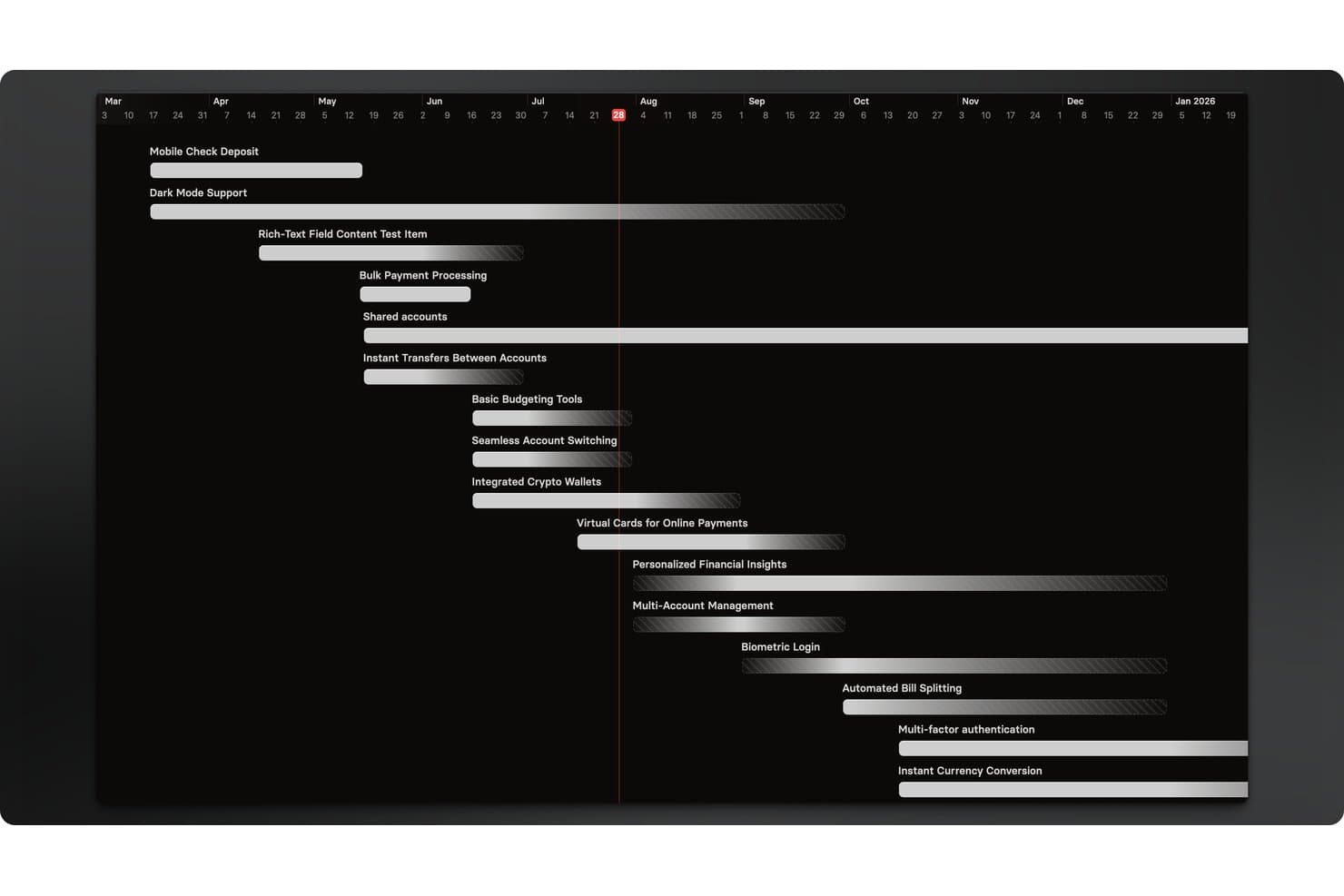
Released offers a timeline roadmap view that displays multiple product features scheduled across months. Released is a Jira-native roadmap publishing and customer communication tool that uses AI to generate release notes and lets teams share live, audience-specific roadmap views with customers, executives, and partners.
Who Is Released Best For?
Released is a natural fit for product managers at Jira Cloud teams who need to publish external-facing roadmaps and release notes without adopting a separate product management platform.
Why I Picked Released
Released earns its spot on my shortlist because of how it handles audience-specific roadmap publishing. I love that you can serve a completely different view to customers, executives, and partners, all pulling from the same live Jira data with no manual exports. The access controls are granular: public, password-protected, or invite-only, set per audience. The AI release notes generator means my team can draft polished, on-brand summaries from completed Jira tickets in seconds.
Released Key Features
- Customer feedback portals: Collect feedback from users via public or private portals that feed directly into your Jira backlog.
- Jira Product Discovery integration: Seamlessly connect feedback and ideas to initiatives tracked in Jira Product Discovery.
- Embeddable roadmap widgets: Embed interactive roadmaps within your app, support portal, or documentation with copy-paste code.
- Confluence publishing: Push release notes and product updates directly to Confluence spaces to keep internal teams informed.
Released Integrations
Released offers native integrations with Jira, Confluence, and Slack. API is available for custom integrations.
Pros and Cons
Pros:
- Embeddable roadmaps for customer-facing portals
- AI-generated release notes from completed tickets
- Audience-specific roadmap views from Jira data
Cons:
- Locked into the Jira Cloud ecosystem
- Limited AI beyond release note generation
Learn more about Released: Best for sprint planning
- Free plan available
- From $1/user/month (billed annually)
Visit WebsiteCustomer Rating:4.4/5
Zoho Sprints uses AI to plan, track, and manage Agile team projects. Zoho Sprints is an Agile project management tool for development teams and project managers to manage their agile workflow efficiently. It plans, tracks, and delivers projects and uses AI to facilitate sprint planning and improve team collaboration.
Why I picked Zoho Sprints: Its focus on sprint-based workflows includes tools for backlog refinement, sprint planning, and progress tracking while offering automation platform capabilities that reduce bottlenecks and improve process optimization. Its structure supports teams undergoing digital transformation by helping them manage iterative delivery and maintain visibility across projects. It includes automation features that reduce manual steps in repetitive task assignment and updates, supporting intelligent process automation at the team level.
Standout features & integrations:
Features include an interactive scrum board that improves task visibility. It also gives visibility into dependencies and supports structured planning aligned with agile process automation practices. Its customizable workflows can support teams working with BPM-inspired structures and iterative process intelligence improvements.
Integrations include Slack, GitHub, Bitbucket, Jira, Microsoft Teams, Zapier, Google Workspace, Zoho CRM, Trello, and Asana.
Pros and Cons
Pros:
- Extensive backlog management tools
- AI-driven task automation
- Live board updates automatically
Cons:
- Can’t track roadmap changes
- Basic roadmap view
Learn more about Zoho Sprints: Best for custom AI agents
- Free plan + 14-day trial + demo available
- From $10/user/month (billed annually)
Visit WebsiteCustomer Rating:4.3/5
Wrike offers a Klaxoon integration for enhanced mind mapping capabilities. For teams seeking to elevate their product management strategies, Wrike offers a dynamic AI-enabled platform that transforms how you plan and execute your product roadmap. Designed to meet the needs of diverse industries, from technology to finance, Wrike empowers you with customizable dashboards, real-time analytics, and seamless collaboration tools. By integrating AI into your workflow, Wrike addresses challenges like inefficient resource allocation and fragmented communication, providing a streamlined approach to achieving your strategic objectives.
Why I Picked Wrike
I picked Wrike for its standout feature: AI-powered automation that enhances your product roadmap management. This tool offers custom AI agents that automate repetitive tasks, freeing your team to focus on strategic initiatives. Moreover, Wrike's AI-powered highlights widget provides critical insights by summarizing dashboard data, ensuring your team makes informed decisions. These features make Wrike a compelling choice for those looking to optimize project management through AI.
Wrike Key Features
In addition to its AI capabilities, Wrike offers several features that enhance your product roadmap management:
- Adjustable Gantt Charts: Allows your team to visualize project timelines and track progress effectively.
- Customizable Templates: Provides ready-to-use templates for various methodologies, including Agile and Scrum.
- Real-Time Analytics: Offers dashboards for data-driven decision-making and monitoring of project health.
- In-Platform Communication: Facilitates seamless collaboration with features like in-app chat and integrated messaging.
Wrike Integrations
Integrations include Slack, Gmail, Zoom, Miro, Dropbox, Adobe InDesign, Adobe XD, Google Sheets, Microsoft Excel, and Salesforce.
Pros and Cons
Pros:
- In-platform communication features available
- Supports multiple project views, including Gantt and Kanban
- Integrates with popular tools like Slack and Salesforce
Cons:
- Lack of real-time phone or chat support for immediate assistance
- Limited time-tracking capabilities on lower-tier plans
 Best for AI-driven feedback synthesis
- Free plan + 30-day trial available
- From $10/user/month
Visit WebsiteCustomer Rating:4.6/5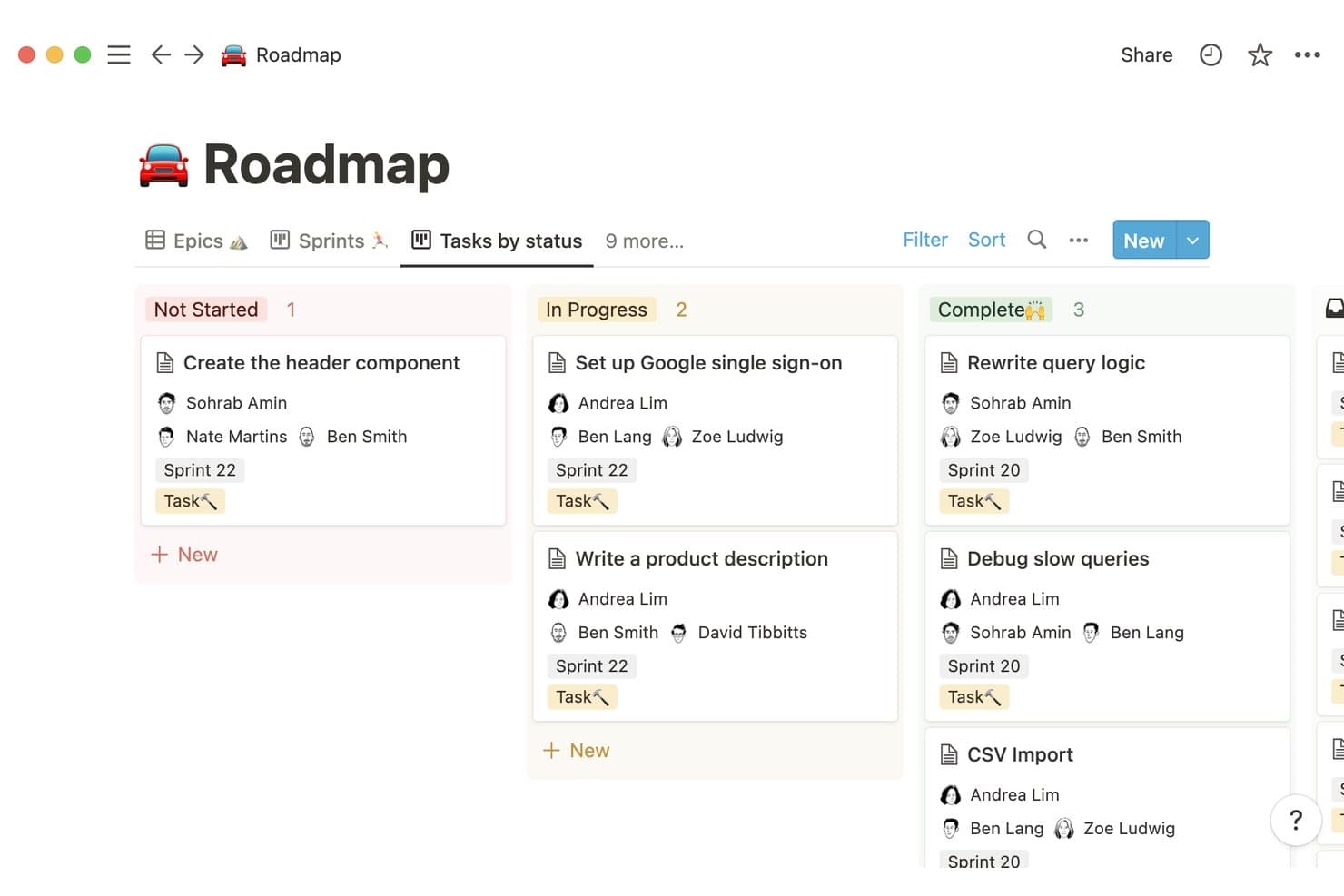
Notion organizes tasks by status across sprints in a kanban roadmap view. Notion is a connected workspace platform that combines docs, databases, and AI to help teams build and manage product roadmaps alongside their research, planning, and feedback data.
Who Is Notion Best For?
Notion is a great fit for product teams that already centralize their docs and research in one workspace and want AI to surface patterns from customer feedback without switching tools.
Why I Picked Notion
I've included Notion in my top picks because its AI can scan across your entire workspace, pulling signals from customer interview notes, support tickets, and feedback docs to surface themes you'd otherwise spend hours finding manually. Notion AI's Q&A feature lets you ask plain-language questions like "what are users saying about onboarding?" and get synthesized answers drawn from your actual data. That makes it genuinely useful when you're trying to justify roadmap priorities without rebuilding your entire research workflow.
Notion Key Features
- Notion AI Q&A: Ask plain-language questions across your workspace to surface synthesized answers from your docs, notes, and databases.
- Linked databases: Connect feedback tables, roadmap boards, and research docs so updates in one place reflect across your entire workspace.
- Timeline view: Visualize roadmap phases and dependencies in a Gantt-style layout built directly inside your Notion pages.
- Collaborative docs: Co-edit roadmap documents in real time with inline comments and mentions to keep stakeholders aligned.
Notion Integrations
Native integrations are not clearly documented. Notion offers an API for custom integrations.
Pros and Cons
Pros:
- Combines collaborative docs with timeline planning
- Links research insights directly to roadmap decisions
- Synthesizes feedback themes across workspace content
Cons:
- AI insights depend on well-organized source content
- Lacks purpose-built product prioritization frameworks
Learn more about Notion: Best for AI-assisted prioritization
- Free plan + free demo available
- From $19/user/month (billed annually)
Visit WebsiteCustomer Rating:4.5/5
Productboard uses AI to help teams prioritize features and plan roadmaps. Productboard is a product management platform for collecting customer insights, assessing feature priorities, and creating clear roadmaps. It centralizes feedback from multiple channels and uses AI to summarize themes, identify patterns, and support process improvement across end-to-end product planning.
Why I picked Productboard: Its strength in consolidating user feedback and transforming it into actionable prioritization inputs. The AI assistant helps categorize feedback, generate summaries, and offer suggestions usable in workflow management and early process design. This makes it effective for teams needing an organized way to evaluate ideas against business goals while maintaining clarity around customer needs. Its AI-driven insights are also helpful for gathering and organizing customer feedback efficiently.
Standout features & integrations:
Features include feedback collection from multiple sources, an insights board that groups similar comments using AI, prioritization frameworks, and multiple roadmap views for communicating plans.
Integrations include Jira, Slack, Microsoft Teams, Trello, Salesforce, Zendesk, Intercom, GitHub, Asana, and Google Analytics.
Pros and Cons
Pros:
- Roadmap views for alignment
- Clear feedback-to-feature linkage
- AI-assisted insight grouping
Cons:
- Limited customization options
- Can be complex for beginners
Learn more about Productboard: Best for strategic roadmapping
- 14-day free trial + free demo available
- From $24/user/month
Visit WebsiteCustomer Rating:4.4/5
Craft.io helps teams build strategic, AI-driven product roadmaps. Craft.io is a product management platform to help product teams create strategic roadmaps and manage product development. It connects customer insights, strategy, and delivery while incorporating AI assistance to reduce inefficiencies and improve operational efficiency.
Why I picked Craft.io: I picked Craft.io for its strong structure for strategic planning and its ability to link decisions directly to product outcomes. Its AI capabilities help summarize feedback, support prioritization, and offer guidance that reinforces process improvement. Teams can evaluate feature ideas using structured scoring and align them with goals, making Craft.io well-suited for organizations that need clarity around prioritization and strategic alignment.
Standout features & integrations:
Features include a roadmap visualization tool that helps you see the big picture. Craft.io also provides built-in templates for structured process mapping and supports workflow management across feature lifecycles through customizable views and drag-and-drop planning.
Integrations include Jira, Slack, Microsoft Teams, GitHub, Trello, Google Drive, Confluence, monday.com, Azure DevOps, and Salesforce.
Pros and Cons
Pros:
- Feedback insights for planning
- AI-supported prioritization
- Clear roadmap visualization tools
Cons:
- Limited export options
- Slow with large data
Learn more about Craft.io: 7Best for product idea funneling
Aha!
- 30-day free trial + free demo available
- From $59/user/month (billed annually)
Visit WebsiteCustomer Rating:4.4/5
Aha! Roadmaps help product teams plan and align strategy with AI tools. Aha! Roadmaps is a product management platform that helps teams create and manage strategic roadmaps. It supports end-to-end planning across goals, initiatives, and feature releases while offering AI assistance to organize feedback and improve operational efficiency
Why I picked Aha! Roadmaps: This tool stands out for its strong ability to centralize product ideas and connect them to strategy in a structured, transparent system. The AI assistant helps capture and categorize feedback, assists with prioritization, and supports teams in reducing inefficiencies across workflow management. This makes it well-suited for teams that want clearer insight into idea evaluation and strategic alignment without relying on multiple disconnected apps.
Standout features & integrations:
Features include idea portals for collecting customer and internal feedback, strategy-to-roadmap linking, AI-assisted task organization, and multiple roadmap formats (including timelines and Gantt-style views). Its whiteboards support early-stage process modeling and drag-and-drop planning.
Integrations include Jira, Salesforce, Slack, GitHub, Trello, Asana, Microsoft Teams, Google Workspace, Dropbox, and Zendesk.
Pros and Cons
Pros:
- Flexible roadmap templates
- AI assistance for organization
- Links ideas to strategy
Cons:
- Progress indicators are not fully customizable
- Too many link layers between tasks
Learn more about Aha!: Best for all-in-one project management
- Free plan + trial + demo available
- From $12/user/month

ClickUp helps teams manage tasks, goals, and workflows in one platform. ClickUp is a work and project management platform that helps teams manage tasks, documents, goals, and workflows in a centralized workspace. It includes AI-assisted writing, task handling, and automation platform features that support workflow automation, reduce inefficiencies, and improve operational efficiency.
Why I picked ClickUp: Its versatility for managing everything from simple tasks to complex processes within a single system. Its AI capabilities assist with generating task summaries, drafting content, and suggesting improvements, while automations support process improvement and reduce manual work. This makes it suitable for teams that want both project visibility and unified workflow management without switching between multiple apps.
Standout features & integrations:
Features include a customizable dashboard that lets you arrange your workspace to suit your needs. You can track time spent on tasks to improve productivity. ClickUp also offers whiteboards for collaborative process mapping and process design, alongside drag-and-drop editing to shape project structures.
Integrations include Slack, Google Drive, Trello, Dropbox, GitHub, Microsoft Teams, Asana, Evernote, Calendly, and Zoom.
Pros and Cons
Pros:
- Goal alignment tools
- Built-in time tracking
- Customizable dashboard
Cons:
- Exporting roadmaps has constraints
- Roadmap sharing options are limited
Learn more about ClickUp: Best for feedback-driven roadmap evidence chains
- Free demo available
- From $7.99/month (billed annually)
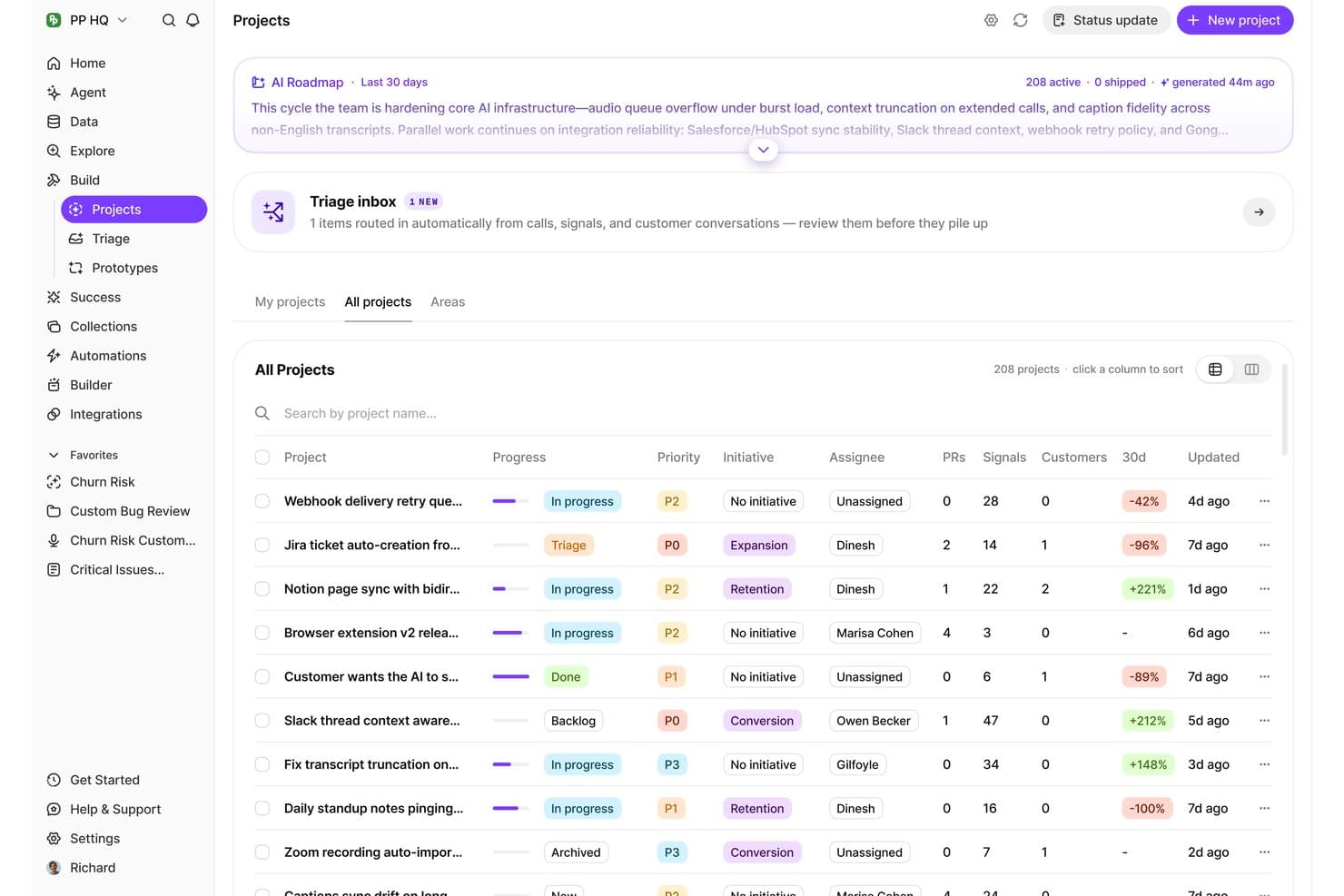
BuildBetter organizes all AI-surfaced projects with priority, signals, and progress. BuildBetter is an AI product management platform that captures, analyzes, and synthesizes customer feedback from calls, interviews, and other sources into structured product insights, roadmap evidence, and prioritization signals.
Who Is BuildBetter Best For?
BuildBetter is a strong fit for product managers who need to connect customer feedback directly to roadmap decisions with a clear, traceable evidence trail.
Why I Picked BuildBetter
I've included BuildBetter in my top picks because it's the only tool I've seen that builds a direct, traceable link between raw customer feedback and roadmap decisions. Its Signal extraction feature pulls themes and evidence from calls and interviews automatically, so when a stakeholder asks why a feature is prioritized, you can point to real quotes. I also like how its Evidence Chains tie specific feedback clusters to roadmap items, giving every priority a verifiable source.
BuildBetter Key Features
- Call and interview transcription: Automatically transcribes recorded customer calls and user interviews to make them searchable and analyzable.
- AI-generated insight summaries: Condenses long transcripts and feedback sessions into concise, structured summaries for quick review.
- Cross-source feedback aggregation: Pulls feedback from multiple channels, including calls, surveys, and support tickets, into a single workspace.
- Searchable feedback library: Stores all processed customer conversations in a queryable archive so you can find relevant quotes and themes on demand.
BuildBetter Integrations
BuildBetter offers documented integrations with Jira, Linear, Slack, HubSpot, Salesforce, Pendo, Zoom, and Microsoft Teams, plus a REST API for custom integrations.
Pros and Cons
Pros:
- Aggregates customer signals across sources
- AI extracts themes from calls and interviews
- Traceable feedback-to-roadmap evidence chains
Cons:
- Evidence quality depends on source coverage
- More feedback-centric than visual roadmapping
Learn more about BuildBetter: 10Best for visual collaboration
Miro
- Free plan + 14-day trial available
- From $8/user/month (billed annually)
Visit WebsiteCustomer Rating:4.8/5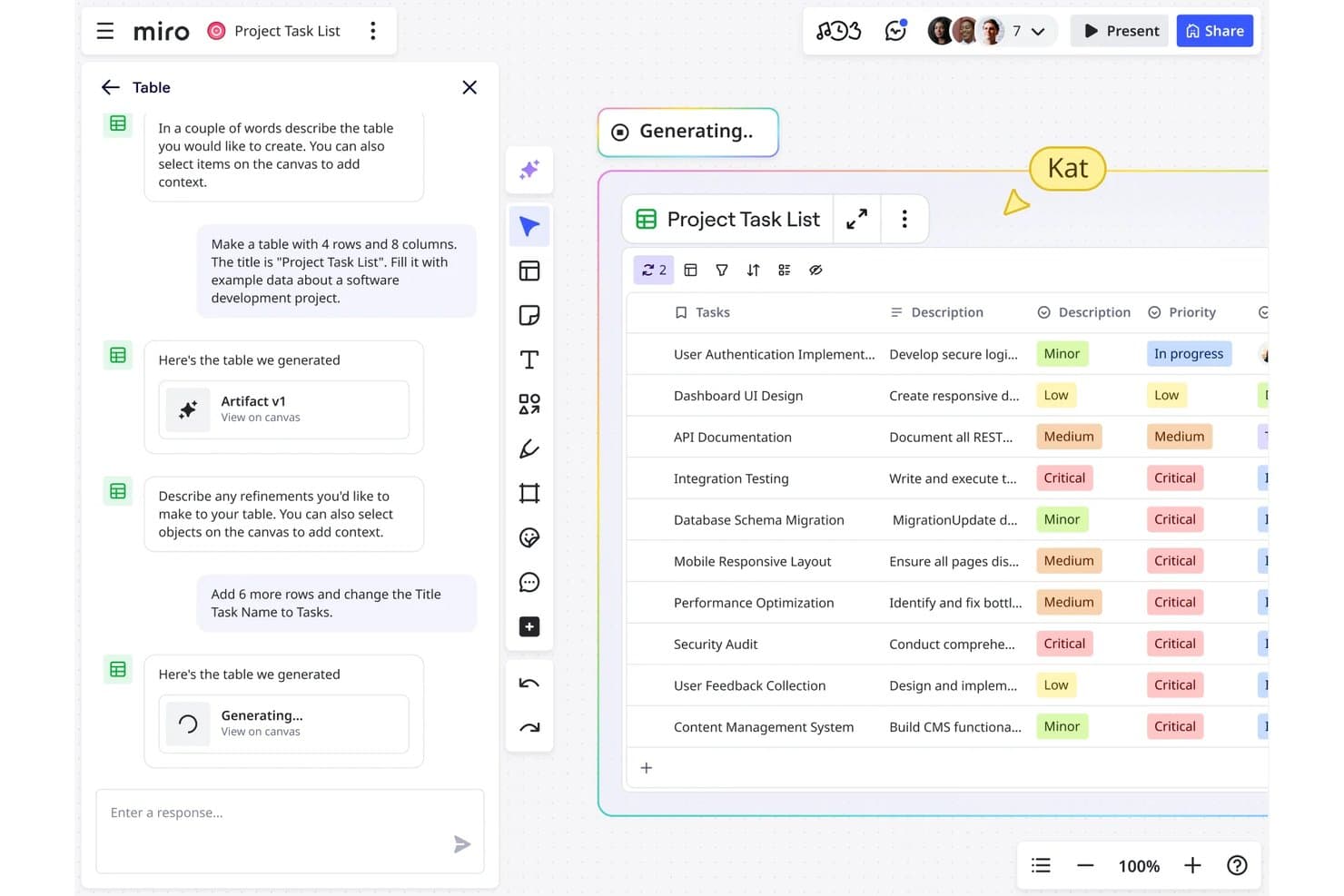
Miro lets users generate and refine project task tables using AI chat. Miro is a visual collaboration platform that combines infinite canvases, AI-assisted diagramming, and roadmap planning tools to support product teams in mapping ideas, aligning stakeholders, and structuring product strategy.
Who Is Miro Best For?
Miro is a strong fit for cross-functional product teams that rely heavily on visual thinking to align stakeholders and map out strategy together.
Why I Picked Miro
Visual collaboration is where Miro genuinely shines, and that's exactly why it earns a spot on this list. I love how its infinite canvas lets product teams run async roadmapping sessions, turning scattered sticky notes and diagrams into a structured product strategy in real time. Miro's AI-assisted diagramming can generate flowcharts and mind maps from a prompt, which cuts down the time it takes to move from raw ideas to shareable artifacts your stakeholders can actually react to.
Miro Key Features
- Smart diagramming: An AI-powered tool that converts text descriptions into structured diagrams, flowcharts, and timelines directly on the canvas.
- Voting and prioritization sessions: Built-in voting features let teams rank and prioritize ideas or backlog items together during live or async sessions.
- Pre-built product templates: A library of templates for user story maps, sprint planning, and product strategy frameworks that teams can customize and reuse.
- Integrations with dev and PM tools: Native connections to Jira, Asana, and Azure DevOps sync tasks and issues between Miro boards and your existing workflow tools.
Miro Integrations
Miro offers native integrations with Jira, Asana, and Azure DevOps, helping product teams connect visual roadmaps with delivery workflows.
Pros and Cons
Pros:
- Templates support product strategy and prioritization workshops
- AI diagrams turn ideas into roadmap artifacts
- Visual canvas aligns cross-functional roadmap discussions
Cons:
- AI outputs require manual refinement for accuracy
- Canvas-first planning limits dedicated roadmap analytics
Diğer Yapay Zekâ Ürün Yol Haritası Yazılımları
Kısa listeme girmeyen ancak yine de göz atmaya değer bazı ek yapay zekâ ürün yol haritası yazılımı seçenekleri şunlardır:
- 11DragonboatBest for portfolio management
- 12airfocusBest for prioritization frameworks
- 13ProductPlanBest for stakeholder-ready roadmap views
- 14ChiselBest for multi-source feedback-to-roadmap synthesis
How I Evaluate AI Product Roadmap Software
To make this list, a tool’s AI needs to handle real product planning, like synthesizing customer feedback into themes or scoring initiatives. From there, I evaluate three things. Core functionality carries the most weight, like building roadmap timelines and organizing initiatives by theme. Then I look at standout features, like scenario planning, and what a tool offers beyond its feature set, like explainable, adjustable AI scoring.
Core Functionality (Table Stakes For This List)
When I'm selecting tools for my list, I score each one on a scale from 0 (does not offer the functionality) to 5 (excels in this area) for each core functionality listed below. I then convert the total into a percentage to help assess each tool's overall fit, with extra weight on any functionalities I’ve deemed essential.
- AI Prioritization (Essential): I look for AI that scores or ranks initiatives against multiple inputs, such as customer impact, business goals, and effort.
- Roadmap Planning (Essential): I assess whether teams can organize work by themes, releases, or timelines and adjust plans as priorities change.
- Feedback Synthesis: I consider how well AI groups customer and stakeholder comments into actionable themes, such as recurring requests or usability issues.
- AI-Generated Summaries: I look for clear, useful summaries of roadmap plans or updates that product managers can share with different stakeholders.
- Timeline Forecasting: I evaluate forecasts that account for team capacity, past delivery data, dependencies, or risks when estimating dates.
- Product Data Integrations: I check whether connections to project trackers, feedback tools, or analytics bring relevant data into roadmap decisions.
Once I have a list of tools that meet the criteria, I consider what sets each platform apart.
Differentiating Factors (What Sets Vendors Apart)
Here's how I compare and contrast different vendors:
Standout Features
Scenario planning is where I start. I look for tools that let you model "what-if" roadmaps by shifting resources or timelines and comparing projected outcomes side by side. Stakeholder-specific views matter just as much—I evaluate whether a single plan can generate distinct presentations for executives, sales, and customers without duplicating work. I also check for revenue or impact attribution, since tying each initiative to projected business outcomes helps you defend priorities in quarterly reviews.
Beyond Features
I evaluate whether AI scoring weights are visible and adjustable, since opaque prioritization erodes trust fast when a CPO asks why you ranked one initiative over another. Ecosystem fit matters just as much—I check for two-way sync with tools like Jira or Intercom, because one-way exports leave AI insights stale within days. I also look at how vendor pricing scales with AI usage, since some tiers cap the features that make the tool worth buying.
Yapay Zekâ Ürün Yol Haritası Yazılımı Nasıl Seçilir?
Uzun özellik listeleri ve karmaşık fiyatlandırma yapılarına kapılmak kolaydır. Kendinize özgü yazılım seçme sürecinizde ilerlerken odağınızı korumanıza yardımcı olmak için göz önünde bulundurmanız gereken faktörleri içeren bir kontrol listesi hazırladım:
| Faktör | Dikkat Edilmesi Gerekenler |
| Ölçeklenebilirlik | Yazılım ekibinizle birlikte büyüyecek mi? Ek maliyet olmadan artan kullanıcı ve proje sayısını destekleyip desteklemediğini kontrol edin. |
| Entegrasyonlar | Mevcut araçlarınızla çalışıyor mu? Ekibinizin mevcut yazılımı ve iş akışlarıyla uyumlu olduğundan emin olun. |
| Özelleştirilebilirlik | İhtiyaçlarınıza göre uyarlayabilir misiniz? Ayarları, görünümleri ve iş akışlarını sürecinize uyacak şekilde düzenleme seçenekleri arayın. |
| Kullanım kolaylığı | Ekibiniz için kullanıcı dostu mu? Öğrenme eğrisini ve etkili kullanım için eğitim gerekip gerekmediğini değerlendirin. |
| Uygulama ve işe alıştırma | Ne kadar hızlı kullanmaya başlayabilirsiniz? Kurulum süresini ve eğitimler ile destek gibi kaynakların kullanılabilirliğini değerlendirin. |
| Maliyet | Bütçenize uygun mu? Gizli maliyetler de dâhil olmak üzere fiyatlandırma planlarını karşılaştırın ve uzun vadeli değeri maliyete kıyasla değerlendirin. |
| Güvenlik önlemleri | Verileriniz korunuyor mu? Şifreleme, veri düzenlemelerine uyumluluk ve erişim kontrolleri gibi özellikleri arayın. |
| Destek kullanılabilirliği | Yardıma kolayca ulaşılabiliyor mu? Sağlayıcının canlı destek sunup sunmadığını, yanıt sürelerini ve yararlı belgeleri kontrol edin. |
Yapay Zekâ Ürün Yol Haritası Yazılımı Nedir?
AI ürün yol haritası yazılımı, ekiplerin yapay zekâ kullanarak ürün geliştirmeyi planlamasına ve önceliklendirmesine yardımcı olan bir araçtır. Ürün yöneticileri, geliştirme ekipleri ve stratejistler bu araçları genellikle projeleri iş hedefleriyle uyumlu hâle getirmek ve karar alma süreçlerini iyileştirmek için kullanır.
Özellikleri arasında yapay zekâ destekli önceliklendirme, öngörücü analizler ve otomatik raporlama bulunur; bunlar stratejik planlamaya, kaynakların verimli şekilde tahsis edilmesine ve içgörüler sunan yol haritalarının oluşturulmasına yardımcı olur. Genel olarak bu araçlar üretkenliği artırır ve ürün girişimlerinin kurumsal hedeflerle uyumlu olmasını sağlar.
AI Ürün Yol Haritası Yazılımının Özellikleri
AI ürün yol haritası yazılımı seçerken aşağıdaki temel özelliklere dikkat edin:
- Yapay zekâ destekli önceliklendirme: Veri analizine dayalı olarak görevleri ve özellikleri otomatik şekilde sıralayarak ekiplerin etkisi yüksek girişimlere odaklanmasına yardımcı olur.
- Öngörücü analizler: Olası proje riskleri ve zaman çizelgeleri hakkında içgörüler sunarak proaktif karar almayı mümkün kılar.
- Otomatik raporlama: Çok az manuel girdiye ihtiyaç duyarak raporlar oluşturur, zamandan tasarruf sağlar ve veri doğruluğunu güvence altına alır.
- Kaynak tahmini: Mevcut verilere dayanarak gelecekteki ihtiyaçları öngörerek ekip kaynaklarının verimli şekilde tahsis edilmesine yardımcı olur.
- Duygu analizi: Müşteri ihtiyaçlarını anlamak ve ürün geliştirmeyi iyileştirmek için kullanıcı geri bildirimlerini değerlendirir.
- Gerçek zamanlı iş birliği: Ekip üyelerinin aynı anda birlikte çalışmasına olanak tanıyarak iletişimi ve üretkenliği artırır.
- Özelleştirilebilir şablonlar: Belirli proje ihtiyaçlarına ve iş akışlarına uyarlanabilen, önceden hazırlanmış şablonlar sunar.
- Yol haritası görselleştirme: Ekip çalışmalarını stratejik hedeflerle uyumlu hâle getirmek için proje zaman çizelgelerini açık ve etkileşimli bir görünümle sunar.
- Bağımlılık takibi: Darboğazları önlemek ve sorunsuz ilerleme sağlamak için proje bağımlılıklarını belirler ve yönetir.
AI Ürün Yol Haritası Yazılımının Faydaları
AI ürün yol haritası yazılımını uygulamak ekibiniz ve işletmeniz için çeşitli faydalar sağlar. Yararlanabileceğiniz faydalardan bazıları şunlardır:
- Geliştirilmiş karar alma: Yapay zekâ destekli içgörüler, görevleri önceliklendirmenize ve stratejik hedeflerle uyumlu, bilinçli seçimler yapmanıza yardımcı olur.
- Artan üretkenlik: Otomatik raporlama ve görev yönetimi zamandan tasarruf sağlar, manuel çabayı azaltır ve ekibinizin yüksek değerli faaliyetlere odaklanmasına olanak tanır.
- Geliştirilmiş iş birliği: Gerçek zamanlı iş birliği araçları, ekibinizin etkili şekilde birlikte çalışmasını sağlayarak iletişimi ve proje sonuçlarını iyileştirir.
- Daha iyi kaynak tahsisi: Kaynak tahmini özellikleri, ekip kaynaklarının en uygun şekilde kullanılmasını sağlayarak aşırı kaynak tahsisini ve tükenmişliği önler.
- Proaktif risk yönetimi: Öngörücü analizler, olası proje risklerini erkenden belirlemenize olanak tanır ve sorunlar ortaya çıkmadan önce bunları azaltmanıza yardımcı olur.
- Müşteri odaklı geliştirme: Duygu analizi, kullanıcı ihtiyaçlarını anlamanıza ve müşteri beklentilerini karşılamak için ürün geliştirmenizi uyarlamanıza yardımcı olur.
AI Ürün Yol Haritası Yazılımının Maliyetleri ve Fiyatlandırması
AI ürün yol haritası yazılımını seçmek, mevcut çeşitli fiyatlandırma modellerini ve planları anlamayı gerektirir. Maliyetler özelliklere, ekip büyüklüğüne, eklentilere ve diğer unsurlara göre değişir. Aşağıdaki tabloda AI ürün yol haritası yazılımı çözümlerinde yaygın planlar, bunların ortalama fiyatları ve genellikle sunulan özellikler özetlenmektedir:
AI Ürün Yol Haritası Yazılımı İçin Plan Karşılaştırma Tablosu
| Plan Türü | Ortalama Fiyat | Yaygın Özellikler |
| Ücretsiz Plan | $0 | Temel yol haritası görselleştirme, görev yönetimi ve sınırlı entegrasyonlar. |
| Kişisel Plan | $3-$19/kullanıcı/ay | Gelişmiş yol haritası araçları, yapay zekâ destekli önceliklendirme ve geliştirilmiş iş birliği. |
| İşletme Planı | $10-$79/kullanıcı/ay | Özelleştirilebilir şablonlar, öngörücü analizler ve kapsamlı raporlama. |
| Kurumsal Plan | $499-$1200/kullanıcı/ay | Tam entegrasyon paketi, özel destek ve kurumsal düzeyde güvenlik özellikleri. |
Yapay Zekâ Ürün Yol Haritası Yazılımı Hakkında Sık Sorulan Sorular
Yapay zekâ ürün yol haritası yazılımı hakkında sık sorulan soruların bazı yanıtları:
Yapay zekâ ürün yol haritası doğruluğunu nasıl artırır?
Yapay zekâ, trendleri ve öncelikleri tahmin etmek için veri analizi kullanarak ürün yol haritası doğruluğunu artırır. Geçmiş verilere ve kullanıcı geri bildirimlerine dayanarak hangi özelliklerin en fazla etkiyi yaratacağını belirlemenize yardımcı olur. Bu, daha bilinçli kararlar almanızı sağlar ve yol haritanızın iş hedeflerinizle uyumlu olmasını güvence altına alır. Örneğin yapay zekâ, hangi özelliklere öncelik verilmesi gerektiğini önermek için müşteri geri bildirimlerini analiz ederek zamandan ve kaynaklardan tasarruf etmenizi sağlayabilir.
Yapay zekâ ürün yol haritası yazılımı mevcut araçlarla entegre olabilir mi?
Evet, çoğu yapay zekâ ürün yol haritası yazılımı Jira, Slack ve Trello gibi mevcut araçlarla entegre olabilir. Bu entegrasyonlar, mevcut iş akışlarınızı korurken onları yapay zekâ özellikleriyle geliştirmenize yardımcı olur. Bir araç seçmeden önce ekibinizin güvendiği entegrasyonları destekleyip desteklemediğini kontrol edin. Bu, daha sorunsuz bir geçiş sağlar ve yazılımın avantajlarını en üst düzeye çıkarır.
Yapay zekâ ürün yol haritası yazılımı ne kadar güvenlidir?
Yapay zekâ ürün yol haritası yazılımı genellikle şifreleme ve erişim kontrolleri gibi güçlü güvenlik özellikleri sunar. Seçenekleri değerlendirirken yazılımın ilgili veri düzenlemelerine uygun olup olmadığını kontrol edin. Satıcılara güvenlik uygulamalarını ve iki faktörlü kimlik doğrulama gibi özellikler sunup sunmadıklarını sormayı düşünün. Bu, verilerinizin korunmasını ve ekibinizin aracı güvenle kullanabilmesini sağlar.
Ekibimin yeni yapay zekâ yazılımını benimsemesini nasıl sağlayabilirim?
Benimsenmesini sağlamak için ekibinizi seçim sürecine dâhil edin ve yeterli eğitim sağlayın. Sezgisel bir arayüze ve eğitimler ile destek gibi erişilebilir kaynaklara sahip bir araç seçin. Geri bildirimleri teşvik edin ve endişeleri erkenden ele alın. Bu yaklaşım, ekibinizin sürece bağlı hissetmesine ve yeni yazılımı benimseme olasılığının artmasına yardımcı olur.