
Bu kadar çok farklı ürün geliştirme çözümü mevcutken hangisinin sizin için doğru olduğunu belirlemek zordur. Müşteri ihtiyaçlarını yönetmek, anket araçlarıyla entegrasyon sağlamak ve kullanıcı geri bildirimlerinin toplanmasını mümkün kılmak istediğinizi biliyorsunuz; ancak hangi aracın en iyi olduğunu belirlemeniz gerekiyor. Yardımcı olabilirim! Bu yazıda, büyük ekipler ve projelerle düzinelerce farklı ürün geliştirme aracı kullanarak edindiğim kişisel deneyimlerimi ve en iyi ücretsiz ürün geliştirme araçlarına ilişkin seçimlerimi paylaşarak seçiminizi kolaylaştıracağım.
Why Trust Our Software Recommendations
6,700+
Reviews
20
Industry experts
16+
Evaluation factors
14
Years
Our team has been testing and reviewing software since 2012. As product managers ourselves, we know how difficult—and important—it is to choose the right software.
For this guide, we evaluated tools using hands-on testing and independent research, scoring tools using our selection criteria.
Our reviews reflect our human editorial judgment, not a sales pitch.
Expert reviewers:
- Andrew LumbySenior TPM
- Cristiano ValimSenior UI/UX Lead


Karşılaştırma Tablosu: Ücretsiz Ürün Geliştirme Yazılımları
Bu karşılaştırma tablosu, en iyi ücretsiz ürün geliştirme yazılımı seçimlerimin fiyatlandırma ayrıntılarını özetlemektedir.
Score legend (out of 5)
- Excellent4.5–5
- Good4–4.4
- Average3–3.9
- Below average2–2.9
- Poor1–1.9
Sorted by: Default
| Tool | Starting Price | Website | |||||||
|---|---|---|---|---|---|---|---|---|---|
Best for dev-native issue and sprint tracking | 3.7 out of 5 | 2 | 2 | 5 | 4 | 5 | 4 | $4/user/month Free plan available | Website |
Best for self-hosted dev tracking without user caps | 2.8 out of 5 | 1 | 1 | 5 | 3 | 3 | 4 | €5.95/user/month Free plan available; 14-day free trial available for Enterprise Cloud and on-premises | Website |
Best for dev teams tracking sprints with GitHub | 3.2 out of 5 | 1 | 2 | 4 | 4 | 4 | 4 | $8.50/user/month Free plan available | Website |
Best for sprint planning with unlimited free seats | 3.5 out of 5 | 2 | 2 | 4 | 4 | 5 | 4 | $10/user/month Free plan available | Website |
Best for free feedback-to-roadmap workflows | 3.0 out of 5 | 5 | 4 | 2 | 4 | 1 | 2 | $29/user/month Free plan + 10-day trial + demo available | Website |
Best for flexible, database-powered project tracking | 3.7 out of 5 | 4 | 4 | 4 | 3 | 3 | 4 | $20/user/month Free plan + 14-day trial + demo available | Website |
Best for docs, roadmaps, and sprints in one workspace | 4.0 out of 5 | 3 | 2 | 4 | 5 | 5 | 5 | $10/user/month Free plan + trial available | Website |
Best for Agile sprint and backlog management | 4.0 out of 5 | 2 | 4 | 5 | 4 | 5 | 4 | $7.91/user/month Free plan + 14-day free trial + free demo available | Website |
Best for AI-assisted roadmap and feedback workflows | 4.5 out of 5 | 5 | 5 | 5 | 5 | 4 | 3 | $12/user/month Free plan available; 14-day free trial; free demo available | Website |
Best for visual whiteboarding across teams | 3.3 out of 5 | 1 | 3 | 3 | 4 | 4 | 5 | $8/user/month Free plan + 14-day trial available | Website |


En İyi Ücretsiz Ürün Geliştirme Yazılımları İncelemeleri
Aşağıda, kısa listeme giren en iyi ücretsiz ürün geliştirme yazılımlarının ayrıntılı özetlerini bulabilirsiniz. İncelemelerimde, sizin için en iyi aracı bulmanıza yardımcı olmak amacıyla her bir aracın temel özelliklerine, artılarına ve eksilerine, entegrasyonlarına ve ideal kullanım alanlarına ayrıntılı bir bakış sunuyorum. Bu araçlardan bazıları tamamen ücretsiz bir sürüm sunarken, diğerleri ücretsiz deneme süresi sunmaktadır. Her incelememde nelerin ücretsiz olduğuna dair bir not ekledim.
 Best for dev-native issue and sprint tracking
- Free plan available
- From $4/user/month
Visit WebsiteCustomer Rating:4.8/5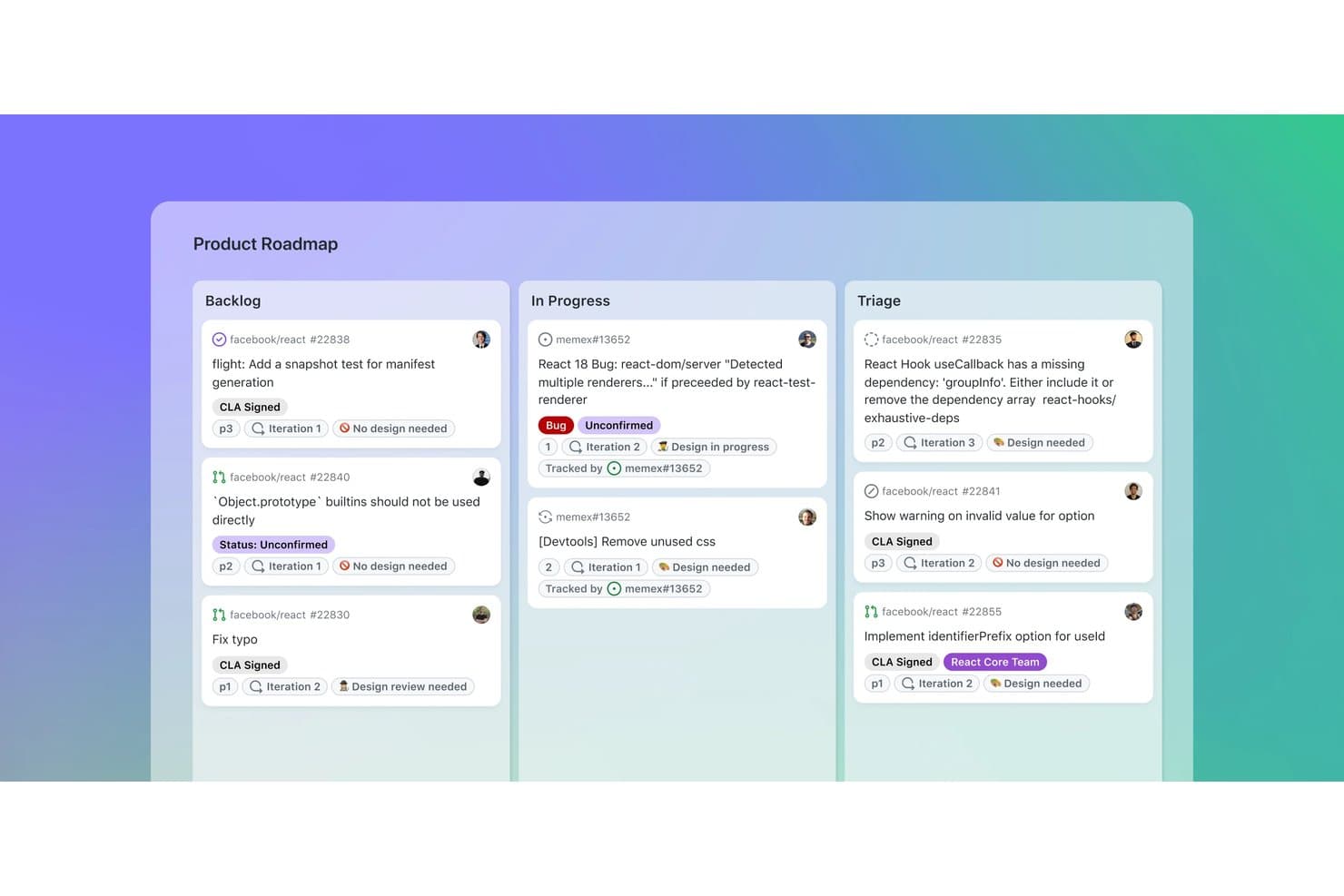
GitHub organizes product tasks across Backlog, In Progress, and Triage boards. GitHub is a product development platform that combines code repositories with issue tracking, project roadmaps, sprint boards, custom fields, pull requests, and team discussions.
Who Is GitHub Best For?
GitHub suits product and engineering teams that want dev-native issue and sprint tracking alongside code, pull requests, and releases.
Why I Picked GitHub
I picked GitHub because it connects product planning directly to the development work that follows. Issues link with commits and pull requests, while Projects adds iteration-based sprint boards, sub-issues, and dependencies. This makes GitHub best for dev-native issue and sprint tracking when product decisions need clear delivery context.
GitHub Key Features
- Issue forms: Create structured requests with fields, labels, and file uploads.
- GitHub Discussions: Organize threaded feedback, polls, upvotes, and marked answers.
- Insights charts: View current project data and historical burn-up charts.
- GitHub Actions: Automate project updates and development workflows.
GitHub Integrations
GitHub offers native Slack integration, plus Marketplace integrations with Zenhub, Azure Boards, Linear, CircleCI, and Codecov. REST and GraphQL APIs, webhooks, GitHub Actions, and the MCP server support custom connectivity and CI/CD workflows.
What's Free?
GitHub offers a free-forever plan with unlimited public and private repositories and unlimited collaborators. Private repositories have feature limits, including 2,000 GitHub Actions minutes and 500 MB of Packages storage per month; additional usage may require payment.
Pros and Cons
Pros:
- Roadmaps are shareable with external stakeholders
- Sprint boards support dependencies and hierarchy
- Issues connect directly with code changes
Cons:
- Feedback collection requires GitHub accounts
- Prioritization lacks built-in scoring frameworks
Learn more about GitHub: Best for self-hosted dev tracking without user caps
- Free plan available; 14-day free trial available for Enterprise Cloud and on-premises
- From €5.95/user/month (billed annually)
Visit WebsiteCustomer Rating:4.5/5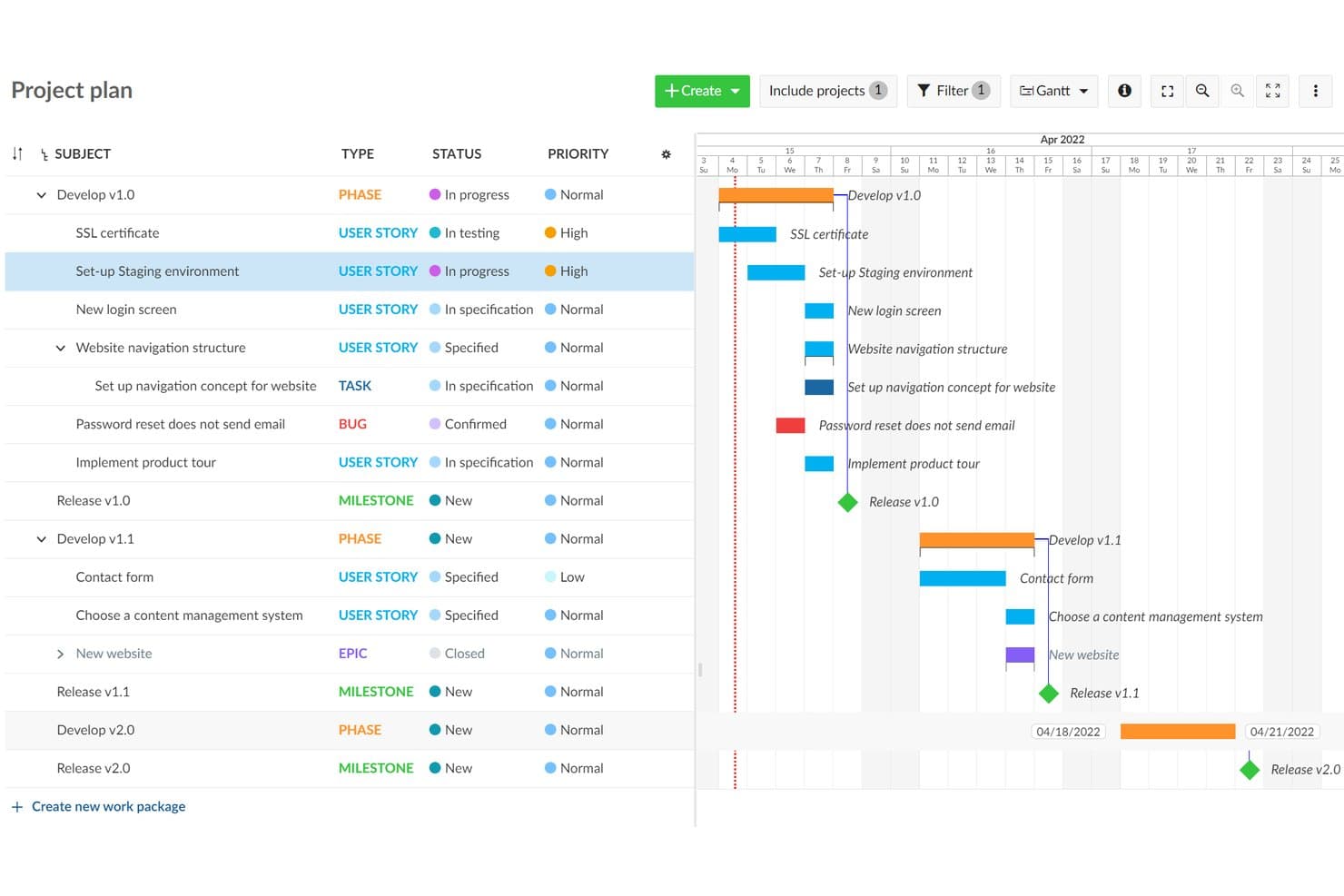
OpenProject visualizes project timelines with a Gantt chart roadmap view. OpenProject is an open-source product development platform combining work package tracking, Scrum backlogs, Gantt planning, roadmaps, collaboration, and workflow boards in a self-hosted workspace.
Who Is OpenProject Best For?
Technical product teams needing unlimited users and projects, self-hosted control, and integrated development tracking will find OpenProject a practical fit.
Why I Picked OpenProject
I picked OpenProject because it combines self-hosted dev tracking without user caps with strong product delivery controls. Unlimited teams can manage work packages, dependencies, and custom workflows, then plan Scrum sprints with story points and burndown charts. Gantt timelines connect release planning to the engineering work behind it.
OpenProject Key Features
- Git integrations: Connect GitHub, GitLab, SVN, and Git repositories to development projects.
- Real-time document editing: Collaborate on shared documents with rich text, linked work packages, and embedded charts.
- Email-to-task conversion: Turn incoming emails into trackable work packages.
- Project templates: Reuse standardized project structures without copying budgets or time data.
OpenProject Integrations
OpenProject offers native integrations with GitHub, GitLab, Nextcloud, SVN, and Git repositories. Its REST API and BCF API support custom integrations.
What’s Free?
OpenProject’s Community edition is free forever, self-hosted, and supports unlimited users and projects. You’ll need to host and administer it yourself, while enterprise add-ons, professional support, and managed cloud hosting require a paid plan.
Pros and Cons
Pros:
- Templates support repeatable delivery workflows
- Scrum backlogs include story points and burndowns
- Handles dependencies across complex project hierarchies
Cons:
- Requires server administration before teams can start
- Roadmaps rely on basic version progress views
Learn more about OpenProject: Best for dev teams tracking sprints with GitHub
- Free plan available
- From $8.50/user/month (billed annually)
Visit WebsiteCustomer Rating:4.5/5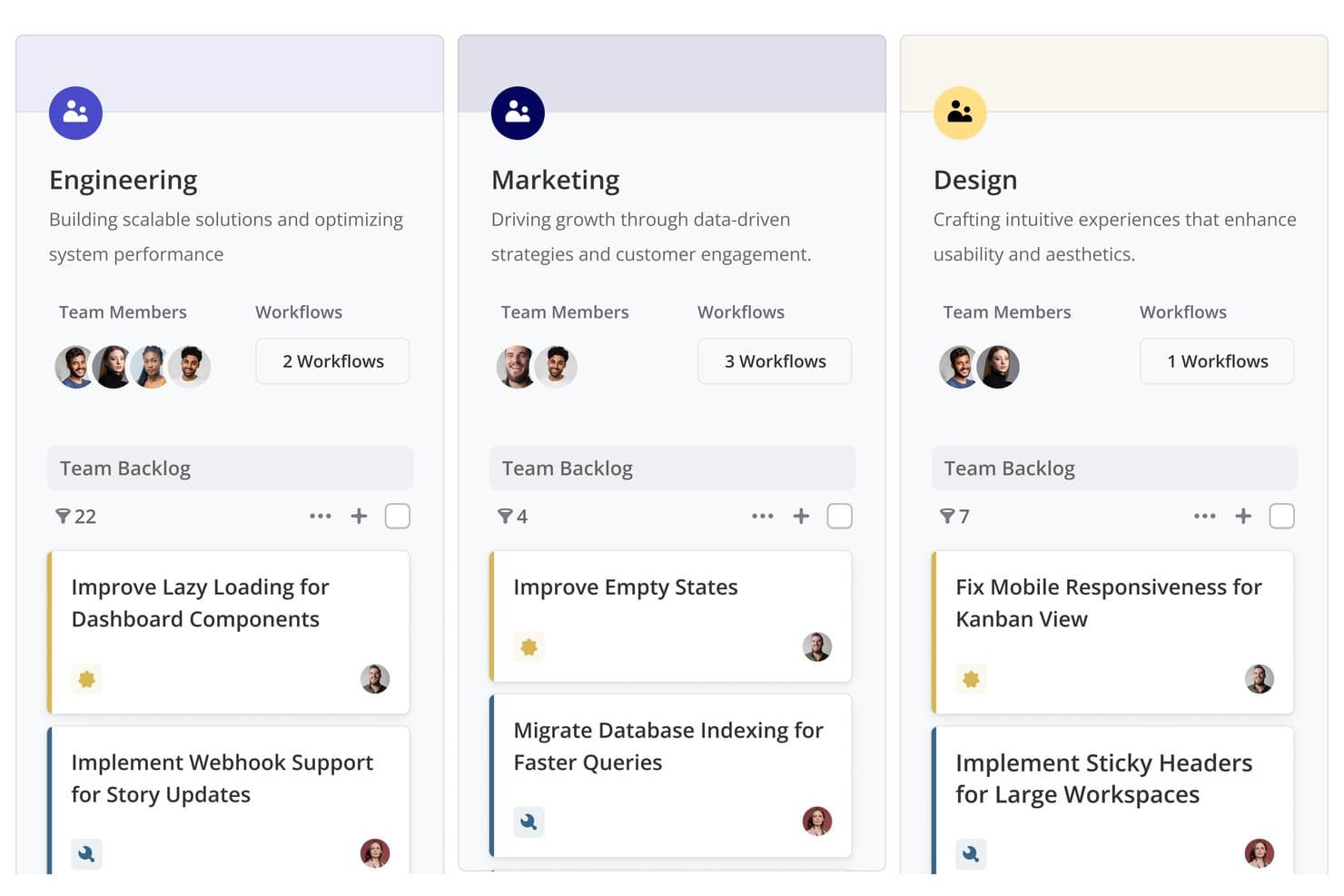
Shortcut organizes team backlogs by department with tasks and workflows. Shortcut is product development software with a free-forever plan that combines roadmaps, Epics, Stories, Kanban boards, Iterations, Docs, and GitHub-linked development workflows.
Who Is Shortcut Best For?
Shortcut fits software development teams that need GitHub-connected sprint planning, roadmaps, and delivery tracking in one workspace.
Why I Picked Shortcut
I rate Shortcut highly for dev teams tracking sprints with GitHub. Its Iterations, Kanban boards, and burndown reports connect sprint planning to daily delivery work. Stories can move as pull requests progress, so my team keeps development status current without updating every ticket manually.
Shortcut Key Features
- Sub-tasks: Break Stories into estimated, trackable work items.
- Custom fields: Organize work with predefined product and technical fields.
- Backlog view: Sort, filter, group, and reorder Stories.
- Slack integration: Create Stories from messages and sync threads.
Shortcut Integrations
Shortcut integrates with GitHub, GitLab, Bitbucket Cloud, Slack, Figma, Zendesk, Productboard, Savio, and Google Sheets. It also offers a REST API and Zapier connectivity for custom workflows.
What's Free?
Shortcut offers a free-forever plan with Epics, Iterations, Roadmaps, Docs, GitHub integration, and unlimited Stories. It supports one Team with up to 10 users, while a 14-day trial provides full access without requiring a credit card.
Pros and Cons
Pros:
- Sprint reports clarify iteration progress
- Roadmap views connect strategy with execution
- Unlimited Stories support ongoing product delivery
Cons:
- No native customer feedback collection
- Prioritization relies on manual ranking
Learn more about Shortcut: Best for sprint planning with unlimited free seats
- Free plan available
- From $10/user/month (billed annually)
Visit WebsiteCustomer Rating:4.6/5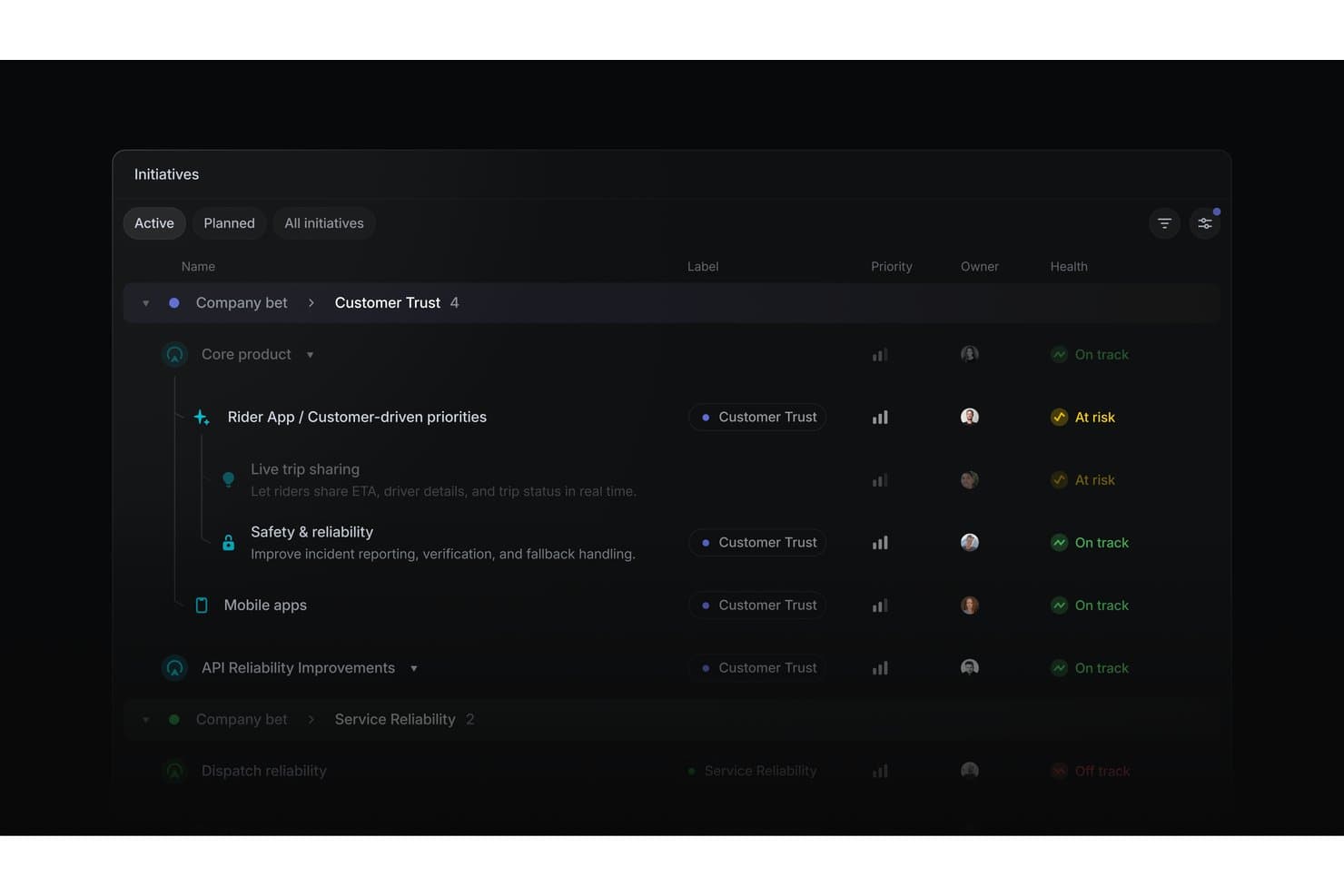
Linear organizes product initiatives by health status, priority, and owner. Linear is product development software for organizing initiatives, projects, issues, cycles, timelines, dependencies, and engineering integrations in one workspace.
Who Is Linear Best For?
Product managers and software developers at startups that need sprint planning, issue tracking, and roadmap coordination with unlimited free seats.
Why I Picked Linear
I picked Linear because it supports sprint planning with unlimited free seats, letting product, engineering, and design collaborate in one workspace. Cycles run one to eight weeks, roll unfinished issues forward, and include capacity tracking. Customizable boards, swimlanes, estimates, dependencies, and issue relationships help my team manage sprint work from backlog to release.
Linear Key Features
- Linear Agent: Creates and updates issues, projects, and initiatives through natural-language prompts.
- Customer Requests: Links manually entered feedback to issues and projects.
- Project templates: Presets milestones, issues, leads, members, and initiatives.
- GitHub integration: Syncs issues and automates pull request updates.
Linear Integrations
Linear offers native integrations with GitHub, GitLab, Slack, Figma, Microsoft Teams, Notion, and Google Sheets. It also supports custom connections through its public API and webhooks, plus Zapier.
What's Free?
Linear offers a free-forever plan at $0 for unlimited members. It includes two teams and up to 250 issues, with file uploads limited to 10 MB.
Pros and Cons
Pros:
- Board swimlanes clarify sprint ownership
- Initiatives connect goals to releases
- Cycles roll unfinished work forward
Cons:
- No built-in impact-effort scoring
- Customer requests require manual entry
Learn more about Linear: Best for free feedback-to-roadmap workflows
- Free plan + 10-day trial + demo available
- From $29/user/month (billed annually)
Visit WebsiteCustomer Rating:4.7/5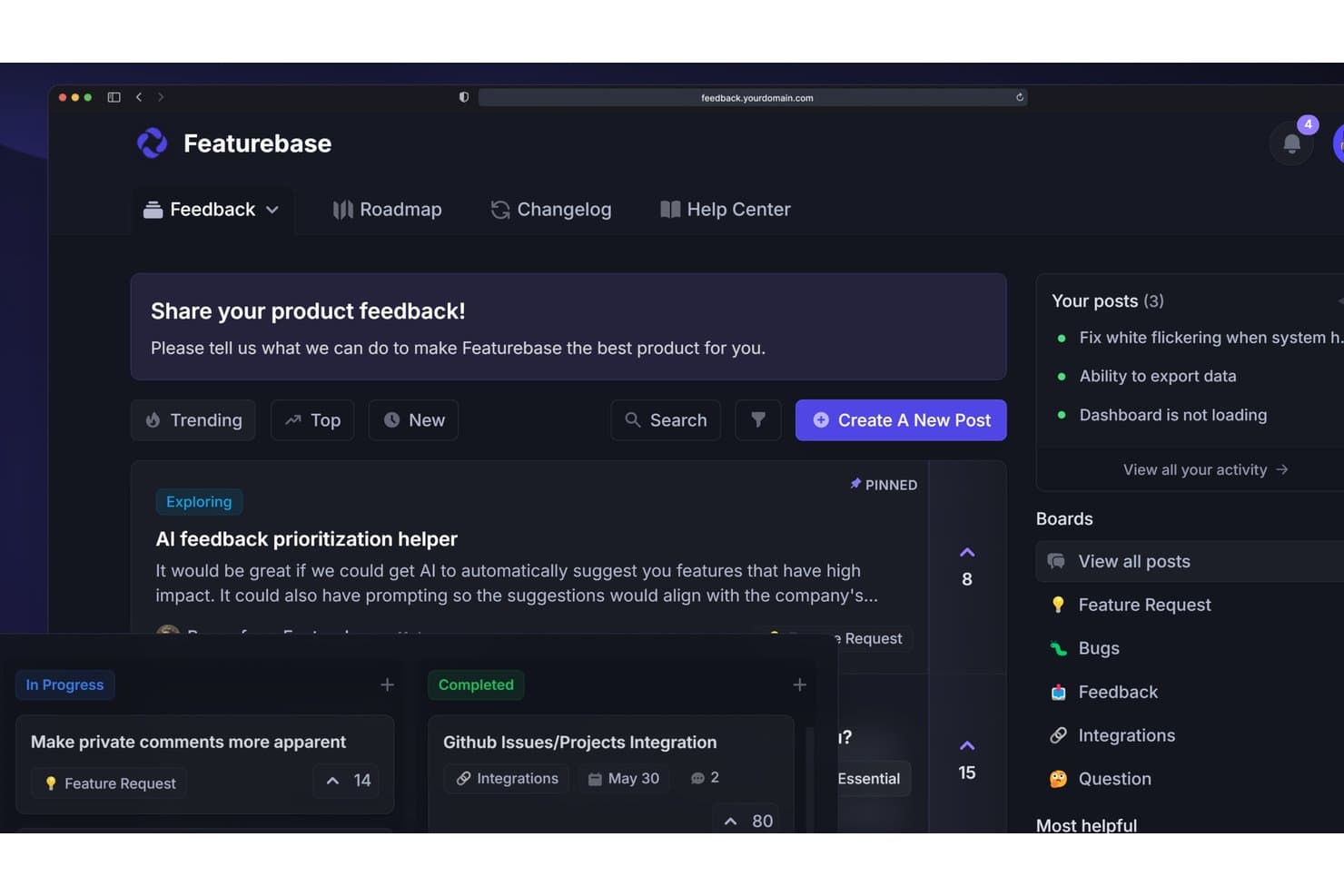
Featurebase lets users collect, prioritize, and track product feedback in one place. Featurebase is product development software that combines customer feedback collection, request prioritization, shareable roadmaps, release changelogs, surveys, and support workflows in one platform.
Who Is Featurebase Best For?
Featurebase suits solo product managers and early-stage founders who need to turn customer feedback into prioritized, shareable roadmaps.
Why I Picked Featurebase
I rate Featurebase Best for free feedback-to-roadmap workflows because its portal and in-app widget turn customer input into organized Requests. I use the value/effort matrix to rank opportunities, then publish status-based or date-based roadmaps for stakeholders. It fits feedback-led planning better than sprint execution.
Featurebase Key Features
- NPS and CSAT surveys: Create in-app surveys to collect customer ratings.
- Public changelog: Publish product updates with segmented release notifications.
- Request comments: Add threaded public or private comments with .
- CSV data management: Import feedback with field mapping and export Request data.
Featurebase Integrations
Featurebase offers native integrations with Linear, Jira, GitHub, ClickUp, Slack, Discord, Intercom, Zendesk, HubSpot, and Segment. It also supports API, MCP, webhooks, and Zapier for custom connectivity.
What's Free?
Featurebase offers a free plan, rather than only a time-limited trial. The available plan details don’t specify user, integration, or usage limits, so check its current pricing page before choosing it for your team.
Pros and Cons
Pros:
- Public roadmaps close the feedback loop
- Value/effort matrix supports clearer prioritization
- Feedback, roadmaps, and changelog stay linked
Cons:
- Free collaboration doesn’t support cross-functional teams
- No native sprint or dependency planning
Learn more about Featurebase: Best for flexible, database-powered project tracking
- Free plan + 14-day trial + demo available
- From $20/user/month (billed annually)
Visit WebsiteCustomer Rating:4.6/5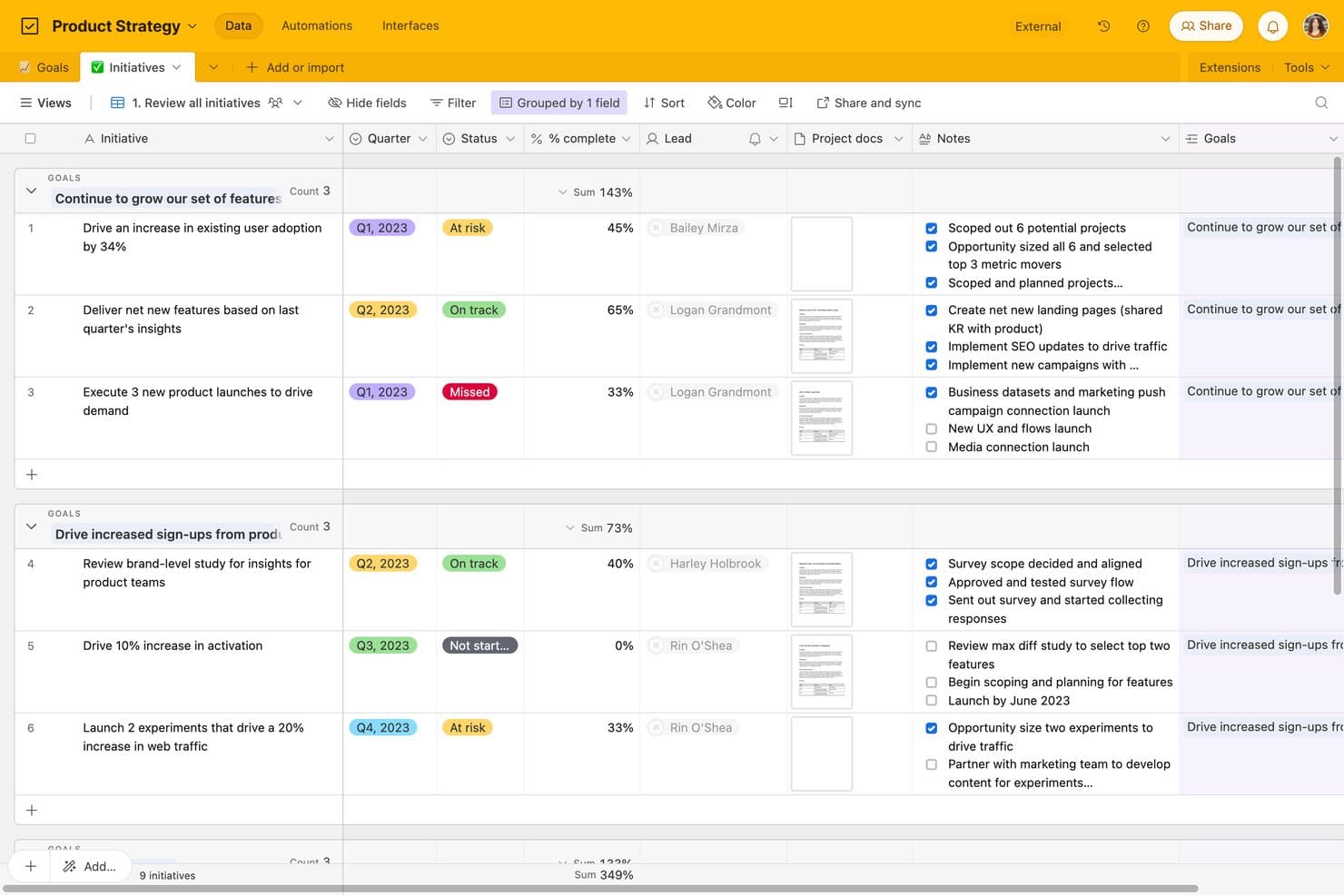
Airtable tracks product initiatives by goal, status, and completion. Airtable is product development software built around relational databases, combining roadmap planning, task tracking, feedback forms, kanban workflows, custom views, and cross-functional collaboration.
Who Is Airtable Best For?
Product managers, startup founders, and program managers can connect roadmaps, feedback, and delivery work in a flexible relational database.
Why I Picked Airtable
I picked Airtable because its relational database structure connects product feedback, roadmap initiatives, and delivery tasks in one workspace. I use linked records and rollups to trace customer requests through epics and sprint work, while kanban views keep execution visible. Forms turn new feedback into records the team can prioritize.
Airtable Key Features
- Interface Designer: Create custom pages with grid, gallery, calendar, form, and dashboard layouts.
- Automation triggers: Start workflows from record changes, form submissions, schedules, webhooks, or buttons.
- Public view sharing: Share views and interface pages through links without requiring viewer accounts.
- CSV import and export: Move data between Airtable and other tools using CSV files.
Airtable Integrations
Airtable lists 27 integrations, including Jira, GitHub, Slack, Google Drive, Google Calendar, Salesforce, Zendesk, Miro, and Typeform. Its free plan includes API access for custom integrations, while sync integrations and Jira automation require paid plans.
What's Free?
Airtable offers a free-forever plan, so you don’t need to start a paid subscription after a trial. It supports unlimited read-only collaborators, up to five editors or creators, 50 commenters, 1,000 records per base, 1 GB of attachments, and 1,000 API calls monthly; sync integrations and Jira automation require a paid plan.
Pros and Cons
Pros:
- Unlimited read-only stakeholder visibility
- Flexible relational tracking for product workflows
- Connects feedback, roadmaps, and tasks
Cons:
- Free tier caps records and automation runs
- Timeline and Gantt views require upgrades
Learn more about Airtable: Best for docs, roadmaps, and sprints in one workspace
- Free plan + trial available
- From $10/user/month
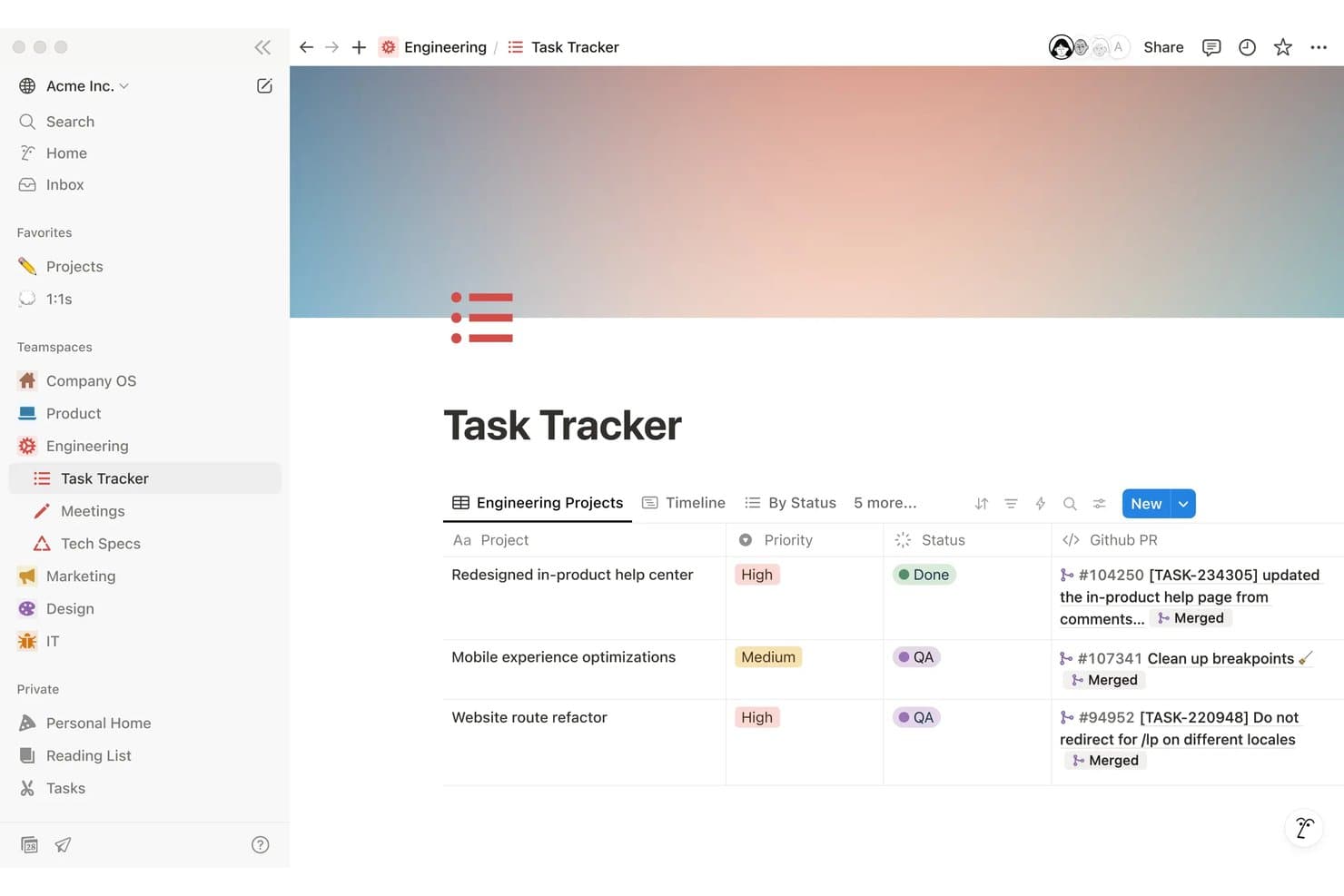
Notion tracks engineering tasks with priority, status, and linked GitHub PRs. Notion is a free product development workspace for creating PRDs, managing roadmaps and tasks, planning sprints, collecting feedback through forms, and collaborating across linked databases and documents.
Who Is Notion Best For?
Product managers at startups and small teams who need one workspace for PRDs, roadmaps, sprint planning, and cross-functional collaboration.
Why I Picked Notion
I picked Notion as one of the best free product development tools because it keeps docs, roadmaps, and sprints in one workspace. I use timeline views to map releases, link PRDs to roadmap items, and run sprints with dedicated backlog and planning views. Teams can also publish roadmap views through Notion Sites.
Notion Key Features
- Unlimited forms: Collect responses through public or embedded forms without requiring Notion accounts.
- Task dependencies: Link related tasks and identify work that must happen first.
- Custom task IDs: Assign prefixes and unique URLs to tasks for easier reference.
- Database comments: Add threaded comments to pages, items, and individual properties.
Notion Integrations
Notion supports connections with GitHub, Jira, Figma, Slack, Trello, Asana, and more. It also provides a public API and webhooks for custom integrations, plus Zapier.
What's Free?
Notion offers a free-forever plan at $0 per member per month, with unlimited pages and blocks for individual users. Important limits include 5 MB file uploads, seven-day page history, up to 10 guests, and limited collaborative blocks for teams.
Pros and Cons
Pros:
- Collects unlimited feedback form responses
- Publishes interactive roadmaps publicly
- Links PRDs, roadmaps, and sprints
Cons:
- Requires manual prioritization scoring setup
- Free team workspaces cap blocks
Learn more about Notion: 8Best for Agile sprint and backlog management
Jira
- Free plan + 14-day free trial + free demo available
- From $7.91/user/month
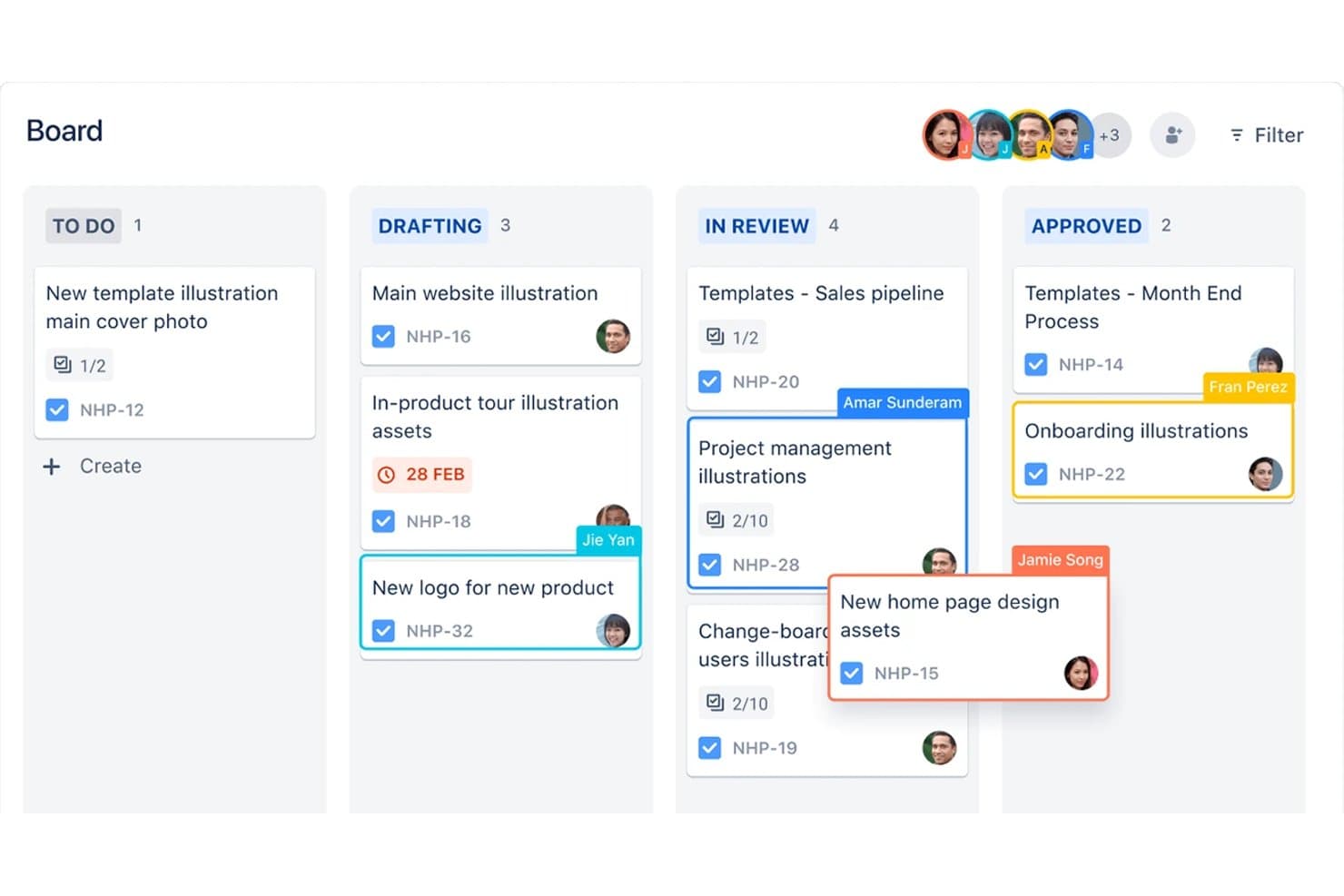
Jira organizes product tasks across kanban board stages by assignee. Jira is product development software from Atlassian that combines backlog and issue tracking, Scrum and Kanban boards, sprint planning, timeline roadmaps, and Jira Product Discovery for prioritization and customer insights.
Who Is Jira Best For?
Jira suits product and engineering teams that manage Agile backlogs, Scrum sprints, Kanban workflows, and cross-functional delivery.
Why I Picked Jira
I picked Jira because it is best for Agile sprint and backlog management, with Scrum and Kanban boards built around ranked backlogs and sprint planning. I use burndown, velocity, cycle time, and cumulative flow reports to spot delivery issues. Its timeline view also connects epics, dependencies, and release work in one delivery plan.
Jira Key Features
- Custom workflows: Configure statuses, rules, and transitions for different delivery processes.
- Custom fields: Add text, dropdown, date, label, and user-picker fields to work items.
- CSV import: Move existing work items into Jira from another tool.
- Marketplace apps: Extend Jira with integrations and add-ons from Atlassian Marketplace.
Jira Integrations
Jira has native integrations with Confluence, Trello, Bitbucket, Slack, Microsoft Teams, Gmail, Figma, and Jira Product Discovery. Its Atlassian Marketplace offers 3,000+ apps, while its REST API supports custom integrations.
What's Free?
Jira has a free-forever plan for up to 10 users, with unlimited projects, boards, backlogs, reports, and basic views. It includes 2 GB of storage and 150 automation steps monthly, but limits support to the community and excludes advanced permissions, data residency, and Rovo AI.
Pros and Cons
Pros:
- JPD connects discovery scores to delivery
- Unlimited work items support detailed tracking
- Agile boards support sprints and WIP limits
Cons:
- Free permissions make every user administrator
- Roadmapping and prioritization span separate products
Learn more about Jira: Best for AI-assisted roadmap and feedback workflows
- Free plan available; 14-day free trial; free demo available
- From $12/user/month (billed annually)
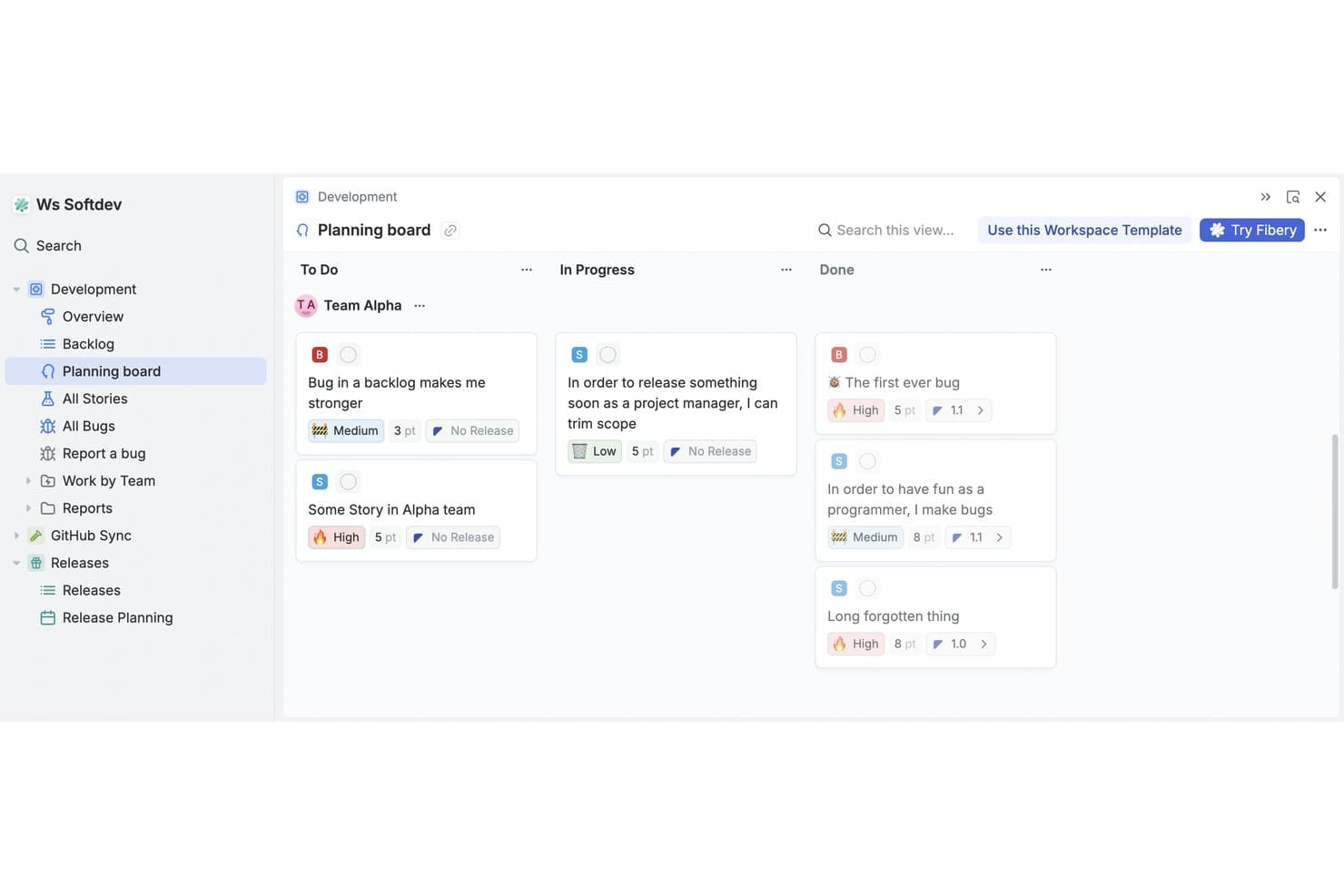
Fibery's planning board organizes tasks by status across teams. Fibery is a free product development platform that combines a no-code relational workspace with customer feedback, feature prioritization, roadmaps, product specs, and software development tracking.
Who Is Fibery Best For?
Product teams at startups and small companies that need AI-assisted feedback analysis, prioritization, roadmaps, and development tracking in one workspace.
Why I Picked Fibery
I picked Fibery because its AI-assisted roadmap and feedback workflows connect customer evidence directly to product decisions. I use AI to identify feedback themes, suggest links to backlog items, and score sentiment before prioritizing work with RICE, Kano, MoSCoW, or WSJF formulas. I can then publish updated roadmaps and changelogs from the same workspace.
Fibery Key Features
- Git sync: Connect GitHub or GitLab branches, commits, and pull requests to issues.
- Custom workflow boards: Configure states, filters, and views for sprints, releases, and priorities.
- Collaborative docs: Create linked product specifications, wikis, and team documentation.
- Feedback forms: Collect submissions through shareable links, embeds, or QR codes.
Fibery Integrations
Fibery offers documented integrations with GitHub, GitLab, Jira, Linear, Intercom, Zendesk, HubSpot, and Slack. It also provides a REST API, webhooks, an MCP server, and Zapier.
What's Free?
Fibery offers a free-forever plan for up to 10 users and 10 guests. It includes 10 databases, unlimited entities, 1 GB of file storage, 14 days of version history, 250 AI credits, and 5,000 entity syncs.
Pros and Cons
Pros:
- Supports tailored product development workflows
- Publishes live roadmaps and changelogs
- Connects feedback directly to prioritization
Cons:
- Free plan limits collaborative views
- Requires substantial initial workspace configuration
Learn more about Fibery: 10Best for visual whiteboarding across teams
Miro
- Free plan + 14-day trial available
- From $8/user/month (billed annually)
Visit WebsiteCustomer Rating:4.8/5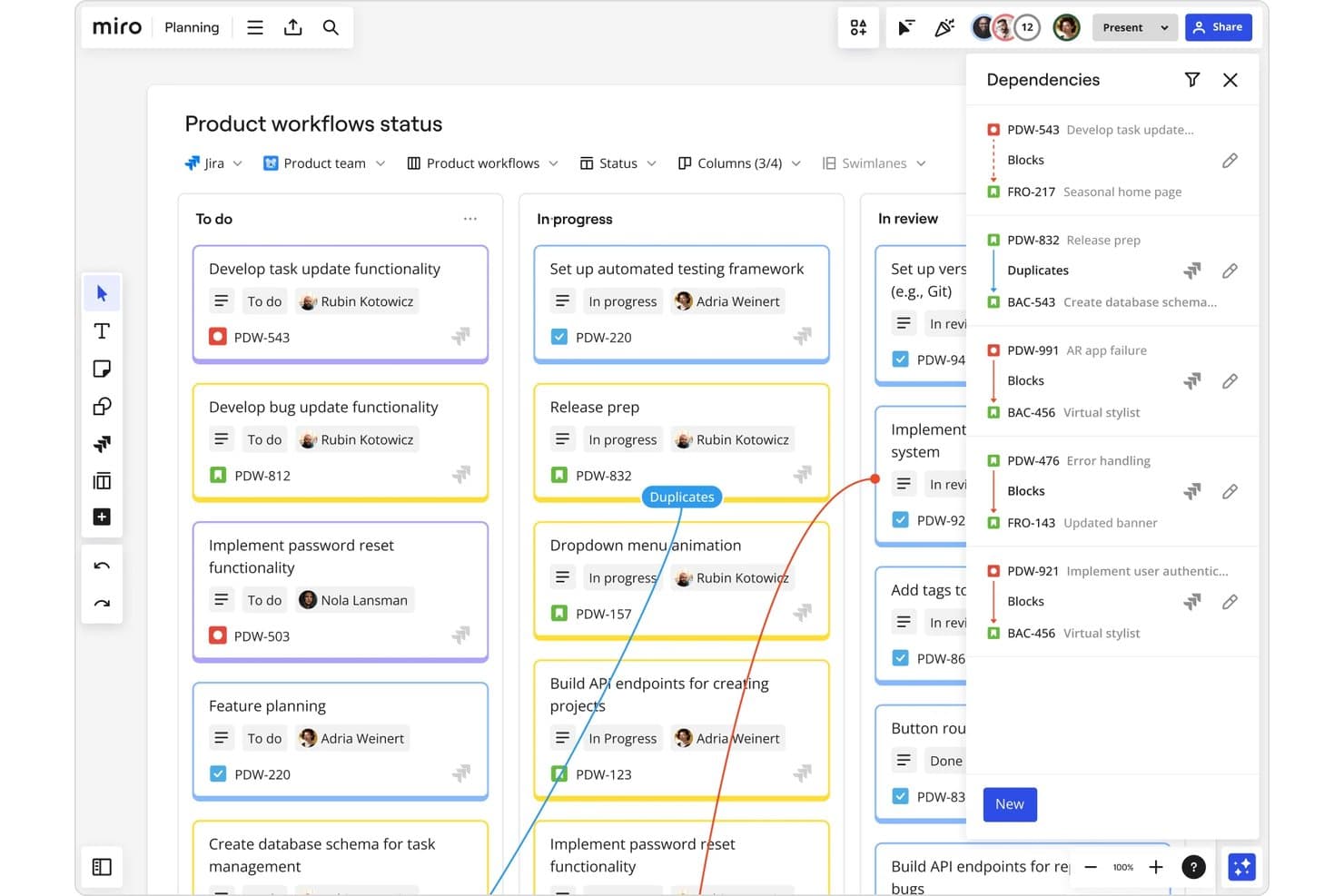
Miro tracks task dependencies across product workflow stages visually. Miro is a free product development workspace built around an infinite canvas, combining visual roadmaps, Kanban boards, Tables, prioritization templates, and real-time comments for cross-functional planning.
Who Is Miro Best For?
Product managers, startup founders, and cross-functional teams that need a shared visual space for product planning and stakeholder alignment.
Why I Picked Miro
I picked Miro because its visual whiteboarding across teams connects product discovery with delivery on one canvas. I use Timeline for roadmap milestones, Kanban for workflow stages, and threaded comments to capture engineering and stakeholder decisions beside the work. Teams can turn workshop notes into structured product plans without losing the original context.
Miro Key Features
- Tables: Organize product records with custom fields, filters, sorting, grouping, and bulk editing.
- Prioritization templates: Apply RICE, MoSCoW, 2x2, and impact-effort frameworks to feature decisions.
- MCP connections: Connect AI tools such as Claude, Cursor, and Copilot to board content.
- Talktracks: Record walkthroughs that explain board context for teammates and stakeholders.
Miro Integrations
Miro offers 250+ integrations, including Microsoft 365, Slack, Google Workspace, Adobe, Jira, Asana, Linear, ClickUp, and Azure DevOps. Its API, SDKs, and Marketplace support custom connectivity, while two-way work-tool sync requires Business or higher.
What's Free?
Miro’s Free plan lasts indefinitely and supports unlimited team members. You get three editable boards, while additional boards are view-only; private boards, advanced sharing controls, and some integrations require a paid plan.
Pros and Cons
Pros:
- Unlimited members enable broad collaboration
- Templates support product planning rituals
- Visual roadmaps keep teams aligned
Cons:
- Feedback collection remains manual on Free
- Three editable boards constrain ongoing work
Diğer Ücretsiz Ürün Geliştirme Yazılımları
Ücretsiz planlar veya deneme sürümleri de sunan bazı ek ürün geliştirme yazılımı seçenekleri şunlardır. Bu araçlar kısa listeme girmemiş olsa da göz atmaya değer:
- 11ClickUpBest for unlimited-user sprint and task tracking
- 12Zoho ProjectsGood for Zoho ecosystem project tracking
- 13TrelloBest for Kanban boards on a free plan
- 14CannyBest for closing the customer feedback loop
- 15PlaneBest for open-source, self-hosted roadmap tracking
How I Evaluate Free Product Development Software
First, I define what counts as free. A free product development tool needs a genuine free-forever plan, not just a trial; I consider its user and feature limits. From there, I split my evaluation into three parts: core functionality, which carries the most weight, like building roadmaps and tracking development work; standout features, like public roadmap sharing; and what a tool offers beyond its feature set, like how its free plan scales as a team grows.
Core Functionality (Table Stakes For This List)
In addition to my free plan requirements, I use a scoring system to select tools for my list. I score each one on a scale from 0 (does not offer the functionality) to 5 (excels in this area) for each core functionality listed below, based on what's available on the free plan. I then convert the total into a percentage to help assess each tool's overall fit, with extra weight on any functionalities I've deemed essential.
- Roadmapping & Planning (Essential): I look for editable release plans with clear timelines and views that help teams connect strategic priorities to upcoming work.
- Task & Issue Tracking (Essential): I assess whether teams can assign, organize, and track backlog items, such as a bug fix or launch task, through completion.
- Prioritization Tools: I check for practical ways to rank ideas, such as voting or impact-and-effort scores, before teams commit them to a release.
- Feedback Collection: I look for ways to capture and organize customer requests, then connect recurring themes to planned features or backlog items.
- Collaboration & Comments: I assess whether teammates can discuss roadmap items and tasks in context, with shared visibility for engineering, design, and stakeholders.
- Sprint & Workflow Boards: I look for visual boards that show work by status and support a team's sprint, kanban, or delivery workflow.
Once I have a list of tools that meet the criteria, I consider what sets each platform apart.
Differentiating Factors (What Sets Vendors Apart)
Here's how I compare and contrast different vendors:
Standout Features
I look for a native feedback widget that lets teams collect user input directly inside their product, then link those requests to backlog items without jumping between tools. Public roadmap sharing is another differentiator: I check whether a free plan lets you publish a live, customer-facing view of planned work so stakeholders can track progress without needing a login. I also evaluate cross-tool import support, since most teams switching from spreadsheets or another tracker need a clean CSV migration path on day one.
Beyond Features
I check whether a free plan's user and project caps can actually grow with a small team. Some tools gate functionality behind storage or usage limits that force an upgrade mid-sprint. Data portability matters just as much: I look for native CSV or API export so you can move roadmaps and backlogs to another tool without losing context. I also evaluate how approachable the workspace is for non-PM teammates like engineers and designers, since simple permissions keep everyone aligned without extra seat costs.
Ücretsiz Ürün Geliştirme Yazılımı Nasıl Seçilir?
Karmaşık özellik listeleri ve fiyatlandırma yapıları, ücretsiz ürün geliştirme yazılımından gerçekte ne elde ettiğinizi anlamanızı zorlaştırabilir. Yazılım seçme sürecinizde ilerlerken odağınızı korumanıza yardımcı olmak için göz önünde bulundurmanız gereken bazı faktörleri aşağıda bulabilirsiniz:
| Faktör | Dikkat Edilmesi Gerekenler |
|---|---|
| FaktörÜcretsiz Teklifin Kapsamı | Dikkat Edilmesi GerekenlerÜcretsiz planda nelerin bulunduğuna bakın. Gizli maliyetler olmadan ekibinizin temel ihtiyaçlarını karşıladığından emin olun. |
| FaktörÖlçeklenebilirlik | Dikkat Edilmesi GerekenlerYazılımın işletmenizle birlikte büyüyüp büyüyemeyeceğini değerlendirin. İhtiyaçlarınız arttıkça daha fazla kullanıcıyı veya projeyi destekleyip desteklemediğini kontrol edin. |
| FaktörEntegrasyonlar | Dikkat Edilmesi Gerekenlerİş akışlarını aksatmamak için Slack veya Google Workspace gibi ekibinizin hâlihazırda kullandığı araçlarla entegre olduğundan emin olun. |
| FaktörKullanım Kolaylığı | Dikkat Edilmesi GerekenlerArayüzün ne kadar sezgisel olduğunu değerlendirin. Ekibiniz, çok az eğitimle kullanmaya başlayabilmelidir. |
| FaktörGüvenlik | Dikkat Edilmesi GerekenlerÖzellikle hassas verileri işliyorsanız yazılımın sektörünüzle ilgili güvenlik standartlarına uyup uymadığını kontrol edin. |
| FaktörMüşteri Desteği | Dikkat Edilmesi GerekenlerSorunlar ortaya çıktığında ekibinize yardımcı olmak için ücretsiz sürümde sohbet veya e-posta desteği gibi mevcut destek seçeneklerini arayın. |
| FaktörÖzelleştirme | Dikkat Edilmesi GerekenlerVerimliliği en üst düzeye çıkarmak için ücretsiz sürümde bile yazılımı belirli iş akışlarınıza uyacak şekilde uyarlayıp uyarlayamayacağınızı belirleyin. |
| FaktörGeri Bildirim Seçenekleri | Dikkat Edilmesi GerekenlerÜrün geliştirme sürecinizi iyileştirmek amacıyla yazılımın kullanıcı geri bildirimlerini toplamanıza ve bu geri bildirimlere göre hareket etmenize nasıl olanak tanıdığını değerlendirin. |
Ücretsiz Ürün Geliştirme Yazılımı Nedir?
Ürün geliştirme yazılımı, ekiplerin ürün fikirlerini planlamasına, yönetmesine ve hayata geçirmesine yardımcı olmak üzere tasarlanmıştır. Bu araçlar genellikle kullanıcıların herhangi bir mali yükümlülük altına girmeden temel özellikleri keşfetmesine olanak tanımak için ücretsiz planlar veya deneme süreleri sunar. Ürün yöneticileri, tasarımcılar ve geliştiriciler bu araçları genellikle iş birliğini ve verimliliği artırmak için kullanır.
Yol haritası planlama, görev yönetimi ve geri bildirim toplama gibi özellikler ekiplerin düzenli kalmasına, görevlere öncelik vermesine ve temel içgörüleri toplamasına yardımcı olarak daha etkili bir geliştirme sürecini destekler.
Özellikler
Ürün geliştirme yazılımında yaygın olarak bulunan özellikleri ve bunlardan hangilerinin genellikle ücretsiz ve ücretli planlara dahil edildiğini inceleyelim.
Genellikle Ücretsiz Ürün Geliştirme Yazılımı Özellikleri
- Görev yönetimi: Görevlerin düzenlenmesine ve ekip üyelerine atanmasına yardımcı olarak herkesin programa bağlı kalmasını sağlar.
- Yol haritası planlama: Ürün hedefleri için görsel bir zaman çizelgesi sunarak stratejik planlamaya yardımcı olur.
- Geri bildirim toplama: Ekiplerin kullanıcı içgörülerini toplamasına olanak tanır; bu içgörüler ürün iyileştirmelerine yön verebilir.
- İş birliği araçları: İletişimi ve ekip çalışmasını kolaylaştırarak herkesin aynı anlayışta olmasını sağlar.
- Temel entegrasyonlar: Slack veya Google Workspace gibi diğer araçlara bağlanarak iş akışını geliştirir.
- Özelleştirilebilir panolar: Kullanıcıların önemli bilgilere hızlı erişim için görünümlerini kendilerine göre düzenlemesine olanak tanır.
- Kullanıcı rolü yönetimi: Ekip rollerine göre erişimi kontrol etmek için izinlerin ayarlanmasını sağlar.
Genellikle Ücretli Ürün Geliştirme Yazılımı Özellikleri
- Gelişmiş analiz: Ekiplerin bilinçli kararlar almasına yardımcı olmak için ayrıntılı veri analizi sunar.
- Otomatik bildirimler: Proje değişiklikleriyle ilgili otomatik uyarılar göndererek ekipleri güncel tutar.
- Gerçek zamanlı iş birliği: Birden fazla kullanıcının aynı belgeler üzerinde eş zamanlı çalışmasına olanak tanır.
- Gelişmiş güvenlik özellikleri: Hassas verilerin korunması için ek güvenlik önlemleri sunar.
- Öncelikli müşteri desteği: Acil sorunlar için daha hızlı yanıt süreleri ve özel destek sunar.
- Sınırsız depolama: Büyüyen ekipler için gerekli olan büyük miktarlarda veriyi barındırır.
- Gelişmiş özelleştirme seçenekleri: Yazılımı belirli iş akışlarına uyarlama konusunda daha fazla esneklik sağlar.
Avantajlar
Ücretsiz ürün geliştirme yazılımını uygulamak, ekibiniz ve işletmeniz için çeşitli avantajlar sağlar. Faydalanabileceğiniz avantajlardan bazıları şunlardır:
- Maliyet tasarrufu: Mali bir yükümlülük altına girmeden temel araçlara erişin ve bütçeyi diğer ihtiyaçlar için serbest bırakın.
- Geliştirilmiş organizasyon: Projeleri ve sorumlulukları net ve yolunda tutmak için görev yönetiminden yararlanın.
- Gelişmiş iş birliği: Yerleşik iletişim araçları ekibinizin bağlantıda ve uyum içinde kalmasını sağlar.
- Değerli içgörüler: Geri bildirim toplama özellikleri kullanıcı ihtiyaçlarını anlamanıza ve bilinçli kararlar almanıza yardımcı olur.
- Esneklik: Özelleştirilebilir panolar çalışma alanınızı iş akışınıza uyacak şekilde düzenlemenize olanak tanır.
- Ölçeklenebilirlik: Temel özelliklerle başlayın ve ekibiniz büyüdükçe değişen ihtiyaçlara uyum sağlayarak kapsamı genişletin.
- Hızlı kurulum: Basit arayüzler ve temel entegrasyonlar, kapsamlı bir eğitim gerektirmeden başlamayı kolaylaştırır.
Maliyetler ve Fiyatlandırma
Bu makaleye ücretsiz olarak kullanılabilen en iyi ürün geliştirme yazılımı seçeneklerini aradığınız için geldiğinizi biliyorum. Ancak ücretsiz planlar yalnızca sınırlı özellikler sunduğundan, gelecekte planınızı yükseltmeniz gerekme ihtimali oldukça yüksektir.
Aşağıdaki tablo, ürün geliştirme yazılımı çözümlerinde yaygın planları, bunların ortalama fiyatlarını ve genellikle dahil edilen özellikleri özetlemektedir:
Ürün Geliştirme Yazılımı İçin Plan Karşılaştırma Tablosu
| Plan Türü | Ortalama Fiyat | Yaygın Özellikler |
|---|---|---|
| Plan TürüÜcretsiz Plan | Ortalama Fiyat$0 | Yaygın ÖzelliklerTemel görev yönetimi, yol haritası planlama, geri bildirim toplama, iş birliği araçları ve temel entegrasyonlar. |
| Plan TürüKişisel Plan | Ortalama Fiyat$5-$25/kullanıcı/ay | Yaygın ÖzelliklerTüm ücretsiz özelliklere ek olarak kullanıcı rolü yönetimi, özelleştirilebilir panolar ve ek depolama alanı. |
| Plan Türüİşletme Planı | Ortalama Fiyat$30-$75/kullanıcı/ay | Yaygın ÖzelliklerTüm kişisel plan özelliklerine ek olarak gelişmiş analizler, otomatik bildirimler ve gelişmiş güvenlik özellikleri. |
| Plan TürüKurumsal Plan | Ortalama Fiyat$80-$150/kullanıcı/ay | Yaygın ÖzelliklerTüm işletme planı özelliklerine ek olarak öncelikli müşteri desteği, sınırsız depolama alanı ve gelişmiş özelleştirme seçenekleri. |
Ücretsiz Ürün Geliştirme Yazılımı Hakkında SSS
Ücretsiz ürün geliştirme yazılımı hakkında sık sorulan bazı soruların yanıtlarını burada bulabilirsiniz:
Uzun vadeli kullanım için ücretsiz ürün geliştirme yazılımına güvenebilir miyim?
Ücretsiz sürümler, temel ihtiyaçları olan yeni girişimler veya küçük ekipler için harika olabilir. Ancak ekibiniz büyüdükçe ücretli planlarda bulunan gelişmiş özelliklere ihtiyaç duyabilirsiniz. Ücretsiz sürümün uzun vadeli hedeflerinizi karşılayıp karşılamadığını değerlendirmek önemlidir.
Ücretsiz ürün geliştirme yazılımında ne gibi sınırlamalarla karşılaşmayı beklemeliyim?
Ücretsiz planlarda genellikle sınırlı depolama alanı, daha az entegrasyon ve temel destek bulunur. Ayrıca kullanıcı veya proje sayısına ilişkin kısıtlamalarla da karşılaşabilirsiniz. Ücretsiz bir planın yeterli olup olmadığına karar vermek için bu sınırlamaları ekibinizin ihtiyaçlarıyla karşılaştırarak değerlendirin.
Ücretsiz ürün geliştirme yazılımı ne kadar güvenlidir?
Güvenlik, sağlayıcılar arasında farklılık gösterebilir. Veri şifreleme gibi temel güvenlik özellikleri sunan yazılımları tercih edin. Hassas bilgileri işlerken sağlayıcının sektör standartlarına ve düzenlemelere uygunluğunu göz önünde bulundurun.
Ücretsiz plandan ücretli plana kolayca geçebilir miyim?
Çoğu sağlayıcı basit bir yükseltme süreci sunar. Ücretli plana geçerken mevcut verilerinizi ve ayarlarınızı genellikle koruyabilirsiniz. Yükseltme sırasında olası kesintiler veya veri taşıma sorunları hakkında sağlayıcıya danışın.