
O kadar çok farklı ürün gereksinimleri aracı var ki sizin için en iyisini seçmek zor olabilir. Bir ürünün sahip olması gereken özellikleri ve teknik özellikleri tanımlamak, düzenlemek ve yönetmek ve ürün yaşam döngüsü boyunca gereksinimleri açık ve düzenli bir şekilde korumak istiyorsunuz; ancak bunun için doğru araca ihtiyacınız var. Size yardımcı olabilirim! Bu yazıda en iyi ürün gereksinimleri yazılımlarını inceliyor ve analizimde yüzlerce ürünü yönetme ve büyük ekiplerle birçok farklı gereksinim platformunu kullanma konusundaki kişisel deneyimimden yararlanıyorum.
Why Trust Our Software Recommendations
6,700+
Reviews
20
Industry experts
16+
Evaluation factors
14
Years
Our team has been testing and reviewing software since 2012. As product managers ourselves, we know how difficult—and important—it is to choose the right software.
For this guide, we evaluated tools using hands-on testing and independent research, scoring tools using our selection criteria.
Our reviews reflect our human editorial judgment, not a sales pitch.
Expert reviewers:
- Andrew LumbySenior TPM
- Cristiano ValimSenior UI/UX Lead


Ürün Gereksinimleri Yazılımları Karşılaştırma Tablosu
Aşağıdaki tabloda, en iyi ürün gereksinimleri yazılımı seçimlerim için fiyatlandırma ayrıntıları karşılaştırılmaktadır.
Score legend (out of 5)
- Excellent4.5–5
- Good4–4.4
- Average3–3.9
- Below average2–2.9
- Poor1–1.9
Sorted by: Default
| Tool | Starting Price | Website | |||||||||||
|---|---|---|---|---|---|---|---|---|---|---|---|---|---|
Best for mapping regulations to test requirements | Not rated | 5 | 4 | 3 | 4 | 5 | 4 | Not rated | Not rated | Not rated | Not rated | Pricing upon request 30-day free trial + free demo available | Website |
Best for ECAD integration with live project sync | Not rated | 4 | 3 | 2 | 3 | 1 | 2 | Not rated | Not rated | Not rated | Not rated | $995/year 30-day free trial + free demo available | Website |
Best for intuitive change control | Not rated | 4 | 4 | 4 | 2 | 3 | 3 | Not rated | Not rated | Not rated | Not rated | Pricing upon request Free demo available | Website |
Best for variant and reuse-driven requirements | Not rated | 5 | 4 | 4 | 2 | 4 | 4 | Not rated | Not rated | Not rated | Not rated | Pricing upon request 30-day free trial + free demo available | Website |
Best for end-to-end ALM traceability | Not rated | 5 | 4 | 4 | 3 | 4 | 4 | Not rated | Not rated | Not rated | Not rated | $41.20/user/month Free 30-day trial available | Website |
Best for requirements at regulated enterprise scale | Not rated | 5 | 5 | 4 | 4 | 5 | 4 | Not rated | Not rated | Not rated | Not rated | Pricing upon request Not available | Website |
Best for AI-drafted specs tied to tasks | Not rated | Not rated | 4 | Not rated | 4 | Not rated | Not rated | 3 | 4 | 4 | 3 | $12/user/month Free plan + free trial + free demo available | Website |
Best for requirements traceability inside Jira | Not rated | 5 | 4 | 4 | 2 | 4 | 4 | Not rated | Not rated | Not rated | Not rated | $10/10 users/year 30 days free trial | Website |
Best for requirements sign-off inside Azure DevOps | Not rated | 5 | 5 | 5 | 4 | 5 | 3 | Not rated | Not rated | Not rated | Not rated | Pricing upon request 30-day free trial + free demo available | Website |
Best for requirements in safety-critical industries | Not rated | 5 | 4 | 4 | 3 | 4 | 5 | Not rated | Not rated | Not rated | Not rated | Pricing available upon request 30 days free trial | Website |


En İyi Ürün Gereksinimleri Yazılımları İncelemeleri
Aşağıda kısa listeme giren en iyi ürün gereksinimleri yazılımlarının ayrıntılı özetlerini bulabilirsiniz. İncelemelerim, sizin için en iyi olanı bulmanıza yardımcı olmak amacıyla her aracın temel özelliklerine, artılarına ve eksilerine, entegrasyonlarına ve ideal kullanım alanlarına ayrıntılı bir bakış sunuyor.
 Best for mapping regulations to test requirements
- 30-day free trial + free demo available
- Pricing upon request
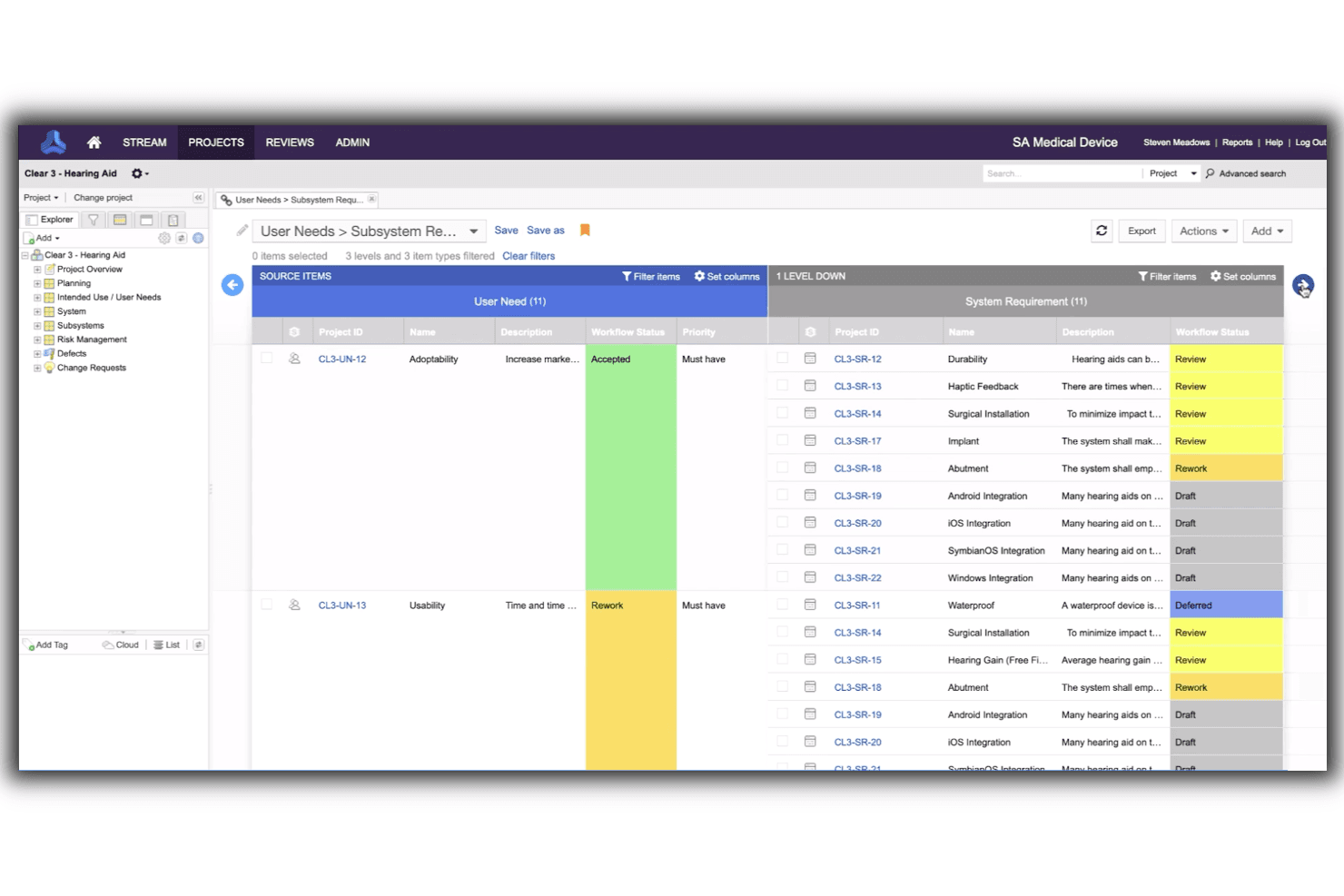
Jama’s live traceability helps teams accurately track the progress of their projects and products. Jama Connect is a requirements management platform built for regulated industries, offering structured requirements authoring, end-to-end traceability, version control, AI-driven quality checks, and cross-functional collaboration across engineering, compliance, and testing workflows.
Who Is Jama Software Best For?
Jama Connect is a strong fit for engineering and product teams in regulated industries—think medical devices, aerospace, or automotive—where traceability between requirements, tests, and compliance standards isn't optional.
Why I Picked Jama Software
Jama Connect earns its spot on my shortlist because it's the only tool I've seen that visually maps the connections between regulations, requirements, and tests in a single diagram. I love that when a regulation changes, Jama's impact analysis immediately shows which requirements and test cases are affected downstream. Its AI-powered Jama Connect Advisor also checks your requirements against INCOSE and EARS writing standards as you work, which is genuinely useful for teams writing safety-critical specs.
Jama Software Key Features
- Document View: Write, edit, and review requirements in a single screen that combines item-based management with a familiar document layout.
- Requirements reuse library: Catalog and pull from a shared library of pre-approved requirements to reduce duplication across projects.
- Baselines and branching: Capture the exact state of requirements at any milestone or release, and branch separately for product variants or new versions.
- Test case generation: Generate traceable test cases directly from requirements using AI, then build test plans and log defects within the same platform.
Jama Software Integrations
Jama Connect offers documented integrations through Jama Connect Interchange for Jira, Excel, ReqIF, Datatap, MCP, and webhooks, plus Azure DevOps connectivity. It also provides a REST API for custom integrations.
Pros and Cons
Pros:
- AI checks requirement quality against INCOSE standards
- Baselines and branching preserve release-specific requirement history
- Visual traceability connects requirements, tests, and regulations
Cons:
- PRD workflows feel heavy for small teams
- Document exports can be cumbersome for reviews
Learn more about Jama Software: Best for ECAD integration with live project sync
- 30-day free trial + free demo available
- From $995/year (billed annually)
Visit WebsiteCustomer Rating:4.6/5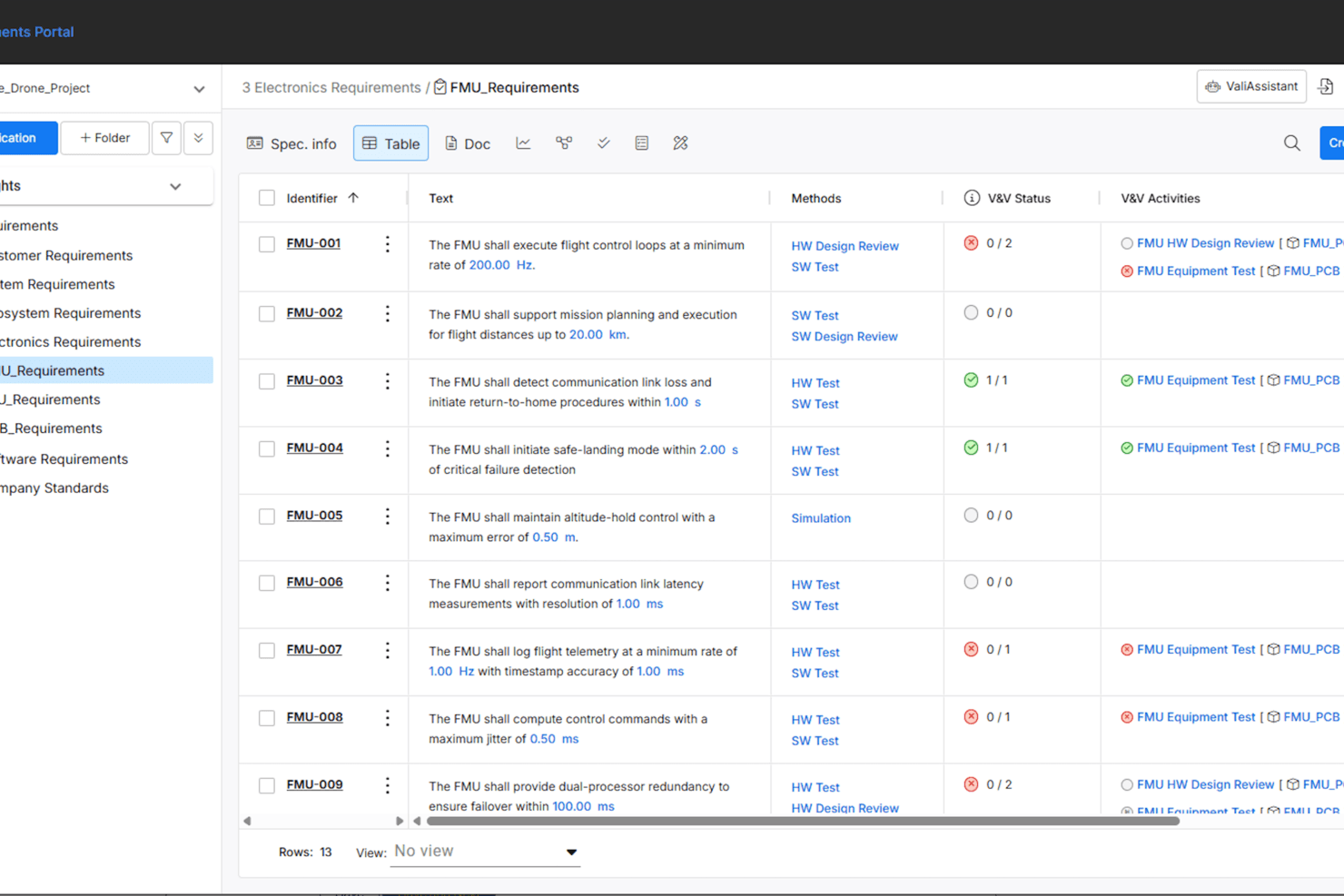
Requirements Portal product requirements dashboard with structured requirement entries, testing methods, and verification activity tracking. Requirements Portal is a requirements management platform designed for engineering and product teams who need structured collaboration, traceability, and integration with design tools to manage complex product development workflows.
Who Is Requirements Portal Best For?
Engineering and product teams in electronics or manufacturing who need structured requirements management and integration with design workflows.
Why I Picked Requirements Portal
Requirements Portal earns its spot as one of the best on my shortlist because my team can sync requirements directly with our ECAD projects in real time. I like how changes in the requirements are instantly reflected in the design environment, which keeps everyone on the same page. My team is able to link requirements to specific schematic elements and track implementation progress without manual updates.
Requirements Portal Key Features
- Requirements traceability: Track every requirement from initial capture through to implementation and testing.
- Version control: Maintain a complete history of changes to requirements with the ability to revert or compare versions.
- Custom workflow automation: Configure approval processes and status transitions to match your team’s requirements process.
- Audit trails: Automatically log all changes and user actions for compliance and accountability.
Requirements Portal Integrations
Integrations include Altium Designer, Altium 365, Altium Develop, Altium Agile Teams, and Altium Agile Enterprise. Native integrations are primarily within the Altium ecosystem, and an API is available for custom integrations.
Pros and Cons
Pros:
- Built-in requirements traceability matrix
- Deep integration with Altium Designer and Altium 365
- AI-powered requirements breakdown and mapping
Cons:
- Advanced features require an Altium subscription
- Free plan only available as a 30-day trial
Learn more about Requirements Portal: Best for intuitive change control
- Free demo available
- Pricing upon request
Visit WebsiteCustomer Rating:4.7/5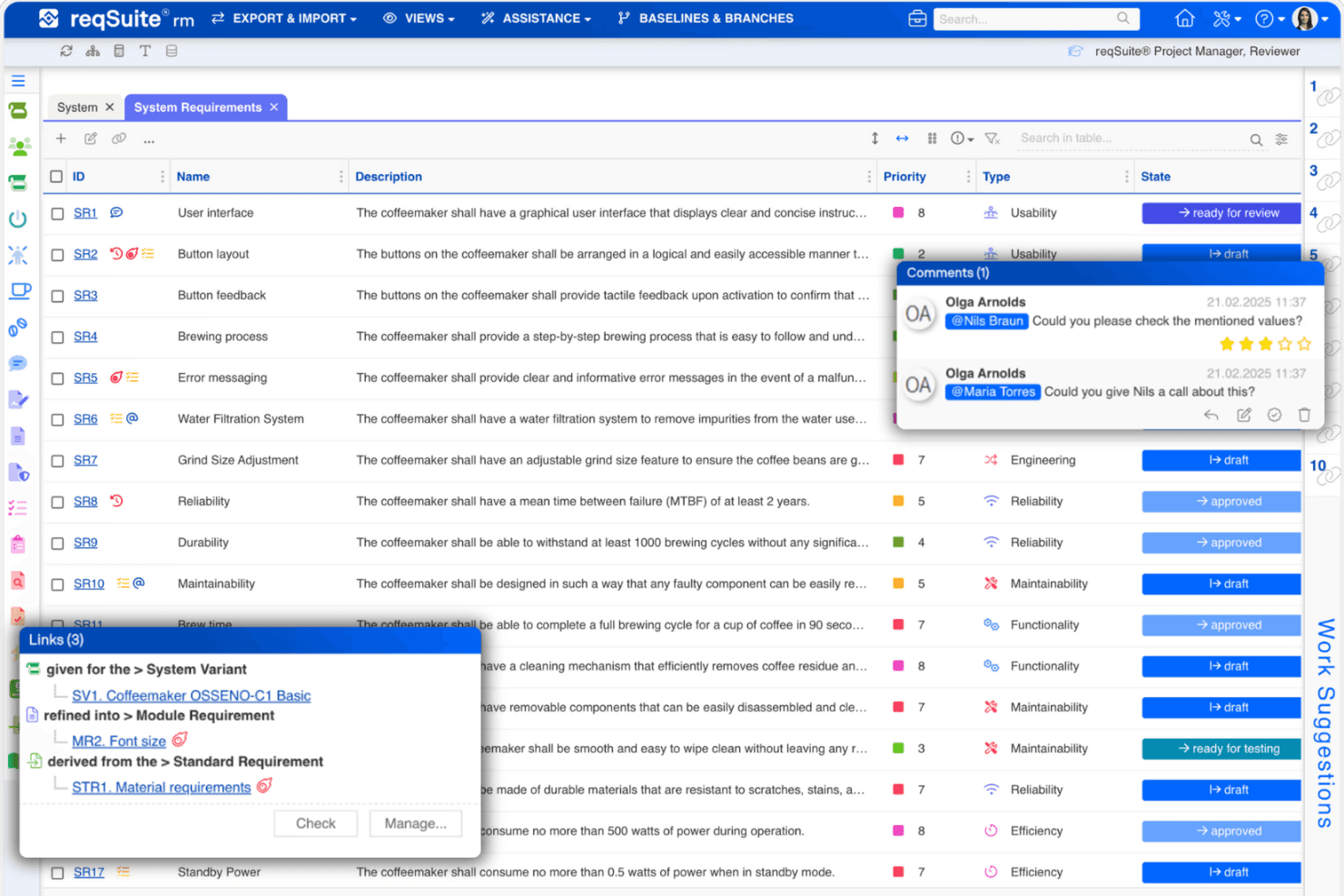
reqSuite® rm system requirements list with comments and trace links. reqSuite® rm is a requirements management tool that structures and versions requirements across the full product lifecycle, with built-in traceability, Jira integration, and auto-generated project documents.
Who Is reqSuite® rm Best For?
reqSuite® rm is a strong fit for engineering and product teams in regulated industries like automotive, medtech, and aerospace that need structured traceability across the full development lifecycle.
Why I Picked reqSuite® rm
reqSuite® rm earns its spot on my shortlist because its change control isn't just a log—it's a structured workflow that ties every requirement change to its downstream impact on test cases, risks, and solution concepts. I particularly like how the layered stakeholder-to-requirement hierarchy makes it easy to trace exactly what changed, when, and why across the full lifecycle. For teams working under ISO 26262 or DO-178C, that kind of controlled traceability isn't optional, and reqSuite® rm handles it well.
reqSuite® rm Key Features
- Layered requirement hierarchy: Structures requirements across a stakeholder → need → topic → requirement hierarchy so every item has clear context and ownership.
- Auto-generated project documents: Produces proposals, technical concepts, and reports in your corporate design directly from your requirements data.
- AI-supported requirement guidance: Walks users through writing requirements to catch ambiguous or missing details before they cause problems downstream.
- Free read-only licenses: Gives reviewers and stakeholders access to view requirements without counting against your named or floating license quota.
reqSuite® rm Integrations
reqSuite® rm integrates with Jira through two-way synchronization or one-way export, including mapped requirement types, fields, assignees, tasks, and statuses. Jira is its only publicly documented integration.
Pros and Cons
Pros:
- Custom templates fit varied documentation workflows
- Regulated teams can connect requirements to tests
- Clear stakeholder-to-requirement hierarchy supports traceability
Cons:
- Exported reports can feel cumbersome and dated
- Advanced configuration takes time to master
Learn more about reqSuite® rm: Best for variant and reuse-driven requirements
- 30-day free trial + free demo available
- Pricing upon request
Visit WebsiteCustomer Rating:4.3/5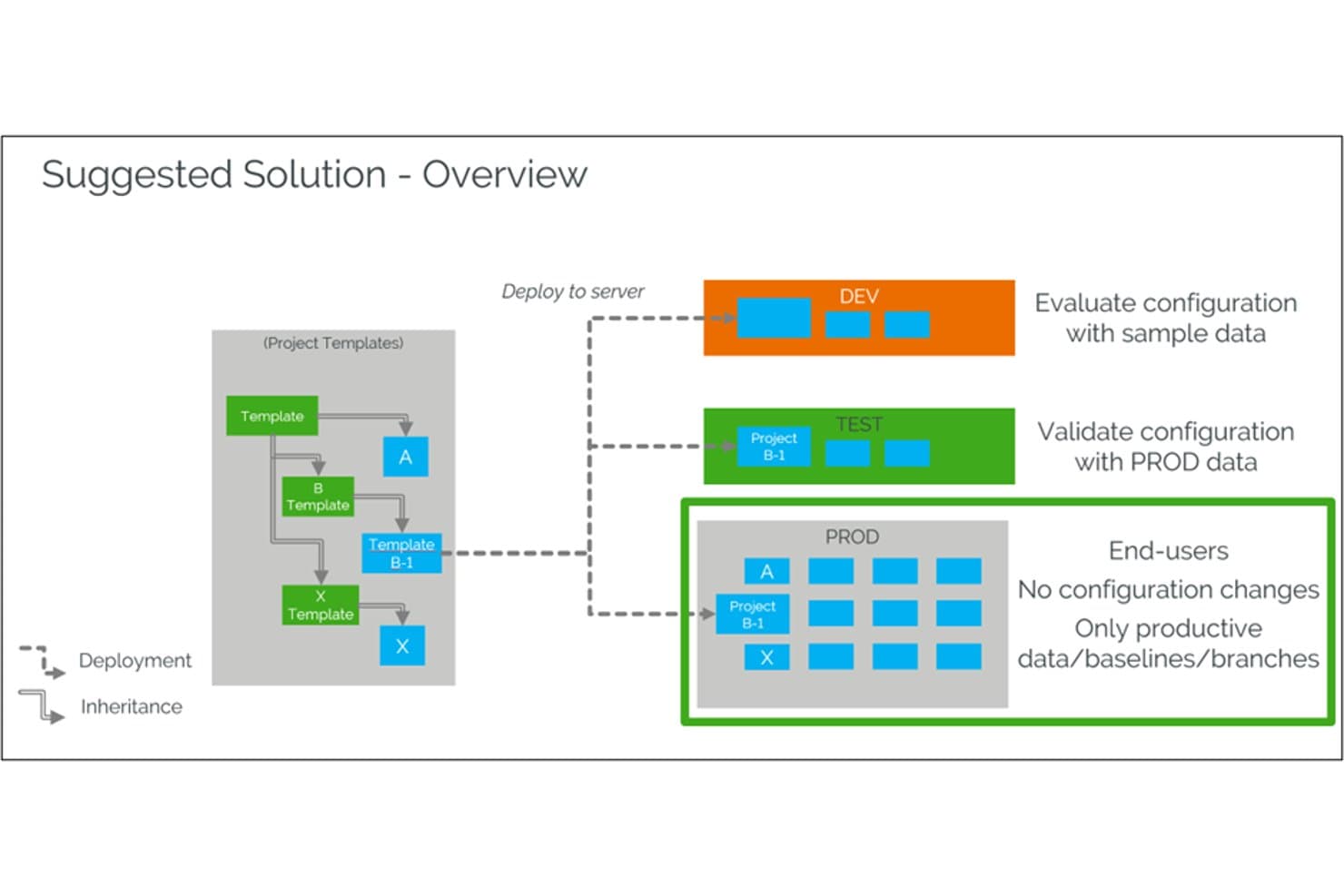
codebeamer structures multi-environment deployments across DEV, TEST, and PROD. codebeamer is an application lifecycle management platform that combines requirements management, end-to-end traceability, test management, and agile planning with built-in support for product variants and module reuse.
Who Is codebeamer Best For?
codebeamer is a strong fit for engineering-led teams in regulated industries like automotive, aerospace, and medical devices that need to manage complex product variants and reuse requirements across multiple product lines.
Why I Picked codebeamer
I've included codebeamer in my top picks because it's the only tool on this list built specifically around product variants and module reuse. If your team manages multiple product lines, like automotive ECU variants or medical device configurations, Product Line Engineering lets you define shared requirement modules once and reuse them across variants without duplicating work. Paired with end-to-end traceability that spans requirements, code, and test, it keeps every variant's compliance trail intact automatically.
codebeamer Key Features
- AI requirement writing: A paid add-on that uses generative AI to draft and refine requirements, flag vague wording, and surface traceability insights.
- Compliance-aligned templates: Ready-made, fully customizable templates built to industry standards like ISO 26262, DO-178C, and FDA 21 CFR Part 820.
- Immutable baselines: Once set, baselines can't be modified, creating a locked audit trail that supports regulated-industry reviews.
- Agile planning tools: Built-in kanban boards, backlog management, and release planning sit alongside your requirements in the same platform.
codebeamer Integrations
codebeamer offers six documented native integrations, including Windchill, Jira, Git, IBM Rhapsody, Jenkins, and Azure Pipeline. These connections link requirements with PLM, development, and CI/CD workflows.
Pros and Cons
Pros:
- Immutable baselines strengthen audit readiness
- Reusable modules reduce duplicate variant requirements
- End-to-end traceability supports regulated product development
Cons:
- Collaboration lacks confirmed real-time co-authoring tools
- Complex setup can slow team adoption
Learn more about codebeamer: Best for end-to-end ALM traceability
- Free 30-day trial available
- From $41.20/user/month (billed annually)
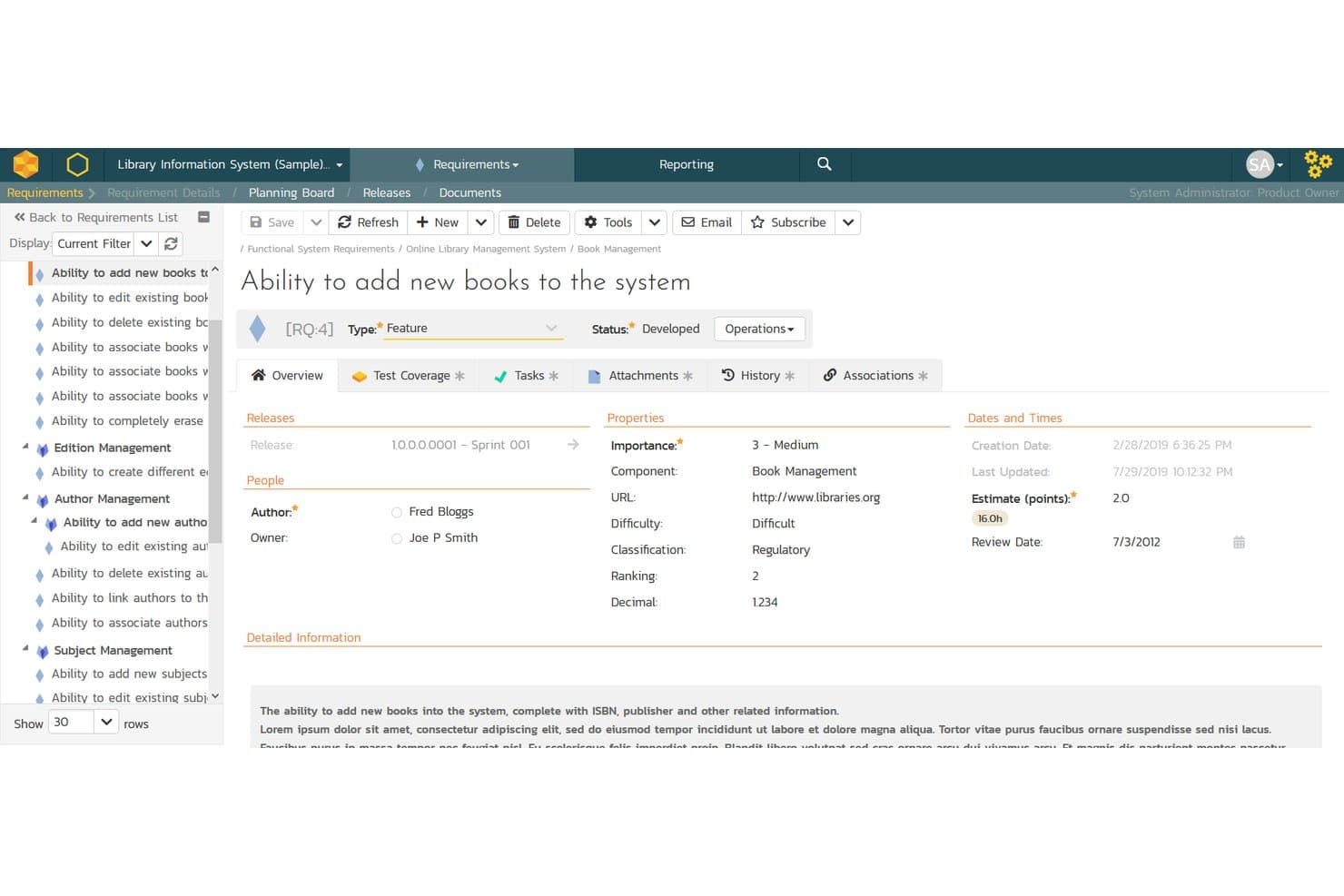
SpiraTeam lets users define and track detailed product requirements with metadata. SpiraTeam is an application lifecycle management (ALM) platform that combines requirements documentation, test case management, defect tracking, and end-to-end traceability across tasks, code, and releases.
Who Is SpiraTeam Best For?
SpiraTeam is a strong fit for teams in regulated industries—like healthcare, aviation, or finance—where audit trails, e-signatures, and end-to-end traceability aren't optional.
Why I Picked SpiraTeam
SpiraTeam earns its spot on my shortlist because no other tool on this list traces a requirement from initial capture all the way through test execution, defect logging, and source code commits in a single environment. I particularly like the bi-directional traceability matrix, which lets you see exactly which test cases cover a given requirement and which defects tie back to it. When a test fails, SpiraTeam surfaces the impacted requirements immediately, so you're never guessing where a gap lives.
SpiraTeam Key Features
- Requirements document view: Scrolls through all requirement details—ID, name, description, status, priority, embedded tables, and process flows—in a single consolidated view.
- Mind-map view: Displays requirement hierarchies, associations, and dependency arrows color-coded by priority so you can visualize scope at a glance.
- AI-powered artifact generation: Inflectra.ai generates user stories, epics, features, test cases, tasks, risks, and BDD scenarios directly from your requirements.
- Custom fields per requirement type: Each requirement supports up to 99 custom fields—including text, list, date, user, and numeric types—defined at the template level and reused across projects.
SpiraTeam Integrations
SpiraTeam integrations include Jira, Azure DevOps, GitHub, GitLab, Jenkins, Visual Studio, and Eclipse. Jira and Azure DevOps connectivity uses plug-ins or the DataSync add-on, while code and CI integrations support requirements traceability.
Pros and Cons
Pros:
- Mind maps clarify hierarchical product scope
- Audit trails support regulated requirements workflows
- Requirements traceability spans tests, defects, and code
Cons:
- Real-time collaborative editing isn’t available
- PRD-specific templates receive limited support
Learn more about SpiraTeam: Best for requirements at regulated enterprise scale
- Not available
- Pricing upon request
Visit WebsiteCustomer Rating:1/5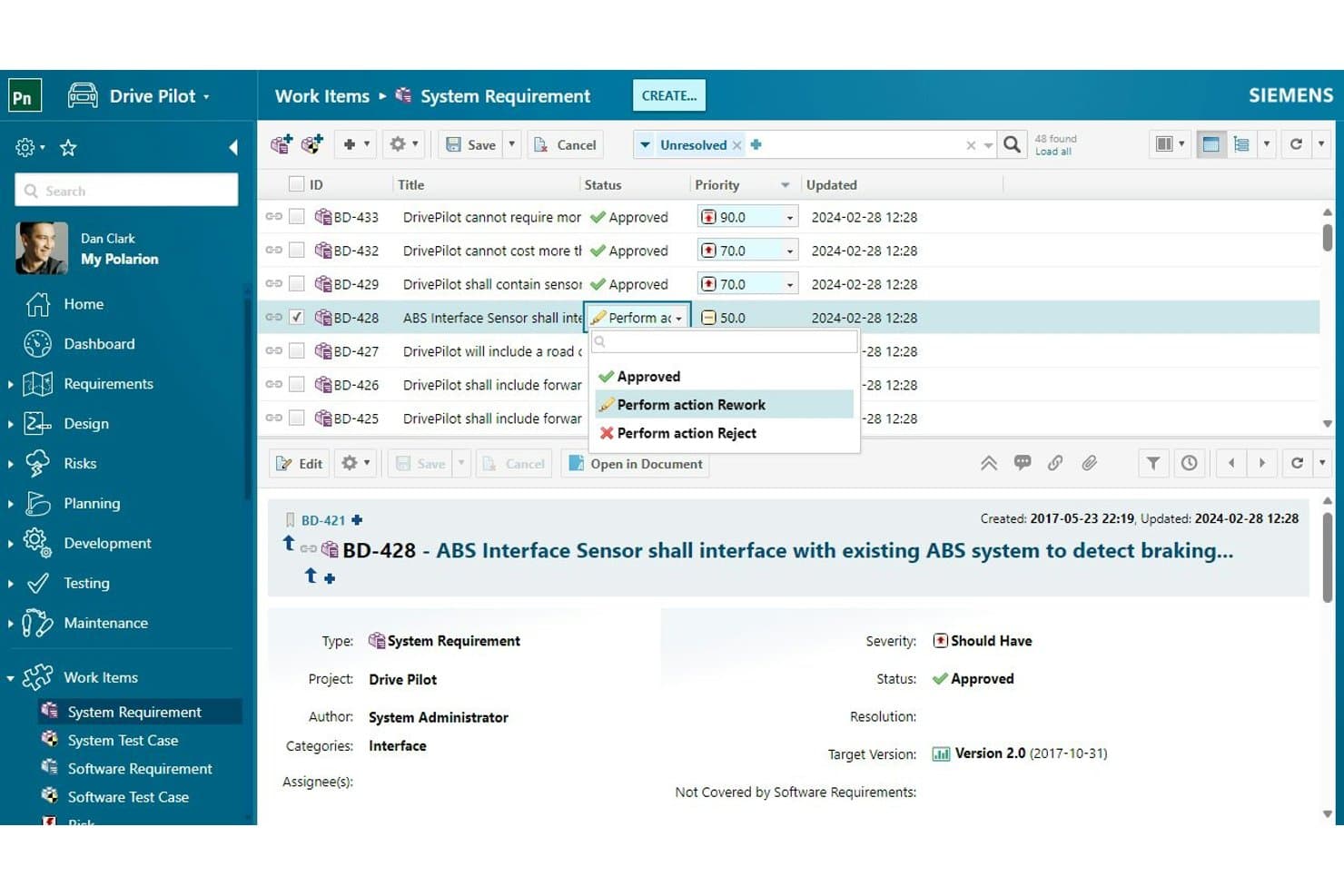
Polarion lets users manage and update system requirements with workflow actions. Polarion is an application lifecycle management (ALM) platform from Siemens that combines structured requirements authoring via LiveDocs, end-to-end traceability, version control, and collaborative review workflows in a single repository.
Who Is Polarion Best For?
Polarion is a strong fit for business analysts and engineering leads in regulated industries—think aerospace, automotive, or medical devices—who manage large-scale requirements under strict compliance demands.
Why I Picked Polarion
Polarion earns its spot on my shortlist because no other tool I've reviewed handles requirements at enterprise scale quite like this. LiveDocs lets multiple authors work inside a single structured specification where every paragraph carries its own ID and traceability link, which matters enormously when you're managing submissions for FDA or aerospace audits. I'm also impressed by the Derived Documents feature, which pushes updates from a master regulatory spec into branched project copies automatically.
Polarion Key Features
- Import Wizard: Pulls requirements and test cases directly from MS Word and Excel files, with export support for offline editing.
- Electronic signatures: Configurable approval workflows with formal e-signature support for regulated review and sign-off processes.
- "Time machine" reporting: Historical reporting that reconstructs how a project looked at any earlier point in time, with full audit trails.
- Polarion Copilot quality checks: Scans requirements against the INCOSE standard, flags duplicates, and checks linked items for contradictions or gaps.
Polarion Integrations
Polarion offers native integrations with Jira, Azure DevOps, MATLAB Simulink, HP Quality Center, Git, and SVN. It also supports ReqIF, Java and Web Services APIs, plus marketplace add-ons for Perforce and Plastic SCM.
Pros and Cons
Pros:
- Audit trails support regulated approvals
- Derived Documents simplify requirements reuse
- LiveDocs make every paragraph traceable
Cons:
- Compliance-heavy workflows overwhelm lightweight product teams
- Large projects can experience slow performance
Learn more about Polarion: Best for AI-drafted specs tied to tasks
- Free plan + free trial + free demo available
- From $12/user/month
Visit WebsiteCustomer Rating:4.7/5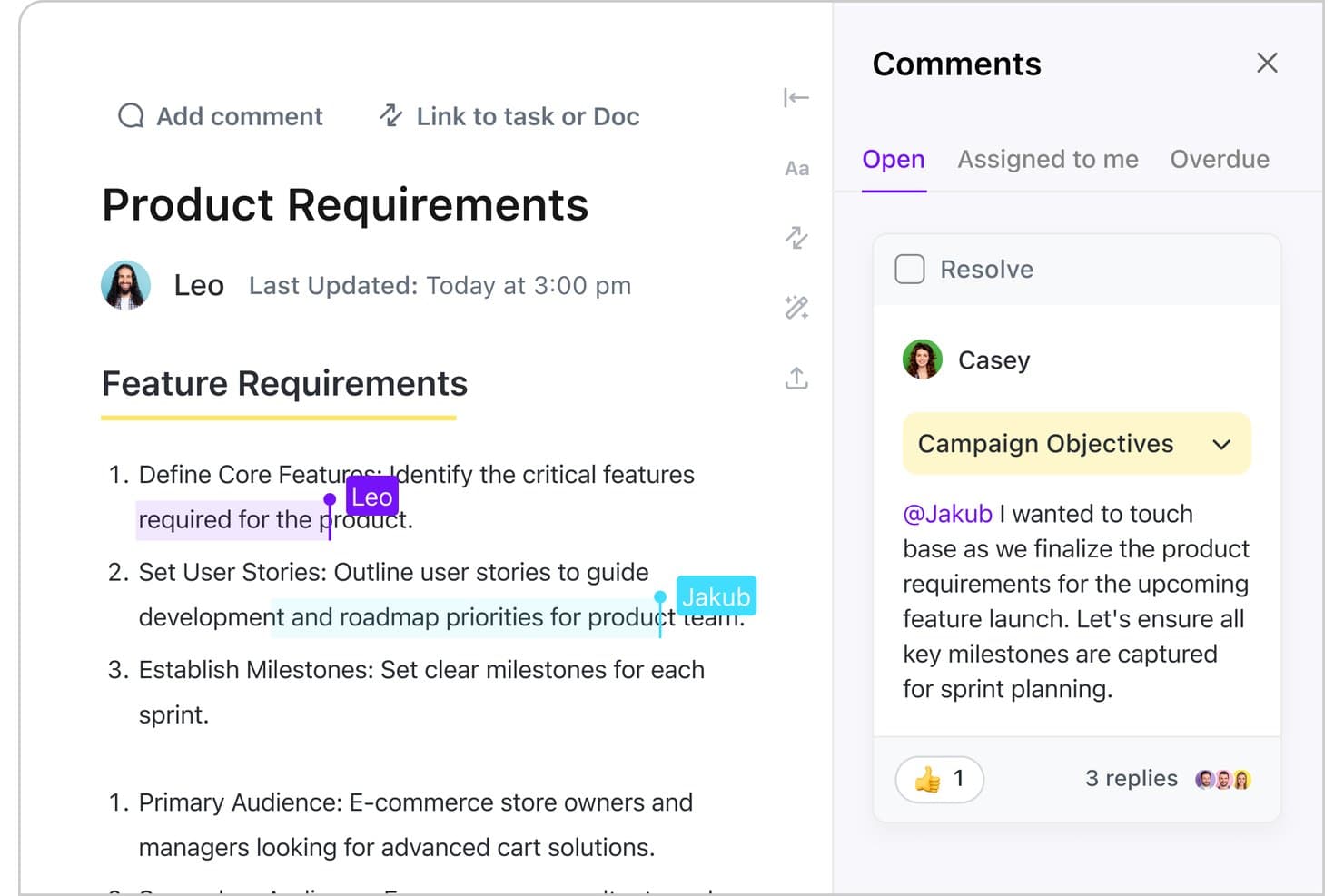
ClickUp lets teams comment and collaborate directly on product requirement docs. ClickUp is an all-in-one work management platform that combines AI-assisted documentation, collaborative Docs, task linking, sprint planning, and roadmapping to support product requirements workflows.
Who Is ClickUp Best For?
ClickUp suits product managers and product owners who want to write, link, and manage requirements inside the same workspace where sprints and roadmaps live.
Why I Picked ClickUp
I've included ClickUp in my top picks because ClickUp Brain can draft a full product spec directly inside a Doc, then link that Doc to the sprint tasks delivering it, all without leaving the workspace. I love that you can turn an inline comment on a requirement into an actionable task in one click, which keeps feedback loops tight during spec reviews. ClickUp's AI "Super Agents" also update Docs automatically as meetings wrap and tasks close, so your requirements stay current without manual effort.
ClickUp Key Features
- Real-time co-editing: Multiple teammates can edit the same Doc simultaneously, with live cursors and threaded inline comments visible to all collaborators.
- Comment-to-task conversion: Any inline comment on a Doc can be converted into a linked task in one click, keeping review feedback directly tied to delivery work.
- Product-specific templates: ClickUp includes ready-made templates for Product Roadmaps, Product Briefs, Release Notes, and Agile Scrum Management to give specs a consistent structure.
- Version history and rollback: Every Doc maintains a full version history, letting you restore any earlier state of a requirement without losing current work.
ClickUp Integrations
ClickUp offers 200+ native integrations, including GitHub, Bitbucket, Figma, Slack, Microsoft Teams, Google Sheets, Sentry, and Zendesk. Webhooks are available on Business, while Enterprise provides API access and higher integration limits.
Pros and Cons
Pros:
- Requirements connect with roadmaps and sprints
- Comments convert directly into delivery tasks
- AI drafts product specs inside Docs
Cons:
- Formal approval workflows aren’t included
- No dedicated requirements traceability matrix
Learn more about ClickUp: Best for requirements traceability inside Jira
- 30 days free trial
- From $10/10 users/year
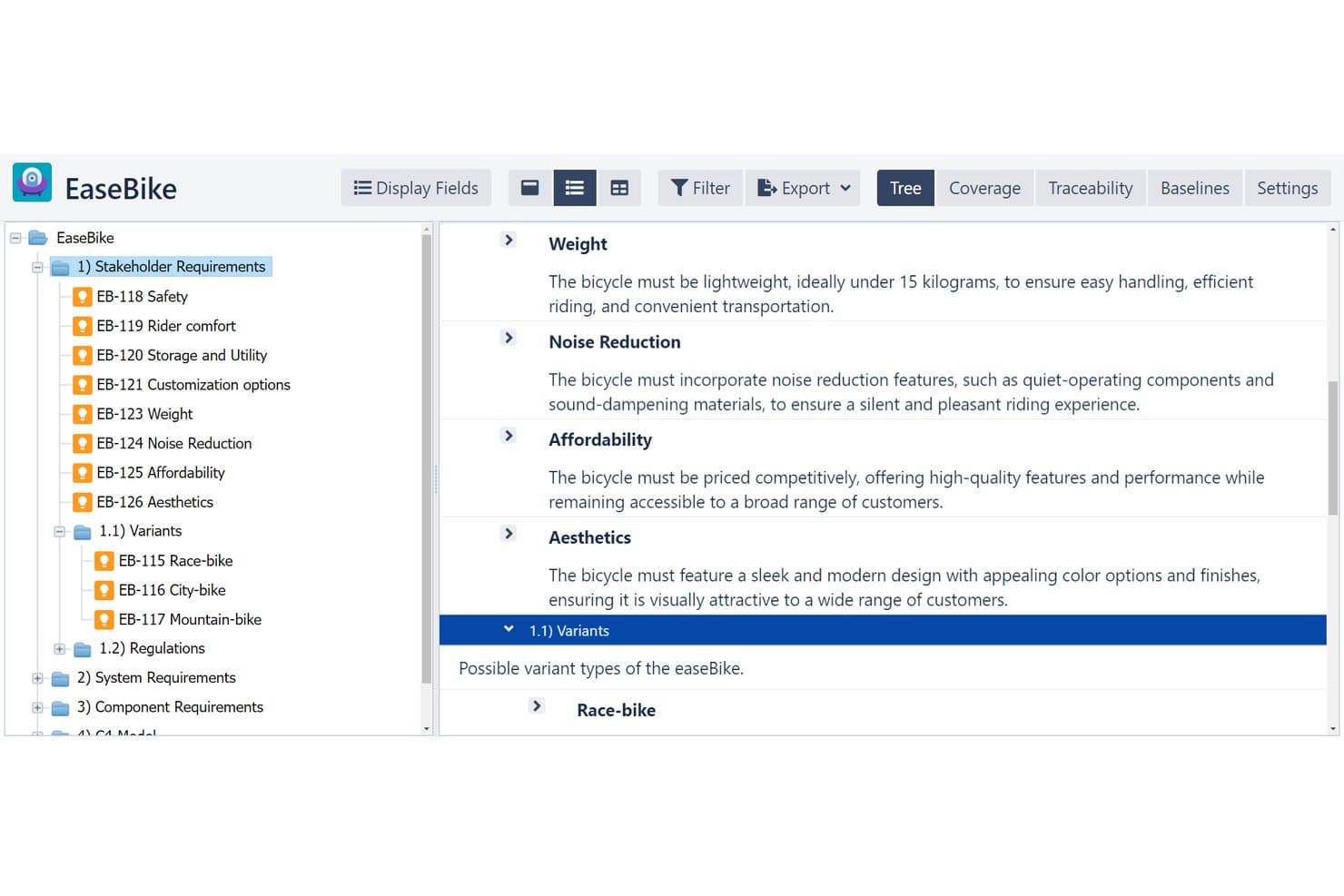
R4J organizes requirements in a hierarchical tree with rich text details. easeRequirements (formerly R4J) is a Jira-native requirements management tool that lets you organize requirements in multi-level tree hierarchies, trace them across the full development lifecycle, and analyze coverage from high-level requirements down to code changes.
Who Is easeRequirements Best For?
easeRequirements is a strong fit for product and engineering teams already working in Jira who need structured requirements traceability without adopting a separate tool.
Why I Picked R4J Requirements Management for Jira
I picked easeRequirements as one of the best because its traceability depth is genuinely hard to replicate without leaving Jira. The Traceability Matrix and Coverage Analysis let you trace requirements from high-level business goals down to code changes, while Suspect Logic automatically flags upstream or downstream requirements when a linked artifact changes. That kind of automated impact analysis is usually reserved for regulated-industry tools like DOORS or Polarion, and here it lives natively inside your existing Jira workflows.
easeRequirements Key Features
- Multi-level tree hierarchy: Organize requirements from multiple Jira projects into a single nested tree structure, with drag-and-drop folder and issue management.
- Excel round-trip add-in: Export requirements to Excel, edit them offline, and sync changes back to Jira in a single click.
- Baselines and revisions: Capture snapshots of your requirements at any milestone, then use Compare Data to review differences between versions side by side.
- Requirements reuse: Pull existing requirements into new projects or product variants as a starting point, rather than building from scratch each time.
R4J Requirements Management for Jira Integrations
R4J Requirements Management for Jira offers native Jira integration, plus a Microsoft Excel add-in for two-way requirement updates and Microsoft Word and Excel exports. Jira Cloud users can also connect supported AI clients through the easeRequirements MCP server.
Pros and Cons
Pros:
- Baselines support milestone-level requirement comparisons
- Suspect Logic flags downstream change impacts
- End-to-end traceability exposes coverage gaps
Cons:
- Formal review sign-offs require Jira workflows
- Jira issue structures limit document-first PRDs
Learn more about R4J Requirements Management for Jira: Best for requirements sign-off inside Azure DevOps
- 30-day free trial + free demo available
- Pricing upon request
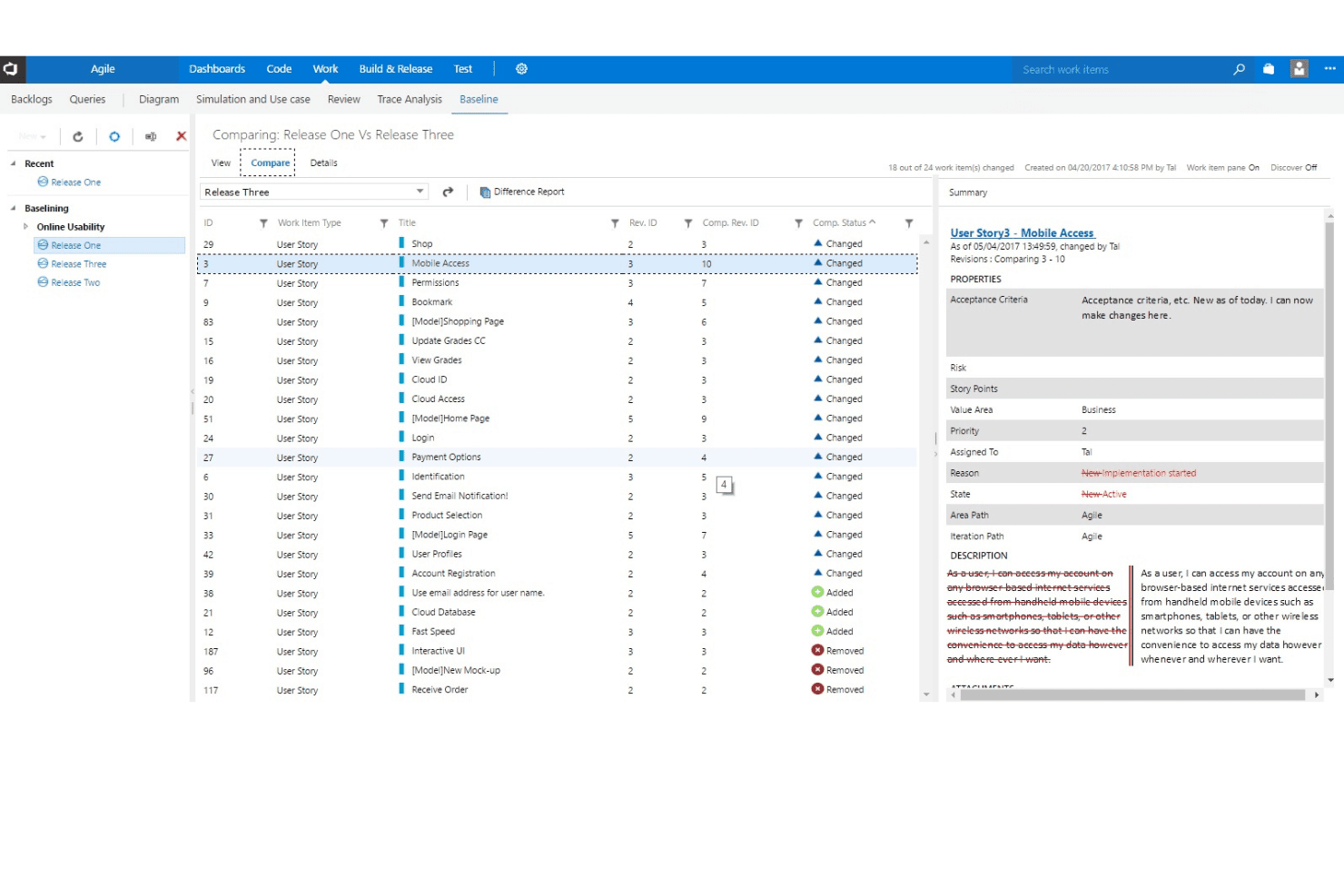
Modern Requirements4DevOps lets users compare baselines across releases side by side. Modern Requirements4DevOps is a requirements management add-on that lives natively inside Azure DevOps, offering structured documentation, bi-directional traceability, formal review and sign-off workflows, version control, and AI-assisted requirements authoring.
Who Is Modern Requirements4DevOps Best For?
Modern Requirements4DevOps is a strong fit for business analysts and engineering leads in regulated industries who need formal requirements sign-off workflows inside Azure DevOps.
Why I Picked Modern Requirements4DevOps
I've included Modern Requirements4DevOps in my top picks because it's the only requirements tool that lives entirely inside Azure DevOps, making formal sign-off feel like a natural part of your existing workflow. I particularly like its Review Management module, which assigns distinct Reviewer and Approver roles, enforces e-signatures with re-authentication, and auto-closes scheduled reviews with a full audit trail. Its immutable baselines then lock those approved requirements to a specific release, giving regulated teams a defensible compliance record without leaving ADO.
Modern Requirements4DevOps Key Features
- Smart Docs: A document-style editor built on ADO work items that supports hierarchy, configurable columns, reusable branded templates, and document comparison.
- Traceability heatmap: A visual matrix that highlights coverage gaps across linked requirements, test cases, and work items for quick impact analysis.
- Virtual Work Items: Extends ADO Test Plans with test points, test runs, and test results to trace requirements all the way through to executed tests.
- AI Edit: A right-click inline editor that rewrites, expands, or analyzes work item text using AI, with support for custom prompts.
Modern Requirements4DevOps Integrations
Modern Requirements4DevOps offers native integration with Azure DevOps, including work items, Azure Test Plans, iterations, and releases. No other native integrations are clearly documented, making it best suited to Azure DevOps-centered teams.
Pros and Cons
Pros:
- Reviewers praise organized change tracking
- Traceability reaches executed test results
- Formal sign-offs preserve compliance audit trails
Cons:
- Change history logs grow unwieldy
- Advanced modules require extra exploration
Learn more about Modern Requirements4DevOps: Best for requirements in safety-critical industries
- 30 days free trial
- Pricing available upon request
Visit WebsiteCustomer Rating:4.7/5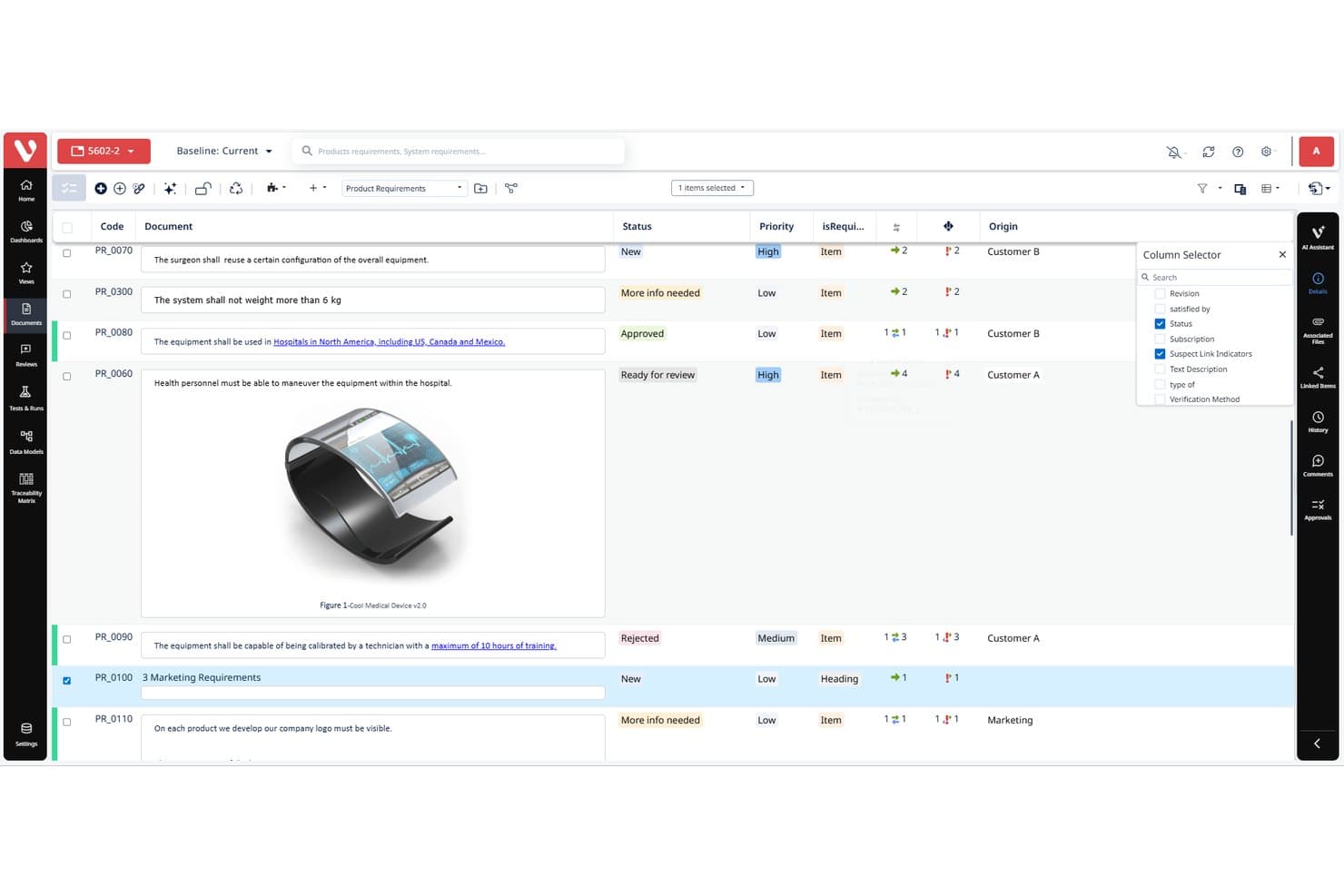
Visure Requirements organizes product requirements with status, priority, and traceability columns. Visure Requirements is an AI-powered requirements management and ALM platform built for regulated industries, offering end-to-end traceability, baseline management, impact analysis, and integrations with tools like Jira, IBM DOORS, and Azure DevOps.
Who Is Visure Requirements Best For?
Visure Requirements is built for engineering teams in regulated industries like aerospace, medical, and automotive who need end-to-end requirements traceability and compliance support.
Why I Picked Visure Requirements
I've included Visure Requirements in my top picks because it's purpose-built for teams working under strict compliance standards like DO-178C or ISO 26262, where traceability isn't optional. Its end-to-end traceability matrix links risks, requirements, and tests across projects, and the AI assistant VIVIA can generate test cases or flag ambiguous requirements, with a human approval gate before any baseline updates.
Visure Requirements Key Features
- Baseline management: Create versioned snapshots of your requirements set and compare them across project stages to track exactly what changed and when.
- Reuse library: Store approved requirements in a shared catalog so teams can pull validated content into new projects without starting from scratch.
- Requirements quality analysis: Automatically scans requirements and flags items that are ambiguous, incomplete, or inconsistent before they cause downstream problems.
- Configurable data models: Define custom attributes, hierarchies, and relationships to match your team's specific documentation and compliance structure.
Visure Requirements Integrations
Visure Requirements offers 30+ integrations, including native two-way sync with Jira, IBM DOORS, GitLab, GitHub, and Azure DevOps, plus Microsoft Word, Excel, ReqIF, and Confluence. Its REST API supports custom integrations.
Pros and Cons
Pros:
- AI flags ambiguity and drafts test cases
- Baselines clarify requirement changes and history
- Deep traceability supports regulated product development
Cons:
- Document exports can be difficult
- Configuration can take substantial setup time
Learn more about Visure Requirements:
Diğer Ürün Gereksinimleri Yazılımları
Kısa listeme giremeyen ancak yine de göz atmaya değer bazı ek ürün gereksinimleri yazılımı seçenekleri şunlardır:
- 11Modern RequirementsBest for traceable docs in DevOps workflows
- 12ProductboardBest for feedback-linked specs and roadmaps
- 13Aha!Best for strategy-linked product requirements
- 14LinearBest for dev-linked specs and PRDs
- 15ReqViewBest for regulated-industry requirements traceability
- 16SpiraTestBest for QA-linked requirements traceability
- 17CradleBest for engineering-led lifecycle traceability
How I Evaluate Product Requirements Software
I split my evaluation into three parts: core functionality (how well a tool lets you write structured PRDs and trace requirements to dev tickets), standout features like AI-assisted drafting, and beyond-features factors like onboarding support and pricing. Core functionality carries the most weight.
Core Functionality (Table Stakes For This List)
When I'm selecting tools for my list, I score each one on a scale from 0 (does not offer the functionality) to 5 (excels in this area) for each core functionality listed below. I then convert the total into a percentage to help assess each tool's overall fit, with extra weight on any functionalities I've deemed essential.
- Requirements Documentation (Essential): I check whether the tool supports structured PRDs with sections, custom fields, and flexible formats like user stories or specs—not just blank docs.
- Collaborative Editing & Feedback: Real-time co-editing, threaded comments, and stakeholder tagging matter here, especially for async reviews across time zones.
- Traceability & Linking: I look for tools that link requirements to epics, dev tickets, and test cases so you can track a feature from concept through release.
- Templates & Structuring Tools: Customizable, reusable templates that scale across products and teams tell me the tool is built for real product orgs, not just one-off docs.
- Version History & Change Tracking: Detailed change logs with diff views and rollback options are what I evaluate, since requirements shift constantly through discovery.
- Integration With Dev/PM Tools: I check for native connections to tools like Jira, Azure DevOps, or Figma, plus API access for teams with custom workflows.
Once I have a list of tools that meet the criteria, I consider what sets each platform apart.
Differentiating Factors (What Sets Vendors Apart)
Here's how I compare and contrast different vendors:
Standout Features
AI requirement generation is where I see the biggest gap between tools. I evaluate whether the AI can turn raw meeting notes or customer feedback into structured user stories—not just autocomplete sentences. Requirement quality analysis pairs well here, since tools that flag vague or conflicting language before handoff to engineering save teams costly rework mid-sprint. I also check for approval workflows that mirror how sign-offs actually happen, like staged reviews where legal or compliance stakeholders gate specific requirement types before dev picks them up.
Beyond Features
I evaluate how well a tool scales across multiple products and business units, since teams that outgrow a single-workspace setup often hit permission and governance headaches. Ecosystem fit matters just as much—I check whether integrations with tools like Jira or Figma rely on native two-way sync or shallow third-party connectors that break during sprint planning. I also look at onboarding support, because migrating hundreds of existing requirement docs into a new system without dedicated guidance usually stalls adoption before it starts.
Ürün Gereksinimleri Yazılımı Nasıl Seçilir?
Uzun özellik listeleri ve karmaşık fiyatlandırma yapılarına kendinizi kaptırmanız kolaydır. Kendinize özgü yazılım seçim sürecinizi yürütürken odaklanmanıza yardımcı olmak için göz önünde bulundurmanız gereken faktörlerin bir kontrol listesini aşağıda bulabilirsiniz:
| Faktör | Göz önünde bulundurulacaklar |
|---|---|
| FaktörÖlçeklenebilirlik | Göz önünde bulundurulacaklarYazılımın ekibinizle birlikte büyüyüp büyüyemeyeceğini değerlendirin. Daha fazla kullanıcıyı veya daha büyük projeleri yönetebilecek mi? Esnek fiyatlandırma planları ve gerektiğinde özellik ekleme olanağı arayın. |
| FaktörEntegrasyonlar | Göz önünde bulundurulacaklarYazılımın ekibinizin hâlihazırda kullandığı araçlarla entegre olup olmadığını kontrol edin. Yaygın entegrasyonlar arasında Jira, Slack ve Microsoft Office bulunur. Sorunsuz veri aktarımı zamandan tasarruf sağlayabilir ve hataları azaltabilir. |
| FaktörÖzelleştirilebilirlik | Göz önünde bulundurulacaklarYazılımı iş akışlarınıza uyacak şekilde uyarlayabildiğinizden emin olun. Alanları, iş akışlarını veya panoları özelleştirebiliyor musunuz? Süreçlerinize uyum sağlamayacak katı sistemlerden kaçının. |
| FaktörKullanım kolaylığı | Göz önünde bulundurulacaklarKullanıcı arayüzünü ve gezinmeyi değerlendirin. Sezgisel ve öğrenmesi kolay mı? Karmaşık bir araç, benimsenmeyi yavaşlatabilir ve kullanıcıları hayal kırıklığına uğratabilir. |
| FaktörUygulama ve işe alıştırma | Göz önünde bulundurulacaklarKurulum için gereken kaynakları değerlendirin. Eğitim materyalleri, öğreticiler veya destek mevcut mu? Sorunsuz bir işe alıştırma süreci, daha hızlı değer elde edilmesini sağlayabilir. |
| FaktörMaliyet | Göz önünde bulundurulacaklarFiyatlandırma modellerini ve toplam sahip olma maliyetini karşılaştırın. Kullanıcı ücretleri, eğitim veya destek gibi gizli maliyetleri göz önünde bulundurun. Fiyat ile ihtiyaç duyduğunuz özellikler arasında bir denge kurmayı hedefleyin. |
| FaktörGüvenlik önlemleri | Göz önünde bulundurulacaklarMevcut güvenlik önlemlerini inceleyin. Yazılım GDPR veya SOC 2 gibi standartlara uyuyor mu? Verilerinizin ihlallere ve yetkisiz erişime karşı korunacağından emin olun. |
| FaktörDestek kullanılabilirliği | Göz önünde bulundurulacaklarSunulan destek düzeyini değerlendirin. 7/24 yardım, canlı sohbet veya özel bir müşteri yöneticisi var mı? Güvenilir destek, kritik proje aşamalarında çok önemli olabilir. |
Ürün Gereksinimleri Yazılımı Nedir?
Ürün gereksinimleri yazılımı, bir ürünün ne yapması gerektiğini belgelemenizi, düzenlemenizi ve yönetmenizi sağlayan bir araçtır. Ürün yöneticileri, tasarımcılar ve mühendisler bu yazılımı gereksinimleri tek bir yerde izlemek, ilgili belgeleri birbirine bağlamak ve herkesi gerçek zamanlı olarak bilgilendirmek için kullanır. Bu, ekibinizin odaklanmasını sağlar, ayrıntıların gözden kaçmasını önlemeye yardımcı olur ve herkesin gerçekte neyin geliştirildiği konusunda anlaşmasını kolaylaştırır.
Özellikler
Ürün gereksinimleri yazılımını seçerken aşağıdaki temel özelliklere dikkat edin:
- İzlenebilirlik: Gereksinimler ile diğer proje unsurları arasındaki ilişkiyi izleyerek hiçbir şeyin gözden kaçmamasını sağlar.
- İş birliği: Ekip üyelerinin gerçek zamanlı olarak birlikte çalışmasını sağlayarak iletişimi ve uyumu geliştirir.
- Raporlama: Proje ilerlemesi ve gereksinimlerin durumu hakkında içgörü sağlamak için ayrıntılı raporlar oluşturur.
- Özelleştirme: Kullanıcıların alanları ve iş akışlarını kendi özel ihtiyaçlarına ve süreçlerine uyacak şekilde uyarlamasını sağlar.
- Entegrasyon: İş akışlarını ve veri paylaşımını kolaylaştırmak için Jira ve Slack gibi diğer araçlara bağlanır.
- Sürüm kontrolü: Gereksinim belgelerindeki değişiklikleri yöneterek düzeltmeleri izlemenizi ve tutarlılığı korumanızı sağlar.
- Uyumluluk yönetimi: Gereksinimlerin sektörel standartlara ve düzenlemelere uygun olmasını sağlamaya yardımcı olur.
- Geri bildirim toplama: Gereksinimleri iyileştirmek ve doğrulamak için paydaşlardan ve kullanıcılardan görüş toplar.
- Önceliklendirme araçları: Proje başarısı için en önemli unsurlara odaklanmak amacıyla gereksinimleri sıralamaya yardımcı olur.
- Güvenlik önlemleri: Şifreleme ve erişim kontrolleri gibi önlemlerle hassas verileri korur.
Faydalar
Ürün gereksinimleri yazılımını uygulamak ekibiniz ve işletmeniz için çeşitli faydalar sağlar. Yararlanabileceğiniz birkaç fayda şunlardır:
- Geliştirilmiş netlik: Açık belgeler ve izlenebilirlik sayesinde herkesin proje hedeflerini anlamasını sağlar.
- Gelişmiş iş birliği: Gerçek zamanlı iletişime ve gereksinimlere ortak erişime olanak tanıyarak ekip çalışmasını kolaylaştırır.
- Artan verimlilik: Otomatik raporlama ve bilgilere kolay erişim sayesinde zamandan tasarruf sağlar ve manuel görevleri azaltır.
- Daha iyi karar verme: Geri bildirim toplama ve önceliklendirme araçlarını kullanarak görevlerin önceliklendirilmesine yardımcı olur ve çabaları en önemli alanlara odaklar.
- Azaltılmış risk: Sürüm kontrolü ve uyumluluk yönetimi özellikleriyle hataları ve gözden kaçan noktaları en aza indirir.
- Ölçeklenebilirlik: Ekibiniz ve projelerinizle birlikte büyür, özelleştirilebilir seçeneklerle değişen ihtiyaçlara uyum sağlar.
- Veri güvenliği: Güçlü güvenlik önlemleriyle hassas bilgileri koruyarak sektörel standartlara uyumluluğu sağlar.
Maliyetler ve Fiyatlandırma
Ürün gereksinimleri yazılımını seçmek, mevcut çeşitli fiyatlandırma modellerinin ve planların anlaşılmasını gerektirir. Maliyetler özelliklere, ekip büyüklüğüne, eklentilere ve diğer unsurlara göre değişir. Aşağıdaki tablo, ürün gereksinimleri yazılımı çözümlerinde yaygın olarak sunulan planları, bunların ortalama fiyatlarını ve tipik özelliklerini özetlemektedir:
Ürün Gereksinimleri Yazılımı İçin Plan Karşılaştırma Tablosu
| Plan Türü | Ortalama Fiyat | Yaygın Özellikler |
|---|---|---|
| Plan TürüÜcretsiz Plan | Ortalama Fiyat$0 | Yaygın ÖzelliklerTemel iş birliği araçları, sınırlı depolama ve topluluk desteği. |
| Plan TürüKişisel Plan | Ortalama Fiyat$5-$25/user/month | Yaygın ÖzelliklerGereksinim belgeleri, temel raporlama ve sınırlı entegrasyonlar. |
| Plan Türüİşletme Planı | Ortalama Fiyat$30-$60/user/month | Yaygın ÖzelliklerGelişmiş izlenebilirlik, özelleştirilebilir iş akışları ve diğer araçlarla entegrasyon. |
| Plan TürüKurumsal Plan | Ortalama Fiyat$70-$120/user/month | Yaygın ÖzelliklerTam uyumluluk yönetimi, kapsamlı özelleştirme seçenekleri ve özel müşteri desteği. |
Ürün Gereksinimleri Yazılımı Hakkında SSS
Ürün gereksinimleri yazılımı hakkında sık sorulan soruların bazı yanıtları aşağıda verilmiştir:
Ürün gereksinimleri yazılımı küçük ekipler için uygun mudur?
Evet, ürün gereksinimleri yazılımı küçük ekipler için uygundur. Birçok araç, farklı ekip boyutlarına hitap eden ölçeklenebilir fiyatlandırma seçenekleri ve özellikler sunar. Küçük ekipler, gelişmiş iş birliğinden ve anlaşılır belgelerden yararlanır. Ekibinizin boyutuna ve bütçesine uygun fiyatlandırma planlarına ve özelliklere sahip çözümleri tercih edin.
Ürün gereksinimleri yazılımı uzaktan çalışmaya yardımcı olabilir mi?
Evet, ürün gereksinimleri yazılımı uzaktan çalışmaya yardımcı olabilir. Ekip üyelerinin gereksinimlere gerçek zamanlı olarak erişebileceği ve bunları güncelleyebileceği merkezi bir platform sağlar. İş birliği araçları ve bulut depolama gibi özellikler, konumdan bağımsız olarak herkesin bağlantıda ve bilgili kalmasını sağlar. Yazılımın uzaktan erişimi ve veri güvenliğini desteklediğinden emin olun.
Ürün gereksinimleri yazılımınız denetimleri veya değişiklik takibini desteklemiyorsa ne olur?
Aracınızda denetim geçmişi veya değişiklik izleme işlevi yoksa, siz ve ekibiniz kimin neyi ve ne zaman değiştirdiğini göstermekte zorlanabilirsiniz. Bu durum kafa karışıklığına, onayların yavaşlamasına veya bağlamın kaybolmasına yol açabilir. Eski sürümleri geri almak ya da gereksinimlerin zaman içinde nasıl geliştiğini anlamak daha zor hale gelir. Düzenlemelere tabi projelerde veya çok sayıda paydaşın bulunduğu projelerde bu durum gecikmelere ve ek işlere neden olabilir.
Birden fazla proje ve ürün gereksinimleri paylaştığında yazılımınız yeniden kullanımı veya sürüm oluşturmayı nasıl ele almalıdır?
Gereksinimleri çoğaltma veya dallandırma olanağına sahip olmak istersiniz; böylece bir proje aynı çalışmayı yeniden yapmak zorunda kalmazken başka bir proje de uygunsuz şekilde farklılaşmaz. Yazılımınız ürün portföyü genelinde gereksinim bileşenlerini sürümlendirmenize veya yeniden kullanmanıza izin vermiyorsa tutarsızlıklar, ek işler ve uyumsuzluk riskiyle karşılaşırsınız. Aracın modüler yeniden kullanımı desteklediğinden ve gereksinimleri kopyaladığınızda veya uyarladığınızda farklılaşmayı takip ettiğinden emin olun.