

Yüksek sadakatli prototipleme araçları, son kullanıcı deneyimini yakından taklit eden etkileşimli ve gerçekçi dijital ürün maketleri oluşturmanıza olanak tanır. Tasarımlarınızı hayata geçirmenin, karmaşık etkileşimleri test etmenin veya geliştirme sürecinden önce paydaşlarla iş birliği yapmanın yollarını arıyorsanız bu araçlar vazgeçilmezdir. Doğru prototipleme aracını seçmek, ekibinizin fikirleri doğrulamasına, kullanılabilirlik sorunlarını erkenden yakalamasına ve tasarım amacını net bir şekilde iletmesine yardımcı olabilir. Bu listede, özellikleri karşılaştırabilmeniz ve iş akışınıza en uygun seçeneği belirleyebilmeniz için 2026’nın en iyi prototipleme araçlarını bulacaksınız.
Why Trust Our Software Recommendations
6,700+
Reviews
20
Industry experts
16+
Evaluation factors
14
Years
Our team has been testing and reviewing software since 2012. As product managers ourselves, we know how difficult—and important—it is to choose the right software.
For this guide, we evaluated tools using hands-on testing and independent research, scoring tools using our selection criteria.
Our reviews reflect our human editorial judgment, not a sales pitch.
Expert reviewers:
- Andrew LumbySenior TPM
- Cristiano ValimSenior UI/UX Lead


Yüksek Sadakatli Prototipleme Araçları Karşılaştırma Tablosu
Bu karşılaştırma tablosu, en iyi yüksek sadakatli prototipleme aracı seçimlerimin fiyatlandırma ayrıntılarını özetler.
Score legend (out of 5)
- Excellent4.5–5
- Good4–4.4
- Average3–3.9
- Below average2–2.9
- Poor1–1.9
Sorted by: Default
| Tool | Starting Price | Website | |||||||
|---|---|---|---|---|---|---|---|---|---|
Best for all-in-one prototyping and dev handoff | Not rated | 4 | 4 | Not rated | 4 | 2 | 4 | $4.95/user/month Free plan + 30-day free trial + free demo available | Website |
Best for prototyping with production-ready code | 3.3 out of 5 | 3 | 4 | 1 | 5 | 4 | 3 | $15/month Free plan available | Website |
Best for macOS-native design system handoff | Not rated | 4 | 4 | Not rated | 5 | 2 | 4 | $12/user/month 30-day free trial available | Website |
Best for no-code mobile gesture prototyping | 3.0 out of 5 | 1 | 5 | 1 | 2 | 5 | 4 | $24/user/month 15-day free trial | Website |
Best for AI-generated working prototypes | 3.2 out of 5 | 3 | 4 | 1 | 4 | 3 | 4 | $25/month Free plan + free demo available | Website |
Best for cross-functional prototype collaboration | 4.3 out of 5 | 5 | 5 | 1 | 5 | 5 | 5 | $3/user/month Free plan available | Website |
Best for prototyping with real coded components | 4.0 out of 5 | 5 | 5 | 1 | 5 | 4 | 4 | $49/user/month Free plan + 14-day free trial + demo available | Website |
Best for user flow diagrams tied to navigation | 3.3 out of 5 | 4 | 4 | 1 | 3 | 4 | 4 | $19/user/month Free plan + 10-day trial available | Website |
Best for logic-driven, variable-rich prototyping | Not rated | 4 | 5 | Not rated | 3 | 5 | 4 | $29/user/month Free plan + 30-day free trial available | Website |
Best for native sensor and hardware prototyping | 3.7 out of 5 | 3 | 5 | 3 | 4 | 5 | 2 | $25/user/month Free plan + free demo available | Website |


Yüksek Sadakatli Prototipleme Araçları İncelemeleri
Aşağıda, kısa listeme giren yüksek sadakatli prototipleme araçlarına ilişkin ayrıntılı özetlerimi bulabilirsiniz. İncelemelerim, ihtiyaçlarınıza en uygun aracı bulmanıza yardımcı olmak için her aracın özelliklerine, en iyi kullanım alanlarına ve entegrasyonlarına ayrıntılı bir bakış sunar.
 Best for all-in-one prototyping and dev handoff
- Free plan + 30-day free trial + free demo available
- From $4.95/user/month (billed annually)
Visit WebsiteCustomer Rating:4.5/5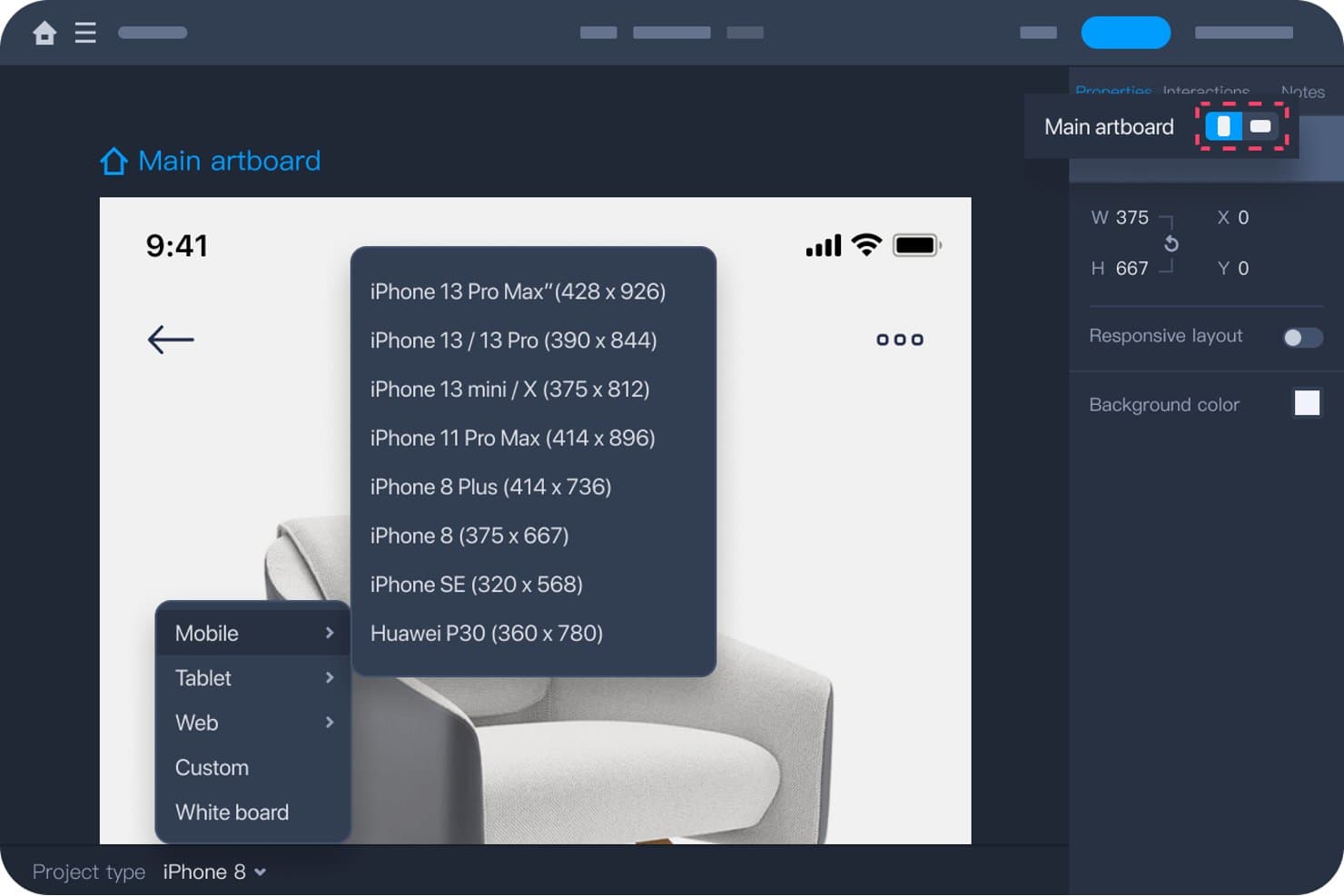
Mockplus lets users choose device presets for high-fidelity prototyping. Mockplus RP is a browser-based, no-code prototyping tool that covers wireframes, high-fidelity interactive prototypes, design systems, and developer handoff in a single platform.
Who Is Mockplus Best For?
Mockplus RP suits cross-functional product teams that need wireframing, hi-fi prototyping, and developer handoff in one place without heavy design tool expertise.
Why I Picked Mockplus
I picked Mockplus RP as one of the best because it genuinely handles the full prototyping-to-handoff pipeline without forcing you to switch tools. I love that development mode auto-generates specs and code snippets in CSS, Android XML, and iOS Swift directly from your prototype, so developers aren't chasing down measurements. Shared design system libraries via Mockplus DS also push CSS variables and style tokens straight into those handoff specs, keeping design and code aligned from the start.
Mockplus Key Features
- Multi-state component interactions: Add custom states to any component—like hover, pressed, or focused—and trigger them with 13 available interaction triggers including click, mouse enter, and on load.
- Axure file import: Import existing Axure files directly into Mockplus RP, preserving an estimated 95% of UI elements and interactions as editable assets.
- Real-time co-editing: Team plan users can work simultaneously on the same prototype, with live cursor visibility and synced changes across all collaborators.
- Password-protected preview sharing: Share prototypes via secure, password-gated links to control who can view your work during stakeholder reviews.
Mockplus Integrations
Mockplus supports integrations with Figma, Sketch, Axure, Adobe XD, Photoshop, Slack, Jira, Confluence, and Lark. Its smaller integration set focuses on design imports, team notifications, issue links, and embedded workspace access.
Pros and Cons
Pros:
- Generates developer specs and code snippets
- Imports Axure projects with editable interactions
- Combines prototyping, feedback, and handoff
Cons:
- Provides no built-in usability testing
- No variables or conditional logic
Learn more about Mockplus: Best for prototyping with production-ready code
- Free plan available
- From $15/month (billed annually)
Visit WebsiteCustomer Rating:4.4/5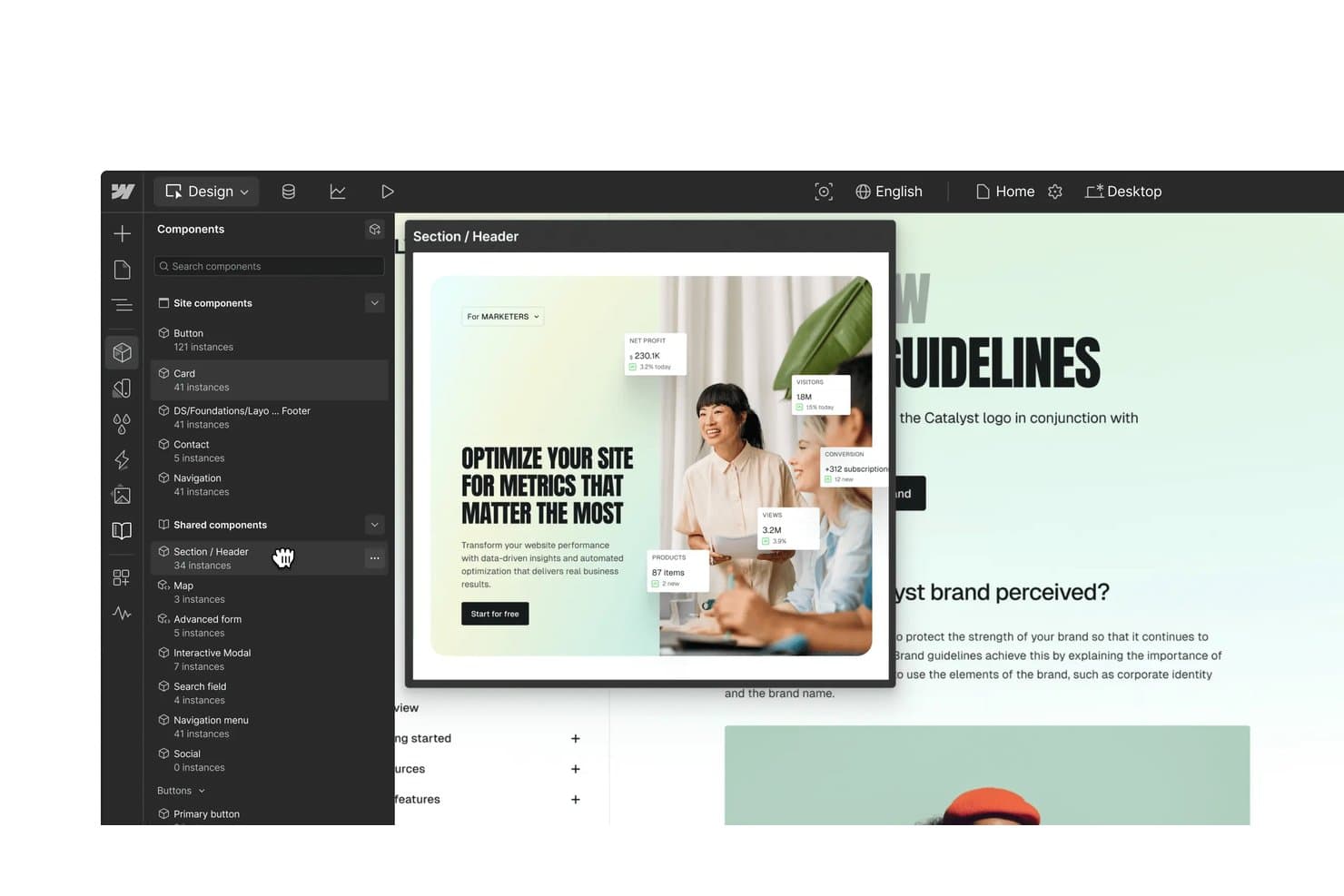
Webflow lets users reuse shared components across a project's design system. Webflow is a visual website-building platform that doubles as a high-fidelity prototyping tool, letting you design responsive layouts, build component libraries, and create GSAP-powered interactions that run as real HTML, CSS, and JavaScript.
Who Is Webflow Best For?
Webflow is a strong fit for product designers and front-end developers who want prototypes that double as shippable code.
Why I Picked Webflow
Webflow earns its spot on my shortlist because the prototype is the production code. I love that when I build interactions using Webflow's GSAP-powered engine—scroll triggers, animated page transitions, staggered reveals—stakeholders preview the exact behavior that ships, not a simulation of it. DevLink then syncs those components directly to a React codebase, so there's no rebuilding from scratch.
Webflow Key Features
- Shared Libraries: Sync components, variables, and assets across multiple sites in a workspace, with staged updates and role-based permissions controlling who can publish changes.
- GSAP-based interactions timeline: Build scroll triggers, hover effects, and page-load animations using a visual horizontal timeline with reusable presets and per-breakpoint controls.
- Code components: Import React components with stateful logic directly into the canvas, where designers configure them through props, slots, and variants.
- Figma variable sync: The Figma to Webflow plugin syncs variable collections, modes, aliases, and components directly into your Webflow design system.
Webflow Integrations
Webflow offers 411+ marketplace integrations, including Figma to Webflow, Relume, LottieFiles, Spline, Rive, Microsoft Clarity, HubSpot, and Make. It also provides Data, Designer, and DevLink APIs, plus Zapier.
Pros and Cons
Pros:
- Shared components govern cross-site design systems
- GSAP timeline supports sophisticated motion patterns
- Working websites mirror production behavior
Cons:
- No native usability testing or session replay
- Website focus limits mobile app prototyping
Learn more about Webflow: Best for macOS-native design system handoff
- 30-day free trial available
- From $12/user/month (billed annually)
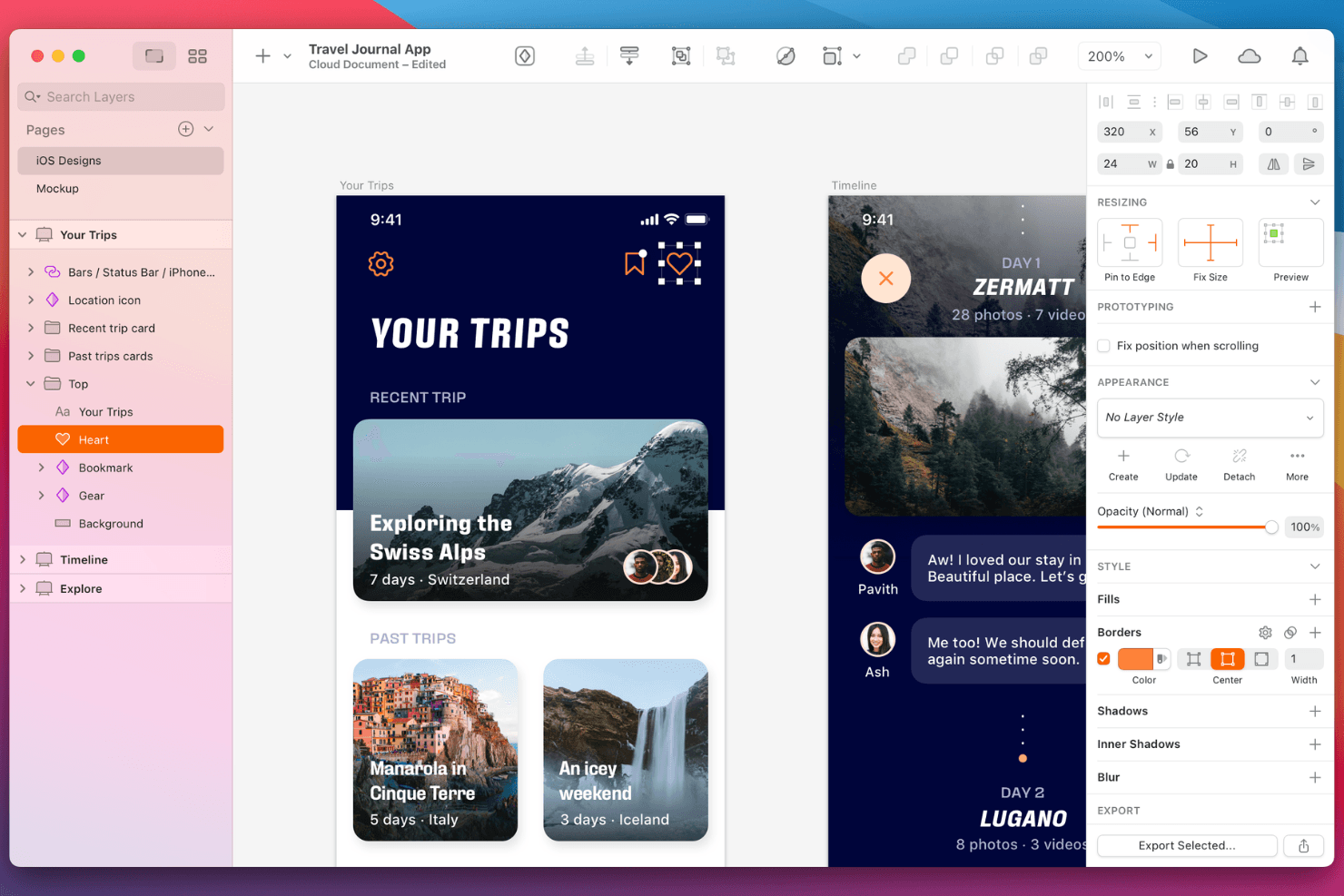
Sketch displays app UI with organized layers and responsive resizing controls. Sketch is a macOS-native design and prototyping tool that combines interactive prototyping, component-based design systems, real-time collaboration, and free browser-based developer handoff.
Who Is Sketch Best For?
Sketch is a strong fit for UX and product designers on Mac who need a design system-first workflow with free, browser-based developer handoff built in.
Why I Picked Sketch
Sketch earns its spot on my shortlist because its macOS-native editor pairs directly with free, browser-based developer handoff—no extra plan required. I love that developers can inspect CSS, export tokens as CSS or JSON, and download assets from any browser without a Sketch account. Shared Libraries with Workspace-level governance keep design system updates synced across every team document automatically.
Sketch Key Features
- Smart Animate: Animates shared layers between frames by name, transitioning position, size, rotation, and shape changes automatically.
- Multiple prototype start points: Any frame can be set as a start point, letting you test separate user flows from a single document.
- Overlay support: Frames can display as overlays with custom positioning, background blur, and stacking for modals, menus, and dropdowns.
- Real-time co-editing: Multiple designers can work in the same document simultaneously, with the option to follow a collaborator's canvas view live.
Sketch Integrations
Sketch offers native integrations with Slack and Notion, plus links and embeds for GitHub, Jira, and Miro. Its JavaScript plugin API and MCP Server support custom developer workflows, while marketplace integrations include ProtoPie, Principle, and Overflow.
Pros and Cons
Pros:
- Design systems carry prototypes across flows
- Smart Animate supports polished screen transitions
- Mac-native performance for large files
Cons:
- Mac-only editing excludes Windows and Linux
- No conditional logic or prototype variables
Learn more about Sketch: Best for no-code mobile gesture prototyping
- 15-day free trial
- From $24/user/month (billed annually)
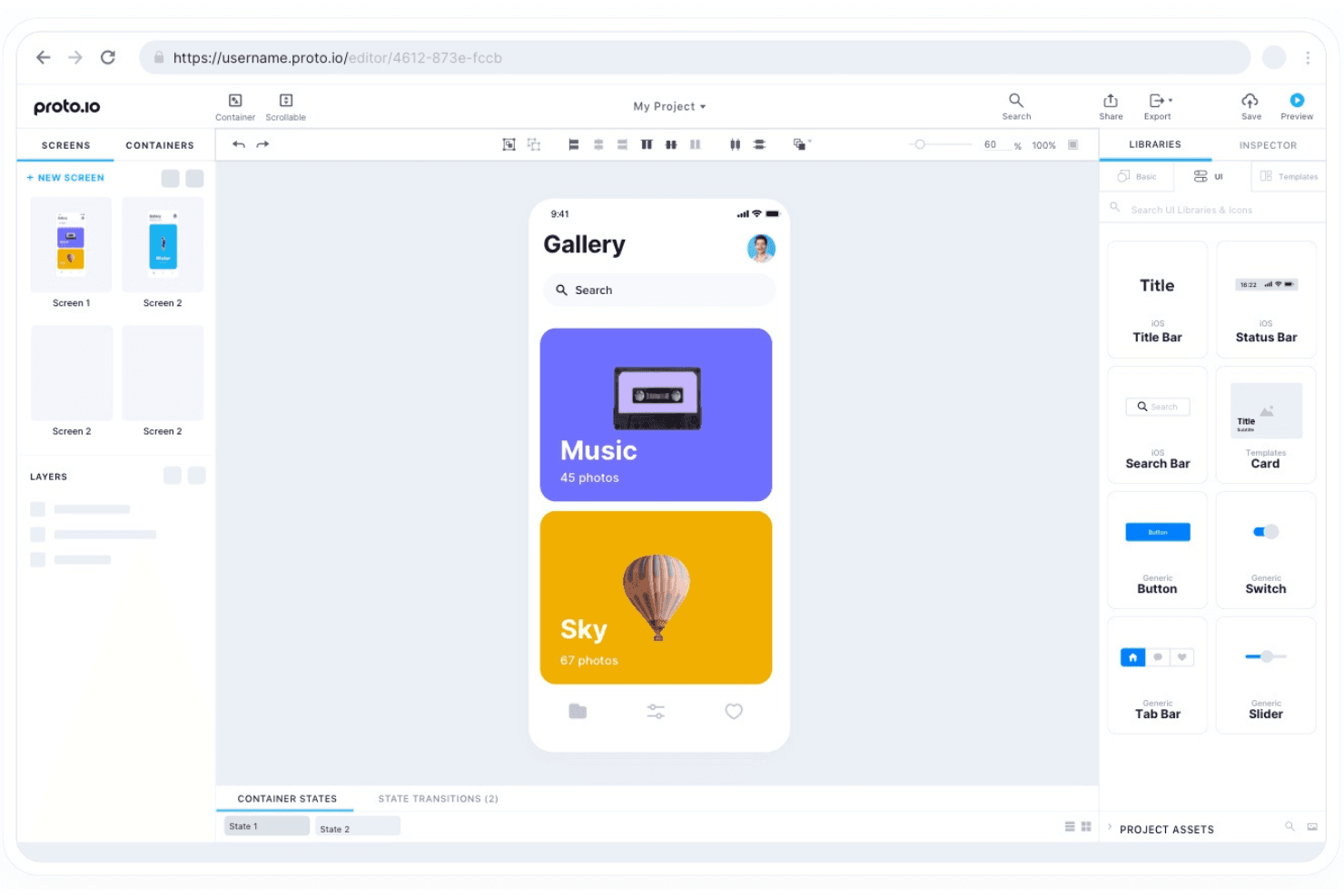
Proto.io offers drag-and-drop prototyping with a rich library of UI components. Proto.io is a browser-based, no-code prototyping tool that lets you build high-fidelity interactive mockups with support for mobile gestures, multi-device emulation, timeline animations, conditional logic, and collaborative review sharing.
Who Is Proto.io Best For?
Proto.io is a strong fit for UX and product designers who need to simulate mobile app interactions with real gestures, animations, and logic—without writing a line of code.
Why I Picked Proto.io
Proto.io earns its spot on my shortlist because no other no-code tool matches its depth of mobile gesture support out of the box. I can wire up pinch-to-zoom, multi-touch swipes, and pull-to-refresh without touching a line of code, which makes it genuinely useful when simulating how a mobile app will feel before a single sprint begins. Pair that with the timeline animation editor and spring easing controls, and prototypes stop feeling like mockups and start behaving like real apps.
Proto.io Key Features
- Variables and conditional logic: Set variables to capture user input, run calculations, and control what elements display across screens based on defined conditions.
- Timeline animation editor: Design state-based animations with precise control over duration, delay, and easing curves, including cubic-bezier and spring presets.
- Multi-device emulation: Preview prototypes across mobile, tablet, web, TV, and smartwatch frames, with support for device rotation and real-device testing via the native Player app.
- Unlimited reviewers: Every paid plan lets you share prototypes with any number of stakeholders via public, password-protected, or sign-in-required links, with threaded comments and version history included.
Proto.io Integrations
Proto.io supports integrations with Figma, Sketch, Adobe XD, Photoshop, Jira, Confluence, Trello, UserTesting, UserZoom, and Lookback. It also connects with Userlytics, UXArmy, and Validately for user research.
Pros and Cons
Pros:
- Unlimited reviewers simplify stakeholder prototype reviews
- Timeline animations support spring-based motion design
- Mobile gestures closely mimic native interactions
Cons:
- Custom component instances don’t synchronize changes
- Developer handoff stops at static exports
Learn more about Proto.io: Best for AI-generated working prototypes
- Free plan + free demo available
- From $25/month
Visit WebsiteCustomer Rating:4.5/5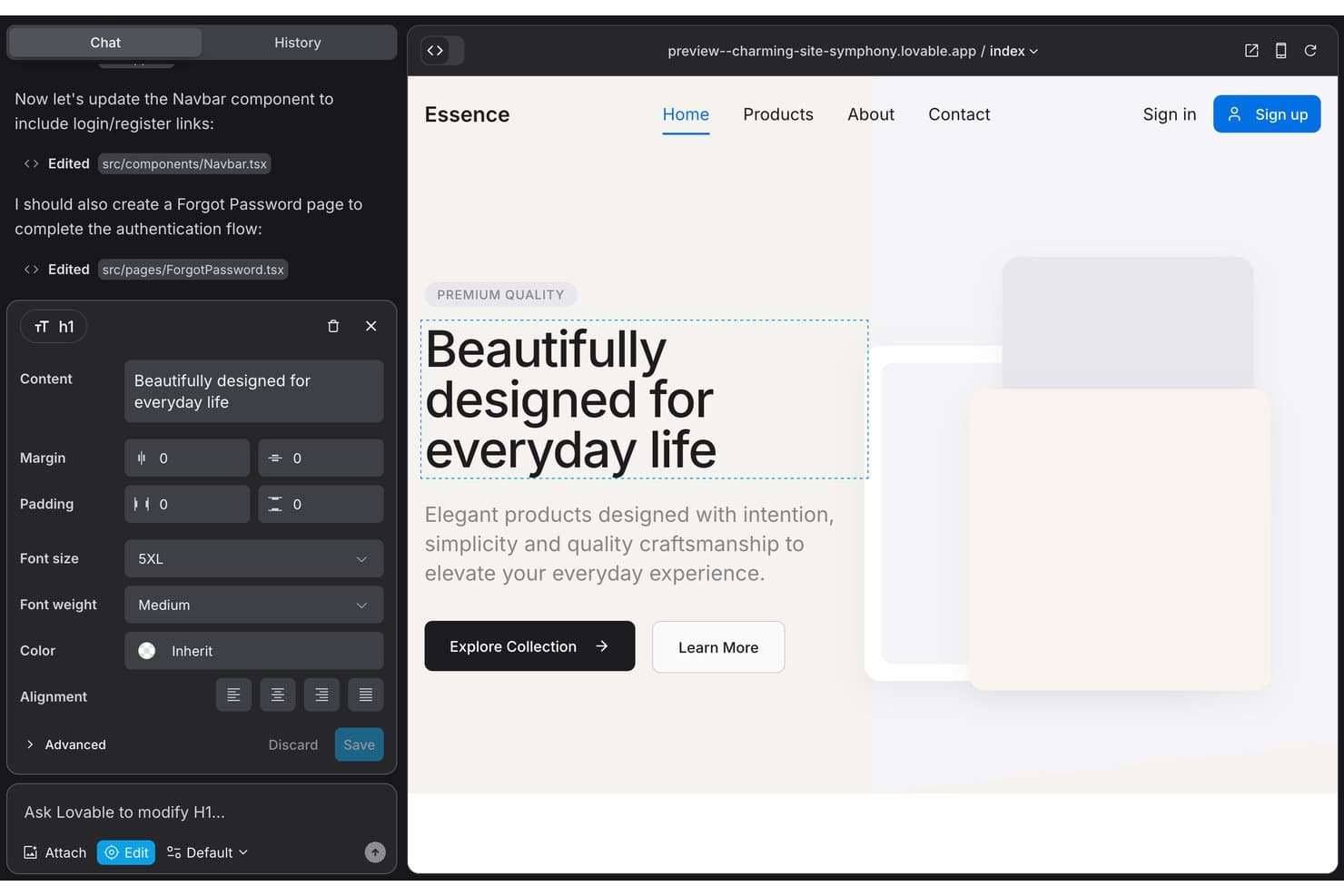
Lovable lets users edit UI text and styles with a visual inspector. Lovable is an AI app builder that generates fully functional web prototypes from plain-language prompts, complete with real navigation, form logic, authentication, and database connectivity.
Who Is Lovable Best For?
Lovable is a strong fit for product managers and developers who need to validate working product flows without waiting on design or engineering resources.
Why I Picked Lovable
Lovable earns its spot on my shortlist because it generates prototypes that are actual working apps, not linked screens. Describe a sign-up flow or checkout experience in plain language, and Lovable builds it with real navigation, form logic, and database connectivity you can click through immediately. I especially like that the output is clean React/TypeScript code that syncs to GitHub, so validated flows go straight to engineering without a handoff doc in sight.
Lovable Key Features
- Design systems: Create a dedicated project that acts as a single source of truth for React components, design tokens, and styles, with versioning and sync across connected projects.
- Preview toolbar: Click elements in the live preview to annotate, edit text inline, draw freehand markups, or pin threaded comments directly to specific UI elements.
- Figma import: Bring in designs via a Figma plugin, live MCP connection, or
.figfile upload to use as a starting point for generated prototypes. - Share links: Generate password-protected or open share links with configurable expiry so stakeholders can view and comment without logging in.
Lovable Integrations
Lovable offers documented integrations with Figma, Jira, Confluence, Linear, Notion, GitHub, GitLab, Bitbucket, PostHog, and Amplitude. It also supports custom REST API connectors and MCP servers for additional connectivity.
Pros and Cons
Pros:
- Code handoff preserves validated product behavior
- Prompt-built flows reach validation quickly
- Working prototypes expose real edge cases
Cons:
- Native usability testing is absent
- Complex logic can trigger AI refactoring loops
Learn more about Lovable: Best for cross-functional prototype collaboration
- Free plan available
- From $3/user/month
Visit WebsiteCustomer Rating:4.7/5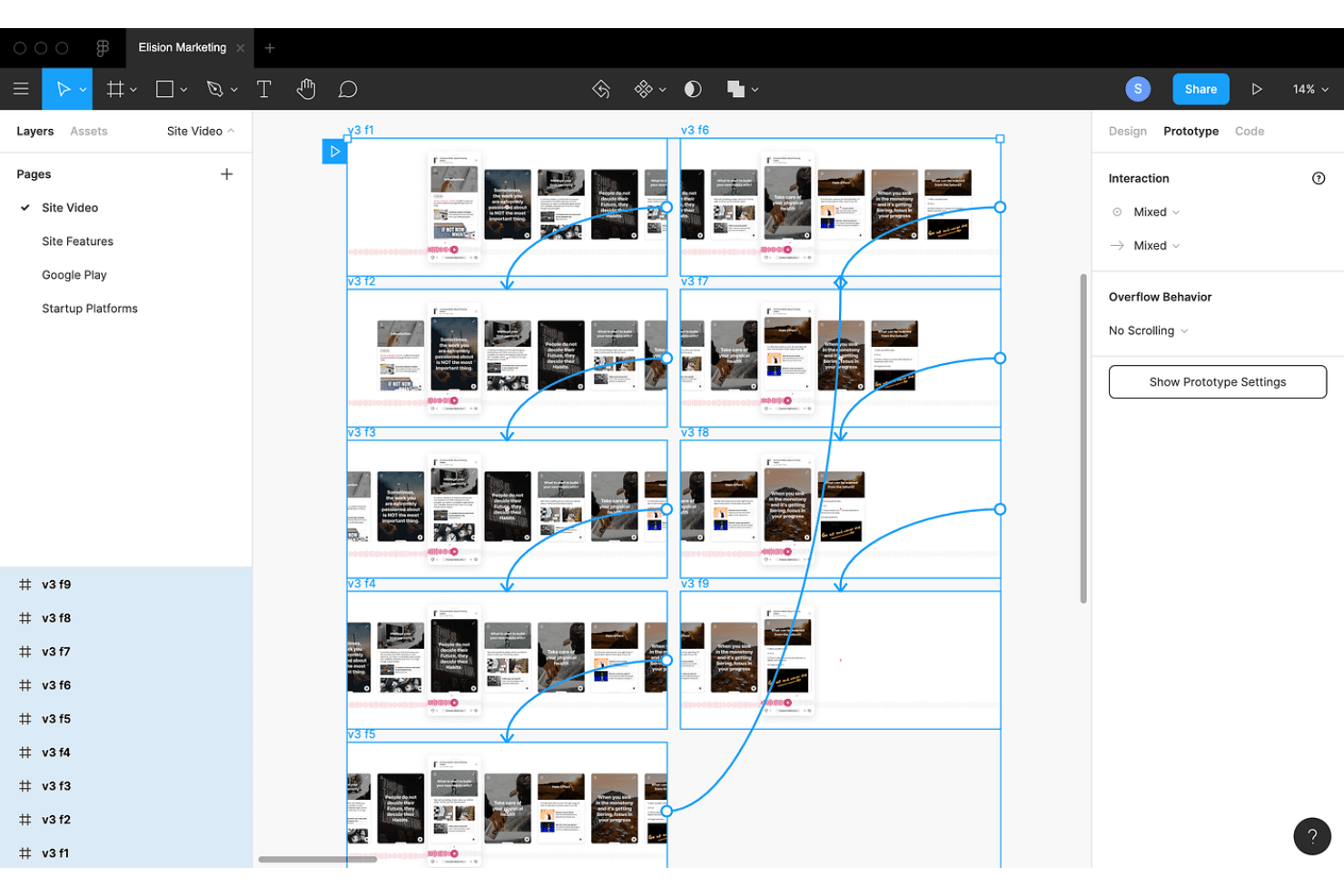
Figma shows a mobile video prototype with interaction wires linking frames. Figma is a browser-based design and prototyping tool that combines interactive prototype building, advanced animation, component libraries, and real-time multi-user editing in a single canvas.
Who Is Figma Best For?
Figma is a natural fit for cross-functional teams where designers, product managers, and developers all need to review, comment on, and iterate prototypes together in real time.
Why I Picked Figma
Figma earns its spot as one of the best on my shortlist because no other prototyping tool makes cross-functional collaboration this frictionless. I love that designers, PMs, and developers can all live in the same file: designers build interactive prototypes with variables and conditional logic, while stakeholders comment directly on flows and developers inspect specs in Dev Mode without needing a separate handoff tool. Spotlight mode lets me present a prototype while others observe in real time, which makes stakeholder review sessions genuinely productive.
Figma Key Features
- Smart Animate: Automatically animates matching layers between frames to create fluid transitions like parallax effects and gesture-based interactions.
- Figma Motion: A timeline-based animation tool with keyframes, easing curves, and spring controls that exports to MP4, GIF, WebM, and animated SVG.
- Interactive components: Define hover, pressed, or toggled states once inside a component so the behavior carries through every instance automatically.
- Variables with conditional logic: Set numeric, string, or boolean variables and write if/else conditions to build branching flows across multiple prototype states.
Figma Integrations
Figma offers documented integrations with Jira, Confluence, Slack, Notion, Linear, GitHub, Storybook, VS Code, Maze, and UserTesting. REST, Variables, Embed, and Plugin APIs support custom integrations.
Pros and Cons
Pros:
- Dev Mode preserves implementation context
- Branching variables model complex product flows
- Real-time co-editing accelerates stakeholder prototype reviews
Cons:
- Usability testing requires external research tools
- Large files can trigger lag
 Best for prototyping with real coded components
- Free plan + 14-day free trial + demo available
- From $49/user/month
Visit WebsiteCustomer Rating:4.2/5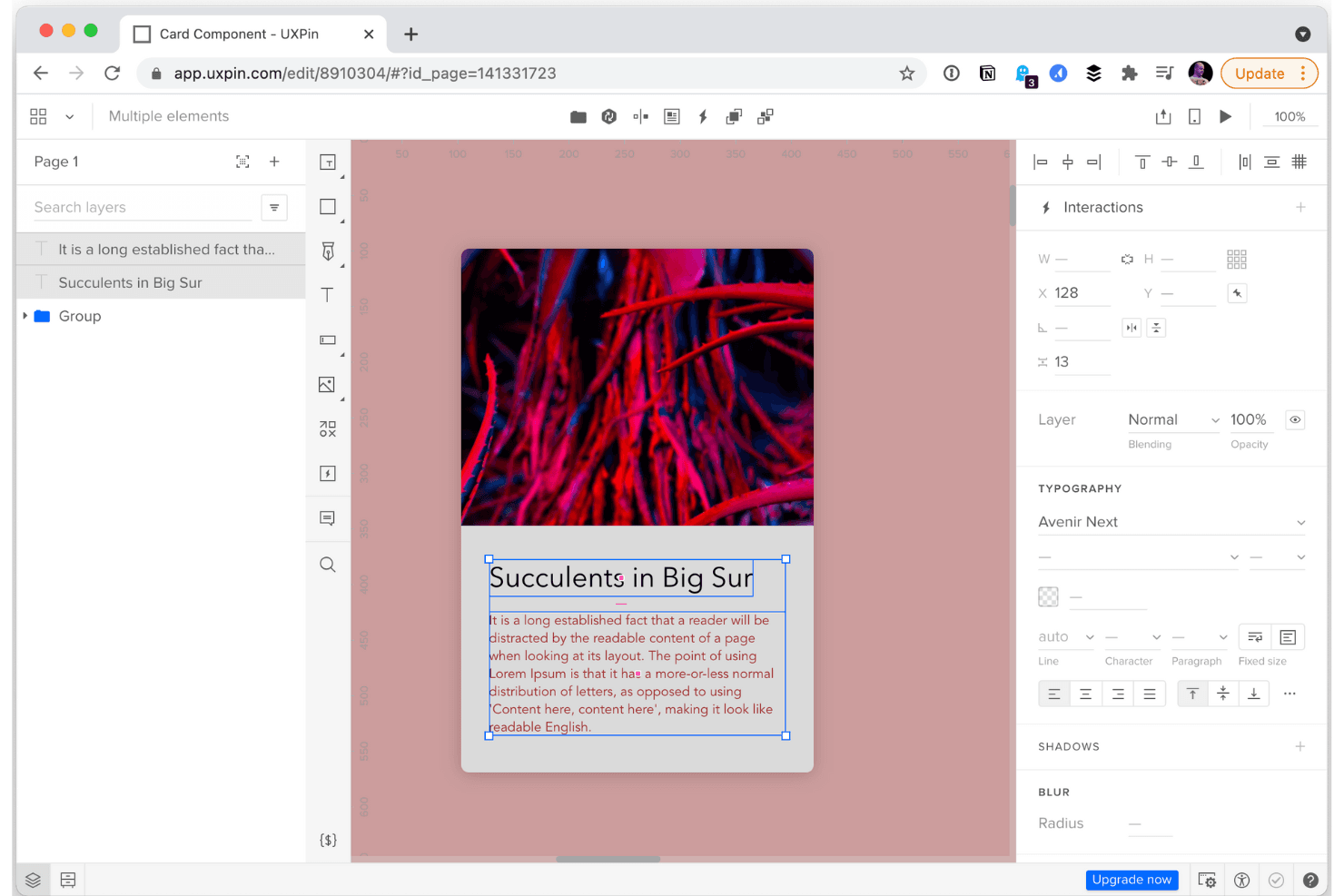
UXPin shows a card editor with typography, layout tools, and live editing. UXPin is a high-fidelity prototyping tool that lets you design interactive, multi-screen prototypes using real coded components, conditional logic, variables, and built-in design system libraries.
Who Is UXPin Best For?
UXPin is a strong fit for product designers and front-end developers who need prototypes built from the same coded components that ship to production.
Why I Picked UXPin
I picked UXPin as one of the best because it's the only tool where your prototype runs on the same React components your developers actually ship. Through Merge, you can sync a live Storybook or Git repo so that a button in your prototype behaves exactly like the button in production, with ripple effects, keyboard navigation, and all. I also love that UXPin Wire can export those interactive flows as a full React project, which collapses the gap between prototyping and development in a way no image-based tool can.
UXPin Key Features
- Conditional logic and variables: Set up branching interactions that respond to user input, letting your prototype behave like a working product across multiple screens.
- AI prototype generation (Forge): Generate and edit UI using real React components from built-in or custom libraries, or convert screenshots and wireframes into interactive designs.
- Stakeholder approval workflows: Collect threaded comments, assign feedback to team members, and request formal approvals—all without requiring reviewers to create an account.
- Jira integration: Attach prototypes, specs, and comments directly to Jira issues so design context stays connected to development tickets.
UXPin Integrations
UXPin offers documented connections with Storybook, GitHub, Bitbucket, Jira, Slack, FullStory, and StackBlitz, plus Figma and Sketch import.
Pros and Cons
Pros:
- Developer handoff includes implementation-ready specifications
- Conditional logic supports realistic multi-screen flows
- Prototypes use production-like coded components
Cons:
- Advanced workflows feel technical for beginners
- Large projects can become sluggish
Learn more about UXPin: Best for user flow diagrams tied to navigation
- Free plan + 10-day trial available
- From $19/user/month
Visit WebsiteCustomer Rating:4.2/5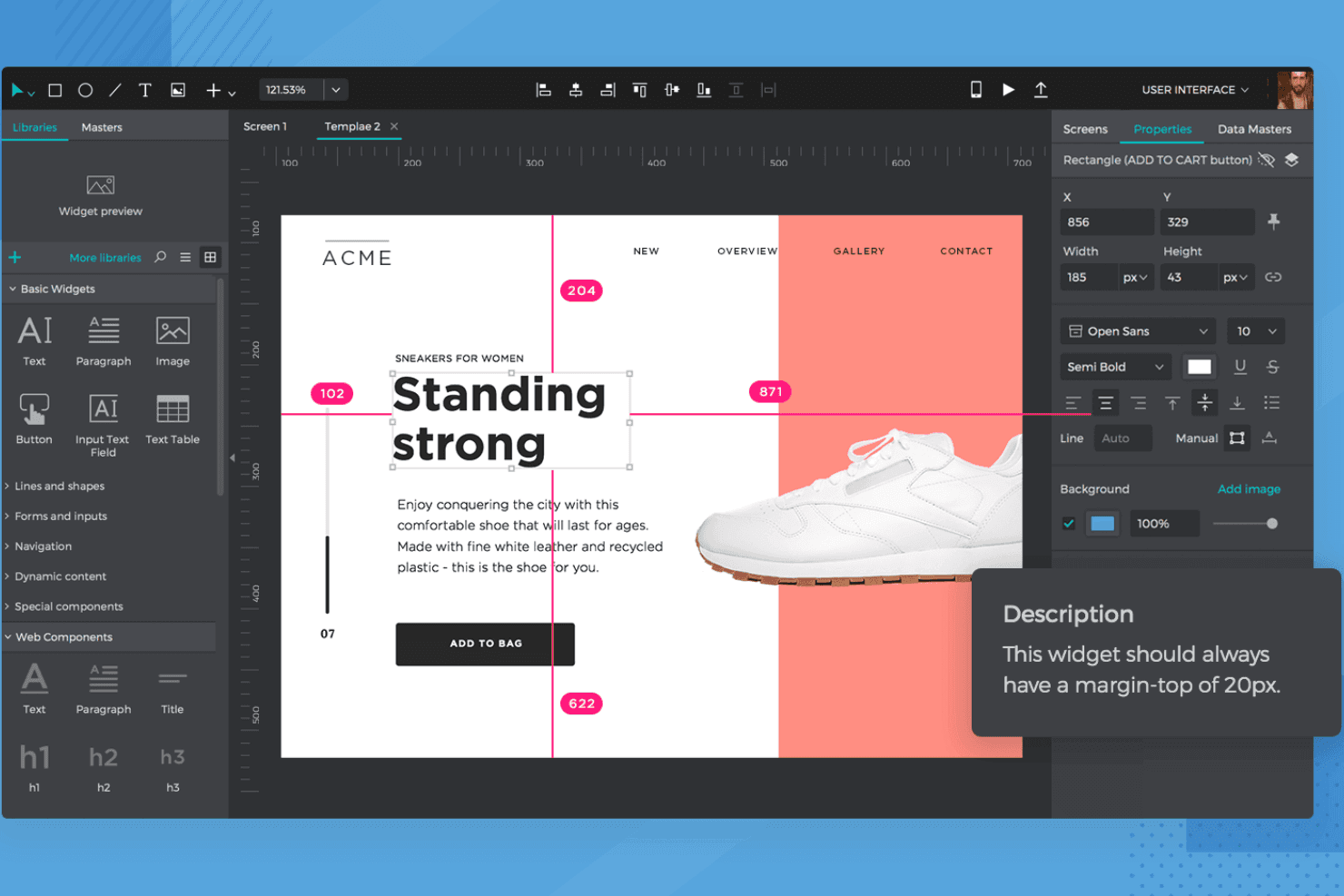
Justinmind shows a responsive workspace with alignment guides and precise UI controls. Justinmind is a desktop-based high fidelity prototyping tool for macOS and Windows that combines interactive simulation, user flow diagramming, component libraries, and developer handoff into a single no-code environment.
Who Is Justinmind Best For?
Justinmind is a strong fit for UX/UI designers and product managers who need to map user journeys and connect those flows directly to interactive, high-fidelity prototypes.
Why I Picked Justinmind
I've included Justinmind in my top picks because its User Flows module does something I haven't seen done this well elsewhere: it validates your flow diagrams against actual prototype navigation, flagging missing connections with a warning icon so nothing slips through. I also like that you can right-click any screen node and instantly generate the matching prototype screen, keeping your journey map and your hi-fi prototype in sync. For anyone who needs to present a navigation-backed user journey alongside a realistic simulation, that connection is genuinely useful.
Justinmind Key Features
- Conditions and variables: Set logic-driven rules and store data across screens to build simulations that respond to user input during testing.
- CSV data import: Load real data into data grids and lists so your prototype reflects actual content rather than placeholder text.
- Masters: Create reusable component groups that update across every screen automatically when you edit the source.
- Design handoff panel: Developers can inspect positions, sizes, CSS values, hex colors, and spacing directly from any shared prototype.
Justinmind Integrations
Justinmind integrates with Figma, Sketch, Adobe Photoshop, Adobe Illustrator, Adobe XD, Jira, Azure DevOps, Confluence, UserTesting, and Validately. Its Java API and SDK support custom integrations.
Pros and Cons
Pros:
- Detailed developer handoff reduces specification gaps
- Logic-driven simulations mirror product behavior
- Navigation-validated user flow diagrams
Cons:
- No native usability testing or analytics
- Desktop-only authoring limits collaborative flexibility
Learn more about Justinmind: Best for logic-driven, variable-rich prototyping
- Free plan + 30-day free trial available
- From $29/user/month (billed annually)
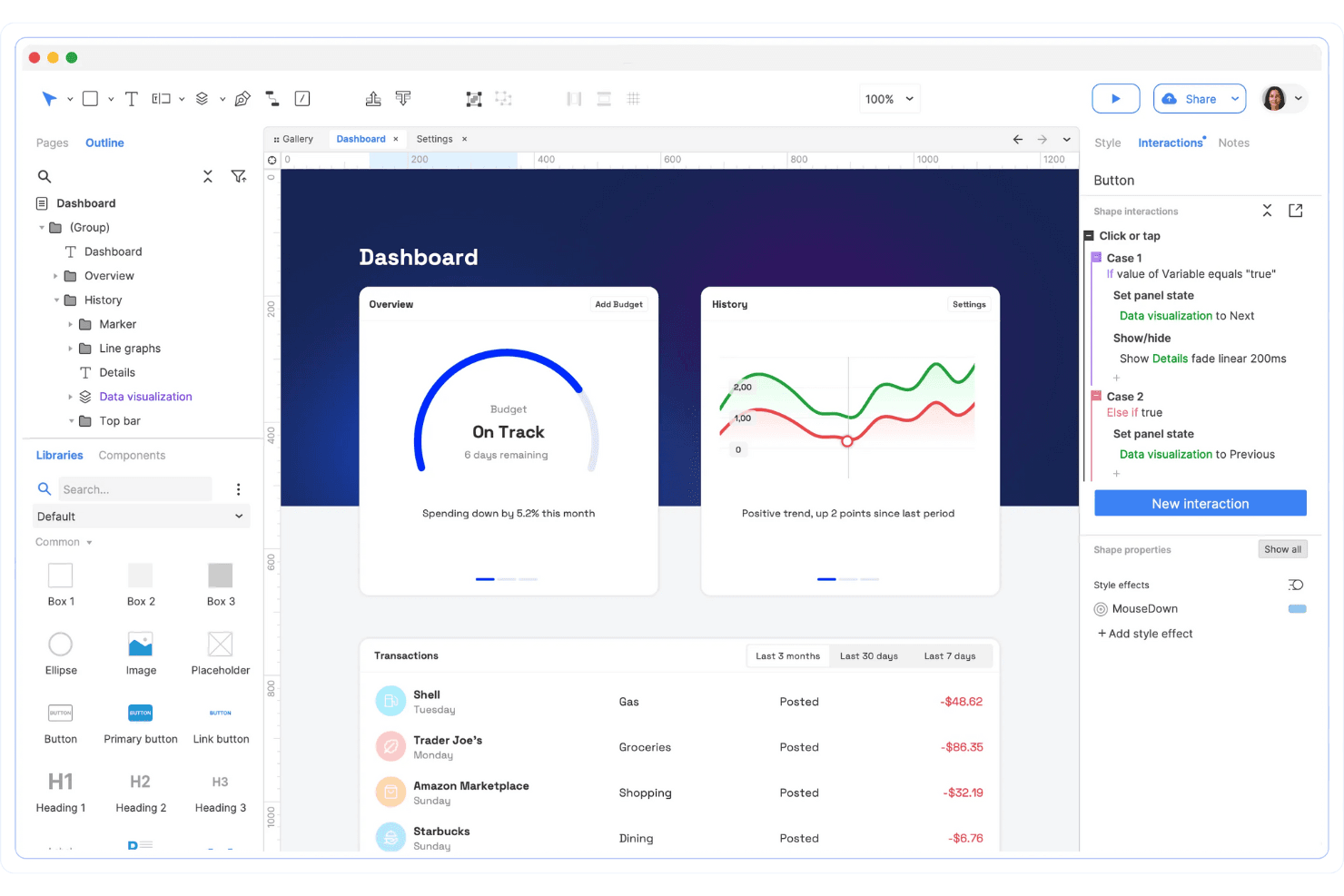
Axure RP provides drag-and-drop wireframing with interactive components and logic. Axure RP is a desktop-based high-fidelity prototyping tool that combines wireframing, interactive prototyping, flow diagramming, and developer handoff documentation through conditional logic, dynamic panels, variables, and a repeater widget for data-driven interfaces.
Who Is Axure RP Best For?
Axure RP is a strong fit for UX/UI and product designers who need to prototype complex, logic-heavy interactions that simpler tools can't handle.
Why I Picked Axure RP
I picked Axure RP as one of the best because no other tool on this list handles conditional logic and variables with the same depth. When I'm prototyping a data-heavy interface, like a filterable dashboard or a multi-step form with branching rules, Axure's Repeater widget and global variables let me build something that genuinely behaves like a live product. The Variable Changed event in RP 11 takes it further, triggering actions the moment a variable updates mid-flow.
Axure RP Key Features
- Adaptive views: Design desktop, tablet, and phone layouts on a single page, with the prototype automatically displaying the correct view by device.
- Axure Cloud Inspect: Gives developers access to automated redlines, CSS inspection, and image export directly from published prototypes.
- Repeater widget: Builds sortable, filterable tables and data grids that respond to real user input while the prototype runs.
- Team co-authoring: Uses a check-out/check-in model with full version history, offline editing support, and intelligent merging of styles.
Axure RP Integrations
Axure RP offers integrations with Jira, Confluence, Slack, Microsoft Teams, Figma, Sketch, and Adobe XD. It also supports MCP connections to VS Code, Cursor, Claude Code, Claude Desktop, and ChatGPT desktop.
Pros and Cons
Pros:
- Working forms support authentic user flows
- Repeaters create realistic filterable data interfaces
- Conditional logic models complex product behavior
Cons:
- Visual styling trails UI-first competitors
- Table-heavy prototypes can slow down
Learn more about Axure RP : 10Best for native sensor and hardware prototyping
ProtoPie
- Free plan + free demo available
- From $25/user/month
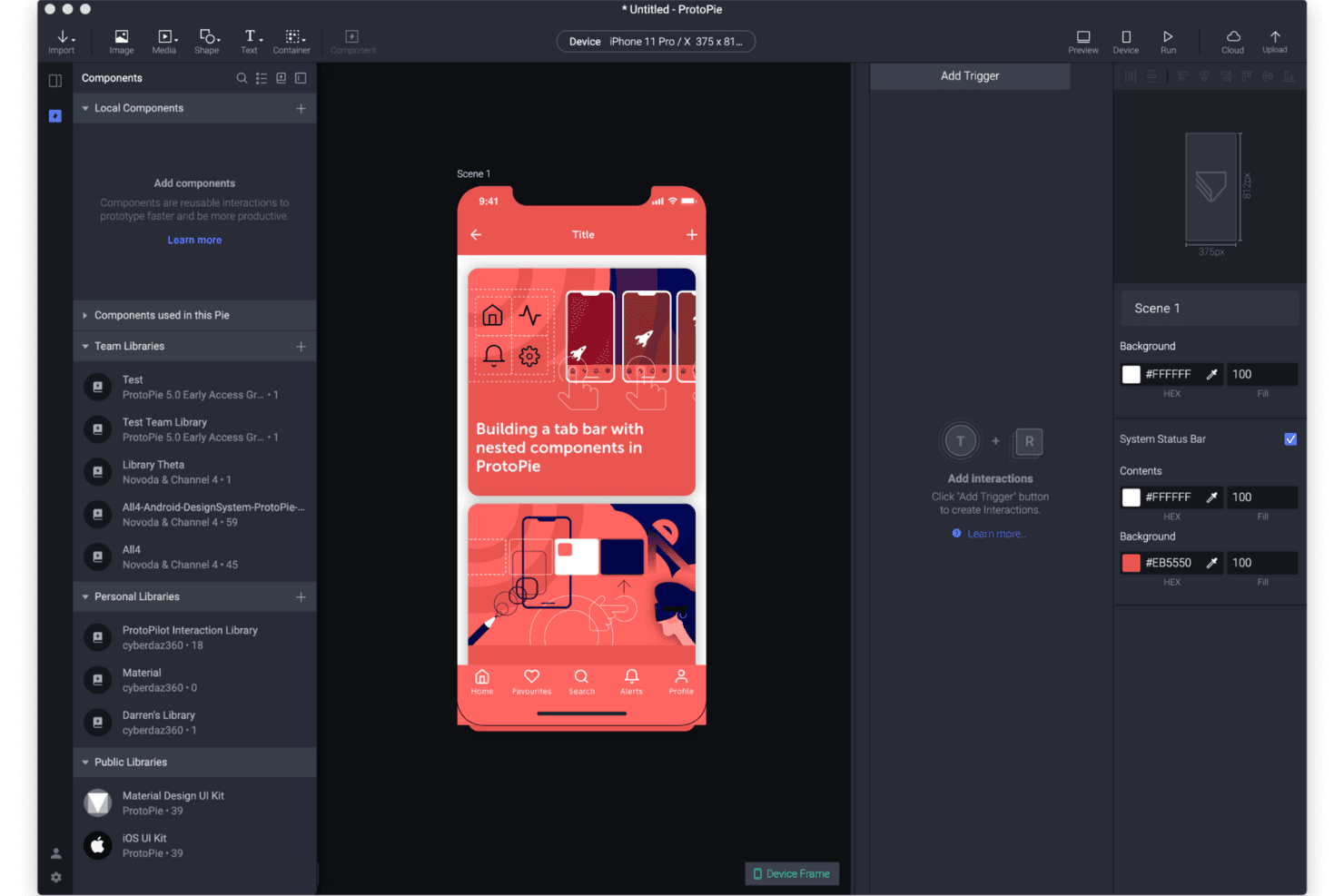
ProtoPie offers a comprehensive component library panel for reusable design elements and interactions. ProtoPie is a high-fidelity prototyping tool that lets designers and developers build interactive prototypes using trigger-response logic, variables, conditions, sensors, and multi-device support through ProtoPie Connect.
Who Is ProtoPie Best For?
ProtoPie is a strong fit for product designers and UX teams building complex, logic-heavy prototypes that go beyond what Figma can handle natively—especially for automotive, IoT, TV, and hardware use cases.
Why I Picked ProtoPie
ProtoPie earns its spot on my shortlist because no other tool handles native sensor and hardware prototyping as thoroughly. I love that ProtoPie Connect lets you wire prototypes to real hardware like Arduino, automotive HMI systems, and smartwatches, so you can test a car dashboard or IoT device before a single line of production code exists. Add in native gyroscope, microphone, and haptics support, and you're prototyping interactions that Figma simply can't replicate.
ProtoPie Key Features
- Trigger-response interaction logic: Build interactions by pairing triggers (tap, drag, scroll, sensor input) with layered responses, including conditions and variables, to prototype complex UI states.
- ProtoPie AI: Generate trigger-and-response interaction logic from plain-language prompts, with full awareness of your current scene, layers, and variables.
- Interaction recordings: Capture prototype flows as shareable recordings with auto-generated specs for duration, delay, easing, and animation timelines for developer handoff.
- Built-in moderated user testing: Run closed, OTP-secured test sessions with live observation, session replays, and timestamped interaction logs for gestures, logic paths, and variable responses.
ProtoPie Integrations
ProtoPie integrates with Figma, Sketch, Adobe XD, Unity, Unreal, Arduino, APIs, and real data through ProtoPie Connect. Enterprise supports custom socket.IO bridge apps and Connect Embedded for hardware integrations.
Pros and Cons
Pros:
- Captures motion specs for developer handoff
- Recreates sensor-driven interactions with native device inputs
- Models complex logic with variables and conditions
Cons:
- User testing remains browser-only and moderated
- Collaboration lacks tagging and comment status tracking
Learn more about ProtoPie:
Diğer Yüksek Sadakatli Prototipleme Araçları
Kısa listeme giremeyen ancak yine de göz atmaya değer bazı ek yüksek sadakatli prototipleme aracı seçenekleri şunlardır:
How I Evaluate High Fidelity Prototyping Tools
My evaluation splits into three parts. First—and most heavily weighted—is core functionality: can the tool link screens into realistic flows and support conditional logic and micro-interactions? Second, I look at standout features like design token sync. Third, I consider support, onboarding, and pricing value.
Core Functionality (Table Stakes for This List)
When I'm selecting tools for my list, I score each one on a scale from 0 (does not offer the functionality) to 5 (excels in this area) for each core functionality listed below. I then convert the total into a percentage to help assess each tool's overall fit, with extra weight on any functionalities I've deemed essential.
- Interactive Prototyping (Essential): I check whether linked screens support branching navigation and multi-state flows that let you walk a stakeholder through a realistic checkout or onboarding sequence.
- Advanced Interaction Design (Essential): Conditional logic, variables, and layered animations matter here. I look for tools that let you build inputs like a dynamic form that adapts fields based on prior selections.
- Component & Design Systems: Shared libraries with variants and overrides keep a prototype consistent across dozens of screens. I evaluate how well components sync when a team updates a shared color token or icon set.
- Developer Handoff: I look at auto-generated specs for spacing, colors, and assets. Tools like Figma and Axure handle this differently, so I compare how cleanly each one exports implementation-ready documentation your engineers can actually use.
- Collaborative Feedback: Threaded comments pinned to specific prototype elements beat scattered Slack threads. I evaluate whether reviewers can tag teammates, resolve threads, and track feedback across versions.
- Usability Testing Support: Task-based test flows with click tracking or session recording let you validate designs before a single line of code ships. I check whether the tool supports this natively or requires a third-party integration.
Once I have a list of tools that meet the criteria, I consider what sets each platform apart.
Differentiating Factors (What Sets Vendors Apart)
Here's how I compare and contrast different vendors:
Standout Features
Design token sync is a big one for me. I check whether a tool can push token updates to a code repository so engineers aren't manually translating hex values or spacing scales from a prototype. Multi-device emulation also matters—I evaluate how accurately each tool renders gestures, safe areas, and OS-specific behaviors when previewing a mobile or wearable prototype. Beyond those, I look at plugin ecosystem depth, since a strong marketplace for accessibility audits, content population, and research integrations saves teams from stitching together workarounds.
Beyond Features
I evaluate how well each tool fits into cross-functional workflows that span design, PM, and engineering. A prototyping tool that connects to Jira or Slack for status updates saves your team from context-switching between apps just to track feedback. Security and data governance also matter—I check for SOC 2 compliance, granular access controls, and version history, especially when prototypes contain sensitive roadmap details or unreleased product concepts. Finally, I consider how easily non-designers like product owners can jump in without a steep learning curve, since adoption across roles determines whether the tool actually gets used.
Yüksek Sadakatli Prototipleme Araçları Nasıl Seçilir?
Uzun özellik listeleri ve karmaşık fiyatlandırma yapıları arasında kaybolmak kolaydır. Kendinize özgü yazılım seçim sürecinizi yürütürken odaklanmanıza yardımcı olmak için göz önünde bulundurmanız gereken faktörleri içeren bir kontrol listesi hazırladım:
| Faktör | Göz önünde bulundurulması gerekenler |
|---|---|
| FaktörÖlçeklenebilirlik | Göz önünde bulundurulması gerekenlerEkip büyüdükçe araç ekibinizi destekleyecek mi? Gelecekteki genişleme için kullanıcı sınırlarını, proje kotalarını ve iş birliği ihtiyaçlarını göz önünde bulundurun. |
| FaktörEntegrasyonlar | Göz önünde bulundurulması gerekenlerAraç, tasarım, geliştirme veya proje yönetimi araç setinize yerel olarak bağlanabiliyor mu? Yalnızca API veya Zapier seçeneklerini değil, doğrudan entegrasyonları da kontrol edin. |
| FaktörÖzelleştirilebilirlik | Göz önünde bulundurulması gerekenlerAracın iş akışlarını, şablonlarını veya kullanıcı arayüzü bileşenlerini ekibinizin süreçlerine ve marka kimliğine uyacak şekilde uyarlayabilir misiniz? |
| FaktörKullanım kolaylığı | Göz önünde bulundurulması gerekenlerYeni kullanıcılar ne kadar hızlı üretken hâle gelebilir? Sezgisel gezinme, anlaşılır etiketler ve minimum eğitim gereksinimleri arayın. |
| FaktörUygulama ve işe alıştırma | Göz önünde bulundurulması gerekenlerBaşlamak için hangi kaynaklar gerekiyor? Geçiş desteğinin, işe alıştırma kılavuzlarının ve şablon kitaplıklarının bulunup bulunmadığını değerlendirin. |
| FaktörMaliyet | Göz önünde bulundurulması gerekenlerFiyatlandırma kademeleri şeffaf ve öngörülebilir mi? Bütçenizi etkileyebilecek gizli ücretlere, kullanıcı koltuğu başına fiyatlandırmaya veya özellik kısıtlamalarına dikkat edin. |
| FaktörGüvenlik önlemleri | Göz önünde bulundurulması gerekenlerAraç, SSO, veri şifreleme ve erişim denetimleri sunuyor mu? Kuruluşunuzun güvenlik ve gizlilik standartlarını karşıladığından emin olun. |
| FaktörDestek kullanılabilirliği | Göz önünde bulundurulması gerekenlerHangi destek kanalları sunuluyor ve hangi saatlerde kullanılabiliyor? Özellikle farklı konumlara dağılmış ekipler için canlı sohbet, telefon veya yalnızca e-posta desteğine ihtiyacınız olup olmadığını değerlendirin. |
Yüksek Sadakatli Prototipleme Araçları Nedir?
Yüksek aslına uygun prototipleme araçları, özel bir Windows uygulamasından web tabanlı bir tasarım platformuna veya web uygulamasına kadar çeşitlilik gösteren ve dijital ürünlerin etkileşimli, piksel düzeyinde doğru temsillerini oluşturmanıza olanak tanıyan yazılım çözümleridir. Bu araçlar ayrıntılı görsel tasarımı, kod yazmadan oluşturulabilen tıklanabilir etkileşimleri ve gerçekçi kullanıcı akışlarını destekleyerek kullanıcı testleri gerçekleştirmek ve kullanıcı geri bildirimleri toplamak için ideal hâle gelir. Tasarım ekipleri bu uygulamaları, Balsamiq gibi bir tel çerçeve oluşturma aracında hazırlanan düşük aslına uygun prototipler veya düşük aslına uygun tel çerçeveler gibi ilk konseptlerle son geliştirme aşaması arasındaki boşluğu kapatmak için kullanır; böylece tasarım amacı net bir şekilde iletilir ve doğrulanır.
Özellikler
Yüksek aslına uygun prototipleme araçlarını seçerken aşağıdaki temel özelliklere dikkat edin:
- Etkileşimli prototipleme: Geliştirme öncesinde gezinmeyi, geçişleri ve etkileşimleri test etmenize olanak tanıyan, gerçek kullanıcı akışlarını simüle eden tıklanabilir prototipler oluşturun.
- Bileşen kitaplıkları: Prototipleme sürecini hızlandırmak ve ekranlar arasında tutarlılığı korumak için önceden oluşturulmuş kullanıcı arayüzü öğelerine ve yeniden kullanılabilir tasarım bileşenlerine erişin.
- Gerçek zamanlı iş birliği: Tasarım süreci boyunca geri bildirimi ve uyumu desteklemek için ekip üyelerini aynı anda ortak düzenleme yapmaya, yorum eklemeye ve prototipleri incelemeye davet edin.
- Tasarım teslim araçları: Tasarımdan geliştirmeye sorunsuz bir geçiş sağlamak için geliştiricilere uygun teknik özellikler, varlıklar ve kod parçacıkları oluşturun.
- Sürüm denetimi: Değişiklikleri izleyin, önceki yinelemelere geri dönün ve yinelemeli tasarımı ve ekip iş akışlarını desteklemek için prototiplerinizin birden fazla sürümünü yönetin.
- Duyarlı tasarım desteği: Farklı ekran boyutlarına ve cihazlara uyum sağlayan prototipler oluşturun; böylece web, mobil ve tablet deneyimleri için yerleşimleri doğrulayabilirsiniz.
- Dışa aktarma ve paylaşma seçenekleri: Geri bildirim ve onayları kolayca toplamak için prototipleri bağlantılar, sunumlar veya indirilebilir dosyalar aracılığıyla paydaşlarla paylaşın.
- Yorum ve açıklama ekleme: Tasarım kararlarını netleştirmek ve geri bildirimleri bağlam içinde yakalamak için doğrudan prototiplerin üzerine notlar, işaretlemeler ve bağlamsal yorumlar ekleyin.
Yaygın Yapay Zekâ Özellikleri
Yukarıda listelenen standart yüksek aslına uygun prototipleme aracı özelliklerinin yanı sıra bu çözümlerin birçoğu aşağıdakiler gibi özelliklerle yapay zekâyı bünyesine katıyor:
- Yapay zekâ tarafından oluşturulan tel çerçeveler: Eskizleri, ekran görüntülerini veya metin istemlerini anında yapılandırılmış tel çerçevelere dönüştürerek ekiplerin en az düzeyde manuel çalışmayla tasarım sürecini başlatmasına yardımcı olun.
- Otomatik tema önerileri: Markanızla veya tasarım hedeflerinizle uyumlu renk paletleri, tipografi ve görsel stiller önermek için yapay zekâyı kullanarak projenizi analiz edin.
- Akıllı bileşen algılama: Varlık yönetimini ve tutarlılığı kolaylaştırmak için içe aktarılan görsellerdeki veya mevcut tasarımlardaki yeniden kullanılabilir kullanıcı arayüzü bileşenlerini otomatik olarak belirleyip ayıklayın.
- İçeriği otomatik doldurma: Yapay zekâyı kullanarak prototipleri gerçekçi yer tutucu metinler, görseller veya verilerle doldurun; böylece zamandan tasarruf edin ve kullanıcı testleri sırasında prototiplerin daha gerçekçi hissettirmesini sağlayın.
- Yerleşim optimizasyonu: Tasarımın en iyi uygulamalarına göre daha iyi kullanılabilirlik, erişilebilirlik veya duyarlılık sağlamak amacıyla yerleşimleri önermek ya da otomatik olarak ayarlamak için yapay zekâdan yararlanın.
Avantajlar
Yüksek aslına uygun prototipleme araçlarını uygulamak ekibiniz ve işletmeniz için çeşitli avantajlar sağlar. Yararlanabileceğiniz avantajlardan bazıları şunlardır:
- Daha net tasarım iletişimi: Etkileşimli prototipler ve ayrıntılı görseller, geliştirme başlamadan önce ekiplerin ve paydaşların tasarım amacını anlamasına yardımcı olur.
- Daha hızlı yineleme döngüleri: Yerleşik bileşen kitaplıkları, gerçek zamanlı iş birliği ve sürüm denetimi; fikirleri test etmeyi ve tasarımları hızla geliştirmeyi kolaylaştırır.
- Geliştirilmiş kullanıcı testleri: Tıklanabilir ve gerçekçi prototipler, daha doğru kullanılabilirlik testlerine ve geri bildirimlere olanak tanıyarak daha iyi ürün kararları alınmasını sağlar.
- Daha sorunsuz geliştirici teslimi: Tasarım teslim araçları ve dışa aktarma seçenekleri, geliştiricilere net teknik özellikler ve varlıklar sağlayarak yanlış anlaşılmaları ve yeniden çalışmayı azaltır.
- Tutarlı marka ve kullanıcı arayüzü: Yeniden kullanılabilir bileşenler ve tema yönetimi özellikleri, projeler ve ekipler arasında görsel tutarlılığın korunmasına yardımcı olur.
- Azaltılmış proje riski: Kullanıcı akışlarının ve etkileşimlerin erken aşamada doğrulanması, maliyetli geliştirme çalışmaları başlamadan önce sorunların yakalanmasına yardımcı olur.
- Geliştirilmiş ekip uyumu: İş birliği özellikleri ve yorum araçları, tasarım süreci boyunca herkesin aynı anlayışta kalmasını sağlar.
Maliyetler ve Fiyatlandırma
Yüksek aslına uygun prototipleme araçlarını seçmek, sunulan çeşitli fiyatlandırma modellerinin ve planların anlaşılmasını gerektirir. Maliyetler özelliklere, ekip büyüklüğüne, eklentilere ve diğer unsurlara göre değişir. Aşağıdaki tabloda yaygın planlar, bunların ortalama fiyatları ve yüksek aslına uygun prototipleme aracı çözümlerinde genellikle bulunan özellikler özetlenmiştir:
Plan Karşılaştırma Tablosu
| Plan Türü | Ortalama Fiyat | Yaygın Özellikler |
|---|---|---|
| Plan TürüÜcretsiz Plan | Ortalama Fiyat$0 | Yaygın ÖzelliklerTemel prototipleme araçları, sınırlı sayıda proje, tek kullanıcı erişimi ve topluluk desteği. |
| Plan TürüKişisel Plan | Ortalama Fiyat$8–$29/kullanıcı/ay | Yaygın ÖzelliklerSınırsız proje, standart bileşen kitaplıklarına erişim, temel paylaşım seçenekleri ve e-posta desteği. |
| Plan Türüİşletme Planı | Ortalama Fiyat$19–$80/kullanıcı/ay | Yaygın ÖzelliklerEkip iş birliği, gelişmiş paylaşım ve dışa aktarma seçenekleri, sürüm denetimi ve öncelikli destek. |
| Plan TürüKurumsal Plan | Ortalama Fiyat$75+/kullanıcı/ay | Yaygın ÖzelliklerSSO ve gelişmiş güvenlik, özel işe alım süreci, özel hesap yönetimi ve geliştirilmiş entegrasyonlar. |
Yüksek Sadakatli Prototipleme Araçları Hakkında SSS
Yüksek sadakatli prototipleme araçları hakkında sık sorulan bazı soruların yanıtları aşağıdadır:
Yüksek sadakatli prototipleme araçları, düşük sadakatli araçlardan nasıl farklıdır?
Yüksek sadakatli prototipleme araçları etkileşimli ve piksel düzeyinde doğru temsiller oluştururken, düşük sadakatli araçlar temel yerleşimlere ve akışlara odaklanır. Yüksek sadakatli araçlar ayrıntılı görselleri, tıklanabilir öğeleri ve gerçekçi kullanıcı deneyimlerini destekler; bu da onları kullanıcı testleri ve paydaş sunumları için daha uygun hâle getirir.
Yüksek sadakatli prototipleme araçları kullanıcı testleri için kullanılabilir mi?
Evet, yüksek sadakatli prototipleme araçları kullanıcı testleri için yaygın olarak kullanılır. Geliştirme başlamadan önce gerçek etkileşimleri simüle etmenize ve kullanılabilirlik, gezinme ve tasarım tercihleri hakkında geri bildirim toplamanıza olanak tanır.
Yüksek sadakatli prototipleme araçlarını kullanmak için hangi beceriler gereklidir?
Yüksek sadakatli prototipleme araçlarının çoğu tasarımcılar için geliştirilmiştir, ancak dijital tasarımın temellerine aşina olan herkes tarafından kullanılabilir. Görsel tasarım, kullanıcı deneyimi ilkeleri ve temel prototipleme kavramları konusundaki beceriler, kullanıcıların bu araçlardan en yüksek değeri elde etmesine yardımcı olur.
Yüksek sadakatli prototipleme araçları ekip iş birliğini destekler mi?
Evet, birçok yüksek sadakatli prototipleme aracı gerçek zamanlı iş birliği özellikleri sunar. Ekipler prototipleri birlikte düzenleyebilir, yorum bırakabilir ve değişiklikleri birlikte inceleyebilir. Bu, tasarım süreci boyunca herkesin uyum içinde kalmasına yardımcı olur.
Yüksek sadakatli prototipleme araçlarını kullanırken güvenlikle ilgili hususlar var mıdır?
Evet, prototipleri ve tasarım varlıklarını paylaşırken güvenlik önemlidir. Hassas bilgileri korumak için veri şifreleme, erişim denetimleri ve kuruluşunuzun güvenlik standartlarına uyumluluk sunan araçları tercih edin.