

As a product manager, you face countless challenges in creating user experiences that resonate. You want tools that can simplify your workflow and improve design outcomes. That's where UX AI tools come in.
I've tested and reviewed these tools to help you choose the right one for your team. I focus on unbiased, well-researched reviews to give you insights you can trust.
In this article, I'll share my top picks for UX AI tools. You'll find what makes each tool unique and how they can address your specific needs. Let's make your design process more efficient and effective.
Why Trust Our Software Recommendations
6,700+
Reviews
20
Industry experts
16+
Evaluation factors
14
Years
Our team has been testing and reviewing software since 2012. As product managers ourselves, we know how difficult—and important—it is to choose the right software.
For this guide, we evaluated tools using hands-on testing and independent research, scoring tools using our selection criteria.
Our reviews reflect our human editorial judgment, not a sales pitch.
Expert reviewers:
- Andrew LumbySenior TPM
- Cristiano ValimSenior UI/UX Lead


UX AI Tools Comparison Table
This comparison table summarizes pricing details for my top UX AI tools selections:
| Tool | Best For | Trial Info | Price | ||
|---|---|---|---|---|---|
| 1 | Best for AI-driven user journey insights | 10-day free trial | From $114/month (billed annually) | Website | |
| 2 | Best for automated competitive UX analysis | Free plan available | From $16/month | Website | |
| 3 | Best for AI-generated synthetic persona research | 7-day free trial + free demo available | From $79/month | Website | |
| 4 | Best drag-and-drop design tool for teams | Free trial + free plan available | From $144/user/year (billed annually) | Website | |
| 5 | Best for rapid prototyping | Free plan available | From $39/month (billed annually) | Website | |
| 6 | Best for AI design suggestions | Free plan available | From $8/month | Website | |
| 7 | Best for user testing | Free plan available | From $12/month (billed annually) | Website | |
| 8 | Best for live co-editing | Free trial available | From $22.99/month (billed annually) | Website | |
| 9 | Best for vector editing | Free plan available; 30-day free trial | From $12/user/month (billed annually) | Website | |
| 10 | Best for AI wireframing | Free plan available | From $14/month | Website |


Best UX AI Tools Reviews
Below are my detailed summaries of the best UX AI tools that made it onto my shortlist. My reviews offer a detailed look at the key features, pros & cons, integrations, and ideal use cases of each tool to help you find the best one for you.
 Best for AI-driven user journey insights
- 10-day free trial
- From $114/month (billed annually)
Visit WebsiteCustomer Rating:4.6/5
Survicate dashboard prompting widget installation to start collecting user feedback. Survicate is a customer feedback and experience management tool designed to help teams collect, analyze, and act on user insights across multiple touchpoints. It enables you to run targeted surveys on websites, mobile apps, and emails, making it easier to understand user satisfaction and improve digital experiences through data-driven decisions.
Why I picked Survicate: For AI-driven feedback insights, Survicate uses artificial intelligence to analyze survey responses, detect sentiment, and categorize feedback automatically. This helps you quickly identify user journeys, trends and pain points without manual data sorting. You can also personalize surveys based on user behavior and preferences, ensuring that the questions you ask are always relevant. I like that its automation features make continuous user feedback collection effortless, helping your UX team stay connected to real customer needs.
Standout features & integrations:
Features include automated survey triggers, and real-time analytics dashboards that track UX metrics like NPS and CSAT. You can design surveys from scratch or use customizable templates to fit your research goals. The platform also supports multilingual feedback collection and role-based account management for team collaboration.
Integrations include HubSpot, Salesforce, Google Sheets, Slack, Intercom, Mailchimp, Marketo, Segment, Zendesk, Microsoft Teams, Zapier, and Google Analytics.
Pros and Cons
Pros:
- Robust integrations library
- Customizable multi-channel surveys
- AI-powered feedback analysis
Cons:
- Design customization could improve
- Limited advanced survey logic
Learn more about Survicate:

Figr AI generates editable UX diagrams, workflows, and design artifacts from natural language prompts. Figr is an AI-powered UX design agent that works from live product context to map flows, surface edge cases, generate high-fidelity prototypes, and review UX decisions against real design system constraints.
Who Is Figr Best For?
Figr is a good fit for product designers and UX teams at early-to-mid stage startups that need to move from product context to design artifacts without switching between multiple tools.
Why I Picked Figr
I picked Figr as one of the best because of how it handles competitive UX research automatically. When you give it a product problem, it pulls UX patterns from real products across the web and references them directly in its reasoning. I've seen it surface patterns from nine or more products in a single session, comparing how similar interfaces handle the same interaction. Its web search capability runs in parallel with product context, so the competitive comparison isn't isolated from your own design system—it's woven into the design decisions Figr makes.
Figr Key Features
- Context Pods: Store and organize product context, including PRDs, docs, analytics data, and research, so Figr can reference them when generating designs.
- Screen recording analysis: Upload a recorded walkthrough of your product and Figr converts it into UX artifacts like annotated flows and edge case lists.
- Live Product Capture: A Chrome extension that lets you capture live product screens directly into Figr's working context for analysis and design generation.
- Edge case mapping: Figr automatically identifies missing states and edge cases from your product screens and PRDs, flagging gaps before you move into prototyping.
Figr Integrations
Figr integrates with Figma through its Figma Sync feature, which imports design files, components, and tokens as context and generates Figma-ready output. It also connects with Storybook for code and component context and includes a Chrome extension for live product capture. Zapier and API support are not clearly documented.
Pros and Cons
Cons:
- Slower than prompt-to-screen tools by design
- Credit system limits high-volume output
- Outputs include documented UX reasoning
- Catches edge cases before design review
- Generates designs matching your existing product style
Learn more about Figr: Best for AI-generated synthetic persona research
- 7-day free trial + free demo available
- From $79/month
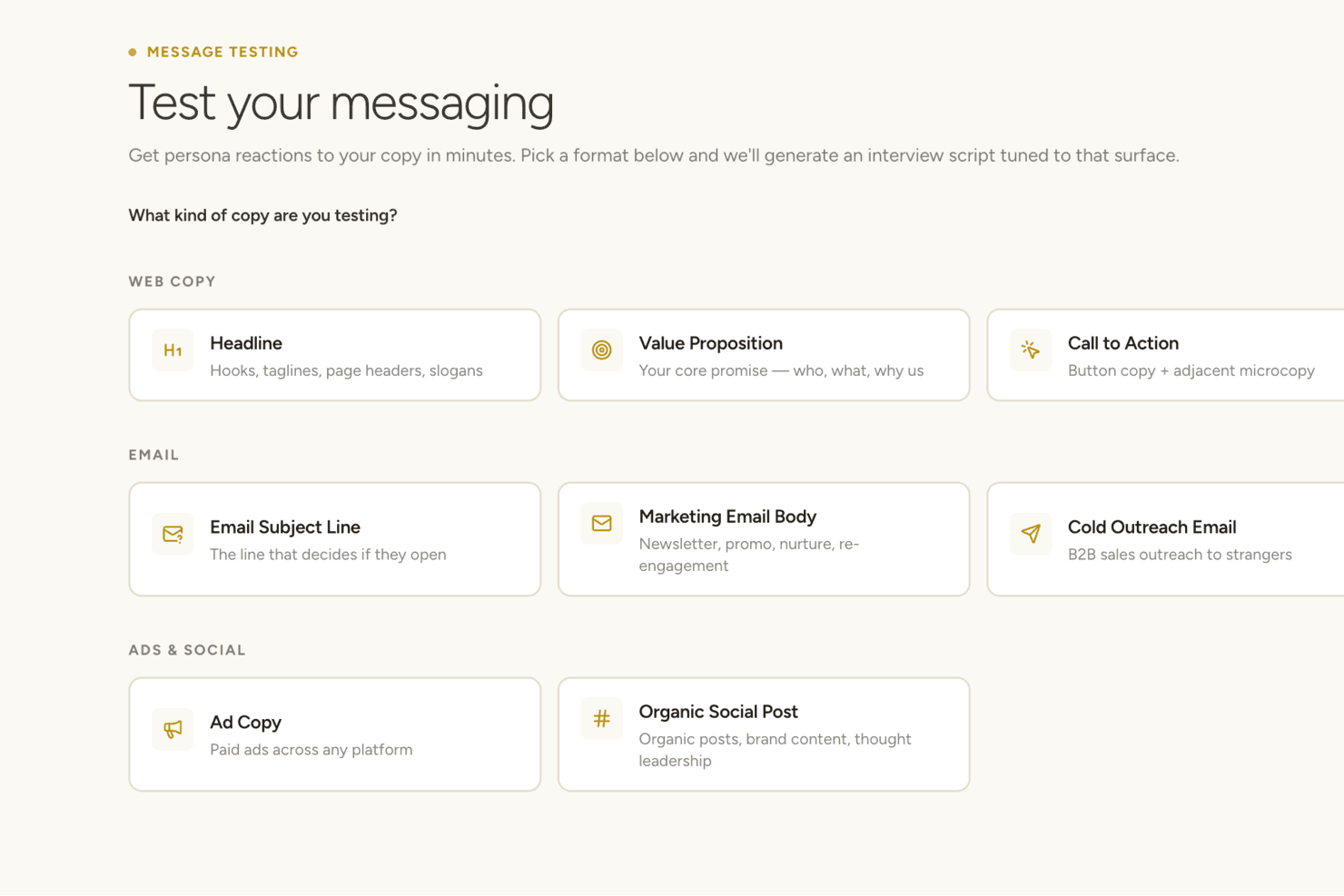
Articos appears to offer a message testing tool that generates persona-based interview scripts for various copy formats including web, email, and social. Articos is a synthetic user research platform that generates AI-driven persona panels, runs hypothesis-blind interviews, and delivers structured insight reports covering motivations, objections, and confusion points.
Who Is Articos Best For?
Articos is a strong fit for consultants and agencies who need fast, structured user research without recruiting participants or coordinating interview schedules.
Why I Picked Articos
Articos earns its spot on my shortlist because of how it handles persona architecture. Each synthetic persona is built on 30 Big Five personality facets and cognitive bias mapping, then interviewed hypothesis-blind so they can't simply validate your assumptions. I especially like the enforced dissenter design: five of twelve personas are calibrated as skeptics, which surfaces genuine objections rather than the confirmation bias you'd get from prompting a standard AI model directly.
Articos Key Features
- Structured research output: Reports surface motivations, objections, confusion points, language patterns, and prioritized recommendations for each research study.
- Persona diversity configuration: Generate panels with 30 personality facets, cognitive bias mapping, and enforced stance diversity.
- A/B testing with synthetic audiences: Run comparative tests to collect structured feedback from synthetic persona panels.
- Talk to Research for follow-up: Re-engage any persona from a completed study with additional targeted questions after the initial research.
Articos Integrations
Native integrations are not clearly documented. An API is available for custom integrations.
Pros and Cons
Pros:
- No participant recruitment or scheduling needed
- Enforced skeptic personas surface genuine objections
- Hypothesis-blind interviews prevent confirmation bias
Cons:
- No generative design capability
- No behavioral data from real users
Learn more about Articos: Best drag-and-drop design tool for teams
- Free trial + free plan available
- From $144/user/year (billed annually)
Visit WebsiteCustomer Rating:4.7/5
Canva brings storyboards to life with generated visuals from simple prompts. Canva is a graphic design platform that caters to individuals, small businesses, and teams looking to create visually appealing designs without needing advanced design skills. It allows users to create a wide array of visual content, including social media graphics, presentations, and marketing materials.
Why I picked Canva: As a tool best for user-friendly design, Canva offers an intuitive drag-and-drop interface that's accessible to everyone, regardless of design experience. You can choose from thousands of templates to jumpstart your projects, making it easy to produce professional-looking designs quickly. Its extensive library of stock photos, icons, and fonts helps you customize designs to fit your brand. The platform's collaborative features enable your team to work together on projects in real-time.
Standout features & integrations:
Features include the ability to create designs for various formats, such as social media posts and business cards. You can access a rich library of templates that cater to different design needs. The tool also offers a brand kit feature to ensure consistency across your team's designs.
Integrations include Dropbox, Google Drive, HubSpot, Instagram, Facebook, Slack, Mailchimp, Microsoft Teams, LinkedIn, and YouTube.
Pros and Cons
Pros:
- Brand kit for consistency
- Extensive template library
- Accessible to non-designers
Cons:
- Less suitable for professional workflows
- Lacks precision controls for detailed design work
Learn more about Canva: Best for rapid prototyping
- Free plan available
- From $39/month (billed annually)
Visit WebsiteCustomer Rating:4.6/5
Uizard supports collaboration by turning design ideas into developer-ready code. Uizard is a prototyping tool designed for UX/UI designers and product teams. It enables users to create wireframes and prototypes quickly, enhancing the design process with minimal effort.
Why I picked Uizard: For rapid prototyping, Uizard offers features like drag-and-drop design, which allows you to swiftly create mockups. Its AI-powered design assistant helps convert sketches into digital designs, saving you time. You can easily share prototypes with stakeholders for feedback, streamlining collaboration. The intuitive interface ensures that even non-designers can participate in the design process.
Standout features & integrations:
Features include the ability to transform hand-drawn sketches into digital wireframes. You can create design templates to standardize your team's workflow. The real-time collaboration feature allows multiple team members to work on a project simultaneously.
Integrations include Figma, Sketch, Adobe XD, Trello, Jira, Slack, Google Drive, Dropbox, and Asana.
Pros and Cons
Pros:
- AI-powered design assistant
- Suitable for non-designers
- Converts sketches to wireframes
Cons:
- Basic customization features
- Limited export options
Learn more about Uizard:

Galileo AI transforms simple prompts into polished, high-fidelity UI designs instantly. Galileo AI is a tool designed for designers and product teams to enhance their design processes. It provides AI-driven design recommendations, helping users create visually appealing and effective designs efficiently.
Why I picked Galileo AI: For AI design suggestions, Galileo AI provides intelligent design recommendations based on user inputs. You can leverage its AI algorithms to enhance your team's design workflow, making design decisions faster. The tool's ability to offer suggestions for layout and color schemes helps maintain consistency across projects. By using AI to inform design choices, Galileo AI enables your team to focus on creativity.
Standout features & integrations:
Features include the ability to generate design templates that align with current trends. You can use its AI to suggest layout improvements, enhancing the overall user experience. The tool also provides analytics on design performance, helping you make data-driven decisions.
Integrations include Figma, Sketch, Adobe XD, Canva, Slack, Trello, Jira, Asana, and Microsoft Teams.
Pros and Cons
Pros:
- Data-driven design analytics
- Provides layout suggestions
- Speeds up design workflow
Cons:
- Learning curve for new users
- Limited customization options
Learn more about ChatGPT: Best for user testing
- Free plan available
- From $12/month (billed annually)
Visit WebsiteCustomer Rating:4.4/5
Marvel simplifies user testing with ready-made scripts and prototype interaction tools. Marvel is a design and prototyping tool ideal for UX/UI designers and product teams. It facilitates the creation of interactive prototypes and supports user testing, helping teams gather feedback to refine their designs.
Why I picked Marvel: For user testing, Marvel provides a platform where you can create and share prototypes easily. Its user testing feature allows you to collect valuable feedback directly from users, helping your team make informed design decisions. You can use its intuitive interface to quickly iterate on designs based on this feedback. The ability to test and refine designs ensures that your final product meets user needs effectively.
Standout features & integrations:
Features include the ability to create interactive prototypes that mimic real user experiences. You can use its design collaboration tools to work with your team in real-time. The handoff feature provides developers with the specs they need to build designs accurately.
Integrations include Sketch, Slack, Jira, Dropbox, Google Drive, Trello, Confluence, Microsoft Teams, Asana, and InVision.
Pros and Cons
Pros:
- Offers user testing tools
- Facilitates design collaboration
- Supports interactive prototypes
Cons:
- No support for responsive breakpoints
- Design tools are limited to wireframing and basic mockups
Learn more about Marvel: Best for live co-editing
- Free trial available
- From $22.99/month (billed annually)
Visit WebsiteCustomer Rating:4.3/5
Adobe XD simplifies UI design with an intuitive interface and organized components. Adobe XD is a design and prototyping tool aimed at UX/UI designers and teams. It supports the creation of wireframes, prototypes, and user interfaces, providing a platform for collaborative design work.
Why I picked Adobe XD: Adobe XD offers real-time co-editing, which allows your team to work together without as many workflow interruptions. You can share design specs and prototypes with stakeholders for feedback, making collaboration smoother. Its repeat grid feature helps in quickly creating multiple elements with consistent spacing. The auto-animate feature adds motion to your designs, enhancing your team's ability to create engaging prototypes.
Standout features & integrations:
Features include responsive design tools for creating layouts that automatically adjust to different screen sizes. Voice triggers let you add speech-based interactions to prototypes for testing voice interfaces. Component states allow you to manage variations like hover or active states within a single component, making updates more efficient and consistent.
Integrations include Adobe Creative Cloud, Slack, Microsoft Teams, Jira, Trello, Zeplin, Sketch, Dropbox, Google Drive, and Airtable.
Pros and Cons
Pros:
- Repeat grid for rapid design
- Supports voice prototyping
- Real-time collaboration
Cons:
- Lack of advanced animations
- Limited text editing options
 Best for vector editing
- Free plan available; 30-day free trial
- From $12/user/month (billed annually)
Visit WebsiteCustomer Rating:4.5/5
Sketch offers precise vector editing tools for creating clean, scalable designs. Pros and Cons
Pros:
- Interactive prototyping tools
- Supports reusable symbols
- Precise vector editing
Cons:
- Limited advanced animation features
- Mac-only application


UX Pilot generates complete wireflows from prompts, streamlining early app design. UX Pilot is a design tool aimed at UX/UI designers and product teams, providing AI-driven wireframing capabilities. It helps users quickly generate wireframes, saving time and enhancing the design process.
Why I picked UX Pilot: For AI wireframing, UX Pilot offers an intuitive platform that uses AI to generate wireframes based on your input. You can rapidly prototype ideas, allowing your team to focus on refining designs. The tool's AI capabilities help streamline the initial stages of design, making it easier to iterate. Its focus on wireframing makes it a useful addition for teams looking to enhance their design workflow.
Standout features & integrations:
Features include the ability to customize wireframes to fit specific project needs. You can generate multiple wireframe variations quickly, helping you explore different design options. The tool also offers collaborative features, allowing your team to work together on wireframes in real-time.
Integrations include Figma, Sketch, Adobe XD, Slack, Trello, Jira, Asana, Microsoft Teams, and Google Drive.
Pros and Cons
Pros:
- Real-time team collaboration
- Supports design iterations
- Quick wireframe generation
Cons:
- Learning curve for new users
- Limited to wireframing tasks
Learn more about UX Pilot:
Other UX AI Tools
Here are some additional UX AI tools options that didn’t make it onto my shortlist, but are still worth checking out:
- 11Axure RP Best for advanced prototyping
- 12KhromaBest for color palette generation
- 13Attention InsightBest for attention prediction
- 14Galileo AIBest for AI design suggestions
- 15NeuronsBest for cognitive testing
- 16MiroBest for AI-assisted visual brainstorming
- 17VisilyBest for low-fidelity prototyping
- 18MidjourneyBest for AI-driven art creation
- 19Designs.aiBest for creative automation
- 20Adobe SenseiBest for AI-enhanced design tools
- 21FrontyBest for converting designs to code
- 22Wireframe DesignerBest for quick wireframe creation
- 23Magician for FigmaBest for generating design ideas
How I Evaluate UX AI Tools
To make this list, a tool’s AI needs to handle real UX work, like generating wireframes from prompts or synthesizing usability findings. From there, I evaluate three things. Core functionality carries the most weight, like creating usable screens and building interactive prototypes. Then I look at standout features, like design system awareness, and how securely it handles user research data.
Core Functionality (Table Stakes For This List)
When I'm selecting tools for my list, I score each one on a scale from 0 (does not offer the functionality) to 5 (excels in this area) for each core functionality listed below. I then convert the total into a percentage to help assess each tool's overall fit, with extra weight on any functionalities I’ve deemed essential.
- AI Design Output (Essential): I look for usable wireframes, UI screens, and multi-step flows generated from prompts, sketches, or product requirements.
- User Insight Analysis (Essential): I assess how well AI finds usability themes and actionable findings across interviews, surveys, analytics, and test sessions.
- Predictive Behavior Modeling: I check whether attention, click, or engagement predictions help identify confusing layouts before recruiting participants.
- Design-to-Code Conversion: I evaluate whether designs become functional prototypes or clean front-end code across standard responsive components.
- Automated Design Assistance: I look for AI support with interface copy, assets, layout suggestions, accessibility checks, and design consistency.
Once I have a list of tools that meet the criteria, I consider what sets each platform apart.
Differentiating Factors (What Sets Vendors Apart)
Here's how I compare and contrast different vendors:
Standout Features
I look for design system awareness first. A tool that respects your existing component library and brand tokens saves hours of cleanup after every generation. I also evaluate whether a tool accepts multi-modal inputs like sketches, screenshots, or competitor URLs, since a PM snapping a whiteboard photo and getting a usable wireframe back beats typing detailed prompts. Accessibility compliance checks matter too. I check whether contrast, labeling, and navigation issues get flagged against WCAG automatically during generation, not as an afterthought.
Beyond Features
I check how each tool handles data privacy for user research inputs, especially whether session recordings and interview transcripts are stored with clear anonymization policies and verifiable compliance like SOC 2 or GDPR. I also evaluate how well the tool fits into an existing stack. A UX AI tool that doesn't connect to Figma, Jira, or Slack adds manual handoff work that erases speed gains. Pricing tiers matter too—I look for plans that scale from a solo designer to a full product organization without forcing an enterprise contract on day one.
How to Choose UX AI Tools
It’s easy to get bogged down in long feature lists and complex pricing structures. To help you stay focused as you work through your unique software selection process, here’s a checklist of factors to keep in mind:
| Factor | What to Consider |
| Scalability | Ensure the tool can grow with your team’s needs, handling more users and larger projects. |
| Integrations | Check if it integrates with your existing software, such as design tools, project management apps, and communication platforms. |
| Customizability | Look for options that let you tailor the interface and workflows to match your team’s processes. |
| Ease of Use | Evaluate whether the tool is intuitive for both new and experienced users, reducing the learning curve. |
| Budget | Consider if the pricing fits your budget while offering the features you need. Look for free trials or plans. |
| Security Safeguards | Verify the tool has strong security measures to protect your data, including encryption and compliance with data regulations. |
| Support | Look for responsive customer support channels, such as live chat and comprehensive resources, to assist when needed. |
| Collaboration | Assess how well the tool supports team collaboration, allowing multiple users to work together in real-time. |
Trends in UX AI Tools
In my research, I sourced countless product updates, press releases, and release logs from different UX AI tools vendors. Here are some of the emerging trends I’m keeping an eye on:
- AI-Driven Design Suggestions: Tools are increasingly using AI to offer design recommendations, helping teams create more effective layouts. For example, Adobe Sensei enhances design processes by suggesting improvements based on user behavior data.
- Real-Time Collaboration Features: More tools are enabling teams to work together in real-time, which improves productivity and design outcomes. Miro Assist offers features that let multiple users edit and comment on designs simultaneously.
- Voice-Activated Interfaces: Voice commands are becoming part of UX tools, allowing for hands-free operation and faster design adjustments. Some vendors are experimenting with voice-triggered design changes to increase accessibility.
- Emotion Recognition: Tools are starting to assess user emotions and reactions to designs, helping teams refine user experiences. Neurons, for instance, incorporates cognitive testing that evaluates emotional responses to improve engagement.
- Sustainability Focus: There's a growing emphasis on tools that help design eco-friendly and sustainable digital products. Some vendors are building features that assess the environmental impact of digital designs, responding to user demand for sustainability.
What Is a UX AI Tool?
UX AI tools are software solutions that integrate artificial intelligence to enhance user experience design processes. They are typically used by UX/UI designers, product managers, and marketing professionals to create more intuitive and effective digital interfaces. Real-time collaboration, AI-driven design suggestions, and emotion recognition features help with creating user-friendly designs, improving team productivity, and understanding user interactions. Overall, these tools provide value by simplifying design tasks and improving the quality of user experiences.
Features of UX AI Tools
When selecting UX AI tools, look for features that support every stage of the UX design process, from user research and ideation to prototyping and handoff. The right combination of AI features can reduce time-consuming manual work while improving output quality for UX professionals and product design teams alike.
- AI-driven design suggestions: Provides recommendations to enhance design layouts, saving time and improving creativity.
- Real-time collaboration: Allows multiple users to work together on projects simultaneously, boosting productivity and teamwork.
- Interactive prototyping: Enables the creation of dynamic prototypes to visualize and test user interactions effectively.
- Emotion recognition: Assesses user emotions and reactions to improve engagement and user experience.
- Voice-activated interfaces: Offers hands-free operation and quick design adjustments, enhancing accessibility.
- Cognitive testing: Evaluates user perception and interaction, providing insights for refining designs.
- Design templates: Provides ready-made templates to jumpstart projects, ensuring consistency and quality.
- Data visualization: Translates user data into visual insights, helping make informed design decisions.
- Customization options: Allows users to tailor the interface and workflows to match specific team needs and processes.
- Security safeguards: Ensures data protection with strong security measures, giving users peace of mind.
Benefits of UX AI Tools
Using UX AI tools can transform the way your team approaches UI/UX design by organizing workflows, improving outcomes, and surfacing richer insights through user research, text prompts, and generative AI. These tools support faster, more informed design decisions and are especially helpful for teams balancing speed and precision.
- AI-driven design suggestions: Uses generative AI to recommend design changes that enhance layout and flow, reducing manual edits during UI/UX design.
- Real-time collaboration: Allows team members—including UX researchers and designers—to work together live, streamlining cross-functional communication.
- Interactive prototyping: Quickly turns wireframes into clickable prototypes to visualize interactions and gather early feedback from users or stakeholders.
- Emotion recognition: Captures emotional responses to visuals and interactions, enriching user research and helping refine user personas.
- Voice-activated interfaces: Supports hands-free adjustments to prototypes or designs, improving accessibility for a wide range of users.
- Cognitive testing: Assesses how users perceive and interact with designs, offering data-backed insights to improve product design.
- Design templates: Jumpstarts projects with pre-built UI/UX design frameworks, improving consistency and saving time on repetitive work.
- Data visualization: Translates user research data into visual insights that help designers make better decisions and refine flows.
- Customization options: Lets teams adapt tools to their preferred workflows—whether for ideation, wireframing, or high-fidelity mockups.
- Security safeguards: Protects sensitive assets like screenshots, user data, and internal feedback through encrypted storage and access controls.
Costs and Pricing of UX AI Tools
Selecting UX AI tools requires an understanding of the various pricing models and plans available. Costs vary based on features, team size, add-ons, and more. The table below summarizes common plans, their average prices, and typical features included in UX AI tools solutions:
Plan Comparison Table for UX AI Tools
| Plan Type | Average Price | Common Features |
| Free Plan | $0 | Limited design templates, basic prototyping, and basic collaboration tools. |
| Personal Plan | $5-$25/user/month | Access to design templates, advanced prototyping, and limited AI-driven insights. |
| Business Plan | $25-$100/ user/month | Full design suite access, real-time collaboration, and AI-driven design suggestions. |
| Enterprise Plan | $100+/user/month | Custom integrations, dedicated support, and advanced security features. |
UX AI Tools FAQs
Here are some answers to common questions about UX AI tools:
How can AI be used in UX design?
AI can enhance the UX design process in several key ways. By analyzing large volumes of user data, AI tools can identify patterns in behavior, surface usability issues, and even predict how users might interact with future designs. This insight supports more informed, user-centered decision-making early in the design cycle.
AI can also automate time-consuming tasks like generating user personas, analyzing feedback from surveys or reviews, or organizing usability test results. Some tools use generative AI to produce wireframes, copy, or design variations based on text prompts, helping teams move faster during ideation. Ultimately, AI allows UX professionals to focus more on strategy, interaction design, and creative problem-solving, while letting automation handle repetitive or analytical work.
While AI can fast-track user insights and wireframe suggestions, it’s still important to ground your UX vision with clear visual direction. For example, in early-stage concepting and aesthetic alignment, moodboard creator tools can help your team get on the same page before moving into prototyping.
What is the difference between UX Pilot and Galileo AI?
UX Pilot and Galileo AI serve different functions. UX Pilot offers advanced wireframing tools for detailed design work, while Galileo AI provides AI-driven design suggestions. Choose UX Pilot for flexibility in wireframing, and Galileo AI for leveraging AI in design decision-making.
What role can AI chatbots play in improving the effectiveness of UX copy?
AI chatbots can enhance UX copy by personalizing content based on user behavior. They analyze data like browsing patterns and interactions to provide tailored content, improving user engagement and satisfaction. This personalization helps create a more relevant and effective user experience.
How does AI improve user testing in UX design?
AI improves user testing by accelerating analysis and reducing reliance on time- and resource-heavy manual testing sessions. AI-powered tools can simulate user interactions, map user flows, and highlight friction points based on behavioral patterns—without needing a large sample of live testers. Some tools use machine learning to analyze screenshots, click data, and session recordings to identify usability issues and predict user drop-off.
AI can also assist with automated task analysis, sentiment detection from user feedback, and clustering of pain points across different user segments. For UX professionals, this means faster validation cycles, earlier issue detection, and the ability to iterate quickly without waiting for extensive rounds of testing.
Can AI tools replace UX designers?
The integration of AI into UX design has sparked discussions about the future role of designers. While AI can automate certain tasks, it’s important to recognize its limitations. AI lacks the human intuition and empathy essential for understanding nuanced user needs and cultural contexts.
As Koji Pereira, a product design leader with experience at Google and Lyft, emphasizes, design is inherently iterative, involving continuous testing and feedback processes that AI tools have yet to fully replicate. Therefore, while AI serves as a valuable tool, it remains just that—a tool. The creative and strategic contributions of UX designers are irreplaceable, ensuring that products are not only functional but also resonate meaningfully with users