
Managing your product marketing efforts can be challenging, especially if your current tools aren't meeting your needs. You might find Ignition isn't the perfect fit for your team anymore. Perhaps it lacks specific features, or maybe it doesn't scale well with your growing business.
In my experience, finding the right software can make all the difference in how efficiently you and your team work. That's why I've independently tested and reviewed various alternatives to Ignition.
In this article, I'll share my top picks of Ignition alternatives, focusing on their unique features and how they address common pain points. You'll get an unbiased, well-researched review to help you make the best decision for your business.
What Is Ignition?
Ignition is product marketing software designed to help teams manage and execute their go-to-market strategies. It's commonly used by product managers, marketing teams, and business strategists who need to align their product launches and marketing plans. Features like collaboration tools, analytics tracking, and campaign management help organize your team’s efforts and stay on top of market trends. Overall, Ignition provides value by enhancing your team's ability to plan and execute successful product launches.
Why Trust Our Software Recommendations
6,700+
Reviews
20
Industry experts
16+
Evaluation factors
14
Years
Our team has been testing and reviewing software since 2012. As product managers ourselves, we know how difficult—and important—it is to choose the right software.
For this guide, we evaluated tools using hands-on testing and independent research, scoring tools using our selection criteria.
Our reviews reflect our human editorial judgment, not a sales pitch.
Expert reviewers:
- Andrew LumbySenior TPM
- Cristiano ValimSenior UI/UX Lead


Comparison Table: Ignition Alternatives
This comparison table summarizes pricing details for my top Ignition alternative selections.
Score legend (out of 5)
- Excellent4.5–5
- Good4–4.4
- Average3–3.9
- Below average2–2.9
- Poor1–1.9
Sorted by: Default
| Tool | Starting Price | Website | |||||||
|---|---|---|---|---|---|---|---|---|---|
Best for accounting firms replacing Ignition | 3.7 out of 5 | 3 | 3 | 4 | 4 | 4 | 4 | $19/user/month 14-day free trial + free demo available | Website |
Best for accounting firm engagement letters | 3.7 out of 5 | 4 | 4 | 4 | 3 | 3 | 4 | $59/user/month Free trial + free demo available | Website |
Best for accounting firms replacing siloed tools | 3.7 out of 5 | 4 | 4 | 4 | 4 | 3 | 3 | $800/user/year Free demo available | Website |
Best for interactive web-based proposals | 3.3 out of 5 | 4 | 4 | 4 | 3 | 4 | 1 | $49/user/month 14-day free trial + free demo available | Website |
Best for accounting firms leaving Ignition | 3.5 out of 5 | 2 | 3 | 4 | 4 | 4 | 4 | A$59/month 30-day free trial + free demo available | Website |
Best for accounting engagement letters | 3.8 out of 5 | 4 | 4 | 5 | 3 | 4 | 3 | $20/month 14-day free trial + demo available | Website |
Best for sign-and-pay in one document | 3.3 out of 5 | 5 | 3 | 4 | 3 | 3 | 2 | $19/user/month Free plan + 14-day free trial available | Website |
Best for proposal-to-payment client onboarding | 3.3 out of 5 | 3 | 3 | 4 | 4 | 4 | 2 | $35/month 21-day free trial + free demo available | Website |
Best for per-payment billing with no subscription | 4.0 out of 5 | 4 | 3 | 4 | 5 | 4 | 4 | $5/payment Free plan + free demo available | Website |
Best for accounting firm pricing proposals | 3.5 out of 5 | 4 | 3 | 4 | 2 | 4 | 4 | $75/month 30-day free trial + free demo available | Website |


Best Ignition Alternatives Reviews
Below are my detailed summaries of the best Ignition alternatives that made it onto my shortlist. My reviews offer a detailed look at the key features, pros & cons, integrations, and ideal use cases of each tool to help you find the best one for you and your team.
 Best for accounting firms replacing Ignition
- 14-day free trial + free demo available
- From $19/user/month (billed annually)
Visit WebsiteCustomer Rating:4.8/5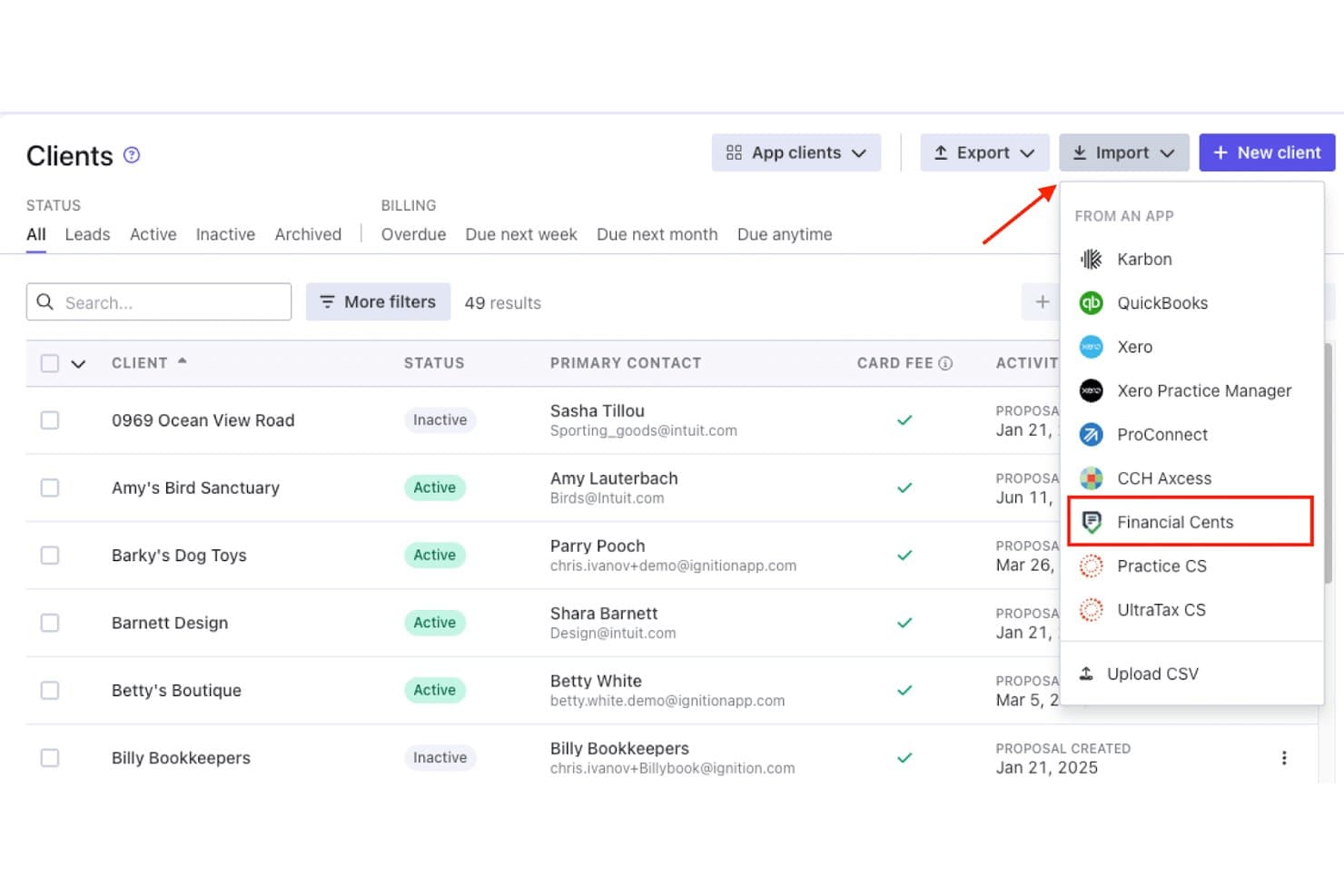
Financial Cents lets users import clients directly from the Ignition app. Financial Cents is an accounting practice management platform that brings proposals, engagement letters, e-signatures, and billing into one place—making it a practical fit for accounting firms that want to handle the full client lifecycle without juggling separate tools.
Who Is Financial Cents Best For?
Financial Cents is a strong fit for accounting firms that want proposals, e-signatures, and billing managed inside the same platform as their client work and workflows.
Why I Picked Financial Cents
I picked Financial Cents because it folds proposals, engagement letters, and billing into the same platform where your accounting firm already manages client work. I especially like that when a client signs a proposal, invoicing kicks off automatically, and you can even require clients to save a payment method before signing so recurring charges happen without any manual follow-up. The tiered proposal packages (Bronze/Silver/Gold, for example) let clients self-select their service level, which keeps scope conversations cleaner from the start.
Financial Cents Key Features
- Client portal with magic link access: Clients log in via an emailed link and six-digit code—no password required—to view documents, complete tasks, and sign requests.
- QuickBooks Online two-way sync: Every paid plan includes a native sync that keeps client records, invoice status, and payments aligned between both platforms automatically.
- Time-based billing: Track billable hours and convert them directly into invoices without manually re-entering data.
- Auto-create work on signed proposals: On the Scale plan, an accepted proposal automatically generates the corresponding project and tasks inside Financial Cents.
Financial Cents Integrations
Financial Cents offers native integrations with QuickBooks Online, Ignition, and Anchor. Scale includes an API and connects with Xero through Zapier.
Pros and Cons
Pros:
- Reviewers praise task workflows and client communication
- Clients choose among tiered service packages
- Signed proposals trigger invoicing and payment collection
Cons:
- No automated renewal proposals or bulk renewals
- Proposals require Financial Cents billing
Learn more about Financial Cents: Best for accounting firm engagement letters
- Free trial + free demo available
- From $59/user/month (billed annually)
Visit WebsiteCustomer Rating:4.8/5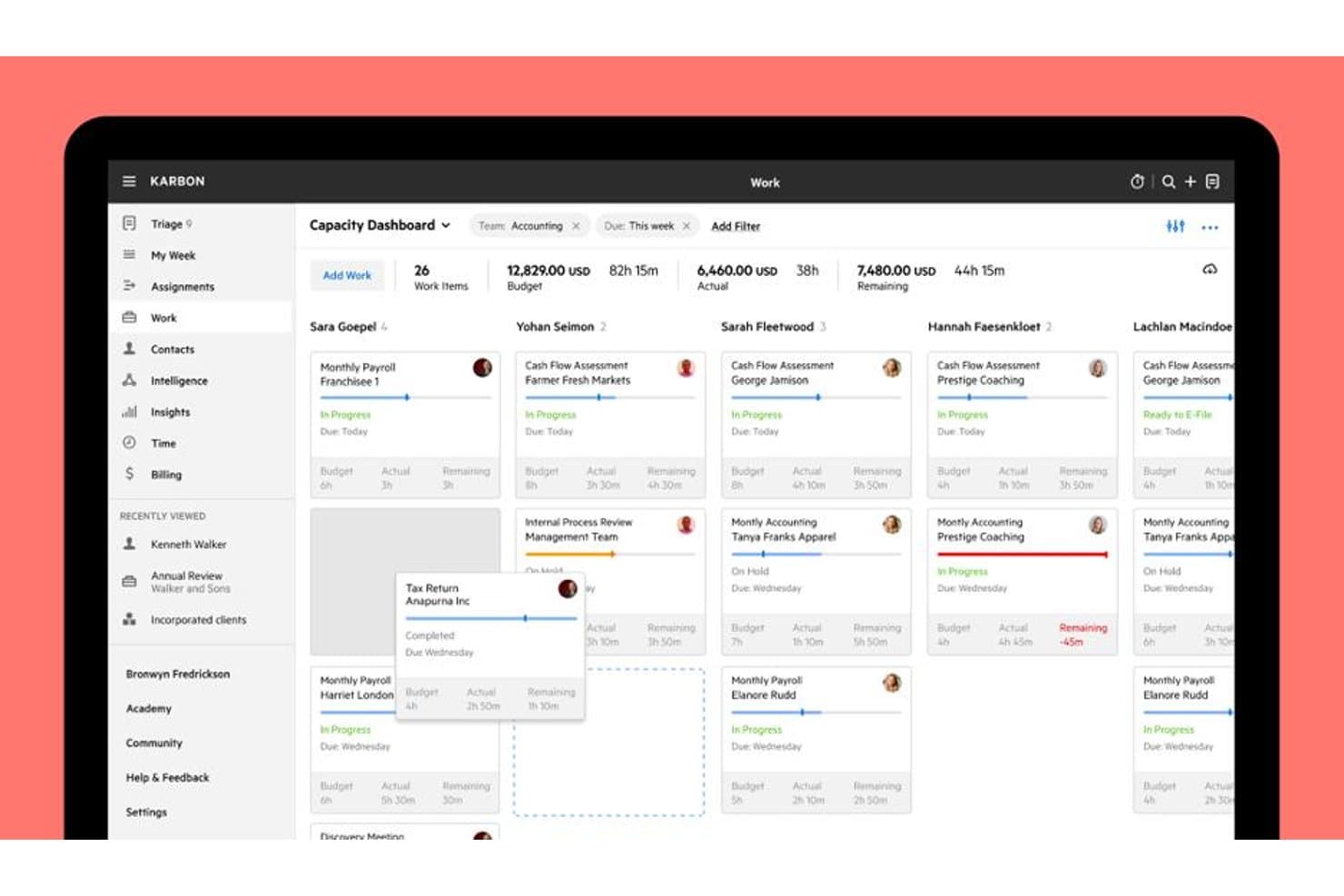
Karbon's Capacity Dashboard tracks team workload and budgets at a glance. Karbon is a practice management platform built for accounting firms that brings engagement letters, e-signatures, billing, and client workflow tracking into one connected system.
Who Is Karbon Best For?
Karbon is a strong fit for accounting firms that want to manage engagement letters, client work, billing, and team collaboration inside a single platform.
Why I Picked Karbon
Karbon earns its spot on my shortlist because it embeds engagement letters directly inside a full practice management system, making it the strongest pick for accounting firms that want one platform from signed letter to collected payment. I particularly like the bulk creation feature, which lets firms draft and send engagement letters to an entire client segment at once, a real advantage during tax season. The IRS-compliant knowledge-based authentication (KBA) for forms like 8878 and 8879 is also something I haven't seen matched elsewhere.
Karbon Key Features
- Automated work creation: A signed engagement automatically generates scoped work items, assignees, due dates, and repeat schedules inside Karbon.
- Recurring billing models: Karbon supports time and materials, fixed fee, recurring fixed fee, progress billing, and WIP billing, all tied to accepted engagements.
- Client portal with invoice payments: Clients can view, manage, and pay invoices directly through the Karbon for Clients portal on web, iOS, and Android.
- QuickBooks Online and Xero sync: Karbon syncs invoices, payments, and surcharges natively with both platforms, with a Billing API for tools like NetSuite and Sage.
Karbon Integrations
Karbon has native integrations with QuickBooks Online Accountant and Xero, plus integrations with Ignition, GoProposal, Anchor, HubSpot, and Pipedrive. Business and Enterprise plans include an API, and Karbon also supports Zapier.
Pros and Cons
Pros:
- Signed scopes create assigned recurring work
- Bulk engagement letters support tax-season renewals
- Reviewers praise task management and collaboration
Cons:
- Reviewers cite invoice customization limits
- Engagements is newer than proposal-first tools
Learn more about Karbon: Best for accounting firms replacing siloed tools
- Free demo available
- From $800/user/year (billed annually)
Visit WebsiteCustomer Rating:4.7/5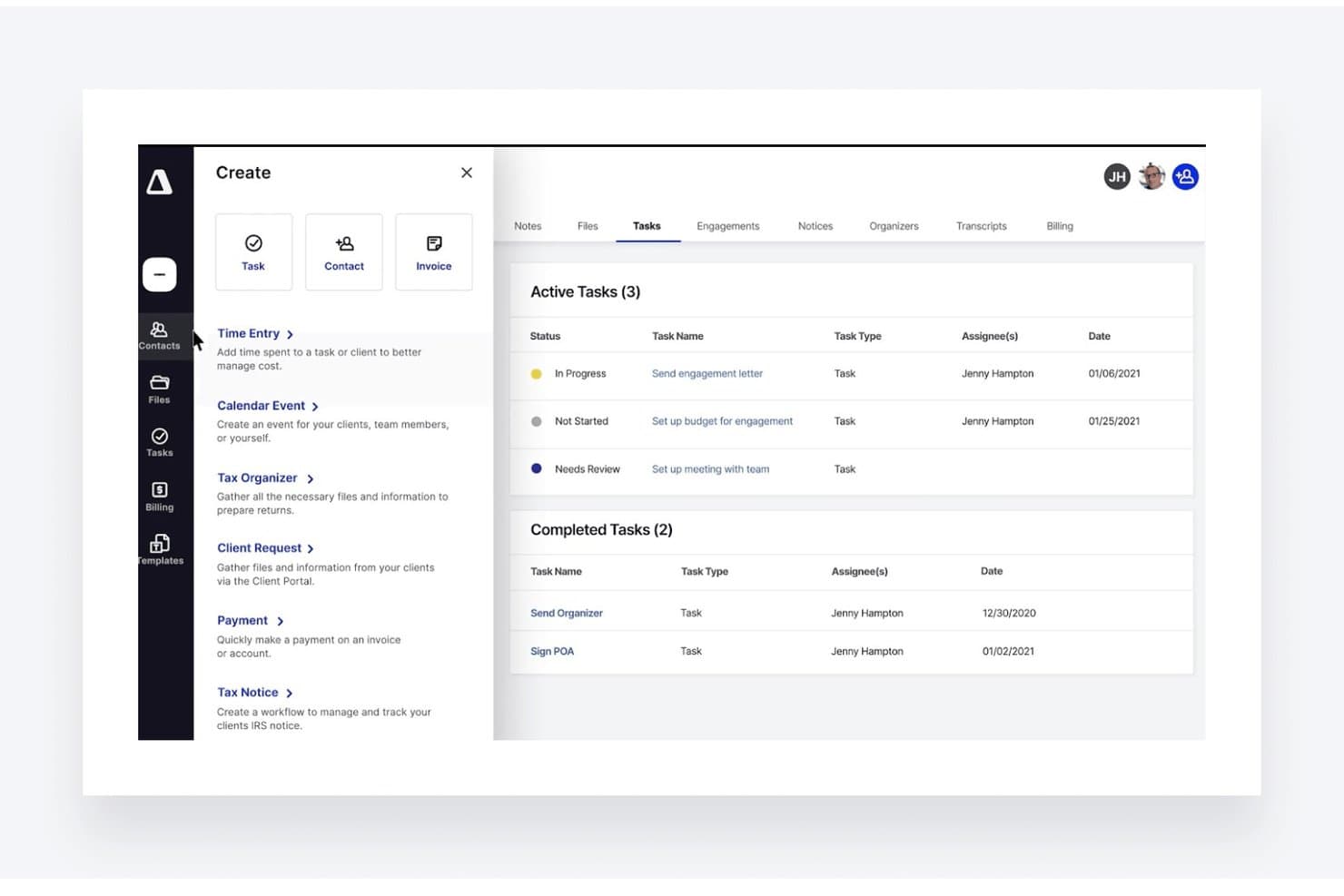
TaxDome lets users create and track client tasks from one dashboard. TaxDome is an all-in-one practice management platform built for tax, bookkeeping, and accounting firms that want to handle proposals, e-signatures, billing, and client workflows without juggling multiple tools.
Who Is TaxDome Best for?
TaxDome fits accounting and bookkeeping firms that want proposals, e-signatures, billing, and client workflows managed in one platform instead of across separate tools.
Why I Picked TaxDome
I picked TaxDome because it replaces the stack of separate tools most accounting firms are juggling, putting proposals, e-signatures, and billing into one platform. I especially like how signing a proposal automatically triggers the next job in your workflow, including welcome emails, intake forms, and package-based pipelines. The built-in recurring billing with auto-pay, failed-payment retries, and deposit options means you're not patching together a payment tool on top of your proposal tool.
TaxDome Key Features
- KBA e-signatures: Supports knowledge-based authentication for IRS Form 8879 signing, with a full audit trail on every completed document.
- Client portal and mobile app: Clients review, sign, and pay through a branded portal or top-rated mobile app without needing email attachments.
- Package-driven pipeline automation: Account tags applied at signing trigger conditional pipelines, giving each service tier its own automated workflow.
- QuickBooks Online sync: Invoices, payments, and processing fees push from TaxDome into QuickBooks automatically on a scheduled basis.
TaxDome Integrations
TaxDome offers integrations with QuickBooks Online, Drake, ATX, CCH Axcess, CrossLink, Intuit ProConnect, TaxSlayer, and ProSeries, plus DATEV and Companies House. It also supports 2,000+ apps through Zapier.
Pros and Cons
Pros:
- KBA signatures include detailed completion audit trails
- Portal combines proposals, payments, and client collaboration
- Signing proposals launches onboarding and job workflows
Cons:
- Proposal experience trails Ignition for engagement letters
- Setup and client migration demand substantial time
Learn more about TaxDome: Best for interactive web-based proposals
- 14-day free trial + free demo available
- From $49/user/month
Visit WebsiteCustomer Rating:4.5/5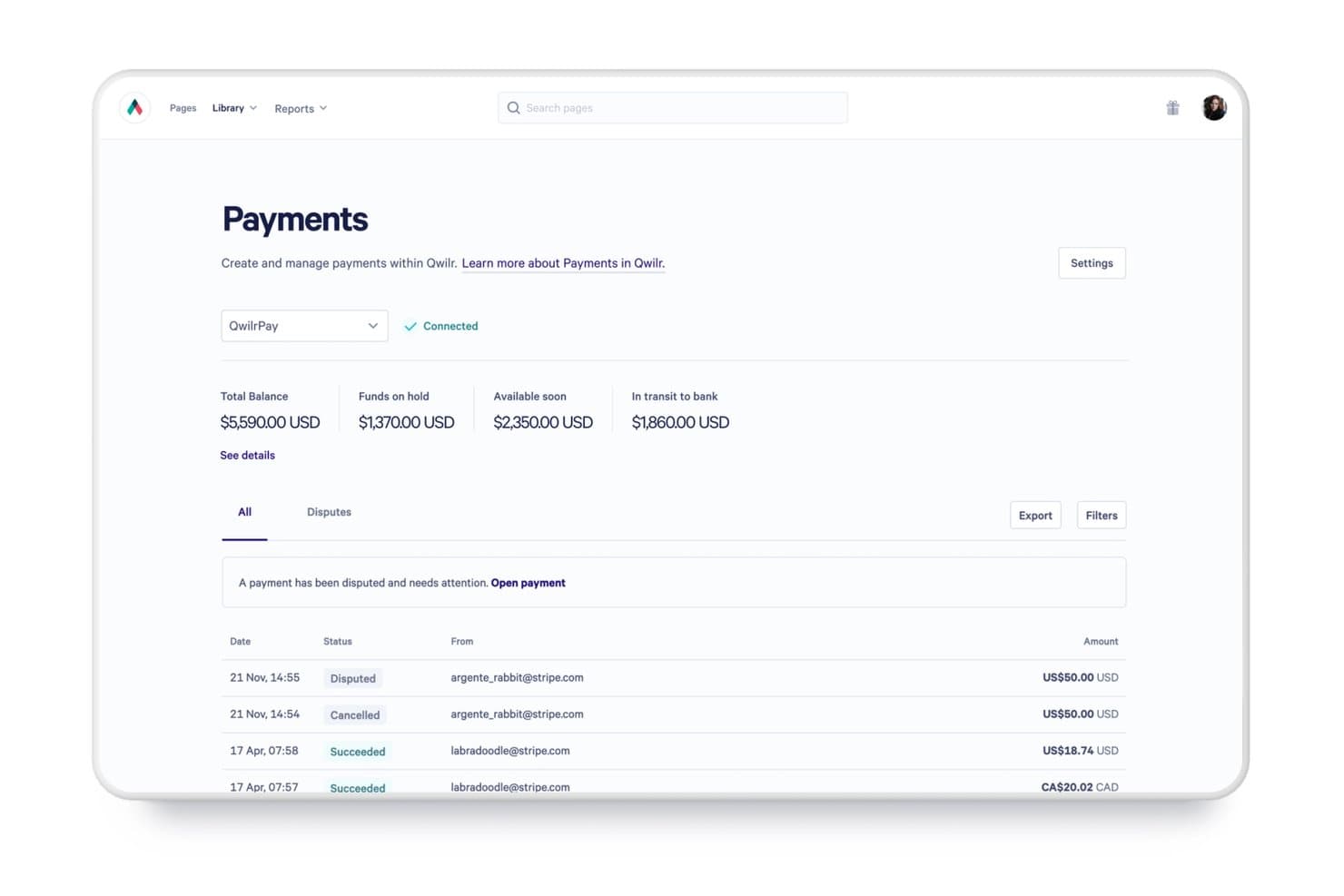
Qwilr tracks payment statuses, balances, and disputes in one place. Qwilr turns proposals into interactive web pages with built-in quoting, e-signatures, and payment collection, making it a strong fit for professional services teams that want clients to review, sign, and pay in a single visit.
Who Is Qwilr Best For?
Qwilr is a strong fit for professional services teams that want clients to review, approve, and pay from a single interactive web page.
Why I Picked Qwilr
I picked Qwilr as one of the best because it turns proposals into live, interactive web pages your clients can review, sign, and pay from in a single visit. I especially like the stalled-signing alerts, which notify you the moment a client starts the acceptance process but doesn't finish, so nothing slips through. The block-by-block engagement analytics also show exactly which sections a client read or skipped, giving you real signal on where a deal stands.
Qwilr Key Features
- Interactive quote blocks: Clients can adjust line items, quantities, and optional add-ons directly inside the proposal, so the final price reflects the scope they actually choose.
- Unlimited multi-party e-signatures: Any number of signers can sign or initial specific clauses within a single proposal, and the page only registers as accepted once everyone has signed.
- QwilrPay recurring billing: Set billing frequency, start and end dates, and billing anchor dates to collect automatic recurring payments or send manual invoice emails each cycle via Stripe.
- QuickBooks invoice sync: Accepted proposals and quotes push directly to QuickBooks as invoices, with tax rates and customer records mapped automatically.
Qwilr Integrations
Qwilr has native integrations with QuickBooks, Stripe, HubSpot, Zoho, Pipedrive, Slack, Microsoft Dynamics 365, and Salesforce, with some features limited by plan. It also supports Zapier and a REST API for custom integrations.
Pros and Cons
Pros:
- Section analytics reveal client interest
- Stalled-signing alerts flag unfinished acceptances
- Clients sign and pay within proposals
Cons:
- Renewals require manual proposal follow-up
- No accounting-specific engagement-letter templates
Learn more about Qwilr: Best for accounting firms leaving Ignition
- 30-day free trial + free demo available
- From A$59/month
Visit WebsiteCustomer Rating:4.5/5
Onboardme guides clients through multi-step contact detail collection forms. OnboardMe is a proposal, billing, and client onboarding platform built specifically for accounting and bookkeeping firms, covering everything from engagement letters and AML/KYC compliance to recurring billing and debtor management in one place.
Who Is OnboardMe Best For?
OnboardMe is a strong fit for accounting and bookkeeping firms in Australia, New Zealand, the UK, or South Africa that want to replace Ignition with a single platform covering proposals, AML/KYC compliance, and billing.
Why I Picked OnboardMe
OnboardMe earns its spot on my shortlist because it's built from the ground up to replace Ignition, not just compete with it. I appreciate that it handles the full post-Ignition workflow in one place: proposal creation with bundled engagement letters, automated recurring billing, and a built-in AML/KYC compliance layer that most alternatives don't touch. What I find especially useful is the debtor management module, which automates payment retries, SMS reminders, and Xero reconciliation so firms aren't chasing unpaid invoices manually after moving off Ignition.
OnboardMe Key Features
- Bulk proposal sending: Send one proposal template to multiple clients at once, filtered by office or group, with a past-runs log tracking results per client.
- AML/KYC compliance tools: Run standard or extensive AML screening, PEP checks, and Customer Due Diligence workflows with risk scoring directly inside the platform.
- Client payment portal: Give clients a branded, login-free portal where they can view balances, pay multiple bills at once, update payment methods, and download statements.
- Client subscriptions module: Track and re-bill software subscriptions you manage for clients, complete with markup, margin reports, and vendor-file imports.
OnboardMe Integrations
OnboardMe has native integrations with Xero, QuickBooks, MYOB, FreeAgent, Xero Practice Manager, FYI, Karbon, MYOB Practice Management, Pinch, and Annature. It also offers a REST API and Zapier.
Pros and Cons
Pros:
- Built-in AML checks support compliance work
- Proposals connect directly to billing workflows
- Reviewers praise responsive support
Cons:
- Proposal engagement analytics aren’t documented
- Signing audit trails aren’t documented
Learn more about Onboardme: Best for accounting engagement letters
- 14-day free trial + demo available
- From $20/month (billed annually)
Visit WebsiteCustomer Rating:4.8/5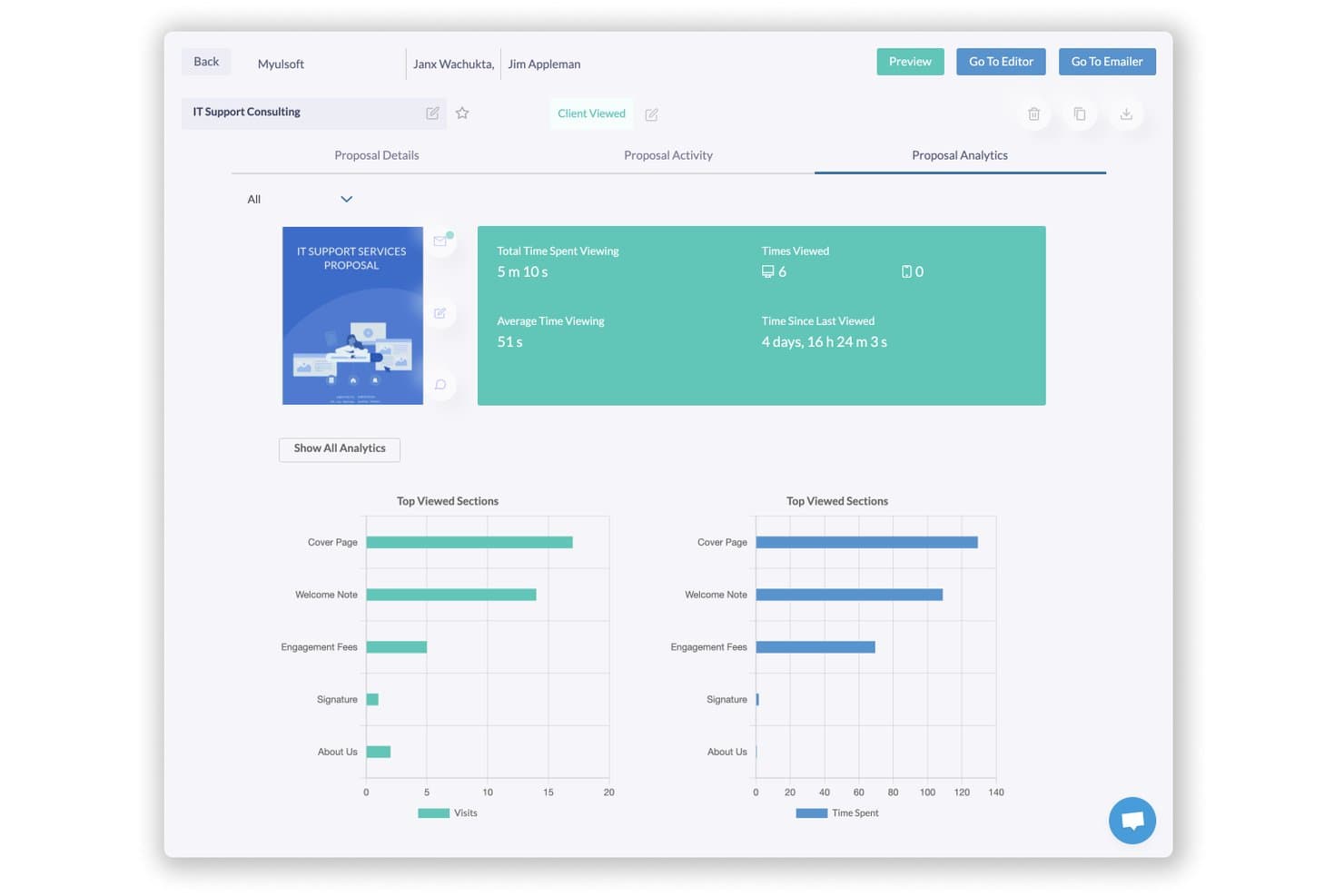
Fresh Proposals lets users track proposal views, time spent, and top sections. Fresh Proposals is a proposal and engagement letter platform built for accounting firms and professional services teams who need to create, send, and collect signatures on client-facing documents without stitching together multiple tools.
Who Is Fresh Proposals Best For?
Fresh Proposals is a strong fit for accounting firms that need AICPA-aligned engagement letters, tax-specific templates, and CPACharge payment support built directly into their proposal workflow.
Why I Picked Fresh Proposals
Fresh Proposals earns its spot on my shortlist because of how specifically it's built for accounting engagement letters. I appreciate that it ships with AICPA-aligned templates covering individual 1040s, partnerships, corporate returns, and estate/trust filings, so there's no starting from scratch. I also like that CPACharge is natively built in, letting clients sign and pay via ACH or card inside the same proposal link.
Fresh Proposals Key Features
- Interactive fee tables: Clients can toggle optional add-ons, edit quantities, and see totals update live inside the proposal.
- Conditional smart sections: Content blocks show or hide automatically based on CRM fields, deal size, industry, or signer role.
- Multi-party signing order: You can configure the sequence in which internal and client-side signers receive and complete the proposal.
- Automated renewal workflows: Set renewal dates across your client base so engagement letters are drafted and queued for review on schedule.
Fresh Proposals Integrations
Fresh Proposals offers 14+ native integrations, including QuickBooks, Xero, HubSpot, Stripe, CPACharge, LawPay, Google Drive, Trello, and Slack. It also supports API and webhook access for enterprise accounts, plus Zapier.
Pros and Cons
Pros:
- Renewal scheduling reduces repeat drafting
- Client-editable fees update totals live
- AICPA-aligned tax engagement templates
Cons:
- Active proposal caps constrain busy firms
- WYSIWYG editor can lag or misalign
Learn more about Fresh Proposals: Best for sign-and-pay in one document
- Free plan + 14-day free trial available
- From $19/user/month (billed annually)
Visit WebsiteCustomer Rating:4.5/5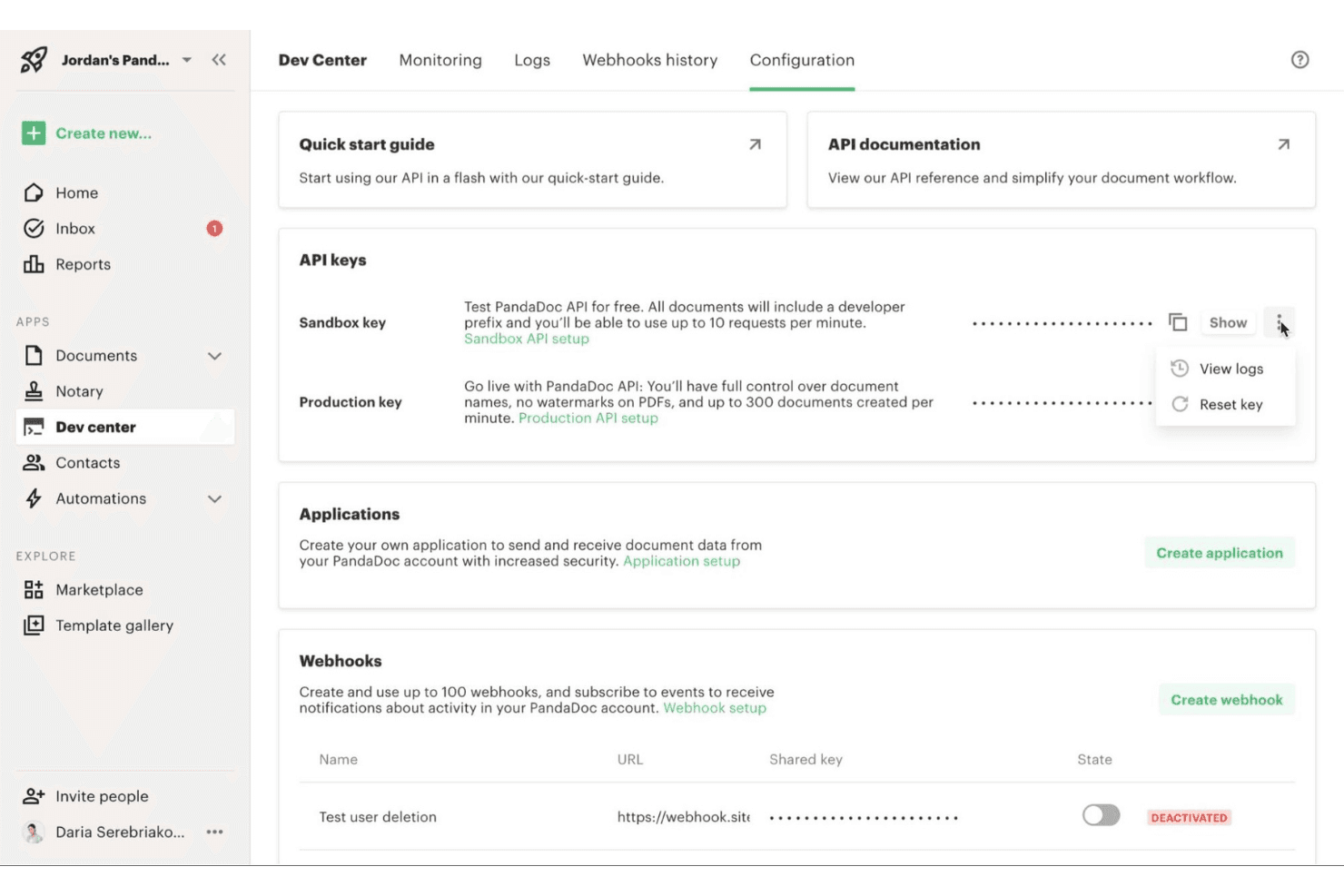
PandaDoc lets users manage API keys and webhooks in Dev Center. PandaDoc is a document automation platform that lets professional services teams build proposals, collect e-signatures, and accept payments without switching between tools.
Who Is PandaDoc Best For?
PandaDoc is a strong fit for professional services teams that want to send branded proposals, collect signatures, and accept payment all within a single document.
Why I Picked PandaDoc
I picked PandaDoc as one of the best because it handles the full client journey inside a single document: proposal, signature, and payment. I love how the payment block lets clients sign and pay without leaving the document or getting redirected to a separate portal. The interactive pricing tables let clients adjust quantities or select optional services before signing, so the final amount is agreed on before a card is charged.
PandaDoc Key Features
- Drag-and-drop document editor: Build proposals and contracts from scratch using a visual editor with 1,000+ templates and reusable content blocks.
- Client collaboration Rooms: Share documents, videos, and messages with clients inside a dedicated deal room that supports negotiation, signing, and payment.
- QuickBooks Online sync: Automatically creates estimates when a document is sent and converts them to invoices upon completion, with customer and product record syncing.
- Audit trail and identity verification: Every signed document includes a timestamped log of views and signatures, with optional SMS, passcode, or knowledge-based authentication.
PandaDoc Integrations
PandaDoc offers 30+ native integrations, including QuickBooks Online, Salesforce, HubSpot, Pipedrive, FreshBooks, Stripe, PayPal, Square, Authorize.net, and QuickBooks Payments. It also provides an API for custom integrations and supports Zapier.
Pros and Cons
Pros:
- Reusable templates speed proposal creation
- Interactive pricing tables clarify service scope
- Clients sign and pay in-document
Cons:
- Recurring billing lacks documented retry automation
- No accounting-specific engagement-letter workflows
Learn more about PandaDoc: Best for proposal-to-payment client onboarding
- 21-day free trial + free demo available
- From $35/month
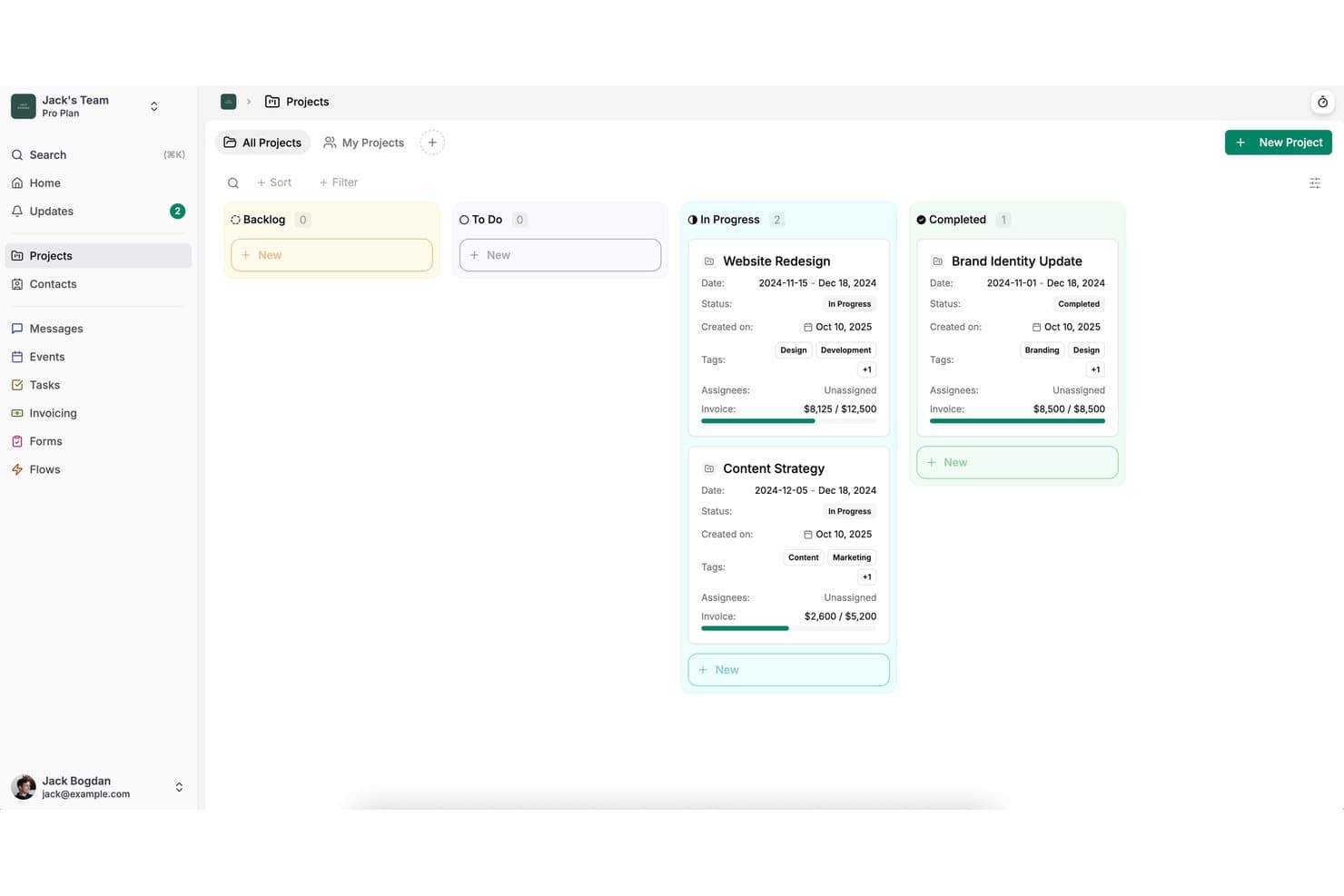
Dubsado organizes client projects by status in a kanban-style board view. Dubsado is a client management platform for service-based businesses that bundles proposals, contracts, invoices, and automated workflows into one place, helping small firms replace fragmented, manual client onboarding with a single connected process.
Who Is Dubsado Best For?
Dubsado fits solopreneurs and small service businesses that want to take clients from first proposal to final payment without juggling separate tools.
Why I Picked Dubsado
I picked Dubsado as one of the best because it handles the entire client onboarding sequence in a single send: proposal, contract, and payment request all go out as one link. I appreciate that clients can browse service packages, select add-ons, sign the contract, and pay without ever switching tools. The recurring invoice and autopay setup is especially useful for retainer-based work, where you need billing to run itself after the initial agreement is signed.
Dubsado Key Features
- Client portal: Each client gets a branded, password-protected portal showing invoices, forms, appointments, and project communications in one place.
- Flows automation: Premier users can build automated sequences that trigger actions based on client activity, such as form completion or payment receipt.
- Sub-agreements: Unlimited additional signing documents—like NDAs or addendums—can be attached to a project outside the primary contract.
- Multiple payment processors: Clients can pay via Dubsado Payments (Stripe-based), Square, or PayPal, with ACH, buy now pay later, and surcharging options available.
Dubsado Integrations
Dubsado offers native integrations with QuickBooks Online and Xero on Premier, plus Square and PayPal payment integrations. It also supports Zapier for additional connections, while QuickBooks Online and Xero sync primarily after payments are received.
Pros and Cons
Pros:
- Branded portals keep client records together
- Recurring invoices collect retainers automatically
- One-link proposals combine contracts and payment
Cons:
- Initial workflow setup takes substantial time
- Separate sub-agreements complicate multiple signatures
Learn more about Dubsado: Best for per-payment billing with no subscription
- Free plan + free demo available
- From $5/payment
Visit WebsiteCustomer Rating:5/5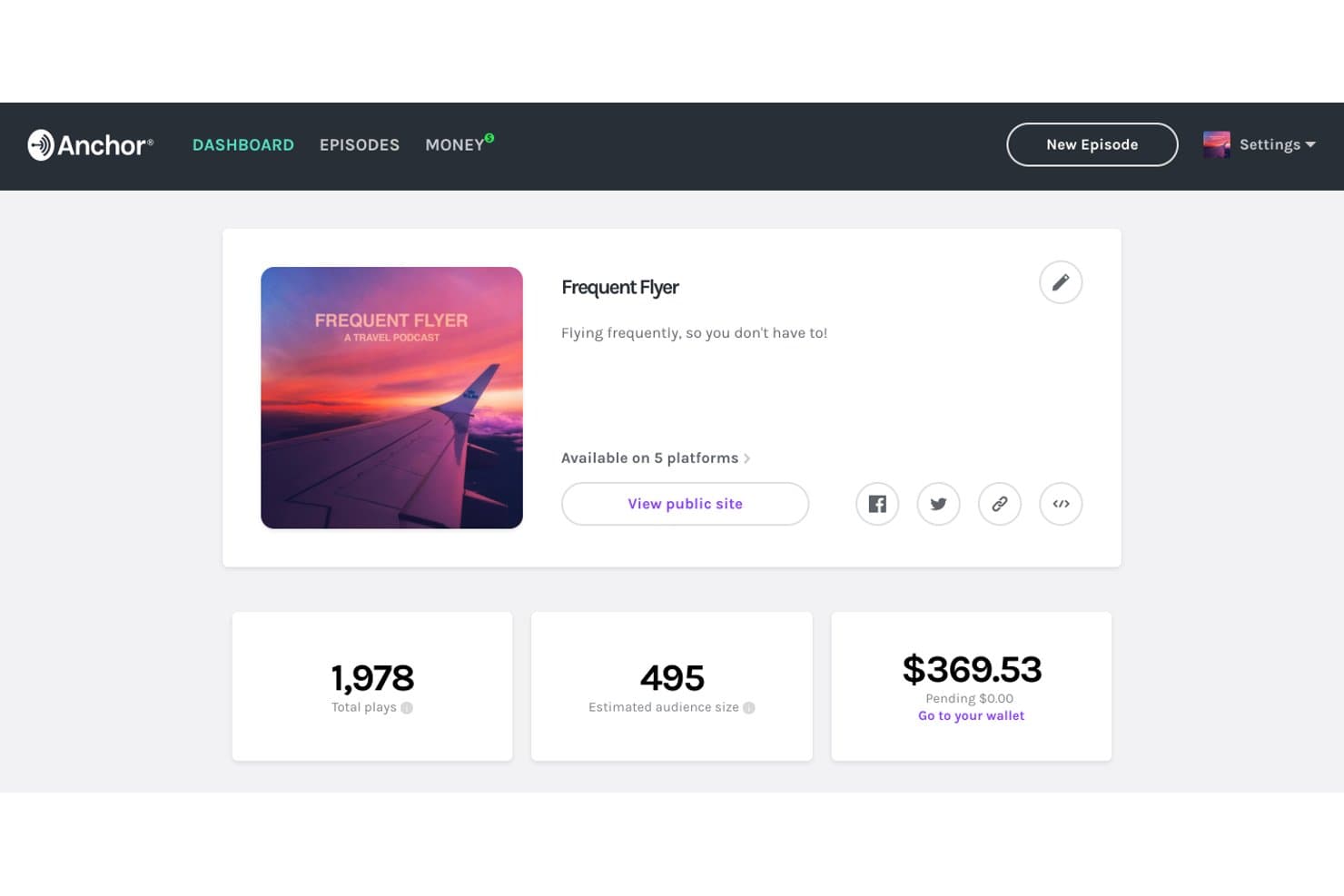
Anchor tracks plays, audience size, and earnings in one dashboard. Anchor is a proposal, e-signature, and billing platform built for accounting and professional services firms that want to replace manual invoicing with an automated, end-to-end client engagement workflow.
Who Is Anchor Best For?
Anchor is a strong fit for accounting firms and professional services businesses that bill clients on a recurring basis and want to get paid automatically without managing invoices manually.
Why I Picked Anchor
I picked Anchor as one of the best Ignition alternatives because it's the only option on my list that charges per payment instead of a monthly subscription. That means you pay $5 when a client pays you, and nothing otherwise. I especially like how billing kicks off automatically the moment a client signs, with their card or ACH details captured right on the signing screen, so there's no separate invoicing step to manage.
Anchor Key Features
- Multi-signer e-signature: Add multiple signers in a set order, with the agreement finalizing only after all parties have signed.
- Post-signing agreement amendments: Modify scope or pricing on a live agreement after signing, with every change logged and client approval triggered automatically.
- Client payment portal: Clients access a no-login portal to view agreements, download invoices, update payment details, and clear failed payments.
- Native QuickBooks and Xero sync: Invoices, payments, and refunds sync in real time between Anchor and your accounting software.
Anchor Integrations
Anchor offers native integrations with QuickBooks Online, Xero, Karbon, Financial Cents, Client Hub, COUNT, Double, Levvy, CCH Axcess, and HubSpot. It also supports a REST API, webhooks, Make, and Zapier.
Pros and Cons
Pros:
- Users report responsive, fast issue resolution
- Automatic retries reduce manual collection follow-up
- Clients can sign and authorize payment together
Cons:
- Bulk renewals require more manual handling
- Payments are limited to US accounts
Learn more about Anchor: Best for accounting firm pricing proposals
- 30-day free trial + free demo available
- From $75/month
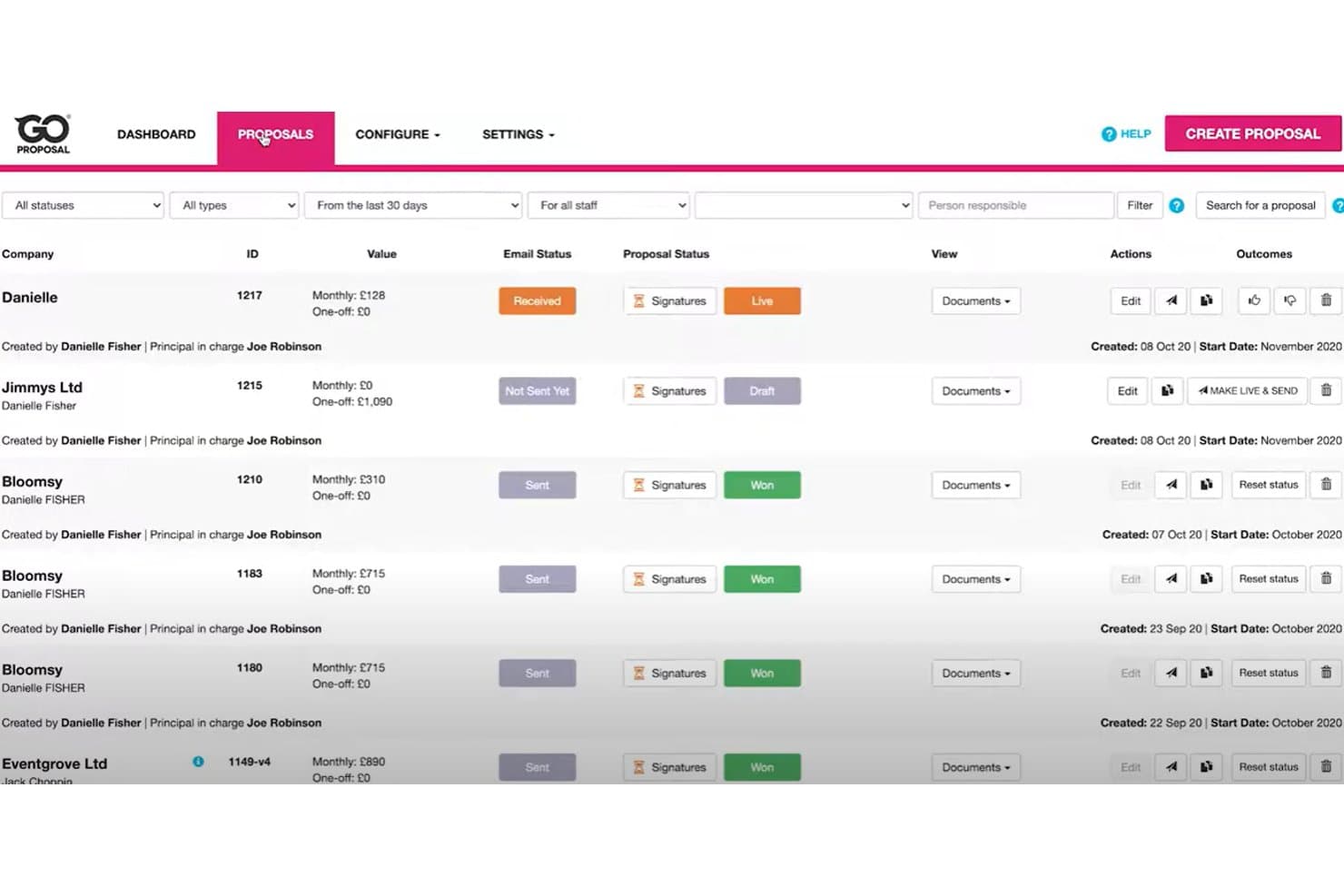
GoProposal tracks proposal statuses, values, and signatures in one view. GoProposal is a client engagement platform built specifically for accounting and bookkeeping firms that want to price services consistently, generate engagement letters automatically, and collect e-signatures without the back-and-forth.
Who Is GoProposal Best For?
GoProposal is built for accounting and bookkeeping firms that want a consistent, structured way to price services and get clients signed quickly.
Why I Picked GoProposal
I picked GoProposal as one of the best because its Pricing Wizard is genuinely built around accounting work, suggesting itemized fees based on best practice rather than leaving you to guess. When a client meeting runs long, I can build the proposal live, agree on scope in the room, and have an engagement letter generated automatically before they leave. The multi-party e-signature tracking, with time, date, and IP stamping, gives me a clear audit trail that holds up under scrutiny.
GoProposal Key Features
- Accounting tool integrations: Connects natively with Xero, QuickBooks, and Sage to automatically create invoices when a proposal is accepted.
- GoCardless Direct Debit setup: Lets clients enter Direct Debit details during or after proposal acceptance, directly within the signing flow.
- Contact Hub: A central client and prospect record that stores communications, history, and pipeline status in one place.
- Service schedules: Attaches recurring tasks and key filing deadlines to each client's engagement letter to keep scope clearly defined.
GoProposal Integrations
GoProposal has native integrations with Xero, QuickBooks, Sage Accounting, and GoCardless. It also integrates with Karbon, Senta, AccountancyManager, Dext, and Zapier.
Pros and Cons
Pros:
- Stamped multi-party signatures track approvals
- Live proposals settle scope during meetings
- Pricing Wizard suggests accountant-specific itemized fees
Cons:
- Follow-ups and lost statuses need manual updates
- No native client card-payment portal
Learn more about GoProposal:
Other Ignition Alternatives
Here are some additional Ignition alternatives that didn’t make it onto my shortlist, but are still worth checking out:
- 11ConeBest for accounting firms billing by proposal
- 12DealHub AIBest for B2B sales quote-to-revenue workflows
- 13QuoteWerksBest for IT and MSP quote-to-signature workflows
- 14ProposifyBest for drag-and-drop proposal branding
- 15OdooBest for quote-to-cash on one platform
- 16BonsaiBest for creative firms managing proposals to payment
- 17AssemblyBest for AI-built, white-labeled client portals
- 18MoxieBest for freelancers sending proposals and contracts
- 19TidyflowBest for accounting firms scaling by team, not clients
- 20FigsFlowBest for UK accounting firm compliance proposals
How I Evaluate an Ignition Alternative
I split my evaluation into three parts. First, core functionality: can it build digital proposals and capture e-signatures? That carries the most weight. Second, I look for standout features like automated renewal workflows or client payment portals. Third, I consider onboarding support and pricing transparency.
Core Functionality (Table Stakes For This List)
When I'm selecting tools for my list, I score each one on a scale from 0 (does not offer the functionality) to 5 (excels in this area) for each core functionality listed below. I then convert the total into a percentage to help assess each tool's overall fit, with extra weight on any functionalities I’ve deemed essential.
- Proposal Creation (Essential): I look for customizable proposals and reusable service templates that let a firm package bookkeeping, advisory, or other services for each client.
- E-Signatures (Essential): I check that clients can sign within the proposal workflow, with signing status and an audit trail visible to the team.
- Billing & Payments: I assess whether accepted proposals can trigger one-off or recurring charges and let clients pay through the platform.
- Pricing & Scope: I consider how teams configure service packages, add-ons, and scope so the proposed price reflects the work each client selects.
- Workflow Tracking: I look for clear sent, viewed, signed, and declined statuses, plus reminders that support follow-up when a proposal stalls.
- Accounting Integrations: I check for connections to accounting, CRM, or practice systems that sync client and billing details without relying on manual re-entry.
Once I have a list of tools that meet the criteria, I consider what sets each platform apart.
Differentiating Factors (What Sets Vendors Apart)
Here's how I compare and contrast different vendors:
Standout Features
I look for automated renewal workflows that pre-generate proposals before an engagement expires. Firms lose clients when renewals slip through the cracks during busy periods, so I check whether a tool can schedule and send those proposals without manual intervention. Proposal analytics also matter—I evaluate whether a platform tracks how long clients spend on each section, which helps teams adjust pricing or restructure scope. A client payment portal rounds out the picture, giving clients a self-service space to view invoices and pay directly.
Beyond Features
I evaluate how quickly a firm can send its first proposal after signing up, including whether the vendor offers guided setup or migration help for existing client data. Pricing transparency matters too—some tools charge per proposal or per signature, which gets expensive as client volume grows. I also check for bidirectional sync with platforms like QuickBooks or Xero, since unreliable data sync creates duplicate billing records that erode client trust.
Why Look For an Ignition Alternative?
While Ignition is a solid software solution for managing proposals and client engagements, there are several reasons why professionals explore alternatives. You might be considering a switch because:
- You need greater control over your pricing model
- You’re looking for tools with stronger API and integration support
- Your onboarding process is becoming more complex as your team grows
- You want deeper analytics and reporting features
- You operate across multiple languages or regions
- You’re a small business or freelancer looking for a more budget-friendly option
A note on Integrations: Many teams use Ignition in conjunction with Excel, bookkeeping systems, or CRMs to support the sales process, but integrations can be limited depending on your tech stack. If that’s a concern, several of the alternatives featured above offer more flexible and modern options for scaling your operations while improving the user experience.
Ignition Key Features
Here’s a look at what Ignition offers, so you can compare its capabilities with other tools:
- Task management – Assign and track tasks using tags and threaded comments for collaboration.
- Project visualization – Organize work with Kanban boards, timeline views, lists, and dashboards.
- OKR tracking – Align teams with objectives and key results, supported by performance metrics.
- Launch documentation – Draft and organize strategy docs, with embedded assets and version control.
- Digital asset and document management – Store files, manage approvals, and add tags for easy retrieval.
- AI-powered automation – Generate insights, marketing copy, and project plans using artificial intelligence.
- Templates and workflow logic – Use pre-built templates and conditional workflows to boost efficiency.
- Competitive intelligence – Automate win/loss reviews, battlecards, and client feedback surveys.
- Product and feature planning – Manage roadmaps, collect ideas, and publish release notes.