

Free heatmap software lets you track clicks, scroll depth, and on-page activity so you can spot UX issues and opportunities without adding to your budget.
For product managers, marketers, and UX teams, it’s an affordable way to understand exactly how users interact with your site—pinpointing ignored CTAs, confusing navigation paths, or sections that fail to hold attention.
After testing and comparing multiple free tools, I’ve selected options that deliver reliable insights, essential features, and easy setup without hidden costs, helping you improve engagement and conversion while keeping spend at zero.
Why Trust Our Software Recommendations
6,700+
Reviews
20
Industry experts
16+
Evaluation factors
14
Years
Our team has been testing and reviewing software since 2012. As product managers ourselves, we know how difficult—and important—it is to choose the right software.
For this guide, we evaluated tools using hands-on testing and independent research, scoring tools using our selection criteria.
Our reviews reflect our human editorial judgment, not a sales pitch.
Expert reviewers:
- Andrew LumbySenior TPM
- Cristiano ValimSenior UI/UX Lead


Free Heatmap Software Comparison Table
This comparison table breaks down pricing for my free heatmap software selections to help you find an option that fits your budget.
| Tool | Best For | Trial Info | Price | ||
|---|---|---|---|---|---|
| 1 | Best for UX research beyond click tracking | Free plan available | From $80/month (billed annually) | Website | |
| 2 | Best for continuous product design | Free demo available | Pricing upon request | Website | |
| 3 | Best for real-time user tracking | Free plan available | From $55/month | Website | |
| 4 | Best for user feedback integration | Free plan available | From $39/month (billed annually) | Website | |
| 5 | Best for session replay with advanced funnels | Free plan available | Pricing upon request | Website | |
| 6 | Best for form analytics | Free plan available | From $39/month | Website | |
| 7 | Best for data privacy compliance | 21-day free trial | From $26/month (billed annually) | Website | |
| 8 | Best for debugging capabilities | 14-day free trial + free plan available | From $176/month (billed annually) | Website | |
| 9 | Best for large-scale user behavior analysis | Free plan available | Pricing upon request | Website | |
| 10 | Best for building real-time collaborative workflows | 14-day free trial | From $19.99/month | Website |



Best Free Heatmap Software Review
Below are my detailed summaries of the best free heatmap software that made it onto my shortlist. My reviews offer a detailed look at the key features, pros & cons, integrations, and ideal use cases of each tool to help you find the best one for you.
 Best for UX research beyond click tracking
- Free plan available
- From $80/month (billed annually)
Visit WebsiteCustomer Rating:4.8/5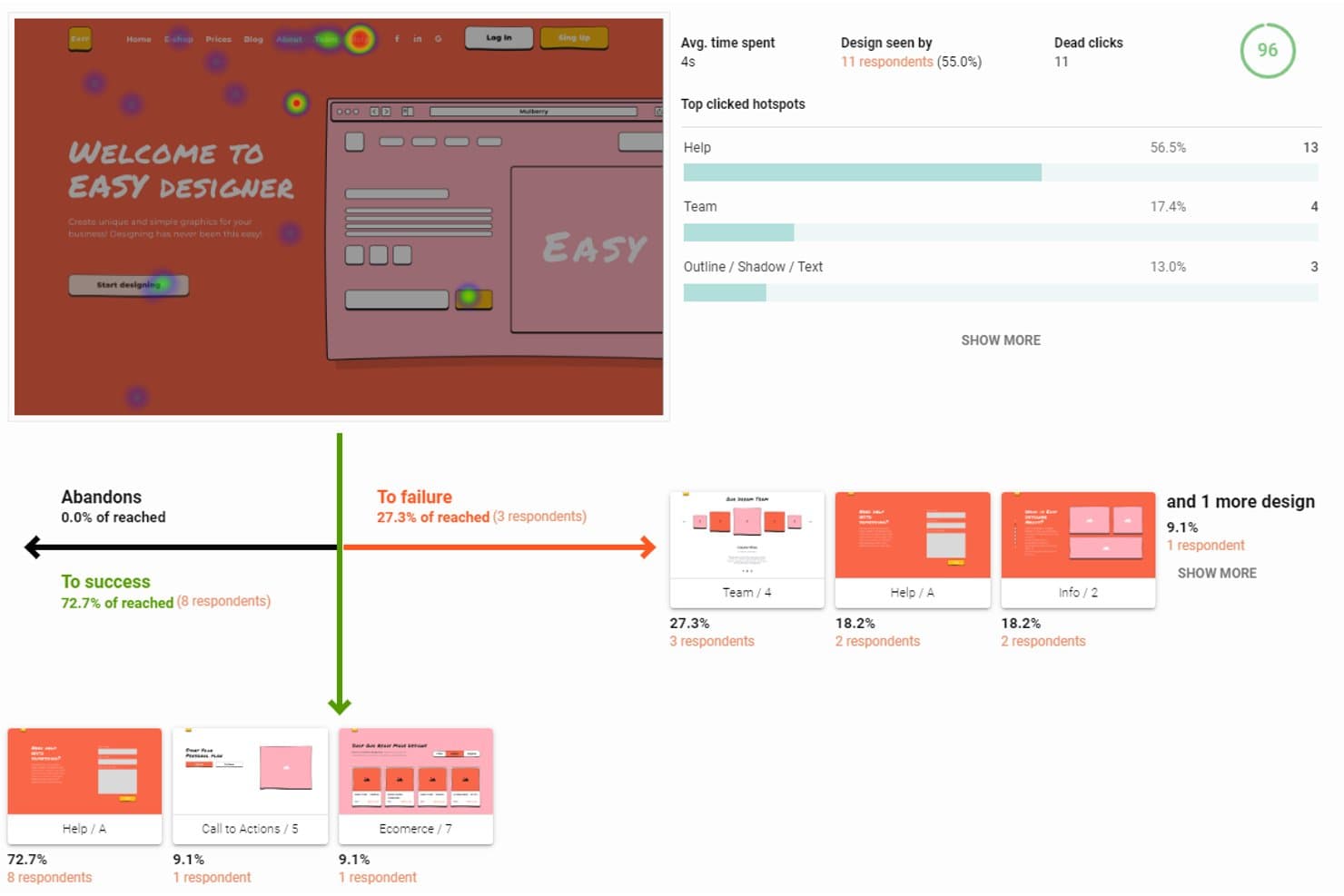
UXtweak tracks click heatmaps, user flow success, and hotspot data. UXtweak is heatmap software with a free-forever plan that combines click, tap, move, and scroll maps with session recordings, URL filters, SmartSearch, and broader UX research tools.
Who Is UXtweak Best For?
UXtweak suits product managers who need heatmaps, session recordings, and broader UX research in one platform.
Why I Picked UXtweak
I picked UXtweak because its heatmaps support UX research beyond click tracking. I can connect click, tap, move, and scroll patterns to recorded sessions through SmartSearch filters, then inspect device, viewport, UTM, and referrer segments. Session replays with network and console logs help my team investigate why users struggle after spotting an engagement pattern.
UXtweak Key Features
- URL matching rules: Target pages with exact, contains, starts-with, ends-with, or regex rules.
- SPA virtual pageviews: Track URL changes without full page reloads.
- Privacy controls: Mask elements and disable IP address or form-input recording.
- Shareable result links: Publish private, public, or password-protected study links.
UXtweak Integrations
UXtweak offers 8 documented integrations, including Google Tag Manager, Figma, Google Drive, Microsoft OneDrive, Notion, Condens, Dovetail, and Marvin. Google Tag Manager supports installation, while the others help with prototype imports, result exports, and research repositories.
What's Free?
UXtweak offers a free-forever plan rather than a time-limited trial. The available plan details don’t specify user, integration, or usage limits, so check current terms before committing to larger research programs.
Pros and Cons
Pros:
- Privacy controls protect sensitive visitor data
- Flexible URL rules support complex page tracking
- Heatmaps link directly to session replays
Cons:
- No rage click or form drop-off analytics
- Free recording limits remain unpublished
Learn more about UXtweak: Best for continuous product design
- Free demo available
- Pricing upon request
Visit WebsiteCustomer Rating:4.7/5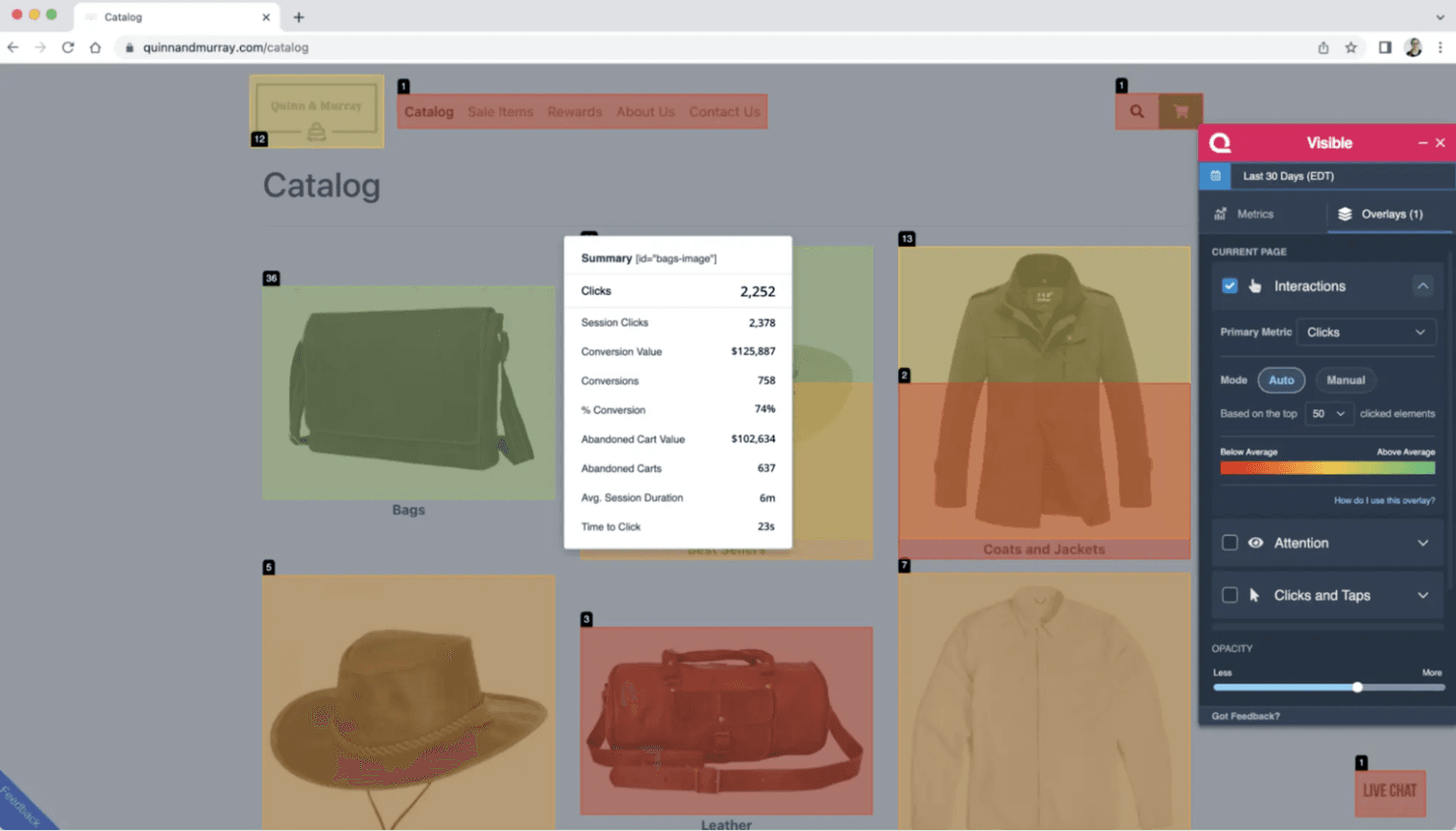
Quantum Metric offers real-time analytics and session replays for enterprises. Quantum Metric is an enterprise digital experience analytics platform—not a free or self-serve heatmap tool—with unsampled click, scroll, attention, and mobile heatmaps connected to session replay, segmentation, and experimentation data.
Who Is Quantum Metric Best For?
Enterprise product and CRO teams that need continuous, cross-platform insight into friction, conversions, and design changes.
Why I Picked Quantum Metric
I picked Quantum Metric for continuous product design because its interaction heatmaps connect clicks, scroll depth, attention, and mobile gestures to session replays. My team can compare converters with non-converters, then review friction before and after a release. It isn’t free, so treat it as an enterprise benchmark rather than a self-serve heatmap option.
Quantum Metric Key Features
- Form analytics: Tracks field errors, skips, hesitation, and completion.
- Visible browser extension: Displays on-page metrics and conversion data.
- Voice of Customer overlays: Adds no-code surveys triggered by user behavior.
- Felix Agentic AI: Summarizes sessions and answers analytics questions.
Quantum Metric Integrations
Quantum Metric offers integrations with Optimizely, AB Tasty, Split, Adobe Analytics, Adobe Customer Journey Analytics, Qualtrics, and Slack. Experimentation integrations support side-by-side variant comparisons, while Adobe connections add heatmap context to existing analytics workflows.
What's Free?
Quantum Metric doesn’t offer a free-forever plan or free trial. Pricing is available upon request, so it’s an enterprise option rather than a free heatmap tool.
Pros and Cons
Pros:
- Converter comparisons reveal revenue-linked friction
- Mobile and web interactions share one view
- Unsampled heatmaps tie clicks to replays
Cons:
- Missing standalone hover and zoned maps
- No free access for quick audits
Learn more about Quantum Metric: Best for real-time user tracking
- Free plan available
- From $55/month
Visit WebsiteCustomer Rating:4.6/5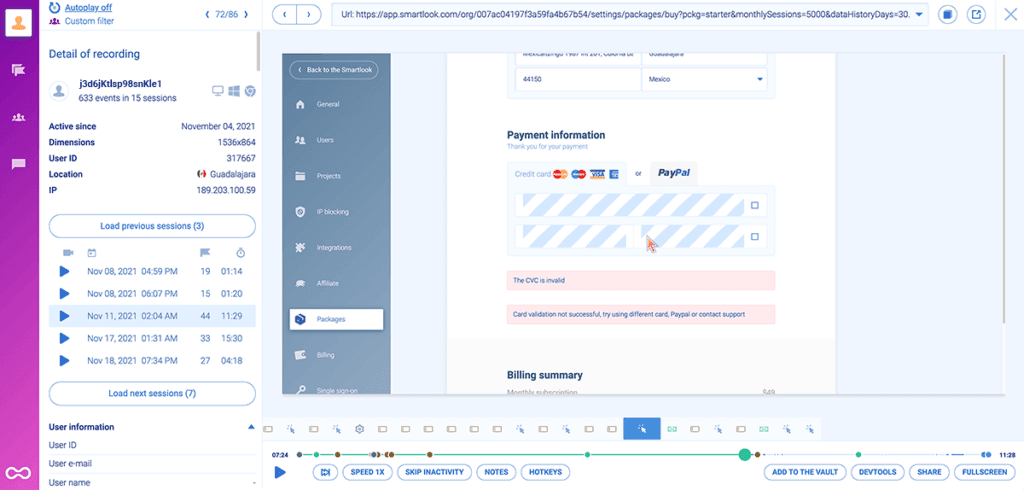
Smartlook is a product analytics tool for web and mobile user insights. Smartlook is free heatmap software for web and mobile apps that combines click, movement, and scroll maps with session recordings, funnels, behavior flows, event analytics, and crash reports.
Who Is Smartlook Best For?
Smartlook suits product and UX teams that need quick web and mobile behavior insights without relying heavily on developers.
Why I Picked Smartlook
I picked Smartlook because it is Best for real-time user tracking, combining click, movement, and scroll heatmaps with session recordings. Funnels, behavior flows, and rage-click filters help me connect live engagement patterns with drop-off points. The free plan remains available, but Cisco’s announced shutdown makes Smartlook suitable for short-term audits rather than long-term adoption.
Smartlook Key Features
- URL matching: Track simple, exact, or substring URL patterns.
- Device views: Switch heatmaps between desktop, mobile, and tablet.
- Crash reports: Review sessions leading up to mobile app crashes.
- Privacy controls: Mask inputs, emails, IP addresses, and page elements.
Smartlook Integrations
Smartlook supports Google Tag Manager, NPM, a REST API, and web and mobile SDKs. Google Analytics, Slack, and Survicate are listed by Capterra, but Smartlook’s current site doesn’t clearly document native integrations.
What’s Free?
Smartlook offers a free plan for tracking web and mobile app behavior with heatmaps, session recordings, and analytics. However, Cisco’s announced shutdown means availability may be limited, so treat the free plan as a short-term option rather than a long-term investment.
Pros and Cons
Pros:
- Historical data speeds initial heatmap creation
- Supports web and mobile app analysis
- Combines heatmaps with session recordings
Cons:
- Scheduled shutdown undermines long-term adoption
- No built-in A/B heatmap comparison
Learn more about Smartlook: Best for user feedback integration
- Free plan available
- From $39/month (billed annually)
Visit WebsiteCustomer Rating:4.5/5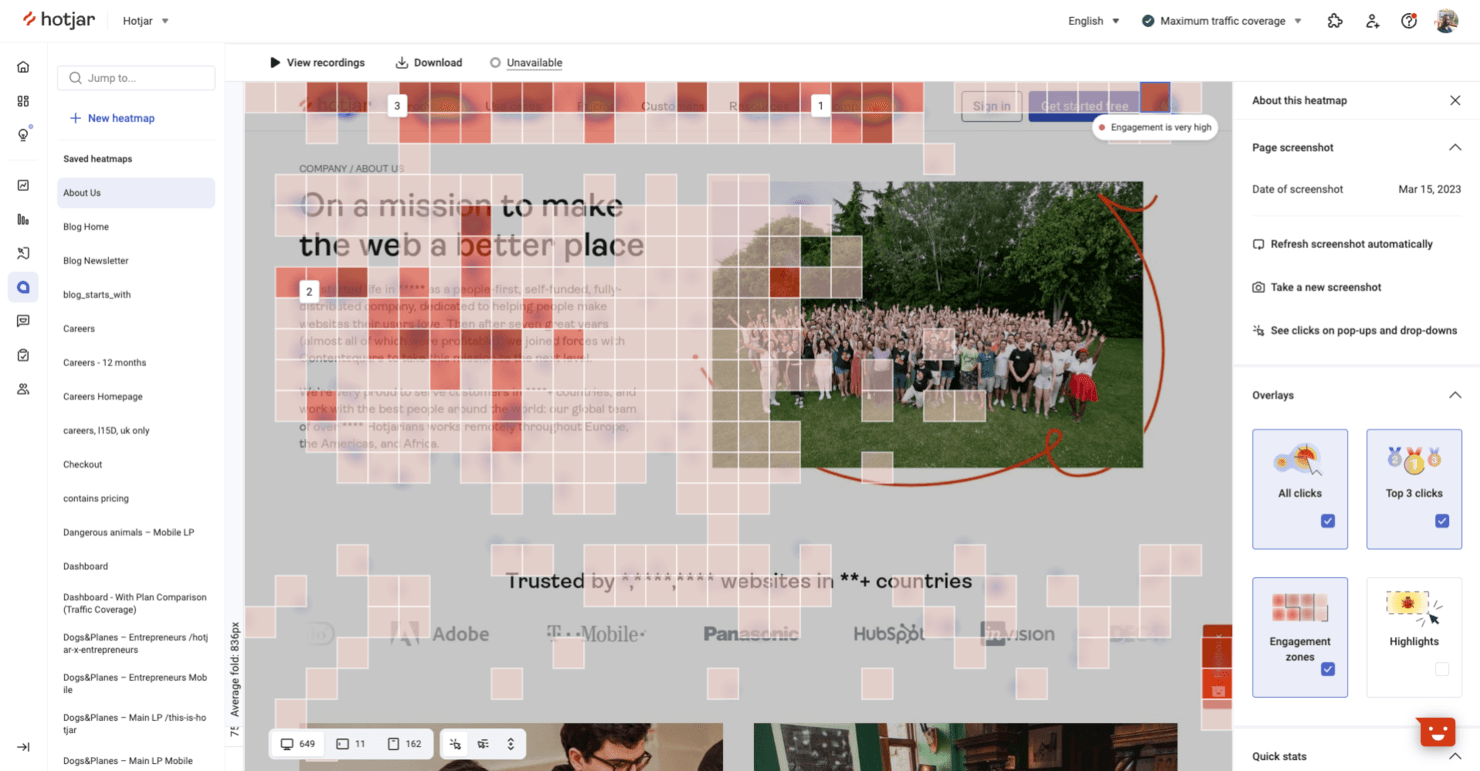
Hotjar helps teams analyze user behavior and gather website feedback. Hotjar (by Contentsquare) is a free heatmap and behavior analytics platform combining click, move, scroll, and attention maps with session replays, funnels, surveys, and feedback widgets.
Who Is Hotjar (by Contentsquare) Best For?
Product teams that connect behavioral data with surveys and feedback widgets will find it useful for research-led prioritization.
Why I Picked Hotjar (by Contentsquare)
I picked Hotjar (by Contentsquare) because its heatmaps connect directly to user feedback. I can pair click, scroll, and attention maps with surveys or feedback widgets, then link responses to replays and segments. That helps me investigate whether a drop-off reflects confusing page behavior or a clearly stated customer concern.
Hotjar (by Contentsquare) Key Features
- Funnels: Build conversion funnels to identify drop-off points.
- URL targeting: Create heatmaps for specific pages or page groups.
- JavaScript error monitoring: Track frontend errors alongside user behavior.
- Performance monitoring: Review page performance signals within the platform.
Hotjar (by Contentsquare) Integrations
Hotjar (by Contentsquare) offers 10+ documented integrations, including Google Analytics, HubSpot, Slack, Jira, Microsoft Teams, Optimizely, Adobe Analytics, Mixpanel, Trello, and Asana. It also supports Zapier.
What's Free?
Hotjar is now part of Contentsquare, where new users can sign up for a free-forever plan with up to 200,000 sessions per month, heatmaps, session replay, surveys, funnels, error monitoring, and 10+ integrations. You’ll also receive a 15-day Growth plan trial with no credit card required, but new Hotjar accounts are no longer available and free-plan features may change.
Pros and Cons
Pros:
- Funnels connect behavior to roadmap decisions
- Unlimited heatmaps support one-off UX audits
- Feedback links replays to customer concerns
Cons:
- Short retention limits longitudinal trend analysis
- Free replays cover only a fraction
Learn more about Hotjar (by Contentsquare): Best for session replay with advanced funnels
- Free plan available
- Pricing upon request
Visit WebsiteCustomer Rating:4.5/5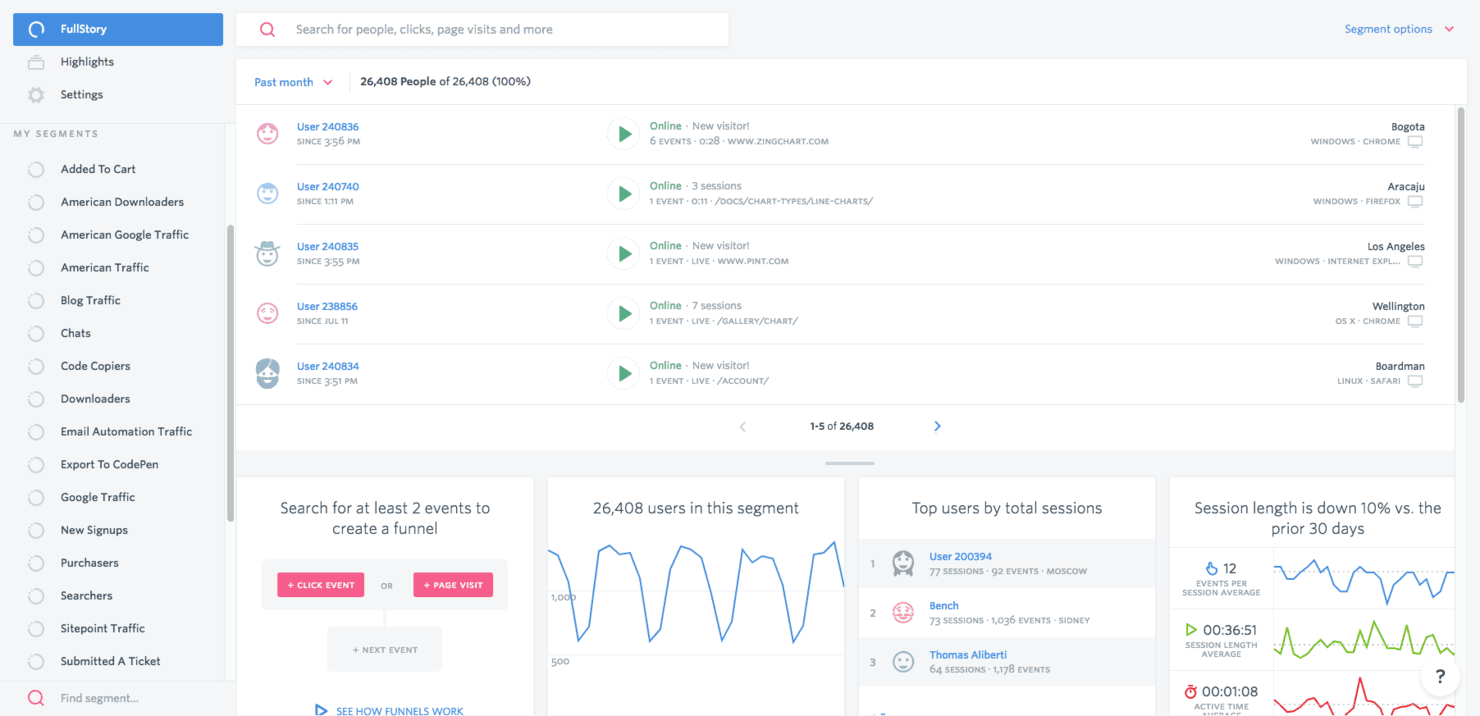
Fullstory provides analytics and session replay to improve user experiences. Fullstory is a free heatmap software platform with click, scroll, and conversion maps alongside session replay, funnels, frustration signals, and no-code autocapture.
Who Is Fullstory Best For?
Product managers and growth teams can connect click and scroll behavior with session replay and funnel drop-offs without extensive event tagging.
Why I Picked Fullstory
I picked Fullstory because it’s best for session replay with advanced funnels, helping me connect heatmap patterns to specific conversion drop-offs. I can filter click maps for rage, error, and dead clicks, then watch matching sessions to see what went wrong. Its URL, event, and hybrid funnels also help me validate whether a product change improves user journeys.
Fullstory Key Features
- No-code autocapture: Capture user interactions without advance event tagging.
- Device and segment filters: Filter heatmap data by device type, segment, and time range.
- Privacy masking: Automatically mask passwords, card numbers, and personally identifiable information.
- PDF heatmap exports: Download heatmaps with page, period, segment, device, and interaction data.
Fullstory Integrations
Fullstory integrates with Slack, Jira, Trello, Microsoft Teams, Google Tag Manager, Segment, and Shopify. It also provides APIs for custom integrations, while webhooks and data exports support broader data workflows on eligible plans.
What's Free?
Fullstory offers a free-forever FullstoryFree plan with up to 30,000 sessions, 10 user seats, and one year of replay and analytics retention. It excludes advanced features such as configurable form privacy, mobile app support, and StoryAI; exceeding the session limit pauses new capture until the next cycle or upgrade.
Pros and Cons
Pros:
- Autocapture supports analysis without event tagging
- Rage and dead-click filters expose friction
- Heatmaps connect clicks to replay sessions
Cons:
- Form-level drop-offs remain unavailable
- No true movement or hover heatmap
Learn more about Fullstory:
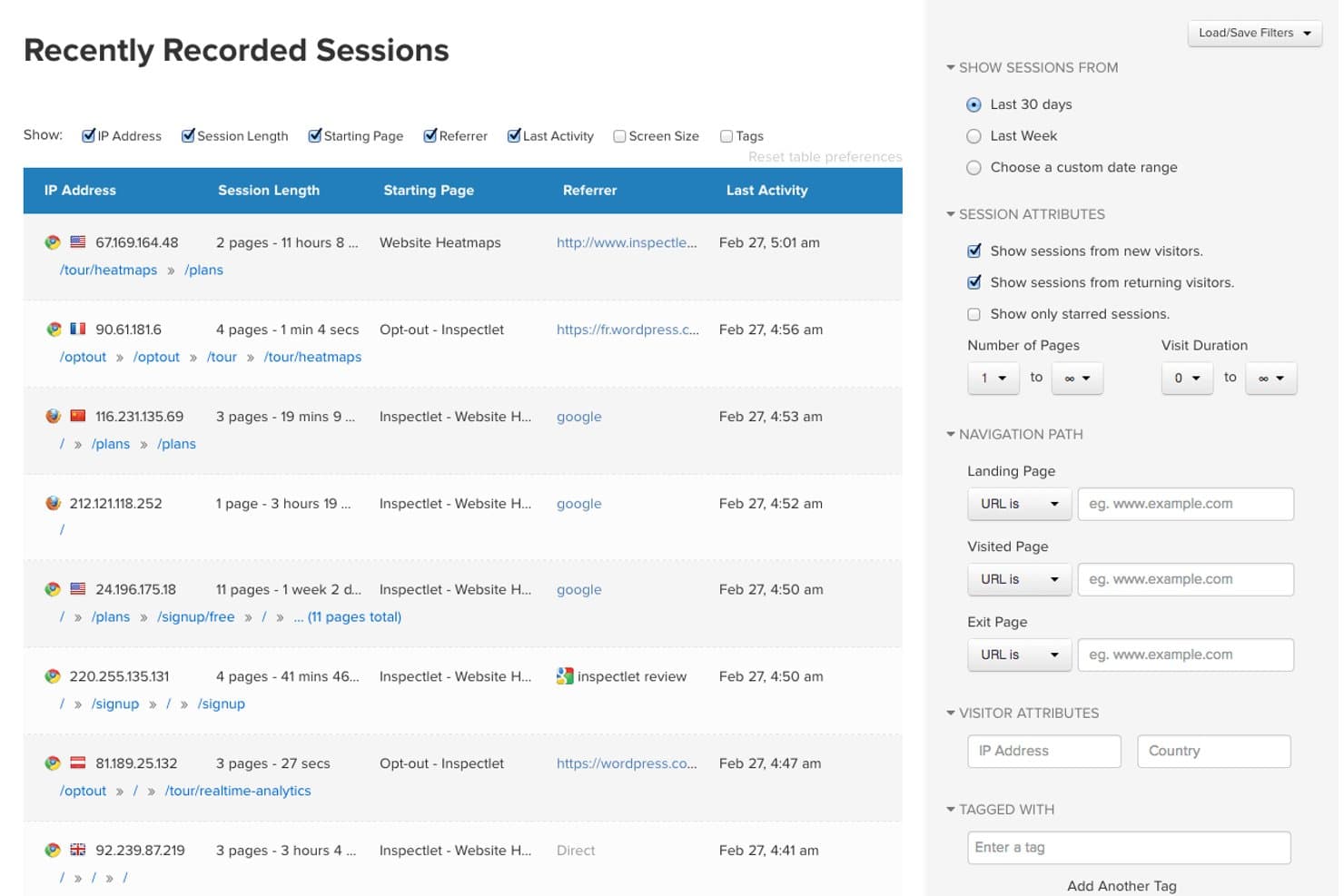
Inspectlet lets users filter recorded sessions by attributes and navigation paths. Inspectlet is a free heatmap software platform with five dynamic heatmap views, session replay, scroll tracking, A/B testing, AI insights, and no-code surveys.
Who Is Inspectlet Best For?
Inspectlet suits product teams and UX designers who need form analytics, session replays, and heatmaps to identify conversion friction.
Why I Picked Inspectlet
I picked Inspectlet because its form analytics connect heatmap behavior to field-level conversion problems. I can review hesitation, fill rates, ignored fields, and drop-off points, then use Click Dots and scroll maps to inspect surrounding page friction. Full form analytics requires the Growth plan, so I treat it as a paid upgrade rather than a free-plan feature.
Inspectlet Key Features
- Session replay: Rewatch clicks, typing, scrolling, navigation, and page visits.
- A/B testing: Create visual experiments and track goals with statistical significance.
- No-code surveys: Build surveys with NPS, emoji, star, text, and multiple-choice questions.
- AI insights: Identify rage clicks, dead clicks, validation errors, and JavaScript errors.
Inspectlet Integrations
Inspectlet integrates with Shopify, WordPress, and Google Tag Manager. It also offers a REST API on the Growth plan and above for custom integrations.
What's Free?
Inspectlet offers a free-forever plan with 2,500 recorded sessions monthly across up to three websites, with no credit card required. It includes session replay, heatmaps, and A/B testing, but limits data retention to one month and stops recording new sessions after reaching the monthly cap.
Pros and Cons
Pros:
- Session filtering helps locate conversion friction
- Dynamic pages and single-page apps render accurately
- Five heatmap views reveal detailed behavior
Cons:
- One-month retention limits before-and-after comparisons
- Form analytics requires a paid upgrade
Learn more about Inspectlet: Best for data privacy compliance
- 21-day free trial
- From $26/month (billed annually)
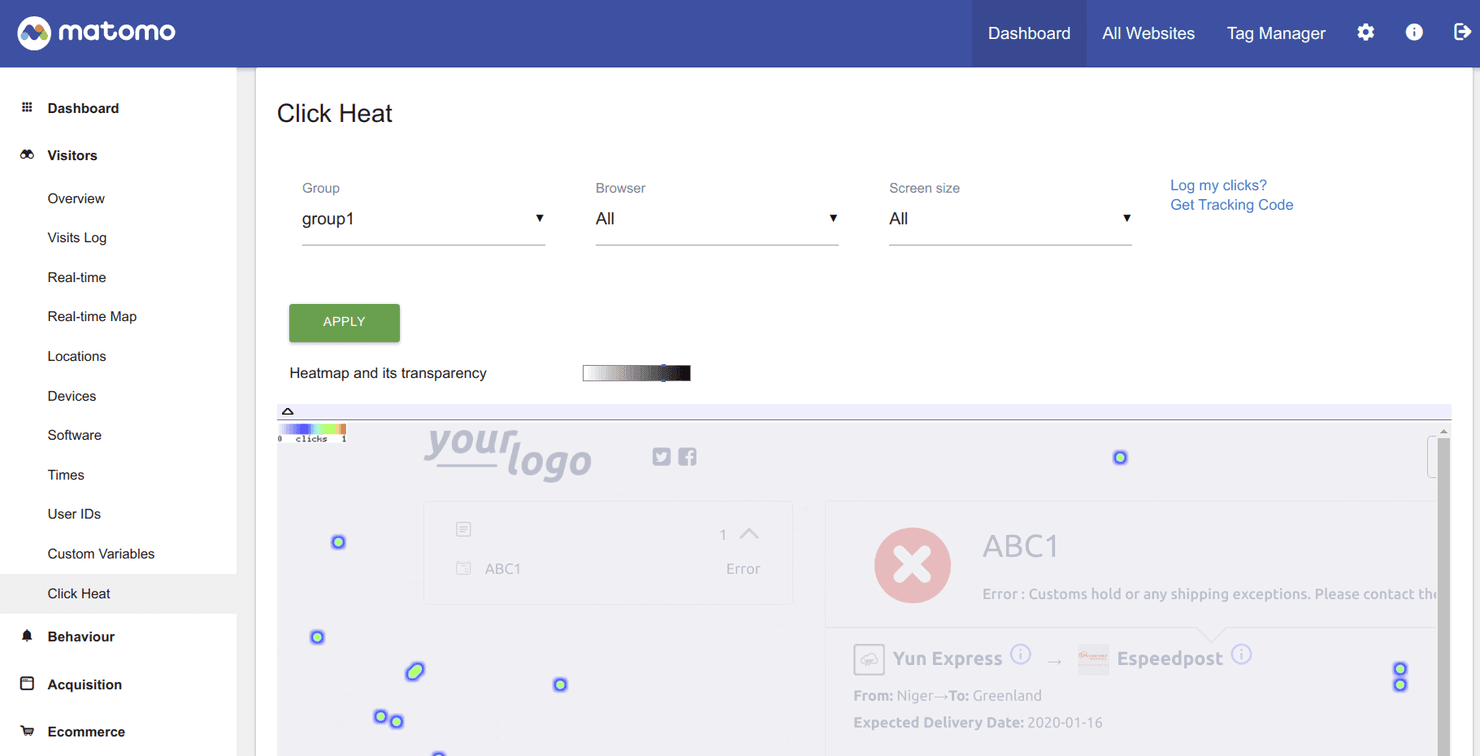
Matomo is an open-source analytics tool focused on privacy and compliance. Matomo is heatmap software with click, move, and scroll maps, session recordings, URL targeting, device and visitor segments, funnels, and form analytics across cloud and self-hosted deployments.
Who Is Matomo Best For?
Matomo suits privacy-conscious product and marketing teams in regulated industries that need heatmaps alongside broader web analytics.
Why I Picked Matomo
I picked Matomo for Best Free Heatmap Software because it’s best for data privacy compliance, with ISO 27001 certification, EU hosting, and self-hosting options. I use its click, move, and scroll maps alongside session recordings to investigate user behavior without sending data to third-party platforms. Its 21-day Cloud trial and 30-day self-hosted plugin trial support a focused UX audit, although heatmaps aren’t free forever.
Matomo Key Features
- URL targeting: Track pages using equals, starts with, contains, or regex rules.
- Device views: Compare desktop, tablet, and mobile behavior with custom breakpoints.
- Visitor segments: Filter reports by browser, country, referrer, or visitor type.
- Form analytics: Find field drop-offs, correction patterns, and time spent per field.
Matomo Integrations
Matomo documents 100+ integrations, including WordPress, WooCommerce, Shopify, BigCommerce, Power BI, Tableau, Looker Studio, Slack, Jira Cloud, and Confluence. Its HTTP API, SDKs, data warehouse connector, and consent-tool integrations support custom analytics workflows.
What's Free?
Matomo offers a 21-day free trial for its Cloud plan and a 30-day free trial for its self-hosted heatmap plugin. Heatmaps aren’t free forever, and continued access requires a paid subscription or license.
Pros and Cons
Pros:
- Segments connect recordings with visitor profiles
- Unlimited on-premise heatmaps avoid sampling limits
- Privacy controls suit regulated analytics teams
Cons:
- Sharing needs API and iframe setup
- Cloud heatmap quotas remain unpublished
Learn more about Matomo: Best for debugging capabilities
- 14-day free trial + free plan available
- From $176/month (billed annually)
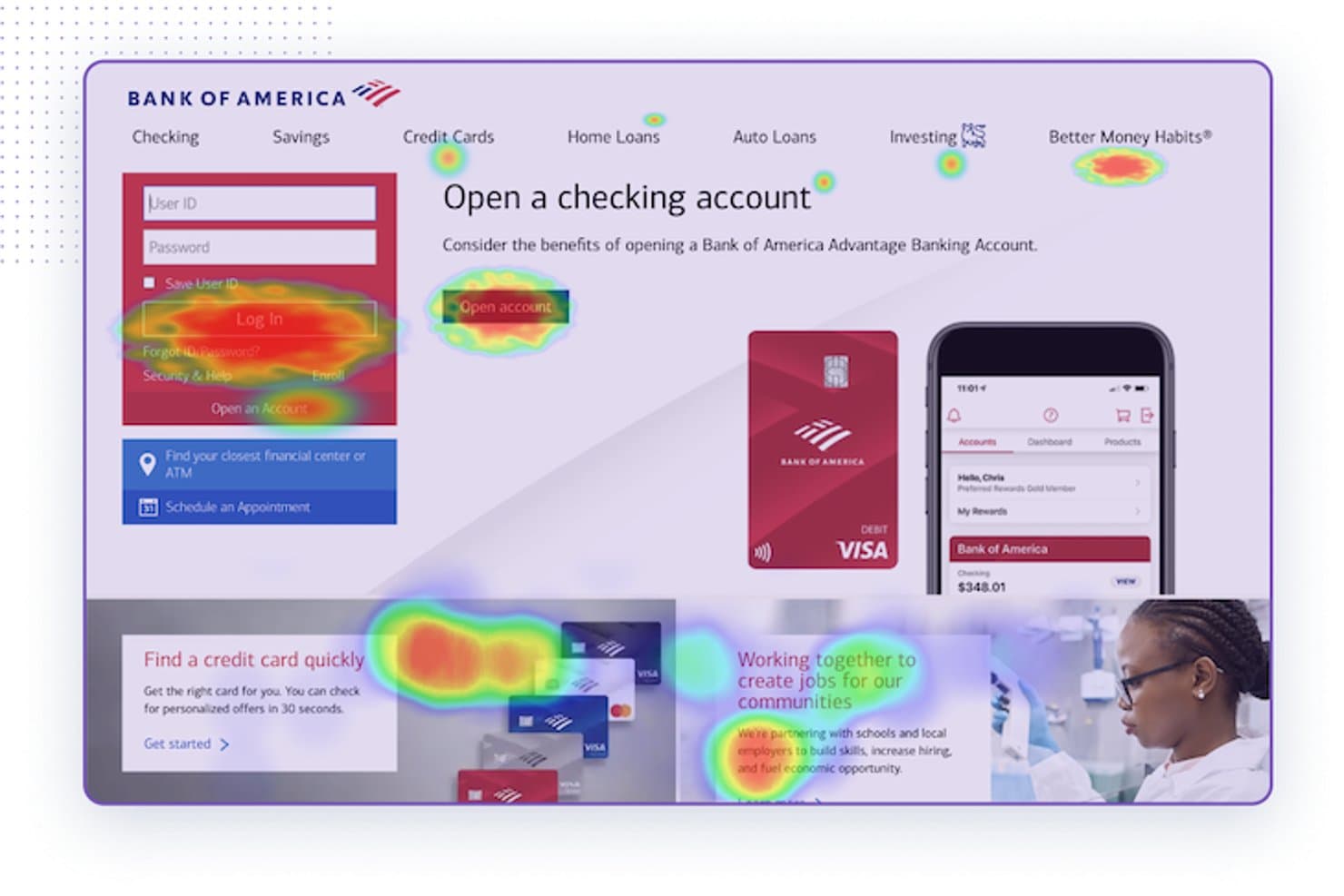
LogRocket overlays heatmaps on live pages to reveal user attention patterns. LogRocket is heatmap software with click, scroll, hover, and conversion-rate maps, zoning, session replay, funnels, path analysis, and frontend debugging data.
Who Is LogRocket Best For?
Product teams that need heatmaps connected to session replay will value LogRocket’s debugging capabilities.
Why I Picked LogRocket
I picked LogRocket because its heatmaps connect directly to session replay, making it my choice for Best for debugging capabilities. I use clickmaps, scrollmaps, and rage-click detection to locate friction, then inspect console errors, network activity, and Redux state in the related replay. That workflow helps me separate interface confusion from frontend defects.
LogRocket Key Features
- Hovermaps: Visualize where desktop users pause their cursors on a page.
- Conversion rate heatmaps: Compare conversion rates for clicks, URLs, or Redux actions.
- Zoning: Analyze clicks within a selected section of a page.
- Path analysis: Review the routes users take through your product.
LogRocket Integrations
LogRocket lists 75 integrations, including 40+ ready-to-use options such as Google Analytics, Amplitude, Mixpanel, Segment, Jira, GitHub, Google Tag Manager, Shopify, and Snowflake. Its MCP server and API support custom integrations.
What's Free?
LogRocket offers a 14-day free trial rather than a free-forever plan. After the trial ends, you’ll need a paid plan to continue using its heatmaps, session replay, and debugging features.
Pros and Cons
Pros:
- Offers conversion-rate and hover heatmaps
- Detects rage clicks and dead clicks
- Connects heatmaps directly to session replays
Cons:
- Requires SDK or script installation
- No free-forever plan confirmed
Learn more about LogRocket: Best for large-scale user behavior analysis
- Free plan available
- Pricing upon request
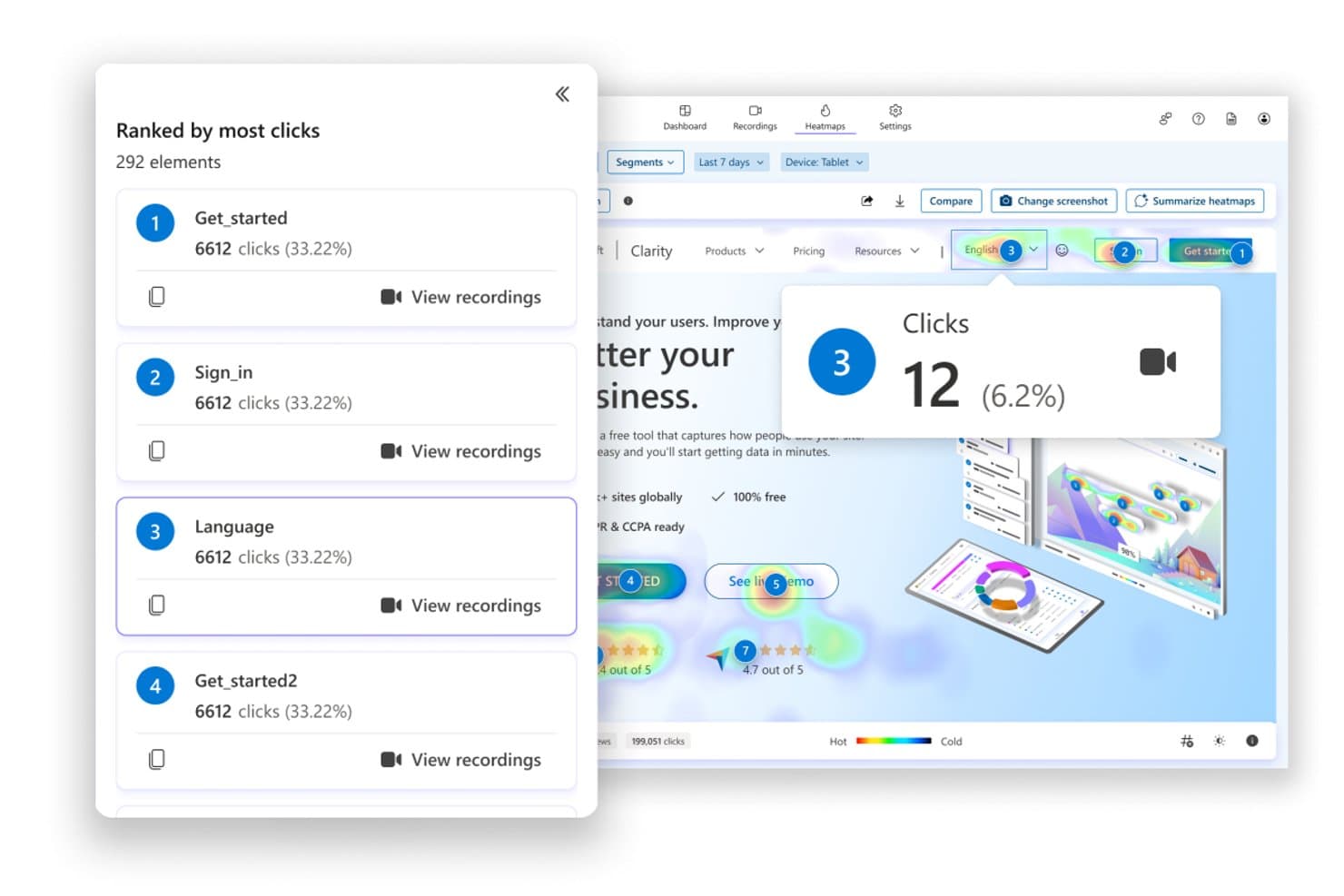
Microsoft Clarity ranks clicked elements by frequency with heatmap overlays. For teams evaluating free heatmap software, Microsoft Clarity combines click, scroll, area, attention, and conversion maps with session recordings, segmentation, and AI summaries across websites and mobile apps.
Who Is Microsoft Clarity Best For?
Product managers, UX designers, and marketers at high-traffic teams can connect heatmaps, recordings, and friction signals across web and mobile experiences.
Why I Picked Microsoft Clarity
I picked Microsoft Clarity for large-scale user behavior analysis because it connects click, scroll, attention, and conversion maps with session recordings. I use rage-click, dead-click, Core Web Vitals, UTM, and device filters to isolate friction across high-traffic journeys. Heatmaps Compare then shows how design changes affect different segments.
Microsoft Clarity Key Features
- Area maps: Visualize interaction concentration across page sections.
- Mobile app SDK: Install Clarity in Android, iOS, React Native, and Flutter apps.
- Heatmap exports: Download filtered data as CSV or PNG files.
- URL grouping: Combine matching pages with exact URL rules or regex.
Microsoft Clarity Integrations
Microsoft Clarity offers documented integrations with Google Analytics, Google Tag Manager, Shopify, WordPress, WooCommerce, Wix, Softr, VisualSP, and CookieYes. Android, iOS, React Native, and Flutter SDKs, plus the Data Export API and MCP server, support custom connectivity.
What's Free?
Microsoft Clarity is free forever, not a time-limited trial. The plan has no traffic limits and includes heatmaps, session recordings, and integrations, although data collection still requires installing Clarity on each website or app.
Pros and Cons
Pros:
- Supports high-volume behavioral analysis
- Compares segments, devices, and timeframes
- Tracks rage, dead, and error clicks
Cons:
- Lacks dedicated form analytics and surveys
- No true cursor-movement heatmaps
Learn more about Microsoft Clarity: Best for building real-time collaborative workflows
- 14-day free trial
- From $19.99/month
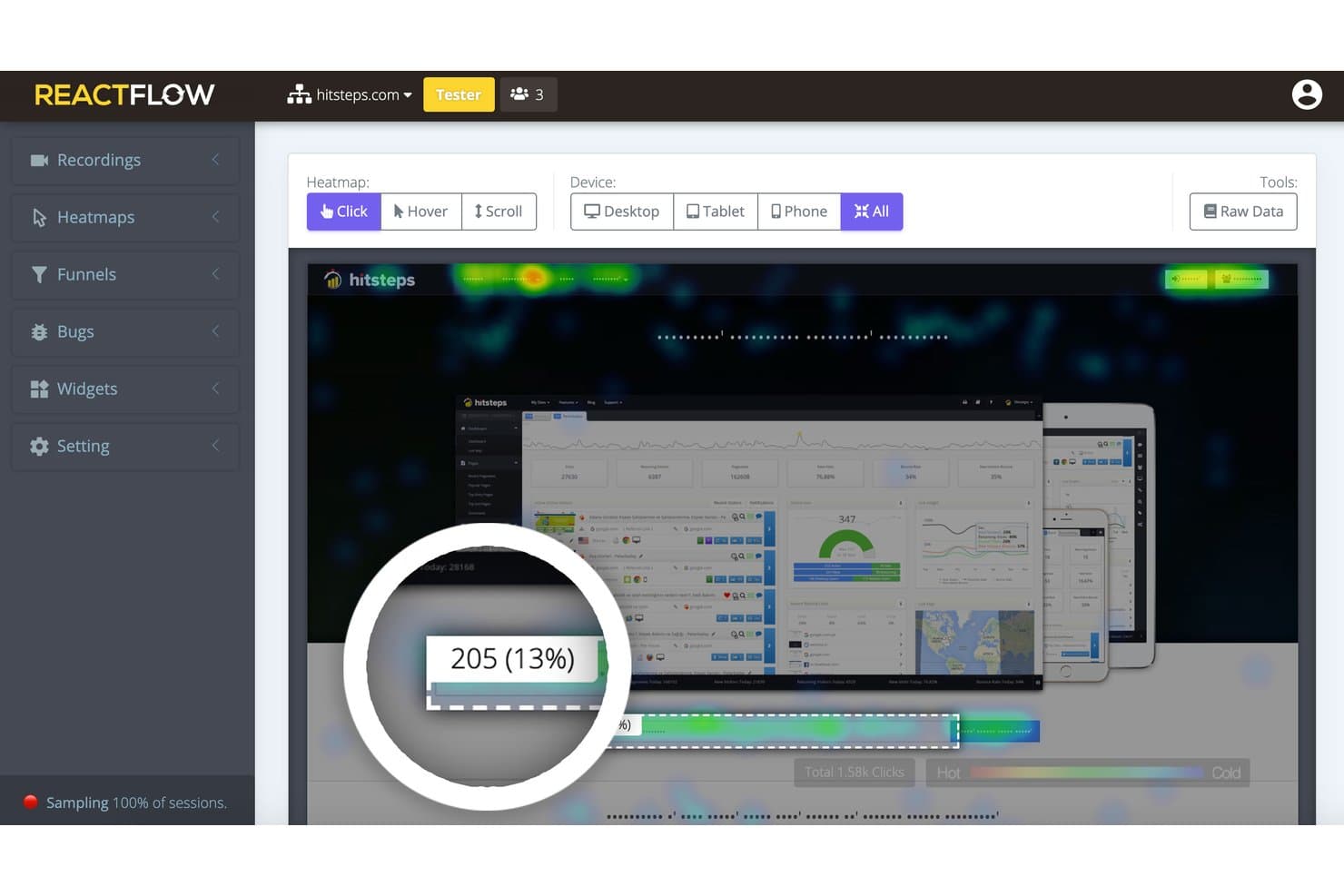
Reactflow lets users visualize click heatmaps across all device types. Reactflow is a website heatmap and session replay platform with click, movement, and scroll maps, funnels, feedback widgets, and JavaScript bug tracking, available through a 14-day full-featured trial.
Who Is Reactflow Best For?
Product managers and UX designers validating page changes through heatmaps, session recordings, funnels, and bug tracking.
Why I Picked Reactflow
I picked Reactflow because its 14-day full-featured trial supports building real-time collaborative workflows around user behavior data. My team can combine click, movement, and scroll maps with recordings, funnels, and pinned comments to review page changes together. Team permissions and shareable links let product and design partners inspect the same evidence, although there’s no standalone free-forever plan.
Reactflow Key Features
- Feedback widgets: Build surveys, polls, NPS forms, and lead-capture widgets.
- Raw data exports: Download element-level heatmap data as CSV files.
- Privacy controls: Mask text and keystrokes, block visitors, and honor Do Not Track.
- Single-page app tracking: Capture activity across SPA, AJAX, and Shadow DOM interfaces.
Reactflow Integrations
Reactflow offers marketplace integrations through WordPress and Shopify, and supports Wix sites. Native integrations with Google Analytics, Slack, Jira, or an API aren’t documented.
What's Free?
Reactflow offers a 14-day free trial with access to its full feature set, rather than a free-forever plan. After the trial, you’ll need a paid plan starting at $19.99 per month to continue using it.
Pros and Cons
Pros:
- Masks text and keystrokes by default
- Links funnel drop-offs to session recordings
- Captures clicks, movement, and scroll depth
Cons:
- No standalone free-forever plan
- Heatmap setup can feel counterintuitive
Learn more about Reactflow:
Other Free Heatmap Software
Here are some additional free heatmap software options that didn’t make it onto my shortlist, but are still worth checking out:
- 11heatmap.comBest for ecommerce revenue-mapped click tracking
- 12Zoho PagesenseBest for CRO and personalization for small businesses
- 13BrowseeBest for AI-powered insights
- 14ContentsquareBest for AI-powered visual journey analytics
- 15FullSessionBest for heatmaps with built-in session replay
How I Evaluate Free Heatmap Software
First, I define what counts as free. For heatmap software, that means a free-forever plan with core heatmaps, even with traffic limits, or a trial lasting at least 14 days for a one-off audit. From there, I split my evaluation into three parts: core functionality, which carries the most weight, like mapping clicks and tracking scroll depth; standout features, like rage-click detection; and what a tool offers beyond its feature set, like a clear upgrade path as usage grows.
Core Functionality (Table Stakes For This List)
In addition to my free plan requirements, I use a scoring system to select tools for my list. I score each one on a scale from 0 (does not offer the functionality) to 5 (excels in this area) for each core functionality listed below, based on what's available on the free plan. I then convert the total into a percentage to help assess each tool's overall fit, with extra weight on any functionalities I've deemed essential.
- Click & Movement Heatmaps (Essential): I look for click, tap, and cursor movement views that reveal ignored buttons, misclicks, and engagement on key pages.
- Scroll Depth Tracking (Essential): I check whether visual scroll data shows where visitors stop reading on landing pages, documentation, and checkout flows.
- Page-Level Tracking: I assess whether teams can isolate URLs across a homepage, signup flow, and feature pages without constant reconfiguration.
- Device Breakdown: Desktop and mobile views should be available so I can compare navigation and conversion friction across screen types.
- Session Recordings: I look for enough replay access to investigate unusual clicks, abandoned forms, and confusing onboarding steps.
- Data Sharing: I check for share links or exports that let product, design, and engineering teams review findings together.
Once I have a list of tools that meet the criteria, I consider what sets each platform apart.
Differentiating Factors (What Sets Vendors Apart)
Here's how I compare and contrast different vendors:
Standout Features
Rage and dead click detection is the first thing I check, since it surfaces broken buttons or confusing elements without manual tagging. I also look for form analytics that expose field-level drop-off, which helps diagnose why users abandon a signup or checkout mid-flow. Instant shareable reports matter too; I evaluate whether a tool lets me generate a public link so a stakeholder can review findings without creating an account.
Beyond Features
I check how quickly a free plan populates usable heatmaps after installing a snippet. If data takes days to appear, it's hard to validate a hypothesis mid-sprint. I also evaluate each tool's privacy posture on its free tier, looking for built-in IP anonymization and element-level masking, since even a proof-of-value project can involve regulated user traffic. Finally, I consider upgrade transparency. Tools like Hotjar and Microsoft Clarity make their tier boundaries obvious, which helps me build a budget case using free-tier data before committing.
How to Choose Free Heatmap Software
It’s easy to get bogged down in long feature lists and complex pricing structures. To help you stay focused as you work through your unique software selection process, here’s a checklist of factors to keep in mind:
| Factor | What to Consider |
|---|---|
| FactorScalability | What to ConsiderWill the software grow with your business? Consider whether it can handle increased data volume and user numbers without additional costs or performance issues. |
| FactorIntegrations | What to ConsiderDoes it connect with your existing tools? Check for compatibility with your CRM, CMS, and analytics platforms to ensure seamless workflow integration. |
| FactorCustomizability | What to ConsiderCan you tailor it to fit your unique needs? Look for software that allows you to customize dashboards and reports to match your specific business requirements. |
| FactorEase of use | What to ConsiderIs it intuitive for your team? Consider the learning curve and whether your team can start using it effectively without extensive training. |
| FactorImplementation and onboarding | What to ConsiderHow quickly can you get started? Evaluate the setup process, availability of onboarding resources, and whether the vendor provides training or support during implementation. |
| FactorCost | What to ConsiderDoes it fit your budget? Assess the total cost of ownership, including any hidden fees, and compare it with your budget to ensure it's a financially viable choice. |
| FactorSecurity safeguards | What to ConsiderAre your data and user information protected? Ensure the software complies with data protection regulations and offers advanced security features to safeguard sensitive information. |
What Is Free Heatmap Software?
Free heatmap software is a tool that visualizes user interactions on websites through color-coded maps. These tools are generally used by marketers, UX designers, and product managers to understand user behavior and improve site design.
Click tracking, scroll mapping, and session replay features help with identifying user engagement and optimizing user experience. Overall, these tools provide valuable insights that drive better decision-making for enhancing digital platforms.
Features of Free Heatmap Software
When selecting free heatmap software, keep an eye out for the following key features:
- Click tracking: Visualizes where users click on your site, helping you identify popular areas and optimize for better engagement.
- Scroll mapping: Shows how far users scroll down a page, indicating content visibility and user interest.
- Session replay: Records user interactions, allowing you to watch real-time sessions and understand user behavior.
- Conversion funnel analysis: Tracks user paths and drop-off points, helping you optimize conversion rates.
- Heatmaps: Provide a color-coded map of user interactions, offering insights into user behavior and engagement.
- A/B testing: Allows you to test different versions of your site to determine what works best for your audience.
- Form analytics: Analyzes user interactions with forms, highlighting potential drop-off points and improving form completion rates.
- User feedback integration: Collects user feedback directly from the site, providing qualitative insights alongside quantitative data.
- Customizable dashboards: Let you tailor analytics views to meet specific business needs, enhancing data interpretation.
- Real-time analytics: Offers immediate insights into user interactions, enabling quick decision-making and adjustments.
Benefits of Free Heatmap Software
Implementing free heatmap software provides several benefits for your team and your business. Here are a few you can look forward to:
- Improved user engagement: By analyzing click tracking and scroll mapping, you can optimize your site layout to increase user interaction.
- Enhanced conversion rates: Conversion funnel analysis helps identify where users drop off, enabling you to make adjustments that improve conversion rates.
- Better user experience: Session replay and heatmaps provide insights into user behavior, allowing you to enhance the overall user experience.
- Data-driven decisions: Real-time analytics and customizable dashboards provide immediate insights, supporting quick and informed decision-making.
- Increased form completion: Form analytics highlights potential drop-off points in forms, helping you make necessary changes to boost completion rates.
- Valuable user feedback: Integrating user feedback directly with analytics helps you understand user needs and preferences, guiding product improvements.
Costs and Pricing of Free Heatmap Software
Selecting free heatmap software requires an understanding of the various pricing models and plans available. Costs vary based on features, team size, add-ons, and more. The table below summarizes common plans, their average prices, and typical features included in free heatmap software solutions:
Plan Comparison Table for Free Heatmap Software
| Plan Type | Average Price | Common Features |
|---|---|---|
| Plan TypeFree Plan | Average Price$0 | Common FeaturesBasic heatmaps, limited session recordings, and fundamental user interaction data. |
| Plan TypePersonal Plan | Average Price$5-$25/user/month | Common FeaturesEnhanced heatmaps, scroll maps, basic A/B testing, and limited integrations. |
| Plan TypeBusiness Plan | Average Price$50-$100/user/month | Common FeaturesAdvanced heatmaps, full session replays, conversion funnel analysis, and user feedback tools. |
| Plan TypeEnterprise Plan | Average Price$150-$300/user/month | Common FeaturesCustomizable dashboards, comprehensive analytics, priority support, and full integrations. |
Free Heatmap Software FAQs
Here are some answers to common questions about free heatmap software:
How accurate are heatmaps in tracking user behavior?
Heatmaps provide a visual representation of user interactions, but they may not capture every detail. They show general trends and patterns, helping you understand where users click and scroll. However, they might not track individual journeys or interactions with dynamic content accurately.
Can heatmaps track user behavior on mobile devices?
Yes, many heatmap tools can track user behavior on mobile devices. They can provide insights into mobile user interactions, such as taps and scrolls. It’s important to choose a tool that supports mobile data collection to ensure comprehensive analysis across all devices.
What are the limitations of using heatmaps?
Heatmaps can show where users click and scroll, but often lack context about why users behave a certain way. They don’t track individual user journeys across multiple pages and may struggle with dynamic content. Complementing heatmaps with session recordings and funnel analysis can provide deeper insights.
How do heatmaps help with website optimization?
Heatmaps help identify which parts of your website attract the most attention and where users lose interest. By understanding these patterns, you can make informed decisions about layout changes, content placement, and design improvements to enhance user engagement and conversion rates.
Do I need technical expertise to use heatmap software?
Most heatmap tools are designed to be user-friendly and don’t require extensive technical knowledge. However, understanding the data and making informed decisions based on the insights might require some analytical skills. Comprehensive support and training resources can help ease the learning curve.
Are there any privacy concerns with using heatmap software?
Heatmap tools collect user interaction data, which can raise privacy concerns. It’s essential to choose a tool that complies with data protection regulations like GDPR. Ensure the software anonymizes user data and provides options to exclude sensitive information from tracking.