

10 Best Whatfix Alternatives Picked for 2026

Best Whatfix Alternatives Shortlist


A strong Whatfix alternative gives your team flexible onboarding flows, in-app guidance, analytics, and product adoption features that fit your business and user behaviour needs. If you’re searching for the best alternatives to Whatfix, you’re likely looking for tools that offer similar or better ways to drive product adoption, support end-users, and measure engagement—without sacrificing customization or ease of use. This list will help you compare the top Whatfix alternatives for 2026, so you can confidently choose a digital adoption platform (DAP) that matches your customer onboarding, employee onboarding, and product-led growth goals.
What Is Whatfix?
Whatfix is an AI-powered product adoption tool used by product teams to create in-app experiences, onboarding flows, and interactive walkthroughs. Teams use Whatfix to deliver contextual guidance, automate training, and track user behaviour within web applications like an ERP or LMS. Its user-friendly features support onboarding new users, rolling out features via a no-code editor, and reducing drop-offs by making software easier to understand. To support digital transformation, it utilizes a self-help widget, smart tips, and training modules for hands-on learning. It helps SMBs and enterprises track monthly active users (MAUs), the overall number of users, and collect customer feedback, though your final cost depends on their specific pricing model.
Best Whatfix Alternatives Summary
This comparison chart summarizes pricing details for my top Whatfix alternative selections to help you find the best one for your budget and business needs.
| Tool | Best For | Trial Info | Price | ||
|---|---|---|---|---|---|
| 1 | Best for auto-capturing internal process guides | Free plan available | From $16/user/month (billed annually) | Website | |
| 2 | Best for subscription retention tracking | Free demo available | Pricing upon request | Website | |
| 3 | Best for customizable onboarding flows | Free trial available | Pricing upon request | Website | |
| 4 | Best for small business onboarding needs | Not available | Pricing upon request | Website | |
| 5 | Best for real-time support automation | Free demo available | Pricing upon request | Website | |
| 6 | Best for large-scale enterprise rollout | Not available | Pricing upon request | Website | |
| 7 | Pendo tracks product usage with analytics dashboards. | 30-day free trial | Pricing upon request | Website | |
| 8 | Best for interactive onboarding creation | Free trial available | From $158/month | Website | |
| 9 | Best for tying usage data to account health | Free trial available | Pricing upon request | Website | |
| 10 | Best for simple tooltip and tour setup | 14-day free trial + free demo available | From $55/month | Website |
Why Trust Our Software Reviews
We’ve been testing and reviewing product management software since 2020. As product managers ourselves, we know how critical and difficult it is to make the right decision when selecting software.
We invest in deep research to help our audience make better software purchasing decisions. We’ve tested more than 2,000 tools for different product management use cases and written over 1,000 comprehensive software reviews. Learn how we stay transparent & our software review methodology.
Best Whatfix Alternatives Reviews
Below are my detailed summaries of the best Whatfix alternatives on my shortlist. My reviews offer a detailed look at the features, best use cases, and integrations of each platform to help you find the best one for you.

Tango
Best for auto-capturing internal process guides
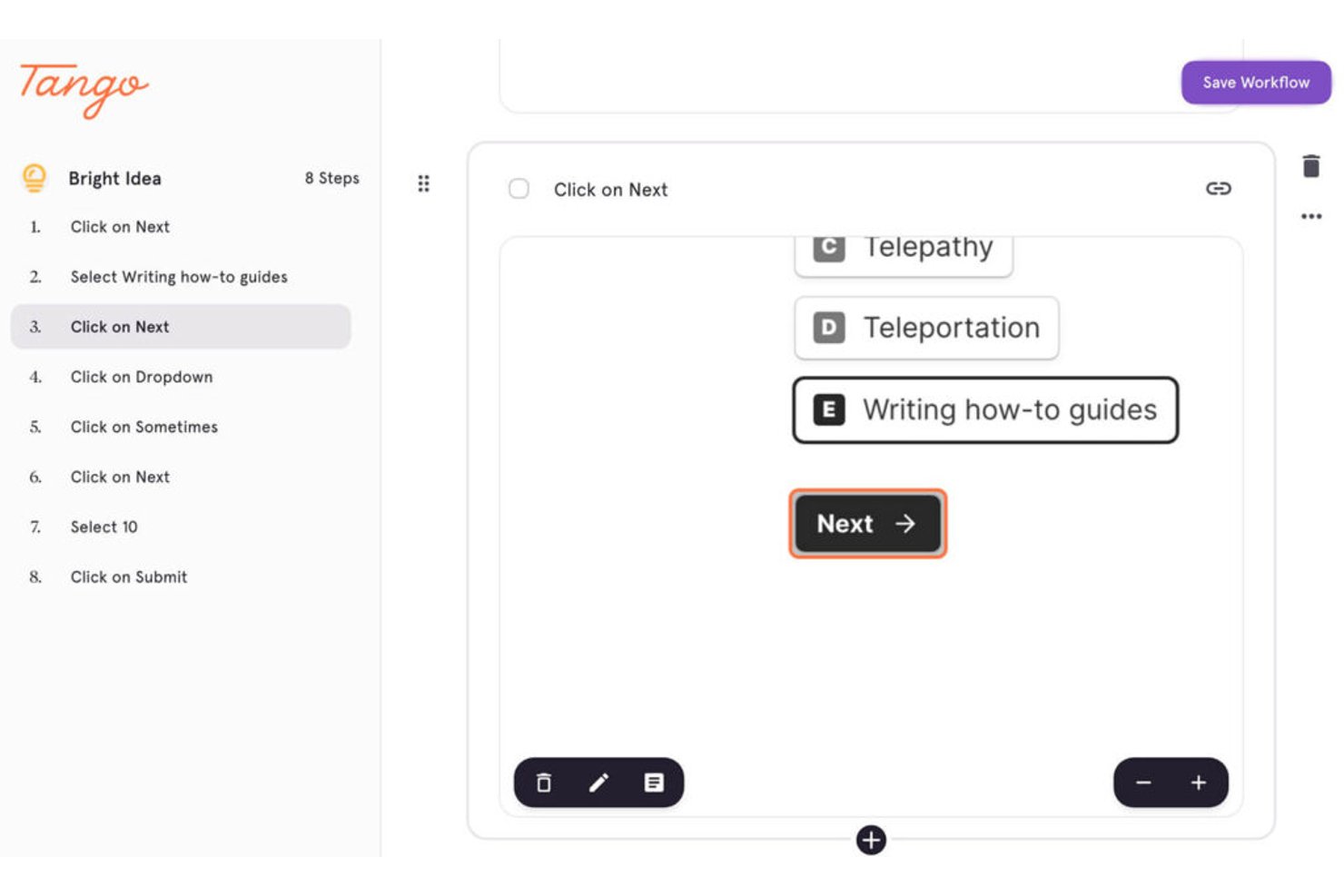
Tango helps teams quickly capture step-by-step workflows and turn them into visual process guides, making it a strong pick for product managers, operations leads, and companies looking to document and share internal processes with less manual effort.
Who Is Tango Best For?
Tango suits teams that need to quickly document and share repeatable processes across product, operations, or onboarding workflows.
Why Tango Is a Good Best Whatfix Alternatives Pick
I picked Tango as one of the best because it auto-captures step-by-step workflows and instantly creates visual guides while you work. I use Tango when my team needs to document complex internal processes without interrupting our flow. In practice, we turn routine tasks into detailed walkthroughs that are easy to share and update.
Tango Key Features
- Browser extension capture: Record workflows directly in Chrome or Edge with the Tango browser extension.
- Template library: Choose from pre-built templates to standardize your team’s process documentation.
- Real-time collaboration: Invite colleagues to edit, comment, or update process guides together.
- Automatic formatting: Steps, screenshots, and highlights are auto-organized into clean, shareable guides.
Tango Integrations
Native integrations are not clearly documented. Tango offers an API for custom integrations.
Pros and Cons
Pros:
- Captures screenshots and highlights automatically in workflows
- Lets teams co-edit and update documentation live
- Instantly generates step-by-step visual process guides
Cons:
- No native onboarding or training-specific features
- Lacks detailed analytics for guide engagement

Best for subscription retention tracking
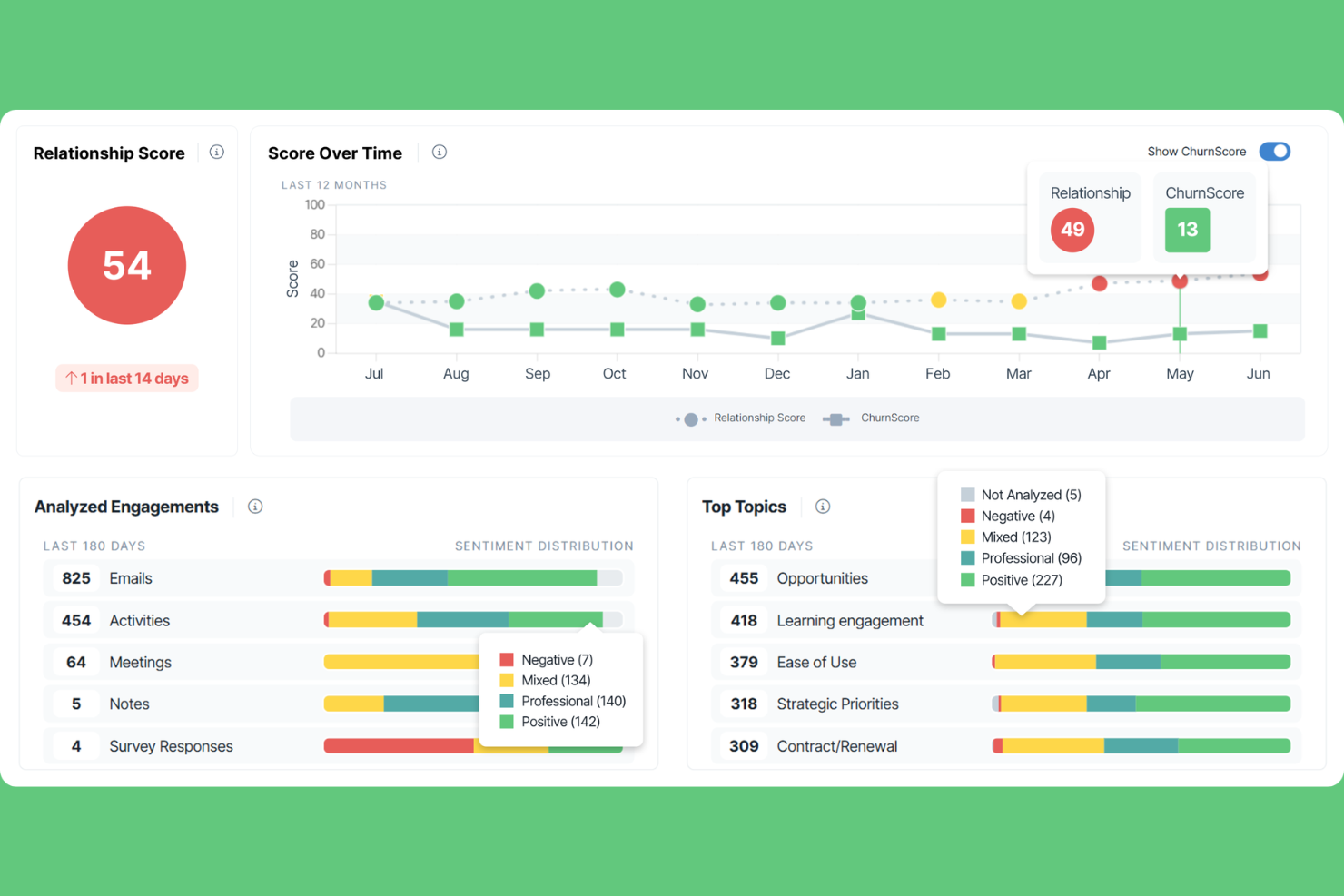
ChurnZero connects product adoption data with customer success workflows, making it a practical choice for SaaS businesses that need to track feature usage, trigger timely interventions, and give customer success teams visibility into how accounts engage with the product.
Who Is ChurnZero Best For?
ChurnZero works well for mid-market and enterprise SaaS companies where customer success managers own renewal and expansion targets.
Why ChurnZero Is a Good Whatfix Alternative
ChurnZero earns its spot on my shortlist because of how it surfaces subscription renewal risk in real time. I appreciate that its account health scores pull in product usage, license utilization, and NPS data together, giving me a single view of which accounts are likely to renew versus lapse. Its automated renewal playbooks then trigger CSM tasks at the right moment, keeping the team focused on accounts that need attention before a contract ends.
ChurnZero Key Features
- Customer segmentation: Group accounts by product tier, usage behavior, or lifecycle stage to target them with specific outreach.
- Success Center: An in-app self-service hub where users can access resources, announcements, and onboarding content.
- NPS and CSAT surveys: Send in-app or email-based surveys and pull response data directly into account records.
- Revenue forecasting: Track renewal and expansion revenue across your book of business with a built-in forecast view.
ChurnZero Integrations
ChurnZero offers 50+ native integrations, including Salesforce, HubSpot, Slack, Zendesk, Jira, Segment, Gong, Snowflake, Intercom, and Stripe. A REST API is available for custom integrations.
Pros and Cons
Pros:
- Automated playbooks for onboarding and retention
- In-app messaging triggered by real-time data
- Targets adoption with health scores
Cons:
- Limited access to advanced analytics
- No built-in knowledge base authoring tools

Appcues
Best for customizable onboarding flows
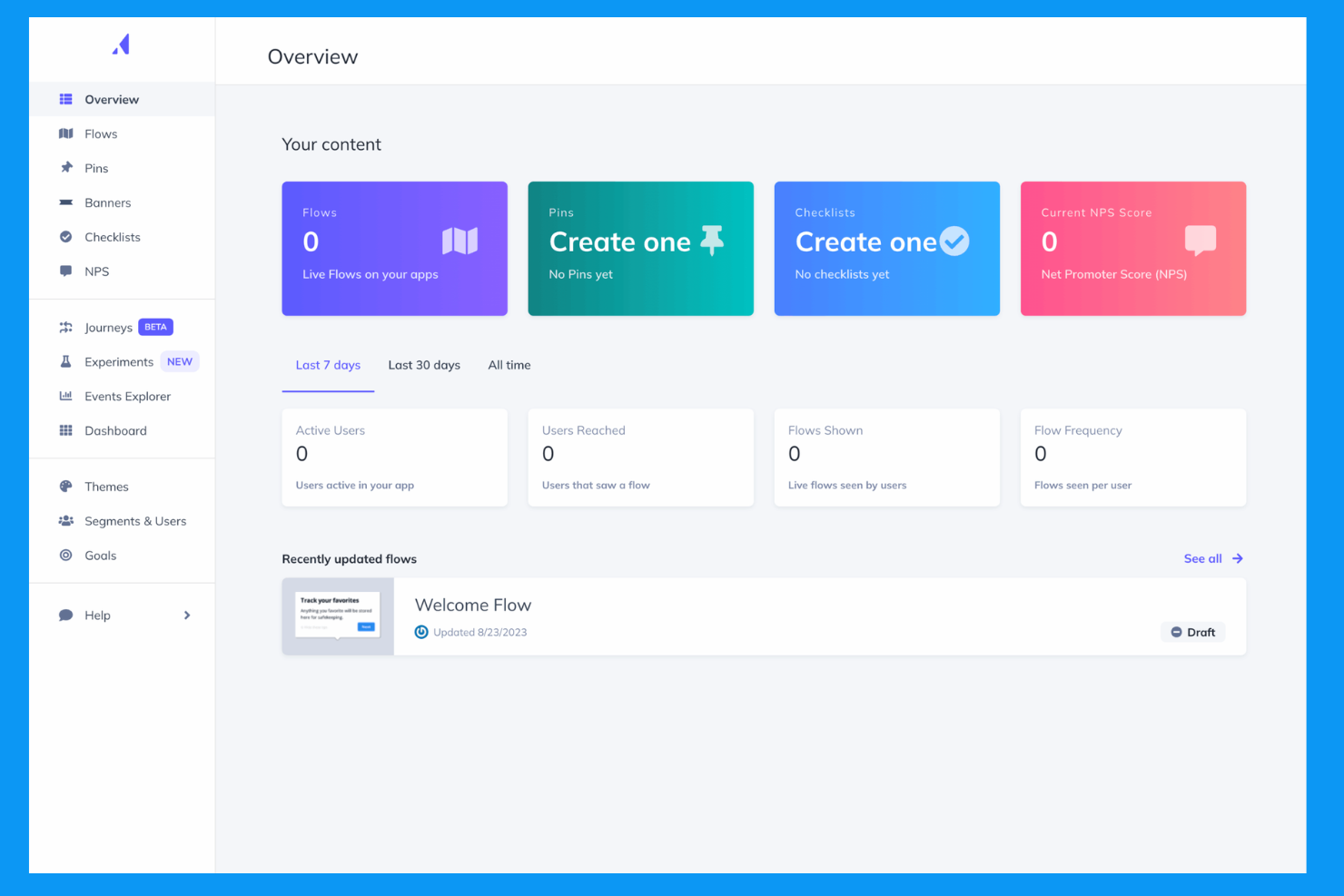
Appcues is a no-code customer engagement platform that lets product and customer success teams build personalized in-app experiences, like onboarding flows, tooltips, and announcements, without needing engineering support.
Who Is Appcues Best For?
Appcues is a strong fit for mid-size SaaS companies where product teams own the onboarding experience but don't have dedicated engineering bandwidth to build it.
Why Appcues Is a Good Whatfix Alternative
I picked Appcues as one of the best because its flow builder gives you real design control over onboarding experiences. You can build modals, checklists, tooltips, slideouts, and hotspots using a no-code editor, then target each one with behavior and attribute-based segmentation. I also like that you can trigger different flows based on feature usage or flow completion, so returning users get a different experience than first-timers.
Appcues Key Features
- NPS surveys: Send in-app Net Promoter Score surveys with built-in analytics to track scores, response rates, and individual feedback over time.
- Event explorer: Track user behavior and product usage with a no-code event tracking tool that shows how users interact with your in-app experiences.
- Cross-channel workflows: Build branching logic that triggers in-app messages, emails, or push notifications based on user behavior or inactivity.
- Mobile onboarding: Create in-app experiences for native Android, iOS, React Native, and Flutter apps using the same no-code builder as the web version.
Appcues Integrations
Appcues offers native integrations with Amplitude, Mixpanel, Heap, Google Analytics, Segment, Salesforce, HubSpot, Intercom, Customer.io, and Slack, among others. It also connects with Zapier and provides webhooks and an API for custom integrations.
Pros and Cons
Pros:
- Event-based triggers for contextual messaging
- A/B testing for optimizing onboarding content
- Visual editor for building onboarding flows
Cons:
- Limited control over CSS for advanced styling
- No multilingual support for onboarding content

Usetiful
Best for small business onboarding needs
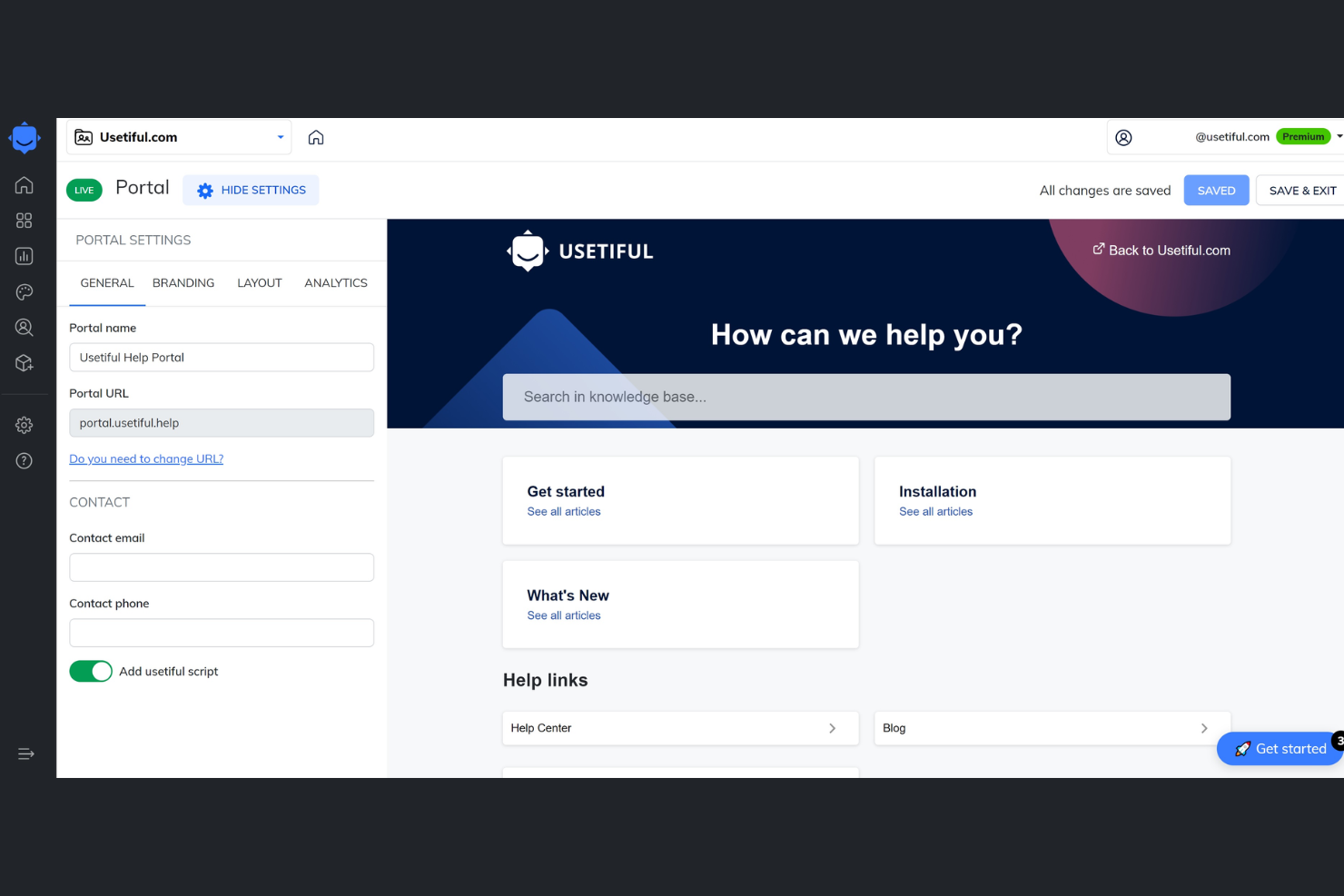
Small businesses looking for a straightforward way to onboard users often turn to Usetiful. This platform is designed for teams that want to create product tours, checklists, and onboarding flows without heavy technical resources. Usetiful stands out for its focus on affordability and simplicity, making it accessible for organizations with limited budgets or technical staff.
Why Usetiful Is a Good Whatfix Alternative
For small businesses that need onboarding tools without the complexity of enterprise platforms, Usetiful is a practical choice. I picked Usetiful because it offers guided product tours and onboarding checklists that are easy to set up and maintain. The platform also supports in-app tooltips and announcements, helping teams communicate updates or highlight new features to users. These features make Usetiful a strong fit for organizations that want to improve user adoption without investing in heavy technical resources.
Usetiful Key Features
Some other features in Usetiful that help teams deliver onboarding experiences include:
- Multi-language support: Create onboarding flows in multiple languages to reach a broader user base.
- User segmentation: Target onboarding content to specific user groups based on behaviour or attributes.
- Progress tracking: Monitor user completion of onboarding steps with built-in analytics.
- Custom branding: Adjust colours, logos, and styles to match your company’s visual identity.
Usetiful Integrations
Integrations include Google Tag Manager, Google Analytics, HubSpot, Mailchimp, and Intercom.
Pros and Cons
Pros:
- Custom branding options for consistent UI
- Delivers content to specific groups
- Multi-language onboarding flows for global teams
Cons:
- API access only on higher-tier plans
- Limited support for mobile app onboarding

Userlane
Best for real-time support automation

Userlane is a digital adoption platform built for enterprises in regulated industries, combining application usage analytics with in-the-moment workflow guidance to reduce software training costs and support ticket volume.
Who Is Userlane Best For?
Userlane is a strong fit for enterprise IT and HR teams rolling out complex software across large, distributed workforces.
Why Userlane Is a Good Whatfix Alternative
I picked Userlane because of how its Userlane Assistant handles support automation in the flow of work. Rather than routing users to help documentation, it answers questions and automates workflows directly inside any application. I also like the Engagement Suite, which layers in announcements and data validation at the right moment in a workflow. For compliance-heavy environments, that real-time, context-triggered support replaces reactive help desk tickets with proactive, automated guidance.
Userlane Key Features
- App Discovery: Maps every application employees use across the browser, including shadow IT and unauthorized tools, to surface license waste and compliance risks.
- HEART Analytics: Scores software adoption across five dimensions (happiness, engagement, adoption, retention, and task success) to show whether applications justify their cost.
- Portfolio Overview: Aggregates adoption, cost, and risk data across your entire software portfolio into a ranked action list for license, training, and support decisions.
- Workflow guidance: Delivers structured, step-by-step help for compliance-critical and complex workflows directly inside any browser-based application.
Userlane Integrations
Userlane offers a small set of native integrations with SharePoint, Confluence, KnowledgeOwl, and Zendesk, focused on connecting knowledge base and help desk content to the Userlane Assistant's in-app search. An API is available for custom integrations, including data exports and user attribute syncing.
Pros and Cons
Pros:
- Offers dedicated enterprise training tools
- Role-based access for targeted content delivery
- Tracks employee training completion rates
Cons:
- No autosave functionality inside guide editor
- No mobile app guidance

WalkMe
Best for large-scale enterprise rollout

WalkMe is an enterprise-grade digital adoption platform that helps large organizations drive product adoption by combining no-code in-app guidance, behavioral analytics, and automated workflows across both web and mobile environments.
Who Is WalkMe Best For?
WalkMe is built for enterprise IT and digital transformation teams managing complex, multi-application rollouts across large, distributed workforces.
Why WalkMe Is a Good Whatfix Alternative
I picked WalkMe as one of the best on my shortlist because of how it handles enterprise-scale rollouts across complex, multi-application environments. I particularly like WalkMe's enterprise governance controls, which let large IT teams manage and deploy in-app guidance across dozens of applications from a single platform. WalkMe also has deep support for enterprise systems like Salesforce, SAP, Workday, and ServiceNow, with purpose-built overlays for each, so you're not building generic walkthroughs and hoping they fit.
WalkMe Key Features
- SmartTips: Contextual help tooltips that appear on specific UI elements to give users on-demand guidance without launching a full walkthrough.
- ActionBot: An in-app automation tool that completes repetitive multi-step tasks on a user's behalf directly within an application.
- Engagement analytics: Tracks user interactions with in-app content to show where drop-offs occur and which guides drive completed actions.
- User segmentation: Targets in-app experiences to specific user groups based on role, behavior, location, or application usage.
WalkMe Integrations
WalkMe offers native integrations with Salesforce, Jira, ServiceNow, Slack, Okta, Azure AD, Google Analytics, SAP S/4HANA, Microsoft Dynamics, and Workday. An API is available for custom integrations and enterprise search.
Pros and Cons
Pros:
- Visual editor for building multi-step walkthroughs
- Handles large-scale organization needs
- Automates complex business processes
Cons:
- Requires a Firefox browser for editor login
- Requires technical maintenance resources

Pendo
Pendo tracks product usage with analytics dashboards.
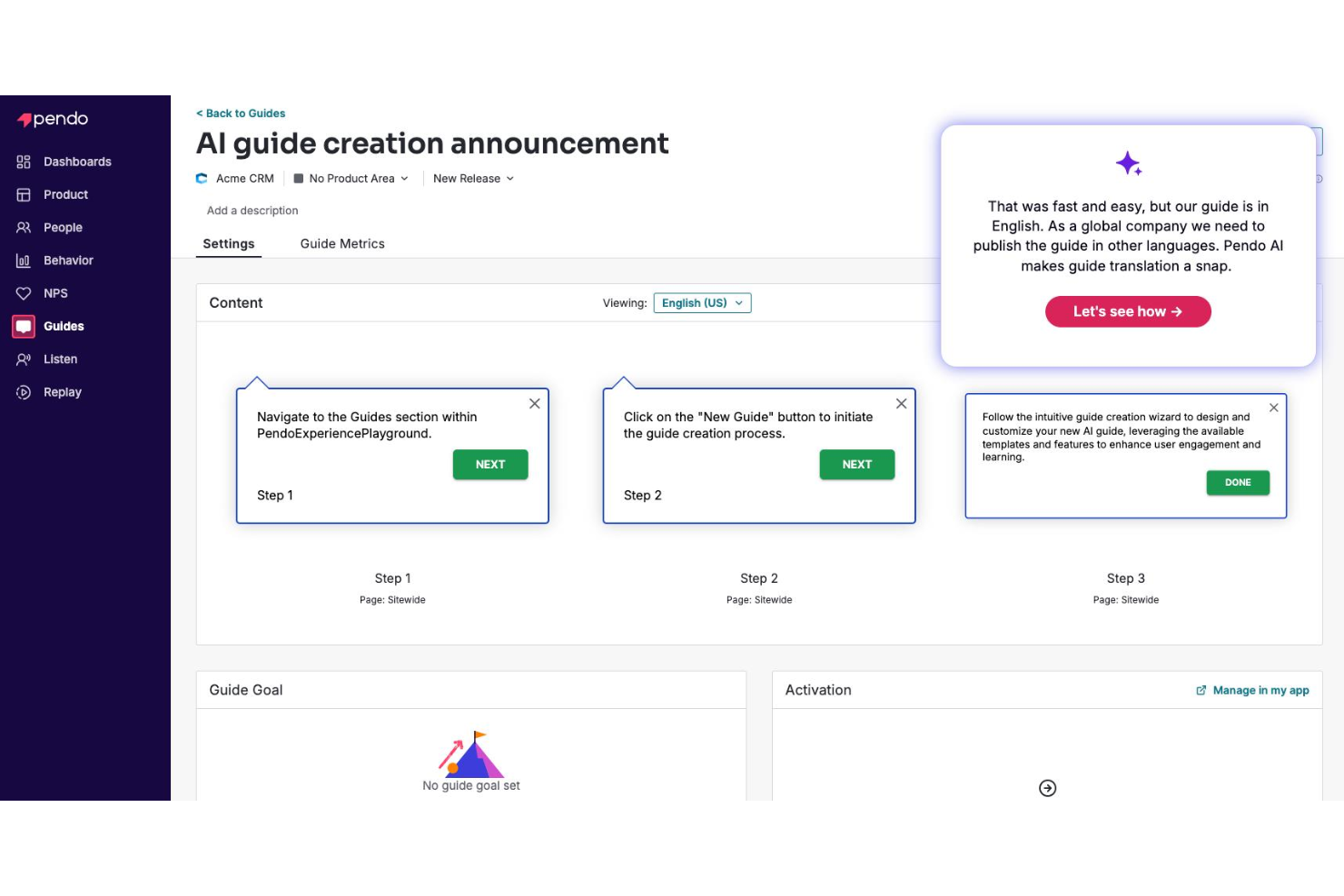
Pendo is a digital adoption platform that combines product analytics, in-app guidance, and user feedback tools—making it a strong fit for product teams and IT leaders who need behavioral data to inform their onboarding and adoption strategies.
Who Is Pendo Best For?
Pendo is a strong fit for mid-market and enterprise SaaS companies with dedicated product teams who need to tie user behavior data to adoption decisions.
Why Pendo Is a Good Whatfix Alternative
I picked Pendo as one of the best Whatfix alternatives because the depth of its product analytics sets it apart. Where Whatfix focuses primarily on guidance, Pendo gives you path analysis and funnel tracking that show exactly where users drop off. I also like its Orchestrate feature, which lets you layer in-app guides with email messaging based on real behavior data. That means you're not guessing when to prompt users—you're acting on what they've actually done in your product.
Pendo Key Features
- Resource center: A self-service widget you can embed inside your product to house walkthroughs, onboarding checklists, and help content.
- In-app NPS and surveys: Collect user feedback directly inside your product using customizable NPS polls and targeted survey modules.
- User segmentation: Group users by attributes, behavior, or account data to target guidance and messaging to specific audiences.
- Session replay: Watch recorded user sessions to see exactly how individuals navigate and interact with your product.
Pendo Integrations
Pendo offers 50+ integrations, including native integrations with Salesforce, HubSpot, Jira, Slack, Segment, Snowflake, Intercom, Zendesk, Okta, and Microsoft Teams. It also connects with Zapier, and an API, webhooks, and MCP are available for custom integrations.
Pros and Cons
Pros:
- Resource center for self-service support
- Built-in in-app surveys and polls
- Granular analytics for tracking feature adoption
Cons:
- Limited customization for onboarding flows
- Requires external documentation hosting

Best for interactive onboarding creation
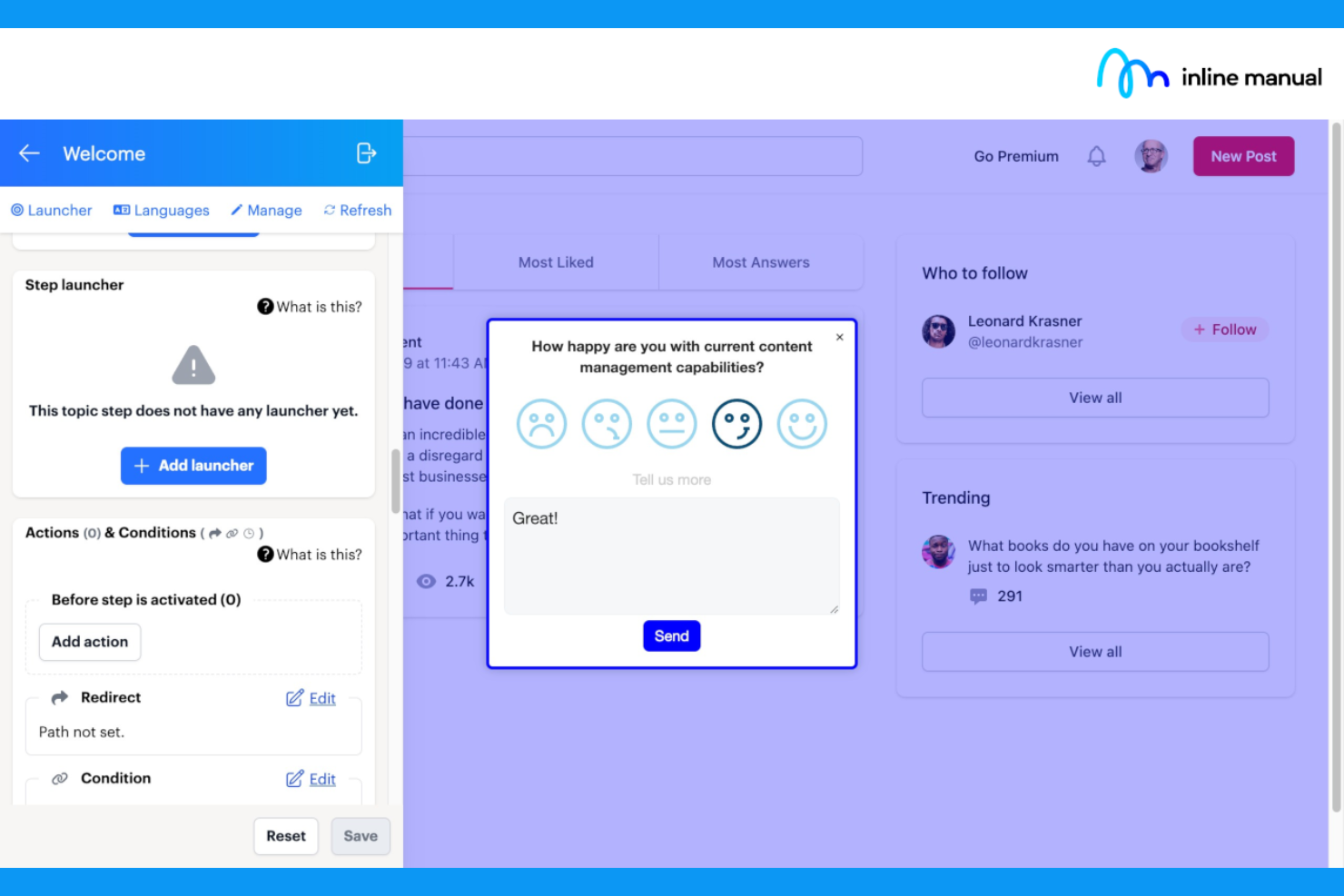
Inline Manual is a digital adoption platform built for product and customer success teams who need to create interactive walkthroughs, tooltips, and onboarding checklists directly inside web applications.
Who Is Inline Manual Best For?
Inline Manual is a good fit for SaaS companies and digital product teams that need to guide users through onboarding without relying on developer resources.
Why Inline Manual Is a Good Whatfix Alternative
I picked Inline Manual as one of the best because its branching walkthroughs let you build multi-path onboarding flows where users choose their own route through your product. I also like its release management feature, which lets you author content on staging and publish to live separately, so you're not pushing unfinished guidance to real users. Its multilingual support and segmentation tools mean you can serve different user groups with localized, role-specific content without duplicating your work.
Inline Manual Key Features
- Modals: Display targeted pop-up announcements inside your app for feature launches, webinars, or planned downtime.
- In-app help center: Embed a searchable help center directly inside your product so users can find articles and restart walkthroughs without leaving.
- Version control: Track changes to your content over time and roll back to a previous version if a newer one underperforms.
- Automation: Create click shortcuts and automate repetitive in-app tasks to smooth over complex or click-heavy workflows.
Inline Manual Integrations
Inline Manual offers a smaller set of integrations focused on analytics, including Google Analytics and Mixpanel, which let you track walkthrough and tooltip engagement in your existing analytics tools. A public API is available for custom integrations.
Pros and Cons
Pros:
- In-app announcements for targeted user messaging
- Step-by-step walkthroughs with branching logic
- Supports many different user languages
Cons:
- Limited visual customization for guide elements
- No native integrations with third-party tools

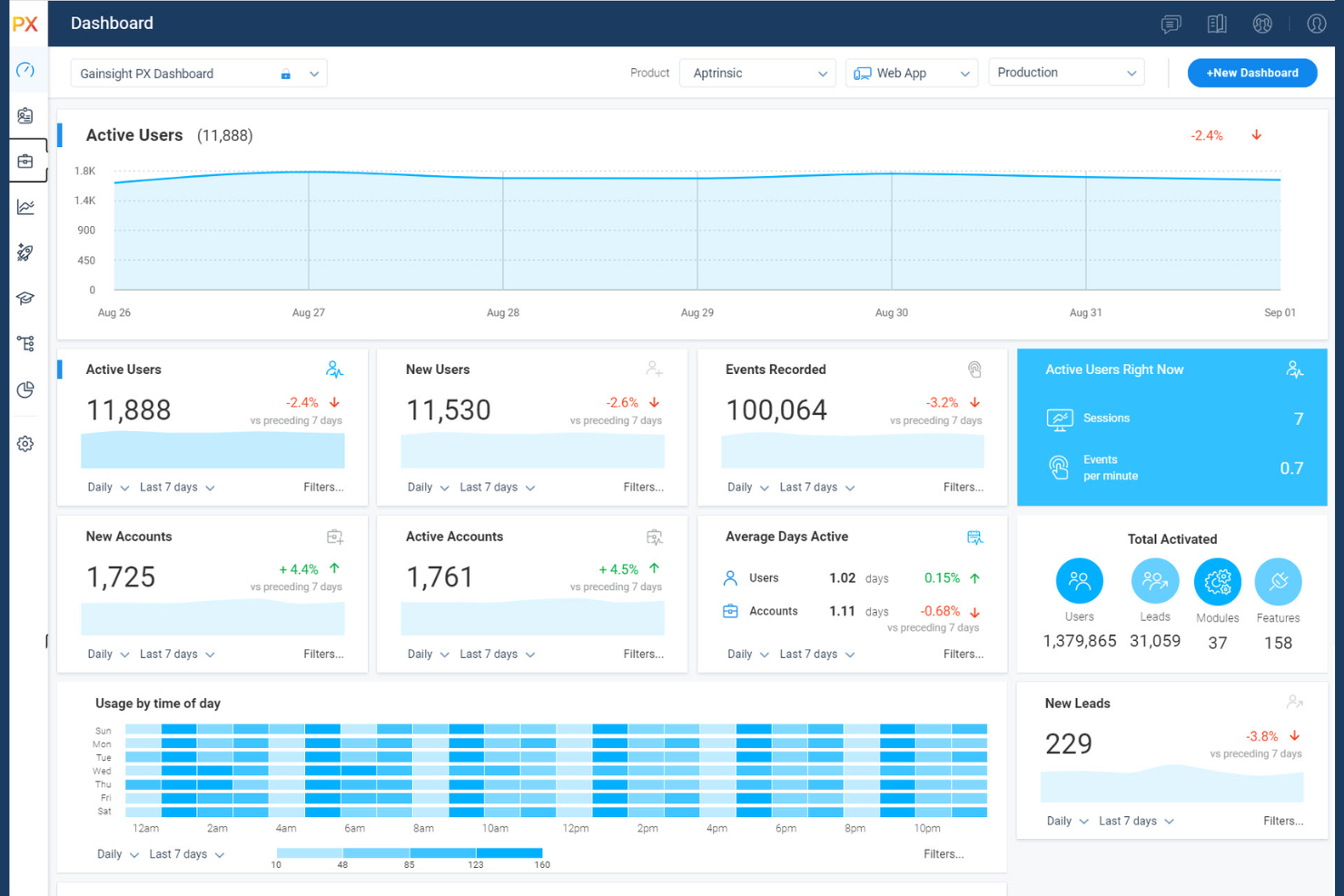
Gainsight PX is a product experience platform for B2B SaaS teams that combines in-app engagement tools like tours and tooltips with deep product analytics to help you understand and act on how users interact with your software.
Who Is Gainsight PX Best For?
Gainsight PX is a natural fit for mid-market and enterprise B2B SaaS companies where customer success and product teams share responsibility for retention.
Why Gainsight PX Is a Good Whatfix Alternative
I picked Gainsight PX because it connects in-app engagement directly to account-level business data, which very few digital adoption platforms do. Its product analytics include path and funnel analysis that surfaces exactly where users drop off, and those behavioral signals feed into account health scores visible to customer success teams. I also appreciate that native CS and CRM integrations mean product usage data can be tied to retention and expansion metrics, giving you a direct line from a tooltip interaction to a renewal risk flag.
Gainsight PX Key Features
- Native email campaigns: Send targeted email campaigns directly from Gainsight PX to accelerate user activation and announce new feature releases.
- In-app surveys: Deploy NPS, CSAT, and CES surveys with intelligent audience targeting to collect feedback without leaving the product.
- Advanced user segmentation: Build audience segments that update in real time to deliver personalized in-app experiences without performance trade-offs.
- Multi-platform SDK support: Deploy across native iOS, Android, React Native, and Windows desktop apps using native C# and Java SDKs.
Gainsight PX Integrations
Gainsight PX offers native integrations with Salesforce, Slack, Zendesk, Segment, FullStory, AWS S3, Google Cloud Storage, Crowdin, and Gainsight CS. It also connects with Zapier, and an API is available for custom integrations.
Pros and Cons
Pros:
- A/B testing for optimizing engagement flows
- Product mapping to visualize user journeys
- Advanced segmentation for targeted onboarding
Cons:
- Feature releases may require manual configuration
- Lacks simplified visualization settings


HelpHero is a no-code onboarding tool for SaaS product and customer success teams who need to build product tours and tooltips quickly, without depending on developers to ship or update in-app guidance.
Who Is HelpHero Best For?
HelpHero is a strong fit for early-stage SaaS startups that need to get product tours live fast without a large budget or technical resources.
Why HelpHero Is a Good Whatfix Alternative
I picked HelpHero for this shortlist because it strips tour creation down to the essentials without sacrificing control. I can point, click, and publish a tooltip or multi-step walkthrough in minutes using its no-code editor, adding embedded videos or images along the way. What I appreciate most is the funnel-based targeting: I can set criteria like device type, browser, or custom user properties to show the right tour to the right person, without any engineering handoff.
HelpHero Key Features
- Onboarding checklists: Display a task list inside your app that tracks user progress through required onboarding steps.
- Hotspots: Add pulsing on-demand hints to UI elements to prompt user actions or announce new features.
- Step-level analytics: Track tour completion rates at each individual step to see exactly where users drop off.
- Tour customization: Edit text, colors, and layout for each tour step directly inside the no-code editor.
HelpHero Integrations
HelpHero offers a native integration with Intercom through a dedicated Messenger app. Beyond that, native integrations are not clearly documented. A JavaScript API is available for custom integrations, letting you listen to tour events and trigger tours programmatically.
Pros and Cons
Pros:
- Analytics dashboard for tracking user engagement
- Builds live overlays via Chrome browser extension
- User targeting for segmented onboarding flows
Cons:
- Limited support for advanced automation triggers
- No native integrations with third-party tools
Other Whatfix Alternatives
Here are some additional Whatfix alternatives that didn’t make it onto my shortlist, but are still worth checking out:
- Fullstory Guides and Surveys
For leveraging behavioral insights
- Chameleon
For targeted user segmentation
- UserGuiding
For easy no-code walkthroughs
- Product Fruits
For feedback collection within interfaces
- Userpilot
For event-based onboarding triggers
- Stonly
For creating personalized self-serve guides
- Userflow
For lightweight chrome extension building
- Toonimo
For voice-guided walkthrough experiences
- Amplitude Guides and Surveys
For cohort-triggered in-app messaging


How I Evaluate Whatfix Alternatives
I look at every Whatfix alternative through two lenses: the core capabilities it needs to qualify—no-code flows, segmentation, in-app messaging—and the factors that differentiate it.
Core Functionality (Table Stakes For This List)
When I'm selecting tools for my list, I rank each one on a scale from 0 (does not offer the functionality) to 5 (excels in this area) for each core functionality listed below. Then, I calculate the tool's total score into a percentage. Each tool needs to achieve a minimum total score of 65% to be considered for inclusion.
- No-Code Flow Builder: I evaluate whether product teams can build, edit, and publish guides without filing engineering tickets—like spinning up a new feature tour in minutes.
- In-App Messaging & Tooltips: Each tool should support contextual elements like modals, hotspots, and banners that can target users at the right moment during their workflow.
- User Onboarding Flows: I look for multi-step onboarding experiences with checklists and progress tracking, similar to the activation sequences SaaS teams use to move trial users toward "aha" moments.
- User Segmentation & Targeting: Delivering the right guide to the right user matters, so I check how each tool segments by attributes, behavior, or lifecycle stage.
- Product Analytics & Engagement Tracking: Strong tools show you guide completion rates, feature usage trends, and adoption metrics—not just basic view counts.
- In-App Feedback Collection: I look for native surveys, NPS prompts, or feedback widgets that trigger contextually, like after a user completes a new workflow for the first time.
Once I have a list of tools that meet this criteria, I consider what sets each platform apart.
Differentiating Factors (What Sets Vendors Apart)
Here's how I compare and contrast different vendors:
Standout Features
A/B testing capabilities let you run experiments on different onboarding paths to find which one drives higher activation rates. I also look for in-app resource centers where users can search guides, videos, and docs without leaving the product. Session replays and heatmaps add another useful layer, showing exactly where users drop off mid-flow so you can iterate with real behavioral data instead of guesswork.
Beyond Features
How well a tool fits your existing stack matters. I check for native integrations with analytics platforms like Amplitude or Mixpanel and CRMs like Salesforce, since disconnected data creates blind spots in your adoption picture. I also evaluate whether a vendor is built for B2B SaaS product-led growth or internal enterprise enablement—these are different use cases, and tools tend to favor one over the other. Pricing structure is worth examining too, especially how costs scale as your MAU count grows.
Why Look For A Whatfix Alternative?
While Whatfix is a good choice of product adoption platform, there are a number of reasons why some users seek out alternative solutions. You might be looking for a Whatfix alternative because…
- You need more advanced personalization options
- Your team requires native voice guidance features
- You want more transparent or flexible pricing
- You need deeper analytics or compliance tracking
- Your organization operates in multiple languages
- You prefer a tool with more prebuilt onboarding templates
If any of these sound like you, you’ve come to the right place. My list contains several product adoption platform options that are better suited for teams facing these challenges with Whatfix and looking for alternative solutions.
Whatfix Key Features
Here are some of the key features of Whatfix, to help you contrast and compare what alternative solutions offer:
- In-app walkthroughs: Interactive guides that lead users through new tools, workflows, or processes directly inside your application.
- User segmentation: Lets you deliver personalized onboarding and support content to different user groups based on behavior, role, or region.
- Embedded knowledge base: Integrates help content, FAQs, and training materials within your product so users get answers without leaving the platform.
- Real-time analytics: Tracks how users engage with guides, tooltips, and other elements, so you can spot adoption gaps and measure success.
- Tooltips and hotspots: Adds dynamic hints or callouts to important UI elements to drive awareness, adoption, or correct usage.
- Onboarding checklists: Provides users with task lists to show progress, encourage completion of onboarding steps, and support retention.
- No-code content creation: Enables non-technical staff to build, update, or manage all onboarding flows and guides without engineering support.
- Event-based triggers: Shows relevant content or prompts at the moment of need, based on user actions or key workflow milestones.
- Multi-language support: Allows teams to localize onboarding content for global teams or diverse user bases with in-app language options.
- User feedback collection: Captures input and ratings from users during or after onboarding to inform improvements and refine your experience.