

Se é gestor de produto, conhece os desafios de manter a sua equipa alinhada e os seus projetos no bom caminho. É possível que esteja a descobrir que o ProductPlan não responde às suas necessidades. Quer seja devido a funcionalidades limitadas, problemas de escalabilidade ou desafios de integração, procura algo que se adapte melhor ao fluxo de trabalho da sua equipa.
Dediquei algum tempo a testar e analisar várias soluções de software para encontrar as melhores alternativas ao ProductPlan. Neste artigo, partilho as minhas principais escolhas. Vou explicar o que torna cada opção única e como podem resolver os seus problemas específicos.
O meu objetivo é fornecer-lhe um guia imparcial e baseado numa pesquisa aprofundada para o ajudar a escolher a ferramenta certa para o sucesso da sua equipa.
O que é o ProductPlan?
O ProductPlan é uma ferramenta essencial de gestão de produtos que ajuda as equipas a planear e visualizar as suas estratégias de produto. Os utilizadores, geralmente gestores de produto e gestores de projetos, podem considerar que o ProductPlan não responde às suas necessidades por uma ou mais das seguintes razões:
- É demasiado caro para o seu orçamento
- A sua equipa precisa de mais opções de personalização
- Precisa de uma melhor integração com outras ferramentas
- Precisa de suporte para equipas maiores
- A equipa trabalha num local geográfico diferente e precisa de funcionalidades de suporte global
- Precisa de funcionalidades de elaboração de relatórios mais avançadas
Se alguma destas situações lhe é familiar, veio ao sítio certo. A minha lista inclui várias opções essenciais de gestão de produtos mais adequadas a equipas que enfrentam estes desafios específicos com o ProductPlan e que procuram as melhores soluções alternativas de software de gestão de produtos.
Why Trust Our Software Recommendations
6,700+
Reviews
20
Industry experts
16+
Evaluation factors
14
Years
Our team has been testing and reviewing software since 2012. As product managers ourselves, we know how difficult—and important—it is to choose the right software.
For this guide, we evaluated tools using hands-on testing and independent research, scoring tools using our selection criteria.
Our reviews reflect our human editorial judgment, not a sales pitch.
Expert reviewers:
- Andrew LumbySenior TPM
- Cristiano ValimSenior UI/UX Lead


Tabela de comparação das alternativas ao ProductPlan
Esta tabela de comparação resume os detalhes de preços das minhas principais alternativas ao ProductPlan:
| Tool | Best For | Trial Info | Price | ||
|---|---|---|---|---|---|
| 1 | Best for publishing live Jira-based roadmaps | Free plan + 30-day trial + demo available | From $1.10/user/month | Website | |
| 2 | Best for mid-sized to large tech companies | Free plan + free demo available | From $19/user/month (billed annually) | Website | |
| 3 | Best for scoring features against strategic goals | 30-day free trial + free demo available | From $59/user/month (billed annually) | Website | |
| 4 | Best for small to medium-sized product teams | 7-day free trial + free demo available | From $24/user/month (billed annually) | Website | |
| 5 | Best for customer feedback collection | Free plan + free trial + free demo available | From $79/month (billed annually) | Website | |
| 6 | Best for highly customizable workflow-based planning | Free plan + 14-day trial available | From $9/user/month (billed annually) | Website | |
| 7 | Best for portfolio-level AI-driven roadmapping | Free demo available | Pricing upon request | Website | |
| 8 | Best for custom prioritization scoring models | Free demo available | Pricing upon request | Website | |
| 9 | Best for linking customer feedback to roadmap items | 14-day free trial + free demo available | From $24/user/month | Website | |
| 10 | Best for feedback-to-roadmap alignment | 14-day free trial available | From $19/user/month (billed annually) | Website |


Testámos e analisámos software de gestão de produtos desde 2020. Como também somos gestores de produto, sabemos como é fundamental e difícil tomar a decisão certa ao selecionar software. Investimos numa pesquisa aprofundada para ajudar o nosso público a tomar melhores decisões de compra de software.
Testámos mais de 2.000 ferramentas para diferentes casos de utilização na gestão de produtos e escrevemos mais de 1.000 análises completas de software. Saiba como mantemos a transparência & consulte a nossa metodologia de análise de software.
Melhores análises de alternativas ao ProductPlan
Seguem-se os meus resumos detalhados das melhores alternativas ao ProductPlan que integraram a minha seleção final. As minhas análises apresentam uma visão detalhada das principais funcionalidades, vantagens e desvantagens, integrações e casos de utilização ideais de cada ferramenta, para o ajudar a encontrar a melhor opção para si.
 Best for publishing live Jira-based roadmaps
- Free plan + 30-day trial + demo available
- From $1.10/user/month
Visit WebsiteCustomer Rating:5/5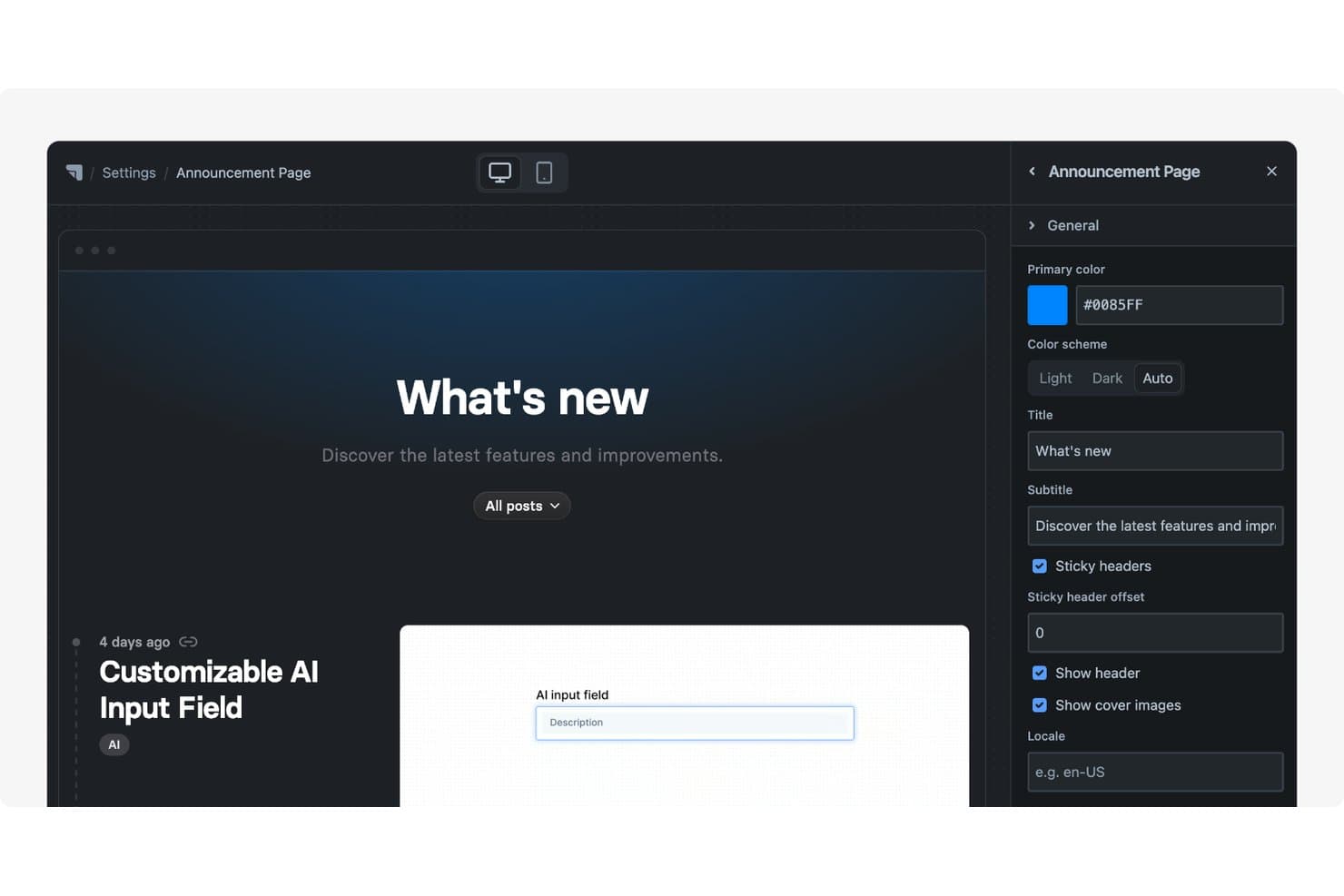
Released offers a customizable Announcement Page with editable title, subtitle, color scheme, and header settings via a side panel. Released is a Jira-native roadmap and changelog tool built for product teams that live in Atlassian's ecosystem and want to publish polished, always-current roadmaps and release notes without maintaining a separate system.
Who Is Released Best For?
Released is a strong fit for product teams already working in Jira who want to publish polished, customer-facing roadmaps and release notes without leaving the Atlassian ecosystem.
Why I Picked Released
I picked Released as one of the best ProductPlan alternatives because it solves a real frustration I've seen on Jira-heavy product teams: your roadmap lives in one tool, your work lives in another, and keeping them in sync is a constant job. Released fixes that by publishing live roadmaps directly from Jira and JPD data, so the moment a status changes in Jira, the customer-facing portal reflects it. I also appreciate the audience-specific publishing, where you can serve one filtered roadmap to customers and a separate one to sales, each with its own visibility controls and branded portal on a custom domain.
Released Key Features
- AI release notes drafting: Released uses OpenAI to generate release notes from selected Jira issues, with reusable templates and writing instructions to control tone and style.
- Feedback inbox: A centralized inbox collects customer feedback from idea portals, embeddable forms, and Slack, linking each submission directly to Jira work items.
- Cross-project roadmap views: You can combine multiple Jira and JPD projects into a single roadmap view, filtered using JQL across your entire Jira site.
- Customer wishlist: Customers can vote on a limited number of roadmap items, with configurable limits and the option to hide demand counts to avoid skewing priorities.
Released Integrations
Released offers native integrations with Jira Software, Jira Product Discovery, Slack, Confluence, Framer, Webflow, Karma, and Scroll Sites. It has no public API or webhooks and runs on Atlassian Cloud only.
Pros and Cons
Pros:
- AI drafts release notes from issues
- Branded portals tailor updates to audiences
- Roadmaps stay current without duplicate entry
Cons:
- No portfolio hierarchy for executive planning
- No built-in strategic prioritization or scoring
Learn more about Released: Best for mid-sized to large tech companies
- Free plan + free demo available
- From $19/user/month (billed annually)
Visit WebsiteCustomer Rating:4.5/5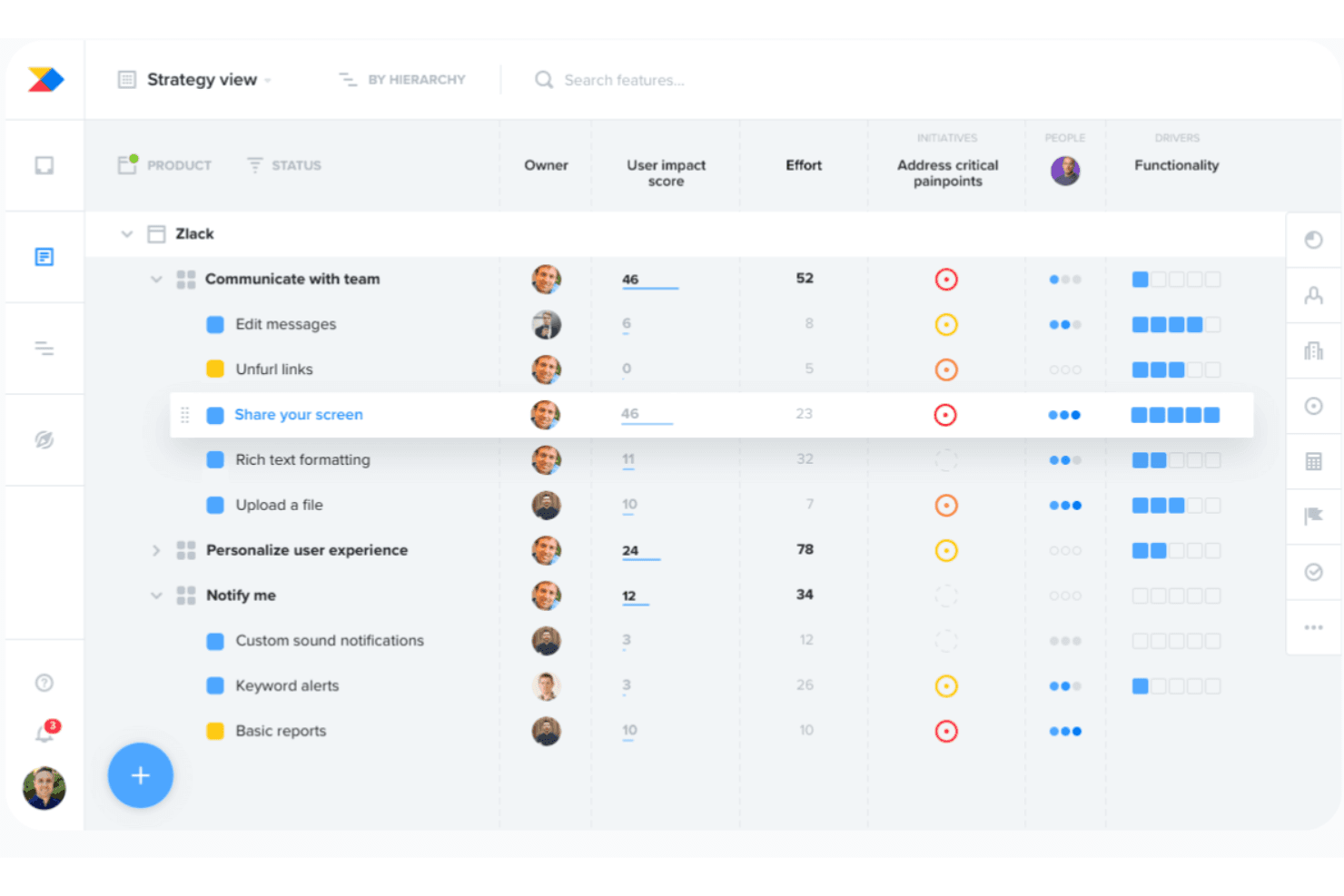
Productboard lets users prioritize features by impact, effort, and initiatives. Productboard brings customer feedback, prioritization, and roadmapping into one connected system, making it a strong fit for product teams that want traceability from raw customer insight all the way through to a shipped feature.
Who Is Productboard Best For?
Productboard works best for mid-sized to large product teams that need to connect customer feedback directly to prioritization decisions and roadmap planning in one place.
Why I Picked Productboard
I picked Productboard as one of the best ProductPlan alternatives because it's purpose-built for mid-sized to large tech teams that need a direct line from customer feedback to roadmap decisions. What I appreciate most is the Customer Importance Score, which automatically weights feature requests by customer segment so prioritization reflects real demand, not gut feel. Pair that with custom prioritization formulas (RICE, WSJF, ICE) and portfolio-wide roadmaps, and you get a system where every item on the roadmap can be traced back to a business reason.
Productboard Key Features
- Customer Importance Score: Automatically weights feature requests by customer segment, so you can see demand ranked by business value rather than request volume.
- Productboard Spark AI agents: A suite of AI agents handles feedback analysis, spec writing, competitive research, and opportunity ranking directly within your workspace.
- Product portal: A customer-facing hub where users submit ideas, vote on features, and get notified when their requested features ship.
- Two-way Jira sync: Keeps features, statuses, and custom fields aligned between Productboard and Jira in real time using webhooks and JQL filters.
Productboard Integrations
Productboard offers 25+ native integrations, including Jira, Azure DevOps, GitHub, Trello, Shortcut, Slack, Zendesk, Intercom, Amplitude, and Mixpanel. It also supports REST API v2.0, an MCP server, and Zapier for custom connectivity.
Pros and Cons
Pros:
- Feedback links directly to roadmap decisions
- Custom formulas support RICE, WSJF, and ICE
- Customer importance scores weight demand by segment
Cons:
- Manual tagging can burden larger teams
- No dedicated team capacity planning
Learn more about Productboard: 3Best for scoring features against strategic goals
Aha!
- 30-day free trial + free demo available
- From $59/user/month (billed annually)
Visit WebsiteCustomer Rating:4.4/5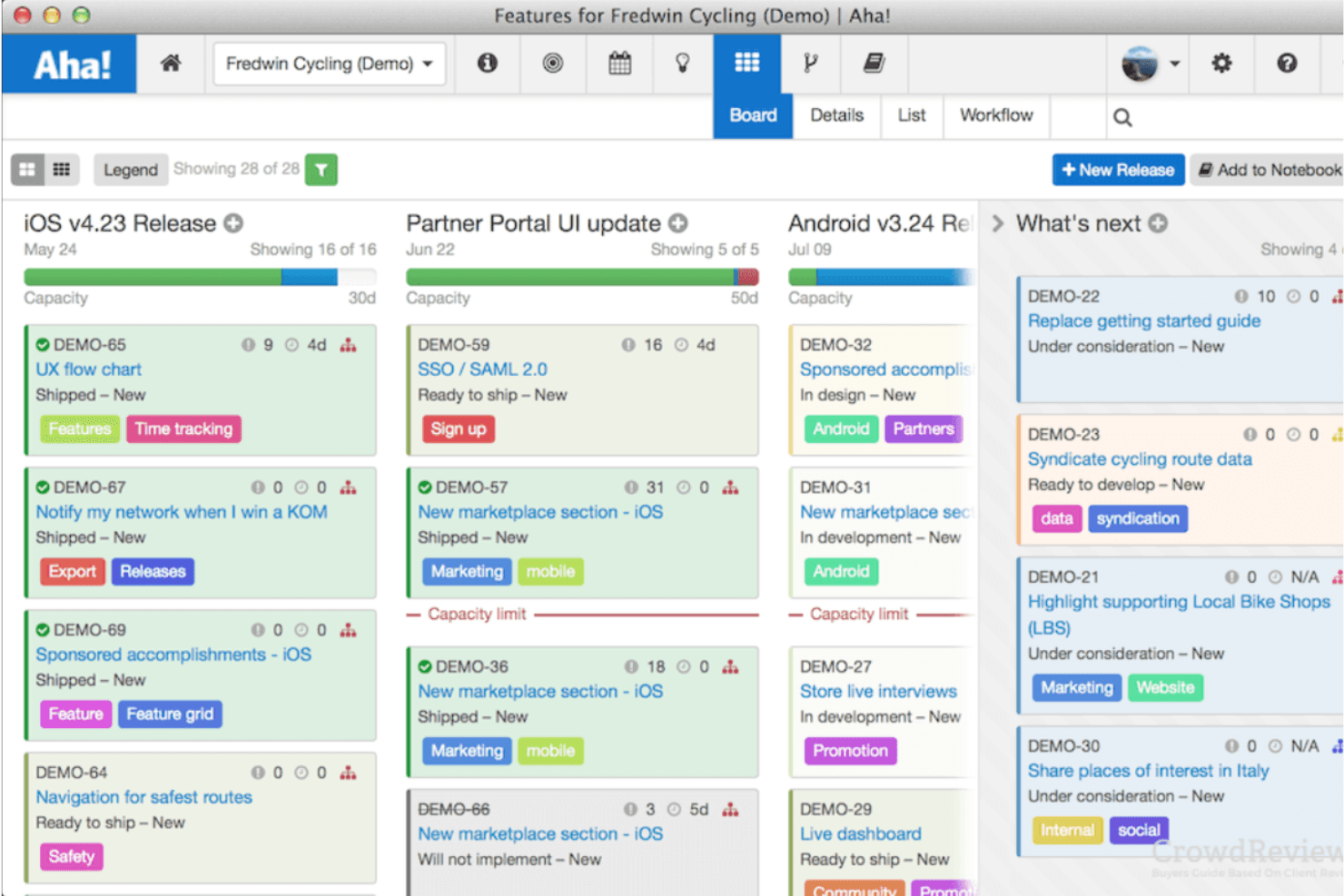
Aha! organizes product features into a visual kanban-style release board. Aha! is a product management suite that connects strategy, feature scoring, and visual roadmaps in one place—making it a strong fit for product managers and product leaders who need to tie day-to-day prioritization decisions back to business goals.
Who Is Aha! Best For?
Aha! is a strong fit for product teams that need to connect individual features directly to company strategy, OKRs, and business goals before committing to a roadmap.
Why I Picked Aha!
I picked Aha! as one of the best ProductPlan alternatives because it ties feature prioritization directly to business goals through a custom product value scorecard. You build your own scoring equation, weighting factors like strategic alignment, customer need, and effort, so every feature decision has a clear, documented rationale. I also appreciate that OKRs and strategic initiatives link directly to releases and features, so your roadmap reflects your strategy in real time, not just in theory.
Aha! Key Features
- Seven roadmap view types: Switch between starter, features, now/next/later, strategy, portfolio, Gantt, and calendar views from a single view switcher.
- Live-synced shareable webpages: Publish any roadmap view as a password-protected or SSO-gated webpage that updates automatically when underlying records change.
- Two-way Jira sync with field mapping: Map custom fields between Aha! and Jira, including checkboxes, labels, dates, and select lists, with changes flowing in both directions.
- Ideas portal included on all plans: Every Roadmaps plan includes online idea portals with scoring, status updates, and direct promotion of ideas into features.
Aha! Integrations
Aha! Roadmaps has 40+ native integrations, including Jira, Azure DevOps, GitHub, GitLab, Rally, Salesforce, HubSpot, Zendesk, Slack, and Microsoft Teams. It also offers a REST API and Zapier.
Pros and Cons
Pros:
- Reviewers praise responsive customer support
- Roadmaps update when underlying records change
- Feature scores document strategic tradeoffs
Cons:
- Some reviewers describe the interface as clunky
- Extensive settings require substantial setup time
Learn more about Aha!: Best for small to medium-sized product teams
- 7-day free trial + free demo available
- From $24/user/month (billed annually)
Visit WebsiteCustomer Rating:4.2/5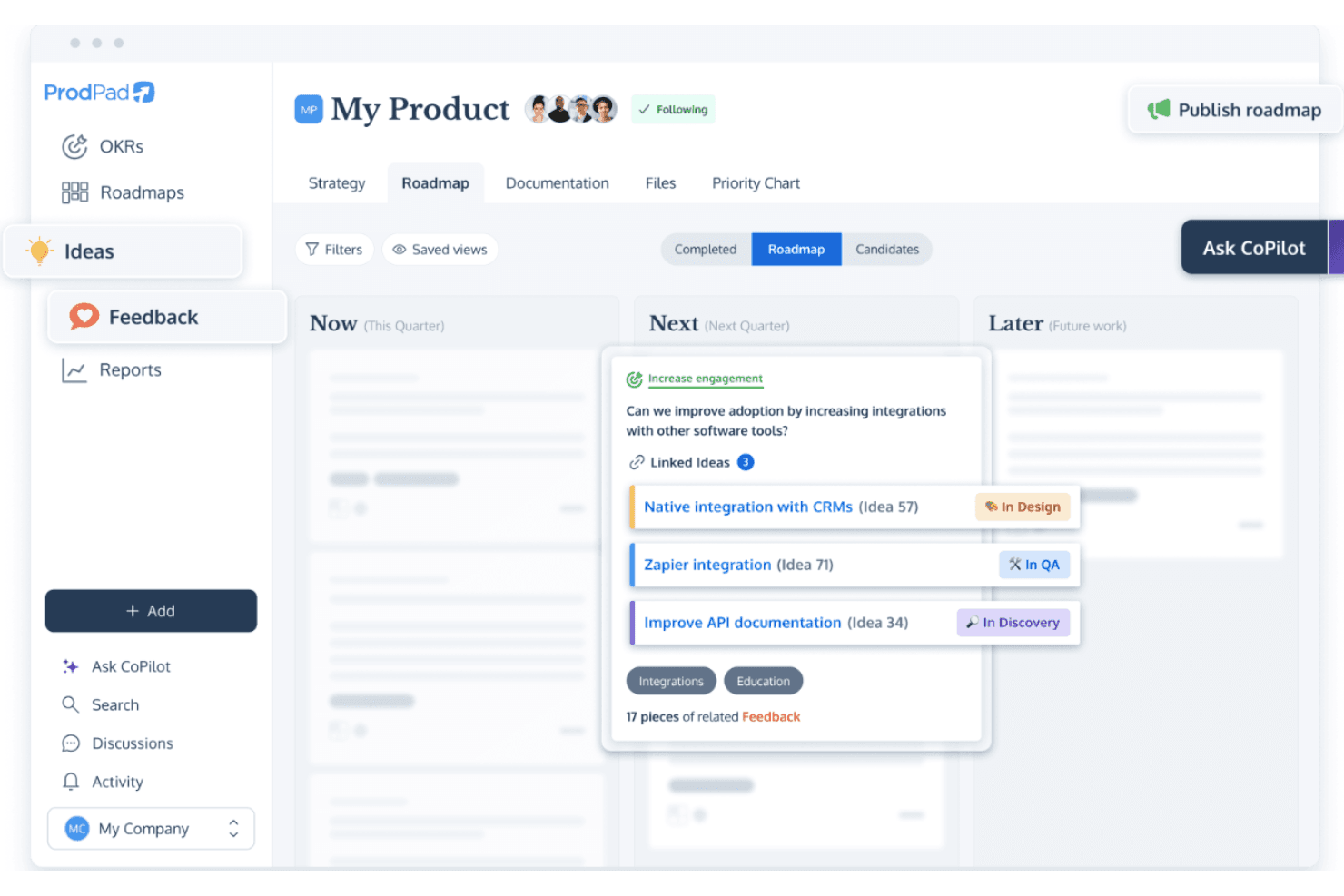
ProdPad links ideas to roadmap specs with live status tracking. ProdPad is a connected product management platform that links roadmaps, ideas, customer feedback, and OKRs in one system—making it a strong fit for product managers who want prioritization and feedback workflows built directly into their roadmapping process.
Who Is ProdPad Best For?
ProdPad fits product managers who want feedback, prioritization, and roadmapping connected in one place rather than spread across separate tools.
Why I Picked ProdPad
I picked ProdPad as one of the best because it connects roadmaps, ideas, customer feedback, and OKRs in one system, which is genuinely useful for small to medium-sized product teams tired of stitching tools together. What I appreciate most is the AI Signals feature, which surfaces themes across incoming feedback and links them directly to roadmap initiatives, so prioritization decisions stay grounded in real customer data. The Idea Canvas adds structure to that process by moving ideas through workflow stages before they ever touch the roadmap.
ProdPad Key Features
- Published roadmaps: Share your roadmap as a hosted URL, embedded view, or PDF, with per-initiative visibility controls to show or hide items for different audiences.
- OKR health tracking: Link initiatives directly to objectives and key results, with live status indicators showing whether each objective is on track, at risk, or behind.
- CoPilot AI: Included on all plans, this AI tool turns spreadsheets or slide decks into live roadmaps and drafts specs and summaries using your account data.
- Jira two-way sync: Connect ProdPad to Jira Cloud or Server in Full Sync or Status Sync mode, with customizable field mapping and no Jira admin access required.
ProdPad Integrations
ProdPad offers native integrations with Jira, Azure DevOps, TFS, GitHub, Linear, Pivotal Tracker, Rally, Trello, Slack, and Microsoft Teams. It also provides an API, webhooks, and Zapier for custom connectivity.
Pros and Cons
Pros:
- Audience-specific published roadmaps support sharing
- Initiatives link directly to strategic objectives
- Customer feedback themes connect to roadmap ideas
Cons:
- Portfolio views omit product swimlanes
- No timeline or Gantt roadmap view
Learn more about ProdPad: Best for customer feedback collection
- Free plan + free trial + free demo available
- From $79/month (billed annually)
Visit WebsiteCustomer Rating:4.6/5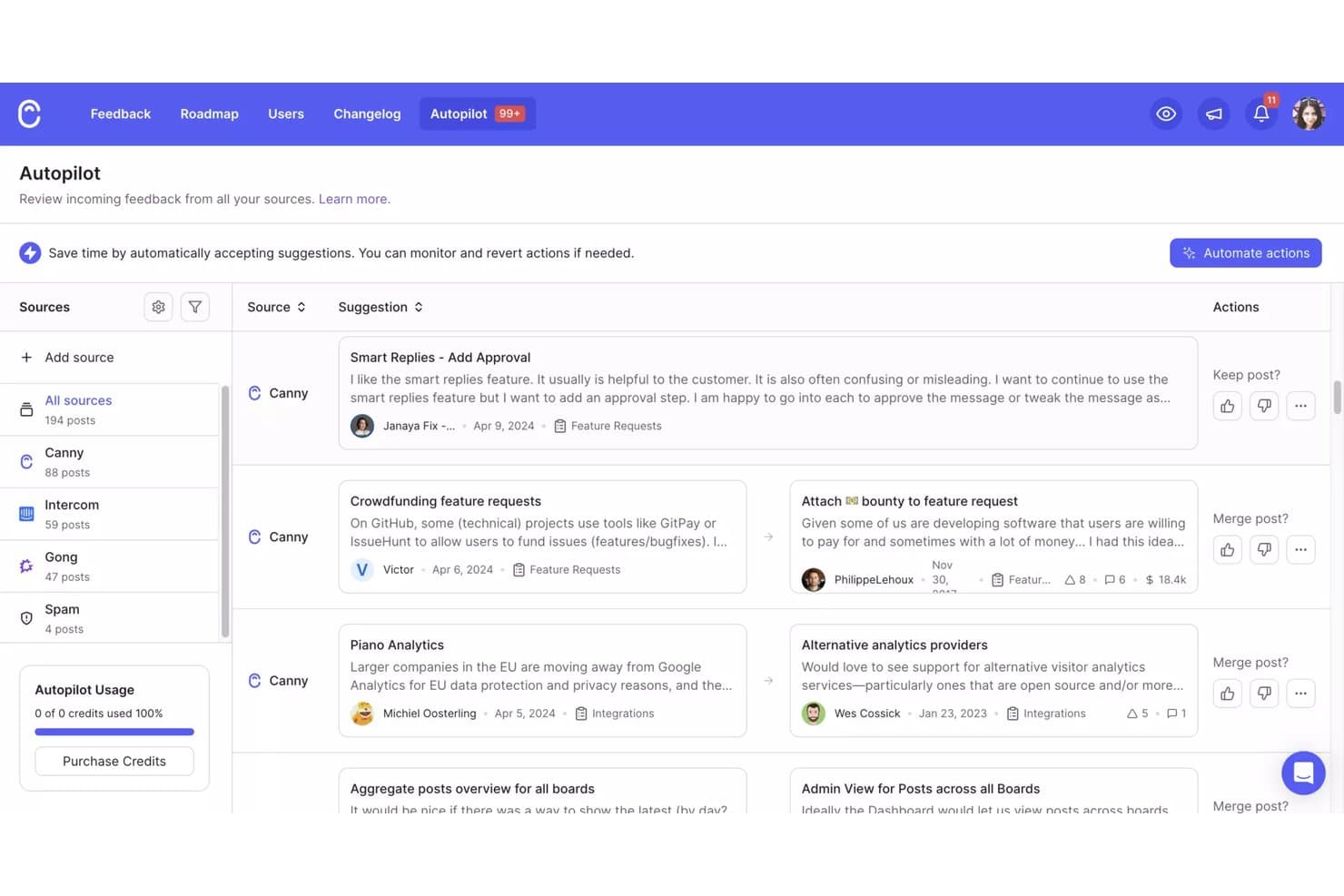
Canny's Autopilot consolidates feedback from multiple sources for review. Canny is a customer intelligence platform that turns raw feedback from support tickets, sales calls, and review sites into prioritized product decisions—making it a strong fit for product teams that want their roadmap driven by what customers actually need.
Who Is Canny Best For?
Canny is a strong fit for product operations leads and product managers who want customer feedback—from support tickets, sales calls, and reviews—to drive prioritization decisions directly.
Why I Picked Canny
I've included Canny in my top picks because it's the strongest tool on this list for turning raw customer signals into prioritized roadmap decisions. I love how Autopilot pulls feature requests directly from Gong calls, Zendesk tickets, and G2 reviews, deduplicates them, and routes them to the right product area automatically. On top of that, the RICE-based scoring engine lets me weight priorities by ARR, renewal risk, or any CRM field, so the roadmap reflects what paying customers actually need.
Canny Key Features
- Public roadmap board: A kanban-style public portal organized by status columns (Planned, In Progress, Complete) that updates automatically as you change post statuses.
- Contributor seats: Unlimited read-only seats on every plan, letting sales and customer success teams follow feature progress without consuming manager seats.
- Changelog with customer notifications: A built-in changelog that automatically notifies users who requested a feature when it ships, with an embeddable in-app widget.
- Two-way Jira and Linear sync: Bidirectional status mapping between Canny ideas and Jira issues or Linear projects, available on the Pro plan and above.
Canny Integrations
Canny offers native integrations with Jira, Linear, GitHub, ClickUp, Asana, Azure DevOps, Salesforce, HubSpot, Intercom, and Zendesk. It also provides an API, webhooks, and Zapier for custom connectivity.
Pros and Cons
Pros:
- Connects customer requests to roadmap decisions
- Weights priorities by revenue and risk
- Captures and deduplicates feedback automatically
Cons:
- Limited portfolio-level executive storytelling
- No timeline or Gantt roadmap view
Learn more about Canny: Best for highly customizable workflow-based planning
- Free plan + 14-day trial available
- From $9/user/month (billed annually)
Visit WebsiteCustomer Rating:4.6/5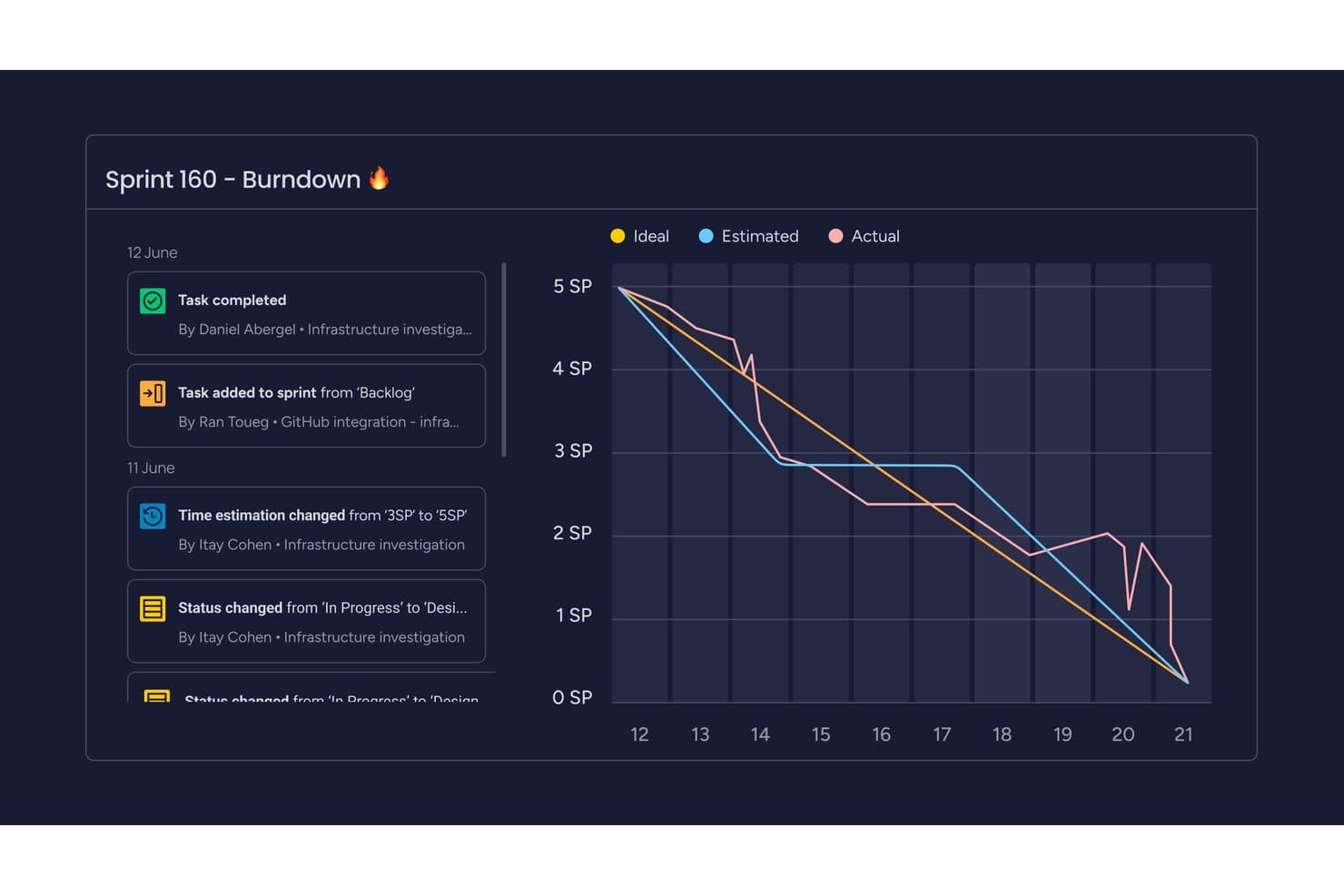
monday AI Workspace tracks sprint progress with a visual burndown chart. monday AI Workspace is a flexible work management platform that lets product and operations teams build fully customized planning boards, roadmap views, and cross-functional workflows without writing a single line of code.
Who Is monday AI Workspace Best For?
monday AI Workspace is a strong fit for product operations teams that need to build and manage cross-functional workflows across multiple teams from a single, highly flexible platform.
Why I Picked monday AI Workspace
I've included monday AI Workspace in my top picks because it gives product operations teams a level of workflow customization that purpose-built roadmap tools rarely match. I love that you can build cross-functional planning boards from scratch, using Timeline, Gantt, Kanban, and Calendar views on the same board, toggled per team. The cross-team roadmap planning feature lets you forecast across multiple teams in one place, which I find especially useful when coordinating release timelines across product, engineering, and go-to-market functions.
monday AI Workspace Key Features
- AI sprint summaries: Sidekick automatically generates sprint summaries and daily stand-up updates so your team spends less time on status reporting.
- Two-way Jira sync: A field-level sync between monday dev and Jira Cloud or Data Center keeps issues updated in both tools without manual effort.
- Workload view: A dedicated view flags team members who are over capacity, giving you a live picture of resource availability across your projects.
- OKR tracking boards: Pre-built OKR templates with formula-based grading and dashboard widgets let you connect initiatives directly to strategic goals.
monday AI Workspace Integrations
The platform lists 850+ integrations, including Jira Cloud, Jira Data Center, GitHub, GitLab, Bitbucket, and Azure DevOps. It also connects with Figma, Slack, Microsoft Teams, and Salesforce, while its REST/GraphQL API and SDKs support custom connections.
Pros and Cons
Pros:
- Dashboards connect roadmap work to OKRs
- Multiple views clarify releases and capacity
- Custom boards map varied planning workflows
Cons:
- Roadmap capabilities span separate products and tiers
- Prioritization relies on custom formulas
Learn more about monday AI Workspace: Best for portfolio-level AI-driven roadmapping
- Free demo available
- Pricing upon request
Visit WebsiteCustomer Rating:4.8/5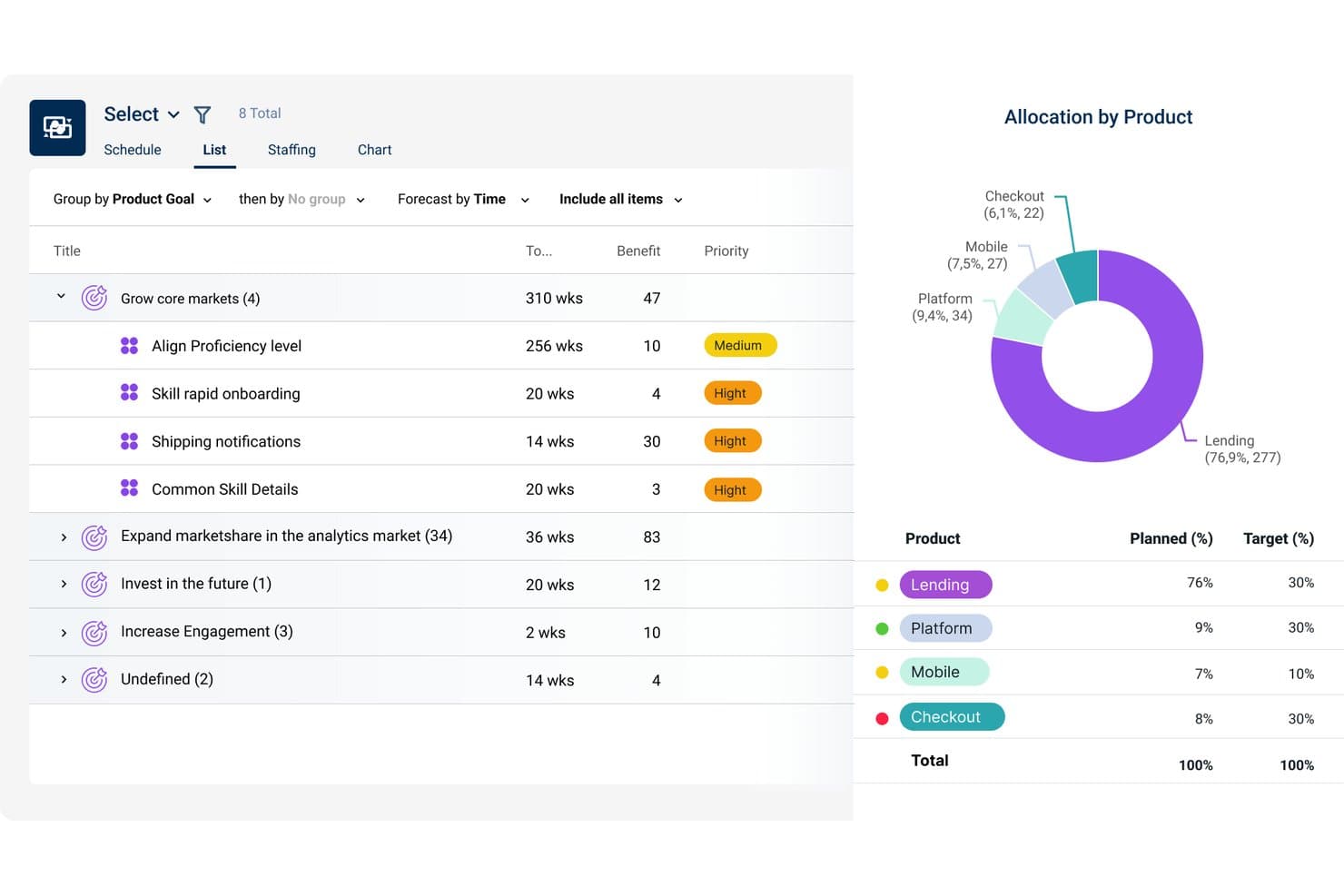
Dragonboat visualizes product allocation vs. targets across portfolios. Dragonboat is an AI-powered product operating platform built for multi-team, multi-product organizations that need to connect strategy, prioritization, and delivery across an entire portfolio.
Who Is Dragonboat Best For?
Dragonboat fits product leaders managing multiple products or teams who need to connect strategy, prioritization, and delivery in one place.
Why I Picked Dragonboat
Dragonboat earns its spot on my shortlist because it operates at a portfolio level that ProductPlan simply doesn't match. I particularly like the AI Portfolio Advisor, which generates prioritization and allocation recommendations tied directly to strategic goals, so if you're managing competing bets across multiple product lines, you're not guessing at tradeoffs. Layered on top of that, the OKR-linked health tracking connects company-level goals down to individual team roadmaps in real time, which I think is where the portfolio-level value really shows up.
Dragonboat Key Features
- Intake App: Centralizes customer feedback, feature requests, and ideas in one place, with AI summarization and connections to Salesforce, Zendesk, and Pendo Listen.
- Two-way Jira sync: Keeps roadmap items and engineering tasks in sync across Jira Cloud, Server, and Data Center instances in real time, with custom field mapping.
- Capacity and scenario planning: The Planner App's Forecast module lets you model staffing, run what-if trade-off analyses, and compare multiple resource allocation scenarios.
- Evergreen stakeholder slide decks: Auto-updating presentation views that you can tailor to specific audiences and share via email, Slack, Confluence, or read-only links.
Dragonboat Integrations
Dragonboat claims 200+ integrations, including Jira, Azure DevOps, Asana, GitHub, Monday.com, Salesforce, Zendesk, Slack, Microsoft Teams, and Confluence. It supports real-time two-way Jira sync plus API and MCP connections for custom integrations.
Pros and Cons
Pros:
- Reviews praise support during onboarding
- OKR tracking connects strategy with delivery
- AI recommendations tie prioritization to strategic goals
Cons:
- External roadmap sharing options are limited
- Some features are difficult to locate
Learn more about Dragonboat: Best for custom prioritization scoring models
- Free demo available
- Pricing upon request
Visit WebsiteCustomer Rating:4.4/5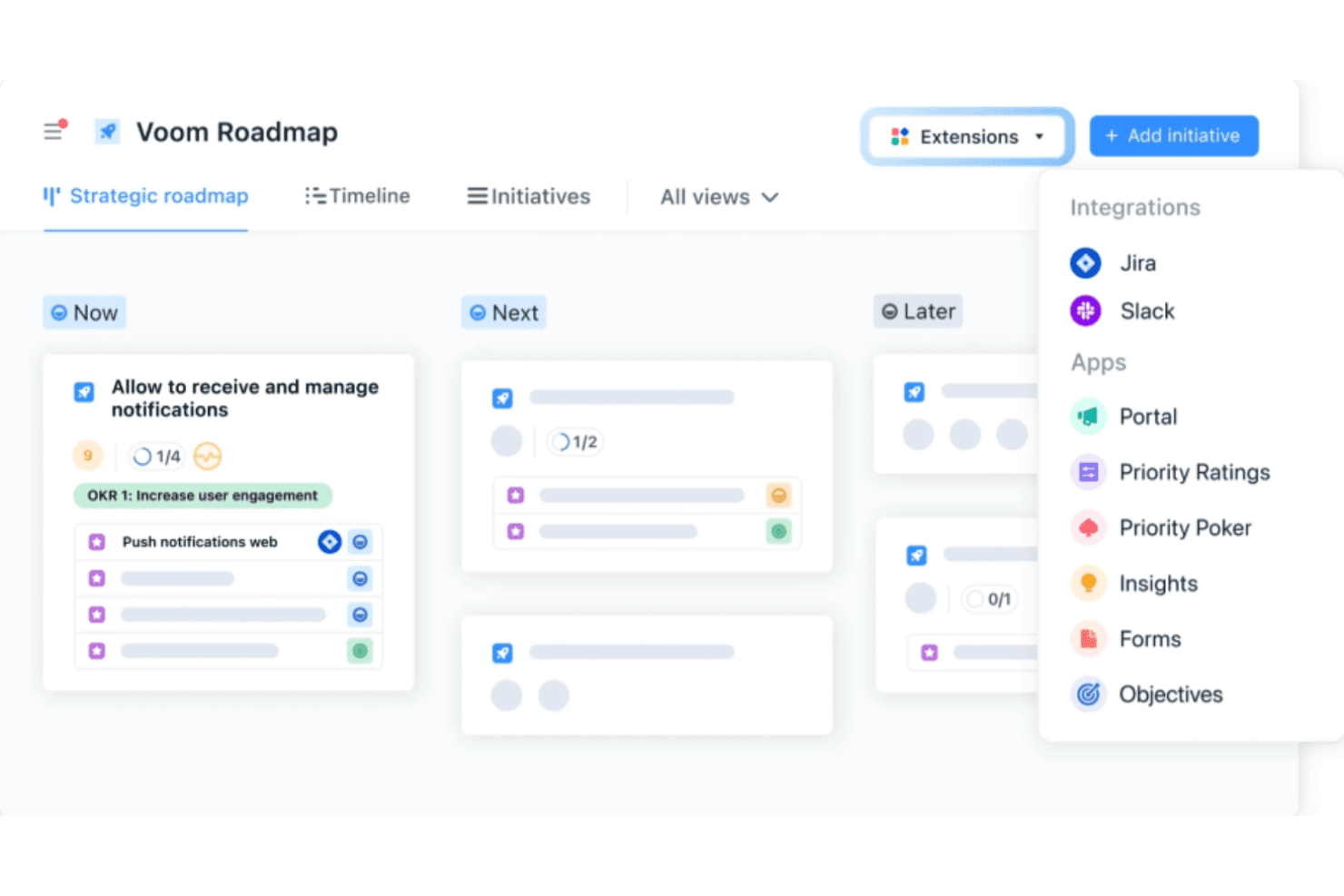
airfocus connects roadmaps to Jira, Slack, and priority tools via Extensions. airfocus is a modular product management platform built for multi-team and enterprise product organizations that need to connect roadmapping, prioritization, feedback, and OKRs in one place.
Who Is airfocus Best For?
airfocus is a strong fit for multi-team product organizations that need to build and defend prioritization decisions across complex portfolios.
Why I Picked airfocus
I picked airfocus as one of the best ProductPlan alternatives because its prioritization engine goes deeper than anything else I've seen in this category. You can build custom scoring models using a formula editor that supports operators like
sqrt,log, and^, letting you encode frameworks like RICE exactly as your team defines them. Each criterion supports its own value type (T-shirt sizes, story points, percentages), and Priority Poker lets stakeholders score independently before the group aligns on outliers.airfocus Key Features
- OKR-linked health tracking: Connect objectives to key results, roadmap items, and tasks in one hierarchy, with check-ins that record progress and confidence over time.
- Jira two-way sync: Map fields with direction control per field, filter by JQL, and keep parent-child relationships in sync across Jira Cloud, Server, and Data Center.
- Branded Portal: Publish a customer-facing site for roadmap updates, idea submissions, and release announcements, with password protection and iframe embed support.
- Multiple roadmap views: Switch between board, timeline, Gantt, table, chart, list, and document views, all pulling from the same live data source.
airfocus Integrations
airfocus offers native integrations with Jira, Azure DevOps, GitHub, Linear, Shortcut, Trello, Asana, Microsoft Planner, Slack, and Zendesk. It also supports webhooks, an open API, an MCP server, and Zapier.
Pros and Cons
Pros:
- Seven roadmap views share live data
- Stakeholder scoring exposes priority outliers
- Custom formulas support team-specific scoring models
Cons:
- Some timeline views are hard to scan
- Complex scoring models take setup effort
 Best for linking customer feedback to roadmap items
- 14-day free trial + free demo available
- From $24/user/month
Visit WebsiteCustomer Rating:4.4/5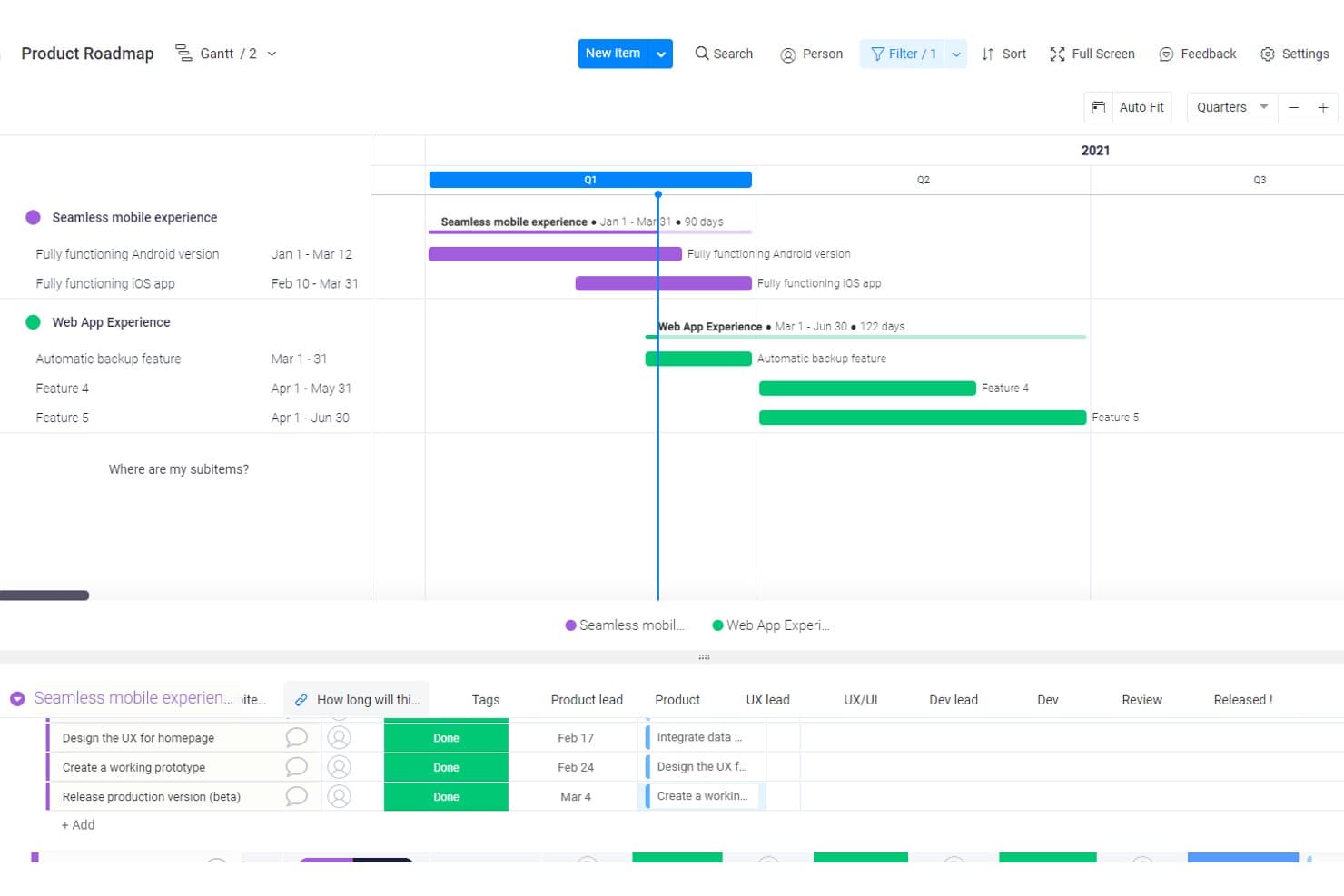
Craft.io visualizes product roadmaps with Gantt timelines and subitems. Craft.io is a product lifecycle platform that helps product managers and product leaders connect strategy to execution—spanning feedback collection, backlog management, prioritization, and roadmapping in a single workspace.
Who Is Craft.io Best For?
Craft.io is a strong fit for product managers and product leaders at mid-size to enterprise companies who need to connect customer feedback directly to roadmap decisions in a single workspace.
Why I Picked Craft.io
I picked Craft.io as one of the best because of how directly it connects customer feedback to roadmap decisions. The feedback portal lets you group submissions by company, so you can see exactly which enterprise accounts are requesting a feature before you prioritize it. That linkage from portal to backlog item is native, not a workaround, which is rare. I also rely on the voting and triage tools to surface signal from noise before anything reaches the roadmap.
Craft.io Key Features
- Timeline roadmap: A date-based view with drag-and-drop scheduling, dependency lines, and zoom levels ranging from sprint to multi-year planning.
- Live Share links: Shareable, real-time read-only URLs that give stakeholders access to current roadmap views without requiring a login.
- Built-in prioritization frameworks: Pre-built scoring templates including RICE, MoSCoW, WSJF, Kano, and Value/Effort, plus a custom formula builder for weighted scoring.
- Capacity planning add-on: A planning tool that lets you model staffing by team, role, or individual, simulate changes, and push plans directly to Jira.
Craft.io Integrations
Craft.io offers native integrations with Jira Cloud, Azure DevOps, GitHub, GitLab, Linear, Figma, Miro, and Google Sheets. Enterprise adds Salesforce, Slack, Microsoft Teams, and a public API; Zapier is also available.
Pros and Cons
Pros:
- Reviewers praise quick roadmap creation
- Company-level voting clarifies account demand
- Feedback links submissions to roadmap items
Cons:
- Finding ticket controls can take extra steps
- Feedback portal sits behind a paid add-on
Learn more about Craft.io: Best for feedback-to-roadmap alignment
- 14-day free trial available
- From $19/user/month (billed annually)
Visit WebsiteCustomer Rating:4/5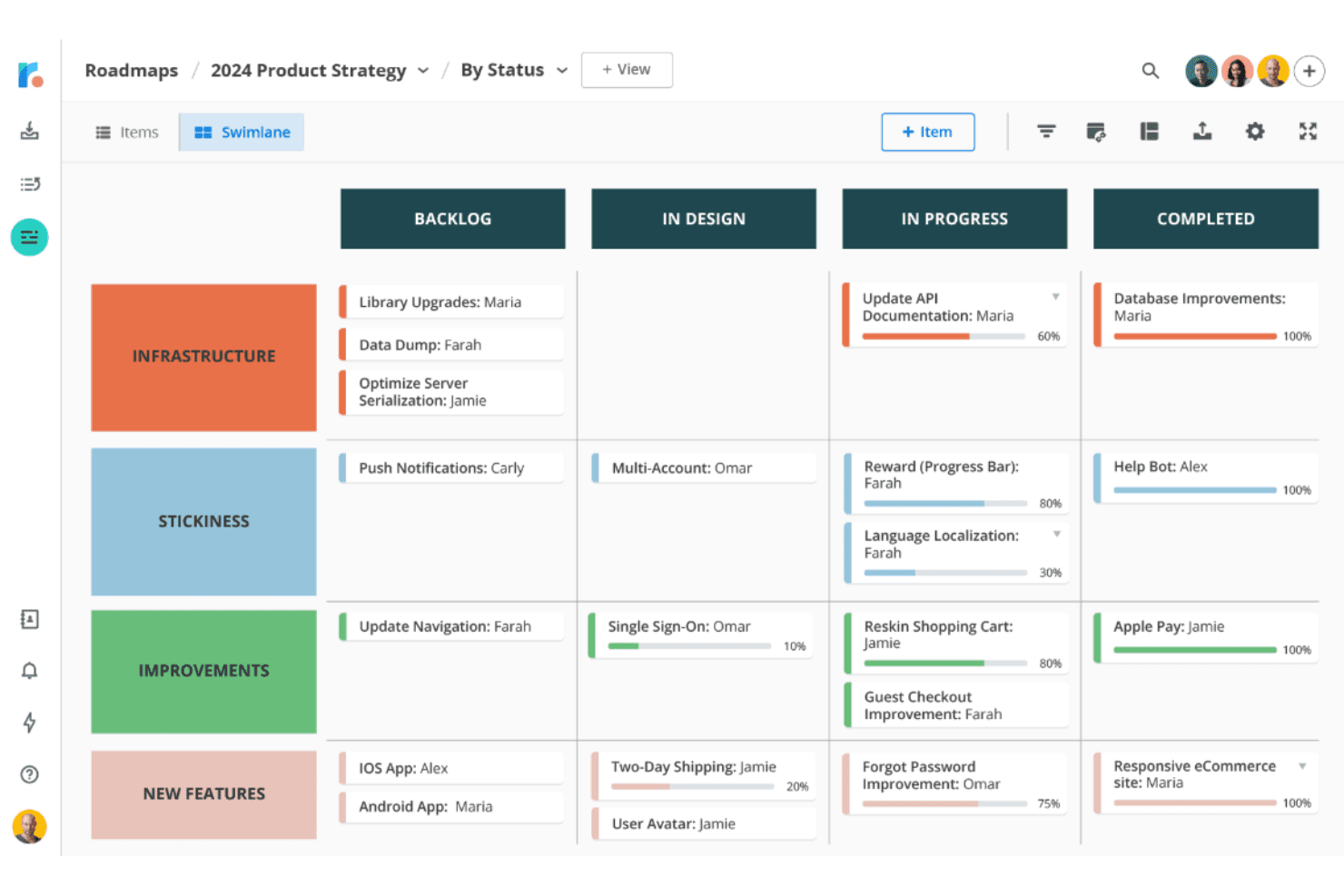
Tempo Roadmapping Software organizes tasks by status across swimlane categories. Tempo Roadmapping Software is a dedicated roadmapping tool that helps product managers collect customer feedback, prioritize ideas using scoring frameworks like RICE, and promote those ideas directly into visual roadmaps across timeline, swimlane, and table views.
Who Is Tempo Roadmapping Software Best For?
Tempo Roadmapping Software is a strong fit for product managers who need a structured pipeline for turning customer feedback into prioritized, shareable roadmaps.
Why I Picked Tempo Roadmapping Software
I picked Tempo Roadmapping Software because its Idea Manager creates a direct pipeline from raw customer feedback to a prioritized roadmap item, which no other tool on this list handles as cohesively. I love that you can link feedback to specific customers, score ideas using RICE or value-vs-effort models, and then promote winning ideas straight into your timeline or swimlane view without any manual re-entry. That closed loop is what makes it earn the "feedback-to-roadmap alignment" spot.
Tempo Roadmapping Software Key Features
- Portfolio roadmaps: Roll multiple team roadmaps into a single high-level view to track initiatives across the organization.
- Publish-to-URL with access controls: Share a live roadmap link protected by password or SSO, with specific fields hidden from viewers.
- Timeline, swimlane, and table views: Switch between three roadmap views built from the same dataset to suit different audiences.
- CSV import and unlimited roadmaps: Bring existing spreadsheet data in via CSV and build as many roadmaps as your team needs on any plan.
Tempo Roadmapping Software Integrations
Tempo Roadmapping Software offers native integrations with Jira, Azure DevOps, Trello, Monday.com, Asana, Pivotal Tracker, Shortcut, GitHub, and GitLab. Its API supports custom integrations.
Pros and Cons
Pros:
- Published roadmaps support tailored stakeholder views
- RICE scoring prioritizes ideas transparently
- Feedback connects customer requests to roadmaps
Cons:
- No native OKR or capacity planning
- No kanban view for delivery tracking
Learn more about Tempo Roadmapping Software:
Outras alternativas ao ProductPlan
Eis algumas alternativas adicionais ao ProductPlan que não chegaram à minha seleção final, mas que ainda vale a pena considerar:
- 11IBM TargetprocessBest for SAFe and enterprise portfolio planning
- 12Jira Product DiscoveryBest for Jira-native roadmap planning
- 13SmartsheetBest for spreadsheet-to-roadmap team alignment
- 14UservoiceBest for revenue-weighted feedback prioritization
- 15ClickUpBest for all-in-one work and roadmap planning
- 16AirtableBest for building roadmaps around custom data models
- 17PendoBest for revenue-weighted feedback-to-roadmap planning
- 18LinearBest for execution-linked roadmap timelines
- 19FeaturebaseBest for closing the loop on feature requests
- 20SleekplanBest for feedback-driven roadmap planning
How I Evaluate ProductPlan Alternatives
I split my evaluation into three parts: core functionality carries the most weight—tools must build visual timeline roadmaps and score initiatives by value or impact. Then I look for standout features like AI-assisted roadmapping or customer segmentation on feedback. Finally, I check pricing flexibility and onboarding ease.
Core Functionality (Table Stakes For This List)
When I'm selecting tools for my list, I score each one on a scale from 0 (does not offer the functionality) to 5 (excels in this area) for each core functionality listed below. I then convert the total into a percentage to help assess each tool's overall fit, with extra weight on any functionalities I’ve deemed essential.
- Roadmap Visualization (Essential): I look for editable timelines that map initiatives, features, and releases, with enough flexibility to show delivery horizons and dependencies.
- Prioritization Frameworks (Essential): I evaluate scoring for value, effort, or strategic fit, such as comparing customer requests during a quarterly planning review.
- Stakeholder Sharing: I check whether teams can present audience-ready roadmaps and share the right view with internal partners or external customers.
- Development Tool Integrations: I look for connections that sync roadmap items with issue trackers, so planned work can be compared with engineering progress.
- Multiple Roadmap Views: I assess whether teams can switch between formats such as timelines, swimlanes, and kanban boards for different planning needs.
- Feedback and Idea Collection: I look for organized intake with tagging, voting, and links to roadmap items, so recurring requests can inform prioritization.
Once I have a list of tools that meet the criteria, I consider what sets each platform apart.
Differentiating Factors (What Sets Vendors Apart)
Here's how I compare and contrast different vendors:
Standout Features
I evaluate whether a tool can segment feedback by account value or persona, because weighting a request from your largest enterprise customer differently than a free-tier user changes what reaches the top of your backlog. AI-assisted roadmapping also matters—I check if the tool can draft release summaries or suggest priority scores, which saves hours before a quarterly review. Beyond that, I look for capacity planning that flags over-commitment before sprint commitments are made.
Beyond Features
Pricing models matter here. Per-editor pricing can balloon costs when designers, engineers, and executives all need to update roadmaps, so I check whether viewer seats are free or low-cost. I also evaluate onboarding speed—can you import existing roadmap data and start sharing within days, not weeks? Templates and migration support cut that switching friction. Finally, I look at how well a tool scales across org structures, because a director overseeing three product lines needs hierarchical roadmaps and role-based permissions that grow without reworking the setup.
Funcionalidades do ProductPlan: compare software alternativo para roteiros
Eis algumas das principais funcionalidades do ProductPlan, para o ajudar a avaliar e comparar aquilo que as soluções alternativas oferecem:
- Criação visual de roteiros: Conceba roteiros intuitivos que proporcionem à sua equipa uma visão geral da estratégia do produto, tornando acessíveis e acionáveis até os planos mais complexos.
- Interface de arrastar e largar: Ajuste facilmente tarefas ou cronogramas, permitindo que a sua equipa se mantenha ágil e se adapte às prioridades em mudança sem perder o foco.
- Acompanhamento de marcos: Mantenha a sua equipa alinhada acompanhando visualmente o progresso em direção a objetivos críticos, garantindo que os prazos sejam cumpridos de forma eficiente. Tem um orçamento limitado? Consulte a nossa lista dos melhores softwares gratuitos para acompanhar marcos.
- Ferramentas de priorização: Avalie e classifique iniciativas para se concentrar no que é mais importante, permitindo uma melhor tomada de decisões para a evolução do seu produto.
- Espaço de trabalho colaborativo: Promova a colaboração em tempo real com membros da equipa e partes interessadas numa ferramenta de criação de roteiros baseada na nuvem, garantindo alinhamento e adesão.
- Roteiros partilháveis: Melhore a comunicação entre departamentos ou com parceiros externos, partilhando roteiros claros e concisos que reflitam os seus planos mais recentes.
- Biblioteca de modelos: Tire partido de modelos pré-concebidos que seguem as melhores práticas, poupando tempo e ajudando a sua equipa a adotar estilos de roteiro comprovados no setor.
- Campos personalizados: Adapte os roteiros às necessidades específicas da sua equipa, adicionando pontos de dados ou métricas específicos e criando uma experiência personalizada para o seu fluxo de trabalho de gestão de produtos.
- Controlos de acesso seguros: Proteja informações sensíveis com permissões personalizáveis, garantindo que apenas os membros certos da equipa possam aceder ou editar os roteiros.
- Acesso à API: Integre o ProductPlan com as suas ferramentas SaaS favoritas, como os produtos Atlassian, para sincronizar tarefas, listas de pendências, priorização de produtos e sprints, proporcionando uma experiência de gestão de produtos integrada.
- Notificações: Mantenha-se informado com atualizações que mantêm a sua equipa a par das alterações, garantindo que todos trabalham com base no roteiro mais recente.
- Gráficos de Gantt e quadros Kanban: Visualize tarefas e progresso através de vários formatos, dando às equipas a flexibilidade de trabalhar da forma que melhor lhes convém.