

O software de criação de wireframes ajuda as equipas de UX e de produto a criar esquemas de baixa fidelidade que definem a estrutura, o conteúdo e o fluxo do utilizador de um site ou aplicação, sem se perderem nos detalhes do design visual. É a fase de projeto do design, em que a rapidez e a clareza são fundamentais.
Está aqui porque fez o trabalho de pesquisa ou porque utilizou o Balsamiq o suficiente para saber que é uma ferramenta sólida para criar wireframes. É rápido, fácil de aprender e excelente para maquetas com estilo de esboço. Mas talvez esteja a começar a sentir as suas limitações.
Talvez esteja à procura de mais interatividade, funcionalidades de prototipagem mais avançadas ou colaboração em tempo real com a sua equipa. Talvez tenha encontrado a frustração de precisar de designs de alta fidelidade ou de uma transferência mais fluida para os programadores. Seja como for, está pronto para descobrir o que mais existe — e estamos aqui para o ajudar a tomar uma decisão informada.
Testámos e analisámos de forma independente uma vasta gama de ferramentas de criação de wireframes — desde o Balsamiq até aos seus concorrentes mais avançados e especializados. Este guia ajuda-o a separar o essencial do ruído para que possa:
- Encontrar ferramentas que se adaptem melhor ao seu fluxo de trabalho
- Ultrapassar problemas específicos que o Balsamiq não resolve
- Fazer escolhas informadas com base nas funcionalidades, facilidade de utilização e preço
Vamos começar.
O que é o Balsamiq?
O Balsamiq é uma ferramenta de criação de wireframes que ajuda a criar rapidamente maquetas de baixa fidelidade dos seus designs. É normalmente utilizado por designers de UX, gestores de produto e programadores que precisam de visualizar e aperfeiçoar conceitos de design. Os elementos de arrastar e largar, os componentes de interface de utilizador pré-criados e uma interface simples ajudam a criar e partilhar wireframes rapidamente. De um modo geral, o Balsamiq oferece uma forma simples de transformar ideias em formatos visuais que a sua equipa pode compreender e discutir facilmente.
Why Trust Our Software Recommendations
6,700+
Reviews
20
Industry experts
16+
Evaluation factors
14
Years
Our team has been testing and reviewing software since 2012. As product managers ourselves, we know how difficult—and important—it is to choose the right software.
For this guide, we evaluated tools using hands-on testing and independent research, scoring tools using our selection criteria.
Our reviews reflect our human editorial judgment, not a sales pitch.
Expert reviewers:
- Andrew LumbySenior TPM
- Cristiano ValimSenior UI/UX Lead


Tabela de comparação: alternativas ao Balsamiq
Esta tabela de comparação resume os detalhes de preços das minhas principais escolhas de alternativas ao Balsamiq.
| Tool | Best For | Trial Info | Price | ||
|---|---|---|---|---|---|
| 1 | Best for mind maps linked to wireframes | Free plan available | From $10/user/month (billed annually) | Website | |
| 2 | Best for non-designers building AI wireframes | Free plan available | From $14/user/month | Website | |
| 3 | Best for Mac-native UI design and handoff | Free plan + 30-day free trial available | From $12/user/month (billed annually) | Website | |
| 4 | Best for no-code interactive prototyping | Free plan + 30-day free trial available | From $29/user/month (billed annually) | Website | |
| 5 | Best for diagramming without an internet connection | Free plan + free trial available | Pricing upon request | Website | |
| 6 | Best for wireframes that scale to full handoff | Free plan available | From $3/user/month | Website | |
| 7 | Best for spec annotations and dev handoff | Free plan + 30-day free trial + free demo available | From $4.95/user/month (billed annually) | Website | |
| 8 | Best for UI planning across screens and flows | Free plan available | From $9/user/month (billed annually) | Website | |
| 9 | Best for prototyping with real code components | Free plan + 14-day free trial + demo available | From $49/user/month | Website | |
| 10 | Best for high-fidelity prototypes | Free plan + 10-day trial available | From $19/user/month | Website |


Testamos e analisamos software de gestão de produtos desde 2020. Como designers de UX, sabemos quão importante e difícil é tomar a decisão certa ao escolher software. Investimos numa investigação aprofundada para ajudar o nosso público a tomar melhores decisões de compra de software.
Testámos mais de 2 000 ferramentas para diferentes casos de utilização na gestão de produtos e escrevemos mais de 1 000 análises completas de software. Saiba como mantemos a transparência e consulte a nossa metodologia de análise de software.
Análises das melhores alternativas ao Balsamiq
Abaixo encontram-se os meus resumos detalhados das melhores alternativas ao Balsamiq que chegaram à minha lista final. As minhas análises apresentam uma análise detalhada das principais funcionalidades, vantagens & desvantagens, integrações e casos de utilização ideais de cada ferramenta, para o ajudar a encontrar a melhor opção para si
 Best for mind maps linked to wireframes
- Free plan available
- From $10/user/month (billed annually)
Visit WebsiteCustomer Rating:4.6/5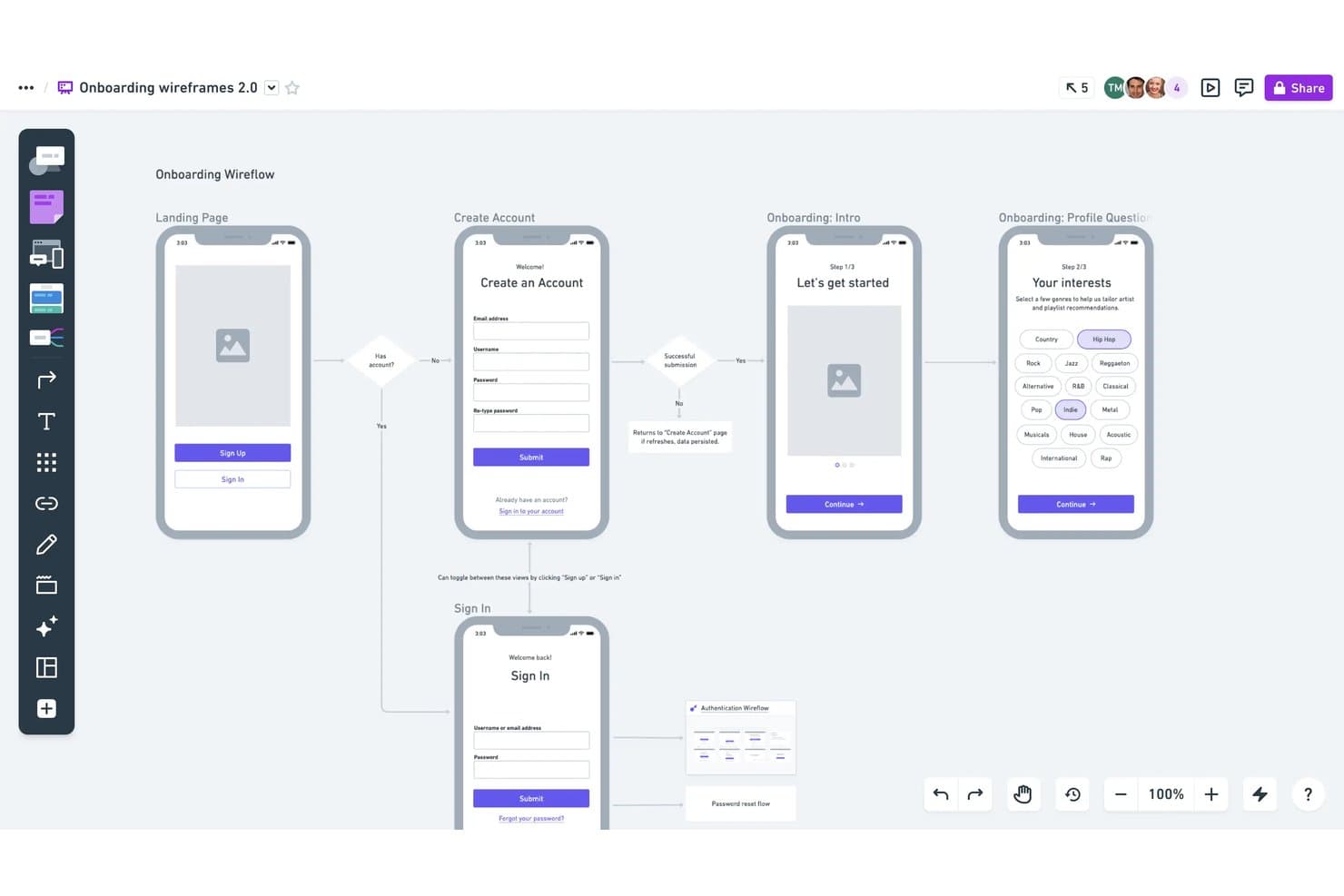
Whimsical lets users build annotated wireframe flows with logic. Whimsical is a visual workspace for product managers, founders, and business analysts who need to move quickly from idea to concept—combining wireframes, mind maps, flowcharts, and docs in one place without a steep learning curve.
Who Is Whimsical Best For?
Whimsical is a great fit for product managers, founders, and business analysts who need to move fast from idea to concept across wireframes, mind maps, and flowcharts in one workspace.
Why I Picked Whimsical
I've included Whimsical in my top picks because it's the only tool on this list where mind maps and wireframes genuinely connect in one canvas. I like that you can map out a product concept in the mind map view, then link directly to wireframe boards for the same feature without switching tools or losing context. The AI-powered mind map generation (built on Claude) makes it especially fast for early ideation, turning a rough topic cluster into a structured concept you can wire up immediately.
Whimsical Key Features
- Real-time multiplayer editing: Multiple teammates can edit the same board simultaneously, with comments, mentions, and voting built into the canvas.
- Presentation mode: Wireframe frames and sections convert into slides you can step through and share via embed or public link for stakeholder reviews.
- Free unlimited guests: Anyone outside your team can view, comment, or edit boards without taking up a paid seat, on every plan including Free.
- Device frames: Pre-built browser, phone, and tablet frames let you place wireframe components directly inside screen containers with configurable properties.
Whimsical Integrations
Whimsical offers seven documented native integrations, including Jira, Slack, Notion, Google Docs, GitHub, Linear, and Obsidian. Jira and Confluence Smart Links require Atlassian Cloud, while MCP supports connections to compatible AI clients.
Pros and Cons
Pros:
- Live collaboration supports cross-functional reviews
- Clean screens are quick to assemble
- Mind maps connect directly to wireframe boards
Cons:
- Wireframes lack reusable component instances
- No native clickable prototype flows
Learn more about Whimsical: Best for non-designers building AI wireframes
- Free plan available
- From $14/user/month
Visit WebsiteCustomer Rating:4.8/5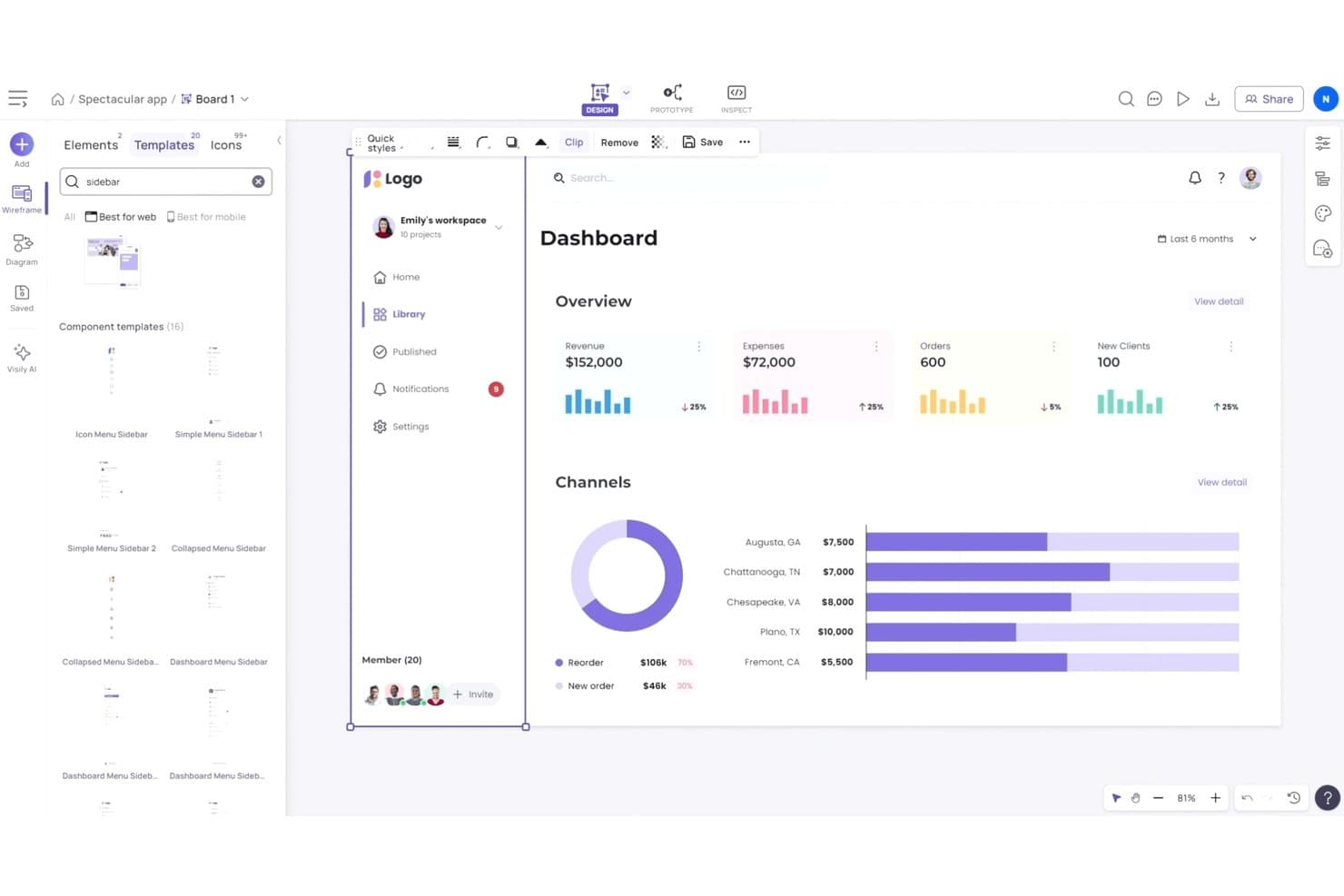
Visily offers ready-made sidebar and dashboard UI templates. Visily is a browser-based UI design tool built for product managers, founders, and business analysts who need to go from idea to interactive wireframe without a design background.
Who Is Visily Best For?
Visily is a strong fit for product managers, founders, and business analysts who need to create wireframes and prototypes without relying on a dedicated designer.
Why I Picked Visily
I've included Visily in my top picks because it's the only tool here built specifically for people without design training, making it a genuinely different kind of Balsamiq alternative. Its text-to-UI and screenshot-to-wireframe AI let you describe a screen or capture an existing one and get a structured wireframe back in seconds. The lo-fi/hi-fi toggle then lets you switch the same wireframe between sketch-style and polished output without rebuilding anything from scratch.
Visily Key Features
- Real-time co-designing: Multiple teammates can edit the same canvas at once, with cursor chat and follower mode to stay in sync.
- Auto-Prototype: AI automatically links your screens into clickable, interactive flows without manual connection setup.
- Jira, Notion, and Slack integrations: Embed Visily boards directly in Jira tickets, Notion pages, and Slack channels to keep designs tied to your workflow.
- Export to code: Generate React, Vue, or HTML code from your screens and download it as a ZIP file for developer handoff.
Visily Integrations
Visily integrates with Figma, Notion, and Slack, plus a Jira Marketplace app for embedding boards in tickets. It also supports browser extensions for Chrome, Edge, and Firefox.
Pros and Cons
Pros:
- Auto-linked flows speed clickable concept reviews
- Lo-fi and hi-fi views reuse elements
- AI converts screenshots into editable wireframes
Cons:
- Short version history limits design recovery
- Manual positioning without auto layout
Learn more about Visily: Best for Mac-native UI design and handoff
- Free plan + 30-day free trial available
- From $12/user/month (billed annually)
Visit WebsiteCustomer Rating:4.5/5
Sketch organizes car dashboard UI layers for structured design workflows. Sketch is a Mac-native UI design tool built for UX/UI designers who need to move from wireframing and prototyping through to polished, developer-ready handoff without switching tools.
Who Is Sketch Best For?
Sketch is the right fit for UX/UI designers on Mac who need a full-featured design tool that takes them from early concepts through polished, developer-ready handoff.
Why I Picked Sketch
Sketch earns its spot on my shortlist because it's the go-to Mac-native UI design tool for taking designs from early wireframes to developer-ready handoff without leaving the app. I love how Symbols and Shared Libraries let me build a reusable component system that stays consistent across every screen, which is exactly what you need when graduating beyond Balsamiq's low-fidelity scope. Built-in prototyping with Smart Animate transitions and free, unlimited browser-based developer handoff make it a genuinely complete design pipeline on Mac.
Sketch Key Features
- Free unlimited viewer access: Anyone can view, comment, and inspect designs in a browser without a Sketch license or a Mac.
- Smart Animate transitions: Prototype flows use Smart Animate to produce motion between screens with customizable easing and duration.
- Design token export: Color variables, Layer Styles, and Text Styles export as CSS or JSON, or as a live public link for developer use.
- MCP Server integration: A built-in local server lets AI clients like Claude and Cursor read and modify Sketch documents directly.
Sketch Integrations
Sketch offers native integrations with GitHub, Jira, Slack, and Notion for sharing and embedding designs. Marketplace integrations include ProtoPie, Zeplin, zeroheight, Stark, and Crowdin, with a JavaScript API for custom integrations.
Pros and Cons
Pros:
- Viewers can comment without installing the app
- Smart Animate adds polish to clickable flows
- Reusable components keep shared UI patterns consistent
Cons:
- Low-fidelity screens need manual shape assembly
- Editing requires a Mac
 Best for no-code interactive prototyping
- Free plan + 30-day free trial available
- From $29/user/month (billed annually)

Axure RP lets users build interactive dashboard prototypes with conditional logic. Axure RP is a desktop-based wireframing and prototyping tool built for product managers and business analysts who need to go beyond static mockups and create fully interactive, logic-driven prototypes without writing code.
Who Is Axure RP Best For?
Axure RP is a strong fit for product managers and business analysts who need to build logic-driven, interactive prototypes without touching code.
Why I Picked Axure RP
I picked Axure RP as one of the best because no other tool on this list matches its depth of no-code interactive prototyping. I love that you can build conditional logic, global variables, and data-driven repeaters directly into a prototype without writing a single line of code. In practice, that means I can simulate a fully functional form flow or a sortable data table that behaves exactly like the real product.
Axure RP Key Features
- Adaptive views: Design desktop, tablet, and phone layouts within a single page to cover responsive breakpoints without duplicating files.
- Requirements and spec notes: Attach notes and specifications directly to widgets to capture requirements for developers and stakeholders.
- Free unlimited reviewers: Share prototypes on Axure Cloud with unlimited reviewers who can comment and inspect designs at no extra cost.
- Jira and Confluence embeds: Paste an Axure Cloud link to embed live, interactive prototypes directly inside Jira tickets or Confluence pages.
Axure RP Integrations
Axure RP integrates with Jira, Confluence, Slack, Microsoft Teams, Figma, Sketch, and Adobe XD. It supports live prototype embeds in Jira and Confluence, plus editable design imports from Figma, Sketch, and Adobe XD.
Pros and Cons
Pros:
- Requirements notes stay beside interface designs
- Repeaters test sortable, filterable data tables
- Conditional logic simulates complex product flows
Cons:
- RP editing requires a desktop app
- RP collaboration relies on page check-in/check-out
Learn more about Axure RP : Best for diagramming without an internet connection
- Free plan + free trial available
- Pricing upon request

draw.io lets users build and duplicate multipage flowcharts visually. draw.io is a free, open-source diagramming tool that appeals to business analysts, startup founders, and product managers who need to create flowcharts, wireframes, and UI mockups without paying for dedicated design software.
Who Is draw.io Best For?
draw.io is a strong fit for business analysts and startup founders who need a free, offline-capable diagramming tool that integrates directly with Jira and Confluence.
Why I Picked draw.io
I picked draw.io as one of the best Balsamiq alternatives because it's the only tool on this list that works fully offline, which matters when you're diagramming on a plane or in a secure environment with no internet access. The desktop app for Windows, macOS, and Linux runs without a connection, and the web app caches as a progressive web app after your first load. I also like the Sketch style, which gives shapes a hand-drawn, rough-edged look that's close to Balsamiq's signature aesthetic.
draw.io Key Features
- Mockup shape libraries: Built-in UI libraries for Android, iOS, Bootstrap, Material Design, and web mockups give you ready-made components to assemble wireframes quickly.
- Custom link actions: Clicking a shape can show or hide elements, toggle styles, animate connectors, or pan the view, enabling basic interactive walkthroughs of your mockups.
- Multi-page canvas: Diagrams support multiple pages as tabs, which you can duplicate, rename, and reorder to map out multi-screen user flows.
- AI diagram generation: A built-in generate tool creates diagrams and interface mockups from a text or voice prompt, with results that remain fully editable on the canvas.
draw.io Integrations
draw.io offers native integrations with Jira, Confluence, Google Drive, OneDrive, Microsoft Teams, Google Docs, Google Sheets, and Google Slides. It also supports embedding, self-hosting with Docker, and storage through Dropbox, GitLab, and Nextcloud.
Pros and Cons
Pros:
- Multi-page canvases map screen flows
- Hand-drawn styling suits rough wireframes
- Works offline for secure diagramming
Cons:
- General diagramming tools feel less wireframe-focused
- Page links lack prototype states or logic
Learn more about draw.io: Best for wireframes that scale to full handoff
- Free plan available
- From $3/user/month
Visit WebsiteCustomer Rating:4.7/5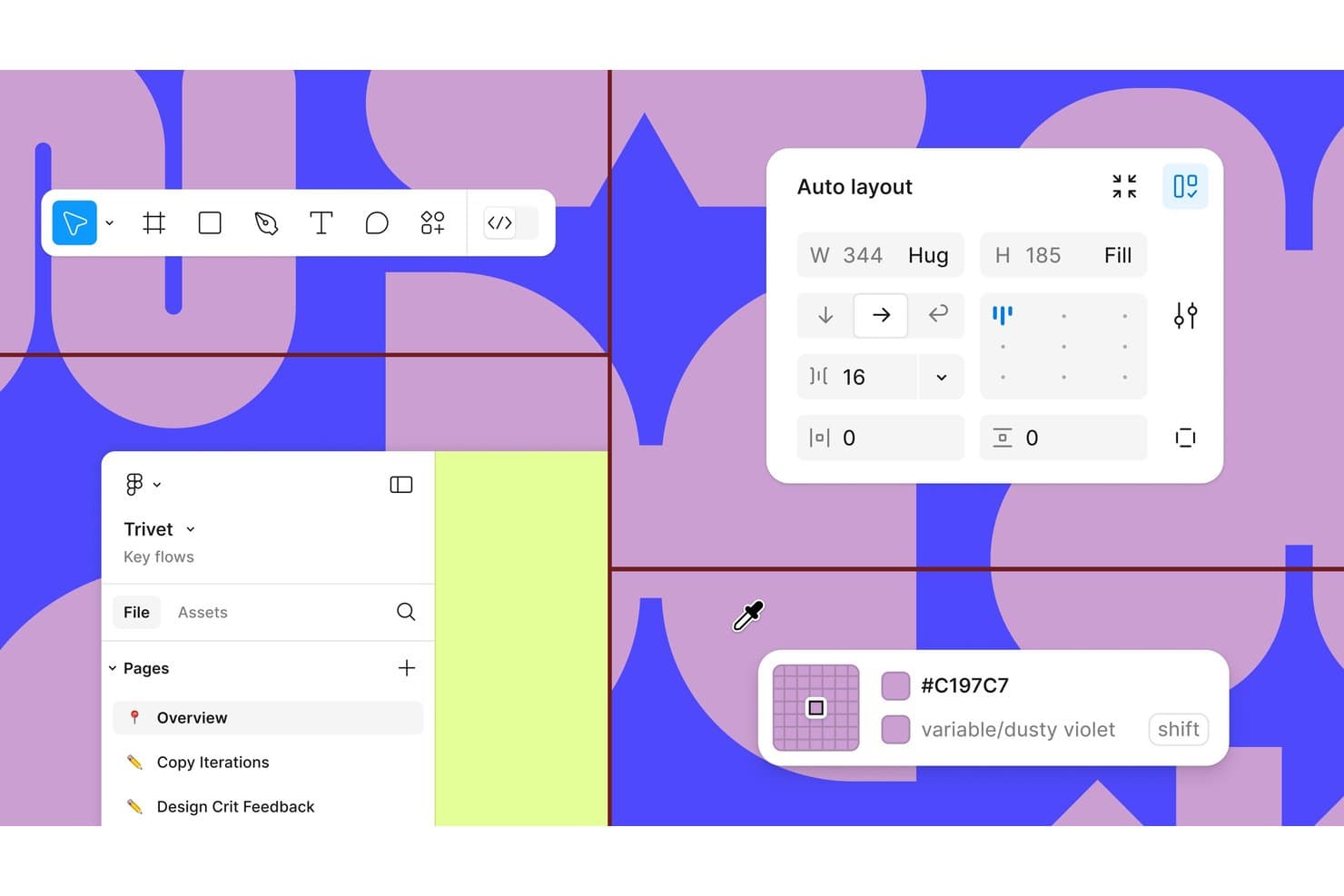
Figma offers auto layout, color variables, and multi-page project organization. Figma is a browser-based design tool that takes you from rough wireframes to high-fidelity prototypes and developer handoff in a single file, making it a natural fit for product managers and designers who want one tool to cover the full design workflow.
Who Is Figma Best For?
Figma is the go-to choice for product and design teams that need to move from early wireframes all the way through developer handoff without switching tools.
Why I Picked Figma
I've included Figma in my top picks because it's the only tool where a rough wireframe can grow into a production-ready prototype without ever leaving the file. I particularly like that Dev Mode connects design layers directly to GitHub issues, Jira tickets, and Storybook stories, so handoff isn't a separate step. Smart Animate and conditional logic let me build flows that behave like real products, which is something Balsamiq simply can't do.
Figma Key Features
- Real-time multi-user editing: Multiple teammates can work in the same file simultaneously, with live cursors, cursor chat, and observation mode visible to everyone.
- FigJam whiteboard: A built-in digital whiteboard for brainstorming, diagramming, and voting, with AI-powered sorting and summaries.
- UI component library: Team libraries let you share design components, tokens, and styles across files and projects on paid plans.
- Figma Community kits: A free library of wireframe kits, UI templates, and design systems contributed by other users that you can drop straight into your files.
Figma Integrations
Figma offers integrations with Slack, Notion, Jira, Google Workspace, GitHub, Storybook, and VS Code. Its APIs and MCP server support custom connections with development and AI coding tools.
Pros and Cons
Pros:
- Teams review screens together in real time
- Wireframes grow into developer-ready designs
- Prototypes test conditional flows before development
Cons:
- Large, layer-heavy files can lag
- Rough sketches take longer than Balsamiq
 Best for spec annotations and dev handoff
- Free plan + 30-day free trial + free demo available
- From $4.95/user/month (billed annually)
Visit WebsiteCustomer Rating:4.5/5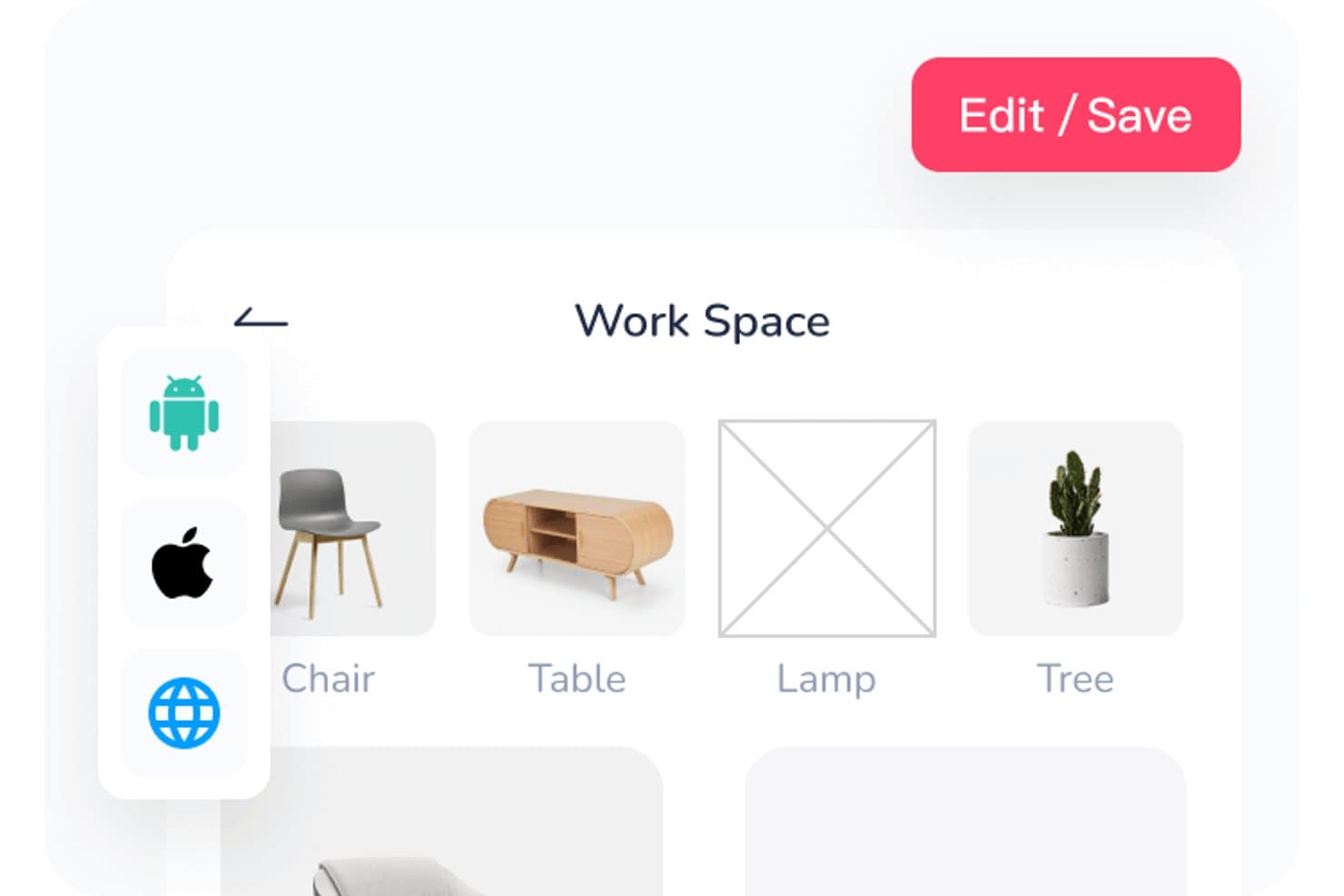
Mockplus lets users organize workspace assets in a visual grid layout. Mockplus RP is a wireframing and prototyping tool that appeals to product managers, UX designers, and business analysts who need to move from early concepts to developer-ready specs without switching tools.
Who Is Mockplus Best For?
Mockplus RP is a strong fit for product managers and business analysts who need to annotate specs and hand off work to developers without leaving their prototyping tool.
Why I Picked Mockplus
I picked Mockplus as one of the best Balsamiq alternatives because it goes well beyond basic wireframing to cover the full handoff workflow. Where Balsamiq stops at static screens, Mockplus RP lets you attach spec annotations directly to components and generate CSS, iOS, and Android code snippets automatically through Dev mode. I especially like the built-in PRD document support, which keeps requirements, tasks, and annotated screens in one place for developers to reference.
Mockplus Key Features
- Connect mode: A built-in flowchart mode lets you map user flows, sitemaps, and onboarding sequences directly on the canvas without switching tools.
- Responsive layout controls: Auto-fit layouts adjust your designs across desktop, tablet, and mobile screen sizes within the same project.
- Component states: Widgets support multiple states so you can prototype dynamic content like modals, popups, and carousels without writing code.
- Real-time co-editing: Team members can edit the same prototype simultaneously, with changes syncing automatically across all collaborators.
Mockplus Integrations
Mockplus documents integrations with Figma, Sketch, Adobe XD, Photoshop, Axure, Jira, Slack, Confluence, and Lark. It has no public API documentation, so custom connectivity options may be limited.
Pros and Cons
Pros:
- Component specs connect prototypes to developer handoff
- Gestures and states support richer flow tests
- Large component library speeds wireframe creation
Cons:
- Complex flows lack advanced conditional logic
- Free plan lacks prototype export
Learn more about Mockplus: Best for UI planning across screens and flows
- Free plan available
- From $9/user/month (billed annually)
Visit WebsiteCustomer Rating:4.3/5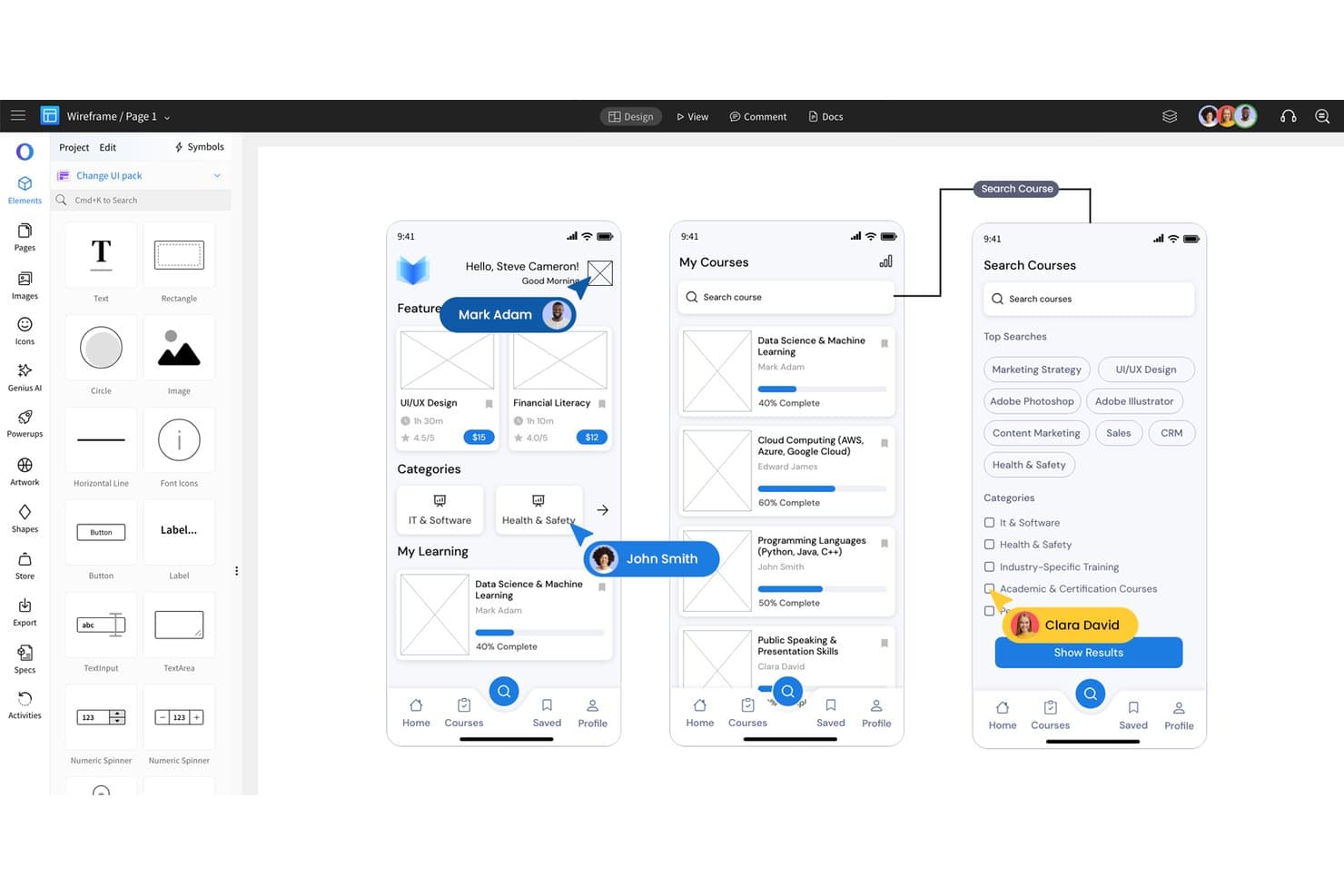
MockFlow lets users design mobile app wireframes with drag-and-drop UI elements. MockFlow is a full-stack concept platform that takes you from wireframing and UI flows to diagrams, documentation, and code generation—making it a strong fit for product managers and UX designers who want more depth than a basic wireframing tool without jumping to a full design suite.
Who Is MockFlow Best For?
MockFlow suits product managers and UX designers who need to plan multi-screen flows and document requirements without switching between multiple tools.
Why I Picked MockFlow
I picked MockFlow as one of the best because it's built specifically for planning UIs across multiple screens, not just individual frames. Master pages let you define shared headers and navigation once, then apply them across every wireframe instantly, while symbols keep reusable components in sync site-wide. MockFlow's Multi-Screen AI takes that further by generating a connected plan of wireframes and flowcharts from a single prompt, so mapping an entire user flow takes minutes rather than hours.
MockFlow Key Features
- Real-time co-editing: Multiple team members can work on the same wireframe simultaneously, with comments and design suggestions built into the shared canvas.
- Version history with visual compare: MockFlow automatically saves revision copies and lets you compare any two versions side by side, with the option to revert or save a revision as a new page.
- Data-heavy UI components: Charts, data grids, and tree components support real data, so you can wireframe dashboards and data-intensive screens without placeholder guesswork.
- MCP server integration: MockFlow's WireframePro MCP server connects with tools like Claude, Cursor, and VS Code Copilot to generate editable wireframes directly from prompts, PRDs, or OpenAPI specs.
MockFlow Integrations
MockFlow offers native integrations with Jira, Confluence, Figma, Slack, Microsoft Teams, Google Drive, and Trello. Its Max plan includes 20+ business-app connectors, while MCP support connects WireframePro with Claude, Cursor, and VS Code Copilot.
Pros and Cons
Pros:
- Visual revision comparisons support design reviews
- Master pages keep shared layouts consistent
- Drag-and-drop kits speed first-pass sketches
Cons:
- Interactive flows lack advanced transitions
- Multi-select resizing can frustrate precise editing
Learn more about MockFlow: Best for prototyping with real code components
- Free plan + 14-day free trial + demo available
- From $49/user/month
Visit WebsiteCustomer Rating:4.2/5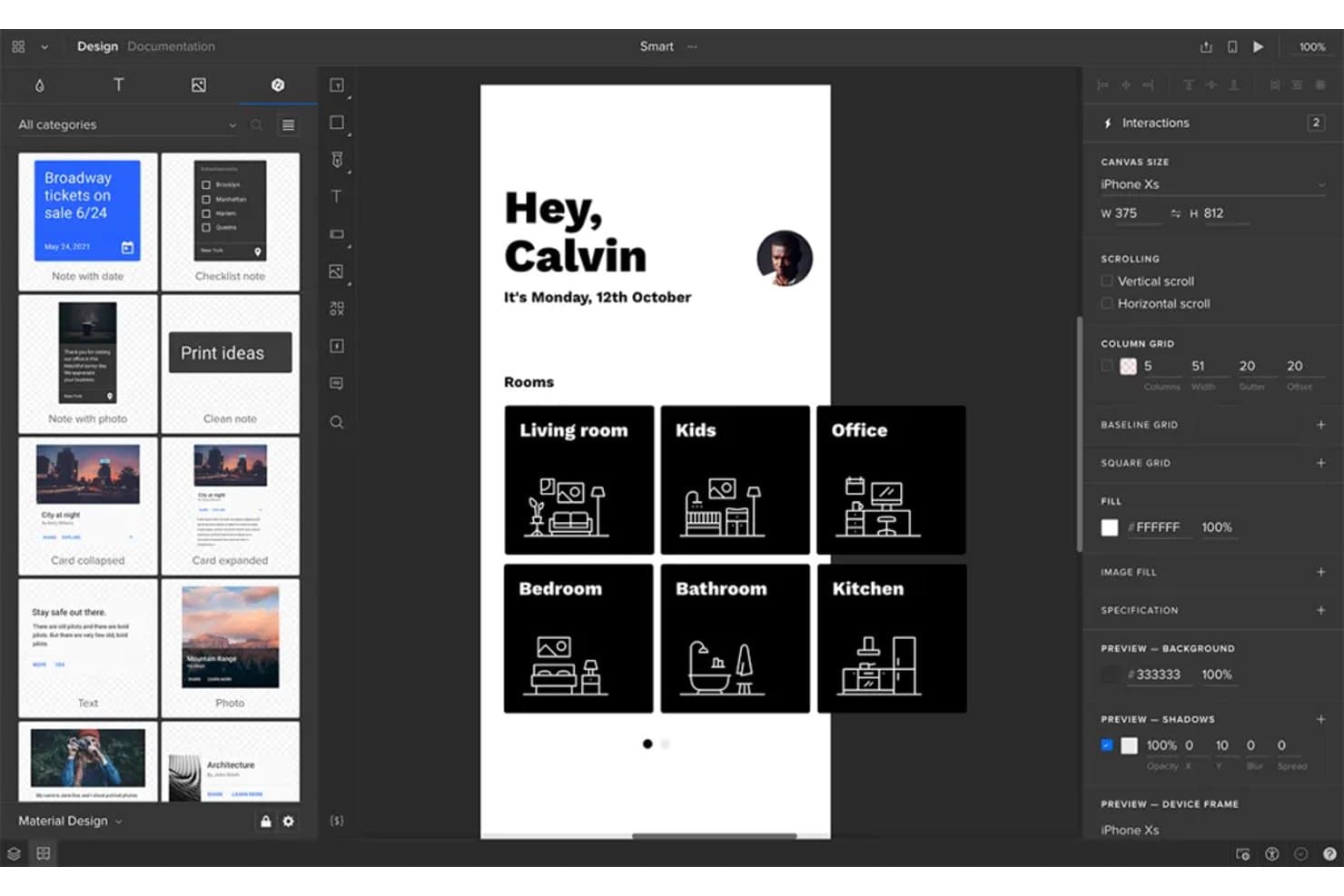
UXPin lets users design and prototype mobile app screens interactively. UXPin is a code-based design and prototyping platform built for product and design teams that need to take concepts from wireframe to production-ready React components without switching tools.
Who Is UXPin Best For?
UXPin is a strong fit for design and engineering teams that need prototypes to behave like real products, not just look like them.
Why I Picked UXPin
I picked UXPin as one of the best Balsamiq alternatives because it lets you prototype with real React components, not simulated ones. Where Balsamiq stops at a static sketch, UXPin's Merge feature pulls in production-ready component libraries like MUI or Tailwind so your prototype actually behaves like the finished product. I also appreciate the conditional logic and variables baked into the entry plan, which means you can build if/then flows and capture user input without touching a line of code.
UXPin Key Features
- Stakeholder approval workflow: Send reviewers a personal preview link so they can approve or reject designs with feedback, no UXPin account required.
- Developer handoff with Spec mode: Auto-generates CSS specs and JSX code with dependencies that developers can inspect, copy, or download directly from the prototype.
- AI wireframing with Forge: Generate UI from a text prompt or uploaded screenshot, then refine the result with follow-up prompts or manual edits on the same canvas.
- Real-time co-editing: Multiple team members can work on the same prototype simultaneously, with comments and live change visibility across the canvas.
UXPin Integrations
UXPin integrates with Figma, Sketch, Jira Cloud, Slack, Storybook, Git, npm, FullStory, StackBlitz, and CodeSandbox. Git and Storybook connectivity depends on the plan.
Pros and Cons
Pros:
- Stakeholders review prototypes without accounts
- Prototypes reuse production React components
- Builds realistic flows with conditional logic
Cons:
- Expressions and variables take practice to master
- Quick sketch-style wireframing isn’t its strength
Learn more about UXPin: Best for high-fidelity prototypes
- Free plan + 10-day trial available
- From $19/user/month
Visit WebsiteCustomer Rating:4.2/5
Justinmind lets users preview prototypes across mobile, tablet, and web. Justinmind is a desktop prototyping tool for designers, product managers, and business analysts who need to move beyond basic wireframes into realistic, interactive simulations that behave like a working product.
Who Is Justinmind Best For?
Justinmind is a strong fit for product managers and business analysts who need prototypes that go beyond click-throughs into realistic, interactive simulations.
Why I Picked Justinmind
I picked Justinmind as one of the best because it's the clearest upgrade path when Balsamiq's click-throughs stop cutting it. Where Balsamiq ends at static mockups, Justinmind lets you build prototypes with real conditions, variables, and working form validation, so stakeholders are reacting to something that behaves like a live product. I particularly like the data simulation feature, which lets you import a .csv and populate a data grid with real records inside the prototype itself.
Justinmind Key Features
- UI component library: Access over 4,000 interactive components, including kits for Bootstrap, MUI, Salesforce, and Atlassian design systems.
- Real-time co-editing: Multiple team members can edit the same prototype simultaneously, with commenting and feedback labels directly on UI elements.
- Design tool import: Bring in designs from Figma, Sketch, or Adobe XD and convert them into editable, interactive prototypes.
- Developer handoff: Developers can inspect prototypes to copy CSS, pull exact measurements and spacing, and export assets directly.
Justinmind Integrations
Documented integrations include Figma, Sketch, Adobe XD, Jira, Azure DevOps, and Confluence. Jira and Azure DevOps require Enterprise, while Justinmind’s API and SDK support custom integrations.
Pros and Cons
Pros:
- Prototypes run on real mobile devices
- Component libraries mirror established design systems
- Simulates forms, variables, and data-driven flows
Cons:
- Rough sketches take longer than in Balsamiq
- Desktop-only editing limits browser-based collaboration
Learn more about Justinmind:
Outras alternativas ao Balsamiq
Eis algumas alternativas adicionais ao Balsamiq que não chegaram à minha lista final, mas que vale a pena conhecer:
How I Evaluate a Balsamiq Alternative
I split my evaluation into three parts. First, core functionality—a tool must let you sketch multi-screen layouts and link screens into navigable flows; this carries the most weight. Second, I look for standout features like AI-assisted wireframing or developer handoff modes. Third, I consider onboarding ease and pricing transparency.
Core Functionality (Table Stakes For This List)
When I'm selecting tools for my list, I score each one on a scale from 0 (does not offer the functionality) to 5 (excels in this area) for each core functionality listed below. I then convert the total into a percentage to help assess each tool's overall fit, with extra weight on any functionalities I’ve deemed essential.
- Wireframing (Essential): I look for layout controls and reusable elements that support clear, low- to mid-fidelity screens across a product flow.
- Prototyping (Essential): I check whether linked screens, overlays, or states can represent key journeys, such as onboarding, for review before development.
- UI Components: I assess the range and flexibility of elements like forms, navigation, and cards for mapping familiar interface patterns.
- Collaboration: I look for shared editing, comments, and feedback features that let design, product, and engineering review iterations together.
- Export & Sharing: I check for shareable links and useful export or handoff options when stakeholders need to review designs or engineers need specifications.
- Version History: I assess whether teams can revisit earlier design states, compare iterations, and restore a version after a change.
Once I have a list of tools that meet the criteria, I consider what sets each platform apart.
Differentiating Factors (What Sets Vendors Apart)
Here's how I compare and contrast different vendors:
Standout Features
I look for AI-assisted wireframing that turns a text prompt into a starter layout—helpful when a PM needs to explore three onboarding variations before a stakeholder review. Design system sync also matters: I check whether wireframes connect to tools like Figma so screens can mature into high-fidelity work without rebuilding. Finally, I evaluate developer handoff modes for specs, spacing values, and annotations that let engineers build from the design directly.
Beyond Features
I evaluate how quickly a non-designer can start producing useful screens. A tool with guided onboarding and ready-made templates lets a PM sketch a checkout flow in minutes instead of watching tutorials for an hour. Pricing transparency matters just as much—I check whether free tiers let small teams validate fit and whether per-seat costs stay reasonable as the team grows. I also look at integrations with tools like Jira or Confluence, since embedding a prototype in a sprint ticket saves context-switching during backlog refinement.
Porquê procurar uma alternativa ao Balsamiq?
Embora o Balsamiq seja uma boa escolha entre as ferramentas de criação de esquemas, existem várias razões pelas quais alguns utilizadores procuram soluções alternativas. Pode estar à procura de uma alternativa ao Balsamiq porque…
- Necessita de mais funcionalidades de criação de protótipos interativos
- A sua equipa necessita de ferramentas de colaboração em tempo real
- Pretende uma ferramenta que suporte designs de elevada fidelidade
- Necessita de uma solução com capacidades de utilização offline
- A sua equipa utiliza dispositivos não suportados pelo Balsamiq
- Pretende mais opções de personalização para os seus designs
Se alguma destas situações lhe é familiar, veio ao lugar certo. A minha lista inclui várias opções de ferramentas de criação de esquemas mais adequadas para equipas que enfrentam estes desafios com o Balsamiq e procuram soluções alternativas.
Principais funcionalidades do Balsamiq
O Balsamiq disponibiliza ferramentas essenciais para o design de produtos em fase inicial e o design de interfaces, sendo uma opção fiável para equipas que desenvolvem conceitos de design para a Web ou experimentam novas ideias. Eis o que pode esperar:
- Interface de arrastar e largar: Crie rapidamente esquemas arrastando elementos da biblioteca de UI para a sua área de trabalho. Esta funcionalidade é ideal para a geração rápida de ideias no seu espaço de trabalho de design.
- Biblioteca de controlos de UI: Aceda a uma vasta gama de componentes pré-concebidos alinhados com padrões comuns nos sistemas de design, ajudando-o a manter a consistência entre projetos.
- Funcionalidade de desenho rápido: Utilize atalhos de teclado simples para esboçar esquemas e interações de forma eficiente durante as fases iniciais do design.
- Design de baixa fidelidade: Concentre-se na estrutura e na funcionalidade, em vez do acabamento. O aspeto desenhado à mão incentiva a iteração rápida e uma comunicação clara durante as pré-visualizações.
- Ferramentas de colaboração: Partilhe esquemas com membros da equipa ou partes interessadas para recolher contributos e rever os seus designs com base em feedback em tempo real.
- Opções de exportação: Guarde os seus esquemas em formatos como PNG ou PDF, ou utilize-os como referência visual ao converter o seu esquema para HTML.
O Balsamiq é particularmente útil para designers que valorizam a clareza e a rapidez durante o desenvolvimento inicial de conceitos, especialmente no planeamento de projetos de design de UI e de design para a Web.