

Gratis verktøy for trådskisser er programvareplattformer som lar deg lage digitale skisser og prototyper for nettsteder eller apper uten betaling, enten gjennom en gratisplan eller en gratis prøveperiode. Hvis du leter etter måter å kartlegge brukerflyter, dele ideer visuelt eller samarbeide om design i en tidlig fase uten budsjettbegrensninger, trenger du alternativer som ikke låser viktige funksjoner bak en betalingsmur. Denne listen hjelper deg med å sammenligne de beste gratis verktøyene for trådskisser som er tilgjengelige i 2026, slik at du kan velge det som passer best til teamets arbeidsflyt, samarbeidsform og prosjektbehov.
Why Trust Our Software Recommendations
6,700+
Reviews
20
Industry experts
16+
Evaluation factors
14
Years
Our team has been testing and reviewing software since 2012. As product managers ourselves, we know how difficult—and important—it is to choose the right software.
For this guide, we evaluated tools using hands-on testing and independent research, scoring tools using our selection criteria.
Our reviews reflect our human editorial judgment, not a sales pitch.
Expert reviewers:
- Andrew LumbySenior TPM
- Cristiano ValimSenior UI/UX Lead


Sammenligningstabell for gratis verktøy for trådskisser
Selv om alle verktøyene for trådskisser på listen min tilbyr gratisalternativer, har de også betalte abonnementer dersom du ønsker å oppgradere:
| Tool | Best For | Trial Info | Price | ||
|---|---|---|---|---|---|
| 1 | Best for real-time team collaboration | Free plan available | From $3/user/month | Website | |
| 2 | Best for AI-powered wireframe generation | Free plan available | From $14/user/month | Website | |
| 3 | Best for low-fidelity brainstorming sessions | 14-day free trial | From $16/user/month (billed annually) | Website | |
| 4 | Best for rapid ideation with UI packs | Free plan available | From $9/user/month (billed annually) | Website | |
| 5 | Best for accessibility-ready designs | Free plan + 14-day free trial available | From $29/user/month (billed annually) | Website | |
| 6 | Best for infinite canvas collaboration | Free plan + 14-day free trial available | From $8/user/month (billed annually) | Website | |
| 7 | Best for high-fidelity interactive previews | Free plan available | From $10/month (billed annually) | Website | |
| 8 | Best for open-source design workflows | Free plan + 14-day free trial available | From $7/user/month | Website | |
| 9 | Best for macOS-native design workflows | 30-day free trial | From $12/user/month (billed annually) | Website | |
| 10 | Best for advanced logic and conditions | 30-day free trial | From $29/user/month (billed annually) | Website |


Omtaler av de beste gratis verktøyene for trådskisser
Nedenfor finner du mine detaljerte sammendrag av de gratis verktøyene for trådskisser som kom med på kortlisten. Omtalene mine gir en detaljert gjennomgang av funksjonene, de beste bruksområdene og prisene for hvert verktøy, slik at du kan finne det som passer best for deg.
 Best for real-time team collaboration
- Free plan available
- From $3/user/month
Visit WebsiteCustomer Rating:4.7/5
Figma canvas displays multi-screen UI designs with a layers panel, assets, and prototype previews. Figma is a cloud-based design platform built for teams that need to collaborate on wireframes and prototypes in real time. It’s especially useful for product teams, UX designers, and agencies who want to co-create, comment, and iterate together from anywhere. If you’re looking for a free wireframing tool that supports live teamwork and feedback, Figma stands out for its multiplayer editing and sharing features.
Who Is Figma Best For?
Figma is a strong fit for distributed product and UX teams that need to collaborate on wireframes and prototypes in real time.
Why I Picked Figma
I picked Figma because its real-time collaboration features set it apart from other free wireframing tools. With multiplayer editing, I can see teammates’ changes instantly and leave comments directly on wireframes, which makes group feedback and iteration much faster. The browser-based platform means everyone can access and contribute to projects without worrying about software installs or version mismatches. For teams that need to co-create wireframes and prototypes together, Figma’s live collaboration and sharing tools are hard to beat.
Figma Key Features
Some other features in Figma make it a versatile choice for free wireframing beyond real-time collaboration:
- Component libraries: Create and reuse design elements across multiple projects to keep wireframes consistent.
- Auto layout: Arrange and resize frames and objects automatically for responsive wireframe designs.
- Version history: Access and restore previous versions of your wireframes at any time.
- Plugin support: Extend functionality with a wide range of community and official plugins for wireframing and prototyping.
Figma Integrations
Integrations include Slack, Jira, Microsoft Teams, Notion, Asana, Dropbox, Trello, Confluence, GitLab, and more.
What's Free?
Figma offers a free-forever plan that includes unlimited personal files, unlimited collaborators on public files, and up to three Figma and three FigJam files per workspace. The free plan limits team collaboration to two editors and does not include advanced prototyping or admin features
Pros and Cons
Pros:
- Large plugin library for added functionality
- Extensive free wireframe templates available
- Real-time collaboration supports unlimited editors
Cons:
- Advanced prototyping features require paid plan
- No offline editing in the free version
 Best for AI-powered wireframe generation
- Free plan available
- From $14/user/month
Visit WebsiteCustomer Rating:4.8/5
Visily dashboard shows AI-generated wireframes with templates, components, and editable layouts. If you want to speed up wireframing with AI, Visily is worth a look. This tool appeals to product teams and non-designers who need to turn ideas, screenshots, or text prompts into wireframes quickly. Visily’s AI-powered features help teams jump from concept to interactive wireframe with minimal manual effort.
Who Is Visily Best For?
Visily is a strong fit for product managers, founders, and early-stage teams who want to generate wireframes from text, images, or sketches using AI.
Why I Picked Visily
I picked Visily because its AI-powered wireframe generation stands out for teams that want to move from idea to wireframe with minimal manual work. The tool lets you create wireframes from text prompts, screenshots, or even hand-drawn sketches, which is especially useful for non-designers or teams working quickly. I also appreciate that Visily’s AI can suggest layouts and UI components based on your input, helping you get started even if you’re not sure where to begin. These features make it a practical choice for anyone looking for a free wireframing tool that leverages AI to accelerate the design process.
Visily Key Features
Some other features make Visily a flexible option for teams exploring free wireframing tools:
- Collaboration tools: Multiple users can comment, edit, and share feedback in real time within the same project.
- Template library: Access a wide range of pre-built templates for web and mobile app wireframes.
- Component management: Organize, reuse, and customize UI components across different projects.
- Export options: Export wireframes to PNG, PDF, or shareable links for easy stakeholder review.
Visily Integrations
Integrations include Figma, Notion, Slack, Jira, Google SSO, Okta, and more.
What's Free?
Visily offers a free-forever plan with unlimited projects and unlimited editors. Some advanced features, export options, and priority support are only available on paid plans.
Pros and Cons
Pros:
- Built-in component management and reuse
- Large template library for web and mobile
- AI generates wireframes from text or images
Cons:
- Mobile app wireframing options are less extensive
- Occasional AI misinterpretation of complex inputs
Learn more about Visily: Best for low-fidelity brainstorming sessions
- 14-day free trial
- From $16/user/month (billed annually)
Visit WebsiteCustomer Rating:4.3/5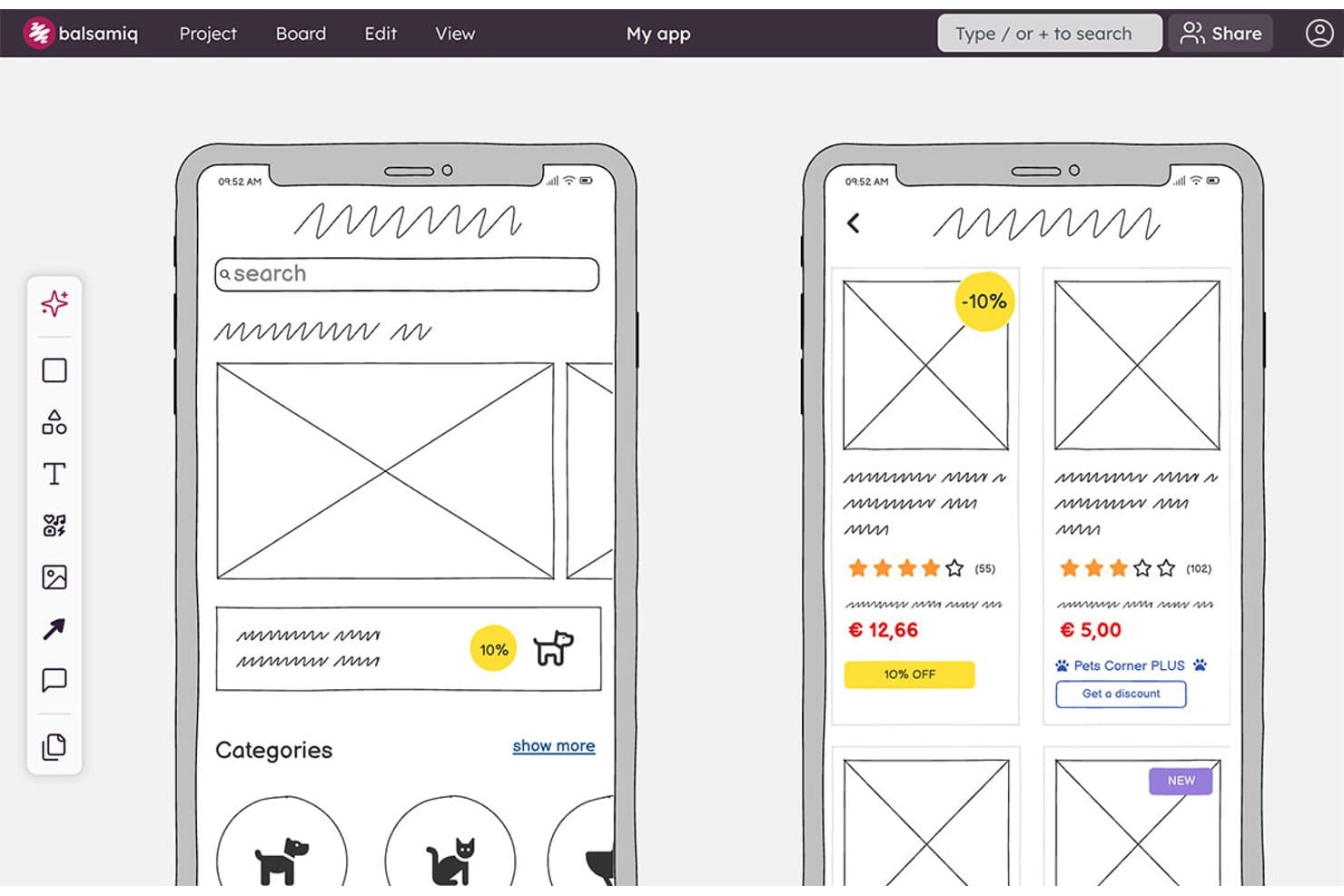
Balsamiq lets users wireframe mobile app screens with product cards and categories. Balsamiq is a browser-based wireframing and prototyping tool with a deliberately low-fidelity UI library, reusable components, clickable board links, AI wireframe generation, real-time collaboration, and Jira and Confluence integrations.
Who Is Balsamiq Best For?
Product managers and UX/UI designers who need to align stakeholders around rough concepts before development.
Why I Picked Balsamiq
I picked Balsamiq for Best Free Wireframing Tools because it keeps brainstorming focused on structure instead of visual polish. Its deliberately low-fidelity UI library, smart guides, and 1–12 column grids help me sketch flows quickly before development. I also use Alternates to compare concepts on one board, while AI can turn a prompt or hand-drawn sketch into an editable wireframe.
Balsamiq Key Features
- Public Review Links: Share boards with non-logged-in viewers who can comment.
- Threaded Comments: Add replies, , reactions, and resolved comment threads.
- Jira And Confluence Apps: Embed editable boards and prototypes in connected workspaces.
- Export Formats: Download projects as interactive PDFs, PNGs, or BMPR files.
Balsamiq Integrations
Balsamiq offers native integrations with Jira and Confluence, including Cloud and Data Center apps. It also supports embedding in Notion and project sharing through Slack.
What's Free?
Balsamiq offers a 14-day free trial, with no credit card required. It doesn’t have a free-forever plan, and you’ll need a paid subscription afterward to continue editing your projects.
Pros and Cons
Pros:
- Stakeholders can comment without accounts
- Clickable flows support early usability validation
- Deliberately low-fidelity for focused brainstorming
Cons:
- Shared components require template duplication
- No permanent free plan
Learn more about Balsamiq: Best for rapid ideation with UI packs
- Free plan available
- From $9/user/month (billed annually)
Visit WebsiteCustomer Rating:4.3/5
MockFlow editor shows drag-and-drop UI components, templates, and layout building tools. If you need to quickly turn ideas into wireframes, MockFlow is built for speed and flexibility. The platform’s unique UI packs let product teams and designers swap in ready-made components for different platforms and styles. MockFlow is a strong fit for anyone who wants to move from brainstorming to visual concepts without getting bogged down in setup.
Who Is MockFlow Best For?
MockFlow suits product teams and UX designers who need to rapidly ideate and prototype using a wide variety of pre-built UI packs.
Why I Picked MockFlow
I picked MockFlow because its rapid ideation capabilities stand out for teams who need to move quickly from concept to wireframe. The platform’s UI packs let you instantly switch between design systems and device types, which is especially useful for cross-platform projects. I also appreciate the built-in brainstorming and sitemap tools that help structure early-stage ideas before you commit to detailed wireframes. These features make MockFlow a strong choice for anyone prioritizing speed and flexibility in their free wireframing workflow.
MockFlow Key Features
Some other features in MockFlow that stand out for free wireframing include:
- Version history: Track and restore previous versions of your wireframes at any time.
- Commenting and feedback tools: Collect input from collaborators directly on wireframes for faster iteration.
- Export options: Download wireframes in multiple formats, including PNG, PDF, and HTML.
- Wireframe sharing: Share projects with team members or stakeholders using secure, permission-based links.
MockFlow Integrations
Integrations include Trello, Slack, Microsoft Teams, Microsoft Office 365, Atlassian Jira, Atlassian Confluence, Google Docs, Google Meet, Figma, and Visual Studio.
What's Free?
MockFlow offers a free-forever plan that allows one user and one project at a time. Some advanced features, UI packs, and integrations are only available on paid plans.
Pros and Cons
Pros:
- Version history included in the free plan
- Built-in sitemap and user flow tools
- Large library of UI packs for fast prototyping
Cons:
- No advanced animation or interaction features
- Free plan limits number of projects
Learn more about MockFlow: Best for accessibility-ready designs
- Free plan + 14-day free trial available
- From $29/user/month (billed annually)
Visit WebsiteCustomer Rating:4.2/5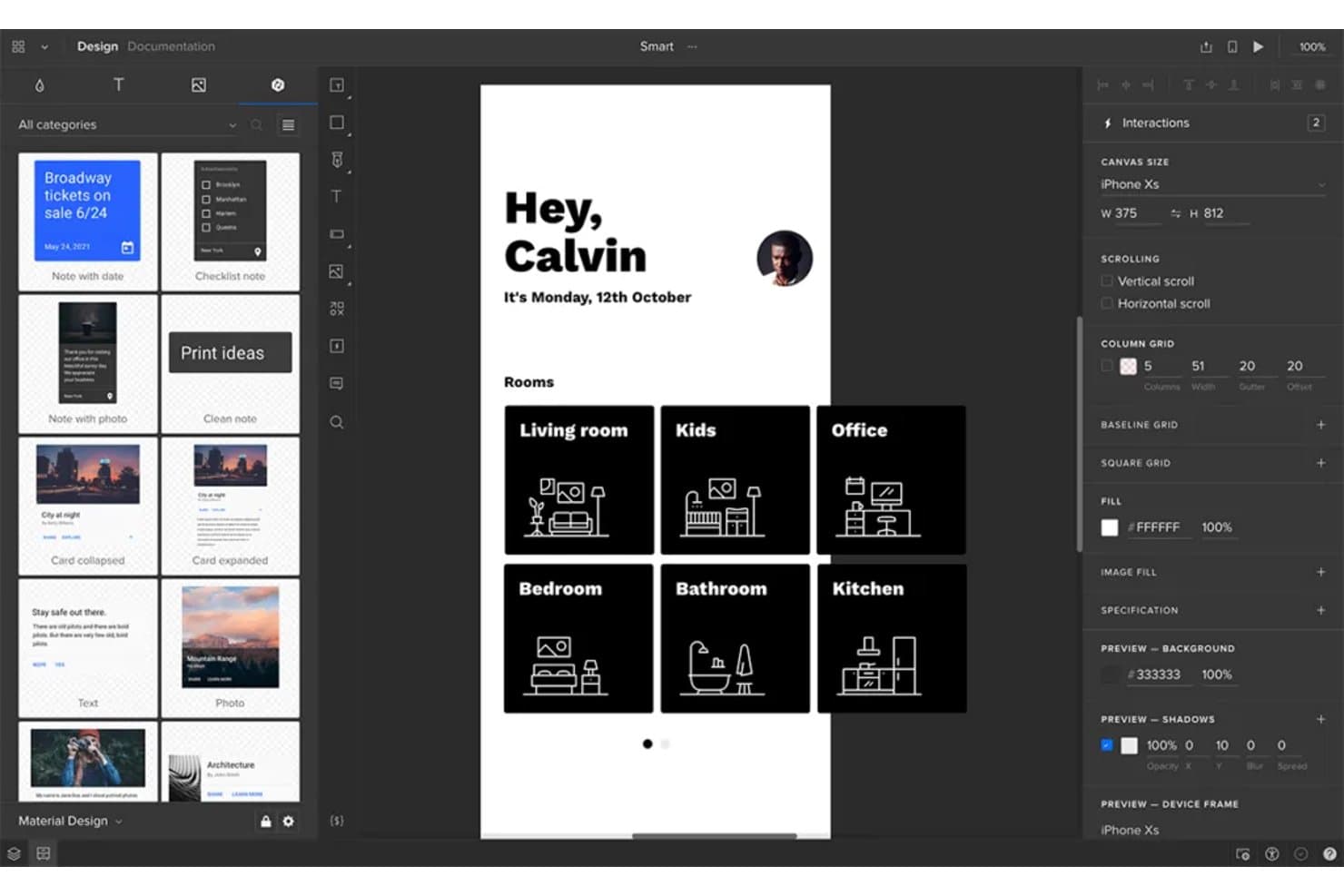
UXPin lets users design and prototype mobile app wireframes interactively. UXPin is a wireframing and interactive prototyping platform with layout grids, Auto Layout, reusable components, clickable flows, conditional logic, and HTML, CSS, and JavaScript-based rendering.
Who Is UXPin Best For?
UXPin suits UX/UI designers who need accessible, interactive prototypes that connect early wireframes with realistic product experiences.
Why I Picked UXPin
I picked UXPin because its wireframes support accessibility checks before development begins. I use the built-in WCAG contrast checker and color blindness simulator to catch visibility issues, then validate flows with interactive form controls and conditional logic.
UXPin Key Features
- Layout grids: Use column, baseline, and square grids with custom margins and gutters.
- Auto Layout: Set direction, spacing, padding, alignment, wrapping, and resizing rules.
- Reusable components: Create components and share styles across projects through team libraries.
- Export options: Export designs as PNG, PDF, or HTML with sitemap and documentation options.
UXPin Integrations
UXPin offers native integrations with Figma, Sketch, Jira Cloud, Slack, and FullStory, plus developer connections through Git, Storybook, and npm.
What's Free?
UXPin offers a 14-day free trial with access to all features and no credit card required. It doesn’t list a free-forever plan on its current pricing page, so you’ll need a paid Core, Growth, or Enterprise plan after the trial ends.
Pros and Cons
Pros:
- Stakeholders can review without creating accounts
- Functional form controls validate flows early
- Built-in WCAG contrast and color blindness checks
Cons:
- Free plan limits ongoing project work
- Interface feels technical for occasional users
Learn more about UXPin: 6Best for infinite canvas collaboration
Miro
- Free plan + 14-day free trial available
- From $8/user/month (billed annually)
Visit WebsiteCustomer Rating:4.8/5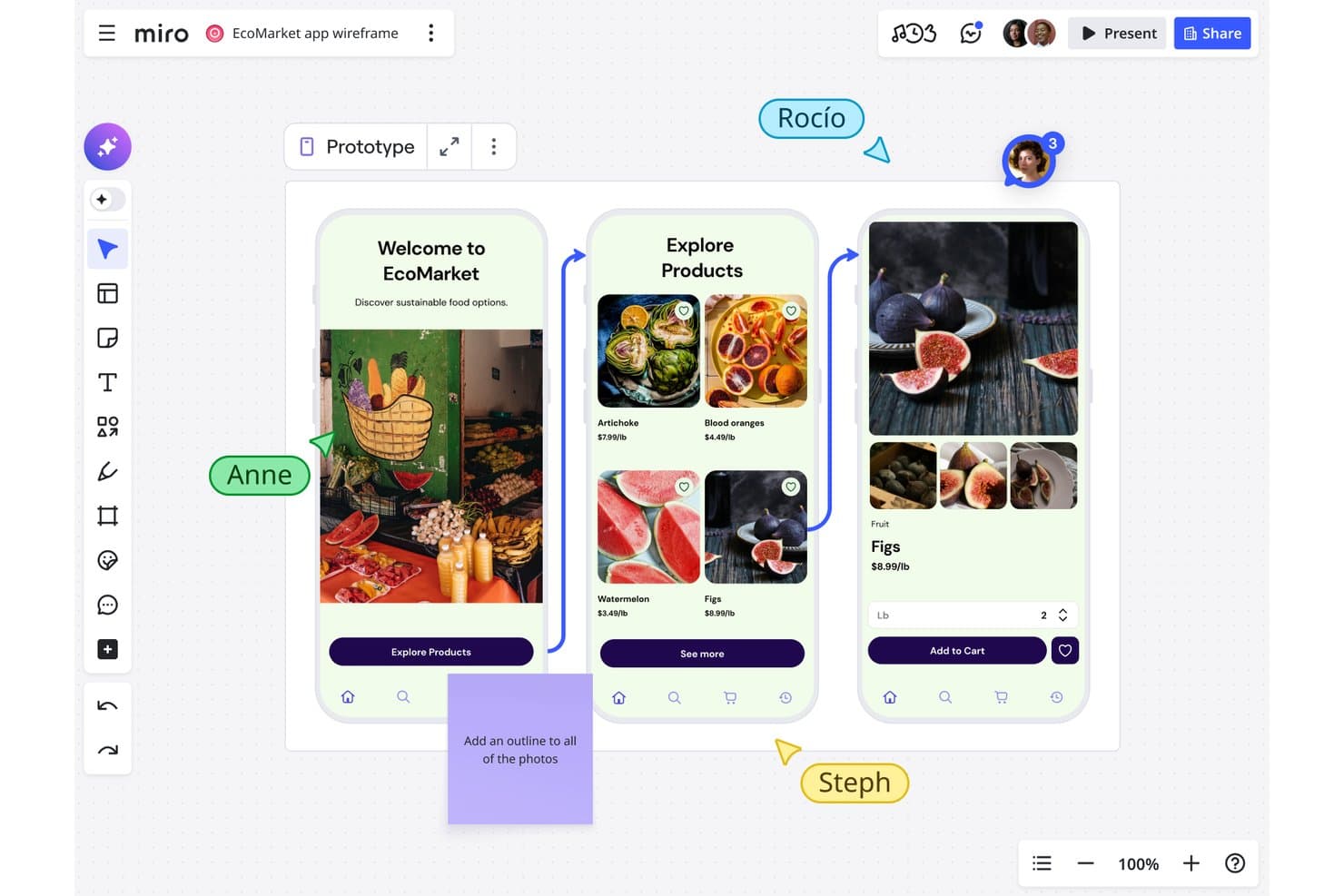
Miro lets users collaboratively wireframe mobile app flows in real time. Miro is a free wireframing and visual collaboration platform with a Prototyping Library, drag-and-drop UI components, templates, object linking, and real-time co-editing.
Who Is Miro Best For?
Miro suits product managers and startup teams that need to sketch ideas, map user flows, and collaborate on an infinite canvas.
Why I Picked Miro
I picked Miro because its infinite canvas collaboration keeps wireframes, user flows, research, and journey maps together. I use the free Prototyping Library to arrange device frames, interface components, and icons into static layouts. Live cursors, comments, and presentation mode help my team review screens with stakeholders, although clickable prototypes require the Business plan.
Miro Key Features
- Object linking: Connect objects to frames, boards, or external URLs.
- Smart guides: Align objects and maintain consistent spacing automatically.
- Wireframe templates: Start with prebuilt layouts for apps, websites, and landing pages.
- Grid app: Organize interface content in grids with up to 2,500 cells.
Miro Integrations
Miro offers 250+ integrations, including Microsoft 365, Google Workspace, Slack, Adobe, Figma, Confluence, Jira, and Notion. Its REST API and SDKs support custom integrations.
What's Free?
Miro offers a free-forever plan with unlimited team members and up to three editable boards. A 14-day trial is also available, while advanced features require a paid plan.
Pros and Cons
Pros:
- Static prototyping library supports quick layouts
- Real-time co-editing supports stakeholder reviews
- Infinite canvas connects flows and research
Cons:
- Three editable boards restrict ongoing projects
- Clickable prototypes require a paid plan
 Best for high-fidelity interactive previews
- Free plan available
- From $10/month (billed annually)
Visit WebsiteCustomer Rating:4.4/5
Framer design view displays interactive UI screens with animation controls and layout editing. Framer is a browser-based design platform built for teams that need high-fidelity, interactive wireframes and prototypes. It’s especially appealing to product designers and UX professionals who want to create realistic previews with advanced animations and interactions. If you’re looking to move beyond static wireframes and show stakeholders exactly how a product will feel, Framer offers the tools to make that possible.
Who Is Framer Best For?
Framer is a strong fit for product designers and UX teams at startups or digital agencies who need to create high-fidelity, interactive previews for web and mobile projects.
Why I Picked Framer
I picked Framer because it stands out for delivering high-fidelity interactive previews, which is rare among free wireframing tools. Framer lets you build wireframes that go far beyond static layouts by supporting advanced animations, transitions, and interactive components right in the browser. I appreciate that you can create clickable prototypes that closely mimic the final user experience, making it easier to communicate design intent to stakeholders. For teams that need to test and showcase realistic product flows without leaving the wireframing stage, Framer offers a unique advantage.
Framer Key Features
Some other features that make Framer a versatile option for free wireframing include:
- Component library: Access a collection of pre-built UI elements to speed up wireframe creation.
- Team collaboration: Invite team members to comment and co-edit projects in real time.
- Version history: Review and restore previous iterations of your wireframes as your project evolves.
- Mobile preview: View and test your wireframes directly on mobile devices for accurate feedback.
Framer Integrations
Integrations include Formspark, Hotjar, HubSpot, Intercom, Mailchimp, Marketo, Meta Pixel, Typeform, Google Analytics, and more.
What's Free?
Framer offers a free-forever plan that allows unlimited projects but limits you to two editors per team. Some advanced features and export options are only available on paid plans.
Pros and Cons
Pros:
- Mobile device preview for accurate testing
- Extensive library of pre-built UI components
- Interactive prototypes support advanced animations
Cons:
- No offline desktop application available
- Free plan limits to two editors
 Best for open-source design workflows
- Free plan + 14-day free trial available
- From $7/user/month
Visit WebsiteCustomer Rating:4.5/5
Penpot interface shows component-based UI design with layout controls and collaborative editing panels. Penpot is an open-source wireframing and design platform built for teams that value transparency and flexibility. It’s a strong choice for designers and developers who want full control over their workflows and data. If you’re looking for a free tool that supports collaborative design without vendor lock-in, Penpot stands out.
Who Is Penpot Best For?
Penpot is a good fit for design and development teams seeking an open-source, self-hosted wireframing solution that supports collaborative workflows and data ownership.
Why I Picked Penpot
I picked Penpot because it’s the only open-source wireframing tool that truly supports collaborative design without locking teams into a proprietary ecosystem. Its self-hosting option gives organizations full control over their data and security, which is rare among free design tools. I also appreciate how Penpot’s SVG-based design system makes it easy for designers and developers to work together on the same platform. For teams that prioritize transparency and flexibility in their workflows, Penpot offers a unique alternative to closed-source solutions.
Penpot Key Features
Some other features make Penpot stand out as a free wireframing tool:
- Component libraries: Create, reuse, and share design components across projects for consistency.
- Team workspaces: Organize projects and assets in shared spaces for easy team access.
- Interactive prototyping: Link wireframes and add interactions to simulate user flows.
- Export options: Export designs to SVG, PNG, or PDF formats for handoff or documentation.
Penpot Integrations
Integrations include GitHub, GitLab, Bitbucket, Slack, and more.
What's Free?
Penpot offers a free-forever plan with unlimited users and projects. Some advanced features and support options may be reserved for paid plans, but core wireframing and design tools are fully accessible without time limits.
Pros and Cons
Pros:
- SVG-based design for developer handoff
- Unlimited projects and users on free plan
- Fully open-source with self-hosting option
Cons:
- Performance can lag with large files
- Fewer templates compared to commercial tools
Learn more about Penpot: Best for macOS-native design workflows
- 30-day free trial
- From $12/user/month (billed annually)
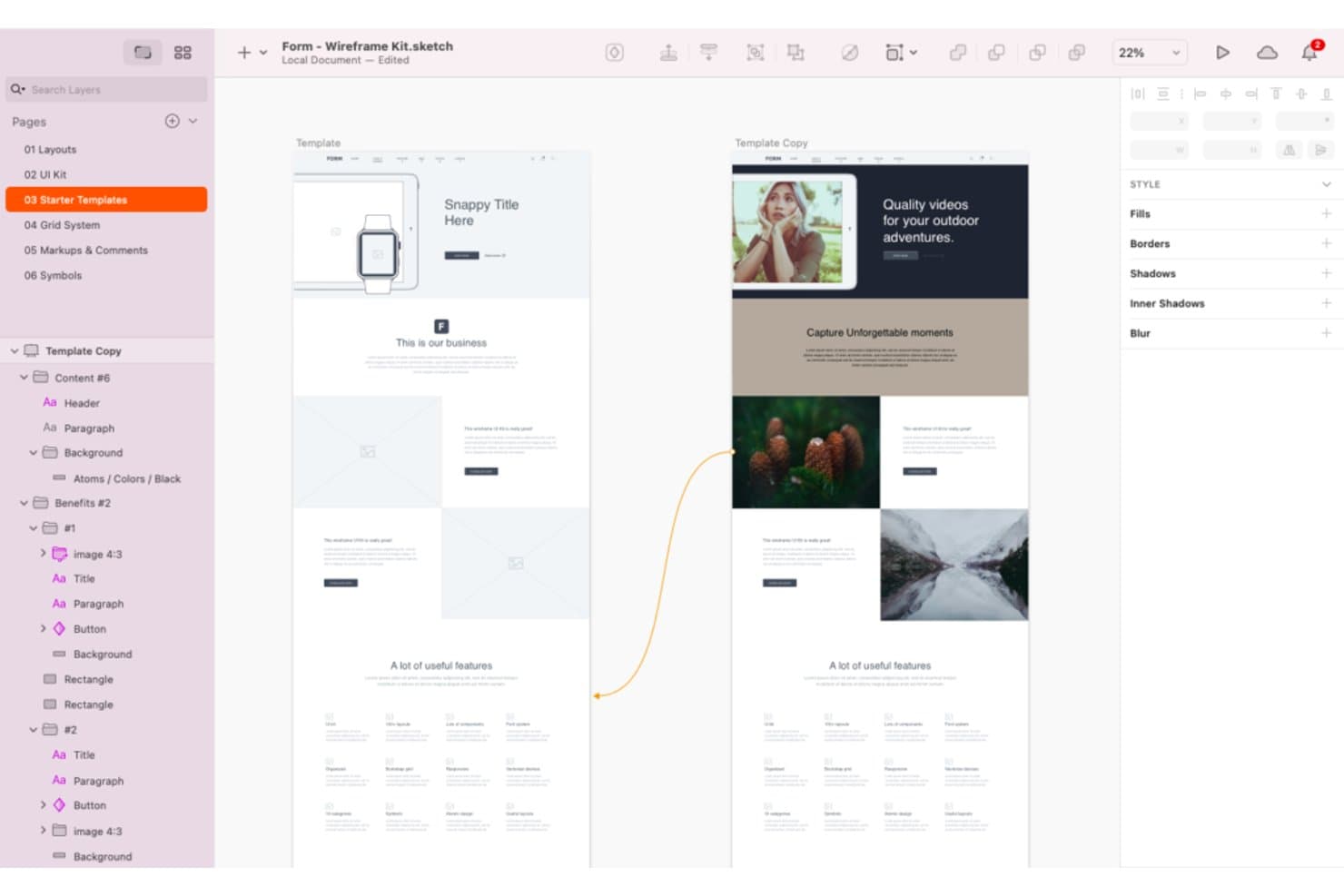
Sketch offers a wide range of wireframing tools and templates. Sketch is a wireframing and interface design platform with vector tools, frames, reusable Symbols and Libraries, interactive prototypes, real-time collaboration, and developer handoff.
Who Is Sketch Best For?
Sketch suits UX/UI designers and freelance product teams that work primarily on macOS.
Why I Picked Sketch
I picked Sketch because it brings macOS-native design workflows to wireframing with precise Frames, Stacks, grids, and vector tools. I use Symbols and Libraries to build reusable navigation, form, and card components across product concepts. Its hotspots, overlays, scrolling areas, and Smart Animate transitions let me test user flows before development begins.
Sketch Key Features
- Browser previews: Share password-protected prototype and page links with expiration dates.
- Developer handoff: Let developers inspect designs, copy values, and download assets in a browser.
- Threaded comments: Pin, mention, and resolve feedback on canvases or prototypes.
- Command Bar: Insert or swap design elements from a keyboard-driven menu.
Sketch Integrations
Sketch supports integrations with Slack, Jira, Notion, GitHub, Miro, and Zeplin through plugins, embeds, link sharing, or ContentSync. Its Sketch MCP Server connects with Claude, Cursor, VS Code, and Codex for custom workflows.
What's Free?
Sketch doesn’t offer a free-forever plan, but it provides a 30-day free trial without requiring a credit card. After the trial, you’ll need a paid subscription, while developers and other collaborators can still access shared files through free viewer and handoff tools.
Pros and Cons
Pros:
- Prototype flows include overlays and scrolling
- Reusable components keep wireframes consistent
- Mac-native workflows support offline design
Cons:
- No free-forever plan for ongoing editing
- Mac-only editing excludes mixed-OS teammates
Learn more about Sketch: 10Best for advanced logic and conditions
Axure RP
- 30-day free trial
- From $29/user/month (billed annually)
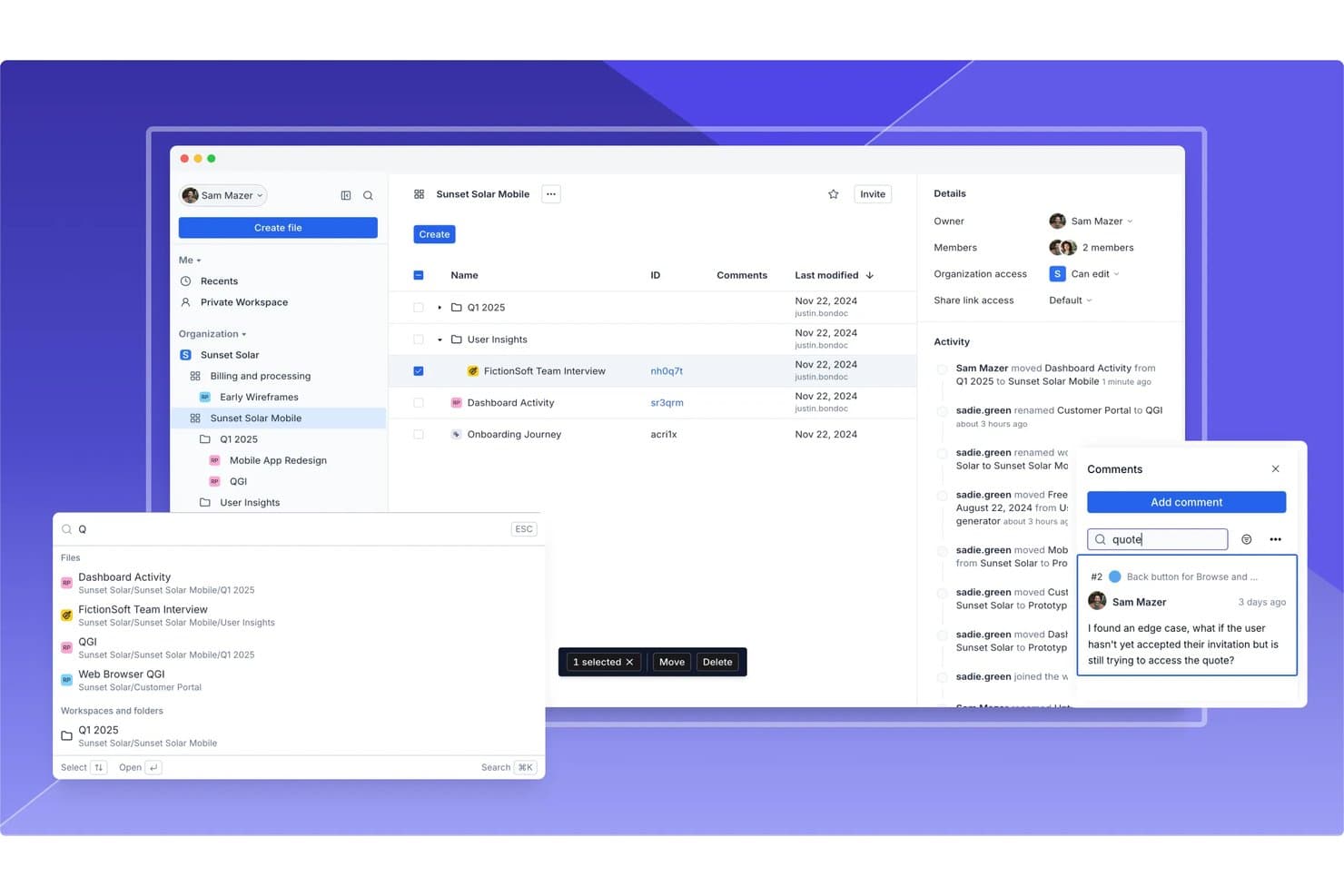
Axure RP supports team collaboration with comments, activity logs, and file sharing. Axure RP is a desktop wireframing and prototyping tool with widget libraries, adaptive views, flow diagrams, working forms, dynamic panels, reusable components, and cloud publishing.
Who Is Axure RP Best For?
Product managers and UX teams building complex, testable user flows will value Axure RP’s conditions, variables, and dynamic panels.
Why I Picked Axure RP
I picked Axure RP because it is best for advanced logic and conditions, even when a wireframe needs to behave like a working product. I use variables, conditional actions, and dynamic panels to test filtered tables, multi-step forms, and responsive states before development. Its 30-day fully functional trial lets me evaluate these workflows without committing upfront.
Axure RP Key Features
- Adaptive views: Create desktop, tablet, and phone layouts on one page.
- Working forms: Add text fields, dropdowns, and radio buttons to wireframes.
- Reusable components: Apply shared widget groups across pages with local overrides.
- Cloud publishing: Share hosted prototypes with reviewers through access-controlled links.
Axure RP Integrations
Axure RP offers documented integrations with Jira, Confluence, Slack, Microsoft Teams, Figma, Sketch, and Adobe XD. It also supports connections with third-party usability testing services.
What's Free?
Axure RP offers a fully functional 30-day free trial, not a free-forever plan. After the trial ends, you’ll need a paid plan to continue using the software.
Pros and Cons
Pros:
- Creates functional forms and filtered tables
- Supports reusable components across projects
- Models complex user flows without code
Cons:
- Desktop authoring limits live team collaboration
- Takes longer to learn than simpler tools
Learn more about Axure RP :
Andre gratis verktøy for trådskisser
Her er noen flere gratis verktøy for trådskisser som ikke kom med på kortlisten min, men som likevel er verdt å se nærmere på:
- 11draw.ioBest for Google Drive integration
- 12LucidchartBest for cross-functional wireframe review and sharing
- 13JustinmindBest for interactive prototyping features
- 14CanvaBest for drag-and-drop visual editing
- 15WhimsicalBest for wireframing within PM tool workflows
- 16MockplusBest for component-based design systems
- 17UizardBest for AI sketch-to-wireframe conversion
- 18Proto.ioBest for mobile app wireframe previews
- 19MoqupsBest for browser-based project sharing
How I Evaluate Free Wireframing Tools
First, I define what counts as free. Wireframing tools qualify with a free-forever plan or a 14-day trial covering core features. From there, I weigh creating layouts and dragging elements most, then ticket integrations and how the free plan scales.
Core Functionality (Table Stakes For This List)
In addition to my free plan requirements, I use a scoring system to select tools for my list. I score each one on a scale from 0 (does not offer the functionality) to 5 (excels in this area) for each core functionality listed below, based on what's available on the free plan. I then convert the total into a percentage to help assess each tool's overall fit, with extra weight on any functionalities I've deemed essential.
- Wireframe Creation (Essential): I look for shape libraries, grids, alignment tools, and interface elements suited to flows such as onboarding or checkout.
- Drag-and-Drop Editing (Essential): I assess how easily you can place, resize, reorder, and align elements while sketching screens without code.
- Real-Time Collaboration: I check for shared editing, live presence, or comments that support feedback from product, design, and engineering teams.
- Reusable Components: I evaluate templates, symbols, or component libraries for repeated patterns such as navigation, forms, and dashboards.
- Export And Sharing: I look for shareable links and practical image or PDF exports for stakeholder reviews and requirement discussions.
- Basic Interactivity: I assess links between screens to model journeys, navigation paths, and edge cases before development begins.
Once I have a list of tools that meet the criteria, I consider what sets each platform apart.
Differentiating Factors (What Sets Vendors Apart)
Here's how I compare and contrast different vendors:
Standout Features
I look for keyboard-driven workflows that let me add shapes and components quickly during time-boxed discovery sessions. Tools like Figma and Balsamiq handle this well with shortcut-heavy interfaces. Presentation mode is another differentiator—I evaluate whether PMs can walk stakeholders through a clickable flow without switching apps. Cross-device browser access also matters, since distributed teams need to review wireframes on any device without installing software.
Beyond Features
I check whether stakeholders can open a shared link without creating an account—executives and clients rarely sign up just to leave feedback. Free tier sustainability also matters: I evaluate project and collaborator caps to confirm a PM can run multiple initiatives without hitting a paywall mid-sprint. Tools like Figma and Miro handle view-only access well, while others restrict guest reviewers on free plans.
Slik velger du gratis verktøy for trådskisser
Det er lett å gå seg vill i lange funksjonslister og kompliserte prismodeller. For å holde fokus mens du går gjennom den unike prosessen med å velge programvare, kan du bruke denne sjekklisten over faktorer du bør ha i bakhodet:
| Faktor | Hva du bør vurdere |
| Skalerbarhet | Vil verktøyet støtte teamet ditt etter hvert som det vokser? Sjekk brukerbegrensninger, prosjektgrenser og muligheter for oppgradering. |
| Integrasjoner | Kan verktøyet kobles til den eksisterende løsningen din for design, utvikling eller prosjektstyring? Bekreft innebygde integrasjoner. |
| Tilpasningsmuligheter | Kan du tilpasse arbeidsområdet, malene eller arbeidsflytene i verktøyet slik at de passer til teamets prosess? |
| Brukervennlighet | Hvor raskt kan nye brukere bli produktive? Se etter intuitiv navigasjon og minst mulig friksjon under opplæringen. |
| Implementering og introduksjon | Hvilke ressurser trengs for å komme i gang? Vurder opplæring, migrering og støtte for førstegangsbrukere. |
| Kostnad | Finnes det skjulte kostnader etter hvert som behovene dine vokser? Gå gjennom begrensningene i gratisplanen og hva som utløser en betalt oppgradering. |
| Sikkerhetstiltak | Tilbyr verktøyet tilstrekkelig databeskyttelse for organisasjonen din? Se etter kryptering, tilgangskontroller og samsvar med regelverk. |
| Tilgjengelig brukerstøtte | Hvilke støttekanaler er tilgjengelige hvis du får problemer? Se etter direktechat, e-post eller brukerfora. |
Hva er gratis verktøy for trådskisser?
Gratis verktøy for trådskisser er programvare som lar brukere lage visuelle skisser eller modeller av digitale grensesnitt uten betaling. Disse verktøyene hjelper team med å planlegge oppsett, kartlegge brukerflyter og kommunisere designideer tidlig i et prosjekt. Gratis verktøy for trådskisser tilbyr vanligvis kjernefunksjoner som dra-og-slipp-elementer, grunnleggende interaktivitet og samarbeid, noe som gjør dem tilgjengelige for enkeltpersoner eller små team med begrensede budsjetter.
Funksjoner
La oss gå gjennom funksjonene som vanligvis finnes i verktøy for trådskisser, og hvilke som vanligvis er inkludert i gratis- og betalingsabonnementer.
Vanlige funksjoner i gratis verktøy for trådskisser
- Dra-og-slipp-redigering: Gjør det mulig for brukere å raskt plassere og ordne grensesnittelementer på et lerret uten å programmere, slik at det blir enkelt å skissere ideer visuelt.
- Biblioteker med grunnleggende former og brukergrensesnitt: Tilbyr et sett med standardkomponenter som knapper, inndatafelt og ikoner for å hjelpe brukere med å lage trådskisser raskere.
- Støtte for flere sider eller skjermer: Gjør det mulig for brukere å opprette og organisere flere trådskisser i ett enkelt prosjekt, med støtte for flyter på flere skjermer.
- Enkel kobling eller interaktivitet: Gjør det mulig å bruke klikkbare områder eller koblinger mellom skjermer for å simulere grunnleggende navigasjon og brukerflyter.
- Samarbeid i sanntid: Gjør det mulig for flere brukere å vise og redigere trådskisser sammen, slik at teamarbeid og tilbakemeldinger kan foregå i samme arbeidsområde.
- Verktøy for kommentarer og tilbakemeldinger: Gir mulighet til å legge igjen notater eller kommentarer direkte på trådskisser, noe som effektiviserer kommunikasjonen med interessenter.
- Skybasert tilgang: Lagrer prosjekter på nettet, slik at brukere kan få tilgang til og redigere trådskisser fra alle enheter med internettforbindelse.
- Eksport til bilde eller PDF: Gjør det mulig å lagre trådskisser som bilder eller PDF-filer for deling utenfor plattformen eller inkludering i presentasjoner.
Vanlige funksjoner i betalte verktøy for trådskisser
- Avansert prototyping og animasjon: Støtter komplekse overganger, mikrointeraksjoner og animerte flyter for å simulere ekte brukeropplevelser bedre.
- Verktøy for designoverlevering: Gir utviklere kodebiter, spesifikasjoner og nedlasting av ressurser for å forenkle overgangen fra design til utvikling.
- Versjonshistorikk og tilbakerulling: Sporer endringer over tid og gjør det mulig for brukere å gå tilbake til tidligere versjoner av en trådskisse ved behov.
- Egendefinerte ressursbiblioteker: Gjør det mulig for team å opprette og administrere egne gjenbrukbare komponenter, slik at det blir konsekvent på tvers av prosjekter.
- Integrasjon for brukertesting: Gjør det mulig å samle inn tilbakemeldinger eller analyser direkte fra brukere av interaktive prototyper i verktøyet.
- Rollebaserte tillatelser: Gjør det mulig for administratorer å kontrollere hvem som kan vise, redigere eller kommentere prosjekter, noe som støtter større team og sensitive prosjekter.
- Integrasjon med tredjepartsverktøy: Kobler seg til plattformer for prosjektstyring, design eller utvikling, slik at verktøyet kan inngå i bredere arbeidsflyter.
- Frakoblet redigering: Gjør det mulig for brukere å arbeide med trådskisser uten internettforbindelse og synkroniserer endringene når tilkoblingen er tilbake.
- Prioritert kundestøtte: Tilbyr raskere svartider og egne supportkanaler for betalende brukere.
- Egendefinert profilering: Gjør det mulig for organisasjoner å legge til egne logoer, farger eller domener i arbeidsområdet for trådskisser, slik at de får en profilert opplevelse.
Fordeler
Implementering av gratis verktøy for trådskisser gir flere fordeler for teamet og virksomheten din. Her er noen av fordelene du kan se frem til:
- Lavere startkostnader: Gratisabonnementer lar team komme i gang med design uten budsjettgodkjenning eller økonomisk risiko, noe som gjør dem tilgjengelige for oppstartsbedrifter og små virksomheter.
- Raskere validering av ideer: Dra-og-slipp-redigering og grunnleggende biblioteker for brukergrensesnitt hjelper team med raskt å visualisere konsepter og forbedre design før utviklingen starter.
- Bedre samarbeid: Redigering i sanntid, kommentarer og skybasert tilgang gjør det mulig for flere interessenter å bidra med tilbakemeldinger og holde seg samkjørte gjennom hele designprosessen.
- Enkel læringskurve: Enkle grensesnitt og innebygde maler gjør det lett for nye brukere å komme i gang, selv uten tidligere designerfaring.
- Fleksibel tilgang fra hvor som helst: Skybasert lagring og nettleserbaserte verktøy gjør det mulig å arbeide hvor som helst og på alle enheter.
- Enkel deling og tilbakemelding: Eksportalternativer og offentlige eller private delingskoblinger gjør det enkelt å innhente innspill fra kunder, teammedlemmer eller eksterne gjennomgåere.
- Støtter smidige arbeidsflyter: Muligheten til å opprette, oppdatere og dele trådskisser raskt passer godt med iterative, smidige tilnærminger til prosjektstyring.
Kostnader og priser
Jeg forstår at du kom til denne artikkelen på jakt etter de beste alternativene for verktøy til trådskisser som er tilgjengelige gratis. Siden gratisabonnementer bare tilbyr begrensede funksjoner, er det imidlertid stor sjanse for at du må oppgradere abonnementet ditt i fremtiden.
Tabellen nedenfor oppsummerer vanlige abonnementer, gjennomsnittsprisene deres og typiske funksjoner som er inkludert i verktøy for trådskisser:
Sammenligningstabell for trådmodelleringsverktøy
| Plantype | Gjennomsnittspris | Vanlige funksjoner |
| Gratisplan | $0 | Grunnleggende trådmodellering, begrenset antall brukere, enkle UI-biblioteker, grunnleggende deling og skylagring. |
| Personlig plan | $5-$15/bruker/måned | Ubegrenset antall prosjekter, flere UI-ressurser, eksportalternativer, prioritert kundestøtte og begrensede integrasjoner. |
| Forretningsplan | $15-$30/bruker/måned | Teamsamarbeid, avansert prototyping, versjonshistorikk, designoverlevering og integrasjoner med tredjeparter. |
| Bedriftsplan | $30-$60/bruker/måned | Tilpasset merkevarebygging, rollebaserte tillatelser, forbedret sikkerhet, dedikert kundestøtte og funksjoner for samsvar. |
Vanlige spørsmål om gratis trådmodelleringsverktøy
Her er noen svar på vanlige spørsmål om gratis trådmodelleringsverktøy:
Kan jeg bruke gratis trådmodelleringsverktøy til kommersielle prosjekter?
Ja, de fleste gratis trådmodelleringsverktøy lar deg bruke plattformen deres til kommersielle prosjekter. Du bør imidlertid alltid lese gjennom verktøyets bruksvilkår for å bekrefte at det ikke finnes begrensninger på kommersiell bruk eller krav om å kreditere verktøyet i leveransene dine.
Hva er de viktigste begrensningene ved gratis trådmodelleringsverktøy?
Gratis trådmodelleringsverktøy begrenser ofte antallet prosjekter, brukere eller eksportalternativer som er tilgjengelige. Avanserte funksjoner som overlevering til utviklere, versjonshistorikk og integrasjoner med annen programvare er vanligvis forbeholdt betalte planer.
Hvor sikre er gratis trådmodelleringsverktøy for sensitive prosjekter?
Sikkerheten varierer fra leverandør til leverandør, men de fleste anerkjente gratis trådmodelleringsverktøy tilbyr grunnleggende sikkerhetstiltak som krypterte forbindelser og passordbeskyttet deling. For svært sensitive prosjekter bør du se etter samsvarssertifiseringer og avanserte sikkerhetsfunksjoner, som kanskje bare er tilgjengelige i betalte planer.
Kan jeg samarbeide med andre i sanntid ved hjelp av gratis trådmodelleringsverktøy?
Ja, mange gratis trådmodelleringsverktøy støtter sanntidssamarbeid, slik at flere brukere kan redigere og kommentere trådmodeller samtidig. Noen verktøy kan begrense antallet samarbeidspartnere eller kreve at alle brukere oppretter kontoer.
Er det enkelt å oppgradere fra en gratisplan til en betalt plan?
Ja, de fleste trådmodelleringsverktøy gjør det enkelt å oppgradere fra en gratisplan til en betalt plan. De eksisterende prosjektene og dataene dine blir vanligvis beholdt, og du får tilgang til flere funksjoner umiddelbart etter oppgraderingen.