

Produktledere, jeg forstår det – dere håndterer utallige oppgaver og trenger verktøy som gjør jobben enklere. Å lage en mockup av et nettsted er et viktig trinn i arbeidsflyten, men det kan være tidkrevende og kjedelig. Det er her den rette mockupgeneratoren kommer inn, og sparer tid samtidig som den reduserer stress.
Etter min erfaring kan det rette verktøyet forandre hvordan teamet samarbeider og gjør ideer til virkelighet. Jeg har testet og vurdert ulike mockupgeneratorer for å gi deg et upartisk innblikk i de beste tilgjengelige alternativene.
I denne artikkelen får du vite mer om verktøy som samsvarer med teamets behov og hjelper deg med å lage mockuper. La oss se nærmere på de beste alternativene som kan utgjøre en reell forskjell i prosjektene dine.
Why Trust Our Software Recommendations
6,700+
Reviews
20
Industry experts
16+
Evaluation factors
14
Years
Our team has been testing and reviewing software since 2012. As product managers ourselves, we know how difficult—and important—it is to choose the right software.
For this guide, we evaluated tools using hands-on testing and independent research, scoring tools using our selection criteria.
Our reviews reflect our human editorial judgment, not a sales pitch.
Expert reviewers:
- Andrew LumbySenior TPM
- Cristiano ValimSenior UI/UX Lead


Sammenligningstabell for generatorer for nettstedsmockuper
Bruk denne sammenligningstabellen til å se gjennom prisopplysningene for mine beste utvalgte generatorer for nettstedsmockuper.
| Tool | Best For | Trial Info | Price | ||
|---|---|---|---|---|---|
| 1 | Best for non-designers building site mockups | Free trial + free plan available | From $144/user/year (billed annually) | Website | |
| 2 | Best for low-fidelity wireframing before dev | 14-day free trial | From $16/user/month (billed annually) | Website | |
| 3 | Best for design-system-backed mockups | Free plan + 14-day free trial available | From $29/user/month (billed annually) | Website | |
| 4 | Best for interaction-heavy wireframing | Free plan available | From $19/user/month | Website | |
| 5 | Best for planning site structure with AI | Free plan available | From $9/user/month (billed annually) | Website | |
| 6 | Best for multiplayer design and dev handoff | Free plan available | From $3/user/month | Website | |
| 7 | Best for AI-driven mockups without design skills | Free plan available | From $39/month (billed annually) | Website | |
| 8 | Best for AI-generated mockups from any input | Free plan available | From $14/user/month | Website | |
| 9 | Best for responsive design across breakpoints | Free plan available | From $10/month (billed annually) | Website | |
| 10 | Best for AI-driven design-to-code handoff | Free plan available | From $14/month | Website |


Vurdering av den beste generatoren for nettstedsmockuper
Nedenfor finner du mine detaljerte sammendrag av de beste generatorene for nettstedsmockuper som kom med på kortlisten min. Vurderingene mine gir et detaljert innblikk i de viktigste funksjonene, fordelene og ulempene, integrasjonene og ideelle bruksområdene for hvert verktøy, slik at du kan finne det som passer best for deg.
 Best for non-designers building site mockups
- Free trial + free plan available
- From $144/user/year (billed annually)
Visit WebsiteCustomer Rating:4.7/5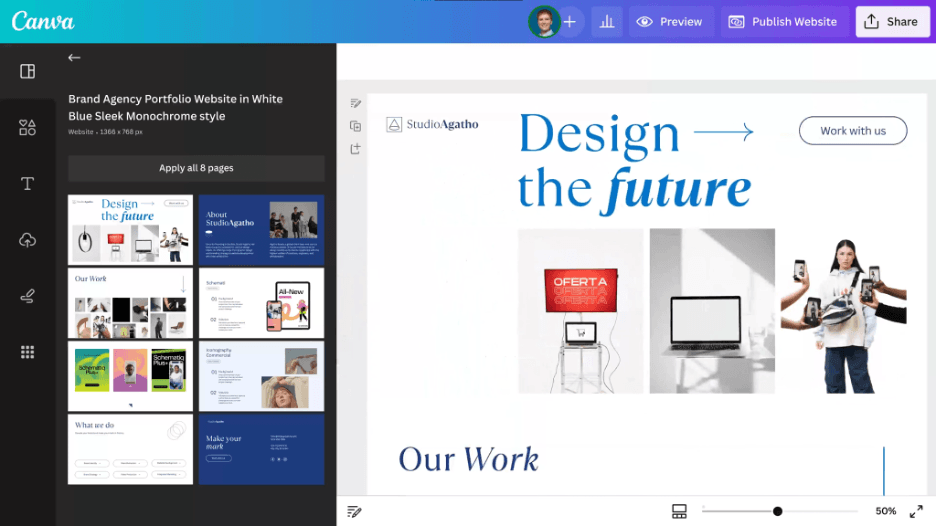
Canva is an easy graphic design tool with drag-and-drop templates. Canva is a drag-and-drop design platform that lets you build website mockups, wireframes, and device-frame previews using a large template library, AI-powered page generation via Canva Code, and built-in publishing tools.
Who Is Canva Best For?
Canva works well for product managers and startup founders who need to turn an idea into a shareable site mockup fast, without relying on a designer.
Why I Picked Canva
I've included Canva in my top picks because its template library of over 2,300 website layouts gives non-designers a real head start, covering everything from landing pages to portfolios without touching a single line of code. I also like Canva Code, which generates a full interactive, responsive site from a plain-language prompt. That combination, templates plus AI generation, means a founder or PM can go from idea to shareable link in minutes.
Canva Key Features
- Multi-page site structure: Build sites with up to 45 linked pages, each with its own URL and up to 20 sections, so you can mock up full site flows, not just single screens.
- Permissioned share links: Send a single link with view, comment, or edit access so stakeholders can review a mockup without creating an account.
- Device preview toggles: Switch between desktop, tablet, and mobile previews while editing to check how your layout holds up across screen sizes.
- HTML import: Paste or upload an HTML file and Canva converts it into editable design elements, giving you a starting point from existing code.
Canva Integrations
Canva’s Apps Marketplace includes Figma, Slack, and Asana integrations; Atlassian Rovo connects Canva with Jira and Confluence. Enterprise plans also provide a REST API for custom integrations.
Pros and Cons
Pros:
- Device previews support responsive layout checks
- Shareable links simplify stakeholder feedback
- Thousands of website templates speed first drafts
Cons:
- Mobile layouts often require manual fixes
- Free-form layouts limit precision control
Learn more about Canva: Best for low-fidelity wireframing before dev
- 14-day free trial
- From $16/user/month (billed annually)
Visit WebsiteCustomer Rating:4.3/5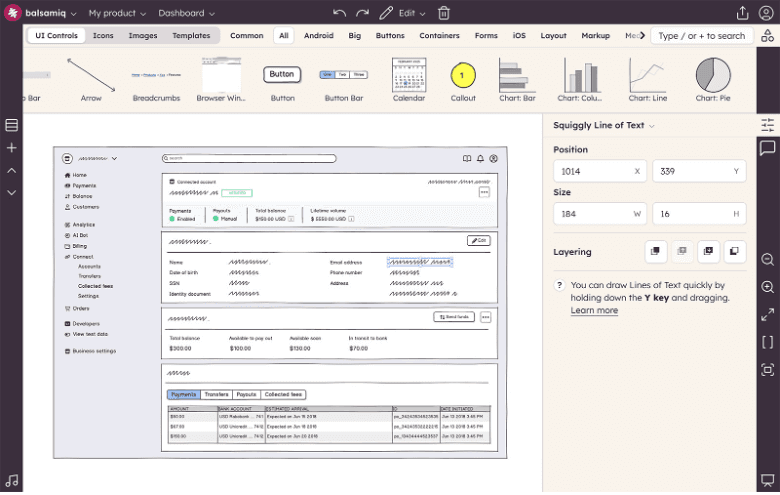
Balsamiq is a wireframing tool for quick, low-fidelity UX concept visualization. Balsamiq is a browser-based wireframing and prototyping tool that lets you drag and drop UI elements, generate wireframes from text or sketches using AI, and share clickable mockups with stakeholders for review.
Who Is Balsamiq Best For?
Balsamiq is a strong fit for product managers and founders who need to sketch out website structure quickly, without any design background.
Why I Picked Balsamiq
I picked Balsamiq as one of the best because it's purpose-built for low-fidelity wireframing, which is exactly what you need before handing anything off to development. I love that Balsamiq AI can generate a multi-screen user flow from a text prompt, a sketch, or even pasted code, giving you an editable wireframe set in minutes. The one-click prototype feature then turns that flow into a clickable, navigable mockup you can share via a public review link without requiring reviewers to log in.
Balsamiq Key Features
- Alternates and version branching: Create, compare, promote, or discard multiple variations of a wireframe within the same project without losing prior work.
- Public review links: Share wireframes via a public link that lets stakeholders view and comment anonymously, no account required.
- Font Awesome icon library: Access over 6,300 built-in icons in multiple sizes and styles directly within the editor.
- MCP server integration: Connect your boards to AI coding tools like Claude, Cursor, and Codex so they can read wireframes and generate production code, user stories, or QA plans.
Balsamiq Integrations
Balsamiq integrates with Slack, Notion, and Linear for sharing, plus marketplace integrations for Jira and Confluence through Atlassian Marketplace. Its MCP server connects boards with Claude, ChatGPT, Cursor, and Codex.
Pros and Cons
Pros:
- Supports clickable prototypes for stakeholder feedback
- Keeps website discussions focused on structure
- Generates editable wireframes from sketches or code
Cons:
- Offers few website-specific templates or layouts
- Outputs intentionally rough, non-polished visuals
Learn more about Balsamiq: Best for design-system-backed mockups
- Free plan + 14-day free trial available
- From $29/user/month (billed annually)
Visit WebsiteCustomer Rating:4.2/5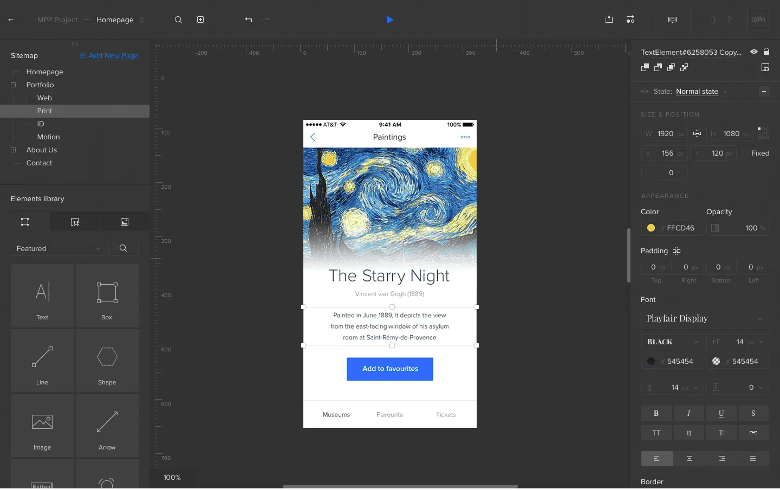
UXPin is a tool for prototyping and designing systems to build consistent UIs. UXPin is a code-based design and prototyping tool that lets you build multi-page mockups using real React components, AI-generated UI, and shared design system libraries.
Who Is UXPin Best For?
UXPin is a strong fit for UX/UI designers and product teams that build against a shared design system and need mockups grounded in real components.
Why I Picked UXPin
UXPin earns its spot on my shortlist because it's the only mockup tool where the components on your canvas are actual React code. I love how Merge lets you sync your live design system via Git, Storybook, or npm so your mockup can't drift from what engineering builds. Forge, its AI generator, creates UI from text prompts or screenshots using those same real components rather than generic shapes.
UXPin Key Features
- Password-protected preview sharing: Generate a shareable link with password protection so only the right stakeholders can access your mockup.
- Public comments without an account: Clients and reviewers can leave comments directly on a shared prototype without needing to sign up.
- Spec mode for developer handoff: Developers can inspect sizes, grids, colors, and typography, and copy CSS or JSX directly from the shared link.
- Iterations for version history: Save named versions of your mockup at any point, share them independently, and restore earlier states without losing your current work.
UXPin Integrations
UXPin offers integrations with Figma, Sketch, Git, Storybook, npm, Jira, Slack, FullStory, StackBlitz, and CodeSandbox. It also supports OpenAI and Anthropic connections through bring-your-own API keys.
Pros and Cons
Pros:
- Advanced interactions model realistic product flows
- Stakeholders comment without creating accounts
- Real React components keep mockups code-accurate
Cons:
- Responsive layouts often require manual resizing
- Templates favor app screens over websites
Learn more about UXPin: Best for interaction-heavy wireframing
- Free plan available
- From $19/user/month
Visit WebsiteCustomer Rating:4.2/5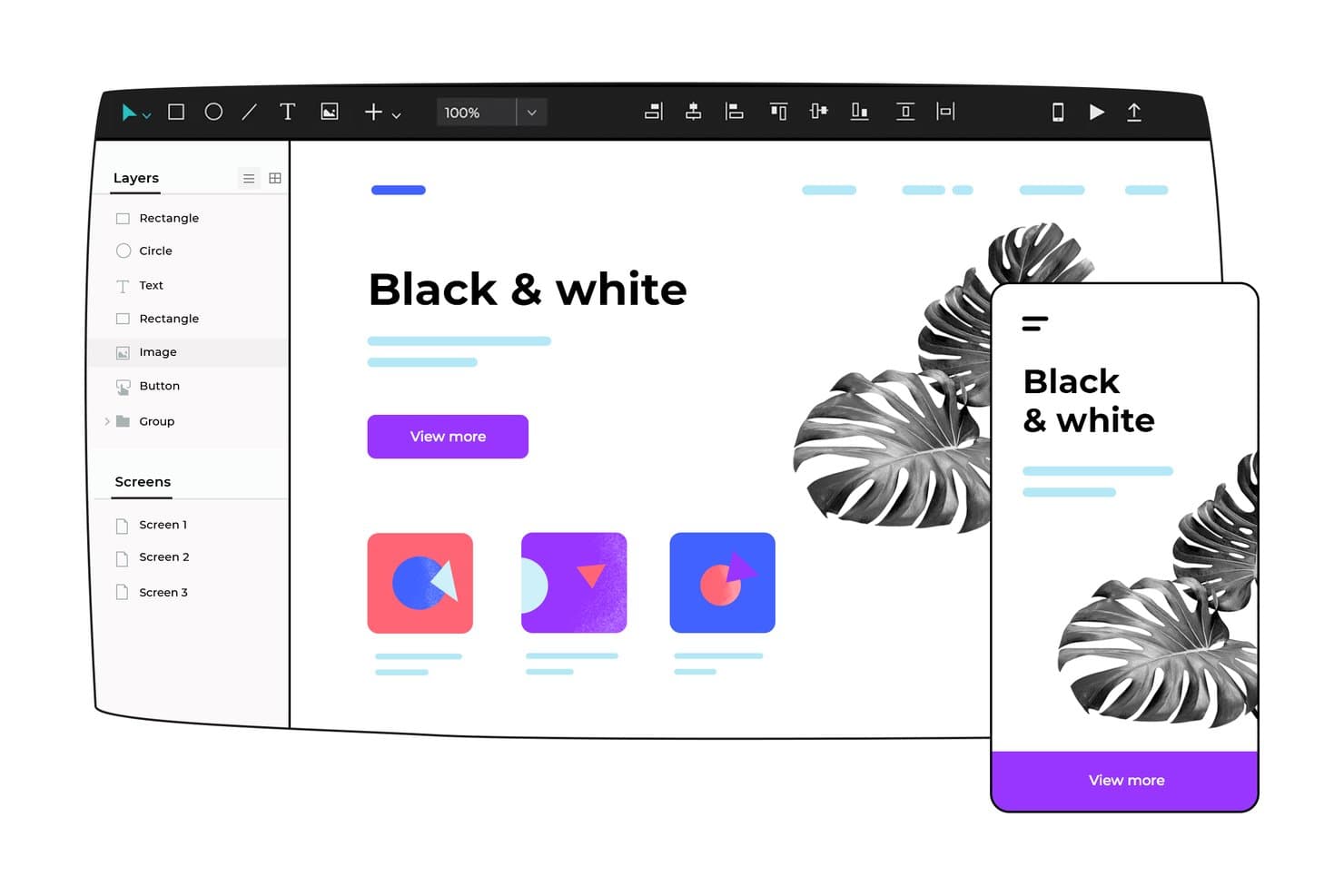
Justinmind lets users design and preview mockups across desktop and mobile. Justinmind is a desktop wireframing and prototyping tool for macOS and Windows that lets you design website and app mockups with interactive elements, dynamic panels, user flows, and a library of 4,000+ UI components.
Who Is Justinmind Best For?
Justinmind is a strong fit for UX/UI designers and freelance web designers who need to build detailed, interaction-heavy prototypes without writing code.
Why I Picked Justinmind
Justinmind earns its spot on my shortlist because it goes deeper on interaction design than most mockup tools. I love that you can build dynamic panels, working forms with validation, and conditional logic without writing a single line of code. For example, my team can prototype a multi-step checkout flow with real business rules and test it on an actual device using the Justinmind mobile app. With 4,000+ UI components spanning Bootstrap, MUI, and Shopify kits, there's rarely a need to build elements from scratch.
Justinmind Key Features
- Device emulator preview: Test your designs across current devices, including iPhone 16, Pixel 9, and Galaxy S25, using built-in device frames and skins directly in the canvas.
- CSV data simulation: Populate data grids and lists with real data from a .csv file to show realistic content in your mockups without manually entering placeholder values.
- Developer handoff tools: Developers can inspect designs to copy CSS, check measurements, view HEX color values, and export assets without needing a design license.
- Figma and Sketch import: Bring existing designs into Justinmind via the Figma plugin or Sketch integration, converting layers into fully editable prototype elements.
Justinmind Integrations
Justinmind supports documented integrations with Figma, Sketch, Adobe XD, Photoshop, Illustrator, Jira, Confluence, Azure DevOps, and DOORS. It also offers an API and SDK for custom plugins.
Pros and Cons
Pros:
- Supports realistic forms and data flows
- Includes extensive web component libraries
- Builds detailed interactive website prototypes
Cons:
- Offers no AI mockup generation
- Requires a desktop application download
Learn more about Justinmind: Best for planning site structure with AI
- Free plan available
- From $9/user/month (billed annually)
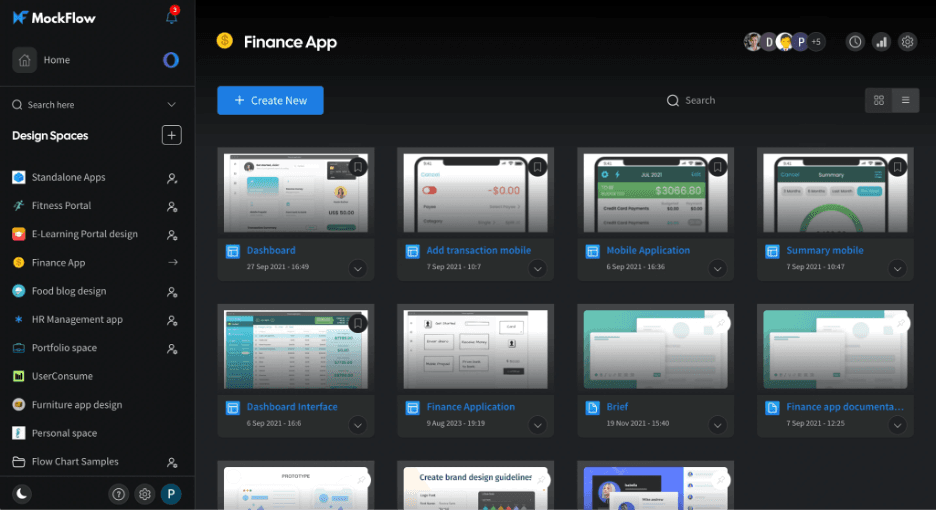
MockFlow is a tool for creating wireframes and planning user interface designs. MockFlow is a wireframing and visual planning tool that combines drag-and-drop layout editing, AI-assisted wireframe generation, sitemaps, and a library of 1,000+ UI components for designing website and app mockups.
Who Is MockFlow Best For?
MockFlow suits startup founders and early-stage product teams who need to go from idea to shareable wireframe fast, without a dedicated design resource.
Why I Picked MockFlow
I picked MockFlow as one of the best because its AI Sitemap tool genuinely changes how early-stage planning works: you describe a site or paste a URL, and MockFlow crawls it to generate an editable visual sitemap you can reshape before a single wireframe is drawn. Pair that with text-to-wireframe and screenshot-to-wireframe generation, and you can go from a rough site concept to a structured, multi-page layout fast.
MockFlow Key Features
- Master pages: Define shared layout elements like headers, footers, and sidebars once, and they update across every page in your project automatically.
- Multi-screen AI generation: Generate a consistent set of screens, flowcharts, or architecture diagrams from a single prompt in one pass.
- 1,000+ UI components: Access a library of smart components—including charts, data grids, modals, and form elements—plus 127+ UI kits filtered by device type.
- Design-to-code export: Build mode outputs React, Vue, Tailwind, Bootstrap, iOS, and Android code directly from your wireframes.
MockFlow Integrations
MockFlow offers documented integrations with Figma, Jira, Confluence, Google Drive, Slack, Microsoft Teams, Trello, and Visual Studio. Its Max plan adds connectors to 20+ apps, including Notion, GitHub, Linear, Asana, Airtable, and HubSpot.
Pros and Cons
Pros:
- Large component library covers complex interface patterns
- Shared master pages keep site layouts consistent
- AI generates wireframes from URLs and screenshots
Cons:
- Templates favor app screens over website pages
- Responsive breakpoints require separate page designs
Learn more about MockFlow: Best for multiplayer design and dev handoff
- Free plan available
- From $3/user/month
Visit WebsiteCustomer Rating:4.7/5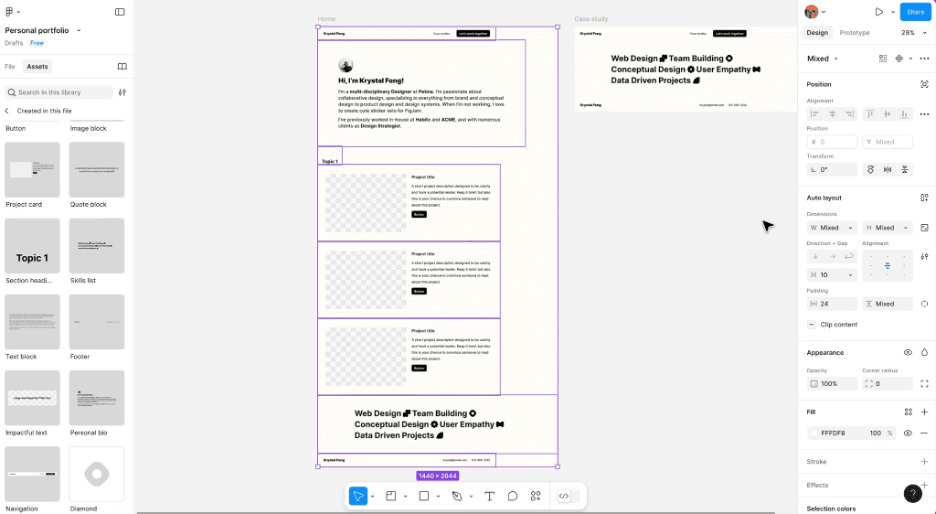
Figma is a cloud tool for real-time collaborative UX/UI design and prototyping. Figma is a browser-based design tool that combines vector editing, auto layout, real-time multiplayer collaboration, prototyping, and dev handoff into a single canvas for building website mockups.
Who Is Figma Best For?
Figma is the go-to choice for UX/UI designers and cross-functional teams who need to collaborate on mockups in real time and hand off polished designs directly to developers.
Why I Picked Figma
Figma earns its spot on my shortlist because no other mockup tool matches its real-time multiplayer canvas. I can share a view-only link with stakeholders or developers instantly, and they can comment directly on specific elements without needing a paid seat. Dev Mode then translates those same designs into code snippets and component specs, closing the gap between mockup and production.
Figma Key Features
- Auto layout: Frames automatically resize and reflow when content changes, so your mockup adapts without manual adjustments.
- Figma Make: Generates prototypes and web app mockups from text prompts, images, or uploaded files using AI.
- Breakpoint and responsiveness controls: Figma Sites lets you set breakpoints and build responsive components that adapt across device sizes.
- Variable system: Reusable values for color, spacing, and text let you apply design-system tokens consistently across mockup files.
Figma Integrations
Figma offers native integrations with Jira, Confluence, Asana, Linear, Trello, Notion, Productboard, Slack, Microsoft Teams, and VS Code. It also supports custom integrations through its REST API and Zapier.
Pros and Cons
Pros:
- Shared component libraries support consistent website layouts
- Dev Mode connects mockups with production components
- Real-time multiplayer reviews speed stakeholder alignment
Cons:
- Large files can lag during detailed design work
- AI-generated mockups often need substantial refinement
 Best for AI-driven mockups without design skills
- Free plan available
- From $39/month (billed annually)
Visit WebsiteCustomer Rating:4.6/5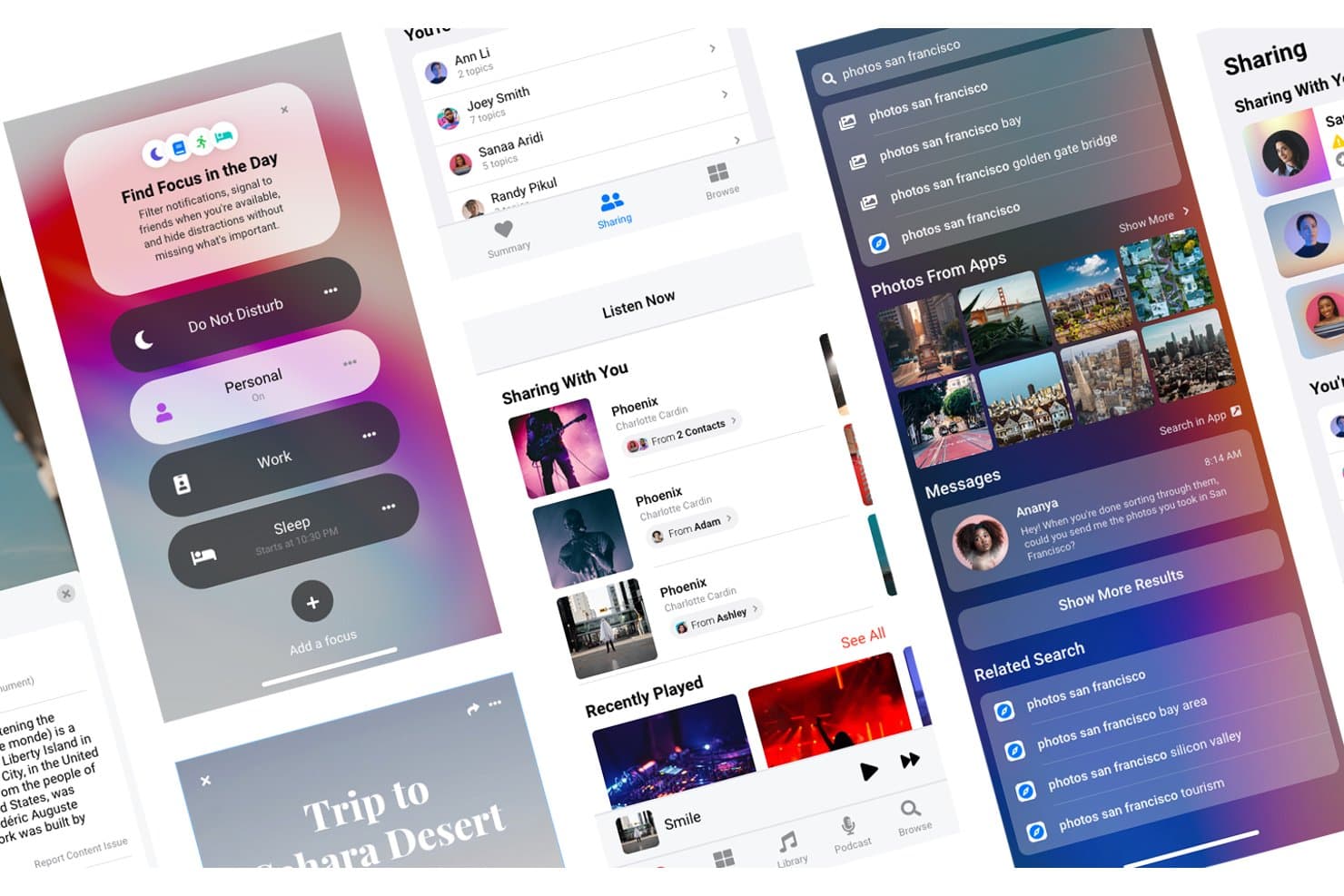
Uizard lets users design and preview multi-screen mobile app mockups. Uizard is an AI-powered mockup and prototyping tool that lets you generate multi-screen website designs from text prompts, hand-drawn sketches, or screenshots, with a drag-and-drop editor and clickable prototype support.
Who Is Uizard Best For?
Uizard is a strong fit for product managers and startup founders who need to turn ideas into shareable prototypes quickly, without relying on a designer.
Why I Picked Uizard
I've included Uizard in my top picks because it's the tool I'd reach for first when I need a working, multi-screen prototype fast and have no designer on hand. Autodesigner 2.0 lets you generate editable mockups from a plain-text prompt, while the Screenshot Scanner converts any existing site or app reference into an editable design instantly. Wireframe Mode lets you flip an entire project between low and high fidelity in one click, which is genuinely useful when pitching to different audiences.
Uizard Key Features
- Clickable hotspot prototyping: Link screens together with hotspots to create interactive, navigable prototypes you can share with stakeholders via a public link.
- Screenshot Scanner: Upload a screenshot of any existing website or app and Uizard converts it into a fully editable mockup.
- Attention heatmaps: Generate AI-predicted heatmaps that show where users are likely to focus their attention on a given screen.
- Team asset libraries: Store shared components, brand assets, and custom icons in a centralized library accessible to all creators on your plan.
Uizard Integrations
Uizard connects with Figma through a beta plugin and supports embeds or links in Miro and Notion. Monday.com offers a marketplace plugin, while Jira and Confluence support links.
Pros and Cons
Pros:
- Supports clickable multi-screen stakeholder prototypes
- Converts screenshots and sketches into designs
- Generates editable mockups from text prompts
Cons:
- Code export requires component-by-component handoff
- Device previews lack custom breakpoints
Learn more about Uizard: Best for AI-generated mockups from any input
- Free plan available
- From $14/user/month
Visit WebsiteCustomer Rating:4.8/5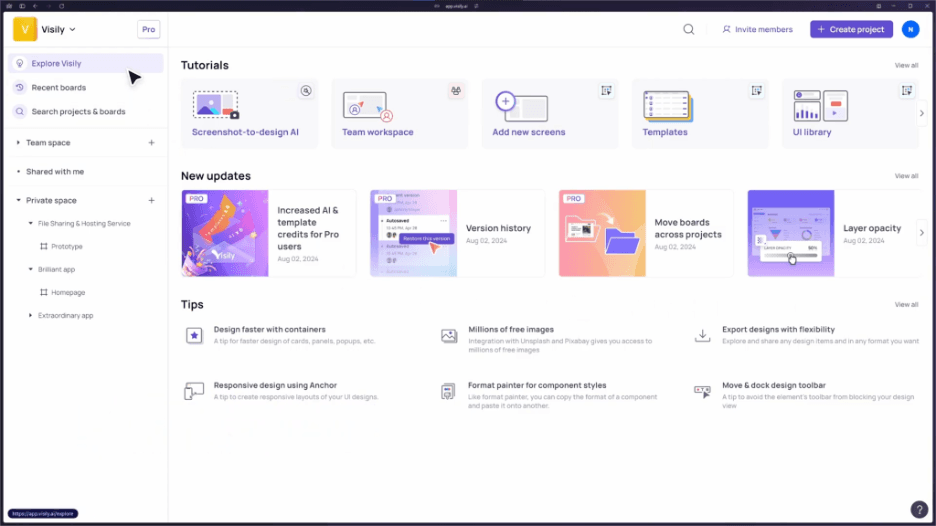
Visily is an AI UI design tool for brainstorming and prototyping. Visily is an AI-powered website mockup generator that lets you create multi-screen designs from text prompts, screenshots, sketches, and diagrams, with a drag-and-drop canvas, 1,500+ templates, and design-to-code export.
Who Is Visily Best For?
Visily is a strong fit for product managers and startup founders who need to turn ideas into shareable mockups fast, without a design background.
Why I Picked Visily
Visily earns its spot on my shortlist because it accepts more input types for AI generation than any other tool I've tested. You can paste a screenshot of a competitor's site, upload a hand-drawn sketch, or drop in a sitemap diagram, and Visily converts it into an editable multi-screen mockup. I also like how Plan Mode asks clarifying questions before generating, which keeps the output consistent across a full flow rather than producing one-off screens you have to stitch together manually.
Visily Key Features
- Design-to-code export: Export your finished screens as React, Vue, or HTML code, giving developers a working starting point directly from your mockup.
- Hi-fi/lo-fi toggle: Switch any design between a polished UI and a wireframe view with a single click, without rebuilding your screens.
- Real-time collaboration: Co-edit boards simultaneously with teammates, leave comment threads, and share view-only prototype links that require no account to open.
- AI Prototype Generator: Automatically links your screens into a clickable flow, so you can share a working prototype without manually setting up every transition.
Visily Integrations
Visily offers integrations with Figma, Slack, Notion, and Jira. Its MCP server also connects workspaces to AI coding agents such as Claude Code and Lovable.
Pros and Cons
Pros:
- Supports rapid stakeholder prototype sharing
- Maintains consistency across multi-screen flows
- Generates editable mockups from sketches
Cons:
- Complex hierarchies require manual cleanup
- Responsive breakpoint previews remain limited
Learn more about Visily: Best for responsive design across breakpoints
- Free plan available
- From $10/month (billed annually)
Visit WebsiteCustomer Rating:4.4/5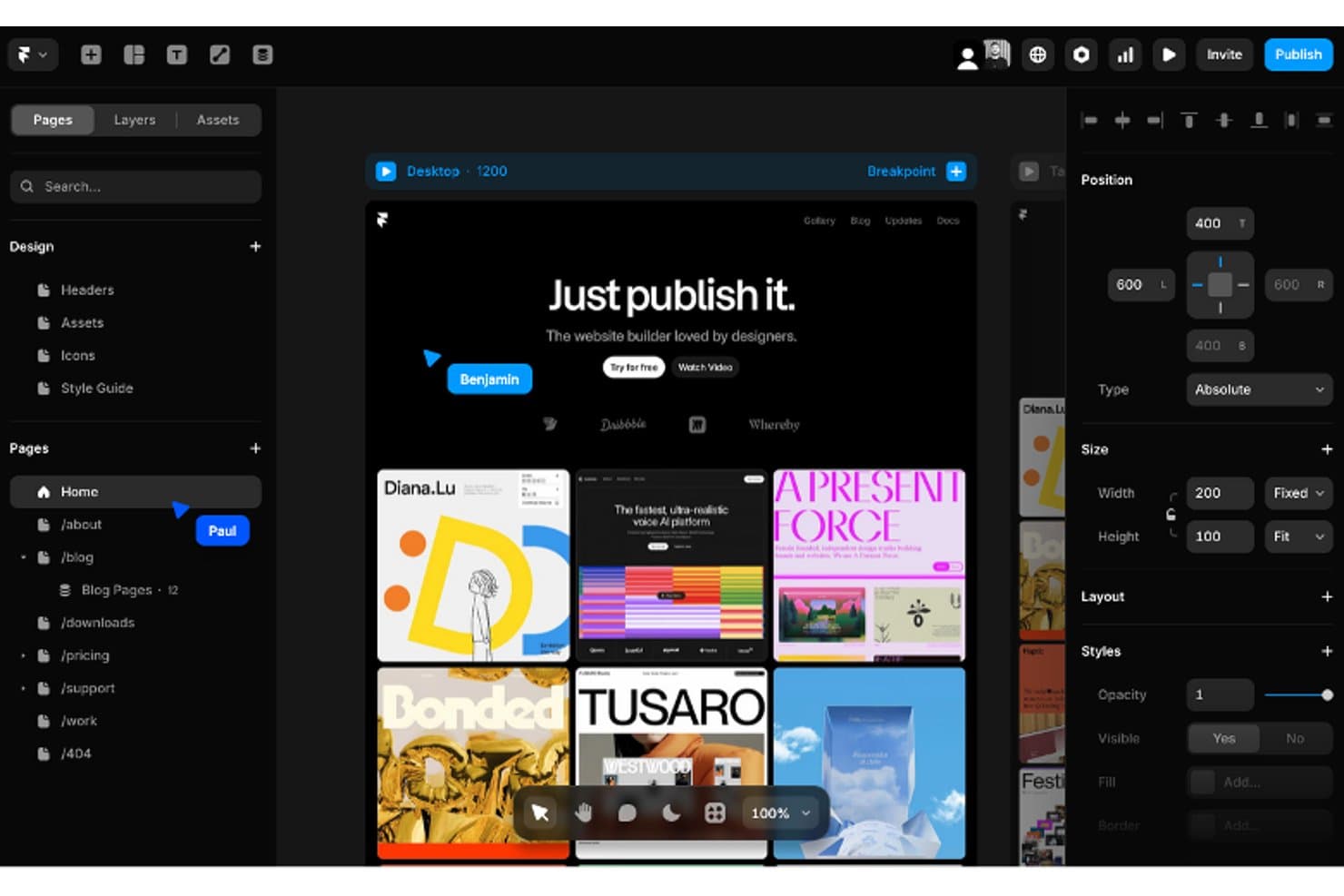
Framer is a tool for creating interactive, responsive designs and prototypes. Framer is a visual website mockup and builder tool that combines a freeform canvas editor, AI-assisted layout generation, responsive breakpoints, a component marketplace, and built-in CMS and hosting.
Who Is Framer Best For?
Framer is a strong fit for UX/UI designers and freelance web designers who need pixel-precise control over responsive layouts across every breakpoint.
Why I Picked Framer
Framer earns its spot on my shortlist because its breakpoint system is the most granular I've seen in a visual website mockup tool. Each breakpoint inherits styles from the main layout and overrides only what changes, so you're not rebuilding your design from scratch for every screen size. I also rely on the AI agent to generate and adjust breakpoints automatically, which is a real time-saver when I need to verify that a multi-section layout holds up across tablet and mobile without manually checking every frame.
Framer Key Features
- AI design agent: Framer's canvas-based agent generates multi-page layouts, copy, and visuals directly from text prompts, screenshots, or URLs you attach as references.
- Component marketplace: Browse and remix thousands of community-built components—navs, carousels, footers, and more—and paste them into any project.
- Version history and branching: Create named branches for edits, preview them on a live staging URL, then merge to main with a built-in changelog.
- Canvas commenting: Press C to drop pinned, threaded comments anywhere on the canvas, which viewers with free accounts can read and reply to.
Framer Integrations
Framer offers marketplace integrations with Figma, Google Sheets, Notion, WordPress, Shopify, HubSpot, and Google Search Console. It also provides a Server API for syncing CMS collections and connections with Slack and GitHub pull requests.
Pros and Cons
Pros:
- AI generates editable multi-page drafts quickly
- Live staging URLs simplify stakeholder review
- Breakpoint inheritance supports precise responsive mockups
Cons:
- Design-literate interface slows first-time users
- Exports only PNG or JPEG assets

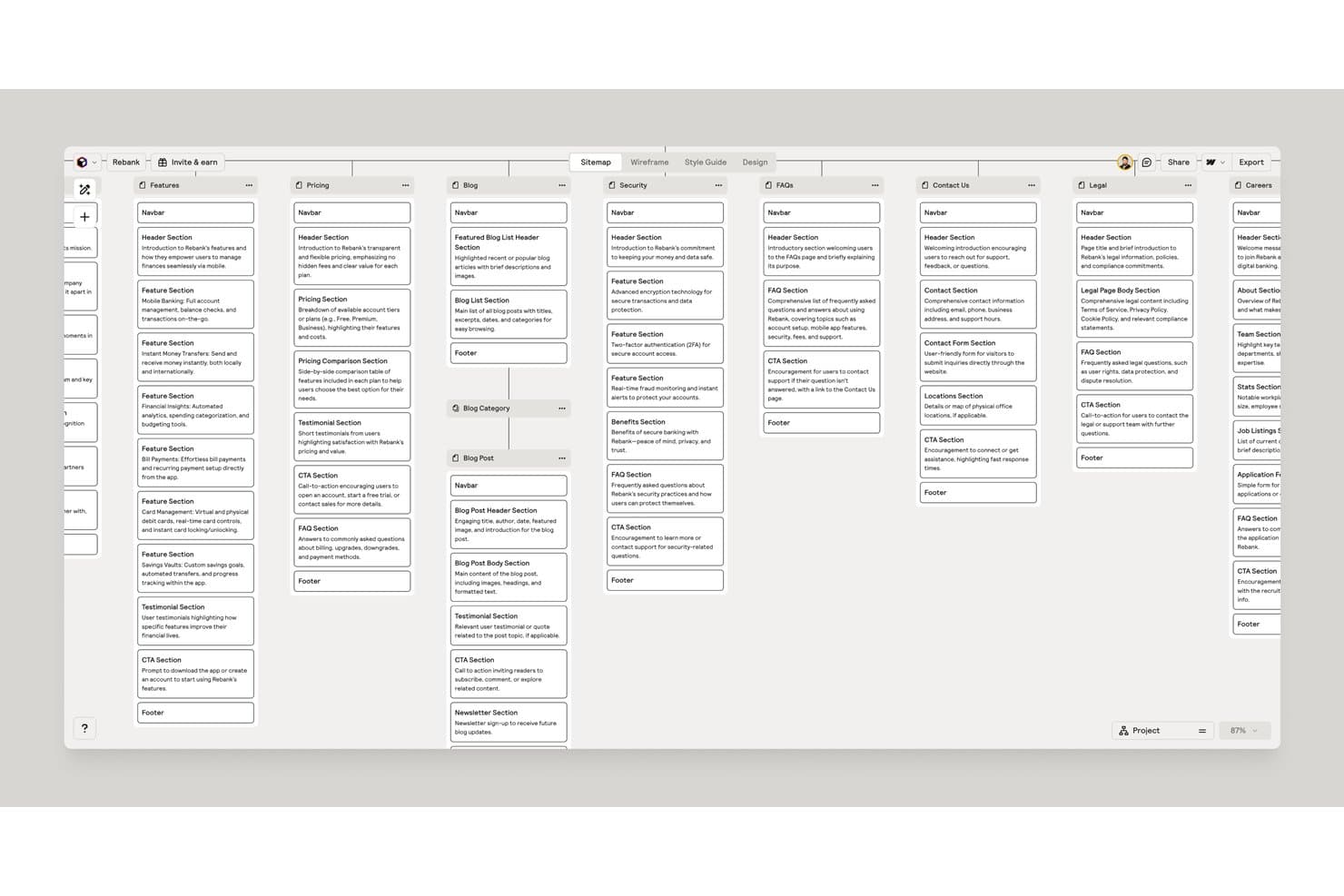
Relume auto-generates full sitemaps with detailed page sections. Relume is an AI-driven website mockup tool that converts written briefs, files, or URLs into multi-page sitemaps, wireframes, and style guides, with direct export to Figma, Webflow, and React.
Who Is Relume Best For?
Relume is a strong fit for freelance web designers and product managers who need to move from a project brief to a shareable, structured site mockup without spending hours in a design tool.
Why I Picked Relume
I picked Relume as one of the best because it's the only tool I've seen that takes a written brief and turns it into a full multi-page sitemap, wireframes with real copy, and a style guide before handing off clean React or Webflow code. The "Assembled, not generated" approach means AI output is built from tested components, so nothing breaks in the handoff. I especially like Wireframing 2.0, which matches content counts and reuses components across pages for consistency.
Relume Key Features
- Brief-to-sitemap generation: Relume takes a written prompt, uploaded file, or URL and builds a full multi-page sitemap you can edit before moving to wireframes.
- Design View styling: a visual preview mode lets you style wireframes with colors, typography, and UI treatment before exporting to Figma, Webflow, or React.
- Global sections: mark any wireframe section as global and it becomes a shared component across pages, staying consistent through export.
- Inline AI copy editing: an "Ask AI" prompt within the wireframe canvas lets you shorten, lengthen, or rewrite individual text blocks without leaving the editor.
Relume Integrations
Relume integrates with Figma and Webflow, and supports React/HTML exports for Next.js, Astro, Vite, and Webpack. It also connects with Cursor, Claude, Windsurf, and VS Code through MCP, plus Claude Design export.
Pros and Cons
Pros:
- Produces structured drafts within minutes
- Reuses components for consistent multi-page structures
- Generates sitemaps, wireframes, and copy together
Cons:
- Figma handoff can feel slow and clunky
- Exported designs can feel visually repetitive
Learn more about Relume:
Andre generatorer for nettstedsmockuper
Her er noen flere alternativer for generatorer for nettstedsmockuper som ikke kom med på kortlisten min, men som likevel er verdt å undersøke:
How I Evaluate Website Mockup Generators
I split my evaluation into three parts, giving core functionality the most weight: build page structures, reuse elements, and preview desktop and mobile layouts. Next, I look for standout features, such as prompt-to-mockup generation. Finally, I consider beyond features, including onboarding, support, integrations, and pricing.
Core Functionality (Table Stakes For This List)
When I'm selecting tools for my list, I score each one on a scale from 0 (does not offer the functionality) to 5 (excels in this area) for each core functionality listed below. I then convert the total into a percentage to help assess each tool's overall fit, with extra weight on any functionalities I’ve deemed essential.
- Visual Layout Design (Essential): I check for grids, sections, and alignment controls that support full-page flows, from landing pages to account areas.
- Website Templates (Essential): I look for page-specific starting points, such as homepages, pricing pages, and campaign landing pages, rather than blank canvases.
- Responsive Preview: I evaluate desktop, tablet, and mobile views, plus controls for adjusting layouts at key breakpoints.
- Export & Sharing: I check for image and PDF exports, along with review links for stakeholder feedback and developer handoff.
- Component Library: I look for reusable navigation bars, forms, buttons, and style variants that support consistent multi-page mockups.
- AI-Assisted Generation: I assess prompt- or reference-based layout generation, editability, and usefulness during early concept exploration.
Once I have a list of tools that meet the criteria, I consider what sets each platform apart.
Differentiating Factors (What Sets Vendors Apart)
Here's how I compare and contrast different vendors:
Standout Features
AI prompt-to-mockup generation is the first thing I evaluate. When a PM needs to test a landing page concept before a sprint planning session, going from a text prompt to a full layout in seconds changes the conversation. I also check whether mockups can export as clean HTML/CSS or React code, since that directly shortens the gap between a validated concept and a working build. Version history with branching matters too—I look for the ability to explore two layout directions in parallel without overwriting earlier work.
Beyond Features
I check how quickly a PM can go from opening the tool to sharing a preview with stakeholders—setup friction eats into sprint cycles. Onboarding matters just as much; I look for guided templates and contextual tooltips that let non-designers produce usable mockups without watching a tutorial series first. I also evaluate how pricing scales when a second or third editor joins, since many tools gate collaboration behind paid tiers that balloon fast.
Slik velger du en generator for nettstedsmockuper
Det er lett å gå seg vill i lange funksjonslister og kompliserte prismodeller. For å hjelpe deg med å holde fokus mens du går gjennom den unike prosessen din for valg av programvare, er dette en sjekkliste over faktorer du bør ha i tankene:
| Faktor | Hva du bør vurdere |
| Skalerbarhet | Vil verktøyet vokse sammen med teamet ditt? Tenk på fremtidige behov og om programvaren kan håndtere flere brukere eller mer komplekse prosjekter uten ekstra kostnader. |
| Integrasjoner | Kan verktøyet kobles til den eksisterende programvaren din? Sjekk om det er kompatibelt med viktige verktøy som Slack, Jira eller Trello i arbeidsflyten din. |
| Tilpasningsmuligheter | Kan du tilpasse verktøyet til arbeidsflytene dine? Se etter alternativer for å justere maler, brukertillatelser og grensesnittet slik at det passer teamets behov. |
| Brukervennlighet | Er programvaren intuitiv for alle teammedlemmer? Et enkelt grensesnitt reduserer opplæringstiden og øker produktiviteten, spesielt for personer uten designbakgrunn. |
| Implementering og oppstart | Hvor raskt kan teamet ditt begynne å bruke verktøyet? Vurder hvorvidt det finnes veiledninger, produktomvisninger og brukerstøtte som kan gjøre overgangen enklere. |
| Kostnad | Passer prisene budsjettet ditt? Sammenlign abonnementsplaner og se etter skjulte kostnader knyttet til funksjoner eller brukerbegrensninger. |
| Sikkerhetstiltak | Er designene dine beskyttet? Se etter kryptering, tilgangskontroller for brukere og samsvar med standarder for databeskyttelse for å sikre trygghet. |
| Tilgjengelig brukerstøtte | Er hjelp tilgjengelig når du trenger det? Vurder leverandørens åpningstider for brukerstøtte, kontaktmetoder og svartider for å unngå avbrudd i arbeidsflyten. |
Hva er en nettsidemockup-generator?
En nettsidemockup-generator er et verktøy som lar brukere lage visuelle representasjoner av nettsider før utviklingen starter. Designere, produktledere og utviklere bruker vanligvis disse verktøyene til å visualisere og videreutvikle designkonsepter. Dra-og-slipp-grensesnitt, malbiblioteker og prototypingsfunksjoner bidrar til rask designutvikling og teamsamarbeid. Disse verktøyene sparer til syvende og sist tid og forbedrer kommunikasjonen ved å gi utviklingsteamene en tydelig visuell veiledning.
Funksjoner
Når du velger en nettsidemockup-generator, bør du se etter følgende viktige funksjoner:
- Dra-og-slipp-grensesnitt: Forenkler designprosessen ved å la brukerne enkelt flytte og plassere elementer på siden.
- Malbibliotek: Tilbyr en rekke ferdiglagde design som hjelper brukerne med å komme raskt i gang med prosjektene sine uten å måtte designe fra bunnen av.
- Interaktiv prototyping: Gjør det mulig å lage klikkbare prototyper for å simulere brukerinteraksjoner og teste designkonsepter.
- Samarbeid i sanntid: Lar flere teammedlemmer arbeide med et prosjekt samtidig, noe som forbedrer kommunikasjonen og effektiviteten.
- Tilpassbare designsystemer: Tilbyr verktøy for å opprettholde konsistens på tvers av prosjekter ved å la brukerne opprette og administrere designelementer.
- Versjonskontroll: Holder oversikt over endringer som er gjort i designene, slik at brukerne kan gå tilbake til tidligere versjoner ved behov.
- Eksportalternativer: Støtter eksport av design i ulike formater, noe som gjør det enklere å dele dem med utviklingsteam eller fortsette arbeidet i programvare for frakoblet webdesign.
- Funksjoner for responsivt design: Sørger for at mockuper tilpasses ulike skjermstørrelser, slik at brukerne kan lage design som passer til forskjellige enheter.
- Designdokumentasjon: Hjelper teamene med å holde orden ved å tilby verktøy for å dokumentere designelementer og beslutninger.
- Sikkerhetstiltak: Beskytter brukerdata og design med kryptering og tilgangskontroller, slik at sensitiv informasjon forblir sikker.
Fordeler
Implementering av en nettsidemockup-generator gir flere fordeler for teamet og virksomheten din. Her er noen av fordelene du kan se frem til:
- Forbedret kommunikasjon: Samarbeid i sanntid og interaktiv prototyping styrker kommunikasjonen i teamet og bidrar til å samkjøre designkonsepter med interessentenes forventninger.
- Tidsbesparelser: Dra-og-slipp-grensesnitt, malbiblioteker og AI-assisterte mockup-verktøy fremskynder designprosessen, slik at teamet raskt kan produsere mockuper av høy kvalitet.
- Økt kreativitet: Tilpassbare designsystemer og funksjoner for responsivt design gir designere mulighet til å eksperimentere og innovere uten å måtte starte fra bunnen av.
- Redusert feilrisiko: Versjonskontroll bidrar til å forhindre feil ved at teamene kan spore endringer og gå tilbake til tidligere designversjoner ved behov.
- Konsistens på tvers av prosjekter: Designdokumentasjon sørger for at alle teammedlemmer har samme forståelse, og opprettholder konsistens og kvalitet i designene.
- Økt fleksibilitet: Eksportalternativer og funksjoner for responsivt design gir fleksibilitet til å tilpasse design for ulike formater og enheter.
- Datasikkerhet: Sikkerhetstiltak beskytter designene og den sensitive informasjonen din, slik at du kan føle deg trygg mens du arbeider med prosjekter.
Kostnader og priser
Valg av en nettsidemockup-generator krever en forståelse av de ulike prismodellene og abonnementene som er tilgjengelige. Kostnadene varierer basert på funksjoner, teamstørrelse, tillegg og mer, selv om gratis mockup-generatorer kan være tilstrekkelige for enkelte team. Tabellen nedenfor oppsummerer vanlige abonnementer, gjennomsnittsprisene deres og typiske funksjoner som er inkludert i løsninger for nettsidemockup-generatorer:
Sammenligningstabell for abonnementer for nettsidemockup-generatorer
| Abonnementstype | Gjennomsnittspris | Vanlige funksjoner |
| Gratisabonnement | $0 | Grunnleggende designverktøy, begrensede eksportalternativer og tilgang til malbiblioteker. |
| Personlig abonnement | $5-$25/bruker/måned | Komplette designverktøy, ubegrenset eksport og grunnleggende samarbeidsfunksjoner. |
| Forretningsabonnement | $30-$50/bruker/måned | Avansert prototyping, verktøy for teamsamarbeid og versjonskontroll. |
| Virksomhetsabonnement | $60-$100/bruker/måned | Tilpassbare designsystemer, dedikert kundestøtte og forbedrede sikkerhetsfunksjoner. |