

Hvis du er produktleder, kjenner du til utfordringene med å holde teamet samkjørt og prosjektene på rett spor. Det kan hende at ProductPlan ikke dekker behovene dine. Enten det skyldes begrenset funksjonalitet, skaleringsproblemer eller integrasjonsutfordringer, er du på utkikk etter noe som passer bedre inn i teamets arbeidsflyt.
Jeg har brukt tid på å teste og vurdere ulike programvareløsninger for å finne de beste alternativene til ProductPlan. I denne artikkelen deler jeg mine fremste anbefalinger. Jeg går gjennom hva som gjør hvert alternativ unikt, og hvordan de kan løse dine spesifikke utfordringer.
Målet mitt er å gi deg en objektiv og grundig undersøkt veiledning som hjelper deg med å velge riktig verktøy for teamets suksess.
Hva er ProductPlan?
ProductPlan er et sentralt verktøy for produktstyring som hjelper team med å planlegge og visualisere produktstrategiene sine. Brukere, vanligvis produktledere og prosjektledere, kan oppleve at ProductPlan ikke dekker behovene deres av én eller flere av følgende grunner:
- Det er for dyrt for budsjettet deres
- Teamet deres trenger flere tilpasningsmuligheter
- De trenger bedre integrasjon med andre verktøy
- De trenger støtte for større team
- Teamet arbeider fra et annet geografisk sted og trenger funksjoner for global støtte
- De trenger mer avanserte rapporteringsfunksjoner
Hvis noe av dette høres kjent ut, har du kommet til rett sted. Listen min inneholder flere sentrale alternativer innen produktstyring som passer bedre for team som står overfor disse spesifikke utfordringene med ProductPlan, og som er på utkikk etter de beste alternative programvareløsningene for produktstyring.
Why Trust Our Software Recommendations
6,700+
Reviews
20
Industry experts
16+
Evaluation factors
14
Years
Our team has been testing and reviewing software since 2012. As product managers ourselves, we know how difficult—and important—it is to choose the right software.
For this guide, we evaluated tools using hands-on testing and independent research, scoring tools using our selection criteria.
Our reviews reflect our human editorial judgment, not a sales pitch.
Expert reviewers:
- Andrew LumbySenior TPM
- Cristiano ValimSenior UI/UX Lead


Sammenligningstabell for alternativer til ProductPlan
Denne sammenligningstabellen oppsummerer prisdetaljene for mine fremste alternativer til ProductPlan:
| Tool | Best For | Trial Info | Price | ||
|---|---|---|---|---|---|
| 1 | Best for publishing live Jira-based roadmaps | 30-day free trial + free plan available | From $1.10/user/month | Website | |
| 2 | Best for mid-sized to large tech companies | Free demo available | Pricing upon request | Website | |
| 3 | Best for scoring features against strategic goals | 30-day free trial + free demo available | From $9/user/month | Website | |
| 4 | Best for small to medium-sized product teams | 14-day free trial + free demo available | Pricing upon request | Website | |
| 5 | Best for customer feedback collection | Free plan available | From $79/month (billed annually) | Website | |
| 6 | Best for highly customizable workflow-based planning | Free plan available; 14-day free trial | From $9/user/month (billed annually) | Website | |
| 7 | Best for portfolio-level AI-driven roadmapping | Free demo available | Pricing upon request | Website | |
| 8 | Best for custom prioritization scoring models | Free demo available | Pricing upon request | Website | |
| 9 | Best for linking customer feedback to roadmap items | 14-day free trial + free demo available | From $24/user/month | Website | |
| 10 | Best for feedback-to-roadmap alignment | 14-day free trial + free demo available | From $10/user/month | Website |


Vi har testet og vurdert programvare for produktstyring siden 2020. Som produktledere selv vet vi hvor avgjørende og vanskelig det er å ta den riktige beslutningen når man skal velge programvare. Vi investerer i grundige undersøkelser for å hjelpe målgruppen vår med å ta bedre kjøpsbeslutninger for programvare.
Vi har testet mer enn 2 000 verktøy for ulike bruksområder innen produktstyring og skrevet over 1 000 omfattende programvareanmeldelser. Finn ut hvordan vi er åpne om arbeidet vårt & se vår metode for programvareanmeldelser.
Beste alternativer til ProductPlan – anmeldelser
Nedenfor finner du mine detaljerte oppsummeringer av de beste alternativene til ProductPlan som kom med på kortlisten min. Anmeldelsene mine gir et detaljert innblikk i de viktigste funksjonene, fordelene og ulempene, integrasjonene og ideelle bruksområdene for hvert verktøy, slik at du kan finne det beste alternativet for deg.
 Best for publishing live Jira-based roadmaps
- 30-day free trial + free plan available
- From $1.10/user/month
Visit WebsiteCustomer Rating:5/5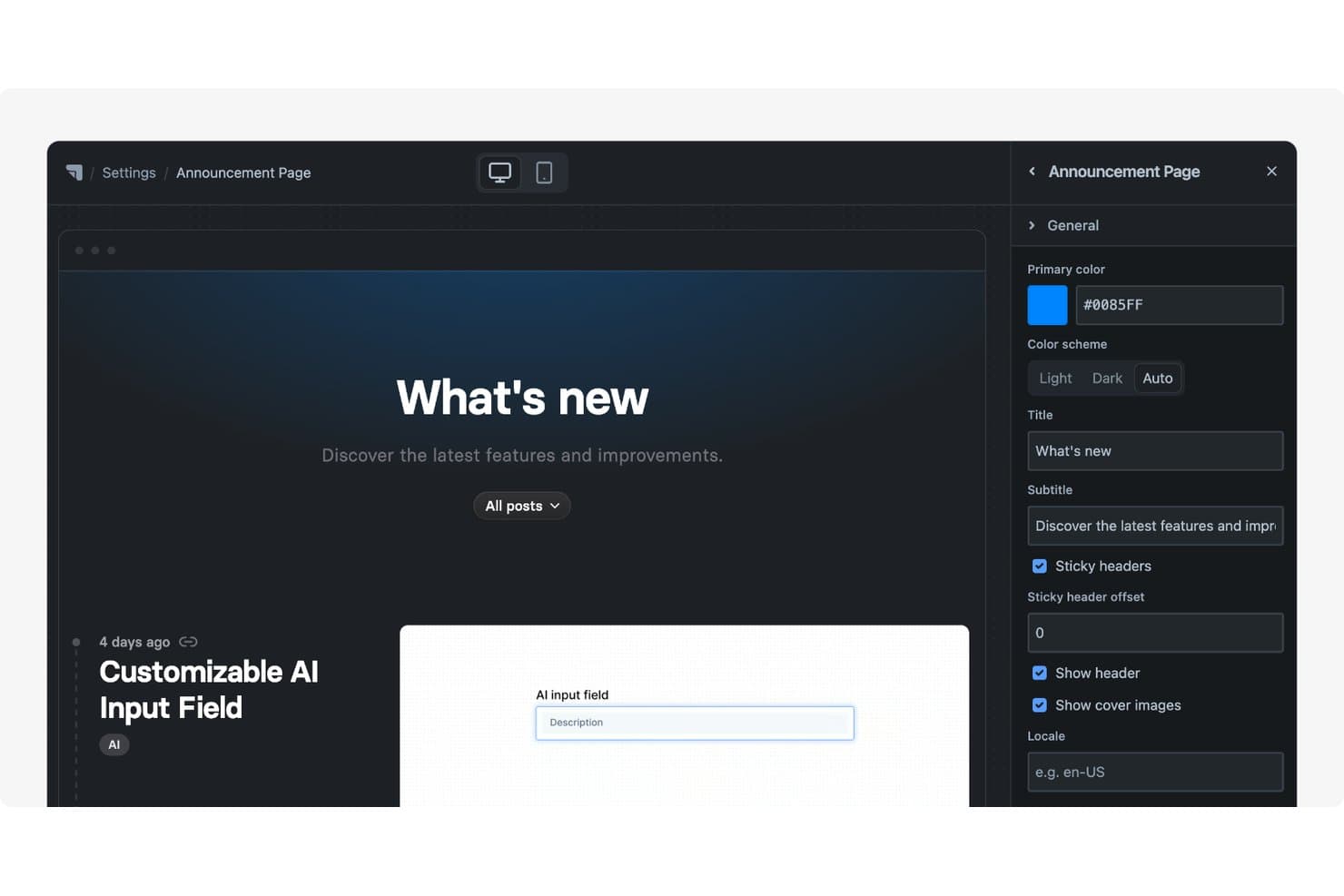
Released offers a customizable Announcement Page with editable title, subtitle, color scheme, and header settings via a side panel. Released is a product management platform for teams that want to turn Jira work into customer-facing roadmaps, share product plans, and align stakeholders without replacing their existing delivery workflow.
Who Is Released Best For?
Product managers and product teams that use Jira and need to publish live, customer-facing roadmaps.
Why Released Is a Good ProductPlan Alternative
I picked Released because it’s best for publishing live Jira-based roadmaps. My team can turn Jira work into customer-facing roadmaps and share product plans while keeping Jira as our delivery source of truth. Stakeholders see current progress without requiring product managers to maintain a separate roadmap manually.
Released Key Features
- Customer feedback portal: Collect ideas, votes, and comments through public or private spaces.
- AI release notes: Draft release notes from completed Jira tickets.
- Branded changelog: Publish searchable product updates on your domain.
- Portal embedding: Add roadmaps, changelogs, or feedback forms to websites and docs.
Released Integrations
Released is built for Jira and offers integrations with Slack, Framer, Webflow, and Confluence, including a native Scroll Sites for Confluence integration. It also supports GitHub pull-request tracking and API-based custom connections.
Pros and Cons
Pros:
- AI drafts release notes from tickets
- Feedback conversations link directly to Jira tasks
- Live roadmaps reuse existing Jira work
Cons:
- Fewer strategic prioritization tools than ProductPlan
- Requires Jira for delivery source data
Learn more about Released: Best for mid-sized to large tech companies
- Free demo available
- Pricing upon request
Visit WebsiteCustomer Rating:4.5/5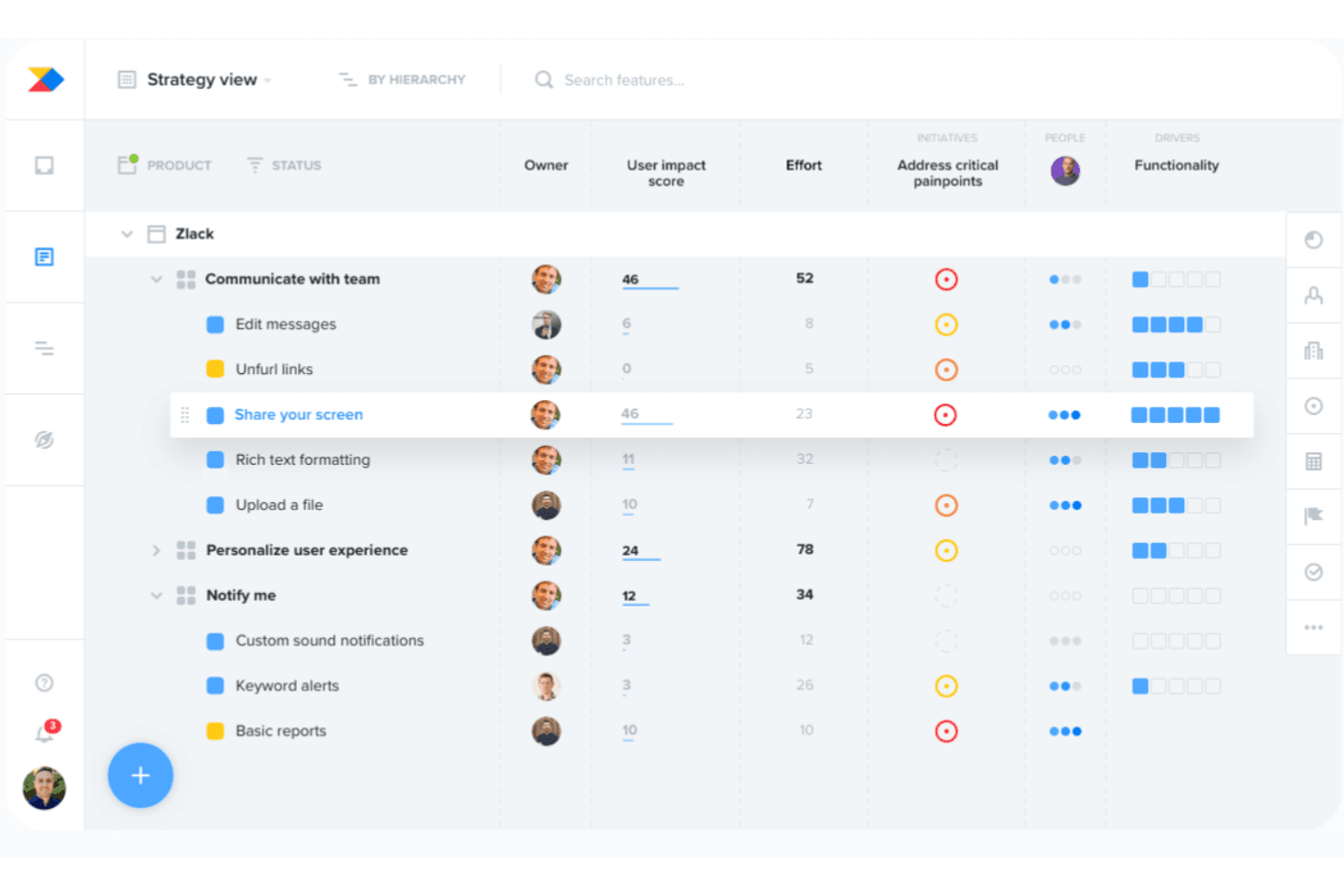
Productboard aligns development with customer needs using AI-driven prioritization. Productboard is a product management platform for mid-sized to large tech companies that connects customer insights, prioritization, and roadmaps to help product teams align decisions with business goals.
Who Is Productboard Best For?
Productboard suits product managers at mid-sized and large tech companies who need shared insight, prioritization, and roadmap planning.
Why Productboard Is a Good ProductPlan Alternative
I picked Productboard because it connects customer insights, prioritization, and roadmaps in one product management platform. My team can link customer feedback to product decisions, then align roadmap priorities with business goals. It’s especially suited to mid-sized to large tech companies managing complex product portfolios.
Productboard Key Features
- Product hierarchy: Organize products, components, and features in nested structures.
- Timeline views: Display initiatives, features, and releases across flexible timelines.
- Dependency mapping: Visualize relationships and dependencies between planned items.
- Jira integration: Sync product plans with Jira issues and delivery workflows.
Productboard Integrations
Productboard integrates with Jira to connect product plans with engineering issues and delivery workflows.
Pros and Cons
Pros:
- Supports portfolio-level roadmap planning
- Links insights directly to prioritized features
- Centralizes customer feedback into product decisions
Cons:
- Some workflows feel rigid for teams
- Requires substantial configuration before broad adoption
Learn more about Productboard: 3Best for scoring features against strategic goals
Aha!
- 30-day free trial + free demo available
- From $9/user/month
Visit WebsiteCustomer Rating:4.4/5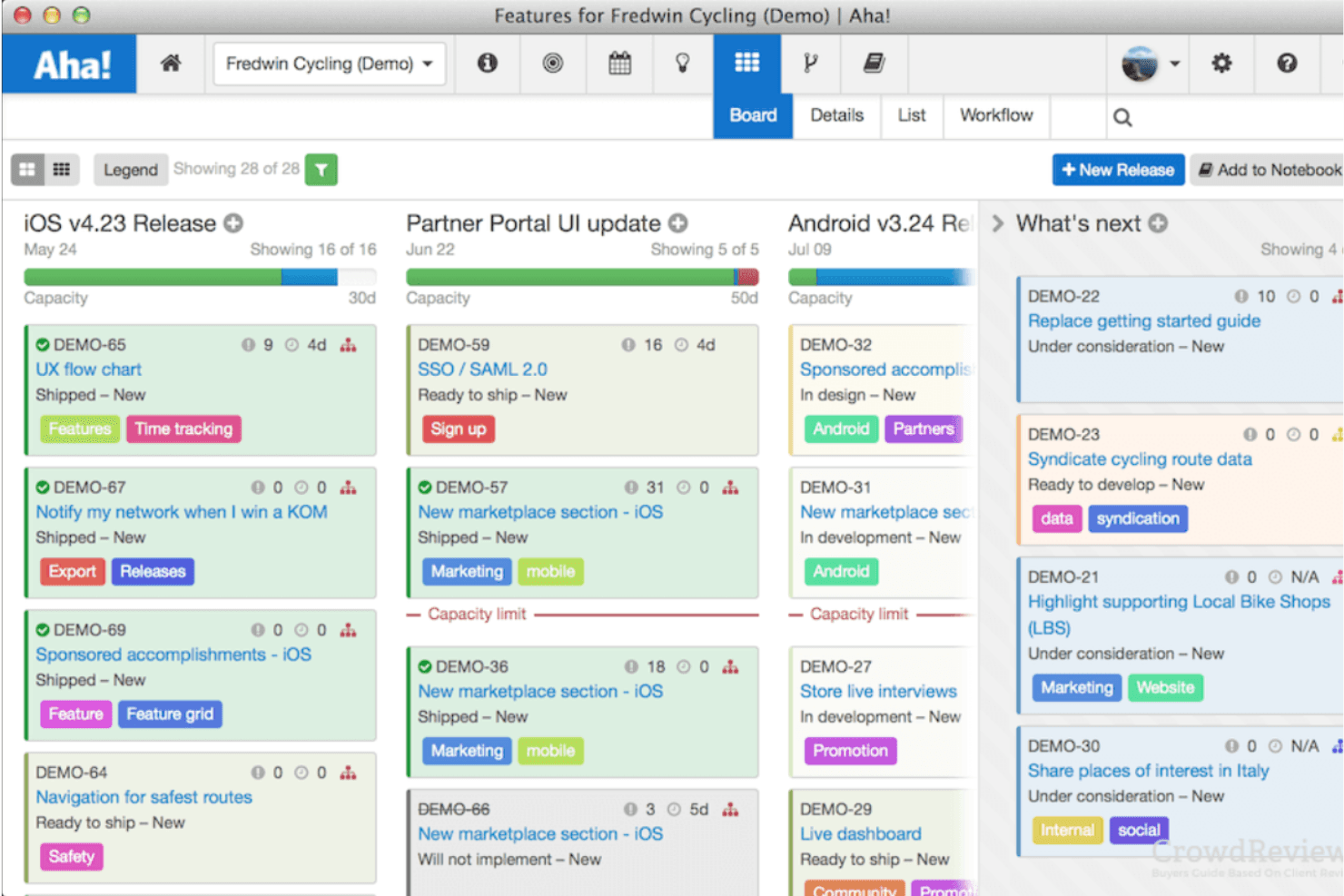
Aha! helps prioritize projects with scorecards and strategy roadmaps. Aha! is product roadmapping software for product managers who need to connect customer needs, business priorities, and delivery plans while keeping stakeholders aligned.
Who Is Aha! Best For?
Aha! suits product managers who need to evaluate feature ideas against strategic goals and align stakeholders around roadmap decisions.
Why Aha! Is a Good ProductPlan Alternative
I picked Aha! because I can score feature ideas against strategic goals using custom scorecards. I use its initiatives and strategic models to connect roadmap items with company objectives, then compare competing requests during prioritization. That makes it useful when a team must explain why one feature outranks another.
Aha! Key Features
- Roadmap views: Display plans in timeline, pivot, Gantt, or swimlane formats.
- Release planning: Group features into releases with dates, milestones, and capacity.
- Dependency tracking: Link related work items and monitor delivery dependencies.
- Customer feedback portal: Collect, organize, and share customer ideas with contributors.
Aha! Integrations
Aha! offers 65+ integrations across its products, including Jira, Azure DevOps, GitHub, Salesforce, Slack, Microsoft Teams, Zendesk, Asana, and Trello, plus Zapier. It also provides the Aha! API for custom integrations.
Pros and Cons
Pros:
- Offers multiple roadmap presentation formats
- Connects initiatives with company objectives
- Scores features against strategic goals
Cons:
- Configuration takes time before launch
- Navigation feels dense for new users
Learn more about Aha!: Best for small to medium-sized product teams
- 14-day free trial + free demo available
- Pricing upon request
Visit WebsiteCustomer Rating:4.2/5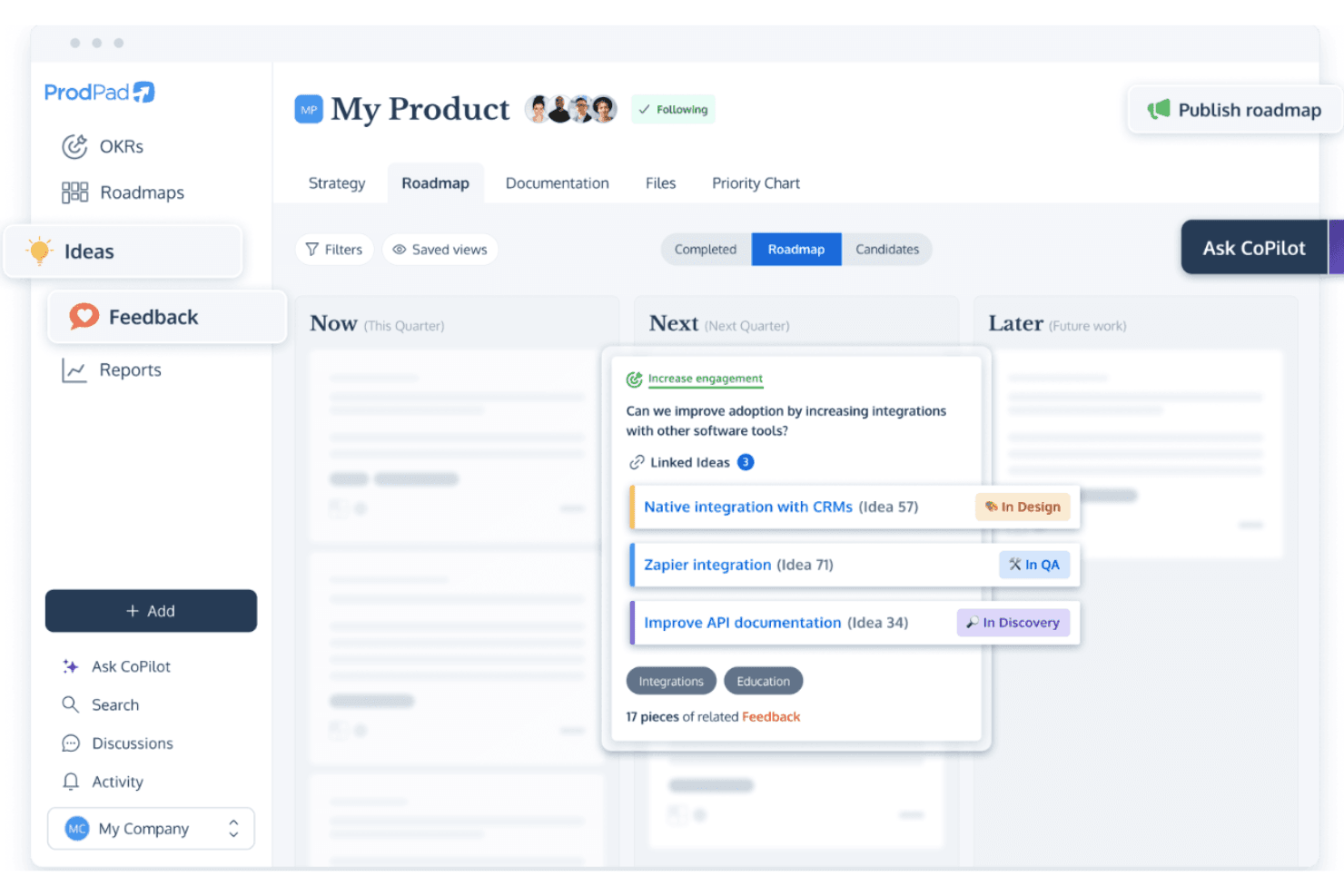
ProdPad supports flexible roadmaps and idea management for Agile planning. ProdPad is a product management and roadmapping platform for small to medium-sized teams that connects customer feedback, prioritization, product discovery, and delivery planning in one workspace.
Who Is ProdPad Best For?
Product managers at growing companies who need to connect customer insight, product discovery, prioritization, and delivery planning.
Why ProdPad Is a Good ProductPlan Alternative
I picked ProdPad because it connects customer feedback, product discovery, prioritization, and delivery planning in one workspace. For small to medium-sized product teams, my team can turn customer insights into prioritized roadmap decisions, then connect those decisions to delivery plans. That keeps discovery evidence visible as roadmap priorities change.
ProdPad Key Features
- Roadmap views: Switch between timeline, list, and swimlane formats.
- Custom fields: Add structured fields to capture product details.
- Dependencies: Map relationships between roadmap items.
- Integrations: Connect ProdPad with delivery tools such as Jira.
ProdPad Integrations
ProdPad integrates with Jira to connect product planning and roadmap decisions with delivery work.
Pros and Cons
Pros:
- Multiple roadmap views support stakeholder communication
- Discovery artifacts inform prioritization discussions
- Customer feedback links directly to roadmap decisions
Cons:
- Reporting options may require additional setup
- Delivery planning feels lighter than execution suites
Learn more about ProdPad: Best for customer feedback collection
- Free plan available
- From $79/month (billed annually)
Visit WebsiteCustomer Rating:4.6/5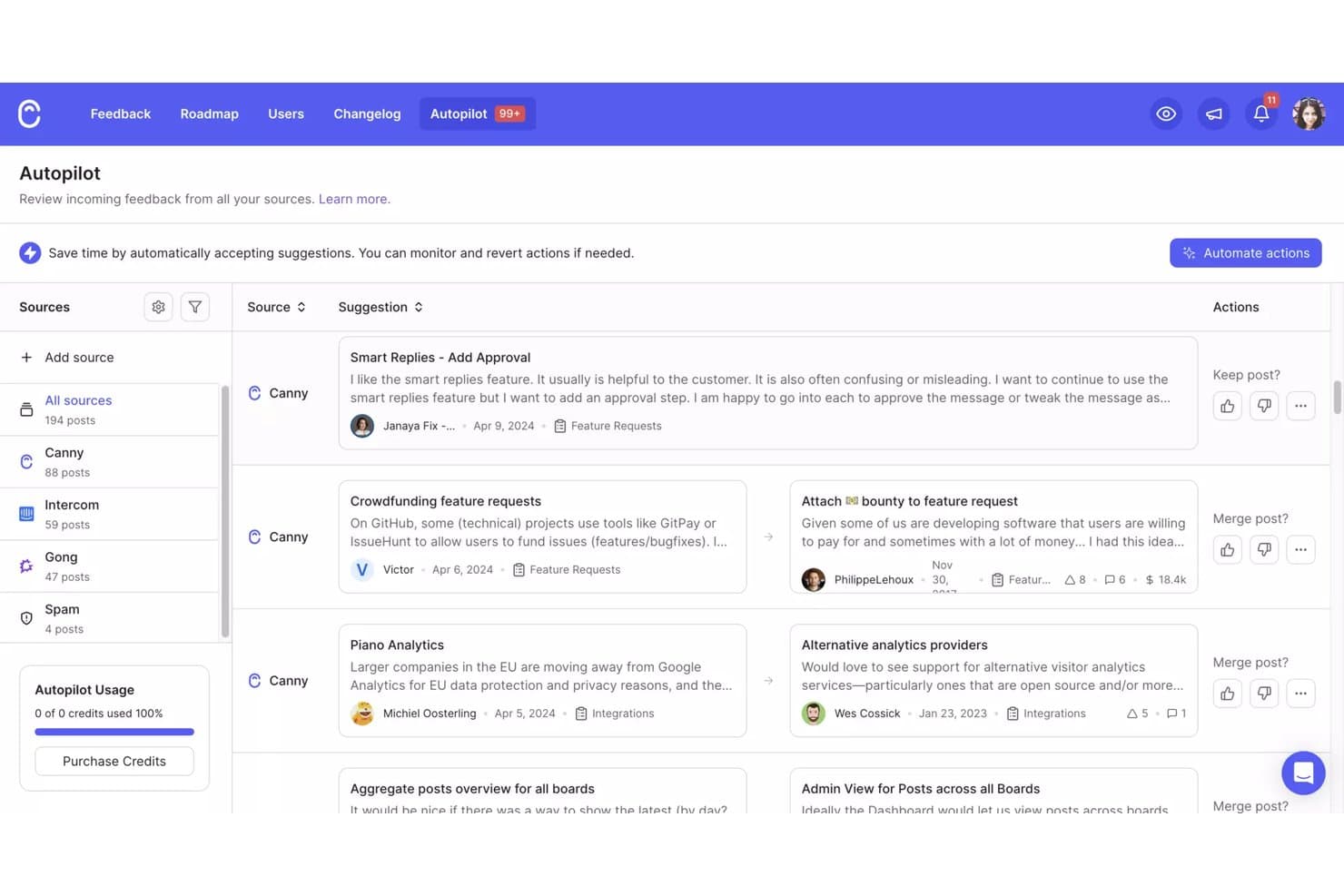
Canny's Autopilot consolidates feedback from multiple sources for review. Canny is a product management platform for teams that need to organize product input, prioritize roadmap decisions, and keep customers and stakeholders aligned on what comes next.
Who Is Canny Best For?
Product teams at growing SaaS companies can use Canny to centralize customer requests, identify recurring needs, and inform roadmap decisions.
Why Canny Is a Good ProductPlan Alternative
I picked Canny because I use its feedback boards and voting to capture customer requests, group recurring needs, and quantify demand. I also connect validated requests to roadmap updates and changelog posts, so customers can see how their input shapes product decisions. This makes Canny a strong ProductPlan alternative when customer feedback drives prioritization.
Canny Key Features
- Custom fields: Add structured details to feedback entries.
- Custom statuses: Define workflow stages for request evaluation.
- User segmentation: Filter feedback by customer attributes.
- Integrations: Connect Canny with tools such as Slack and Jira.
Canny Integrations
Canny offers 50+ integrations, including Jira Cloud, Linear, GitHub, ClickUp, Asana, Azure DevOps Services, Slack, Salesforce, HubSpot, and Intercom. It provides an API for custom integrations and connects with Zapier.
Pros and Cons
Pros:
- Segments demand by customer attributes
- Links customer feedback to roadmap updates
- Centralizes requests with public voting
Cons:
- Advanced reporting requires more manual analysis
- Roadmap views feel secondary to feedback management
Learn more about Canny: Best for highly customizable workflow-based planning
- Free plan available; 14-day free trial
- From $9/user/month (billed annually)
Visit WebsiteCustomer Rating:4.6/5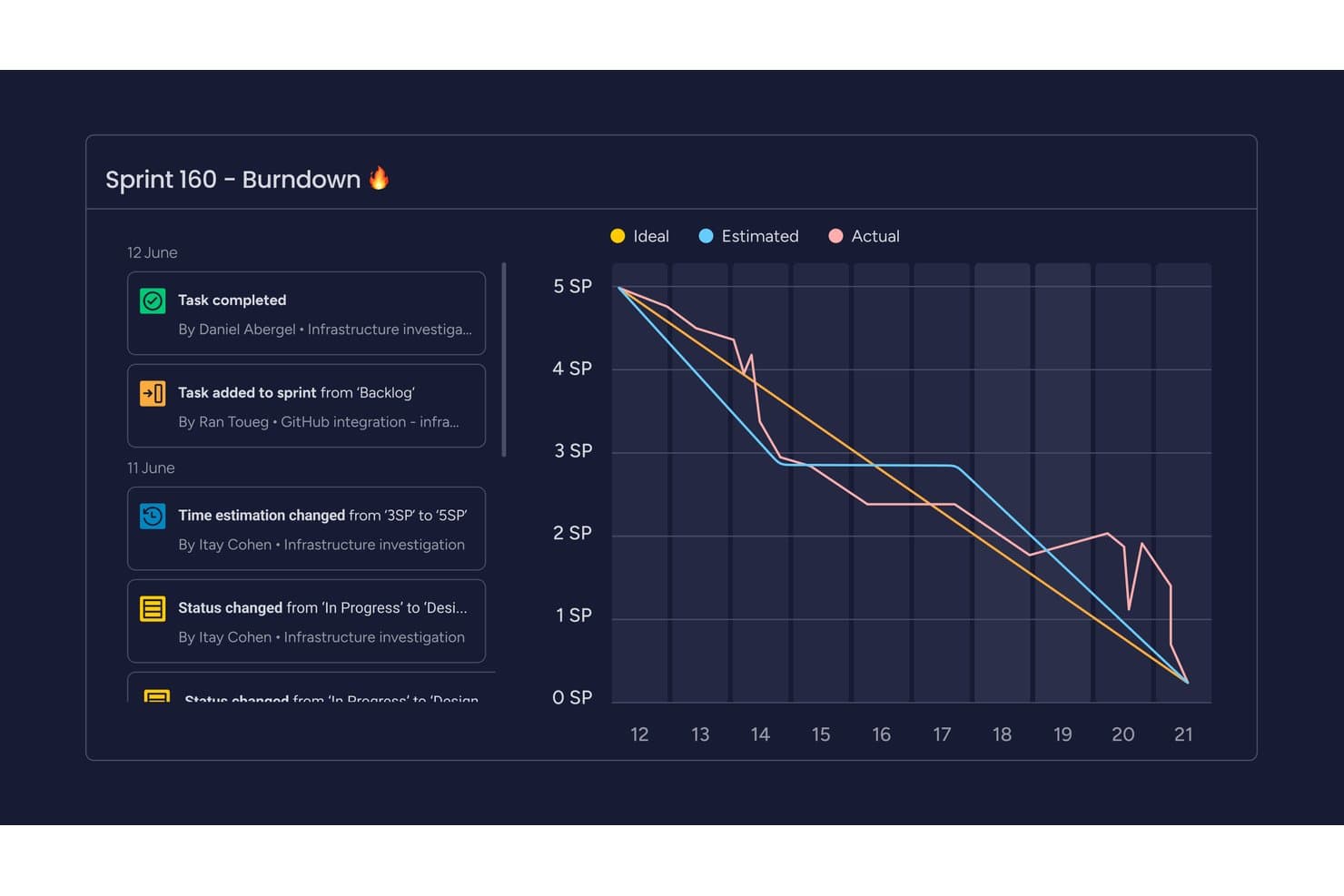
monday AI Workspace tracks sprint progress with a visual burndown chart. monday AI Workspace is a flexible work management platform for product teams that need to connect roadmaps, customer feedback, delivery plans, and cross-functional priorities in one place.
Who Is monday AI Workspace Best For?
Product operations teams that need customizable workflows for managing intake, prioritization, launches, and cross-functional dependencies.
Why monday AI Workspace Is a Good ProductPlan Alternative
I picked monday AI Workspace because its highly customizable workflow-based planning adapts to product operations work. I use connected boards to tie customer feedback, roadmaps, delivery plans, and cross-functional dependencies together. Custom intake and prioritization workflows also help my team move requests from discovery through launch without losing context.
monday AI Workspace Key Features
- Timeline and Gantt views: Visualize roadmap dates, milestones, and delivery schedules.
- Dependency tracking: Link items and flag blocked follow-up work.
- Workload view: See team capacity across roadmap initiatives.
- Dashboards: Monitor project progress with customizable widgets.
monday AI Workspace Integrations
monday AI Workspace offers 850+ integrations and apps, including Slack, Salesforce, HubSpot, Google Calendar, Microsoft Teams, GitHub, GitLab, Zendesk, and Mailchimp. It supports Zapier, marketplace integrations, and a GraphQL API for custom integrations.
Pros and Cons
Pros:
- Dashboards surface progress across product initiatives
- Flexible views support cross-functional roadmap planning
- Custom boards connect discovery through delivery
Cons:
- Task breakdowns can limit complex product work
- Less purpose-built for product portfolio planning
Learn more about monday AI Workspace: Best for portfolio-level AI-driven roadmapping
- Free demo available
- Pricing upon request
Visit WebsiteCustomer Rating:4.8/5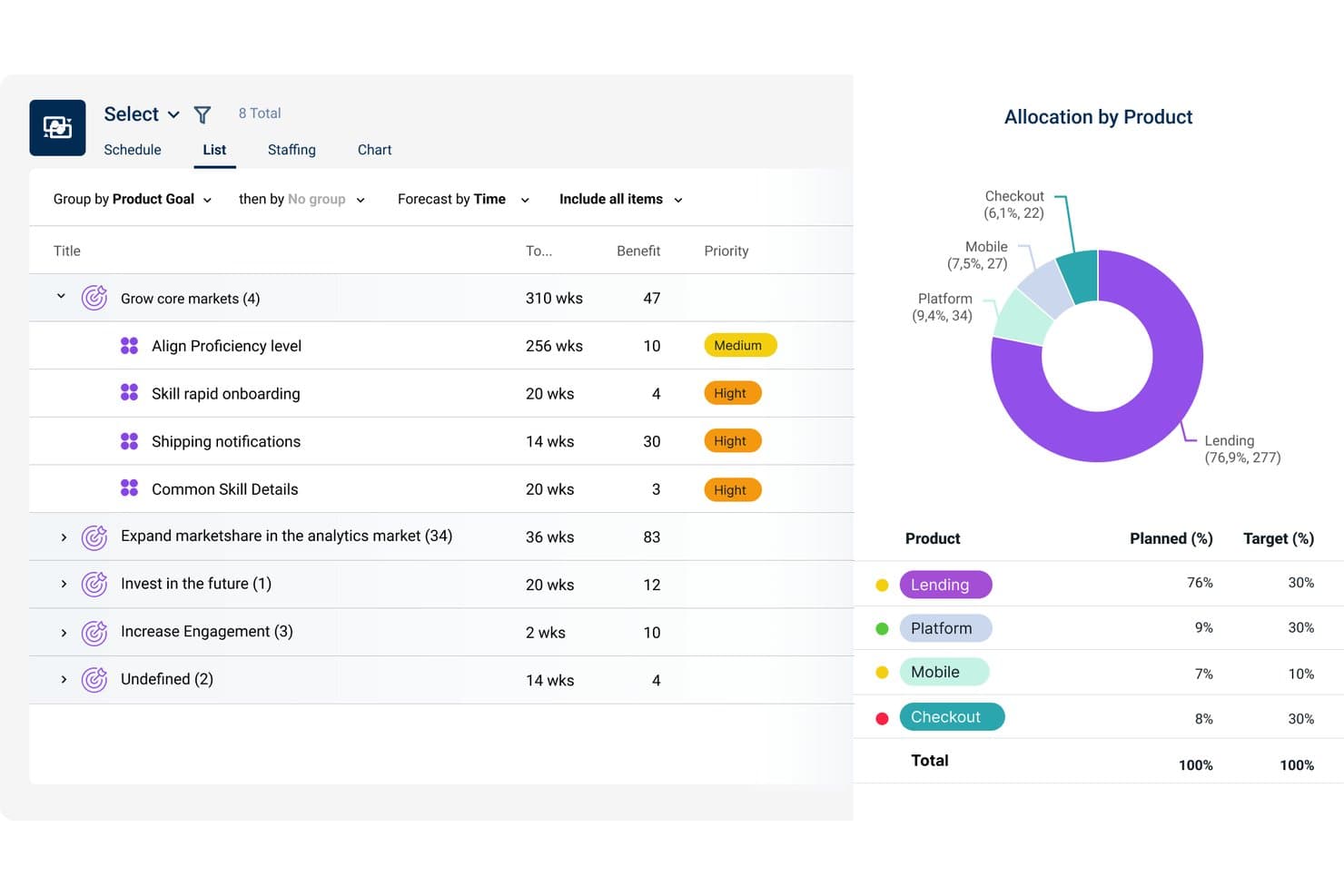
Dragonboat visualizes product allocation vs. targets across portfolios. Dragonboat is a product portfolio management platform for product leaders who need to connect strategy, prioritization, capacity planning, and delivery across teams while keeping business outcomes in view.
Who Is Dragonboat Best For?
Product portfolio leaders at scaling organizations can use Dragonboat to connect strategic priorities, capacity planning, and delivery across teams.
Why Dragonboat Is a Good ProductPlan Alternative
I picked Dragonboat because its portfolio-level AI-driven roadmapping connects strategic priorities with capacity planning and delivery. I use it to compare initiatives across teams, balance available capacity, and keep roadmaps tied to measurable business outcomes. That makes it useful when ProductPlan alternatives must support portfolio decisions beyond feature timelines.
Dragonboat Key Features
- Jira and Azure DevOps integrations: Sync roadmap items with delivery tools.
- Dependency mapping: Visualize relationships between initiatives and work items.
- Custom roadmap views: Filter and group roadmaps by selected fields.
- Progress tracking: Monitor initiative status, milestones, and delivery updates.
Dragonboat Integrations
Dragonboat supports integrations with Jira and Azure DevOps, allowing teams to sync roadmap items with delivery tools.
Pros and Cons
Pros:
- Flexible views preserve alignment across stakeholder audiences
- Scenario planning ties priorities to measurable outcomes
- Portfolio rollups connect roadmaps with resource needs
Cons:
- External view sharing takes extra effort
- Capacity planning struggles with shifting team sizes
Learn more about Dragonboat: Best for custom prioritization scoring models
- Free demo available
- Pricing upon request
Visit WebsiteCustomer Rating:4.4/5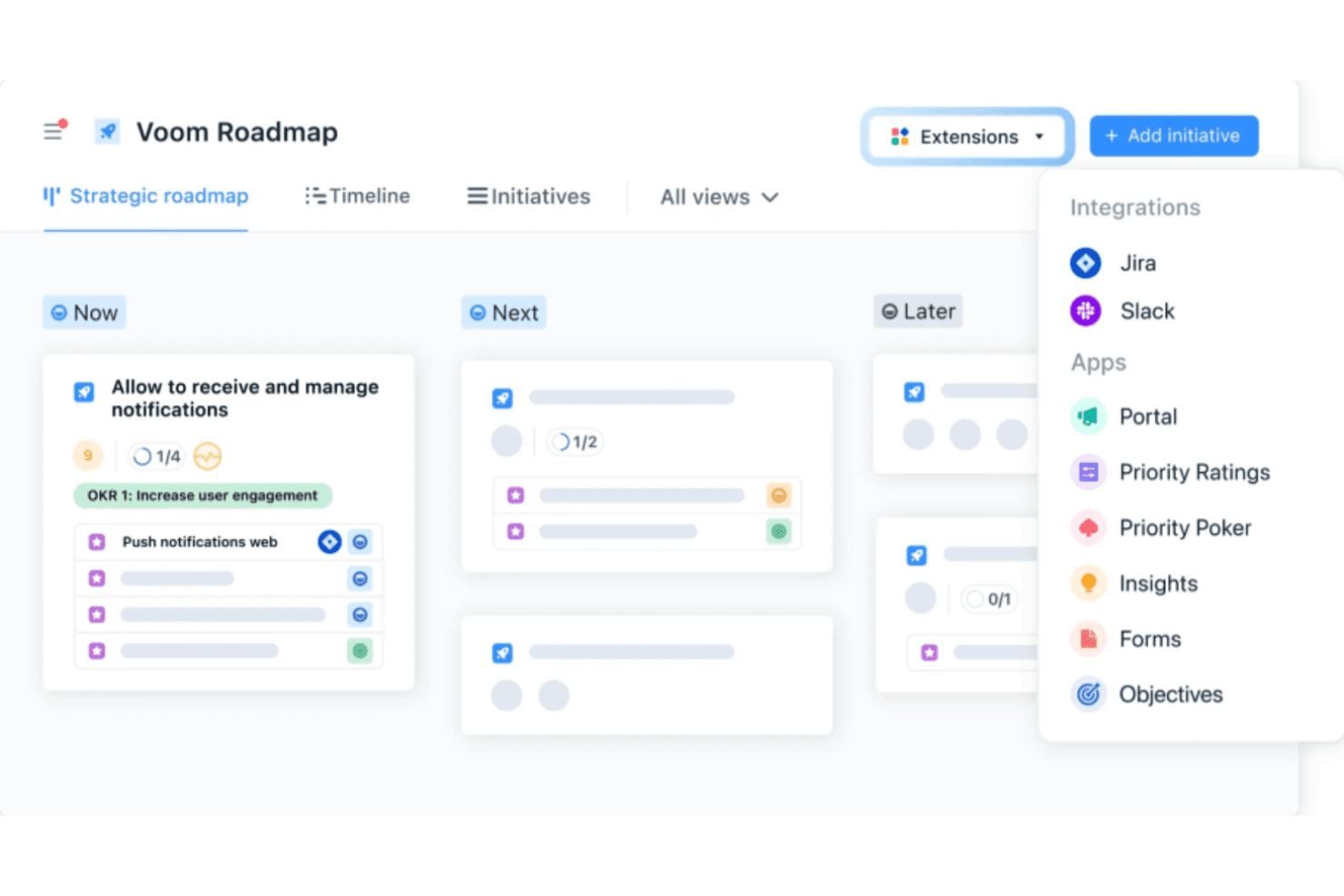
airfocus uses AI for prioritization and offers customizable frameworks for flexible roadmaps. airfocus is a product management platform for teams that need to connect product strategy, customer feedback, roadmaps, and delivery decisions in one workspace.
Who Is airfocus Best For?
Product managers and product operations teams that need configurable scoring models to compare initiatives against strategy, customer value, and delivery constraints.
Why airfocus Is a Good ProductPlan Alternative
I picked airfocus because it’s built for custom prioritization scoring models. I use weighted criteria, custom fields, and prioritization views to compare initiatives against customer value, strategic fit, and delivery effort. My team can adjust scoring models as product goals change, then use the results to support roadmap tradeoffs.
airfocus Key Features
- Feedback portal: Collect and organize customer feedback in one shared space.
- Product roadmaps: Build visual roadmaps with flexible timeline views.
- Dependency management: Link related work items to track delivery dependencies.
- Integrations: Connect airfocus with tools such as Jira, Azure DevOps, and Slack.
airfocus Integrations
airfocus integrates with Jira, Azure DevOps, and Slack.
Pros and Cons
Pros:
- Dependency tracking supports roadmap tradeoffs
- Customer feedback connects directly to prioritization
- Weighted scoring models compare initiatives consistently
Cons:
- Initial scoring setup requires considerable configuration
- Timeline editing feels awkward at scale
 Best for linking customer feedback to roadmap items
- 14-day free trial + free demo available
- From $24/user/month
Visit WebsiteCustomer Rating:4.4/5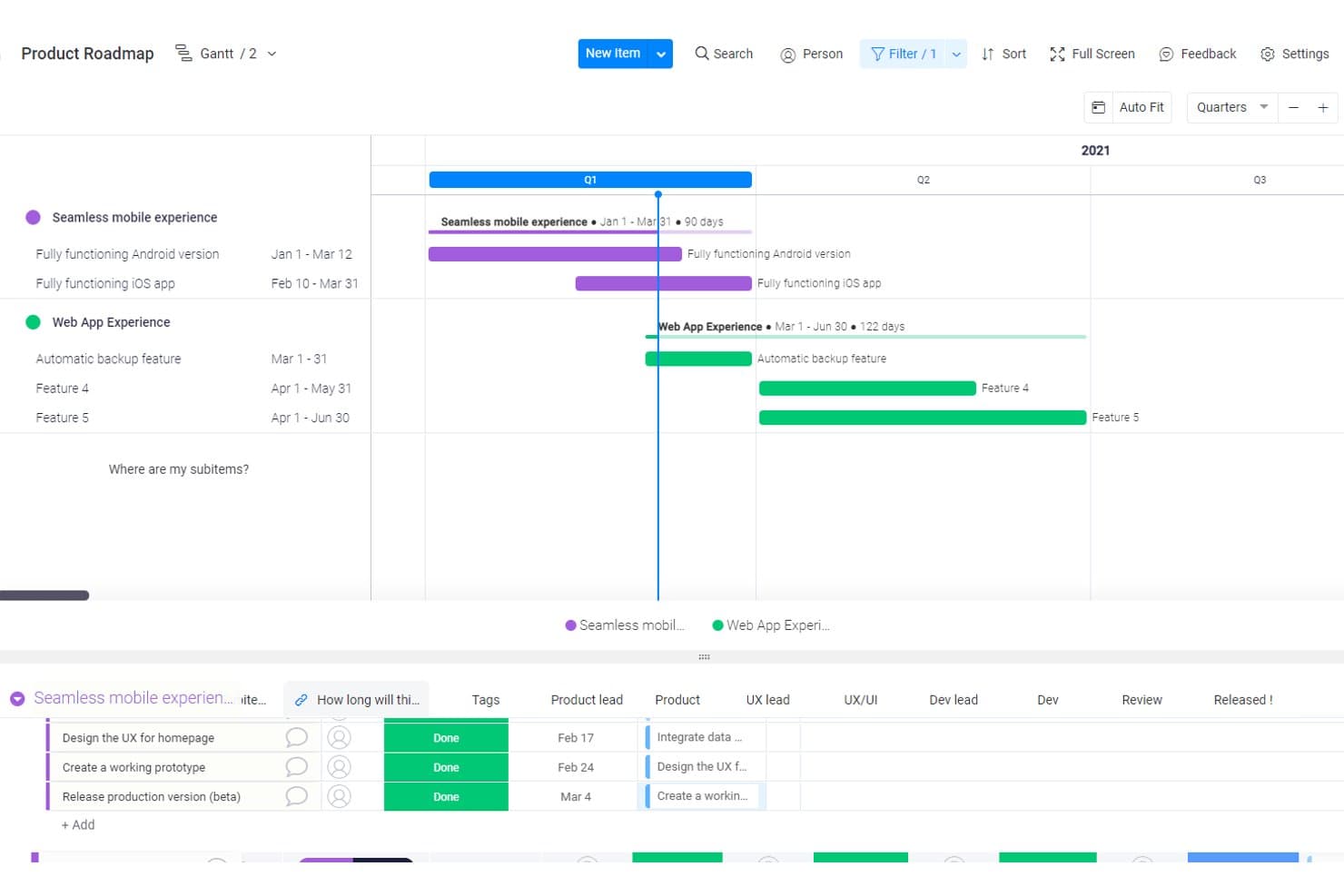
Craft.io visualizes product roadmaps with Gantt timelines and subitems. Craft.io is product roadmapping software for product teams that need to connect strategy, prioritization, portfolio planning, and cross-functional collaboration in one workspace.
Who Is Craft.io Best For?
Craft.io suits product teams that need to connect customer feedback with prioritization decisions and roadmap planning.
Why Craft.io Is a Good ProductPlan Alternative
I picked Craft.io because it’s built for linking customer feedback to roadmap items. I use its feedback repository, customer insights, and prioritization tools to connect requests with product initiatives. My team can then show why a roadmap item matters, such as tying repeated onboarding complaints to a planned workflow improvement.
Craft.io Key Features
- Roadmap views: Build timeline, swimlane, and portfolio roadmaps.
- Product hierarchy: Organize products, capabilities, features, and releases.
- Dependency mapping: Link related work items and surface delivery dependencies.
- Jira integration: Sync roadmap items with Jira delivery data.
Craft.io Integrations
Craft.io offers a native Jira integration that syncs roadmap items with delivery data. It also supports custom integrations through an API.
Pros and Cons
Pros:
- Supports dependency and capacity planning
- Links initiatives to strategic outcomes
- Connects feedback directly to roadmap items
Cons:
- Feedback quality depends on consistent tagging
- Feature breadth can overwhelm new users
Learn more about Craft.io: Best for feedback-to-roadmap alignment
- 14-day free trial + free demo available
- From $10/user/month
Visit WebsiteCustomer Rating:4/5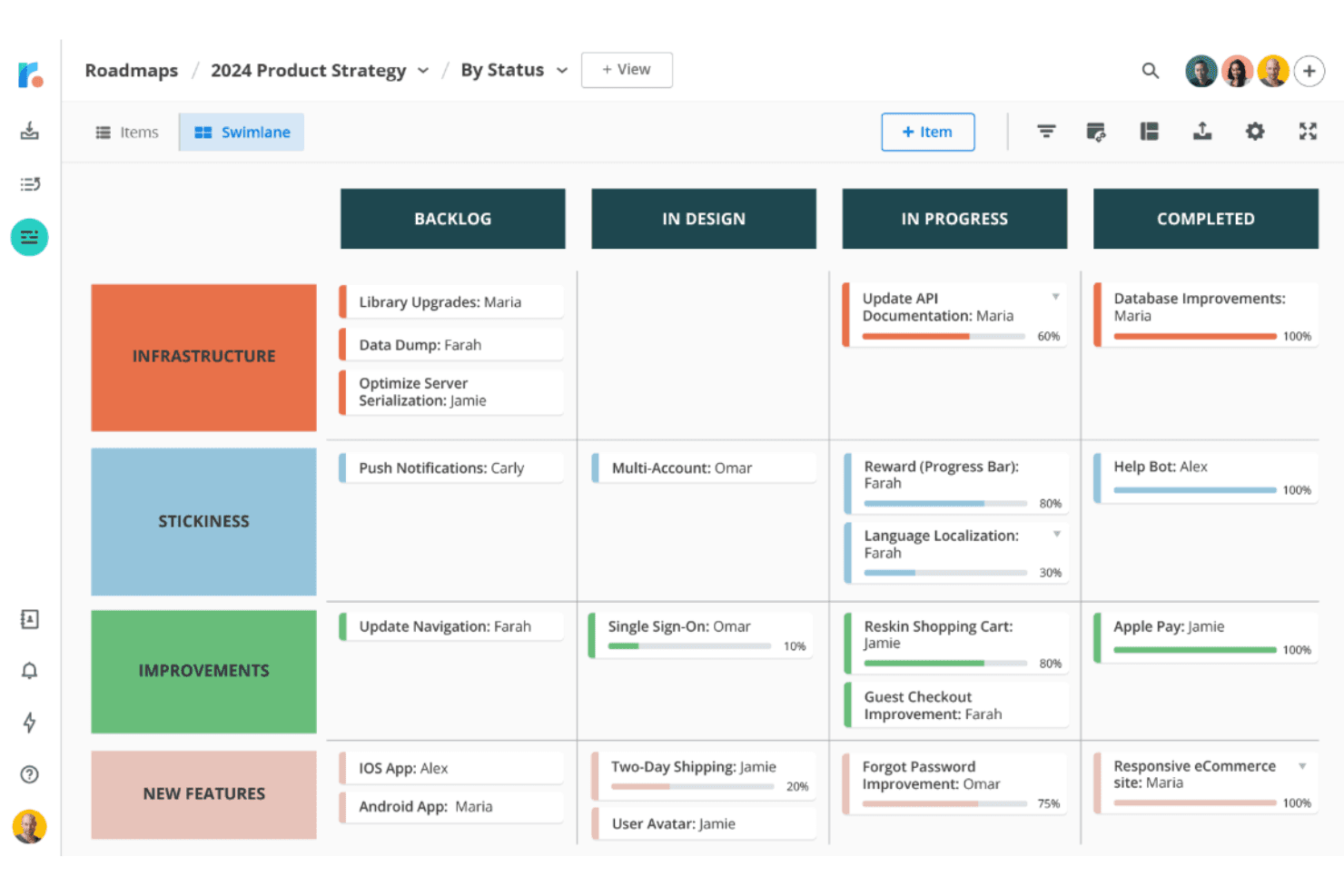
Roadmunk integrates user feedback into clear, customer-driven roadmaps. Tempo Roadmapping Software helps product teams build visual, shareable roadmaps that connect strategic priorities with delivery plans and keep stakeholders aligned across complex portfolios.
Who Is Tempo Roadmapping Software Best For?
Product managers who need to turn customer feedback into prioritized, shareable roadmaps will find it a good fit.
Why Tempo Roadmapping Software Is a Good ProductPlan Alternative
I picked Tempo Roadmapping Software because its feedback-to-roadmap alignment connects customer input with product priorities. I use customer feedback to shape visual, shareable roadmaps, then link strategic priorities to delivery plans. This gives stakeholders a clear view of why an initiative matters and where it fits across the portfolio.
Tempo Roadmapping Software Key Features
- Timeline views : Display initiatives across time-based roadmap formats.
- Custom fields : Add metadata for themes, owners, status, and priorities.
- Dependency mapping : Link initiatives to show delivery relationships.
- Jira integration : Sync roadmap items with Jira projects and issues.
Tempo Roadmapping Software Integrations
Tempo Roadmapping Software offers native integrations with Jira, Azure DevOps, GitHub, GitLab, Asana, Shortcut, and Trello. Its Jira and Azure DevOps integrations support syncing roadmap items with delivery work, including dates and custom fields.
Pros and Cons
Pros:
- Shareable roadmaps clarify stakeholder alignment
- Multiple roadmap views from one dataset
- Feedback-linked idea prioritization
Cons:
- Some reviewers report occasional glitches
- No native sprint planning periods
Learn more about Tempo Roadmapping Software:
Andre alternativer til ProductPlan
Her er noen flere alternativer til ProductPlan som ikke kom med på kortlisten min, men som likevel er verdt å se nærmere på:
- 11IBM TargetprocessBest for SAFe and enterprise portfolio planning
- 12Jira Product DiscoveryBest for Jira-native roadmap planning
- 13SmartsheetBest for spreadsheet-to-roadmap team alignment
- 14UservoiceBest for revenue-weighted feedback prioritization
- 15ClickUpBest for all-in-one work and roadmap planning
- 16AirtableBest for building roadmaps around custom data models
- 17PendoBest for revenue-weighted feedback-to-roadmap planning
- 18LinearBest for execution-linked roadmap timelines
- 19FeaturebaseBest for closing the loop on feature requests
- 20SleekplanBest for feedback-driven roadmap planning
How I Evaluate a ProductPlan Alternative
I split my evaluation into three parts: core functionality, standout features, and beyond features. First, I check whether a tool can build visual timeline roadmaps and score initiatives against strategic criteria—these carry the most weight. Then I look for AI-assisted roadmapping or customer segmentation on feedback, plus how pricing and onboarding hold up for cross-functional teams.
Core Functionality (Table Stakes For This List)
When I'm selecting tools for my list, I score each one on a scale from 0 (does not offer the functionality) to 5 (excels in this area) for each core functionality listed below. I then convert the total into a percentage to help assess each tool's overall fit, with extra weight on any functionalities I’ve deemed essential.
- Roadmap Visualization (Essential): I look for editable timeline roadmaps that show initiatives, features, dependencies, and releases clearly.
- Prioritization Framework (Essential): Scoring should compare value, effort, impact, or strategic fit across competing initiatives.
- Stakeholder Sharing: I assess polished presentation views, shareable links, exports, and audience-specific visibility controls.
- Development Integrations: I check for two-way connections with tools such as Jira, linking roadmap items to delivery work.
- Roadmap Views: Multiple timeline, swimlane, kanban, or portfolio views should support planning and communication needs.
- Feedback Collection: I look for categorized requests, voting, and links between customer ideas and prioritized roadmap items.
Once I have a list of tools that meet the criteria, I consider what sets each platform apart.
Differentiating Factors (What Sets Vendors Apart)
Here's how I compare and contrast different vendors:
Standout Features
I look for AI-assisted roadmapping that goes beyond buzzwords—tools like Productboard and Aha! let you draft release notes or suggest priority scores, which saves hours before a stakeholder review. Customer segmentation on feedback is equally valuable; I evaluate whether a tool can weight requests by account value or plan tier so your highest-impact customers shape the backlog. I also check for capacity planning that flags over-commitment before sprint planning, not after.
Beyond Features
Pricing models matter here. Per-editor pricing with free viewer seats lets you share roadmaps across sales, support, and leadership without inflating costs—something per-seat models punish. I also evaluate onboarding speed, since a tool that offers templates and migration support gets a team productive in days, not weeks. For growing orgs, I check whether role-based permissions and hierarchical roadmaps scale from one team to a full portfolio without reworking your setup.
Funksjoner i ProductPlan: Sammenlign alternative veikartverktøy
Her er noen av de viktigste funksjonene i ProductPlan, slik at du kan sammenligne hva alternative løsninger tilbyr:
- Visuell oppretting av veikart: Utform intuitive veikart som gir teamet ditt en overordnet oversikt over produktstrategien, slik at selv komplekse planer blir tilgjengelige og handlingsrettede.
- Dra-og-slipp-grensesnitt: Juster enkelt oppgaver eller tidslinjer, slik at teamet ditt kan jobbe smidig og tilpasse seg endrede prioriteringer uten å miste fokus.
- Fremdrift for milepæler: Hold teamet samkjørt ved å følge fremdriften mot kritiske mål visuelt, slik at tidsfrister overholdes effektivt. Har du et begrenset budsjett? Se listen vår over de beste gratis verktøyene for milepælsoppfølging.
- Prioriteringsverktøy: Vurder og ranger initiativer for å fokusere på det som betyr mest, slik at du kan ta bedre beslutninger for produktets videre utvikling.
- Samarbeidsområde: Legg til rette for samarbeid i sanntid med teammedlemmer og interessenter i et skybasert veikartverktøy, slik at alle er samkjørte og stiller seg bak planene.
- Delbare veikart: Styrk kommunikasjonen på tvers av avdelinger eller med eksterne partnere ved å dele tydelige og konsise veikart som gjenspeiler de nyeste planene dine.
- Malsamling: Benytt forhåndsutformede maler som følger anbefalte fremgangsmåter, slik at du sparer tid og hjelper teamet med å ta i bruk veikartstiler som er utprøvd i bransjen.
- Tilpassede felt: Tilpass veikartene til teamets unike behov ved å legge til bestemte datapunkter eller måltall, og skap en skreddersydd opplevelse for arbeidsflyten innen produktstyring.
- Sikker tilgangskontroll: Beskytt sensitiv informasjon med tilpassbare tillatelser, slik at bare de riktige teammedlemmene får tilgang til eller kan redigere veikart.
- API-tilgang: Integrer ProductPlan med dine foretrukne SaaS-verktøy, for eksempel Atlassian-produkter, for å synkronisere oppgaver, restanser, produktprioritering og sprinter, slik at du får en sømløs opplevelse av produktstyringen.
- Varsler: Hold deg oppdatert med varsler som holder teamet informert om endringer, slik at alle arbeider ut fra det nyeste veikartet.
- Gantt-diagrammer og Kanban-tavler: Visualiser oppgaver og fremdrift i flere formater, slik at teamene får fleksibilitet til å arbeide på den måten som passer dem best.