

Gli strumenti gratuiti per wireframe sono piattaforme software che consentono di creare schizzi digitali e prototipi per siti web o app senza dover pagare, tramite un piano gratuito o una prova gratuita. Se stai cercando modi per delineare i flussi degli utenti, condividere idee visivamente o collaborare ai progetti nelle fasi iniziali senza vincoli di budget, hai bisogno di opzioni che non nascondano le funzionalità essenziali dietro un abbonamento a pagamento. Questo elenco ti aiuterà a confrontare rapidamente i migliori strumenti gratuiti per wireframe disponibili nel 2026, così potrai scegliere quello più adatto al flusso di lavoro del tuo team, al suo stile di collaborazione e alle esigenze del progetto.
Perché fidarsi dei nostri consigli sui software
6,700+
Reviews
20
Industry experts
16+
Evaluation factors
14
Years
Il nostro team testa e recensisce software dal 2012. In quanto product manager noi stessi, sappiamo quanto sia difficile — e importante — scegliere il software giusto.
Per questa guida, abbiamo valutato gli strumenti attraverso test pratici e ricerche indipendenti, assegnando un punteggio agli strumenti in base ai nostri criteri di selezione.
Le nostre recensioni riflettono il nostro giudizio editoriale umano, non un discorso di vendita.
Revisori esperti:
- Andrew LumbySenior TPM
- Cristiano ValimSenior UI/UX Lead


Tabella comparativa degli strumenti gratuiti per wireframe
Sebbene tutti gli strumenti per wireframe presenti nel mio elenco offrano opzioni gratuite, dispongono anche di piani a pagamento qualora desiderassi effettuare un passaggio a un piano superiore:
| Tool | Best For | Trial Info | Price | ||
|---|---|---|---|---|---|
| 1 | Ideale per la collaborazione in tempo reale del team | Piano gratuito disponibile | Da $16/utente/mese (fatturato annualmente) | Website | |
| 2 | Ideale per la generazione di wireframe tramite IA | Piano gratuito disponibile | Da $11/editor/mese (fatturato annualmente) | Website | |
| 3 | Ideale per sessioni di brainstorming a bassa fedeltà | Prova gratuita di 14 giorni | A partire da $16/utente/mese (con fatturazione annuale) | Website | |
| 4 | Ideale per ideazione rapida con pacchetti UI | Piano gratuito disponibile | Da $14/utente/mese (fatturato annualmente) | Website | |
| 5 | Ideale per design pronti per l'accessibilità | Piano gratuito + prova gratuita di 14 giorni disponibile | A partire da $29/utente/mese (con fatturazione annuale) | Website | |
| 6 | Ideale per la collaborazione su una tela infinita | Piano gratuito + prova gratuita di 14 giorni disponibile | A partire da $8/utente/mese (con fatturazione annuale) | Website | |
| 7 | Ideale per anteprime interattive ad alta fedeltà | Prova gratuita + piano gratuito disponibile | A partire da $10/mese (fatturato annualmente) | Website | |
| 8 | Ideale per workflow di design open-source | Piano gratuito e prova gratuita di 14 giorni disponibili | Da $7/utente/mese | Website | |
| 9 | Ideale per flussi di progettazione nativi di macOS | Prova gratuita di 30 giorni | Da $12/utente/mese (con fatturazione annuale) | Website | |
| 10 | Ideale per la logica e le condizioni avanzate | Versione di prova gratuita di 30 giorni | A partire da $29/utente/mese (con fatturazione annuale) | Website |


Recensioni dei migliori strumenti gratuiti per wireframe
Di seguito trovi le mie descrizioni dettagliate degli strumenti gratuiti per wireframe inclusi nel mio elenco. Le mie recensioni offrono una panoramica approfondita delle funzionalità, dei casi d’uso migliori e dei prezzi di ciascuno strumento, per aiutarti a trovare quello più adatto a te.
 Ideale per la collaborazione in tempo reale del team
- Piano gratuito disponibile
- Da $16/utente/mese (fatturato annualmente)
Visit WebsiteCustomer Rating:4.7/5
La tela di Figma mostra progetti UI multi-schermo con un pannello dei livelli, risorse e anteprime di prototipi. Figma è una piattaforma di design basata su cloud creata per i team che devono collaborare su wireframe e prototipi in tempo reale. È particolarmente utile per i team di prodotto, i designer UX e le agenzie che desiderano co-creare, commentare e iterare insieme da qualsiasi luogo. Se stai cercando uno strumento di wireframing gratuito che supporti il lavoro di squadra dal vivo e il feedback, Figma si distingue per le sue funzionalità di modifica multiplayer e condivisione.
Per chi è più adatto Figma?
Figma è particolarmente adatto a team di prodotto e UX distribuiti che devono collaborare su wireframe e prototipi in tempo reale.
Perché ho scelto Figma
Ho scelto Figma perché le sue funzionalità di collaborazione in tempo reale lo distinguono dagli altri strumenti di wireframing gratuiti. Con la modifica multiplayer, posso vedere immediatamente le modifiche dei colleghi e lasciare commenti direttamente sui wireframe, il che rende il feedback di gruppo e l'iterazione molto più veloce. La piattaforma basata su browser significa che tutti possono accedere e contribuire ai progetti senza preoccuparsi di installare software o di incompatibilità tra le versioni. Per i team che devono co-creare wireframe e prototipi insieme, gli strumenti di collaborazione dal vivo e di condivisione di Figma sono difficili da superare.
Caratteristiche principali di Figma
Altre funzionalità di Figma lo rendono una scelta versatile per il wireframing gratuito oltre alla collaborazione in tempo reale:
- Librerie di componenti: Crea e riutilizza elementi di design su più progetti per mantenere coerenza nei wireframe.
- Auto layout: Disponi e ridimensiona automaticamente frame e oggetti per design di wireframe reattivi.
- Cronologia delle versioni: Accedi e ripristina versioni precedenti dei tuoi wireframe in qualsiasi momento.
- Supporto per plugin: Estendi le funzionalità con un'ampia gamma di plugin ufficiali e della community per wireframing e prototipazione.
Integrazioni di Figma
Le integrazioni includono Slack, Jira, Microsoft Teams, Notion, Asana, Dropbox, Trello, Confluence, GitLab e altro ancora.
Cosa è gratuito?
Figma offre un piano gratuito a vita che include file personali illimitati, collaboratori illimitati su file pubblici e fino a tre file Figma e tre file FigJam per workspace. Il piano gratuito limita la collaborazione del team a due editor e non include funzionalità avanzate di prototipazione o amministrazione
Pros and Cons
Pros:
- Collaborazione in tempo reale con editor illimitati
- Numerosi template di wireframe gratuiti disponibili
- Ampia libreria di plugin per funzionalità aggiuntive
Cons:
- Nessuna modifica offline nella versione gratuita
- Le funzionalità avanzate di prototipazione richiedono il piano a pagamento
 Ideale per la generazione di wireframe tramite IA
- Piano gratuito disponibile
- Da $11/editor/mese (fatturato annualmente)
Visit WebsiteCustomer Rating:4.8/5
La dashboard di Visily mostra wireframe generati dall’IA con template, componenti e layout modificabili. Se vuoi velocizzare la creazione di wireframe con l’AI, vale la pena dare un’occhiata a Visily. Questo strumento è pensato per team di prodotto e non-designer che hanno bisogno di trasformare velocemente idee, screenshot o prompt testuali in wireframe. Le funzionalità potenziate dall’intelligenza artificiale di Visily aiutano i team a passare dal concetto al wireframe interattivo con il minimo sforzo manuale.
Per chi è più indicato Visily?
Visily è particolarmente adatto a product manager, founder e team nelle prime fasi che desiderano generare wireframe da testo, immagini o schizzi utilizzando l’intelligenza artificiale.
Perché ho scelto Visily
Ho scelto Visily perché la sua generazione di wireframe tramite IA si distingue per i team che vogliono passare dall’idea al wireframe con pochissimo lavoro manuale. Lo strumento ti permette di creare wireframe da prompt testuali, screenshot o anche da schizzi a mano, il che è particolarmente utile per i non-designer o per i team che lavorano rapidamente. Apprezzo inoltre che l’AI di Visily possa suggerire layout e componenti UI in base ai tuoi input, aiutandoti così a partire anche se non sai bene da dove iniziare. Queste caratteristiche lo rendono una scelta pratica per chiunque cerchi uno strumento gratuito di wireframing che sfrutti l’IA per accelerare il processo di design.
Principali funzionalità di Visily
Altre funzionalità rendono Visily un’opzione flessibile per i team che esplorano strumenti gratuiti di wireframing:
- Strumenti di collaborazione: Più utenti possono commentare, modificare e condividere feedback in tempo reale nello stesso progetto.
- Libreria di template: Accesso a un’ampia gamma di template predefiniti per wireframe web e mobile.
- Gestione dei componenti: Organizza, riutilizza e personalizza i componenti UI tra diversi progetti.
- Opzioni di esportazione: Esporta wireframe in PNG, PDF o link condivisibili per una revisione facile con gli stakeholder.
Integrazioni Visily
Le integrazioni includono Figma, Notion, Slack, Jira, Google SSO, Okta e altro ancora.
Cosa è gratuito?
Visily offre un piano gratuito per sempre con progetti illimitati e collaboratori illimitati. Alcune funzionalità avanzate, opzioni di esportazione e supporto prioritario sono disponibili solo nei piani a pagamento.
Pros and Cons
Pros:
- L’IA genera wireframe da testo o immagini
- Ampia libreria di template per web e mobile
- Gestione e riutilizzo dei componenti integrati
Cons:
- A volte l’IA interpreta erroneamente input complessi
- Opzioni di wireframing per app mobile meno complete
Learn more about Visily: Ideale per sessioni di brainstorming a bassa fedeltà
- Prova gratuita di 14 giorni
- A partire da $16/utente/mese (con fatturazione annuale)
Visit WebsiteCustomer Rating:4.3/5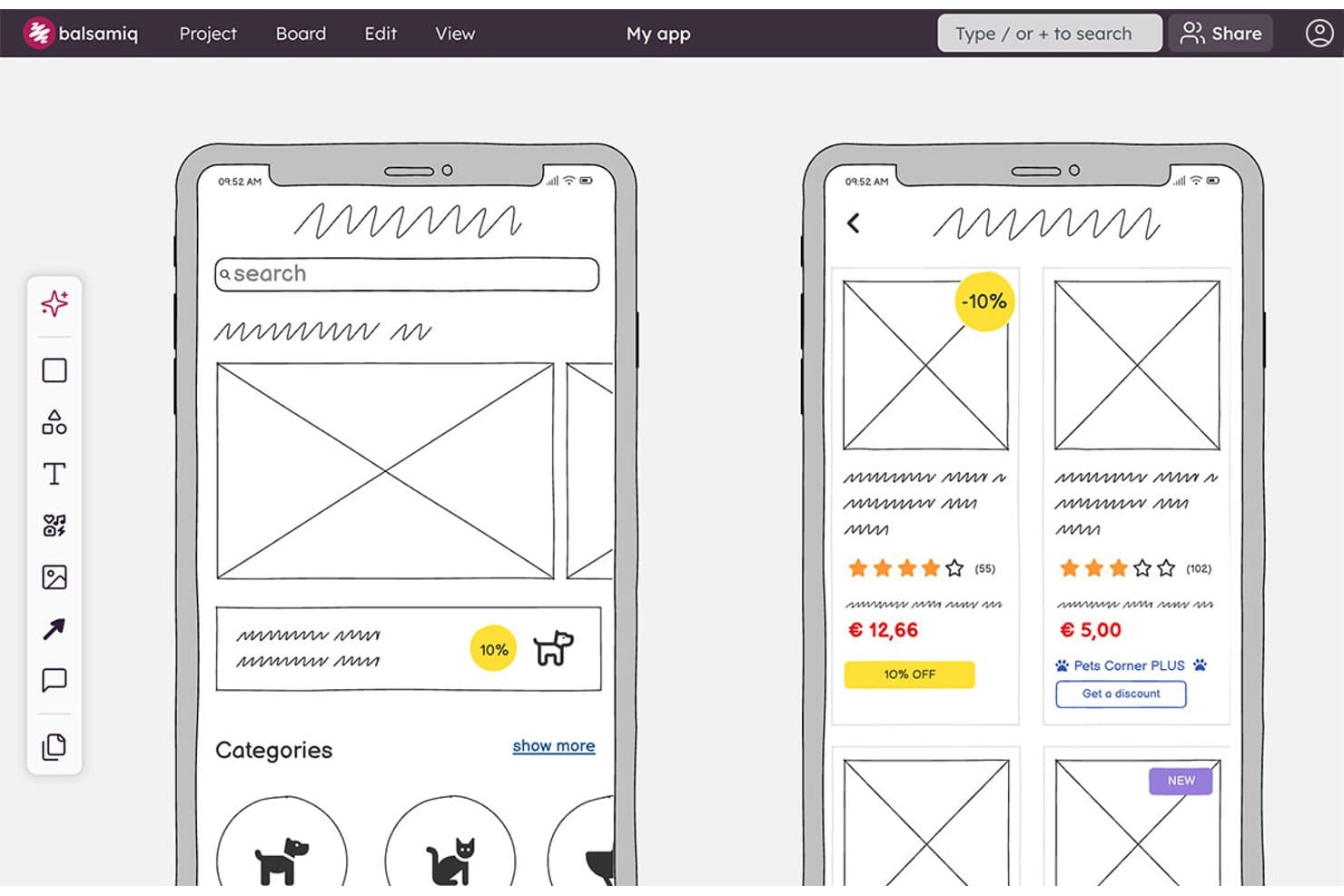
Balsamiq consente agli utenti di creare wireframe di schermate di app mobili con schede prodotto e categorie. Balsamiq è uno strumento per la creazione di wireframe e prototipi basato su browser, con una libreria di elementi UI volutamente a bassa fedeltà, componenti riutilizzabili, collegamenti cliccabili tra tavole, generazione di wireframe tramite IA, collaborazione in tempo reale e integrazioni con Jira e Confluence.
Per chi è più adatto Balsamiq?
Responsabili di prodotto e designer UX/UI che devono allineare gli stakeholder su concetti preliminari prima dello sviluppo.
Perché ho scelto Balsamiq
Ho scelto Balsamiq tra i migliori strumenti gratuiti per la creazione di wireframe perché mantiene il brainstorming concentrato sulla struttura invece che sulla rifinitura visiva. La sua libreria di elementi UI volutamente a bassa fedeltà, le guide intelligenti e le griglie da 1 a 12 colonne mi aiutano a delineare rapidamente i flussi prima dello sviluppo. Uso anche le alternative per confrontare i concetti su un'unica tavola, mentre l'IA può trasformare un prompt o uno schizzo disegnato a mano in un wireframe modificabile.
Funzionalità principali di Balsamiq
- Collegamenti per la revisione pubblica: Condividi le tavole con utenti non autenticati che possono commentare.
- Commenti organizzati in discussioni: Aggiungi risposte, reazioni e discussioni di commenti risolte.
- App per Jira e Confluence: Incorpora tavole e prototipi modificabili negli spazi di lavoro collegati.
- Formati di esportazione: Scarica i progetti come PDF interattivi, PNG o file BMPR.
Integrazioni di Balsamiq
Balsamiq offre integrazioni native con Jira e Confluence, comprese le app Cloud e Data Center. Supporta inoltre l'incorporamento in Notion e la condivisione dei progetti tramite Slack.
Cosa è gratuito?
Balsamiq offre una prova gratuita di 14 giorni, senza bisogno di una carta di credito. Non dispone di un piano gratuito permanente e, successivamente, sarà necessario un abbonamento a pagamento per continuare a modificare i progetti.
Pros and Cons
Pros:
- Bassa fedeltà intenzionale per un brainstorming mirato
- I flussi cliccabili supportano la convalida iniziale dell'usabilità
- Gli stakeholder possono commentare senza account
Cons:
- Nessun piano gratuito permanente
- I componenti condivisi richiedono la duplicazione dei modelli
Learn more about Balsamiq: Ideale per ideazione rapida con pacchetti UI
- Piano gratuito disponibile
- Da $14/utente/mese (fatturato annualmente)
Visit WebsiteCustomer Rating:4.3/5
L'editor di MockFlow mostra componenti UI drag-and-drop, template e strumenti per la creazione di layout. Se hai bisogno di trasformare rapidamente idee in wireframe, MockFlow è pensato per velocità e flessibilità. I pacchetti UI unici della piattaforma permettono ai team di prodotto e ai designer di sostituire componenti pronti per diversi sistemi e stili. MockFlow è particolarmente adatto a chi desidera passare dalla fase di brainstorming ai concetti visivi senza perdere tempo nelle configurazioni iniziali.
Per Chi È Ideale MockFlow?
MockFlow è ideale per team di prodotto e designer UX che hanno bisogno di ideare e prototipare rapidamente utilizzando una vasta gamma di pacchetti UI predefiniti.
Perché Ho Scelto MockFlow
Ho scelto MockFlow perché le sue capacità di ideazione rapida sono eccezionali per i team che devono passare velocemente dal concetto al wireframe. I pacchetti UI della piattaforma permettono di cambiare immediatamente tra sistemi di design e tipi di dispositivo, rendendolo particolarmente utile per progetti multipiattaforma. Apprezzo anche gli strumenti di brainstorming e di creazione sitemap integrati che aiutano a strutturare le idee nelle fasi iniziali prima di dedicarsi ai wireframe dettagliati. Queste funzionalità rendono MockFlow una scelta eccellente per chi dà priorità a velocità e flessibilità nel suo workflow gratuito di wireframing.
Funzionalità Principali di MockFlow
Altre funzioni distintive di MockFlow utili per il wireframing gratuito includono:
- Cronologia delle versioni: Traccia e ripristina le versioni precedenti dei tuoi wireframe in qualsiasi momento.
- Strumenti di commento e feedback: Raccogli input dai collaboratori direttamente sui wireframe per iterazioni più rapide.
- Opzioni di esportazione: Scarica i wireframe in diversi formati, inclusi PNG, PDF e HTML.
- Condivisione dei wireframe: Condividi i progetti con membri del team o stakeholder tramite link sicuri e basati su permessi.
Integrazioni di MockFlow
Le integrazioni includono Trello, Slack, Microsoft Teams, Microsoft Office 365, Atlassian Jira, Atlassian Confluence, Google Docs, Google Meet, Figma e Visual Studio.
Cosa È Gratuito?
MockFlow offre un piano gratuito per sempre che consente l'utilizzo da parte di un utente e di un progetto alla volta. Alcune funzionalità avanzate, pacchetti UI e integrazioni sono disponibili solo con i piani a pagamento.
Pros and Cons
Pros:
- Ampia libreria di pacchetti UI per prototipazione veloce
- Strumenti di sitemap e flusso utente integrati
- Cronologia delle versioni inclusa nel piano gratuito
Cons:
- Il piano gratuito limita il numero di progetti
- Nessuna funzione avanzata di animazione o interazione
Learn more about MockFlow: Ideale per design pronti per l'accessibilità
- Piano gratuito + prova gratuita di 14 giorni disponibile
- A partire da $29/utente/mese (con fatturazione annuale)
Visit WebsiteCustomer Rating:4.2/5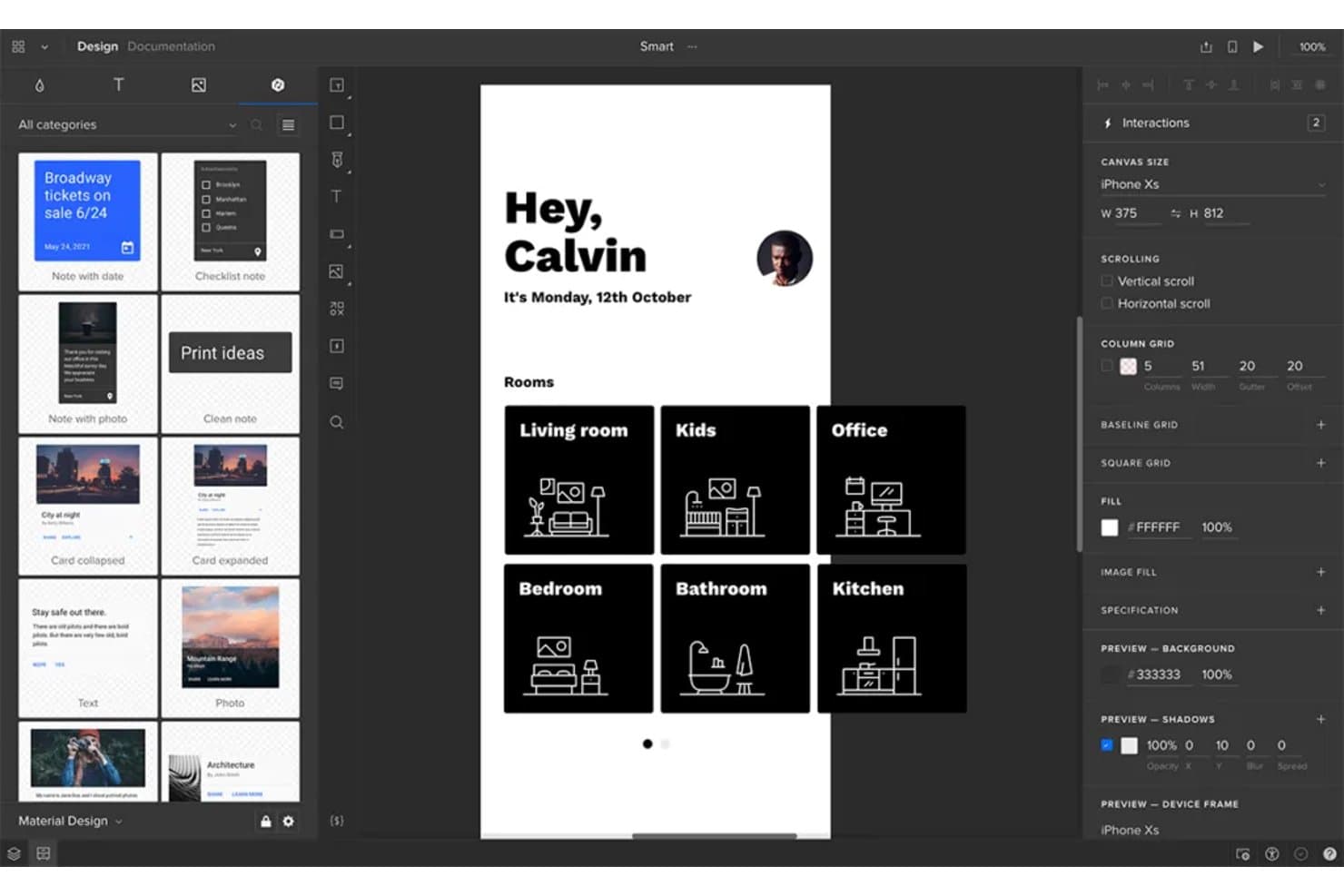
UXPin consente agli utenti di progettare e prototipare interattivamente wireframe per app mobili. UXPin è una piattaforma per la creazione di wireframe e la prototipazione interattiva, con griglie di layout, layout automatico, componenti riutilizzabili, flussi cliccabili, logica condizionale e rendering basato su HTML, CSS e JavaScript.
Per chi è più adatto UXPin?
UXPin è adatto ai designer UX/UI che hanno bisogno di prototipi accessibili e interattivi, in grado di collegare i primi wireframe a esperienze di prodotto realistiche.
Perché ho scelto UXPin
Ho scelto UXPin perché i suoi wireframe supportano i controlli di accessibilità prima dell'inizio dello sviluppo. Utilizzo il verificatore integrato del contrasto WCAG e il simulatore del daltonismo per individuare i problemi di visibilità, quindi convalido i flussi con controlli interattivi dei moduli e la logica condizionale.
Funzionalità principali di UXPin
- Griglie di layout: Utilizza griglie a colonne, di base e quadrate con margini e spaziature personalizzati.
- Layout automatico: Imposta direzione, spaziatura, imbottitura, allineamento, disposizione su più righe e regole di ridimensionamento.
- Componenti riutilizzabili: Crea componenti e condividi gli stili tra i progetti attraverso le librerie del team.
- Opzioni di esportazione: Esporta i progetti come PNG, PDF o HTML, con opzioni per mappe del sito e documentazione.
Integrazioni di UXPin
UXPin offre integrazioni native con Figma, Sketch, Jira Cloud, Slack e FullStory, oltre a collegamenti per gli sviluppatori tramite Git, Storybook e npm.
Cosa è gratuito?
UXPin offre una prova gratuita di 14 giorni con accesso a tutte le funzionalità e senza richiedere una carta di credito. Nella pagina dei prezzi attuale non è indicato un piano gratuito senza scadenza, quindi al termine della prova sarà necessario sottoscrivere un piano Core, Growth o Enterprise a pagamento.
Pros and Cons
Pros:
- Controlli integrati del contrasto WCAG e del daltonismo
- I controlli funzionali dei moduli consentono di convalidare tempestivamente i flussi
- Gli stakeholder possono effettuare revisioni senza creare account
Cons:
- L'interfaccia può risultare tecnica per gli utenti occasionali
- Il piano gratuito limita il lavoro continuativo sui progetti
Learn more about UXPin: 6Ideale per la collaborazione su una tela infinita
Miro
- Piano gratuito + prova gratuita di 14 giorni disponibile
- A partire da $8/utente/mese (con fatturazione annuale)
Visit WebsiteCustomer Rating:4.8/5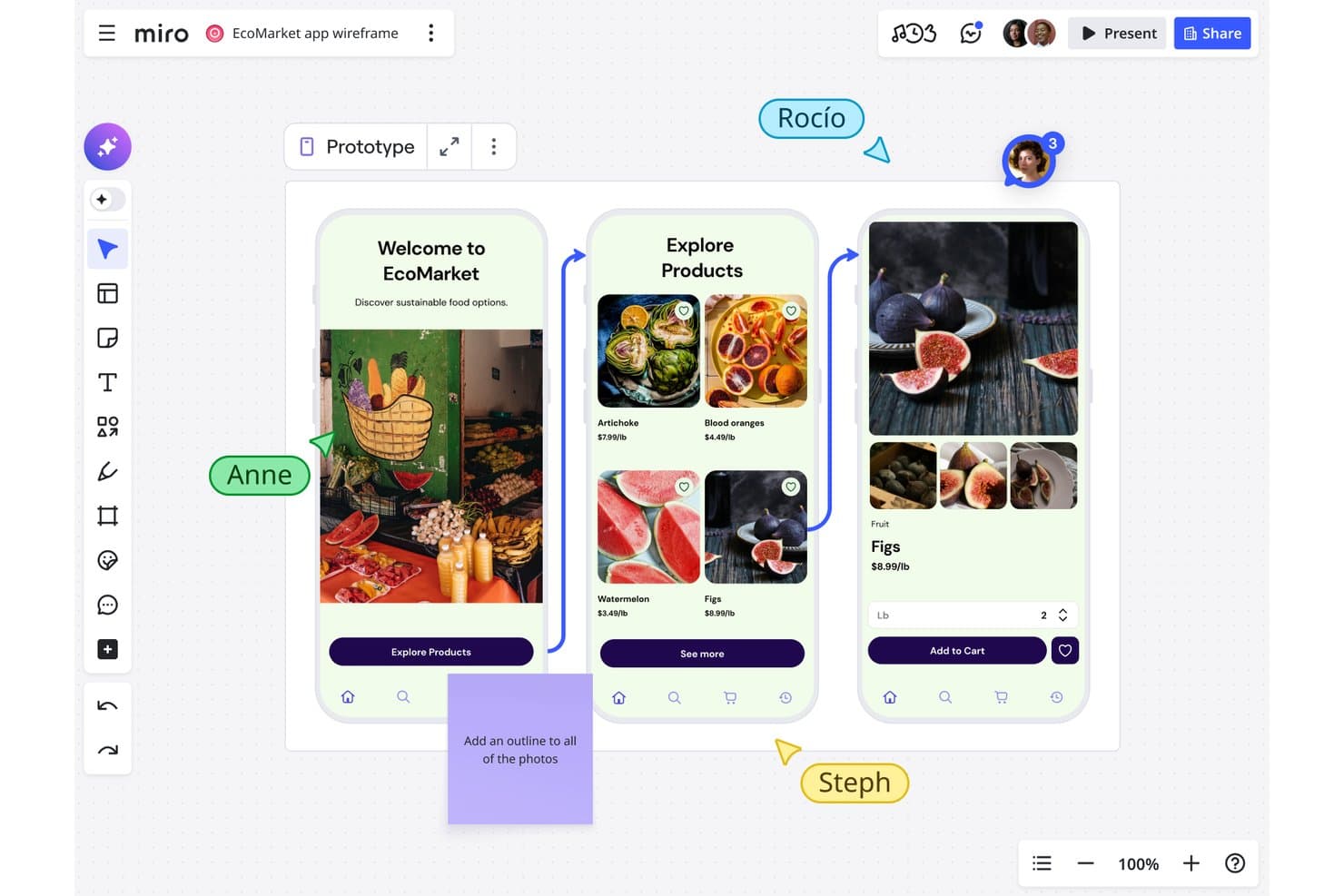
Miro consente agli utenti di creare collaborativamente wireframe dei flussi di app mobili in tempo reale. Miro è una piattaforma gratuita per la creazione di wireframe e la collaborazione visiva con una libreria di prototipazione, componenti dell'interfaccia utente trascinabili, modelli, collegamento degli oggetti e modifica collaborativa in tempo reale.
Per chi è più adatto Miro?
Miro è adatto ai product manager e ai team di startup che devono abbozzare idee, mappare i flussi degli utenti e collaborare su una tela infinita.
Perché ho scelto Miro
Ho scelto Miro perché la collaborazione su una tela infinita mantiene wireframe, flussi degli utenti, ricerche e mappe del percorso in un unico posto. Utilizzo la libreria di prototipazione gratuita per organizzare cornici dei dispositivi, componenti dell'interfaccia e icone in layout statici. I cursori in tempo reale, i commenti e la modalità di presentazione aiutano il mio team a esaminare le schermate con gli stakeholder, anche se i prototipi interattivi richiedono il piano Business.
Caratteristiche principali di Miro
- Collegamento degli oggetti: Collega gli oggetti a cornici, bacheche o URL esterni.
- Guide intelligenti: Allinea automaticamente gli oggetti e mantiene una spaziatura uniforme.
- Modelli per wireframe: Inizia con layout predefiniti per app, siti web e pagine di destinazione.
- App Griglia: Organizza i contenuti dell'interfaccia in griglie con un massimo di 2.500 celle.
Integrazioni di Miro
Miro offre oltre 250 integrazioni, tra cui Microsoft 365, Google Workspace, Slack, Adobe, Figma, Confluence, Jira e Notion. La sua API REST e i suoi SDK supportano integrazioni personalizzate.
Cosa è gratuito?
Miro offre un piano gratuito per sempre con membri del team illimitati e fino a tre bacheche modificabili. È disponibile anche una prova di 14 giorni, mentre le funzionalità avanzate richiedono un piano a pagamento.
Pros and Cons
Pros:
- La tela infinita collega flussi e ricerche
- La modifica collaborativa in tempo reale facilita le revisioni con gli stakeholder
- La libreria di prototipazione statica supporta layout rapidi
Cons:
- I prototipi interattivi richiedono un piano a pagamento
- Tre bacheche modificabili limitano i progetti in corso
 Ideale per anteprime interattive ad alta fedeltà
- Prova gratuita + piano gratuito disponibile
- A partire da $10/mese (fatturato annualmente)
Visit WebsiteCustomer Rating:4.4/5
La vista di progettazione di Framer mostra schermate UI interattive con controlli di animazione e modifica del layout. Framer è una piattaforma di design basata su browser creata per team che necessitano di wireframe e prototipi interattivi ad alta fedeltà. È particolarmente interessante per designer di prodotto e professionisti UX che vogliono realizzare anteprime realistiche con animazioni e interazioni avanzate. Se desideri andare oltre i wireframe statici e mostrare alle parti interessate esattamente come sarà l’esperienza del prodotto, Framer offre gli strumenti per renderlo possibile.
Per chi è più indicato Framer?
Framer è particolarmente adatto per designer di prodotto e team UX di startup o agenzie digitali che devono realizzare anteprime interattive e ad alta fedeltà per progetti web e mobile.
Perché ho scelto Framer
Ho scelto Framer perché si distingue per la capacità di realizzare anteprime interattive ad alta fedeltà, caratteristica rara tra gli strumenti di wireframing gratuiti. Framer permette di realizzare wireframe che vanno ben oltre i layout statici, offrendo supporto per animazioni avanzate, transizioni e componenti interattivi direttamente nel browser. Mi piace che si possano creare prototipi cliccabili che simulano da vicino l’esperienza utente finale, facilitando la comunicazione delle intenzioni progettuali ai portatori di interesse. Per i team che hanno bisogno di testare e mostrare flussi di prodotto realistici senza uscire dalla fase di wireframing, Framer offre un vantaggio unico.
Funzionalità principali di Framer
Altre funzionalità che rendono Framer una scelta versatile per il wireframing gratuito includono:
- Libreria di componenti: Accesso a una raccolta di elementi UI predefiniti per velocizzare la creazione dei wireframe.
- Collaborazione di team: Invita i membri del team a commentare e co-modificare i progetti in tempo reale.
- Cronologia delle versioni: Visualizza e ripristina le versioni precedenti dei tuoi wireframe man mano che il progetto evolve.
- Anteprima mobile: Visualizza e testa i tuoi wireframe direttamente su dispositivi mobili per un riscontro accurato.
Integrazioni Framer
Le integrazioni includono Formspark, Hotjar, HubSpot, Intercom, Mailchimp, Marketo, Meta Pixel, Typeform, Google Analytics e altri.
Cosa è gratuito?
Framer offre un piano gratuito per sempre che permette progetti illimitati ma limita a due editor per team. Alcune funzionalità avanzate e opzioni di esportazione sono disponibili solo nei piani a pagamento.
Pros and Cons
Pros:
- I prototipi interattivi supportano animazioni avanzate
- Ampia libreria di componenti UI predefiniti
- Anteprima su dispositivi mobili per test accurati
Cons:
- Il piano gratuito è limitato a due editor
- Nessuna applicazione desktop offline disponibile
 Ideale per workflow di design open-source
- Piano gratuito e prova gratuita di 14 giorni disponibili
- Da $7/utente/mese
Visit WebsiteCustomer Rating:4.5/5
L'interfaccia di Penpot mostra un design UI basato su componenti con controlli di layout e pannelli di modifica collaborativi. Penpot è una piattaforma open-source per wireframing e design creata per team che valorizzano trasparenza e flessibilità. È una scelta solida per designer e sviluppatori che desiderano il pieno controllo sui propri flussi di lavoro e dati. Se cerchi uno strumento gratuito che supporta la progettazione collaborativa senza vincoli da parte dei fornitori, Penpot si distingue.
A chi è più adatto Penpot?
Penpot è ideale per team di design e sviluppo che cercano una soluzione open-source e self-hosted per wireframing, che supporti flussi di lavoro collaborativi e la proprietà dei dati.
Perché ho scelto Penpot
Ho scelto Penpot perché è l'unico strumento di wireframing open-source che supporta realmente il design collaborativo senza rinchiudere i team in un ecosistema proprietario. L'opzione di self-hosting consente alle organizzazioni di avere pieno controllo su dati e sicurezza, caratteristica rara tra gli strumenti di design gratuiti. Apprezzo inoltre come il sistema di design basato su SVG di Penpot renda più semplice per designer e sviluppatori lavorare insieme sulla stessa piattaforma. Per i team che danno priorità alla trasparenza e flessibilità nei loro flussi di lavoro, Penpot rappresenta un'alternativa unica alle soluzioni closed-source.
Caratteristiche principali di Penpot
Altre funzionalità rendono Penpot uno strumento di wireframing gratuito degno di nota:
- Librerie di componenti: Crea, riutilizza e condividi componenti di design tra progetti per garantire coerenza.
- Workspace di team: Organizza progetti e risorse in spazi condivisi per un facile accesso del team.
- Prototipazione interattiva: Collega wireframe e aggiungi interazioni per simulare i flussi utente.
- Opzioni di esportazione: Esporta i design nei formati SVG, PNG o PDF per il passaggio a sviluppo o la documentazione.
Integrazioni di Penpot
Le integrazioni includono GitHub, GitLab, Bitbucket, Slack e altro ancora.
Cosa è gratuito?
Penpot offre un piano gratuito per sempre con utenti e progetti illimitati. Alcune funzionalità avanzate e opzioni di supporto possono essere riservate ai piani a pagamento, ma gli strumenti principali di wireframing e design sono pienamente accessibili senza limiti di tempo.
Pros and Cons
Pros:
- Completamente open-source con opzione self-hosting
- Progetti e utenti illimitati nel piano gratuito
- Design basato su SVG per il passaggio agli sviluppatori
Cons:
- Meno template rispetto agli strumenti commerciali
- Le prestazioni possono rallentare con file di grandi dimensioni
Learn more about Penpot: Ideale per flussi di progettazione nativi di macOS
- Prova gratuita di 30 giorni
- Da $12/utente/mese (con fatturazione annuale)
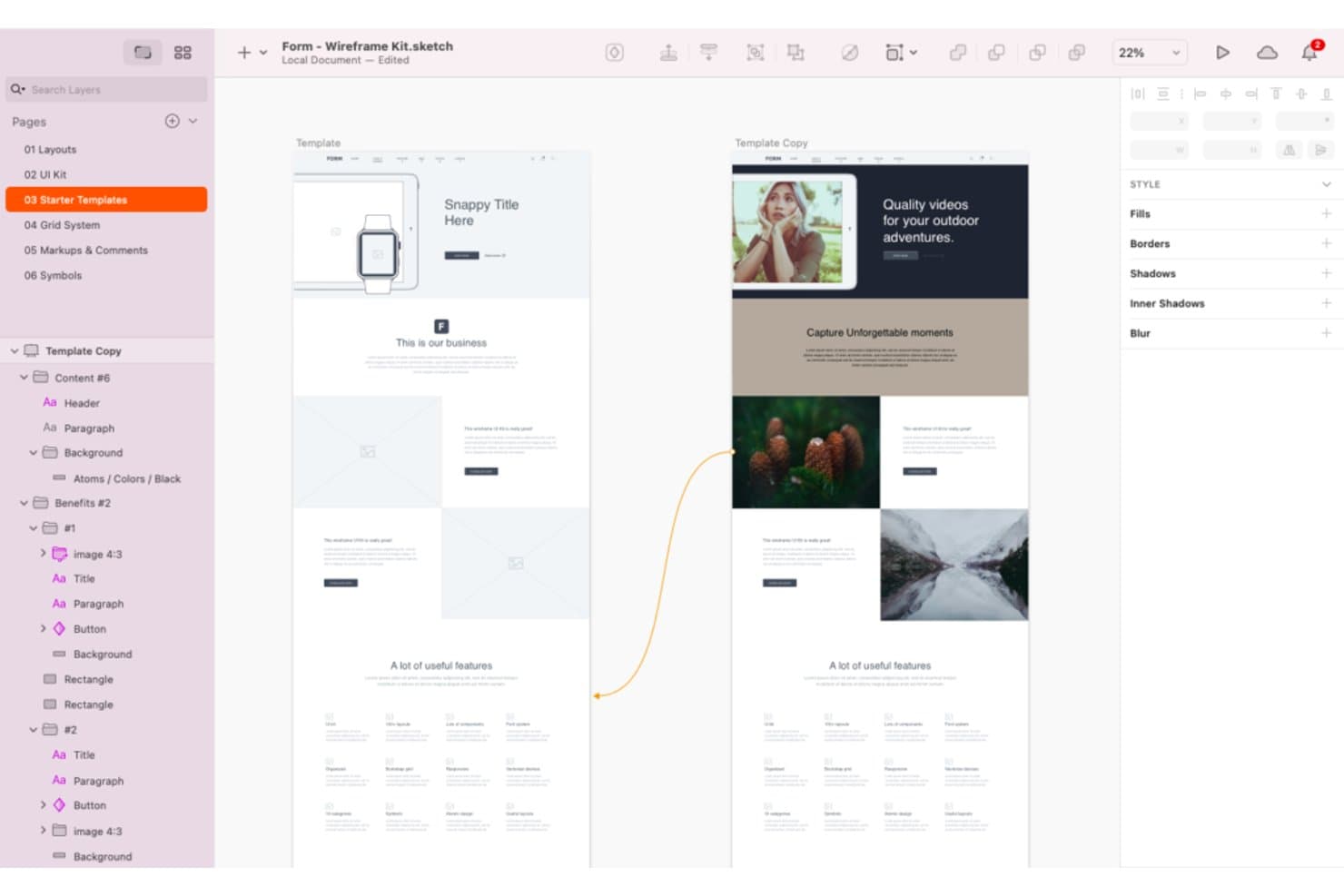
Sketch offre un'ampia gamma di strumenti e modelli per la creazione di wireframe. Sketch è una piattaforma per la creazione di wireframe e la progettazione di interfacce con strumenti vettoriali, cornici, simboli e librerie riutilizzabili, prototipi interattivi, collaborazione in tempo reale e passaggio del progetto agli sviluppatori.
A chi è più adatto Sketch?
Sketch è adatto ai designer UX/UI e ai team di prodotto freelance che lavorano principalmente su macOS.
Perché ho scelto Sketch
Ho scelto Sketch perché porta i flussi di progettazione nativi di macOS nella creazione di wireframe, con cornici, pile, griglie e strumenti vettoriali precisi. Uso simboli e librerie per creare componenti riutilizzabili di navigazione, moduli e schede nei diversi concept di prodotto. I suoi hotspot, sovrapposizioni, aree con scorrimento e transizioni Smart Animate mi consentono di testare i flussi utente prima dell'inizio dello sviluppo.
Funzionalità principali di Sketch
- Anteprime nel browser: Condividi collegamenti a prototipi e pagine protetti da password, con date di scadenza.
- Passaggio agli sviluppatori: Consenti agli sviluppatori di esaminare i progetti, copiare i valori e scaricare le risorse in un browser.
- Commenti organizzati in thread: Fissa, menziona e risolvi i feedback su canvas o prototipi.
- Barra dei comandi: Inserisci o sostituisci elementi di progettazione da un menu gestito tramite tastiera.
Integrazioni di Sketch
Sketch supporta integrazioni con Slack, Jira, Notion, GitHub, Miro e Zeplin tramite plugin, incorporamenti, condivisione di link o ContentSync. Il server MCP di Sketch si connette a Claude, Cursor, VS Code e Codex per flussi di lavoro personalizzati.
Cosa è gratuito?
Sketch non offre un piano gratuito a tempo indeterminato, ma mette a disposizione una prova gratuita di 30 giorni senza richiedere una carta di credito. Al termine della prova, è necessario un abbonamento a pagamento, mentre gli sviluppatori e gli altri collaboratori possono continuare ad accedere ai file condivisi tramite strumenti gratuiti di visualizzazione e passaggio agli sviluppatori.
Pros and Cons
Pros:
- I flussi di lavoro nativi per Mac supportano la progettazione offline
- I componenti riutilizzabili mantengono coerenti i wireframe
- I flussi dei prototipi includono sovrapposizioni e scorrimento
Cons:
- La modifica esclusiva su Mac esclude i membri del team che utilizzano sistemi operativi diversi
- Nessun piano gratuito a tempo indeterminato per la modifica continuativa
Learn more about Sketch: 10Ideale per la logica e le condizioni avanzate
Axure RP
- Versione di prova gratuita di 30 giorni
- A partire da $29/utente/mese (con fatturazione annuale)
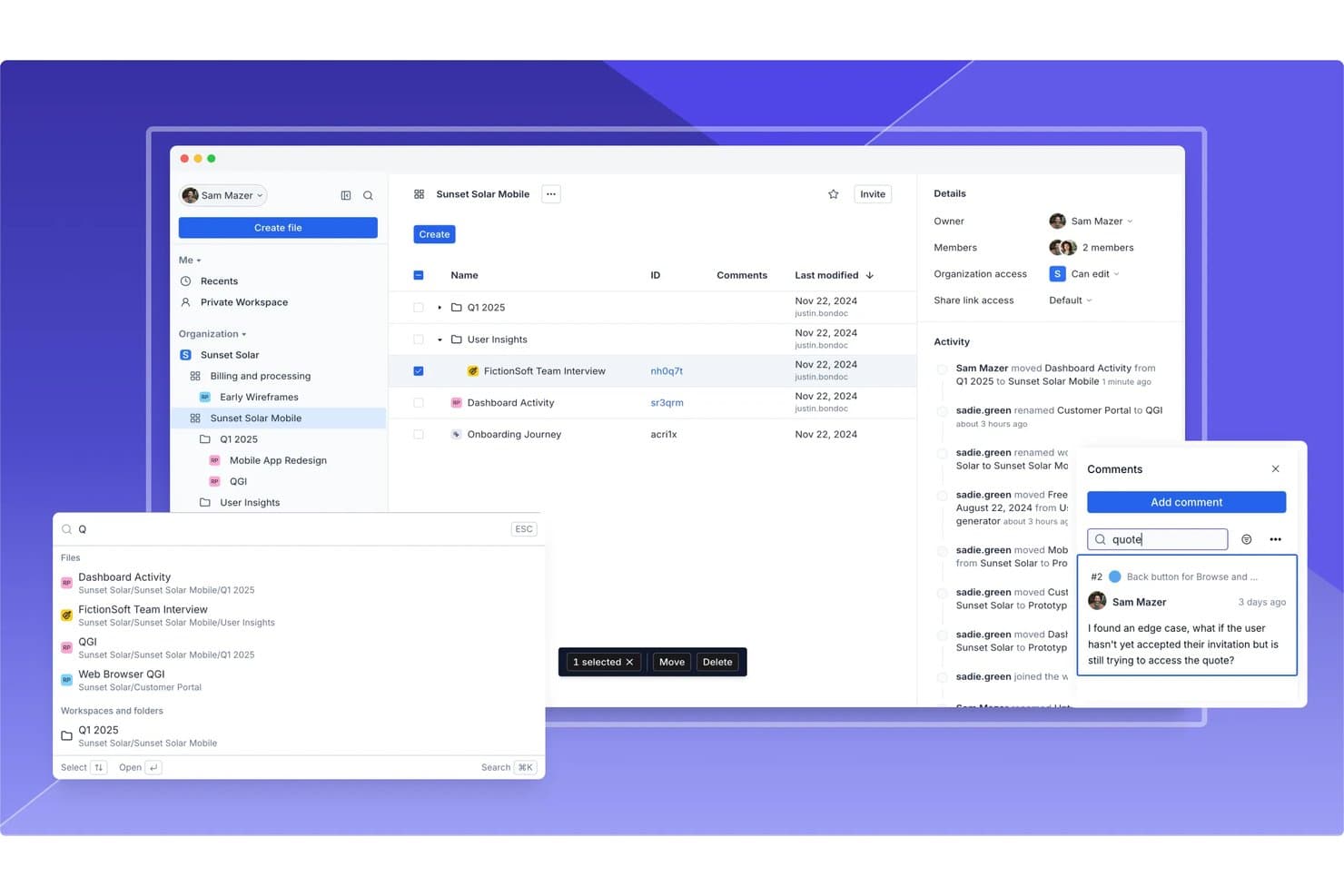
Axure RP supporta la collaborazione tra team con commenti, registri delle attività e condivisione dei file. Axure RP è uno strumento desktop per la creazione di wireframe e prototipi, con librerie di widget, viste adattive, diagrammi di flusso, moduli funzionanti, pannelli dinamici, componenti riutilizzabili e pubblicazione sul cloud.
Per chi è più indicato Axure RP?
I product manager e i team UX che creano flussi utente complessi e testabili apprezzeranno le condizioni, le variabili e i pannelli dinamici di Axure RP.
Perché ho scelto Axure RP
Ho scelto Axure RP perché è ideale per la logica e le condizioni avanzate, anche quando un wireframe deve comportarsi come un prodotto funzionante. Uso variabili, azioni condizionali e pannelli dinamici per testare tabelle filtrate, moduli in più passaggi e stati reattivi prima dello sviluppo. La sua versione di prova completamente funzionale di 30 giorni mi consente di valutare questi flussi di lavoro senza impegnarmi fin dall'inizio.
Caratteristiche principali di Axure RP
- Viste adattive: Crea layout per desktop, tablet e telefono su un'unica pagina.
- Moduli funzionanti: Aggiungi campi di testo, menu a discesa e pulsanti di opzione ai wireframe.
- Componenti riutilizzabili: Applica gruppi di widget condivisi a più pagine con override locali.
- Pubblicazione sul cloud: Condividi prototipi ospitati con i revisori tramite link con accesso controllato.
Integrazioni di Axure RP
Axure RP offre integrazioni documentate con Jira, Confluence, Slack, Microsoft Teams, Figma, Sketch e Adobe XD. Supporta inoltre le connessioni con servizi di test dell'usabilità di terze parti.
Cosa è gratuito?
Axure RP offre una versione di prova gratuita e completamente funzionale di 30 giorni, non un piano gratuito a tempo indeterminato. Al termine del periodo di prova, sarà necessario un piano a pagamento per continuare a utilizzare il software.
Pros and Cons
Pros:
- Modella flussi utente complessi senza codice
- Supporta componenti riutilizzabili tra i progetti
- Crea moduli funzionanti e tabelle filtrate
Cons:
- Richiede più tempo per essere appreso rispetto agli strumenti più semplici
- La creazione desktop limita la collaborazione in tempo reale tra i membri del team
Learn more about Axure RP :
Altri strumenti gratuiti per wireframe
Ecco alcune ulteriori opzioni di strumenti gratuiti per wireframe che non sono entrate nel mio elenco, ma che vale comunque la pena prendere in considerazione:
- 11draw.ioIdeale per l'integrazione con Google Drive
- 12LucidchartIdeale per la revisione e la condivisione di bozze tra squadre interfunzionali
- 13JustinmindIdeale per funzioni avanzate di prototipazione interattiva
- 14CanvaIdeale per l’editing visivo drag-and-drop
- 15WhimsicalIdeale per la creazione di bozze strutturali nei flussi di lavoro degli strumenti di gestione dei progetti
- 16MockplusIdeale per sistemi di design basati su componenti
- 17UizardIdeale per la conversione di schizzi in wireframe tramite IA
- 18Proto.ioIdeale per visualizzare in anteprima wireframe di app mobile
- 19MoqupsIdeale per la condivisione di progetti basata su browser
Come valuto gli strumenti gratuiti per la creazione di wireframe
Per prima cosa, definisco cosa si intende per gratuito. Gli strumenti per la creazione di wireframe sono idonei se offrono un piano gratuito a tempo indeterminato o una prova di 14 giorni che includa le funzionalità principali. Dopodiché, attribuisco maggiore importanza alla creazione dei layout e al trascinamento degli elementi, quindi alle integrazioni con i ticket e al modo in cui il piano gratuito può essere ampliato.
Funzionalità fondamentali (requisiti per questo elenco)
Oltre ai requisiti relativi al piano gratuito, utilizzo un sistema di punteggio per selezionare gli strumenti da includere nel mio elenco. Assegno a ciascuno un punteggio su una scala da 0 (non offre la funzionalità) a 5 (eccelle in quest'area) per ogni funzionalità fondamentale elencata di seguito, in base a ciò che è disponibile nel piano gratuito. Converto quindi il totale in una percentuale per contribuire a valutare l'idoneità complessiva di ogni strumento, attribuendo un peso aggiuntivo alle funzionalità che ho considerato essenziali.
- Creazione di wireframe (essenziale): cerco librerie di forme, griglie, strumenti di allineamento ed elementi dell'interfaccia adatti a flussi come l'onboarding o il pagamento.
- Modifica tramite trascinamento (essenziale): valuto con quale facilità è possibile posizionare, ridimensionare, riordinare e allineare gli elementi durante la progettazione delle schermate senza scrivere codice.
- Collaborazione in tempo reale: verifico la presenza di modifica condivisa, presenza in tempo reale o commenti che supportino il feedback dei team di prodotto, design e sviluppo.
- Componenti riutilizzabili: valuto modelli, simboli o librerie di componenti per schemi ricorrenti come navigazione, moduli e dashboard.
- Esportazione e condivisione: cerco link condivisibili ed esportazioni pratiche in formato immagine o PDF per le revisioni con gli stakeholder e le discussioni sui requisiti.
- Interattività di base: valuto i collegamenti tra le schermate per modellare i percorsi degli utenti, i flussi di navigazione e i casi limite prima dell'inizio dello sviluppo.
Una volta ottenuto un elenco di strumenti che soddisfano i criteri, considero ciò che distingue ogni piattaforma.
Fattori distintivi (ciò che differenzia i fornitori)
Ecco come confronto e metto in contrapposizione i diversi fornitori:
Funzionalità di spicco
Cerco flussi di lavoro basati sulla tastiera che consentano di aggiungere rapidamente forme e componenti durante sessioni di analisi con tempi prestabiliti. Strumenti come Figma e Balsamiq gestiscono bene questo aspetto con interfacce che fanno ampio uso delle scorciatoie. Anche la modalità di presentazione è un altro elemento distintivo: valuto se i PM possono guidare gli stakeholder attraverso un flusso cliccabile senza cambiare applicazione. È importante anche l'accesso tramite browser da diversi dispositivi, poiché i team distribuiti devono poter esaminare i wireframe da qualsiasi dispositivo senza installare software.
Oltre le funzionalità
Verifico se gli stakeholder possono aprire un link condiviso senza creare un account: dirigenti e clienti raramente si registrano solo per lasciare un feedback. È importante anche la sostenibilità del livello gratuito: valuto i limiti relativi ai progetti e ai collaboratori per verificare che un PM possa gestire più iniziative senza incontrare un paywall a metà sprint. Strumenti come Figma e Miro gestiscono bene l'accesso in sola visualizzazione, mentre altri limitano i revisori ospiti nei piani gratuiti.
Come scegliere gli strumenti gratuiti per wireframe
È facile perdersi tra lunghi elenchi di funzionalità e strutture tariffarie complesse. Per aiutarti a rimanere concentrato mentre affronti il tuo particolare processo di selezione del software, ecco un elenco di fattori da tenere a mente:
| Fattore | Cosa considerare |
| Scalabilità | Lo strumento supporterà il tuo team mentre cresce? Controlla i limiti per gli utenti, i limiti per i progetti e le possibilità di passaggio a un piano superiore. |
| Integrazioni | Lo strumento si collega al tuo ecosistema esistente per la progettazione, lo sviluppo o la gestione dei progetti? Verifica la disponibilità di integrazioni native. |
| Personalizzazione | Puoi adattare l'area di lavoro, i modelli o i flussi di lavoro dello strumento al processo del tuo team? |
| Facilità d'uso | Con quale rapidità i nuovi utenti possono diventare produttivi? Cerca una navigazione intuitiva e un processo di apprendimento iniziale semplice. |
| Implementazione e configurazione iniziale | Quali risorse servono per iniziare? Considera formazione, migrazione e assistenza per gli utenti alle prime armi. |
| Costo | Ci sono costi nascosti con la crescita delle tue esigenze? Esamina i limiti del piano gratuito e cosa comporta il passaggio a un piano a pagamento. |
| Misure di sicurezza | Lo strumento offre una protezione dei dati adeguata per la tua organizzazione? Verifica la crittografia, i controlli degli accessi e la conformità. |
| Disponibilità dell'assistenza | Quali canali di assistenza sono disponibili se riscontri dei problemi? Cerca chat dal vivo, supporto via email o forum della comunità. |
Cosa sono gli strumenti gratuiti per wireframe?
Gli strumenti gratuiti per wireframe sono applicazioni software che consentono agli utenti di creare schemi visivi o modelli delle interfacce digitali senza dover pagare. Questi strumenti aiutano i team a pianificare i layout, mappare i flussi degli utenti e comunicare le idee di progettazione nelle prime fasi di un progetto. Gli strumenti gratuiti per wireframe offrono generalmente funzionalità di base come elementi trascinabili, interattività di base e collaborazione, rendendoli accessibili a singoli utenti o piccoli team con budget limitati.
Funzionalità
Esaminiamo le funzionalità comunemente presenti negli strumenti per la creazione di wireframe e quali sono solitamente incluse nei piani gratuiti e a pagamento.
Funzionalità tipiche gratuite degli strumenti per la creazione di wireframe
- Editor con trascinamento: consente agli utenti di posizionare e disporre rapidamente gli elementi dell'interfaccia su una tavola di lavoro senza scrivere codice, facilitando la rappresentazione visiva delle idee.
- Librerie di forme e componenti dell'interfaccia di base: fornisce una serie di componenti standard, come pulsanti, campi di input e icone, per aiutare gli utenti a creare wireframe più velocemente.
- Supporto per più pagine o schermate: consente agli utenti di creare e organizzare diversi wireframe all'interno di un singolo progetto, supportando flussi con più schermate.
- Collegamenti o interattività semplici: permette di creare aree attive cliccabili o collegamenti tra le schermate per simulare la navigazione e i flussi utente di base.
- Collaborazione in tempo reale: consente a più utenti di visualizzare e modificare insieme i wireframe, favorendo il lavoro di squadra e la condivisione di feedback nello stesso spazio di lavoro.
- Strumenti per commenti e feedback: offre la possibilità di lasciare note o commenti direttamente sui wireframe, semplificando la comunicazione con gli stakeholder.
- Accesso basato sul cloud: archivia i progetti online, consentendo agli utenti di accedere ai wireframe e modificarli da qualsiasi dispositivo con una connessione Internet.
- Esportazione in formato immagine o PDF: consente agli utenti di salvare i wireframe come immagini o PDF per condividerli al di fuori della piattaforma o inserirli nelle presentazioni.
Funzionalità tipiche a pagamento degli strumenti per la creazione di wireframe
- Prototipazione e animazione avanzate: supporta transizioni complesse, microinterazioni e flussi animati per simulare meglio le esperienze utente reali.
- Strumenti per il passaggio alla fase di sviluppo: forniscono agli sviluppatori frammenti di codice, specifiche e download delle risorse per semplificare il passaggio dalla progettazione allo sviluppo.
- Cronologia delle versioni e ripristino: tiene traccia delle modifiche nel tempo e consente agli utenti di ripristinare versioni precedenti di un wireframe, se necessario.
- Librerie di risorse personalizzate: consente ai team di creare e gestire i propri componenti riutilizzabili, garantendo coerenza tra i progetti.
- Integrazione dei test con gli utenti: permette di raccogliere direttamente feedback o dati analitici degli utenti sui prototipi interattivi all'interno dello strumento.
- Autorizzazioni basate sui ruoli: consente agli amministratori di controllare chi può visualizzare, modificare o commentare i progetti, supportando team più numerosi e progetti sensibili.
- Integrazione con strumenti di terze parti: si collega a piattaforme per la gestione dei progetti, la progettazione o lo sviluppo, adattandosi a flussi di lavoro più ampi.
- Modifica offline: consente agli utenti di lavorare sui wireframe senza una connessione Internet, sincronizzando le modifiche quando tornano online.
- Assistenza clienti prioritaria: offre tempi di risposta più rapidi e canali di supporto dedicati agli utenti a pagamento.
- Marchio personalizzato: consente alle organizzazioni di aggiungere i propri loghi, colori o domini allo spazio di lavoro per la creazione di wireframe, offrendo un'esperienza personalizzata con il proprio marchio.
Vantaggi
L'implementazione di strumenti gratuiti per la creazione di wireframe offre diversi vantaggi al team e all'azienda. Eccone alcuni:
- Costi iniziali inferiori: i piani gratuiti consentono ai team di iniziare a progettare senza approvazione del budget o rischi finanziari, rendendoli accessibili a startup e piccole imprese.
- Convalida più rapida delle idee: gli editor con trascinamento e le librerie di componenti dell'interfaccia di base aiutano i team a visualizzare rapidamente i concetti e a perfezionare i progetti prima dell'inizio dello sviluppo.
- Collaborazione migliorata: la modifica in tempo reale, i commenti e l'accesso basato sul cloud consentono a più stakeholder di fornire feedback e rimanere allineati durante tutto il processo di progettazione.
- Curva di apprendimento accessibile: le interfacce semplici e i modelli integrati facilitano l'avvio dei nuovi utenti, anche senza una precedente esperienza di progettazione.
- Accesso remoto e flessibile: l'archiviazione basata sul cloud e gli strumenti basati sul browser consentono agli utenti di lavorare ovunque e da qualsiasi dispositivo.
- Condivisione e feedback semplici: le opzioni di esportazione e i link di condivisione pubblici o privati semplificano la raccolta di opinioni da clienti, membri del team o revisori esterni.
- Supporto ai flussi di lavoro agili: la possibilità di creare, aggiornare e condividere rapidamente i wireframe si adatta bene agli approcci iterativi e agili di gestione dei progetti.
Costi e prezzi
Mi rendo conto che sei arrivato a questo articolo cercando le migliori opzioni di strumenti per la creazione di wireframe disponibili gratuitamente. Tuttavia, poiché i piani gratuiti offrono solo funzionalità limitate, è molto probabile che in futuro dovrai passare a un piano superiore.
La tabella seguente riassume i piani più comuni, i relativi prezzi medi e le funzionalità tipicamente incluse negli strumenti per la creazione di wireframe:
Tabella comparativa dei piani per gli strumenti di creazione di wireframe
| Tipo di piano | Prezzo medio | Funzionalità comuni |
| Piano gratuito | $0 | Creazione di wireframe di base, utenti limitati, librerie UI semplici, condivisione di base e archiviazione online. |
| Piano personale | $5-$15/utente/mese | Progetti illimitati, più risorse UI, opzioni di esportazione, assistenza prioritaria e integrazioni limitate. |
| Piano aziendale | $15-$30/utente/mese | Collaborazione di team, prototipazione avanzata, cronologia delle versioni, passaggio alla fase di sviluppo e integrazioni di terze parti. |
| Piano aziendale avanzato | $30-$60/utente/mese | Branding personalizzato, autorizzazioni basate sui ruoli, sicurezza migliorata, assistenza dedicata e funzionalità di conformità. |
Domande frequenti sugli strumenti gratuiti per la creazione di wireframe
Ecco alcune risposte alle domande comuni sugli strumenti gratuiti per la creazione di wireframe:
Posso utilizzare strumenti gratuiti per la creazione di wireframe per progetti commerciali?
Sì, la maggior parte degli strumenti gratuiti per la creazione di wireframe consente di utilizzare la propria piattaforma per progetti commerciali. Tuttavia, verifica sempre i termini di servizio dello strumento per confermare che non vi siano restrizioni sull’uso commerciale o requisiti di attribuzione dello strumento nei materiali consegnati.
Quali sono le principali limitazioni degli strumenti gratuiti per la creazione di wireframe?
Gli strumenti gratuiti per la creazione di wireframe spesso limitano il numero di progetti, utenti o opzioni di esportazione disponibili. Le funzionalità avanzate, come il passaggio alla fase di sviluppo, la cronologia delle versioni e le integrazioni con altri software, sono generalmente riservate ai piani a pagamento.
Quanto sono sicuri gli strumenti gratuiti per la creazione di wireframe per i progetti sensibili?
La sicurezza varia a seconda del fornitore, ma la maggior parte degli strumenti gratuiti affidabili per la creazione di wireframe offre protezioni di base, come connessioni crittografate e condivisione protetta da password. Per i progetti altamente sensibili, verifica la presenza di certificazioni di conformità e funzionalità di sicurezza avanzate, che potrebbero essere disponibili solo nei piani a pagamento.
Posso collaborare con altre persone in tempo reale utilizzando strumenti gratuiti per la creazione di wireframe?
Sì, molti strumenti gratuiti per la creazione di wireframe supportano la collaborazione in tempo reale, consentendo a più utenti di modificare e commentare contemporaneamente i wireframe. Alcuni strumenti potrebbero limitare il numero di collaboratori o richiedere a tutti gli utenti di creare un account.
È facile passare da un piano gratuito a uno a pagamento?
Sì, la maggior parte degli strumenti per la creazione di wireframe semplifica il passaggio da un piano gratuito a uno a pagamento. I progetti e i dati esistenti vengono in genere mantenuti e si ottiene immediatamente l’accesso a funzionalità aggiuntive dopo il passaggio a un piano superiore.