

10 migliori software di progettazione web offline recensiti nel 2026

I migliori software offline per la progettazione web: selezione


Muoversi nel mondo della progettazione web può essere difficile, soprattutto quando l'accesso a Internet è inaffidabile. I software offline per la progettazione web offrono una soluzione, consentendo al tuo team di lavorare senza interruzioni. Questi strumenti sono preziosi per gestire i progetti in modo sicuro ed efficiente.
In base alla mia esperienza, scegliere il software giusto può alleviare problemi comuni come la dipendenza da Internet e i problemi di sicurezza. Ho testato e recensito alcune soluzioni offline per la progettazione web per offrirti una panoramica imparziale delle migliori opzioni disponibili.
In questo articolo troverai una recensione ben documentata dei migliori creatori di siti web offline. Analizzerò le funzionalità principali, i vantaggi e gli svantaggi, aiutandoti a prendere una decisione consapevole per il tuo team. Iniziamo a trovare la soluzione perfetta per le tue esigenze.
Perché Fidarsi delle Nostre Recensioni Software
Testiamo e recensiamo software per il product management dal 2020. Come product manager sappiamo quanto sia fondamentale e difficile fare la scelta giusta in termini di software. Investiamo in una ricerca approfondita per aiutare il nostro pubblico a prendere decisioni migliori sugli acquisti di software. Abbiamo testato oltre 2.000 strumenti per diversi casi d’uso e scritto più di 1.000 recensioni approfondite.Scopri come assicuriamo la trasparenza & la nostra metodologia di recensione software.
Riepilogo dei migliori software offline per la progettazione web
Questa tabella comparativa riassume i dettagli dei prezzi delle mie migliori selezioni di software offline per la progettazione web, per aiutarti a trovare quello più adatto al tuo budget e alle esigenze della tua attività.
| Tool | Best For | Trial Info | Price | ||
|---|---|---|---|---|---|
| 1 | Ideale per la flessibilità nella codifica | Prova gratuita di 7 giorni | Da $20.99/mese | Website | |
| 2 | Ideale per la creazione di app no-code potenziate dall'IA | Prova gratuita di 7 giorni disponibile | Da $16/app/mese | Website | |
| 3 | Ideale per le animazioni HTML5 | Demo gratuita disponibile | Gratuito da usare | Website | |
| 4 | Ideale per la creazione gratuita di siti web assistita da AI | Prova gratuita disponibile | Da $149 | Website | |
| 5 | Ideale per un'interfaccia adatta ai principianti | Versione di prova gratuita disponibile | A partire da $49 (acquisto una tantum) | Website | |
| 6 | Ideale per design drag-and-drop | Piano gratuito + prova gratuita di 7 giorni disponibile | Da $6,75/mese | Website | |
| 7 | Ideale per sviluppatori professionisti | Prova gratuita disponibile | Da $12/utente/mese | Website | |
| 8 | Ideale per progetti open-source | Piano gratuito + prova gratuita di 14 giorni disponibile | Da $15/mese (fatturazione annuale) | Website | |
| 9 | Ideale per il design responsivo | Prova gratuita di 30 giorni disponibile | Da $59.95 | Website | |
| 10 | Ideale per pagine reattive offline | Editor HTML gratuito disponibile | A partire da $99/mese | Website |
Recensioni dei migliori software offline per la progettazione web
Di seguito trovi i miei riepiloghi dettagliati dei migliori software offline per la progettazione web inclusi nella mia selezione. Le mie recensioni offrono un’analisi approfondita delle funzionalità principali, dei vantaggi e degli svantaggi, delle integrazioni e dei casi d’uso ideali di ogni strumento, per aiutarti a trovare quello più adatto a te.

Ideale per la flessibilità nella codifica
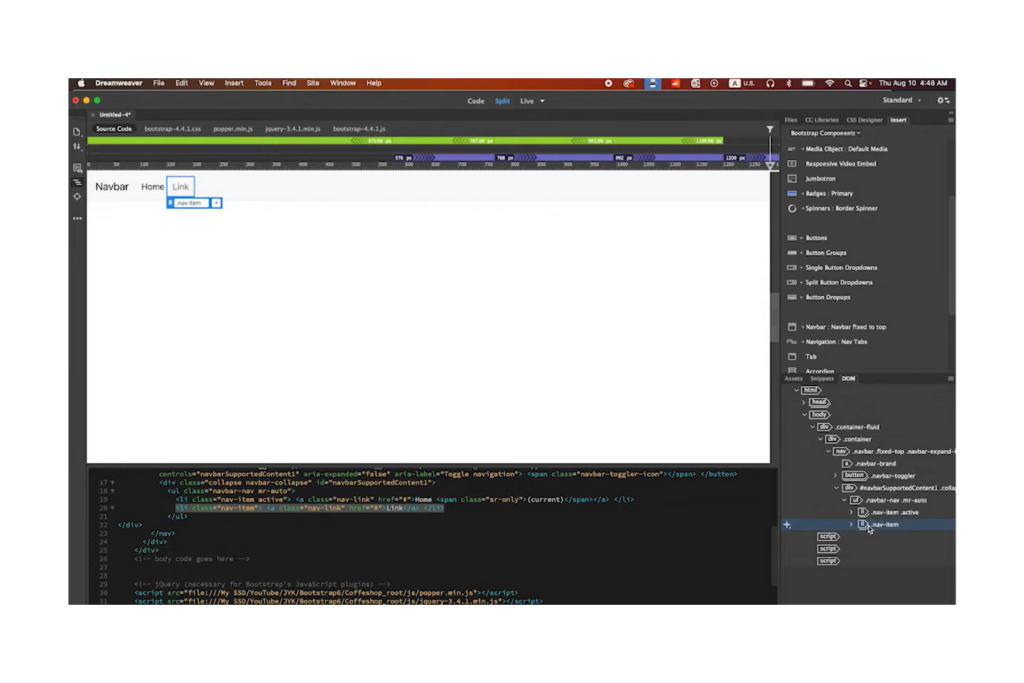
Adobe Dreamweaver è uno strumento professionale per lo sviluppo di siti web, utilizzato da sviluppatori e designer per creare siti web reattivi. Offre una piattaforma versatile per codificare, progettare e gestire siti web in modo efficiente.
Perché ho scelto Adobe Dreamweaver: Offre una flessibilità di codifica insuperabile, permettendo di lavorare con HTML, CSS e JavaScript. Puoi passare facilmente dalla vista di progettazione visiva a quella del codice, rendendo più semplice seguire le modifiche e mantenere la coerenza del design. La funzione di anteprima live di Dreamweaver consente di vedere in tempo reale come appare il sito su diversi dispositivi. Supporta inoltre numerosi linguaggi di programmazione, coprendo così una vasta gamma di esigenze di sviluppo.
Caratteristiche principali e integrazioni:
Caratteristiche includono uno spazio di lavoro personalizzabile che consente di adattare l'ambiente alle proprie necessità. Il tuo team può beneficiare del sistema di layout a griglia fluida, che semplifica il design responsivo. I suggerimenti di codice integrati e l'evidenziazione della sintassi migliorano accuratezza ed efficienza nella scrittura del codice.
Integrazioni includono Creative Cloud, Photoshop, Animate e altri.
Pros and Cons
Pros:
- Supporta diversi linguaggi di programmazione
- Anteprima in tempo reale sui dispositivi
- Evidenziazione della sintassi
Cons:
- Occasionali rallentamenti delle prestazioni
- Nessuna licenza perpetua disponibile

Appy Pie
Ideale per la creazione di app no-code potenziate dall'IA

Appy Pie è una piattaforma di sviluppo app no-code progettata per privati e aziende che desiderano creare app senza competenze tecniche. Si rivolge a piccole imprese, startup e imprenditori che hanno bisogno di lanciare app rapidamente ed in modo efficiente.
Perché ho scelto Appy Pie: Eccelle nella creazione di app senza codice, permettendoti di sviluppare applicazioni senza scrivere una sola riga di codice. Puoi scegliere tra diversi modelli per avviare il tuo progetto, semplificando il processo di design. Appy Pie supporta più piattaforme, così puoi pubblicare la tua app sia su iOS che su Android. La sua interfaccia drag-and-drop rende la personalizzazione semplice, anche per i principianti.
Caratteristiche principali e integrazioni:
Le funzionalità includono un'ampia selezione di modelli che rispondono alle esigenze di diversi settori, aiutandoti ad avviare rapidamente lo sviluppo della tua app. Il tuo team può utilizzare la funzione di aggiornamenti in tempo reale per vedere istantaneamente le modifiche su tutte le piattaforme. La piattaforma offre anche diverse opzioni di monetizzazione, consentendoti di generare entrate dalla tua app.
Le integrazioni includono Slack, PayPal, Shopify, Mailchimp, Salesforce, Dropbox, Zendesk, Google Analytics, Google Calendar, Twilio e altro ancora.
Pros and Cons
Pros:
- Non sono richieste competenze di programmazione
- Supporta più piattaforme
- Builder potenziato dall'IA
Cons:
- La rimozione del branding richiede un piano costoso
- Potrebbero verificarsi tempi di caricamento lenti

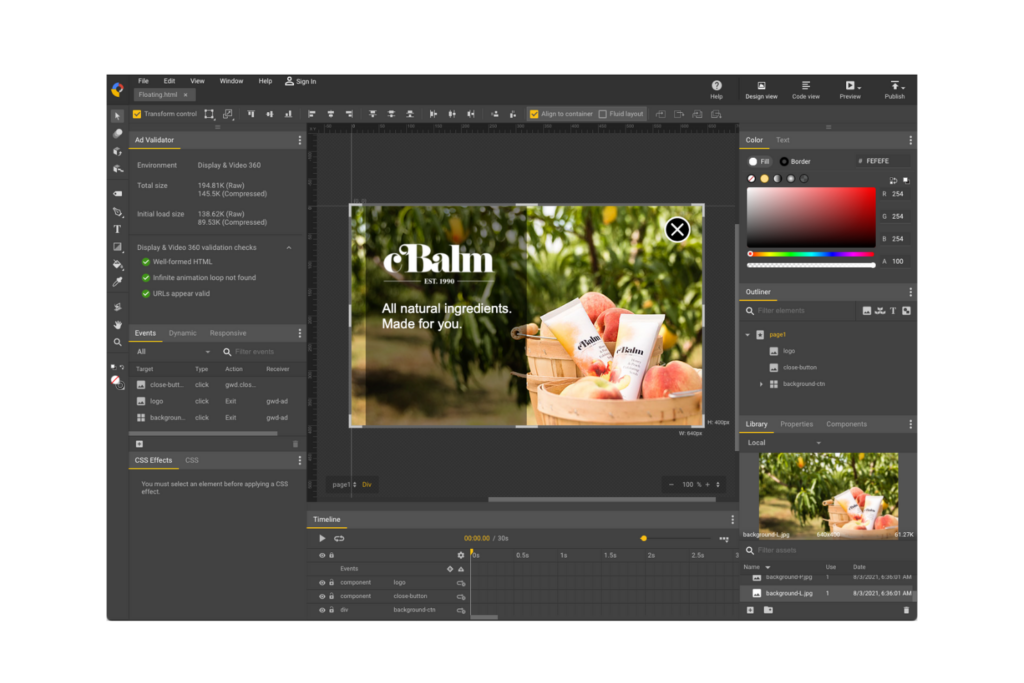
Google Web Designer è uno strumento gratuito per creare design interattivi e animazioni grafiche basati su HTML5. È rivolto a esperti di marketing e sviluppatori che desiderano realizzare contenuti web coinvolgenti e compatibili con vari dispositivi.
Perché ho scelto Google Web Designer: è eccellente per creare animazioni HTML5, il che lo rende una scelta ideale per i contenuti interattivi. Lo strumento offre numerose opzioni di progettazione e codifica, garantendo flessibilità sia ai principianti sia agli sviluppatori esperti. La sua integrazione con i servizi Google ne rafforza le funzionalità per le campagne di marketing.
Funzionalità e integrazioni principali:
Le funzionalità includono una sequenza temporale per le animazioni, facile da usare, che semplifica la creazione di animazioni grafiche. Il tuo team può utilizzare gli strumenti di creazione 3D per realizzare contenuti visivi coinvolgenti. Il software supporta inoltre diverse modalità di progettazione, consentendo di passare agevolmente dalla visualizzazione di progettazione a quella del codice.
Le integrazioni includono Google Drive, Google Ads, AdMob, YouTube, Google Analytics, Google Fonts e altro.
Pros and Cons
Pros:
- Supporta animazioni complesse
- Strumenti di creazione 3D disponibili
- Compatibilità multipiattaforma
Cons:
- Funzionalità offline limitate
- Nessun FTP integrato


Mobirise è uno strumento di web design offline rivolto a piccole imprese e designer indipendenti che desiderano creare siti web senza una programmazione complessa. Offre una piattaforma facile da usare per costruire siti web ottimizzati per dispositivi mobili offline, facilitando il lavoro in assenza di connessione internet.
Perché ho scelto Mobirise: Offre una versione gratuita per la creazione di siti web, ideale se hai un budget limitato. L'interfaccia drag-and-drop semplifica il processo di progettazione web, rendendolo accessibile anche a chi ha poca esperienza tecnica. La funzionalità offline assicura un lavoro senza interruzioni, ovunque tu ti trovi.
Caratteristiche e integrazioni principali:
Le caratteristiche includono oltre 1.500 blocchi di siti web personalizzabili per adattarsi al tuo brand. Il tuo team può beneficiare di un approccio mobile-first, così i siti avranno sempre un aspetto professionale su qualsiasi dispositivo mobile. Mobirise consente anche di pubblicare il sito su un drive locale, tramite FTP o sull'hosting di tua scelta.
Le integrazioni includono PayPal, Google Analytics, Instagram, YouTube, Vimeo e altri ancora.
Pros and Cons
Pros:
- Builder offline facile da usare
- Approccio mobile-first al design
- Versione gratuita stabile per siti di base
Cons:
- I blocchi avanzati richiedono licenze a pagamento
- Richiede servizi di hosting web esterni

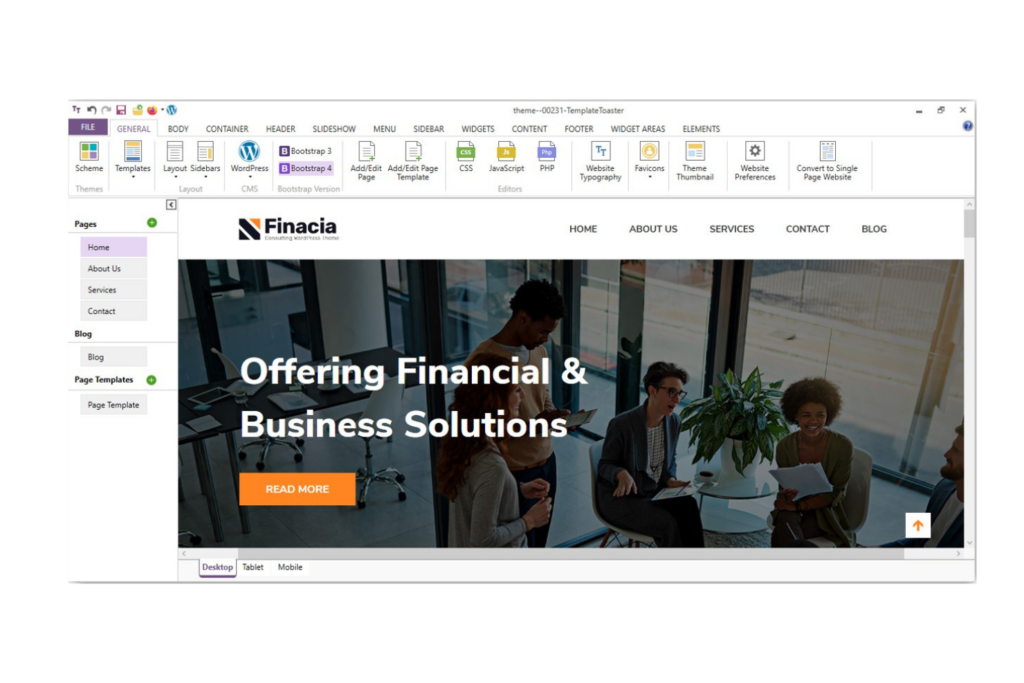
TemplateToaster è un software di web design offline che si rivolge sia ai principianti che ai professionisti. Semplifica il processo di creazione di siti web offrendo un'interfaccia intuitiva che non richiede conoscenze di programmazione avanzate.
Perché ho scelto TemplateToaster: Eccelle grazie a un'interfaccia adatta ai principianti che permette di progettare siti web con facilità. Il software propone una varietà di template e opzioni di design, rendendolo accessibile a chi si avvicina per la prima volta al web design. Include una funzione drag-and-drop che semplifica la creazione del layout. Puoi anche personalizzare i temi per adattarli alle esigenze specifiche del progetto senza necessità di codici complessi.
Funzionalità principali e integrazioni:
Funzionalità includono un'ampia libreria di template predefiniti che puoi personalizzare in base al tuo brand. Il tuo team può utilizzare la funzionalità drag-and-drop per posizionare gli elementi sulla pagina. Inoltre, supporta il design reattivo, garantendo che il tuo sito abbia un aspetto professionale su tutti i dispositivi.
Integrazioni includono WordPress, Joomla, Drupal, Adobe Commerce, Blogger, WooCommerce, VirtueMart, OpenCart, Prestashop e altri.
Pros and Cons
Pros:
- Supporta molteplici piattaforme CMS
- Adatto ai principianti, nessuna programmazione richiesta
- Offre design reattivi
Cons:
- Nessuna versione Mac nativa
- Curva di apprendimento per le funzionalità avanzate

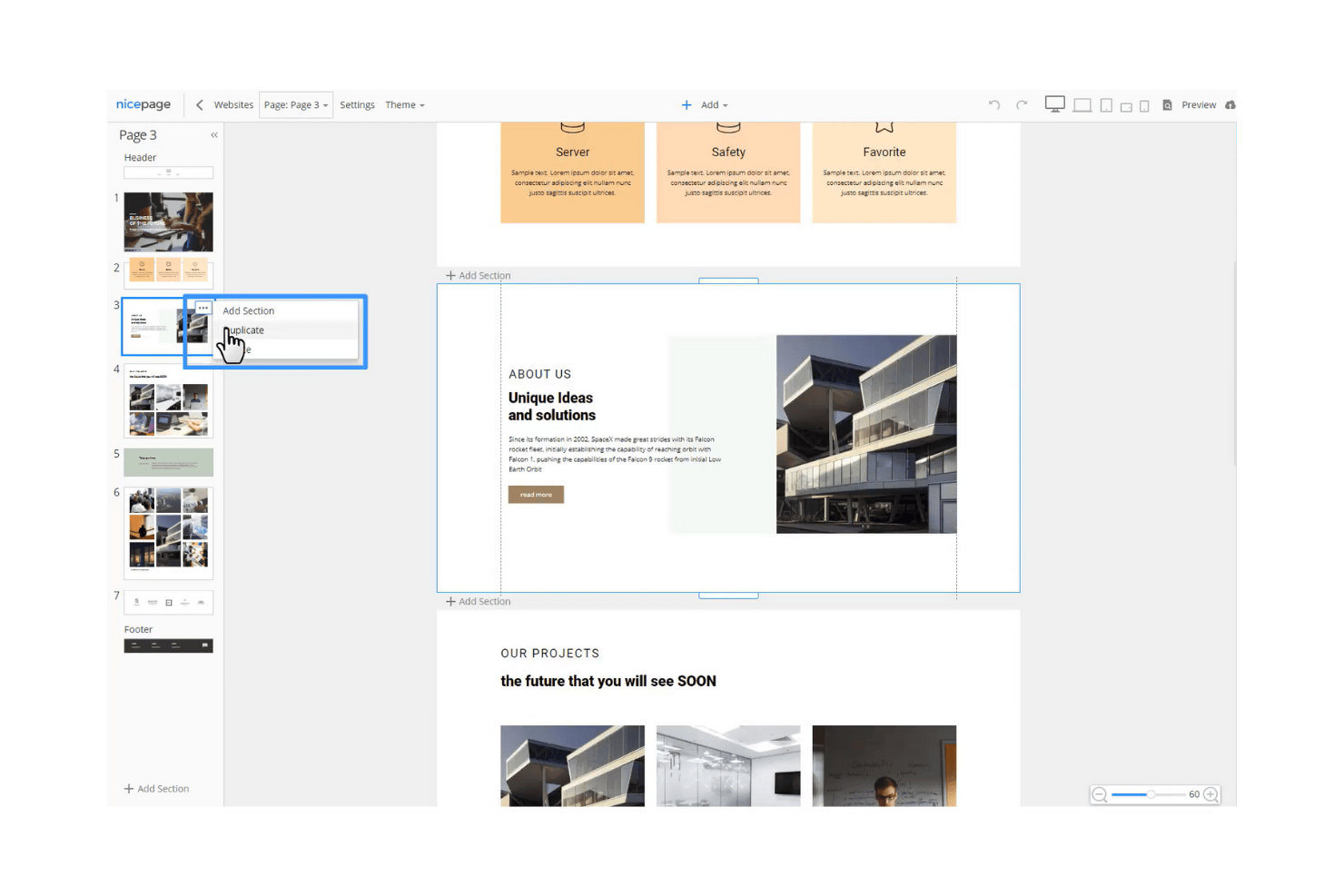
Nicepage è uno strumento offline per la progettazione di siti web pensato per designer e sviluppatori che necessitano di flessibilità nella creazione di siti web responsivi. Offre un'interfaccia intuitiva per progettare pagine web senza dover dipendere dall'accesso a Internet, il che lo rende ideale per team che lavorano in ambienti diversi.
Perché ho scelto Nicepage: Offre funzionalità di design uniche che semplificano il processo di progettazione dei siti web. È possibile posizionare gli elementi ovunque sulla pagina, offrendo al team libertà creativa. Le funzionalità offline garantiscono che il lavoro non venga interrotto da problemi di connettività.
Funzionalità e integrazioni principali:
Le funzionalità includono un'interfaccia intuitiva drag-and-drop, un'ampia gamma di template personalizzabili e la possibilità di progettare siti web responsivi rapidamente. Il team può anche beneficiare del sistema avanzato di griglie, che permette un posizionamento preciso degli elementi. Un altro punto di forza è il supporto per HTML e CSS personalizzati, che garantisce ancora più flessibilità nel design.
Le integrazioni includono WordPress, Joomla, Google Analytics, Google Tag Manager, WooCommerce e altro ancora.
Pros and Cons
Pros:
- Ampia varietà di template
- Supporta HTML e CSS personalizzati
- Funzionalità di design responsivo
Cons:
- Integrazioni limitate
- Nessuna app mobile per l'utente finale disponibile

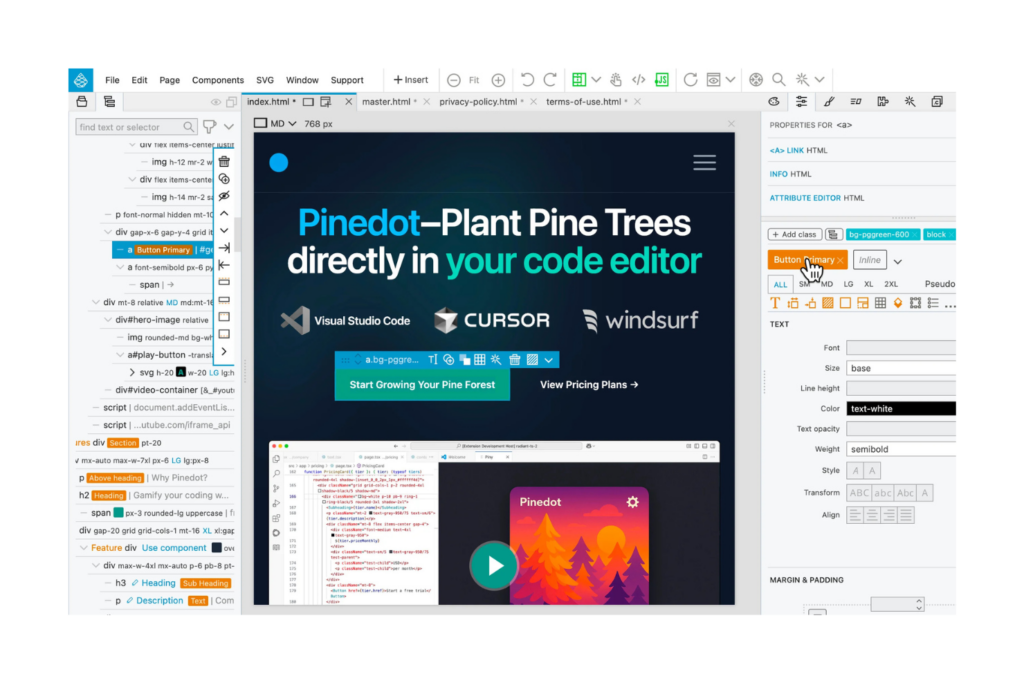
Pinegrow è un software di web design offline pensato per sviluppatori e designer professionisti che necessitano di strumenti avanzati per la creazione di siti web responsivi. Offre una piattaforma per creare siti in modo efficiente con particolare attenzione alla flessibilità del codice e alla precisione del design.
Perché ho scelto Pinegrow: Si rivolge specificamente agli sviluppatori professionisti grazie alle sue avanzate capacità di programmazione. Puoi utilizzare la sua modifica multi-pagina in tempo reale per vedere immediatamente le modifiche apportate all'intero sito. Pinegrow supporta i framework Bootstrap e Foundation, aumentando così la flessibilità nel design. La funzionalità drag-and-drop, combinata con la modifica del codice dal vivo, offre un set di strumenti potente per lavori di design complessi.
Funzionalità principali e integrazioni:
Le funzionalità includono un editor CSS grid che semplifica il processo di layout e accelera il lavoro di progettazione. Il tuo team può utilizzare il builder di temi WordPress per convertire i design in temi WordPress. Pinegrow mette inoltre a disposizione una libreria di componenti pronti all'uso per aiutarti a creare pagine più rapidamente.
Integrazioni disponibili con WordPress, Bootstrap, Foundation, Tailwind CSS, Google Fonts, Font Awesome, Materialize, WooCommerce, Visual Studio Code e altro ancora.
Pros and Cons
Pros:
- Supporto avanzato alla programmazione
- Funzione di modifica multipagina
- Aggiornamenti di design in tempo reale
Cons:
- L'interfaccia può risultare affollata
- Nessuna gestione dei media integrata

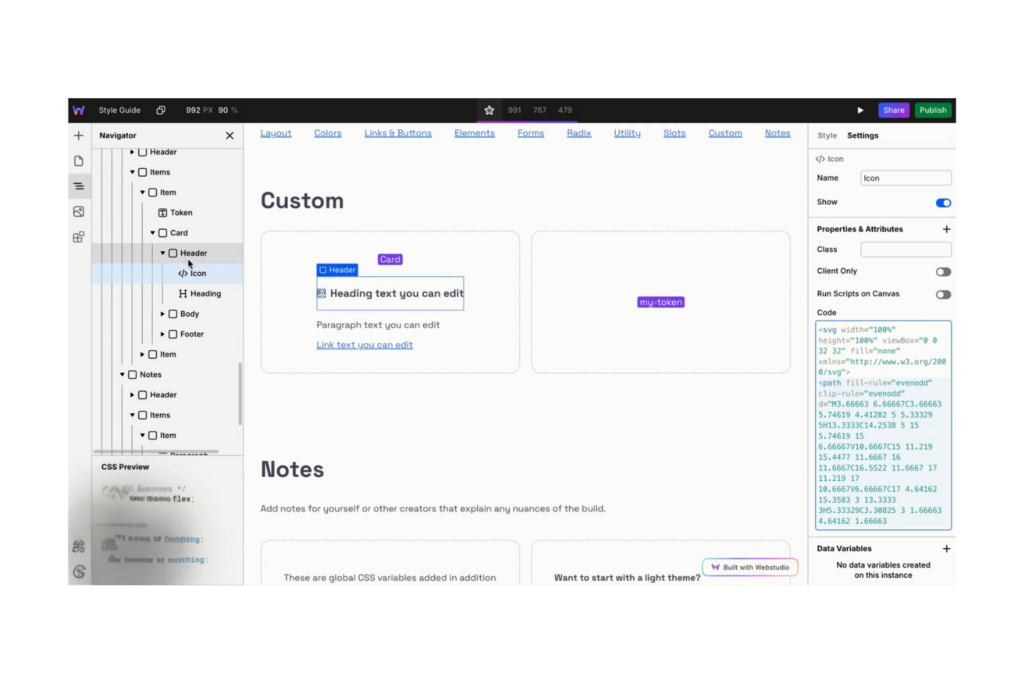
Webstudio è un website builder open-source pensato per i designer che desiderano sviluppare siti web rapidi e facilmente mantenibili utilizzando gli standard web moderni. Consente agli utenti di controllare le proprietà CSS in modo visivo, supporta diverse esperienze web e pone l'accento sugli stili riutilizzabili per garantire un design coerente.
Perché ho scelto Webstudio: Eccelle nel supportare progetti open-source grazie alle sue capacità di design flessibili e trasparenti. È possibile gestire le proprietà CSS senza dover programmare, rendendolo accessibile sia ai principianti che agli sviluppatori esperti. L'enfasi sugli stili riutilizzabili assicura una coerenza stilistica tra i vari progetti. L'integrazione con strumenti di gestione dei contenuti più diffusi permette la creazione e gestione dinamica dei contenuti.
Funzionalità principali e integrazioni:
Le funzionalità includono uno strumento visivo di gestione CSS che semplifica il processo di design. Il tuo team può sfruttare il supporto per esperienze di marketing, CMS ed eCommerce. La piattaforma offre inoltre hosting cloud con Cloudflare, garantendo elevate prestazioni e sicurezza.
Le integrazioni includono Zapier, Contentful, Netlify, Vercel e altri.
Pros and Cons
Pros:
- Supporta progetti open-source
- Strumento visivo di gestione CSS
- Offre hosting cloud
Cons:
- Pochi template preimpostati
- Richiede auto-hosting per controllo completo

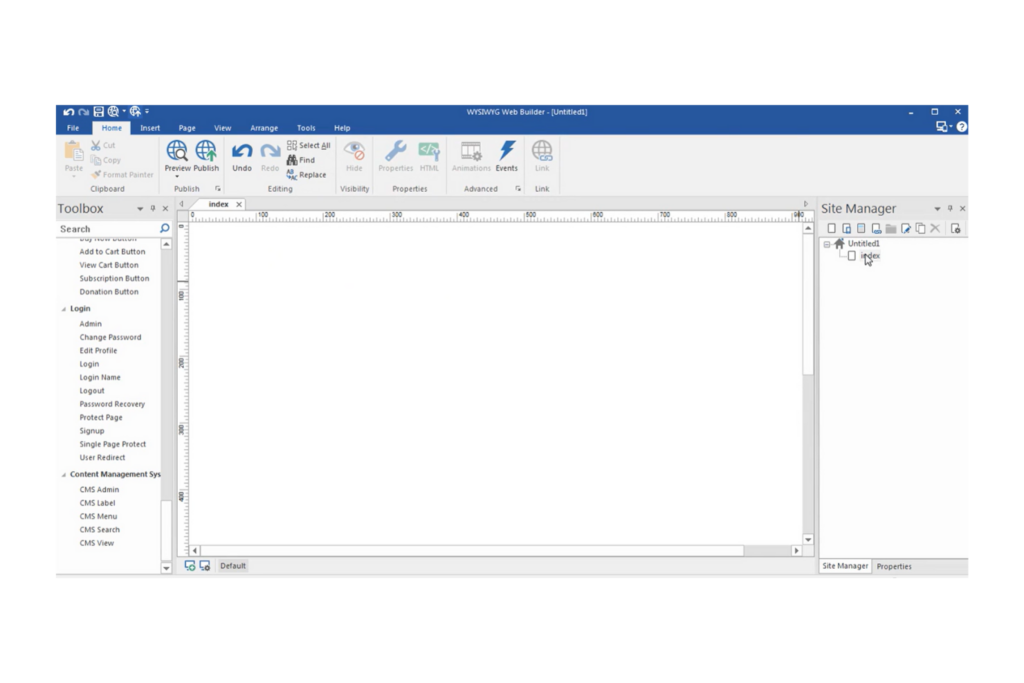
WYSIWYG Web Builder è un'applicazione desktop progettata per utenti che desiderano creare siti web responsivi senza scrivere codice. È ideale per titolari di piccole imprese, freelance e hobbisti che vogliono costruire e gestire i propri siti in modo semplice.
Perché ho scelto WYSIWYG Web Builder: Offre un approccio diretto al design responsivo, consentendo di creare siti che appaiono perfetti su qualsiasi dispositivo. La funzionalità drag-and-drop del software rende facile posizionare gli elementi dove preferisci. Include diversi strumenti integrati per creare moduli, barre di navigazione e gallerie di immagini. Puoi anche personalizzare il sito con ampie opzioni di design e template.
Funzionalità e integrazioni principali:
Funzionalità includono un generatore di moduli che consente di creare facilmente moduli personalizzati. Il tuo team può utilizzare l’editor di immagini integrato per modificare direttamente le immagini nell’applicazione. Il software offre inoltre una varietà di strumenti di navigazione per migliorare l’usabilità del sito.
Integrazioni includono PayPal, Stripe, Google Maps, YouTube, Vimeo, Google Fonts, Google Analytics, Ecwid, Snipcart, Paddle e altro.
Pros and Cons
Pros:
- Supporta breakpoint personalizzati
- Generatore di moduli integrato
- Intuitivo e veloce
Cons:
- Funzionalità avanzate di codifica limitate
- Nessun controllo versione integrato

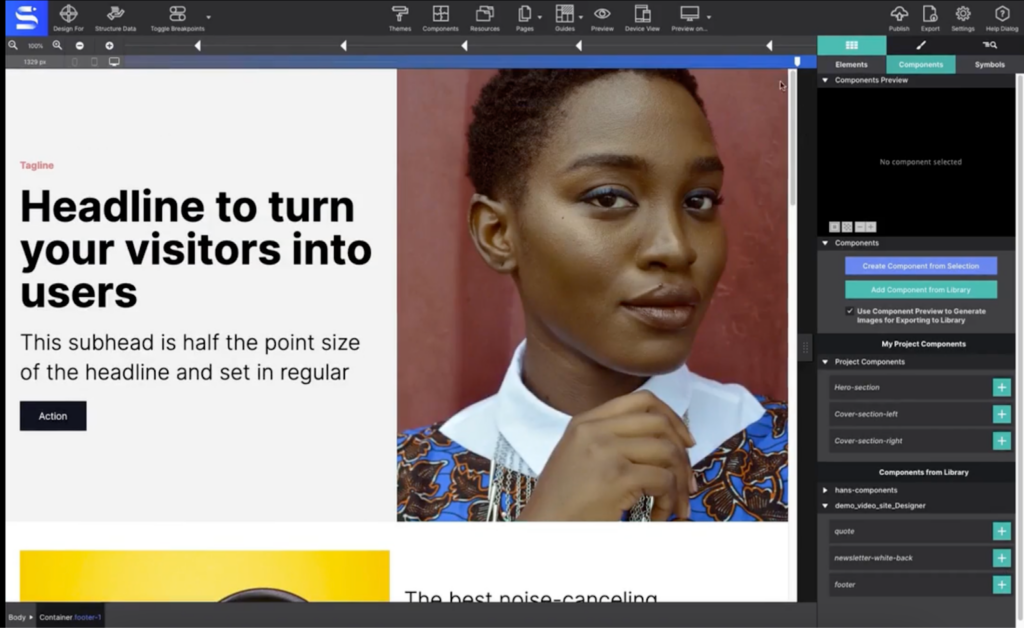
Se vuoi realizzare siti web reattivi senza doverti affidare a una connessione internet, CoffeeCup offre un ambiente di progettazione offline dedicato. La sua interfaccia drag-and-drop è ideale per designer e piccole imprese che hanno bisogno di creare pagine ottimizzate per dispositivi mobili rapidamente.
Perché ho scelto CoffeeCup: Ciò che mi ha attirato di CoffeeCup è l’attenzione verso il design reattivo offline e drag-and-drop. Il software permette di costruire e visualizzare in anteprima pagine completamente reattive senza dover essere connessi a internet, requisito fondamentale per chi desidera lavorare in locale. I suoi strumenti di layout visivo e i breakpoint personalizzabili consentono di creare siti pronti all’uso su dispositivi mobili partendo da zero. Questo approccio è particolarmente utile per designer e piccole aziende che vogliono avere il massimo controllo pratico su ogni aspetto dell’aspetto e della struttura del proprio sito.
Funzionalità e integrazioni principali:
Funzionalità includono un editor di codice HTML e CSS, componenti riutilizzabili, anteprima integrata e possibilità di esportare sul disco locale.
Integrazioni comprendono HubSpot, Jira, easybill, sevdesk e altre ancora.
Pros and Cons
Pros:
- Layout reattivi per tutti i dispositivi
- Funzione di anteprima locale
- Acquisto una tantum
Cons:
- Integrazioni native limitate
- Meno aggiornamenti rilasciati
Altri software offline per la progettazione web
Ecco alcune ulteriori opzioni di software offline per la progettazione web che non sono entrate nella mia selezione, ma che vale comunque la pena prendere in considerazione:
- openElement
Ideale per la creazione di siti WYSIWYG
- RapidWeaver Elements
Ideale per la creazione visiva di siti web
- Blocs
Il migliore per Mac


Come Valuto il Software di Web Design Offline
Valuto il software di web design offline su due livelli: i criteri di base che un tool deve soddisfare per qualificarsi e i fattori differenzianti che mostrano quanto bene si comporta in un laboratorio sicuro o durante un volo intercontinentale.
Funzionalità Core (Requisiti Fondamentali per Questa Lista)
Quando seleziono i tool per la mia lista, valuto ciascuno su una scala da 0 (non offre la funzionalità) a 5 (eccelle in quest'area) per ogni funzionalità core elencata di seguito. Dopodiché, calcolo il punteggio totale dello strumento in percentuale. Ogni tool deve raggiungere un punteggio totale minimo del 65% per essere preso in considerazione.
- Capacità di Design Offline: Controllo se il tool permette di creare, modificare e salvare progetti web completi su un laptop senza connessione a Internet—come progettare su un aereo o in una struttura con restrizioni.
- Editor Visuale di Web Design: Qui è importante un'interfaccia drag-and-drop o basata su canvas. Cerco strumenti in cui i product manager possono disporre le pagine in modo visuale invece di dover scrivere manualmente ogni elemento in codice.
- Esportazione Codice HTML/CSS: Valuto la qualità del codice esportato, verificando che i file generati siano abbastanza puliti da poter essere utilizzati dagli sviluppatori senza doverli riscrivere completamente.
- Supporto al Design Responsivo: Gli strumenti devono consentire di progettare su diversi breakpoint. Cerco anteprime per desktop, tablet e mobile in modo da poter validare i layout prima della consegna agli ingegneri.
- Gestione Locale dei File: Prendo in considerazione quanto bene il tool gestisce il salvataggio, l'organizzazione e l'accesso ai file di progetto su memoria locale—soprattutto per i team che necessitano il pieno controllo dei dati durante la fase pre-lancio.
- Libreria di Componenti e Template: Blocchi predefiniti e componenti riutilizzabili velocizzano la creazione delle pagine. Valuto se la libreria è abbastanza ricca da permettere di realizzare rapidamente una landing page di prodotto senza partire da zero.
Una volta individuati gli strumenti che soddisfano questi criteri, considero cosa distingue ogni piattaforma.
Fattori Differenzianti (Cosa Distingue i Fornitori)
Ecco come confronto i vari fornitori:
Funzionalità Distintive
Un aspetto rilevante è la prototipazione interattiva—cerco tool che consentano di creare flussi cliccabili e micro-interazioni in modo che i product manager possano validare il percorso utente prima di coinvolgere gli sviluppatori. Sono importanti anche gli strumenti per il passaggio agli sviluppatori. Le modalità ispezione e la generazione di snippet CSS riducono i passaggi tra design e sviluppo. Valuto inoltre la gestione del design system, poiché una libreria componenti condivisa mantiene la coerenza delle pagine web tra vari lanci di prodotto.
Oltre le Funzionalità
La struttura della licenza è molto importante per i tool offline. Verifico se il fornitore offre una licenza perpetua oppure richiede un abbonamento, poiché i team che desiderano il pieno controllo locale spesso preferiscono un acquisto una tantum. La proprietà e la sicurezza dei dati sono aspetti strettamente collegati—valuto se lo strumento archivia i file esclusivamente sul dispositivo senza sincronizzazione cloud obbligatoria, fondamentale per i team che lavorano su progetti in fase pre-lancio in ambienti riservati. Considero anche l'integrazione con strumenti come Jira o Linear, visto che i project manager necessitano che il lavoro di design si colleghi ai flussi di lavoro della roadmap.
Come scegliere un software offline per la progettazione web
È facile perdersi in lunghi elenchi di funzionalità e strutture tariffarie complesse. Per aiutarti a rimanere concentrato mentre affronti il tuo specifico processo di selezione del software, ecco una lista di fattori da tenere a mente:
| Fattore | Cosa considerare |
|---|---|
| Scalabilità | Il software può crescere insieme alle tue esigenze? Considera se è in grado di gestire progetti più grandi o un numero maggiore di utenti con l'espansione della tua attività. Cerca strumenti che offrano piani o moduli flessibili. |
| Integrazioni | Funziona con gli strumenti che già utilizzi? Verifica se si integra con le piattaforme CMS, di analisi o di e-commerce che usi già, per evitare interruzioni nel flusso di lavoro. |
| Personalizzazione | Quanto puoi adattarlo alle tue esigenze? Assicurati che lo strumento consenta una personalizzazione sufficiente del design e delle funzionalità, in modo da soddisfare i tuoi requisiti specifici senza ricorrere a codice complesso. |
| Semplicità d'uso | È facile da usare per il tuo team? Valuta l'interfaccia e considera se richiede una formazione approfondita. Una curva di apprendimento ripida potrebbe rallentare le tempistiche del progetto. |
| Implementazione e onboarding | Quale supporto è disponibile per la configurazione? Valuta le risorse e le indicazioni offerte per iniziare, come tutorial, forum di supporto o assistenza dedicata per l'onboarding. |
| Costo | Rientra nel tuo budget? Confronta i modelli di prezzo e verifica la presenza di costi nascosti. Considera il costo totale di proprietà, inclusi gli aggiornamenti e le funzionalità aggiuntive. |
| Misure di sicurezza | Protegge i tuoi dati? Cerca funzionalità come la crittografia e gli aggiornamenti regolari. Considera la conformità agli standard del settore se gestisci informazioni sensibili. |
| Disponibilità dell'assistenza | Quanto è facile ricevere aiuto quando ne hai bisogno? Considera la disponibilità dei canali di assistenza clienti, come chat, e-mail o telefono, soprattutto durante il tuo orario di lavoro. |
Che cos'è il software di progettazione web offline?
Il software di progettazione web offline è uno strumento che consente agli utenti di progettare e sviluppare siti web senza bisogno di una connessione Internet. Questi strumenti vengono generalmente utilizzati da web designer, sviluppatori e titolari di piccole imprese che lavorano in ambienti con accesso limitato a Internet. Le interfacce drag-and-drop, i modelli personalizzabili e le funzionalità di modifica offline aiutano gli utenti a creare e gestire i siti web in modo efficiente. Nel complesso, questi strumenti offrono flessibilità e controllo sul processo di progettazione web senza dipendere da una connettività costante.
Funzionalità
Quando scegli un software di progettazione web offline, presta attenzione alle seguenti funzionalità principali:
- Interfaccia drag-and-drop: consente di posizionare facilmente gli elementi nella pagina senza dover scrivere codice, rendendo la progettazione accessibile agli utenti non tecnici.
- Modifica offline: consente di lavorare sui progetti senza una connessione Internet, garantendo progressi ininterrotti.
- Modelli personalizzabili: offrono layout predefiniti che possono essere adattati al tuo marchio, accelerando il processo di progettazione.
- Strumenti per il design responsivo: assicurano che il tuo sito web abbia un aspetto ottimale su tutti i dispositivi, migliorando l'esperienza utente su ogni piattaforma.
- Funzionalità ottimizzate per la SEO: aiutano a ottimizzare il sito per i motori di ricerca, aumentando la visibilità e il traffico.
- Editor di immagini integrato: consente di modificare le immagini direttamente all'interno del software, risparmiando tempo e risorse.
- Supporto multipiattaforma: consente di pubblicare il sito su diverse piattaforme, ampliando la portata verso pubblici differenti.
- Funzionalità di modifica del codice: offrono la flessibilità di modificare HTML, CSS e JavaScript per personalizzazioni più avanzate.
- Animazioni ed effetti: aggiungono interesse visivo al sito con effetti di movimento e transizioni, migliorando il coinvolgimento degli utenti.
- Misure di sicurezza: proteggono i dati con la crittografia e aggiornamenti regolari, garantendo la conformità agli standard del settore.
Vantaggi
L'implementazione di un software di progettazione web offline offre diversi vantaggi al tuo team e alla tua attività. Eccone alcuni:
- Lavoro senza interruzioni: la modifica offline consente al tuo team di continuare a lavorare senza accesso a Internet, garantendo la produttività anche in luoghi remoti.
- Maggiore controllo: i modelli personalizzabili e le funzionalità di modifica del codice offrono la flessibilità necessaria per adattare i design alle tue specifiche esatte.
- Maggiore sicurezza: lavorare offline riduce al minimo le vulnerabilità dei dati, proteggendo le informazioni sensibili dalle minacce online.
- Collaborazione migliorata: il supporto multipiattaforma consente ai membri del team di condividere e modificare i progetti su dispositivi diversi, favorendo il lavoro di squadra.
- Efficienza in termini di tempo: le interfacce drag-and-drop e gli editor di immagini integrati velocizzano il processo di progettazione, consentendo di completare i progetti più rapidamente.
- Risparmio sui costi: riducendo la necessità di una connettività costante, gli strumenti offline possono diminuire i costi operativi associati all'utilizzo di Internet.
- Esperienza utente migliore: gli strumenti per il design responsivo assicurano che il sito web sia accessibile e funzionale su tutti i dispositivi, favorendo la soddisfazione degli utenti.
Costi e prezzi
La scelta di un software per la progettazione web offline richiede la comprensione dei vari modelli di prezzo e dei piani disponibili. I costi variano in base alle funzionalità, alle dimensioni del team, ai componenti aggiuntivi e ad altri fattori. La tabella seguente riassume i piani più comuni, i relativi prezzi medi e le funzionalità tipicamente incluse nelle soluzioni software per la progettazione web offline:
Tabella comparativa dei piani per i software di progettazione web offline
| Tipo di piano | Prezzo medio | Funzionalità comuni |
|---|---|---|
| Piano gratuito | $0 | Strumenti di progettazione di base, modelli limitati e supporto della community. |
| Piano personale | $5-$25/utente/mese | Modelli personalizzabili, strumenti di progettazione responsiva e funzionalità SEO di base. |
| Piano aziendale | $30-$80/utente/mese | Opzioni di progettazione avanzate, funzionalità per il commercio elettronico e supporto clienti prioritario. |
| Piano aziendale avanzato | $80-$150/utente/mese | Personalizzazione completa, account manager dedicato, funzionalità di sicurezza avanzate e integrazione con i sistemi aziendali. |
Domande frequenti sui software di progettazione web offline
Ecco alcune risposte alle domande comuni sui software di progettazione web offline:
I software di progettazione web offline possono funzionare su qualsiasi sistema operativo?
Sì, la maggior parte dei software di progettazione web offline è progettata per funzionare su più sistemi operativi, come Windows, Mac e Linux. Prima dell’acquisto, verifica i requisiti di sistema del software per assicurarti che sia compatibile con il tuo dispositivo. Se il tuo team utilizza principalmente hardware Apple, confrontare i software di progettazione web per Mac può aiutarti a restringere la scelta agli strumenti sviluppati o ottimizzati per quell’ambiente. Alcuni strumenti potrebbero offrire funzionalità specifiche che funzionano meglio su un sistema operativo rispetto a un altro, quindi è consigliabile considerare l’infrastruttura già in uso nel tuo team al momento della scelta.
I software di progettazione web offline sono adatti ai principianti?
Sì, molti strumenti di progettazione web offline sono adatti ai principianti e offrono interfacce con funzionalità di trascinamento e rilascio e modelli personalizzabili. Questi strumenti spesso includono tutorial e risorse di supporto per aiutarti a iniziare. Se non hai esperienza nella progettazione web, cerca un software con un’interfaccia intuitiva e numerosi materiali didattici che ti guidino durante il processo.
Posso utilizzare un software di progettazione web offline per creare siti di commercio elettronico?
Sì, diversi strumenti di progettazione web offline offrono funzionalità per il commercio elettronico, consentendoti di creare e gestire negozi online. Queste funzionalità possono includere cataloghi di prodotti, funzioni del carrello e opzioni per l’elaborazione dei pagamenti. Assicurati che il software scelto possa integrarsi con la tua piattaforma di commercio elettronico preferita e offra le funzionalità necessarie per supportare le esigenze della tua attività.
Prossimi passi:
Se stai cercando un software di progettazione web offline, contatta gratuitamente un consulente di SoftwareSelect per ricevere consigli personalizzati.
Compili un modulo e partecipi a una breve conversazione durante la quale verranno analizzate nel dettaglio le tue esigenze. In seguito riceverai una selezione ristretta di software da valutare. Ti assisteranno anche durante l'intero processo di acquisto, comprese le trattative sul prezzo.