

In qualità di responsabile di prodotto, devi affrontare la sfida di comprendere il comportamento degli utenti e prendere decisioni basate sui dati per migliorare il tuo prodotto.
Nella mia esperienza, gli strumenti di analisi UX aiutano a colmare il divario tra l'interazione degli utenti e informazioni concrete. Forniscono i dati necessari per prendere decisioni informate e migliorare la soddisfazione degli utenti.
In questo articolo in formato elenco condividerò la mia selezione dei migliori strumenti di analisi UX. Ti offrirò una valutazione imparziale di ciascuno, concentrandomi su come possano soddisfare le esigenze specifiche del tuo team. Esaminiamo i dettagli e scopriamo le soluzioni migliori per migliorare l'esperienza utente del tuo prodotto.
Perché fidarsi dei nostri consigli sui software
6,700+
Reviews
20
Industry experts
16+
Evaluation factors
14
Years
Il nostro team testa e recensisce software dal 2012. In quanto product manager noi stessi, sappiamo quanto sia difficile — e importante — scegliere il software giusto.
Per questa guida, abbiamo valutato gli strumenti attraverso test pratici e ricerche indipendenti, assegnando un punteggio agli strumenti in base ai nostri criteri di selezione.
Le nostre recensioni riflettono il nostro giudizio editoriale umano, non un discorso di vendita.
Revisori esperti:
- Andrew LumbySenior TPM
- Cristiano ValimSenior UI/UX Lead


Tabella comparativa: strumenti di analisi UX
Questa tabella comparativa riassume i dettagli dei prezzi degli strumenti di analisi UX che ho selezionato.
| Tool | Best For | Trial Info | Price | ||
|---|---|---|---|---|---|
| 1 | Ideale per completare il ciclo tra analisi e correzioni in-app | Prova gratuita di 14 giorni | Da $299/mese | Website | |
| 2 | Ideale per il monitoraggio del comportamento degli utenti | Piano gratuito + demo gratuita disponibile | Da $1200/anno (fatturato annualmente) | Website | |
| 3 | Ideale per l'analisi comportamentale basata sull'intelligenza artificiale | Piano gratuito disponibile | Prezzi su richiesta | Website | |
| 4 | Ideale per l'analisi delle app mobili | Piano gratuito disponibile | Prezzi su richiesta | Website | |
| 5 | Ideale per il punteggio della frizione e il VoC nelle aziende | Demo gratuita disponibile | Prezzi su richiesta | Website | |
| 6 | Ideale per la scoperta continua del prodotto su vasta scala | Demo gratuita disponibile | Prezzi su richiesta | Website | |
| 7 | Ideale per la riproduzione delle sessioni | Piano gratuito + demo gratuita disponibile | Prezzi su richiesta | Website | |
| 8 | Ideale per il monitoraggio automatico degli eventi | Piano gratuito disponibile | Prezzi su richiesta | Website | |
| 9 | Ideale per l'analisi dell'esperienza digitale | Prova gratuita di 15 giorni + piano gratuito + demo gratuita disponibili | Da $39/mese (fatturazione annuale) | Website | |
| 10 | Ideale per la gestione interfunzionale dei problemi di UX e ingegneria | Piano gratuito disponibile | A partire da $83/mese | Website |


Recensioni dei migliori strumenti di analisi UX
Di seguito trovi i miei riepiloghi dettagliati dei migliori strumenti di analisi UX inclusi nel mio elenco. Le mie recensioni offrono una panoramica approfondita delle funzionalità principali, dei pro e dei contro, delle integrazioni e dei casi d’uso ideali di ogni strumento, per aiutarti a trovare quello più adatto a te.
 Ideale per completare il ciclo tra analisi e correzioni in-app
- Prova gratuita di 14 giorni
- Da $299/mese
Visit WebsiteCustomer Rating:4.7/5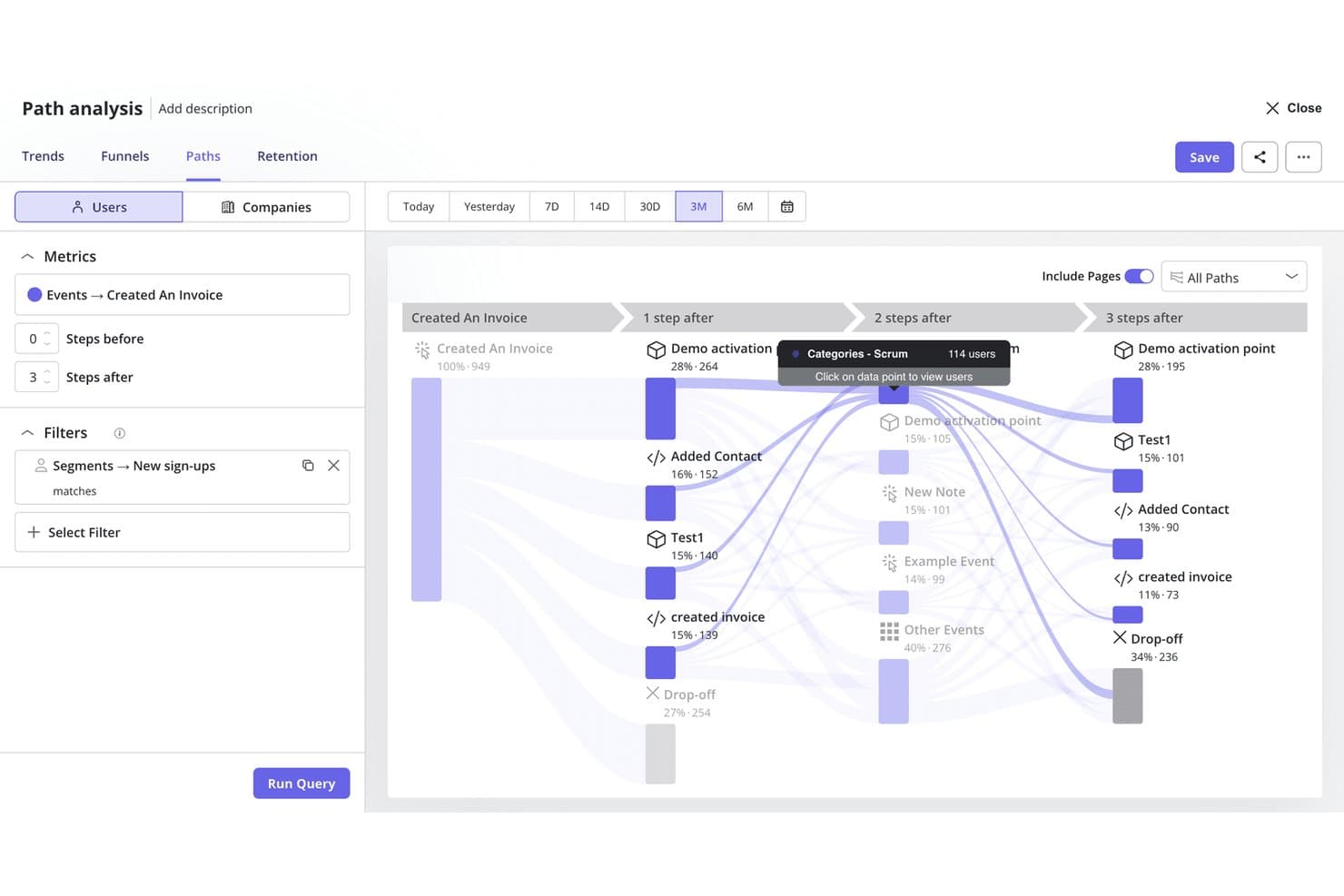
L'analisi dei percorsi di Userpilot mappa i viaggi degli utenti dopo gli eventi chiave del prodotto. Userpilot è una piattaforma di analisi del prodotto e coinvolgimento in-app che combina la riproduzione delle sessioni, l'analisi dei funnel e dei percorsi, il monitoraggio degli eventi, il rilevamento dei segnali di frustrazione e strumenti nativi per i sondaggi, con funzionalità integrate per creare flussi e guide in-app.
Per chi è più adatto Userpilot?
Userpilot è particolarmente adatto ai team di prodotto che vogliono passare dall'individuazione degli ostacoli alla loro risoluzione senza dover passare da uno strumento all'altro.
Perché ho scelto Userpilot
Userpilot si è guadagnato un posto nella mia rosa ristretta perché è l'unico strumento che ho utilizzato in cui l'individuazione di un abbandono e l'implementazione di una correzione avvengono all'interno della stessa piattaforma. Posso fare clic da un report del funnel direttamente sulle riproduzioni delle sessioni alla base di quello specifico abbandono, quindi avviare un flusso in-app o un tooltip per risolvere l'ostacolo senza utilizzare un altro strumento. L'analisi delle correlazioni basata sull'IA segnala inoltre automaticamente quali segnali di frustrazione, come clic rabbiosi o inversioni di percorso, stanno causando quell'abbandono.
Funzionalità principali di Userpilot
- Acquisizione automatica retroattiva degli eventi: Definisci nuovi eventi sulla base dei dati storici sulle interazioni già acquisiti, così puoi eseguire analisi senza dover strumentare nuovamente il prodotto.
- Analisi delle correlazioni basata sull'IA: Mostra automaticamente quali attributi degli utenti, eventi e segnali di frustrazione sono correlati alla conversione o all'abbandono del funnel nei tuoi report.
- Sondaggi NPS, CSAT e CES nativi: Attiva sondaggi comportamentali in base a specifici eventi in-app, quindi collega direttamente le risposte ai dati sulla fidelizzazione e sul coinvolgimento nella stessa piattaforma.
- Server MCP: Collega i dati sul prodotto di Userpilot a strumenti di IA esterni come Claude, ChatGPT e Microsoft Copilot, così puoi consultare gli insight comportamentali senza uscire da questi ambienti.
Integrazioni di Userpilot
Userpilot offre integrazioni native con Segment, Amplitude, Mixpanel, Heap, Google Analytics, Google Tag Manager, Intercom, Slack, HubSpot e Salesforce. Supporta inoltre API, webhook e la sincronizzazione con il data warehouse aziendale.
Pros and Cons
Pros:
- I funnel si collegano direttamente alle riproduzioni delle sessioni
- Rileva segnali di frustrazione come clic rabbiosi e clic a vuoto
- Avvia correzioni in-app dai report di analisi
Cons:
- Nessuna mappa di calore per la visualizzazione aggregata dei clic
- La maggior parte delle funzionalità di analisi avanzate è disponibile solo in determinati piani
Learn more about Userpilot: Ideale per il monitoraggio del comportamento degli utenti
- Piano gratuito + demo gratuita disponibile
- Da $1200/anno (fatturato annualmente)
Visit WebsiteCustomer Rating:4.5/5
Mixpanel visualizza i tassi di conversione tra browser con un'analisi dettagliata dei funnel. Mixpanel è uno strumento di analisi pensato per le aziende che desiderano monitorare il comportamento e le interazioni degli utenti con i loro prodotti. I principali utilizzatori sono product manager e analisti dei dati che hanno bisogno di comprendere i percorsi e il coinvolgimento degli utenti.
Perché ho scelto Mixpanel: È specializzato nel monitoraggio del comportamento degli utenti, permettendo di analizzare in tempo reale come gli utenti interagiscono con il tuo prodotto. Puoi creare funnel dettagliati per tracciare i percorsi di conversione e identificare i punti di abbandono. Mixpanel offre anche l’analisi dei cohort, che ti aiuta a segmentare gli utenti in base alle loro azioni nel tempo. Questa combinazione di funzionalità lo rende ideale per comprendere a fondo l’engagement degli utenti.
Funzionalità principali & integrazioni:
Funzionalità includono A/B testing per ottimizzare l’esperienza utente, notifiche push per coinvolgere direttamente gli utenti e report di fidelizzazione che ti aiutano a comprendere la lealtà degli utenti. Queste funzionalità sono progettate per offrire insight pratici sul comportamento degli utenti.
Integrazioni includono Segment, Zapier, Salesforce, HubSpot, Google Ads, Marketo, Amplitude, Optimizely, Slack e Intercom.
Pros and Cons
Pros:
- Analisi dettagliata dei cohort
- Dashboard personalizzabili
- Supporta l’A/B testing
Cons:
- Leggero periodo di apprendimento
- Le funzionalità avanzate richiedono competenze di programmazione
 Ideale per l'analisi comportamentale basata sull'intelligenza artificiale
- Piano gratuito disponibile
- Prezzi su richiesta
Visit WebsiteCustomer Rating:4.5/5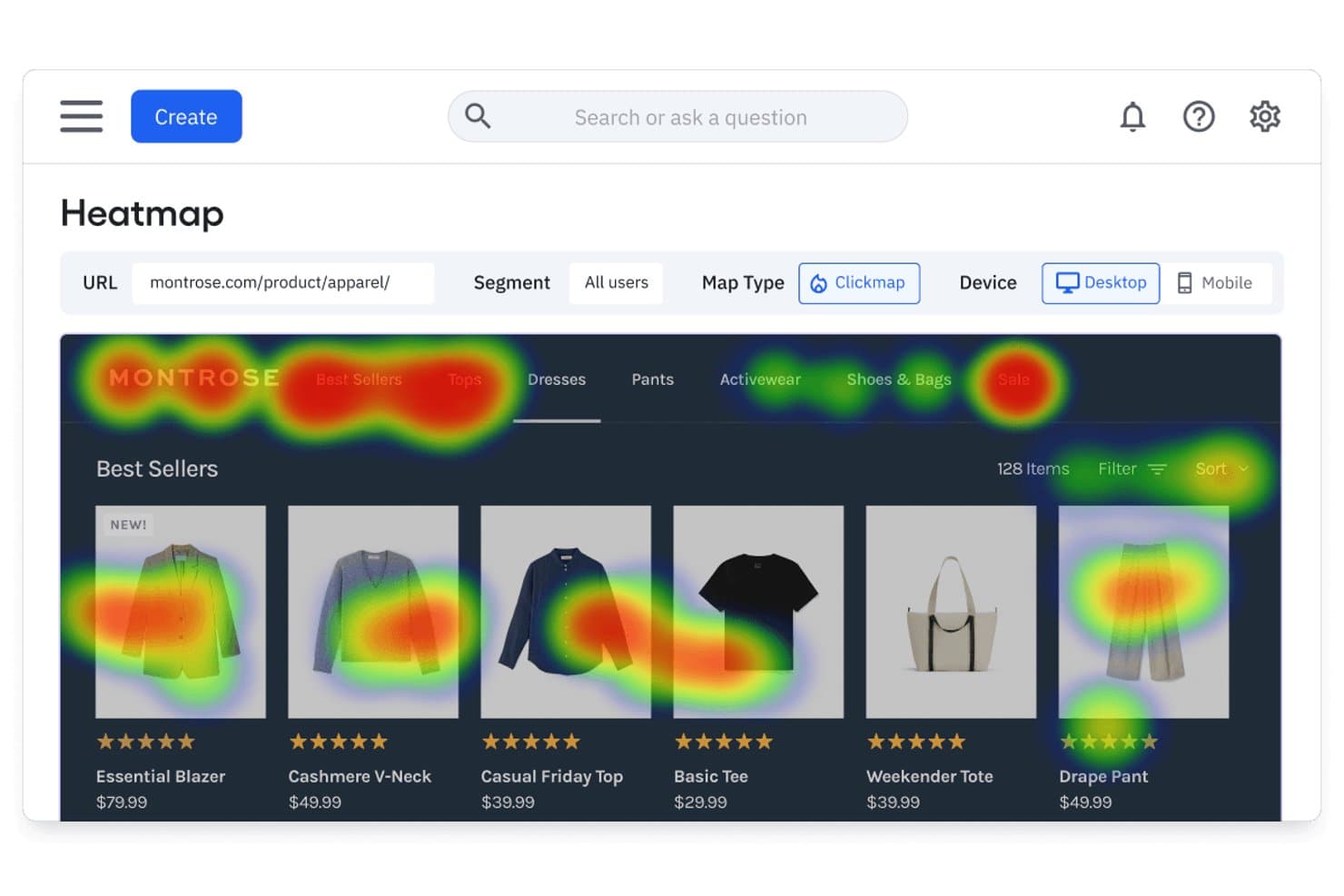
La mappa di calore di Amplitude mostra dove gli utenti fanno clic sulle pagine dei prodotti. Amplitude è una piattaforma di analisi dei prodotti che combina la riproduzione delle sessioni, le mappe di calore, l'analisi degli imbuti di conversione, le coorti comportamentali e la sperimentazione integrata con agenti basati sull'intelligenza artificiale che fanno emergere informazioni utili da tutti i tuoi dati.
Per chi è più adatto Amplitude?
Amplitude è una soluzione particolarmente adatta ai team di prodotto e di crescita che hanno bisogno di analisi comportamentali, sperimentazione e riproduzione delle sessioni in un'unica piattaforma, anziché di soluzioni separate assemblate tra loro.
Perché ho scelto Amplitude
Amplitude si è guadagnato un posto nella mia rosa di candidati perché la sua analisi comportamentale basata sull'intelligenza artificiale va oltre i pannelli di controllo passivi in modi che non ho visto eguagliare. L'Agente di riproduzione delle sessioni riepiloga automaticamente le sessioni e fa emergere i punti di attrito senza revisione manuale, mentre l'Agente globale risponde a domande in linguaggio naturale come 'perché i nuovi utenti abbandonano prima della configurazione?' sintetizzando i dati dell'intero prodotto. Apprezzo anche il fatto che l'analisi retrospettiva degli imbuti di conversione permetta di applicare istantaneamente agli dati storici gli eventi definiti di recente, senza dover effettuare nuovamente la strumentazione.
Funzionalità principali di Amplitude
- Coorti comportamentali: Salva gruppi di utenti definiti da azioni specifiche all'interno del prodotto e riutilizzali in grafici, riproduzioni delle sessioni, esperimenti e sondaggi.
- Sperimentazione web e mobile: Esegui test A/B ed esperimenti con flag delle funzionalità in modo nativo, con riproduzioni delle sessioni collegate direttamente ai risultati delle varianti per la convalida qualitativa.
- Guide e sondaggi: Distribuisci guide di onboarding nell'app, richieste NPS e widget per il feedback, con la riproduzione delle sessioni collegata ai momenti di raccolta del feedback.
- Etichettatura visiva: Contrassegna gli elementi dell'interfaccia utente e definisci eventi denominati direttamente dall'interfaccia di Amplitude senza scrivere codice.
Integrazioni di Amplitude
Amplitude offre oltre 60 integrazioni native, tra cui Twilio Segment, Snowflake, Google BigQuery, Salesforce, HubSpot, Zendesk, Intercom, Braze e Google Analytics 4. Fornisce inoltre API HTTP, Batch, di esportazione e DSAR per flussi di lavoro personalizzati sui dati.
Pros and Cons
Pros:
- La riproduzione delle sessioni basata sull'intelligenza artificiale riepiloga automaticamente i punti di attrito
- Coorti comportamentali riutilizzabili tra analisi ed esperimenti
- Analisi retrospettiva degli imbuti di conversione sui dati storici del prodotto
Cons:
- Le mappe di calore richiedono il piano di livello più alto con un componente aggiuntivo
- Le mappe di calore per app mobile native non sono ancora disponibili
Learn more about Amplitude: Ideale per l'analisi delle app mobili
- Piano gratuito disponibile
- Prezzi su richiesta
Visit WebsiteCustomer Rating:4.6/5
UXCam visualizza i percorsi degli utenti con l'analisi dei funnel per ottimizzare l'onboarding dell'app. UXCam è uno strumento di analisi per app mobili progettato per aiutare le aziende a comprendere il comportamento degli utenti sulle loro applicazioni mobili. I principali utenti sono sviluppatori di app e product manager che necessitano di approfondimenti sulle prestazioni dell'app e sulle interazioni degli utenti.
Perché ho scelto UXCam: Si distingue nell'analisi delle app mobili, offrendo funzionalità come la riproduzione delle sessioni per visualizzare le azioni degli utenti. Puoi analizzare le heatmap per vedere dove gli utenti toccano e scorrono all'interno della tua app. UXCam fornisce anche analisi dei crash, aiutandoti a identificare e risolvere rapidamente i problemi. Queste capacità lo rendono una scelta completa per migliorare l'esperienza utente della tua app.
Funzionalità principali & integrazioni:
Funzionalità includono analytics dei funnel che tracciano i percorsi degli utenti all'interno dell'app, rilevamento dei gesti che identifica azioni come swipe e pinch, e analisi dei flussi di schermata che mappa come gli utenti navigano nell'app. Queste funzionalità offrono approfondimenti dettagliati sul comportamento degli utenti.
Integrazioni includono Google Analytics, Segment, Mixpanel, Amplitude, Firebase, Adjust, AppsFlyer, Kochava, Airship e Braze.
Pros and Cons
Pros:
- Replay dettagliati delle sessioni
- Fornisce analytics dei funnel
- Offre mappatura dei flussi di schermata e rilevamento dei gesti
Cons:
- Prezzi elevati per piccoli team
- Richiede configurazione tecnica
Learn more about UXCam: Ideale per il punteggio della frizione e il VoC nelle aziende
- Demo gratuita disponibile
- Prezzi su richiesta
Visit WebsiteCustomer Rating:4.7/5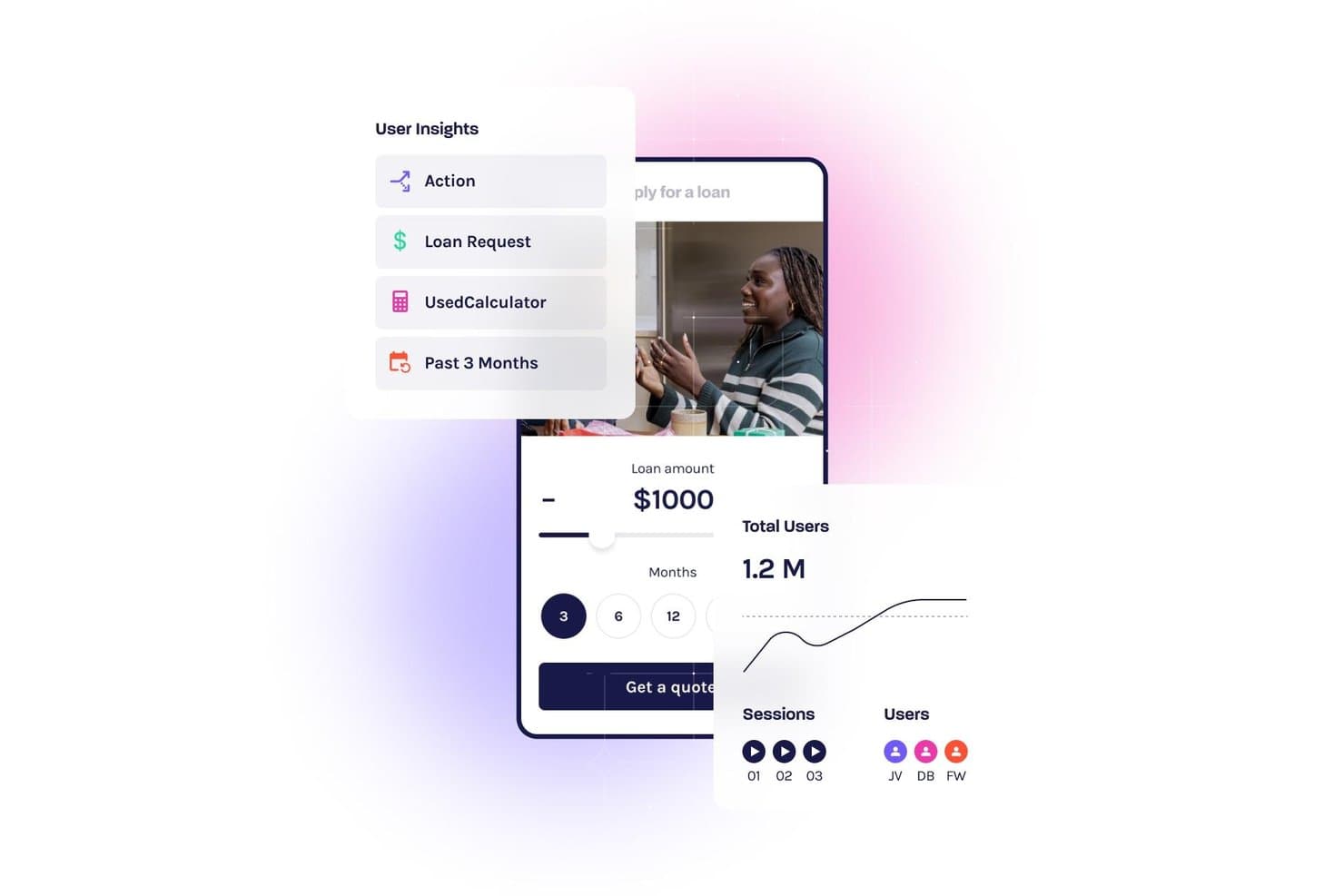
Glassbox monitora il comportamento degli utenti con riproduzioni delle sessioni e dashboard di analisi. Glassbox è una piattaforma di analisi UX per aziende che combina la riproduzione delle sessioni, l'acquisizione automatica senza tag, le mappe delle interazioni, l'analisi dei funnel, il punteggio di frizione e strumenti VoC nativi per il web e i dispositivi mobili.
Per chi è più adatto Glassbox?
Glassbox è ideale per i team aziendali responsabili dei prodotti e della CX in settori regolamentati, come servizi finanziari, sanità e vendita al dettaglio, che hanno bisogno di dati comportamentali approfonditi senza l'onere della strumentazione manuale.
Perché ho scelto Glassbox
Glassbox si è guadagnato un posto nella mia lista ristretta grazie al suo proprietario Struggle Score, che quantifica la frizione sulla base di oltre 30 segnali comportamentali—clic ripetuti, inversioni di direzione, clic su errori—e collega ciascuno di essi direttamente all'impatto sui ricavi. Mi piace il fatto che non si limiti a segnalare i problemi fastidiosi: permette ai team di prodotto e CX di classificare i problemi UX in base al costo per l'azienda e di intervenire prima sulle criticità con la massima priorità. La funzionalità Voice of the Silent amplia ulteriormente il quadro utilizzando l'IA per applicare il sentiment VoC degli intervistati al 95% o più degli utenti che non compilano mai un sondaggio.
Funzionalità principali di Glassbox
- Acquisizione automatica senza tag: Glassbox registra automaticamente ogni clic, scorrimento, input nei moduli ed evento lato server senza tagging manuale o strumentazione da parte degli sviluppatori.
- Mappa del percorso aumentata: Una singola visualizzazione multicanale mappa l'intero percorso del cliente, dall'acquisizione alla conversione, su web e dispositivi mobili in un'unica schermata.
- GIA (Glassbox Insights Assistant): Un assistente di IA generativa consente di interrogare i dati delle sessioni, generare riepiloghi delle sessioni e individuare approfondimenti comportamentali utilizzando il linguaggio naturale.
- Analisi delle app mobili: SDK dedicati per iOS, Android, React Native, Flutter e altri cinque framework offrono la riproduzione delle sessioni, le mappe delle interazioni e l'analisi dei crash per le app mobili native.
Integrazioni di Glassbox
Glassbox offre integrazioni native con Adobe Analytics, Google Analytics 4, Qualtrics, Medallia, Optimizely, VWO, Jira e Slack. Un'API aperta supporta le integrazioni personalizzate.
Pros and Cons
Pros:
- Quantifica la frizione utilizzando il proprietario Struggle Score
- L'acquisizione automatica senza tag elimina il tagging manuale degli eventi
- L'IA individua immediatamente approfondimenti nascosti nelle sessioni
Cons:
- Richiede una demo commerciale per accedere alla piattaforma
- Può sovraccaricare i team con un volume elevato di dati sulle sessioni
Learn more about Glassbox: Ideale per la scoperta continua del prodotto su vasta scala
- Demo gratuita disponibile
- Prezzi su richiesta
Visit WebsiteCustomer Rating:4.7/5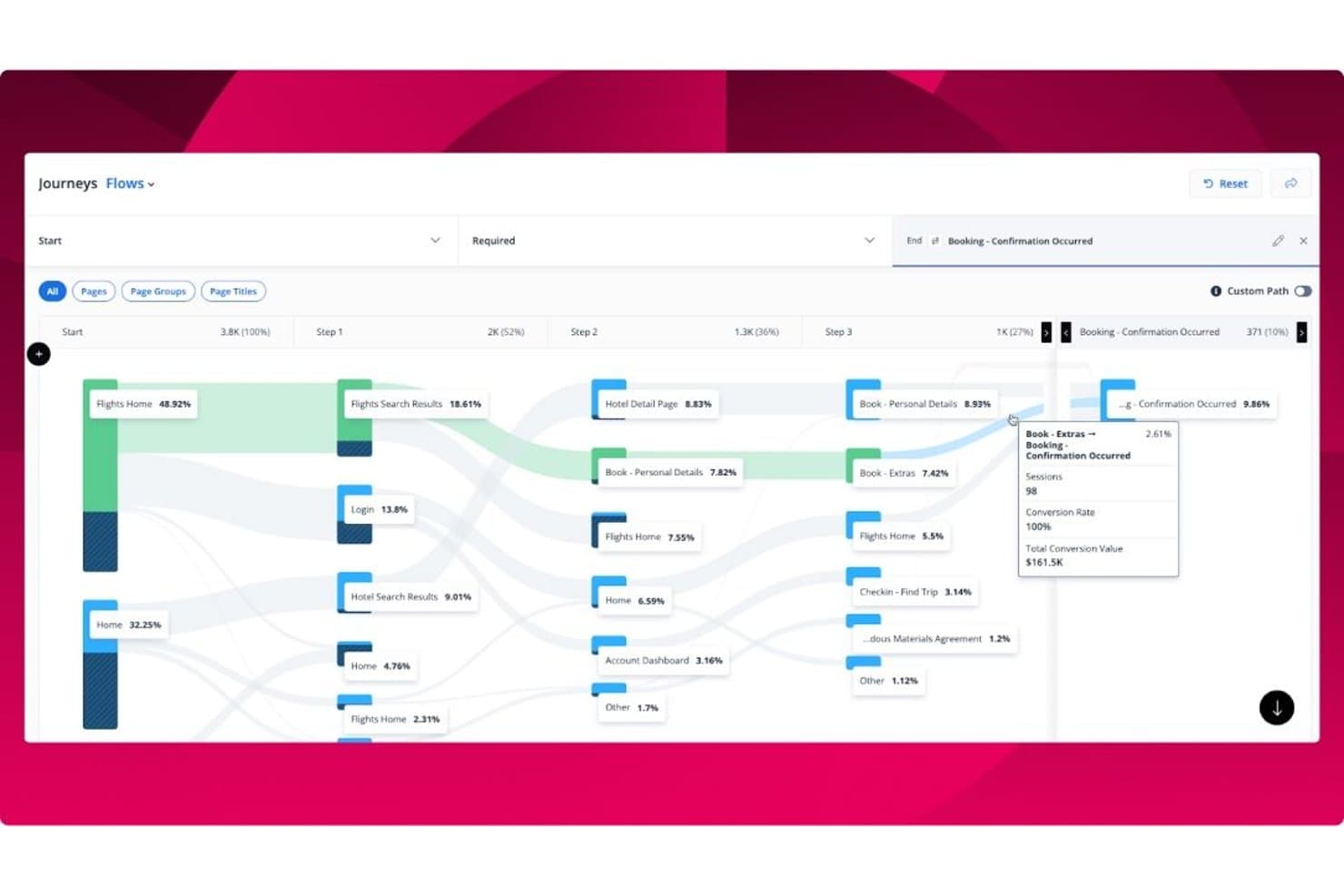
Quantum Metric visualizza i flussi dei percorsi utente con tassi di conversione e dati delle sessioni. Quantum Metric è una piattaforma di analisi dell'esperienza utente per aziende che combina la riproduzione delle sessioni senza campionamento al 100%, mappe di calore delle interazioni, analisi dei percorsi, individuazione delle informazioni chiave basata sull'intelligenza artificiale tramite Felix AI Agentic e integrazione della voce del cliente per applicazioni web e mobili native.
Per chi è più adatto Quantum Metric?
Quantum Metric è una soluzione particolarmente adatta ai team di prodotto e digitali delle grandi aziende che hanno bisogno di collegare i dati comportamentali all'impatto aziendale su applicazioni web e mobili native, anche con volumi di traffico elevati.
Perché ho scelto Quantum Metric
Quantum Metric si è guadagnato un posto nella mia rosa di candidati perché nessun'altra piattaforma che ho valutato rende la scoperta continua del prodotto così automatica su scala aziendale. Felix AI Agentic opera autonomamente in background, monitora i tuoi KPI e mette in evidenza gli ostacoli che incidono sui ricavi prima ancora che tu pensi di cercarli. Se a questo si aggiunge l'Analisi delle opportunità, che quantifica l'impatto aziendale di specifici abbandoni nei percorsi web e mobili nativi, il tuo team dedica meno tempo alla ricerca dei problemi e più tempo alla risoluzione di quelli giusti.
Funzionalità principali di Quantum Metric
- Chat AI Felix: un'interfaccia in linguaggio naturale che consente di porre domande semplici sui propri dati comportamentali e ottenere risposte dirette senza scrivere query.
- Acquisizione dei dati lato server: invia eventi critici come transazioni e registrazioni direttamente dai tuoi server, aggiungendoli alle riproduzioni delle sessioni in corso anche quando l'acquisizione lato client non funziona.
- Scansione automatica dei dati personali identificabili: esegue una scansione continua per rilevare l'acquisizione involontaria di dati personali identificabili e applica per impostazione predefinita il mascheramento della privacy a tutti i dati delle sessioni.
- Trasmissione dei dati: esporta i tuoi dati comportamentali verso destinazioni come Snowflake, Azure e Databricks per l'integrazione con l'infrastruttura BI e dati esistente.
Integrazioni di Quantum Metric
Quantum Metric si integra con Qualtrics, Optimizely, Split, UserTesting, Snowflake, Azure, Databricks, Looker, Tealium e Slack, con trasmissione dei dati verso oltre 20 destinazioni. API, webhook e integrazioni con i sistemi di gestione dei tag supportano la connettività personalizzata.
Pros and Cons
Pros:
- Rileva gli ostacoli che incidono sui ricavi con Felix AI
- Offre dati di riproduzione delle sessioni senza campionamento al 100%
- Consente di creare percorsi di conversione direttamente dalle riproduzioni delle sessioni
Cons:
- La segmentazione avanzata può risultare confusa per i team
- I dati a volte non corrispondono a quelli di altri strumenti di analisi
Learn more about Quantum Metric: Ideale per la riproduzione delle sessioni
- Piano gratuito + demo gratuita disponibile
- Prezzi su richiesta
Visit WebsiteCustomer Rating:4.5/5
Fullstory offre un'analisi chiara dei funnel e delle conversioni per ottimizzare i percorsi degli utenti. Fullstory è una piattaforma di analisi dell'esperienza digitale che aiuta le aziende a comprendere le interazioni degli utenti tramite la riproduzione delle sessioni. I suoi principali utilizzatori sono designer UX e team di prodotto che necessitano di approfondimenti dettagliati sul comportamento degli utenti su siti web e app.
Perché ho scelto Fullstory: Eccelle nella riproduzione delle sessioni, consentendoti di visualizzare sessioni utente complete per individuare i punti critici. Puoi utilizzare le heatmap per visualizzare il coinvolgimento degli utenti sul tuo sito. Fullstory offre anche funnel di eventi che aiutano a tracciare i percorsi utente e analizzare le conversioni. Questi strumenti forniscono una visione completa dell'esperienza utente, facilitando l'ottimizzazione della presenza digitale.
Funzionalità e integrazioni principali:
Funzionalità includono analisi delle conversioni per tracciare il successo dei percorsi utente, rilevamento degli errori che ti avvisa dei problemi che impattano sull'esperienza utente e tracking di eventi personalizzati per monitorare azioni specifiche degli utenti. Queste funzionalità lavorano insieme per migliorare la comprensione delle interazioni degli utenti.
Integrazioni includono Slack, Segment, Google Analytics, Optimizely, Mixpanel, HubSpot, Salesforce, Jira, Trello e Zendesk.
Pros and Cons
Pros:
- Riproduzione sessioni di alta qualità
- Rilevamento errori efficace
- Tracking eventi personalizzato
Cons:
- Alto utilizzo di risorse
- Le funzionalità avanzate richiedono formazione
Learn more about Fullstory: Ideale per il monitoraggio automatico degli eventi
- Piano gratuito disponibile
- Prezzi su richiesta
Visit WebsiteCustomer Rating:4.3/5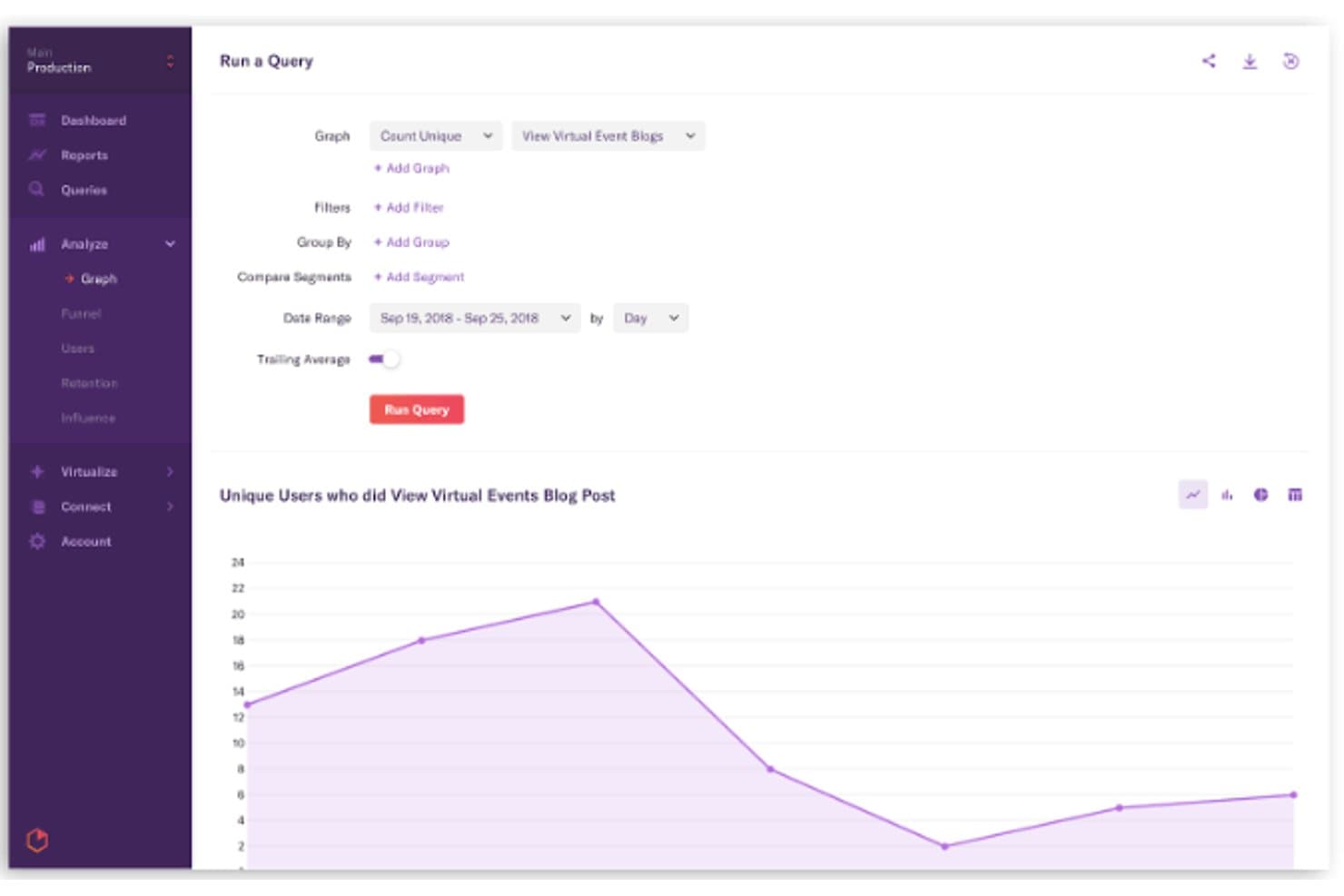
Heap consente agli utenti di interrogare e visualizzare le tendenze del comportamento degli utenti nel tempo. Heap è una piattaforma di analisi UX che acquisisce automaticamente ogni interazione dell'utente—clic, tocchi, visualizzazioni di pagina e compilazioni di moduli—su web e dispositivi mobili, e combina questi dati comportamentali con l'analisi dei funnel, la mappatura dei percorsi, la riproduzione delle sessioni e la presentazione di insight basati sull'intelligenza artificiale.
Per chi è più adatto Heap?
Heap è particolarmente adatto ai team di prodotto che hanno bisogno di insight comportamentali immediati senza aspettare che il team di sviluppo strumentalizzi ogni evento.
Perché ho scelto Heap
Heap è entrato nella mia rosa dei preferiti perché il suo approccio di acquisizione automatica cambia concretamente ciò che è possibile fare nell'analisi dei prodotti. Dal momento in cui inserisci un singolo frammento di codice, Heap registra automaticamente ogni clic, tocco, visualizzazione di pagina e compilazione di modulo, senza richiedere l'assegnazione manuale di tag agli eventi. Ciò che trovo più prezioso è la possibilità di definire nuovi eventi e creare funnel retroattivamente sui dati storici, così una domanda che non avevi pensato di porre sei mesi fa può ancora ricevere una risposta oggi.
Funzionalità principali di Heap
- Sense Chat: Un assistente di intelligenza artificiale generativa che consente a qualsiasi membro del team di porre domande in linguaggio naturale sul comportamento degli utenti e genera automaticamente grafici a partire dalla risposta.
- Heap Illuminate: Un livello di data science che individua proattivamente gli eventi principali, i segmenti di utenti a maggiore impatto e i modelli di frizione senza alcuna configurazione manuale.
- Riepiloghi della riproduzione delle sessioni: Riepiloghi generati dall'intelligenza artificiale delle registrazioni delle singole sessioni che evidenziano i momenti chiave, riducendo la necessità di guardare le riproduzioni complete.
- Heap Connect: Una soluzione ETL gestita che sincronizza i dati comportamentali con Snowflake o BigQuery per arricchirli e analizzarli insieme a fonti di dati esterne.
Integrazioni di Heap
Heap offre oltre 100 integrazioni, tra cui Snowflake, BigQuery, Salesforce, HubSpot, Intercom, Segment, RudderStack, Shopify e WalkMe. Le API lato client e lato server supportano integrazioni personalizzate e l'arricchimento dei dati.
Pros and Cons
Pros:
- Definizione retroattiva degli eventi sui dati storici
- Presentazione di insight basata sull'intelligenza artificiale e assistente chat
- Acquisizione automatica di tutte le interazioni degli utenti
Cons:
- La riproduzione delle sessioni richiede un componente aggiuntivo a pagamento
- Nessun test A/B o sondaggio integrato
Learn more about Heap (by Contentsquare): Ideale per l'analisi dell'esperienza digitale
- Prova gratuita di 15 giorni + piano gratuito + demo gratuita disponibili
- Da $39/mese (fatturazione annuale)

Contentsquare cattura le interazioni degli utenti con riproduzioni delle sessioni dettagliate e analisi dei comportamenti. Contentsquare è una piattaforma di analisi dell'esperienza digitale progettata per aiutare le aziende a comprendere e migliorare le interazioni degli utenti sui loro siti web e app. I principali utilizzatori sono marketer digitali e designer UX che necessitano di approfondimenti sul comportamento e il coinvolgimento degli utenti.
Perché ho scelto Contentsquare: Si specializza nelle analisi dell'esperienza digitale, offrendo funzionalità come heatmap basate sulle zone che forniscono dettagli approfonditi sul coinvolgimento degli utenti nei diversi elementi della pagina. È possibile utilizzare l'analisi dei percorsi per tracciare i comportamenti degli utenti e identificare i punti di abbandono. Contentsquare offre anche la riproduzione delle sessioni, che permette di visualizzare in tempo reale le interazioni degli utenti. Questi strumenti ti aiutano ad apportare miglioramenti guidati dai dati alle tue esperienze digitali.
Funzionalità principali e integrazioni:
Funzionalità includono la quantificazione dell'impatto, che misura l'effetto delle modifiche sul comportamento degli utenti, avvisi comportamentali che segnalano cambiamenti significativi nell'attività degli utenti e approfondimenti basati sull'intelligenza artificiale che evidenziano le principali tendenze degli utenti. Queste funzionalità lavorano insieme per migliorare la comprensione delle interazioni degli utenti.
Integrazioni includono Google Analytics, Adobe Analytics, Salesforce, Tealium, Segment, Optimizely, HubSpot, Shopify, Adobe Commerce e WordPress.
Pros and Cons
Pros:
- Heatmap dettagliate basate sulle zone
- Analisi efficace dei percorsi
- Riproduzione delle sessioni in tempo reale
Cons:
- Curva di apprendimento leggermente ripida
- Le funzionalità avanzate richiedono formazione
Learn more about Contentsquare: Ideale per la gestione interfunzionale dei problemi di UX e ingegneria
- Piano gratuito disponibile
- A partire da $83/mese
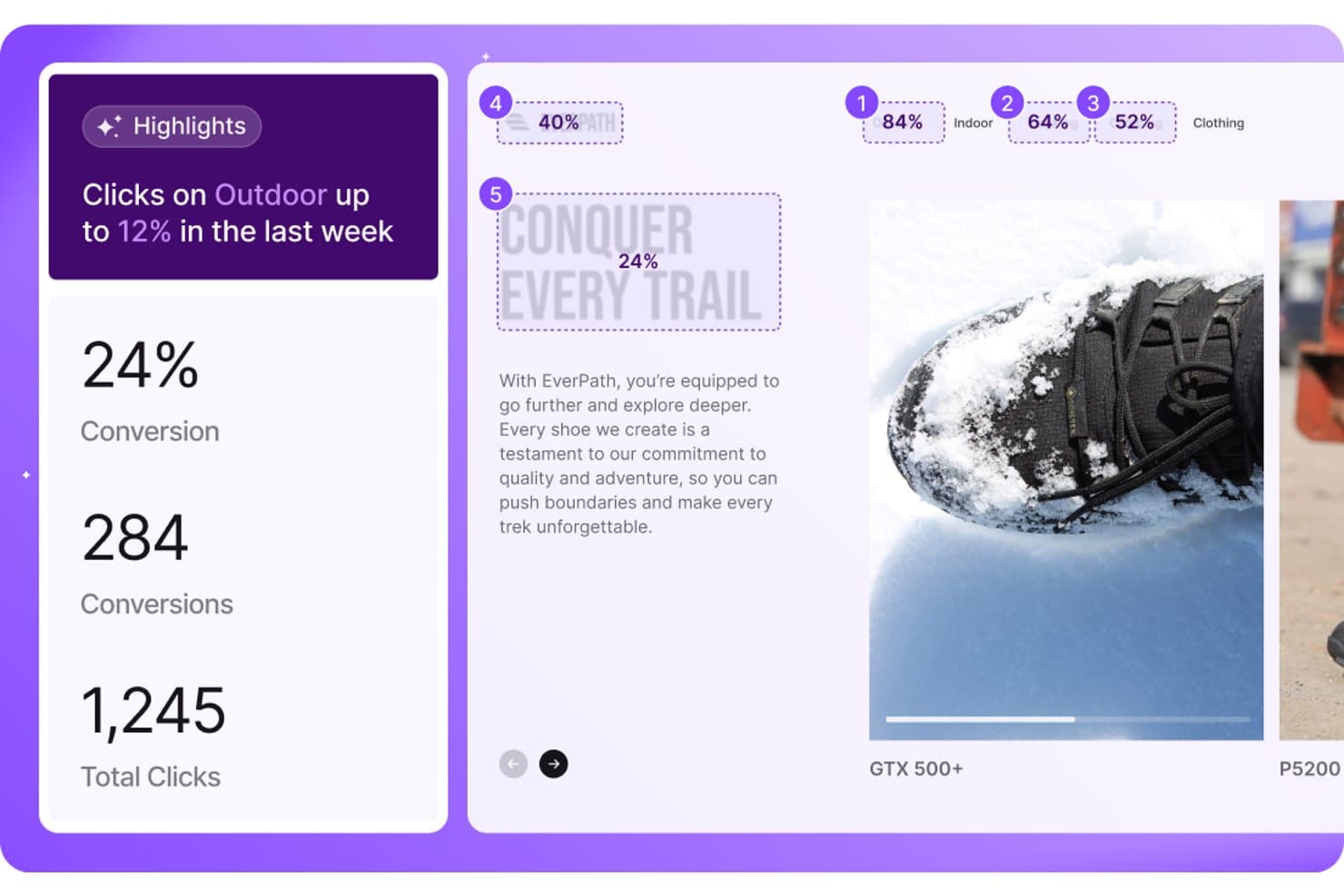
LogRocket mostra le tendenze dei clic e le metriche di conversione per segmento di contenuto. LogRocket è una piattaforma di analisi UX che combina la riproduzione delle sessioni, le mappe di calore, le canalizzazioni di conversione, l'analisi dei percorsi e il rilevamento dei problemi basato sull'intelligenza artificiale nelle applicazioni web e mobili native.
Per chi è più indicato LogRocket?
LogRocket è ideale per i team di prodotto e di ingegneria che hanno bisogno di uno strumento condiviso per diagnosticare i problemi di UX e riprodurre i bug senza interminabili scambi.
Perché ho scelto LogRocket
LogRocket si è guadagnato un posto nella mia rosa ristretta perché è il raro strumento di analisi UX che i team di prodotto e di ingegneria condividono davvero. Ciò che lo rende efficace per la gestione interfunzionale dei problemi è Galileo AI, che rileva automaticamente i clic ripetuti, i clic inattivi e gli stati di errore, li valuta in base all'impatto aziendale e invia direttamente a Slack o al tuo ambiente di sviluppo basato sull'intelligenza artificiale i passaggi per riprodurli. A questo si aggiungono le definizioni retroattive, che consentono di etichettare oggi un elemento dell'interfaccia utente e interrogare istantaneamente tutte le sessioni storiche che lo riguardano: in questo modo gli scambi tra prodotto e ingegneria si riducono rapidamente.
Funzionalità principali di LogRocket
- Acquisizione automatica con definizioni retroattive: Un semplice script di una riga acquisisce automaticamente ogni evento e le nuove etichette degli eventi create vengono applicate istantaneamente a tutti i dati storici delle sessioni.
- SDK mobili nativi: SDK dedicati per iOS, Android, React Native, Flutter, Ionic ed Expo offrono riproduzioni delle sessioni perfette al pixel e analisi UX complete sui dispositivi mobili.
- Canalizzazioni di conversione con analisi dettagliata delle sessioni: L'analisi delle canalizzazioni in più passaggi consente di accedere direttamente alle riproduzioni delle sessioni da qualsiasi punto di abbandono, per ottenere un quadro completo del comportamento.
- Analisi dei feedback con l'intelligenza artificiale: Aggrega i feedback degli utenti provenienti da strumenti come Zendesk, Qualtrics e Gong, li raggruppa per temi e collega ogni tema alle riproduzioni delle sessioni correlate.
Integrazioni di LogRocket
LogRocket offre oltre 75 integrazioni, tra cui Sentry, Zendesk, Qualtrics, Optimizely, LaunchDarkly, Jira, Snowflake e BigQuery. Supporta inoltre Slack, Microsoft Teams, l'accesso tramite API e la connettività MCP per flussi di lavoro personalizzati.
Pros and Cons
Pros:
- La fedeltà della riproduzione delle sessioni è perfetta al pixel
- Acquisizione automatica con definizioni retroattive degli eventi
- Galileo AI automatizza il rilevamento dei problemi di UX
Cons:
- Prezzi elevati per volumi maggiori di sessioni
- Diverse funzionalità non sono disponibili nelle applicazioni mobili
Learn more about LogRocket:
Altri strumenti di analisi UX
Ecco alcune opzioni aggiuntive di strumenti di analisi UX che non sono entrate nel mio elenco, ma che vale comunque la pena prendere in considerazione:
- 11PendoIdeale per collegare i dati alle azioni nell'app
- 12PostHogIdeale per l'analisi dei prodotti a codice sorgente aperto
- 13Crazy EggIdeale per approfondimenti sui test A/B
- 14InspectletIdeale per il monitoraggio degli utenti in tempo reale
- 15SmartlookIdeale per riprodurre gli abbandoni del funnel sul web e su dispositivi mobili
- 16Lucky OrangeIdeale per l'esperienza utente nell'e-commerce e i segnali di frustrazione
- 17MouseflowIdeale per la valutazione degli attriti in tutte le sessioni
- 18Microsoft ClarityIdeale per analisi comportamentali gratuite senza limiti
Come valuto gli strumenti di analisi UX
Valuto gli strumenti di analisi UX su due livelli: le funzionalità di base—session replay, heatmap, analisi dei funnel—che uno strumento deve avere, e i fattori di differenziazione che distinguono i migliori.
Funzionalità principali (requisiti minimi per questo elenco)
Quando seleziono gli strumenti per la mia lista, valuto ciascuno su una scala da 0 (non offre la funzionalità) a 5 (eccelle in questo ambito) per ogni funzionalità di base elencata di seguito. Poi calcolo il punteggio totale dello strumento in una percentuale. Ogni strumento deve raggiungere un punteggio totale minimo del 65% per essere considerato per l'inclusione.
- Session Replay: Esamino la qualità della riproduzione, le opzioni di filtro e i controlli sulla privacy—ad esempio se posso trovare rapidamente le sessioni in cui un utente ha abbandonato il processo di acquisto o ha riscontrato un errore JS.
- Heatmap & Click Tracking: Delle buone heatmap devono gestire contenuti dinamici e SPA, non solo pagine statiche. Controllo se gli strumenti supportano mappe di scroll, click, e movimento con segmentazione.
- Analisi dei funnel & dei percorsi: Valuto quanto sia flessibile la costruzione dei funnel—posso definire funnel personalizzati a più step, vedere dove gli utenti abbandonano e confrontare le conversioni tra i segmenti?
- Tracciamento di eventi & comportamenti: È importante se uno strumento offre autocapture o richiede instrumentation manuale. Guardo quanto sia facile per i team taggare bottoni, campi nei moduli e azioni in-app.
- Segmentazione & analisi dei gruppi: Filtrare sessioni o heatmap per attributi utente come tipo di piano, dispositivo o data di iscrizione è essenziale per capire i comportamenti tra diversi gruppi di utenti.
- Segnali di frustrazione & errori: Strumenti che rilevano rage click, dead click e inversioni rapide aiutano a far emergere problemi di usabilità più velocemente rispetto a esaminare manualmente tutte le sessioni registrate.
Una volta che ho una lista di strumenti che soddisfano i criteri, considero cosa distingue ciascuna piattaforma.
Fattori differenzianti (cosa distingue i fornitori)
Ecco come confronto e metto a confronto diversi fornitori:
Funzionalità distintive
Le funzionalità basate su intelligenza artificiale fanno risparmiare ore di analisi manuale segnalando automaticamente anomalie comportamentali—come un improvviso picco di rage click su una funzionalità appena lanciata. L'analisi retroattiva è un altro aspetto che considero fondamentale. Applicare nuove definizioni di eventi ai dati storici permette al team di ottenere risultati immediatamente dopo aver riprogettato il tracciamento, senza aspettare settimane. Per i team che sviluppano prodotti mobile, verifico se uno strumento offre SDK nativi con tracciamento dei gesti e heatmap specifiche per le app.
Oltre le funzionalità
La privacy e la conformità sono aspetti fondamentali quando le registrazioni delle sessioni catturano interazioni reali degli utenti. Verifico la presenza di mascheramento dei dati sensibili, gestione del consenso e certificazioni come SOC 2 o conformità GDPR—specialmente per i team che gestiscono dati delicati. Anche l'integrazione con il proprio stack tecnologico è importante. Uno strumento di analisi UX dovrebbe collegarsi agli strumenti già usati dal team, ad esempio inviando insight in ticket Jira o trasferendo dati evento tramite Segment. Valuto inoltre la trasparenza dei prezzi, dato che i modelli basati su sessioni o MTU possono aumentare rapidamente man mano che il prodotto cresce.
Come scegliere gli strumenti di analisi UX
È facile perdersi tra lunghi elenchi di funzionalità e strutture tariffarie complesse. Per aiutarti a mantenere la concentrazione mentre affronti il tuo processo di selezione del software, ecco un elenco di fattori da tenere presenti:
| Fattore | Cosa considerare |
| Scalabilità | Assicurati che lo strumento possa crescere insieme alla tua attività. Deve gestire volumi di dati crescenti con l'espansione della tua base utenti, senza compromettere le prestazioni. |
| Integrazioni | Verifica la compatibilità con i software già utilizzati dal tuo team, come i sistemi CRM o le piattaforme di marketing, per garantire un flusso di dati continuo tra gli strumenti. |
| Personalizzazione | Cerca strumenti che ti consentano di adattare dashboard e report alle esigenze e ai flussi di lavoro specifici del tuo team. |
| Facilità d'uso | L'interfaccia dovrebbe essere intuitiva e richiedere una formazione minima, consentendo al tuo team di adottare rapidamente lo strumento e utilizzarlo in modo efficace. |
| Budget | Considera sia i costi iniziali sia i piani tariffari a lungo termine. Assicurati che lo strumento rientri nel tuo budget e offra un buon rapporto qualità-prezzo in relazione alle sue funzionalità. |
| Misure di sicurezza | Valuta le misure di protezione dei dati, come la crittografia e i controlli di accesso, per garantire che i dati degli utenti siano sicuri e conformi alle normative. |
| Assistenza | Un'assistenza clienti affidabile è fondamentale. Cerca disponibilità 24 ore su 24, 7 giorni su 7 e diverse opzioni di contatto per affrontare eventuali problemi che il tuo team potrebbe incontrare. |
| Profondità dell'analisi | Valuta il livello di dettaglio delle analisi fornite. Lo strumento dovrebbe offrire informazioni approfondite sul comportamento degli utenti, aiutandoti a prendere decisioni informate. |
Tendenze negli strumenti di analisi UX
Nella mia ricerca, ho raccolto innumerevoli aggiornamenti di prodotto, comunicati stampa e registri delle release di diversi fornitori di strumenti di analisi UX. Ecco alcune delle tendenze emergenti che sto tenendo d’occhio:
- Insight basati sull’IA: l’IA viene utilizzata sempre più spesso per fornire insight più approfonditi sul comportamento degli utenti. Gli strumenti sfruttano l’apprendimento automatico per prevedere le tendenze e automatizzare l’analisi dei dati, aiutando i team a prendere decisioni più rapidamente. Fornitori come Contentsquare stanno integrando l’IA per evidenziare le tendenze degli utenti.
- Analisi multicanale: le aziende vogliono monitorare il comportamento degli utenti su più canali. Gli strumenti si stanno evolvendo per fornire una visione unificata delle interazioni degli utenti su siti web, app e altri punti di contatto digitali. Questa tendenza aiuta i team a comprendere l’intero percorso del cliente.
- Analisi incentrata sulla privacy: con le crescenti preoccupazioni relative alla privacy dei dati, gli strumenti si stanno concentrando sulla fornitura di analisi senza compromettere la privacy degli utenti. Funzionalità come la raccolta di dati anonimizzati stanno diventando sempre più comuni, garantendo la conformità a normative come il GDPR.
- Collaborazione in tempo reale: con il proseguire del lavoro da remoto, la possibilità per i team di collaborare in tempo reale sulle analisi sta guadagnando sempre più attenzione. Gli strumenti stanno integrando funzionalità che consentono ai team di condividere insight e lavorare insieme sull’analisi dei dati all’istante.
- Maggiore attenzione all’esperienza utente: oltre ai semplici dati, si sta verificando uno spostamento verso il miglioramento dell’esperienza utente all’interno degli stessi strumenti di analisi. I fornitori stanno dando priorità a interfacce intuitive e design facili da usare, rendendo più semplice per i team interagire con i dati analitici.
Cosa sono gli strumenti di analisi UX?
Gli strumenti di analisi UX sono un tipo di strumento di analisi web progettato per aiutare i team a comprendere come gli utenti interagiscono con i prodotti digitali. Utilizzati comunemente da designer UX, product manager e professionisti del marketing, questi strumenti combinano dati comportamentali e insight qualitativi per migliorare l’esperienza del cliente.
Funzionalità come mappe di calore, registrazioni delle sessioni e monitoraggio delle conversioni consentono ai team di individuare problemi di usabilità, monitorare il comportamento dei singoli utenti e perfezionare le esperienze digitali. Trasformando i dati sia quantitativi sia qualitativi in insight utili per l’azione, questi strumenti supportano decisioni di progettazione basate sui dati che migliorano la soddisfazione complessiva degli utenti.
Funzionalità degli strumenti di analisi UX
Quando selezioni strumenti di analisi UX, cerca funzionalità chiave che supportino sia il monitoraggio quantitativo sia la ricerca qualitativa sugli utenti:
- Mappe di calore: visualizza l’attività di clic, scorrimento e passaggio del cursore per identificare i punti di maggiore coinvolgimento degli utenti e le aree di attrito.
- Registrazioni delle sessioni: osserva le sessioni dei singoli utenti per individuare problemi di usabilità, clic di frustrazione e abbandoni.
- Monitoraggio delle conversioni: analizza i funnel di conversione e individua i punti in cui gli utenti abbandonano il percorso.
- Analisi in tempo reale: accedi ai dati comportamentali in tempo reale per reagire rapidamente a schemi o problemi emergenti.
- Dashboard personalizzabili: visualizza le metriche in modo coerente con gli obiettivi e i flussi di lavoro del tuo team.
- Avvisi comportamentali: ricevi notifiche quando emergono schemi imprevisti, come picchi nei tassi di uscita o cicli di navigazione.
- Analisi delle coorti: segmenta gli utenti in base al comportamento o agli attributi per comprendere le tendenze tra diversi pubblici.
- Raccolta dei dati incentrata sulla privacy: rispetta la privacy degli utenti continuando a raccogliere insight significativi.
- Monitoraggio multicanale: monitora l’intero percorso dell’utente su app mobili, siti web e altri punti di contatto digitali.
- Integrazione dei feedback degli utenti: combina gli input diretti con il monitoraggio del comportamento per ottenere un quadro più completo dell’esperienza utente.
Vantaggi degli strumenti di analisi UX
L’implementazione di strumenti di analisi UX offre diversi vantaggi al tuo team e alla tua azienda. Eccone alcuni che puoi aspettarti:
- Migliore esperienza utente: analizzando mappe di calore e registrazioni delle sessioni, puoi identificare e risolvere i punti critici, ottenendo interazioni più fluide per gli utenti.
- Decisioni basate sui dati: l’analisi in tempo reale e il monitoraggio delle conversioni forniscono insight che aiutano il tuo team a compiere scelte consapevoli.
- Aumento dei tassi di conversione: comprendere i punti di abbandono attraverso il monitoraggio delle conversioni ti consente di ottimizzare il percorso dell’utente e incrementare le conversioni.
- Maggiore soddisfazione del cliente: integrando il feedback degli utenti e l’analisi delle coorti, puoi personalizzare le esperienze per soddisfare meglio le esigenze degli utenti.
- Risoluzione tempestiva dei problemi: gli avvisi comportamentali assicurano che tu possa affrontare rapidamente eventuali cambiamenti significativi nel comportamento degli utenti, mantenendo un’esperienza positiva.
- Visione completa dei percorsi degli utenti: il monitoraggio multicanale offre un quadro completo delle interazioni degli utenti, aiutandoti a elaborare strategie coerenti.
- Conformità normativa: la raccolta dei dati incentrata sulla privacy garantisce che le tue pratiche relative ai dati siano conformi alle normative, proteggendo le informazioni degli utenti.
Costi e prezzi degli strumenti di analisi UX
La scelta degli strumenti di analisi UX richiede la comprensione dei vari modelli di prezzo e dei piani disponibili. I costi variano in base alle funzionalità, alle dimensioni del team, ai componenti aggiuntivi e ad altri fattori. La tabella seguente riassume i piani più comuni, i relativi prezzi medi e le funzionalità tipicamente incluse nelle soluzioni di analisi UX:
Tabella comparativa dei piani per gli strumenti di analisi UX
| Tipo di piano | Prezzo medio | Funzionalità comuni |
| Piano gratuito | $0 | Mappe di calore di base, registrazioni delle sessioni limitate e analisi standard. |
| Piano personale | $5-$50/utente/mese | Mappe di calore, registrazioni delle sessioni, monitoraggio di base delle conversioni e report personalizzati limitati. |
| Piano aziendale | $50-$150/ utente/mese | Monitoraggio avanzato delle conversioni, analisi in tempo reale, integrazione dei feedback degli utenti e dashboard personalizzabili. |
| Piano per grandi aziende | $150+/utente/mese | Monitoraggio multicanale, avvisi comportamentali, informazioni basate sull'intelligenza artificiale e assistenza dedicata. |
Domande frequenti sugli strumenti di analisi UX
Ecco alcune risposte alle domande comuni sugli strumenti di analisi UX:
I designer UX devono conoscere l'analisi dei dati?
Sì, i designer UX traggono vantaggio dalla comprensione dell’analisi dei dati, poiché questa fornisce informazioni utili per prendere decisioni di progettazione. Sapere come interpretare i dati relativi alle interazioni degli utenti aiuta a ottimizzare i progetti e a migliorare le esperienze degli utenti. L’analisi dei dati supporta le decisioni fondamentali nel processo di progettazione, evidenziando le aree da migliorare.
Cosa sono gli strumenti di analisi esterni?
Gli strumenti di analisi esterni includono piattaforme popolari come Google Analytics, Hotjar e Mixpanel. Questi strumenti forniscono informazioni preziose sul comportamento degli utenti, aiutandoti a capire come interagiscono con i tuoi prodotti digitali e a individuare le aree da ottimizzare.
Come si integrano gli strumenti di analisi UX con i sistemi esistenti?
Gli strumenti di analisi UX si integrano spesso con i sistemi CRM, le piattaforme di marketing e altri strumenti aziendali. Queste integrazioni consentono un flusso di dati continuo, aiutandoti a consolidare le informazioni e a ottenere una visione completa delle interazioni degli utenti sui diversi canali.
Gli strumenti di analisi UX possono aiutare a ottimizzare il tasso di conversione?
Sì, gli strumenti di analisi UX svolgono un ruolo fondamentale nell’ottimizzazione del tasso di conversione, monitorando i percorsi degli utenti e individuando i punti di abbandono. Analizzando questi dati, puoi apportare modifiche informate per migliorare il flusso degli utenti e aumentare i tassi di conversione sulle tue piattaforme digitali.