

10 migliori alternative a Miro recensite nel 2026

10 Elenco delle migliori alternative a Miro


Ricercare e confrontare gli strumenti di collaborazione può essere scoraggiante, soprattutto quando cerchi un'alternativa a Miro e alle sue funzionalità specifiche. Hai bisogno di una soluzione che soddisfi le esigenze uniche del tuo team, migliori la comunicazione e aumenti la produttività.
Nella mia esperienza, i responsabili di prodotto devono spesso affrontare sfide come team dislocati, progetti complessi e la necessità di collaborare in tempo reale. È qui che entra in gioco il software giusto. Può aiutarti a gestire le attività, visualizzare i progetti e mantenere tutti aggiornati.
Ho testato e recensito in modo indipendente diverse alternative a Miro. In questo articolo condividerò opinioni imparziali sulle migliori opzioni disponibili. Troverai recensioni dettagliate che evidenziano funzionalità e vantaggi pensati per le esigenze della tua azienda. Troviamo la soluzione perfetta per il tuo team.
Cos'è Miro?
Miro è un software di collaborazione progettato per migliorare il lavoro di squadra e la gestione dei progetti. Viene comunemente utilizzato da professionisti come responsabili di progetto, designer e insegnanti che devono facilitare la comunicazione e la condivisione delle idee. Funzionalità come la collaborazione in tempo reale, la mappatura visiva dei progetti e l'integrazione con altri strumenti aiutano a mantenere il team allineato ed efficiente. Nel complesso, Miro offre una piattaforma che semplifica i flussi di lavoro complessi e aumenta la produttività del team.
Perché Fidarsi delle Nostre Recensioni Software
Testiamo e recensiamo software per il product management dal 2020. Come product manager sappiamo quanto sia fondamentale e difficile fare la scelta giusta in termini di software. Investiamo in una ricerca approfondita per aiutare il nostro pubblico a prendere decisioni migliori sugli acquisti di software. Abbiamo testato oltre 2.000 strumenti per diversi casi d’uso e scritto più di 1.000 recensioni approfondite.Scopri come assicuriamo la trasparenza & la nostra metodologia di recensione software.
Riepilogo delle migliori alternative a Miro
Questa tabella comparativa riassume i dettagli sui prezzi delle mie migliori alternative a Miro, per aiutarti a trovare quella più adatta al tuo budget e alle esigenze della tua azienda
| Tool | Best For | Trial Info | Price | ||
|---|---|---|---|---|---|
| 1 | Ideale per integrazioni con strumenti di design | Piano gratuito disponibile | Da $3/editor/mese (fatturazione annuale) | Website | |
| 2 | Ideale per la consolidazione della conoscenza | Prova gratuita di 14 giorni + demo gratuita disponibile | Da $6/utente/mese (fatturato annualmente) | Website | |
| 3 | Ideale per organizzare le attività | Piano gratuito disponibile | Da $5/utente/mese (fatturato annualmente) | Website | |
| 4 | Ideale per la protezione dei dati | Piano gratuito + prova gratuita disponibile | Da €5/utente/mese | Website | |
| 5 | Ideale per processi creativi | Piano gratuito disponibile | Da $9.99/utente/mese (fatturato annualmente) | Website | |
| 6 | Ideale per le opzioni di diagrammazione | Piano gratuito disponibile | Da $5/utente/mese (fatturazione annuale) | Website | |
| 7 | Ideale per sessioni di brainstorming di team strutturate | Prova gratuita di 30 giorni + piano gratuito + demo gratuita disponibile | Da $8,33/utente/mese (fatturato annualmente) | Website | |
| 8 | Ideale per l'integrazione con Microsoft | Piano gratuito + prova gratuita di 30 giorni disponibile | Da $9.99/mese | Website | |
| 9 | Ideale per l'uso educativo | Piano gratuito disponibile | Da $11.61/mese | Website | |
| 10 | Ideale per un effetto e uno stile disegnati a mano | Prova gratuita di 14 giorni + piano gratuito disponibile | Da $6/utente/mese (fatturato annualmente) | Website |
Testiamo e recensiamo software di gestione dei prodotti dal 2020. In quanto responsabili di prodotto, sappiamo quanto sia fondamentale e difficile prendere la decisione giusta nella scelta del software. Investiamo in ricerche approfondite per aiutare il nostro pubblico a prendere decisioni migliori nell'acquisto di software.
Abbiamo testato più di 2.000 strumenti per diversi casi d'uso nella gestione dei prodotti e scritto oltre 1.000 recensioni software complete. Scopri come manteniamo la trasparenza & dai un'occhiata alla nostra metodologia di recensione del software.
Recensioni delle migliori alternative a Miro
Di seguito sono riportati i miei riepiloghi dettagliati delle migliori alternative a Miro incluse nel mio elenco. Le mie recensioni offrono uno sguardo approfondito alle funzionalità principali, ai pro \u0026 contro, alle integrazioni e ai casi d’uso ideali di ogni strumento, per aiutarti a trovare quello più adatto a te.

FigJam
Ideale per integrazioni con strumenti di design
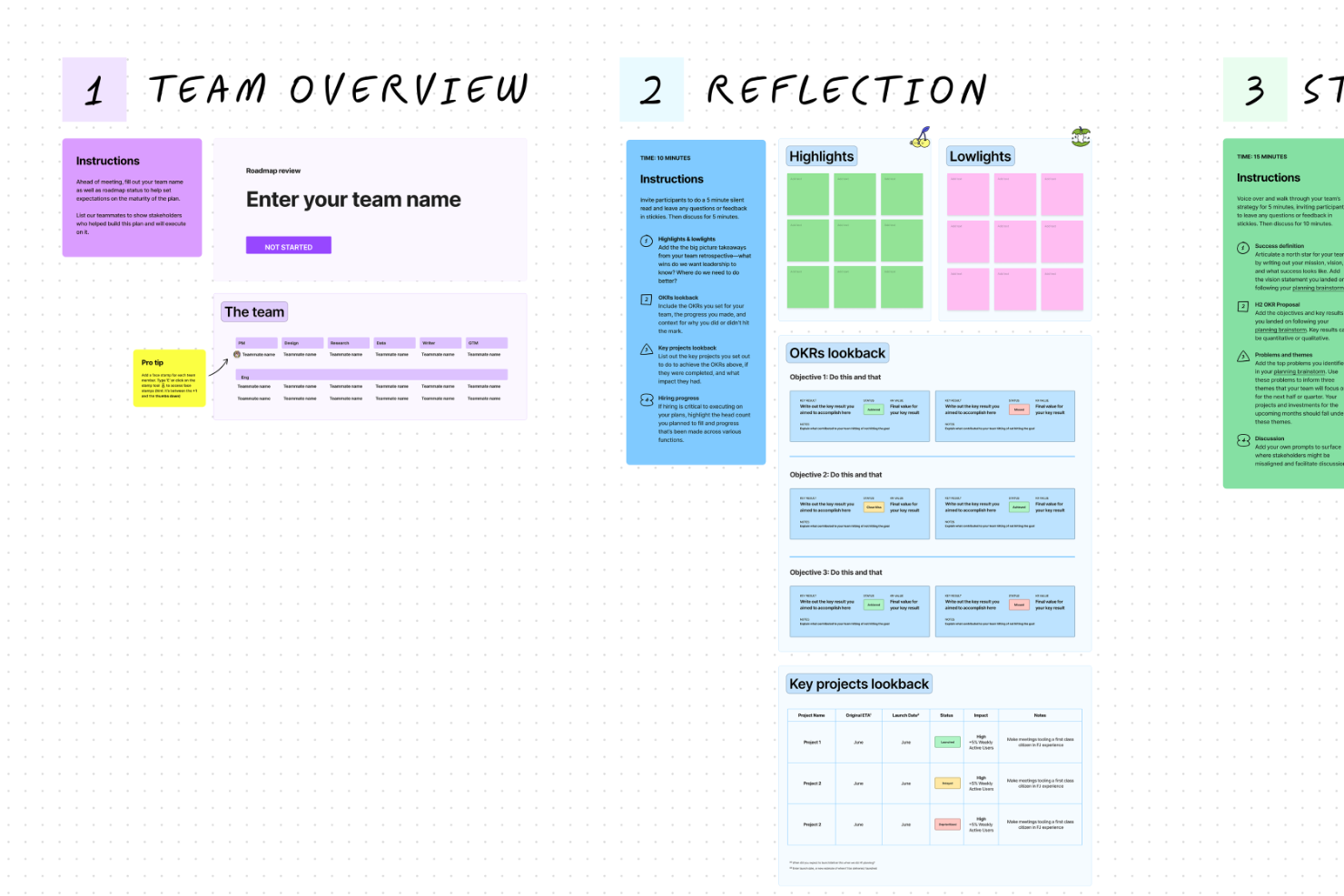
FigJam è uno strumento di lavagna online pensato per designer e team creativi che hanno bisogno di fare brainstorming e collaborare visivamente. Permette di disegnare, pianificare progetti e condividere idee in tempo reale.
Perché FigJam è una buona alternativa a Miro: FigJam è ideale per l'integrazione con strumenti di design, rendendolo una scelta eccellente per i team che utilizzano Figma. I suoi post-it e strumenti di disegno supportano il brainstorming creativo. Puoi passare facilmente da FigJam a Figma, migliorando il flusso di lavoro di progettazione. A differenza di Miro, l'integrazione di FigJam con strumenti di design lo rende perfetto per i team focalizzati sulla collaborazione visiva.
Funzionalità e integrazioni principali:
Funzionalità includono post-it, che rendono interattive le sessioni di brainstorming. Gli strumenti di disegno consentono al team di abbozzare idee in modo rapido ed efficace. C'è anche una chat tramite cursore che permette la comunicazione in tempo reale durante la collaborazione.
Integrazioni includono Slack, Google Drive, Microsoft Teams, Dropbox, Notion, Trello, Asana, Jira, Airtable e Zoom.
Pros and Cons
Pros:
- Integrazione facile con Figma
- Brainstorming in tempo reale
- Strumenti di disegno interattivi
Cons:
- Funzionalità avanzate limitate
- Potrebbe richiedere formazione per i principianti

Nuclino
Ideale per la consolidazione della conoscenza
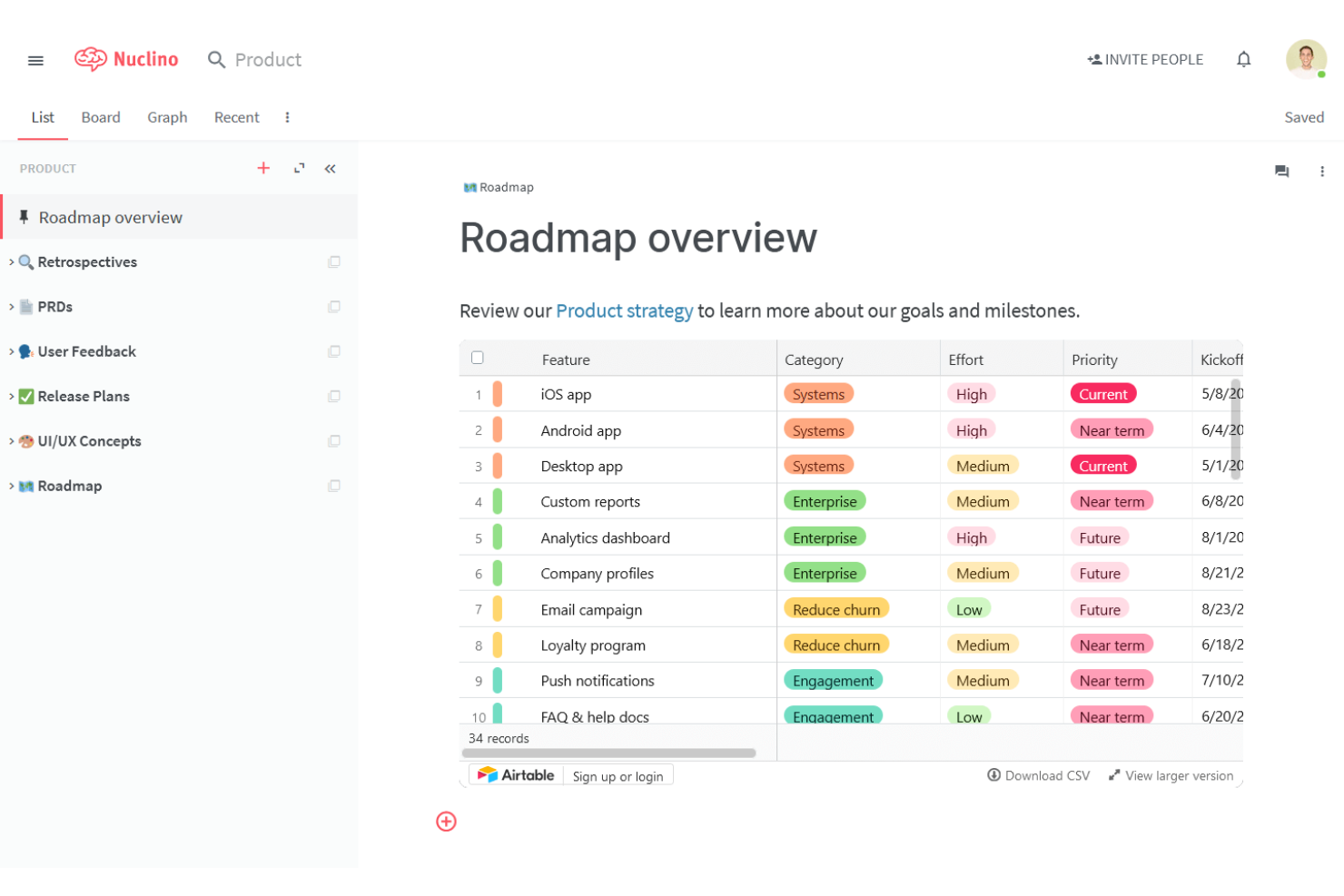
Nuclino è uno strumento di lavoro collaborativo pensato per i team che necessitano di organizzare e condividere informazioni in modo efficiente. È utilizzato principalmente da startup, aziende tecnologiche e istituti educativi per gestire la conoscenza e la collaborazione di squadra.
Perché Nuclino è una valida alternativa a Miro: Nuclino offre un'interfaccia intuitiva per creare e collegare documenti, rendendolo ideale per la consolidazione delle conoscenze. La funzione di collaborazione in tempo reale assicura che il tuo team possa lavorare insieme senza interruzioni. L'organizzazione visiva dei contenuti ti aiuta a strutturare efficacemente la base di conoscenza del team. A differenza di Miro, l'attenzione di Nuclino sulla gestione delle informazioni lo rende perfetto per i team che danno priorità all'accessibilità e alla chiarezza delle informazioni.
Funzionalità e integrazioni principali:
Funzionalità includono un semplice editor drag-and-drop, che consente di creare e organizzare facilmente i contenuti. L'organizzazione visiva dei contenuti aiuta il team a vedere le connessioni tra le diverse informazioni. La modifica collaborativa in tempo reale assicura che tutti siano sempre aggiornati.
Integrazioni includono Slack, Google Drive, Microsoft OneDrive, Dropbox, Trello, Asana, Zapier, GitHub, Jira e Airtable.
Pros and Cons
Pros:
- Gestione della conoscenza facile
- Interfaccia intuitiva
- Collaborazione in tempo reale
Cons:
- Opzioni di personalizzazione limitate
- Non ideale per progetti complessi
Trello
Ideale per organizzare le attività

Trello è uno strumento di gestione visiva delle attività progettato per aiutare i team ad organizzare e dare priorità ai progetti. È ampiamente utilizzato da project manager, team di marketing e piccole imprese grazie ai suoi board intuitivi e al sistema di card.
Perché Trello è una buona alternativa a Miro: Trello offre un modo semplice per gestire le attività con il suo sistema di board e card, rendendo facile per il tuo team monitorare l'avanzamento dei lavori. Puoi personalizzare i board per adattarli al tuo flusso di lavoro, l'ideale per l'organizzazione delle attività. La funzione drag-and-drop semplifica lo spostamento delle attività tra le varie fasi. A differenza di Miro, Trello si concentra sull'organizzazione orientata alle attività, rendendolo adatto ai team che hanno bisogno di una panoramica chiara dello stato dei progetti.
Funzionalità principali & integrazioni:
Funzionalità includono una vista calendario, che aiuta a tenere traccia delle scadenze in modo efficace. La funzione checklist consente al tuo team di suddividere le attività in passaggi più piccoli. Etichette e date di scadenza mantengono i tuoi progetti organizzati e sotto controllo.
Integrazioni includono Slack, Google Drive, Microsoft Teams, Dropbox, GitHub, Evernote, Salesforce, Asana, Jira e Zendesk.
Pros and Cons
Pros:
- Interfaccia intuitiva
- Gestione attività semplice
- Board personalizzabili
Cons:
- Funzionalità avanzate limitate
- Non ideale per progetti di grandi dimensioni

Ideale per la protezione dei dati
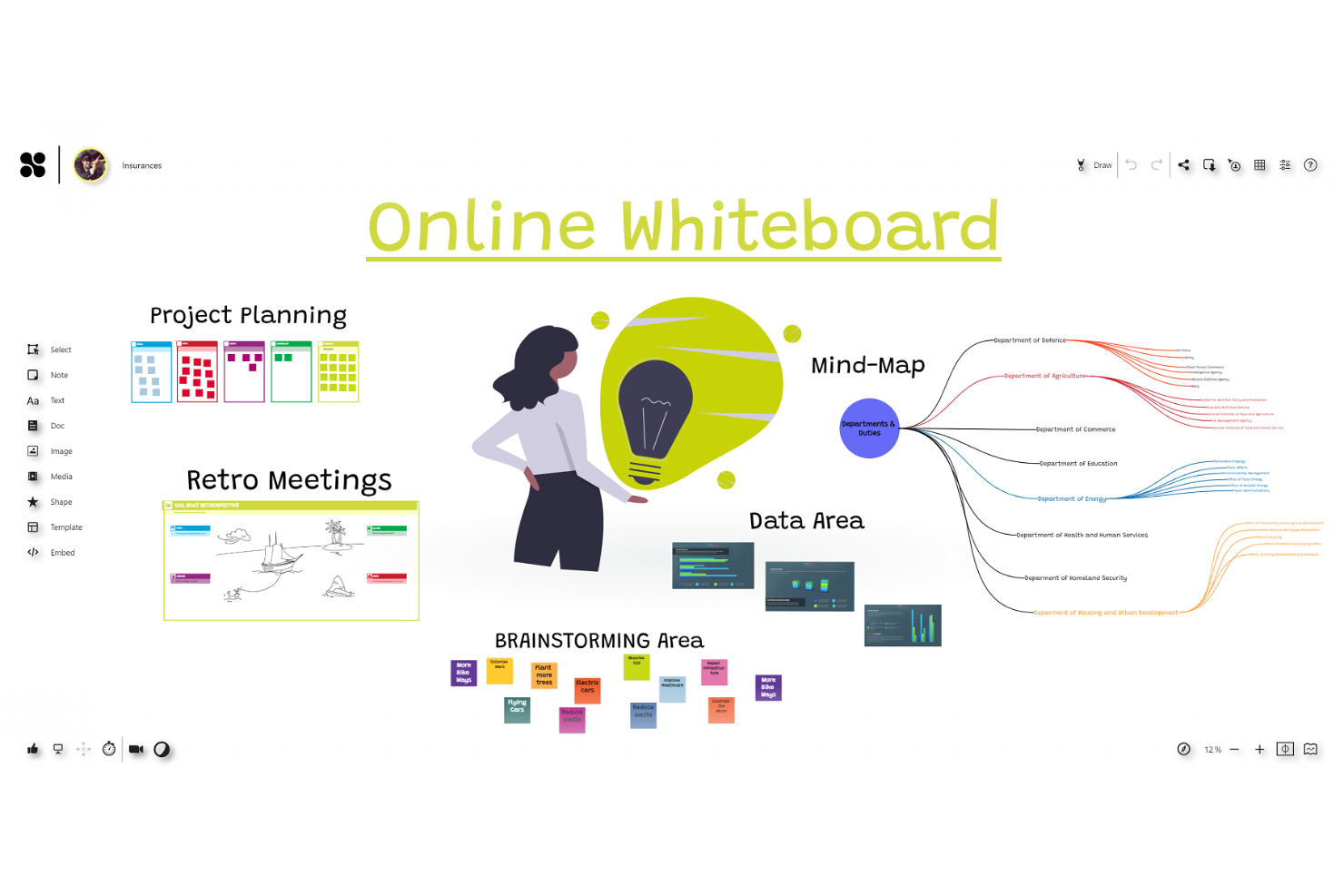
Collaboard è una lavagna online collaborativa progettata per i team che danno valore alla sicurezza e alla privacy nei loro processi creativi. Viene utilizzata da aziende e istituzioni educative per il brainstorming, la pianificazione di progetti e la collaborazione visiva.
Perché Collaboard è una valida alternativa a Miro: Collaboard pone l'accento sulla protezione dei dati, rendendolo adatto a team e settori con requisiti di sicurezza rigorosi. La sua crittografia end-to-end garantisce che i dati del tuo team rimangano privati. La piattaforma permette di ospitare i dati all'interno della propria infrastruttura, aumentando il controllo sulle informazioni sensibili. A differenza di Miro, l'attenzione di Collaboard alla sicurezza lo rende ideale per organizzazioni che danno priorità alla privacy dei dati.
Funzionalità e integrazioni distintive:
Funzionalità includono modelli personalizzabili, che aiutano ad avviare rapidamente i progetti. La funzione di post-it consente un brainstorming semplice e la facile organizzazione delle idee. Puoi anche utilizzare lo strumento di mind mapping visivo per collegare idee e concetti.
Integrazioni includono Microsoft Teams, Google Drive, Dropbox, Slack, Zoom, Trello, OneNote, SharePoint, Microsoft Office e Asana.
Pros and Cons
Pros:
- Opzioni di hosting personalizzate
- Crittografia end-to-end
- Opzioni di distribuzione flessibili
Cons:
- Potrebbe aver bisogno di supporto IT
- Richiede formazione per un utilizzo completo

Milanote
Ideale per processi creativi
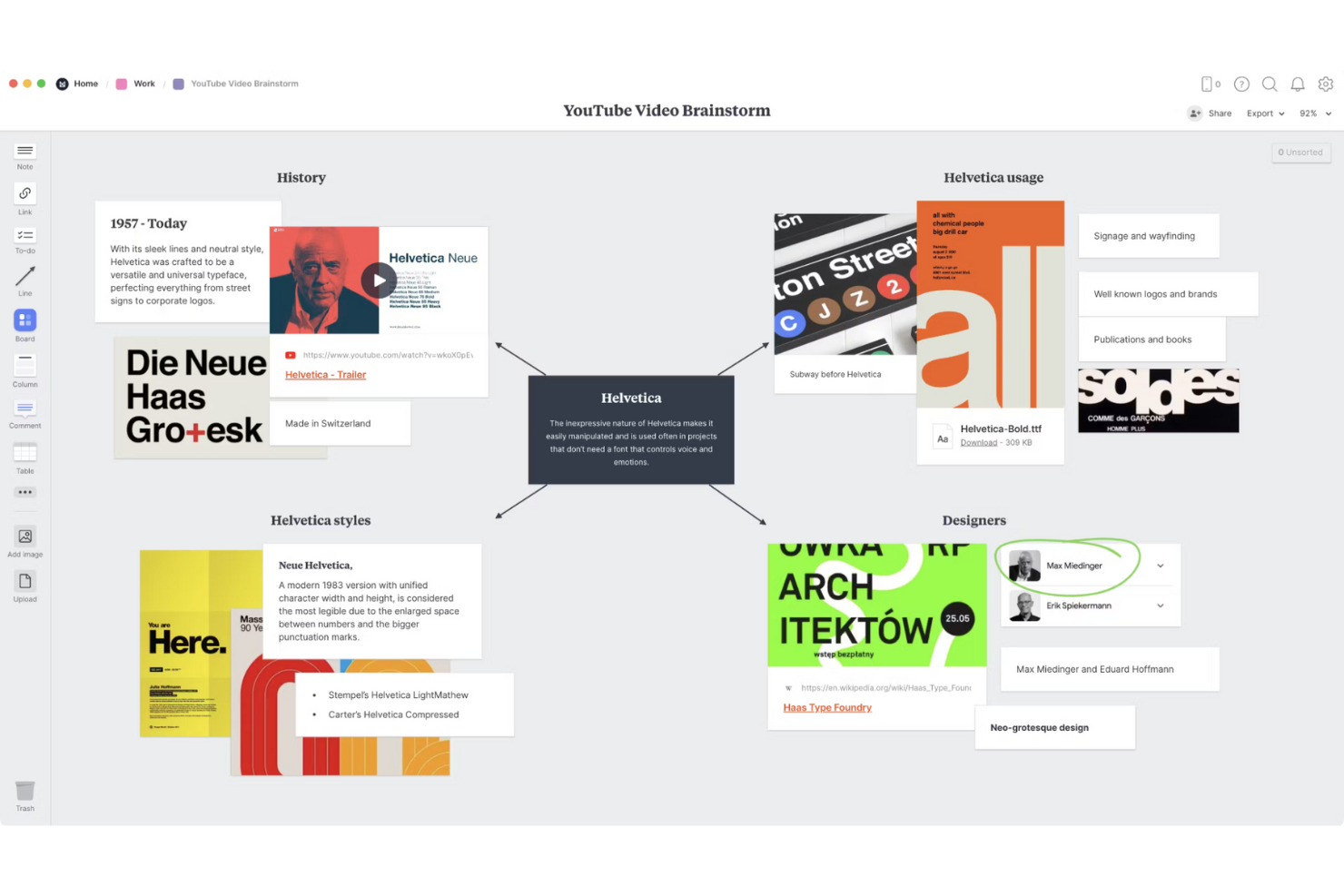
Milanote è uno strumento di collaborazione visiva pensato per professionisti creativi come designer, scrittori e marketer. Ti aiuta a organizzare idee, progetti e flussi di lavoro creativi in modo visivamente accattivante.
Perché Milanote è una valida alternativa a Miro: Milanote offre una tela flessibile che permette di disporre liberamente testo, immagini e link, rendendolo ideale per i processi creativi. La sua interfaccia drag-and-drop consente al tuo team di visualizzare progetti e fare brainstorming in modo efficace. Puoi creare facilmente moodboard e storyboard, elementi essenziali per i progetti creativi. A differenza di Miro, Milanote si concentra sulla creatività visiva, perfetta per i team che necessitano di ideare e presentare concetti in modo visuale.
Caratteristiche e integrazioni principali:
Caratteristiche includono la possibilità di creare moodboard, che consentono al tuo team di raccogliere ispirazioni visive. Lo strumento storyboard aiuta a pianificare narrazioni e presentazioni. Un web clipper permette di salvare contenuti dal web direttamente nelle bacheche Milanote.
Integrazioni includono Slack, Google Drive, Dropbox, Microsoft OneDrive, Adobe Creative Cloud, Evernote, Trello, Asana, Jira e Airtable.
Pros and Cons
Pros:
- Ideale per progetti visivi
- Interfaccia drag-and-drop facile da usare
- Adatto a team creativi
Cons:
- Funzionalità limitate di gestione dei progetti
- Non adatto ad analisi di dati complesse

Creately
Ideale per le opzioni di diagrammazione
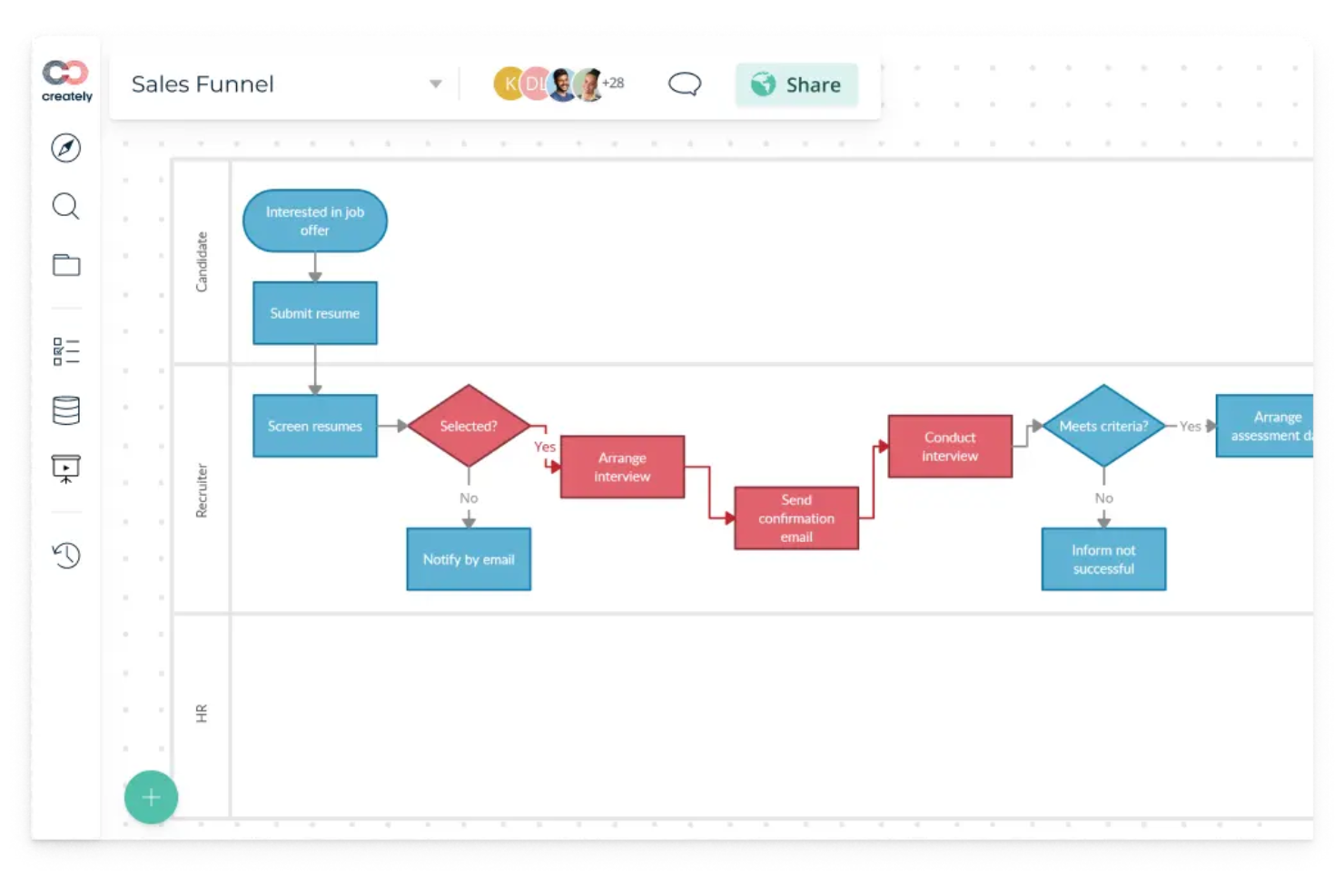
Creately è uno strumento di diagrammazione e collaborazione progettato per i team che necessitano di visualizzare flussi di lavoro e processi. È ampiamente utilizzato da project manager, designer ed educatori per creare diagrammi di flusso, mappe mentali e organigrammi.
Perché Creately è una valida alternativa a Miro: Creately offre numerose opzioni di diagrammazione, rendendolo perfetto per i team focalizzati sulla mappatura visiva dei processi. La sua interfaccia facile da usare permette al tuo team di creare diagrammi dettagliati con il minimo sforzo. La funzione di collaborazione in tempo reale garantisce che tutti possano contribuire ai progetti simultaneamente. A differenza di Miro, Creately si concentra specificamente sulla diagrammazione, con una gamma di strumenti completa per mappare processi complessi.
Funzionalità e integrazioni principali:
Funzionalità includono un'interfaccia intuitiva drag-and-drop che semplifica la creazione dei diagrammi. Puoi accedere a un'ampia libreria di modelli per tutti i tipi di esigenze di diagrammazione. La funzione di commento permette al tuo team di fornire feedback direttamente sui diagrammi.
Le integrazioni includono Google Drive, Slack, Microsoft Teams, Jira, Confluence, Trello, Asana, Dropbox, GitHub e Zoom.
Pros and Cons
Pros:
- Strumenti di diagrammazione avanzati
- Ampia libreria di modelli
- Adatto a processi complessi
Cons:
- Curva di apprendimento per i nuovi utenti
- Potrebbe essere necessaria una formazione per l'utilizzo completo

Ideale per sessioni di brainstorming di team strutturate

Stormboard è uno spazio di lavoro digitale per brainstorming, pianificazione e collaborazione. È pensato per team remoti e ibridi che necessitano di un modo visivo per lavorare insieme in tempo reale.
Perché Stormboard è una valida alternativa a Miro:
Stormboard offre al tuo team modelli flessibili e note adesive digitali che aiutano a guidare discussioni strutturate. Puoi organizzare le tue sessioni utilizzando i framework integrati come SWOT, Agile e Kanban. I suoi strumenti di report trasformano le idee in note operative per le riunioni. Questa impostazione è ideale se hai bisogno di più struttura rispetto a una semplice lavagna bianca.
Funzionalità e integrazioni principali:
Funzionalità includono assegnazione di compiti all'interno delle board, votazione delle idee ed esportazione dei brainstorming in report strutturati. Il tuo team può anche creare modelli privati o condivisi da riutilizzare nei diversi progetti. Avrai inoltre accesso a funzionalità di timeline e monitoraggio dei progetti per pianificare il lavoro dopo le riunioni.
Le integrazioni includono Microsoft Teams, Microsoft 365, Microsoft OneDrive, Google Drive, Google Meet, Slack, Dropbox, Box, Zapier e Trello.
Pros and Cons
Pros:
- Modelli di riunioni integrati
- Funziona bene nelle riunioni ibride
- Esporta le idee in report strutturati
Cons:
- Può risultare rigido per un uso non strutturato
- Non adatto a lavoro fortemente visuale

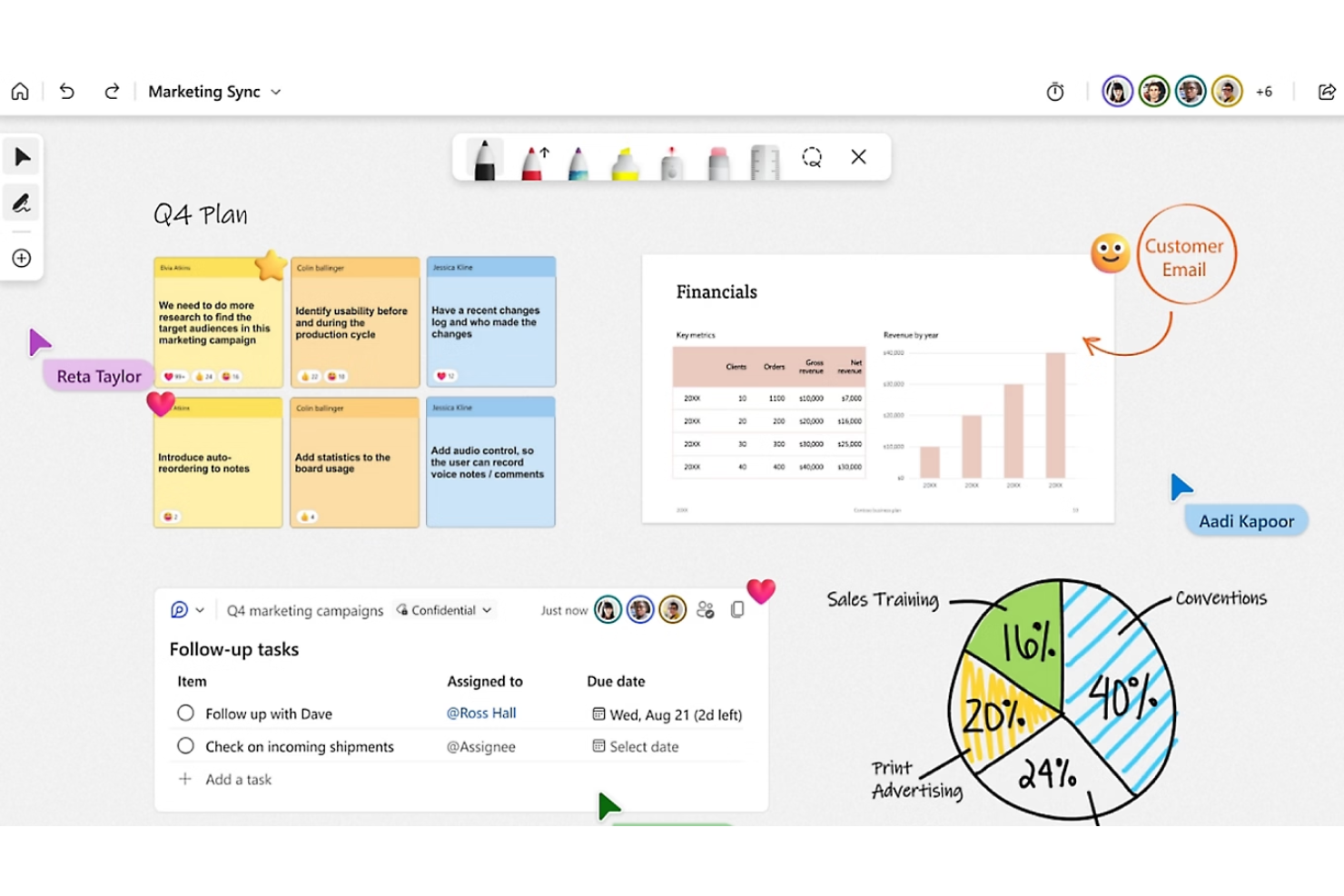
Microsoft Whiteboard è uno strumento di collaborazione digitale progettato per i team che hanno bisogno di uno spazio online condiviso per fare brainstorming e organizzare idee. È ampiamente utilizzato da aziende e istituzioni educative per facilitare riunioni interattive e pianificazione collaborativa.
Perché Microsoft Whiteboard è una valida alternativa a Miro: Microsoft Whiteboard si integra nativamente con altri prodotti Microsoft, rendendolo un'ottima scelta per i team che già utilizzano l'ecosistema Microsoft. La sua lavagna infinita permette di fare brainstorming senza limiti. È possibile aggiungere facilmente note adesive e disegnare sulla lavagna, il che aiuta a visualizzare le idee. A differenza di Miro, l'integrazione di Microsoft Whiteboard con Microsoft 365 aumenta la produttività per chi già utilizza gli strumenti Microsoft.
Funzionalità e integrazioni principali:
Funzionalità includono la possibilità di disegnare liberamente, il che incoraggia la creatività e la generazione spontanea di idee. La funzione delle note adesive consente al team di annotare rapidamente pensieri e appunti. Si può anche salvare e condividere facilmente le lavagne con il team.
Integrazioni includono Microsoft Teams, OneNote, Office 365, SharePoint, Outlook, PowerPoint, Excel, Word, Azure e Dynamics 365.
Pros and Cons
Pros:
- Spazio su lavagna infinito
- Adatto per riunioni interattive
- Opzioni di condivisione semplici
Cons:
- Funzionalità avanzate limitate
- Non adatto a chi non usa Microsoft

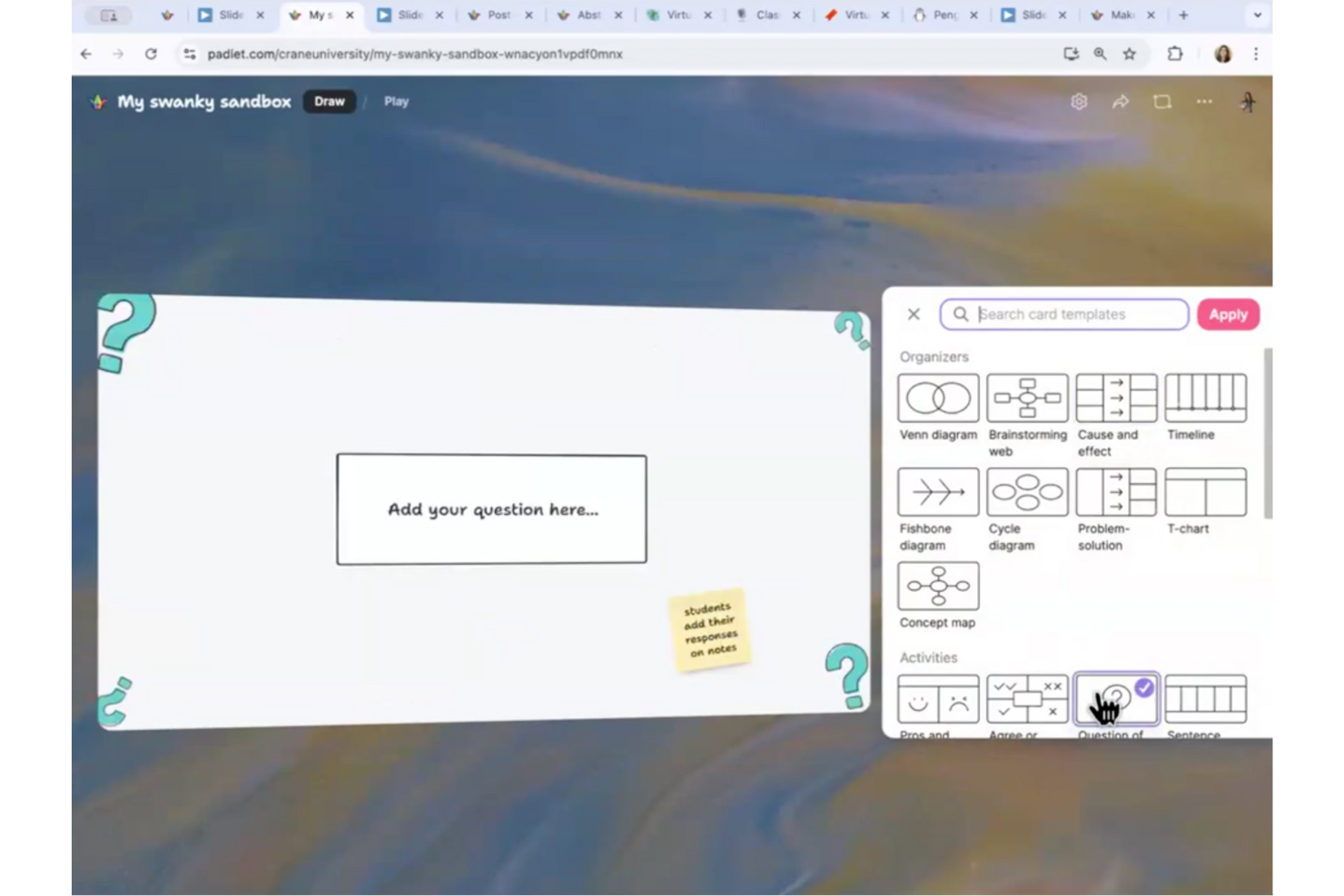
Padlet è uno strumento di collaborazione online che consente agli utenti di creare bacheche digitali per condividere contenuti e idee. È ampiamente utilizzato da insegnanti, studenti e team creativi per la sua semplicità e versatilità nel supportare l'apprendimento interattivo e le sessioni di brainstorming.
Perché Padlet è una valida alternativa a Miro: Padlet offre un'interfaccia intuitiva e facile da usare, rendendolo adatto agli ambienti educativi. Supporta contenuti multimediali, permettendo al tuo team di caricare facilmente immagini, video e documenti. La funzione di collaborazione in tempo reale mantiene tutti coinvolti e permette feedback immediati. A differenza di Miro, il focus di Padlet su semplicità e accessibilità lo rende ideale per aule e contesti educativi.
Funzionalità distintive & integrazioni:
Funzionalità includono sfondi personalizzabili, che permettono di personalizzare l'aspetto delle bacheche. La possibilità di aggiungere contenuti multimediali arricchisce l'esperienza di apprendimento integrando vari tipi di media. Puoi anche utilizzare la funzione di commento per facilitare discussioni e feedback.
Integrazioni comprendono Google Classroom, Microsoft Teams, Slack, Canva, YouTube, Google Drive, Microsoft OneDrive, Trello, Zoom e Dropbox.
Pros and Cons
Pros:
- Integrazione multimediale facilitata
- Adatto alle aule scolastiche
- Interfaccia semplice e intuitiva
Cons:
- Opzioni di analisi basilari
- Non ideale per progetti complessi


Excalidraw è uno strumento di lavagna online che offre uno spazio digitale per schizzi e brainstorming. È apprezzato da creativi e sviluppatori che prediligono il suo aspetto disegnato a mano e il design semplice per una collaborazione visiva immediata.
Perché Excalidraw è una valida alternativa a Miro: Excalidraw propone un look unico disegnato a mano, ideale per i team che preferiscono un tocco più organico nei loro schizzi digitali. La sua semplicità permette al tuo team di concentrarsi sulle idee senza distrazioni. Consente la collaborazione in tempo reale, garantendo che tutti siano coinvolti e contribuiscano. A differenza di Miro, l'enfasi di Excalidraw sullo stile disegnato a mano attrae i gruppi che cercano un tocco più personale nei loro progetti visivi.
Funzionalità e integrazioni principali:
Funzionalità includono un'interfaccia semplice che incoraggia a schizzare e fare brainstorming rapidamente. Puoi utilizzare la tela infinita per espandere le idee senza limiti. Inoltre, la modifica collaborativa permette al team di lavorare insieme in tempo reale.
Le integrazioni includono Slack, Google Drive, Microsoft Teams, Dropbox, Trello, Asana, Jira, GitHub, Zoom e Notion.
Pros and Cons
Pros:
- Estetica disegnata a mano
- Semplice e intuitivo
- Configurazione e utilizzo rapidi
Cons:
- Funzionalità avanzate limitate
- Capacità offline di base
Altre alternative a Miro
Ecco alcune ulteriori alternative a Miro che non sono state incluse nel mio elenco, ma che vale comunque la pena prendere in considerazione:
- Zoom Whiteboard
Ideale per l'integrazione con le riunioni
- Klaxoon
Ideale per riunioni interattive
- Mural
Ideale per workshop a distanza
- Businessmap
Ideale per la pianificazione strategica


Come Valuto le Alternative a Miro
Divido la mia valutazione in criteri di base—come la co-modifica in tempo reale e i template per la gestione dei prodotti—e fattori differenzianti che separano gli strumenti creati per la product discovery dalle lavagne digitali generiche.
Funzionalità Principali (Requisiti Fondamentali per Questa Lista)
Quando seleziono gli strumenti per la mia lista, assegno a ciascuno un punteggio da 0 (non offre la funzionalità) a 5 (eccelle in quest'area) per ognuna delle funzionalità principali elencate qui sotto. Successivamente, calcolo il punteggio totale dello strumento in percentuale. Ogni strumento deve raggiungere un punteggio totale minimo del 65% per poter essere incluso.
- Canvas Visivo Infinito: Verifico se lo spazio di lavoro consente di disporre e zoomare liberamente tra centinaia di post-it, diagrammi e frame senza cali di prestazioni o limiti artificiali.
- Collaborazione Multigiocatore in Tempo Reale: Cursori live, indicatori di presenza e modifica simultanea sono fondamentali quando il team di prodotto distribuito è nel pieno di un workshop e tutti devono contribuire contemporaneamente.
- Template per la Gestione del Prodotto: Cerco framework pronti all'uso come user story map, roadmap di prodotto, board per retrospettive e canvas JTBD in modo che i team possano avviare sessioni strutturate rapidamente.
- Sticky Notes e Diagrammazione: Oltre ai post-it base, valuto se uno strumento supporta flowchart, mappe mentali, wireframe e connettori intelligenti per mappare flussi utente o architetture di sistema.
- Integrazioni con Strumenti di Prodotto: Collegare il lavoro visuale agli strumenti di delivery come Jira, Figma, Confluence o Linear è fondamentale, quindi analizzo se le integrazioni offrono una sincronizzazione reale o solo collegamenti superficiali.
- Funzionalità per la Facilitazione di Workshop: Timer, votazioni, modalità privata e comandi di presentazione fanno la differenza tra un brainstorming caotico e una sessione di product discovery ben organizzata.
Una volta selezionati gli strumenti che soddisfano questi criteri, considero ciò che distingue ciascuna piattaforma.
Fattori Differenzianti (Cosa Rende Unici i Fornitori)
Ecco come confronto i diversi fornitori:
Funzionalità Distintive
Le funzionalità di IA sono un grande fattore differenziante—cerco strumenti capaci di raggruppare i post-it per tema o di riassumere un brainstorming in azioni concrete, risparmiando ore di lavoro dopo il workshop. La sincronizzazione bidirezionale con Jira è un altro elemento che considero molto, perché i team di prodotto che possono trasformare un post-it di una story map in un ticket backlog senza cambiare strumento restano più vicini alla loro fonte di verità. Valuto anche le capacità di handoff del design, come frame Figma incorporati, che mantengono gli artefatti della discovery collegati ai deliverable effettivamente utilizzati dagli ingegneri.
Oltre le Funzionalità
La struttura dei prezzi è molto importante in questo ambito perché i team di prodotto spesso includono stakeholder—executive, ingegneri, designer—che necessitano di accedere alla board ma non sono utenti giornalieri. Valuto se uno strumento fa pagare per editor o per singolo posto e quanto è generoso l’accesso ospite. Le prestazioni su larga scala sono un altro aspetto che considero, dato che una board con centinaia di post-it da uno sprint di discovery lungo una settimana può rallentare gli strumenti meno performanti. Per i clienti enterprise, verifico anche la conformità SOC 2 Tipo II, il supporto SSO e le opzioni di residenza dei dati.
Perché cercare un'alternativa a Miro?
Sebbene Miro sia una buona scelta come software di collaborazione, ci sono diversi motivi per cui alcuni utenti cercano soluzioni alternative. Potresti cercare un'alternativa a Miro perché…
- Hai bisogno di funzionalità di sicurezza più avanzate
- Il tuo team richiede migliori funzionalità offline
- Stai cercando uno strumento dai costi inferiori
- Vuoi più opzioni di personalizzazione
- Il tuo team ha bisogno di integrazioni specifiche per il settore
Se ti riconosci in una di queste situazioni, sei nel posto giusto. Il mio elenco contiene diverse opzioni di software per la collaborazione più adatte ai team che affrontano queste difficoltà con Miro e cercano soluzioni alternative. I team di progettazione potrebbero anche prendere in considerazione le alternative a Framer per le loro esigenze di prototipazione e collaborazione.
Funzionalità principali di Miro
Miro è una piattaforma di collaborazione visiva tutto-in-uno progettata per supportare una varietà di flussi di lavoro dei team. Che tu lavori da remoto o in presenza, queste funzionalità distintive consentono una migliore facilitazione, un'ideazione più rapida e una pianificazione più efficace:
- Collaborazione in tempo reale: riunisci i membri del team distribuiti su una bacheca condivisa per fare brainstorming, pianificare e apportare modifiche senza ritardi.
- Lavagna interattiva: visualizza flussi di lavoro, mappe mentali e diagrammi in uno spazio digitale intuitivo, ideale per sostituire strumenti tradizionali come Jamboard.
- Libreria di modelli: accedi a strutture predefinite per accelerare attività comuni come la mappatura del percorso dell'utente, la pianificazione degli sprint e le retrospettive.
- Area di lavoro personalizzabile: adatta le bacheche alle esigenze specifiche del tuo team, aggiungendo widget, tag e codici colore per maggiore chiarezza e allineamento.
- Integrazioni di terze parti: connettiti agli strumenti di uso quotidiano come Jira, Asana, Slack e Google Workspace per ridurre i cambi di contesto e migliorare l'automazione.
- Modalità presentazione: condividi gli aggiornamenti con gli stakeholder trasformando le bacheche in presentazioni strutturate, senza bisogno di software aggiuntivi per le presentazioni.
- Controlli di accesso degli utenti: imposta le autorizzazioni in base al ruolo per garantire una collaborazione sicura e organizzata tra i reparti.
- Analisi e reportistica: utilizza gli approfondimenti sui dati integrati per monitorare il coinvolgimento e l'avanzamento dei progetti direttamente nella tua area di lavoro.
- Accesso da dispositivi mobili: modifica e commenta le bacheche ovunque ti trovi utilizzando l'app mobile di Miro, ideale per i team distribuiti o ibridi.
- Gestione dei file: carica e organizza le risorse all'interno della bacheca, eliminando la necessità di passare da una piattaforma all'altra.
Qual è il prossimo passo?
Non dimenticare di iscriverti alla nostra newsletter per ricevere ulteriori risorse e guide sulla gestione dei prodotti, oltre agli ultimi podcast, alle interviste e ad altri approfondimenti dei leader e degli esperti del settore.